
At the end of Chapter 1, the @ stood in a room that we drew by hand, with a pair of loops. That was fine for testing the drawing, but it isn't a roguelike yet. A roguelike builds a new dungeon every time you play, so you never quite know what's around the next corner.
This chapter builds those dungeons. First, the game gets a map: a grid that remembers what every cell is made of. Then it gets a generator, which cuts the map in two, cuts each half in two again, and so on. It puts a room in every piece that's left.
Corridors join the rooms as the pieces are put back together, in a way that's certain to connect them all. Last comes the seed, a single number that the whole dungeon grows from, so that any dungeon can be built again, cell for cell.
The next image shows one of this chapter's dungeons: ten rooms and the corridors between them, all grown from the seed 7. At the end of the chapter, you'll type that seed in and get this exact dungeon on your own screen.

Every wall in the picture is one that borders a floor. The rest of the map is solid rock, which the game doesn't draw at all. So the dungeon looks as if it was carved out of the dark.
Chapter 02 in the book's repository holds this chapter's finished project. The chapter carries on in your own project from Chapter 1. If you'd rather start from the book's copy, open the Chapter 01 folder's project instead, and carry on from there.In this chapter, we will:
- Give the game a map: one vector of cells, kept row by row
- Draw only the walls that border a floor, so the rock stays dark
- Cut the map into pieces with binary space partitioning, using a function that calls itself
- Put a room in every piece, with rock around it, so no two rooms touch
- Join the rooms with corridors, in a way that's certain to connect them all
- Grow each dungeon from a seed, make a new one on the Space bar, and replay any seed from the command line
As in Chapter 1, there are six checkpoints along the way, so you can build and check each piece as soon as it's added. Let's start digging.
Planning the Chapter
Chapter 1 left the game with four files of code. This chapter adds four more, changes two of the old ones, and leaves the glyph cache alone:
| File | Status | What it's for |
|---|---|---|
src/Map.h, src/Map.cpp |
New | The map: what every cell is made of, and which walls are worth drawing |
src/RoomGen.h, src/RoomGen.cpp |
New | The dungeon's architect: rooms, cut out by binary space partitioning, and corridors |
src/Common.h |
Changed | Point, a cell's place on the map |
src/main.cpp |
Changed | Draws the map, makes a new dungeon on Space, and reads a seed from the command line |
src/GlyphCache.h, src/GlyphCache.cpp |
Unchanged | |
assets/RobotoMono-Light.ttf |
Unchanged |
The next image shows how the files fit together at the end of the chapter, with the new ones filled in blue, and the changed ones outlined in blue.
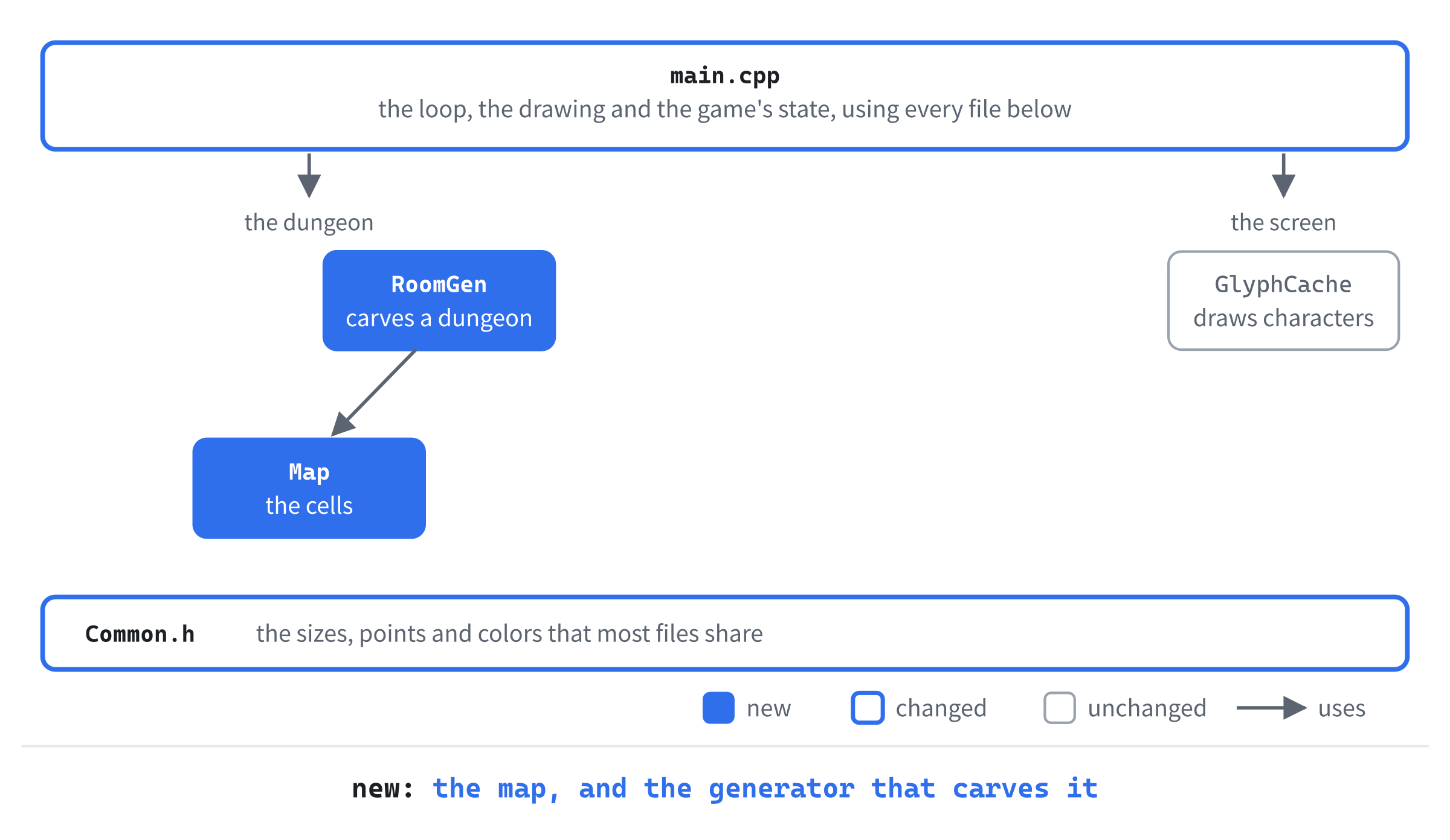
The map and the generator are separate on purpose. The map knows what the dungeon is made of, but not how it was made. The generator knows how to make a dungeon, but keeps nothing once it's made one. Keeping the two apart pays off in Chapter 18. There, a second generator carves caves into the same kind of map, and the game can use either one.
We'll build the chapter in four steps. First comes the map, which draws Chapter 1's test room again, from a grid this time. Then the rooms, which appear all over the map, but with no way between them. After that come the corridors, which join them up. And last, the seed, which lets you build any dungeon again.
A Map of the Dungeon
A roguelike's map is a grid of cells. Every cell is made of something: rock, or floor, and later doors, stairs, and water. The map's job is to remember what each cell is made of, and to answer questions about it, such as "what's at this cell?" and "is there floor next to this wall?"
A Place on the Map
Many parts of the game will talk about cells, so a cell's place on the map gets a small struct of its own. Open Common.h, and add Point below MARGIN:
// A cell's place on the map: x across, y down
struct Point
{
    int x = 0;
    int y = 0;
};
A Point is a pair of numbers: x, the column, counting across from the left, and y, the row, counting down from the top. Both start at 0, thanks to the = 0 after each, so a Point is never left holding garbage. A cell's top-left corner on the screen is its column and row, each times CELL_PX, as in Chapter 1's drawCell.
Terrain
In Solution Explorer, right-click src, choose Add > New Item, and add a Header File (.h) called Map.h. Below the #pragma once that Visual Studio types for you, add the includes and the kinds of terrain, so that the file begins like this:
#pragma once
#include <SDL3/SDL.h>
#include <vector>   // std::vector, for the cells
#include "Common.h"

// What a cell of the map is made of
enum class Terrain
{
    Wall,
    Floor,
};
Below the includes, Terrain lists what a cell can be made of. For now, there are only two kinds: Wall, which is solid rock, and Floor, which you can walk on. Later chapters add more, such as doors in Chapter 19.
The Terrain type is an enum class, so its names are written Terrain::Floor and Terrain::Wall. They can't clash with any other Floor in the game. A Terrain can't be mixed up with a number by accident, either: comparing one with an int is an error the compiler catches.
Map.h
Now for the class itself. Add it below Terrain:
// One floor of the dungeon: a grid of MAP_W by MAP_H cells, kept row by row
// in a single vector
class Map
{
public:
    Map();

    bool inBounds(int x, int y) const;
    Terrain at(int x, int y) const;
    void set(int x, int y, Terrain terrain);
    void fill(Terrain terrain);
    void carve(const SDL_Rect& area);

    // True for a wall with floor beside it, diagonals included. Those are
    // the only walls worth drawing. The rest is solid rock nobody can see
    bool bordersFloor(int x, int y) const;

private:
    std::vector<Terrain> cells_;
};
In the preceding code, the constructor will make a map of solid rock. Then inBounds says whether a cell is on the map at all. The function at says what a cell is made of, and set changes it.
The function fill makes every cell the same, and carve turns a rectangle of cells into floor. Last, bordersFloor says whether a cell has floor next to it. We'll come back to why that matters when we write it.
The map keeps its cells in cells_, a single std::vector<Terrain>. You might have expected a grid to be a vector of rows, each a vector of cells. That works, but one long vector is simpler. It's one block of memory, made in one go. Filling it or copying it is one operation.
The cells go into the vector a row at a time: the 64 cells of row 0, then the 64 of row 1, and so on, down to row 35. So the cell at column x of row y is at index y * MAP_W + x. The y * MAP_W skips the whole rows above it, and the x counts along its own row. The next image shows the idea, on a small map four cells across.
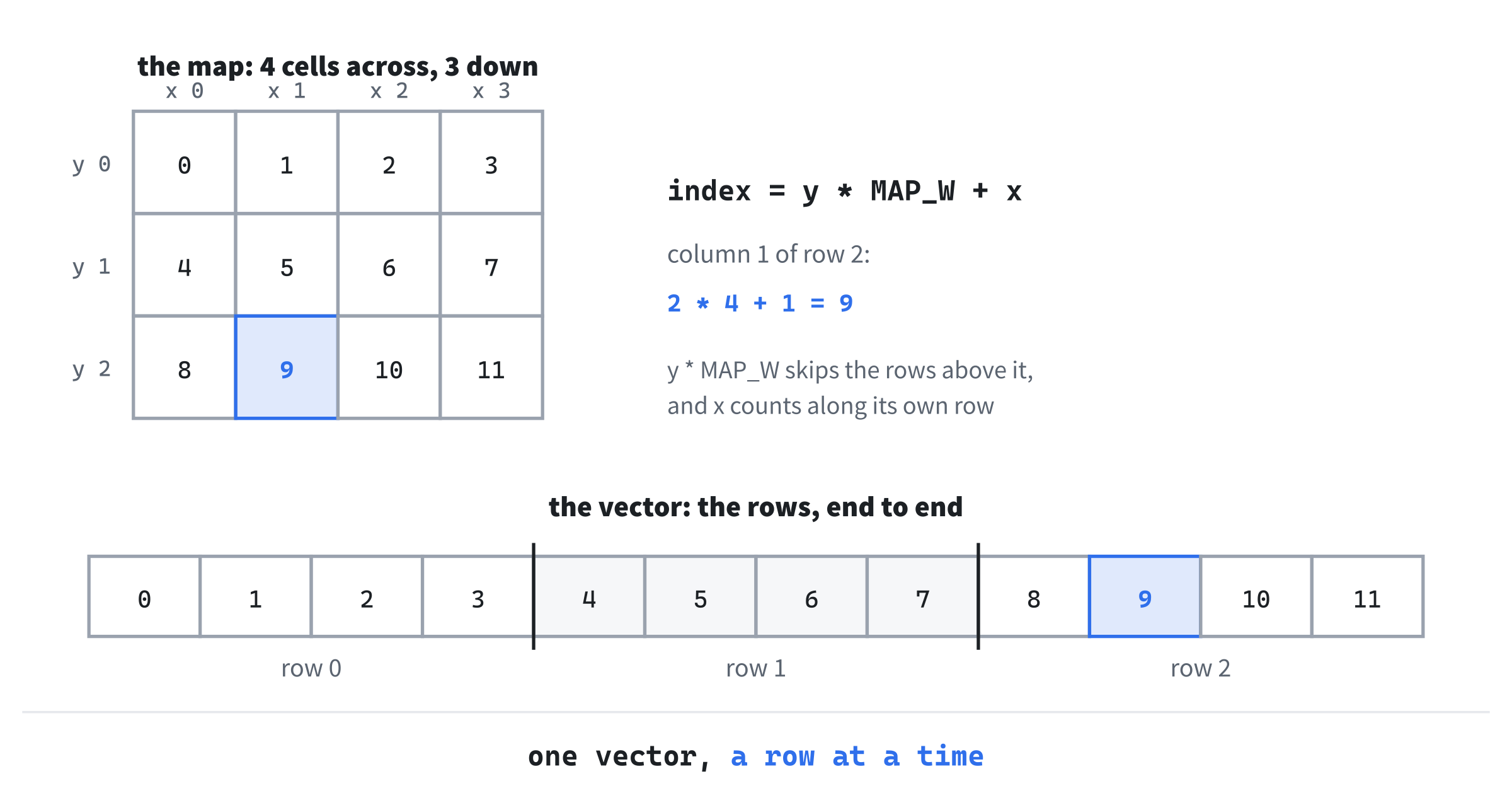
The formula works for any size of map. Our map is 64 cells across, so the cell at column 5 of row 2 is at index 2 times 64, plus 5, which is 133.
Map.cpp
Add a C++ File (.cpp) called Map.cpp to src, the same way, and type its include, the constructor, and inBounds:
#include "Map.h"

Map::Map()
    : cells_(MAP_W * MAP_H, Terrain::Wall)
{
}

bool Map::inBounds(int x, int y) const
{
    return x >= 0 && x < MAP_W && y >= 0 && y < MAP_H;
}
The constructor's initializer list makes cells_ with MAP_W * MAP_H cells, which is 2,304. Every one of them is Terrain::Wall. A new map is solid rock, and the generator carves the dungeon out of it.
The function inBounds is true when both x and y are on the map. Columns run from 0 to 63, so x < MAP_W lets in 63, but not 64. The same goes for the rows.
Next come the two functions that use the index formula. Add them below inBounds:
// Outside the map counts as wall, so code that looks at a cell's neighbors
// never has to check the edges first
Terrain Map::at(int x, int y) const
{
    if (!inBounds(x, y))
    {
        return Terrain::Wall;
    }
    return cells_[y * MAP_W + x];
}

void Map::set(int x, int y, Terrain terrain)
{
    if (inBounds(x, y))
    {
        cells_[y * MAP_W + x] = terrain;
    }
}
First, at answers Terrain::Wall for any cell off the map, rather than reading past the end of the vector. That's a small decision that saves a lot of trouble. Code that looks at a cell's neighbors, as bordersFloor will, can look one cell past the edge without checking first. It simply finds rock there.
The function set changes a cell, but only if it's on the map. A change to a cell off the map does nothing at all. Both functions find the cell with y * MAP_W + x, the formula from Figure 2.3.
Now add fill and carve below set:
void Map::fill(Terrain terrain)
{
    cells_.assign(cells_.size(), terrain);
}

// Turns every cell inside area into floor
void Map::carve(const SDL_Rect& area)
{
    for (int y = area.y; y < area.y + area.h; ++y)
    {
        for (int x = area.x; x < area.x + area.w; ++x)
        {
            set(x, y, Terrain::Floor);
        }
    }
}
The new fill sets every cell to the same terrain. It uses the vector's assign function, which replaces everything in the vector with a number of copies of one value. Here, the number is the vector's own size, so the map keeps its 2,304 cells. The generator will call it to turn the map back into solid rock before it builds a new dungeon.
The function carve turns every cell inside a rectangle into floor. Its rectangle is an SDL_Rect, which holds x, y, w, and h. So carve covers the columns from x up to, but not including, x + w, and the rows from y up to y + h. A room 10 cells wide that starts at column 11 covers columns 11 to 20. Since it calls set, carve never writes outside the map, even if it's given a rectangle that hangs over the edge.
The Walls Worth Drawing
A map of solid rock has a wall in every cell that isn't floor. If the game drew all of them, the screen would be a field of # signs, with the rooms as holes in it. Traditional roguelikes draw only the walls that you could see from inside the dungeon: the ones next to a floor. Everything else is solid rock, and stays dark.
So the map needs to answer one more question. Add bordersFloor below carve:
bool Map::bordersFloor(int x, int y) const
{
    for (int dy = -1; dy <= 1; ++dy)
    {
        for (int dx = -1; dx <= 1; ++dx)
        {
            if (at(x + dx, y + dy) == Terrain::Floor)
            {
                return true;
            }
        }
    }
    return false;
}
The two loops step dy and dx from -1 to 1, which visits the cell and its eight neighbors, diagonals included. As soon as one of them is floor, the function returns true. If none is, it returns false. The diagonals matter. The wall at each corner of a room touches the floor only at its own corner, so without the diagonals, every room would have a gap in its walls at each corner.
The loops look at the cell itself, too, when dx and dy are both 0. That does no harm, because the game only asks about cells that are walls. Thanks to at, a cell on the edge of the map can safely check neighbors that are off it.
The next image shows what the rule does. On the left, every wall is drawn, and the room is a hole in a field of # signs. On the right, only the walls next to the floor are drawn, and the room stands out against the dark.
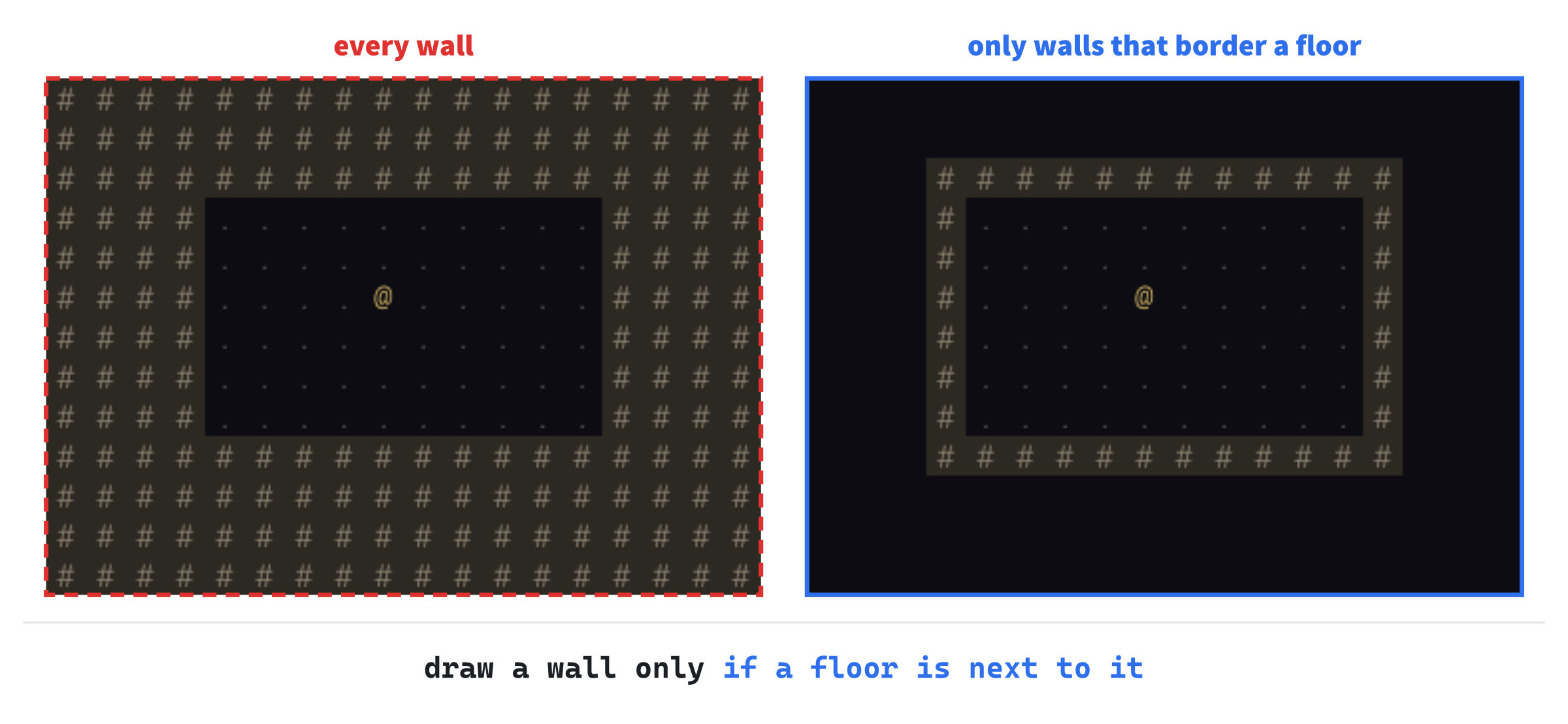
The rule costs nine lookups for each wall cell, every time the map is drawn. That's about 20,000 lookups, which takes far less than a millisecond. And it only happens when something has changed.
Checkpoint: Click in Map.cpp, and press Ctrl+F7 to compile it. It compiles on its own, since it needs nothing but its header, Common.h, and SDL.
Drawing the Map
Now main.cpp can draw a map instead of Chapter 1's test room. Open it, and add the map's header below #include "GlyphCache.h":
#include "Map.h"With Map.h included, main.cpp can make a Map and draw it.
The test room's function is replaced by one that draws whatever the map holds. Replace the whole of drawTestRoom with this:
// The map: floor everywhere it's been carved, and walls only where
// they border it
void drawMap(SDL_Renderer* renderer, const GlyphCache& glyphs,
             const Map& map)
{
    for (int y = 0; y < MAP_H; ++y)
    {
        for (int x = 0; x < MAP_W; ++x)
        {
            if (map.at(x, y) == Terrain::Floor)
            {
                drawCell(renderer, glyphs, x, y, '.', Palette::FLOOR);
            }
            else if (map.bordersFloor(x, y))
            {
                drawCell(renderer, glyphs, x, y, '#', Palette::WALL,
                         Palette::WALL_BACK);
            }
        }
    }
}
In the preceding code, drawMap takes the map by const reference, since drawing it changes nothing. It visits every cell, a row at a time. A floor cell gets a dim dot. A wall that borders a floor gets a # on the wall's dark background, as Chapter 1's walls did. Any other cell is solid rock, and gets nothing at all, so the background shows through.
The @ used to be part of the test room, so it needs drawing on its own now, and drawFrame needs the map. Replace the whole of drawFrame with this:
void drawFrame(SDL_Renderer* renderer, const GlyphCache& glyphs,
               const Map& map, Point start)
{
    setColor(renderer, Palette::BACKGROUND);
    SDL_RenderClear(renderer);
    drawMap(renderer, glyphs, map);
    drawCell(renderer, glyphs, start.x, start.y, '@', Palette::PLAYER);
    drawPanels(renderer, glyphs);
    SDL_RenderPresent(renderer);
}
This version of drawFrame takes the map, and start, the cell where the @ stands. It draws the map, then the @ on top of it, then the panels. The @ is drawn after the map, so its cell's fill wipes out the floor's dot before the @ goes on.
Now runGame makes the map, and carves Chapter 1's room into it. Add these lines at the top of runGame, above bool running = true;, with a blank line in between:
// A room carved by hand into solid rock, and the player's place in it
Map map;
map.carve({ 11, 7, 10, 6 });
Point start = { 15, 9 };
The map starts as solid rock, and map.carve turns a rectangle into floor. The braces, { 11, 7, 10, 6 }, make an SDL_Rect on the spot: column 11, row 7, 10 cells wide and 6 tall. That's exactly the floor of Chapter 1's room, and the wall rule puts walls in exactly the places where Chapter 1 drew them by hand. The @ starts at column 15, row 9, as before.
Last, the loop passes the map and the start to drawFrame. Near the end of runGame, change drawFrame(renderer, glyphs); to drawFrame(renderer, glyphs, map, start);, so every frame draws the map, and the @ where start says.
Checkpoint: Press F5. The window shows Chapter 1's test room, exactly as before, with its walls on dark stone and the @ in the middle. It looks the same, but it's drawn in a new way: the room is carved into a map, and the walls are there because they border its floor. If you'd like proof, change the 10 in map.carve to 20, and the room stretches to the right, walls and all. Then put it back.
Cutting the Map in Pieces
There are many ways to build a dungeon. This one is a classic, called binary space partitioning, or BSP for short. It's "binary" because it cuts things in two, and "space partitioning" because what it cuts up is space: the map.
Binary Space Partitioning
The idea is simple. Take the whole map, and cut it in two with a straight line, at a random place. Then take each half, and cut it in two in the same way. Keep going until the pieces are too small to cut, or have been cut four times. Then put a room in every piece that's left.
Design note: Rogue's tic-tac-toe board. Rogue built every level on the same plan: the screen was split into a three-by-three grid, like a tic-tac-toe board. Each square held a room, though a few could be left without one. That's quick to make, and the rooms can never overlap, but every level has the same shape. Binary space partitioning keeps the guarantee, and lets the cuts fall anywhere. So the rooms come in every size, and no two dungeons share a layout.
Each cut splits the longer side of its piece, so the pieces stay roughly square, rather than turning into long, thin strips. The code calls the two ways of cutting "across" and "down." Cutting across measures off part of a piece's width: the cut runs from top to bottom, and leaves a left half and a right half. Cutting down measures off part of its height, and leaves a top half and a bottom half.
The next image shows the cuts for seed 7's dungeon, from Figure 2.1. The first cut splits the map into a narrow piece on the left and a wide one on the right. Each later cut splits a piece again, until every piece holds one room.

BSP has three properties that make it a good fit for a first dungeon. The pieces never overlap, so neither do the rooms, and no time is wasted checking. Every part of the map gets a piece, so the rooms are spread out, rather than clumped in one corner. And, as we'll see, the cuts tell us exactly which rooms to join with corridors.
Dice You Can Replay
A dungeon builder needs dice: a cut at a random place, a room of a random size. C++ gets its random numbers in two parts, an engine and a distribution.
An engine makes a long stream of numbers that look random. Ours is std::mt19937, an engine called the Mersenne Twister. It's quick, and good enough for any game.
The numbers only look random, though. The engine works them out, one after another, from a starting number called the seed. Start two engines from the same seed, and they make exactly the same stream. That's what makes a dungeon replayable: build it with the same seed, and every roll comes out the same.
The seed itself needs to be truly random, or every game would get the same dungeon. That's the job of std::random_device, which asks the computer for a number it can't predict, such as one stirred up from timings in the hardware. It's too slow to roll every die with, but fine for one seed.
A distribution turns the engine's raw numbers into the numbers you want. Ours is std::uniform_int_distribution, which gives a whole number in a range. Every number in it is equally likely, like a die with as many sides as you need.
RoomGen.h
The generator keeps nothing between one dungeon and the next. It takes a map and some dice, carves a dungeon, and it's done. So it doesn't need to be a class with members. It's a set of functions, in a namespace called RoomGen, which keeps their names out of the way of everything else's.
Add a Header File (.h) called RoomGen.h to src, and type the whole file, so that it reads like this:
#pragma once
#include <SDL3/SDL.h>
#include <random>   // std::mt19937, for the dungeon's dice
#include <vector>   // std::vector, for the rooms
#include "Common.h"
#include "Map.h"

// Builds a floor of rooms by binary space partitioning: the map is cut in
// two, each half is cut in two again, and so on, and every piece that isn't
// cut any further gets a room
namespace RoomGen
{
    std::vector<SDL_Rect> generate(Map& map, std::mt19937& rng);
    Point centerOf(const SDL_Rect& room);
}
Of the two functions, generate builds a dungeon into map, rolling its dice with rng. It returns the rooms it made, as SDL_Rects, so the game can choose where the player starts. The function centerOf gives the cell in the middle of a room. The engine is passed by reference, std::mt19937&, since rolling a die changes the engine: it moves on to its next number.
Rooms Inside Pieces
Now add a C++ File (.cpp) called RoomGen.cpp, and type its include and an unnamed namespace for its helpers. The namespace is empty for now, apart from the constants that shape the dungeon:
#include "RoomGen.h"

namespace
{
    // How many times the map can be halved, so at most 2 to the power of
    // MAX_CUTS rooms
    constexpr int MAX_CUTS = 4;

    // A piece is only cut if both halves would be at least this big
    constexpr int MIN_PIECE_W = 12;
    constexpr int MIN_PIECE_H = 9;

    // The smallest room, and the solid rock kept around each room, inside
    // its piece, so rooms in neighboring pieces never touch
    constexpr int MIN_ROOM = 4;
    constexpr int PADDING = 1;
}
The first constant, MAX_CUTS, limits how deep the cutting goes. The map is cut in two, each half is cut again, and so on, at most four times over. Four rounds of cuts make at most 2 times 2 times 2 times 2 pieces, which is 16 rooms. A piece is only cut if both halves would be at least MIN_PIECE_W cells wide, when it's cut across, or MIN_PIECE_H cells tall, when it's cut down. So a piece narrower than 24 cells can't be cut across, and one shorter than 18 can't be cut down.
Every room is at least MIN_ROOM cells wide and tall, and keeps PADDING cells of rock between itself and the edges of its piece. So a room never touches its piece's edge, and two rooms in neighboring pieces can never touch each other.
The dice are next. Add roll inside the namespace, below PADDING:
int roll(std::mt19937& rng, int low, int high)
{
    return std::uniform_int_distribution<int>(low, high)(rng);
}
The helper roll gives a number from low to high, both included. It makes a std::uniform_int_distribution for that range, and calls it with the engine, which rolls the die. Making a distribution is cheap, so making a new one for every roll is fine. That keeps every call to roll a single line.
Now for the rooms. Add addRoom below roll:
// Makes a room of random size, at a random place inside area, and
// carves it out of the rock
SDL_Rect addRoom(Map& map, const SDL_Rect& area, std::mt19937& rng)
{
    int maxW = area.w - 2 * PADDING;
    int maxH = area.h - 2 * PADDING;
    SDL_Rect room;
    room.w = roll(rng, MIN_ROOM, maxW);
    room.h = roll(rng, MIN_ROOM, maxH);
    room.x = area.x + PADDING + roll(rng, 0, maxW - room.w);
    room.y = area.y + PADDING + roll(rng, 0, maxH - room.h);
    map.carve(room);
    return room;
}
Inside addRoom, maxW and maxH are the biggest room that fits in the piece, once the padding is taken off both sides. The room's width is a roll from MIN_ROOM to maxW, and its height likewise. Then its left edge is rolled, somewhere between the piece's left edge plus the padding, and the farthest right that the room can go and still fit. Its top edge is rolled the same way. Last, the room is carved into the map, and returned.
The next image shows a room inside its piece. The dashed line is the piece's padding, and the room can be any size and at any place inside it.
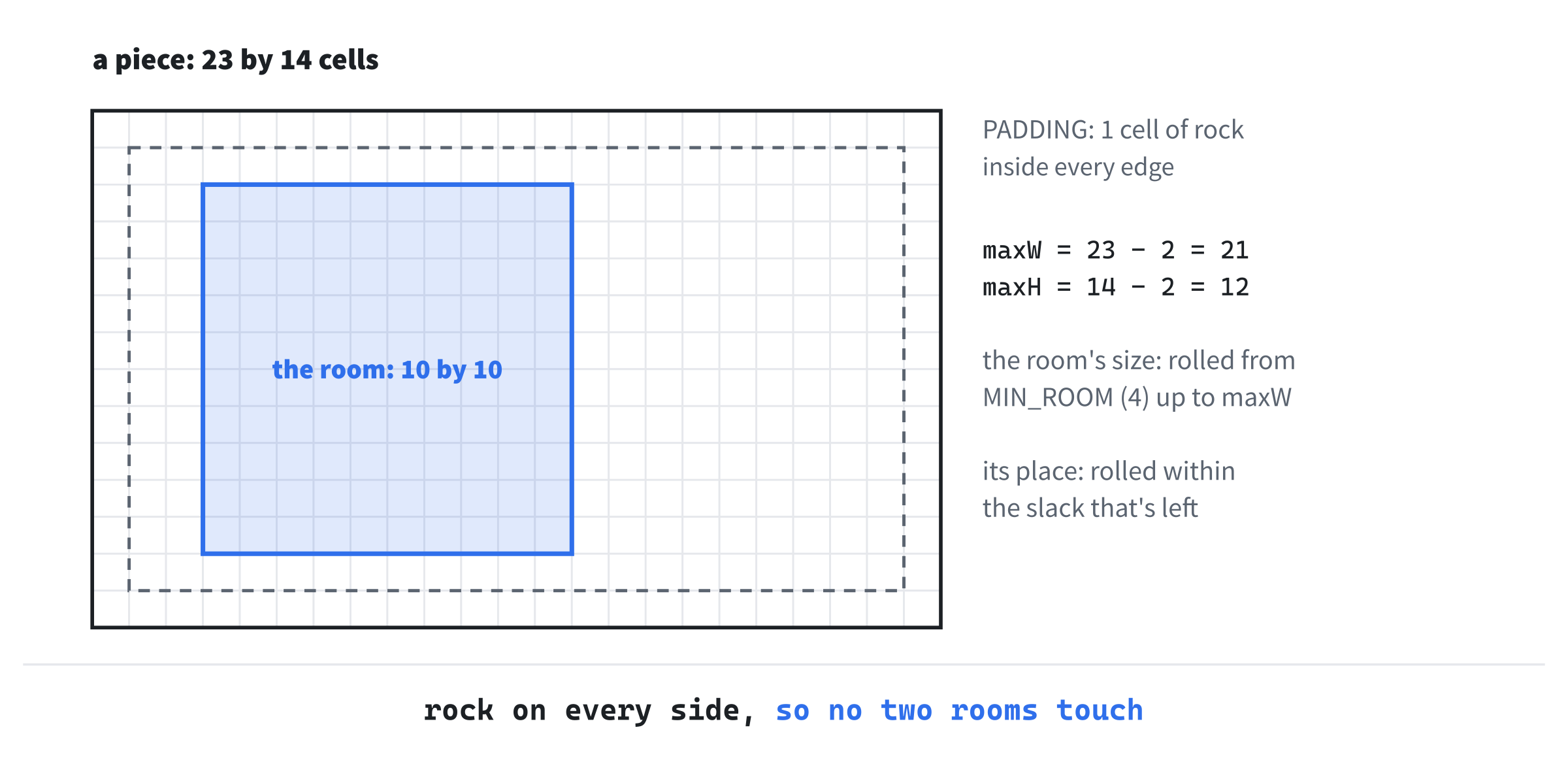
Since every room stays inside its own padding, the rock between two neighboring rooms is always at least two cells thick: one cell of padding from each piece. Those two cells are where each room's walls go.
A Function That Calls Itself
Now for the cutting. The function that does it, split, calls itself, once for each half. A function that calls itself is called recursive. It's the natural way to write anything that's made of smaller copies of itself, as a piece is made of two smaller pieces.
Every recursive function needs a case that doesn't call itself, or it would call itself forever. That's called the base case, and here, it's a piece that won't be cut any more. Add the first part of split below addRoom:
// Cuts area in two, and each half again, until it runs out of cuts or
// room, and gives every piece that's left a room
void split(Map& map, const SDL_Rect& area, int cutsLeft,
           std::mt19937& rng, std::vector<SDL_Rect>& rooms)
{
    bool canCutAcross = area.w >= 2 * MIN_PIECE_W;
    bool canCutDown = area.h >= 2 * MIN_PIECE_H;
    if (cutsLeft == 0 || (!canCutAcross && !canCutDown))
    {
        rooms.push_back(addRoom(map, area, rng));
        return;
    }
Each call to split takes the map, the piece to cut, the number of cuts it has left, the dice, and the list of rooms so far, which it adds to. The two flags say whether the piece is wide enough to cut across, and tall enough to cut down. If it has no cuts left, or it's too small both ways, it's a base case. Then the piece gets a room, which goes on the list, and split returns.
The rest of split makes the cut, and splits each half. Add it below the base case:
    // Cut across the longer side, when either way would do
    bool across = canCutAcross && (!canCutDown || area.w >= area.h);
    SDL_Rect first = area;
    SDL_Rect second = area;
    if (across)
    {
        int cut = roll(rng, MIN_PIECE_W, area.w - MIN_PIECE_W);
        first.w = cut;
        second.x = area.x + cut;
        second.w = area.w - cut;
    }
    else
    {
        int cut = roll(rng, MIN_PIECE_H, area.h - MIN_PIECE_H);
        first.h = cut;
        second.y = area.y + cut;
        second.h = area.h - cut;
    }
    split(map, first, cutsLeft - 1, rng, rooms);
    split(map, second, cutsLeft - 1, rng, rooms);
}
The flag across is true if the piece can be cut across, and either can't be cut down, or is at least as wide as it is tall. So the cut goes across the longer side, when both ways would do. The two halves, first and second, start as copies of the piece.
A cut across rolls where to cut, somewhere that leaves both halves at least MIN_PIECE_W wide. Then first keeps the left part, cut cells wide, and second starts where first ends and takes the rest. A cut down does the same with the heights. Last, split calls itself for each half, with one cut fewer.
Those last two lines are where the recursion happens. Each call to split makes two more, until the calls reach base cases and return. Then the whole thing unwinds. The next image shows every call that seed 7's dungeon makes, as a tree. Each box is one call to split, and the ones at the bottom are base cases, which make the rooms.
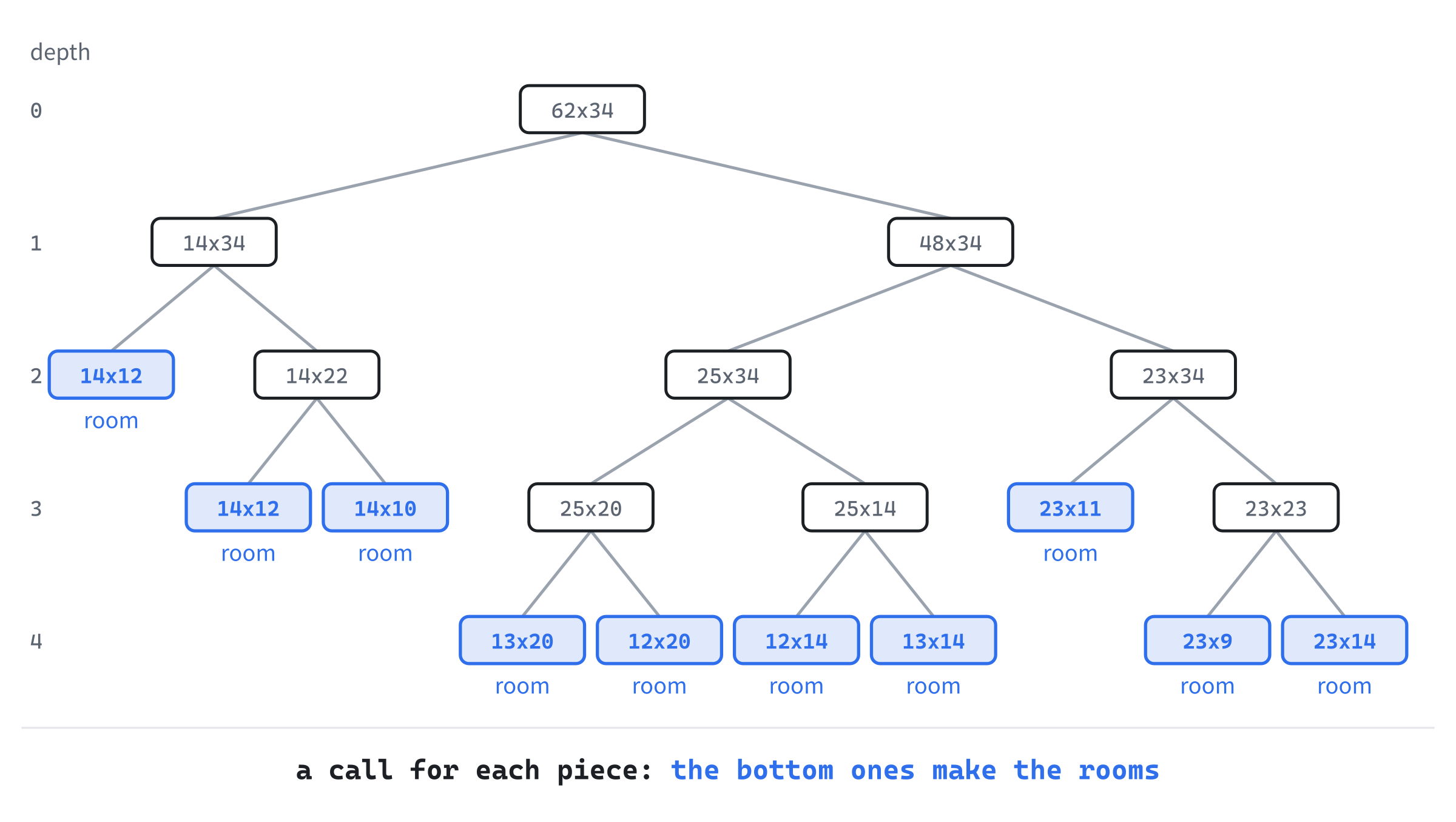
The calls go deeper on the right, where the map is wider, and stop earlier on the left. The first piece there is 14 cells across, too narrow to cut across, so it can only be cut down. It's cut down until its pieces are shorter than 18 rows, too short to cut down again. Each of those becomes a room. That's MIN_PIECE_W and MIN_PIECE_H at work: a piece that's too small to cut either way is a base case, however many cuts it has left.
Generating a Dungeon
All that's left is the two functions that the rest of the game calls. Add them at the bottom of the file, below the namespace's closing brace:
std::vector<SDL_Rect> RoomGen::generate(Map& map, std::mt19937& rng)
{
    map.fill(Terrain::Wall);
    std::vector<SDL_Rect> rooms;

    // Leave the outermost cells as rock, so the walls have somewhere to be
    SDL_Rect inside = { 1, 1, MAP_W - 2, MAP_H - 2 };
    split(map, inside, MAX_CUTS, rng, rooms);
    return rooms;
}

Point RoomGen::centerOf(const SDL_Rect& room)
{
    return { room.x + room.w / 2, room.y + room.h / 2 };
}
First, generate fills the map with rock, and makes an empty list of rooms. Then it calls split for inside, the whole map less a ring of one cell around its edge. That ring stays rock, so that a room or corridor can never reach the edge of the map, where its walls would have nowhere to go. Last, generate returns the rooms.
The function centerOf finds the cell in the middle of a room. Integer division drops any fraction, so for a room 10 cells wide, it's 5 cells in from the left edge.
Checkpoint: Click in RoomGen.cpp, and press Ctrl+F7 to compile it. It compiles on its own, as Map.cpp did.
Rooms in the Game
Now runGame can generate a dungeon instead of carving a room by hand. It needs two more of the standard library's headers. Add them below #include <SDL3_ttf/SDL_ttf.h>:
#include <random>   // std::random_device and std::mt19937, for the dice
#include <vector>   // std::vector, for the rooms
The header <random> has the engine, and the device that seeds it. And <vector> has the vector that holds the rooms. Next, add the generator's header below #include "Map.h":
#include "RoomGen.h"Now main.cpp includes RoomGen.h, so that it can call the generator. Now find the lines that carve the test room, at the top of runGame:
// A room carved by hand into solid rock, and the player's place in it
Map map;
map.carve({ 11, 7, 10, 6 });
Point start = { 15, 9 };
Replace them with these lines:
// Everything random in a run comes from one engine, started from
// one seed: the same seed always gives the same dungeon
std::random_device entropy;
unsigned int seed = entropy();
std::mt19937 rng(seed);

// The dungeon, and the player's place in its first room
Map map;
std::vector<SDL_Rect> rooms = RoomGen::generate(map, rng);
Point start = RoomGen::centerOf(rooms.front());
The variable entropy is the random device, and seed is one number from it. Then rng, the engine, starts from that seed. Everything random in the game will come from this one engine, so that one seed decides everything. That pays off in the last part of the chapter, and again in later chapters, when the same engine rolls the monsters' and the items' dice.
Then generate builds the dungeon, and start is the middle of the first room it made, rooms.front(). There's always at least one room, since even a map too small to cut gets a room.
Checkpoint: Press F5. The window shows ten rooms or so, spread across the map, with walls around each. There's no way between them yet, so they're islands in the rock. Close the window and run the game again, and you'll get a different set of rooms, since the seed is different every time.
The next image shows one of those runs. Every room sits in a piece of its own, and no two rooms touch.
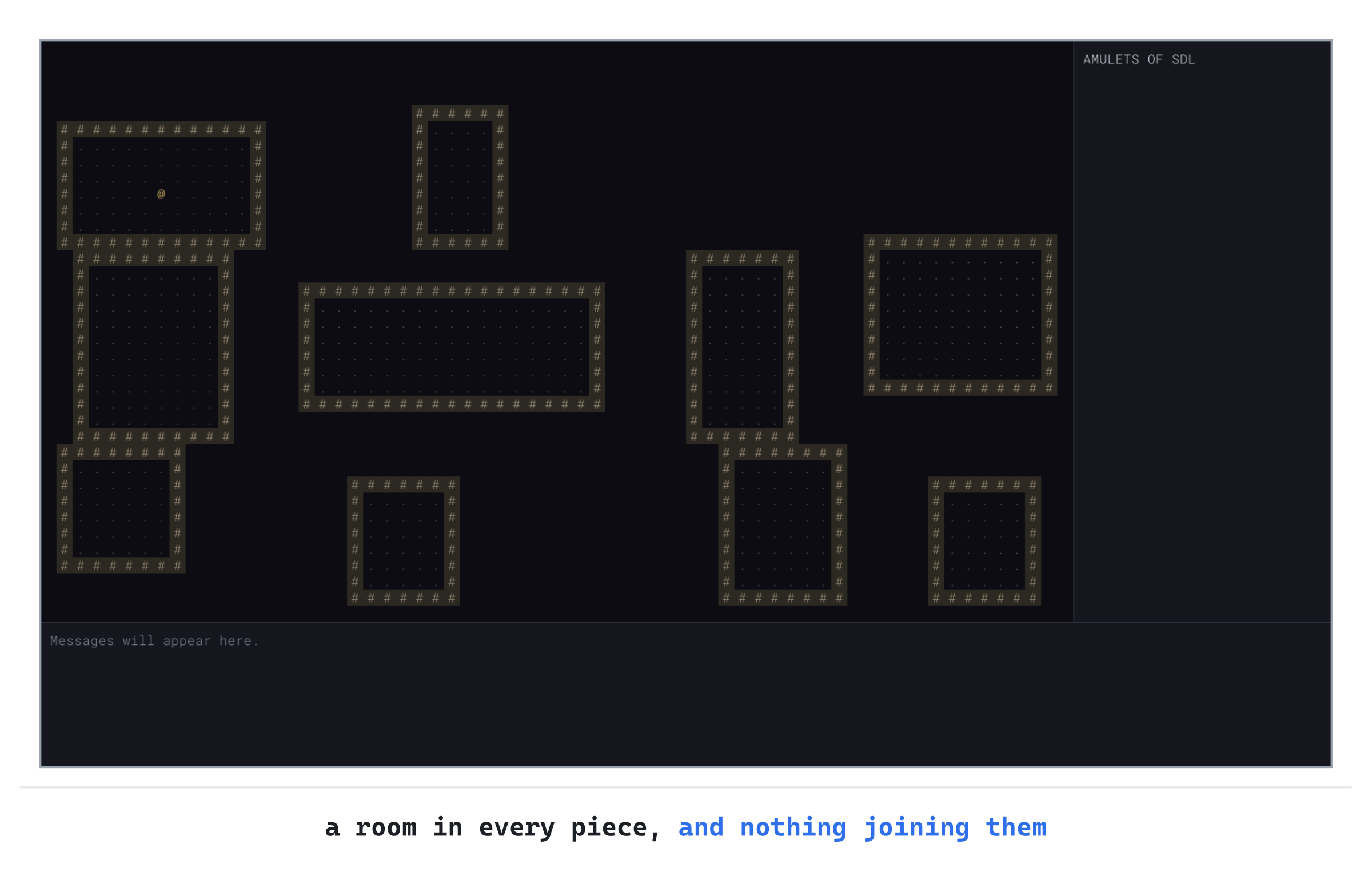
The @ is in the first room. It's usually near the top-left corner, since the first half of every cut is the left or the top one.
Corridors That Always Connect
Rooms with no way between them aren't much of a dungeon. The corridors need to join every room to every other, by some route, so the player can never be cut off from part of the map. Later, when there are stairs to find and Amulets to collect, a room that can't be reached would make the game impossible to win.
There's a neat way to guarantee it, and BSP hands it to us. Every cut splits a piece into two halves. If the rooms in each half are already joined to each other, one corridor between the halves joins all of them. And split handles the halves before it returns, so that's exactly where the corridors can go.
Straight Lines and Corners
A corridor is made of straight lines, so the generator needs a way to dig one. It also needs two more of the standard library's headers. Add them below #include "RoomGen.h", at the top of RoomGen.cpp:
#include <algorithm>   // std::min, for the corridors
#include <cstdlib>     // std::abs, for the corridors
The header <algorithm> has std::min, which gives the smaller of two values, and <cstdlib> has std::abs, which gives a number without its sign. Now add the function that digs a straight line, below addRoom:
// Digs a straight corridor between two points in a line, both ends
// included
void carveLine(Map& map, Point a, Point b)
{
    SDL_Rect line;
    line.x = std::min(a.x, b.x);
    line.y = std::min(a.y, b.y);
    line.w = std::abs(a.x - b.x) + 1;
    line.h = std::abs(a.y - b.y) + 1;
    map.carve(line);
}
The helper carveLine digs between two points that are in the same row or the same column. It does that by carving a rectangle one cell thick.
The rectangle starts at the smaller of the two x values, and the smaller of the two y values, so it works in whichever order the points are given. Its width is the distance between the two x values, plus 1, so that both ends are included. The height is the same for y. One of the two distances is always 0, so the rectangle is a line.
Two points usually aren't in a line, though. So a corridor between them is two lines, with a corner between them. Add carveCorridor below carveLine:
// Digs an L-shaped corridor between two points: across and then down,
// or down and then across, at random
void carveCorridor(Map& map, Point from, Point to, std::mt19937& rng)
{
    Point corner = { to.x, from.y };
    if (roll(rng, 0, 1) == 1)
    {
        corner = { from.x, to.y };
    }
    carveLine(map, from, corner);
    carveLine(map, corner, to);
}
At first, corner is the point in to's column and from's row, so the corridor goes across first and then down. A roll of the die can change it to the point in from's column and to's row, so the corridor goes down first and then across. Either way, two calls to carveLine dig it. The next image shows both shapes.

Rolling for the corner gives the dungeon some variety. If every corridor went across first, every corridor's corner would be at the same end, and the dungeons would start to look alike.
Joining the Halves
Now split can join each pair of halves. To do that, it needs to know a point in each half to join. So split will return one: the middle of one of the rooms in its piece. That changes the comment above it, and the word in front of its name. Find these lines, at the start of split:
// Cuts area in two, and each half again, until it runs out of cuts or
// room, and gives every piece that's left a room
void split(Map& map, const SDL_Rect& area, int cutsLeft,
           std::mt19937& rng, std::vector<SDL_Rect>& rooms)
Change them to these:
// Cuts area in two, and each half again, until it runs out of cuts or
// room, and gives every piece that's left a room. Returns the middle of
// one of area's rooms, so that whoever cut area can join it to the other
// half
Point split(Map& map, const SDL_Rect& area, int cutsLeft,
            std::mt19937& rng, std::vector<SDL_Rect>& rooms)
From now on, split returns a Point, rather than nothing, so void becomes Point. The second line moves one space to the right, to stay lined up under the first. The comment says what the point is for: the code that cut a piece in two uses it to join that half to the other.
A base case returns the middle of its room, which is the one room in its piece. Find these two lines, in the base case:
rooms.push_back(addRoom(map, area, rng));
return;
Replace them with these:
SDL_Rect room = addRoom(map, area, rng);
rooms.push_back(room);
return RoomGen::centerOf(room);
The room is kept in a variable, room, so that it can go on the list and give its middle back to the caller. Last come the recursive calls themselves. Find these two lines, at the end of split:
split(map, first, cutsLeft - 1, rng, rooms);
split(map, second, cutsLeft - 1, rng, rooms);
Replace them with these:
// Every room in each half is joined to the others in it, so one
// corridor between the halves joins them all
Point a = split(map, first, cutsLeft - 1, rng, rooms);
Point b = split(map, second, cutsLeft - 1, rng, rooms);
carveCorridor(map, a, b, rng);
if (roll(rng, 0, 1) == 0)
{
    return a;
}
return b;
The point a is in the first half, and b in the second, each returned by split's call for that half. Then carveCorridor joins them. Last, split returns a or b, chosen at random. That's the point that whoever cut this piece will join to its other half.
Here's why that's certain to connect every room. Think about a piece that's a base case: it has one room, so all of its rooms are joined, trivially. Now think about a piece that was cut in two. When the two calls to split for its halves have returned, the rooms inside each half are already joined to each other. That's the very same argument, one cut further down.
Then one corridor joins a room in the first half to a room in the second, and so every room in the piece is joined to every other. The whole map is a piece, so every room in the dungeon is joined.
The next image shows seed 7's corridors. The blue one was dug last, for the very first cut, and it joins the left of the map to the right.
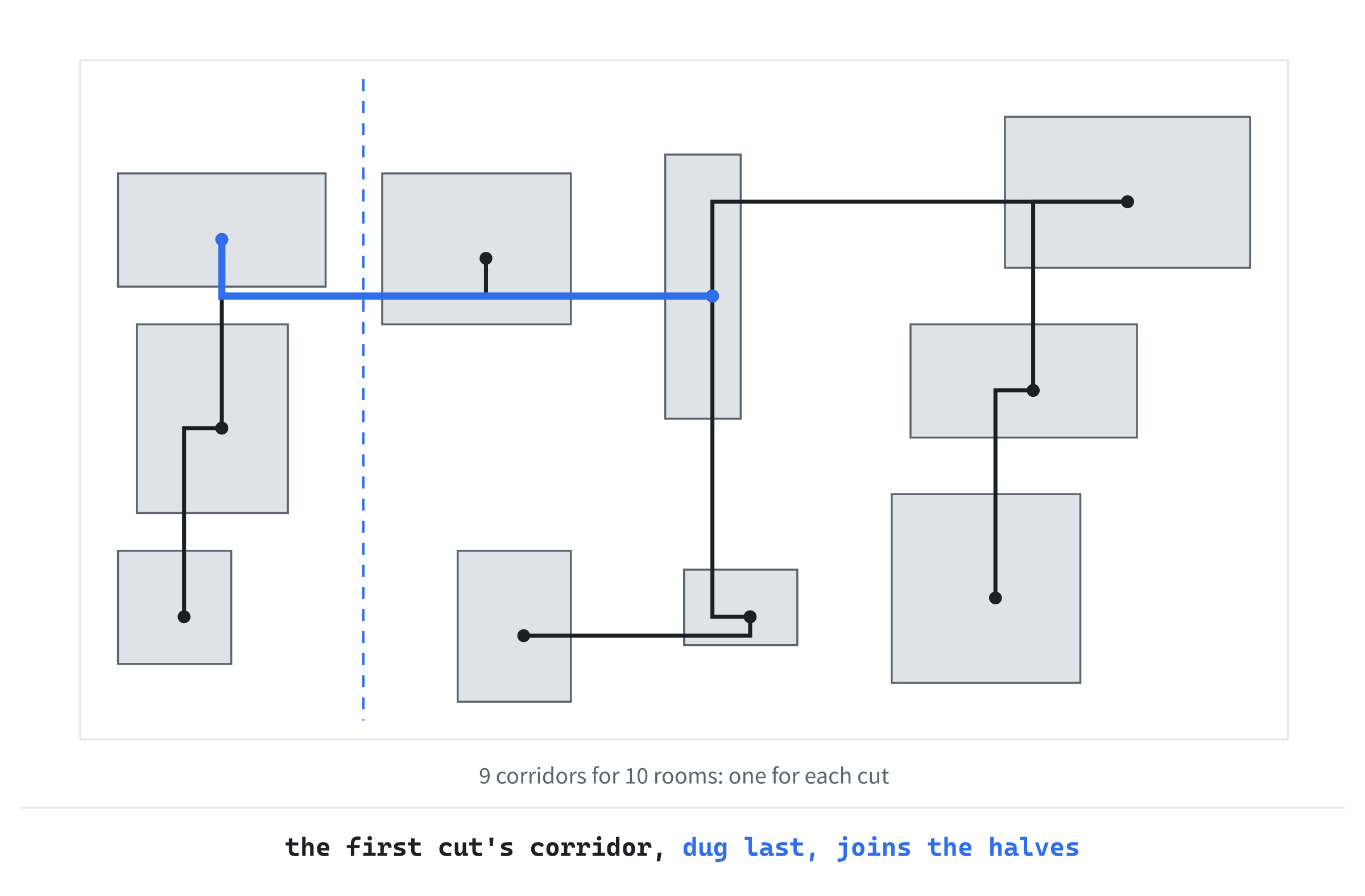
A dungeon with 10 rooms always has exactly 9 corridors, one for each cut. That's the fewest that can join 10 rooms. So there's exactly one route between any two rooms, apart from the shortcuts that appear where a corridor happens to cut through another room or corridor. The AI exercise at the end of the chapter adds a few more corridors, to make loops.
Returning a or b at random spreads the corridors around. If split always returned a, every corridor would start from the first room of its half. Those rooms would become hubs, with corridors fanning out from them.
Checkpoint: Press F5. The rooms are joined by corridors now, some running across and then down, and some down and then across. Close the window and run the game a few times. Every dungeon is different, and in every one, you could walk from any room to any other.
Seeds
At the moment, every run starts from a new seed, which std::random_device chooses. That's what you want when you play. But sometimes you want a particular dungeon back. You might have found a bug that only one dungeon shows, or want to compare two versions of the generator on the same map, or share a dungeon with a friend.
Roguelikes have long made a feature of this. Many show the seed on the screen, take one when they start, and run "daily challenges", in which everyone plays the dungeon grown from the same seed. This part of the chapter shows the seed in the side panel, makes a new dungeon whenever you press Space, and lets you choose the seed when the game starts.
Ten Small Changes
The seed passes through most of main.cpp, so this part of the chapter makes ten small changes to it. The next image maps them out. As in Chapter 1, the blue slots are new lines, and the outlined lines will change. Each is lettered in the order we'll get to it.
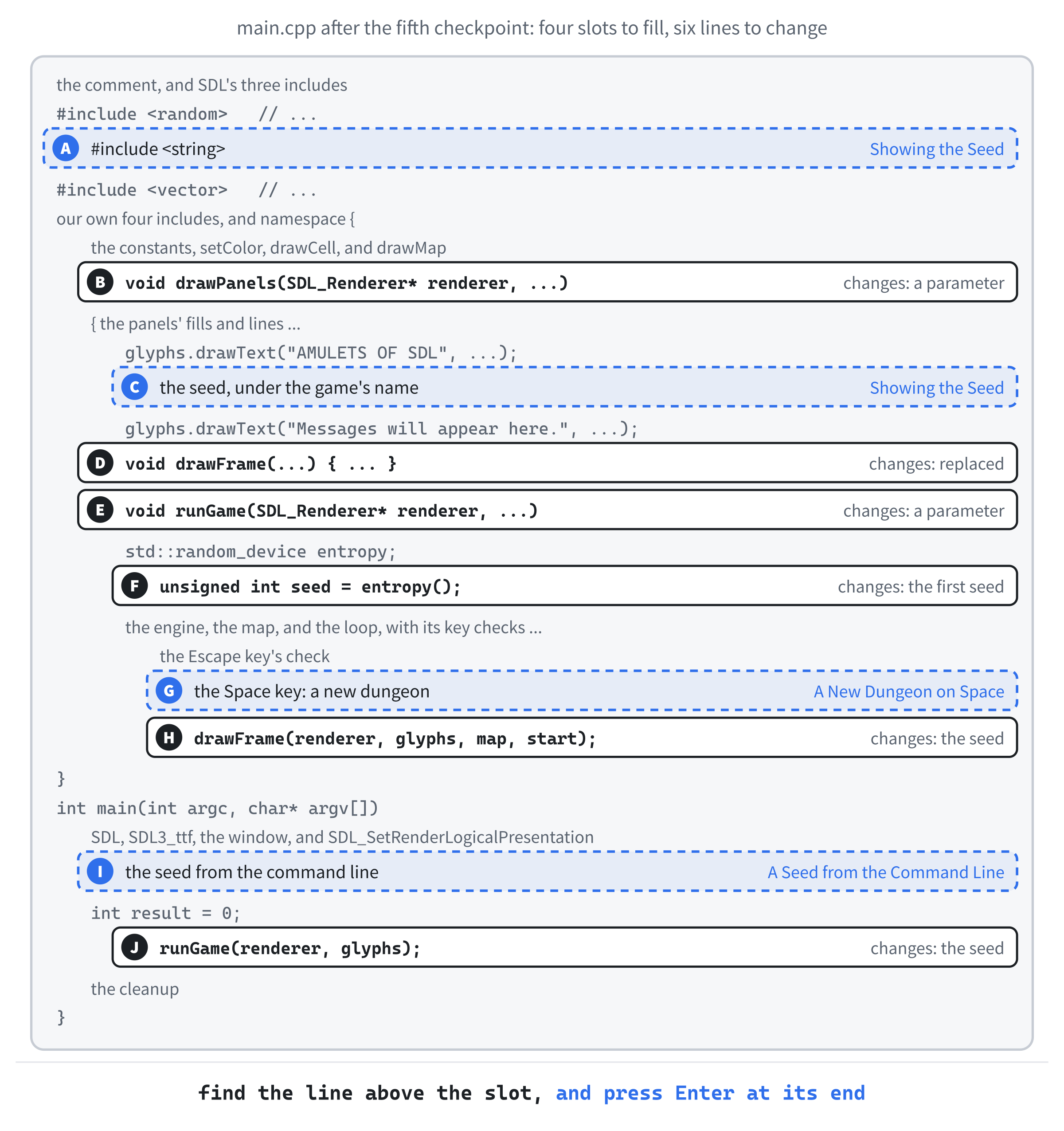
As before, to open a gap, click at the end of the line just above it, and press Enter. And if a slot's place still isn't clear, the Chapter 02 folder in the repository holds main.cpp exactly as it is at the end of the chapter.
Showing the Seed
Slot A is the header for std::to_string, which turns a number into text. Add it below #include <random>:
#include <string> // std::string and std::to_string, for the seedThe header <string> brings in std::string, and std::to_string, which we'll use to show the seed.
The side panel will show the seed, so drawPanels needs it. At slot B, find this line, the first line of drawPanels:
void drawPanels(SDL_Renderer* renderer, const GlyphCache& glyphs)Change it to these two lines:
void drawPanels(SDL_Renderer* renderer, const GlyphCache& glyphs,
                unsigned int seed)
With this change, drawPanels takes the seed, an unsigned int, which is what the engine's seeds are. Slot C is the line that shows it. Add it below the line that writes the game's name, which ends Palette::TEXT);:
glyphs.drawText("Seed " + std::to_string(seed), PANEL_X + MARGIN,
                MARGIN + glyphs.lineHeight(), Palette::DIM_TEXT);
Here, std::to_string turns the seed into text, and + joins it on after "Seed ". The line goes one line height below the game's name, which glyphs.lineHeight() gives. It's in the dim color, since it's a detail rather than news.
At slot D, drawFrame passes the seed along. Replace the whole of drawFrame with this:
void drawFrame(SDL_Renderer* renderer, const GlyphCache& glyphs,
               const Map& map, Point start, unsigned int seed)
{
    setColor(renderer, Palette::BACKGROUND);
    SDL_RenderClear(renderer);
    drawMap(renderer, glyphs, map);
    drawCell(renderer, glyphs, start.x, start.y, '@', Palette::PLAYER);
    drawPanels(renderer, glyphs, seed);
    SDL_RenderPresent(renderer);
}
The new drawFrame takes the seed as its last parameter, and hands it to drawPanels.
That's the second time this chapter has replaced drawFrame, and it won't be the last. The game's state lives in runGame, and each function is handed what it needs, as parameters. That's on purpose: every function says exactly what it uses, and it's the simplest way that works while the game is small.
The cost is that each new thing to draw adds a parameter, both here and in the call. So drawFrame grows a little in each chapter, and by Chapter 5 it takes nine. Chapter 7 shows why that stops working, and gathers the game's state into a class, which ends the passing around.
A New Dungeon on Space
Now runGame takes the seed that the game should start with, or 0 to choose one at random. At slot E, find the first line of runGame:
void runGame(SDL_Renderer* renderer, const GlyphCache& glyphs)Change it to these two lines:
void runGame(SDL_Renderer* renderer, const GlyphCache& glyphs,
             unsigned int firstSeed)
The new parameter, firstSeed, is the seed to start with. At slot F, find the line that sets the seed:
unsigned int seed = entropy();Replace it with these lines:
unsigned int seed = firstSeed;
if (seed == 0)
{
    seed = entropy();
}
The variable seed starts as firstSeed, and only if that's 0 does the random device choose one. Either way, the engine starts from seed, on the next line, as before.
Slot G is a new key. Add these lines below the Escape key's check, before the check for the window's events:
else if (event.type == SDL_EVENT_KEY_DOWN &&
         event.key.key == SDLK_SPACE)
{
    // A new dungeon, from a new seed
    seed = entropy();
    rng.seed(seed);
    rooms = RoomGen::generate(map, rng);
    start = RoomGen::centerOf(rooms.front());
    redraw = true;
}
The Space key gets a new seed from the random device. Then rng.seed(seed) starts the engine again from that seed, exactly as if it had just been made from it. So the new dungeon is the one that the seed builds, and you'll get the same one back by starting the game with that seed. Then the generator builds the new dungeon, the @ moves to its first room, and redraw makes sure it's drawn.
The generator fills the map with rock before it starts, so the old dungeon is wiped away. That's why generate calls map.fill first: without it, each new dungeon would be carved on top of the last.
At slot H, change drawFrame(renderer, glyphs, map, start); to drawFrame(renderer, glyphs, map, start, seed);, so every frame shows the seed of the dungeon it draws.
A Seed from the Command Line
The last two slots are in main. A seed can come from the command line, which main receives in argc and argv. The first, argv[0], is the program's own name, so a seed typed after it is argv[1].
Slot I reads the seed. Add these lines below the call to SDL_SetRenderLogicalPresentation, above int result = 0;, with a blank line on each side:
// A seed on the command line replays that dungeon, as in
// "AmuletsOfSDL 12345". Without one, the seed is chosen at random
unsigned int seed = 0;
if (argc > 1)
{
    seed = static_cast<unsigned int>(SDL_strtoul(argv[1], nullptr, 10));
}
In main, seed is 0, meaning "choose one at random," unless something was typed after the program's name. If something was, argc is more than 1, and SDL_strtoul turns the text in argv[1] into a number. The 10 says that it's written in base 10, the ordinary way. The nullptr says that we don't need to know where the number ended. Text that isn't a number gives 0, so the seed is chosen at random, as if nothing had been typed.
The function SDL_strtoul gives an unsigned long, so static_cast turns it into the unsigned int that the engine takes. On Windows, the two are the same size, but the cast says that the change is meant.
At slot J, pass the seed to runGame: in main, change runGame(renderer, glyphs); to runGame(renderer, glyphs, seed);. Then runGame starts from the seed that was typed, or a random one. That's every slot filled.
To type a command-line argument in Visual Studio, right-click the project, choose Properties, and set Configuration to All Configurations. Then choose Debugging on the left, type the seed into Command Arguments, and click OK. From then on, F5 starts the game with that seed. To go back to random dungeons, empty the box again.
Checkpoint: Press F5. The side panel shows the seed under the game's name. Press Space a few times: each press makes a new dungeon, and the seed changes with it. Now type 7 into Command Arguments, as above, and press F5 again. The dungeon is the one in Figure 2.1, cell for cell, and you'll get it every time. Try another seed you've seen in the panel, and that dungeon comes back too.
Understanding the Code
The game now has three layers. At the bottom is the map, which only knows what each cell is made of, and answers questions about it. Above it is the generator, which carves a dungeon into a map, using dice that it's given. At the top is main.cpp, which owns the map and the dice, asks for a dungeon, and draws whatever the map holds.
When a dungeon is generated, split cuts the map into pieces, going deeper and deeper. It goes first down the left side of the tree in Figure 2.7, and then the right. A room is made at the bottom of each branch. As the calls return, back up the tree, each one joins its two halves with a corridor. So by the time the first call returns, the whole dungeon is joined.
Everything random comes from one engine, started from one seed. That makes the dungeon a function of its seed: the same seed, the same dungeon. As later chapters roll more dice from the same engine, the whole run will become a function of its seed, monsters, items, and all.
Experimenting
Start by looking. Press Space a dozen times, and watch the dungeons go by. Some have a few big rooms, and some have many small ones, depending on how the cuts fell. Some corridors take long detours, and some cut straight through another room on their way.
Try to find a room that you couldn't walk to. You won't, since the corridors are certain to join them all. Look for the shortcuts, though: wherever a corridor runs through a room on the way to another, it makes a second route, and a loop.
Then write down a seed you like, and start the game with it. The same dungeon comes back, every time, on any Windows computer. That will stay true when there are monsters and items to roll for too.
The generator is shaped by a handful of constants, so it's easy to change its character. Try each of these, run the game with seed 7 and with a few others, and put each change back afterward:
- More cuts, or fewer. Change
MAX_CUTSto2, and the dungeon has at most four big rooms. Change it to6, and you'll get more rooms, but not 64 of them: the pieces soon get too small to cut, whateverMAX_CUTSsays. - Smaller pieces. Change
MIN_PIECE_Wto8andMIN_PIECE_Hto6, and the map can be cut into many more pieces, with small rooms in each. Then also setMAX_CUTSto6, to let it. - No padding. Change
PADDINGto0. Rooms can now fill their pieces, and rooms in neighboring pieces can touch. That makes some odd shapes, as two rooms merge into one. - Every corner the same way. In
carveCorridor, delete theifthat rolls for the corner, so that every corridor goes across first and then down. The corridors are still L-shaped, but their corners always fall at the same end, and the dungeons start to look alike. - Every wall. In
drawMap, changeelse if (map.bordersFloor(x, y))to justelse, and see the field of#signs from Figure 2.4. Then put it back.
One warning: keep MIN_ROOM plus twice PADDING no bigger than MIN_PIECE_H, and no bigger than MIN_PIECE_W. Otherwise, the smallest piece is too small for the smallest room. Then addRoom asks roll for a number between, say, 7 and 6. The distribution can't do that, so the program stops with a "Debug Assertion Failed!" message. It says "invalid min and max arguments for uniform_int_distribution."
Common Errors and Fixes
If the game didn't build, didn't start, or didn't look right, the problem is probably one of these.
C4430: missing type specifier - int assumed. Note: C++ does not support default-int, on the line const Map& map), followed by a string of other errors, such as C2065: 'map': undeclared identifier. The compiler has never heard of Map in main.cpp. Check that #include "Map.h" is there, below #include "GlyphCache.h". As in Chapter 1, fix the first error, and the rest usually go with it.
C2065: 'Floor': undeclared identifier. Terrain is a scoped enumeration, so its names need its name in front of them. It should read Terrain::Floor.
LNK2019: unresolved external symbol "public: __cdecl Map::Map(void)", with more for Map::at, Map::carve, and Map::bordersFloor, and then LNK1120: 4 unresolved externals. The linker can't find Map's code, because Map.cpp isn't part of the project. That happens when a file is made outside Visual Studio, in File Explorer or another editor. In Solution Explorer, with Show All Files on, right-click Map.cpp, and choose Include In Project. The same goes for RoomGen.cpp.
C2061: syntax error: identifier 'Point', followed by errors about start. The struct Point is missing from Common.h. Check that it's there, below MARGIN.
C2672: 'generate': no matching overloaded function found. The call to generate is missing RoomGen:: in front of it. The message is a confusing one. When C++ looks for a function, it also looks in the namespaces of the arguments' types. The engine is a std::mt19937, so it looks in std, and finds the standard library's own std::generate, which takes different arguments. It should read RoomGen::generate(map, rng).
warning C4715: '`anonymous namespace'::split': not all control paths return a value. The end of split is missing its last line, return b;. The program still builds, since this is a warning. But split then returns whatever happens to be in memory, and the corridors can lead anywhere. Treat this warning as an error, and fix it.
The whole map is a field of # signs. drawMap is drawing every wall, not just the ones that border a floor. Check that it says else if (map.bordersFloor(x, y)).
The rooms are there, but the corridors aren't. Check that split calls carveCorridor after its two calls to itself, and that carveCorridor calls carveLine twice.
Space makes a new dungeon, but starting the game with its seed gives a different one. The engine isn't being started again from the new seed. Check that the Space key's code calls rng.seed(seed) after it gets the new seed, and before it calls generate.
The seed in Command Arguments makes no difference. Check that Configuration said All Configurations when you typed it, or that it matches the configuration you're running, which is usually Debug. A seed typed for Release is ignored when you run Debug.
FAQ
Q) Why cut the map into pieces, rather than putting rooms at random places?
A) Rooms at random places overlap, so each new room has to be checked against all the others, and moved or tried again if it overlaps. Some parts of the map end up crowded, and others empty. BSP needs no checks, since its pieces can't overlap. It also spreads the rooms over the whole map. And, best of all, its cuts tell you which rooms to join, so connecting them all is certain, rather than something you have to test for.
Q) Will seed 7 give the same dungeon on every computer?
A) On every Windows computer, built with Visual Studio, yes. The C++ standard says exactly which numbers std::mt19937 makes from a seed. But it leaves each standard library to decide how std::uniform_int_distribution turns those numbers into a range. So the same seed can build a different dungeon when the game is built with a different compiler, such as on a Mac or on Linux. Games that need the same dungeon everywhere write their own distribution, which takes only a few lines.
Q) Why not use rand, from C?
A) rand is still in C++, but its numbers aren't very random, and the standard doesn't even say how good they must be. It also keeps one hidden engine for the whole program, which you can't pass around, or copy, or have two of. A std::mt19937 is an object like any other, so the game decides who rolls its dice, and how they're seeded.
Q) Why is the map one long vector, rather than a vector of rows?
A) One vector is one block of memory, made in one go. Filling it, copying it, or comparing it is one operation. A vector of rows is 36 separate blocks, plus one more to hold them. The cost of one vector is the formula y * MAP_W + x. That's hidden inside Map, so nothing else ever sees it.
Q) What happens if a corridor runs through a room?
A) It digs floor where there's floor already, which changes nothing. The room simply gets another way in, and the dungeon gets a loop, which is no bad thing.
Q) Why does a cell outside the map count as a wall?
A) Because it's what the rest of the game wants. Anything outside the map can't be walked on, or seen through, and a wall is exactly that. Answering "wall" means that code looking at a cell's neighbors never has to check whether they exist first, and can never read past the end of the vector.
AI Exercise (Optional)
A dungeon with exactly one route between any two rooms can feel like a maze of dead ends. Many roguelikes add a few extra corridors, to make loops, so that a player being chased has somewhere to run. If you'd like to try that with an AI's help, open your AI chatbot of choice, and try a prompt like this:
"I'm writing a roguelike in C++. My dungeon generator, in a namespace called RoomGen, uses binary space partitioning. A recursive function, split, cuts the map in two, gives every piece that's left a room, and joins each pair of halves with an L-shaped corridor from carveCorridor(Map& map, Point from, Point to, std::mt19937& rng). RoomGen::generate(Map& map, std::mt19937& rng) returns the rooms as a std::vector<SDL_Rect>, and RoomGen::centerOf(room) gives a room's middle cell as a Point. All the dice come from one std::mt19937, through a helper, roll(rng, low, high), so that a seed always gives the same dungeon. I'd like generate to add a few extra corridors after split has finished, joining random pairs of rooms, to make loops. Show me the changes, with each curly brace on its own line, using carveCorridor and roll, and explain how the number of extra corridors is chosen."
Notice what the preceding prompt does. It names the functions the answer should use, so that the AI builds on your generator rather than writing its own. The prompt also says why the dice must all come from roll: if the AI reaches for rand or a new std::random_device, seeds will stop working.
When the answer comes back, check it against your code. Does it choose two different rooms, or could it join a room to itself? Does every extra corridor come from carveCorridor? Then run it with seed 7, twice. If the two dungeons differ, something is rolling dice outside the engine, so ask the AI to find it.
Summary
You've built a dungeon generator that cuts the map into pieces, puts a room in each, and joins the halves as the recursion unwinds. So every dungeon is connected, and any dungeon comes back from its seed. In Chapter 3, the @ starts to move. You'll walk it around the dungeon with the arrow keys, the numeric keypad, or the letters that roguelikes have used for decades. The side panel will count your turns, and the message log will start to talk.