
Every game in this book so far has been made of colored rectangles. That's served us well, because rectangles let us learn game loops, collisions, and states without any distractions. But real games are made of pictures, and in this chapter, we finally load some: a lawn, a set of holes, a mole with two expressions, a mallet, and a burst of stars, all drawn as PNG files and all ready for you in the book's repository.
Pictures arrive in an SDL program as textures, and SDL hands you every texture as a raw pointer, which makes this the perfect project to follow Chapter 10. Each texture has to be loaded, checked for nullptr, and destroyed exactly once, before the renderer that made it.
The game itself is the fairground classic. Nine holes sit in a lawn, and moles pop up out of them at random, pause, and duck back down. Click one with the mallet to bonk it, and it reels, dazed, as a star bursts from its head. You have sixty seconds, the moles get quicker as the clock runs down, and your score sits in the window's title bar, just as Chapter 2 promised it would.
SDL3 Projects/Whack-a-Mole — the complete source for this chapter lives here, along with the assets folder that holds every picture the game uses.In this chapter, we will:
- Download SDL_image, SDL's add-on for loading pictures, and add it to a project
- Load PNG files into textures, check each one, and destroy each one exactly once
- Tile a picture across the window, and draw pictures at any size and position
- Draw in the right order, so that moles come up out of their holes
- Show part of a picture with a source rectangle, and flip it to face the other way
- Name a mole's five states with an
enum class, and move between them with aswitch - Bonk moles with the mouse, and turn the pointer into a swinging mallet
- Tint and fade pictures with color and alpha modulation
- Show the score in the title bar, run a sixty-second round, and restart with R
- Play the game, experiment with it, fix the most common mistakes, and try an optional AI exercise
Let's build it.
Setting Up the Project
This project needs one more thing than the others: SDL_image, SDL's add-on library for loading pictures. SDL itself can load two simple kinds of picture file, BMP and, since version 3.4, PNG, but only into the kind of picture called a surface, which we'll meet shortly. SDL_image is the heavy-duty version. It reads PNG, JPG, and a dozen other formats, and it can load a picture straight into a texture, ready to draw, in a single call.
It's the first of several add-ons that SDL's authors publish for jobs SDL leaves out, such as SDL_ttf, for drawing text, which our final project uses. Adding it to a project works exactly like adding SDL did in Chapter 1, so this will feel familiar.
Downloading SDL_image
Go to https://github.com/libsdl-org/SDL_image/releases, SDL_image's releases page on GitHub. As with SDL in Chapter 1, scroll down the latest release to its list of downloads, labeled Assets, and click Show all if the list is cut short. Find the file whose name ends in -VC.zip, such as SDL3_image-devel-3.4.6-VC.zip.
The version number may well be higher by the time you read this, and that's fine. Just make sure the name has "devel" and "VC" in it, like the SDL zip in Chapter 1. There's a similar file that ends in win32-x64.zip, and that one won't do: it holds the DLL, but not the header files or the .lib file.
Download the zip, then unpack it next to SDL:
- Right-click the zip file and choose Extract All.
- Change the destination to
C:\and click Extract. This creates a folder with a name likeC:\SDL3_image-3.4.6. - Rename that folder to plain
SDL3_image.
Open C:\SDL3_image and check what's inside, just as you did for SDL. You should see folders called include and lib right there, and not another folder with a version number in its name.
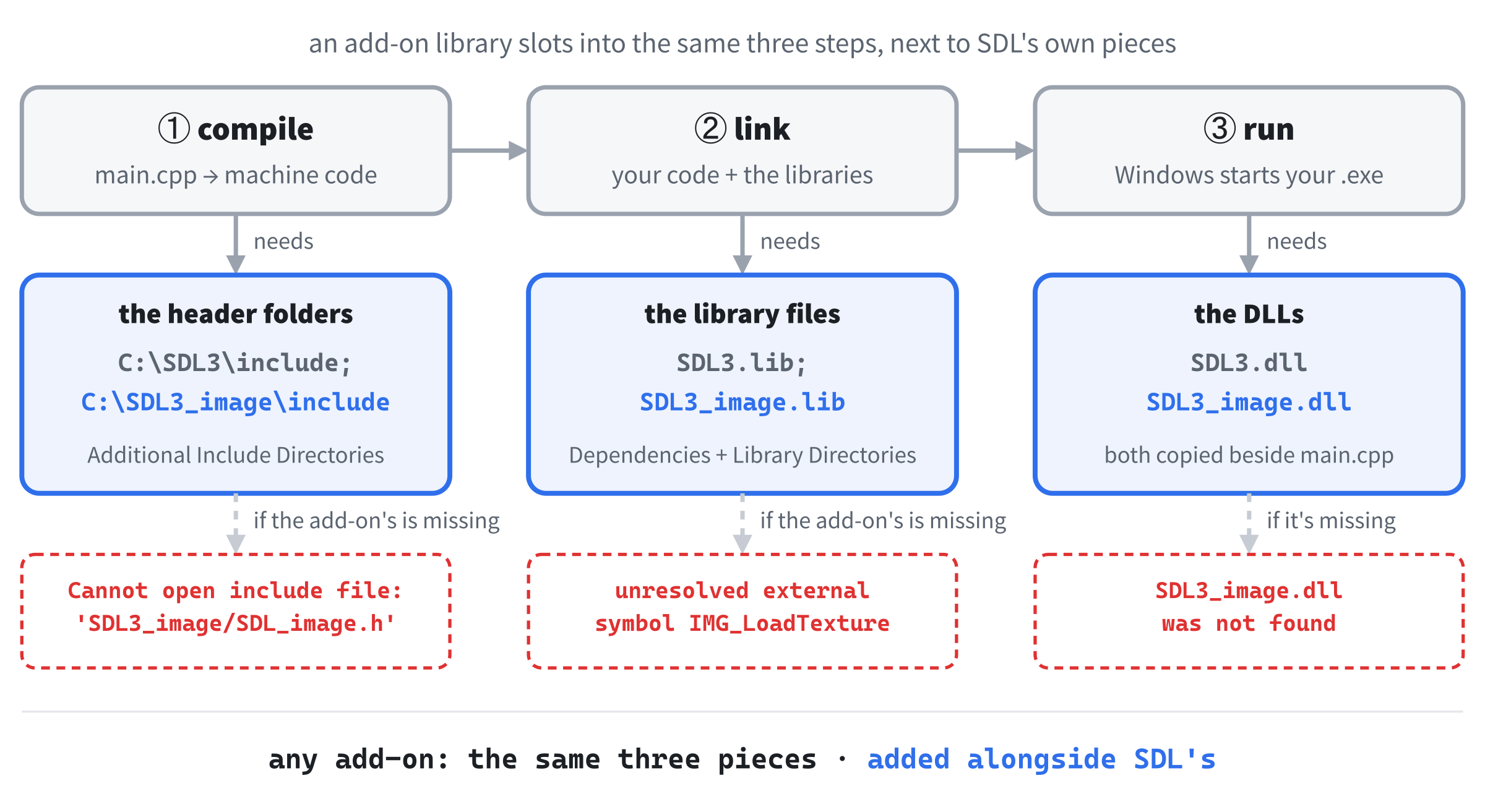
The pieces are the same three kinds as SDL's, as Figure 11.1 shows. The include folder holds a folder called SDL3_image, with the header file SDL_image.h inside. The lib\x64 folder holds SDL3_image.lib, which is needed while our program is being built, and SDL3_image.dll, which is needed every time it runs. There's also a folder called optional, with extra DLLs for unusual picture formats, and we can ignore it, because SDL_image reads PNG files without any help.
Creating the Project
The project is the same as before, with SDL_image added to three of the settings and one more DLL. Here's the checklist:
- Choose File > New > Project, pick Empty Project (the one tagged C++, Windows, and Console), name it
WhackAMole, and click Create. - In Solution Explorer, right-click Source Files, choose Add > New Item, and add a file called
main.cpp. - Right-click the project, choose Properties, set the two dropdowns to All Configurations and All Platforms, and then make the four changes:
- C/C++ > General > Additional Include Directories:
C:\SDL3\include;C:\SDL3_image\include - C/C++ > Language > C++ Language Standard: ISO C++20 Standard (/std:c++20)
- Linker > General > Additional Library Directories:
C:\SDL3\lib\x64;C:\SDL3_image\lib\x64 - Linker > Input > Additional Dependencies:
SDL3.lib;SDL3_image.lib
- C/C++ > General > Additional Include Directories:
- Right-click the project, choose Open Folder in File Explorer, and copy two DLLs into that folder, beside
main.cpp:SDL3.dllfromC:\SDL3\lib\x64, andSDL3_image.dllfromC:\SDL3_image\lib\x64.
The only new thing is the semicolon. A setting that takes a list of folders or files, such as the include directories, uses semicolons to separate the items in its list, so C:\SDL3\include;C:\SDL3_image\include tells the compiler to look in both folders. Leave out the spaces around the semicolons.
If you made a project template with the tip in Chapter 3, you can start from it, and then add SDL_image's three entries to the end of each list. Better still, once this project builds, export it as a template of its own, called something like "SDL3 plus image project". The next few projects go back to rectangles, but pictures return in Chapter 17, and from then on, the template will save you the typing each time.
That takes care of the libraries. Now for the pictures themselves.
The Pictures
The game's pictures are PNG files, and they're all ready in the book's repository, in SDL3 Projects/Whack-a-Mole/assets. Copy the whole assets folder into your project folder, beside main.cpp, so that you end up with a folder called assets next to your code, with the ten pictures inside it:
| File | Size | What it is |
|---|---|---|
grass.png |
128 × 128 | A patch of lawn, drawn so that copies fit together seamlessly |
hole_back.png |
200 × 100 | The back of a hole: the mound of earth and the dark opening |
hole_front.png |
200 × 100 | Just the front lip of the hole, drawn over a mole |
mole.png |
120 × 140 | The mole, facing right |
mole_bonked.png |
120 × 140 | The same mole, dazed, with crossed eyes and a bump |
mallet.png |
128 × 128 | The mallet that replaces the mouse pointer |
star.png |
96 × 96 | The burst of stars when a mole is bonked |
title.png |
560 × 150 | The game's title, for the top of the window |
times_up.png |
460 × 130 | The banner at the end of a round |
icon.png |
64 × 64 | The window's icon |
The folder also holds whack_atlas.png, which packs all ten pictures into one, and two lists of where each one sits in it, whack_atlas.txt and whack_atlas.json. The game doesn't need them, but one of the experiments at the end of the chapter does.
The program opens each picture with a path like assets/grass.png. A path that doesn't start with a drive letter is a relative path: it's measured from the program's working directory, the folder that Windows treats as "here" while the program runs. When you press F5, Visual Studio sets the working directory to the project folder, the one with main.cpp in it, so assets/grass.png means the assets folder beside your code. And the forward slash is fine: Windows accepts either kind of slash in a path.
Double-clicking WhackAMole.exe is different, as Chapter 1 explained, because the program then starts in its own folder, x64\Debug, which has no DLLs and no assets folder in it. To run the game from there, or to share it with a friend, copy both DLLs and the whole assets folder next to the .exe.
With the libraries in place and the pictures in the right folder, it's time to write the game.
Coding the Game
We'll build this game the same way as the last few. First comes the skeleton: a window with a lawn in it, which proves that SDL_image is working and our pictures are in the right place. Then come the holes, the moles, the whacking, the mallet and the stars, and finally the round itself, each with a checkpoint where there's something new to see.
At about 590 lines, this is our longest program yet, and nearly all of the new ideas are in the drawing, so take it a checkpoint at a time. As before, the blocks are shown without the indentation they'll have in your file, and the complete program at the end shows every line where it sits. As in Chapter 9, leave a blank line between one function or struct and the next, and each step says where any other blank lines go.
The Header Comment and Includes
Type this at the very top of main.cpp:
/*
    Whack-a-Mole
    The Chapter 11 project from Learning C++ by Building Games

    Moles pop up out of nine holes. Click one with the mallet to bonk
    it before it drops back down. You have sixty seconds, and the moles
    get quicker as the clock runs down. When time's up, press R to play
    again, or Escape to quit.

    New in this project: SDL3_image. Every picture is a PNG file in the
    assets folder, loaded into an SDL_Texture.
*/

#include <SDL3/SDL.h>
#include <SDL3/SDL_main.h>
#include <SDL3_image/SDL_image.h>

#include <string>   // std::string and std::to_string, for the title bar
In the preceding code, the comment describes the game, and the first two #include lines bring in SDL and its helper for main, as usual. The third brings in SDL_image, from the include folder we just added to the settings. The last one is Chapter 2's <string>, because we'll build the title bar's text as a std::string.
The First Constants
Add these below the includes, with a blank line in between:
const int   WINDOW_W  = 800;    // window width in pixels
const int   WINDOW_H  = 600;    // window height in pixels
const float MAX_DELTA = 0.1f;   // the longest frame we'll allow, in seconds
In the preceding code, the window is 800 by 600, and MAX_DELTA is new: it's the longest a single frame is allowed to count for, a tenth of a second. We'll see why when we write the game loop.
A Struct for the Pictures
The game draws nine of the ten pictures, and each of those will be a pointer to a texture. The tenth, the icon, belongs to the window, and we'll deal with it separately. Rather than scatter nine pointers around main, we'll keep them together in one struct. Add this below the constants, with a blank line in between:
// Every picture in the game, each one starting as "not loaded yet"
struct Textures
{
    SDL_Texture* grass      = nullptr;
    SDL_Texture* holeBack   = nullptr;
    SDL_Texture* holeFront  = nullptr;
    SDL_Texture* mole       = nullptr;
    SDL_Texture* moleBonked = nullptr;
    SDL_Texture* mallet     = nullptr;
    SDL_Texture* star       = nullptr;
    SDL_Texture* title      = nullptr;
    SDL_Texture* timesUp    = nullptr;
};
In the preceding code, each member is an SDL_Texture*, a pointer to a texture, and there's something new at the end of each line. A struct's members can be given a starting value right where they're declared, and here every pointer starts as nullptr. That's Chapter 10's habit, built into the struct: the moment a Textures variable is created, all nine pointers honestly say "not loaded yet," and none of them is ever wild.
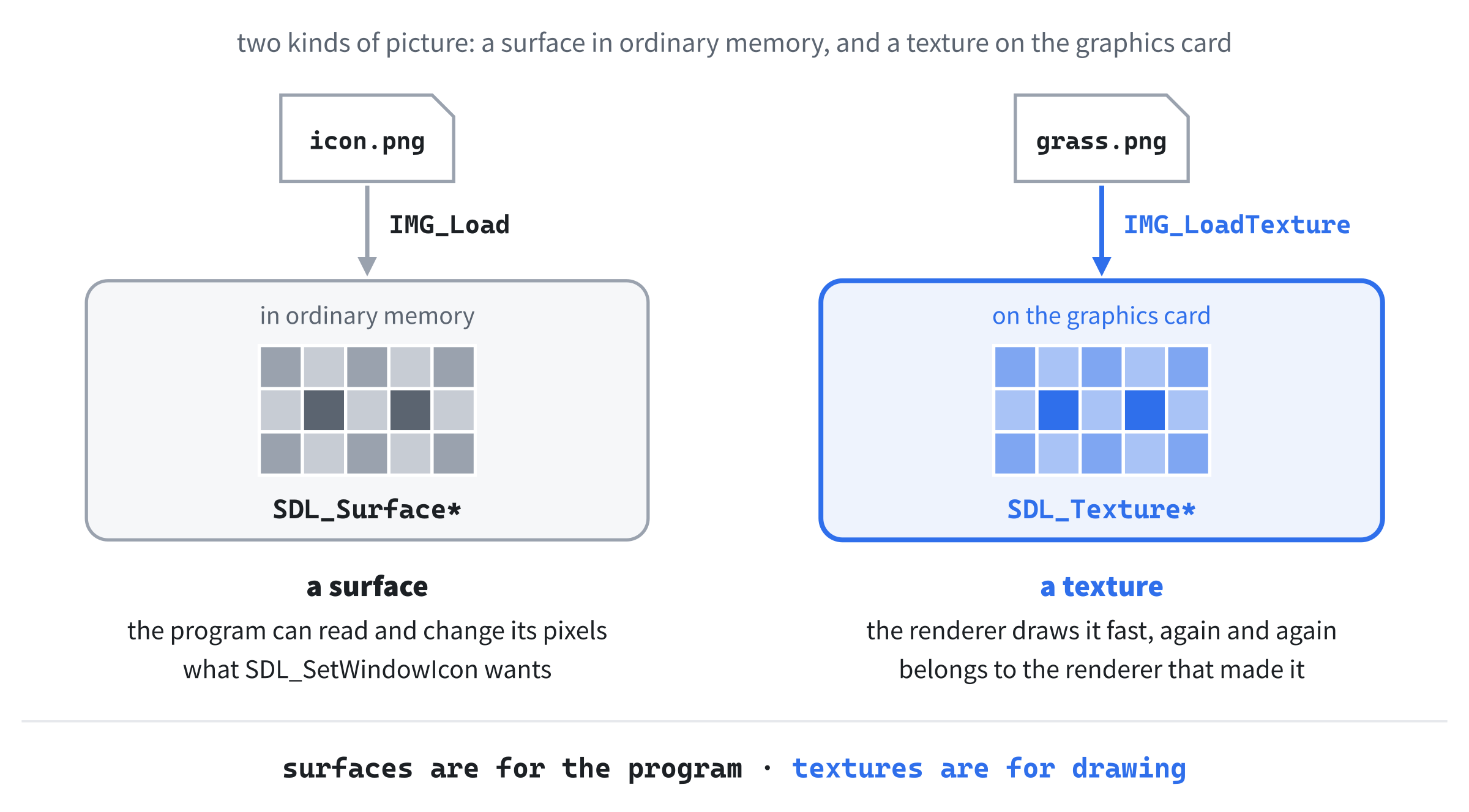
So what is a texture? It's a picture that's been handed to the graphics card, ready to be drawn. A texture's pixels live in the graphics card's own memory, where the renderer can draw them at astonishing speed, many times over, every frame. You never look inside a texture yourself. SDL gives you a pointer to it, and you hand the pointer back to SDL whenever you want it drawn, exactly like SDL_Window* in Chapter 10.
Loading and Destroying Pictures
Loading a picture is a job we'll do nine times, so it gets a function. Add this below the Textures struct, with a blank line in between:
// Load one PNG into a texture, or say why it failed and return nullptr
SDL_Texture* loadTexture(SDL_Renderer* renderer, const char* path)
{
    SDL_Texture* texture = IMG_LoadTexture(renderer, path);
    if (texture == nullptr)
        SDL_Log("Couldn't load %s: %s", path, SDL_GetError());
    return texture;
}
In the preceding code, loadTexture takes the renderer and the path of a picture file, and returns a pointer to a texture. It gets the renderer because every texture belongs to the renderer that made it, and can only be drawn by that renderer.
The path's type, const char*, is new. Text in double quotes, such as "assets/grass.png", is stored as an array of characters, and it's passed to a function as a pointer to its first character. Quoted text can't be changed, so that pointer is a const char*, Chapter 10's pointer to const, and a function that takes one promises only to read the text. It's the same kind of pointer as the ones in main’s argv.
Inside, IMG_LoadTexture does all the hard work. It opens the file, decodes the PNG into pixels, and hands those pixels to the graphics card as a new texture, owned by the renderer. The result is the texture's address, or nullptr if anything went wrong, such as a missing file. So we check, and if it's nullptr, we log which file failed, along with SDL_GetError’s explanation, before returning the nullptr to the caller. The if controls a single line, so it leaves its braces off, as Chapter 4 allows.
Now a function that loads all nine. Add it below loadTexture:
// Load every picture, and report whether they all loaded
bool loadTextures(SDL_Renderer* renderer, Textures& t)
{
    t.grass      = loadTexture(renderer, "assets/grass.png");
    t.holeBack   = loadTexture(renderer, "assets/hole_back.png");
    t.holeFront  = loadTexture(renderer, "assets/hole_front.png");
    t.mole       = loadTexture(renderer, "assets/mole.png");
    t.moleBonked = loadTexture(renderer, "assets/mole_bonked.png");
    t.mallet     = loadTexture(renderer, "assets/mallet.png");
    t.star       = loadTexture(renderer, "assets/star.png");
    t.title      = loadTexture(renderer, "assets/title.png");
    t.timesUp    = loadTexture(renderer, "assets/times_up.png");

    return t.grass && t.holeBack && t.holeFront && t.mole && t.moleBonked
        && t.mallet && t.star && t.title && t.timesUp;
}
In the preceding code, loadTextures takes the renderer, and the Textures struct by reference, so that it fills in the caller's pointers. Each line loads one picture into one member. The member names are long enough that we've called the parameter just t, to keep the lines short.
The return line asks whether they all worked, and there's a neat trick in it. When a pointer is used where C++ expects a bool, nullptr counts as false, and any real address counts as true. So the && chain is true only if every one of the nine pointers is real, and false if even one picture failed to load. The expression runs over two lines, and the && at the start of the second line makes it clear that it's a continuation.
Every texture we load must be destroyed exactly once. Here's the function that destroys one. Add it below loadTextures:
// Destroy one texture, and set the caller's pointer back to nullptr
void destroyTexture(SDL_Texture*& texture)
{
    if (texture != nullptr)
    {
        SDL_DestroyTexture(texture);
        texture = nullptr;
    }
}
In the preceding code, the parameter's type is SDL_Texture*&. Read it right to left, as Chapter 10 suggested: texture is a reference to a pointer to an SDL_Texture. It's a reference, so it's the caller's own pointer, and that matters for the second line in the braces. If the pointer isn't null, SDL_DestroyTexture gives the texture back, and then the pointer is set to nullptr, which is Chapter 10's warning put into practice: a destroyed texture's pointer never lingers with its old address. Without the &, the function would set its own copy of the pointer to nullptr, and the caller's pointer would be left dangling.
Checking for nullptr first means it's safe to call destroyTexture on a pointer that never got a texture, and that's exactly what the next function relies on. Add it below destroyTexture:
// Destroy every picture: safe even if some of them never loaded
void destroyTextures(Textures& t)
{
    destroyTexture(t.grass);
    destroyTexture(t.holeBack);
    destroyTexture(t.holeFront);
    destroyTexture(t.mole);
    destroyTexture(t.moleBonked);
    destroyTexture(t.mallet);
    destroyTexture(t.star);
    destroyTexture(t.title);
    destroyTexture(t.timesUp);
}
In the preceding code, destroyTextures destroys all nine pictures, one line each. Because destroyTexture skips null pointers, it's safe to call even when some of the pictures never loaded, and because every pointer is set to nullptr as it goes, calling it twice would do no harm either.
Checkpoint: There's no main yet, so there's nothing to run, but you can check your typing. Press Ctrl+F7 to compile main.cpp on its own, as in Chapter 9. If it fails with C1083: Cannot open include file: 'SDL3_image/SDL_image.h', the include setting for SDL_image isn't right, so check it against the setup checklist. Otherwise, the Error List should stay empty.
main and the SDL Setup
Add main below destroyTextures, with just return 0; inside for now:
int main(int argc, char* argv[])
{
    return 0;
}
In the preceding code, main has its usual two parameters, and everything else will go inside it, above return 0;.
Click at the end of the line with main’s opening brace, press Enter, and add this:
// Start SDL, then make the window and the renderer
if (!SDL_Init(SDL_INIT_VIDEO))
{
    SDL_Log("SDL_Init failed: %s", SDL_GetError());
    return 1;
}

SDL_Window* window = SDL_CreateWindow("Whack-a-Mole",
                                      WINDOW_W, WINDOW_H, 0);
if (!window)
{
    SDL_Log("SDL_CreateWindow failed: %s", SDL_GetError());
    SDL_Quit();
    return 1;
}
In the preceding code, we start SDL's video system and create an 800 by 600 window called Whack-a-Mole, checking each step and bailing out with a message if it fails, as in every project so far.
The renderer, vsync, and one new setting finish the setup. Add this below the window check, with a blank line in between:
SDL_Renderer* renderer = SDL_CreateRenderer(window, nullptr);
if (!renderer)
{
    SDL_Log("SDL_CreateRenderer failed: %s", SDL_GetError());
    SDL_DestroyWindow(window);
    SDL_Quit();
    return 1;
}

// Show each frame in step with the monitor's refresh
SDL_SetRenderVSync(renderer, 1);

// Let see-through colors blend with whatever is behind them
SDL_SetRenderDrawBlendMode(renderer, SDL_BLENDMODE_BLEND);
In the preceding code, we create the renderer, tidy up if that fails, and turn on vsync. The last line is new.
Colors in SDL have a fourth part, alpha, which says how solid a color is, and until now we've always used 255, fully solid. Calling SDL_SetRenderDrawBlendMode with SDL_BLENDMODE_BLEND tells the renderer to take alpha into account when it fills a rectangle, so that a color with a lower alpha lets whatever is underneath show through. We'll use that for the strip across the top of the window, and to dim the field at the end of the round. The pictures don't need it, because a texture loaded from a PNG blends its see-through parts by itself.
Next, the window gets an icon. Add this below the blend mode line, with a blank line in between:
// The window's icon is a surface: a picture in ordinary memory
SDL_Surface* icon = IMG_Load("assets/icon.png");
if (icon != nullptr)
{
    SDL_SetWindowIcon(window, icon);
    SDL_DestroySurface(icon);   // the window keeps its own copy
}
In the preceding code, IMG_Load loads a picture without making a texture from it. What it returns is an SDL_Surface*, a pointer to a surface: a picture whose pixels sit in ordinary memory, where your program could read or change them, rather than on the graphics card. A window's icon has to be a surface, because Windows makes its own copy of the pixels, and SDL_SetWindowIcon hands them over.
Once the window has its copy, we don't need ours, so SDL_DestroySurface gives it back right away. And if the icon fails to load, the game just carries on without one, because a missing icon isn't worth stopping for. Figure 11.2 compares the two kinds of picture.
Now for the textures. Add this below the icon's closing brace, with a blank line in between:
// Load every picture, or tidy up and stop if any of them is missing
Textures textures;
if (!loadTextures(renderer, textures))
{
    destroyTextures(textures);   // the ones that did load
    SDL_DestroyRenderer(renderer);
    SDL_DestroyWindow(window);
    SDL_Quit();
    return 1;
}
In the preceding code, textures is created with all nine pointers set to nullptr, thanks to the struct, and loadTextures fills them in. If any picture failed, the program can't go on, so it cleans up in the usual reverse order and returns 1. Notice what comes first in the cleanup: destroyTextures, which destroys whichever pictures did load, before the renderer they belong to. That's why destroyTextures had to cope with null pointers.
The last pieces before the loop are familiar. Add these below the texture check's closing brace, with a blank line in between:
// The time at the last frame, in milliseconds
Uint64 lastTime = SDL_GetTicks();

bool running = true;
SDL_Event event;
In the preceding code, we record the time for delta time, and create the running flag and the event that the event loop fills in.
The Game Loop
Add the game loop below SDL_Event event;, with a blank line in between:
while (running)
{
    // Handle every event that's waiting
    while (SDL_PollEvent(&event))
    {
        if (event.type == SDL_EVENT_QUIT)
        {
            running = false;
        }
        if (event.type == SDL_EVENT_KEY_DOWN && !event.key.repeat)
        {
            if (event.key.key == SDLK_ESCAPE)
                running = false;
        }
    }
}
In the preceding code, the event loop handles the window's X and the Escape key, exactly as in Chapter 9, with !event.key.repeat so that each press counts once. The other kinds of event will join it as the game grows.
Now the rest of each frame. Add this inside the game loop, below the event loop's closing brace, with a blank line in between:
// Delta time, never more than MAX_DELTA
Uint64 now = SDL_GetTicks();
float delta = (now - lastTime) / 1000.0f;
lastTime = now;
if (delta > MAX_DELTA)
    delta = MAX_DELTA;

// Draw the frame, starting with the grass
SDL_RenderTextureTiled(renderer, textures.grass, nullptr, 1.0f,
                       nullptr);

SDL_RenderPresent(renderer);
In the preceding code, the first three lines measure delta time, as usual, and the fourth is where MAX_DELTA comes in. If you drag the window around, or stop the program at a breakpoint, no frames are drawn for a while, and the next frame's delta could be several seconds long. Every mole would leap through its whole life in a single frame, and the round's clock would lose seconds in one jump. Capping delta at a tenth of a second means that, after a pause, the game simply carries on from where it was. It's the one exception we'll make to letting delta time run free, and a very common one in real games.
Then comes the drawing, and the first texture. The new function, SDL_RenderTextureTiled, draws a texture over and over, like tiles on a floor, to fill a rectangle. Its arguments are the renderer and the texture, then which part of the picture to use, where nullptr means all of it, then a scale, where 1.0 means actual size, and finally the rectangle to fill, where nullptr means the whole window.
The grass picture is only 128 pixels square, so it's repeated seven times across and five times down, and it was drawn so that the copies meet without a seam. Notice that there's no SDL_RenderClear this time. The grass covers every pixel of the window, every frame, so there's nothing left over to clear.
Finally, add the cleanup below the game loop's closing brace, just above return 0;, with a blank line on each side:
// Clean up: the textures first, while their renderer still exists
destroyTextures(textures);
SDL_DestroyRenderer(renderer);
SDL_DestroyWindow(window);
SDL_Quit();
In the preceding code, the textures go first, while the renderer still exists, then the renderer, the window, and SDL itself. The order matters. Destroying a renderer with SDL_DestroyRenderer also destroys every texture that belongs to it, so if the renderer went first, destroyTextures would be handing SDL nine dangling pointers. SDL happens to notice, and quietly complains that "Parameter 'texture' is invalid," but that's luck, not good code.
Checkpoint: Press F5. The window fills with a lawn, the mole icon appears in its title bar and on the taskbar, and Escape or the window's X closes it. If the window flashes up and vanishes instead, look at the console: it names every picture that failed to load, and the most likely cause is that the assets folder isn't beside main.cpp.
The Holes
The lawn needs holes. First, the numbers that lay them out. Add these below MAX_DELTA, with a blank line in between:
// The holes: three rows of three
const int   HOLE_COLS    = 3;
const int   HOLE_ROWS    = 3;
const int   HOLE_COUNT   = HOLE_COLS * HOLE_ROWS;
const float HOLE_W       = 200.0f;   // hole_back.png and hole_front.png
const float HOLE_H       = 100.0f;   // are both 200 by 100
const float FIRST_HOLE_X = 70.0f;    // the top-left hole's top-left corner
const float FIRST_HOLE_Y = 176.0f;
const float HOLE_GAP_X   = 230.0f;   // from one hole to the next, across
const float HOLE_GAP_Y   = 160.0f;   // and down
In the preceding code, the holes are arranged in three rows of three, so HOLE_COUNT works out as 9. Each hole is drawn from two pictures, the back and the front, and both are 200 by 100 pixels. The top-left hole's corner is at 70 across and 176 down, and each hole is 230 pixels to the right of the one before it, and each row 160 pixels below the one above. That puts the holes at 70, 300, and 530 across, which leaves an even 70 pixels of lawn on either side, and at 176, 336, and 496 down.
Each mole will be doing one of five things at any moment: hiding down its hole, rising, waiting at the top, reeling from a bonk, or sinking back down. We could number those 0 to 4, but then every line that checks a mole would be full of meaningless numbers. C++ has a much better tool for a fixed set of choices like this. Add it below the Textures struct, with a blank line in between:
// The five things a mole can be doing
enum class MoleState
{
    Hidden,    // down its hole
    Rising,    // on its way up
    Up,        // waiting to be bonked
    Bonked,    // dazed after a hit
    Sinking    // on its way back down
};
In the preceding code, enum class creates a new type, called MoleState, whose values are the five names in its braces, separated by commas. It's called an enumeration, because it lists every value the type can have, one by one. A variable of type MoleState can hold MoleState::Hidden, MoleState::Rising, and so on, and nothing else. The type's name and :: go in front of each value, which is what the class in enum class asks for, and it means the names can never clash with anything else in the program. This is the kind of type Chapter 4 promised would work in a switch, and we'll switch on one shortly.
With the states named, we can describe a hole. Add this struct below MoleState:
// One hole, and the mole that lives in it
struct Hole
{
    float x;             // the hole's top-left corner on screen
    float y;
    MoleState state;
    float shown;         // how many pixels of the mole are showing
    float timer;         // seconds left while it's Up or Bonked
    float starTimer;     // seconds left on this hole's star
    bool facingLeft;     // true to draw the mole flipped
};
In the preceding code, a Hole holds everything about one hole and the mole that lives in it. The x and y members say where the hole is drawn. The state member is a MoleState, and shown is how many pixels of the mole are out of the hole: 0 when it's hidden, and more as it rises. The timer member counts down how long the mole stays up, or stays dazed, and starTimer counts down the star that bursts out of a bonked mole. The facingLeft flag says whether this mole should be drawn flipped.
Now the whole game. Add this below Hole:
// Everything that changes while you play
struct Game
{
    Hole holes[HOLE_COUNT];
    int score;
    float timeLeft;      // seconds left in the round
    float spawnTimer;    // seconds until the next mole comes up
    float swingTimer;    // seconds left in the mallet's swing
    bool gameOver;
};
In the preceding code, a Game has an array of nine holes, as in Chapter 9, the score, and the seconds left in the round. There are two more countdowns, one for the time until the next mole comes up, and one for the mallet's swing, and the gameOver flag says whether time has run out.
Setting all of that up is resetGame’s job. Add it below destroyTextures, with a blank line in between:
// Put every hole in its place, send every mole down, and reset the clock
void resetGame(Game& game)
{
    for (int i = 0; i < HOLE_COUNT; i++)
    {
        Hole& hole = game.holes[i];
        int col = i % HOLE_COLS;
        int row = i / HOLE_COLS;
        hole.x = FIRST_HOLE_X + col * HOLE_GAP_X;
        hole.y = FIRST_HOLE_Y + row * HOLE_GAP_Y;
        hole.state = MoleState::Hidden;
        hole.shown = 0.0f;
        hole.timer = 0.0f;
        hole.starTimer = 0.0f;
        hole.facingLeft = false;
    }

    game.score = 0;
    game.swingTimer = 0.0f;
    game.gameOver = false;
}
In the preceding code, the loop visits all nine holes, and gives each one a second name, hole, as Chapter 9 did with its aliens. The two lines after it turn the hole's number into a column and a row. Dividing by the number of columns, with whole numbers, gives the row, so holes 0 to 2 are in row 0, holes 3 to 5 in row 1, and holes 6 to 8 in row 2. The remainder, from Chapter 2's modulo operator, %, gives the column, going 0, 1, 2, 0, 1, 2, and so on.
From the column and the row, the hole's position is the first hole's corner plus that many gaps across and down. Then every mole starts out hidden, with nothing showing, no timers running, and facing right.
After the loop, the score goes back to 0, the mallet isn't swinging, and the game isn't over. The round's clock will join them once there's a round to time.
See how firmly an enum class keeps its values to itself. In resetGame, change the line hole.state = MoleState::Hidden; to hole.state = 0;, and press Ctrl+F7. The build stops with C2440: '=': cannot convert from 'int' to 'MoleState'. Leave out the MoleState:: instead, and it's C2065: 'Hidden': undeclared identifier. Put the line back as it was.
Mixing up a mole's state with a plain number is exactly the kind of slip that an ordinary int would let through without a murmur.
Now to draw a hole. Add this function below resetGame:
// Draw one hole: its back, then its mole, then its front lip
void drawHole(SDL_Renderer* renderer, const Textures& t, const Hole& hole)
{
    SDL_FRect holeRect = { hole.x, hole.y, HOLE_W, HOLE_H };
    SDL_RenderTexture(renderer, t.holeBack, nullptr, &holeRect);

    SDL_RenderTexture(renderer, t.holeFront, nullptr, &holeRect);
}
In the preceding code, drawHole takes the renderer, the textures by const reference, because it only reads them, and one hole, also by const reference. The first line builds the rectangle where the hole goes, and SDL_RenderTexture draws a texture into it. Its arguments are the renderer, the texture, which part of the picture to draw, where nullptr means all of it, and the rectangle to draw it into. If the rectangle isn't the same size as the picture, SDL stretches or shrinks the picture to fit, but these two are both exactly 200 by 100. The back of the hole is drawn first, then the front lip on top of it, and the gap between the two is where the mole will go.
Now main needs a game to draw. Add these to main, below the texture check's closing brace, and above the // The time at the last frame comment, with a blank line on each side:
// The whole game, in its starting state
Game game{};
resetGame(game);
In the preceding code, Game game{}; creates the game with every member set to zero, as in Chapter 9, and resetGame sets it up properly.
Finally, draw the holes. Add this below the SDL_RenderTextureTiled call, with a blank line in between:
for (int i = 0; i < HOLE_COUNT; i++)
    drawHole(renderer, textures, game.holes[i]);
In the preceding code, the loop calls drawHole for each of the nine holes, handing it the game's hole by const reference.
Checkpoint: Press F5. Nine holes sit in the lawn, in three neat rows of three. They're empty, for now.
The Moles
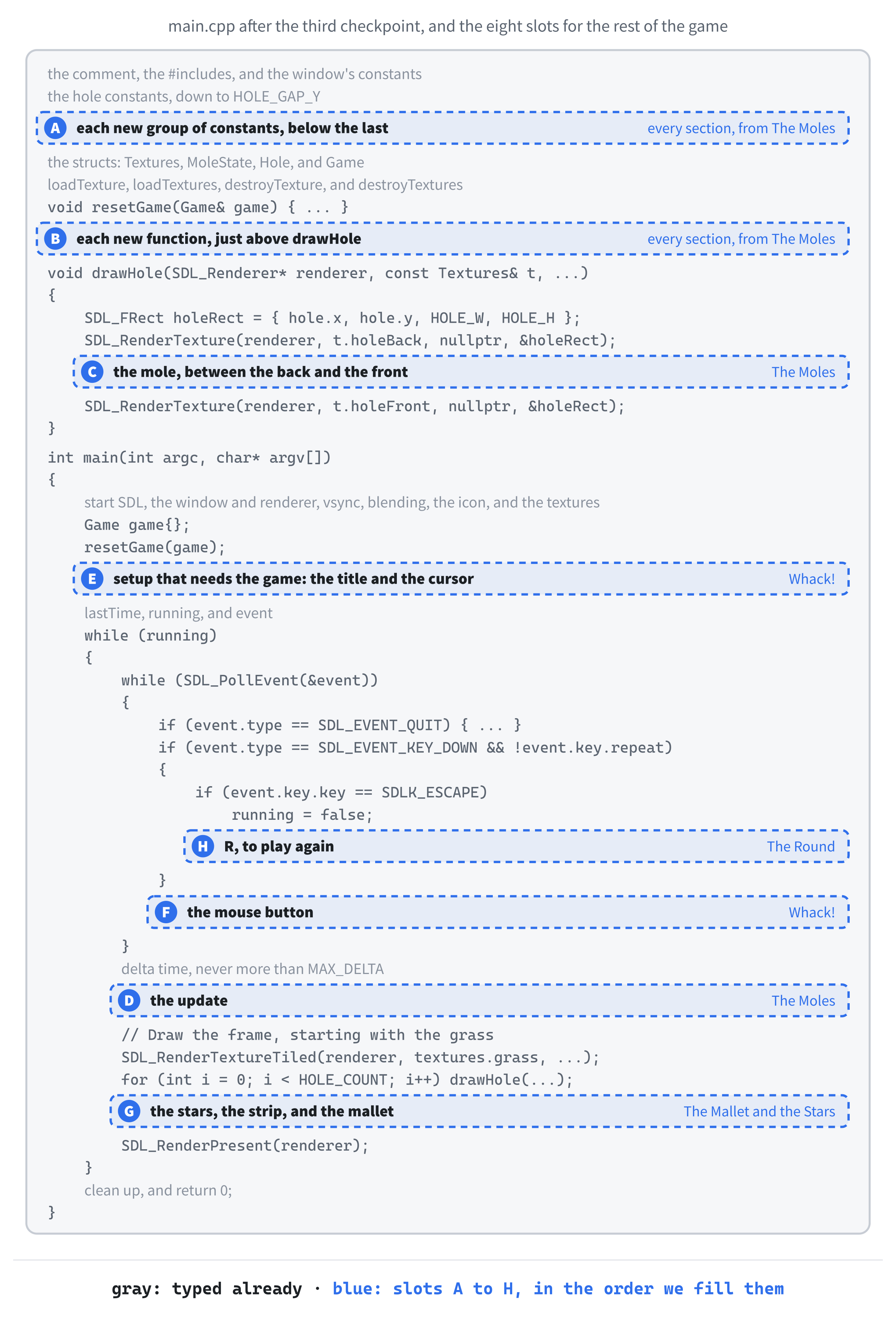
From here on, every block goes into a gap in the code you've already typed. Figure 11.3 is the map, and it has more slots than any project so far, but most of them only take a line or two. As in Chapter 9, several slots grow as we go: every new group of constants goes at the bottom of slot A, and every new function at the bottom of slot B, just above drawHole.
The moles need a lot of numbers, most of them about time. They go in slot A, at the bottom of the constants, below HOLE_GAP_Y, with a blank line in between:
// The moles, and the round
const float MOLE_W          = 120.0f;  // mole.png is 120 by 140
const float MOLE_OFFSET_X   = 40.0f;   // the mole's left edge, from the hole's
const float MOLE_BASE_Y     = 70.0f;   // its bottom edge, hidden by the lip
const float MOLE_MAX_SHOW   = 130.0f;  // pixels showing when it's fully up
const float RISE_SPEED      = 520.0f;  // pixels per second, going up or down
const float ROUND_TIME      = 60.0f;   // seconds in a round
const float START_UP_TIME   = 1.2f;    // how long a mole waits, at the start
const float END_UP_TIME     = 0.55f;   // and by the end of the round
const float START_SPAWN_GAP = 0.9f;    // seconds between moles, at the start
const float END_SPAWN_GAP   = 0.45f;   // and by the end
const int   SPAWN_TRIES     = 10;      // random holes to try for a new mole
In the preceding code, the first four constants place the mole within its hole. The mole is 120 pixels wide, and its left edge is 40 pixels in from the hole's, which centers it. Its bottom edge sits 70 pixels down from the hole's top, which is hidden behind the front lip, and when it's all the way up, 130 pixels of it are showing. It rises and sinks at 520 pixels a second, so it comes all the way up in a quarter of a second.
The rest are about time. A round lasts ROUND_TIME, sixty seconds. At the start, a mole waits at the top for 1.2 seconds, and a new mole comes up every 0.9 seconds. By the end of the round, a mole waits for just 0.55 seconds, and new ones come twice as often. Finally, SPAWN_TRIES limits how many random holes we'll try when we look for an empty one.
Now that a round has a length, resetGame can start the clock. Add these two lines to resetGame, between game.score = 0; and game.swingTimer = 0.0f;:
game.timeLeft = ROUND_TIME;
game.spawnTimer = START_SPAWN_GAP;
In the preceding code, the round gets its full sixty seconds, and the first mole is due after START_SPAWN_GAP seconds, every time a game starts.
To get from the starting values to the ending ones smoothly, we need a small piece of math. It goes in slot B, between the closing brace of resetGame and the // Draw one hole comment:
// A number partway from a to b: a when t is 0, and b when t is 1
float lerp(float a, float b, float t)
{
    return a + (b - a) * t;
}
In the preceding code, lerp, short for linear interpolation, finds the number that's a fraction t of the way from a to b. When t is 0, the answer is a, and when it's 1, the answer is b. In between, b - a is the whole distance, t times that is the part of it we've covered, and adding a starts us from the right place. Halfway through the round, lerp(1.2f, 0.55f, 0.5f) is 0.875, so a mole waits for 0.875 seconds. It's one of the most useful little functions in all of game programming, and you'll meet it again and again.
Next, a function to send a mole up. Add it below lerp, still above drawHole:
// Send a mole up out of a random empty hole, if one turns up quickly
void spawnMole(Game& game)
{
    for (int attempt = 0; attempt < SPAWN_TRIES; attempt++)
    {
        Hole& hole = game.holes[SDL_rand(HOLE_COUNT)];
        if (hole.state == MoleState::Hidden)
        {
            hole.state = MoleState::Rising;
            hole.facingLeft = (SDL_rand(2) == 0);
            return;
        }
    }
}
In the preceding code, the loop picks a hole at random, and if its mole is hidden, sends it up. The random number comes from SDL_rand, which is Chapter 9's SDL_randf in whole numbers: SDL_rand(HOLE_COUNT) gives a random int from 0 up to, but not including, 9, which is exactly the range of the holes. If the hole it picks is busy, the loop tries again, up to SPAWN_TRIES times, and if it never finds an empty hole, no mole comes up this time, which only happens when nearly every hole is busy.
When the loop finds an empty hole, the mole's state becomes Rising. The line after it is a coin toss: SDL_rand(2) is 0 or 1, so comparing it with 0 gives true half the time, and half the moles face left. Then return ends the function, because one mole is enough.
Now for the heart of the game: what a mole does, frame by frame, in each of its states. This is a job for Chapter 4's switch. Add the function below spawnMole:
// Move one mole through its life: up, a wait (or a bonk), and down again
void updateHole(Hole& hole, float delta, float upTime)
{
    switch (hole.state)
    {
    case MoleState::Hidden:
        break;

    case MoleState::Rising:
        hole.shown += RISE_SPEED * delta;
        if (hole.shown >= MOLE_MAX_SHOW)
        {
            hole.shown = MOLE_MAX_SHOW;
            hole.state = MoleState::Up;
            hole.timer = upTime;
        }
        break;
    }

    if (hole.starTimer > 0.0f)
        hole.starTimer -= delta;
}
In the preceding code, updateHole takes one hole by reference, delta, and upTime, which is how long a mole should wait at the top at this point in the round. The switch jumps to the case for the mole's current state. Each case names a value of the enumeration, with its MoleState:: in front, and the labels sit level with the switch's braces, as Chapter 4 described.
A hidden mole has nothing to do, so its case goes straight to break. A rising mole shows a few more pixels each frame, at RISE_SPEED. Once it's showing MOLE_MAX_SHOW pixels, it's all the way up: the line after the check snaps shown to exactly that, in case the last step overshot, and then the state becomes Up, and timer is set to upTime, which starts the wait.
Below the switch, the star's countdown runs down, whatever the mole is doing. Nothing sets a star going yet, but it'll be ready when something does.
The other three states come next. Add them inside the switch, below the Rising case's break;, with a blank line in between:
case MoleState::Up:
case MoleState::Bonked:
    hole.timer -= delta;
    if (hole.timer <= 0.0f)
        hole.state = MoleState::Sinking;
    break;

case MoleState::Sinking:
    hole.shown -= RISE_SPEED * delta;
    if (hole.shown <= 0.0f)
    {
        hole.shown = 0.0f;
        hole.state = MoleState::Hidden;
    }
    break;
In the preceding code, the Up and Bonked states share their code, because both mean "wait until the timer runs out." Stacking the two case labels, as Chapter 4 showed, sends both states to the same lines. The timer counts down, and when it runs out, the mole starts to sink. The Sinking case is Rising in reverse: the mole shows fewer pixels each frame, and once none are showing, it's hidden again, and its hole is free for the next mole. Figure 11.4 shows the whole life cycle.
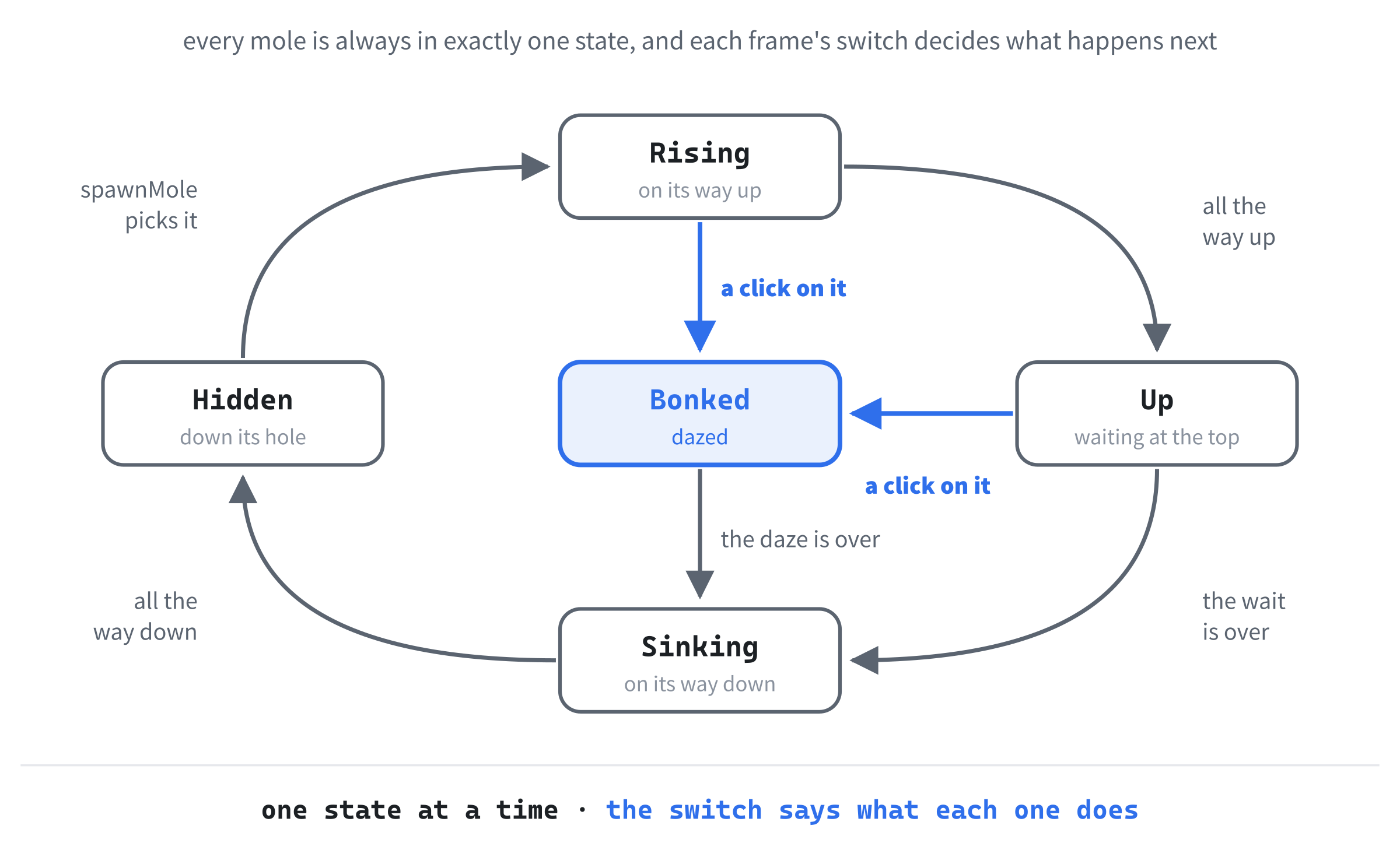
A state machine like this, where each thing is in exactly one named state, and a switch decides what that state does each frame, is one of the most common patterns in game code. Enemies, doors, menus, and whole games are built this way.
Now the function that moves the whole game on. Add it below updateHole:
// Move the whole game on by one frame
void updateGame(Game& game, float delta)
{
    if (game.swingTimer > 0.0f)
        game.swingTimer -= delta;

    // How far through the round we are: 0 at the start, and 1 at the end
    float progress = 1.0f - game.timeLeft / ROUND_TIME;
    float upTime = lerp(START_UP_TIME, END_UP_TIME, progress);

    for (int i = 0; i < HOLE_COUNT; i++)
        updateHole(game.holes[i], delta, upTime);

    if (game.gameOver)
        return;   // the moles finish what they're doing, but no more come
}
In the preceding code, the first line counts down the mallet's swing, which, like the star, has nothing to do yet. Then comes the difficulty ramp. The fraction of the round that's gone by is 1 minus the fraction that's left, so progress climbs from 0 at the start to 1 at the end, and lerp turns it into how long a mole should wait at the top right now. Then every hole gets its update.
If the round is over, the function stops there. The moles still finish what they were doing, so the ones that are up sink back down, but nothing else happens: no clock, and no new moles.
The rest of the function runs the clock, and sends in new moles. Add it below the return after if (game.gameOver), with a blank line in between:
game.timeLeft -= delta;
if (game.timeLeft <= 0.0f)
{
    game.timeLeft = 0.0f;
    game.gameOver = true;
    return;
}

game.spawnTimer -= delta;
if (game.spawnTimer <= 0.0f)
{
    spawnMole(game);
    game.spawnTimer = lerp(START_SPAWN_GAP, END_SPAWN_GAP, progress);
}
In the preceding code, the round's clock counts down, and when it reaches zero, the round is over. The clock is pinned at exactly 0, so that it never shows a negative time, and gameOver becomes true. Otherwise, the countdown to the next mole runs down, and when it reaches zero, spawnMole sends one up, and the countdown starts again, with a gap that lerp shrinks as the round goes on.
The last new function works out where a mole is on screen. Add it below updateGame:
// Where the showing part of a hole's mole is, on screen
SDL_FRect moleRect(const Hole& hole)
{
    SDL_FRect rect;
    rect.x = hole.x + MOLE_OFFSET_X;
    rect.y = hole.y + MOLE_BASE_Y - hole.shown;
    rect.w = MOLE_W;
    rect.h = hole.shown;
    return rect;
}
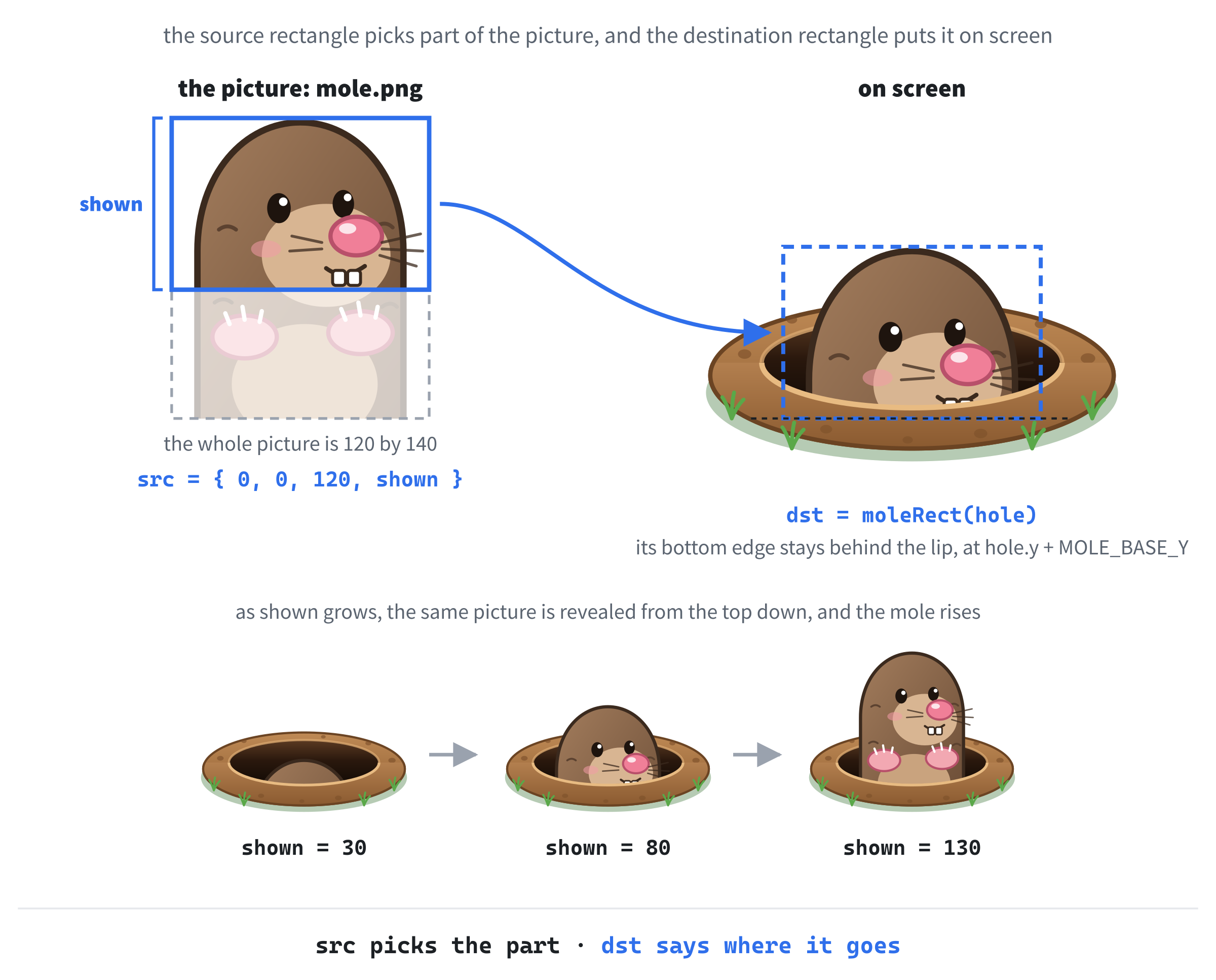
In the preceding code, moleRect returns an SDL_FRect: a function can return a whole struct, just as it can return an int. The rectangle covers only the part of the mole that's out of its hole. Its left edge is MOLE_OFFSET_X in from the hole's, and it's MOLE_W wide. Its bottom edge stays fixed at MOLE_BASE_Y below the hole's top, hidden by the lip, so its top is shown pixels above that, and it's shown pixels tall. As shown grows, the rectangle grows upward from a fixed base, and that's what makes the mole rise.
Now to draw the mole. This goes in slot C, inside drawHole, between its two SDL_RenderTexture calls, with a blank line on each side:
if (hole.shown > 0.0f)
{
    // Just the top of the mole: the part that's out of the hole
    SDL_FRect src = { 0.0f, 0.0f, MOLE_W, hole.shown };
    SDL_FRect dst = moleRect(hole);

    bool bonked = hole.state == MoleState::Bonked;
    SDL_Texture* picture = bonked ? t.moleBonked : t.mole;
    SDL_FlipMode flip = hole.facingLeft ? SDL_FLIP_HORIZONTAL
                                        : SDL_FLIP_NONE;
    SDL_RenderTextureRotated(renderer, picture, &src, &dst,
                             0.0, nullptr, flip);
}
In the preceding code, nothing is drawn unless some of the mole is showing. The first rectangle is new: a source rectangle says which part of the picture to use. It starts at the top-left of the mole picture, and it's shown pixels tall, so it takes just the top of the mole: the part that's out of the hole. The second rectangle is moleRect, the destination rectangle, which says where on screen that part goes, and it's exactly the same size. As Figure 11.5 shows, a rising mole is simply more and more of the same picture, revealed from the top down, with its base pinned behind the lip.
The next three lines choose how to draw it. The bonked flag is true for a dazed mole, and Chapter 4's ternary picks the bonked picture for one of those, and the ordinary mole otherwise. We won't bonk anything until the next section, but the drawing will be ready. Another ternary picks the flip: SDL_FLIP_HORIZONTAL, which draws the picture mirrored, left to right, for a mole that faces left, and SDL_FLIP_NONE otherwise. The expression is split over two lines, with the : lined up under the ?.
Finally, SDL_RenderTextureRotated draws it. It's SDL_RenderTexture with three more arguments: an angle to turn the picture by, a point to turn it around, and a flip. We don't want any turning, so the angle is 0, and the point is nullptr, but it's the drawing function that takes a flip, and one picture that can face both ways is half as many pictures to draw.
The order in drawHole is the whole trick. Each thing drawn goes on top of what's there already, so drawing the back, then the mole, then the front lip puts the lip over the bottom of the mole. The mole seems to come up out of the hole, rather than float in front of it. This is called the painter's algorithm, because it's how a painter works: background first, foreground last. Figure 11.6 takes one hole apart.

The last piece is the update itself. It goes in slot D, in the game loop, between the delta time lines and the // Draw the frame comment, with a blank line on each side:
// Move the game on by one frame
updateGame(game, delta);
In the preceding code, updateGame moves the whole game on by one frame's worth of time, every frame.
Checkpoint: Press F5. After a moment, moles start popping up out of the holes at random, some facing left and some facing right. Each one rises, waits, and sinks back down. Watch closely, and you'll see them come and go faster as the round goes on. After sixty seconds, they stop coming, because the round is over, even though there's nothing on screen to say so yet.
Whack!
Time to fight back. First, the numbers for bonking. They go in slot A, below SPAWN_TRIES, with a blank line in between:
// Bonking, and the timers that a click starts
const float     BONK_TIME  = 0.4f;     // how long a bonked mole stays dazed
const float     FLASH_TIME = 0.1f;     // how long it flashes red
const SDL_Color FLASH_TINT = { 255, 120, 120, 255 };   // the red of the flash
const float     SWING_TIME = 0.15f;    // seconds for the mallet to swing back
const float     STAR_TIME  = 0.4f;     // seconds for a star to fade away
In the preceding code, a bonked mole stays dazed for 0.4 seconds, and for the first tenth of a second, it flashes red, using the tint in FLASH_TINT. A click also starts two timers: the mallet takes 0.15 seconds to swing, and a star takes 0.4 seconds to fade. We'll draw those shortly.
Now the function that works out whether a click hit anything. It goes in slot B, below moleRect:
// Bonk the mole under the mallet, if there is one, and report a hit
bool whack(Game& game, float mouseX, float mouseY)
{
    SDL_FPoint point = { mouseX, mouseY };

    for (int i = 0; i < HOLE_COUNT; i++)
    {
        Hole& hole = game.holes[i];
        bool hittable = hole.state == MoleState::Rising ||
                        hole.state == MoleState::Up;
        SDL_FRect rect = moleRect(hole);

        if (hittable && SDL_PointInRectFloat(&point, &rect))
        {
            hole.state = MoleState::Bonked;
            hole.timer = BONK_TIME;
            hole.starTimer = STAR_TIME;
            game.score++;
            return true;
        }
    }
    return false;
}
In the preceding code, whack gets the mouse position when the button was pressed, and turns it into an SDL_FPoint, SDL's struct for a point, with an x and a y. Then it checks every hole. Only a mole that's rising or up can be hit, because a hidden mole is out of reach, a sinking one has gone, and bonking a dazed mole twice would be unsporting. The check itself is SDL_PointInRectFloat, which answers whether a point is inside a rectangle, and the rectangle is moleRect, so a click only counts if it lands on the part of the mole that's out of its hole.
On a hit, the mole is Bonked, its timer starts its daze, its star starts, and the score goes up by one. Then the function returns true, because a single click can only bonk one mole. If the loop finishes without a hit, the function returns false.
The score belongs in the title bar, as Chapter 2 promised. Add this below whack:
// Show the score in the title bar, and how to play again once time's up
void updateTitle(SDL_Window* window, const Game& game)
{
    std::string title = "Whack-a-Mole    Score: " +
                        std::to_string(game.score);
    if (game.gameOver)
        title += "    (press R to play again)";

    SDL_SetWindowTitle(window, title.c_str());
}
In the preceding code, the title is built as a std::string. The std::to_string function, from the <string> header, turns a number into text, so a score of 7 becomes "7", and then + joins it onto the end of the rest of the title, just as Chapter 2 joined strings together. If the round is over, += adds a reminder of how to play again to the end.
The last line hands the title to SDL_SetWindowTitle, which sets the window's title. SDL is written in C, though, and C has no std::string, so the function wants a const char*, the same kind of text as loadTexture’s path. A string's c_str function hands over its text in exactly that form.
Next, the red flash. The flash is a tint, and a tint has to be set before the mole is drawn. Add this inside drawHole’s mole block, between the SDL_FlipMode lines and SDL_RenderTextureRotated, with a blank line on each side:
// A quick red flash, just after a hit
bool flashing = bonked && hole.timer > BONK_TIME - FLASH_TIME;
if (flashing)
{
    SDL_SetTextureColorMod(picture, FLASH_TINT.r, FLASH_TINT.g,
                           FLASH_TINT.b);
}
In the preceding code, the mole is flashing if it's bonked, and its timer still has more than BONK_TIME - FLASH_TIME left, which is true for the first tenth of a second of its daze. The call to SDL_SetTextureColorMod sets a texture's color modulation: every pixel's red, green, and blue are multiplied by the three numbers given, divided by 255. A red of 255 leaves the red just as it was, while green and blue at 120 bring them down to less than half, so the whole mole turns a warm red, as Figure 11.7 shows.
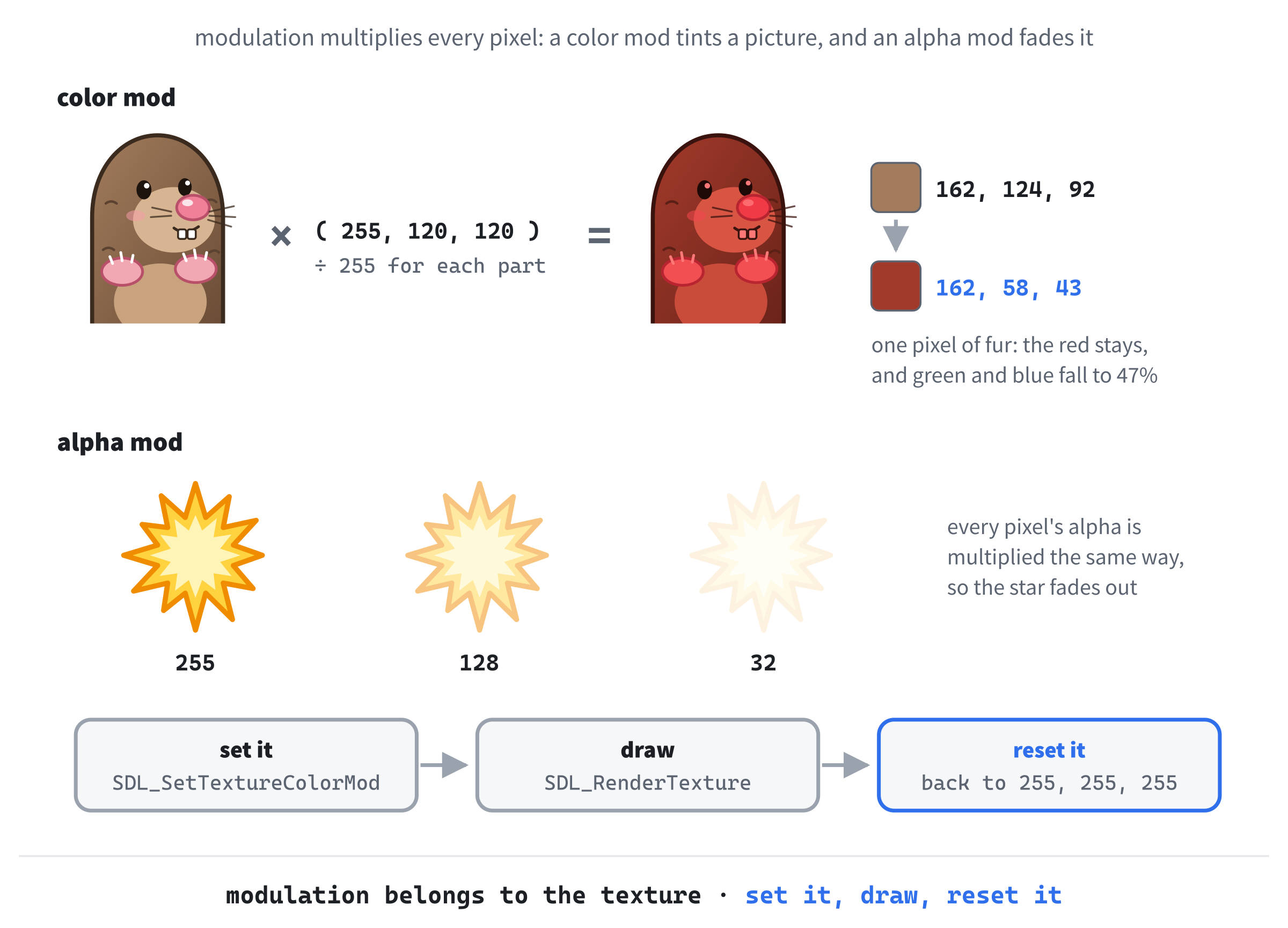
There's a catch. The color modulation belongs to the texture, not to one drawing of it, so it stays set until something changes it, and every mole drawn with that picture afterward would be red too. So, as soon as the mole is drawn, the tint has to come off. Add this below the SDL_RenderTextureRotated call, still inside the mole block, with a blank line in between:
if (flashing)
    SDL_SetTextureColorMod(picture, 255, 255, 255);   // back to normal
In the preceding code, a modulation of 255, 255, 255 multiplies every part of every pixel by 1, which is no tint at all. The pattern is always the same: set it, draw, reset it.
Forget the reset, and nothing complains. The bonked picture simply stays tinted, so every dazed mole from then on is red for its whole daze, not just the first tenth of a second. The same goes for alpha modulation, which we'll use for the stars. Whenever you change a texture's modulation to draw it, change it back as soon as you've drawn it.
The title bar should show the score from the start, so it needs setting once before the game begins. Add this in slot E, below resetGame(game); in main:
updateTitle(window, game);In the preceding code, the title changes from plain Whack-a-Mole to Whack-a-Mole, with a score of 0.
Finally, the click itself. It goes in slot F, inside the event loop, below the closing brace of the key-down check:
if (event.type == SDL_EVENT_MOUSE_BUTTON_DOWN &&
    event.button.button == SDL_BUTTON_LEFT)
{
    game.swingTimer = SWING_TIME;
    if (!game.gameOver &&
        whack(game, event.button.x, event.button.y))
    {
        updateTitle(window, game);
    }
}
In the preceding code, a mouse click arrives as an SDL_EVENT_MOUSE_BUTTON_DOWN event. Its button part says which button it was, and where the pointer was: event.button.button is SDL_BUTTON_LEFT for the left button, and event.button.x and event.button.y give the position in the window. The condition is long enough to split over two lines, and the braces go with it.
Any left click swings the mallet, by starting its timer, even if it misses. Then, as long as the round isn't over, whack tries for a hit, and if it gets one, the title bar is updated with the new score. The title isn't changed every frame, only when there's something new to show, because there's no sense in asking Windows to redraw the title bar sixty times a second when its text hasn't changed. The inner condition is split over two lines, too, so it gets braces as well.
Checkpoint: Press F5, and click on the moles. A bonked mole flashes red, its eyes cross, and it sinks back down after its daze, and the score in the title bar goes up by one. Clicks that miss, or that land on a sinking mole, do nothing at all.
The Mallet and the Stars
A game about hitting things needs something to hit them with. First, the numbers for the mallet and the star. They go in slot A, below STAR_TIME, with a blank line in between:
// The mallet, and the star that bursts out of a bonked mole
const float      MALLET_SIZE  = 128.0f;              // mallet.png is 128 by 128
const SDL_FPoint MALLET_HEAD  = { 44.0f, 44.0f };    // its head, in the image
const SDL_FPoint MALLET_PIVOT = { 110.5f, 110.5f };  // its handle's end
const double     SWING_ANGLE  = -35.0;    // degrees of tilt at the hit
const float      STAR_SIZE    = 96.0f;    // star.png is 96 by 96
const float      STAR_GROWTH  = 0.5f;     // how much bigger it grows
const float      STAR_Y       = -40.0f;   // its center, from the hole's top
In the preceding code, the mallet picture is 128 pixels square, and the next two constants are points inside that picture, measured from its top-left corner. The first, MALLET_HEAD, is the middle of the mallet's head, which should sit right under the mouse, and the second, MALLET_PIVOT, is the end of the handle, which the mallet turns around when it swings. At the moment of a hit, it's tilted by 35 degrees. The star picture is 96 pixels square, it grows by half its size as it fades, and its center is 40 pixels above the hole's top, which is right by a risen mole's head.
Now the star. It goes in slot B, below updateTitle:
// Draw a hole's star, growing and fading as its timer runs down
void drawStar(SDL_Renderer* renderer, const Textures& t, const Hole& hole)
{
    if (hole.starTimer <= 0.0f)
        return;

    float life = hole.starTimer / STAR_TIME;   // 1 when it's new, 0 at the end
    float size = STAR_SIZE * (1.0f + STAR_GROWTH * (1.0f - life));
    float centerX = hole.x + HOLE_W / 2.0f;
    float centerY = hole.y + STAR_Y;
    SDL_FRect dst = { centerX - size / 2.0f, centerY - size / 2.0f,
                      size, size };

    SDL_SetTextureAlphaMod(t.star, static_cast<Uint8>(255.0f * life));
    SDL_RenderTexture(renderer, t.star, nullptr, &dst);
    SDL_SetTextureAlphaMod(t.star, 255);   // solid again, for next time
}
In the preceding code, a hole whose star has run out has nothing to draw, so the function returns right away. Otherwise, life is how much of the star's time is left, as a fraction: 1 when it's new, falling to 0 as it ends. The size grows as life falls, from STAR_SIZE up to one and a half times that. The center is halfway across the hole, and STAR_Y above its top, and the destination rectangle is built around that center, half the size to the left and half above.
Then comes the fade, with SDL_SetTextureAlphaMod, which is modulation for alpha: it multiplies how solid each pixel is by the number given, divided by 255. We give it life times 255, so a new star is fully solid, and a nearly finished one is almost invisible. The function wants a Uint8, one of Chapter 2's exact-size types, so static_cast converts the float. Then we draw the star, and reset the alpha to 255, following the rule from the warning above.
Now the mallet. Add this below drawStar:
// Draw the mallet with its head over the mouse. While it swings, it's
// tilted around the end of its handle, easing back upright.
void drawMallet(SDL_Renderer* renderer, const Textures& t,
                float mouseX, float mouseY, float swingTimer)
{
    SDL_FRect dst = { mouseX - MALLET_HEAD.x, mouseY - MALLET_HEAD.y,
                      MALLET_SIZE, MALLET_SIZE };

    double angle = 0.0;
    if (swingTimer > 0.0f)
        angle = SWING_ANGLE * (swingTimer / SWING_TIME);

    SDL_RenderTextureRotated(renderer, t.mallet, nullptr, &dst,
                             angle, &MALLET_PIVOT, SDL_FLIP_NONE);
}
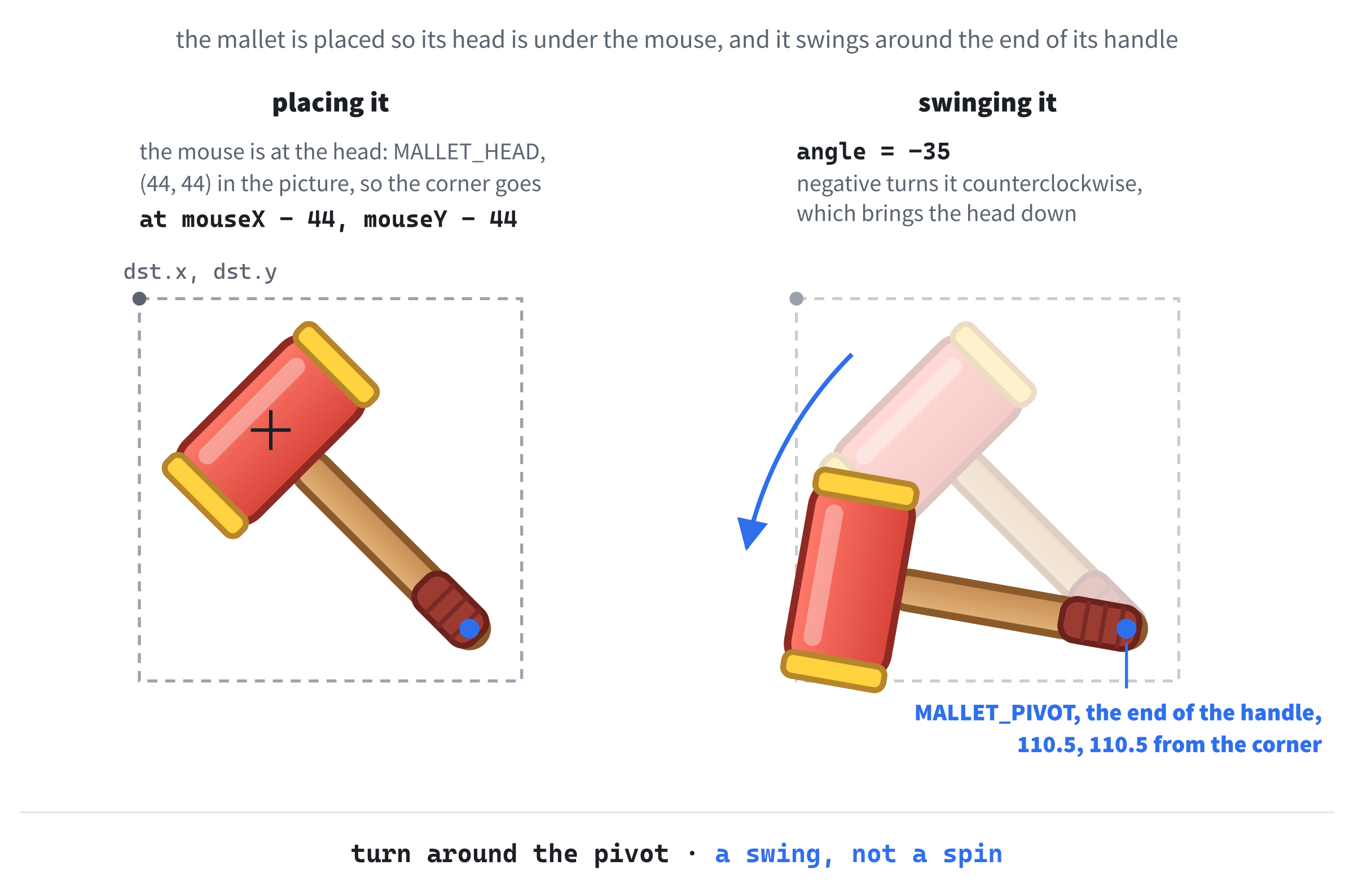
In the preceding code, the destination rectangle puts the mallet picture so that its head, not its top-left corner, sits under the mouse: subtracting MALLET_HEAD from the mouse position moves the corner up and to the left by just the right amount. If the mallet is swinging, its angle is SWING_ANGLE times the fraction of the swing that's left, so it starts tilted by 35 degrees and eases back upright as swingTimer runs out.
Then SDL_RenderTextureRotated draws it, and this time, the angle and the point matter. The angle is in degrees, and a positive angle turns the picture clockwise, so ours, which is negative, turns it counterclockwise, which brings the head down, as if it's striking. The point is the pivot, measured from the top-left of the destination rectangle, and the picture turns around it, as Figure 11.8 shows. Turning around the end of the handle, rather than the middle of the picture, is what makes it look like a swing, and not a spin.
With a mallet to look at, we can hide the ordinary mouse pointer. Add this in slot E, below updateTitle(window, game);, with a blank line in between:
SDL_HideCursor(); // the mallet is the mouse pointer nowIn the preceding code, SDL_HideCursor hides the mouse pointer while it's over our window. The mouse still works exactly as before; you just can't see its arrow.
Now to draw them. The stars go in slot G, in the drawing, below the loop that draws the holes:
for (int i = 0; i < HOLE_COUNT; i++)
    drawStar(renderer, textures, game.holes[i]);
In the preceding code, the stars get a loop of their own, after the holes. With this layout, no star reaches the row below, but a bigger star, or rows closer together, would be covered by the next row if each star were drawn with its own hole. Drawing them all afterward keeps every star on top, whatever the layout.
The mallet comes last of all, so that it's on top of everything. Add this below the stars' loop, with a blank line in between:
float mouseX = 0.0f;
float mouseY = 0.0f;
SDL_GetMouseState(&mouseX, &mouseY);
drawMallet(renderer, textures, mouseX, mouseY, game.swingTimer);
In the preceding code, SDL_GetMouseState fills in the mouse's current position, through the two pointers it's given, just as SDL_PollEvent fills in an event. It also returns which buttons are held, but we don't need that. Then drawMallet draws the mallet there, swinging if it's been clicked recently.
Checkpoint: Press F5. The mouse pointer is now a mallet, and it swings with every click. Bonk a mole, and a star bursts out of its head, growing and fading as the mole reels.
The Round
The last piece is the strip across the top of the window, which shows the game's title and a bar for the time left, and the banner at the end of the round. First, their numbers. They go in slot A, below STAR_Y, with a blank line in between:
// The strip across the top of the window, and the end of the round
const float     STRIP_H     = 70.0f;
const float     TITLE_X     = 12.0f;    // where the title goes in the strip
const float     TITLE_Y     = 2.0f;
const float     TITLE_SCALE = 0.4f;     // title.png shrunk to fit the strip
const SDL_FRect TIMER_BAR   = { 470.0f, 24.0f, 300.0f, 22.0f };
const float     BAR_INSET   = 4.0f;     // the gap inside the bar's frame

const SDL_Color STRIP_COLOR = { 20, 50, 20, 110 };     // see-through green
const SDL_Color FRAME_COLOR = { 255, 255, 255, 255 };  // white
const SDL_Color BAR_COLOR   = { 155, 225, 93, 255 };   // bright green
const SDL_Color DIM_COLOR   = { 0, 0, 0, 120 };        // see-through black
In the preceding code, the strip is 70 pixels tall. The title picture goes near its top-left corner, shrunk to 40 percent of its full size, and the timer bar is a rectangle in the strip's right-hand side, with a 4-pixel gap inside its frame. Of the colors, two are see-through: the strip's green has an alpha of 110, and the black that dims the field has 120, which is what the blend mode in the setup was for.
The strip is drawn with filled rectangles, so Chapter 9's drawRect comes back. Add it in slot B, below drawMallet:
// Fill a rectangle with a color
void drawRect(SDL_Renderer* renderer, const SDL_FRect& rect,
              const SDL_Color& color)
{
    SDL_SetRenderDrawColor(renderer, color.r, color.g, color.b, color.a);
    SDL_RenderFillRect(renderer, &rect);
}
In the preceding code, drawRect sets the draw color from an SDL_Color, and fills the rectangle, exactly as in Chapter 9.
Now the strip itself, in a function called drawHud, since games call the information drawn over the game its HUD, short for heads-up display. Add this below drawRect:
// The strip across the top: the title on the left, and the timer bar
void drawHud(SDL_Renderer* renderer, const Textures& t, const Game& game)
{
    SDL_FRect strip = { 0.0f, 0.0f, static_cast<float>(WINDOW_W), STRIP_H };
    drawRect(renderer, strip, STRIP_COLOR);

    float titleW = 0.0f;
    float titleH = 0.0f;
    SDL_GetTextureSize(t.title, &titleW, &titleH);
    SDL_FRect titleRect = { TITLE_X, TITLE_Y,
                            titleW * TITLE_SCALE, titleH * TITLE_SCALE };
    SDL_RenderTexture(renderer, t.title, nullptr, &titleRect);

    SDL_SetRenderDrawColor(renderer, FRAME_COLOR.r, FRAME_COLOR.g,
                           FRAME_COLOR.b, FRAME_COLOR.a);
    SDL_RenderRect(renderer, &TIMER_BAR);

    float fraction = game.timeLeft / ROUND_TIME;   // 1 when full, 0 when empty
    SDL_FRect fill = { TIMER_BAR.x + BAR_INSET, TIMER_BAR.y + BAR_INSET,
                       (TIMER_BAR.w - 2.0f * BAR_INSET) * fraction,
                       TIMER_BAR.h - 2.0f * BAR_INSET };
    drawRect(renderer, fill, BAR_COLOR);
}
In the preceding code, the first two lines fill the strip with see-through green, across the whole width of the window. The window's width, WINDOW_W, is an int, and an SDL_FRect holds float values, so static_cast converts it, as Chapter 2 taught.
The title picture is 560 by 150, far too big for the strip, so we ask SDL for its size with SDL_GetTextureSize, which fills in the width and height through two pointers, and then draw it at 40 percent of that. Asking the texture for its size, rather than typing 560 and 150 again, means the code still works if the picture ever changes.
Next, the timer bar. Its white frame comes from SDL_RenderRect, which draws the outline of a rectangle without filling it. Inside it, the green fill is inset by BAR_INSET on every side, and its width is the inside width times the fraction of the round that's left, so the bar shrinks from full to empty over the sixty seconds.
At the end of the round, the field dims and a banner appears. Add this below drawHud:
// Dim the whole field, and show the "Time's up!" banner in the middle
void drawTimesUp(SDL_Renderer* renderer, const Textures& t)
{
    SDL_FRect everything = { 0.0f, 0.0f, static_cast<float>(WINDOW_W),
                             static_cast<float>(WINDOW_H) };
    drawRect(renderer, everything, DIM_COLOR);

    float w = 0.0f;
    float h = 0.0f;
    SDL_GetTextureSize(t.timesUp, &w, &h);
    SDL_FRect dst = { (WINDOW_W - w) / 2.0f, (WINDOW_H - h) / 2.0f, w, h };
    SDL_RenderTexture(renderer, t.timesUp, nullptr, &dst);
}
In the preceding code, a see-through black rectangle covers the whole window, darkening everything under it. Then the banner goes in the middle of the window, at its full size, which SDL_GetTextureSize tells us: half the window's width, less half the banner's width, and the same for the height.
Both go in slot G, in the drawing, between the stars' loop and the float mouseX line, so that the mallet is still drawn over them. Leave a blank line on each side:
drawHud(renderer, textures, game);
if (game.gameOver)
    drawTimesUp(renderer, textures);
In the preceding code, the strip is drawn every frame, and the dimming and the banner only once the round is over.
Now for playing again. Add this in slot H, inside the key-down check, directly below the running = false; under if (event.key.key == SDLK_ESCAPE):
else if (event.key.key == SDLK_R && game.gameOver)
{
    resetGame(game);
    updateTitle(window, game);
}
In the preceding code, the new lines carry on from the Escape check, as an else if, and they need braces, because there are two of them. R only works once the round is over, so a stray press in the middle of a game does nothing. It resets the game, as resetGame did at the start, and updates the title bar, which takes away the "press R" reminder, and shows the score back at 0.
There's one last thing. The title bar should say "press R to play again" as soon as time runs out, and the only code that knows when that happens is updateGame. So we note whether the game was over before the update, and compare afterward. Add this in slot D, between the // Move the game on by one frame comment and updateGame(game, delta);:
bool wasOver = game.gameOver;In the preceding code, wasOver keeps a copy of gameOver, from before this frame's update.
Then, to compare the two, add this below updateGame(game, delta);:
if (game.gameOver != wasOver)
    updateTitle(window, game);   // the round has just ended
In the preceding code, if gameOver is different after the update, the round has just ended, during this very frame, so it's time to update the title. It happens once, at the moment it's needed, rather than every frame.
Checkpoint: Press F5, and you have the complete game. The title and the timer bar sit in a see-through strip across the top, and the bar shrinks as the round goes on. When it runs out, the field dims, the banner says "Time's up!", and the title bar tells you to press R. Press it, and a new round begins.
That fills the last slot, and the game is finished.
The Complete Program
Here's the whole file in one piece, with every line at its real indentation. If you've typed every block in the place described, this is exactly what you have:
/*
    Whack-a-Mole
    The Chapter 11 project from Learning C++ by Building Games

    Moles pop up out of nine holes. Click one with the mallet to bonk
    it before it drops back down. You have sixty seconds, and the moles
    get quicker as the clock runs down. When time's up, press R to play
    again, or Escape to quit.

    New in this project: SDL3_image. Every picture is a PNG file in the
    assets folder, loaded into an SDL_Texture.
*/

#include <SDL3/SDL.h>
#include <SDL3/SDL_main.h>
#include <SDL3_image/SDL_image.h>

#include <string>   // std::string and std::to_string, for the title bar

const int   WINDOW_W  = 800;    // window width in pixels
const int   WINDOW_H  = 600;    // window height in pixels
const float MAX_DELTA = 0.1f;   // the longest frame we'll allow, in seconds

// The holes: three rows of three
const int   HOLE_COLS    = 3;
const int   HOLE_ROWS    = 3;
const int   HOLE_COUNT   = HOLE_COLS * HOLE_ROWS;
const float HOLE_W       = 200.0f;   // hole_back.png and hole_front.png
const float HOLE_H       = 100.0f;   // are both 200 by 100
const float FIRST_HOLE_X = 70.0f;    // the top-left hole's top-left corner
const float FIRST_HOLE_Y = 176.0f;
const float HOLE_GAP_X   = 230.0f;   // from one hole to the next, across
const float HOLE_GAP_Y   = 160.0f;   // and down

// The moles, and the round
const float MOLE_W          = 120.0f;  // mole.png is 120 by 140
const float MOLE_OFFSET_X   = 40.0f;   // the mole's left edge, from the hole's
const float MOLE_BASE_Y     = 70.0f;   // its bottom edge, hidden by the lip
const float MOLE_MAX_SHOW   = 130.0f;  // pixels showing when it's fully up
const float RISE_SPEED      = 520.0f;  // pixels per second, going up or down
const float ROUND_TIME      = 60.0f;   // seconds in a round
const float START_UP_TIME   = 1.2f;    // how long a mole waits, at the start
const float END_UP_TIME     = 0.55f;   // and by the end of the round
const float START_SPAWN_GAP = 0.9f;    // seconds between moles, at the start
const float END_SPAWN_GAP   = 0.45f;   // and by the end
const int   SPAWN_TRIES     = 10;      // random holes to try for a new mole

// Bonking, and the timers that a click starts
const float     BONK_TIME  = 0.4f;     // how long a bonked mole stays dazed
const float     FLASH_TIME = 0.1f;     // how long it flashes red
const SDL_Color FLASH_TINT = { 255, 120, 120, 255 };   // the red of the flash
const float     SWING_TIME = 0.15f;    // seconds for the mallet to swing back
const float     STAR_TIME  = 0.4f;     // seconds for a star to fade away

// The mallet, and the star that bursts out of a bonked mole
const float      MALLET_SIZE  = 128.0f;              // mallet.png is 128 by 128
const SDL_FPoint MALLET_HEAD  = { 44.0f, 44.0f };    // its head, in the image
const SDL_FPoint MALLET_PIVOT = { 110.5f, 110.5f };  // its handle's end
const double     SWING_ANGLE  = -35.0;    // degrees of tilt at the hit
const float      STAR_SIZE    = 96.0f;    // star.png is 96 by 96
const float      STAR_GROWTH  = 0.5f;     // how much bigger it grows
const float      STAR_Y       = -40.0f;   // its center, from the hole's top

// The strip across the top of the window, and the end of the round
const float     STRIP_H     = 70.0f;
const float     TITLE_X     = 12.0f;    // where the title goes in the strip
const float     TITLE_Y     = 2.0f;
const float     TITLE_SCALE = 0.4f;     // title.png shrunk to fit the strip
const SDL_FRect TIMER_BAR   = { 470.0f, 24.0f, 300.0f, 22.0f };
const float     BAR_INSET   = 4.0f;     // the gap inside the bar's frame

const SDL_Color STRIP_COLOR = { 20, 50, 20, 110 };     // see-through green
const SDL_Color FRAME_COLOR = { 255, 255, 255, 255 };  // white
const SDL_Color BAR_COLOR   = { 155, 225, 93, 255 };   // bright green
const SDL_Color DIM_COLOR   = { 0, 0, 0, 120 };        // see-through black

// Every picture in the game, each one starting as "not loaded yet"
struct Textures
{
    SDL_Texture* grass      = nullptr;
    SDL_Texture* holeBack   = nullptr;
    SDL_Texture* holeFront  = nullptr;
    SDL_Texture* mole       = nullptr;
    SDL_Texture* moleBonked = nullptr;
    SDL_Texture* mallet     = nullptr;
    SDL_Texture* star       = nullptr;
    SDL_Texture* title      = nullptr;
    SDL_Texture* timesUp    = nullptr;
};

// The five things a mole can be doing
enum class MoleState
{
    Hidden,    // down its hole
    Rising,    // on its way up
    Up,        // waiting to be bonked
    Bonked,    // dazed after a hit
    Sinking    // on its way back down
};

// One hole, and the mole that lives in it
struct Hole
{
    float x;             // the hole's top-left corner on screen
    float y;
    MoleState state;
    float shown;         // how many pixels of the mole are showing
    float timer;         // seconds left while it's Up or Bonked
    float starTimer;     // seconds left on this hole's star
    bool facingLeft;     // true to draw the mole flipped
};

// Everything that changes while you play
struct Game
{
    Hole holes[HOLE_COUNT];
    int score;
    float timeLeft;      // seconds left in the round
    float spawnTimer;    // seconds until the next mole comes up
    float swingTimer;    // seconds left in the mallet's swing
    bool gameOver;
};

// Load one PNG into a texture, or say why it failed and return nullptr
SDL_Texture* loadTexture(SDL_Renderer* renderer, const char* path)
{
    SDL_Texture* texture = IMG_LoadTexture(renderer, path);
    if (texture == nullptr)
        SDL_Log("Couldn't load %s: %s", path, SDL_GetError());
    return texture;
}

// Load every picture, and report whether they all loaded
bool loadTextures(SDL_Renderer* renderer, Textures& t)
{
    t.grass      = loadTexture(renderer, "assets/grass.png");
    t.holeBack   = loadTexture(renderer, "assets/hole_back.png");
    t.holeFront  = loadTexture(renderer, "assets/hole_front.png");
    t.mole       = loadTexture(renderer, "assets/mole.png");
    t.moleBonked = loadTexture(renderer, "assets/mole_bonked.png");
    t.mallet     = loadTexture(renderer, "assets/mallet.png");
    t.star       = loadTexture(renderer, "assets/star.png");
    t.title      = loadTexture(renderer, "assets/title.png");
    t.timesUp    = loadTexture(renderer, "assets/times_up.png");

    return t.grass && t.holeBack && t.holeFront && t.mole && t.moleBonked
        && t.mallet && t.star && t.title && t.timesUp;
}

// Destroy one texture, and set the caller's pointer back to nullptr
void destroyTexture(SDL_Texture*& texture)
{
    if (texture != nullptr)
    {
        SDL_DestroyTexture(texture);
        texture = nullptr;
    }
}

// Destroy every picture: safe even if some of them never loaded
void destroyTextures(Textures& t)
{
    destroyTexture(t.grass);
    destroyTexture(t.holeBack);
    destroyTexture(t.holeFront);
    destroyTexture(t.mole);
    destroyTexture(t.moleBonked);
    destroyTexture(t.mallet);
    destroyTexture(t.star);
    destroyTexture(t.title);
    destroyTexture(t.timesUp);
}

// Put every hole in its place, send every mole down, and reset the clock
void resetGame(Game& game)
{
    for (int i = 0; i < HOLE_COUNT; i++)
    {
        Hole& hole = game.holes[i];
        int col = i % HOLE_COLS;
        int row = i / HOLE_COLS;
        hole.x = FIRST_HOLE_X + col * HOLE_GAP_X;
        hole.y = FIRST_HOLE_Y + row * HOLE_GAP_Y;
        hole.state = MoleState::Hidden;
        hole.shown = 0.0f;
        hole.timer = 0.0f;
        hole.starTimer = 0.0f;
        hole.facingLeft = false;
    }

    game.score = 0;
    game.timeLeft = ROUND_TIME;
    game.spawnTimer = START_SPAWN_GAP;
    game.swingTimer = 0.0f;
    game.gameOver = false;
}

// A number partway from a to b: a when t is 0, and b when t is 1
float lerp(float a, float b, float t)
{
    return a + (b - a) * t;
}

// Send a mole up out of a random empty hole, if one turns up quickly
void spawnMole(Game& game)
{
    for (int attempt = 0; attempt < SPAWN_TRIES; attempt++)
    {
        Hole& hole = game.holes[SDL_rand(HOLE_COUNT)];
        if (hole.state == MoleState::Hidden)
        {
            hole.state = MoleState::Rising;
            hole.facingLeft = (SDL_rand(2) == 0);
            return;
        }
    }
}

// Move one mole through its life: up, a wait (or a bonk), and down again
void updateHole(Hole& hole, float delta, float upTime)
{
    switch (hole.state)
    {
    case MoleState::Hidden:
        break;

    case MoleState::Rising:
        hole.shown += RISE_SPEED * delta;
        if (hole.shown >= MOLE_MAX_SHOW)
        {
            hole.shown = MOLE_MAX_SHOW;
            hole.state = MoleState::Up;
            hole.timer = upTime;
        }
        break;

    case MoleState::Up:
    case MoleState::Bonked:
        hole.timer -= delta;
        if (hole.timer <= 0.0f)
            hole.state = MoleState::Sinking;
        break;

    case MoleState::Sinking:
        hole.shown -= RISE_SPEED * delta;
        if (hole.shown <= 0.0f)
        {
            hole.shown = 0.0f;
            hole.state = MoleState::Hidden;
        }
        break;
    }

    if (hole.starTimer > 0.0f)
        hole.starTimer -= delta;
}

// Move the whole game on by one frame
void updateGame(Game& game, float delta)
{
    if (game.swingTimer > 0.0f)
        game.swingTimer -= delta;

    // How far through the round we are: 0 at the start, and 1 at the end
    float progress = 1.0f - game.timeLeft / ROUND_TIME;
    float upTime = lerp(START_UP_TIME, END_UP_TIME, progress);

    for (int i = 0; i < HOLE_COUNT; i++)
        updateHole(game.holes[i], delta, upTime);

    if (game.gameOver)
        return;   // the moles finish what they're doing, but no more come

    game.timeLeft -= delta;
    if (game.timeLeft <= 0.0f)
    {
        game.timeLeft = 0.0f;
        game.gameOver = true;
        return;
    }

    game.spawnTimer -= delta;
    if (game.spawnTimer <= 0.0f)
    {
        spawnMole(game);
        game.spawnTimer = lerp(START_SPAWN_GAP, END_SPAWN_GAP, progress);
    }
}

// Where the showing part of a hole's mole is, on screen
SDL_FRect moleRect(const Hole& hole)
{
    SDL_FRect rect;
    rect.x = hole.x + MOLE_OFFSET_X;
    rect.y = hole.y + MOLE_BASE_Y - hole.shown;
    rect.w = MOLE_W;
    rect.h = hole.shown;
    return rect;
}

// Bonk the mole under the mallet, if there is one, and report a hit
bool whack(Game& game, float mouseX, float mouseY)
{
    SDL_FPoint point = { mouseX, mouseY };

    for (int i = 0; i < HOLE_COUNT; i++)
    {
        Hole& hole = game.holes[i];
        bool hittable = hole.state == MoleState::Rising ||
                        hole.state == MoleState::Up;
        SDL_FRect rect = moleRect(hole);

        if (hittable && SDL_PointInRectFloat(&point, &rect))
        {
            hole.state = MoleState::Bonked;
            hole.timer = BONK_TIME;
            hole.starTimer = STAR_TIME;
            game.score++;
            return true;
        }
    }
    return false;
}

// Show the score in the title bar, and how to play again once time's up
void updateTitle(SDL_Window* window, const Game& game)
{
    std::string title = "Whack-a-Mole    Score: " +
                        std::to_string(game.score);
    if (game.gameOver)
        title += "    (press R to play again)";

    SDL_SetWindowTitle(window, title.c_str());
}

// Draw a hole's star, growing and fading as its timer runs down
void drawStar(SDL_Renderer* renderer, const Textures& t, const Hole& hole)
{
    if (hole.starTimer <= 0.0f)
        return;

    float life = hole.starTimer / STAR_TIME;   // 1 when it's new, 0 at the end
    float size = STAR_SIZE * (1.0f + STAR_GROWTH * (1.0f - life));
    float centerX = hole.x + HOLE_W / 2.0f;
    float centerY = hole.y + STAR_Y;
    SDL_FRect dst = { centerX - size / 2.0f, centerY - size / 2.0f,
                      size, size };

    SDL_SetTextureAlphaMod(t.star, static_cast<Uint8>(255.0f * life));
    SDL_RenderTexture(renderer, t.star, nullptr, &dst);
    SDL_SetTextureAlphaMod(t.star, 255);   // solid again, for next time
}

// Draw the mallet with its head over the mouse. While it swings, it's
// tilted around the end of its handle, easing back upright.
void drawMallet(SDL_Renderer* renderer, const Textures& t,
                float mouseX, float mouseY, float swingTimer)
{
    SDL_FRect dst = { mouseX - MALLET_HEAD.x, mouseY - MALLET_HEAD.y,
                      MALLET_SIZE, MALLET_SIZE };

    double angle = 0.0;
    if (swingTimer > 0.0f)
        angle = SWING_ANGLE * (swingTimer / SWING_TIME);

    SDL_RenderTextureRotated(renderer, t.mallet, nullptr, &dst,
                             angle, &MALLET_PIVOT, SDL_FLIP_NONE);
}

// Fill a rectangle with a color
void drawRect(SDL_Renderer* renderer, const SDL_FRect& rect,
              const SDL_Color& color)
{
    SDL_SetRenderDrawColor(renderer, color.r, color.g, color.b, color.a);
    SDL_RenderFillRect(renderer, &rect);
}

// The strip across the top: the title on the left, and the timer bar
void drawHud(SDL_Renderer* renderer, const Textures& t, const Game& game)
{
    SDL_FRect strip = { 0.0f, 0.0f, static_cast<float>(WINDOW_W), STRIP_H };
    drawRect(renderer, strip, STRIP_COLOR);

    float titleW = 0.0f;
    float titleH = 0.0f;
    SDL_GetTextureSize(t.title, &titleW, &titleH);
    SDL_FRect titleRect = { TITLE_X, TITLE_Y,
                            titleW * TITLE_SCALE, titleH * TITLE_SCALE };
    SDL_RenderTexture(renderer, t.title, nullptr, &titleRect);

    SDL_SetRenderDrawColor(renderer, FRAME_COLOR.r, FRAME_COLOR.g,
                           FRAME_COLOR.b, FRAME_COLOR.a);
    SDL_RenderRect(renderer, &TIMER_BAR);

    float fraction = game.timeLeft / ROUND_TIME;   // 1 when full, 0 when empty
    SDL_FRect fill = { TIMER_BAR.x + BAR_INSET, TIMER_BAR.y + BAR_INSET,
                       (TIMER_BAR.w - 2.0f * BAR_INSET) * fraction,
                       TIMER_BAR.h - 2.0f * BAR_INSET };
    drawRect(renderer, fill, BAR_COLOR);
}

// Dim the whole field, and show the "Time's up!" banner in the middle
void drawTimesUp(SDL_Renderer* renderer, const Textures& t)
{
    SDL_FRect everything = { 0.0f, 0.0f, static_cast<float>(WINDOW_W),
                             static_cast<float>(WINDOW_H) };
    drawRect(renderer, everything, DIM_COLOR);

    float w = 0.0f;
    float h = 0.0f;
    SDL_GetTextureSize(t.timesUp, &w, &h);
    SDL_FRect dst = { (WINDOW_W - w) / 2.0f, (WINDOW_H - h) / 2.0f, w, h };
    SDL_RenderTexture(renderer, t.timesUp, nullptr, &dst);
}

// Draw one hole: its back, then its mole, then its front lip
void drawHole(SDL_Renderer* renderer, const Textures& t, const Hole& hole)
{
    SDL_FRect holeRect = { hole.x, hole.y, HOLE_W, HOLE_H };
    SDL_RenderTexture(renderer, t.holeBack, nullptr, &holeRect);

    if (hole.shown > 0.0f)
    {
        // Just the top of the mole: the part that's out of the hole
        SDL_FRect src = { 0.0f, 0.0f, MOLE_W, hole.shown };
        SDL_FRect dst = moleRect(hole);

        bool bonked = hole.state == MoleState::Bonked;
        SDL_Texture* picture = bonked ? t.moleBonked : t.mole;
        SDL_FlipMode flip = hole.facingLeft ? SDL_FLIP_HORIZONTAL
                                            : SDL_FLIP_NONE;

        // A quick red flash, just after a hit
        bool flashing = bonked && hole.timer > BONK_TIME - FLASH_TIME;
        if (flashing)
        {
            SDL_SetTextureColorMod(picture, FLASH_TINT.r, FLASH_TINT.g,
                                   FLASH_TINT.b);
        }

        SDL_RenderTextureRotated(renderer, picture, &src, &dst,
                                 0.0, nullptr, flip);

        if (flashing)
            SDL_SetTextureColorMod(picture, 255, 255, 255);   // back to normal
    }

    SDL_RenderTexture(renderer, t.holeFront, nullptr, &holeRect);
}

int main(int argc, char* argv[])
{
    // Start SDL, then make the window and the renderer
    if (!SDL_Init(SDL_INIT_VIDEO))
    {
        SDL_Log("SDL_Init failed: %s", SDL_GetError());
        return 1;
    }

    SDL_Window* window = SDL_CreateWindow("Whack-a-Mole",
                                          WINDOW_W, WINDOW_H, 0);
    if (!window)
    {
        SDL_Log("SDL_CreateWindow failed: %s", SDL_GetError());
        SDL_Quit();
        return 1;
    }

    SDL_Renderer* renderer = SDL_CreateRenderer(window, nullptr);
    if (!renderer)
    {
        SDL_Log("SDL_CreateRenderer failed: %s", SDL_GetError());
        SDL_DestroyWindow(window);
        SDL_Quit();
        return 1;
    }

    // Show each frame in step with the monitor's refresh
    SDL_SetRenderVSync(renderer, 1);

    // Let see-through colors blend with whatever is behind them
    SDL_SetRenderDrawBlendMode(renderer, SDL_BLENDMODE_BLEND);

    // The window's icon is a surface: a picture in ordinary memory
    SDL_Surface* icon = IMG_Load("assets/icon.png");
    if (icon != nullptr)
    {
        SDL_SetWindowIcon(window, icon);
        SDL_DestroySurface(icon);   // the window keeps its own copy
    }

    // Load every picture, or tidy up and stop if any of them is missing
    Textures textures;
    if (!loadTextures(renderer, textures))
    {
        destroyTextures(textures);   // the ones that did load
        SDL_DestroyRenderer(renderer);
        SDL_DestroyWindow(window);
        SDL_Quit();
        return 1;
    }

    // The whole game, in its starting state
    Game game{};
    resetGame(game);
    updateTitle(window, game);

    SDL_HideCursor();   // the mallet is the mouse pointer now

    // The time at the last frame, in milliseconds
    Uint64 lastTime = SDL_GetTicks();

    bool running = true;
    SDL_Event event;

    while (running)
    {
        // Handle every event that's waiting
        while (SDL_PollEvent(&event))
        {
            if (event.type == SDL_EVENT_QUIT)
            {
                running = false;
            }
            if (event.type == SDL_EVENT_KEY_DOWN && !event.key.repeat)
            {
                if (event.key.key == SDLK_ESCAPE)
                    running = false;
                else if (event.key.key == SDLK_R && game.gameOver)
                {
                    resetGame(game);
                    updateTitle(window, game);
                }
            }
            if (event.type == SDL_EVENT_MOUSE_BUTTON_DOWN &&
                event.button.button == SDL_BUTTON_LEFT)
            {
                game.swingTimer = SWING_TIME;
                if (!game.gameOver &&
                    whack(game, event.button.x, event.button.y))
                {
                    updateTitle(window, game);
                }
            }
        }

        // Delta time, never more than MAX_DELTA
        Uint64 now = SDL_GetTicks();
        float delta = (now - lastTime) / 1000.0f;
        lastTime = now;
        if (delta > MAX_DELTA)
            delta = MAX_DELTA;

        // Move the game on by one frame
        bool wasOver = game.gameOver;
        updateGame(game, delta);
        if (game.gameOver != wasOver)
            updateTitle(window, game);   // the round has just ended

        // Draw the frame, starting with the grass
        SDL_RenderTextureTiled(renderer, textures.grass, nullptr, 1.0f,
                               nullptr);

        for (int i = 0; i < HOLE_COUNT; i++)
            drawHole(renderer, textures, game.holes[i]);
        for (int i = 0; i < HOLE_COUNT; i++)
            drawStar(renderer, textures, game.holes[i]);

        drawHud(renderer, textures, game);
        if (game.gameOver)
            drawTimesUp(renderer, textures);

        float mouseX = 0.0f;
        float mouseY = 0.0f;
        SDL_GetMouseState(&mouseX, &mouseY);
        drawMallet(renderer, textures, mouseX, mouseY, game.swingTimer);

        SDL_RenderPresent(renderer);
    }

    // Clean up: the textures first, while their renderer still exists
    destroyTextures(textures);
    SDL_DestroyRenderer(renderer);
    SDL_DestroyWindow(window);
    SDL_Quit();

    return 0;
}
In the preceding code, the shape is the same as Chapter 9's: the constants, the structs, the functions, and then main. The functions come in the order we wrote them, with drawHole last, because every new function went just above it.
Playing the Game
Press F5. The lawn fills the window, and after a moment, the first mole pokes its head up. Move the mallet over it and click. Each bonk flashes the mole red, crosses its eyes, and bursts a star out of its head, as in Figure 11.9, and the score in the title bar goes up by one. Moles that you miss, or that you're too slow for, sink back down unharmed.

Keep an eye on the timer bar. As it shrinks, the moles come up more often and duck down sooner, so the last few seconds are frantic. When the bar runs out, the field dims, and the banner of Figure 11.10 appears.

Press R to play again, and see if you can beat your score. Press Escape, or close the window, when you've had enough.
This is the first game in the book that looks like a real, finished game, and every picture in it is handled by the same few lines: load it, check it, draw it, and destroy it once.
Understanding the Code
Step back from the details, and there are two big ideas in this program.
The first is textures and their ownership. Every picture is a raw pointer to something that SDL created on the graphics card, and the program's job is to look after those pointers. Each one starts as nullptr, is checked when it's loaded, and is destroyed exactly once, before the renderer it belongs to, with the pointer set back to nullptr right afterward. That's Chapter 10's advice about raw pointers, followed to the letter, and it's why nothing leaks and nothing dangles.
Chapter 10 also promised a look at how smart pointers can do this kind of cleanup for you. A unique_ptr can be told which function to call when it lets go of its object, and for a texture, that's SDL_DestroyTexture. Here's what a single texture looks like, managed that way:
std::unique_ptr<SDL_Texture, void (*)(SDL_Texture*)> grass(
    IMG_LoadTexture(renderer, "assets/grass.png"), SDL_DestroyTexture);
In the preceding code, the unique_ptr has a second type in its angle brackets, the type of the cleanup function: void (*)(SDL_Texture*), Chapter 10's function pointer syntax, for a function that takes an SDL_Texture* and returns nothing. It's given the texture and SDL_DestroyTexture, and when grass goes away, it calls SDL_DestroyTexture for you. Like every smart pointer, it needs #include <memory>.
To draw the texture, grass.get() hands over the raw pointer. The catch is the order: grass must go away before the renderer is destroyed, which means making it inside a pair of braces that close before SDL_DestroyRenderer. For a game with nine pictures and a tidy cleanup, doing it by hand is just as clear, and that's what we did, but it's a technique you'll see in plenty of SDL code.
The second big idea is drawing in layers. The painter's algorithm decides everything you see: the grass first, then each hole's back, mole, and lip, then the stars, the strip, the banner, and the mallet on top. Source rectangles, flipping, rotation, and modulation let a handful of pictures do the work of dozens: one mole picture rises, faces both ways, and flashes red, and one mallet picture swings.
Underneath it all is the state machine. Every mole is always in exactly one of five named states, and updateHole decides what each state does, every frame. Because the states are an enum class, the compiler won't let a stray number sneak in, and when you read a line like hole.state = MoleState::Sinking;, it says exactly what it does.
Experimenting
Try these one at a time, and see how the game changes:
- Change
ROUND_TIMEto20.0ffor a quick game, or to120.0ffor a marathon. - Change
END_UP_TIMEto0.3f, and the last seconds become a blur. - Change
RISE_SPEEDto200.0f, and the moles creep up slowly enough to catch every one. - Change
FLASH_TINTto{ 120, 120, 255, 255 }for a blue flash, or{ 255, 255, 120, 255 }for a yellow one. - Change
SWING_ANGLEto-90.0for a much bigger swing, or to35.0, and see which way it turns. - Change the scale in
SDL_RenderTextureTiledfrom1.0fto0.5f, and the lawn is drawn at half size, with four times as many tiles. - Add a fourth row of holes. Change
HOLE_ROWSto4, and make room for it by changingWINDOW_Hto760. The number of holes,HOLE_COUNT, follows by itself, and so does every loop.
For a bigger challenge, try these:
- Make a miss cost a point. In the click handling, if
whackreturnsfalse, and the round isn't over, take one off the score, without letting it go below zero, and update the title. - Add a golden mole. Give
Holeabool golden, set it at random inspawnMolefor one mole in ten, draw a golden mole with a yellow color mod, and make it worth five points. - Keep a best score. Add a
highScoretoGame, as Chapter 9 did, keep it across rounds, and show it in the title bar. - Draw from the atlas. Add an
atlasmember toTextures, loadassets/whack_atlas.pnginto it inloadTextures, with its own check in thereturnline, and destroy it indestroyTextures. Then, indrawHole, cut the back of the hole out of the atlas: make a source rectangle,SDL_FRect backSrc = { 732.0f, 158.0f, 200.0f, 100.0f };, from thehole_backline ofwhack_atlas.txt, and drawt.atlaswith&backSrcin place oft.holeBackwithnullptr. The holes look just the same. Real games pack their pictures into atlases like this, so that the renderer can draw lots of them without switching from one texture to another.
Each of these touches only a few places in the program, and the map from Figure 11.3 tells you where they are.
Common Errors and Fixes
If the build fails with errors about SDL3/SDL.h or SDL3.lib, the SDL settings need checking, and Chapter 1's Common Errors section covers each one. Here are the problems that are particular to this chapter.
C1083: Cannot open include file: 'SDL3_image/SDL_image.h': No such file or directory. The compiler can't find SDL_image's headers. Check that Additional Include Directories has C:\SDL3_image\include after C:\SDL3\include, separated by a semicolon, and that the folder really has an SDL3_image folder inside it.
LNK2019: unresolved external symbol IMG_LoadTexture, along with the same for IMG_Load, and then LNK1120: 2 unresolved externals. The linker can't find SDL_image's code. Check that Additional Dependencies has SDL3_image.lib, and that Additional Library Directories has C:\SDL3_image\lib\x64.
A message box says "The code execution cannot proceed because SDL3_image.dll was not found." Copy SDL3_image.dll from C:\SDL3_image\lib\x64 into the project folder, beside main.cpp and SDL3.dll.
The window flashes up and closes, and the console says "Couldn't load assets/grass.png: Couldn't open assets/grass.png: The system cannot find the path specified." The assets folder isn't in the working directory. Put it in the project folder, beside main.cpp, and run the program from Visual Studio. If the message ends "cannot find the file specified" instead, the folder is there, but that picture isn't in it, or its name is spelled differently.
C2440: '=': cannot convert from 'int' to 'MoleState'. A number is being stored in a MoleState. Use one of the enumeration's names instead, such as MoleState::Hidden. Comparing a MoleState with a number gives a similar complaint, C2676, for the same reason.
C2065: 'Hidden': undeclared identifier. An enum class value needs its type's name in front: MoleState::Hidden, not Hidden.
Bonked moles stay red for their whole daze. The line that resets the color modulation after drawing, SDL_SetTextureColorMod(picture, 255, 255, 255);, is missing, so the tint never comes off the texture.
The strip across the top is solid dark green, and at the end of the round, the whole field turns black. The call to SDL_SetRenderDrawBlendMode is missing from the setup, so see-through colors are drawn solid.
The moles look as if they're standing in front of the holes, not coming out of them. The front lip is being drawn before the mole. In drawHole, the order must be the back, then the mole, then the front.
The mallet hangs below and to the right of the mouse, and clicks seem to land at its corner. The destination rectangle in drawMallet isn't subtracting MALLET_HEAD from the mouse position, so the picture's top-left corner is under the mouse, instead of the mallet's head.
Holes or moles are in odd places, or overlap. Check the hole constants, and the column and row lines in resetGame: the row is i / HOLE_COLS, and the column is i % HOLE_COLS: one divides, and the other takes the remainder. If both divide, or both take the remainder, the holes pile up in threes along a diagonal.
AI Exercise (Optional)
If you'd like to take the game further with an AI's help, here's a challenge that stretches what we've covered without leaving it. As always, skip it if you'd rather not; nothing later in the book depends on it.
Open your AI chatbot of choice and try a prompt like this:
"I have a C++ SDL 3 Whack-a-Mole game that uses SDL3_image. Each hole is a struct with a MoleState enum class (Hidden, Rising, Up, Bonked, Sinking), and a switch in updateHole moves each mole through its states. Textures are raw SDL_Texture pointers, kept in a Textures struct, loaded once and destroyed once. I have learned variables, structs, loops, functions, references, enum class, switch, raw and smart pointers, and SDL textures, including source rectangles, flipping, rotation, and color and alpha modulation. I have not learned classes or vectors. Add a 'bomb' mole: one mole in eight is a bomb, drawn with a dark red color modulation. Bonking a bomb costs three points and shakes the whole screen for a quarter of a second. Use only what I've learned, put each curly brace on its own line, and show me every function you change, in full."
Notice what the preceding prompt does. It describes the program's shape, the state machine and the textures, so that the AI builds on what's there instead of starting again. It lists what you know and what you don't, and it asks for a feature that touches several parts of the program at once: a new flag in the struct, a choice in spawnMole, a tint in drawHole, a penalty in whack, and a shake that has to reach the drawing.
That last part is the interesting one. There's more than one way to shake a screen, and a good answer might offset everything it draws by a small random amount while a timer runs down. Read the AI's answer carefully, and look at where it put the new state. Did it add a timer to Game, and did it use SDL_rand or SDL_randf, as we have? If it reached for a class or a vector, push back: "Please stick to the features I listed."
Your version will look different from anyone else's, and that's the point.
Summary
You've built a game out of real pictures. SDL_image, the first add-on library in the book, went in with the same three pieces as SDL itself. PNG files became textures, and every texture was handled the way Chapter 10 recommends: created, checked for nullptr, destroyed exactly once, and its pointer set back to nullptr, all before the renderer that made it. You've tiled a lawn across the window, drawn in layers with the painter's algorithm, revealed a mole with a source rectangle, flipped it, turned a mallet around a pivot, and tinted and faded pictures with modulation. Along the way, an enum class and a switch gave every mole a clear life cycle, and the score finally made it into the title bar.
In the next chapter, we'll go back to a colored square for a while, and put Chapter 10's new and delete to work: a particle, created on the heap at the click of a mouse, and destroyed when you click again. After that, Chapter 13 covers arrays properly, and brings vectors, lists that can grow and shrink as a game runs, and pictures come back for good in Chapter 17's Runner.