
Chapter 11 was a big project, full of pictures. This one is small on purpose, and it's back to a colored square, because it has just one job: to put Chapter 10's new and delete to work, in a program where you can watch them happen.
Click anywhere in the window, and a colored square, which we'll call a particle, is made on the heap and flies off in a random direction, bouncing off the walls. Click again, and the old particle is deleted, and a new one takes its place. Right-click, and the particle is deleted, leaving the window empty. There's no score and no game over, just one particle at a time, one raw pointer that holds on to it, and a console that reports each particle's address as it's made.
The limit of one is deliberate, too. Chapter 13 brings vectors, lists that can grow as a game runs, and Chapter 14 comes straight back to this project to turn one particle into a fountain of them. By the end of this chapter, you'll be more than ready for that.
SDL3 Projects/Click Particle — the complete source for this chapter lives here.In this chapter, we will:
- Keep a particle on the heap, with a raw pointer that's
nullptrwhenever there isn't one - Make each particle with
new, in a function that hands back a pointer to it - Reach the particle's members through the pointer with the arrow operator,
-> - Send each particle off in a random direction, with a little trigonometry
- Delete the old particle before making a new one, and see why the order matters
- Check the pointer for
nullptrbefore every use - Log each particle's address, and watch the heap reuse memory
- Clean up properly when the program ends
- Play the program, experiment with it, fix the most common mistakes, and try an optional AI exercise
Let's build it.
Setting Up the Project
This project uses plain SDL, without the SDL_image add-on from Chapter 11, so the setup is the same as Chapter 9's:
- Choose File > New > Project, pick Empty Project (the one tagged C++, Windows, and Console), name it
ClickParticle, and click Create. - In Solution Explorer, right-click Source Files, choose Add > New Item, and add a file called
main.cpp. - Right-click the project, choose Properties, set the two dropdowns to All Configurations and All Platforms, and then make the four changes:
- C/C++ > General > Additional Include Directories:
C:\SDL3\include - C/C++ > Language > C++ Language Standard: ISO C++20 Standard (/std:c++20)
- Linker > General > Additional Library Directories:
C:\SDL3\lib\x64 - Linker > Input > Additional Dependencies:
SDL3.lib
- C/C++ > General > Additional Include Directories:
- Right-click the project, choose Open Folder in File Explorer, and copy
SDL3.dllfromC:\SDL3\lib\x64into that folder, besidemain.cpp.
If you made a project template with the tip in Chapter 3, pick it in step 1 instead, and then you only need step 4.
Planning the Program
This program is small, but it's worth asking Chapter 9's two planning questions anyway, because the answers are unusual.
What does it need to remember? Only one thing: where the particle is, if there is one. The particle itself, with its position, velocity, size, and color, lives on the heap, and main keeps a single pointer to it. When there's no particle, the pointer is nullptr. That one pointer is the whole state of the program.
What does it need to do? Four jobs, each with a function of its own:
| Function | Its one job |
|---|---|
randomBetween |
Picks a random number between two others, as in Chapter 9 |
spawnParticle |
Makes a new particle on the heap, and hands back a pointer to it |
drawParticle |
Draws a particle, given a pointer to it |
moveParticle |
Moves a particle on by one frame, bouncing it off the walls |
The interesting part is what happens between these functions. Look at spawnParticle: it makes a particle with new, but it doesn't delete it. It hands the pointer back, and from then on, the particle belongs to main, which must delete it exactly once. The two that draw and move it, drawParticle and moveParticle, are given the pointer to use for a moment, and they never delete anything. Keeping track of who owns each thing on the heap, and so who has to delete it, is most of the skill of working with raw pointers.
Coding the Game
We'll build the program the same way as the last few. First comes an empty window with a working game loop, then the particle, a piece at a time, with a checkpoint whenever there's something new to see. As before, the blocks are shown without the indentation they'll have in your file, and the complete program at the end shows every line where it sits. Leave a blank line between one function or struct and the next, as in Chapter 9, and each step says where any other blank lines go.
The Header Comment and Includes
Type this at the very top of main.cpp:
/*
    Click Particle
    The Chapter 12 project from Learning C++ by Building Games

    Left-click anywhere, and a colored square is made on the heap and
    flies off, bouncing around the window. Left-click again, and the old
    square is deleted and a new one takes its place. Right-click to
    delete it and leave the window empty. Escape, or the window's X,
    quits.

    New in this project: a Particle made with new, reached through a
    raw pointer with the arrow operator, and deleted with delete.
*/

#include <SDL3/SDL.h>
#include <SDL3/SDL_main.h>

#include <cmath>   // std::cos and std::sin, for a random direction
In the preceding code, the comment describes the program, and the first two #include lines bring in SDL and its helper for main, as usual. The last one is new. The <cmath> header holds C++'s math functions, and we need two of them, std::cos and std::sin, to send each particle off in a random direction.
The Constants
Add these below the includes, with a blank line in between:
const int       WINDOW_W   = 800;                   // window width in pixels
const int       WINDOW_H   = 600;                   // window height in pixels
const SDL_Color BACKGROUND = { 12, 12, 24, 255 };   // deep blue-black

// New particles
const float MIN_SIZE   = 16.0f;       // width and height, in pixels
const float MAX_SIZE   = 32.0f;
const float MIN_SPEED  = 180.0f;      // pixels per second
const float MAX_SPEED  = 360.0f;
const float TWO_PI     = 6.2831853f;  // a full turn, in radians
const int   MIN_BRIGHT = 100;         // no part of a color is darker
In the preceding code, the first group is the window: 800 by 600, with a deep blue-black background. The second group describes a new particle. Its size is somewhere between 16 and 32 pixels, and its speed between 180 and 360 pixels a second. The last two are for its direction and its color, and they'll make sense when we make our first particle.
main and the SDL Setup
Add main below the constants, leaving a blank line after them, with just return 0; inside for now:
int main(int argc, char* argv[])
{
    return 0;
}
In the preceding code, main has its usual two parameters, and everything else will go inside it, above return 0;.
Click at the end of the line with main’s opening brace, press Enter, and add this:
// Start SDL, then make the window and the renderer
if (!SDL_Init(SDL_INIT_VIDEO))
{
    SDL_Log("SDL_Init failed: %s", SDL_GetError());
    return 1;
}

SDL_Window* window = SDL_CreateWindow("Click Particle",
                                      WINDOW_W, WINDOW_H, 0);
if (!window)
{
    SDL_Log("SDL_CreateWindow failed: %s", SDL_GetError());
    SDL_Quit();
    return 1;
}
In the preceding code, we start SDL's video system and create an 800 by 600 window called Click Particle, checking each step and bailing out with a message if it fails, as in every project so far.
The renderer and vsync finish the setup. Add this below the window check, with a blank line in between:
SDL_Renderer* renderer = SDL_CreateRenderer(window, nullptr);
if (!renderer)
{
    SDL_Log("SDL_CreateRenderer failed: %s", SDL_GetError());
    SDL_DestroyWindow(window);
    SDL_Quit();
    return 1;
}

// Show each frame in step with the monitor's refresh
SDL_SetRenderVSync(renderer, 1);
In the preceding code, we create the renderer, tidy up if that fails, and ask for vsync, so that each frame is shown in step with the monitor.
The last pieces before the loop are the usual two. Add these below the vsync line, with a blank line in between:
bool running = true;
SDL_Event event;
In the preceding code, running keeps the game loop going, and event is the variable that the event loop fills in.
The Game Loop
Add the game loop below SDL_Event event;, with a blank line in between:
while (running)
{
    // Handle every event that's waiting
    while (SDL_PollEvent(&event))
    {
        if (event.type == SDL_EVENT_QUIT)
        {
            running = false;
        }
        if (event.type == SDL_EVENT_KEY_DOWN &&
            event.key.key == SDLK_ESCAPE)
        {
            running = false;
        }
    }
}
In the preceding code, the event loop handles the window's X and the Escape key, exactly as in Chapter 1. The mouse buttons will join them soon.
Now the drawing. Add this inside the game loop, below the event loop's closing brace, with a blank line in between:
// Draw the frame
SDL_SetRenderDrawColor(renderer, BACKGROUND.r, BACKGROUND.g,
                       BACKGROUND.b, BACKGROUND.a);
SDL_RenderClear(renderer);

SDL_RenderPresent(renderer);
In the preceding code, every frame clears the window to the background color and presents it. The blank line between the two calls is where the particle will be drawn.
Finally, add the cleanup below the game loop's closing brace, just above return 0;, with a blank line on each side:
// Clean up, in the reverse order we created things
SDL_DestroyRenderer(renderer);
SDL_DestroyWindow(window);
SDL_Quit();
In the preceding code, the renderer, the window, and SDL itself are shut down in the reverse order we created them, as usual.
Checkpoint: Press F5. An empty, deep blue-black window opens, titled Click Particle, and Escape or the window's X closes it. If it doesn't build, compare your file with the complete program at the end of this section.
A Particle on the Heap
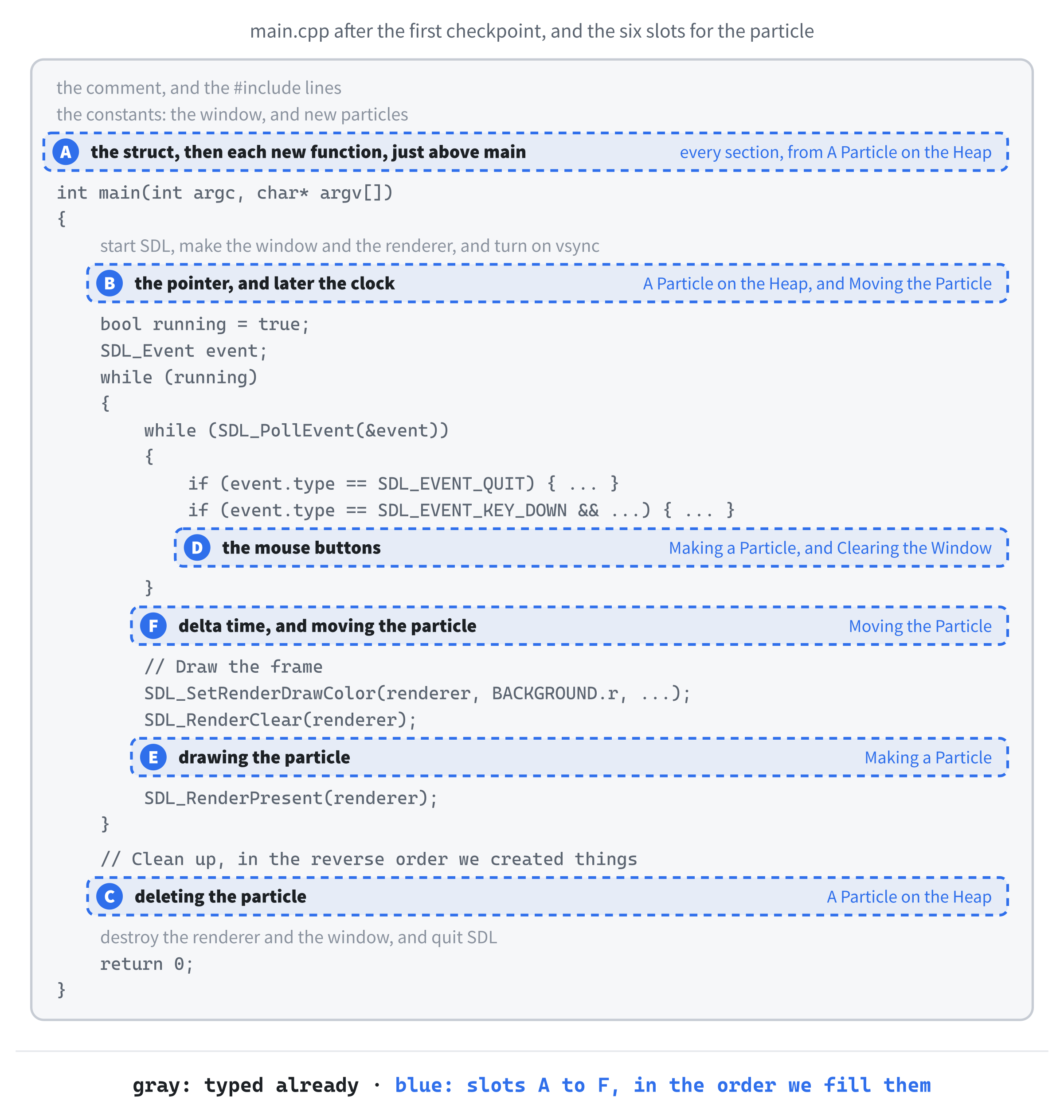
From here on, every block goes into a gap in the code you've already typed. Figure 12.1 is the map. It has six slots, lettered in the order we'll first fill them, and slot A grows as we go: the struct goes in first, and then each new function goes at the bottom of the slot, just above main.
First, what a particle is. Add this struct in slot A, below the constants, with a blank line in between:
// One particle: a colored square with a position and a velocity
struct Particle
{
    float x;           // the top-left corner, in pixels
    float y;
    float velX;        // the velocity, in pixels per second
    float velY;
    float size;        // the width and height, in pixels
    SDL_Color color;
};
In the preceding code, a Particle holds everything about one colored square. Its position is its top-left corner, x and y, and its velocity, velX and velY, is how many pixels it moves each second, across and down. The size is both its width and its height, and color is an SDL_Color, one of the structs SDL gives us, holding red, green, blue, and alpha.
There's nothing new in the struct itself. What's new is where a Particle will live. Every struct in our projects so far has been an ordinary variable on the stack, made when its line runs, and gone when its block ends. Our particles will live on the heap instead, where a particle stays for exactly as long as we choose, from the new that makes it to the delete that gets rid of it.
Now the line that the whole chapter is built around. Add this in slot B, between the vsync line and bool running = true;, with a blank line on each side:
// The particle on the heap, or nullptr when there isn't one
Particle* particle = nullptr;
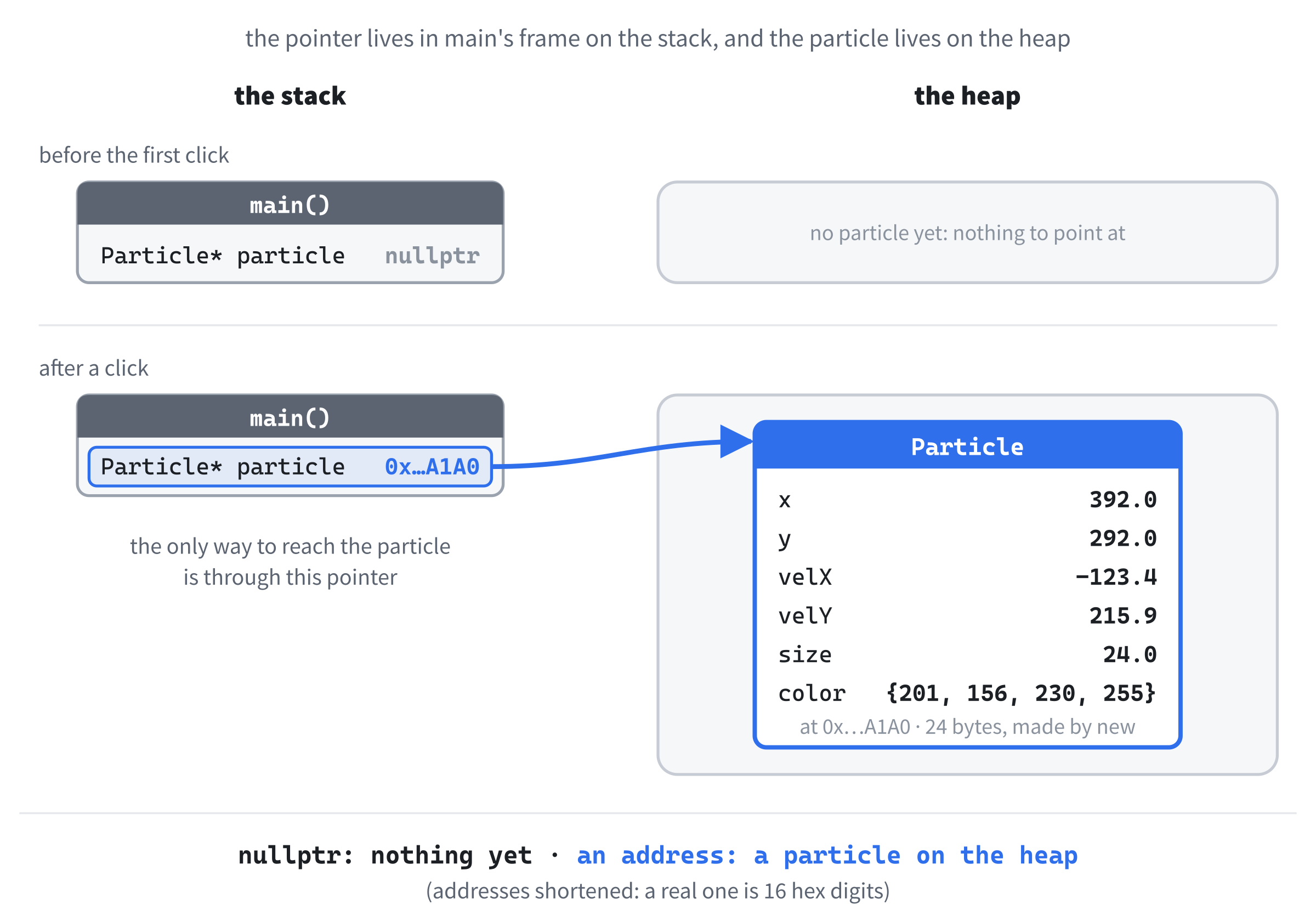
In the preceding code, particle is a pointer to a Particle: the * in its type says it holds the address of a Particle, rather than being one. It starts as nullptr, Chapter 10's value for "pointing at nothing," because there's no particle until you click. This pointer is the program's whole state, as Figure 12.2 shows: nullptr when the window is empty, and the address of a particle on the heap the rest of the time.
Every new needs exactly one delete, and it's easiest to write the delete right away, before there's even a new to match it. These two lines go in slot C. Click at the end of the // Clean up comment, press Enter, and add them:
delete particle;       // the particle, if there is one
particle = nullptr;
In the preceding code, the particle goes first, because it was made after the renderer, and cleanup runs in reverse order. If there's a particle on the heap when you quit, delete gives its memory back. If there isn't, particle is nullptr, and deleting nullptr is perfectly safe: it does nothing at all, as Chapter 10 said. Setting the pointer to nullptr afterward doesn't matter this close to the end of the program, but it's Chapter 10's habit, and habits only work if you keep them every time.
Write the delete as soon as you write the pointer, as we just did, rather than promising yourself to add it later. A forgotten delete never causes an error, and the program seems to work perfectly, so there's nothing to remind you. In a bigger program, the place for the delete is often far from the new, which makes it even easier to lose.
The program builds and runs just as it did at the checkpoint, but the pointer and its cleanup are in place, ready for a particle.
Making a Particle
A new particle needs a random size, speed, and direction, so first, Chapter 9's helper for random numbers. Add it in slot A, below the Particle struct:
// A random number from low up to high
float randomBetween(float low, float high)
{
    return low + SDL_randf() * (high - low);
}
In the preceding code, SDL_randf gives a random float from 0 up to, but not including, 1, and randomBetween stretches that to cover the range from low to high, exactly as in Chapter 9.
Now the function that makes a particle. Add it below randomBetween:
// Make a particle on the heap, centered on a point, and flying off in a
// random direction. It's the caller's job to delete it.
Particle* spawnParticle(float centerX, float centerY)
{
    Particle* p = new Particle{};

    p->size = randomBetween(MIN_SIZE, MAX_SIZE);
    p->x = centerX - p->size / 2.0f;
    p->y = centerY - p->size / 2.0f;

    float angle = randomBetween(0.0f, TWO_PI);
    float speed = randomBetween(MIN_SPEED, MAX_SPEED);
    p->velX = std::cos(angle) * speed;
    p->velY = std::sin(angle) * speed;

    p->color.r = static_cast<Uint8>(MIN_BRIGHT + SDL_rand(256 - MIN_BRIGHT));
    p->color.g = static_cast<Uint8>(MIN_BRIGHT + SDL_rand(256 - MIN_BRIGHT));
    p->color.b = static_cast<Uint8>(MIN_BRIGHT + SDL_rand(256 - MIN_BRIGHT));
    p->color.a = 255;

    return p;
}
In the preceding code, spawnParticle takes the point where the particle should appear, and returns a Particle*: a function can hand back a pointer, just as it can hand back an int. Its first line is where the particle is born. The new asks the heap for enough memory to hold a Particle, and hands back its address, which we keep in a pointer called p. The empty braces on the end work just like the ones in Chapter 9's Game game{};: every member starts at zero, so nothing in the new particle is ever garbage.
From then on, each member is reached through the pointer with Chapter 10's arrow operator. The expression p->size means "follow p to the particle, then take its size," exactly like (*p).size, but easier to type and to read. The size is a random number in its range, and the next two lines center the particle on the point it was given, by moving its corner up and to the left by half its size.
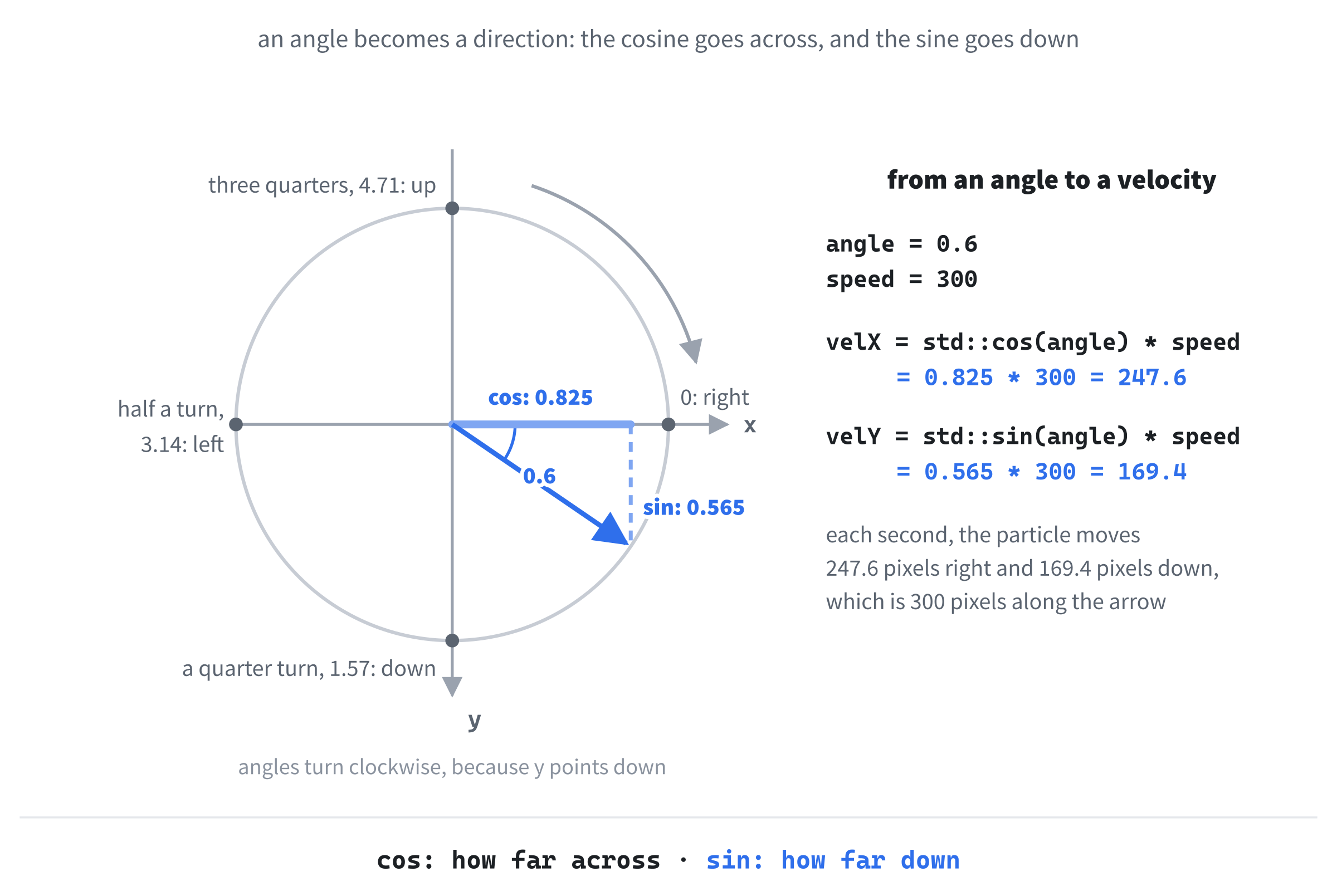
The next four lines choose which way it flies. The angle is a random direction, somewhere in a full turn, and C++'s math functions measure angles in radians, where a full turn is 2π, about 6.28, which is why the constant is called TWO_PI. Given an angle, std::cos says how far across to go, and std::sin says how far down, each as a number between -1 and 1. Multiplying both by the speed turns them into a velocity that goes in exactly that direction, at exactly that speed, as Figure 12.3 shows.
The color comes next. The call SDL_rand(256 - MIN_BRIGHT) gives a whole number from 0 to 155, and adding MIN_BRIGHT moves it up to between 100 and 255, so no part of the color is ever too dark to see against the background. Each part of an SDL_Color is a Uint8, so static_cast converts the int, and the alpha is 255, fully solid.
Finally, return p; hands the address back to whoever called the function. The particle stays on the heap, even though p itself disappears when the function ends, and that's the whole point of the heap. As the comment above the function says, the particle now belongs to the caller, and the caller must delete it.
See what those braces are doing. Take them off, so that the line reads Particle* p = new Particle;, and put a breakpoint on the p->size line below it. Press F5, click in the window, and when Visual Studio stops, open up p in the Locals window. Every float reads -431602080, which is the 0xCD pattern that a Debug build fills new heap memory with. Put the braces back.
That's why the braces are there: without them, the particle's members start as whatever was in that memory before. Now the function that draws a particle. Add it below spawnParticle:
// Draw a particle as a square, in its own color
void drawParticle(SDL_Renderer* renderer, const Particle* p)
{
    SDL_SetRenderDrawColor(renderer, p->color.r, p->color.g, p->color.b,
                           p->color.a);
    SDL_FRect rect = { p->x, p->y, p->size, p->size };
    SDL_RenderFillRect(renderer, &rect);
}
In the preceding code, drawParticle sets the draw color from the particle's color, builds a rectangle from its position and size, and fills it. It takes the particle as a const Particle*, Chapter 10's pointer to const, which promises that it only reads the particle and never changes it. The compiler holds the function to that promise.
Time to make particles. Add this in slot D, inside the event loop, below the Escape check's closing brace:
if (event.type == SDL_EVENT_MOUSE_BUTTON_DOWN)
{
    if (event.button.button == SDL_BUTTON_LEFT)
    {
        delete particle;   // the old one, if there is one
        particle = spawnParticle(event.button.x, event.button.y);
        SDL_Log("New particle at %p",
                static_cast<void*>(particle));
    }
}
In the preceding code, a mouse click arrives as an SDL_EVENT_MOUSE_BUTTON_DOWN event, as in Chapter 11, and event.button.button says which button it was. For the left button, two lines do all the work. The first deletes the old particle, if there is one, and gives its memory back to the heap. If there isn't one, particle is nullptr, and deleting it does nothing. The second makes a new particle where you clicked, and keeps its address in particle.
Notice that there's no particle = nullptr; between the two. After the delete, the pointer can't be trusted, but the very next line gives it a new address, so it never gets the chance to be used. Figure 12.4 follows the pointer through a second click.
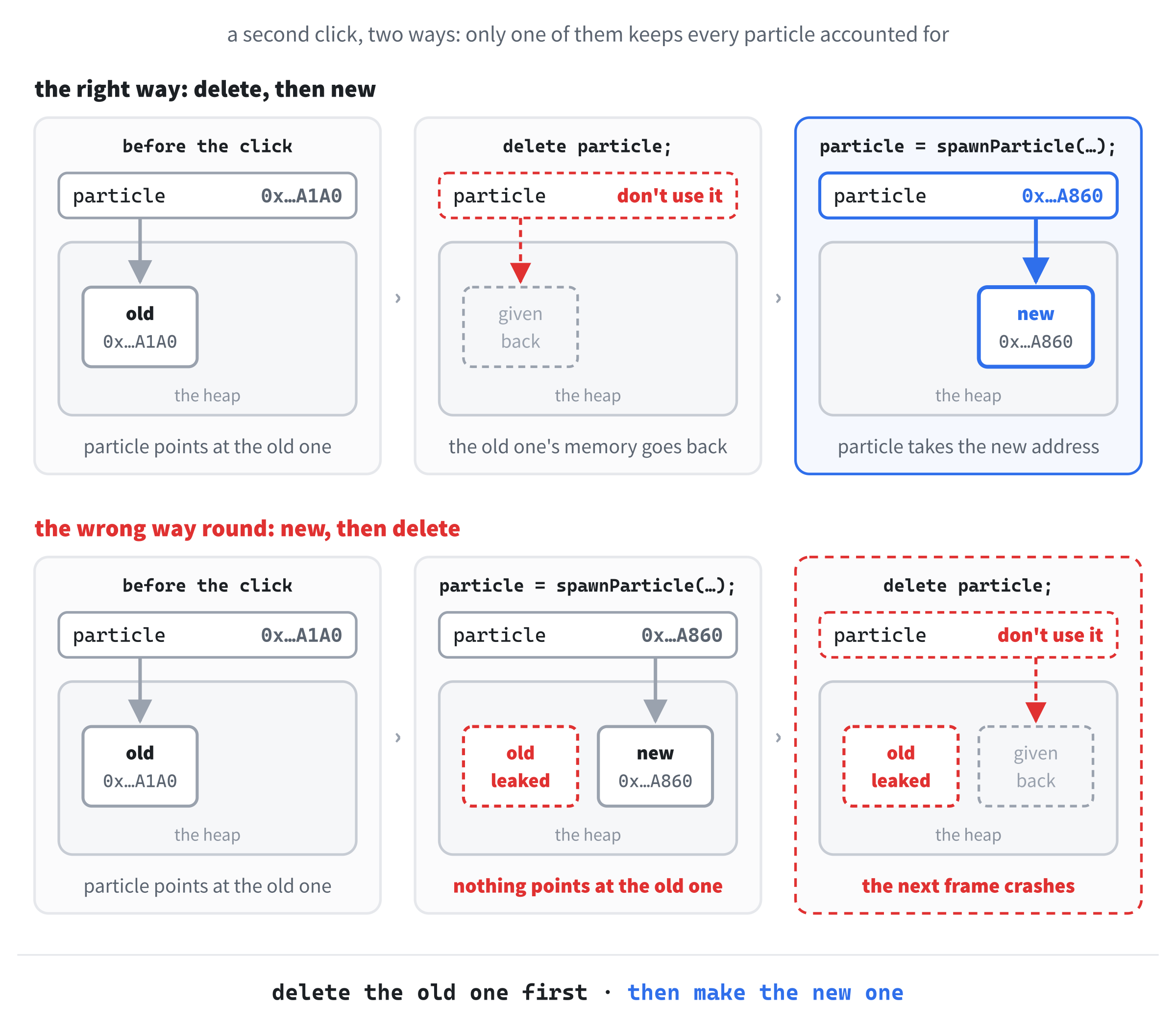
Delete first, and then make the new particle. Swap the two lines, and particle takes the new particle's address before the delete runs, so the old particle leaks, with nothing left pointing at it, and the delete destroys the particle you've only just made. That leaves particle with nothing it can safely use, and the program crashes on the next frame.
The last line logs the new particle's address, so you can see the heap at work. The %p in the message prints an address, and it wants a void*, a pointer that doesn't say what type it points at, so static_cast converts our Particle* to one.
Finally, the particle needs drawing. Add this in slot E, between SDL_RenderClear(renderer); and SDL_RenderPresent(renderer);, with a blank line on each side:
if (particle != nullptr)
    drawParticle(renderer, particle);
In the preceding code, the particle is drawn only if there is one. Until the first click, particle is nullptr, and following a null pointer crashes the program, so the check has to come first. It controls a single line, so it leaves its braces off, as Chapter 4 allows.
Checkpoint: Press F5, and click anywhere in the window. A colored square appears, centered on the point where you clicked. It stays still, because nothing moves it yet. Click somewhere else, and it jumps, with a new size and a new color, because the old particle has been deleted and a new one made. Each click prints a line in the console, like this:
New particle at 0000017898BAA1A0
New particle at 0000017898BAA860
New particle at 0000017898BA94E0
New particle at 0000017898BA94E0
In the preceding output, the addresses will be different on your machine, but watch for a repeat, as in the last two lines. When a particle is deleted, its memory goes back to the heap, and a later new may well be given that same memory, so a new particle can land at an old one's address. Sometimes it does, and sometimes it doesn't: the heap decides, not us.
Moving the Particle
A particle ought to fly. Add this function in slot A, below drawParticle:
// Move a particle on by one frame, bouncing it off the walls
void moveParticle(Particle* p, float delta)
{
    p->x += p->velX * delta;
    p->y += p->velY * delta;

    // The left and right walls
    if (p->x < 0.0f)
    {
        p->x = 0.0f;
        p->velX = -p->velX;
    }
    else if (p->x + p->size > WINDOW_W)
    {
        p->x = WINDOW_W - p->size;
        p->velX = -p->velX;
    }
}
In the preceding code, moveParticle takes a pointer to the particle, and delta, and changes the particle through the pointer, which is why this pointer isn't a pointer to const. The first two lines move it on by its velocity times the time that has passed, as in Chapter 3.
The checks bounce it off the left and right walls. They look a little different from Chapter 3's, because Chapter 3's ball was measured from its center, and a particle is measured from its top-left corner. Its left edge is x, so it has gone through the left wall when x is less than 0. Its right edge is x + size, so it has gone through the right wall when that's more than WINDOW_W. Either way, it's put back against the wall, and its velX flips sign, so it heads back the other way.
The top and bottom walls work the same way, with y and velY. Add this below the right wall's closing brace, with a blank line in between:
// The top and bottom walls
if (p->y < 0.0f)
{
    p->y = 0.0f;
    p->velY = -p->velY;
}
else if (p->y + p->size > WINDOW_H)
{
    p->y = WINDOW_H - p->size;
    p->velY = -p->velY;
}
In the preceding code, the top edge is y, and the bottom edge is y + size, so the checks mirror the ones for the sides.
Moving needs delta time, and delta time needs a clock. Add this in slot B, below the particle pointer and above bool running = true;, with a blank line on each side:
// The time at the last frame, in milliseconds
Uint64 lastTime = SDL_GetTicks();
In the preceding code, lastTime records when the last frame happened, in milliseconds, as in Chapter 1 and most of the projects since.
Finally, the update itself. Add this in slot F, between the event loop's closing brace and the // Draw the frame comment, with a blank line on each side:
// Delta time: how many seconds the last frame took
Uint64 now = SDL_GetTicks();
float delta = (now - lastTime) / 1000.0f;
lastTime = now;

// Move the particle, if there is one
if (particle != nullptr)
    moveParticle(particle, delta);
In the preceding code, the first three lines measure delta time, as usual. Then the particle is moved, but, just like the drawing, only if there is one.
Checkpoint: Press F5, and click. This time, the particle flies off in a random direction, and bounces off every wall. Click again, and the old particle vanishes, and a new one flies off from the new spot, in a new direction, at a new speed.
Clearing the Window
The right mouse button gets the last job: deleting the particle and leaving the window empty. Add this in slot D, still inside the mouse-button check, below the left button's closing brace:
else if (event.button.button == SDL_BUTTON_RIGHT)
{
    delete particle;
    particle = nullptr;
    SDL_Log("No particle now");
}
In the preceding code, the right button deletes the particle, and this time, the particle = nullptr; matters. There's no new particle to take its place, so without it, particle would be left holding an address it can't use, and on the very next frame, the check before moveParticle would let it through. Setting it to nullptr is what tells the checks that the window is empty.
Checkpoint: Press F5, click to make a particle, and then right-click. The particle disappears, and the console says "No particle now". Left-click again, and a new particle appears.
That fills the last slot, and the program is finished.
The Complete Program
Here's the whole file in one piece, with every line at its real indentation. If you've typed every block in the place described, this is exactly what you have:
/*
    Click Particle
    The Chapter 12 project from Learning C++ by Building Games

    Left-click anywhere, and a colored square is made on the heap and
    flies off, bouncing around the window. Left-click again, and the old
    square is deleted and a new one takes its place. Right-click to
    delete it and leave the window empty. Escape, or the window's X,
    quits.

    New in this project: a Particle made with new, reached through a
    raw pointer with the arrow operator, and deleted with delete.
*/

#include <SDL3/SDL.h>
#include <SDL3/SDL_main.h>

#include <cmath>   // std::cos and std::sin, for a random direction

const int       WINDOW_W   = 800;                   // window width in pixels
const int       WINDOW_H   = 600;                   // window height in pixels
const SDL_Color BACKGROUND = { 12, 12, 24, 255 };   // deep blue-black

// New particles
const float MIN_SIZE   = 16.0f;       // width and height, in pixels
const float MAX_SIZE   = 32.0f;
const float MIN_SPEED  = 180.0f;      // pixels per second
const float MAX_SPEED  = 360.0f;
const float TWO_PI     = 6.2831853f;  // a full turn, in radians
const int   MIN_BRIGHT = 100;         // no part of a color is darker

// One particle: a colored square with a position and a velocity
struct Particle
{
    float x;           // the top-left corner, in pixels
    float y;
    float velX;        // the velocity, in pixels per second
    float velY;
    float size;        // the width and height, in pixels
    SDL_Color color;
};

// A random number from low up to high
float randomBetween(float low, float high)
{
    return low + SDL_randf() * (high - low);
}

// Make a particle on the heap, centered on a point, and flying off in a
// random direction. It's the caller's job to delete it.
Particle* spawnParticle(float centerX, float centerY)
{
    Particle* p = new Particle{};

    p->size = randomBetween(MIN_SIZE, MAX_SIZE);
    p->x = centerX - p->size / 2.0f;
    p->y = centerY - p->size / 2.0f;

    float angle = randomBetween(0.0f, TWO_PI);
    float speed = randomBetween(MIN_SPEED, MAX_SPEED);
    p->velX = std::cos(angle) * speed;
    p->velY = std::sin(angle) * speed;

    p->color.r = static_cast<Uint8>(MIN_BRIGHT + SDL_rand(256 - MIN_BRIGHT));
    p->color.g = static_cast<Uint8>(MIN_BRIGHT + SDL_rand(256 - MIN_BRIGHT));
    p->color.b = static_cast<Uint8>(MIN_BRIGHT + SDL_rand(256 - MIN_BRIGHT));
    p->color.a = 255;

    return p;
}

// Draw a particle as a square, in its own color
void drawParticle(SDL_Renderer* renderer, const Particle* p)
{
    SDL_SetRenderDrawColor(renderer, p->color.r, p->color.g, p->color.b,
                           p->color.a);
    SDL_FRect rect = { p->x, p->y, p->size, p->size };
    SDL_RenderFillRect(renderer, &rect);
}

// Move a particle on by one frame, bouncing it off the walls
void moveParticle(Particle* p, float delta)
{
    p->x += p->velX * delta;
    p->y += p->velY * delta;

    // The left and right walls
    if (p->x < 0.0f)
    {
        p->x = 0.0f;
        p->velX = -p->velX;
    }
    else if (p->x + p->size > WINDOW_W)
    {
        p->x = WINDOW_W - p->size;
        p->velX = -p->velX;
    }

    // The top and bottom walls
    if (p->y < 0.0f)
    {
        p->y = 0.0f;
        p->velY = -p->velY;
    }
    else if (p->y + p->size > WINDOW_H)
    {
        p->y = WINDOW_H - p->size;
        p->velY = -p->velY;
    }
}

int main(int argc, char* argv[])
{
    // Start SDL, then make the window and the renderer
    if (!SDL_Init(SDL_INIT_VIDEO))
    {
        SDL_Log("SDL_Init failed: %s", SDL_GetError());
        return 1;
    }

    SDL_Window* window = SDL_CreateWindow("Click Particle",
                                          WINDOW_W, WINDOW_H, 0);
    if (!window)
    {
        SDL_Log("SDL_CreateWindow failed: %s", SDL_GetError());
        SDL_Quit();
        return 1;
    }

    SDL_Renderer* renderer = SDL_CreateRenderer(window, nullptr);
    if (!renderer)
    {
        SDL_Log("SDL_CreateRenderer failed: %s", SDL_GetError());
        SDL_DestroyWindow(window);
        SDL_Quit();
        return 1;
    }

    // Show each frame in step with the monitor's refresh
    SDL_SetRenderVSync(renderer, 1);

    // The particle on the heap, or nullptr when there isn't one
    Particle* particle = nullptr;

    // The time at the last frame, in milliseconds
    Uint64 lastTime = SDL_GetTicks();

    bool running = true;
    SDL_Event event;

    while (running)
    {
        // Handle every event that's waiting
        while (SDL_PollEvent(&event))
        {
            if (event.type == SDL_EVENT_QUIT)
            {
                running = false;
            }
            if (event.type == SDL_EVENT_KEY_DOWN &&
                event.key.key == SDLK_ESCAPE)
            {
                running = false;
            }
            if (event.type == SDL_EVENT_MOUSE_BUTTON_DOWN)
            {
                if (event.button.button == SDL_BUTTON_LEFT)
                {
                    delete particle;   // the old one, if there is one
                    particle = spawnParticle(event.button.x, event.button.y);
                    SDL_Log("New particle at %p",
                            static_cast<void*>(particle));
                }
                else if (event.button.button == SDL_BUTTON_RIGHT)
                {
                    delete particle;
                    particle = nullptr;
                    SDL_Log("No particle now");
                }
            }
        }

        // Delta time: how many seconds the last frame took
        Uint64 now = SDL_GetTicks();
        float delta = (now - lastTime) / 1000.0f;
        lastTime = now;

        // Move the particle, if there is one
        if (particle != nullptr)
            moveParticle(particle, delta);

        // Draw the frame
        SDL_SetRenderDrawColor(renderer, BACKGROUND.r, BACKGROUND.g,
                               BACKGROUND.b, BACKGROUND.a);
        SDL_RenderClear(renderer);

        if (particle != nullptr)
            drawParticle(renderer, particle);

        SDL_RenderPresent(renderer);
    }

    // Clean up, in the reverse order we created things
    delete particle;       // the particle, if there is one
    particle = nullptr;
    SDL_DestroyRenderer(renderer);
    SDL_DestroyWindow(window);
    SDL_Quit();

    return 0;
}
In the preceding code, the shape is the same as Chapter 9's: the constants, the struct, the functions, and then main. The functions come in the order we wrote them, and main holds the one pointer that owns the particle.
Playing the Game
Press F5. The window opens, dark and empty. Click anywhere with the left mouse button, and a colored square appears where you clicked and flies off, bouncing around the walls, as Figure 12.5 shows.
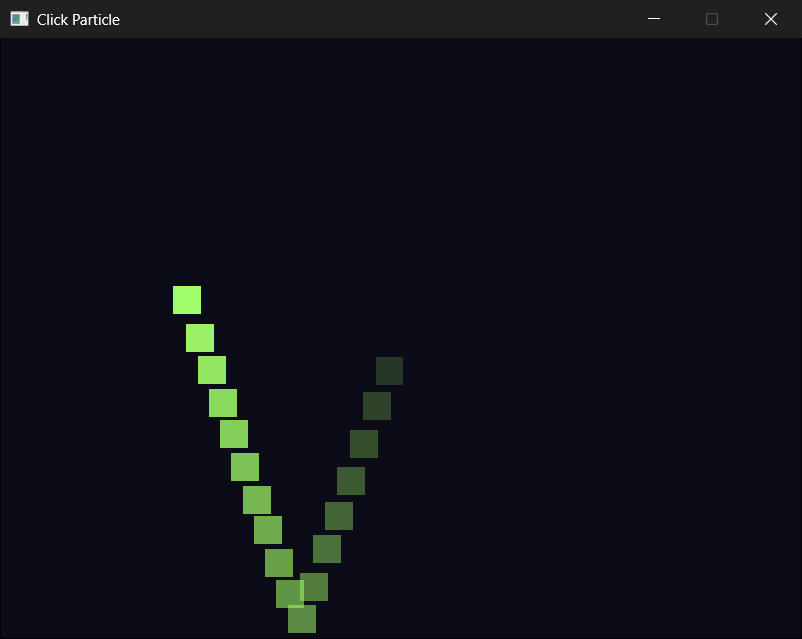
Click again, somewhere else. The first square vanishes, and a new one appears, with its own color, size, direction, and speed. Click as often as you like: there's only ever one square, because each click deletes the old particle before it makes a new one. Right-click to clear the window, and press Escape, or close the window, when you've had enough.
Keep an eye on the console as you click. Every line is a real address on the heap, and every repeat is the heap handing back memory that was given back to it a moment before.
Understanding the Code
Step back, and the whole program is one pointer's life, told over and over. At the start, particle is nullptr, the heap has no particle on it, and the checks before moveParticle and drawParticle skip them. When you click, delete is handed nullptr, so it does nothing, and spawnParticle asks the heap for 24 bytes, fills them in, and hands their address back to particle. From the next frame on, the checks see a real address, and the particle comes to life.
When you click again, the delete has real work to do: it gives the old particle's memory back. Then a new particle is made, and particle takes its address, which might even be the same address, if the heap decided to reuse that memory. Either way, the new particle knows nothing of the old one. When you right-click, the particle is deleted, particle goes back to nullptr, and the checks skip it again. When you quit, the last delete tidies up whatever's left.
That cycle is the heart of dynamic memory: make it, use it, delete it. Every new is paired with exactly one delete, and at every moment, particle is either nullptr or the address of a particle that main owns.
You can also see what doing it by hand costs. Every use of the pointer needs a check first. Replacing a particle has an order that's easy to get wrong. The final delete is ours to remember.
This is exactly the work that Chapter 10's smart pointers take off your hands. A std::unique_ptr<Particle> would delete the old particle whenever it was given a new one, delete the last one when main ended, and never leave an address it couldn't use. We've done it by hand here so that you can see precisely what the smart pointer does for you, and the Experimenting section lets you swap one in.
The one thing that should bother you by now is the limit of one. Wouldn't it be better if every click added a particle, rather than replacing the last one? It would, but we'd need somewhere to keep all of the pointers, and we don't know how many there will be.
An array has a fixed size, so what we need is a list that can grow. That's exactly what std::vector is, and it's the heart of Chapter 13. In Chapter 14, we'll come straight back to this project and lift the limit.
Experimenting
Try these one at a time, and see how the program changes:
- Change
MIN_SPEEDandMAX_SPEEDto40.0fand90.0f, and the particles drift instead of zipping. - Change
MIN_SIZEandMAX_SIZEto40.0fand80.0ffor much bigger particles. - Change
MIN_BRIGHTto0, and every so often, a particle comes out so dark that it's hard to see against the background. - Make every particle fly straight up. In
spawnParticle, changerandomBetween(0.0f, TWO_PI)toTWO_PI * 0.75f, three quarters of a turn, which Figure 12.3 shows pointing up.
For a bigger challenge, try these:
- Watch a leak happen. Remove
delete particle;from the left-button block, and add#include <crtdbg.h>below the other includes and_CrtDumpMemoryLeaks();just abovereturn 0;. Press F5, click a few times, and press Escape. The program looks perfectly fine, but Visual Studio's Output window now says "Detected memory leaks!" and lists every particle that was never deleted, each one a "normal block" that's "24 bytes long". Put thedeleteback, and the leaks go away. - Swap in a smart pointer. Add
#include <memory>, and change the pointer tostd::unique_ptr<Particle> particle;. For the left button, replace thedeleteandspawnParticlelines withparticle.reset(spawnParticle(event.button.x, event.button.y));, which deletes the old particle and takes the new one. For the right button, replace thedeleteandparticle = nullptr;lines withparticle.reset();. Passparticle.get()tomoveParticle,drawParticle, and thestatic_cast, and remove the two cleanup lines at the end ofmain, because the smart pointer deletes the last particle by itself. - Stop the particle with a key. Add a
bool pausedthat the Space key switches on and off, and only move the particle when it'sfalse.
Each of these touches only a few places in the program, and the map in Figure 12.1 tells you where they are.
Common Errors and Fixes
If the build fails with errors about SDL3/SDL.h or SDL3.lib, the SDL settings need checking, and Chapter 1's Common Errors section covers each one. Here are the problems that are particular to this chapter.
As soon as the program starts, Visual Studio stops with "Exception thrown: read access violation. p was nullptr." The check before moveParticle or drawParticle is missing. Until the first click, particle is nullptr, and the function follows it right away. Visual Studio stops inside the function, on the first line that uses p, and the Call Stack window shows the line in main that called it, listed as SDL_main, as Chapter 9 explained. Run without the debugger, and the window just closes.
Visual Studio stops with "Exception thrown: read access violation. p was 0x8123." as soon as you right-click. The right button's particle = nullptr; is missing. The 0x8123 is Visual Studio's doing: the extra security checks from Chapter 10 change a pointer to 0x8123 when you delete through it, so that using it again crashes at once. The check before moveParticle only looks for nullptr, so it lets 0x8123 through.
Visual Studio stops with "p was 0x8123." on the very first click, and the console says "New particle at 0000000000008123". The two lines in the left-button block are the wrong way around, so the new particle is deleted as soon as it's made. Delete first, then call spawnParticle.
C2228: left of '.size' must have class/struct/union, along with "type is 'Particle *'" and "did you intend to use '->' instead?" A dot has been used on a pointer. Use the arrow: p->size, not p.size.
C2440: 'initializing': cannot convert from 'nullptr' to 'Particle', followed by a long list of other errors. The * is missing from Particle* particle = nullptr;, so particle is a Particle, not a pointer to one. Put the * back, and the other errors go with it.
C4716: 'spawnParticle': must return a value. The return p; at the end of spawnParticle is missing. Visual Studio treats this warning as an error, because a caller would get a garbage address.
C2039: 'cos': is not a member of 'std', and the same for sin. The #include <cmath> line is missing.
Every click leaves the old particle behind in memory, but nothing looks wrong. A delete is missing, which is a leak. The "Watch a leak happen" experiment shows how Visual Studio can find it for you.
AI Exercise (Optional)
If you'd like to take the program further with an AI's help, here's a challenge that stretches what we've covered without leaving it. As always, skip it if you'd rather not; nothing later in the book depends on it.
Open your AI chatbot of choice and try a prompt like this:
"I have a small C++ SDL 3 program that keeps one particle on the heap. A Particle* particle starts as nullptr. A left click deletes the old particle and calls Particle* spawnParticle(float x, float y), which makes a new one with new, and a right click deletes it and sets the pointer back to nullptr. I have learned variables, structs, flow control, loops, arrays, functions, references, raw pointers with new and delete, and smart pointers. I have not learned vectors or classes. Change the program so that up to three particles can be on screen at once, using three separate raw pointers, p1, p2, and p3, and no array or smart pointer. Each left click should fill the first empty pointer, or replace the oldest particle if all three are in use. Use only what I've learned, put each curly brace on its own line, and show me every function you change, in full."
Notice what the preceding prompt does. It describes the program's shape, so that the AI builds on what's there, and it lists what you know and what you don't, so that it can't reach for a vector. It also sets a real design problem: how does the program know which particle is the oldest? The answer needs one more small piece of state, such as a count of clicks, or a note of which pointer was filled last.
Read the answer carefully. Does every new have exactly one delete, including at the end of main? Is every pointer checked before it's used, and set back to nullptr when its particle is deleted? If the AI used an array, a vector, or a smart pointer, push back: "Please use three separate raw pointers, as I asked."
You'll probably find the result clumsy, with three of everything, and that's the point. Keep that feeling in mind for Chapter 13, where a vector does the same job in a few lines.
Summary
You've managed a particle on the heap by hand. It was made with new, in a function that hands back a pointer, and you reached its members with ->, drew it through a pointer to const, and moved it through an ordinary pointer. You deleted the old particle before making a new one, and set the pointer to nullptr whenever it had nothing to point at. Every use of the pointer was checked first, and whatever was left was deleted when the program ended. Along the way, you met radians, std::cos and std::sin, and the 0x8123 that Visual Studio puts in a deleted pointer, and you watched the heap reuse memory, one address at a time.
In the next chapter, we'll put this project down for a moment and meet arrays and vectors properly: lists of values, and lists that can grow and shrink as a game runs. Then Chapter 14 comes back to this program, and turns its single particle into a fountain.