
You've been using collections for a while now, without calling them that. Chapter 7's palette kept nine colors in one list, Chapter 9's pools kept three lasers and twelve aliens, and Chapter 11's lawn had nine holes, each a numbered slot in a row of them. Each of those was an array: a fixed number of values of the same type, side by side, with a number for each one.
This chapter meets arrays properly, and then the collection you'll use more than any other: std::vector, an array that can grow and shrink while the program runs. That's exactly what Chapter 12 was missing. Its single particle could never become two, because we had nowhere to keep a second pointer, let alone a hundred. Chapter 5's lone invader had the same problem, and a vector fixes both.
In this chapter, we will:
- Declare arrays, count their slots from 0, and loop over them
- See what happens when an index goes out of bounds, and how Visual Studio catches it
- Pass arrays to functions, and find out why they forget their size
- Use
std::arrayfor collections of a fixed size, andstd::vectorfor collections that grow - Keep structs in a vector, the way games keep their enemies and bullets
- Watch a vector grow, and use
reserveto stop it from growing one step at a time - Build a grid out of a vector of vectors
- Meet iterators, and see what a range-based
forloop really does - Remove items while looping over a vector, three ways, without skipping any
- Get a first taste of moving instead of copying
- Try an optional AI exercise
As in Chapters 2, 4, 6, 8, and 10, the examples are small experiments for your Sandbox project. Each lead-in says whether the code goes inside main or above it, and any #include it needs.
Let's start with the oldest member of the family.
Arrays
An array is a fixed-size block of memory holding a row of values of the same type. It came to C++ from C, it's still everywhere in real code, and it's what the fancier collections in this chapter are built on, so it's worth knowing well.
Declaring an Array
Here's an array of five high scores. Try this inside main:
int highScores[5] = { 100, 85, 70, 60, 45 };

std::cout << highScores[0] << std::endl;
std::cout << highScores[4] << std::endl;
highScores[0] = 150;
std::cout << highScores[0] << std::endl;
In the preceding code, int highScores[5] asks for room for five ints, all in a row, and the list in braces fills them in order. The number in the square brackets is the array's size, and it's fixed for good: this array will always have exactly five slots, called its elements.
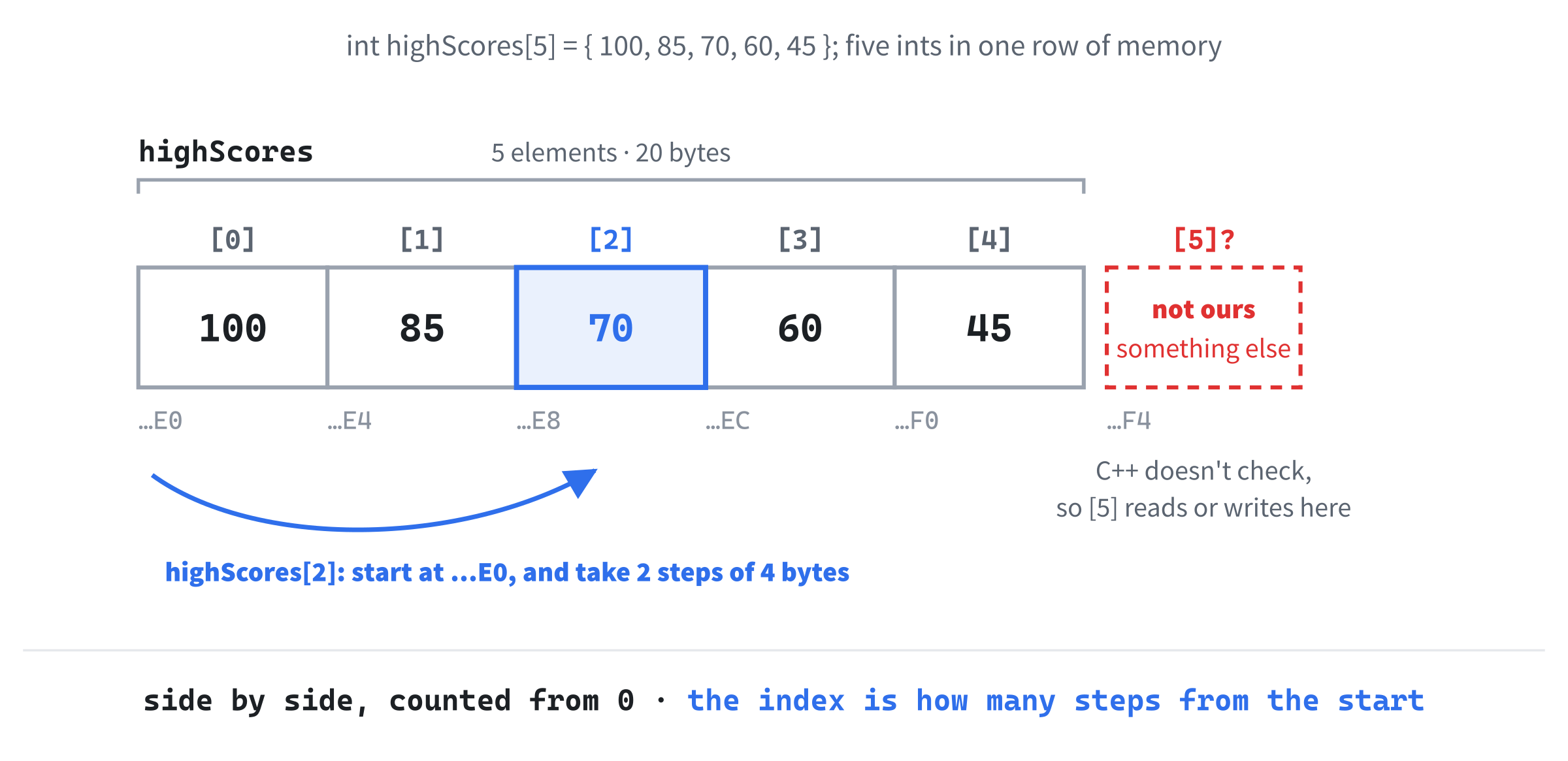
To reach one element, you put its index, its position, in square brackets. Indexes count from 0, as Chapter 6 warned, so the first element is highScores[0], and the fifth and last is highScores[4]. The console shows 100, 45, and then 150, because the last two lines change the first element and print it again. An array of size n has indexes from 0 to n - 1, and there's no highScores[5] at all.
As Figure 13.1 shows, the five ints sit right next to each other in memory, four bytes apart, which is what makes an array so fast: to find element i, the computer starts at the array's address and steps forward i elements. That's Chapter 10's pointer arithmetic, done for you.
Take the braces and the numbers off, so the first line reads int highScores[5];, and run it again. The first line printed is -858993460, Chapter 9's 0xCC pattern, because the elements were never given values. Arrays don't warn you about this the way single variables do. Put the numbers back, or write int highScores[5] = {};, with empty braces, which sets every element to 0.
An array without an initializer really does start out full of garbage, so the empty braces are worth the few extra keystrokes.
Looping Over an Array
A for loop is the natural way to visit every element. Try this inside main, below the array:
for (int i = 0; i < 5; i++)
{
    std::cout << "Rank " << i + 1 << ": " << highScores[i] << std::endl;
}
In the preceding code, i runs from 0 to 4, and each pass prints one rank and one score, from "Rank 1: 150" down to "Rank 5: 45". Counting from 0, and stopping before the size with <, visits every element exactly once. It's the same shape as every counting loop since Chapter 6, and it's why Chapter 6 made such a point of starting at 0.
A range-based for works on arrays too, just as it did on Chapter 6's strings. Add this below the loop:
for (int score : highScores)
{
    std::cout << score << " ";
}
std::cout << std::endl;
In the preceding code, each pass gives us the next element, and the console shows all five scores on one line. When you don't need to know an element's position, this is the neater loop.
The Size Must Be a Constant
The size of an array is part of its type, so it has to be known when the program is built. Try this inside main:
int count = 5;
int scores[count];
In the preceding code, count is an ordinary variable, which could change while the program runs, so the build stops with C2131: expression did not evaluate to a constant. Make it const int count = 5;, and the error goes away. That's why Chapter 9 sized its pools with named constants, such as MAX_LASERS.
Chapter 9's pools were arrays of structs, which work just the same. Put this above main:
const int MAX_LASERS = 3;

struct Laser
{
    float x;
    bool active;
};

struct Game
{
    Laser lasers[MAX_LASERS];
    int score;
};
In the preceding code, a Game holds an array of three Lasers, just as Chapter 9's did. Now try this inside main:
Game game{};
game.lasers[1].active = true;
game.lasers[1].x = 42.0f;

for (int i = 0; i < MAX_LASERS; i++)
{
    std::cout << i << ": " << game.lasers[i].active << " "
              << game.lasers[i].x << std::endl;
}
In the preceding code, game.lasers[1] picks the second laser, and the dot after it reaches one of its members, so each line reads left to right: the game, its lasers, number 1, its active flag. The empty braces on game set everything to zero, so the console shows lasers 0 and 2 inactive at 0, and laser 1 active at 42. Chapter 5 promised that arrays would be the cure for its one hard-coded invader, and this is how: one struct for an invader, and an array for the army.
Out of Bounds
What happens if an index goes past the end? Try this inside main, in place of the other examples:
int highScores[5] = { 100, 85, 70, 60, 45 };
std::cout << highScores[5] << std::endl;
In the preceding code, highScores[5] asks for a sixth element, which doesn't exist. C++ doesn't check: it takes the array's address, steps forward five ints, and reads whatever it finds there. In a Debug build, that's -858993460 again, from the guard bytes Visual Studio puts around arrays, but in general, it's whatever happens to be next in memory.
Writing past the end is worse, because it changes memory that belongs to something else. Visual Studio catches the simplest case: write highScores[5] = 999;, and the build stops with C4789: in function 'main' buffer 'highScores' of size 20 bytes will be overrun. It can only do that because the 5 is right there in the code, though. Try this inside main instead:
int highScores[5] = { 100, 85, 70, 60, 45 };
int rank = 5;
highScores[rank] = 999;
std::cout << "Still going" << std::endl;
In the preceding code, the index is a variable, so the compiler can't tell that it's out of bounds. The program builds, prints "Still going", and only when main ends does a Debug build notice the damage: a message box says "Run-Time Check Failure #2 - Stack around the variable 'highScores' was corrupted." A Release build doesn't check at all, and just carries on with some other variable quietly overwritten.
This is undefined behavior, which you met in Chapter 7, when the palette was read past its end: the C++ rules don't say what happens, so anything can. The program might crash, print garbage, or seem to work perfectly and fail next week. Visual Studio's Debug checks catch some of it, but none of it is guaranteed, so the only real protection is never to go out of bounds.
Arrays and Functions
Arrays have one more quirk, and it trips up everybody. Put this function above main:
void printScores(int scores[], int count)
{
    std::cout << "inside: " << sizeof(scores) << " bytes" << std::endl;
    for (int i = 0; i < count; i++)
    {
        std::cout << scores[i] << std::endl;
    }
}
In the preceding code, int scores[] looks like an array parameter, with no size in the brackets, and sizeof gives the size of something in bytes. Now call it from main:
int highScores[5] = { 100, 85, 70, 60, 45 };
std::cout << "in main: " << sizeof(highScores) << " bytes" << std::endl;
printScores(highScores, 5);
In the preceding code, main sees the whole array, five ints at four bytes each, and the console says "in main: 20 bytes". Inside the function, it says "inside: 8 bytes", and then the five scores. When you pass an array to a function, C++ passes just the address of its first element, and the parameter is really a pointer, which is eight bytes on a 64-bit machine.
This is called decay: the array decays into a pointer, and its size is lost on the way. That's why printScores needs count as well. Forget to pass it, or pass the wrong number, and the loop runs straight off the end.
While an array is still in scope, you can ask for its number of elements with std::size, from the <iterator> header: std::size(highScores) is 5. Chapter 7 used SDL's SDL_arraysize for the same job, on its palette. Both only give the right answer where the array is still an array, not inside a function it's been passed to.
Chapter 11 said that text in double quotes, such as "assets/grass.png", is stored as an array of characters. That's a C-style string: the characters, followed by a hidden extra character, '\0', which marks the end, because the array can't tell anyone its size. Pass it to a function, and it decays to a const char*, which is why SDL's functions take text that way. In your own code, std::string does the same job and remembers its length.
Raw arrays are fast and simple, but they forget their size, and they never check an index. The next two collections fix both problems.
std::array
The type std::array is a raw array wrapped up in a small struct that remembers its size. Add #include <array> below #include <iostream>, and try this inside main:
std::array<int, 5> highScores = { 100, 85, 70, 60, 45 };

std::cout << highScores[0] << std::endl;
highScores[0] = 200;
std::cout << highScores[0] << std::endl;
std::cout << highScores.size() << std::endl;
std::cout << highScores.at(4) << std::endl;
In the preceding code, the angle brackets hold the element type and the size, just as std::unique_ptr<int> held a type in Chapter 10. A type with angle brackets like this is a template: one blueprint that works for any type you give it. Elements work exactly as before, so the console shows 100 and 200, and then size() reports 5: the array knows its own size, so there's nothing to pass around. The last line uses at, which is [] with a bounds check, and shows 45.
Here's what the check is for. Try std::cout << highScores.at(100) << std::endl; below the other lines, and press F5. Instead of reading whatever is 100 elements along, at throws an exception, C++'s way of reporting an error that the program can't just carry on from. Nothing in our program catches it, so Visual Studio stops the program with "Unhandled exception" and std::out_of_range.
Chapter 24 shows how a program can catch an exception and deal with it. For now, a clear stop on the right line beats silently reading garbage.
What about highScores[100]? The square brackets don't check in a Release build, but in a Debug build, Visual Studio's version of std::array checks them anyway, and stops with a "Debug Assertion Failed!" box that says "array subscript out of range".
Use std::array whenever the size is fixed and known when you write the code. It's just as fast as a raw array, and a good deal safer. But when you don't know the size in advance, because a level loads a different number of enemies each time, or because the player keeps clicking, you need a collection that can grow.
std::vector
The vector, std::vector, is the most useful collection in C++. It's a dynamic array: it keeps its elements on the heap, and it can grow and shrink while the program runs, doing all of Chapter 10's new and delete for you.
Adding and Removing Elements
Add #include <vector> below #include <iostream>, and try this inside main, in place of the other examples:
std::vector<int> scores;
std::cout << scores.size() << std::endl;

scores.push_back(100);
scores.push_back(85);
scores.push_back(70);
std::cout << scores.size() << std::endl;
std::cout << scores.front() << " " << scores.back() << std::endl;
In the preceding code, scores starts out empty, so size() is 0. Each push_back adds an element to the end, and the vector finds room for it on the heap, so after three of them, the size is 3. The first element is front(), and the last is back(), so the console shows 100 and 70.
Taking elements away is just as easy. Add this below:
scores.pop_back();
std::cout << scores.size() << " " << scores.back() << std::endl;

scores.clear();
std::cout << scores.size() << " " << scores.empty() << std::endl;
In the preceding code, pop_back removes the last element, so the size drops to 2 and the new last element is 85. Then clear removes everything, and empty() asks whether the vector has nothing in it. The console shows 0 and 1, because std::cout prints true as 1.
Starting With Elements
A vector can start out full, too. Try this inside main:
std::vector<int> scores = { 100, 85, 70, 60, 45 };
std::vector<int> zeros(10, 0);
std::vector<int> tenItems(10);

std::cout << scores.size() << " " << zeros.size() << " "
          << tenItems.size() << std::endl;
std::cout << tenItems[3] << std::endl;
In the preceding code, scores starts with five elements, from the list in braces. The next line, zeros(10, 0), makes ten elements, each set to 0, and tenItems(10) makes ten elements without saying what they should be, so each one is value-initialized, which for an int means 0. The console shows 5, 10, and 10, and then 0. Notice the round brackets: (10, 0) means "ten of them, each 0," while { 10, 0 }, in braces, would mean a vector holding just two elements, 10 and 0.
Reading Elements
Vectors have both kinds of access, [] and at, and in Visual Studio, both are checked in a Debug build. Try this inside main:
std::vector<int> scores = { 100, 85, 70 };
std::cout << scores.at(10) << std::endl;
In the preceding code, there's no element 10, so at throws std::out_of_range, as in Figure 13.2. Visual Studio stops inside the vector's own code, which can be a surprise the first time. The Call Stack window shows the way back: the line that says main() is where your code called at.

Change scores.at(10) to scores[10], and a Debug build stops with a "Debug Assertion Failed!" box instead, saying "vector subscript out of range". The difference is what happens in a Release build. There, at still checks and throws, but [] doesn't check at all, and reads garbage.
Test your games in Debug builds. Visual Studio's Debug version of the standard library checks every [] on a vector or std::array, and stops the program at the first bad index. A Release build skips those checks to run faster, so a mistake that you'd have spotted in Debug can quietly corrupt memory there instead.
Either way, a bad index is a bug to fix, not a check to lean on.
Looping Over a Vector
The counting loop works on vectors, with size() as the limit. Try this inside main:
std::vector<int> scores = { 100, 85, 70, 60, 45 };

for (size_t i = 0; i < scores.size(); i++)
{
    std::cout << scores[i] << std::endl;
}
In the preceding code, the counter is a size_t rather than an int. That's the type size() returns: an unsigned whole number, one that can't be negative, and big enough to count anything that fits in memory. Using the same type for the counter keeps the comparison simple.
You'll meet size_t whenever you store a size in an int. Try adding int count = scores.size();, and Visual Studio warns C4267: 'initializing': conversion from 'size_t' to 'int', possible loss of data, because a size_t can hold numbers far too big for an int. Our vectors are never going to be that big, so the fix is to say so: int count = static_cast<int>(scores.size());.
Never count down with a size_t. A loop like for (size_t i = scores.size() - 1; i >= 0; i--) looks fine, but i >= 0 is always true, because a size_t can't go below zero. After 0, it wraps around to 18,446,744,073,709,551,615, and the next scores[i] stops the program with "vector subscript out of range". Count down with an int instead.
When you don't need the index, use a range-based for. Try this inside main, below the vector:
for (int score : scores)
{
    std::cout << score << " ";
}
std::cout << std::endl;

for (int& score : scores)
{
    score = score + 10;
}
In the preceding code, the first loop prints every score. The second loop adds 10 to each one, and it can only do that because of the &. With int& score, each pass gives us a reference to the element itself, as in Chapter 8, so changing score changes the vector. With plain int score, each pass gets a copy, and changing it would change nothing in the vector at all.
A Vector of Structs
Games keep structs in their vectors: every enemy, every bullet, every particle. Put this struct above main:
struct Enemy
{
    int health;
    float x;
};
In the preceding code, an Enemy has a health and a position. Now try this inside main:
std::vector<Enemy> enemies;
enemies.push_back({ 100, 50.0f });
enemies.push_back({ 60, 200.0f });
enemies.push_back({ 0, 350.0f });

for (Enemy& enemy : enemies)
{
    enemy.x += 10.0f;
}
for (const Enemy& enemy : enemies)
{
    std::cout << enemy.health << " at " << enemy.x << std::endl;
}
In the preceding code, each push_back is given a new Enemy in braces, just like the list you'd use to set up a struct variable. The first loop moves every enemy 10 pixels to the right, through a reference, and the second prints each one through a const reference, which is Chapter 8's way of looking without copying or changing. The console shows "100 at 60", "60 at 210", and "0 at 360".
That's the shape of most game code: a vector of things, and loops that update and draw them all. Chapter 14 builds exactly that, with a vector of particles.
How a Vector Grows
A vector keeps its elements in one block of memory on the heap, side by side like an array. So what happens when it's full, and you push_back another one? It can't just take the memory next door, because that might belong to something else. Instead, it asks the heap for a bigger block, moves every element across, and gives the old block back.
To avoid doing that on every push_back, a vector keeps some spare room. Its size is how many elements it holds, and its capacity is how many it has room for. Try this inside main:
std::vector<int> scores;
std::cout << scores.size() << " " << scores.capacity() << std::endl;

for (int i = 0; i < 20; i++)
{
    scores.push_back(i);
    std::cout << scores.size() << ":" << scores.capacity() << " ";
}
std::cout << std::endl;
In the preceding code, the empty vector has a size and a capacity of 0. Then, after each push_back, the console shows the size and the capacity as a pair, and the pattern appears. The capacity goes 1, 2, 3, 4, then 6, 9, 13, 19, and 28, each time about half as big again as the last. Every jump is a new block, and a move. In between, the spare room fills up at no extra cost, as Figure 13.3 shows.
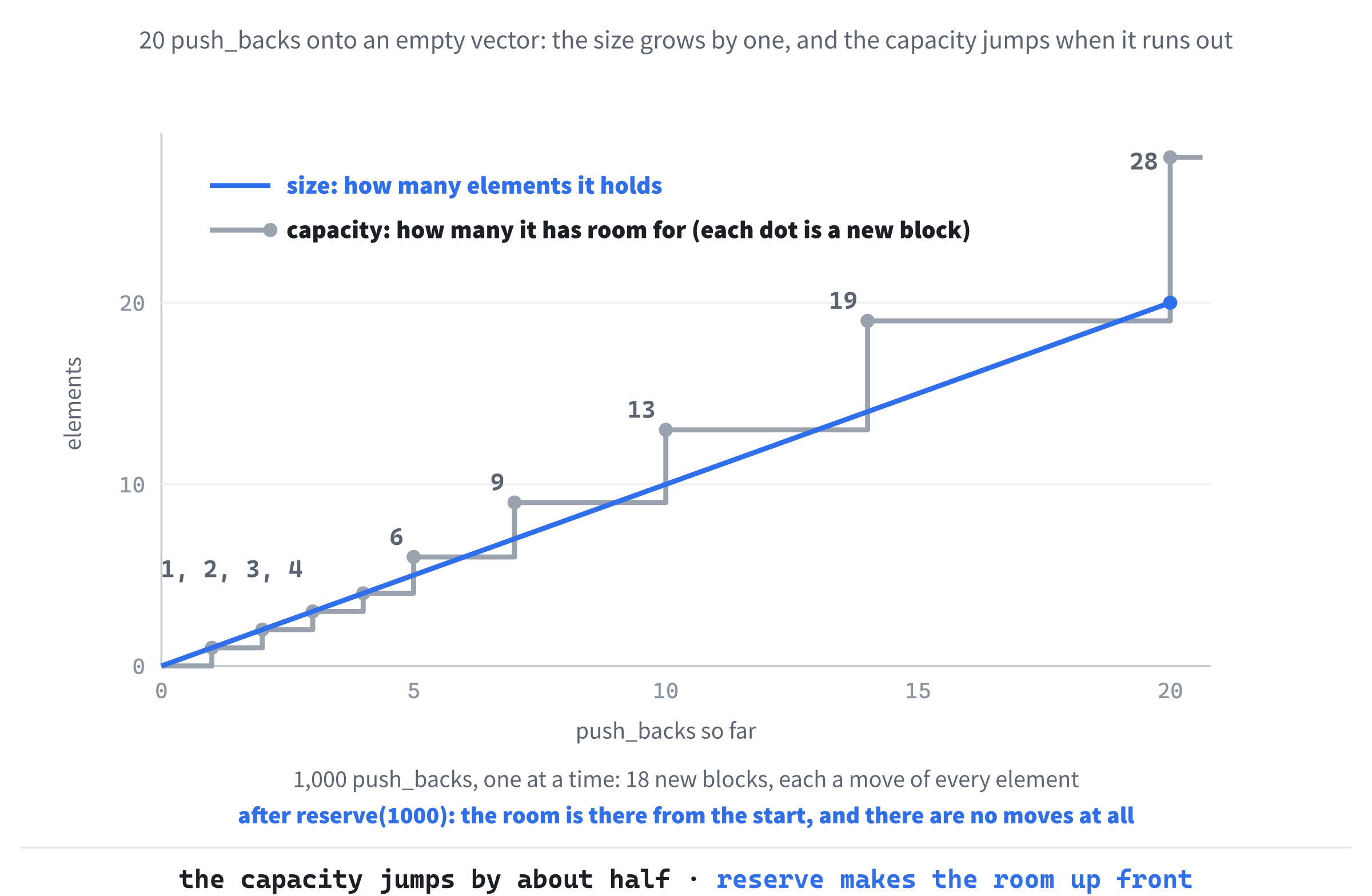
Pushing 1,000 elements one at a time makes the vector find a new block 18 times. If you know roughly how many elements you'll need, you can skip them all by asking for the room up front. Try this inside main:
std::vector<int> scores;
scores.reserve(1000);
std::cout << scores.size() << " " << scores.capacity() << std::endl;

for (int i = 0; i < 1000; i++)
{
    scores.push_back(i);
}
std::cout << scores.size() << " " << scores.capacity() << std::endl;
In the preceding code, reserve(1000) makes room for 1,000 elements without adding any, so the console shows a size of 0 and a capacity of 1000. The loop then fills the room it already has, with no moves at all, and ends at 1000 and 1000.
For most code, the moves are too quick to matter. In a game that fills a vector every frame, though, reserve is an easy win, and Chapter 14 uses it.
Grids: A Vector of Vectors
Games are full of grids: tile maps, game boards, and inventory screens are all rows and columns. A vector can hold any type, including other vectors, and a vector of vectors makes a grid. Try this inside main:
std::vector<std::vector<int>> tileMap = {
    { 1, 1, 1, 1, 1, 1, 1 },
    { 1, 0, 0, 0, 0, 0, 1 },
    { 1, 0, 1, 0, 0, 0, 1 },
    { 1, 0, 0, 0, 1, 0, 1 },
    { 1, 1, 1, 1, 1, 1, 1 }
};

std::cout << tileMap[2][2] << " " << tileMap[1][1] << std::endl;
In the preceding code, tileMap is a vector whose elements are vectors of ints. The outer vector is the list of rows, and each row is a vector of seven tiles, with 1 for a wall and 0 for floor, as Figure 13.4 shows. To reach one tile, you index twice: tileMap[2][2] is row 2, and then column 2 within that row, which is a pillar in the middle of the room, so the console shows 1, and then 0 for the floor at row 1, column 1.
![A vector of vectors. The outer vector holds the rows, and each row holds the tiles, so the first index picks a row and the second picks the tile in it. tileMap[2][2] is the pillar in row 2.](../images/learning-cpp/c13/vector_of_vectors.png)
To visit every tile, loop over the rows, and inside that, over the tiles in each row. Add this below:
for (size_t row = 0; row < tileMap.size(); row++)
{
    for (size_t col = 0; col < tileMap[row].size(); col++)
    {
        if (tileMap[row][col] == 1)
            std::cout << "#";
        else
            std::cout << ".";
    }
    std::cout << std::endl;
}
In the preceding code, the outer loop goes down the rows, and the inner loop goes along each row, printing # for a wall and . for floor. The inner if and else each control a single line, so they leave their braces off. The console draws the room:
#######
#.....#
#.#...#
#...#.#
#######
In the preceding output, you can see the two pillars inside the walls. Swap the # and . for pictures, and this is how a tile-based game draws its levels. There's another way to store a grid, which Chapter 11 used for its holes: one long list, with the tile at row r and column c at index r * COLUMNS + c. Both work, and Chapter 16's Loot Grid uses a grid of its own.
Iterators
The range-based for loop has been hiding something. Underneath, it uses an iterator: a small object that marks a position in a collection. You can think of it as a smarter cousin of Chapter 10's pointers. You move it along with ++, and you reach the element it marks with *, exactly as you would a pointer.
Every vector has two special iterators. The first, begin(), marks the first element, and the second, end(), marks the position just past the last one, as Figure 13.5 shows. There's no element at end(): it's a finish line, and a loop is done when it gets there. Try this inside main:
std::vector<int> scores = { 100, 85, 70 };

for (auto it = scores.begin(); it != scores.end(); ++it)
{
    std::cout << *it << std::endl;
}
In the preceding code, it starts at begin(), and each pass prints the element it marks and then moves it along. When it reaches end(), the loop stops, so the console shows 100, 85, and 70. The type of a vector's iterator has a long and fearsome name, so auto, from Chapter 2, works it out for us.
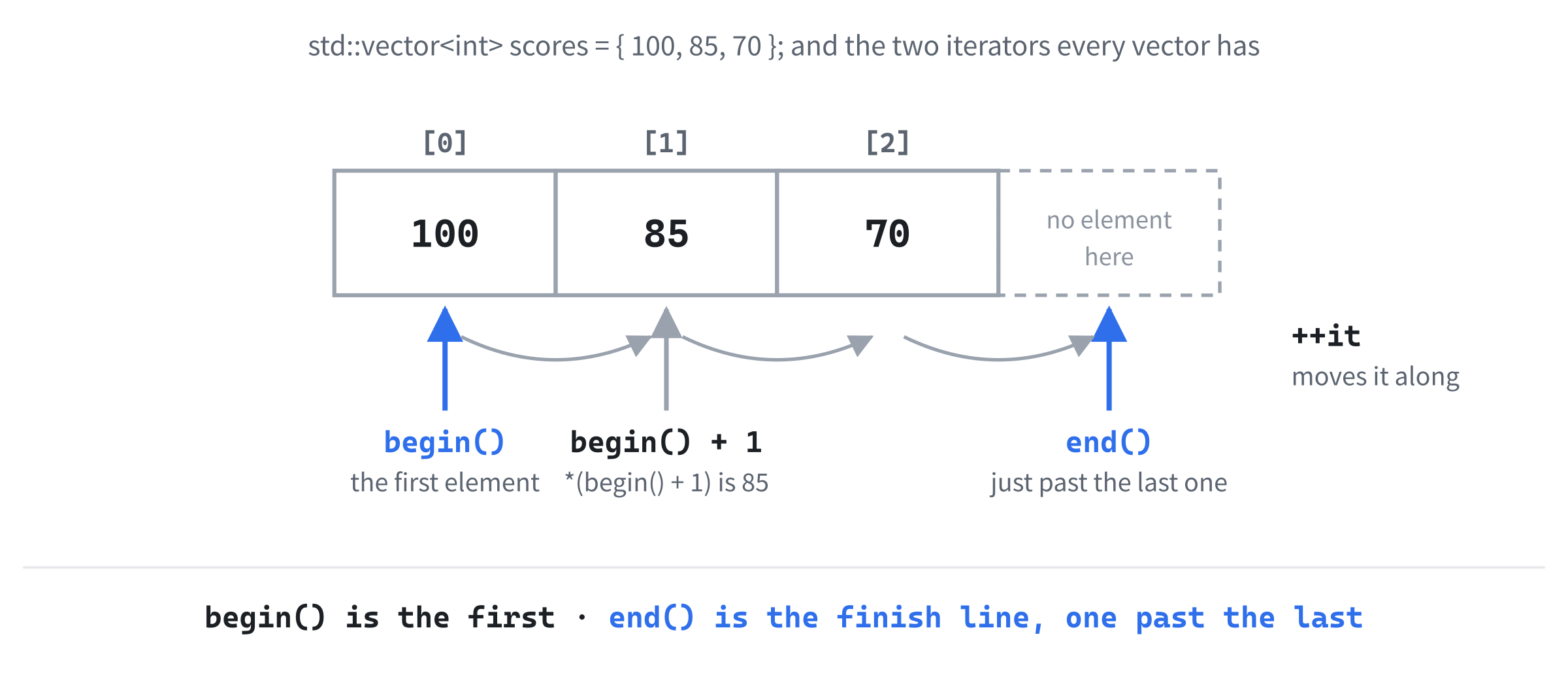
That loop is exactly what a range-based for does for you. When you write for (int score : scores), the compiler turns it into a loop from begin() to end(), with score set to *it on each pass. The range-based version is shorter and harder to get wrong, so it's the one to use, but knowing what it hides explains a lot of what follows.
You can also do arithmetic with a vector's iterators, just like Chapter 10's pointer arithmetic: scores.begin() + 1 marks the second element, so *(scores.begin() + 1) is 85. We'll need that in a moment, to say which element to remove.
Vectors and std::array have iterators, a raw array's pointers do the same job, and most of the collections in Chapter 15 have them too. A few, such as std::queue and std::stack, deliberately don't, because they only let you reach the items at their ends, never the ones in the middle.
Common Vector Pitfalls
Vectors are friendly, but there are three ways to trip over them that catch nearly everyone.
Holding On Through a push_back
Every push_back might move the whole vector to a new block of memory, and when it does, anything that pointed into the old block is left pointing at memory that's been given back. That includes references, pointers, and iterators. Try this inside main:
std::vector<int> scores = { 100, 85, 70 };
int& first = scores[0];

scores.push_back(50);
first = 200;
std::cout << scores[0] << std::endl;
In the preceding code, first is a reference to the first element, and then push_back finds the vector full, and moves everything to a bigger block. The reference still points into the old block, so first = 200 writes into memory that has already been given back, and the vector never sees it: the console shows 100. Nothing crashes, and nothing warns you, which is what makes this bug so nasty. Figure 13.6 shows what happened.
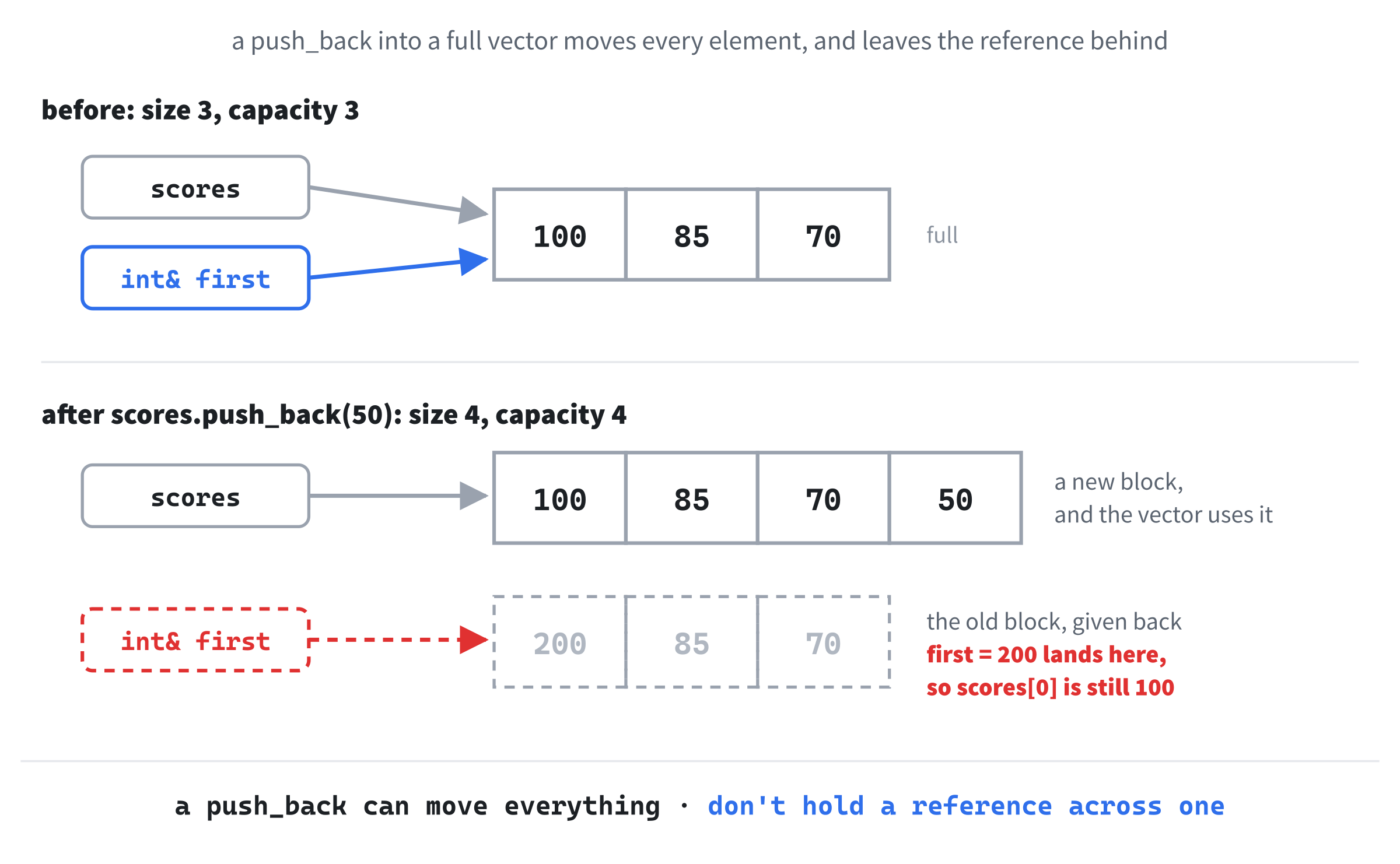
Iterators are better protected. Change the reference to auto first = scores.begin();, and the assignment to *first = 200;, and a Debug build stops with "can't dereference invalidated vector iterator". References and pointers get no such check. The rule is simple: don't keep a reference, pointer, or iterator into a vector across anything that might change its size.
Asking an Empty Vector
The functions front(), back(), and pop_back() all assume there's at least one element. Call back() on an empty vector, and there's nothing there to give you. A Debug build stops with "back() called on empty vector", and a Release build returns garbage, or crashes. If a vector might be empty, check empty() first.
Removing While Looping
The last pitfall needs a section of its own.
Removing Elements While Looping
Games remove things all the time: an enemy dies, a bullet leaves the screen, a particle fades out. Removing one element from a vector is done with erase, which takes an iterator, so enemies.erase(enemies.begin() + 1) removes the element at index 1, and everything after it shuffles down one place to close the gap.
That shuffle is the problem. Here's the obvious way to remove every dead enemy, with 0 meaning dead. Try this inside main:
std::vector<int> enemies = { 10, 0, 0, 25, 0, 15 };

for (size_t i = 0; i < enemies.size(); i++)
{
    if (enemies[i] == 0)
        enemies.erase(enemies.begin() + i);
}
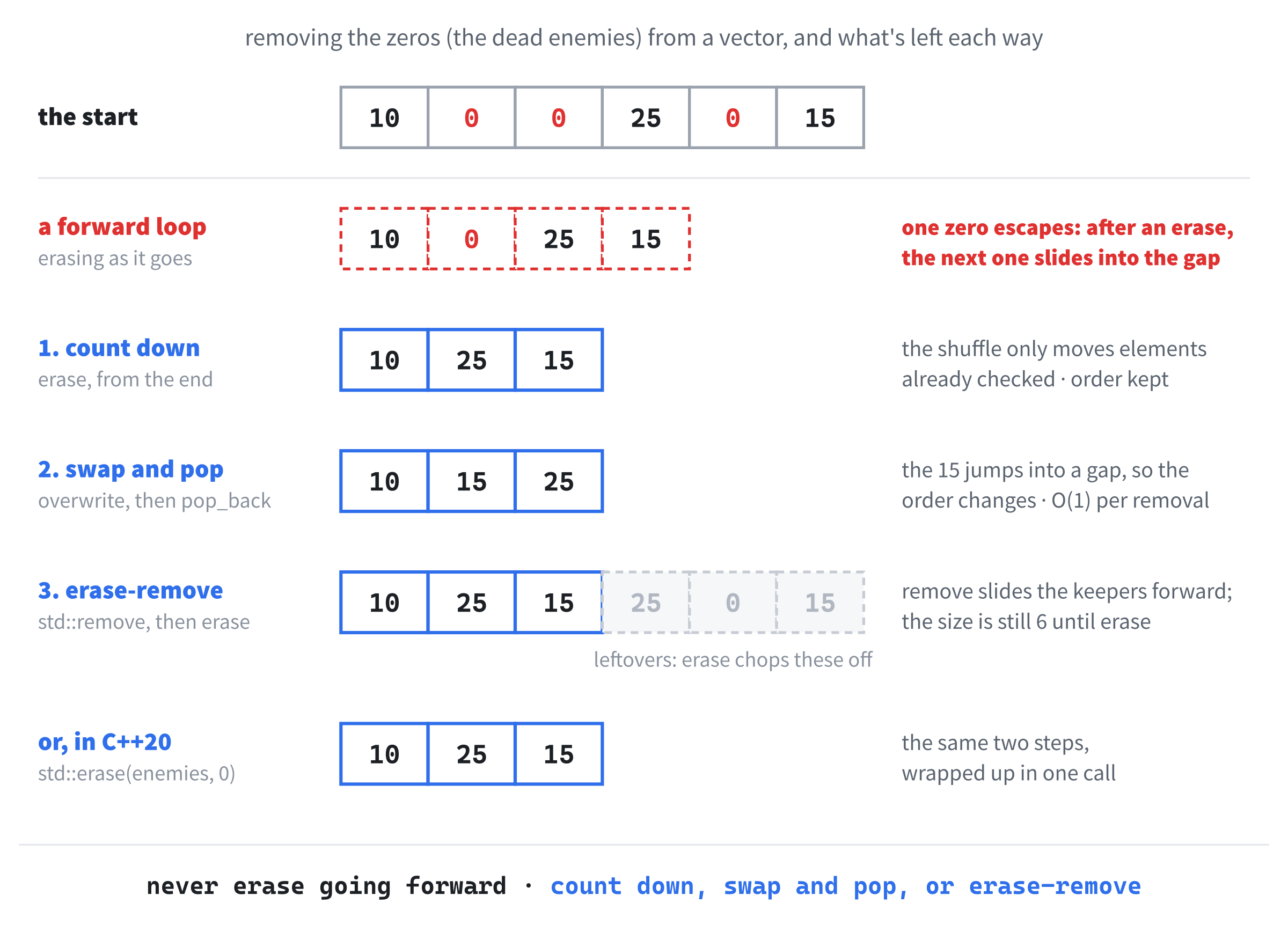
In the preceding code, the loop checks each element, and erases it if it's 0. Add a range-based for below to print what's left, and it's "10 0 25 15": one of the dead enemies has survived. When the loop erases the 0 at index 1, the second 0 shuffles down into index 1, but the loop has already moved on to index 2, so it never looks at it. Two dead enemies in a row, and the second one always escapes.
A range-based for is no help. It uses iterators, and removing an element invalidates them, just as a push_back can. Here are three ways that work, and Figure 13.7 follows each one through the same six enemies.
Way 1: Count Down
Loop from the end to the start. Try this inside main, in place of the loop above:
for (int i = static_cast<int>(enemies.size()) - 1; i >= 0; i--)
{
    if (enemies[i] == 0)
        enemies.erase(enemies.begin() + i);
}
In the preceding code, the loop starts at the last index and steps down. When it erases an element, only the elements after it shuffle down, and it has already checked those, so nothing is skipped: what's left is "10 25 15". The counter is an int, because a size_t can't count down past zero, and the static_cast turns the size into an int first.
Way 2: Swap and Pop
If the order of the elements doesn't matter, there's a faster way. Try this inside main, in place of the loop:
size_t i = 0;
while (i < enemies.size())
{
    if (enemies[i] == 0)
    {
        enemies[i] = enemies.back();
        enemies.pop_back();
    }
    else
    {
        i++;
    }
}
In the preceding code, a dead enemy is overwritten with the last enemy in the vector, and then the last slot is dropped with pop_back, so nothing has to shuffle at all. The loop doesn't move on after a removal, because the enemy that has just arrived at index i hasn't been checked yet. What's left is "10 15 25", in a different order, because the 15 has jumped into a gap.
Why is that faster? An erase in the middle of a vector moves every element after it, so the more elements there are, the longer it takes: programmers call that O(n), meaning the work grows with n, the number of elements. Swap and pop does the same small amount of work however big the vector is, which is O(1). For a handful of enemies, you'd never notice. For thousands of particles, every frame, you would.
Way 3: Erase-Remove
The standard library has a tool for this, in the <algorithm> header. Add #include <algorithm>, and try this inside main, in place of the loop:
auto firstLeftover = std::remove(enemies.begin(), enemies.end(), 0);
enemies.erase(firstLeftover, enemies.end());
In the preceding code, std::remove doesn't actually remove anything, despite its name: it slides every element that isn't 0 to the front, in order, and returns an iterator to the first leftover slot after them. The vector's size hasn't changed: print it straight after std::remove, and it's "10 25 15 25 0 15", with three leftovers on the end. Then erase, given two iterators, removes everything from the first to the second, and chops the leftovers off, leaving "10 25 15".
This pairing is called the erase-remove idiom, and you'll see it in a great deal of C++ code. C++20 wraps the pair in a single call, std::erase(enemies, 0);, which removes every 0 and leaves "10 25 15" too. Use it in your own code, but recognize the long form when you meet it.
All three ways work. Count down when the order matters and the code should be obvious, swap and pop when the order doesn't matter and speed does, and std::erase when you want the standard library to do it for you. The one thing never to do is erase from a vector while a forward loop walks over it.
Moving vs Copying (Brief)
When a vector grows, it has to get every element from the old block into the new one. For an int, that's just a copy. For a big element, such as a std::string holding a long piece of text, copying would mean duplicating all of that text, only to throw the original away a moment later.
Instead, C++ can move it. Moving a string with a long piece of text hands the text over to the new string, instead of copying it, and leaves the old one empty. Chapter 10 moved a unique_ptr from one owner to another with std::move, and it works on strings and vectors, too. Add #include <string> and #include <utility>, and try this inside main:
std::string name = "Ada Lovelace";
std::vector<std::string> names;

names.push_back(name);
std::cout << "copied: [" << name << "] [" << names[0] << "]" << std::endl;

names.push_back(std::move(name));
std::cout << "moved: [" << name << "] [" << names[1] << "]" << std::endl;
In the preceding code, the first push_back copies name into the vector, so both show "Ada Lovelace". The second is given std::move(name), which says we've finished with name, so the vector takes its text instead of copying it. The console shows "moved: [] [Ada Lovelace]": the vector has the name, and name is left empty. A moved-from variable still exists, and you can give it a new value, but don't count on what's in it until you do.
Vectors use moves themselves whenever they grow, for element types that can be moved cheaply, which is one reason they're so fast. That's all you need to know about moving for now.
AI Exercise (Optional)
Removing items while looping is one of the most common collection bugs in real code, and it's an ideal topic to explore with an AI, because there are several good answers, and comparing them teaches you more than any one of them. As always, skip it if you'd rather not; nothing later in the book depends on it.
Open your AI chatbot of choice and try a prompt like this:
"I'm learning C++ and I've just met std::vector, iterators, and the problem of removing elements while looping over a vector. Please write a small program that starts with a std::vector<int> holding {10, 0, 0, 25, 0, 15, 30, 0}, where 0 means a dead enemy. Write three functions that each remove every 0: one that loops backward by index, one that uses swap and pop, and one that uses std::erase from C++20. Print the vector after each one. For each, explain briefly how it works, whether it keeps the order, and when you'd choose it. Put each curly brace on its own line, and end with a one-paragraph recommendation."
Notice what the preceding prompt does. It names the three patterns, so the AI shows you exactly those, and it asks about order, which is the real difference between them. The starting data has two zeros in a row, and a zero at the very end, which are exactly the cases that break careless code.
When the answer comes back, run it in the sandbox. Do all three versions print the same numbers, apart from the order? Does the swap-and-pop version really change the order, as this chapter said it would? Is each function taking the vector by reference, so that it changes the caller's vector and not a copy? If an explanation doesn't match what you saw on the screen, ask about it.
Then push back on the recommendation. If the AI chose swap and pop, ask, "What if the order matters, such as the order enemies are drawn in?" The answer will tell you something about trade-offs that a single right answer never could.
Summary
You've met the collections that hold a game together. A raw array is a fixed row of elements, counted from 0: fast and simple, but it forgets its size when it's passed to a function, and it never checks an index, so going out of bounds is undefined behavior. A std::array remembers its size, and its at checks every index. A std::vector grows and shrinks on the heap, with push_back, pop_back, erase, and clear, and reserve makes its room in advance. You've kept structs in a vector, built a grid from a vector of vectors, and seen that a range-based for is an iterator loop in disguise.
Along the way, you've met the three pitfalls, holding on through a push_back, asking an empty vector, and removing while looping, along with three safe ways to remove.
In the next chapter, we'll put all of this to work. Chapter 12's single particle becomes a whole fountain of them, kept in a vector that grows with every click and shrinks as particles fade away.