
Chapter 12 ended with an itch. It had one particle on the heap, held by one pointer, and every click had to delete the old particle to make room for the new one, because there was nowhere to keep a second pointer. Chapter 13 gave us that somewhere: a std::vector, which grows as a program runs.
This project scratches the itch. It starts from Chapter 12's program and turns it into a fountain. Every click sprays a burst of forty particles up out of the mouse pointer. They arc, fall, bounce off the floor, and fade away, and as each one fades, the program deletes it and takes it out of the vector. The title bar keeps count, so you can watch the vector grow with every click and shrink as the particles fade.
The particles still live on the heap, one new each, and the vector holds pointers to them. That keeps Chapter 12's ownership in view: the vector looks after its pointers, but the particles they point to are still ours to delete.
SDL3 Projects/Particle Fountain — the complete source for this chapter lives here.In this chapter, we will:
- Start a new project from a copy of Chapter 12's
main.cpp - Add gravity, and send each particle upward in a spray, with the angles from Chapter 12
- Swap Chapter 12's single pointer for a
std::vector<Particle*>, with room reserved up front - Spray a burst of particles with each click, and update and draw them all with range-based
forloops - Delete every particle the vector points to, because the vector won't
- Count the particles in the title bar
- Fade the particles out, and remove each one with Chapter 13's swap and pop, deleting it first
- Play the game, experiment with it, fix the most common mistakes, and try an optional AI exercise
Let's pick up where Chapter 12 left off.
Setting Up the Project
This project starts from Chapter 12's main.cpp, so the setup has one new step, copying that file, and one thing to watch for. Here's the checklist:
- Choose File > New > Project, pick Empty Project (the one tagged C++, Windows, and Console), name it
ParticleFountain, and click Create. - Right-click the project, choose Open Folder in File Explorer, and copy two files into that folder, from your
ClickParticleproject folder:main.cppandSDL3.dll. - In Solution Explorer, right-click Source Files, choose Add > Existing Item, and pick the
main.cppin the new project folder. - Right-click the project, choose Properties, set the two dropdowns to All Configurations and All Platforms, and then make the four changes:
- C/C++ > General > Additional Include Directories:
C:\SDL3\include - C/C++ > Language > C++ Language Standard: ISO C++20 Standard (/std:c++20)
- Linker > General > Additional Library Directories:
C:\SDL3\lib\x64 - Linker > Input > Additional Dependencies:
SDL3.lib
- C/C++ > General > Additional Include Directories:
Copy main.cpp into the new folder first, as step 2 does, and only then add it. In a C++ project, Add > Existing Item doesn't copy the file: it adds the file where it is. Pick Chapter 12's own main.cpp, and every change in this chapter would go into Chapter 12's project. If you did, remove it from Solution Explorer, and add the copy instead.
If you skipped Chapter 12, its finished main.cpp is in the book's repository, in SDL3 Projects/Click Particle.
Checkpoint: Press F5. You have Chapter 12's program again, in a new project: click to make a particle, and right-click to delete it.
What Changes
Most of Chapter 12's program stays as it is: the game loop, randomBetween, most of the three particle functions, and all of the SDL setup but two lines. Here's what changes, in the order we'll change it:
| Section | What changes |
|---|---|
| A New Name | The comment at the top, and the window's title |
| Gravity | Faster, smaller particles, sprayed upward; gravity and a softer floor in moveParticle |
| Many Particles | The single pointer becomes a vector; a click sprays a burst; loops update and draw them all; deleteAll cleans up |
| Counting Them | A new updateTitle puts the count in the title bar |
| Fading Away | Each particle gets a lifetime, fades as it runs down, and is deleted and removed when it's gone |
Each change shows the lines to find, and what to change them to, or says where new lines go. After each section, there's a checkpoint, and the complete program is at the end.
A New Name
Start with the easy part. Replace the whole comment at the top of the file, from /* to */, with this one:
/*
    Particle Fountain
    The Chapter 14 project from Learning C++ by Building Games

    Chapter 12's Click Particle, with room for as many particles as you
    like. Each left-click sprays a burst of particles up out of the
    mouse pointer, like a fountain. They fall, bounce, and fade away,
    and each one is deleted as it fades. Right-click to delete them
    all. The title bar counts them. Escape, or the window's X, quits.

    New in this project: a std::vector of pointers to Particles, which
    the program still deletes one by one.
*/
In the preceding code, the comment says what the program does now. It's worth keeping a file's opening comment honest, because it's the first thing anyone reads, including you, next year.
The window needs a new title, too. Find this line in main:
SDL_Window* window = SDL_CreateWindow("Click Particle",And change it to this:
SDL_Window* window = SDL_CreateWindow("Particle Fountain",In the preceding code, only the text in quotes has changed. Soon, the title bar will count the particles as well.
Checkpoint: Press F5. The program works just as it did in Chapter 12, but its title bar now says Particle Fountain.
Gravity
A fountain throws things up, and gravity brings them down. First, the new particles need to be smaller and faster. Find these four constants near the top of the file:
const float MIN_SIZE   = 16.0f;       // width and height, in pixels
const float MAX_SIZE   = 32.0f;
const float MIN_SPEED  = 180.0f;      // pixels per second
const float MAX_SPEED  = 360.0f;
And change them to these:
const float MIN_SIZE   = 8.0f;        // width and height, in pixels
const float MAX_SIZE   = 16.0f;
const float MIN_SPEED  = 350.0f;      // pixels per second
const float MAX_SPEED  = 650.0f;
In the preceding code, the particles are half the size they were, because we'll soon have hundreds of them, and they start out a good deal faster, because gravity is about to slow them down.
Now the numbers for the fountain itself. Add these below MIN_BRIGHT, with a blank line in between:
// The fountain
const float UP           = TWO_PI * 0.75f;  // three quarters of a turn
const float SPREAD       = 0.45f;           // radians either side of up
const float GRAVITY      = 600.0f;          // pixels per second, per second
const float FLOOR_BOUNCE = 0.6f;            // speed kept after hitting floor
In the preceding code, UP is three quarters of a turn, which Chapter 12's Figure 12.3 showed pointing straight up, and SPREAD is how far either side of straight up a particle can go: 0.45 radians is about 26 degrees, so the spray fans out without going sideways. Then GRAVITY is how much faster, downward, a particle gets every second: 600 pixels per second, each second. Last, FLOOR_BOUNCE is how much of its speed a particle keeps when it hits the floor. At 0.6, it keeps 60 percent, so each bounce is lower than the last.
To spray the particles upward, find this line in spawnParticle:
float angle = randomBetween(0.0f, TWO_PI);And change it to this:
float angle = randomBetween(UP - SPREAD, UP + SPREAD);In the preceding code, the angle is no longer anywhere in a full turn, but somewhere between UP - SPREAD and UP + SPREAD, a narrow fan around straight up. The rest of spawnParticle still turns the angle into a velocity with std::cos and std::sin, exactly as before.
Gravity goes in moveParticle. Add this line at the top of the function, above the two lines that move the particle, with a blank line in between:
p->velY += GRAVITY * delta;In the preceding code, every frame adds a little to the particle's downward speed: GRAVITY pixels per second, for every second that has passed. A particle sprayed upward has a negative velY, so gravity first slows it down, then stops it at the top of its arc, and then pulls it back down, faster and faster. That's all gravity is in a game: one line that changes the velocity, before the velocity changes the position.
Finally, the floor. Find these two lines in moveParticle’s bottom-wall check:
p->y = WINDOW_H - p->size;
p->velY = -p->velY;
And change them to these:
p->y = WINDOW_H - p->size;
p->velY = -p->velY * FLOOR_BOUNCE;
In the preceding code, a particle that hits the floor still turns around, but it keeps only 60 percent of its speed, so each bounce is lower than the one before.
Checkpoint: Press F5, and click near the bottom of the window. The particle leaps upward, slows, falls back, and bounces lower and lower along the floor. It's still just one particle, because the program still has one pointer to keep it in.
Many Particles
Now for the change that the whole chapter is about. The program needs Chapter 13's vector, and the title bar will need std::string soon, so find this line at the top of the file:
#include <cmath> // std::cos and std::sin, for a random directionAnd change it to these three lines:
#include <cmath>    // std::cos and std::sin, for a random direction
#include <string>   // std::string and std::to_string, for the title bar
#include <vector>   // std::vector, to keep all the particles
In the preceding code, the <cmath> line only gets one more space before its comment, to line up with the new lines. The <vector> header brings in std::vector, and <string> brings in std::string and std::to_string, which we'll use for the count in the title bar.
A click should spray a burst of particles. Add this constant below FLOOR_BOUNCE:
const int BURST = 40; // particles for each clickIn the preceding code, BURST is how many particles each click adds: forty.
Now the heart of it. Find the particle pointer in main:
// The particle on the heap, or nullptr when there isn't one
Particle* particle = nullptr;
And change it to this:
// All the particles, each one on the heap, with room for 1,000
std::vector<Particle*> particles;
particles.reserve(1000);
In the preceding code, particles is a vector of Particle*: every element is a pointer to a particle on the heap, just like Chapter 12's single pointer, and the vector holds as many of them as we like. It starts empty. Then reserve, from Chapter 13, makes room for 1,000 pointers up front, so the vector won't have to move them all as it grows, until we pass a thousand particles.
From here until the next checkpoint, the program won't build, because the rest of main still uses particle, which has just gone. The next few changes replace every use of it.
Notice that a vector of pointers doesn't need nullptr to say "there's no particle." An empty vector simply has no pointers in it, and a loop over it does nothing, which is exactly what we want. Figure 14.1 shows what the vector holds: not the particles, but their addresses.

The 1,000 isn't a limit. Past it, push_back grows the vector as Chapter 13 showed, moving every element to a bigger block. Here, though, the elements are only addresses. The particles themselves stay exactly where new put them, so any other Particle* in the program still leads to the right particle after the move. That's one reason real programs keep big objects behind pointers: the collection can grow without the objects moving.
The click that made one particle now makes forty. Find these lines in the left button's block:
delete particle;   // the old one, if there is one
particle = spawnParticle(event.button.x, event.button.y);
SDL_Log("New particle at %p",
        static_cast<void*>(particle));
And change them to these:
for (int i = 0; i < BURST; i++)
{
    particles.push_back(spawnParticle(event.button.x,
                                      event.button.y));
}
In the preceding code, the old particle isn't deleted anymore, because we want to keep it, and the log is gone, because forty addresses a click would flood the console. Instead, the loop runs BURST times, and each time, spawnParticle makes a particle on the heap, just as in Chapter 12, and hands back its address, which push_back adds to the end of the vector. Nothing else keeps that address, so from now on, the vector's copy is the only way to reach that particle.
The right button deletes every particle, which is a job we'll need twice, so it gets a function. Add this function below moveParticle:
// Delete every particle, and empty the vector
void deleteAll(std::vector<Particle*>& particles)
{
    for (Particle* p : particles)
        delete p;
    particles.clear();
}
In the preceding code, deleteAll takes the vector by reference, so it works on the caller's vector, not a copy of it. The loop visits every pointer, and deletes the particle it points to. Then clear empties the vector itself, so that it doesn't hold on to addresses that no longer lead anywhere. The order matters: clear first would throw away the only addresses we have, and the particles would leak.
Now use it. Find these lines in the right button's block:
delete particle;
particle = nullptr;
SDL_Log("No particle now");
And change them to this:
deleteAll(particles);In the preceding code, one call deletes every particle and empties the vector. There's no pointer to set to nullptr anymore: the empty vector says "no particles" all by itself.
Next, the update. Find these lines, below the delta time:
// Move the particle, if there is one
if (particle != nullptr)
    moveParticle(particle, delta);
And change them to these:
// Move every particle
for (Particle* p : particles)
    moveParticle(p, delta);
In the preceding code, the range-based for from Chapter 13 visits every pointer in the vector, and p is a copy of each one in turn: a copy of the address, not of the particle, so moveParticle changes the real particle on the heap. Chapter 12's check for nullptr has gone, because every pointer in the vector came from new, and an empty vector just means the loop does nothing.
The drawing works the same way. Find these lines:
if (particle != nullptr)
    drawParticle(renderer, particle);
And change them to these:
for (const Particle* p : particles)
    drawParticle(renderer, p);
In the preceding code, each p is a const Particle*, because drawing only needs to look at a particle, just like drawParticle’s own parameter.
Last, the cleanup. Find these lines at the end of main:
delete particle;       // the particle, if there is one
particle = nullptr;
And change them to this:
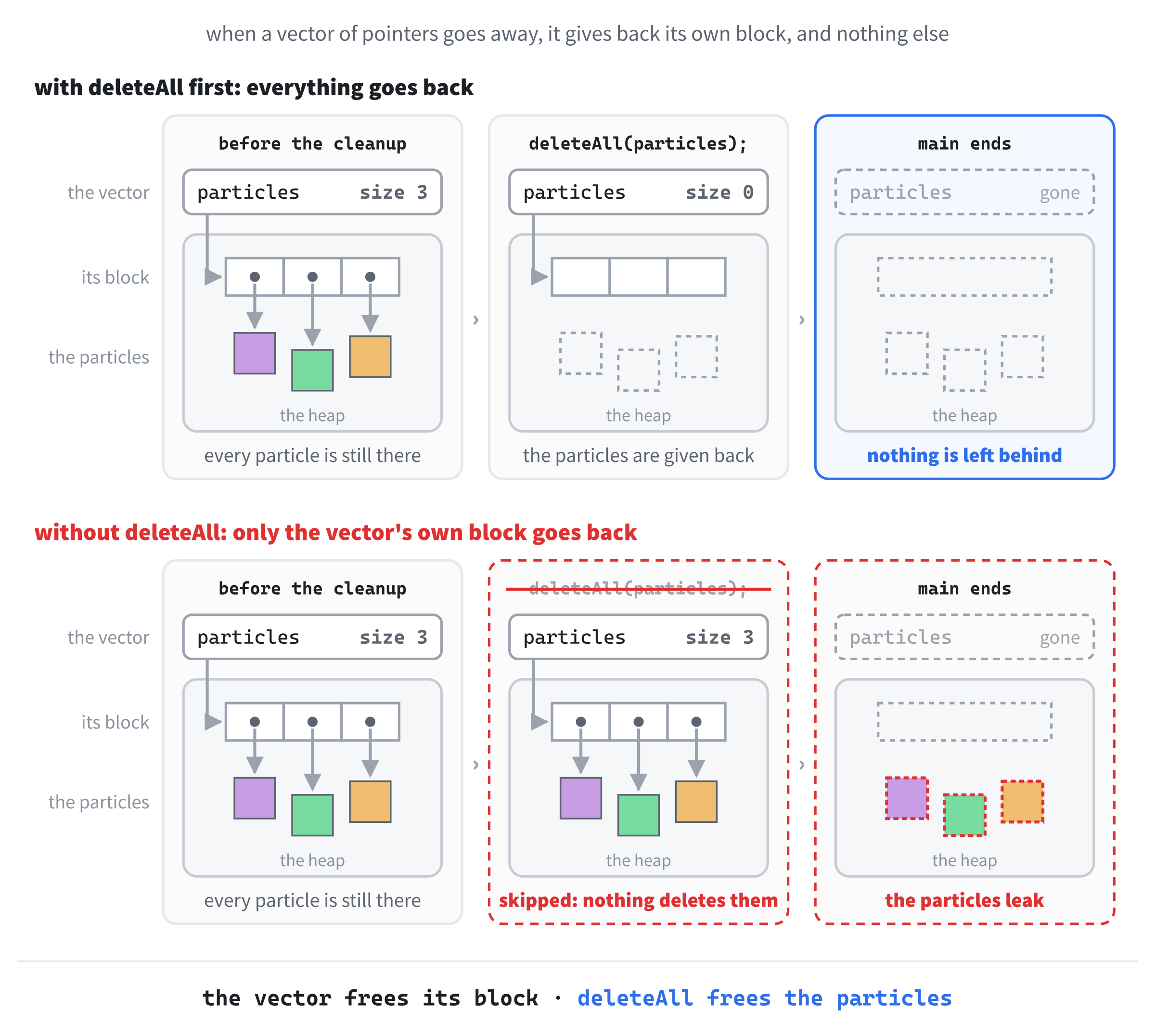
deleteAll(particles); // every particle that's still on the heapIn the preceding code, every particle still on the heap is deleted before the program ends. This is the part that's easy to forget, and Figure 14.2 shows why it matters. When main ends, the vector cleans up after itself: it gives back its own block of memory, the one that holds the pointers. But it doesn't know that those pointers own anything, so the particles they point to would stay on the heap, with nothing pointing at them at all.
Checkpoint: Press F5, and click near the bottom of the window. Forty particles spray upward in a fan, arc over, and rain down, bouncing lower and lower. Click a few more times, anywhere. Each click adds another forty, and they pile up along the floor, because nothing ever takes a particle away. Right-click, and they all vanish at once.
Counting Them
How many particles are there right now? The title bar can tell us, just as it showed the score in Chapter 11. Add this function below deleteAll:
// Show how many particles there are in the title bar
void updateTitle(SDL_Window* window, size_t count)
{
    std::string title = "Particle Fountain    Particles: " +
                        std::to_string(count);
    SDL_SetWindowTitle(window, title.c_str());
}
In the preceding code, updateTitle builds the title with std::to_string, as in Chapter 11, and hands it to SDL_SetWindowTitle with c_str. The count is a size_t, because that's the type size() returns, as Chapter 13 explained.
The title should show 0 from the start. Add this line below particles.reserve(1000);:
updateTitle(window, particles.size());In the preceding code, the vector is still empty, so the title says "Particles: 0".
Each click changes the count. Add the same line below the left button's for loop, just after its closing brace:
updateTitle(window, particles.size());In the preceding code, the title is updated once, after all forty particles have been added, rather than forty times.
The right button changes the count, too. Add the same line again below deleteAll(particles); in the right button's block:
updateTitle(window, particles.size());In the preceding code, the vector has just been emptied, so the title goes back to "Particles: 0".
Checkpoint: Press F5. The title bar says "Particle Fountain Particles: 0". Each click adds 40, so after five clicks it says 200, and a right-click puts it back to 0.
Fading Away
The last step makes the fountain clean up after itself: each particle gets a lifetime, fades as it runs down, and is deleted and removed when it's gone. Add this constant below BURST:
const float LIFETIME = 3.0f; // seconds until it fades awayIn the preceding code, LIFETIME is how long a particle lasts: three seconds.
Each particle needs to know how much of its life is left. Add this member to the Particle struct, below SDL_Color color;:
float life; // seconds left before it fades awayIn the preceding code, life counts down from LIFETIME to 0.
Every new particle starts with its whole life ahead of it. Add this line in spawnParticle, below p->color.a = 255;:
p->life = LIFETIME;In the preceding code, a new particle has three seconds to live.
And every frame, it gets a little older. Add this line in moveParticle, below the gravity line:
p->life -= delta;In the preceding code, the particle's life goes down by the time the frame took, so after three seconds' worth of frames, it reaches 0.
Now the fade. Find the top of drawParticle:
// Draw a particle as a square, in its own color
void drawParticle(SDL_Renderer* renderer, const Particle* p)
{
    SDL_SetRenderDrawColor(renderer, p->color.r, p->color.g, p->color.b,
                           p->color.a);
And change it to this:
// Draw a particle as a square, in its own color, fading as it ages
void drawParticle(SDL_Renderer* renderer, const Particle* p)
{
    Uint8 alpha = static_cast<Uint8>(p->color.a * (p->life / LIFETIME));
    SDL_SetRenderDrawColor(renderer, p->color.r, p->color.g, p->color.b,
                           alpha);
In the preceding code, p->life / LIFETIME is how much of the particle's life is left, as a fraction: 1 when it's new, falling to 0. Multiplying the color's alpha by that fraction makes it fade from fully solid to fully see-through, and static_cast turns the result into the Uint8 that an alpha has to be.
Alpha only counts if the renderer blends, which Chapter 11 turned on with one line. Add this below the vsync line in main, with a blank line in between:
// Let see-through colors blend with whatever is behind them
SDL_SetRenderDrawBlendMode(renderer, SDL_BLENDMODE_BLEND);
In the preceding code, the renderer takes each color's alpha into account when it fills a rectangle, so a fading particle lets the background show through.
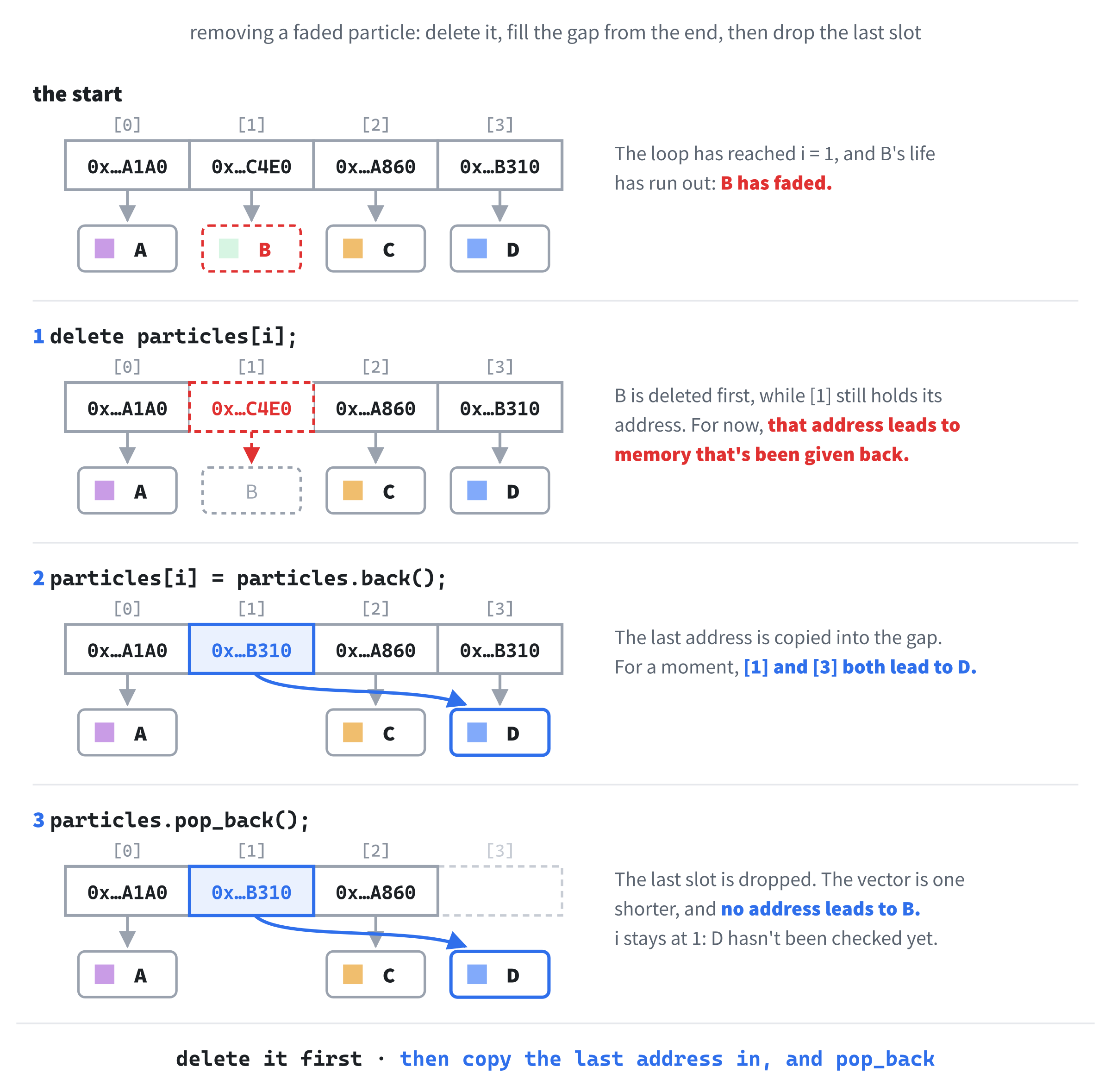
A particle whose life has run out is invisible, but it's still on the heap, and still in the vector, being moved and drawn every frame for nothing. Removing it is Chapter 13's job, with one twist: the vector holds pointers, so each particle has to be deleted before its pointer is taken out. Add this function below moveParticle, above deleteAll:
// Delete every particle that has faded away, and take it out of the
// vector. The order doesn't matter, so each gap is filled from the end.
void removeFaded(std::vector<Particle*>& particles)
{
    size_t i = 0;
    while (i < particles.size())
    {
        if (particles[i]->life <= 0.0f)
        {
            delete particles[i];
            particles[i] = particles.back();
            particles.pop_back();
        }
        else
        {
            i++;
        }
    }
}
In the preceding code, removeFaded is Chapter 13's swap and pop, with a delete in front. When a particle's life has run out, the particle itself is deleted first, while its address is still in the vector. Then the last pointer in the vector is copied into its slot, and pop_back drops the last slot. As before, the loop doesn't move on after a removal, because the pointer that has just arrived at i hasn't been checked yet. Figure 14.3 follows one removal.
Swap and pop is the right choice for a fountain, because the order of the particles doesn't matter, and there could be hundreds of them fading every second. Chapter 13's std::erase won't do here, though. It would take the pointers out of the vector perfectly well, but it would never delete the particles they point to, so every one would leak.
Finally, call it. Add this below the loop that moves the particles, with a blank line in between:
// Remove the particles that have faded, and update the count
size_t countBefore = particles.size();
removeFaded(particles);
if (particles.size() != countBefore)
    updateTitle(window, particles.size());
In the preceding code, the count is noted before the faded particles are removed, and compared afterward. If any have gone, the title is updated, and if none have, the title is left alone, rather than being set to the same thing every frame, as Chapter 11 advised.
Checkpoint: Press F5, and click a few times. The particles spray up, fall, and bounce, and now they fade as they go, disappearing about three seconds after each click. Watch the title bar: it climbs by 40 with every click, and counts back down to 0 as the particles fade.
That's the fountain finished.
The Complete Program
Here's the whole file in one piece, with every line at its real indentation. If you've made every change in the place described, this is exactly what you have:
/*
    Particle Fountain
    The Chapter 14 project from Learning C++ by Building Games

    Chapter 12's Click Particle, with room for as many particles as you
    like. Each left-click sprays a burst of particles up out of the
    mouse pointer, like a fountain. They fall, bounce, and fade away,
    and each one is deleted as it fades. Right-click to delete them
    all. The title bar counts them. Escape, or the window's X, quits.

    New in this project: a std::vector of pointers to Particles, which
    the program still deletes one by one.
*/

#include <SDL3/SDL.h>
#include <SDL3/SDL_main.h>

#include <cmath>    // std::cos and std::sin, for a random direction
#include <string>   // std::string and std::to_string, for the title bar
#include <vector>   // std::vector, to keep all the particles

const int       WINDOW_W   = 800;                   // window width in pixels
const int       WINDOW_H   = 600;                   // window height in pixels
const SDL_Color BACKGROUND = { 12, 12, 24, 255 };   // deep blue-black

// New particles
const float MIN_SIZE   = 8.0f;        // width and height, in pixels
const float MAX_SIZE   = 16.0f;
const float MIN_SPEED  = 350.0f;      // pixels per second
const float MAX_SPEED  = 650.0f;
const float TWO_PI     = 6.2831853f;  // a full turn, in radians
const int   MIN_BRIGHT = 100;         // no part of a color is darker

// The fountain
const float UP           = TWO_PI * 0.75f;  // three quarters of a turn
const float SPREAD       = 0.45f;           // radians either side of up
const float GRAVITY      = 600.0f;          // pixels per second, per second
const float FLOOR_BOUNCE = 0.6f;            // speed kept after hitting floor
const int   BURST        = 40;              // particles for each click
const float LIFETIME     = 3.0f;            // seconds until it fades away

// One particle: a colored square with a position and a velocity
struct Particle
{
    float x;           // the top-left corner, in pixels
    float y;
    float velX;        // the velocity, in pixels per second
    float velY;
    float size;        // the width and height, in pixels
    SDL_Color color;
    float life;        // seconds left before it fades away
};

// A random number from low up to high
float randomBetween(float low, float high)
{
    return low + SDL_randf() * (high - low);
}

// Make a particle on the heap, centered on a point, and flying off in a
// random direction. It's the caller's job to delete it.
Particle* spawnParticle(float centerX, float centerY)
{
    Particle* p = new Particle{};

    p->size = randomBetween(MIN_SIZE, MAX_SIZE);
    p->x = centerX - p->size / 2.0f;
    p->y = centerY - p->size / 2.0f;

    float angle = randomBetween(UP - SPREAD, UP + SPREAD);
    float speed = randomBetween(MIN_SPEED, MAX_SPEED);
    p->velX = std::cos(angle) * speed;
    p->velY = std::sin(angle) * speed;

    p->color.r = static_cast<Uint8>(MIN_BRIGHT + SDL_rand(256 - MIN_BRIGHT));
    p->color.g = static_cast<Uint8>(MIN_BRIGHT + SDL_rand(256 - MIN_BRIGHT));
    p->color.b = static_cast<Uint8>(MIN_BRIGHT + SDL_rand(256 - MIN_BRIGHT));
    p->color.a = 255;
    p->life = LIFETIME;

    return p;
}

// Draw a particle as a square, in its own color, fading as it ages
void drawParticle(SDL_Renderer* renderer, const Particle* p)
{
    Uint8 alpha = static_cast<Uint8>(p->color.a * (p->life / LIFETIME));
    SDL_SetRenderDrawColor(renderer, p->color.r, p->color.g, p->color.b,
                           alpha);
    SDL_FRect rect = { p->x, p->y, p->size, p->size };
    SDL_RenderFillRect(renderer, &rect);
}

// Move a particle on by one frame, bouncing it off the walls
void moveParticle(Particle* p, float delta)
{
    p->velY += GRAVITY * delta;
    p->life -= delta;

    p->x += p->velX * delta;
    p->y += p->velY * delta;

    // The left and right walls
    if (p->x < 0.0f)
    {
        p->x = 0.0f;
        p->velX = -p->velX;
    }
    else if (p->x + p->size > WINDOW_W)
    {
        p->x = WINDOW_W - p->size;
        p->velX = -p->velX;
    }

    // The top and bottom walls
    if (p->y < 0.0f)
    {
        p->y = 0.0f;
        p->velY = -p->velY;
    }
    else if (p->y + p->size > WINDOW_H)
    {
        p->y = WINDOW_H - p->size;
        p->velY = -p->velY * FLOOR_BOUNCE;
    }
}

// Delete every particle that has faded away, and take it out of the
// vector. The order doesn't matter, so each gap is filled from the end.
void removeFaded(std::vector<Particle*>& particles)
{
    size_t i = 0;
    while (i < particles.size())
    {
        if (particles[i]->life <= 0.0f)
        {
            delete particles[i];
            particles[i] = particles.back();
            particles.pop_back();
        }
        else
        {
            i++;
        }
    }
}

// Delete every particle, and empty the vector
void deleteAll(std::vector<Particle*>& particles)
{
    for (Particle* p : particles)
        delete p;
    particles.clear();
}

// Show how many particles there are in the title bar
void updateTitle(SDL_Window* window, size_t count)
{
    std::string title = "Particle Fountain    Particles: " +
                        std::to_string(count);
    SDL_SetWindowTitle(window, title.c_str());
}

int main(int argc, char* argv[])
{
    // Start SDL, then make the window and the renderer
    if (!SDL_Init(SDL_INIT_VIDEO))
    {
        SDL_Log("SDL_Init failed: %s", SDL_GetError());
        return 1;
    }

    SDL_Window* window = SDL_CreateWindow("Particle Fountain",
                                          WINDOW_W, WINDOW_H, 0);
    if (!window)
    {
        SDL_Log("SDL_CreateWindow failed: %s", SDL_GetError());
        SDL_Quit();
        return 1;
    }

    SDL_Renderer* renderer = SDL_CreateRenderer(window, nullptr);
    if (!renderer)
    {
        SDL_Log("SDL_CreateRenderer failed: %s", SDL_GetError());
        SDL_DestroyWindow(window);
        SDL_Quit();
        return 1;
    }

    // Show each frame in step with the monitor's refresh
    SDL_SetRenderVSync(renderer, 1);

    // Let see-through colors blend with whatever is behind them
    SDL_SetRenderDrawBlendMode(renderer, SDL_BLENDMODE_BLEND);

    // All the particles, each one on the heap, with room for 1,000
    std::vector<Particle*> particles;
    particles.reserve(1000);
    updateTitle(window, particles.size());

    // The time at the last frame, in milliseconds
    Uint64 lastTime = SDL_GetTicks();

    bool running = true;
    SDL_Event event;

    while (running)
    {
        // Handle every event that's waiting
        while (SDL_PollEvent(&event))
        {
            if (event.type == SDL_EVENT_QUIT)
            {
                running = false;
            }
            if (event.type == SDL_EVENT_KEY_DOWN &&
                event.key.key == SDLK_ESCAPE)
            {
                running = false;
            }
            if (event.type == SDL_EVENT_MOUSE_BUTTON_DOWN)
            {
                if (event.button.button == SDL_BUTTON_LEFT)
                {
                    for (int i = 0; i < BURST; i++)
                    {
                        particles.push_back(spawnParticle(event.button.x,
                                                          event.button.y));
                    }
                    updateTitle(window, particles.size());
                }
                else if (event.button.button == SDL_BUTTON_RIGHT)
                {
                    deleteAll(particles);
                    updateTitle(window, particles.size());
                }
            }
        }

        // Delta time: how many seconds the last frame took
        Uint64 now = SDL_GetTicks();
        float delta = (now - lastTime) / 1000.0f;
        lastTime = now;

        // Move every particle
        for (Particle* p : particles)
            moveParticle(p, delta);

        // Remove the particles that have faded, and update the count
        size_t countBefore = particles.size();
        removeFaded(particles);
        if (particles.size() != countBefore)
            updateTitle(window, particles.size());

        // Draw the frame
        SDL_SetRenderDrawColor(renderer, BACKGROUND.r, BACKGROUND.g,
                               BACKGROUND.b, BACKGROUND.a);
        SDL_RenderClear(renderer);

        for (const Particle* p : particles)
            drawParticle(renderer, p);

        SDL_RenderPresent(renderer);
    }

    // Clean up, in the reverse order we created things
    deleteAll(particles);  // every particle that's still on the heap
    SDL_DestroyRenderer(renderer);
    SDL_DestroyWindow(window);
    SDL_Quit();

    return 0;
}
In the preceding code, the shape is still Chapter 12's: the constants, the struct, the functions, and then main. The three new functions, removeFaded, deleteAll, and updateTitle, sit just above main, and main holds a vector where Chapter 12 had a single pointer.
Playing the Game
Press F5, and click near the bottom of the window. Forty particles burst upward in a fan of colors, slow down, and rain back down, bouncing lower each time, and fading as they go. Click again, and again: every click adds another burst, and the title bar counts them, as in Figure 14.4.
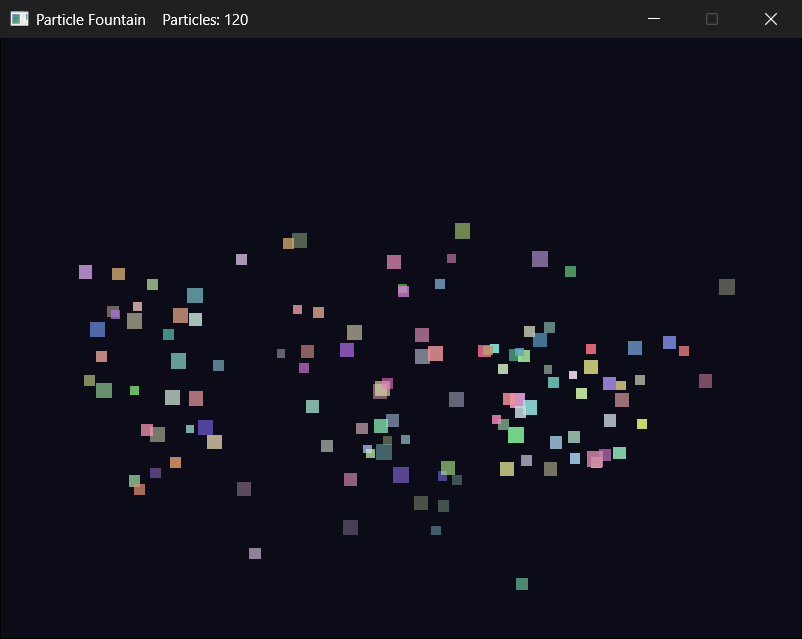
Click fast, all over the window, and the count climbs into the hundreds. Stop, and three seconds later, the window is empty and the count is back to 0. Right-click to clear everything at once, and press Escape, or close the window, when you've had enough.
Understanding the Code
Compared with Chapter 12, surprisingly little changed. Apart from the window's title, and one line that turns on blending, the SDL setup is exactly as it was, and so are the game loop and most of the particle functions. What changed is the one place that decides how many things there are: a single pointer became a vector of them, and everything that touched that pointer became a loop.
That's the gift of collections. The loops don't care whether the vector holds zero particles or ten thousand, so the code for one is the code for all of them. Chapter 12 needed a check for nullptr before every use of its pointer, and this program needs none, because an empty vector makes every loop do nothing.
The ownership, though, is exactly Chapter 12's, multiplied. Every particle is made with new, and must be deleted exactly once: when it fades, in removeFaded, when you right-click, in deleteAll, or when the program ends, in deleteAll again. The vector owns its block of pointers and gives it back by itself, but it knows nothing about what those pointers point to. A vector of raw pointers says "I keep the addresses, and you do the deleting."
See the leak that deleteAll prevents. Add #include <crtdbg.h> at the top, and make _CrtSetDbgFlag(_CRTDBG_ALLOC_MEM_DF | _CRTDBG_LEAK_CHECK_DF);, with a single |, the first line of main: unlike Chapter 12's check, it waits until the vector has gone. Then take out the last deleteAll call in main, press F5, click once, and press Escape before the burst fades. The Output window says "Detected memory leaks!" and lists 40 blocks, each "28 bytes long", the size of one Particle. Put deleteAll back, and they're gone.
There are two ways to take that job away. One is Chapter 10's smart pointer: a std::vector<std::unique_ptr<Particle>> deletes each particle whenever its unique_ptr is removed, or when the vector goes away. The other is simpler still: a std::vector<Particle>, which keeps the particles themselves in the vector's block, side by side, with no new, no delete, and no pointers at all. That's what most games would do with something as small as a particle, and the Experimenting section lets you try it. We kept the pointers here because they make the ownership visible, and because plenty of real code, where each object is too big to copy around or has to stay at the same address, looks exactly like this.
Experimenting
Try these one at a time, and see how the fountain changes:
- Change
GRAVITYto150.0f, for a slow, floaty fountain, or to1500.0f, for a heavy one. - Change
SPREADto0.1ffor a tight jet, or to1.5ffor a spray that nearly reaches the floor on either side. - Change
FLOOR_BOUNCEto0.0f, and the particles land without a bounce and slide along the floor until they fade, or to1.0f, and they bounce forever, or at least until they fade. - Change
BURSTto200, and watch the count climb five times as fast.
For a bigger challenge, try these:
- Spray while the button is held. Chapter 11 read the mouse with
SDL_GetMouseState, which also returns which buttons are held. Every frame that the left button is down, spray a few particles from the mouse position, and the fountain follows the pointer. Keep an eye on the count. - A vector of values. Change
particlesto astd::vector<Particle>, and follow the compiler's errors. MakespawnParticlereturn aParticleinstead of aParticle*, with nonew, and makemoveParticleanddrawParticletake aParticle&and aconst Particle&, with everyp->in the three functions becomingp.. The loops inmaintake references, too. Then take thedeleteout ofremoveFaded, and cutdeleteAlldown to justparticles.clear(). The program behaves exactly the same, and there's nothing left to delete. - A vector of smart pointers. Try
std::vector<std::unique_ptr<Particle>>instead, with#include <memory>. The call topush_backneedsstd::unique_ptr<Particle>(spawnParticle(...)), the loops take references tostd::unique_ptr<Particle>, and you'll need.get()to pass a raw pointer to the functions. InremoveFaded,std::move(particles.back())fills the gap, as Chapter 10 moved aunique_ptr, and everydeletedisappears.
The last two are the same program with different ownership, and trying both will teach you more about C++ memory than another chapter of theory.
Common Errors and Fixes
If the build fails with errors about SDL3/SDL.h or SDL3.lib, the SDL settings need checking, and Chapter 1's Common Errors section covers each one. Here are the problems that are particular to this chapter.
Every change you make shows up in Chapter 12's project, too. In step 3, main.cpp was added straight from Chapter 12's folder, so both projects are using the same file. Remove it from this project's Solution Explorer, copy it into this project's folder, and add the copy.
The particles don't fade: they stay solid, and then vanish. The SDL_SetRenderDrawBlendMode line is missing, so the renderer ignores the alpha.
The particles fade out, and then come back and pile up along the floor, and the count never goes down. The call to removeFaded is missing from the game loop. The particles' lives run out, but nothing removes them, so they're still drawn, with a nonsense alpha worked out from a life below zero.
Clicking seems to do nothing, and the count stays at 0. The line in spawnParticle that sets p->life is missing. The empty braces on new Particle{} start life at 0, so every particle has faded before it's even drawn, and removeFaded takes it right away.
Visual Studio stops inside delete with "Breakpoint Instruction Executed", a few seconds after a click, or as soon as you right-click. Click Continue, and a "Debug Assertion Failed!" box about _CrtIsValidHeapPointer(block) follows. The & is missing from removeFaded’s or deleteAll’s parameter, so the function gets a copy of the vector. It deletes the particles, but only takes their pointers out of the copy, so the real vector still has the addresses of particles that are gone, and deleting one of them again is Chapter 10's double free. Put the & back: std::vector<Particle*>& particles.
The build stops with C2039: 'vector': is not a member of 'std'. The #include <vector> line is missing.
AI Exercise (Optional)
If you'd like to take the fountain further with an AI's help, here's a challenge that stretches what we've covered without leaving it. As always, skip it if you'd rather not; nothing later in the book depends on it.
Open your AI chatbot of choice and try a prompt like this:
"I have a C++ SDL 3 particle fountain. Particles are made with new and kept in a std::vector<Particle*>. Each click adds a burst of 40 particles that fly up, fall with gravity, bounce off the floor, and fade out over three seconds, and a function called removeFaded deletes each faded particle and removes it with swap and pop. I have learned variables, structs, flow control, loops, functions, references, raw and smart pointers, arrays, std::vector, and SDL. I haven't learned classes. Add fireworks: when a particle reaches the top of its arc, which is when its vertical velocity turns from negative to positive, it should burst into 8 smaller particles of the same color that fly out in all directions, and the original particle should be deleted. Use only what I've learned, put each curly brace on its own line, and show me every function you change, in full."
Notice what the preceding prompt does. It describes the ownership, so the AI knows that every particle came from new and must be deleted exactly once, and it lists what you know. The feature it asks for is harder than it looks: new particles have to be added while the program is looping over the vector.
That's where the trap is. If the AI's code calls push_back inside the range-based for that moves the particles, the vector may move its whole block to make room, which invalidates the loop's iterators, exactly as Chapter 13 warned. Look for a safer shape, such as collecting the new particles in a second vector during the loop, and adding them all afterward. If the AI's version adds to the vector mid-loop, push back: "Adding to the vector inside the loop that walks over it can invalidate the loop's iterators. Show me a version that adds the new particles after the loop."
Then run it, and watch the count in the title bar. If it keeps climbing and never comes back to 0, something isn't being deleted.
Summary
You've turned Chapter 12's one particle into a fountain of hundreds. A std::vector<Particle*> keeps the pointers, reserve makes room for them up front, push_back adds a burst with each click, and range-based for loops move and draw every particle, with no checks for nullptr anywhere. Gravity turned out to be one line that changes the velocity, and a fade is just an alpha that shrinks with a particle's life.
The ownership stayed Chapter 12's. The vector gives back its own block of pointers, but every particle is still ours to delete, exactly once: in removeFaded, with a delete before Chapter 13's swap and pop, and in deleteAll, before clear, when you right-click and when the program ends.
In the next chapter, we'll meet the rest of the standard library's collections, the ones that find things by a name or a key, rather than by a position, and that keep things in order or in line. After that, Chapter 16's Loot Grid puts several of them to work in a game.