
Every collection so far has found things by position. Chapter 13's vectors hand you the element at index 3, or the tile at row 2, column 2, and Chapter 14's fountain never needed to find any one particle: it kept them all in a vector, in no particular order, and visited every one. But a lot of what a game needs to find has a name instead of a number: the texture called "grass", how many potions the player is carrying, the best score for "Ada", or whatever is lying on the floor at column 3, row 1.
You can do those jobs with the tools you already have, but it gets clumsy. Chapter 11 gave each of its nine pictures a member of its own in a Textures struct, so a tenth picture would need a new member, a new line to load it, and a new line to destroy it. The collections in this chapter let the names themselves be data: ask for "grass", and you get the grass.
That's what Chapter 14 promised: the collections that find things by a name or a key, rather than by a position, and the ones that keep things in order or in line. We'll spend most of the chapter on the two you'll use most, std::map and std::unordered_map, and then meet the rest of the family more briefly, finishing with a flowchart for choosing between them.
In this chapter, we will:
- Look things up by key with
std::map, and add, change, and remove entries - Fall into the square-bracket trap on purpose, and learn three ways around it:
contains,find, andat - Walk through a map in key order, and unpack each entry with a structured binding
- Count things with a map, and use
enum classvalues and pairs as keys - See how a map keeps its order, and swap in
std::unordered_mapfor faster lookups - Keep a collection of unique values with
std::set - Take things in turn with
std::queue,std::stack, andstd::priority_queue - Add and remove at both ends with
std::deque - Group values with
std::pairandstd::tuple - Choose the right collection with a flowchart
- Try an optional AI exercise
As in Chapters 2, 4, 6, 8, 10, and 13, the examples are small experiments for your Sandbox project. Each lead-in says whether the code goes inside main or above it. Every collection has a header of its own, and each #include goes below #include <iostream>.
Let's start with the one you'll reach for most.
std::map
A std::map is a collection of key-value pairs, where each key leads to one value. A paper dictionary works the same way: you look up a word, which is the key, to find its definition, which is the value. In a game, the key might be a player's name and the value their score, or the key might be an item's name and the value how many of them the player is carrying.
Making a Map
Add #include <map> and #include <string> below #include <iostream>, and try this inside main:
std::map<std::string, int> scores;

scores["Grace"] = 85;
scores["Ada"] = 100;
scores["Linus"] = 70;

std::cout << scores["Ada"] << " " << scores.size() << std::endl;
In the preceding code, the angle brackets hold two types this time: first the key type, std::string, and then the value type, int. So scores is a map from names to scores, and like a vector, it starts out empty. The next three lines use square brackets with a key where a vector would have an index, so scores["Grace"] = 85; means "the value for Grace is 85." There's no Grace in the map yet, so the map adds her. The console shows 100, the value for Ada, and 3, the number of entries.
Setting a key that's already there changes its value. Add this below:
scores["Ada"] = 120;
std::cout << scores["Ada"] << " " << scores.size() << std::endl;
In the preceding code, Ada is already in the map, so her value changes to 120, and the console shows 120 and 3. Each key appears in a map only once, so the size doesn't change. That's the big difference from a vector's push_back: a vector would happily hold two scores for Ada, but a map never does.
A map can start out full, too, from a list. Try this inside main:
std::map<std::string, int> prices = {
    { "sword", 150 },
    { "shield", 90 },
    { "potion", 25 }
};

std::cout << prices["potion"] << std::endl;
In the preceding code, each entry in the list is a key and a value, in braces of their own, so prices starts out with three entries, and the console shows 25.
The Square-Bracket Trap
Square brackets have a catch that surprises everyone once. Try this inside main, in place of the other examples:
std::map<std::string, int> scores = { { "Ada", 100 } };

int graceScore = scores["Grace"];
std::cout << graceScore << " " << scores.size() << std::endl;
In the preceding code, the map holds only Ada, and the next line reads Grace's score. There's no Grace, but instead of complaining, the square brackets add her. Her value is value-initialized, like the elements of Chapter 13's tenItems(10), which for an int means 0. The console shows 0 and 2: just by looking, we've added an entry, as Figure 15.1 shows.
![The square-bracket trap. Reading scores["Grace"] when there's no Grace adds her, with a score of 0, so the map grows from one entry to two. The functions contains, find, and at only look, and leave the map as it was.](../images/learning-cpp/c15/the_brackets_trap.png)
When the value is a std::string, a missing key gets an empty string, and when it's a struct, it gets a struct with every member set to zero. Sometimes that's exactly what you want, as we'll see when we count things. When you only meant to look, though, it's a bug waiting to happen: a typo in a key quietly adds a new entry, and much later, a loop over the map finds a player nobody created.
There are three ways to look without adding, and each one answers a slightly different question.
Asking First: contains
To ask whether a key is in the map, use contains. Try this inside main, below the map:
if (scores.contains("Linus"))
{
    std::cout << "Linus scored " << scores["Linus"] << std::endl;
}
else
{
    std::cout << "No score for Linus" << std::endl;
}
std::cout << scores.size() << std::endl;
In the preceding code, contains answers true or false and never adds anything, so the square brackets only run when Linus is really there. He isn't, so the console shows "No score for Linus". The size is still 2: Ada, and the Grace we added by accident.
The contains function arrived in C++20, which is one of the reasons Chapter 1 switched every project to C++20. In a project left on Visual Studio's default, C++14, the build stops with C2039, saying that 'contains' is not a member of the map. Older code asks the same question with count, which gives 1 when the key is there and 0 when it isn't, because a map holds each key only once.
When the answer is yes, though, checking with contains and then reading with the square brackets looks the key up twice. The next way looks just once.
Looking Up Once: find
The function find looks for a key, and tells you where its entry is, if there is one. Try this inside main, in place of the other examples:
std::map<std::string, int> scores = { { "Ada", 100 }, { "Grace", 85 } };

auto it = scores.find("Ada");
if (it != scores.end())
{
    std::cout << it->first << " has " << it->second << std::endl;
    it->second = 150;
}
std::cout << scores["Ada"] << std::endl;
In the preceding code, find returns an iterator, like the ones in Chapter 13, that marks Ada's entry. If there were no Ada, it would return end(), the finish line just past the last entry, so checking against end() is how you ask "did it find anything?", as Figure 15.2 shows. An entry has two parts, first, which is the key, and second, which is the value, and the arrow reaches them through the iterator, just as Chapter 10's arrow reached a struct's members through a pointer. The console shows "Ada has 100", and then 150, because the iterator leads to the entry itself, so changing it->second changes the map.
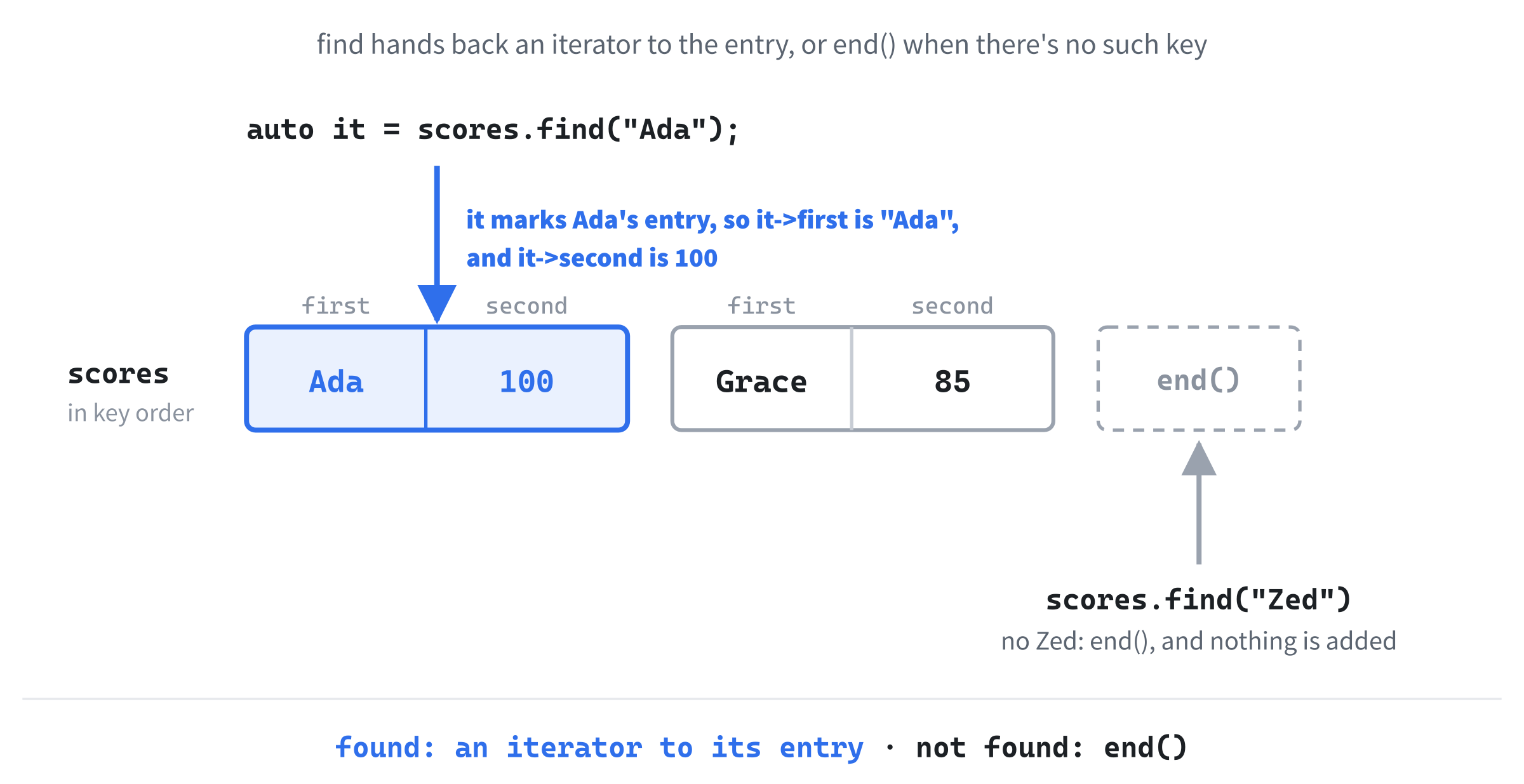
Try scores.find("Zed") in the same way, and it returns end(), so the if skips its block, and the map still has two entries. Unlike the square brackets, find never adds anything.
Insisting: at
Sometimes a missing key means something has gone wrong, and you'd rather stop than carry on with a 0. Chapter 13's at works on maps, too. Try this inside main, in place of the other examples:
std::map<std::string, int> scores = { { "Ada", 100 } };

std::cout << scores.at("Ada") << std::endl;
std::cout << scores.at("Grace") << std::endl;
In the preceding code, at("Ada") finds Ada, and the console shows 100. There's no Grace, so at("Grace") throws std::out_of_range, just as a vector's at did with a bad index, and Visual Studio stops the program, as it did in Figure 13.2. It doesn't add Grace, either.
Use at for keys that ought to be there, such as the name of a picture that the game loaded when it started. Then a typo in a name stops the game on the line with the typo, instead of quietly adding an entry and carrying on.
Pass a map to a function by const reference, as Chapter 8 passed strings, and the square brackets stop working: the build fails with C2678, binary '[': no operator found. That's the trap again, caught before the program even runs. The square brackets might add an entry, and a const map can't change, so inside the function, look keys up with contains, find, or at instead.
So there are four ways to look up a key, and a simple rule for choosing: the square brackets when adding a missing key is fine, contains for a yes or a no, find for the value if it's there, and at when it had better be.
Walking Through a Map
A range-based for visits every entry in a map. Try this inside main, in place of the other examples:
std::map<std::string, int> scores;
scores["Grace"] = 85;
scores["Ada"] = 100;
scores["Linus"] = 70;

for (const auto& entry : scores)
{
    std::cout << entry.first << ": " << entry.second << std::endl;
}
In the preceding code, each entry is one key and its value, with the key in first and the value in second, just as with find. The console shows "Ada: 100", "Grace: 85", and "Linus: 70", in alphabetical order, even though Grace went in first. A std::map always keeps its entries sorted by key, and a loop over it visits them in that order.
Strings are sorted one character at a time, by each character's code, and in those codes, every capital letter comes before every lowercase one. So a map puts "Zed" before "ada", and "Grace" before "grace". Keep the capitals consistent, and sorted order is alphabetical order.
Each entry is a std::pair, a tiny struct with two members, first and second, which the standard library uses whenever it has to hand back two things at once. Here, the entry's full type is std::pair<const std::string, int>, and the const on the key matters. You can change an entry's value whenever you like, but never its key, because the map has filed the entry under that key. To rename Ada, you'd erase her entry and add a new one.
Loop over a map with const auto&, as here. An entry's type is long, so auto works it out, and the & looks at each entry where it is. With plain auto, every pass would copy an entry, string and all, only to throw the copy away at the end of the pass. Leave out the const, and write auto&, when the loop needs to change the values.
The names first and second work, but they don't say what they hold. C++17 added a neater way to name the parts, called a structured binding. Change the loop to this:
for (const auto& [name, score] : scores)
{
    std::cout << name << ": " << score << std::endl;
}
In the preceding code, [name, score] unpacks each entry into two names of our choosing: name for the key, and score for the value. The loop now reads like what it does, and the console shows the same three lines. Figure 15.3 shows one entry, and both ways to name its parts. Structured bindings need C++17 or later, so they rely on Chapter 1's setting, too. On C++14, the build stops with C2429: language feature 'structured bindings' requires compiler flag '/std:c++17'.
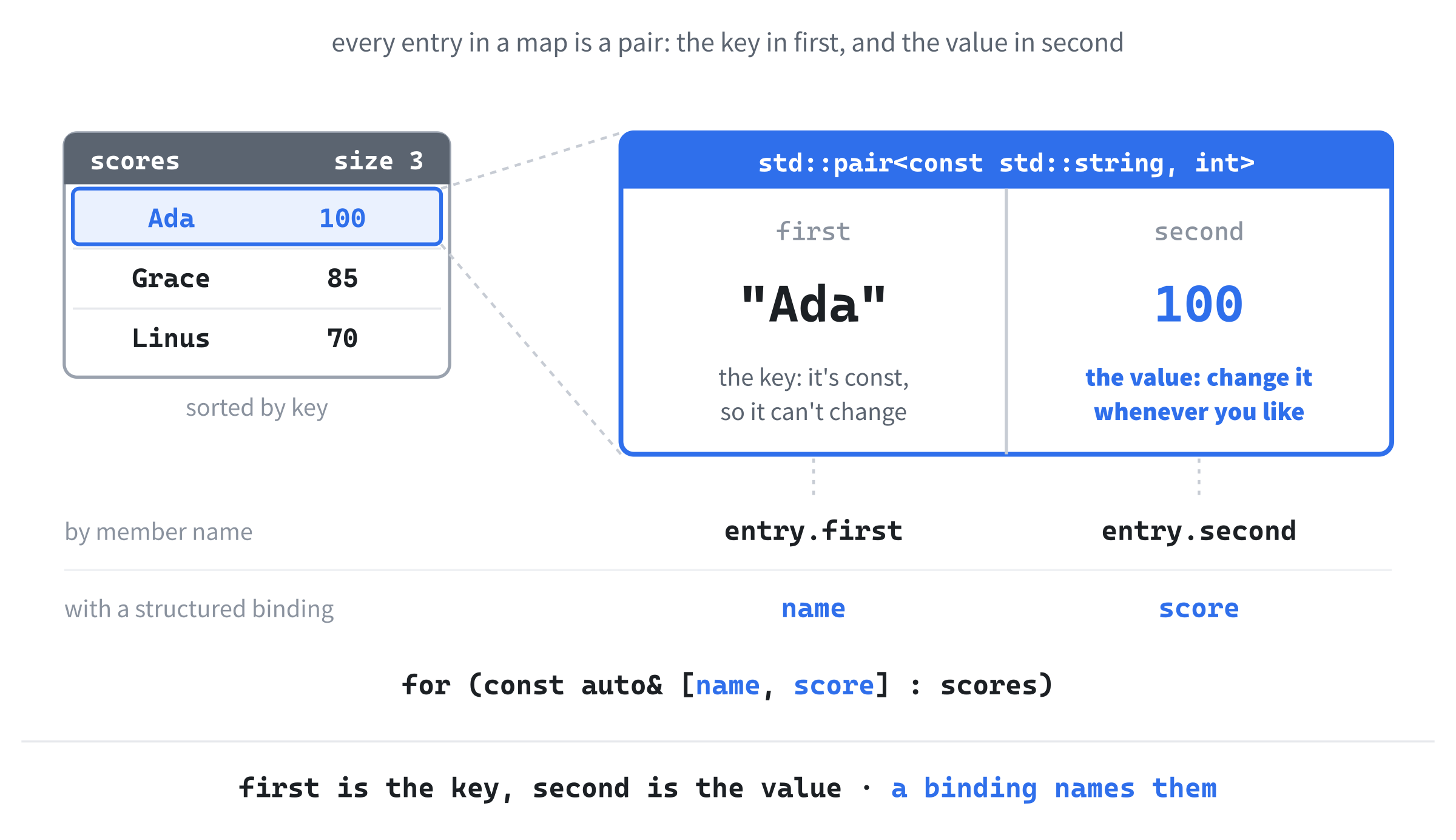
A structured binding with auto& can change the values. Add this below the loop:
for (auto& [name, score] : scores)
{
    score += 10;
}
std::cout << scores["Ada"] << " " << scores["Linus"] << std::endl;
In the preceding code, score refers to each entry's value, so every score goes up by 10, and the console shows 110 and 80. Try adding name = "Bob"; inside the loop, and the build stops with C2678, because name refers to the key, which is const. From here on, we'll use structured bindings whenever we walk through a map.
Erasing and Inserting
To take an entry out, erase it by its key. Try this inside main, in place of the other examples:
std::map<std::string, int> scores = {
    { "Ada", 100 }, { "Grace", 85 }, { "Linus", 70 }
};

std::cout << scores.erase("Linus") << std::endl;
std::cout << scores.erase("Linus") << std::endl;
std::cout << scores.size() << std::endl;
In the preceding code, the first erase finds Linus, removes his entry, and returns how many entries it removed: 1. The second finds no Linus, removes nothing, and returns 0, so erasing a key that isn't there is harmless. The console shows 1, 0, and 2.
If you already have an iterator from find, you can erase the entry it marks without looking the key up again. Add this below:
auto it = scores.find("Grace");
if (it != scores.end())
    scores.erase(it);
std::cout << scores.size() << std::endl;
In the preceding code, find marks Grace's entry, and erase(it) removes that entry directly, so only Ada is left, and the console shows 1. The check against end() isn't optional. Erasing end() is undefined behavior, which a Debug build catches with a "Debug Assertion Failed!" box that says "cannot erase map/set end() iterator".
The square brackets always set the value, whether or not the key was already there. For a gentler kind of adding, insert adds an entry only if its key is new. Add this below:
auto [where, added] = scores.insert({ "Ada", 50 });
std::cout << added << " " << scores["Ada"] << std::endl;
In the preceding code, insert is given a key and a value, in braces, and it hands back two things, which a structured binding unpacks. The first, where, is an iterator to the entry with that key, and the second, added, is a bool that says whether insert added it. Ada is already there, so nothing changes, and the console shows 0 and 100. Use insert when the first value should win, such as the level where the player first found each item, and the square brackets when the latest should.
Counting With a Map
The square-bracket trap has a bright side. A missing key starts at 0, so a map can count things with almost no code. Add #include <vector>, and try this inside main:
std::vector<std::string> pickups = {
    "coin", "gem", "coin", "potion", "coin", "gem"
};
std::map<std::string, int> inventory;

for (const std::string& item : pickups)
{
    inventory[item]++;
}

for (const auto& [item, count] : inventory)
{
    std::cout << item << ": " << count << std::endl;
}
In the preceding code, pickups lists six things the player picked up, in the order they were found. The first loop adds one to each item's count with inventory[item]++. The first coin isn't in the map yet, so the square brackets add "coin" with a count of 0, and the ++ makes it 1, and every coin after that finds its entry already there, and adds one to it. The console shows "coin: 3", "gem: 2", and "potion: 1", in alphabetical order. Chapter 16's Loot Grid keeps the player's inventory in just this way.
What Can Be a Key
A map's values can be any type at all, but its keys need one thing: the map must be able to tell which of two keys comes first, using <, so that it can keep them sorted. Numbers, characters, and strings all have a < already. So do Chapter 11's enum class values, which come in the order they're listed. Put this above main:
enum class Item
{
    Coin,      // counts toward the score
    Gem,       // worth ten coins
    Potion     // restores some health
};
In the preceding code, Item is a new type with three values, just like Chapter 11's MoleState. Now try this inside main:
std::map<Item, int> inventory;
inventory[Item::Potion] = 2;
inventory[Item::Coin] = 50;

for (const auto& [item, count] : inventory)
{
    std::cout << static_cast<int>(item) << ": " << count << std::endl;
}
In the preceding code, the keys are Item values, so a typo in an item's name is a build error rather than a new entry. The loop visits the coins before the potions, because Coin comes first in the list. The console can't print an enum class as it is, so static_cast<int> turns each one into its number, and the console shows "0: 50" and "2: 2".
A pair can be a key, too, and two numbers in a pair make a grid position. Pairs compare their first members, and only if those are equal, their second members. Add #include <utility>, for std::pair, and try this inside main:
std::map<std::pair<int, int>, std::string> treasure;
treasure[{ 3, 1 }] = "sword";
treasure[{ 0, 2 }] = "potion";
treasure[{ 3, 0 }] = "coin";

for (const auto& [cell, item] : treasure)
{
    std::cout << "(" << cell.first << ", " << cell.second << ") "
              << item << std::endl;
}
In the preceding code, each key is a column and a row, in braces, and each value is what's lying in that cell. The loop visits (0, 2) first, then (3, 0), and then (3, 1): the pairs are sorted by their first number, and where those tie, by their second. Unlike Chapter 13's vector of vectors, which stored every tile, this grid stores only the cells that have something in them, so a huge level with a few items lying around takes almost no room. Chapter 16's Loot Grid is built on exactly this idea.
A struct of your own can't be a key yet. Make a struct Point with an x and a y, then try adding an entry to a std::map<Point, std::string>, and the build stops inside the standard library's own code with C2678: binary '<': no operator found, because nothing says which of two Points comes first. Until a type has a < of its own, a pair is the easy way to use two numbers as a key.
How a Map Keeps Its Order
Inside, a std::map keeps its entries in a tree, as the left of Figure 15.4 shows. Each entry has up to two others below it: one with a smaller key on the left, and one with a bigger key on the right. To find a key, the map starts at the top, compares, and goes left or right, and each step rules out about half of what's left. So a map with 1,000 entries finds one in 10 or so steps, and a map with a million in 20 or so.
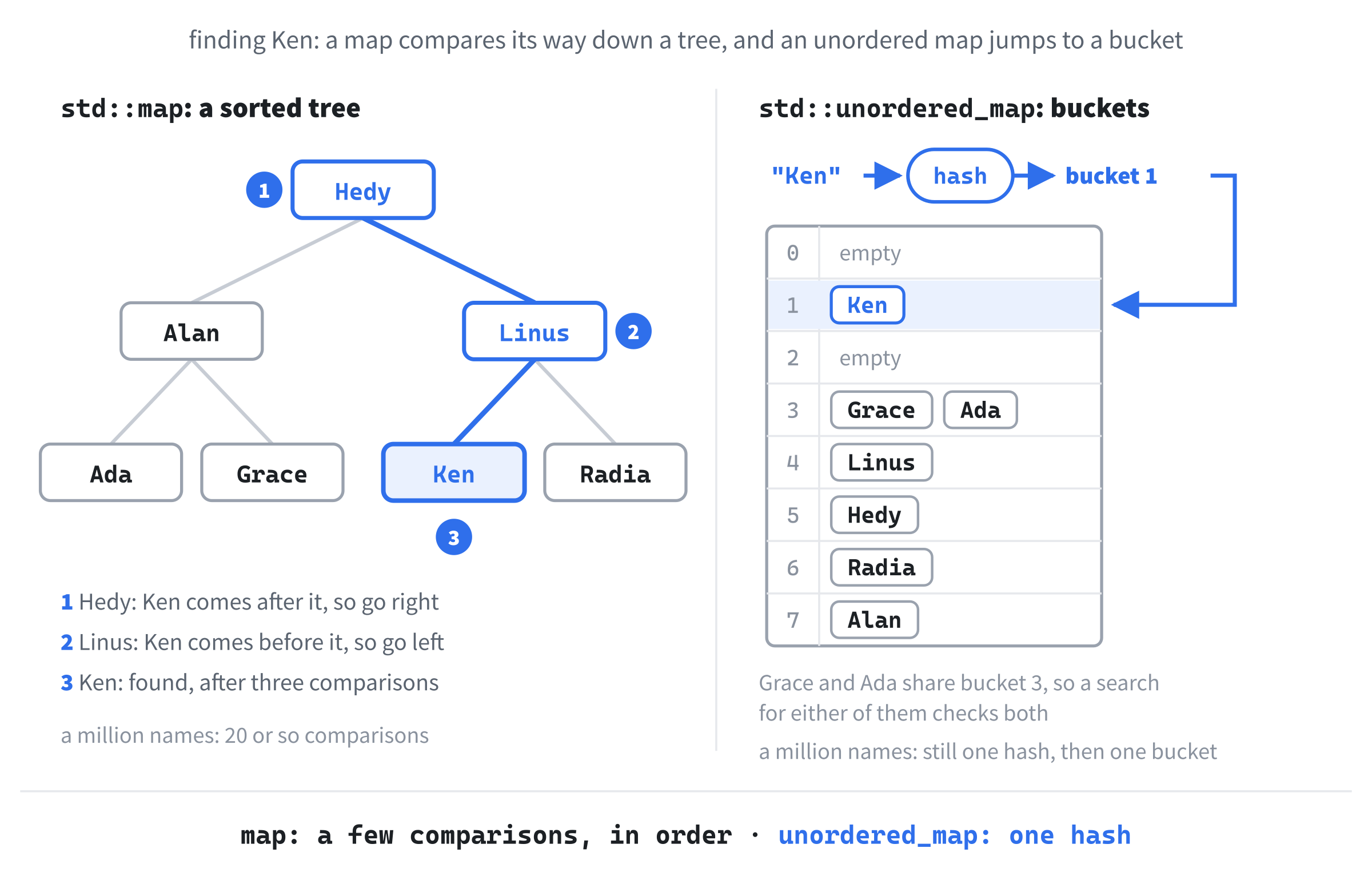
That's quick, and it's how a map keeps everything in order, but it's still several steps for every lookup, and one more each time the map doubles in size. In Chapter 13's terms, a map's lookups are O(log n): the work grows with the number of entries, but very slowly. If you never need the order, there's a quicker way.
std::unordered_map
A std::unordered_map is a hash table. Instead of comparing its way down a tree, it turns the key into a number, called its hash, and uses that number to pick one of a row of buckets, as the right of Figure 15.4 shows. It goes straight to that bucket, so a lookup takes about the same time however many entries there are. In Chapter 13's terms, that's O(1), on average.
Two keys can land in the same bucket, as Ada and Grace do in the figure, and then the table checks each key in that bucket in turn. That's why it's O(1) on average, rather than always. The table adds buckets as it fills up, though, so most buckets hold no more than one or two keys.
Switching is usually just a matter of changing the type. Add #include <unordered_map>, and try this inside main, in place of the other examples:
std::unordered_map<std::string, int> scores;
scores["Ada"] = 100;
scores["Grace"] = 85;
scores["Linus"] = 70;

std::cout << scores["Ada"] << " " << scores.contains("Grace")
          << std::endl;

for (const auto& [name, score] : scores)
{
    std::cout << name << " ";
}
std::cout << std::endl;
In the preceding code, everything works just as it did with std::map: the square brackets, their trap, contains, and the loop, and find, at, erase, and insert work, too. The console shows 100 and 1, and then the three names, but not in alphabetical order, and not in the order they went in, either: Visual Studio prints Grace, Ada, Linus. An unordered map visits its entries in whatever order its buckets happen to hold them.
Add ten more names below the first three, such as scores["Alan"] = 1;, and run it again. The new names don't simply follow on at the end, in the order you added them: some of them land in among the others, wherever their buckets put them. So never count on an unordered map's order, not even from one loop to the next, if anything has been added in between.
So which should you use? Reach for std::unordered_map when you only ever look things up by key, such as a texture by its name, or a color by an item type. Reach for std::map when the order matters, such as a high-score table shown alphabetically, or when it helps to see the entries in order while you're testing. For a few dozen entries, either one is plenty fast, so pick the one that says what you mean.
There's one more difference, in what can be a key. An unordered map needs to hash its keys, and the standard library knows how to hash numbers, characters, strings, pointers, and enum class values, but not pairs, or structs of your own. Try a std::unordered_map<std::pair<int, int>, std::string>, and the build stops deep inside the standard library, with C2064: term does not evaluate to a function taking 1 arguments, in a file called xhash. The notes below it in the Output window mention std::hash<std::pair<int,int>>, and that's the missing piece: a way to hash a pair. For a pair of numbers as a key, use a std::map, as Chapter 16 does; Chapter 33, in the final project, shows how to teach a type of your own to hash.
std::set and std::unordered_set
Sometimes there's no value to store, only a question: is it in there? Which levels has the player unlocked, and which achievements have they earned? For that, a set holds values, each one at most once, so a value is either in the set or it isn't. Add #include <set>, and try this inside main:
std::set<std::string> unlocked;
unlocked.insert("forest");
unlocked.insert("desert");
unlocked.insert("caves");

auto [where, added] = unlocked.insert("forest");
std::cout << added << " " << unlocked.size() << std::endl;
In the preceding code, insert adds a value, and, like a map's insert, hands back an iterator and a bool. The forest is already there, so the last insert adds nothing: added is false, and the size is still 3, so the console shows 0 and 3. There's no error for adding a value twice, and nothing to check first, which makes a set an easy way to keep a list with no repeats.
Now look inside it. Add this below:
for (const std::string& level : unlocked)
{
    std::cout << level << " ";
}
std::cout << std::endl;

std::cout << unlocked.contains("desert") << " " << unlocked.contains("moon")
          << std::endl;
unlocked.erase("desert");
std::cout << unlocked.size() << std::endl;
In the preceding code, the loop visits the levels in alphabetical order, caves, desert, and forest, because a std::set keeps its values sorted, just as a map keeps its keys. It has the same contains, find, and erase, too, so the console shows 1 and 0, and then the size drops to 2. You can think of a set as a map with keys and no values.
As you'd expect, std::unordered_set, in <unordered_set>, is the hash-table version, with faster lookups, no order, and the same rules about what it can hash. Good game uses for a set include the levels unlocked, the achievements earned, the enemy types the player has met, and the cells a search has already visited.
Taking Turns
The next three collections don't find things at all. They hand things out in a particular order, one at a time, and that's all they do.
std::queue
A queue is a line, like the line at a store: the first thing in is the first thing out, which programmers call FIFO, for first in, first out. Add #include <queue>, and try this inside main:
std::queue<std::string> turns;
turns.push("knight");
turns.push("archer");
turns.push("wizard");

std::cout << turns.size() << " " << turns.front() << " "
          << turns.back() << std::endl;

while (!turns.empty())
{
    std::cout << turns.front() << " takes a turn" << std::endl;
    turns.pop();
}
In the preceding code, push adds to the back of the line, front() is whoever is at the front, and back() is whoever joined last, so the console shows 3, knight, and wizard. Then the loop serves the line: it reads the front, and pop removes it, until the queue is empty(). The knight takes a turn first, then the archer, and then the wizard, in the order they arrived. A turn order works like that, and so does a queue of events waiting to be handled, or of messages waiting to be shown.
The function pop removes the front of the queue, but doesn't give it back to you. Write std::string next = turns.pop();, and the build stops with C2440, because it cannot convert from 'void', which is what pop returns. Read front() first, and then pop.
A queue has no iterators, either, so a range-based for can't walk along it. Try one, and the build stops with C3312: no callable 'begin' function found. That's deliberate, and it's what Chapter 13 meant: a queue only lets you reach the ends of the line, never the middle.
std::stack
A stack is the other way around: the last thing in is the first thing out, which is LIFO, like a stack of plates, where you always take the top one. Add #include <stack>, and try this inside main:
std::stack<std::string> undo;
undo.push("place wall");
undo.push("move enemy");
undo.push("delete tile");

while (!undo.empty())
{
    std::cout << "Undo " << undo.top() << std::endl;
    undo.pop();
}
In the preceding code, each push puts an action on top, and top() is the one on top, the most recent. The loop takes them off in reverse order, so the console shows "Undo delete tile", then "Undo move enemy", and then "Undo place wall". That's exactly how an Undo button works. A game can keep its screens the same way, with a pause menu pushed on top of the game, and popped off again to go back.
A stack has push, pop, top, empty, and size, and nothing else. Try undo.front(), and C2039 says that 'front' is not a member of the stack.
std::priority_queue
A priority queue hands things out biggest first, whatever order they went in. It's in <queue>, too. Try this inside main:
std::priority_queue<int> loudest;
loudest.push(30);
loudest.push(80);
loudest.push(10);
loudest.push(50);

while (!loudest.empty())
{
    std::cout << loudest.top() << " ";
    loudest.pop();
}
std::cout << std::endl;
In the preceding code, the numbers go in as 30, 80, 10, and 50, but top() is always the biggest one left, so the console shows 80 50 30 10. A priority queue doesn't sort everything up front. It keeps just enough order to find the biggest quickly, every time something is added or taken away. A game might use one to play only the loudest sounds when too many happen at once.
Often you want the smallest first: the event that's due soonest, or the cheapest step. For that, the priority queue has to be told how to compare. Add #include <functional>, and #include <vector> if it isn't there already, and try this inside main:
std::priority_queue<int, std::vector<int>, std::greater<int>> soonest;
soonest.push(30);
soonest.push(80);
soonest.push(10);
soonest.push(50);

while (!soonest.empty())
{
    std::cout << soonest.top() << " ";
    soonest.pop();
}
std::cout << std::endl;
In the preceding code, the angle brackets hold three things: the element type, int; what to keep the elements in, a std::vector<int>; and how to compare them, std::greater<int>, which turns the order around. The console shows 10 30 50 80. It's a mouthful, and it trips everyone up the first time, but it's the standard way to get the smallest first. In the final project, Chapter 33's pathfinding uses a priority queue like this one, to try the cheapest path first.
std::deque
A deque, said "deck," is a double-ended queue: you can add and remove at both ends, and both are quick, where a vector is only quick at its back. Add #include <deque>, and try this inside main:
std::deque<int> recent;
recent.push_back(100);
recent.push_back(85);
recent.push_front(150);

for (int score : recent)
{
    std::cout << score << " ";
}
std::cout << "| " << recent[1] << std::endl;
In the preceding code, push_back adds to the end, as with a vector, and push_front adds to the start, so the loop shows 150 100 85. Unlike a queue, a deque has iterators and square brackets, so the loop can walk along it, and recent[1] is 100. It has pop_front and pop_back, and front() and back(), too.
A vector has no push_front: try one, and C2039 says so. The nearest thing is insert, as in v.insert(v.begin(), 0);, which works, but has to shuffle every element up one place to make room, which is Chapter 13's O(n). A deque does it in O(1).
That makes a deque the natural fit for a window onto recent history, such as the last ten positions of a trail: push each new one onto the front, and pop the oldest off the back. In fact, std::queue and std::stack are built on a deque. Look closely at the C3312 message from earlier, and the queue's full type mentions std::deque: a queue is a deque with everything hidden except the two ends a queue allows. Figure 15.5 puts all four side by side.
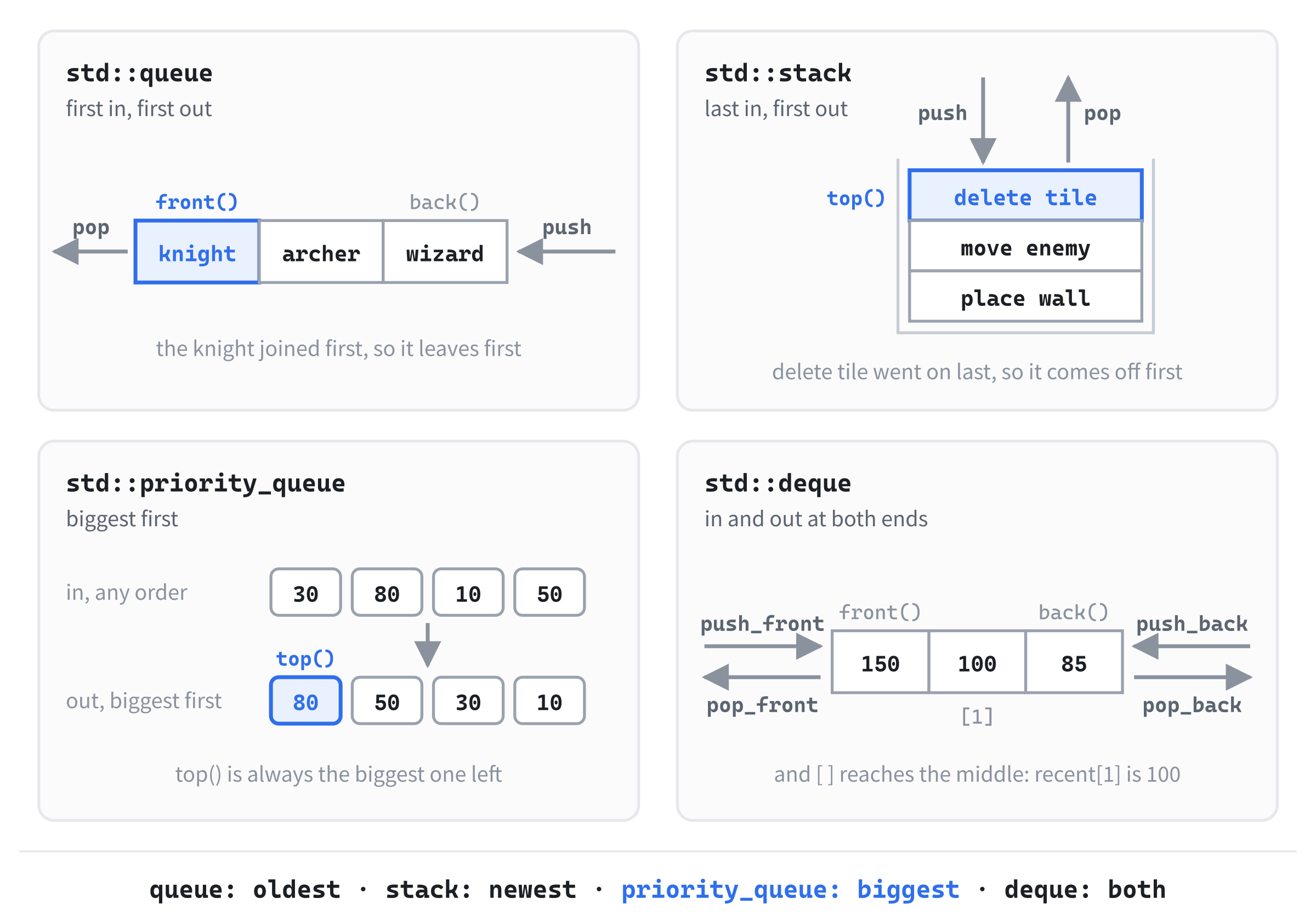
For most jobs, std::vector is still the one to start with. Reach for a deque when you really do need both ends.
std::pair and std::tuple
You've been using pairs all chapter: every entry in a map is one, and so is a key made of a column and a row. A std::pair holds exactly two values, of any two types, and it lives in <utility>. Try this inside main:
std::pair<std::string, int> best = { "Ada", 100 };
std::cout << best.first << " " << best.second << std::endl;
In the preceding code, the first type is for first, and the second for second, and the braces fill both, so the console shows Ada and 100.
Pairs are handiest for handing back two things from a function. Put this above main:
std::pair<int, int> findPlayer()
{
    return { 4, 7 };
}
In the preceding code, findPlayer returns a column and a row together, in braces. A real game would search its grid for the player, but this one just knows. Now try this inside main:
auto [col, row] = findPlayer();
std::cout << col << ", " << row << std::endl;
In the preceding code, a structured binding unpacks the pair as it arrives, into col and row, and the console shows 4, 7.
A std::tuple is the same idea for any number of values. Add #include <tuple>, and try this inside main:
std::tuple<std::string, int, float> save = { "Ada", 3, 0.75f };
std::cout << std::get<1>(save) << std::endl;

auto [name, level, progress] = save;
std::cout << name << " is on level " << level << std::endl;
In the preceding code, the tuple holds a name, a level, and how far through that level the player is. Its values have positions but no names, so std::get<1> reaches the second one, and the console shows 3. A structured binding gives them names, which reads far better, and the console shows "Ada is on level 3".
Structured bindings unpack plain structs, too: given a struct with members x and y, auto [x, y] = point; names them in the order they're declared. For anything that lasts longer than a line or two, though, a struct beats a pair or a tuple. A struct's members, from Chapter 2, have names that say what they hold, while a std::pair<int, int> makes you remember which of first and second was the column. Use a pair or a tuple to hand back a couple of values in passing, and a struct for anything with meaning.
Choosing the Right Collection
You've now met eleven collections, counting Chapter 13's three, so choosing between them is a real question. Figure 15.6 turns it into a few questions, asked in order.
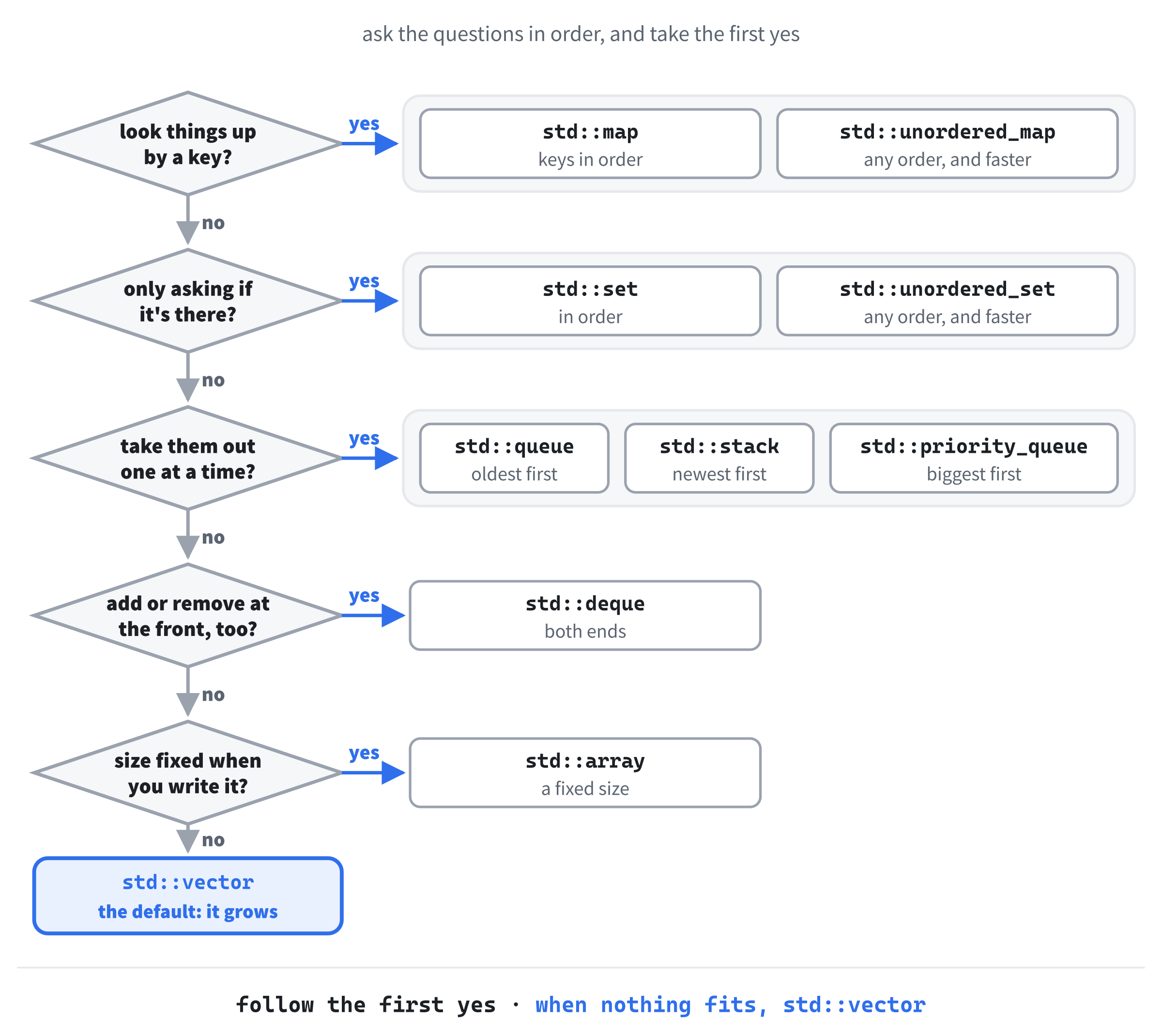
Here's the same information as a table, with a job for each one:
| Collection | Finds things by | Order | A game might use it for |
|---|---|---|---|
std::vector |
position | the order they were added | enemies, bullets, particles |
std::array |
position | fixed, and so is the size | a board of a known size |
std::map |
key | sorted by key | an inventory, a high-score table |
std::unordered_map |
key | none | textures by name, colors by item |
std::set |
value | sorted | levels unlocked, achievements |
std::unordered_set |
value | none | enemy types met, cells visited |
std::queue |
— | first in, first out | turns, events |
std::stack |
— | last in, first out | undo, screens |
std::priority_queue |
— | biggest first, or smallest | the next event, the cheapest step |
std::deque |
position | both ends | recent history, a trail |
The standard library has a few more, for narrower jobs, such as std::list, std::multimap, and std::multiset. Chapter 29 meets std::list, and shows why a vector usually beats it anyway. If you come across one of the others in someone's code, a quick question to an AI chatbot, such as "What is a std::multimap, and when would a game use one instead of a std::map?", will get you a good explanation in seconds.
AI Exercise (Optional)
Choosing a collection for a new system is one of the most practical skills in game programming, and it's a good one to practice with an AI, because you can check its reasoning against this chapter. As always, skip it if you'd rather not; nothing later in the book depends on it.
Open your AI chatbot of choice and try a prompt like this:
"I'm learning C++, and I've just met std::vector, std::array, std::map, std::unordered_map, std::set, std::unordered_set, std::queue, std::stack, std::priority_queue, std::deque, std::pair, and std::tuple. For each of these five game systems, recommend the collection, or combination of collections, that I should use, and explain why in one or two sentences. (1) An inventory that maps item names to how many the player has, shown alphabetically on screen. (2) A record of which enemy types the player has met at least once, used only to answer questions like 'has the player met a goblin yet?' (3) The player's last ten positions, where each new position goes on the front and the oldest drops off the end. (4) Timed events, such as 'spawn a wave in 3.5 seconds', where the game always handles the one that's due soonest. (5) A tile map for a level that's always exactly 40 tiles wide and 25 tiles tall, where each tile is an int. Finally, show the C++ declaration, just the type and a name, for each system."
Notice what the preceding prompt does. It says what you know, so the AI doesn't wander off into collections you haven't met, and it describes five systems where the right answer hangs on a detail: "alphabetically", "only to answer questions", "on the front… off the end", "due soonest", and "always exactly 40 by 25". Those details are clues, and a good answer will pick up on every one of them.
When the answer comes back, check each recommendation against this chapter. For (1), did it notice that "alphabetically" makes the order matter, so std::map beats std::unordered_map? For (2), did it pick a set rather than a map, because there's no value to store?
For (3), did it choose a deque, because both ends are busy? For (4), did it use a priority queue that hands out the smallest time first, with std::greater or a comparison of its own? And for (5), did it notice that the size is fixed, and reach for std::array?
If a recommendation doesn't match what you'd have picked, ask why. "I'd have used a std::set for (2), because there's no value to store for each enemy type. Why did you pick a std::map?" is a perfectly fair challenge, and the answer will teach you something, whether the AI changes its mind or defends its choice. Sometimes it will have a good reason you hadn't thought of, and sometimes you'll catch it picking the wrong tool.
The real goal isn't five right answers. It's the habit of reading a problem carefully and choosing a collection on purpose, which you'll use every time you build something new.
Summary
You've met the collections that find things by key, and the ones that take turns. A std::map looks values up by key and keeps its keys sorted in a tree, and a std::unordered_map does the same job with a hash table, faster, and in no particular order. The square brackets add a missing key, which is perfect for counting and a trap when you only meant to look, so contains, find, and at look without adding. A structured binding unpacks each entry into names of your own, and keys can be strings, numbers, enum class values, or pairs.
Sets keep unique values, in the same sorted and hashed versions. A queue serves things in the order they arrived, a stack serves the newest first, and a priority queue serves the biggest, or with std::greater, the smallest. The deque works at both ends, pairs and tuples group a few values in passing, and Figure 15.6 helps you choose between them all.
In the next chapter, we'll put three of them to work in one game. Chapter 16's Loot Grid keeps the loot lying around its world in a map from grid cells to items, looks up each item's color in an unordered map, and counts the player's haul in a map of its own.