
Chapter 15 was all short experiments, a few lines each. This project puts its collections to work together, in a small game where nearly everything the game knows lives in a map.
A green square stands in the middle of a grid of 16 by 12 cells, and twenty pieces of loot lie scattered around it: coins, gems, keys, potions, and hearts, each its own color. You move one cell at a time with W, A, S, and D, and when you step onto an item, you pick it up. It vanishes from the grid, the console announces what you found, and Tab lists everything you've collected so far. When you've found the lot, R scatters a new world.
Three maps do almost all the work. The world is a std::map from grid cells to items, holding only the cells that have something in them. The inventory is another std::map, counting each kind of item with Chapter 15's square brackets and ++. And a std::unordered_map is the game's table of item types, with each one's name and color. Along the way, you'll see why a pair of numbers makes such a good key, why a constant map won't take the square brackets, and why a game that never uses new never has to delete anything.
SDL3 Projects/Loot Grid — the complete source for this chapter lives here.In this chapter, we will:
- Plan the game's state as a
Gamestruct, and see why the world is stored sparsely - Draw a grid, and turn a cell's column and row into pixels
- Move the player one cell per key press, ignoring the repeats from a held key
- Name the five kinds of loot with Chapter 11's
enum class, and keep each one's name and color in astd::unordered_map - Scatter the loot into a
std::mapkeyed by grid cells, with a type alias calledCell - Pick items up with
findanderase, and count them with the square brackets and++ - List the inventory in the console with
SDL_Log, in item order - Play the game, experiment with it, fix the most common mistakes, and try an optional AI exercise
Let's build it.
Setting Up the Project
This project uses plain SDL, without the SDL_image add-on from Chapter 11, so the setup is the same as Chapter 12's:
- Choose File > New > Project, pick Empty Project (the one tagged C++, Windows, and Console), name it
LootGrid, and click Create. - In Solution Explorer, right-click Source Files, choose Add > New Item, and add a file called
main.cpp. - Right-click the project, choose Properties, set the two dropdowns to All Configurations and All Platforms, and then make the four changes:
- C/C++ > General > Additional Include Directories:
C:\SDL3\include - C/C++ > Language > C++ Language Standard: ISO C++20 Standard (/std:c++20)
- Linker > General > Additional Library Directories:
C:\SDL3\lib\x64 - Linker > Input > Additional Dependencies:
SDL3.lib
- C/C++ > General > Additional Include Directories:
- Right-click the project, choose Open Folder in File Explorer, and copy
SDL3.dllfromC:\SDL3\lib\x64into that folder, besidemain.cpp.
If you made a project template with the tip in Chapter 3, pick it in step 1 instead, and then you only need step 4. The C++20 setting matters more than ever in this chapter, because the game uses contains, which is new in C++20, and structured bindings, which need C++17, just as Chapter 15 warned.
Planning the Program
Before any code, Chapter 9's two planning questions. What does the game need to remember, and what does it need to do?
It needs to remember three things, and they change as you play:
- Where the player is: a column and a row.
- What's lying where: which cells have loot in them, and what kind.
- What the player has found: how many of each kind.
As in Chapters 9 and 11, the three go together in a struct called Game, so that the functions can be handed the whole game at once. Alongside them, there's one thing that never changes: each kind of loot's name and color. That's a table the game looks things up in, and it can be a constant.
The interesting question is how to store the second item, what's lying where. Chapter 13 would suggest a grid: a vector of vectors, 12 rows of 16 cells, each cell holding the item in it. But 172 of those 192 cells would hold nothing at all, so each cell would need a way to say "empty," and every question about the loot would mean looking through all 192 cells to find the 20 that matter. Chapter 15 suggested the other way: a map whose keys are cells, holding only the cells that have something in them. Figure 16.1 compares the two.
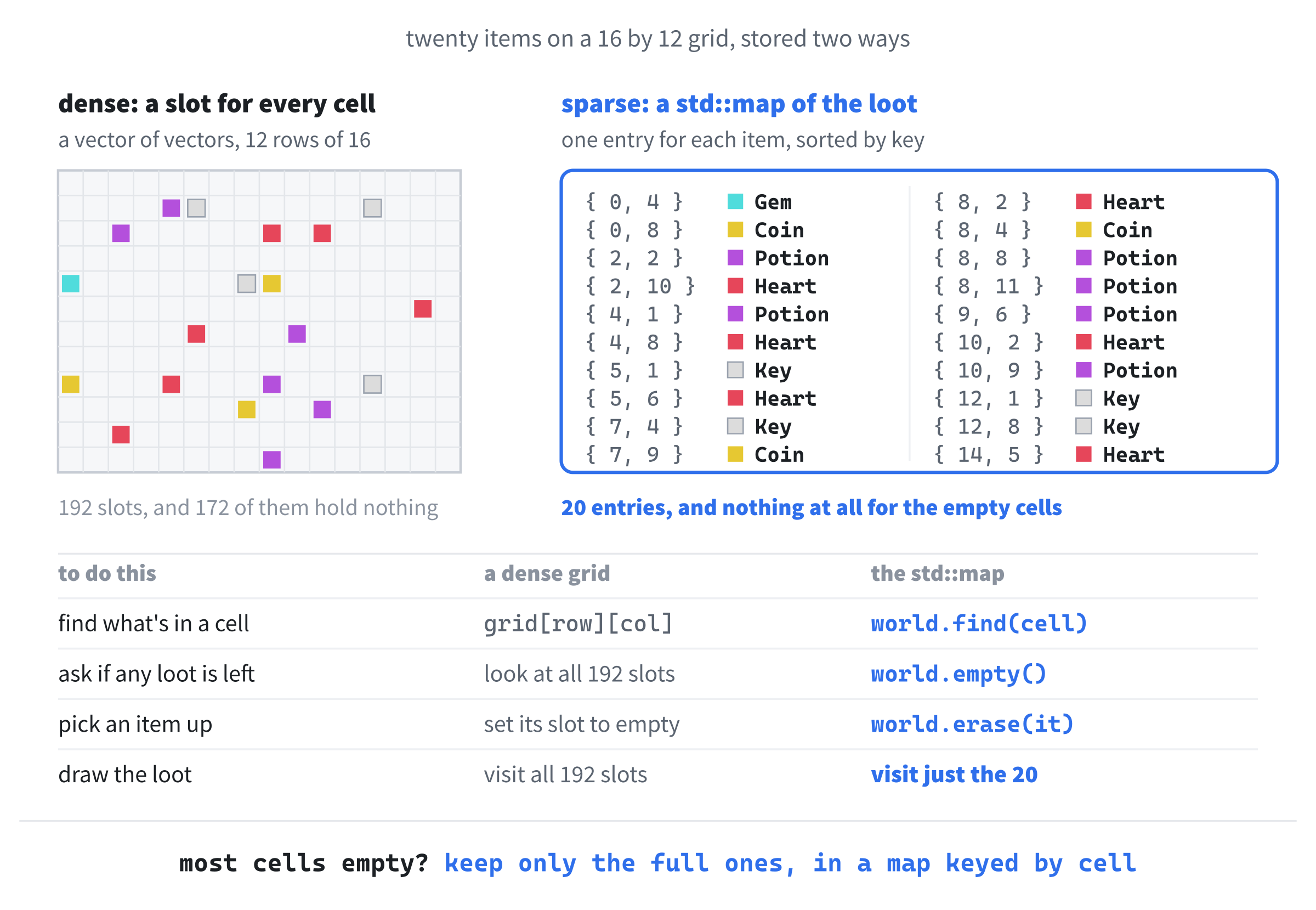
The map wins for this game on every count. "What's in this cell?" is one find. "Is there any loot left?" is empty(), and "how much?" is size(). Picking an item up is one erase, and drawing the loot means looping over twenty entries, not 192 cells.
Storing only the cells that matter is called sparse storage, and the grid that stores every cell is dense. A dense grid is the better choice when nearly every cell holds something, like Chapter 13's walls and floor, and a sparse map is better when most cells are empty, as they are here.
What does the game need to do? Nine jobs, each with a function of its own:
| Function | Its one job |
|---|---|
resetGame |
Starts a game: the player in the middle, nothing found, and new loot |
randomItem |
Picks one of the five kinds of loot, at random |
seedWorld |
Scatters twenty items across the grid, one to a cell |
movePlayer |
Moves the player one cell, unless that would leave the grid |
pickUp |
Moves any loot in the player's cell into the inventory |
logInventory |
Lists the inventory in the console |
drawGrid |
Draws the lines between the cells |
drawSquare |
Fills a square inside one cell, in a color |
drawGame |
Draws the loot, and then the player |
None of these functions uses new, and none of them has a delete to remember. The maps hold their entries by value, make room for them as they're added, and give it all back when the Game goes away.
Coding the Game
We'll build the game the same way as the last few projects. First comes an empty grid with a working game loop, then the player, then the loot, and last of all, picking it up, with a checkpoint whenever there's something new to see. As before, the blocks are shown without the indentation they'll have in your file, and the complete program at the end shows every line where it sits. Leave a blank line between one function or struct and the next, as in Chapter 9, and each step says where any other blank lines go.
The Header Comment and Includes
Type this at the very top of main.cpp:
/*
    Loot Grid
    The Chapter 16 project from Learning C++ by Building Games

    Loot is scattered across a grid: coins, gems, keys, potions, and
    hearts, each its own color. Move the green square one cell at a
    time with W, A, S, and D, and walk onto an item to pick it up. Tab
    lists what you've found in the console, R starts again with a new
    world, and Escape, or the window's X, quits.

    New in this project: the collections from Chapter 15. The world is
    a std::map from cells to items, the inventory is a std::map that
    counts them, and a std::unordered_map holds each item's name and
    color.
*/

#include <SDL3/SDL.h>
#include <SDL3/SDL_main.h>

#include <map>            // std::map, for the world and the inventory
#include <unordered_map>  // std::unordered_map, for the table of items
#include <utility>        // std::pair, for a cell's column and row
In the preceding code, the comment describes the game, and the first two #include lines bring in SDL and its helper for main, as usual. The other three are Chapter 15's headers: <map> for the world and the inventory, <unordered_map> for the table of item types, and <utility> for std::pair, which will hold a cell's column and row.
The Constants
Add these below the includes, with a blank line in between:
// The grid
const int CELL_SIZE  = 50;                      // width and height, in pixels
const int GRID_COLS  = 16;                      // cells across
const int GRID_ROWS  = 12;                      // cells down
const int WINDOW_W   = GRID_COLS * CELL_SIZE;   // 800 pixels
const int WINDOW_H   = GRID_ROWS * CELL_SIZE;   // 600 pixels
const int ITEM_COUNT = 20;                      // items in a new world

// The colors, and how far in from its cell's edges each square is drawn
const SDL_Color BACKGROUND   = { 25, 25, 30, 255 };    // almost black
const SDL_Color GRID_LINES   = { 45, 45, 55, 255 };    // a little lighter
const SDL_Color PLAYER_COLOR = { 80, 220, 100, 255 };  // green
const float     PLAYER_INSET = 6.0f;                   // in pixels
const float     ITEM_INSET   = 12.0f;
In the preceding code, the first group is the grid: 16 cells across and 12 down, each 50 pixels square. The window's size is worked out from them, so it's always exactly the right size for the grid, 800 by 600, and ITEM_COUNT says how many pieces of loot a new world gets.
The second group is how the game looks: an almost black background, grid lines a shade lighter, and a green player. The two insets say how far in from its cell's edges a square is drawn. The player is 6 pixels in, so it nearly fills its cell, and the loot is 12 pixels in, so it's smaller, and you can always tell which square is you.
main and the SDL Setup
Add main below the constants, leaving a blank line after them, with just return 0; inside for now:
int main(int argc, char* argv[])
{
    return 0;
}
In the preceding code, main has its usual two parameters, and everything else will go inside it, above return 0;.
Click at the end of the line with main’s opening brace, press Enter, and add this:
// Start SDL, then make the window and the renderer
if (!SDL_Init(SDL_INIT_VIDEO))
{
    SDL_Log("SDL_Init failed: %s", SDL_GetError());
    return 1;
}

SDL_Window* window = SDL_CreateWindow("Loot Grid",
                                      WINDOW_W, WINDOW_H, 0);
if (!window)
{
    SDL_Log("SDL_CreateWindow failed: %s", SDL_GetError());
    SDL_Quit();
    return 1;
}
In the preceding code, we start SDL's video system and create a window called Loot Grid, exactly the size of the grid, checking each step and bailing out with a message if it fails, as in every project so far.
The renderer and vsync finish the setup. Add this below the window check, with a blank line in between:
SDL_Renderer* renderer = SDL_CreateRenderer(window, nullptr);
if (!renderer)
{
    SDL_Log("SDL_CreateRenderer failed: %s", SDL_GetError());
    SDL_DestroyWindow(window);
    SDL_Quit();
    return 1;
}

// Show each frame in step with the monitor's refresh
SDL_SetRenderVSync(renderer, 1);
In the preceding code, we create the renderer, tidy up if that fails, and ask for vsync. Nothing in this game moves on its own, so there's no delta time, but vsync still matters. Without it, the game loop would draw the same picture thousands of times a second, keeping a processor core busy for nothing, and with it, the loop draws once for each time the monitor refreshes, and rests in between.
The last pieces before the loop are the usual two. Add these below the vsync line, with a blank line in between:
bool running = true;
SDL_Event event;
In the preceding code, running keeps the game loop going, and event is the variable that the event loop fills in.
The Game Loop
Add the game loop below SDL_Event event;, with a blank line in between:
while (running)
{
    // Handle every event that's waiting
    while (SDL_PollEvent(&event))
    {
        if (event.type == SDL_EVENT_QUIT)
        {
            running = false;
        }
        // A key going down, but not the repeats from holding it
        if (event.type == SDL_EVENT_KEY_DOWN && !event.key.repeat)
        {
            switch (event.key.key)
            {
            case SDLK_ESCAPE:
                running = false;
                break;
            }
        }
    }
}
In the preceding code, the event loop handles the window's X as usual, and every key goes to a switch, as Chapter 4 taught, on which key it was. For now, the only case is Escape, but the movement keys will join it soon, and then Tab and R.
Look at the condition in front of the switch, though. When you hold a key down, Windows sends one key-down event, and then, after a short pause, a stream of repeats, many times a second, the way a held key in a text editor types the same letter over and over. SDL marks each of those with event.key.repeat, so !event.key.repeat lets through only the first press. In this game, that means one press, one move, however long you hold the key.
Now the grid. Add this function below the constants, with a blank line in between, and above main:
// Draw the lines between the cells
void drawGrid(SDL_Renderer* renderer)
{
    SDL_SetRenderDrawColor(renderer, GRID_LINES.r, GRID_LINES.g,
                           GRID_LINES.b, GRID_LINES.a);
    for (int col = 1; col < GRID_COLS; col++)
    {
        float x = static_cast<float>(col * CELL_SIZE);
        SDL_RenderLine(renderer, x, 0.0f, x, static_cast<float>(WINDOW_H));
    }
    for (int row = 1; row < GRID_ROWS; row++)
    {
        float y = static_cast<float>(row * CELL_SIZE);
        SDL_RenderLine(renderer, 0.0f, y, static_cast<float>(WINDOW_W), y);
    }
}
In the preceding code, drawGrid draws the lines between the cells in the grid-line color. The first loop draws one line down the window between each pair of columns, at 50, 100, and so on up to 750 pixels, and the second draws one across between each pair of rows. Both loops start at 1 and stop before the last column or row, because the window's own edges already mark the outside of the grid. The function SDL_RenderLine draws a straight line in the current draw color, from the point given by its second and third arguments to the point given by its fourth and fifth. Its coordinates are floats, like the rectangles we've drawn before, so each whole number of pixels is converted with static_cast<float>.
Now draw each frame. Add this inside the game loop, below the event loop's closing brace, with a blank line in between:
// Draw the frame: the background, the grid, and then the game
SDL_SetRenderDrawColor(renderer, BACKGROUND.r, BACKGROUND.g,
                       BACKGROUND.b, BACKGROUND.a);
SDL_RenderClear(renderer);
drawGrid(renderer);

SDL_RenderPresent(renderer);
In the preceding code, every frame clears the window to the background color, draws the grid over it, and presents it. The blank line above SDL_RenderPresent is where the loot and the player will be drawn.
Finally, add the cleanup below the game loop's closing brace, just above return 0;, with a blank line on each side:
// Clean up, in the reverse order we created things
SDL_DestroyRenderer(renderer);
SDL_DestroyWindow(window);
SDL_Quit();
In the preceding code, the renderer, the window, and SDL itself are shut down in the reverse order we created them, as usual.
Checkpoint: Press F5. A window titled Loot Grid opens, almost black, divided into 16 columns and 12 rows by faint gray lines, and Escape or the window's X closes it. If it doesn't build, compare your file with the complete program at the end of this section.
The Player
From here on, every block goes into a gap in the code you've already typed. Figure 16.2 is the map. It has six slots, lettered in the order we'll first fill them. Slots A and B grow as we go: the types all go in slot A, and the game's functions in slot B, both above drawGrid, while the drawing functions go in slot D, below it.
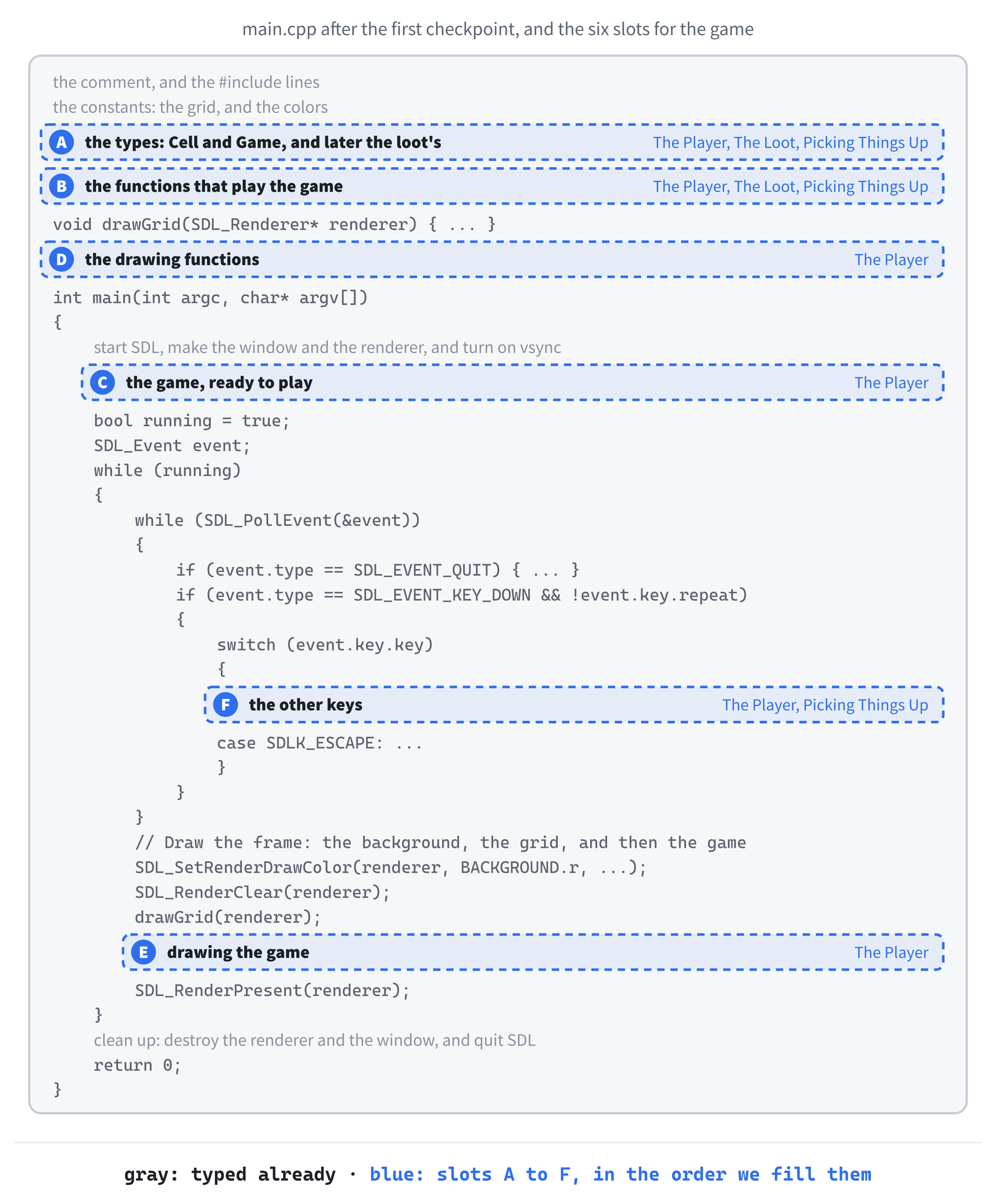
First, how the game names a cell. Add this in slot A, below the constants, with a blank line in between:
// A cell on the grid: its column, and then its row
using Cell = std::pair<int, int>;

// Everything that changes as the game is played
struct Game
{
    Cell player;                          // the cell the player is in
};
In the preceding code, the using line gives std::pair<int, int> a shorter name. A line like this makes a type alias: from here on, Cell means exactly the same as std::pair<int, int>, and the name says what it's for. Each cell's first member is its column, counting from 0 at the left, and its second member is its row, counting from 0 at the top.
A type alias makes a new name, not a new type. So a Cell is a std::pair<int, int> through and through, and it can do everything a pair can do: compare with == and <, sort in a map, and unpack with a structured binding. If you ever meet an older program with typedef std::pair<int, int> Cell; in it, that's the same thing, written the way C did it.
The struct below it is where the game keeps everything that changes as it's played. For now, that's just the cell the player is in. The loot and the inventory will join it as the game grows.
The player starts in the middle. Add this function in slot B, below the Game struct:
// Start again: the player in the middle, nothing found, and a new
// world of loot
void resetGame(Game& game)
{
    game.player = { GRID_COLS / 2, GRID_ROWS / 2 };
}
In the preceding code, resetGame takes the game by reference, as Chapter 8 taught, so it changes the caller's Game, not a copy. It puts the player in the middle of the grid, at column 8, row 6. The comment promises more than the function does yet: by the end of the chapter, resetGame will also empty the inventory and scatter new loot, and the comment is ready for them.
Now make the game. Add this in slot C, between the vsync line and bool running = true;, with a blank line on each side:
// The player, the loot, and the inventory, ready to play
Game game;
resetGame(game);
In the preceding code, game is the whole game, in one variable, and resetGame gets it ready to play. It doesn't need the empty braces of Chapter 9's Game game{};, because resetGame gives every member its value before anything reads it. When R starts a new game later, it will call the same function.
To see the player, we need to draw a square inside a cell. Add this function in slot D, below drawGrid:
// Fill a square in a cell, inset from the cell's edges, in a color
void drawSquare(SDL_Renderer* renderer, Cell cell, float inset,
                SDL_Color color)
{
    SDL_FRect rect = {
        cell.first * CELL_SIZE + inset,     // left
        cell.second * CELL_SIZE + inset,    // top
        CELL_SIZE - 2.0f * inset,           // width
        CELL_SIZE - 2.0f * inset            // height
    };
    SDL_SetRenderDrawColor(renderer, color.r, color.g, color.b, color.a);
    SDL_RenderFillRect(renderer, &rect);
}
In the preceding code, drawSquare turns a cell into pixels, as Figure 16.3 shows. The cell's column times CELL_SIZE is the left edge of the cell, and adding the inset moves the square in from that edge. The row does the same for the top. The square is the cell's size, less the inset on both sides, so it sits in the middle of its cell with an even gap all around. Because inset is a float, each sum works out as a float, which is what an SDL_FRect holds.

Now draw the game with it. Add this function below drawSquare:
// Draw every item in the world, and then the player on top
void drawGame(SDL_Renderer* renderer, const Game& game)
{
    drawSquare(renderer, game.player, PLAYER_INSET, PLAYER_COLOR);
}
In the preceding code, drawGame draws the player's cell, inset 6 pixels, in green. It takes the game by const reference, because drawing only needs to look at the game, never change it. Like resetGame’s, its comment is ready for the loot.
Last, call it. Add this in slot E, just below drawGrid(renderer);:
drawGame(renderer, game);In the preceding code, the game is drawn after the grid, so the grid lines are underneath it.
If you press F5 now, a green square sits in the middle of the grid. It can't move yet, so let's give it a function that moves it. Add this in slot B, below resetGame:
// Move the player one cell across and down, unless that's off the grid
void movePlayer(Game& game, int across, int down)
{
    int col = game.player.first + across;
    int row = game.player.second + down;
    if (col < 0 || col >= GRID_COLS || row < 0 || row >= GRID_ROWS)
        return;   // off the edge, so stay put

    game.player = { col, row };
}
In the preceding code, movePlayer is told how far to move, across and down: across is -1 for left and 1 for right, and down is -1 for up and 1 for down. It works out the cell that the player would move to, and if that cell is off the grid, it returns right away, so the player stays put. Otherwise, the player moves. This does the same job as Chapter 5's SDL_clamp, which kept the player inside the window, but because the player moves one whole cell at a time, it's simpler: a move either stays on the grid or doesn't happen at all.
The keys call it. Add these in slot F, inside the switch, just above case SDLK_ESCAPE::
case SDLK_W:
    movePlayer(game, 0, -1);
    break;
case SDLK_A:
    movePlayer(game, -1, 0);
    break;
case SDLK_S:
    movePlayer(game, 0, 1);
    break;
case SDLK_D:
    movePlayer(game, 1, 0);
    break;
In the preceding code, W moves up a row, S moves down one, A moves left a column, and D moves right one. Each case calls movePlayer with the right direction, and break ends the case, as always.
Checkpoint: Press F5. Press W, A, S, and D, and the green square moves one cell at a time. Walk into an edge, and it stops. Hold a key down, and it moves just one cell, however long you hold it.
Take && !event.key.repeat out of the if in front of the switch, run the game, and hold D. After a moment's pause, the player races across the grid, one cell for every repeat, until it hits the right-hand edge. Now you know why it's there. Put it back before you go on.
With the player moving properly, it's time for something to pick up.
The Loot
The loot needs a type of its own. Add this in slot A, below the constants, above the Cell alias, with a blank line on each side:
// The five kinds of loot
enum class ItemType
{
    Coin,
    Gem,
    Key,
    Potion,
    Heart
};
const int ITEM_KINDS = 5;   // how many values ItemType has
In the preceding code, ItemType is an enum class, just like Chapter 11's MoleState: a new type whose five values are named, and have to be written with ItemType:: in front, so they can never be mixed up with plain numbers. The constant below it says how many values there are, which we'll need to pick one at random. If you ever add a sixth kind of loot, ITEM_KINDS has to change too.
Each kind of loot needs a name for the console and a color for the grid. Add this below ITEM_KINDS, with a blank line in between:
// What each kind of loot is called, and its color
struct ItemInfo
{
    const char* name;
    SDL_Color color;
};

const std::unordered_map<ItemType, ItemInfo> ITEMS = {
    { ItemType::Coin,   { "Coin",   { 230, 200,  50, 255 } } },   // gold
    { ItemType::Gem,    { "Gem",    {  80, 220, 220, 255 } } },   // cyan
    { ItemType::Key,    { "Key",    { 220, 220, 220, 255 } } },   // silver
    { ItemType::Potion, { "Potion", { 180,  80, 220, 255 } } },   // purple
    { ItemType::Heart,  { "Heart",  { 230,  70,  90, 255 } } }    // red
};
In the preceding code, ItemInfo is a small struct holding a name and a color, and ITEMS is a table of them, an unordered map from each ItemType to its ItemInfo. Chapter 15 said that a map's values can be any type at all, and here each value is a struct. Every entry in the list is a key and a value in braces, and the value is itself in braces: a name, and then a color, in braces of its own.
The table is an unordered_map because the game only ever looks things up in it, one kind of loot at a time, and never needs its entries in order. An enum class value can be a key in an unordered map, as Chapter 15 showed, because the standard library knows how to hash it.
The table is also const, because it never changes while the game runs. That means the square brackets won't work on it, just as Chapter 15's tip warned: ITEMS[type] might add an entry, and a const map can't change, so we'll look things up with ITEMS.at(type) instead. Every kind of loot is in the table, so at always finds what it's looking for.
Now the world. Add this member to the Game struct, below player:
std::map<Cell, ItemType> world; // the loot, by the cell it's inIn the preceding code, world is the sparse map from Figure 16.1: its keys are cells, and its values are what's lying in them. A cell that isn't in the map is empty. The key is a Cell, which is a pair, and a pair can be a key in a std::map because pairs know how to compare with <: by column first, and then, if the columns are equal, by row. Chapter 15 found that an unordered_map can't use a pair as its key, so the world is a std::map.
To scatter the loot, we need a random kind of it. Add this function in slot B, below the Game struct, above resetGame:
// One of the five kinds of loot, at random
ItemType randomItem()
{
    return static_cast<ItemType>(SDL_rand(ITEM_KINDS));
}
In the preceding code, SDL_rand(ITEM_KINDS) is a random whole number from 0 to 4, as in Chapter 12, and static_cast<ItemType> turns it into an ItemType. That works because an enum class numbers its values from 0, in the order they're listed, as Chapter 15's static_cast<int> showed the other way around: 0 is Coin, 1 is Gem, and so on up to 4, Heart.
Now scatter it. Add this function below randomItem:
// Scatter ITEM_COUNT items across the grid, one to a cell, and never
// in the player's cell
void seedWorld(Game& game)
{
    game.world.clear();
    while (game.world.size() < ITEM_COUNT)
    {
        Cell cell = { SDL_rand(GRID_COLS), SDL_rand(GRID_ROWS) };
        if (cell != game.player && !game.world.contains(cell))
            game.world[cell] = randomItem();
    }
}
In the preceding code, seedWorld starts by clearing the world, in case there was loot left from the last game. Then it keeps picking random cells until the world holds ITEM_COUNT items. A cell is used only if it isn't the player's cell, and the world doesn't already contain it, checked with Chapter 15's contains, so no two items ever share a cell. The square brackets add the new item, which is exactly what we want here: we've just checked that the cell is empty, so there's nothing for them to overwrite.
The loop's condition counts the items with size(), so a cell that's rejected just means one more time around the loop. There are only twenty items on 191 free cells, so a rejection is rare, and the loop finishes almost at once.
Now resetGame can use it. Add these two lines to resetGame, below the player's line:
seedWorld(game);
SDL_Log("A new world, with %d items to find", ITEM_COUNT);
In the preceding code, the loot is scattered after the player has been put in the middle, because seedWorld needs to know which cell to keep clear. Then SDL_Log says so in the console, where %d is replaced by ITEM_COUNT, just as Chapter 5's messages showed the score.
Finally, draw the loot. Add these two lines to drawGame, above the player's line:
for (const auto& [cell, type] : game.world)
    drawSquare(renderer, cell, ITEM_INSET, ITEMS.at(type).color);
In the preceding code, a range-based for with a structured binding walks through the world, and each entry unpacks into its cell and the type of loot in it. Each item is drawn inset 12 pixels, in its own color from the table. The loot is drawn before the player, so that when you stand on an item, your square covers it.
Checkpoint: Press F5. Twenty colored squares are scattered around the grid, and the console says "A new world, with 20 items to find". Close the game and run it again, and the loot is somewhere else: SDL_rand starts from a different place each time, as Chapter 12's particles did. You can walk over the loot, but you can't pick it up yet. Your square just covers it, and it's still there when you step off.
Picking Things Up
The inventory is the last thing the game needs to remember. Add this member to the Game struct, below world:
std::map<ItemType, int> inventory; // how many of each we've foundIn the preceding code, inventory counts how many of each kind of loot the player has found, with the kind as its key. It's a std::map, rather than an unordered one, so that it keeps its keys in order, and the list we print will always be in the same order, the order of the enum: coins first, and hearts last.
Now the heart of the game. Add this function in slot B, above movePlayer:
// If there's loot in the player's cell, move it into the inventory
void pickUp(Game& game)
{
    auto it = game.world.find(game.player);
    if (it == game.world.end())
        return;   // nothing here

    ItemType type = it->second;
    game.world.erase(it);
    game.inventory[type]++;

    SDL_Log("Picked up a %s (%d so far)", ITEMS.at(type).name,
            game.inventory[type]);
    if (game.world.empty())
        SDL_Log("That's all of it! Press R for a new world.");
}
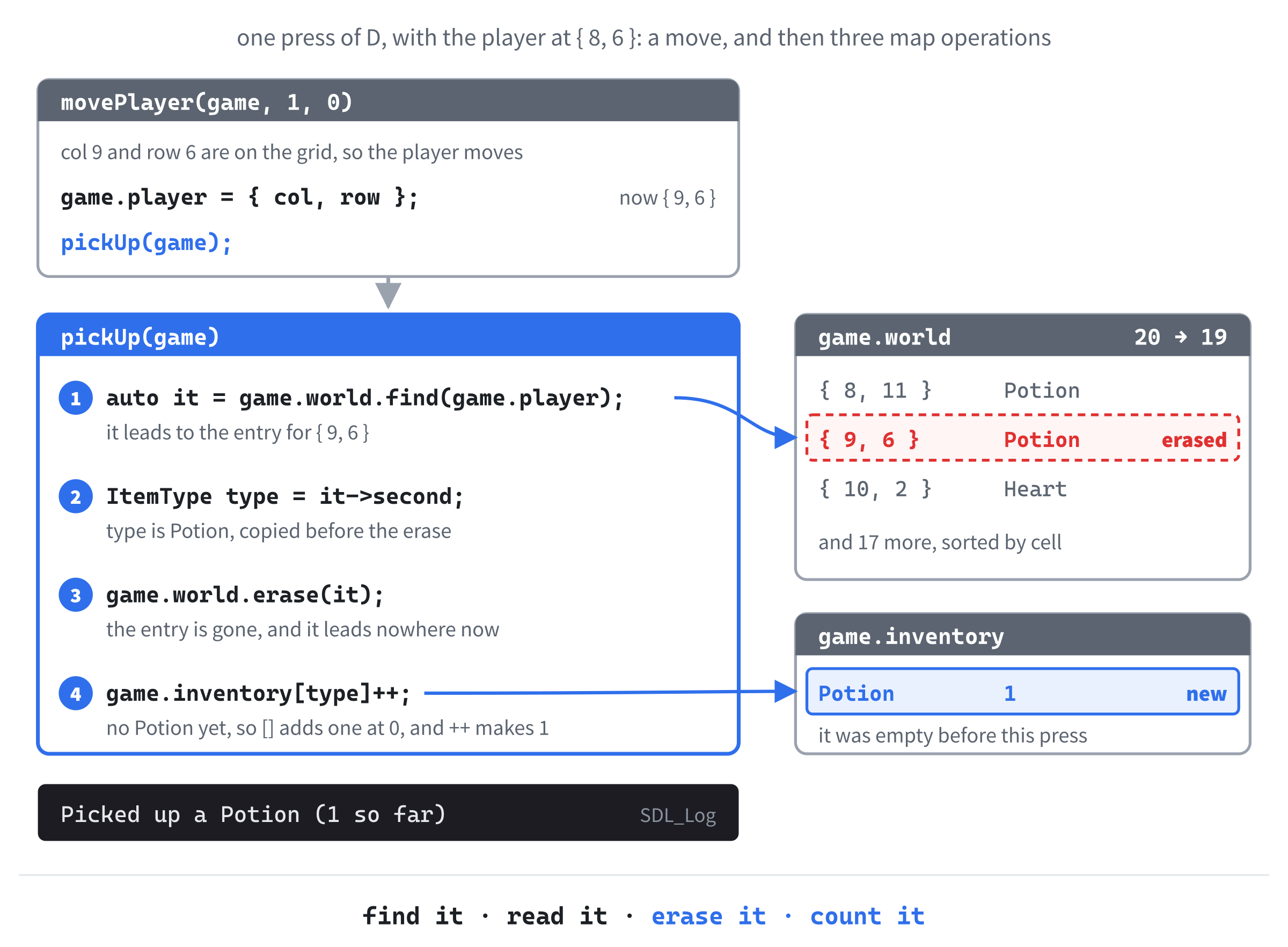
In the preceding code, pickUp asks the world what's in the player's cell with find, which, as Chapter 15 showed, never adds anything. If find returns end(), there's nothing there, and the function returns. Otherwise, it leads to the entry, and it->second is the kind of loot in it.
The order of the next lines matters. The kind of loot is copied into type first, and only then does erase(it) take the entry out of the world. Once the entry is erased, it leads nowhere, and reading it->second after that would be using a dangling iterator, the kind of mistake Chapter 13 warned about. Then game.inventory[type]++ counts the item, with Chapter 15's counting trick: the first time a kind of loot turns up, the square brackets add it with a count of 0, and the ++ makes it 1.
Last, the console hears about it. The %s in the message is replaced by the item's name, looked up in the table with at, and the %d by how many of it the player now has. If that was the last item in the world, a second message says so. Figure 16.4 follows all of this through one key press.
Now call it. Add this line to movePlayer, below game.player = { col, row };:
pickUp(game);In the preceding code, every successful move ends by picking up whatever is in the new cell. A move off the edge returns before it gets here, so walking into a wall does nothing at all.
A new game should start with nothing found. Add this line to resetGame, between the player's line and seedWorld(game);:
game.inventory.clear();In the preceding code, clear empties the inventory, so R, when we add it, really does start again.
Now the list. Add this function below movePlayer:
// List the inventory in the console, and how much loot is left
void logInventory(const Game& game)
{
    SDL_Log("--- Inventory ---");
    if (game.inventory.empty())
        SDL_Log("(nothing yet)");
    for (const auto& [type, count] : game.inventory)
        SDL_Log("%-7s x %d", ITEMS.at(type).name, count);
    SDL_Log("Left to find: %d", static_cast<int>(game.world.size()));
}
In the preceding code, logInventory prints a heading, and then either "(nothing yet)" or one line for each kind of loot the player has found. The loop walks through the inventory with a structured binding, and because the inventory is a std::map, the lines always come out in the order of the enum. The last line says how many items are left in the world, which is just the world's size().
The game is passed by const reference here, too, because listing the inventory only looks at it. That's another reason the loop reads the inventory with a structured binding rather than the square brackets: the brackets won't work on a const map.
The codes in an SDL_Log message say how to print what follows. The code %d prints an int, and %s prints text given as a const char*, while %-7s prints text padded with spaces to seven characters, so the x's line up. A size_t, such as a map's size(), needs its own code, %zu, so this chapter turns it into an int with static_cast<int> and prints it with %d, which is easier to remember.
Neither %d nor %s checks what it's given, so each value has to match its code, in order.
The last two keys call the last two functions. Add these to the switch, below the D key's case, just above case SDLK_ESCAPE::
case SDLK_TAB:
    logInventory(game);
    break;
case SDLK_R:
    resetGame(game);
    break;
In the preceding code, Tab lists the inventory, and R starts a new game with resetGame, which puts the player back in the middle, empties the inventory, and scatters new loot.
Checkpoint: Press F5, and walk onto an item. It vanishes, and the console says something like "Picked up a Gem (1 so far)". Collect a few more, and press Tab to see them listed, with how many are left. Press R, and a new world appears, with the player back in the middle, and Tab shows "(nothing yet)". Pick up all twenty, and the console tells you so.
That's the game finished.
The Complete Program
Here's the whole file in one piece, with every line at its real indentation. If you've typed every block in the place described, this is exactly what you have:
/*
    Loot Grid
    The Chapter 16 project from Learning C++ by Building Games

    Loot is scattered across a grid: coins, gems, keys, potions, and
    hearts, each its own color. Move the green square one cell at a
    time with W, A, S, and D, and walk onto an item to pick it up. Tab
    lists what you've found in the console, R starts again with a new
    world, and Escape, or the window's X, quits.

    New in this project: the collections from Chapter 15. The world is
    a std::map from cells to items, the inventory is a std::map that
    counts them, and a std::unordered_map holds each item's name and
    color.
*/

#include <SDL3/SDL.h>
#include <SDL3/SDL_main.h>

#include <map>            // std::map, for the world and the inventory
#include <unordered_map>  // std::unordered_map, for the table of items
#include <utility>        // std::pair, for a cell's column and row

// The grid
const int CELL_SIZE  = 50;                      // width and height, in pixels
const int GRID_COLS  = 16;                      // cells across
const int GRID_ROWS  = 12;                      // cells down
const int WINDOW_W   = GRID_COLS * CELL_SIZE;   // 800 pixels
const int WINDOW_H   = GRID_ROWS * CELL_SIZE;   // 600 pixels
const int ITEM_COUNT = 20;                      // items in a new world

// The colors, and how far in from its cell's edges each square is drawn
const SDL_Color BACKGROUND   = { 25, 25, 30, 255 };    // almost black
const SDL_Color GRID_LINES   = { 45, 45, 55, 255 };    // a little lighter
const SDL_Color PLAYER_COLOR = { 80, 220, 100, 255 };  // green
const float     PLAYER_INSET = 6.0f;                   // in pixels
const float     ITEM_INSET   = 12.0f;

// The five kinds of loot
enum class ItemType
{
    Coin,
    Gem,
    Key,
    Potion,
    Heart
};
const int ITEM_KINDS = 5;   // how many values ItemType has

// What each kind of loot is called, and its color
struct ItemInfo
{
    const char* name;
    SDL_Color color;
};

const std::unordered_map<ItemType, ItemInfo> ITEMS = {
    { ItemType::Coin,   { "Coin",   { 230, 200,  50, 255 } } },   // gold
    { ItemType::Gem,    { "Gem",    {  80, 220, 220, 255 } } },   // cyan
    { ItemType::Key,    { "Key",    { 220, 220, 220, 255 } } },   // silver
    { ItemType::Potion, { "Potion", { 180,  80, 220, 255 } } },   // purple
    { ItemType::Heart,  { "Heart",  { 230,  70,  90, 255 } } }    // red
};

// A cell on the grid: its column, and then its row
using Cell = std::pair<int, int>;

// Everything that changes as the game is played
struct Game
{
    Cell player;                          // the cell the player is in
    std::map<Cell, ItemType> world;       // the loot, by the cell it's in
    std::map<ItemType, int> inventory;    // how many of each we've found
};

// One of the five kinds of loot, at random
ItemType randomItem()
{
    return static_cast<ItemType>(SDL_rand(ITEM_KINDS));
}

// Scatter ITEM_COUNT items across the grid, one to a cell, and never
// in the player's cell
void seedWorld(Game& game)
{
    game.world.clear();
    while (game.world.size() < ITEM_COUNT)
    {
        Cell cell = { SDL_rand(GRID_COLS), SDL_rand(GRID_ROWS) };
        if (cell != game.player && !game.world.contains(cell))
            game.world[cell] = randomItem();
    }
}

// Start again: the player in the middle, nothing found, and a new
// world of loot
void resetGame(Game& game)
{
    game.player = { GRID_COLS / 2, GRID_ROWS / 2 };
    game.inventory.clear();
    seedWorld(game);
    SDL_Log("A new world, with %d items to find", ITEM_COUNT);
}

// If there's loot in the player's cell, move it into the inventory
void pickUp(Game& game)
{
    auto it = game.world.find(game.player);
    if (it == game.world.end())
        return;   // nothing here

    ItemType type = it->second;
    game.world.erase(it);
    game.inventory[type]++;

    SDL_Log("Picked up a %s (%d so far)", ITEMS.at(type).name,
            game.inventory[type]);
    if (game.world.empty())
        SDL_Log("That's all of it! Press R for a new world.");
}

// Move the player one cell across and down, unless that's off the grid
void movePlayer(Game& game, int across, int down)
{
    int col = game.player.first + across;
    int row = game.player.second + down;
    if (col < 0 || col >= GRID_COLS || row < 0 || row >= GRID_ROWS)
        return;   // off the edge, so stay put

    game.player = { col, row };
    pickUp(game);
}

// List the inventory in the console, and how much loot is left
void logInventory(const Game& game)
{
    SDL_Log("--- Inventory ---");
    if (game.inventory.empty())
        SDL_Log("(nothing yet)");
    for (const auto& [type, count] : game.inventory)
        SDL_Log("%-7s x %d", ITEMS.at(type).name, count);
    SDL_Log("Left to find: %d", static_cast<int>(game.world.size()));
}

// Draw the lines between the cells
void drawGrid(SDL_Renderer* renderer)
{
    SDL_SetRenderDrawColor(renderer, GRID_LINES.r, GRID_LINES.g,
                           GRID_LINES.b, GRID_LINES.a);
    for (int col = 1; col < GRID_COLS; col++)
    {
        float x = static_cast<float>(col * CELL_SIZE);
        SDL_RenderLine(renderer, x, 0.0f, x, static_cast<float>(WINDOW_H));
    }
    for (int row = 1; row < GRID_ROWS; row++)
    {
        float y = static_cast<float>(row * CELL_SIZE);
        SDL_RenderLine(renderer, 0.0f, y, static_cast<float>(WINDOW_W), y);
    }
}

// Fill a square in a cell, inset from the cell's edges, in a color
void drawSquare(SDL_Renderer* renderer, Cell cell, float inset,
                SDL_Color color)
{
    SDL_FRect rect = {
        cell.first * CELL_SIZE + inset,     // left
        cell.second * CELL_SIZE + inset,    // top
        CELL_SIZE - 2.0f * inset,           // width
        CELL_SIZE - 2.0f * inset            // height
    };
    SDL_SetRenderDrawColor(renderer, color.r, color.g, color.b, color.a);
    SDL_RenderFillRect(renderer, &rect);
}

// Draw every item in the world, and then the player on top
void drawGame(SDL_Renderer* renderer, const Game& game)
{
    for (const auto& [cell, type] : game.world)
        drawSquare(renderer, cell, ITEM_INSET, ITEMS.at(type).color);
    drawSquare(renderer, game.player, PLAYER_INSET, PLAYER_COLOR);
}

int main(int argc, char* argv[])
{
    // Start SDL, then make the window and the renderer
    if (!SDL_Init(SDL_INIT_VIDEO))
    {
        SDL_Log("SDL_Init failed: %s", SDL_GetError());
        return 1;
    }

    SDL_Window* window = SDL_CreateWindow("Loot Grid",
                                          WINDOW_W, WINDOW_H, 0);
    if (!window)
    {
        SDL_Log("SDL_CreateWindow failed: %s", SDL_GetError());
        SDL_Quit();
        return 1;
    }

    SDL_Renderer* renderer = SDL_CreateRenderer(window, nullptr);
    if (!renderer)
    {
        SDL_Log("SDL_CreateRenderer failed: %s", SDL_GetError());
        SDL_DestroyWindow(window);
        SDL_Quit();
        return 1;
    }

    // Show each frame in step with the monitor's refresh
    SDL_SetRenderVSync(renderer, 1);

    // The player, the loot, and the inventory, ready to play
    Game game;
    resetGame(game);

    bool running = true;
    SDL_Event event;

    while (running)
    {
        // Handle every event that's waiting
        while (SDL_PollEvent(&event))
        {
            if (event.type == SDL_EVENT_QUIT)
            {
                running = false;
            }
            // A key going down, but not the repeats from holding it
            if (event.type == SDL_EVENT_KEY_DOWN && !event.key.repeat)
            {
                switch (event.key.key)
                {
                case SDLK_W:
                    movePlayer(game, 0, -1);
                    break;
                case SDLK_A:
                    movePlayer(game, -1, 0);
                    break;
                case SDLK_S:
                    movePlayer(game, 0, 1);
                    break;
                case SDLK_D:
                    movePlayer(game, 1, 0);
                    break;
                case SDLK_TAB:
                    logInventory(game);
                    break;
                case SDLK_R:
                    resetGame(game);
                    break;
                case SDLK_ESCAPE:
                    running = false;
                    break;
                }
            }
        }

        // Draw the frame: the background, the grid, and then the game
        SDL_SetRenderDrawColor(renderer, BACKGROUND.r, BACKGROUND.g,
                               BACKGROUND.b, BACKGROUND.a);
        SDL_RenderClear(renderer);
        drawGrid(renderer);
        drawGame(renderer, game);

        SDL_RenderPresent(renderer);
    }

    // Clean up, in the reverse order we created things
    SDL_DestroyRenderer(renderer);
    SDL_DestroyWindow(window);
    SDL_Quit();

    return 0;
}
In the preceding code, the shape is the same as Chapter 11's: the constants, then the types, then the functions that play the game, the functions that draw it, and main. The types are small, and the functions are short, because the three maps do the heavy lifting.
Playing the Game
Press F5. The green square stands in the middle of the grid, with twenty pieces of loot scattered around it, as in Figure 16.5.
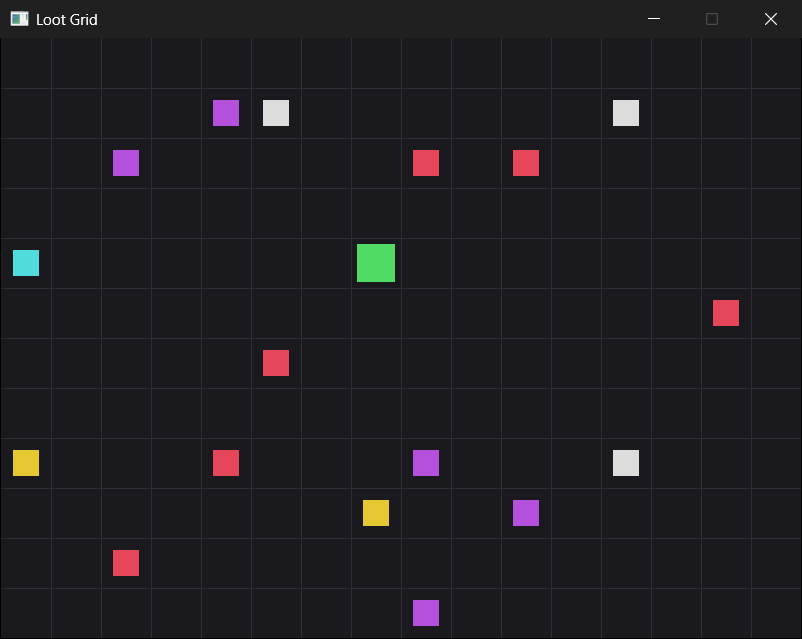
Walk around the grid with W, A, S, and D, and pick up whatever you like. Each pickup is reported in the console, and Tab lists your haul. Here's the console after picking up a potion, a coin, and a key, and pressing Tab:
A new world, with 20 items to find
Picked up a Potion (1 so far)
Picked up a Coin (1 so far)
Picked up a Key (1 so far)
--- Inventory ---
Coin    x 1
Key     x 1
Potion  x 1
Left to find: 17
In the preceding output, the pickups are in the order they happened, but the inventory is in the order of the enum, coins before keys before potions, because it's a std::map keyed by ItemType. The %-7s has lined up the x's. When you've found all twenty, press R for a new world, and press Escape, or close the window, when you've had enough.
Understanding the Code
Look back through the program, and notice how much of it is map operations. Scattering the loot is contains and the square brackets. Picking it up is find, erase, and the square brackets again, with ++. Drawing the loot is a loop over the world, and listing the inventory is a loop over the inventory, each with a structured binding, and every color and name comes out of the table with at.
That's because the game's data has the shape that maps are for. Any time the natural way to describe something is "the X for the Y," a map fits: the item in this cell, the count for this kind of item, the color for this kind of item. Without maps, the world would be Chapter 13's grid, with an "empty" value in most of its cells, the inventory would be five separate counters, and the names and colors would be a switch or two. All of that would work, but the maps make the code say what the game means.
Notice, too, what's missing: new and delete. Chapters 12 and 14 kept their particles on the heap, and had to delete every one of them exactly once. Here, the maps keep the loot and the counts by value, inside themselves, and they make room on the heap for them as they're added, and give it back as they're erased. When main ends, game goes away, its maps go with it, and everything they held is gone too, without a single line of cleanup from us. The containers look after their own memory, so we never have to.
The type alias is doing more work than it looks. Everywhere a cell appears, from the player's position to the world's keys to the parameter of drawSquare, the word Cell says what the pair means. And because a Cell is a pair, the world map gets its sorting, and find gets its comparisons, for free.
Experimenting
Try these one at a time, and see how the game changes:
- Change
ITEM_COUNTto60for a crowded world, or to5for a quick game. - Change the grid. Set
CELL_SIZEto40,GRID_COLSto20, andGRID_ROWSto15, and the window stays 800 by 600, with smaller cells and more of them. - Change a color. Make the keys gold in the table, and the coins silver, and nothing else has to change.
- Change the insets. Set
ITEM_INSETto2.0f, and the loot nearly fills its cells, or setPLAYER_INSETto18.0f, and the player shrinks to 14 pixels across, smaller than the loot.
For a bigger challenge, try these:
- A sixth kind of loot. Add
Scrollto the end of the enum, changeITEM_KINDSto6, and add a scroll to the table, with a name and a color of its own. Those three changes are all it takes, and nothing else in the program needs to know. - Rocks. Add
#include <set>below the other includes, and astd::set<Cell>of rocks to theGamestruct, fill it with ten random cells inresetGame, and draw them in gray. Then makemovePlayerrefuse to move into a rock, withcontains, andseedWorldrefuse to put loot on one. It's Chapter 15's set, doing exactly what sets are for: answering "is this cell a rock?" - A goal. Count the moves the player makes, and when the world is empty, show the count in the title bar, with Chapter 11's
SDL_SetWindowTitleandstd::to_string, adding#include <string>for the second. Then try to find all twenty in fewer moves.
The last two are the kind of feature a real game would add next, and both are made from pieces you already have.
Common Errors and Fixes
If the build fails with errors about SDL3/SDL.h or SDL3.lib, the SDL settings need checking, and Chapter 1's Common Errors section covers each one. Here are the problems that are particular to this chapter.
The build stops with C2678: binary '[': no operator found, on a line that uses ITEMS[type]. The table is const, so its square brackets aren't allowed, because they might add an entry. Use ITEMS.at(type) instead, as Chapter 15's tip said.
The build stops with C2039: 'unordered_map': is not a member of 'std'. The #include <unordered_map> line is missing. Including <map> isn't enough: each collection has its own header.
Holding a key sends the player racing across the grid. The && !event.key.repeat is missing from the if in front of the switch, so every repeat of a held key is another move.
A "Debug Assertion Failed!" box that says "cannot dereference value-initialized map/set iterator", the moment you pick something up. In pickUp, the erase comes before ItemType type = it->second;. Once the entry is erased, the iterator no longer leads to anything, so read the type first, and erase afterward.
After pressing R, Tab still lists the loot from the last game. The line game.inventory.clear(); is missing from resetGame, so the counts carry over into the new world.
The game stops as soon as it starts, with an unhandled std::out_of_range, or, without the debugger, "abort() has been called". An item type has no entry in ITEMS, so at can't find it, and throws. This happens if ITEM_KINDS is bigger than the number of kinds in the table, or if you've added a kind to the enum without adding it to the table. Make the three agree: the enum, ITEM_KINDS, and the table.
AI Exercise (Optional)
If you'd like to take Loot Grid further with an AI's help, here's a challenge that is almost entirely map operations. As always, skip it if you'd rather not; nothing later in the book depends on it.
Open your AI chatbot of choice and try a prompt like this:
"I have a C++ SDL 3 grid game. The world is a std::map<std::pair<int, int>, ItemType>, the inventory is a std::map<ItemType, int>, and a const std::unordered_map<ItemType, ItemInfo> holds each item type's name and color. ItemType is an enum class with Coin, Gem, Key, Potion, and Heart, and everything the game changes is in a struct called Game. I have learned variables, structs, flow control, loops, functions, references, pointers, arrays, std::vector, std::map, std::unordered_map, std::set, and enum class, but not classes. Add a shop: pressing B lists, with SDL_Log, a price in coins for every item type except Coin, and pressing 1 to 4 buys one of that item if the player has enough coins, taking the coins from the inventory and adding the item. Keep the prices in a const std::unordered_map<ItemType, int>. Use only what I've learned, put each curly brace on its own line, and show me every function you change, in full."
Notice what the preceding prompt does. It describes the three maps, with their exact types, so the AI builds on them instead of inventing its own, and it lists what you know, so the answer stays within it. And it even says where the prices should live.
When the answer comes back, read it with Chapter 15 in mind. The price table is const, so does the AI use at or find to read it, rather than the square brackets, which won't compile?
When the player can't afford something, does it check the coins with find or contains, rather than reading inventory[ItemType::Coin], which would add a coin entry with a count of 0 just by looking? And if buying the last of the player's coins leaves a count of 0, does it matter whether the entry stays in the map? Tab would list "Coin x 0". If the answer uses a feature you haven't learned, push back: "That uses something I haven't learned. Please try again with only the features I listed."
Then play it. Buy something you can afford, try to buy something you can't, and press Tab to check that the inventory adds up.
Summary
You've built a game whose data is almost entirely maps. The world is a std::map from cells to loot, storing only the cells that have something in them, which is sparse storage, and far better than a dense grid when most cells are empty. The inventory is a std::map that counts with the square brackets and ++, in the order of the enum. And a const std::unordered_map is the game's table of item types, with a struct for each value, read with at.
Along the way, a type alias gave std::pair<int, int> a name that says what it means, event.key.repeat turned held keys into single moves, and pickUp found, erased, and counted each item, in exactly that order. None of it needed new or delete, because the maps look after their own memory.
In the next chapter, the last of Act 2, we'll bring everything together in a game with real pictures again: a runner that races across a scrolling landscape, animated from a sprite sheet, with a map of textures loaded by name.