
This is the last project of Act 2, and it brings back the pictures. Chapter 11 loaded a lawn, some holes, and a mole, and since then we've gone back to colored squares while Chapters 12 to 16 filled in the rest of Act 2: new and delete, arrays and vectors, and maps. The Runner puts all of it to work in the most animated game we've made so far.
A runner races across a sunny landscape. The far hills roll slowly by, the near hills a little faster, and the ground rushes under her feet, while the sun and clouds hang still in the sky. Crates come at her along the ground, and rows of coins float in the air. Press Space to jump, and she leaps over the crates and snatches the high coins, but touch a crate, and the run is over. The distance she's run and the coins she's collected are counted at the top of the window, in pictures of digits rather than text, and the pace keeps rising the longer she runs.
Every picture in the game is kept in a std::unordered_map, found by its name, which is the job Chapter 15 promised a map could do better than Chapter 11's struct of pointers. The runner herself is six pictures in one, a sprite sheet, played one frame after another to make her legs move. And the landscape is four pictures stacked in layers, each scrolling at its own speed, which is a trick called parallax that makes a flat screen look deep.
SDL3 Projects/Runner — the complete source for this chapter lives here, along with the assets folder that holds every picture the game uses.In this chapter, we will:
- Load every picture into a
std::unordered_mapfrom a list of names, find each one withfind, and destroy them all in one loop - Scroll four layers of scenery at different speeds, and wrap each one around so it never runs out
- Animate the runner from a sprite sheet, choosing each frame with a source rectangle and timing it with an accumulator
- Give the runner three states with an
enum class, and let her jump with gravity - Keep the crates and coins in vectors, spawn them as she runs, and remove them when they leave the window
- Check collisions with a hitbox smaller than the picture
- Draw numbers from a strip of digit pictures, with no font at all
- Play the game, experiment with it, fix the most common mistakes, and try an optional AI exercise
Let's build it.
Setting Up the Project
This project uses SDL_image again, to load its pictures, so the setup is exactly Chapter 11's. You already have SDL_image in C:\SDL3_image from that chapter, so there's nothing to download. Here's the checklist:
- Choose File > New > Project, pick Empty Project (the one tagged C++, Windows, and Console), name it
Runner, and click Create. - In Solution Explorer, right-click Source Files, choose Add > New Item, and add a file called
main.cpp. - Right-click the project, choose Properties, set the two dropdowns to All Configurations and All Platforms, and then make the four changes:
- C/C++ > General > Additional Include Directories:
C:\SDL3\include;C:\SDL3_image\include - C/C++ > Language > C++ Language Standard: ISO C++20 Standard (/std:c++20)
- Linker > General > Additional Library Directories:
C:\SDL3\lib\x64;C:\SDL3_image\lib\x64 - Linker > Input > Additional Dependencies:
SDL3.lib;SDL3_image.lib
- C/C++ > General > Additional Include Directories:
- Right-click the project, choose Open Folder in File Explorer, and copy two DLLs into that folder, beside
main.cpp:SDL3.dllfromC:\SDL3\lib\x64, andSDL3_image.dllfromC:\SDL3_image\lib\x64.
If you took Chapter 11's advice and exported Whack-a-Mole as a template called something like "SDL3 plus image project", this is the moment it pays off. Pick it in step 1 instead of Empty Project, and the settings in step 3 are already made. You still need an empty main.cpp: add one if the template doesn't bring one, or delete everything in the one it brings. Then copy the two DLLs.
The game's pictures are PNG files, all ready in the book's repository, in SDL3 Projects/Runner/assets. Copy the whole assets folder into your project folder, beside main.cpp, just as in Chapter 11, so that you end up with a folder called assets next to your code, with these nine pictures in it:
| File | Size | What it is |
|---|---|---|
sky.png |
960 × 540 | The sky, with the sun and clouds, the size of the whole window |
hills_far.png |
960 × 540 | Distant blue hills, see-through everywhere else |
hills_near.png |
960 × 540 | Nearer green hills with trees, see-through above them |
ground.png |
960 × 540 | The sandy ground along the bottom, see-through above it |
runner.png |
672 × 180 | Six frames of the runner, side by side: her sprite sheet |
crate.png |
64 × 64 | A wooden crate to jump over |
coin.png |
36 × 36 | A gold coin to collect |
digits.png |
260 × 40 | The digits 0 to 9, side by side |
crashed.png |
520 × 150 | The banner that says the run is over |
The four scenery pictures are each exactly the size of the window, and all but the sky are see-through wherever there's nothing drawn, so each layer shows through the ones in front of it. They're also drawn so that their left and right edges match, which is what lets a layer repeat forever without a seam. Most of the pictures were drawn for the book.
As in Chapter 11, the program opens each picture with a relative path like assets/sky.png, measured from the working directory, which Visual Studio sets to the project folder when you press F5.
Planning the Program
At about 550 lines, this is nearly as long as Chapter 11's Whack-a-Mole, and it has more functions than any program so far, so it's worth planning with Chapter 9's two questions before we start.
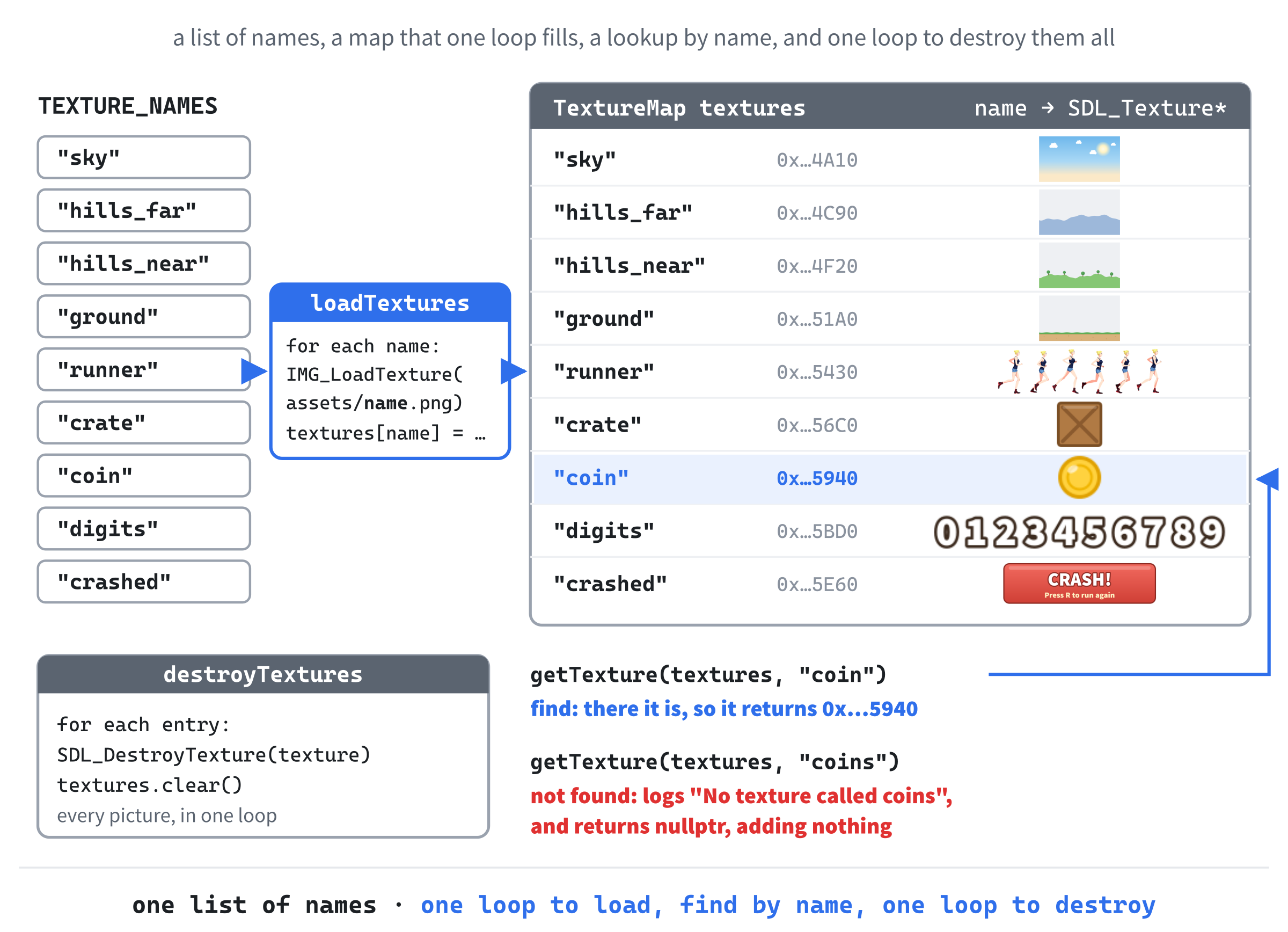
What does the game need to remember? The pictures, first of all, and here's where this project goes its own way. Chapter 11 kept its nine pictures in a struct with one member for each, so every new picture meant a new member, a new line to load it, and a new line to destroy it. This time, the pictures go in a std::unordered_map, with each picture's name as its key and its texture as the value. Loading them is one loop over a list of names, destroying them is one loop over the map, and a new picture is one more name in the list.
Then there's everything that changes as the game is played:
- The runner: how high she is, how fast she's rising or falling, what she's doing (running, jumping, or crashed), and which frame of her run she's showing.
- The scenery: four layers, each with the name of its picture, how fast it scrolls, and how far it has scrolled.
- The crates and the coins: two vectors of rectangles, which grow as new ones appear at the right and shrink as old ones leave at the left.
- The run itself: how fast the ground is moving, how far she's run, when the next crate and coins are due, and how many coins she's collected.
All of that goes in a Game struct, as in Chapters 11 and 16, with the runner in a struct of her own inside it. Notice that nothing is made with new. The vectors and the map look after their own memory, and the only things that need cleaning up by hand are the textures, which SDL made, and which the map only holds pointers to.
What does the game need to do? Twenty jobs, each with a function of its own:
| Function | Its one job |
|---|---|
loadTextures |
Loads every picture in the list of names into the map |
getTexture |
Finds a picture in the map by its name |
destroyTextures |
Destroys every picture in the map |
resetGame |
Puts everything back where it starts, ready for a new run |
randomBetween |
Picks a random number between two others, as in Chapter 12 |
jump |
Launches the runner upward, if she's on the ground |
updateRunner |
Moves the runner on by one frame: her legs on the ground, gravity in the air |
removeOffScreen |
Forgets the crates or coins that have left the window |
moveWorld |
Scrolls the scenery, the crates, and the coins to the left |
spawnThings |
Adds a new crate or row of coins at the right, when one is due |
runnerHitbox |
Works out where the runner's hitbox is on the screen |
checkCollisions |
Ends the run at a crate, and collects the coins |
updateGame |
Moves the whole game on by one frame |
drawLayer |
Draws one layer of scenery, wrapped around |
drawWorld |
Draws the scenery, the crates, and the coins |
drawRunner |
Draws the runner's frame from her sprite sheet |
drawNumber |
Draws a number from the strip of digits |
numberWidth |
Works out how wide a number will be |
drawHud |
Draws the coin count and the distance at the top of the window |
drawCrashed |
Draws the banner that says the run is over |
That's a long list, but each function is short, and each one does one thing, which is what makes a program this size easy to follow. We'll write them a few at a time.
Coding the Game
We'll build the game in stages, as in Chapter 11. First comes the skeleton, a window with the pictures loaded, then the scenery, standing still and then scrolling. Then the runner arrives, running and then jumping, and last of all come the crates, the coins, and the numbers, each stage ending in a checkpoint where there's something new to see.
As before, the blocks are shown without the indentation they'll have in your file, and the complete program at the end shows every line where it sits. Leave a blank line between one function or struct and the next, as in Chapter 9, and each step says where any other blank lines go.
The Header Comment and Includes
Type this at the very top of main.cpp:
/*
    Runner
    The Chapter 17 project from Learning C++ by Building Games

    She runs, and the world scrolls past. Press Space, W, or the Up
    arrow to jump the crates and grab the coins, and the pace keeps
    rising. Hit a crate, and the run is over: press R to run again.
    Escape, or the window's X, quits.

    New in this project: a sprite sheet, with six frames of running in
    one picture; scenery in layers that scroll at different speeds;
    numbers drawn from a strip of digits; and every texture kept in a
    std::unordered_map, loaded by name.
*/

#include <SDL3/SDL.h>
#include <SDL3/SDL_main.h>
#include <SDL3_image/SDL_image.h>

#include <string>          // std::string and std::to_string
#include <unordered_map>   // std::unordered_map, for the textures
#include <vector>          // std::vector, for the layers, crates, and coins
In the preceding code, the comment describes the game, and the first three #include lines bring in SDL, its helper for main, and SDL_image, just as in Chapter 11. The other three are the standard library's: <string> for std::string and std::to_string, <unordered_map> for the map of pictures, and <vector> for the layers, the crates, and the coins.
The First Constants
Add these below the includes, with a blank line in between:
const int   WINDOW_W  = 960;    // window width in pixels
const int   WINDOW_H  = 540;    // window height in pixels
const float MAX_DELTA = 0.1f;   // the longest frame we'll allow, in seconds
In the preceding code, the window is 960 by 540, which is the same shape as a widescreen TV, and MAX_DELTA is Chapter 11's limit on how long a single frame can count for: a tenth of a second. We'll use it when the scenery starts to move.
The Texture Registry
Now the map of pictures, which programmers call a registry: one place where everything of a kind is kept, and found by name. Add these below the constants, with a blank line in between:
// Every texture, found by its name
using TextureMap = std::unordered_map<std::string, SDL_Texture*>;

// The pictures to load, each one from assets/<name>.png
const char* TEXTURE_NAMES[] = { "sky", "hills_far", "hills_near", "ground",
                                "runner", "crate", "coin", "digits",
                                "crashed" };
In the preceding code, the first line is a type alias, like Chapter 16's Cell. From here on, TextureMap means a std::unordered_map whose keys are std::string names and whose values are SDL_Texture* pointers. An unordered map is the right choice, because the game only ever looks pictures up by name, and never needs them in order.
Below it, TEXTURE_NAMES is an array of the nine names, from Chapter 13, with each name written as text in double quotes, which Chapter 11 said is a const char*. Each name is also the picture's file name, without its folder or its .png, so the list says everything that needs loading. The array is written over three lines, lined up under its first name, because it's too long for one.
Loading them is the first job. Add this function below TEXTURE_NAMES, with a blank line in between:
// Load every picture in TEXTURE_NAMES into the map, and report whether
// they all loaded. It stops at the first one that fails.
bool loadTextures(SDL_Renderer* renderer, TextureMap& textures)
{
    for (const char* name : TEXTURE_NAMES)
    {
        std::string path = std::string("assets/") + name + ".png";
        SDL_Texture* texture = IMG_LoadTexture(renderer, path.c_str());
        if (texture == nullptr)
        {
            SDL_Log("Couldn't load %s: %s", path.c_str(), SDL_GetError());
            return false;
        }
        textures[name] = texture;
    }
    return true;
}
In the preceding code, loadTextures walks through the names with a range-based for, which works on an array just as it does on a vector. For each one, it builds the path by adding the pieces together as std::strings: "assets/", then the name, then ".png", so "sky" becomes "assets/sky.png". The first piece is made into a std::string explicitly, because two const char* texts can't be added together with +, but a std::string can have any text added to it.
Then IMG_LoadTexture loads the picture, as in Chapter 11, taking the path as a const char* with Chapter 11's c_str. If it fails, the function says which file and why, and returns false at once. Otherwise, textures[name] = texture; files the texture under its name. The square brackets are exactly right here, because we want to add a new entry for each name. If every picture loads, the loop ends, and the function returns true.
To use a picture, we need to find it by name. Add this function below loadTextures:
// Find a texture by its name, or say so and return nullptr. A mistyped
// name can't add an entry to the map, as the square brackets would.
SDL_Texture* getTexture(const TextureMap& textures, const std::string& name)
{
    auto it = textures.find(name);
    if (it == textures.end())
    {
        SDL_Log("No texture called %s", name.c_str());
        return nullptr;
    }
    return it->second;
}
In the preceding code, getTexture looks the name up with find, as Chapter 15 showed, and returns the texture's pointer if it's there. The map is passed by const reference, because finding a picture never changes the map, and that's why the square brackets wouldn't compile here, as Chapter 15's tip warned. They'd be the wrong tool anyway. A mistyped name, such as "coins", would quietly add an entry holding nullptr under the typo, and nothing would say so. With find, a mistyped name is reported in the console, and the function returns nullptr, which SDL's drawing functions simply refuse to draw.
Every texture must be destroyed exactly once, as Chapter 11 said. Add this function below getTexture:
// Destroy every texture in the map, and then empty it
void destroyTextures(TextureMap& textures)
{
    for (const auto& [name, texture] : textures)
        SDL_DestroyTexture(texture);
    textures.clear();
}
In the preceding code, destroyTextures walks through the map with a structured binding, destroys each texture, and then empties the map with clear, so nothing is left holding a pointer to a destroyed texture. The loop only needs the texture, not its name, but a structured binding has to name both parts of each entry, so name is there and simply isn't used. The const auto& is fine, because SDL_DestroyTexture destroys what the pointer points to, which doesn't change the pointer itself.
Figure 17.1 puts the three functions together. Compare them with Chapter 11's, where every picture needed its own line in all three.
Checkpoint: There's no main yet, so there's nothing to run, but you can check your typing. Press Ctrl+F7 to compile main.cpp on its own, as in Chapter 11. If the Error List stays empty, the includes, the constants, and the three functions are all correct.
main and the SDL Setup
Add main below destroyTextures, with just return 0; inside for now:
int main(int argc, char* argv[])
{
    return 0;
}
In the preceding code, main has its usual two parameters, and everything else will go inside it, above return 0;.
Click at the end of the line with main’s opening brace, press Enter, and add this:
// Start SDL, then make the window and the renderer
if (!SDL_Init(SDL_INIT_VIDEO))
{
    SDL_Log("SDL_Init failed: %s", SDL_GetError());
    return 1;
}

SDL_Window* window = SDL_CreateWindow("Runner", WINDOW_W, WINDOW_H, 0);
if (!window)
{
    SDL_Log("SDL_CreateWindow failed: %s", SDL_GetError());
    SDL_Quit();
    return 1;
}
In the preceding code, we start SDL's video system and create a 960 by 540 window called Runner, checking each step and bailing out with a message if it fails, as in every project so far.
The renderer and vsync come next. Add this below the window check, with a blank line in between:
SDL_Renderer* renderer = SDL_CreateRenderer(window, nullptr);
if (!renderer)
{
    SDL_Log("SDL_CreateRenderer failed: %s", SDL_GetError());
    SDL_DestroyWindow(window);
    SDL_Quit();
    return 1;
}

// Show each frame in step with the monitor's refresh
SDL_SetRenderVSync(renderer, 1);
In the preceding code, we create the renderer, tidy up if that fails, and ask for vsync, so that each frame is shown in step with the monitor.
Now load the pictures. Add this below the vsync line, with a blank line in between:
// Every picture, loaded by name
TextureMap textures;
if (!loadTextures(renderer, textures))
{
    destroyTextures(textures);   // the ones that did load
    SDL_DestroyRenderer(renderer);
    SDL_DestroyWindow(window);
    SDL_Quit();
    return 1;
}
In the preceding code, textures starts as an empty map, and loadTextures fills it. If any picture fails to load, the program can't go on, so it shuts down, but look at the first line inside the braces. The function loadTextures stops at the first failure, so the pictures before that one are already loaded, and destroyTextures gives them back before the renderer goes. After that, the cleanup is the same as for a failed renderer, in reverse order.
The last pieces before the loop are the usual two. Add these below the texture check's closing brace, with a blank line in between:
bool running = true;
SDL_Event event;
In the preceding code, running keeps the game loop going, and event is the variable that the event loop fills in.
The Game Loop
Add the game loop below SDL_Event event;, with a blank line in between:
while (running)
{
    // Handle every event that's waiting
    while (SDL_PollEvent(&event))
    {
        if (event.type == SDL_EVENT_QUIT)
        {
            running = false;
        }
        // A key going down, but not the repeats from holding it
        if (event.type == SDL_EVENT_KEY_DOWN && !event.key.repeat)
        {
            switch (event.key.key)
            {
            case SDLK_ESCAPE:
                running = false;
                break;
            }
        }
    }
}
In the preceding code, the event loop handles the window's X, and every key goes to a switch on which key it was, behind Chapter 16's !event.key.repeat, so holding a key down counts only once. For now, the only case is Escape, but the jump keys and R will join it.
Now the drawing. Add this inside the game loop, below the event loop's closing brace, with a blank line in between:
// Draw the frame, from the back to the front
SDL_RenderClear(renderer);

SDL_RenderPresent(renderer);
In the preceding code, SDL_RenderClear clears the window to the renderer's starting color, black, and SDL_RenderPresent shows the frame. The scenery will soon cover the whole window, but clearing first means the window never shows whatever was left over from the last frame, even while the game is half-built. Everything else will be drawn in the blank line between them.
Finally, add the cleanup below the game loop's closing brace, just above return 0;, with a blank line on each side:
// Clean up, in the reverse order we created things
destroyTextures(textures);
SDL_DestroyRenderer(renderer);
SDL_DestroyWindow(window);
SDL_Quit();
In the preceding code, the textures are destroyed first, while the renderer that made them still exists, and then the renderer, the window, and SDL itself are shut down, in the reverse order we created them.
Checkpoint: Press F5. A black window titled Runner opens, and the console stays silent, which means all nine pictures loaded. Escape or the window's X closes it. If the console says "Couldn't load assets/sky.png", the assets folder isn't beside main.cpp, so check where you copied it.
The Scenery
The scenery comes first, because everything else is drawn in front of it. Its constants go below the window's. Add these below MAX_DELTA, with a blank line in between:
// The scenery: every layer's picture is exactly the size of the window
const float LAYER_W  = 960.0f;
const float LAYER_H  = 540.0f;
const float GROUND_Y = 452.0f;   // the line the runner and the crates stand on
In the preceding code, each layer's picture is the size of the window, 960 by 540, and GROUND_Y is where the top of the ground is in the ground picture, 452 pixels down. The runner and the crates will stand on that line.
Each layer needs a name, a depth, and an offset. Add this struct below TEXTURE_NAMES, with a blank line in between:
// One layer of scenery, scrolling at its own share of the ground's speed
struct Layer
{
    std::string texture;   // its name in the texture map
    float depth;           // 0 never moves, and 1 moves with the ground
    float offset;          // how far it has scrolled, from 0 up to LAYER_W
};
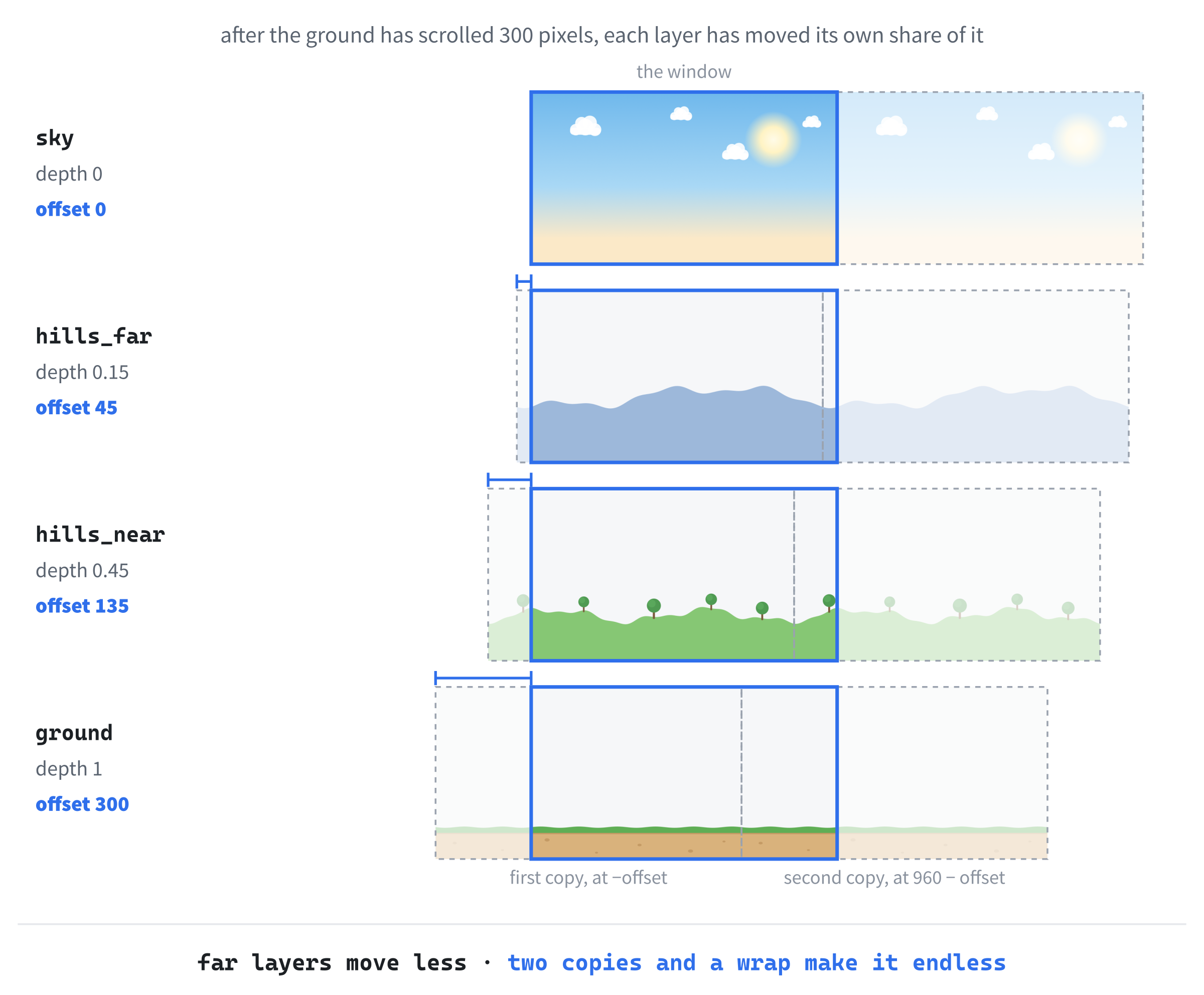
In the preceding code, texture is the layer's name in the texture map, so a layer finds its picture with getTexture. The depth says how fast the layer scrolls, as a share of the ground's speed: a layer with a depth of 0 never moves, one with a depth of 1 moves exactly with the ground, and one with a depth of 0.5 moves at half the speed. And offset is how far the layer has scrolled so far, in pixels, which will always be somewhere from 0 up to its width.
Now the game's state, which starts small. Add this struct below Layer:
// Everything that changes as the game is played
struct Game
{
    std::vector<Layer> layers;
};
In the preceding code, the Game struct holds a vector of layers, and every other part of the game will join it as we go.
The layers are set up when a run starts. Add this function below destroyTextures:
// Put everything back where it starts
void resetGame(Game& game)
{
    game.layers = {
        { "sky",        0.0f,  0.0f },
        { "hills_far",  0.15f, 0.0f },
        { "hills_near", 0.45f, 0.0f },
        { "ground",     1.0f,  0.0f }
    };
}
In the preceding code, resetGame gives the game its four layers, from the back to the front, in a list in braces, where each layer is its own braces: a name, a depth, and an offset of 0. The sky never moves, with a depth of 0, the far hills move at 15 percent of the ground's speed, the near hills at 45 percent, and the ground at the full speed. Assigning a list to a vector like this replaces whatever was in it, so a second run starts with fresh layers.
The farther away something is, the slower it seems to move, as the view from a train window shows: the fence posts flash past, while the hills barely move at all. That's the whole trick of parallax, and the depths are what make it work.
Now create the game. Add this between the texture check and bool running = true;, with a blank line on each side:
// The game, ready to run
Game game;
resetGame(game);
In the preceding code, game is the whole game in one variable, and resetGame gets it ready to run, setting every member, so, as in Chapter 16, it needs no empty braces. When R starts a new run later, it will call the same function.
To draw a layer, we'll draw its picture twice. Add this function below resetGame:
// Draw a layer twice, side by side, shifted left by its offset. When the
// first copy has slid right off the window, the offset wraps back to 0,
// and the second copy is exactly where the first one started.
void drawLayer(SDL_Renderer* renderer, SDL_Texture* texture, float offset)
{
    SDL_FRect first = { -offset, 0.0f, LAYER_W, LAYER_H };
    SDL_FRect second = { LAYER_W - offset, 0.0f, LAYER_W, LAYER_H };
    SDL_RenderTexture(renderer, texture, nullptr, &first);
    SDL_RenderTexture(renderer, texture, nullptr, &second);
}
In the preceding code, drawLayer draws the layer's picture once at its offset, shifted left, and once more immediately to its right. The call to SDL_RenderTexture draws a whole texture into a destination rectangle, as in Chapter 11, and nullptr for the source means "all of the picture". With an offset of 0, the first copy fills the window and the second is off the right edge, out of sight. With an offset of 300, the first copy has slid 300 pixels to the left, and the second fills the 300-pixel gap it left behind.
When the offset reaches the layer's width, the first copy has gone completely, and the second fills the window exactly where the first began. So the offset can go back to 0 without anything on the screen changing at all, and the picture seems to scroll forever. The next section does that wrapping, and Figure 17.3 shows it.
Now draw every layer. Add this function below drawLayer:
// Draw the world, from the back to the front
void drawWorld(SDL_Renderer* renderer, const TextureMap& textures,
               const Game& game)
{
    for (const Layer& layer : game.layers)
    {
        drawLayer(renderer, getTexture(textures, layer.texture),
                  layer.offset);
    }
}
In the preceding code, drawWorld draws the layers in the order they're in the vector, sky first and ground last, so each one is drawn over the ones behind it, which is Chapter 11's painter's algorithm again. The call to drawLayer is too long for one line, so the loop keeps its braces. The crates and coins will be drawn here later too, which is why the function is called drawWorld.
Last, call it. Add this in the drawing, below SDL_RenderClear(renderer);:
drawWorld(renderer, textures, game);In the preceding code, the whole world is drawn after the window is cleared, and before the frame is presented.
Checkpoint: Press F5. The window shows a sunny landscape: blue sky with a sun and clouds, far hills, nearer hills with trees, and sandy ground along the bottom. Nothing moves yet. If a layer is missing, check its name in resetGame against the list: the console says "No texture called" and the name it couldn't find.
Scrolling the Scenery
From here on, every block goes into a gap in the code you've already typed. Figure 17.2 is the map. It has nine slots, lettered in the order we'll first fill them. Slots A and B grow the most: every new group of constants goes in slot A, below the scenery's, and every function that runs the game goes in slot B, between resetGame and drawLayer.

The ground needs a speed. Add these in slot A, below GROUND_Y, with a blank line in between:
// How fast the ground scrolls, in pixels per second
const float START_SPEED = 360.0f;
In the preceding code, the ground starts out scrolling at 360 pixels a second. A later step makes it speed up.
The game needs to remember its speed, and how far it's gone. Add these two members to the Game struct, below layers:
float speed;           // pixels per second that the ground scrolls
float distance;        // pixels run so far
In the preceding code, speed is how fast the ground is scrolling right now, in pixels a second, and distance is how many pixels the runner has run since the start. The distance will count the meters, and it'll decide when each crate and coin appears.
A new run starts at the starting speed, at the start. Add these two lines to resetGame, below the layers:
game.speed = START_SPEED;
game.distance = 0.0f;
In the preceding code, resetGame sets the speed to START_SPEED and the distance to 0.
Now the function that scrolls the world. Add this in slot B, below resetGame:
// Scroll the world to the left by this frame's share of the speed
void moveWorld(Game& game, float delta)
{
    float dx = game.speed * delta;
    game.distance += dx;

    for (Layer& layer : game.layers)
    {
        layer.offset += dx * layer.depth;
        if (layer.offset >= LAYER_W)
            layer.offset -= LAYER_W;
    }
}
In the preceding code, dx is how far the ground moves during this frame: the speed, in pixels a second, times the frame's length in seconds, which is Chapter 11's delta time at work. The distance grows by that much, and then each layer moves on by its own share of it, dx * layer.depth, so the sky moves 0 pixels, the far hills 15 percent of dx, and the ground all of it. When a layer's offset reaches its width, it goes back by that width, which is the wrap from the last section.
The layer changes its offset, so the loop takes each Layer by reference, with &, as Chapter 13 did when it changed the elements of a vector. Without the &, each pass would change a copy, and the scenery would never move.
The whole game moves on through one function. Add this below moveWorld:
// Move the whole game on by one frame
void updateGame(Game& game, float delta)
{
    moveWorld(game, delta);
}
In the preceding code, updateGame just scrolls the world for now. It will soon move the runner, spawn crates and coins, and check for collisions, all from here, so main only ever has to make one call.
To move anything, we need delta time, which needs the time of the last frame. Add this in slot C, between resetGame(game); and bool running = true;, with a blank line on each side:
// The time at the last frame, in milliseconds
Uint64 lastTime = SDL_GetTicks();
In the preceding code, lastTime starts at the time in milliseconds that SDL has been running, as in Chapter 11.
Now the delta time and the update. Add this in slot D, inside the game loop, below the event loop's closing brace, with a blank line on each side:
// Delta time, never more than MAX_DELTA
Uint64 now = SDL_GetTicks();
float delta = (now - lastTime) / 1000.0f;
lastTime = now;
if (delta > MAX_DELTA)
    delta = MAX_DELTA;

// Move the game on by one frame
updateGame(game, delta);
In the preceding code, delta time is worked out exactly as in Chapter 11: the milliseconds since the last frame, divided by 1,000 to make seconds. If the program was held up, by dragging the window, for example, a single frame could count for a whole second, and the world would leap ahead, so MAX_DELTA limits it to a tenth of a second. Then updateGame moves everything on by that much.
Figure 17.3 shows what happens next, layer by layer.
Checkpoint: Press F5. The landscape scrolls to the left. The ground rushes past, the near hills and their trees move more slowly, the far hills more slowly still, and the sky, with its sun and clouds, stays where it is. It feels deep, even though every picture is flat. Watch the ground for a while: it never runs out, and there's no seam where it wraps around.
The Runner
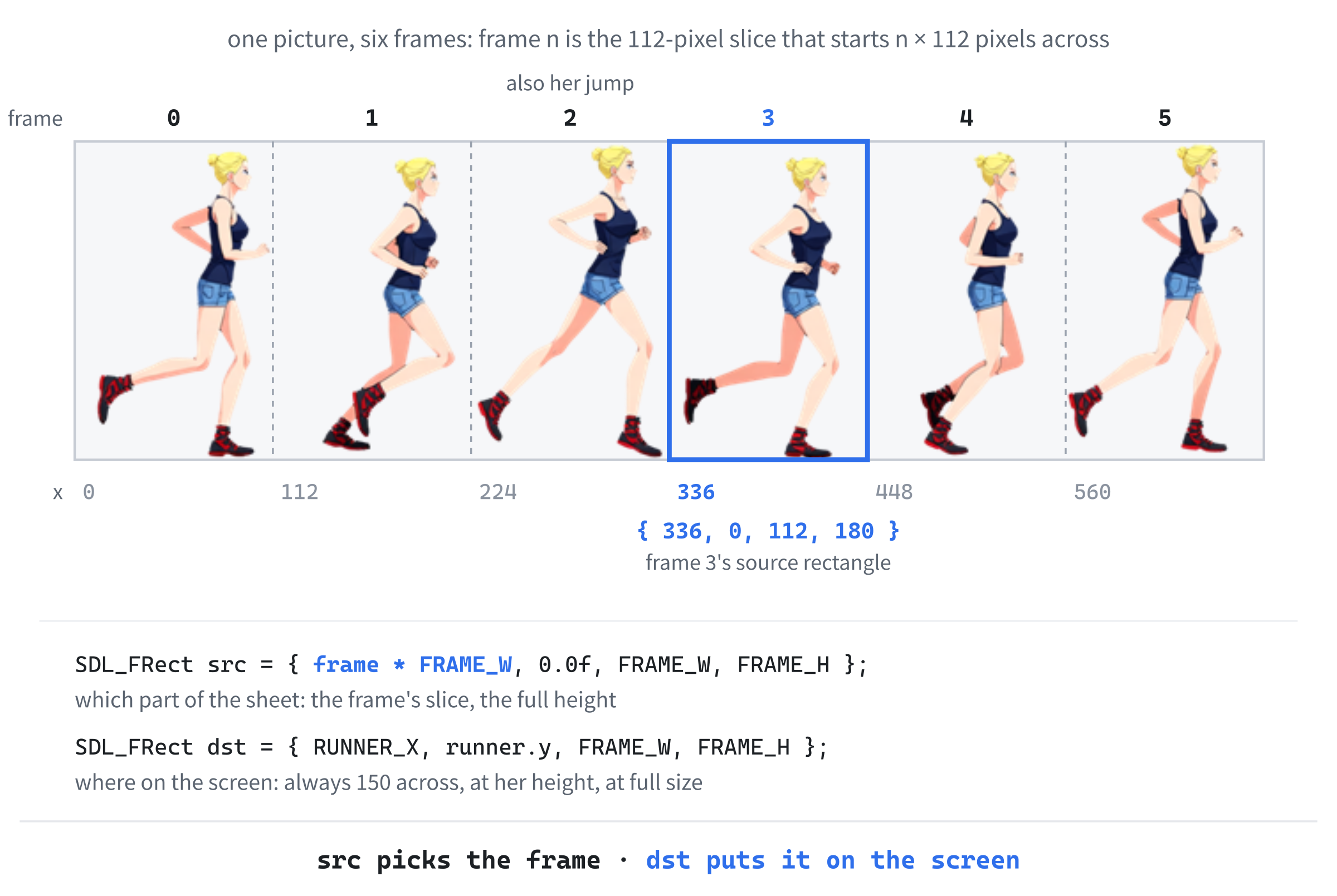
Now the star of the show. Her sprite sheet, runner.png, is six pictures of her in one, side by side, each 112 pixels wide and 180 tall, so that playing them one after another makes her run. Figure 17.4 shows the sheet. Add these in slot A, below START_SPEED, with a blank line in between:
// The runner's sprite sheet: six frames, each 112 by 180, in one row
const float FRAME_W    = 112.0f;
const float FRAME_H    = 180.0f;
const int   RUN_FRAMES = 6;
const int   JUMP_FRAME = 2;         // her longest stride doubles as her jump
const float FRAME_TIME = 0.08f;     // seconds per frame, at START_SPEED
const float FEET_GAP   = 2.0f;      // empty pixels below her feet
const float RUNNER_X   = 150.0f;    // she stays put, and the world moves
const float RUNNER_Y   = GROUND_Y + FEET_GAP - FRAME_H;   // on the ground
In the preceding code, the first group describes the sheet: its six frames, each 112 by 180. Frame 2, her longest stride, will double as her jump pose, and FRAME_TIME says how long each frame is shown at the starting speed, 0.08 seconds, which is twelve and a half frames a second.
The last three place her on the screen. She never moves across it: she always stays 150 pixels from the left, and the world scrolls past her, which is how most runners work. Her frame has 2 empty pixels below her feet, so RUNNER_Y works out where the top of her frame goes for her feet to touch GROUND_Y: 452 + 2 − 180, which is 274. A constant can be worked out from other constants, as long as they come first.
She needs a state, as Chapter 11's moles did. Add these in slot E, below the Layer struct:
// What the runner is doing
enum class RunnerState
{
    Running,   // on the ground, legs going
    Jumping,   // in the air, going up or coming down
    Crashed    // stopped by a crate
};

// The runner. She always stays at RUNNER_X, and only moves up and down.
struct Runner
{
    RunnerState state;
    float y;            // the top of her frame on the screen
    float velY;         // pixels per second, and negative is up
    int frame;          // which of the six running frames to show
    float frameTimer;   // seconds spent on that frame so far
};
In the preceding code, RunnerState is an enum class with her three states: running along the ground, jumping, which covers both going up and coming down, and crashed. The Runner struct holds everything about her: her state, the top of her frame on the screen, y, her upward or downward speed, velY, and which frame of her run she's showing, with how long she's been showing it.
A negative velY means she's moving up, because y grows downward on the screen, as it has since Chapter 1. There's no x in the struct, because she's always at RUNNER_X.
Now give the game a runner. Add this member to the Game struct, above layers:
Runner runner;In the preceding code, runner is a whole Runner struct inside the Game struct, so game.runner.y, for example, reads from left to right: the game's runner's y.
A run starts with her running, on the ground, at the first frame. Add these at the top of resetGame, above the layers, leaving a blank line after them:
game.runner.state = RunnerState::Running;
game.runner.y = RUNNER_Y;
game.runner.velY = 0.0f;
game.runner.frame = 0;
game.runner.frameTimer = 0.0f;
In the preceding code, every member of the runner is set, one line each: running, standing on the ground at RUNNER_Y, not moving up or down, on frame 0, which has been showing for no time at all.
Now the heart of her animation. Add this function in slot B, below resetGame, above moveWorld:
// Move the runner on by one frame
void updateRunner(Runner& runner, float delta, float speed)
{
    switch (runner.state)
    {
    case RunnerState::Running:
        // The faster the ground scrolls, the faster her legs go
        runner.frameTimer += delta * (speed / START_SPEED);
        while (runner.frameTimer >= FRAME_TIME)
        {
            runner.frameTimer -= FRAME_TIME;
            runner.frame = (runner.frame + 1) % RUN_FRAMES;
        }
        break;
    }
}
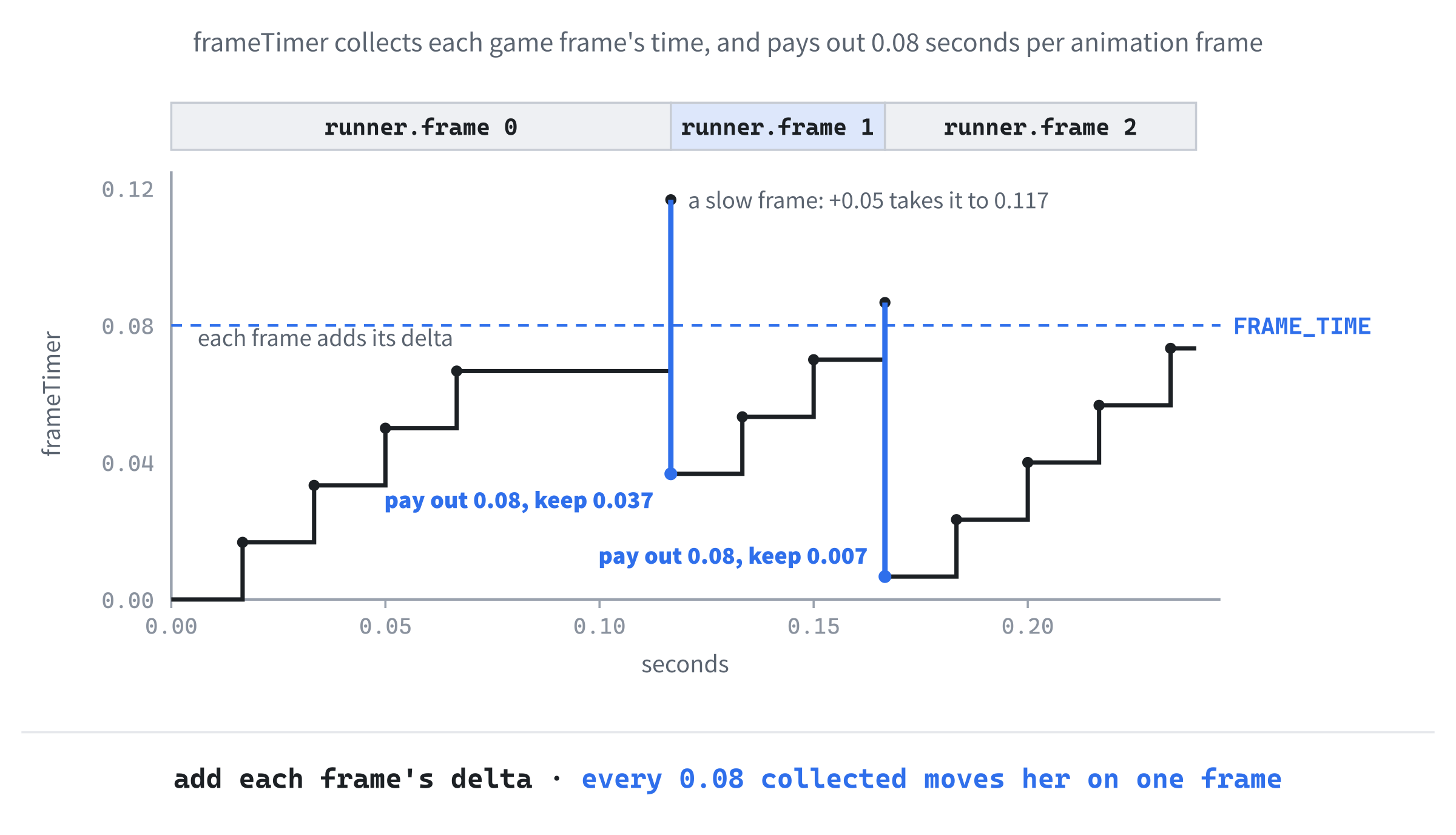
In the preceding code, updateRunner is a switch on her state, like Chapter 11's updateHole, with just the running case for now. While she's running, frameTimer counts up the time she's spent on her current frame. Once it has reached FRAME_TIME, the loop moves her on to the next frame and takes FRAME_TIME off the timer, and the % sends her back from frame 5 to frame 0, so the six frames play round and round.
That's called an accumulator: a timer that collects the time from each frame, however long each one is, and pays it out in fixed amounts. Taking FRAME_TIME off, rather than setting the timer back to 0, keeps whatever was left over, so her legs keep perfect time whatever the frame rate. And it's a while rather than an if, so that one long frame, which might hold two frames' worth of time, moves her on by two. Figure 17.5 follows the timer through a few frames.
The first line of the case speeds her legs up with the ground. Multiplying delta by speed / START_SPEED means that at the starting speed, the timer runs at normal speed, and when the ground is going half as fast again, so is the timer. Without it, her feet would seem to slide over the ground once the pace picked up.
Now call it. Add this line to updateGame, above moveWorld(game, delta);:
updateRunner(game.runner, delta, game.speed);In the preceding code, the runner moves on, and then the world does. The function updateRunner takes game.runner by reference, so it changes the real runner, and it's also given the ground's current speed, for her legs.
To draw her, we cut one frame out of the sheet. Add this function in slot F, below drawWorld:
// Draw the runner's frame from the sprite sheet
void drawRunner(SDL_Renderer* renderer, SDL_Texture* sheet,
                const Runner& runner)
{
    int frame = runner.frame;

    SDL_FRect src = { frame * FRAME_W, 0.0f, FRAME_W, FRAME_H };
    SDL_FRect dst = { RUNNER_X, runner.y, FRAME_W, FRAME_H };

    SDL_RenderTexture(renderer, sheet, &src, &dst);
}
In the preceding code, src is the source rectangle, from Chapter 11: the part of the texture to draw. Frame frame starts at frame * FRAME_W across the sheet, so frame 0 is at 0, frame 1 at 112, and frame 5 at 560, and every frame is at the top, 0 down, 112 wide, and 180 tall. The destination, dst, is where she goes on the screen: always at RUNNER_X across, and at her y down, at her full size. Passing both to SDL_RenderTexture draws that one frame there. The blank lines are where her jump pose and her crash will go.
Last, call it. Add this line in slot G, below drawWorld(renderer, textures, game);:
drawRunner(renderer, getTexture(textures, "runner"), game.runner);In the preceding code, she's drawn after the world, so she's in front of the scenery.
Checkpoint: Press F5. The runner runs on the spot, 150 pixels from the left, with her feet on the ground, while the landscape scrolls past her. Her legs cycle through the six frames, and her feet keep pace with the ground.
Jumping
A jump needs two numbers. Add these in slot A, below the runner's constants, with a blank line in between:
// Jumping
const float JUMP_SPEED = -820.0f;   // pixels per second at take-off, upward
const float GRAVITY    = 2200.0f;   // pixels per second, per second
In the preceding code, JUMP_SPEED is how fast she leaves the ground: 820 pixels a second, upward, which is why it's negative. Then GRAVITY pulls her back down, adding 2,200 pixels a second to her downward speed for every second she's in the air, just like Chapter 14's gravity for the particles.
With those numbers, she rises about 150 pixels, more than twice the height of a crate, and she's in the air for about three quarters of a second. At the starting speed, the ground moves about 270 pixels in that time, which is plenty to clear a crate 64 pixels wide.
The jump itself is a small function. Add this in slot B, below resetGame, above updateRunner:
// Launch her upward, but only from the ground: no jumping in mid-air
void jump(Runner& runner)
{
    if (runner.state == RunnerState::Running)
    {
        runner.state = RunnerState::Jumping;
        runner.velY = JUMP_SPEED;
    }
}
In the preceding code, jump only does anything if she's running. Then it changes her state to jumping and gives her the take-off speed. If she's already in the air, or has crashed, pressing jump does nothing, so there's no jumping in mid-air.
Now the jumping case. Add this to the switch in updateRunner, below the running case's break;, with a blank line in between:
case RunnerState::Jumping:
    runner.velY += GRAVITY * delta;
    runner.y += runner.velY * delta;
    if (runner.y >= RUNNER_Y)
    {
        runner.y = RUNNER_Y;   // she has landed
        runner.velY = 0.0f;
        runner.state = RunnerState::Running;
    }
    break;
In the preceding code, gravity changes her speed, and her speed changes her height, which is the same pair of lines as Chapter 14's particles, in the same order. Once she has come back down to RUNNER_Y, she has landed: she's put exactly on the ground, in case the last frame took her a little below it, her speed goes to 0, and she's running again.
In the air, she should hold her jump pose. Add these two lines to drawRunner, below int frame = runner.frame;:
if (runner.y < RUNNER_Y)
    frame = JUMP_FRAME;   // she's off the ground
In the preceding code, if the top of her frame is above RUNNER_Y, she's off the ground, and she's drawn with frame 2, whichever frame her legs were on. Checking her height, rather than her state, means she'll keep the pose if she crashes into a crate in mid-air, too.
Last, the keys. Add these in slot H, inside the switch in main, above case SDLK_ESCAPE::
case SDLK_SPACE:
case SDLK_W:
case SDLK_UP:
    jump(game.runner);
    break;
In the preceding code, three case labels share one block, so Space, W, and the Up arrow all jump. This is the useful side of Chapter 4's fall-through: the first two labels have nothing of their own, so they fall straight through into the third one's code.
Checkpoint: Press F5, and press Space. She leaps into the air in her jump pose, rises, slows, falls back, and lands running. W and the Up arrow do the same. Press Space again while she's in the air, and nothing happens. Hold it down, and she jumps just once.
The jump comes out nearly the same whatever the frame rate, because gravity and height both change by amounts multiplied by delta. On a 144-hertz monitor, she rises about 150 pixels, and on a 60-hertz one, about 146, because the motion is added up in bigger steps: a difference no player will ever notice. If each frame moved her by a fixed amount instead, the 144-hertz jump would be over in less than half the time.
With her jumping, it's time to give her something to jump over.
Crates
A crate ends the run if it touches her, but "touches" needs a definition. Add this in slot A, below the jumping constants, with a blank line in between:
// Her hitbox, measured from the top-left of her frame. It's smaller than
// the picture, so that brushing a crate with a flying heel doesn't count.
const SDL_FRect HITBOX = { 34.0f, 28.0f, 44.0f, 146.0f };
In the preceding code, HITBOX is an SDL_FRect that's a constant, and it's measured from the top-left of her frame, not from the window. It starts 34 pixels in and 28 down, and it's 44 wide and 146 tall, which covers her body from her head to her feet, but not her swinging arms or her trailing foot. A collision will only count if a crate touches that box.
Make a hitbox smaller than the picture. A picture's rectangle includes every empty corner around the character, and her arms and legs swing far out in some frames, so a crash on the picture's rectangle would feel unfair: the crate would never have touched her. A smaller box in the middle of her body misses those near things, and players always forgive a lucky escape, but never an unlucky crash.
The crates' own constants come next. Add these in slot A, below HITBOX, with a blank line in between:
// The crates
const float CRATE_SIZE    = 64.0f;    // crate.png is 64 by 64
const float FIRST_CRATE   = 600.0f;   // pixels run before the first crate
const float MIN_CRATE_GAP = 420.0f;   // pixels from one crate to the next
const float MAX_CRATE_GAP = 820.0f;
In the preceding code, a crate is 64 pixels square, the first one arrives after she's run 600 pixels, and each one after that is somewhere between 420 and 820 pixels behind the last, at random, so she never knows exactly when to jump.
The game keeps its crates in a vector, and remembers when the next one is due. Add this member to the Game struct, below layers:
std::vector<SDL_FRect> crates;In the preceding code, crates is a vector of SDL_FRects, one rectangle for each crate in the world, in window coordinates. SDL's own rectangle struct makes a perfectly good crate, because a crate is nothing more than where it is and how big it is.
Add this one to the Game struct, below distance:
float nextCrateAt; // the distance for the next crateIn the preceding code, nextCrateAt is the distance at which the next crate should appear. When distance catches up with it, a crate is added, and nextCrateAt moves on.
A new run has no crates, and its first one is due at FIRST_CRATE. Add this line to resetGame, below the layers:
game.crates.clear();In the preceding code, clear empties the vector of crates from the last run.
Then add this line to resetGame, below game.distance = 0.0f;:
game.nextCrateAt = FIRST_CRATE;In the preceding code, the first crate is due after 600 pixels of running.
The gaps between crates are random, which needs Chapter 12's helper. Add this in slot I, below the Game struct, above loadTextures:
// A random number from low up to high
float randomBetween(float low, float high)
{
    return low + SDL_randf() * (high - low);
}
In the preceding code, randomBetween takes a random number from 0 up to 1, from SDL_randf, and stretches it to fit between low and high, exactly as it did in Chapter 12.
Crates that have scrolled off the left of the window are gone for good, so the game should forget them. Add this function in slot B, below updateRunner, above moveWorld:
// Forget everything that has gone off the left edge of the window,
// counting down, as Chapter 13 did, so that no erase makes us skip one
void removeOffScreen(std::vector<SDL_FRect>& things)
{
    for (int i = static_cast<int>(things.size()) - 1; i >= 0; i--)
    {
        if (things[i].x + things[i].w < 0.0f)
            things.erase(things.begin() + i);
    }
}
In the preceding code, removeOffScreen removes every rectangle whose right edge, x + w, has gone past the left edge of the window. It uses Chapter 13's first safe way to remove while looping: counting down from the end, so that an erase only ever moves the elements already checked. The function takes any vector of rectangles, so it will work for the coins too.
Now the crates scroll with the ground. Add these two lines to moveWorld, below the layers' loop:
for (SDL_FRect& crate : game.crates)
    crate.x -= dx;
In the preceding code, every crate moves left by the whole of dx, the same as the ground, because a crate sits on the ground. The loop takes each rectangle by reference, so it moves the real crate.
And then, once they've moved, forget the ones that have gone. Add this line below the crates' loop, with a blank line in between:
removeOffScreen(game.crates);In the preceding code, removeOffScreen is given the game's vector of crates, by reference, so it removes them from the real vector.
Now the crates need somewhere to come from. Add this function in slot B, below moveWorld:
// Add new things just past the right edge of the window, when the
// distance run says it's time
void spawnThings(Game& game)
{
    if (game.distance >= game.nextCrateAt)
    {
        SDL_FRect crate = { static_cast<float>(WINDOW_W),
                            GROUND_Y - CRATE_SIZE, CRATE_SIZE, CRATE_SIZE };
        game.crates.push_back(crate);
        game.nextCrateAt += randomBetween(MIN_CRATE_GAP, MAX_CRATE_GAP);
    }
}
In the preceding code, spawnThings checks whether the distance run has reached the next crate's distance. If it has, a new crate goes in just past the right edge of the window, at WINDOW_W, standing on the ground, with its top at GROUND_Y - CRATE_SIZE. Then the next crate is scheduled somewhere between 420 and 820 pixels further on. Because each crate starts just out of sight, it slides into view from the right, as if the runner were coming up to it.
The static_cast<float> turns WINDOW_W, an int, into the float that an SDL_FRect holds. The compiler would make that change by itself here, but spelling it out says we meant it, as Chapter 16's drawGrid did.
Next, where her hitbox is right now. Add this function below spawnThings:
// Where her hitbox is on the screen right now
SDL_FRect runnerHitbox(const Runner& runner)
{
    return { RUNNER_X + HITBOX.x, runner.y + HITBOX.y, HITBOX.w, HITBOX.h };
}
In the preceding code, runnerHitbox moves HITBOX to where she is: it adds her position, RUNNER_X across and y down, to the hitbox's own position inside her frame. The result is her hitbox in window coordinates, ready to compare with the crates.
Now the crash. Add this function below runnerHitbox:
// Check what her hitbox has run into
void checkCollisions(Game& game)
{
    SDL_FRect box = runnerHitbox(game.runner);

    for (const SDL_FRect& crate : game.crates)
    {
        if (SDL_HasRectIntersectionFloat(&box, &crate))
        {
            game.runner.state = RunnerState::Crashed;
            return;
        }
    }
}
In the preceding code, checkCollisions gets her hitbox once, and then asks, for every crate, whether the two rectangles overlap. The function SDL_HasRectIntersectionFloat takes the addresses of two SDL_FRects, with &, and returns true if they overlap at all. If one does, she's crashed, and there's no point checking the rest, so the function returns.
Now use them. Add these two lines to updateGame, below moveWorld(game, delta);:
spawnThings(game);
checkCollisions(game);
In the preceding code, new things appear after the world has moved, and the collisions are checked last, when everything is where it will be drawn.
A crash should stop everything. Add these at the top of updateGame, above updateRunner(game.runner, delta, game.speed);, with a blank line in between:
if (game.runner.state == RunnerState::Crashed)
    return;
In the preceding code, if she has crashed, updateGame returns at once, before anything moves, so the whole game freezes where it is, and she stays up against the crate that stopped her.
That means updateRunner never sees a crashed runner, but its switch should still say what a crashed runner does, which is nothing. Add this case below the jumping case's break;, with a blank line in between:
case RunnerState::Crashed:
    break;   // she doesn't move again until R
In the preceding code, the crashed case does nothing but break. The comment says why, for anyone reading the switch later.
She should look as if she's hurt, too. Add these two lines to drawRunner, above SDL_RenderTexture(renderer, sheet, &src, &dst);:
if (runner.state == RunnerState::Crashed)
    SDL_SetTextureColorMod(sheet, 255, 110, 110);   // ouch
In the preceding code, a crashed runner is drawn with Chapter 11's color modulation: the red is left at full strength, and the green and blue are turned down to 110 out of 255, which tints her red.
The tint stays on the texture until it's changed, so it has to be turned off again. Add this line below SDL_RenderTexture(renderer, sheet, &src, &dst);:
SDL_SetTextureColorMod(sheet, 255, 255, 255); // back to normalIn the preceding code, the color goes back to 255, 255, 255, which is no tint at all, every time she's drawn. It's the same habit as Chapter 11's red flash on a bonked mole: set the tint, draw, and set it back.
The crates need drawing. Add these to drawWorld, below the layers' loop, with a blank line in between:
SDL_Texture* crate = getTexture(textures, "crate");
for (const SDL_FRect& rect : game.crates)
    SDL_RenderTexture(renderer, crate, nullptr, &rect);
In the preceding code, the crate's texture is found once, before the loop, rather than once for every crate, and each crate is drawn at its own rectangle. The layers are drawn first, so the crates stand in front of the scenery.
When she crashes, the game should say so. Add this function in slot F, below drawRunner:
// Draw the crash banner in the middle of the window, a little high
void drawCrashed(SDL_Renderer* renderer, SDL_Texture* banner)
{
    float w = 0.0f;
    float h = 0.0f;
    SDL_GetTextureSize(banner, &w, &h);
    SDL_FRect dst = { (WINDOW_W - w) / 2.0f, (WINDOW_H - h) / 2.0f - 40.0f,
                      w, h };
    SDL_RenderTexture(renderer, banner, nullptr, &dst);
}
In the preceding code, drawCrashed asks the banner texture its size with SDL_GetTextureSize, as Chapter 11 did for its "Time's up!" banner, and centers it in the window, 40 pixels higher than the middle, so it doesn't cover her.
Now show it. Add these in slot G, below drawRunner(renderer, getTexture(textures, "runner"), game.runner);:
if (game.runner.state == RunnerState::Crashed)
    drawCrashed(renderer, getTexture(textures, "crashed"));
In the preceding code, the banner is drawn last of all, over everything else, but only once she's crashed.
And the banner says to press R. Add this in slot H, below the jump's break;, above case SDLK_ESCAPE::
case SDLK_R:
    if (game.runner.state == RunnerState::Crashed)
        resetGame(game);
    break;
In the preceding code, R starts a new run with resetGame, but only after a crash. Pressing R in the middle of a good run does nothing, which saves a promising run from a slip of the finger.
Checkpoint: Press F5. Crates slide in from the right, a random distance apart, and scroll along the ground. Jump them with Space. Hit one, and everything stops: she turns red, the crash banner appears, and the scenery and the crates freeze where they are. Press R, and a new run starts, with no crates in sight. Land just after a crate, and her trailing foot can pass over its corner without a crash, because the hitbox doesn't reach that far back.
Coins and the Numbers
The coins come in rows of four, low enough to catch by running, or high enough to need a jump. Add these in slot A, below the crates' constants, with a blank line in between:
// The coins
const float COIN_SIZE    = 36.0f;    // coin.png is 36 by 36
const float FIRST_COINS  = 300.0f;   // pixels run before the first coins
const float MIN_COIN_GAP = 260.0f;   // pixels from one row to the next
const float MAX_COIN_GAP = 560.0f;
const int   COINS_IN_ROW = 4;
const float COIN_SPACING = 46.0f;    // from one coin to the next in a row
const float LOW_COINS_Y  = GROUND_Y - 120.0f;   // caught just by running
const float HIGH_COINS_Y = GROUND_Y - 230.0f;   // caught only in a jump
In the preceding code, a coin is 36 pixels square, the first row arrives after 300 pixels, and each row is between 260 and 560 pixels of ground behind the last one. A row is four coins, 46 pixels apart, and it's either 120 pixels above the ground, where her body passes as she runs, or 230 above it, where only a jump can reach.
The game keeps its coins in a vector too. Add this member to the Game struct, below crates:
std::vector<SDL_FRect> coins;In the preceding code, coins is a vector of rectangles, just like crates.
Two more members count the coins. Add these to the Game struct, below nextCrateAt:
float nextCoinsAt;     // the distance for the next row of coins
int coinCount;
In the preceding code, nextCoinsAt is when the next row is due, like nextCrateAt, and coinCount is how many coins she's collected on this run.
A new run starts with none of them. Add this line to resetGame, below game.crates.clear();:
game.coins.clear();In the preceding code, the coins from the last run are cleared away, like its crates.
And add these to resetGame, below game.nextCrateAt = FIRST_CRATE;:
game.nextCoinsAt = FIRST_COINS;
game.coinCount = 0;
In the preceding code, the first row is due after 300 pixels, and the count starts at 0.
The coins scroll with the ground too. Add these two lines to moveWorld, below the crates' loop:
for (SDL_FRect& coin : game.coins)
    coin.x -= dx;
In the preceding code, each coin moves left by dx, exactly like a crate.
Then add this line to moveWorld, below removeOffScreen(game.crates);:
removeOffScreen(game.coins);In the preceding code, the same removeOffScreen forgets the coins that have left the window, which is why it was written to take any vector of rectangles.
Now spawn them. Add this to spawnThings, below the crate's if, with a blank line in between:
if (game.distance >= game.nextCoinsAt)
{
    float y = SDL_rand(2) == 0 ? LOW_COINS_Y : HIGH_COINS_Y;
    for (int i = 0; i < COINS_IN_ROW; i++)
    {
        SDL_FRect coin = { WINDOW_W + i * COIN_SPACING, y,
                           COIN_SIZE, COIN_SIZE };
        game.coins.push_back(coin);
    }
    game.nextCoinsAt += COINS_IN_ROW * COIN_SPACING +
                        randomBetween(MIN_COIN_GAP, MAX_COIN_GAP);
}
In the preceding code, when a row is due, SDL_rand(2) picks 0 or 1, and Chapter 4's ternary operator turns that into the row's height: low for 0, and high for 1. The loop adds four coins, the first just past the right edge of the window and each one 46 pixels further on. The WINDOW_W needs no cast this time, because i * COIN_SPACING is already a float, so the whole sum is one. The next row is due after the four coins, plus a random gap.
Coins are collected rather than crashed into. Add this to checkCollisions, below the crates' loop, with a blank line in between:
for (int i = static_cast<int>(game.coins.size()) - 1; i >= 0; i--)
{
    if (SDL_HasRectIntersectionFloat(&box, &game.coins[i]))
    {
        game.coinCount++;
        game.coins.erase(game.coins.begin() + i);
    }
}
In the preceding code, the loop counts down through the coins, as removeOffScreen does, because a collected coin is erased from the vector as it's counted. The crates are checked first, so a crash stops everything before any coin is collected in the same frame.
Draw them after the crates. Add these to drawWorld, below the crates, with a blank line in between:
SDL_Texture* coin = getTexture(textures, "coin");
for (const SDL_FRect& rect : game.coins)
    SDL_RenderTexture(renderer, coin, nullptr, &rect);
In the preceding code, the coins are drawn just like the crates, with their texture found once, before the loop.
If you press F5 now, rows of coins float past, low and high, and they vanish as she runs or jumps through them. But there's no way to see how many she's collected, so the last job is the numbers.
The game has no font, so it draws its numbers from a picture of the ten digits, digits.png, in a row. Add these in slot A, below the coins' constants, with a blank line in between:
// The numbers at the top of the window
const float DIGIT_W          = 26.0f;    // digits.png is ten digits, each
const float DIGIT_H          = 40.0f;    // 26 by 40, from 0 to 9
const float HUD_MARGIN       = 16.0f;    // pixels from the window's edges
const float PIXELS_PER_METER = 40.0f;
In the preceding code, each digit in the strip is 26 pixels wide and 40 tall, in order from 0 to 9, so digit d starts at d * 26 across. The numbers sit 16 pixels in from the window's edges, and 40 pixels of running count as a meter, so the starting speed is 9 meters a second, a good sprint.
Drawing a number means drawing its digits one at a time. Add this function in slot F, below drawRunner, above drawCrashed:
// Draw a whole number, digit by digit, from the strip of digits, with its
// top-left corner at (x, y)
void drawNumber(SDL_Renderer* renderer, SDL_Texture* digits, int value,
                float x, float y)
{
    std::string text = std::to_string(value);
    for (char c : text)
    {
        int digit = c - '0';   // the characters '0' to '9' become 0 to 9
        SDL_FRect src = { digit * DIGIT_W, 0.0f, DIGIT_W, DIGIT_H };
        SDL_FRect dst = { x, y, DIGIT_W, DIGIT_H };
        SDL_RenderTexture(renderer, digits, &src, &dst);
        x += DIGIT_W;
    }
}
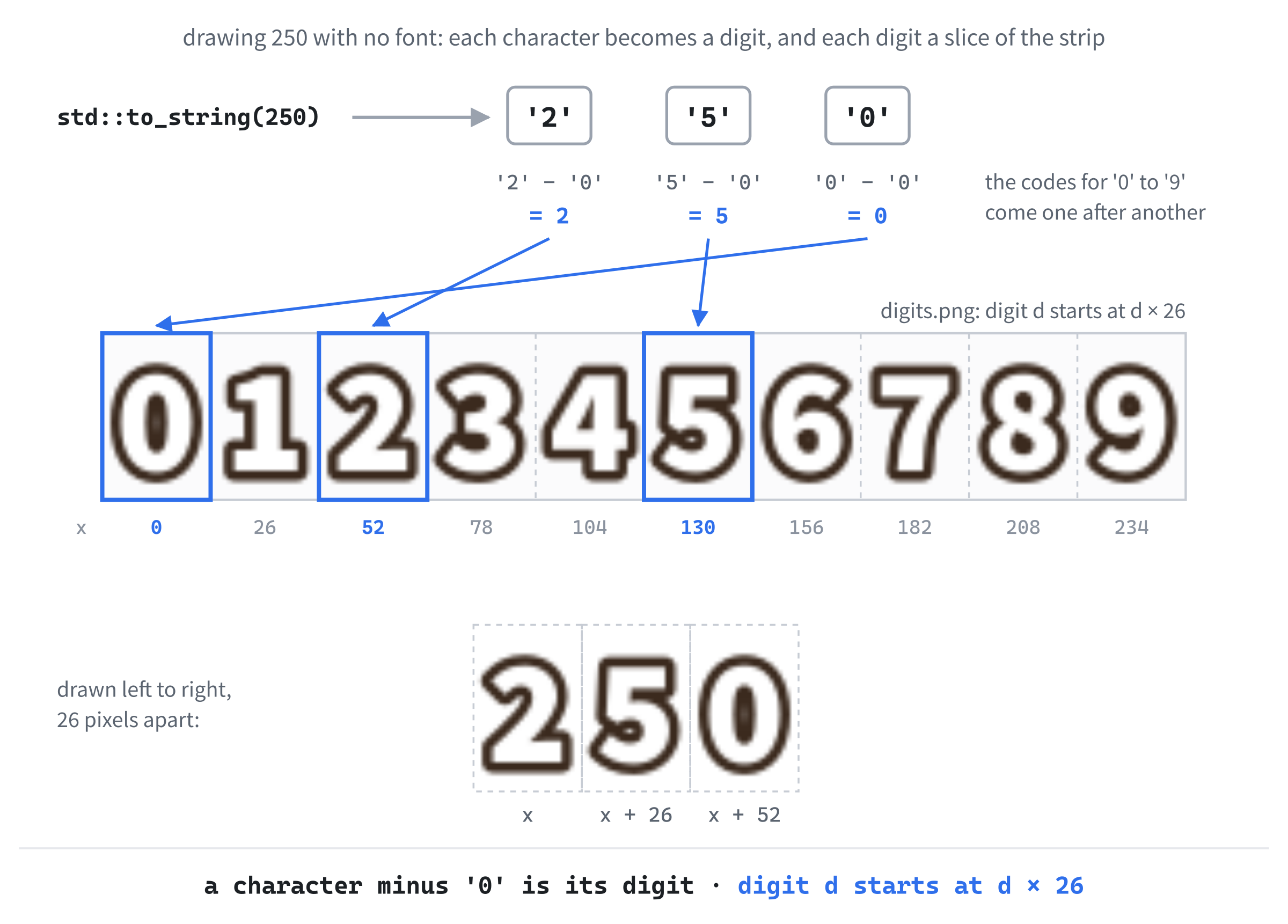
In the preceding code, std::to_string turns the number into text, as in Chapter 11, so 250 becomes the three characters '2', '5', and '0'. The loop visits each character in turn, as Chapter 6's loops over strings did. Each character is stored as a number, its character code, and the codes for '0' to '9' come one after another, in order, so taking away the code for '0' turns each digit character into the number it stands for: '0' - '0' is 0, and '7' - '0' is 7.
Then the digit's source rectangle is cut out of the strip, exactly like a frame from the runner's sheet, and drawn at x, which moves right by one digit's width each time. Figure 17.6 draws 250.
The distance goes in the top-right corner, lined up against the right edge, so we need to know how wide a number will be. Add this function below drawNumber:
// How wide drawNumber will draw a number, in pixels
float numberWidth(int value)
{
    return static_cast<float>(std::to_string(value).size()) * DIGIT_W;
}
In the preceding code, numberWidth turns the number into text, counts its characters with size(), and multiplies by a digit's width, so 250 is 78 pixels wide. The static_cast<float> turns the size_t that size() returns into a float before the multiplication, as Chapter 13 did with int.
Now the display itself, the HUD, as Chapter 11 called it: the numbers and icons drawn over the game. Add this function below numberWidth:
// Draw the coins collected at the top left, and the meters run at the
// top right
void drawHud(SDL_Renderer* renderer, const TextureMap& textures,
             const Game& game)
{
    SDL_Texture* digits = getTexture(textures, "digits");

    SDL_FRect icon = { HUD_MARGIN, HUD_MARGIN + (DIGIT_H - COIN_SIZE) / 2.0f,
                       COIN_SIZE, COIN_SIZE };
    SDL_RenderTexture(renderer, getTexture(textures, "coin"), nullptr, &icon);
    drawNumber(renderer, digits, game.coinCount,
               HUD_MARGIN + COIN_SIZE + 8.0f, HUD_MARGIN);

    int meters = static_cast<int>(game.distance / PIXELS_PER_METER);
    drawNumber(renderer, digits, meters,
               WINDOW_W - HUD_MARGIN - numberWidth(meters), HUD_MARGIN);
}
In the preceding code, the top-left corner gets a coin, 16 pixels in, lowered by half the difference between the digits' height and the coin's, so that the coin sits level with the numbers beside it. The coin count is drawn 8 pixels to its right. The distance, in whole meters, goes on the right: it starts 16 pixels in from the right edge, less the number's width, so its last digit always ends in the same place, however many digits it has.
Now show it. Add this in slot G, below drawRunner(renderer, getTexture(textures, "runner"), game.runner);:
drawHud(renderer, textures, game);In the preceding code, the HUD is drawn after the runner, so she can never cover the numbers, and before the crash banner, which covers everything.
One last thing: the pace should keep rising. Add these in slot A, below START_SPEED:
const float MAX_SPEED   = 620.0f;
const float SPEED_GAIN  = 6.0f;     // added every second, up to MAX_SPEED
In the preceding code, the ground's speed will never go beyond 620 pixels a second, and it gains 6 pixels a second, every second, until it gets there, which takes a little over 40 seconds.
Now speed the game up. Add these to updateGame, between the crash check and updateRunner(game.runner, delta, game.speed);, with a blank line on each side:
game.speed += SPEED_GAIN * delta;
if (game.speed > MAX_SPEED)
    game.speed = MAX_SPEED;
In the preceding code, the speed grows by SPEED_GAIN times the frame's length, which adds up to 6 pixels a second for every second of running, and it stops at MAX_SPEED. The crates still come the same distance apart, but at a faster speed, that distance goes by sooner, so the jumps come quicker and quicker, and her legs speed up with the ground.
Checkpoint: Press F5, and play. The coins count up at the top left as you collect them, and the meters count up at the top right. The ground speeds up as the run goes on. When a crate stops you, the numbers freeze with everything else, and R starts again from 0.
That's the game finished.
The Complete Program
Here's the whole file in one piece, with every line at its real indentation. If you've typed every block in the place described, this is exactly what you have:
/*
    Runner
    The Chapter 17 project from Learning C++ by Building Games

    She runs, and the world scrolls past. Press Space, W, or the Up
    arrow to jump the crates and grab the coins, and the pace keeps
    rising. Hit a crate, and the run is over: press R to run again.
    Escape, or the window's X, quits.

    New in this project: a sprite sheet, with six frames of running in
    one picture; scenery in layers that scroll at different speeds;
    numbers drawn from a strip of digits; and every texture kept in a
    std::unordered_map, loaded by name.
*/

#include <SDL3/SDL.h>
#include <SDL3/SDL_main.h>
#include <SDL3_image/SDL_image.h>

#include <string>          // std::string and std::to_string
#include <unordered_map>   // std::unordered_map, for the textures
#include <vector>          // std::vector, for the layers, crates, and coins

const int   WINDOW_W  = 960;    // window width in pixels
const int   WINDOW_H  = 540;    // window height in pixels
const float MAX_DELTA = 0.1f;   // the longest frame we'll allow, in seconds

// The scenery: every layer's picture is exactly the size of the window
const float LAYER_W  = 960.0f;
const float LAYER_H  = 540.0f;
const float GROUND_Y = 452.0f;   // the line the runner and the crates stand on

// How fast the ground scrolls, in pixels per second
const float START_SPEED = 360.0f;
const float MAX_SPEED   = 620.0f;
const float SPEED_GAIN  = 6.0f;     // added every second, up to MAX_SPEED

// The runner's sprite sheet: six frames, each 112 by 180, in one row
const float FRAME_W    = 112.0f;
const float FRAME_H    = 180.0f;
const int   RUN_FRAMES = 6;
const int   JUMP_FRAME = 2;         // her longest stride doubles as her jump
const float FRAME_TIME = 0.08f;     // seconds per frame, at START_SPEED
const float FEET_GAP   = 2.0f;      // empty pixels below her feet
const float RUNNER_X   = 150.0f;    // she stays put, and the world moves
const float RUNNER_Y   = GROUND_Y + FEET_GAP - FRAME_H;   // on the ground

// Jumping
const float JUMP_SPEED = -820.0f;   // pixels per second at take-off, upward
const float GRAVITY    = 2200.0f;   // pixels per second, per second

// Her hitbox, measured from the top-left of her frame. It's smaller than
// the picture, so that brushing a crate with a flying heel doesn't count.
const SDL_FRect HITBOX = { 34.0f, 28.0f, 44.0f, 146.0f };

// The crates
const float CRATE_SIZE    = 64.0f;    // crate.png is 64 by 64
const float FIRST_CRATE   = 600.0f;   // pixels run before the first crate
const float MIN_CRATE_GAP = 420.0f;   // pixels from one crate to the next
const float MAX_CRATE_GAP = 820.0f;

// The coins
const float COIN_SIZE    = 36.0f;    // coin.png is 36 by 36
const float FIRST_COINS  = 300.0f;   // pixels run before the first coins
const float MIN_COIN_GAP = 260.0f;   // pixels from one row to the next
const float MAX_COIN_GAP = 560.0f;
const int   COINS_IN_ROW = 4;
const float COIN_SPACING = 46.0f;    // from one coin to the next in a row
const float LOW_COINS_Y  = GROUND_Y - 120.0f;   // caught just by running
const float HIGH_COINS_Y = GROUND_Y - 230.0f;   // caught only in a jump

// The numbers at the top of the window
const float DIGIT_W          = 26.0f;    // digits.png is ten digits, each
const float DIGIT_H          = 40.0f;    // 26 by 40, from 0 to 9
const float HUD_MARGIN       = 16.0f;    // pixels from the window's edges
const float PIXELS_PER_METER = 40.0f;

// Every texture, found by its name
using TextureMap = std::unordered_map<std::string, SDL_Texture*>;

// The pictures to load, each one from assets/<name>.png
const char* TEXTURE_NAMES[] = { "sky", "hills_far", "hills_near", "ground",
                                "runner", "crate", "coin", "digits",
                                "crashed" };

// One layer of scenery, scrolling at its own share of the ground's speed
struct Layer
{
    std::string texture;   // its name in the texture map
    float depth;           // 0 never moves, and 1 moves with the ground
    float offset;          // how far it has scrolled, from 0 up to LAYER_W
};

// What the runner is doing
enum class RunnerState
{
    Running,   // on the ground, legs going
    Jumping,   // in the air, going up or coming down
    Crashed    // stopped by a crate
};

// The runner. She always stays at RUNNER_X, and only moves up and down.
struct Runner
{
    RunnerState state;
    float y;            // the top of her frame on the screen
    float velY;         // pixels per second, and negative is up
    int frame;          // which of the six running frames to show
    float frameTimer;   // seconds spent on that frame so far
};

// Everything that changes as the game is played
struct Game
{
    Runner runner;
    std::vector<Layer> layers;
    std::vector<SDL_FRect> crates;
    std::vector<SDL_FRect> coins;
    float speed;           // pixels per second that the ground scrolls
    float distance;        // pixels run so far
    float nextCrateAt;     // the distance for the next crate
    float nextCoinsAt;     // the distance for the next row of coins
    int coinCount;
};

// A random number from low up to high
float randomBetween(float low, float high)
{
    return low + SDL_randf() * (high - low);
}

// Load every picture in TEXTURE_NAMES into the map, and report whether
// they all loaded. It stops at the first one that fails.
bool loadTextures(SDL_Renderer* renderer, TextureMap& textures)
{
    for (const char* name : TEXTURE_NAMES)
    {
        std::string path = std::string("assets/") + name + ".png";
        SDL_Texture* texture = IMG_LoadTexture(renderer, path.c_str());
        if (texture == nullptr)
        {
            SDL_Log("Couldn't load %s: %s", path.c_str(), SDL_GetError());
            return false;
        }
        textures[name] = texture;
    }
    return true;
}

// Find a texture by its name, or say so and return nullptr. A mistyped
// name can't add an entry to the map, as the square brackets would.
SDL_Texture* getTexture(const TextureMap& textures, const std::string& name)
{
    auto it = textures.find(name);
    if (it == textures.end())
    {
        SDL_Log("No texture called %s", name.c_str());
        return nullptr;
    }
    return it->second;
}

// Destroy every texture in the map, and then empty it
void destroyTextures(TextureMap& textures)
{
    for (const auto& [name, texture] : textures)
        SDL_DestroyTexture(texture);
    textures.clear();
}

// Put everything back where it starts
void resetGame(Game& game)
{
    game.runner.state = RunnerState::Running;
    game.runner.y = RUNNER_Y;
    game.runner.velY = 0.0f;
    game.runner.frame = 0;
    game.runner.frameTimer = 0.0f;

    game.layers = {
        { "sky",        0.0f,  0.0f },
        { "hills_far",  0.15f, 0.0f },
        { "hills_near", 0.45f, 0.0f },
        { "ground",     1.0f,  0.0f }
    };
    game.crates.clear();
    game.coins.clear();
    game.speed = START_SPEED;
    game.distance = 0.0f;
    game.nextCrateAt = FIRST_CRATE;
    game.nextCoinsAt = FIRST_COINS;
    game.coinCount = 0;
}

// Launch her upward, but only from the ground: no jumping in mid-air
void jump(Runner& runner)
{
    if (runner.state == RunnerState::Running)
    {
        runner.state = RunnerState::Jumping;
        runner.velY = JUMP_SPEED;
    }
}

// Move the runner on by one frame
void updateRunner(Runner& runner, float delta, float speed)
{
    switch (runner.state)
    {
    case RunnerState::Running:
        // The faster the ground scrolls, the faster her legs go
        runner.frameTimer += delta * (speed / START_SPEED);
        while (runner.frameTimer >= FRAME_TIME)
        {
            runner.frameTimer -= FRAME_TIME;
            runner.frame = (runner.frame + 1) % RUN_FRAMES;
        }
        break;

    case RunnerState::Jumping:
        runner.velY += GRAVITY * delta;
        runner.y += runner.velY * delta;
        if (runner.y >= RUNNER_Y)
        {
            runner.y = RUNNER_Y;   // she has landed
            runner.velY = 0.0f;
            runner.state = RunnerState::Running;
        }
        break;

    case RunnerState::Crashed:
        break;   // she doesn't move again until R
    }
}

// Forget everything that has gone off the left edge of the window,
// counting down, as Chapter 13 did, so that no erase makes us skip one
void removeOffScreen(std::vector<SDL_FRect>& things)
{
    for (int i = static_cast<int>(things.size()) - 1; i >= 0; i--)
    {
        if (things[i].x + things[i].w < 0.0f)
            things.erase(things.begin() + i);
    }
}

// Scroll the world to the left by this frame's share of the speed
void moveWorld(Game& game, float delta)
{
    float dx = game.speed * delta;
    game.distance += dx;

    for (Layer& layer : game.layers)
    {
        layer.offset += dx * layer.depth;
        if (layer.offset >= LAYER_W)
            layer.offset -= LAYER_W;
    }
    for (SDL_FRect& crate : game.crates)
        crate.x -= dx;
    for (SDL_FRect& coin : game.coins)
        coin.x -= dx;

    removeOffScreen(game.crates);
    removeOffScreen(game.coins);
}

// Add new things just past the right edge of the window, when the
// distance run says it's time
void spawnThings(Game& game)
{
    if (game.distance >= game.nextCrateAt)
    {
        SDL_FRect crate = { static_cast<float>(WINDOW_W),
                            GROUND_Y - CRATE_SIZE, CRATE_SIZE, CRATE_SIZE };
        game.crates.push_back(crate);
        game.nextCrateAt += randomBetween(MIN_CRATE_GAP, MAX_CRATE_GAP);
    }

    if (game.distance >= game.nextCoinsAt)
    {
        float y = SDL_rand(2) == 0 ? LOW_COINS_Y : HIGH_COINS_Y;
        for (int i = 0; i < COINS_IN_ROW; i++)
        {
            SDL_FRect coin = { WINDOW_W + i * COIN_SPACING, y,
                               COIN_SIZE, COIN_SIZE };
            game.coins.push_back(coin);
        }
        game.nextCoinsAt += COINS_IN_ROW * COIN_SPACING +
                            randomBetween(MIN_COIN_GAP, MAX_COIN_GAP);
    }
}

// Where her hitbox is on the screen right now
SDL_FRect runnerHitbox(const Runner& runner)
{
    return { RUNNER_X + HITBOX.x, runner.y + HITBOX.y, HITBOX.w, HITBOX.h };
}

// Check what her hitbox has run into
void checkCollisions(Game& game)
{
    SDL_FRect box = runnerHitbox(game.runner);

    for (const SDL_FRect& crate : game.crates)
    {
        if (SDL_HasRectIntersectionFloat(&box, &crate))
        {
            game.runner.state = RunnerState::Crashed;
            return;
        }
    }

    for (int i = static_cast<int>(game.coins.size()) - 1; i >= 0; i--)
    {
        if (SDL_HasRectIntersectionFloat(&box, &game.coins[i]))
        {
            game.coinCount++;
            game.coins.erase(game.coins.begin() + i);
        }
    }
}

// Move the whole game on by one frame
void updateGame(Game& game, float delta)
{
    if (game.runner.state == RunnerState::Crashed)
        return;

    game.speed += SPEED_GAIN * delta;
    if (game.speed > MAX_SPEED)
        game.speed = MAX_SPEED;

    updateRunner(game.runner, delta, game.speed);
    moveWorld(game, delta);
    spawnThings(game);
    checkCollisions(game);
}

// Draw a layer twice, side by side, shifted left by its offset. When the
// first copy has slid right off the window, the offset wraps back to 0,
// and the second copy is exactly where the first one started.
void drawLayer(SDL_Renderer* renderer, SDL_Texture* texture, float offset)
{
    SDL_FRect first = { -offset, 0.0f, LAYER_W, LAYER_H };
    SDL_FRect second = { LAYER_W - offset, 0.0f, LAYER_W, LAYER_H };
    SDL_RenderTexture(renderer, texture, nullptr, &first);
    SDL_RenderTexture(renderer, texture, nullptr, &second);
}

// Draw the world, from the back to the front
void drawWorld(SDL_Renderer* renderer, const TextureMap& textures,
               const Game& game)
{
    for (const Layer& layer : game.layers)
    {
        drawLayer(renderer, getTexture(textures, layer.texture),
                  layer.offset);
    }

    SDL_Texture* crate = getTexture(textures, "crate");
    for (const SDL_FRect& rect : game.crates)
        SDL_RenderTexture(renderer, crate, nullptr, &rect);

    SDL_Texture* coin = getTexture(textures, "coin");
    for (const SDL_FRect& rect : game.coins)
        SDL_RenderTexture(renderer, coin, nullptr, &rect);
}

// Draw the runner's frame from the sprite sheet
void drawRunner(SDL_Renderer* renderer, SDL_Texture* sheet,
                const Runner& runner)
{
    int frame = runner.frame;
    if (runner.y < RUNNER_Y)
        frame = JUMP_FRAME;   // she's off the ground

    SDL_FRect src = { frame * FRAME_W, 0.0f, FRAME_W, FRAME_H };
    SDL_FRect dst = { RUNNER_X, runner.y, FRAME_W, FRAME_H };

    if (runner.state == RunnerState::Crashed)
        SDL_SetTextureColorMod(sheet, 255, 110, 110);   // ouch
    SDL_RenderTexture(renderer, sheet, &src, &dst);
    SDL_SetTextureColorMod(sheet, 255, 255, 255);       // back to normal
}

// Draw a whole number, digit by digit, from the strip of digits, with its
// top-left corner at (x, y)
void drawNumber(SDL_Renderer* renderer, SDL_Texture* digits, int value,
                float x, float y)
{
    std::string text = std::to_string(value);
    for (char c : text)
    {
        int digit = c - '0';   // the characters '0' to '9' become 0 to 9
        SDL_FRect src = { digit * DIGIT_W, 0.0f, DIGIT_W, DIGIT_H };
        SDL_FRect dst = { x, y, DIGIT_W, DIGIT_H };
        SDL_RenderTexture(renderer, digits, &src, &dst);
        x += DIGIT_W;
    }
}

// How wide drawNumber will draw a number, in pixels
float numberWidth(int value)
{
    return static_cast<float>(std::to_string(value).size()) * DIGIT_W;
}

// Draw the coins collected at the top left, and the meters run at the
// top right
void drawHud(SDL_Renderer* renderer, const TextureMap& textures,
             const Game& game)
{
    SDL_Texture* digits = getTexture(textures, "digits");

    SDL_FRect icon = { HUD_MARGIN, HUD_MARGIN + (DIGIT_H - COIN_SIZE) / 2.0f,
                       COIN_SIZE, COIN_SIZE };
    SDL_RenderTexture(renderer, getTexture(textures, "coin"), nullptr, &icon);
    drawNumber(renderer, digits, game.coinCount,
               HUD_MARGIN + COIN_SIZE + 8.0f, HUD_MARGIN);

    int meters = static_cast<int>(game.distance / PIXELS_PER_METER);
    drawNumber(renderer, digits, meters,
               WINDOW_W - HUD_MARGIN - numberWidth(meters), HUD_MARGIN);
}

// Draw the crash banner in the middle of the window, a little high
void drawCrashed(SDL_Renderer* renderer, SDL_Texture* banner)
{
    float w = 0.0f;
    float h = 0.0f;
    SDL_GetTextureSize(banner, &w, &h);
    SDL_FRect dst = { (WINDOW_W - w) / 2.0f, (WINDOW_H - h) / 2.0f - 40.0f,
                      w, h };
    SDL_RenderTexture(renderer, banner, nullptr, &dst);
}

int main(int argc, char* argv[])
{
    // Start SDL, then make the window and the renderer
    if (!SDL_Init(SDL_INIT_VIDEO))
    {
        SDL_Log("SDL_Init failed: %s", SDL_GetError());
        return 1;
    }

    SDL_Window* window = SDL_CreateWindow("Runner", WINDOW_W, WINDOW_H, 0);
    if (!window)
    {
        SDL_Log("SDL_CreateWindow failed: %s", SDL_GetError());
        SDL_Quit();
        return 1;
    }

    SDL_Renderer* renderer = SDL_CreateRenderer(window, nullptr);
    if (!renderer)
    {
        SDL_Log("SDL_CreateRenderer failed: %s", SDL_GetError());
        SDL_DestroyWindow(window);
        SDL_Quit();
        return 1;
    }

    // Show each frame in step with the monitor's refresh
    SDL_SetRenderVSync(renderer, 1);

    // Every picture, loaded by name
    TextureMap textures;
    if (!loadTextures(renderer, textures))
    {
        destroyTextures(textures);   // the ones that did load
        SDL_DestroyRenderer(renderer);
        SDL_DestroyWindow(window);
        SDL_Quit();
        return 1;
    }

    // The game, ready to run
    Game game;
    resetGame(game);

    // The time at the last frame, in milliseconds
    Uint64 lastTime = SDL_GetTicks();

    bool running = true;
    SDL_Event event;

    while (running)
    {
        // Handle every event that's waiting
        while (SDL_PollEvent(&event))
        {
            if (event.type == SDL_EVENT_QUIT)
            {
                running = false;
            }
            // A key going down, but not the repeats from holding it
            if (event.type == SDL_EVENT_KEY_DOWN && !event.key.repeat)
            {
                switch (event.key.key)
                {
                case SDLK_SPACE:
                case SDLK_W:
                case SDLK_UP:
                    jump(game.runner);
                    break;
                case SDLK_R:
                    if (game.runner.state == RunnerState::Crashed)
                        resetGame(game);
                    break;
                case SDLK_ESCAPE:
                    running = false;
                    break;
                }
            }
        }

        // Delta time, never more than MAX_DELTA
        Uint64 now = SDL_GetTicks();
        float delta = (now - lastTime) / 1000.0f;
        lastTime = now;
        if (delta > MAX_DELTA)
            delta = MAX_DELTA;

        // Move the game on by one frame
        updateGame(game, delta);

        // Draw the frame, from the back to the front
        SDL_RenderClear(renderer);
        drawWorld(renderer, textures, game);
        drawRunner(renderer, getTexture(textures, "runner"), game.runner);
        drawHud(renderer, textures, game);
        if (game.runner.state == RunnerState::Crashed)
            drawCrashed(renderer, getTexture(textures, "crashed"));

        SDL_RenderPresent(renderer);
    }

    // Clean up, in the reverse order we created things
    destroyTextures(textures);
    SDL_DestroyRenderer(renderer);
    SDL_DestroyWindow(window);
    SDL_Quit();

    return 0;
}
In the preceding code, the file has the same shape as Chapter 11's: constants, then types, then functions, and main last. The functions fall into three groups, the texture registry, the functions that run the game, and the ones that draw it, and main only sets things up, handles the keys, and calls updateGame and the drawing functions once a frame.
Playing the Game
Press F5, and run. Jump the crates with Space, W, or the Up arrow, and time your jumps to catch the high coins, as in Figure 17.7.
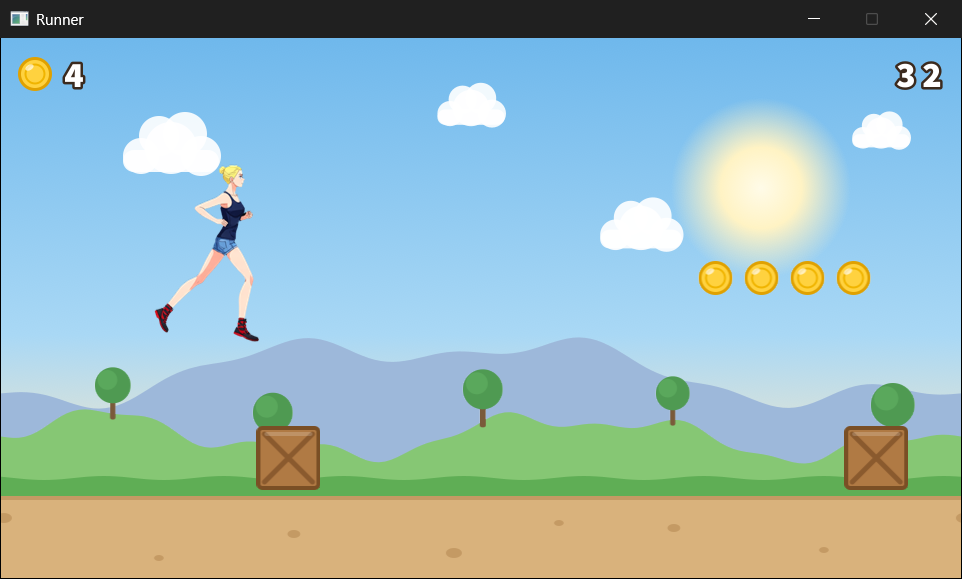
The pace creeps up the longer you run, and by the time it's at full speed, the crates come thick and fast. When one catches you, the banner says so, and R starts a new run. Escape, or the window's X, quits.
Understanding the Code
Look at how the pictures are handled now. The whole program asks for pictures by name: getTexture(textures, "crate"), or a layer's texture member. Adding a tenth picture means adding one name to TEXTURE_NAMES and dropping its PNG into the assets folder, and loadTextures and destroyTextures never change. That's what Chapter 15 meant by letting the names themselves be data. The price is small: a mistyped name is only caught when the program runs, and getTexture makes sure it's caught loudly, in the console, rather than silently.
The runner is a small state machine, like Chapter 11's moles. Her state decides what updateRunner does, jump only works from one state, and a crash freezes the whole game. Three states are enough for a runner, but the same shape grows well: a sliding state, or a double jump, would each be one more value in the enum and one more case in the switch.
Everything that moves, moves by delta time: the ground, the layers, the crates, the coins, her jump, and even her legs, through the accumulator. So the game plays the same on any monitor. And almost everything that comes and goes lives in a vector. Crates and coins are added with push_back and removed with Chapter 13's count-down erase, and none of them is ever made with new, so there's nothing to delete. The textures are the one exception: SDL makes them, the map holds their pointers, and destroyTextures gives them back, once each, before the renderer goes.
Notice, too, how little main does. It sets things up, and then each frame, it handles the keys, calls updateGame, and draws. Everything else is in a function with one job, and each function's name says what that job is. That's the shape that the next act of the book will take further, by gathering the data and the functions that work on it together, into classes.
Experimenting
Try these one at a time, and see how the game changes:
- Change the depths in
resetGame. Give the sky a depth of0.03f, and the clouds drift by. Give the near hills a depth of1.0f, and they move with the ground, which flattens the whole landscape. - Change
JUMP_SPEEDto-1100.0ffor a huge leap, orGRAVITYto1200.0ffor a floaty, moon-like jump. - Change
FRAME_TIMEto0.16f, and her legs move at half speed, so her feet slide over the ground. Change it to0.04f, and she scampers. - Change
MAX_SPEEDto1000.0fandSPEED_GAINto20.0f, for a run that gets frantic fast. - Change the hitbox. Set
HITBOXto{ 0.0f, 0.0f, 112.0f, 180.0f }, the whole frame, and feel how unfair the crashes become.
For a bigger challenge, try these:
- A best run. Keep the longest distance in a variable in
main, update it whenever a run ends, and draw it withdrawNumberin the middle of the top of the window. - A double jump. Add a
jumpsLeftmember to theRunner, set it to 2 when she lands, and letjumpwork in mid-air while it's above 0. - A sound. SDL can play sounds by itself, from WAV files, and the final project does exactly that. If you'd like a head start, look up
SDL_LoadWAVandSDL_OpenAudioDeviceStream, and play a coin sound whenevercoinCountgoes up.
The last one goes beyond what we've covered, but the others are all made from pieces you already have.
Common Errors and Fixes
If the build fails with C1083: Cannot open include file: 'SDL3_image/SDL_image.h', or the program won't start because SDL3_image.dll is missing, the SDL_image settings need checking, and Chapter 11's Common Errors section covers each one. Here are the problems that are particular to this chapter.
The build stops with C2110: '+': cannot add two pointers, in loadTextures. The path is being built as "assets/" + name + ".png", with no std::string at the front. Text in double quotes is a const char*, a pointer, and C++ can't add two pointers together. Make the first piece a std::string, as in the chapter: std::string("assets/") + name + ".png".
The build stops with C2678: binary '[': no operator found which takes a left-hand operand of type 'const TextureMap'. The function getTexture is using the square brackets on the map, which is const there, as Chapter 15's tip warned. Use find, as in the chapter, which also reports a mistyped name instead of hiding it.
The console says "Couldn't load assets/sky.png: Couldn't open assets/sky.png: The system cannot find the path specified.", and the game closes at once. The assets folder isn't where the program is looking. Copy it into the project folder, beside main.cpp, and start the game with F5, as Chapter 11 explained.
A picture is missing, and the console fills with "No texture called coins". A name given to getTexture doesn't match one in TEXTURE_NAMES: here, "coins" instead of "coin". The message repeats every frame, because the picture is asked for every frame. Check the spelling against the list.
The hills and the ground slide away to the left, uncovering the layers behind them, and then jump back into place. The function drawLayer is only drawing its first copy. Draw the second copy too, at LAYER_W - offset, to fill the gap that the first one leaves.
The scenery doesn't move, although the crates, the coins, and the meters do. The loop in moveWorld is for (Layer layer : game.layers), without the &, so each pass changes a copy of a layer, and the copy is thrown away at the end of the pass. Make it Layer& layer.
The runner vanishes after her first stride, and only reappears in the air. The % RUN_FRAMES is missing from updateRunner, so frame keeps counting up past 5, and its source rectangle moves off the end of the sprite sheet, where there's nothing to draw. Her jump pose is always frame 2, so that's the only time she shows up.
Space does nothing, and she never leaves the ground. The value of JUMP_SPEED is positive, so the jump pushes her down, into the ground, and she lands in the same frame. Up is negative on the screen, so JUMP_SPEED must be -820.0f.
After a crash and R, the runner stays red. The line that sets her color back to 255, 255, 255 is missing from drawRunner, so the red tint stays on the texture for good. Put it back, below SDL_RenderTexture, so that it runs every time she's drawn.
AI Exercise (Optional)
If you'd like to take the Runner further with an AI's help, here's a challenge that uses the sprite sheet in a new way. As always, skip it if you'd rather not; nothing later in the book depends on it.
Open your AI chatbot of choice and try a prompt like this:
"I have a C++ SDL 3 endless runner. The runner's sprite sheet is six 112 by 180 frames in one row, chosen with a source rectangle, and a RunnerState enum class has Running, Jumping, and Crashed, handled in a switch in an updateRunner function. Crates and coins are std::vector<SDL_FRect>, and every texture is in a std::unordered_map<std::string, SDL_Texture*> found with a getTexture function that uses find. I have learned variables, structs, enum class, switch, loops, functions, references, pointers, arrays, std::vector, std::map, and std::unordered_map, but not classes. Add a slide: pressing S or the Down arrow while she's running makes her slide for half a second, drawn by squashing her running frame to half its height, with her hitbox half as tall, so she can pass under a new kind of obstacle, a bar hanging 100 pixels above the ground. Use only what I've learned, put each curly brace on its own line, and show me every function you change, in full."
Notice what the preceding prompt does. It describes the state machine, the vectors, and the registry, so the AI builds on them rather than inventing its own, and it asks for a new state, which is exactly where a state machine should grow. It also describes the slide precisely, down to the squashed frame and the smaller hitbox, which gives the AI less room to guess.
When the answer comes back, look for three things. Does it add a Sliding value to the enum, with a case of its own in updateRunner, and a timer for the half second? Does it draw the squashed frame with a destination rectangle half as tall, moved down so her feet stay on the ground? And does it get the new obstacles' pictures with getTexture, adding a name to TEXTURE_NAMES, rather than loading a texture somewhere else and forgetting to destroy it? If it has missed any of them, ask about it.
Then play it. If the bars are too easy or too hard to slide under, the numbers are yours to tune.
Summary
You've built the last game of Act 2, with more functions than any before it. Every picture is in a std::unordered_map, loaded in one loop from a list of names, found with find, and destroyed in one loop, before the renderer. The scenery is four layers, each drawn twice and wrapped around, scrolling at its own share of the ground's speed, which is parallax. The runner is a sprite sheet: six frames in one picture, each one cut out with a source rectangle, and played in turn by an accumulator that keeps steady time whatever the frame rate. She has three states, in an enum class, and she jumps with the same two lines of gravity as Chapter 14's particles.
The crates and coins live in vectors, spawned by distance just past the right edge, removed with Chapter 13's count-down erase when they've gone, and checked against a hitbox that's kinder than the picture. And the numbers are drawn a digit at a time, from a strip of pictures, with std::to_string and a little arithmetic on character codes.
That's Act 2 complete. You can now manage memory with pointers and smart pointers, keep things in arrays, vectors, and maps, and build a real game from structs and functions. In Act 3, starting in the next chapter, we'll learn to bundle data together with the functions that work on it, into classes, which is how nearly all larger C++ programs are organized. A runner that holds her own state, and knows how to update and draw herself, is exactly the kind of thing a class is for.