
Chapter 17's runner was built from a struct and a handful of functions. The Runner struct held her state, her height, her speed, and which frame of the sprite sheet to show, and the functions jump, updateRunner, and drawRunner did things with her, each one taking the runner as a parameter. That worked well. But nothing in the code says that those three functions belong with the runner, and nothing stops any other line in the program from reaching into the struct and setting her frame to 99.
In a program the size of the Runner, you can keep all of that in your head. Now picture a game with a player, a dozen kinds of enemy, bullets, pickups, and doors, each with a struct of its own and a pile of functions to go with it. It gets hard to hold the whole thing in your head, and every change in one corner threatens something in another.
This chapter is about a better way. Object-oriented programming, or OOP, organizes a program around its things. The player, an enemy, a bullet: each becomes a self-contained unit that holds its own data, knows how to do its own jobs, and decides who's allowed to touch its insides. Once you build programs this way, big programs stop being scary, because you only ever have to understand one piece at a time.
It's the biggest shift in thinking in the book, so take it one section at a time. As in the other theory chapters, the examples are small experiments for your Sandbox project, and each lead-in says where the code goes. Partway through, the sandbox gets its first new files since Chapter 2.
In this chapter, we will:
- Turn a struct and its functions into a class, with private data and public functions
- Start objects off properly, with constructors and member initializer lists
- Mark the member functions that only look with
const - Split a class into a header file and a source file
- Clean up with destructors, and meet RAII
- Find out what copying an object really does, and switch copying off with
= delete - Build classes out of other classes, and meet the
thispointer and static members - See Chapter 17's runner rewritten as a class, and try an optional AI exercise
Classes and Objects
A class is a blueprint, and an object is a thing built from it. If you design a house, with its rooms, windows, and doors, you've drawn a blueprint, but you haven't built a house. From that one blueprint you can build as many houses as you like, each at its own address, with different people living in each one. The blueprint says what a house is, and each house is one particular example of it.
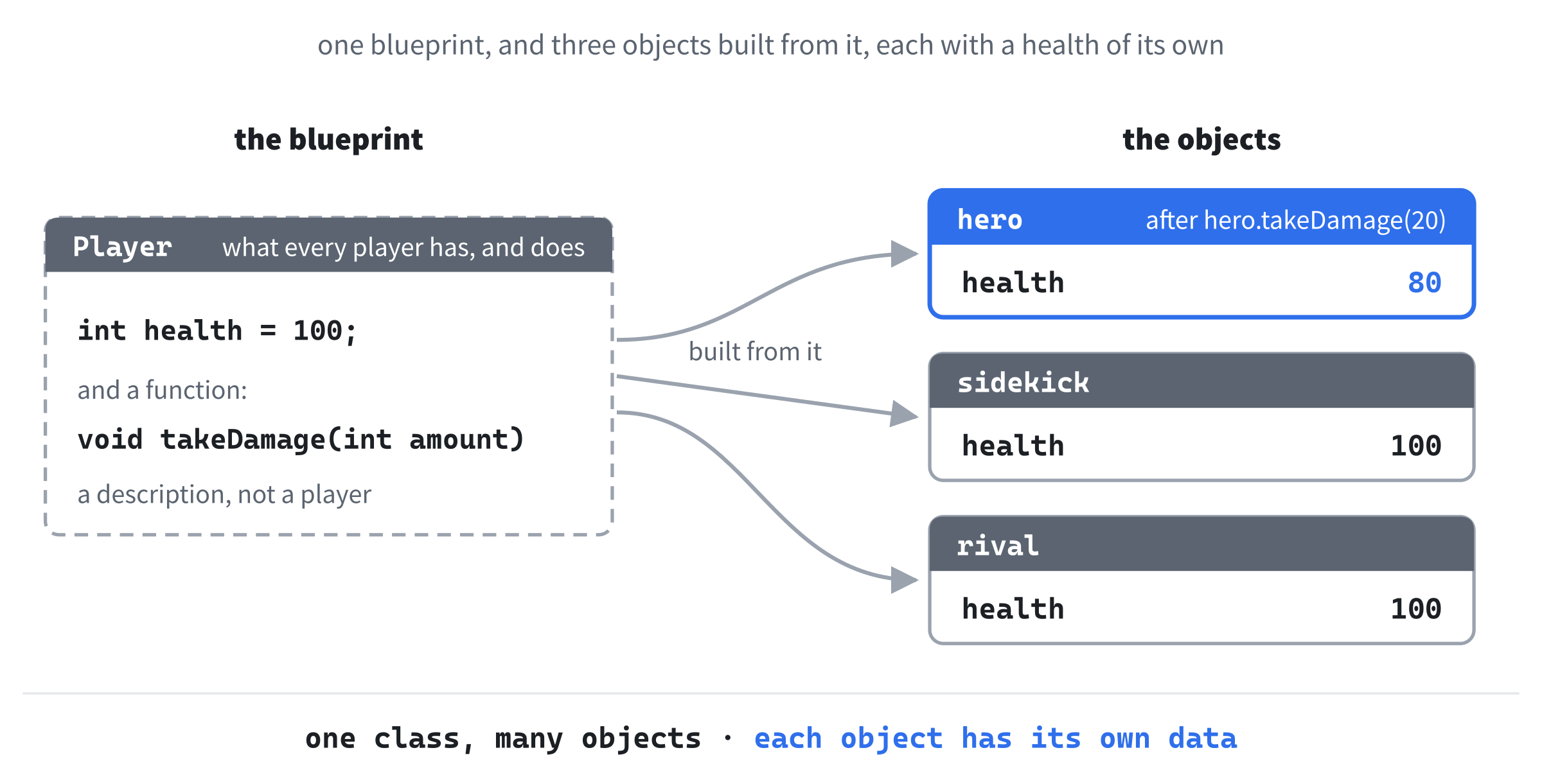
You've been doing this since Chapter 1 without the vocabulary. The struct SDL_FRect is a blueprint: it says that a rectangle has an x, a y, a w, and an h. Every SDL_FRect variable you've made is one particular rectangle built from that blueprint, holding values of its own. A variable made from a struct or a class is called an object, or an instance of it, and Figure 18.1 shows one blueprint with three objects built from it.
So what does a class add to the structs you already know? Two things. It can hold functions as well as data, and it decides which of its parts the rest of the program is allowed to touch. We'll take them in that order.
Functions Inside a Struct
A struct can hold functions as well as variables. Try this in the sandbox, above main:
struct Player
{
    int health = 100;
    int score = 0;

    void takeDamage(int amount)
    {
        health -= amount;
    }
};
In the preceding code, Player has two member variables, health and score, which start out at 100 and 0, just like the default member values in Chapter 11's Textures struct. Below them is a member function, takeDamage. The member variables describe what a player has, and the member function describes something a player can do. Notice that takeDamage changes health without being handed it as a parameter. A member function can use the other members of its struct directly, by name.
Now make two players from the blueprint, and damage one of them. Try this inside main:
Player hero;
Player sidekick;

hero.takeDamage(20);
std::cout << hero.health << " " << sidekick.health << std::endl;
In the preceding code, we make two objects from the one blueprint, and then call takeDamage on hero. The dot works for functions exactly as it does for variables, so hero.takeDamage(20) means "run takeDamage on hero." The health inside the function is hero’s health, and the console shows 80 and 100. The sidekick wasn't touched, because each object has its own copy of every member variable.
Compare that with Chapter 17, where the call was jump(game.runner), and the function needed the runner handed to it. A member function doesn't need one, because it's always called on an object, and that object comes along with the call.
From Struct to Class
Now for the second thing a class adds. Change the first line of Player to this:
class PlayerIn the preceding code, the word struct has become class, and nothing else has changed. But build again, and it fails with three errors, one for each place where main uses a member. The first one reads C2248: 'Player::takeDamage': cannot access private member declared in class 'Player'.
That's the difference between a struct and a class. Everything in a class is private unless you say otherwise, which means that only the class's own member functions can use it. A struct is the opposite way around: everything in it is public, open to any code at all. That default, private or public, is the only difference between them. C++ gives you both words so that you can say what kind of thing you're making, and the next section shows how to choose, member by member.
public and private
To say which members of a class are public, you use access specifiers: the word public or private, followed by a colon. Each one applies to every member below it, until the next one comes along. Replace the Player above main with this version:
class Player
{
public:
    void takeDamage(int amount)
    {
        health_ -= amount;
    }

    int getHealth()
    {
        return health_;
    }

private:
    int health_ = 100;
};
In the preceding code, the functions are public, and the data is private. The public part comes first, because it's the part that the rest of the program needs to know about, and the private details come last. That's the order this book uses. Both access specifiers sit level with the class's braces, which is where Visual Studio puts them, just as it does with a switch’s case labels. We've left the score out, to keep things short.
The new member function, getHealth, hands back the player's current health, and it's now the only way for code outside the class to find out what that is.
The member variable has a new name, too: health_, with an underscore on the end. That's a common convention, and it's the one this book follows from here on. The name of a class's private member variable ends with _, so that inside a member function, you can tell a member from a local variable or a parameter at a glance.
Now change main to match, in place of the other examples:
Player hero;
hero.takeDamage(20);
std::cout << hero.getHealth() << std::endl;
In the preceding code, main only uses the public functions, and the console shows 80. Try adding hero.health_ = 9999; below the first line, though, and the build stops with C2248: 'Player::health_': cannot access private member declared in class 'Player'. As far as main is concerned, the health is behind a wall, and the only ways through it are the functions that the class chose to make public, as Figure 18.2 shows. Take that line out again before you go on.
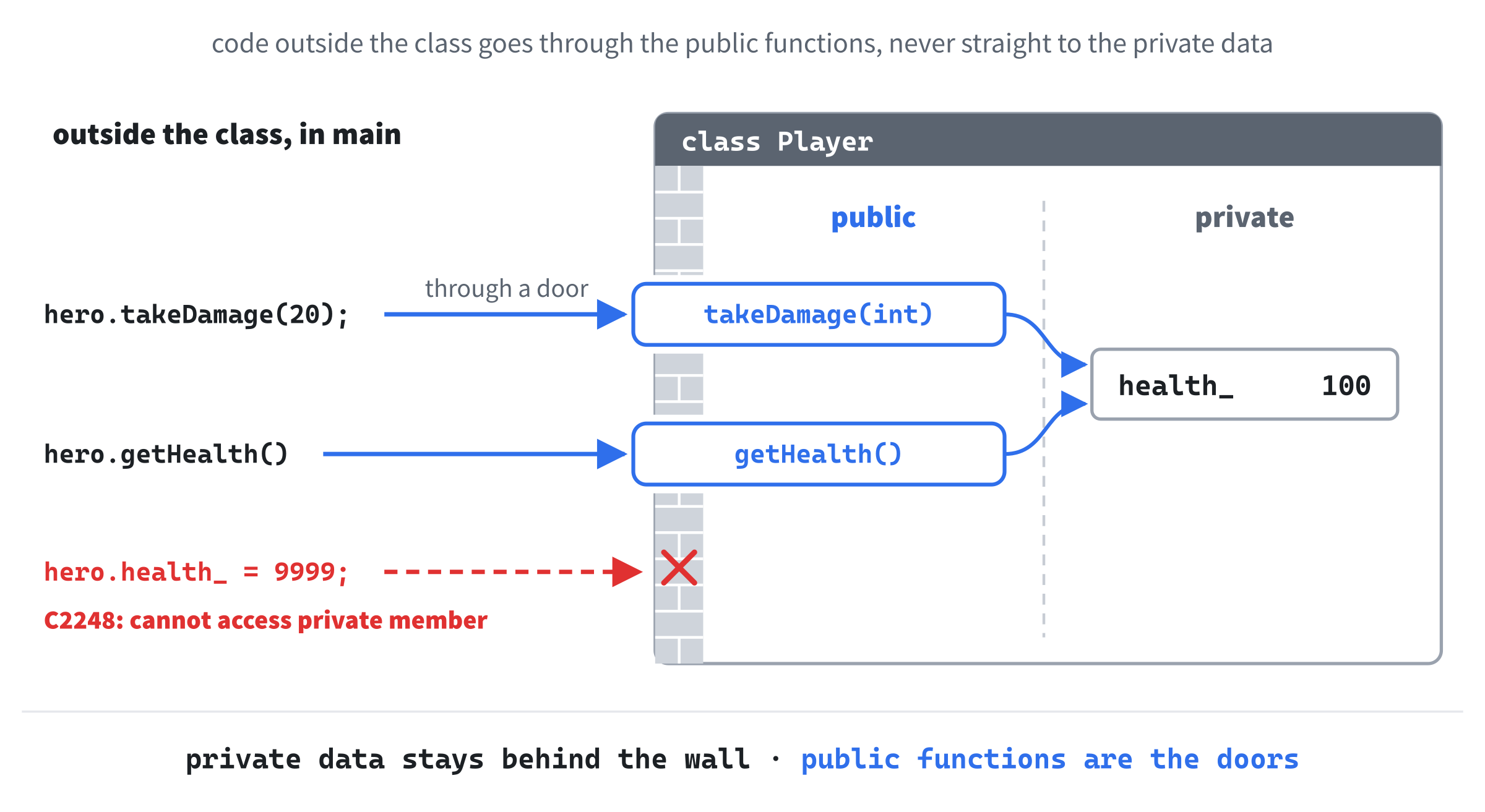
Keeping data private, and letting the class's own functions look after it, is called encapsulation, and it's the first big idea of OOP.
Why Encapsulation Matters
Keeping data private isn't about secrecy. It's about control.
When a member variable is public, any line of code anywhere can set it to anything, at any time. One careless line in some faraway corner of the program sets health to -999999, and the game carries on, quietly wrong. When the member is private, the only way to change it is through a function you wrote, and that function can refuse nonsense. The takeDamage function could make sure that health never drops below zero, and a heal function could make sure that it never climbs above the maximum. You decide what's allowed, in one place.
The second benefit shows up later. Because nothing outside the class touches health_, you're free to change how the class stores it. Suppose you decide that health should be a float, or kept as a fraction of the maximum.
If health were public, and used all over the program, every one of those places would need changing. With it private, only the class's own functions do. The rest of the program doesn't know or care how a Player keeps its health.
That doesn't mean every member needs one function to read it and another to change it, a getter and a setter. Some programmers write both for every member out of habit, and a class with a getter and a setter for everything is a wall with a door in every brick. Give the outside world what it needs, and keep the rest private.
When should you use struct, and when class? The compiler doesn't mind, but people reading your code do. The usual convention, which this book follows, is to use struct for a plain bundle of data that anyone may read and change, like SDL_FRect or Chapter 17's Layer, and class for a thing with private data and member functions that look after it. If you find yourself writing private in a struct, it probably wants to be a class.
There's a third access specifier, protected, which behaves like private, except toward classes that are built on top of this one. Building one class on top of another is called inheritance, and it's the subject of Chapter 20, so for now, it's enough to recognize the word when you see it.
Constructors
Our Player gets its starting health from a default member value, which is fine as long as every player starts out the same. But what if the hero should start with 50 health? A constructor is a special member function that runs by itself whenever an object is created, and its job is to get the new object ready to use. It has the same name as its class, and no return type at all, not even void. Add this to the public part of Player, above takeDamage, with a blank line in between:
Player(int startingHealth)
{
    health_ = startingHealth;
}
In the preceding code, the constructor takes the starting health as a parameter, and stores it. From now on, creating a player means giving it a starting health, in parentheses after its name. Change the first line of main to this:
Player hero(50);In the preceding code, creating hero calls the constructor with 50, so after 20 points of damage, the console shows 30. Next, add a second player below it:
Player sidekick;In the preceding code, sidekick is made the old way, with nothing in parentheses, and this time the build fails with C2512: 'Player': no appropriate default constructor available. A constructor that takes no arguments is called a default constructor, and until now, the compiler has quietly written one for us that does nothing at all. As soon as a class has a constructor of its own, the compiler stops, on the grounds that we've taken charge of how players are made. So there's no constructor for Player sidekick; to call.
If you want both ways of making a player, you can have both, by overloading the constructor, just as Chapter 8 overloaded functions. Add this to the public part of Player, above the other constructor, with a blank line in between:
Player() = default;In the preceding code, = default asks the compiler for the default constructor it would have written, which leaves health_ at its default value, 100. Now the build succeeds: Player hero(50); calls the constructor that takes an int, and Player sidekick; calls the default one. The compiler picks between them by looking at the arguments, exactly as it does with any overloaded function.
Member Initializer Lists
There's a better way to write a constructor, and it's the one to reach for by default. Replace the constructor that takes an int with this one:
Player(int startingHealth) : health_(startingHealth)
{
}
In the preceding code, the colon after the parameters starts a member initializer list, and health_(startingHealth) gives health_ its starting value directly. There's nothing left for the body to do, so it's empty. When a class has several members, the list separates them with commas, as in : health_(startingHealth), score_(0).
That looks like a matter of taste, but it isn't quite. Every member is created before the constructor's body runs. The list creates each member holding the right value, while assignment in the body creates it first and changes it afterward, which is two steps instead of one. For an int, the difference doesn't matter.
For some members, though, assignment in the body doesn't work at all. A const member can't be changed once it exists, and neither can a reference, which is always a second name for one particular thing, so both must get their values as they're created: in the list, or from a default value where they're declared. You'll meet one more kind of member that must, later in this chapter.
Get into the habit of using the list. It's how C++ programmers expect a constructor to look, and it's no harder to write.
The Order of Initialization
One rule about initializer lists catches out nearly everyone, once. Try this class above main, below Player:
class HealthBar
{
public:
    HealthBar(int maxHealth)
        : maxHealth_(maxHealth), width_(maxHealth_ * 2)
    {
    }

    void print()
    {
        std::cout << maxHealth_ << " " << width_ << std::endl;
    }

private:
    int width_;
    int maxHealth_;
};
In the preceding code, a health bar is two pixels wide for every point of health, so its width is worked out from the maximum health. The initializer list sets maxHealth_, and then uses it to set width_, which looks perfectly reasonable. The list is long enough that it goes on a line of its own, below the parameters, which is a common way to lay one out. Now try this inside main, in place of the other examples:
HealthBar bar(100);
bar.print();
In the preceding code, the bar is made for a maximum health of 100, so we'd expect it to print 100 and 200. Run it in a Debug build, though, and the console shows this instead:
100 -1717986920In the preceding output, the maximum is right, but the width is nonsense. The members of a class are always initialized in the order they're declared in the class, whatever order the list names them in. Here, width_ is declared first, so it's initialized first, and it reads maxHealth_ before maxHealth_ has been given a value. What it finds is Chapter 9's -858993460, the pattern a Debug build fills unused memory with, and twice that is -1717986920. Figure 18.3 shows the two orders side by side.
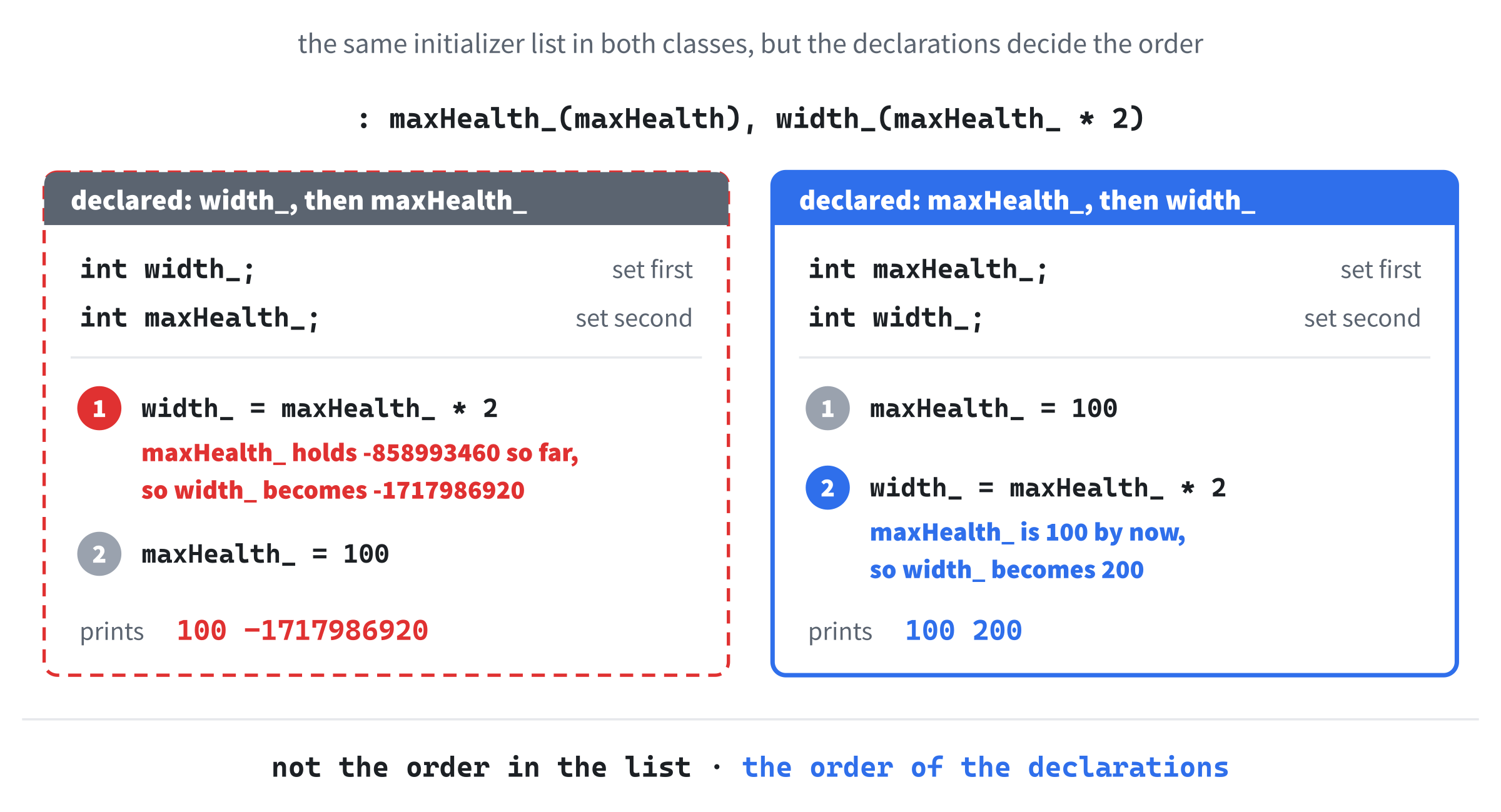
The fix is to swap the two declarations, so that maxHealth_ comes first. It's good practice to write the list in the same order as the declarations, too, so that the code reads the way it runs.
Visual Studio doesn't warn you about this. Its warning for a list that's out of order, C5038, is switched off by default, even at warning level 4, so the build succeeds without a word, and the bug shows up later as a strange number, or a character drawn somewhere off the screen. Whenever a member's starting value is worked out from another member, check that the one it needs is declared above it.
That's exactly the kind of bug a class with several members can hide, so we'll keep an eye out for it in the next chapter, where one of the runner's members is worked out from another.
const Member Functions
Some member functions change their object, like takeDamage. Others only look at it, like getHealth. C++ lets you mark the ones that only look by putting const after the parentheses. It's a promise, and a piece of documentation, both at once. Replace getHealth in Player with this version:
int getHealth() const
{
    return health_;
}
In the preceding code, the const promises that getHealth won't change any of the object's member variables, and the compiler holds it to that. Add health_ = 0; inside it, and the build stops with C3490: 'health_' cannot be modified because it is being accessed through a const object. Take that line out again.
Why go to the trouble? Because of Chapter 8's const references. A function that takes a const Player& has promised not to change the player, so it's only allowed to call the player's const member functions. Try this above main, below HealthBar:
void showHealth(const Player& player)
{
    std::cout << player.getHealth() << std::endl;
}
In the preceding code, showHealth reads the player's health through a const reference, and that's allowed, because getHealth is const. Try it inside main, in place of the other examples:
Player hero(50);
showHealth(hero);
In the preceding code, showHealth is handed the hero, and the console shows 50. Now take the const off getHealth, and the build fails with C2662: 'int Player::getHealth(void)': cannot convert 'this' pointer from 'const Player' to 'Player &'. That's a mouthful, and we'll meet the this pointer later in the chapter, but the meaning is simple. As far as the compiler knows, getHealth might change the player, and the player is const, so the call isn't allowed. Put the const back.
So make it a habit. Mark every member function that doesn't change its object as const, and your classes will work wherever a const reference is passed around, which in real C++ code is almost everywhere.
Header Files and Source Files
So far, every class has lived in main.cpp, above main. That's fine for a quick experiment, but it isn't how real programs are organized. A real program gives each class two files of its own: a header file, ending in .h, which says what the class looks like, and a source file, ending in .cpp, which holds the code of its member functions.
There are three reasons for the split. First, each file stays small, and holds one thing, so it's easy to find your way around. Second, any other file that wants to use the class only needs its header, the short description, and not the code behind it. And third, the compiler works on each source file separately, so when you change one class, only its own source file needs compiling again, which keeps builds quick once a program has dozens of classes.
Let's give Player a pair of files. In Solution Explorer, right-click the Header Files folder, and choose Add > New Item. If Visual Studio shows a list of templates, pick Header File (.h). Either way, set the name to Player.h, and click Add. Then do the same with the Source Files folder, picking C++ File (.cpp) if you're asked, and name that file Player.cpp.
The Header File
The header says what a Player has, and what it can do, but not how it does it. Visual Studio starts every new header with the line #pragma once, which we'll come to in a moment, so Player.h already has its first line. Type the rest below it, with a blank line in between, so that the file reads like this:
#pragma once

class Player
{
public:
    Player() = default;
    Player(int startingHealth);

    void takeDamage(int amount);
    int getHealth() const;

private:
    int health_ = 100;
};
In the preceding code, the class looks just as it did above main, except that the constructor that takes an int, takeDamage, and getHealth have no bodies. Each one is now a declaration: its return type, its name, and its parameters, followed by a semicolon. A declaration is all that other code needs in order to call a function. The body, which is the function's definition, will go in Player.cpp. The default constructor keeps its = default, because the compiler writes its body for us, and the member variable, with its default value, stays exactly as it was.
The first line, #pragma once, stops the header from being read twice in one build. In a big program, headers include other headers, so the same header can easily arrive twice by different routes, and the compiler would then see the class described twice, and refuse, with C2011: 'Player': 'class' type redefinition. The #pragma once line tells the compiler to read the file only once per source file, however many times it's included. You'll sometimes see an older way of doing the same job, three lines beginning #ifndef, #define, and #endif, called an include guard. Either works, and this book uses #pragma once.
The Source File
The source file holds the definitions. Type this into Player.cpp:
#include "Player.h"

Player::Player(int startingHealth) : health_(startingHealth)
{
}

void Player::takeDamage(int amount)
{
    health_ -= amount;
}

int Player::getHealth() const
{
    return health_;
}
In the preceding code, the first line includes Player.h, so the compiler knows what the class looks like before it meets the definitions. Then come the three definitions, each with Player:: in front of its name. The double colon, ::, is the scope resolution operator, and Player::takeDamage means "the takeDamage that belongs to Player." It's the same :: as in std::cout, which means "the cout that belongs to the standard library." The constructor's full name is Player::Player, the Player function that belongs to the class Player, which looks odd, but reads correctly.
Leave out the Player::, and you've written a free function, one that doesn't belong to any class, like every function you wrote before this chapter. It just happens to be called takeDamage. A free function can't see a player's members, so the build stops at the line inside it, with C2065: 'health_': undeclared identifier.
Notice, too, that getHealth keeps its const. The const is part of the function's identity, so it has to appear in both the declaration and the definition. Leave it off the definition, and the compiler looks for a getHealth without const in the class, finds none, and stops with C2511: 'int Player::getHealth(void)': overloaded member function not found in 'Player'.
Using the Class
Now main.cpp needs to see the class. Delete the whole Player class from main.cpp, and add this below #include <iostream>:
#include "Player.h"In the preceding code, the file name is in double quotes, not angle brackets, and that's deliberate. Angle brackets tell the compiler to look in the standard places, such as the standard library's folders and the include folders in the project's settings, which is where <iostream> and Chapter 1's <SDL3/SDL.h> are found. Double quotes tell it to look in the project's own folder first, and that's where Player.h lives. Then add hero.takeDamage(20); to main, between its two lines, and build and run: the console shows 30.
It's worth seeing how the pieces come together. The compiler works on one source file at a time, together with everything it includes, and that combination is called a translation unit. Our project has two, so the compiler makes two object files, main.obj and Player.obj. The code in main.obj calls takeDamage, but it doesn't contain it, and it only knows it exists because the header said so. Joining the calls in one object file to the code in another is the linker's job, the same linker that Chapter 1 used to join our code to SDL's, as Figure 18.4 shows.

So what happens if a function is declared in the header, but never defined? Every file that includes the header compiles, because the declaration is all it needs. The trouble comes at the end, when the linker can't find the code. Leave takeDamage out of Player.cpp, and the build stops with LNK2019: unresolved external symbol "public: void __cdecl Player::takeDamage(int)", followed by the same name in the compiler's own coded form, and "referenced in function main". An LNK2019 means that everything compiled, but the linker couldn't find a definition, so look for a missing function, or one whose name or parameters in the .cpp file don't quite match the header.
A member function doesn't have to go in the source file. Short ones, like getHealth, can keep their bodies inside the class in the header, just as they had above main, and that's common for one-line getters. From here on, though, the classes in this book's projects live in pairs of files, a .h and a .cpp, one pair per class. Small experiments in the sandbox can still go above main, and the rest of this chapter's do.
Destructors
A constructor runs when an object is created, and a destructor runs when it's destroyed. Its name is the class's name with a tilde, ~, in front, and it takes no parameters and has no return type. Add #include <string> below #include <iostream>, and try this class above main, below the other classes:
class Noisy
{
public:
    Noisy(std::string name) : name_(name)
    {
        std::cout << "Hello from " << name_ << std::endl;
    }

    ~Noisy()
    {
        std::cout << "Goodbye from " << name_ << std::endl;
    }

private:
    std::string name_;
};
In the preceding code, the constructor keeps the object's name, and says hello. The destructor, ~Noisy, says goodbye. Now try this inside main, in place of the other examples:
Noisy first("first");
{
    Noisy second("second");
    std::cout << "End of the block" << std::endl;
}
Noisy third("third");
std::cout << "End of main" << std::endl;
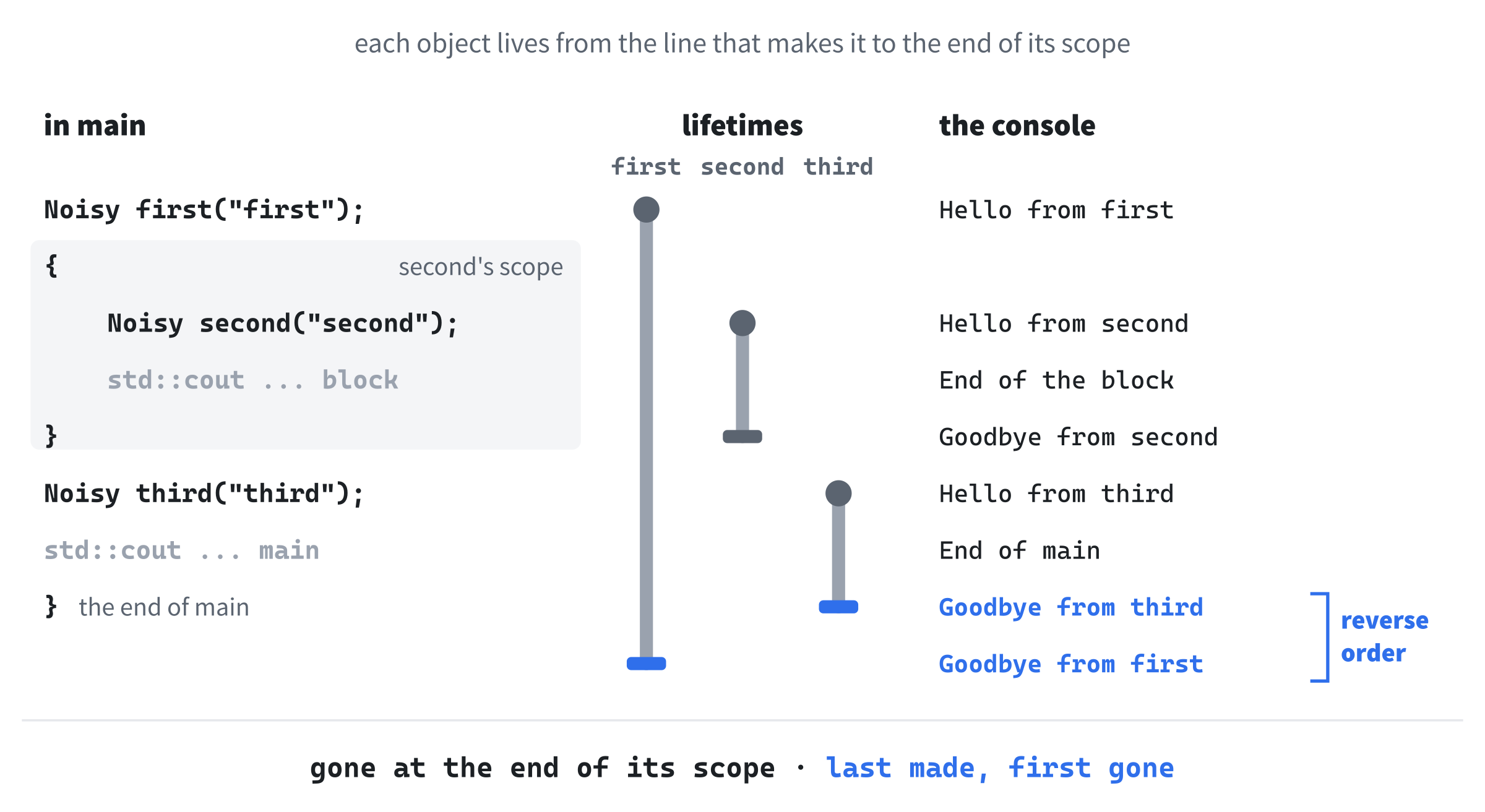
In the preceding code, first is created at the top of main, and second inside a pair of braces with nothing in front of them. A block like that is allowed anywhere, and its only job here is to give second a scope of its own, as Chapter 2 described. Then third is created, after the block has ended. The console shows this:
Hello from first
Hello from second
End of the block
Goodbye from second
Hello from third
End of main
Goodbye from third
Goodbye from first
In the preceding output, each object says hello where it's declared, but the goodbyes come in a different order. An object is destroyed when its scope ends, and its destructor runs right then, by itself. So second says goodbye at its block's closing brace. The other two last until the end of main, and when main finishes, they're destroyed in the reverse of the order they were created in, like plates taken off a stack, so third goes before first. Figure 18.5 lays out the whole timeline.
Objects that aren't local variables get their destructors run too. An object made with new is destroyed by delete, which is what Chapter 10's unique_ptr does for you, and the objects in a vector are destroyed when they're erased, or when the vector itself goes away.
Most classes don't need a destructor of their own. When a Player is destroyed, its int simply goes with it, and when a Noisy is destroyed, its std::string cleans itself up, because std::string has a destructor of its own, which the compiler calls for you. Destructors earn their keep when a class looks after something that won't clean itself up, and that's the next section.
RAII
Chapter 10 promised that we'd write destructors of our own, and here's why you'd want to. Some things have to be given back when you've finished with them: memory from new, a texture from SDL, a window, an open file. Forget, and you leak. Give one back twice, and you crash.
C++'s answer has an awkward name, Resource Acquisition Is Initialization, or RAII, and a lovely idea behind it: tie each thing's life to an object's. The object's constructor gets the thing, and its destructor gives it back. C++ guarantees that the destructor runs when the object goes away, so the giving back can't be forgotten.
You've been using RAII for a while. Chapter 10's unique_ptr is a small class whose destructor calls delete, and every std::vector since Chapter 13 frees its memory in its destructor. Now let's write an owner of our own. Try this class above main, below Noisy:
class ScoreTable
{
public:
    ScoreTable(int count) : scores_(new int[count]{}), count_(count)
    {
    }

    ~ScoreTable()
    {
        std::cout << "Deleting the table at " << scores_ << std::endl;
        delete[] scores_;
    }

private:
    int* scores_;
    int count_;
};
In the preceding code, a ScoreTable keeps a list of scores on the heap. The initializer list uses a new form of Chapter 10's new: new int[count] asks for a whole array of count ints, rather than just one, and hands back the address of the first. The braces on the end set every one of them to 0, just as Chapter 12's new Particle{} zeroed a particle's members. The table keeps that address in scores_, and the size in count_.
The destructor prints the address it's about to give back, and then gives it back. An array made with new[] has to be given back with delete[], square brackets and all, and mixing them up, with a plain delete for an array, is undefined behavior, so always pair them.
Next, a way to use the scores. Add these two functions to the public part of ScoreTable, below the destructor, with a blank line in between:
void set(int index, int score)
{
    scores_[index] = score;
}

int get(int index) const
{
    return scores_[index];
}
In the preceding code, set stores a score at an index, and get reads one back. A pointer to the start of an array can be followed by an index in square brackets, just like the array itself, so scores_[index] is the element at that index. Now try this inside main, in place of the other examples:
ScoreTable today(5);
today.set(0, 1200);
std::cout << today.get(0) << std::endl;
In the preceding code, today makes a table of five scores, sets the first one, and prints it. The console shows 1200, and then, as main finishes, "Deleting the table at" followed by an address. The destructor ran by itself, and main didn't need a delete, or even to know that there was an array. That's RAII: the table owns its array, and the array lives exactly as long as the table does.
Chapter 10's rule of thumb was never to write new and delete by hand in everyday code, and a class like this is the exception it mentioned: a small piece of low-level code whose whole job is to own something. In a real game, you'd use a std::vector<int>, which does all of this for you, and we'll see why that's the better choice in a moment. But SDL's textures, windows, and renderers don't come with a class like that, and in the next chapter, you'll write one: a Texture class that loads a picture in its constructor, and destroys it in its destructor.
Copying Objects
Objects get copied more often than you might think, and it's worth knowing exactly what a copy is. Try this inside main, in place of the other examples:
Player hero(50);
Player clone = hero;

clone.takeDamage(20);
std::cout << hero.getHealth() << " " << clone.getHealth() << std::endl;
In the preceding code, clone is created as a copy of hero. We didn't write anything to make that possible. The compiler writes a copy constructor for every class, a constructor that makes a new object from an existing one, by copying each member in turn. So clone starts out with hero’s 50 health. It's a separate object, though, so the damage only touches the clone, and the console shows 50 and 30.
Copies turn up in three common places. The first is when you create an object from another one, as we just did. The second is when you pass an object to a function by value, because the parameter is a new object, made from the argument, as Chapter 8 explained.
The third is assignment, as in clone = hero;. That one doesn't make a new object, since clone already exists, so it's not the copy constructor that runs, but the copy assignment operator. The compiler writes that for you, too, and it copies each member over the old values.
For Player, copying each member is exactly right. Now try the same thing with a ScoreTable, inside main, in place of the other examples:
ScoreTable today(5);
today.set(0, 1200);

ScoreTable backup = today;
backup.set(0, 50);

std::cout << today.get(0) << std::endl;
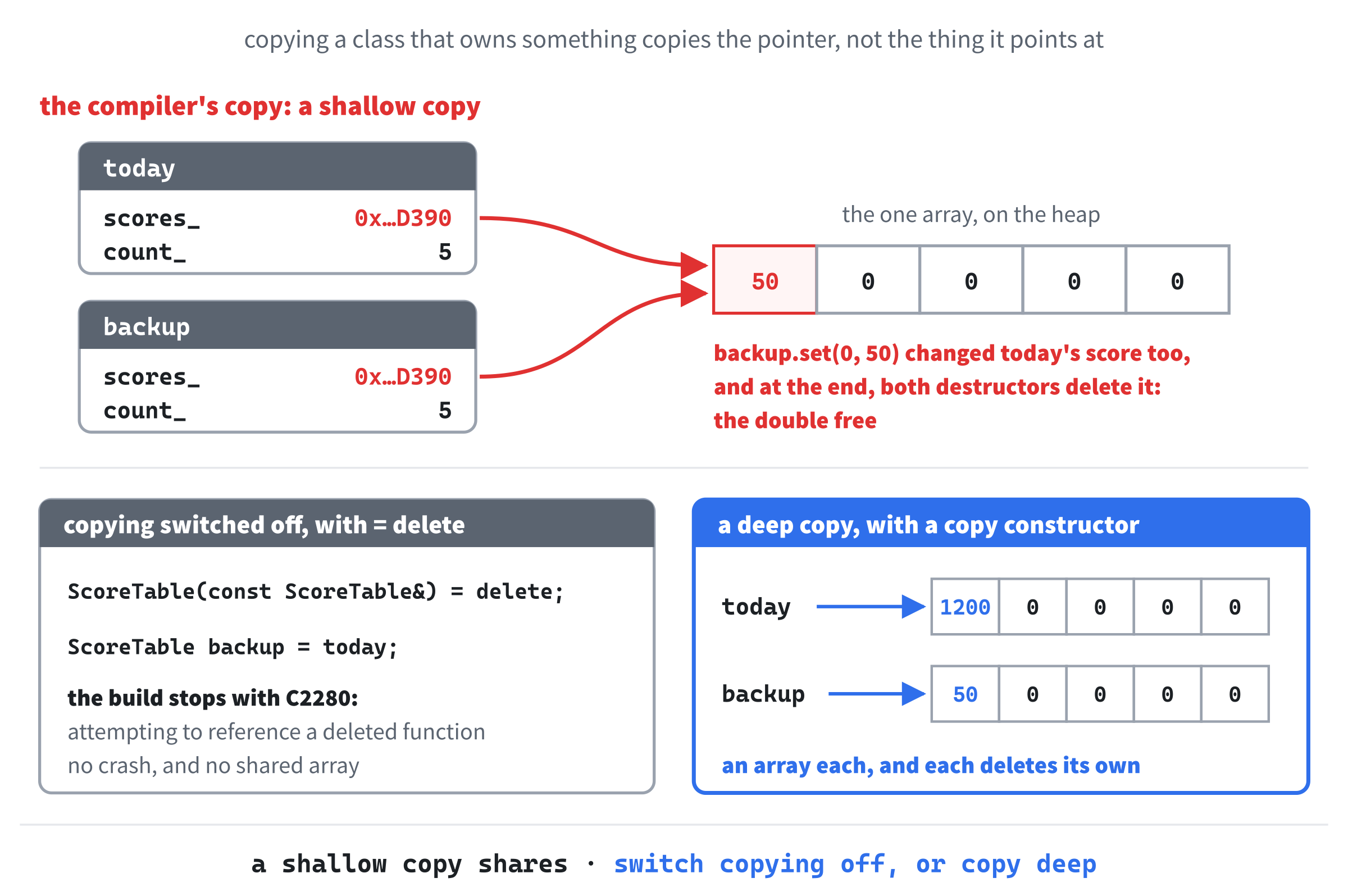
In the preceding code, backup starts as a copy of today, and then we change the backup's first score. We only touched the backup, so we'd expect today to still hold 1200. Run it with Ctrl+F5, as in Chapter 10, though, and the console shows this, and then a "Debug Assertion Failed!" message about _CrtIsValidHeapPointer(block) stops the program:
50
Deleting the table at 000001FF0DFDEAD0
Deleting the table at 000001FF0DFDEAD0
In the preceding output, both goodbyes come from the same address. Your addresses will be different, but they'll match each other, and that's the clue.
The compiler's copy constructor copied each member, and one of the members is a pointer, so it copied the address, not the array. Now two tables point at one array, as Figure 18.6 shows. Setting a score through the backup changed the only array there is, so today changed too. Then, as main finished, both destructors ran, and both deleted the same array: the double free that Chapter 10's AI exercise caught, and the same message.
Switching Copying Off
There are two ways to fix this. The first is to say that a ScoreTable can't be copied at all. For something like a texture, where a real copy would mean a second picture in the graphics card's memory, that's usually the right answer. The second, which we'll try after this one, is to write a copy constructor of our own that makes a proper copy. Add these two lines to the public part of ScoreTable, below the destructor, with a blank line in between:
ScoreTable(const ScoreTable&) = delete;
ScoreTable& operator=(const ScoreTable&) = delete;
In the preceding code, the first line is the copy constructor: a constructor that takes a const reference to another object of the same class, the one to copy. The parameter has no name, because nothing will ever use it. The second line is the copy assignment operator. Its name, operator=, is how C++ spells "the function that runs when you write =." It takes a const reference to the object being copied from, and it returns a reference to the one being copied into, which is what lets assignments be chained, as in a = b = c;. Chapter 24 shows how to write functions like this for other operators, too.
The = delete on the end of each line is the opposite of = default. It says that the function doesn't exist, and that using it is a mistake. Build now, and the line that makes backup stops the build, with C2280: 'ScoreTable::ScoreTable(const ScoreTable &)': attempting to reference a deleted function. That's the same C2280 that Chapter 10's unique_ptr gave when you tried to copy one, and now you know how it's done: a unique_ptr’s copy operations are deleted, just like these. Passing a ScoreTable to a function by value gets the same error, and assigning one with = gets it too, this time naming operator=.
To hand a ScoreTable to a function without copying it, pass it by reference, as Chapter 8 did with strings: const ScoreTable& table to look at it, or ScoreTable& table to change it.
Writing a Copy Constructor
The other way is to make copying do the right thing. Replace the first of those two lines with this copy constructor:
ScoreTable(const ScoreTable& other)
    : scores_(new int[other.count_]), count_(other.count_)
{
    for (int i = 0; i < count_; i++)
        scores_[i] = other.scores_[i];
}
In the preceding code, the parameter now has a name, other, which is the table being copied. Rather than copying other’s pointer, the initializer list gives the new table an array of its own, the same size as other’s, and the loop copies the scores across, one at a time. There are no braces after new int[other.count_] this time, because the loop is about to fill in every element anyway.
Notice that the copy constructor reads other.count_ and other.scores_, even though they're private. Private means private to the class, not to one object, so a member function can see the private members of any object of its own class.
Run the backup example again, and the console shows 1200, and then two goodbyes from two different addresses. Each table has an array of its own now, and each deletes its own. This kind of copy, which copies what a pointer points at rather than just the pointer, is called a deep copy, and the compiler's member-by-member version is a shallow copy.
Copy assignment is still deleted, so today = backup; still won't build. A correct operator= takes more care, because the table being assigned to already owns an array, which has to be given back, but only after the copy is made, or today = today; would copy from an array it had just deleted. Until you need assignment, leaving operator= deleted is fine.
There's a rule of thumb for this, the rule of three: if a class needs a destructor of its own, it almost certainly needs its copy constructor and copy assignment operator dealt with too, either written properly or deleted. Better still is the rule of zero: build your classes from members that already clean up after themselves, like std::vector, std::string, and std::unique_ptr, and you won't need to write any of the three.
The rule of zero is why real code would use a vector here. Make scores_ a std::vector<int>, and the vector allocates the array, copies it properly, and gives it back, all by itself. The ScoreTable class wouldn't need a destructor, a copy constructor, or a copy assignment operator, and it would still do the right thing. Writing all three by hand, once, is how you find out what the vector has been doing for you.
Classes Made of Classes
A member variable can be an object of another class. That's how big things are built from small ones: a player has a weapon, a car has an engine, and in the next chapter, a runner has an animator that keeps track of her frames. Building a class from other classes like this is called composition, or a has-a relationship, because you can say that a player has a weapon. The has-a test is worth remembering, because Chapter 20 introduces a different relationship, "is a", and telling the two apart is one of the most useful habits in OOP.
Let's see how a class with members that are objects gets built. Try this class above main, below ScoreTable:
class Knight
{
public:
    Knight() : sword_("the sword"), shield_("the shield")
    {
        std::cout << "Hello from the knight" << std::endl;
    }

    ~Knight()
    {
        std::cout << "Goodbye from the knight" << std::endl;
    }

private:
    Noisy sword_;
    Noisy shield_;
};
In the preceding code, a Knight has two members that are objects of our Noisy class, so we'll see exactly when each one is created and destroyed. The initializer list gives each its name, which is how a member that's an object gets its constructor's arguments: whatever is in the parentheses after its name in the list is passed to its constructor. Then the knight's own constructor says hello, and its destructor says goodbye. Now try this inside main, in place of the other examples:
Knight arthur;
std::cout << "Ready" << std::endl;
In the preceding code, we make one knight, and nothing else. The console shows this:
Hello from the sword
Hello from the shield
Hello from the knight
Ready
Goodbye from the knight
Goodbye from the shield
Goodbye from the sword
In the preceding output, the sword and the shield say hello before the knight does, and goodbye after it. A knight is built from the inside out: first its members are created, in the order they're declared, and only then does the knight's own constructor body run, so by the time it does, the sword and shield are ready to use. Destruction goes the other way: the knight's destructor body runs first, while the sword and shield still exist, and then the members are destroyed, in reverse order, as Figure 18.7 shows. So a class's constructor and destructor can always rely on its members being there.

This is the one more kind of member that must get its value as it's created. Take sword_("the sword") out of the list, and the build fails with C2512: 'Noisy': no appropriate default constructor available.
Every member has to be created before the constructor's body runs, and with nothing in the list to say how, the compiler tries the member's default constructor. Our Noisy class doesn't have one, because its only constructor needs a name. So a member whose class has no default constructor must appear in the list. Put the sword back.
Notice what Knight doesn't do: it never destroys its sword and shield. It doesn't need to, because each member's destructor runs by itself, as part of destroying the knight. That's the rule of zero again, one level up. The next chapter's Player will have an animator as a member, and it won't need a destructor at all.
The this Pointer
Every member function has a hidden parameter called this. It's a pointer to the object that the function was called on, so when you write hero.takeDamage(20), this inside takeDamage points at hero. That's how a member function knows whose health_ to change. You can use it yourself, with the arrow from Chapter 10: inside a Player member function, this->health_ means exactly the same as health_.
Usually there's no reason to write this->, but there's one situation where it earns its place. Many programmers don't put an underscore on their member names, and then a parameter can have the same name as a member. Try this class above main, below Knight:
class Monster
{
public:
    void setHealth(int health)
    {
        health = health;
    }

    int getHealth() const
    {
        return health;
    }

private:
    int health = 100;
};
In the preceding code, the member variable and the parameter of setHealth are both called health. Inside the function, the nearest name wins, and the nearest is the parameter, so health = health; sets the parameter to itself, and the member never changes. Make a Monster inside main, call setHealth(50) on it, print getHealth(), and the console shows 100. At warning level 4, Visual Studio spots it, with C4458: declaration of 'health' hides class member, but at the default level 3, it says nothing.
With this, you can say which health you mean. Replace the body of setHealth with this line:
this->health = health;In the preceding code, this->health is the member, and the plain health is the parameter, so the member gets the parameter's value, and the console shows 50. The underscore convention avoids the clash altogether, which is one reason this book uses it, but you'll see this-> in plenty of other people's code.
Now the C2662 message from the const section makes more sense. In a const member function, this points to a const object, so it's a const Player*. The error "cannot convert 'this' pointer from 'const Player' to 'Player &'" was the compiler saying that it couldn't call a function that needs a changeable player on a player that mustn't change.
Static Members
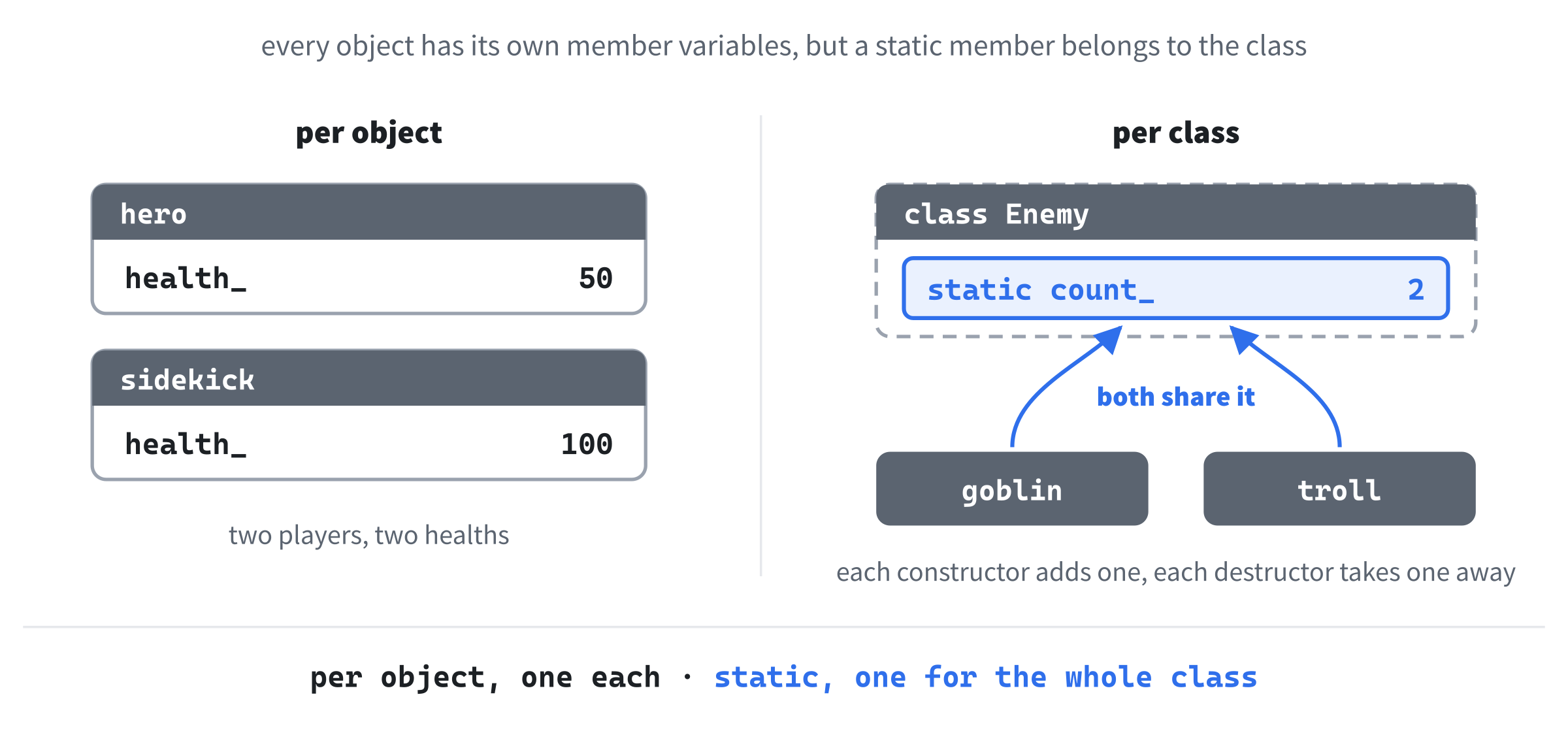
Every object has its own copy of each member variable: two players, two healths. Sometimes, though, you want one variable shared by the whole class, such as a count of how many enemies exist. That's a static member. Try this class above main, below Monster:
class Enemy
{
public:
    Enemy()
    {
        count_++;
    }

    ~Enemy()
    {
        count_--;
    }

    static int getCount()
    {
        return count_;
    }

private:
    inline static int count_ = 0;
};
In the preceding code, count_ is declared static, so there's exactly one count_, shared by every Enemy, rather than one inside each, as Figure 18.8 shows. The constructor adds one to it, and the destructor takes one away, so it always holds the number of enemies that exist. The word inline lets the one shared count_ be given its starting value right here, inside the class. That arrived in C++17, and before it, a static member had to be declared in the class, and then defined once more in a source file, with a line like int Enemy::count_ = 0;, which you'll still see in older code.
The function getCount is static too, which makes it a static member function. It belongs to the class, not to any one object, so it has no this, and it can only use static members. You call it through the class name, with ::. Try this inside main, in place of the other examples:
Enemy goblin;
Enemy troll;
std::cout << Enemy::getCount() << std::endl;
In the preceding code, two enemies are created, and Enemy::getCount() asks the class how many there are. The console shows 2.
There's a catch, and it's the copying from earlier. Add this function above main, below Enemy:
void inspect(Enemy enemy)
{
    std::cout << "Inside inspect: " << Enemy::getCount() << std::endl;
}
In the preceding code, inspect takes an Enemy by value, so every call makes a copy. Now add these lines to the end of main:
inspect(goblin);
std::cout << Enemy::getCount() << std::endl;
In the preceding code, while inspect runs, there are three enemies: the goblin, the troll, and the copy. The console says 2, and then, after the call, 1, with two enemies still standing. The copy was made by the compiler's copy constructor, which knows nothing about counting, so it didn't add one. But when the copy was destroyed at the end of inspect, our destructor ran, and took one away. The fix is the one from the copying section: either delete the copy operations, so that inspect must take a const Enemy&, or write a copy constructor that adds one to count_, too.
Static members are the basis of a pattern called the singleton: a class that allows only one object of itself, which the whole program reaches through a static member function. Singletons are popular in game code for things like audio and input, and widely regretted, because a singleton is a global variable in disguise, with the same hidden connections between distant parts of a program. This book doesn't use them. Pass things to the code that needs them instead.
Static members are handy for counts, for shared settings, and for anything else that belongs to the idea of an enemy, rather than to one particular enemy. Most of the time, though, per-object members are what you want.
The Runner as a Class
Let's finish where we started, with Chapter 17's runner, and see what she'd look like as a class. There's nothing to type in this section, because the Runner is an SDL program, and our sandbox isn't. Here's the struct as Chapter 17 had it, followed by declarations of its three functions:
struct Runner
{
    RunnerState state;
    float y;
    float velY;
    int frame;
    float frameTimer;
};

void jump(Runner& runner);
void updateRunner(Runner& runner, float delta, float speed);
void drawRunner(SDL_Renderer* renderer, SDL_Texture* sheet,
                const Runner& runner);
In the preceding code, the struct holds the runner's data, and each function takes the runner as a parameter: a reference, so the functions can change her, or a const reference to draw her. That's not all, though. Search the Runner's code for runner., and you'll find that resetGame sets all five members, checkCollisions sets her state to Crashed, runnerHitbox reads her height, and updateGame and the game loop check her state in three places between them. Anything in the program could change anything about her, and did.
Here's the same runner as a class, as it would appear in its header:
class Runner
{
public:
    void reset();
    void jump();
    void crash();
    void update(float delta, float speed);
    void draw(SDL_Renderer* renderer, SDL_Texture* sheet) const;

    bool hasCrashed() const;
    SDL_FRect hitbox() const;

private:
    RunnerState state_ = RunnerState::Running;
    float y_ = RUNNER_Y;
    float velY_ = 0.0f;
    int frame_ = 0;
    float frameTimer_ = 0.0f;
};
In the preceding code, the five members are private now, with default values, so a new runner starts on the ground, running, and every place in the program that used to reach into the struct has become a public member function, with a name that says what it's for. The code that set all five members becomes reset, the line that set her state to Crashed becomes crash, the checks on her state become hasCrashed, and runnerHitbox becomes hitbox. The three functions from Chapter 17 lose their runner parameter, because they're called on her now, so jump(game.runner) becomes game.runner.jump(). The functions that only look, draw, hasCrashed, and hitbox, are const.
Look at what that buys. Everything the program can do with her is listed in one place, in her header. Her frame can't be set to 99 from anywhere, because only her own functions can reach it. And if you ever want to change how she jumps, there's exactly one function to look in. That's encapsulation at work, and it's what the rest of this book is built on.
AI Exercise (Optional)
Designing a class well is a skill that grows with practice, and one of the best habits you can build is running a design past a second mind before you commit to it. A chatbot makes a good second mind: it's quick, it never gets tired of questions, and it's often good at spotting what's missing.
As always, use a regular chatbot, such as Claude, ChatGPT, or Gemini, in its ordinary chat window, not an agent or an IDE integration. Chat, read, think, and decide. Open your chatbot, and try this prompt:
"I'm learning C++ and have just met classes. I've learned public and private members, constructors with member initializer lists, const member functions, destructors, RAII, the copy constructor and copy assignment operator, = delete, and splitting a class into a .h and a .cpp file. I want to design a class called PowerUp for a 2D game. A power-up has a position (x and y, as floats), a type (health, ammo, or shield, as an enum class), and whether it has been collected. It needs a constructor that takes a position and a type, a function that checks whether a player's rectangle touches it and collects it if so, and getters for its position, type, and whether it's been collected. Please write the header file, PowerUp.h, only, and briefly explain each design decision. Also tell me whether PowerUp needs a destructor, or deleted copy operations, and why."
Notice what the preceding prompt is doing. It says exactly what you've learned, so the answer stays within reach, and then describes the class concretely: its data, what it can do, and what the outside world needs from it. Finally, it asks for one file, not a whole program, and for the reasons behind each decision, which is the most important part. You don't just want a class: you want to understand why it looks the way it does.
When the answer comes back, check it against this chapter. Is the data private? Are the getters const? Does the constructor use an initializer list, and does it list the members in the order they're declared?
Then look at what it said about copying. A PowerUp owns nothing that needs giving back, so the right answer is that it needs no destructor, and copying it is perfectly safe: the rule of zero. If the AI added a destructor or deleted the copy operations anyway, ask it why, and see whether its reason holds up.
Next, push on the design. How does the collecting function learn about the player: does it take a rectangle, two numbers, or a whole Player? Which would you prefer, and why? "Why did you use an enum class for the type, rather than a string?" is a good follow-up, too.
You'll either get a reasoned answer that teaches you something about trade-offs, or the AI will change its mind and rewrite the class in a way you like better. Either way, you've practiced the real skill here, which is looking at a class and asking is this right?
Summary
You've made the biggest leap in the book. A class bundles data together with the functions that work on it, and an object is one thing built from that blueprint, with data of its own. Public functions and private data give you encapsulation, so each class looks after its own members, and nothing else can reach them. Constructors start objects off properly, with member initializer lists that follow the order of the declarations, whatever order they're written in. Member functions that only look are marked const, and each class lives in a pair of files, a header that says what it is, and a source file that says how it works, joined by the linker.
Destructors give things back, and RAII ties the giving back to an object's lifetime, so that it can't be forgotten. You've seen why copying a class that owns something needs care, how = delete switches copying off, and how the rule of zero lets vectors, strings, and smart pointers do that work for you. Along the way, you've built a knight out of other objects, met the this pointer and static members, and seen the runner from Chapter 17 become a class. In the next chapter, you'll put all of it to work in a real SDL program, split across several pairs of files: an animated character, with a class of its own, an animator inside her, and a Texture class that destroys its picture all by itself.