
Chapter 18 turned the runner into a class on paper. This chapter does it for real. We'll build a small program around the runner from Chapter 17: she stands on the same sunny landscape, runs left or right while you hold an arrow key, turns to face the way she's going, and jumps when you press Space. In the top-left corner, a counter shows how many frames the program draws every second.
The program is smaller than the Runner, and that's on purpose, because what's new isn't what it does, but how it's built. For the first time, a program is made of classes, and each class lives in its own pair of files, a header and a source file, just as Chapter 18 described. There are four of them: a Texture that owns one picture and destroys it by itself, an Animator that counts through frames, a Player with an Animator of her own inside her, and a HUD that counts the frame rate. By the end, main does little more than start SDL, and the game loop reads almost like a description of the game.
SDL3 Projects/Animated Character Classes — the complete source for this chapter lives here: its nine files, and the assets folder that holds its pictures.In this chapter, we will:
- Build a program from classes, each in a
.hfile and a.cppfile of its own - Write a
Textureclass that loads a picture in its constructor, destroys it in its destructor, and can't be copied - Keep the whole game in one function, so that everything it makes is destroyed before the renderer
- Give the runner an
Animatorof her own, and a sprite sheet she uses but doesn't own - Make her run, turn, and jump, with a mirrored picture that stays in place when she turns
- Count the frame rate with a
HUDclass and a private member function - Play the game, experiment with it, fix the most common mistakes, and try an optional AI exercise
Let's build it.
Setting Up the Project
This project loads its pictures with SDL_image, like Chapters 11 and 17, so the setup is Chapter 17's checklist with a new name:
- Choose File > New > Project, pick Empty Project (the one tagged C++, Windows, and Console), name it
Animated Character Classes, and click Create. - In Solution Explorer, right-click Source Files, choose Add > New Item, and add a file called
main.cpp. - Right-click the project, choose Properties, set the two dropdowns to All Configurations and All Platforms, and then make the four changes:
- C/C++ > General > Additional Include Directories:
C:\SDL3\include;C:\SDL3_image\include - C/C++ > Language > C++ Language Standard: ISO C++20 Standard (/std:c++20)
- Linker > General > Additional Library Directories:
C:\SDL3\lib\x64;C:\SDL3_image\lib\x64 - Linker > Input > Additional Dependencies:
SDL3.lib;SDL3_image.lib
- C/C++ > General > Additional Include Directories:
- Right-click the project, choose Open Folder in File Explorer, and copy two DLLs into that folder, beside
main.cpp:SDL3.dllfromC:\SDL3\lib\x64, andSDL3_image.dllfromC:\SDL3_image\lib\x64.
If you exported Chapter 11's project as a template, as its tip suggested, pick it in step 1 instead of Empty Project, and the settings in step 3 are already made. You still need main.cpp, if the template doesn't bring one, and the two DLLs.
The rest of the files will come as we need them, a header and a source file for each class.
The pictures are six of the Runner's. Make a folder called assets in your project folder, beside main.cpp, and copy these six pictures into it from the Runner's assets folder, or from SDL3 Projects/Animated Character Classes/assets in the book's repository, which has them ready:
| File | Size | What it is |
|---|---|---|
sky.png |
960 × 540 | The sky, with the sun and clouds, the size of the whole window |
hills_far.png |
960 × 540 | Distant blue hills, see-through everywhere else |
hills_near.png |
960 × 540 | Nearer green hills with trees, see-through above them |
ground.png |
960 × 540 | The sandy ground along the bottom, see-through above it |
runner.png |
672 × 180 | Six frames of the runner, side by side: her sprite sheet |
digits.png |
260 × 40 | The digits 0 to 9, side by side |
They're exactly the pictures Chapter 17 used. This time the four scenery layers stand still, stacked on top of one another, and Figure 17.4 is a good reminder of what's in the runner's sprite sheet.
Planning the Program
Chapter 9's two questions still apply: what does the program need to remember, and what does it need to do? Classes add a third question, and it's the one that shapes everything else: which class is in charge of what?
Here's the plan. A Texture looks after one picture: it loads it when it's made, and destroys it when it goes, which is the RAII of Chapter 18. The program needs six, one for each picture.
An Animator does the counting that Chapter 17's accumulator did, so it knows which frame of an animation to show. A Player is the runner: where she is, which way she's facing, whether she's in the air, and how to draw herself. And a HUD counts the frames drawn each second, and draws the count in the corner.
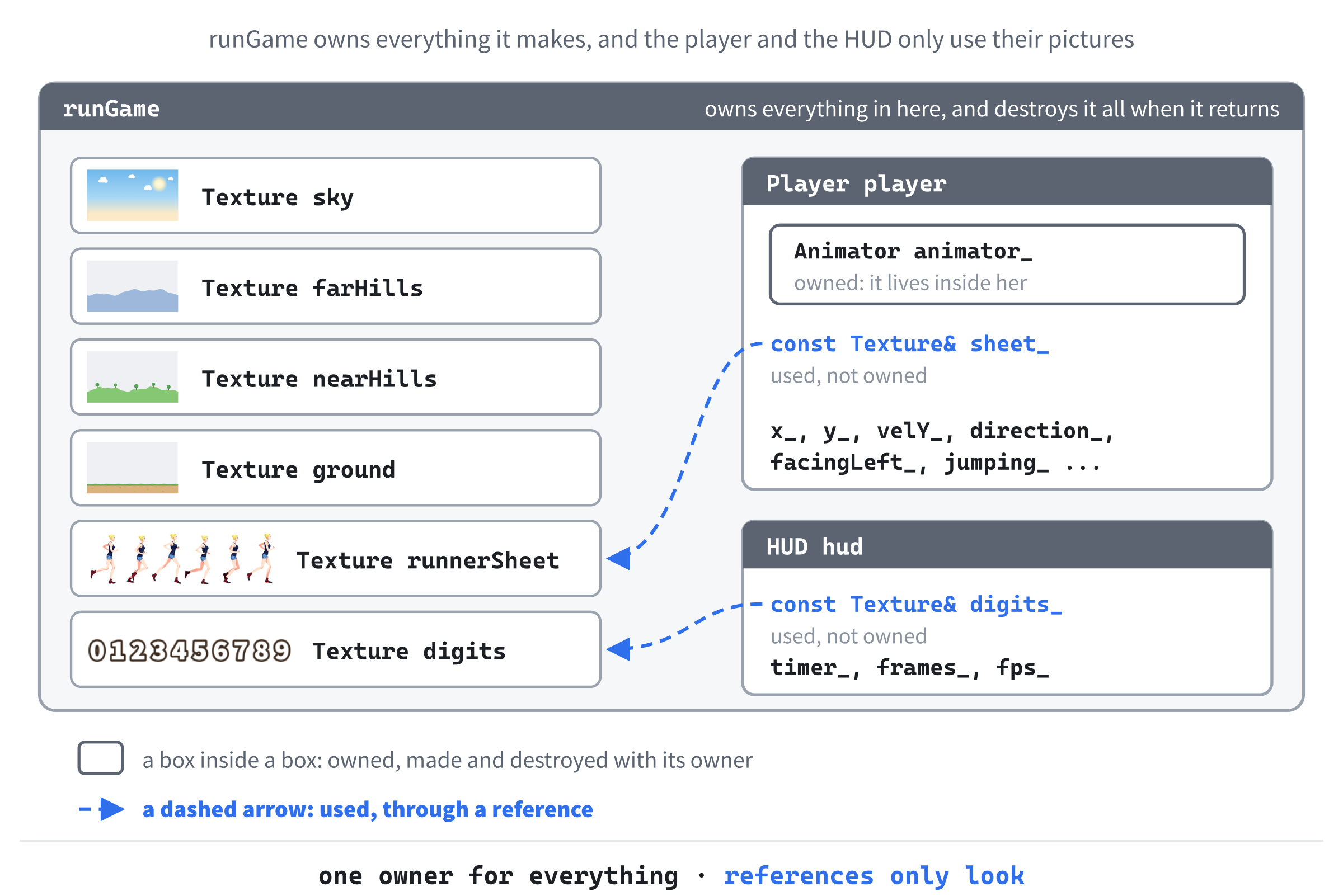
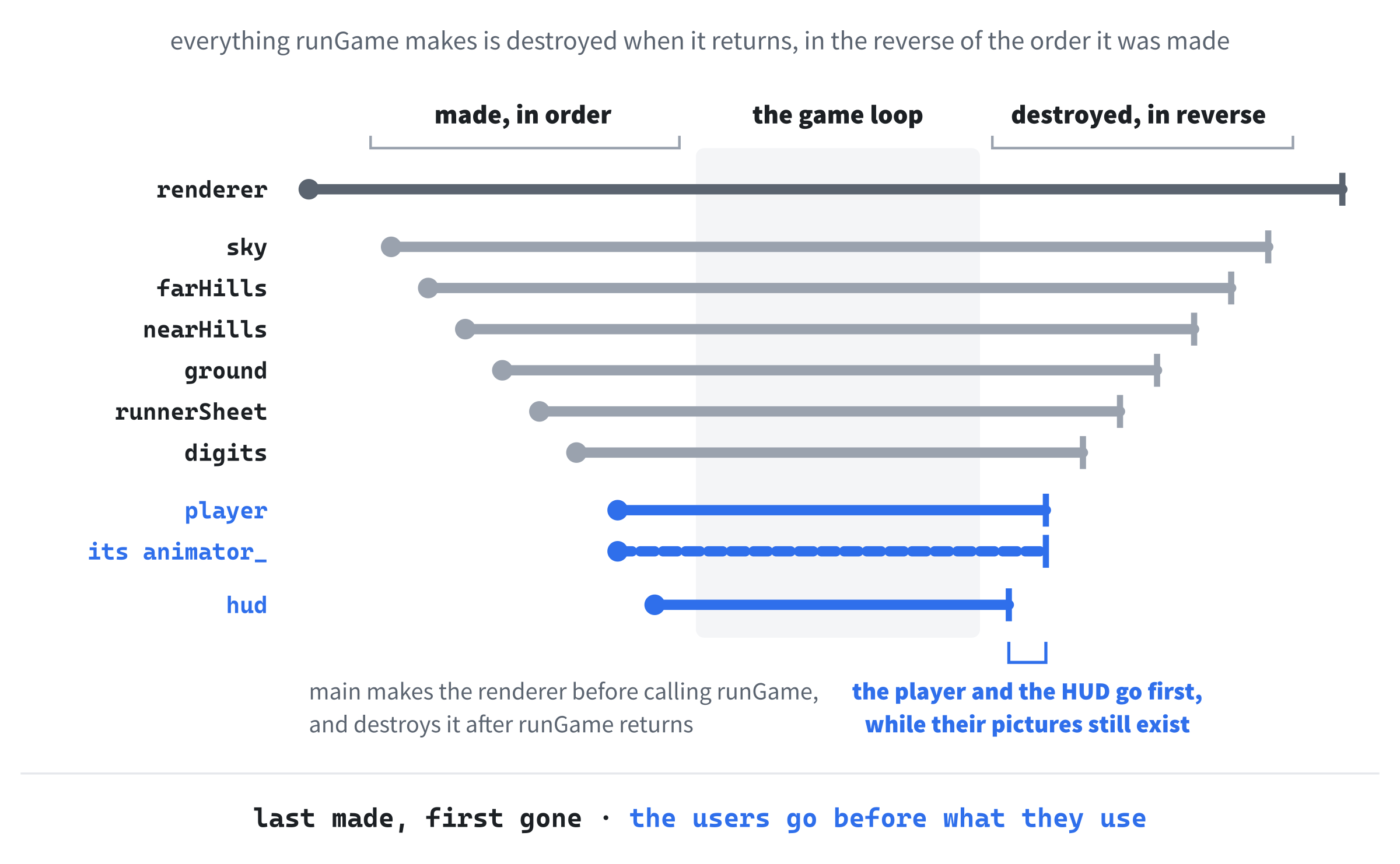
The interesting part is who owns what, and Figure 19.1 shows it. The six textures, the player, and the HUD are all made by one function, runGame, which holds the whole game, so it owns them all, and they're all destroyed when it returns. The player has an Animator as a member, so she owns that: it's made with her and destroyed with her, which is Chapter 18's composition.
But she doesn't own her sprite sheet. She only uses it, through a reference, and so does the HUD with its digits. A picture should be loaded once, however many things draw it, and in Chapter 21, several runners will share this one sprite sheet.
That's nine files in all:
| File | What it holds |
|---|---|
main.cpp |
main, which starts SDL and cleans up, and runGame, which holds the game |
Texture.h, Texture.cpp |
The Texture class: one picture, loaded and destroyed by itself |
Animator.h, Animator.cpp |
The Animator class: counts through an animation's frames |
Player.h, Player.cpp |
The Player class: the runner, who runs, turns, and jumps |
HUD.h, HUD.cpp |
The HUD class: counts the frame rate, and draws it |
We'll build it in the order that lets us run it soonest: main.cpp first, with an empty window; then the Texture class and the scenery; then the Animator and the Player, first standing, then running, and then jumping; and last of all, the HUD.
As in every project since Chapter 11, leave a blank line between one function and the next. Each step says where any other blank lines go.
main.cpp
The Top of the File
Start with a comment that says what the program is, and the includes. Type this into main.cpp:
/*
    Animated Character (Classes)
    The Chapter 19 project from Learning C++ by Building Games

    The runner from Chapter 17, as a class of her own. Hold the left or
    right arrow, or A or D, to run, and press Space, W, or the Up arrow
    to jump. The number in the top-left corner is the frame rate.
    Escape, or the window's X, quits.

    New in this project: classes, each in a .h file and a .cpp file of
    its own. A Texture loads a picture and destroys it by itself, an
    Animator counts through the frames, the Player has an Animator of
    her own, and the HUD counts the frames drawn every second.
*/

#include <SDL3/SDL.h>
#include <SDL3/SDL_main.h>
In the preceding code, the comment describes the finished program, and the two includes are the usual pair: SDL itself, and SDL_main.h, which lets SDL start the program on every system. There's no SDL_image here, because main.cpp never loads a picture itself. That will be the Texture class's job, and it will include SDL_image in its own file.
Below the includes, with a blank line in between, add the window's constants:
const int   WINDOW_W  = 960;      // window width in pixels
const int   WINDOW_H  = 540;      // window height in pixels
const float MAX_DELTA = 0.1f;     // the longest frame we'll allow, in seconds
In the preceding code, the window is 960 by 540, the size of every scenery picture, and MAX_DELTA is the longest frame we'll allow, so that a pause, such as dragging the window, can't make the runner leap across the screen. Both are straight from Chapter 17.
main
The main function starts SDL, hands over to the game, and cleans up. Start it below the constants, with a blank line in between:
int main(int argc, char* argv[])
{
    // Start SDL, then make the window and the renderer
    if (!SDL_Init(SDL_INIT_VIDEO))
    {
        SDL_Log("SDL_Init failed: %s", SDL_GetError());
        return 1;
    }

    SDL_Window* window = SDL_CreateWindow("Animated Character", WINDOW_W,
                                          WINDOW_H, 0);
    if (!window)
    {
        SDL_Log("SDL_CreateWindow failed: %s", SDL_GetError());
        SDL_Quit();
        return 1;
    }
In the preceding code, SDL_Init starts SDL's video, and SDL_CreateWindow makes the window, with the title "Animated Character", exactly as in every SDL project since Chapter 1. If either fails, SDL_Log says why, and main gives up, cleaning up whatever it had made so far. The call to SDL_CreateWindow is split over two lines to keep it within the page.
Below the window's if, with a blank line in between, make the renderer:
SDL_Renderer* renderer = SDL_CreateRenderer(window, nullptr);
if (!renderer)
{
    SDL_Log("SDL_CreateRenderer failed: %s", SDL_GetError());
    SDL_DestroyWindow(window);
    SDL_Quit();
    return 1;
}

// Show each frame in step with the monitor's refresh
SDL_SetRenderVSync(renderer, 1);
In the preceding code, SDL_CreateRenderer makes the renderer, and if it fails, main destroys the window and quits. Then SDL_SetRenderVSync makes the program wait for the monitor's refresh before showing each frame, as Chapter 17 did.
Below the vsync line, with a blank line in between, finish main:
    // Play until the player quits, then clean up, in the reverse order
    // we created things
    bool played = runGame(renderer);

    SDL_DestroyRenderer(renderer);
    SDL_DestroyWindow(window);
    SDL_Quit();

    return played ? 0 : 1;
}
In the preceding code, the whole game happens in one call, to a function called runGame, which we'll write next. It returns true if the game ran, and false if it couldn't start, which will happen if a picture is missing. When it returns, main destroys the renderer and the window, and quits SDL, in the reverse of the order it made them. The last line is Chapter 4's ternary operator: main returns 0, meaning all went well, if the game was played, and 1 if it wasn't.
Why a separate function? Because of Chapter 18's lifetimes. Every object that runGame makes, from the textures to the player, is destroyed when runGame returns, by its own destructor. That happens before main reaches SDL_DestroyRenderer, which matters, because a texture belongs to its renderer: destroying the renderer destroys its textures too, so every texture must already be gone. Keeping the game in a function of its own makes that order automatic, whichever way the game ends.
runGame
Now add runGame above main, with a blank line in between:
// The whole game, from the first frame to the last. Everything made in
// here is destroyed when it returns, before main destroys the renderer
bool runGame(SDL_Renderer* renderer)
{
    // The time at the last frame, in milliseconds
    Uint64 lastTime = SDL_GetTicks();

    bool running = true;
    SDL_Event event;

    while (running)
    {
    }

    return true;
}
In the preceding code, the comment above runGame says what matters about it, so nobody moves the game into main later without thinking. The function takes the renderer, since everything it draws needs one, and returns a bool. Inside, lastTime holds the time at the last frame, for the delta time, and running keeps the game loop going until something sets it to false. The loop is empty for now. After it, the function returns true: the game ran.
Inside the game loop's braces, handle the events:
// Handle every event that's waiting
while (SDL_PollEvent(&event))
{
    if (event.type == SDL_EVENT_QUIT)
    {
        running = false;
    }
    // A key going down, but not the repeats from holding it
    if (event.type == SDL_EVENT_KEY_DOWN && !event.key.repeat)
    {
        switch (event.key.key)
        {
        case SDLK_ESCAPE:
            running = false;
            break;
        }
    }
}
In the preceding code, SDL_PollEvent hands over each waiting event in turn. Closing the window stops the loop. A key going down, but not the repeats that come from holding it, goes to a switch on event.key.key, the key's keycode, just as in Chapter 17, and for now, Escape is the only key it knows. It stops the loop, too.
Below the event loop, with a blank line in between, work out the delta time:
// Delta time, never more than MAX_DELTA
Uint64 now = SDL_GetTicks();
float delta = (now - lastTime) / 1000.0f;
lastTime = now;
if (delta > MAX_DELTA)
    delta = MAX_DELTA;
In the preceding code, SDL_GetTicks gives the time in milliseconds, so the difference from the last frame, divided by 1,000, is the delta time in seconds. Then lastTime moves on, and the delta is clamped to MAX_DELTA.
Below the delta time, with a blank line in between, draw the frame:
// Draw the frame, from the back to the front
SDL_RenderClear(renderer);

SDL_RenderPresent(renderer);
In the preceding code, SDL_RenderClear clears the frame, and SDL_RenderPresent shows it. There's nothing to draw in between yet, and the blank line keeps a place for it.
Checkpoint: Press F5. A black window titled Animated Character opens. Press Escape, or click the window's X, and it closes. If the build stops with C3861: 'runGame': identifier not found, you've typed runGame below main rather than above it, and as Chapter 8 showed, a function has to be declared before it's used.
The Texture Class
Chapters 11 and 17 loaded their pictures into raw SDL_Texture* pointers, and every one of them needed a line somewhere to destroy it, in the right place, and in the right order. Forget one, and it leaks. The Texture class makes that impossible, because it's the RAII of Chapter 18: a Texture loads its picture when it's made, and destroys it when it goes.
A class needs its two files. In Solution Explorer, right-click Header Files, choose Add > New Item, and add a header called Texture.h, just as you added Player.h to the sandbox in Chapter 18. Then right-click Source Files, and add a C++ file called Texture.cpp the same way.
Texture.h
Visual Studio has already typed the first line of Texture.h, #pragma once. Below it, type the outline of the class, so that the file reads like this:
#pragma once
#include <SDL3/SDL.h>

// A picture, loaded from a file when a Texture is made, and destroyed by
// its destructor, so it can't be forgotten
class Texture
{
public:
    Texture(SDL_Renderer* renderer, const char* path);
    ~Texture();

private:
    SDL_Texture* texture_;
};
In the preceding code, the header includes SDL, because the class uses SDL's types: SDL_Renderer, and SDL_Texture. The comment says what a Texture is for. Its constructor takes the renderer that the picture will be drawn with, and the path of the file to load, as a const char*, the type of text in double quotes, which Chapter 11 used for its paths. Then comes the destructor, ~Texture. In the private part is the one thing a Texture looks after: the pointer to SDL's texture, texture_.
Now for the rest of the public part. Add this below ~Texture();, with a blank line in between:
// One picture, one owner, so a Texture can't be copied
Texture(const Texture&) = delete;
Texture& operator=(const Texture&) = delete;

bool isLoaded() const;

// Draw the part of the picture in src into dst, mirrored if flip says
// so. A nullptr for src means the whole picture, and for dst, the
// whole window
void draw(SDL_Renderer* renderer, const SDL_FRect* src,
          const SDL_FRect* dst, SDL_FlipMode flip = SDL_FLIP_NONE) const;
In the preceding code, the first two lines are Chapter 18's deleted copy operations. A copy of a Texture would copy the pointer, not the picture, and then two objects would own one texture. The first to be destroyed would destroy it, leaving the other pointing at a picture that's gone. So a Texture can't be copied at all: pass one by reference instead. The function isLoaded says whether the picture loaded, and it's const, because it only looks.
Last comes draw, which draws some or all of the picture, and it's const too, because drawing a picture doesn't change it. It takes the renderer, then a source rectangle, which says which part of the picture to draw, and a destination rectangle, which says where in the window to draw it, the pair Chapter 11 introduced. They're pointers, so either can be nullptr, meaning the whole picture, or the whole window. The last parameter is a flip, and = SDL_FLIP_NONE gives it a default value, as Chapter 8 did for parameters, so a call that doesn't mention a flip gets none.
A default value belongs in the declaration, in the header, and only there. The definition in Texture.cpp will leave it out.
Texture.cpp
Now open Texture.cpp, which Visual Studio left empty, and type this:
#include "Texture.h"
#include <SDL3_image/SDL_image.h>

Texture::Texture(SDL_Renderer* renderer, const char* path)
    : texture_(IMG_LoadTexture(renderer, path))
{
    if (texture_ == nullptr)
        SDL_Log("Couldn't load %s: %s", path, SDL_GetError());
}
In the preceding code, the file includes its own header first, and then SDL_image. Only Texture.cpp needs SDL_image, so only Texture.cpp includes it, and any file that includes Texture.h doesn't have to know SDL_image exists.
The constructor's full name is Texture::Texture, and its initializer list gives texture_ its value straight from IMG_LoadTexture, which loads a picture into a texture in one step, just as in Chapter 11. If it fails, it returns nullptr, and the body logs which file couldn't be loaded, and why. A constructor has no return value, so it can't hand back false the way a function could. That's why the class has isLoaded: whoever makes a Texture can ask afterward whether it worked.
Below the constructor, add the destructor, which gives the picture back:
Texture::~Texture()
{
    if (texture_ != nullptr)
        SDL_DestroyTexture(texture_);
}
In the preceding code, the destructor destroys the texture, if there is one to destroy. That one call, SDL_DestroyTexture, is the only one in the whole program, and nobody ever has to remember to make it, because every Texture makes it for itself.
Below the destructor, add the last two functions:
bool Texture::isLoaded() const
{
    return texture_ != nullptr;
}

void Texture::draw(SDL_Renderer* renderer, const SDL_FRect* src,
                   const SDL_FRect* dst, SDL_FlipMode flip) const
{
    SDL_RenderTextureRotated(renderer, texture_, src, dst, 0.0, nullptr, flip);
}
In the preceding code, isLoaded compares the pointer with nullptr. Then draw hands everything to SDL_RenderTextureRotated, which Chapter 11 used to draw its moles facing either way. Its angle is 0, and its turning point is nullptr, because we never want the picture turned, only flipped. Notice that the definition of draw has no = SDL_FLIP_NONE. The default lives in the header, and repeating it here would stop the build.
Checkpoint: There's nothing new to see yet, but you can check your typing. With Texture.cpp open, press Ctrl+F7 to compile it on its own, as in Chapter 11. If the Error List stays empty, the class is right.
The Scenery
From now on, most of the new code in main.cpp goes into places we've already typed, rather than on the end. Figure 19.2 maps them: seven slots, lettered in the order we'll first fill them, and each lead-in names its slot.
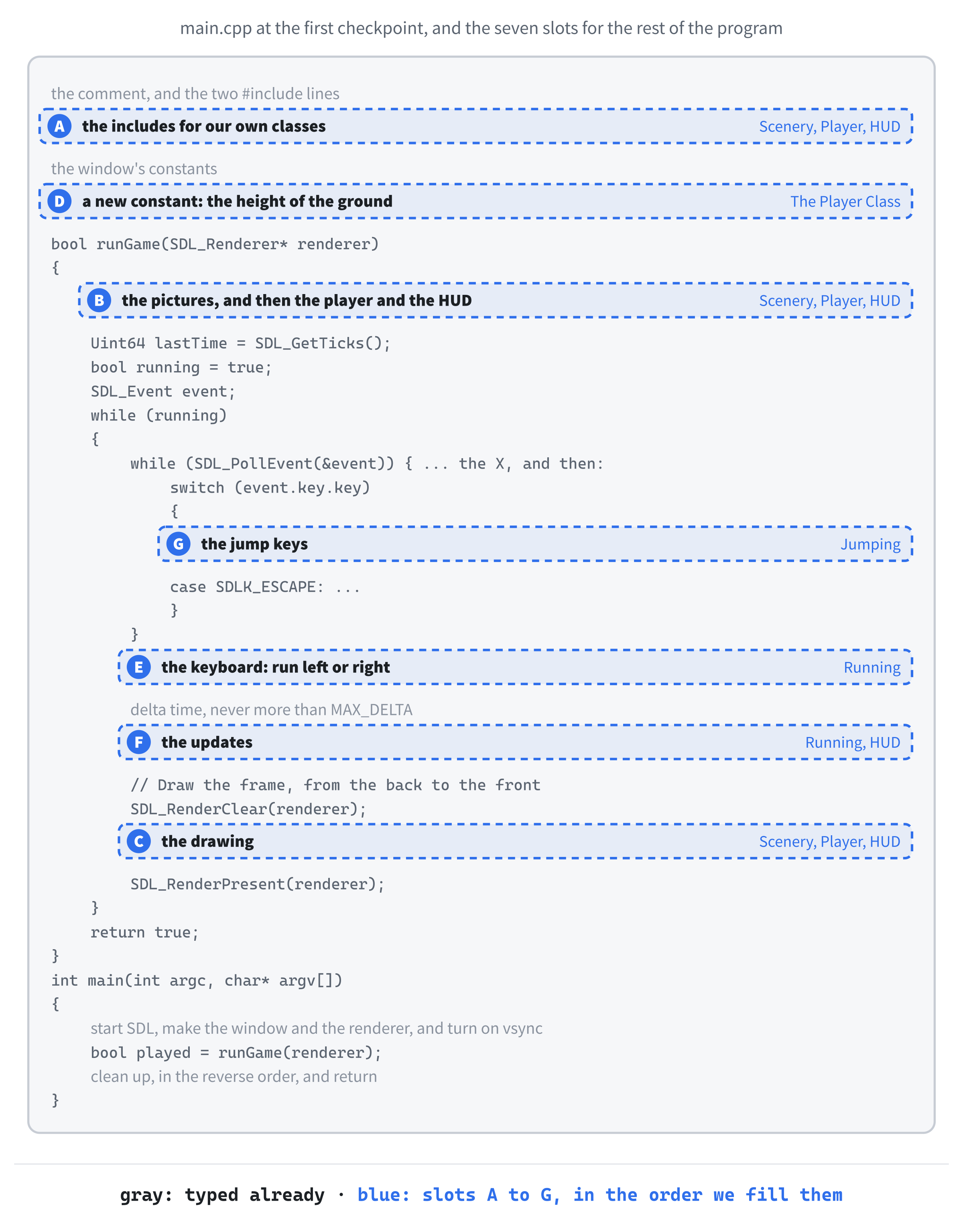
First, main.cpp needs to know about textures. Add this in slot A, below #include <SDL3/SDL_main.h>, with a blank line in between:
#include "Texture.h"In the preceding code, the header's name is in double quotes, because it's one of ours, as Chapter 18 explained.
Now load the pictures. Add these lines in slot B, at the top of runGame, above the comment // The time at the last frame, in milliseconds, with a blank line in between:
Texture sky(renderer, "assets/sky.png");
Texture farHills(renderer, "assets/hills_far.png");
Texture nearHills(renderer, "assets/hills_near.png");
Texture ground(renderer, "assets/ground.png");
Texture runnerSheet(renderer, "assets/runner.png");
Texture digits(renderer, "assets/digits.png");

// If a picture didn't load, its Texture has already said which
if (!sky.isLoaded() || !farHills.isLoaded() || !nearHills.isLoaded() ||
    !ground.isLoaded() || !runnerSheet.isLoaded() || !digits.isLoaded())
{
    return false;
}
In the preceding code, each of the first six lines makes a Texture, and making one runs its constructor, which loads the picture. They're ordinary local variables, made the same way as Chapter 18's Player hero(50);, with the constructor's arguments in parentheses after the name. Two of them, the runner's sprite sheet and the digits, won't be drawn until later, but loading them now means all the pictures are checked in one place.
Then the if asks each texture whether it loaded. The first one that didn't has already logged its name, so runGame just returns false. The condition is long enough to split over two lines, with the second indented to show it's a continuation, so its body gets braces, even though it's a single line.
Notice what isn't here: any code to destroy the textures. When runGame returns, whether it's here, early, or at the end, after the game loop, all six are destroyed, in the reverse of the order they were made. Even when only some of them loaded, the ones that did are destroyed, and the ones that didn't have nothing to destroy. That's RAII paying off: every way out of a function cleans up after itself.
Finally, draw the scenery. Add this in slot C, below SDL_RenderClear(renderer);:
sky.draw(renderer, nullptr, nullptr);
farHills.draw(renderer, nullptr, nullptr);
nearHills.draw(renderer, nullptr, nullptr);
ground.draw(renderer, nullptr, nullptr);
In the preceding code, each layer is drawn with nullptr for both rectangles: the whole picture, over the whole window. They're drawn from the back to the front, the painter's algorithm from Chapter 11, so each layer covers the ones behind it, wherever it isn't see-through. The sky covers the whole window, so clearing it first isn't strictly needed anymore, but clearing every frame is a habit from Chapter 17 that costs nothing and saves trouble.
Checkpoint: Press F5. The window shows the landscape from Chapter 17: the sky with its sun and clouds, the two layers of hills, and the sandy ground, all standing still. If the window opens and closes again at once, look at the console. A line like "Couldn't load assets/sky.png: Couldn't open assets/sky.png: The system cannot find the path specified." means the assets folder isn't beside main.cpp.
The Animator Class
The runner's legs need Chapter 17's accumulator: a timer that adds up the delta time, and moves on one frame every time it's collected a frame's worth. This time, it gets a class of its own, so that anything with an animation can have one.
Add a header called Animator.h and a source file called Animator.cpp, as you did for the texture. Below the #pragma once that Visual Studio typed, add the class, so that Animator.h reads like this:
#pragma once

// Counts through the frames of an animation at a steady rate, however
// quickly or slowly the game's own frames come
class Animator
{
public:
    Animator(int frameCount, float frameTime);

    void update(float delta);
    int getFrame() const;

private:
    int frameCount_;
    float frameTime_;      // seconds to show each frame for
    int frame_ = 0;        // which frame to show now
    float timer_ = 0.0f;   // seconds spent on that frame so far
};
In the preceding code, there's no #include at all, because an Animator only counts, with ints and floats, and doesn't need SDL for anything. Its constructor takes how many frames the animation has, and how long to show each one. The function update moves it on by some number of seconds, and getFrame says which frame to show now. It's const, because it only looks.
The private part holds four members. The first two come from the constructor. The other two start with default values, as Chapter 11's structs did, so an animation starts at frame 0, with nothing on its timer.
Now open Animator.cpp, and type its constructor:
#include "Animator.h"

Animator::Animator(int frameCount, float frameTime)
    : frameCount_(frameCount), frameTime_(frameTime)
{
}
In the preceding code, the initializer list sets the two members that the constructor was given, in the order they're declared, which is the habit from Chapter 18. The other two already have their default values, so the list doesn't need to mention them, and the body has nothing left to do.
Below the constructor, add the other two functions:
// Chapter 17's accumulator: add up the time, and move on one frame for
// every frameTime_ collected
void Animator::update(float delta)
{
    timer_ += delta;
    while (timer_ >= frameTime_)
    {
        timer_ -= frameTime_;
        frame_ = (frame_ + 1) % frameCount_;
    }
}

int Animator::getFrame() const
{
    return frame_;
}
In the preceding code, update is Chapter 17's accumulator, as Figure 17.5 showed it. The delta time goes onto the timer, and for every frameTime_ the timer collects, the frame moves on one, going back to 0 after the last, with the % from Chapter 2. The while, rather than an if, catches up if a slow frame has collected more than one frame's worth. Then getFrame hands back the frame.
An Animator owns nothing that needs giving back, so it has no destructor, and copying one is perfectly safe: the compiler's copy of two ints and two floats is exactly right. That's Chapter 18's rule of zero, at its simplest.
Checkpoint: With Animator.cpp open, press Ctrl+F7. An empty Error List means the class is right.
The Player Class
Now for the runner herself. Add Player.h and Player.cpp, as before.
Player.h
Below the #pragma once in Player.h, type the outline of the class, so that the file reads like this:
#pragma once
#include <SDL3/SDL.h>
#include "Animator.h"
#include "Texture.h"

// The runner: she runs left and right, turns to face the way she's
// going, and jumps
class Player
{
public:
    Player(const Texture& sheet, float groundY, float windowWidth);

    void run(int direction);
    void jump();
    void update(float delta);
    void draw(SDL_Renderer* renderer) const;

private:
};
In the preceding code, the header includes three others: SDL, because draw takes a renderer, and Animator.h and Texture.h, because a Player has members of both types, and the compiler has to know what they look like before it can build one. The constructor takes her sprite sheet, as a const reference, since a Texture can't be copied, and the height of the ground, and the width of the window.
The public functions are everything the rest of the program can ask of her. The functions run and jump are orders, which runGame will give her when keys are pressed. Then update moves her on by one frame, and draw draws her, and it's const, because drawing her doesn't change her.
Now fill in the private part. Add this below private::
const Texture& sheet_;      // her sprite sheet, used but not owned
Animator animator_;         // counts through her running frames
float groundTop_;           // the top of her frame when she's standing
float maxX_;                // the furthest right her middle can go
float x_;                   // the middle of her body, across the window
float y_;                   // the top of her frame
float velY_ = 0.0f;         // pixels per second, and negative is up
int direction_ = 0;         // -1 for left, 1 for right, 0 for standing
bool facingLeft_ = false;
bool jumping_ = false;
In the preceding code, sheet_ is a reference to her sprite sheet. She uses it, but doesn't own it, and a reference says exactly that: it's a second name for a texture that belongs to someone else, as Chapter 10 described. A reference member has to be given its value in the initializer list, as Chapter 18 warned, since there's no way to point it somewhere later.
Get into the habit of saying, beside every pointer or reference member, whether its class owns what it points at, as the comment on sheet_ does, and as the HUD's digits_ will. When a program crashes as it closes, the first question is always who destroys what, and a comment that answers it saves a lot of detective work.
Next, animator_ is an Animator, the member that makes this composition: a Player has an Animator, made with her and destroyed with her.
The rest describe her. The numbers groundTop_ and maxX_ are worked out once, in the constructor, and never change: the height of the top of her frame when she's standing on the ground, and the furthest right her middle can go. Her position is x_, the middle of her body, across the window, and y_, the top of her frame. Then come her vertical speed while she's jumping, the direction she's running in, which way she's facing, and whether she's in the air, each with the value she starts with.
Look at the order of those declarations, because it matters. The constructor is going to work out y_ from groundTop_, and members are always initialized in the order they're declared, as Chapter 18's health bar showed. So groundTop_ has to be declared above y_. Swap them, and y_ is worked out from a groundTop_ that doesn't hold anything yet, Visual Studio doesn't say a word, and the runner simply isn't there.
That's the whole class, as the rest of the program sees it. Now to make it work.
Player.cpp
Open Player.cpp, and start with its constants:
#include "Player.h"

// Her sprite sheet
const float FRAME_W     = 112.0f;   // runner.png is six frames, each
const float FRAME_H     = 180.0f;   // 112 by 180
const int   RUN_FRAMES  = 6;
const int   JUMP_FRAME  = 2;        // her longest stride, as in Chapter 17
const int   STAND_FRAME = 4;        // the frame with her feet closest
const float FRAME_TIME  = 0.08f;    // seconds per frame
const float FEET_GAP    = 2.0f;     // empty pixels below her feet
const float HIPS_X      = 74.0f;    // her middle, from the frame's left edge

// Running and jumping
const float RUN_SPEED  = 360.0f;    // pixels per second
const float EDGE       = 40.0f;     // how close her middle can get to a side
const float JUMP_SPEED = -820.0f;   // pixels per second at take-off, upward
const float GRAVITY    = 2200.0f;   // pixels per second, per second
In the preceding code, most of the constants are Chapter 17's: the size of a frame, the number of running frames, the jumping frame, the time for each frame, the gap below her feet, and her jump speed and gravity.
Four are new. The standing frame is 4, the one where her feet are closest together, which makes the best stand-in for standing still. The constant HIPS_X gives the position of her middle within a frame, 74 pixels from its left edge, which we'll need when she turns around. And her running speed is 360 pixels a second, the Runner's starting speed, so her feet keep pace with the ground just as they did there. Last, EDGE keeps her middle at least 40 pixels from each side of the window.
A constant at the top of a .cpp file belongs to that file alone. Nothing outside Player.cpp needs these, so here is where they live, and if another file had a FRAME_W of its own, the two wouldn't clash.
Below the constants, with a blank line in between, add the constructor:
Player::Player(const Texture& sheet, float groundY, float windowWidth)
    : sheet_(sheet),
      animator_(RUN_FRAMES, FRAME_TIME),
      groundTop_(groundY + FEET_GAP - FRAME_H),
      maxX_(windowWidth - EDGE),
      x_(windowWidth / 2.0f),
      y_(groundTop_)
{
}
In the preceding code, the initializer list gives every member without a default value its starting value, one per line, in the order they're declared. First, sheet_ becomes another name for the sprite sheet she was given. Then animator_(RUN_FRAMES, FRAME_TIME) builds her Animator, passing its constructor the six frames and their time, which is how a member that's an object gets its arguments, just like Chapter 18's knight and his sword.
Then come her measurements. The top of her frame when she's standing is the ground's height, plus the gap below her feet, less the height of a frame, which is Chapter 17's RUNNER_Y. The furthest right her middle goes is EDGE in from the window's right side, and she starts in the middle of the window. Last of all, y_(groundTop_) puts her on the ground. That's the member worked out from another, and it's safe, because groundTop_ is declared, and so initialized, above it.
Now she needs drawing. Add the start of draw below the constructor, and the three functions still to come, run, jump, and update, will go in between the two:
void Player::draw(SDL_Renderer* renderer) const
{
    // In the air, running, or standing still
    int frame = STAND_FRAME;
    if (jumping_)
        frame = JUMP_FRAME;
    else if (direction_ != 0)
        frame = animator_.getFrame();
}
In the preceding code, draw first chooses a frame. She starts out standing, in her standing frame. If she's in the air, it's her jumping frame instead, and if she's running, it's whichever frame her Animator has reached. The getFrame call is allowed in a const function because getFrame is const itself, as Chapter 18 explained.
Next comes the part that deals with turning around. Add this inside draw, below the frame choice, with a blank line in between:
// Her middle is HIPS_X from the frame's left edge, or from its right
// edge when the frame is mirrored, so the frame moves to keep her
// middle at x_
float left = x_ - HIPS_X;
SDL_FlipMode flip = SDL_FLIP_NONE;
if (facingLeft_)
{
    left = x_ - (FRAME_W - HIPS_X);
    flip = SDL_FLIP_HORIZONTAL;
}

SDL_FRect src = { frame * FRAME_W, 0.0f, FRAME_W, FRAME_H };
SDL_FRect dst = { left, y_, FRAME_W, FRAME_H };
sheet_.draw(renderer, &src, &dst, flip);
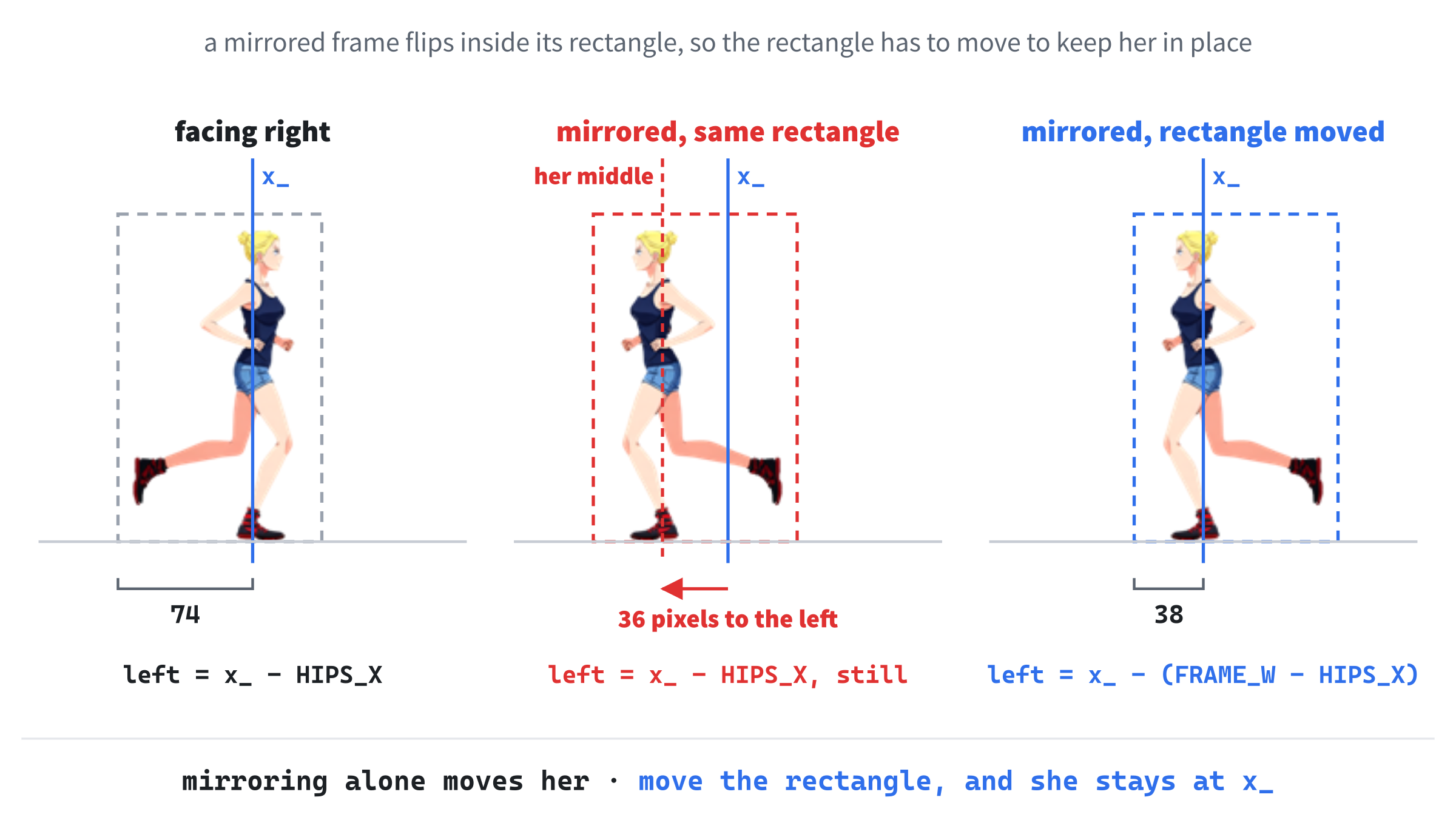
In the preceding code, the frame is drawn mirrored when she's facing left, with Chapter 11's SDL_FLIP_HORIZONTAL. Mirroring a picture flips it inside its own rectangle, though, and her body isn't in the middle of her frame. It's 74 pixels from the left edge, so after a flip it's 74 pixels from the right edge, 36 pixels further left. If the rectangle stayed put, she'd jump sideways every time she turned.
So the rectangle moves instead: facing right, its left edge is HIPS_X to the left of her middle, and facing left, it's FRAME_W - HIPS_X to the left, as Figure 19.3 shows. Either way, her middle ends up exactly at x_.
Then the source rectangle picks her frame from the sheet, exactly as in Chapter 17, the destination rectangle puts it on the screen, and the sheet draws itself. The rectangles are passed with &, because draw takes pointers, so that either one could be nullptr.
Putting Her on the Ground
Over to main.cpp. Add this in slot A, below #include "Texture.h":
#include "Player.h"In the preceding code, Player.h includes Texture.h and Animator.h itself, so main.cpp gets all three. It still includes Texture.h itself, because it makes textures of its own, and it's good practice for a file to include the headers it uses directly, rather than rely on another header to bring them.
Next, the height of the ground. Add this in slot D, below MAX_DELTA:
const float GROUND_Y = 452.0f; // the line the runner stands onIn the preceding code, GROUND_Y is where the sandy ground begins, 452 pixels down, as in Chapter 17. It belongs in main.cpp, because it's a fact about the scenery, and the player is only told it.
Now make the player. Add this in slot B, below the closing brace of the if that checks the pictures, with a blank line in between:
Player player(runnerSheet, GROUND_Y, WINDOW_W);In the preceding code, player is made from the runner's sprite sheet, the ground's height, and the window's width, which is an int, and becomes a float on the way in, without a word from the compiler. She's made after the textures, so she'll be destroyed before them, and the sheet she refers to always outlives her.
Last of all, draw her. Add this in slot C, below ground.draw(renderer, nullptr, nullptr);:
player.draw(renderer);In the preceding code, the player draws herself, and runGame doesn't need to know how. She's drawn after the ground, so she stands in front of it.
Checkpoint: Press F5. The runner stands in the middle of the landscape, facing right, with her feet on the ground. Nothing moves yet. If she isn't there at all, check the order of the members in Player.h against the warning above.
Running
To run, she needs her orders, and a way to act on them. Back in Player.cpp, add this below the constructor:
// Which way to run: -1 for left, 1 for right, or 0 to stand still
void Player::run(int direction)
{
    direction_ = direction;
    if (direction != 0)
        facingLeft_ = direction < 0;
}
In the preceding code, run stores the direction she's been told to run in: -1 for left, 1 for right, and 0 for standing still. If she's been told to move, she turns to face that way, and direction < 0 is true for left and false for right. When she's told to stand still, she keeps facing whichever way she was.
Below run, add update, which acts on her orders every frame:
void Player::update(float delta)
{
    // Run, but keep her middle at least EDGE from each side
    x_ += direction_ * RUN_SPEED * delta;
    if (x_ < EDGE)
        x_ = EDGE;
    if (x_ > maxX_)
        x_ = maxX_;

    // Her legs only move while she's running
    if (direction_ != 0)
        animator_.update(delta);
}
In the preceding code, she moves by her direction times her speed times the delta time, which is delta time exactly as Chapter 1 introduced it. A direction of 0 doesn't move her at all. Then two ifs keep her middle between EDGE and maxX_, so she can't run out of the window. Her Animator is only updated while she's running, so her legs stop when she does, and start again from the same frame.
Now runGame has to give the orders. Add this in slot E, below the event loop's closing brace, with a blank line in between:
// Run left or right while an arrow key, or A or D, is held
const bool* keys = SDL_GetKeyboardState(nullptr);
int direction = 0;
if (keys[SDL_SCANCODE_LEFT] || keys[SDL_SCANCODE_A])
    direction -= 1;
if (keys[SDL_SCANCODE_RIGHT] || keys[SDL_SCANCODE_D])
    direction += 1;
player.run(direction);
In the preceding code, SDL_GetKeyboardState gives the table of keys that are down right now, as in Chapters 1 and 5. Holding the left arrow or A takes one from the direction, and holding the right arrow or D adds one, so holding both cancels out, and she stands still. Then the player gets her orders.
Notice that this table is looked up with scancodes, which name the physical keys, while the switch above uses keycodes, which name what the keys mean. We need both kinds of input here. Running happens for as long as a key is held, so it's a question of which keys are down right now, and the keyboard table answers it. A jump happens once for each press, so it's a question of which key just went down, and that's what an event says, with its keycode.
Finally, move her on each frame. Add this in slot F, below the delta time's if, with a blank line in between:
// Move everything on by one frame
player.update(delta);
In the preceding code, one line moves the player on by one frame, however much there is for her to do. This is where the class earns its keep: runGame doesn't know about her position, her speed, or her Animator. It just tells her to update.
Checkpoint: Press F5, and hold the right arrow. She runs to the right, with her legs moving, and stops at the window's edge. Hold the left arrow, and she turns around and runs back, without jumping sideways as she turns. Let go, and she stands still, facing the way she was going.
Jumping
A jump is an order, too. In Player.cpp, add this below run:
void Player::jump()
{
    if (!jumping_)
    {
        jumping_ = true;
        velY_ = JUMP_SPEED;
    }
}
In the preceding code, jump does nothing if she's already in the air, so she can't jump again halfway up. Otherwise, she's jumping now, with Chapter 17's take-off speed, upward.
Then the jump needs gravity. Add this at the end of update, below animator_.update(delta);, with a blank line in between:
// Rise, fall, and land, just as in Chapter 17
if (jumping_)
{
    velY_ += GRAVITY * delta;
    y_ += velY_ * delta;
    if (y_ >= groundTop_)
    {
        y_ = groundTop_;   // she has landed
        velY_ = 0.0f;
        jumping_ = false;
    }
}
In the preceding code, while she's in the air, gravity pulls her speed downward, and her speed moves her, which is Chapter 17's jump, line for line. When her frame's top reaches groundTop_ again, she's landed: she's put exactly on the ground, her speed goes back to 0, and she's no longer jumping.
Last of all, the keys. Add this in slot G, in the switch in runGame, above case SDLK_ESCAPE::
case SDLK_SPACE:
case SDLK_W:
case SDLK_UP:
    player.jump();
    break;
In the preceding code, Space, W, and the up arrow all lead to the same line, because the first two cases have nothing of their own and fall through to the third, as in Chapter 17.
Checkpoint: Press F5, and press Space. She jumps, in her longest stride, and lands on her feet. Hold an arrow key as she jumps, and she jumps forward, still facing the way she's going. And if you hold Space down, she jumps just once, because the if around the switch ignores the key's repeats.
The HUD Class
The last class counts how many frames the program draws each second, and draws the count in the top-left corner. Add HUD.h and HUD.cpp.
HUD.h
Below the #pragma once in HUD.h, type the outline of the class, so that the file reads like this:
#pragma once
#include <SDL3/SDL.h>
#include "Texture.h"

// The frame rate, counted over each second, and drawn from a strip of
// digits in the window's top-left corner
class HUD
{
public:
    HUD(const Texture& digits);

    void update(float delta);
    void draw(SDL_Renderer* renderer) const;

private:
};
In the preceding code, the constructor takes the strip of digits, as a const reference, just as the player takes her sprite sheet. Then update counts a frame, and draw draws the count.
Now the private part. Add this below private::
void drawNumber(SDL_Renderer* renderer, int value, float x,
                float y) const;

const Texture& digits_;   // the strip of digits, used but not owned
float timer_ = 0.0f;      // seconds since fps_ was last worked out
int frames_ = 0;          // frames counted in that time
int fps_ = 0;             // frames in the last whole second
In the preceding code, the first thing in the private part is a function, drawNumber, which draws a number from the strip of digits. It's a private member function: only the HUD's own functions can call it. That's exactly right for a helper that draw needs and nothing outside the class does, so it stays behind the wall with the data, and the public part stays short.
The members count the frames. The digits are a reference, used but not owned. The HUD adds up the time in timer_, and the frames in frames_, and once a whole second has passed, fps_ gets the count, which is the number of frames per second, or the frame rate.
HUD.cpp
Open HUD.cpp, and type the start of it:
#include "HUD.h"
#include <string>   // std::string and std::to_string

const float DIGIT_W    = 26.0f;   // digits.png is ten digits, each
const float DIGIT_H    = 40.0f;   // 26 by 40, from 0 to 9
const float HUD_MARGIN = 16.0f;   // pixels from the window's edges

HUD::HUD(const Texture& digits) : digits_(digits)
{
}
In the preceding code, the HUD needs <string>, for std::to_string, and it has three constants of its own: the size of a digit in the strip, and the margin from the window's edges, all from Chapter 17. The constructor has only the reference to set, so its whole initializer list fits on the same line as its name.
Below the constructor, add update and draw:
// Count the frames, and each time a whole second has passed, show the count
void HUD::update(float delta)
{
    frames_++;
    timer_ += delta;
    if (timer_ >= 1.0f)
    {
        fps_ = frames_;
        frames_ = 0;
        timer_ -= 1.0f;
    }
}

void HUD::draw(SDL_Renderer* renderer) const
{
    drawNumber(renderer, fps_, HUD_MARGIN, HUD_MARGIN);
}
In the preceding code, update is called once every frame, so each call counts one more frame, and adds the frame's delta time to the timer. As soon as the timer reaches a whole second, the count becomes the frame rate, and counting starts again. Taking one second off the timer, rather than setting it back to zero, keeps whatever's left over, so no time is lost between one second and the next. Then draw calls the private helper to draw the frame rate in the corner.
Below draw, add the private helper that draws a number:
// Chapter 17's drawNumber, as a private member function: a whole number,
// digit by digit, with its top-left corner at (x, y)
void HUD::drawNumber(SDL_Renderer* renderer, int value, float x,
                     float y) const
{
    std::string text = std::to_string(value);
    for (char c : text)
    {
        int digit = c - '0';   // the characters '0' to '9' become 0 to 9
        SDL_FRect src = { digit * DIGIT_W, 0.0f, DIGIT_W, DIGIT_H };
        SDL_FRect dst = { x, y, DIGIT_W, DIGIT_H };
        digits_.draw(renderer, &src, &dst);
        x += DIGIT_W;
    }
}
In the preceding code, drawNumber is Chapter 17's function of the same name, and Figure 17.6 shows how it works. The number becomes a string, and each character in turn becomes its digit, by subtracting '0', and chooses its slice of the strip. Two things differ: the digits aren't passed in, since the HUD keeps them in digits_, and the line that draws each digit, rather than calling SDL directly, asks the texture to draw itself, with no flip, so the default does its job. The function is const, like draw, because a const function can only call other const member functions of its own class, just as a const reference could only call Chapter 18's const getter.
Counting in main
Back in main.cpp, add this in slot A, below #include "Player.h":
#include "HUD.h"In the preceding code, main.cpp includes the last of the headers.
Then make the HUD. Add this in slot B, below Player player(runnerSheet, GROUND_Y, WINDOW_W);:
HUD hud(digits);In the preceding code, the HUD is given the digits it will draw with, and like the player, it's made after the textures, so it's destroyed before them.
Next, count the frames. Add this in slot F, below player.update(delta);:
hud.update(delta);In the preceding code, the HUD is updated once a frame, which is exactly what it needs to count them.
And last, draw the count. Add this in slot C, below player.draw(renderer);:
hud.draw(renderer);In the preceding code, the HUD is drawn last of all, so it's in front of everything else.
Checkpoint: Press F5. For the first second, the corner shows 0, and then the frame rate appears. With vsync on, the program draws one frame for each refresh of the monitor, so the count is your monitor's refresh rate, give or take a frame or two: 60 on most monitors, and 144 on mine. That's the finished program.
The Complete Files
Here are all nine files in one piece, with every line at its real indentation, exactly as they are in the repository. If you've typed every block in the place described, this is what you have. First, main.cpp, which holds the game:
/*
    Animated Character (Classes)
    The Chapter 19 project from Learning C++ by Building Games

    The runner from Chapter 17, as a class of her own. Hold the left or
    right arrow, or A or D, to run, and press Space, W, or the Up arrow
    to jump. The number in the top-left corner is the frame rate.
    Escape, or the window's X, quits.

    New in this project: classes, each in a .h file and a .cpp file of
    its own. A Texture loads a picture and destroys it by itself, an
    Animator counts through the frames, the Player has an Animator of
    her own, and the HUD counts the frames drawn every second.
*/

#include <SDL3/SDL.h>
#include <SDL3/SDL_main.h>

#include "Texture.h"
#include "Player.h"
#include "HUD.h"

const int   WINDOW_W  = 960;      // window width in pixels
const int   WINDOW_H  = 540;      // window height in pixels
const float MAX_DELTA = 0.1f;     // the longest frame we'll allow, in seconds
const float GROUND_Y  = 452.0f;   // the line the runner stands on

// The whole game, from the first frame to the last. Everything made in
// here is destroyed when it returns, before main destroys the renderer
bool runGame(SDL_Renderer* renderer)
{
    Texture sky(renderer, "assets/sky.png");
    Texture farHills(renderer, "assets/hills_far.png");
    Texture nearHills(renderer, "assets/hills_near.png");
    Texture ground(renderer, "assets/ground.png");
    Texture runnerSheet(renderer, "assets/runner.png");
    Texture digits(renderer, "assets/digits.png");

    // If a picture didn't load, its Texture has already said which
    if (!sky.isLoaded() || !farHills.isLoaded() || !nearHills.isLoaded() ||
        !ground.isLoaded() || !runnerSheet.isLoaded() || !digits.isLoaded())
    {
        return false;
    }

    Player player(runnerSheet, GROUND_Y, WINDOW_W);
    HUD hud(digits);

    // The time at the last frame, in milliseconds
    Uint64 lastTime = SDL_GetTicks();

    bool running = true;
    SDL_Event event;

    while (running)
    {
        // Handle every event that's waiting
        while (SDL_PollEvent(&event))
        {
            if (event.type == SDL_EVENT_QUIT)
            {
                running = false;
            }
            // A key going down, but not the repeats from holding it
            if (event.type == SDL_EVENT_KEY_DOWN && !event.key.repeat)
            {
                switch (event.key.key)
                {
                case SDLK_SPACE:
                case SDLK_W:
                case SDLK_UP:
                    player.jump();
                    break;
                case SDLK_ESCAPE:
                    running = false;
                    break;
                }
            }
        }

        // Run left or right while an arrow key, or A or D, is held
        const bool* keys = SDL_GetKeyboardState(nullptr);
        int direction = 0;
        if (keys[SDL_SCANCODE_LEFT] || keys[SDL_SCANCODE_A])
            direction -= 1;
        if (keys[SDL_SCANCODE_RIGHT] || keys[SDL_SCANCODE_D])
            direction += 1;
        player.run(direction);

        // Delta time, never more than MAX_DELTA
        Uint64 now = SDL_GetTicks();
        float delta = (now - lastTime) / 1000.0f;
        lastTime = now;
        if (delta > MAX_DELTA)
            delta = MAX_DELTA;

        // Move everything on by one frame
        player.update(delta);
        hud.update(delta);

        // Draw the frame, from the back to the front
        SDL_RenderClear(renderer);
        sky.draw(renderer, nullptr, nullptr);
        farHills.draw(renderer, nullptr, nullptr);
        nearHills.draw(renderer, nullptr, nullptr);
        ground.draw(renderer, nullptr, nullptr);
        player.draw(renderer);
        hud.draw(renderer);

        SDL_RenderPresent(renderer);
    }

    return true;
}

int main(int argc, char* argv[])
{
    // Start SDL, then make the window and the renderer
    if (!SDL_Init(SDL_INIT_VIDEO))
    {
        SDL_Log("SDL_Init failed: %s", SDL_GetError());
        return 1;
    }

    SDL_Window* window = SDL_CreateWindow("Animated Character", WINDOW_W,
                                          WINDOW_H, 0);
    if (!window)
    {
        SDL_Log("SDL_CreateWindow failed: %s", SDL_GetError());
        SDL_Quit();
        return 1;
    }

    SDL_Renderer* renderer = SDL_CreateRenderer(window, nullptr);
    if (!renderer)
    {
        SDL_Log("SDL_CreateRenderer failed: %s", SDL_GetError());
        SDL_DestroyWindow(window);
        SDL_Quit();
        return 1;
    }

    // Show each frame in step with the monitor's refresh
    SDL_SetRenderVSync(renderer, 1);

    // Play until the player quits, then clean up, in the reverse order
    // we created things
    bool played = runGame(renderer);

    SDL_DestroyRenderer(renderer);
    SDL_DestroyWindow(window);
    SDL_Quit();

    return played ? 0 : 1;
}
In the preceding code, runGame sits above main, so main can call it. Every object in the program is made at the top of runGame, and the game loop gives the player her orders, moves things on, and draws them, in that order, every frame.
Next, Texture.h, the outline of the class that owns a picture:
#pragma once
#include <SDL3/SDL.h>

// A picture, loaded from a file when a Texture is made, and destroyed by
// its destructor, so it can't be forgotten
class Texture
{
public:
    Texture(SDL_Renderer* renderer, const char* path);
    ~Texture();

    // One picture, one owner, so a Texture can't be copied
    Texture(const Texture&) = delete;
    Texture& operator=(const Texture&) = delete;

    bool isLoaded() const;

    // Draw the part of the picture in src into dst, mirrored if flip says
    // so. A nullptr for src means the whole picture, and for dst, the
    // whole window
    void draw(SDL_Renderer* renderer, const SDL_FRect* src,
              const SDL_FRect* dst, SDL_FlipMode flip = SDL_FLIP_NONE) const;

private:
    SDL_Texture* texture_;
};
In the preceding code, the public part says everything a Texture can do, including the two things it refuses to do, and the private part holds its one pointer.
Then Texture.cpp, with the code behind that outline:
#include "Texture.h"
#include <SDL3_image/SDL_image.h>

Texture::Texture(SDL_Renderer* renderer, const char* path)
    : texture_(IMG_LoadTexture(renderer, path))
{
    if (texture_ == nullptr)
        SDL_Log("Couldn't load %s: %s", path, SDL_GetError());
}

Texture::~Texture()
{
    if (texture_ != nullptr)
        SDL_DestroyTexture(texture_);
}

bool Texture::isLoaded() const
{
    return texture_ != nullptr;
}

void Texture::draw(SDL_Renderer* renderer, const SDL_FRect* src,
                   const SDL_FRect* dst, SDL_FlipMode flip) const
{
    SDL_RenderTextureRotated(renderer, texture_, src, dst, 0.0, nullptr, flip);
}
In the preceding code, the constructor loads the picture and the destructor destroys it, which is the whole of RAII in two short functions.
Then Animator.h, the one class that doesn't need SDL at all:
#pragma once

// Counts through the frames of an animation at a steady rate, however
// quickly or slowly the game's own frames come
class Animator
{
public:
    Animator(int frameCount, float frameTime);

    void update(float delta);
    int getFrame() const;

private:
    int frameCount_;
    float frameTime_;      // seconds to show each frame for
    int frame_ = 0;        // which frame to show now
    float timer_ = 0.0f;   // seconds spent on that frame so far
};
In the preceding code, the class declares its three functions, and its four members, two of them with starting values of their own.
Then Animator.cpp, with Chapter 17's accumulator inside it:
#include "Animator.h"

Animator::Animator(int frameCount, float frameTime)
    : frameCount_(frameCount), frameTime_(frameTime)
{
}

// Chapter 17's accumulator: add up the time, and move on one frame for
// every frameTime_ collected
void Animator::update(float delta)
{
    timer_ += delta;
    while (timer_ >= frameTime_)
    {
        timer_ -= frameTime_;
        frame_ = (frame_ + 1) % frameCount_;
    }
}

int Animator::getFrame() const
{
    return frame_;
}
In the preceding code, update is the only function with any real work to do, and it's the same loop that moved the Runner's legs.
Then Player.h, with the members in the order that matters:
#pragma once
#include <SDL3/SDL.h>
#include "Animator.h"
#include "Texture.h"

// The runner: she runs left and right, turns to face the way she's
// going, and jumps
class Player
{
public:
    Player(const Texture& sheet, float groundY, float windowWidth);

    void run(int direction);
    void jump();
    void update(float delta);
    void draw(SDL_Renderer* renderer) const;

private:
    const Texture& sheet_;      // her sprite sheet, used but not owned
    Animator animator_;         // counts through her running frames
    float groundTop_;           // the top of her frame when she's standing
    float maxX_;                // the furthest right her middle can go
    float x_;                   // the middle of her body, across the window
    float y_;                   // the top of her frame
    float velY_ = 0.0f;         // pixels per second, and negative is up
    int direction_ = 0;         // -1 for left, 1 for right, 0 for standing
    bool facingLeft_ = false;
    bool jumping_ = false;
};
In the preceding code, groundTop_ is declared above y_, so it's initialized first, and the public part lists the four orders and questions the rest of the program can give her.
Then Player.cpp, the biggest file, with everything she does:
#include "Player.h"

// Her sprite sheet
const float FRAME_W     = 112.0f;   // runner.png is six frames, each
const float FRAME_H     = 180.0f;   // 112 by 180
const int   RUN_FRAMES  = 6;
const int   JUMP_FRAME  = 2;        // her longest stride, as in Chapter 17
const int   STAND_FRAME = 4;        // the frame with her feet closest
const float FRAME_TIME  = 0.08f;    // seconds per frame
const float FEET_GAP    = 2.0f;     // empty pixels below her feet
const float HIPS_X      = 74.0f;    // her middle, from the frame's left edge

// Running and jumping
const float RUN_SPEED  = 360.0f;    // pixels per second
const float EDGE       = 40.0f;     // how close her middle can get to a side
const float JUMP_SPEED = -820.0f;   // pixels per second at take-off, upward
const float GRAVITY    = 2200.0f;   // pixels per second, per second

Player::Player(const Texture& sheet, float groundY, float windowWidth)
    : sheet_(sheet),
      animator_(RUN_FRAMES, FRAME_TIME),
      groundTop_(groundY + FEET_GAP - FRAME_H),
      maxX_(windowWidth - EDGE),
      x_(windowWidth / 2.0f),
      y_(groundTop_)
{
}

// Which way to run: -1 for left, 1 for right, or 0 to stand still
void Player::run(int direction)
{
    direction_ = direction;
    if (direction != 0)
        facingLeft_ = direction < 0;
}

void Player::jump()
{
    if (!jumping_)
    {
        jumping_ = true;
        velY_ = JUMP_SPEED;
    }
}

void Player::update(float delta)
{
    // Run, but keep her middle at least EDGE from each side
    x_ += direction_ * RUN_SPEED * delta;
    if (x_ < EDGE)
        x_ = EDGE;
    if (x_ > maxX_)
        x_ = maxX_;

    // Her legs only move while she's running
    if (direction_ != 0)
        animator_.update(delta);

    // Rise, fall, and land, just as in Chapter 17
    if (jumping_)
    {
        velY_ += GRAVITY * delta;
        y_ += velY_ * delta;
        if (y_ >= groundTop_)
        {
            y_ = groundTop_;   // she has landed
            velY_ = 0.0f;
            jumping_ = false;
        }
    }
}

void Player::draw(SDL_Renderer* renderer) const
{
    // In the air, running, or standing still
    int frame = STAND_FRAME;
    if (jumping_)
        frame = JUMP_FRAME;
    else if (direction_ != 0)
        frame = animator_.getFrame();

    // Her middle is HIPS_X from the frame's left edge, or from its right
    // edge when the frame is mirrored, so the frame moves to keep her
    // middle at x_
    float left = x_ - HIPS_X;
    SDL_FlipMode flip = SDL_FLIP_NONE;
    if (facingLeft_)
    {
        left = x_ - (FRAME_W - HIPS_X);
        flip = SDL_FLIP_HORIZONTAL;
    }

    SDL_FRect src = { frame * FRAME_W, 0.0f, FRAME_W, FRAME_H };
    SDL_FRect dst = { left, y_, FRAME_W, FRAME_H };
    sheet_.draw(renderer, &src, &dst, flip);
}
In the preceding code, the constants come first, then the constructor, and then her functions, in the order they're declared: run, jump, update, and draw.
Then HUD.h, with its private helper declared at the top of the private part:
#pragma once
#include <SDL3/SDL.h>
#include "Texture.h"

// The frame rate, counted over each second, and drawn from a strip of
// digits in the window's top-left corner
class HUD
{
public:
    HUD(const Texture& digits);

    void update(float delta);
    void draw(SDL_Renderer* renderer) const;

private:
    void drawNumber(SDL_Renderer* renderer, int value, float x,
                    float y) const;

    const Texture& digits_;   // the strip of digits, used but not owned
    float timer_ = 0.0f;      // seconds since fps_ was last worked out
    int frames_ = 0;          // frames counted in that time
    int fps_ = 0;             // frames in the last whole second
};
In the preceding code, the public part is just the constructor, update, and draw, which is all the rest of the program needs from a HUD.
And last, HUD.cpp, which counts the frames and draws the count:
#include "HUD.h"
#include <string>   // std::string and std::to_string

const float DIGIT_W    = 26.0f;   // digits.png is ten digits, each
const float DIGIT_H    = 40.0f;   // 26 by 40, from 0 to 9
const float HUD_MARGIN = 16.0f;   // pixels from the window's edges

HUD::HUD(const Texture& digits) : digits_(digits)
{
}

// Count the frames, and each time a whole second has passed, show the count
void HUD::update(float delta)
{
    frames_++;
    timer_ += delta;
    if (timer_ >= 1.0f)
    {
        fps_ = frames_;
        frames_ = 0;
        timer_ -= 1.0f;
    }
}

void HUD::draw(SDL_Renderer* renderer) const
{
    drawNumber(renderer, fps_, HUD_MARGIN, HUD_MARGIN);
}

// Chapter 17's drawNumber, as a private member function: a whole number,
// digit by digit, with its top-left corner at (x, y)
void HUD::drawNumber(SDL_Renderer* renderer, int value, float x,
                     float y) const
{
    std::string text = std::to_string(value);
    for (char c : text)
    {
        int digit = c - '0';   // the characters '0' to '9' become 0 to 9
        SDL_FRect src = { digit * DIGIT_W, 0.0f, DIGIT_W, DIGIT_H };
        SDL_FRect dst = { x, y, DIGIT_W, DIGIT_H };
        digits_.draw(renderer, &src, &dst);
        x += DIGIT_W;
    }
}
In the preceding code, update counts, draw hands over to drawNumber, and drawNumber is Chapter 17's function, now a private member of the class that needs it.
Playing the Game
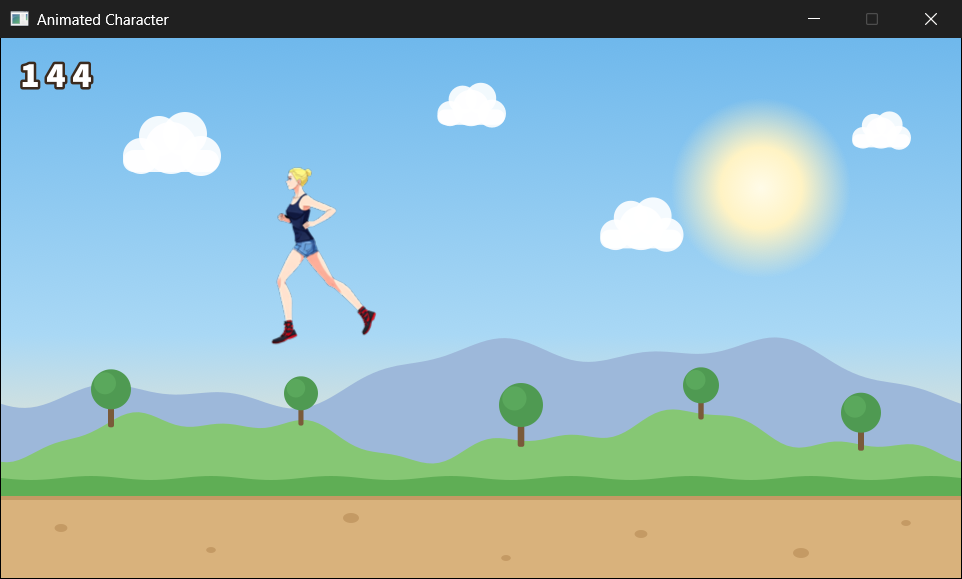
Press F5, and there she is, standing on the landscape from Chapter 17, as in Figure 19.4. Hold the right arrow, and she runs, legs pumping, as far as the edge of the window. Then hold the left arrow, and she turns on the spot and runs the other way. Press Space as she runs, and she leaps, and lands still running. Let go of everything, and she stands and waits, facing the way she was going.
It looks a lot like part of the Runner, and in a way, it is. But look at the code that made it. The game loop tells a player to run, update, and draw, and tells a HUD to update and draw, and never needs to know how they do it. That's what you've built, as much as the runner herself.
Understanding the Code
The program is 440 lines, in nine files, and each file does one job. Here's how the pieces fit together.
Who Knows What
Start with runGame’s game loop, and compare it with Chapter 17's. The Runner's loop called updateGame, which called updateRunner, passing the runner's struct along, and any function that had the struct could change anything in it. This loop only gives orders: player.run(direction), player.jump(), player.update(delta), and player.draw(renderer). It doesn't know that she has a position, a vertical speed, or an Animator, and it can't reach them, because they're private. If her jump needs changing, Player.cpp is the only place to look.
The classes know as little about each other as they can. The Player class uses a Texture and an Animator, but only through their public functions, so the texture's pointer and the animator's timer are as private from her as they are from runGame. The Animator doesn't know it's animating a runner, or even that there's such a thing as SDL, so any animation in any later program could use it as it is. And Texture knows nothing about runners, digits, or scenery. It just looks after a picture.
Owners and Users
Two kinds of member hold other objects in this program, and the difference matters. The player's animator_ is an Animator itself, so it lives inside her, and she owns it. But her sheet_ is a reference: a second name for a texture that belongs to runGame. It's the same distinction that Chapter 10 drew between a unique_ptr, which owns what it points at, and a raw pointer, which only looks at it.
A reference, like any observer, carries one rule with it: whatever it refers to has to outlive it. Here, that's guaranteed by the order the objects are made in runGame, which Figure 19.5 lays out. The textures are made first, and the player and the HUD after them, so when runGame returns, the player and the HUD are destroyed first, while the textures they refer to still exist. Then the textures go, each destroying its own picture. And only after runGame has returned does main destroy the renderer.
The Rule of Zero, in Practice
Count the destructors in the program. There's one, in Texture. The player owns an Animator and uses a texture, the HUD uses a texture, and runGame owns six textures, a player, and a HUD, and none of them has a destructor, because none of them needs one. The Animator inside the player is destroyed with her, just as Chapter 18's knight took his sword and shield with him, and each Texture destroys its own picture.
The one class that owns something SDL made is also the one class with deleted copy operations. That's no accident. It's the rule of three from Chapter 18, and the rest of the classes follow the rule of zero.
Experimenting
A few things to try, now that the pieces are separate:
- Switch vsync off. Put
//in front of theSDL_SetRenderVSyncline inmain, and run it. The frame rate jumps into the thousands, 5,068 on my machine in a Debug build, and yet she runs at exactly the same speed, because everything moves by the delta time. Put the line back when you've seen it. - Change her pace. Double
RUN_SPEEDinPlayer.cpp, and her legs can't keep up. HalveFRAME_TIMEas well, and they can. Nothing outsidePlayer.cppneeds to change. - Two runners. In
runGame, make a second player below the first, withPlayer rival(runnerSheet, GROUND_Y, WINDOW_W);. Belowplayer.run(direction);, give her the opposite orders withrival.run(-direction);, and update and draw her alongside the first. They start in the same place and run apart, mirror images of each other, and only the first one jumps, because she's the only one told to. That's two objects, one class, and one sprite sheet between them. - A different stance. Try each frame from 0 to 5 as
STAND_FRAME, and see which one looks most like standing still to you. - Try to copy a texture. Add
Texture copy = sky;torunGame, below the textures. The build stops with C2280: 'Texture::Texture(const Texture &)': attempting to reference a deleted function. Chapter 18's= deleteis doing its job. Take the line out again.
Common Errors and Fixes
The runner doesn't appear, though the scenery does. The members in Player.h are in the wrong order: y_ is declared above groundTop_, so the constructor works out her height from a groundTop_ that isn't set yet. In a Debug build, that's a huge negative number, which puts her far above the window, and Visual Studio gives no warning. Declare groundTop_ above y_, as in the complete listing.
C2065: 'direction_': undeclared identifier, in Player.cpp. A definition is missing its Player::, so it's a free function that just happens to be called run, and it can't see the class's members. The error names the first member it tried to use. Put Player:: in front of the function's name.
C2280: 'Texture::Texture(const Texture &)': attempting to reference a deleted function. Something is trying to copy a Texture. If the error points at the line in runGame that makes the player, her constructor takes Texture sheet instead of const Texture& sheet, so passing the sheet would copy it. When it points at the constructor in Player.cpp instead, the member in Player.h is const Texture sheet_; without its &, so it's a whole texture of its own, copied from the one it's given. Add the missing &.
C2572: 'Texture::draw': redefinition of default argument: parameter 1. The definition of draw in Texture.cpp repeats = SDL_FLIP_NONE. The default belongs in the header only, so take it out of the .cpp file.
C3646: 'animator_': unknown override specifier, followed by C4430: missing type specifier - int assumed. Two confusing messages with one cause: Player.h doesn't include Animator.h, so the compiler doesn't know that Animator is a type, and tries to make sense of the line some other way. Add #include "Animator.h" to Player.h.
C2664: cannot convert argument 2 from 'SDL_FRect' to 'const SDL_FRect *'. A call to draw passes a rectangle itself, where it should pass its address. Write &src and &dst, with the &.
The window opens and closes at once. The console says why, with a line for each picture, like "Couldn't load assets/sky.png: Couldn't open assets/sky.png: The system cannot find the path specified." The assets folder isn't beside main.cpp, or it's called something else. If only one picture is named, check that file's name in the folder against the one in runGame.
She slides along without moving her legs. Her Animator is never updated, so it stays on frame 0. Check that update in Player.cpp calls animator_.update(delta) while she's running.
AI Exercise (Optional)
If you'd like to push the program further with an AI's help, here's a challenge that's all about classes. As always, it's optional, and nothing later depends on it.
Open your AI chatbot of choice and try a prompt like this:
"I have a small C++ SDL 3 program built from classes, each in its own .h and .cpp file. A Texture class owns one SDL_Texture, loading it with IMG_LoadTexture in its constructor and destroying it in its destructor, with its copy constructor and copy assignment deleted; it has isLoaded() and draw(renderer, src, dst, flip), where src and dst are const SDL_FRect pointers and nullptr means the whole picture or the whole window. There's also a function, runGame(SDL_Renderer* renderer), that makes four Texture objects for the scenery (sky, far hills, near hills, and ground, each 960 by 540, drawn over the whole window from the back to the front) and draws them every frame. I have learned classes, constructors with member initializer lists, const member functions, destructors, RAII, deleted copy operations, composition, and references, but not inheritance. Write a Scenery class, in Scenery.h and Scenery.cpp, that owns the four textures as members, loads them in its constructor, has an isLoaded() that's true only if all four loaded, and draws them all in a const draw(renderer) function, so that runGame only needs one Scenery object. Put each curly brace on its own line, and show me the changes to runGame too."
Notice what the preceding prompt does. It describes the Texture class exactly, so the AI builds on it rather than inventing its own, and it says what you've learned, so the answer won't lean on inheritance. The prompt also asks for the three things that make the class right: ownership, a way to report failure, and a const draw.
When the answer comes back, check it against this chapter. Are the four textures members of Scenery, rather than pointers to textures made with new? Does the constructor build them in its initializer list, since a Texture has no default constructor?
And did the AI give the class a destructor, or deleted copy operations? It needs neither, because its Texture members already destroy themselves, and can't be copied, which makes a Scenery uncopyable too: the rule of zero again. If the AI wrote any of those anyway, ask it why.
Then put the new class into your project, and make sure the landscape looks exactly as it did.
Summary
You've built your first program out of classes, split across nine files. A Texture loads its picture when it's made, destroys it when it goes, and can't be copied, so the program has one call to SDL_DestroyTexture in it, and nobody ever has to remember to make it.
An Animator counts through frames with Chapter 17's accumulator, and knows nothing about what it's animating. The Player has an Animator of her own, uses a sprite sheet that belongs to someone else, and runs, turns, and jumps when she's told to, keeping all of her own details to herself. The HUD counts the frame rate, with a private helper to draw it. And the whole game lives in one function, so that everything it makes is destroyed, in reverse order, before the renderer.
In the next chapter, we'll meet the other big relationship between classes. Our player has an Animator, but some classes are other classes: a runner and a rival runner are both characters, and they'd share most of their code. That's inheritance, and in Chapter 21, it will fill this landscape with a crowd of runners, all sharing one sprite sheet.