
Everything you've learned up to this point has been building toward this chapter. Variables, functions, and references have all been warm-ups for the moment we finally look at how the computer actually stores our data, and that moment is now. Pointers are one of the things that give C++ its reputation as a language you have to take seriously, and also one of the things that give it its enormous power. If you've heard programmers talk about pointers in hushed, slightly nervous tones, it's because pointers are where C++ stops protecting you from yourself.
Don't panic. Pointers aren't magic, and you've been using them since Chapter 1: every SDL_Window*, every &event, and the keys table in every project you steer with the keyboard. In this chapter, we'll build up from what memory actually looks like, meet raw pointers honestly, find out what those Chapter 1 lines really mean, and then graduate to smart pointers, the modern and much safer way to manage memory in C++. By the end, you'll understand a concept that a lot of programmers struggle with for years, and your code will be noticeably more powerful for it.
In this chapter, we will:
- See where a program keeps its data: the stack and the heap
- Revisit references, and meet raw pointers, the
&that finds an address, and the*that follows one - Finally explain
SDL_Window*,&event, andconst bool* keysfrom Chapter 1 - Reach into structs through pointers with the arrow,
->, and watch pointers in the debugger - Create and destroy things on the heap with
newanddelete, and see what goes wrong - Use
nullptr, and combineconstwith pointers - Let smart pointers do the cleaning up:
unique_ptr,shared_ptr, andweak_ptr - See where pointers turn up in real game code
- Try an optional AI exercise on memory bugs
As in Chapters 2, 4, 6, and 8, the examples are small experiments for your Sandbox project. Each lead-in says whether the code goes inside main or above it, and any #include it needs.
Let's start by finding out where our data has been living all along.
Memory: The Stack and the Heap
Every variable in every program you've written so far has lived somewhere in the computer's memory. You haven't had to think about where, exactly, because C++ has been quietly handling it for you. Now we need to pull back the curtain, because where a variable lives has real consequences.
A running C++ program keeps its data in two main regions of memory: the stack and the heap. They work very differently, and the difference is the foundation for everything else in this chapter.
The Stack
You met the stack in Chapter 8, as the call stack. Every time a function is called, a stack frame goes on top, holding that call's parameters and local variables, and when the function returns, its frame comes off again. The stack is fast, it's small, and it's automatic: you don't have to do anything, because it takes care of itself.
Every local variable you've created so far has lived on the stack. Here's a function to put above main in the sandbox:
void doSomething()
{
    int score = 100;       // lives on the stack
    float speed = 2.5f;    // so does this
}   // doSomething returns, and both are gone
In the preceding code, score and speed exist only while doSomething is running. The moment it returns, its stack frame is thrown away, and the memory is reused by the next function that's called.
The stack is fast because adding and removing a frame is trivial: the program just moves a single marker up and down. It's also limited in size. Use too much of it, for example by recursing too deeply, and you get Chapter 8's stack overflow crash.
On Windows, each program's stack is 1 MB unless you ask for more, which is plenty for local variables, but not for big things. An array of 300,000 int values inside a function needs more than that on its own, and crashes with Chapter 8's stack overflow. That's one of the reasons big game data, such as textures (the pictures a game draws, which Chapter 11 loads) and levels, lives on the heap instead.
So the stack is quick and tidy, but small, and everything on it disappears when its function returns. The heap is the answer to both of those limits.
The Heap
The heap is a much bigger pool of memory: essentially all the free memory your program can get its hands on. Unlike the stack, nothing on the heap is automatic. When you want memory from the heap, you ask for it, and when you're done with it, you have to give it back. Forget to give it back, and that memory stays taken until your program ends. That's called a memory leak, and in a long-running program like a game, it can be a serious problem.
If the stack is a neat pile of plates, the heap is the warehouse out back. It's vastly bigger, but nobody keeps track of what you took. You have to remember.
So why would we ever use the heap? There are three good reasons:
- Lifetime beyond a single function. A variable on the stack dies when its function returns. Sometimes we need data that outlives the function that created it.
- Big things. The stack is small. Something big, such as a texture, a level's worth of tiles, or a list of ten thousand enemies, belongs on the heap.
- Sizes you don't know in advance. Sometimes you don't know how much data you'll need until the program is running. The stack needs every size to be known when the program is compiled, and the heap doesn't.
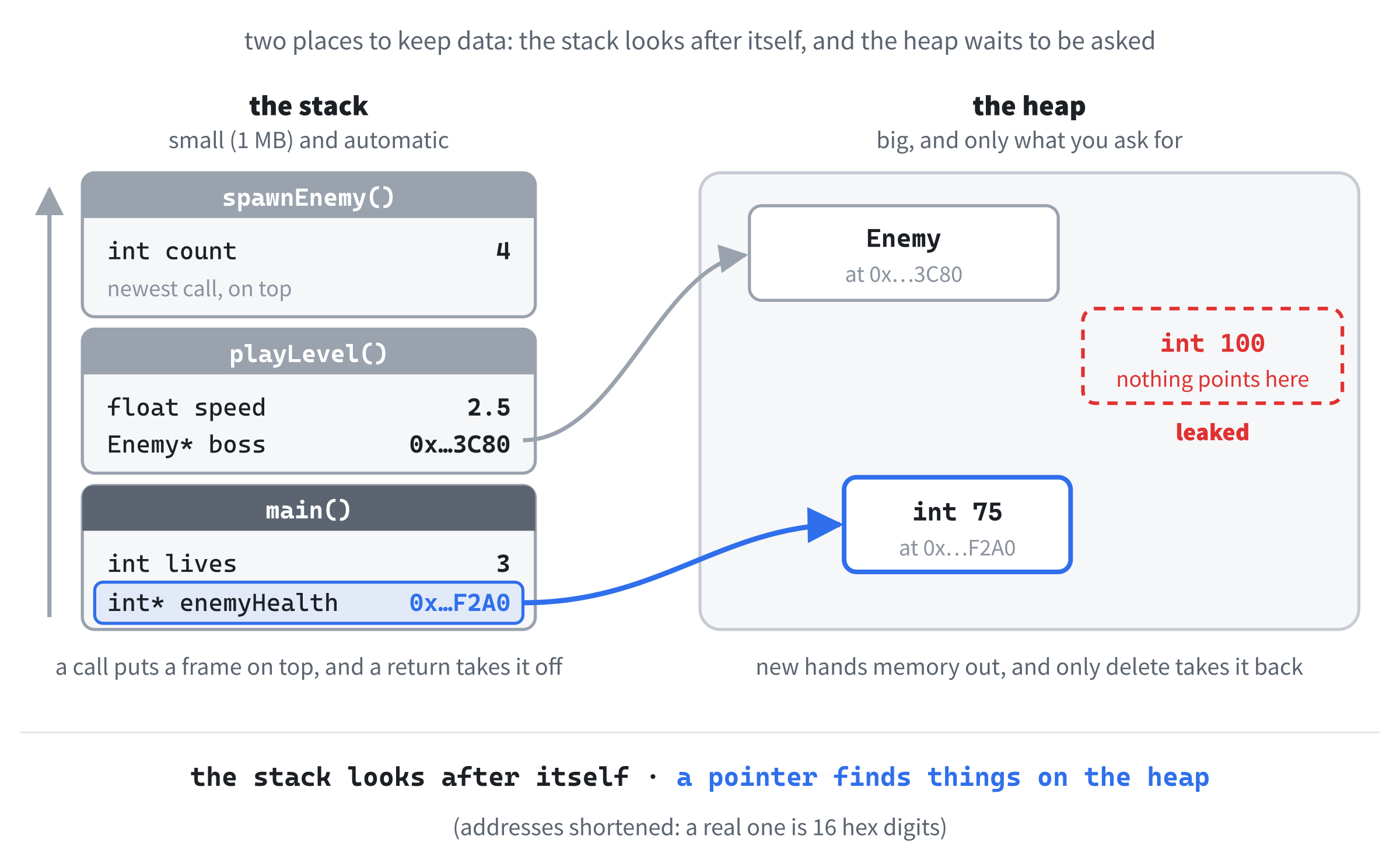
Notice the blue arrow in Figure 10.1. A variable in a stack frame can hold the location of something on the heap, and that's how a program keeps track of what it asked for. Such a variable is called a pointer. Before we meet pointers properly, though, let's take another look at their close relative, the reference.
References, Revisited
References appeared in Chapter 8, as a way for a function to change the caller's variable, and in Chapter 9, where Alien& alien = game.aliens[i]; made a reference in the middle of a loop. The full story is simple: a reference is another name for a variable that already exists. Try this inside main:
int score = 100;
int& scoreRef = score;   // scoreRef is another name for score

scoreRef = 200;
std::cout << score << std::endl;
In the preceding code, scoreRef isn't a copy of score: it is score, under a second name. Writing to scoreRef changes score, so the console shows 200. The & after the type is what makes it a reference.
References have two important rules. First, a reference must be set up when it's created. You can't create a reference to nothing and decide later. Second, once a reference is tied to a variable, it can never be tied to a different one. Whatever you attach it to on the first day, it stays attached to for life.
The second rule leads to a classic trap. Try this, in place of the last example:
int a = 10;
int b = 20;

int& ref = a;   // ref is another name for a
ref = b;        // copies b's value into a: it doesn't move ref to b
std::cout << a << " " << b << std::endl;
In the preceding code, the line ref = b; looks as though it might point ref at b. It doesn't, because references can't be moved. The assignment copies the value of b into whatever ref names, which is a, so the console shows "20 20". Change b afterward, and ref still reads 20, because it's still a.
References are safe, clean, and limited. They always refer to something real, they can never refer to nothing, and they can never be moved to a different target. When all you need is another name for an existing variable, a reference is almost always the right tool.
But what if you need something more flexible? What if you want something that can refer to one thing now, a different thing later, or nothing at all? That's what pointers are for.
Raw Pointers
A pointer is a variable whose value is a memory address. Where an ordinary int stores a number like 100, a pointer stores the location of an int somewhere in memory. If you think of memory as a street of houses, a pointer is a house number written on a scrap of paper. It isn't the house. It's a note telling you where to find it.
Here's a pointer, to try inside main:
int score = 100;
int* scorePtr = &score;   // scorePtr holds the address of score

std::cout << scorePtr << std::endl;
In the preceding code, the type int* means "pointer to an int": the * is part of the type. On the right, the & in front of score is the address-of operator, which gives the memory address where score lives. So scorePtr now holds the address of score, and when the console prints it, you see something like 0000007447F7FAC4. Yours will be different, and it'll change every time you run the program.
That strange number is the address in hexadecimal, or base 16, which uses the digits 0 to 9 and then A to F for the values 10 to 15. Each hex digit stands for exactly four bits, so a 64-bit address is always 16 hex digits. You'll never need to convert them to decimal, only to notice when two addresses match. The address changes from run to run because Windows moves things around on purpose each time a program starts, to make it harder to attack.
An address on its own isn't much use. We want to read or write the value that lives there. For that, we dereference the pointer with *. Add these lines below the last example:
std::cout << *scorePtr << std::endl;   // the value at that address
*scorePtr = 250;                       // writes 250 into score
std::cout << score << std::endl;
In the preceding code, *scorePtr means "the value at the address in scorePtr." Reading *scorePtr reads score, so the first line prints 100. Writing to *scorePtr writes to score, so the last line prints 250. The pointer is an indirect handle on score: it gets you there by way of the address. Figure 10.2 draws the whole thing.

The two uses of * are worth pulling apart, because they look identical but do different jobs:
- In
int* scorePtr = &score;, the*is part of the type. It says "pointer toint." - In
*scorePtr = 250;, the*is the dereference operator. It says "follow the pointer to the value."
C++ uses the same symbol for both, and it trips up every beginner at some point. Whenever you see a * next to a pointer, ask yourself whether it's in a declaration, where it's part of a type, or in an expression, where it follows the pointer. That tells you what it means.
One more fact makes pointers less mysterious: a pointer is just a variable, with its own place in memory, like any other. In a 64-bit Windows program, every pointer takes eight bytes, whether it points at a single int or a whole game's worth of data, because all it holds is an address.
The Two Ampersands
Chapter 8 warned that the & in a reference like int& n isn't the & in Chapter 1's SDL_PollEvent(&event), and promised that this chapter would explain how they're related. Here's the promise kept. Put these two functions above main:
void doubleByPointer(int* n)
{
    *n = *n * 2;
}

void doubleByReference(int& n)
{
    n = n * 2;
}
In the preceding code, both functions double the caller's number, but they get hold of it differently. The first takes a pointer, so it has to follow the pointer with * to reach the number. The second takes a reference, Chapter 8's way, so it can use n as if it were the number itself. Now call them, inside main:
int score = 10;
doubleByPointer(&score);
std::cout << score << std::endl;
doubleByReference(score);
std::cout << score << std::endl;
In the preceding code, the call to doubleByPointer has to hand over the address, with &score, and the console shows 20. The call to doubleByReference just passes score, and the console shows 40.
Both functions changed the caller's variable, and under the hood, the compiler usually passes the reference as an address, too. The difference is who does the work. With a pointer, you take the address and follow it yourself. With a reference, the compiler does both for you, and in return, a reference must always refer to something, and can never be moved.
So the two ampersands are related, but they sit in different places. After a type, as in int& n, the & makes a reference. In front of a name, as in &score, it takes an address. Figure 10.3 puts a reference and a pointer side by side.

The Pointers You've Been Using
Now we can go back to Chapter 1 and read its code properly. SDL is written in C, which has pointers but no references, so every SDL function that needs to change something of yours, or hand you something of its own, uses a pointer.
The window is the first example. The function SDL_CreateWindow creates the window somewhere in SDL's own memory, and hands you back its address, which is why the type is SDL_Window*: a pointer to an SDL_Window. You never look inside it: you just hand the pointer back to SDL whenever you want something done to that window, and when you're finished, SDL_DestroyWindow gives the memory back. The renderer works the same way.
Then there's &event. The function SDL_PollEvent takes an SDL_Event*, a pointer to an event. We hand it the address of our event variable, and SDL writes the next event into it, through the pointer, exactly as doubleByPointer wrote into score. That's why the & has been there since Chapter 1.
The keyboard is the third. The function SDL_GetKeyboardState returns a const bool*, the address of a table of bool values that SDL keeps up to date, one for every key. The const means we can read the table, but not change it, and we'll look at that combination properly later in this chapter. The nullptr we pass it means "I don't need to know how many keys there are," and we'll come to nullptr properly in a moment.
Even main’s char* argv[] fits the pattern. It's an array of char* pointers, each one holding the address of the first letter of a piece of text: the program's own name, and then anything typed after it. We still don't use it, but now you can read it.
Pointers Can Be Reassigned
Unlike a reference, a pointer can be pointed at different things over its lifetime. Try this inside main:
int firstScore = 100;
int secondScore = 200;

int* ptr = &firstScore;          // points at firstScore
std::cout << *ptr << std::endl;

ptr = &secondScore;              // now points at secondScore
std::cout << *ptr << std::endl;
In the preceding code, ptr starts out pointing at firstScore, so the console shows 100. Then it's given the address of secondScore, and now it shows 200. Assigning to a pointer changes where it points, which is exactly what ref = b; couldn't do. That flexibility is why pointers exist, and also what makes them more dangerous than references.
Null Pointers
A pointer doesn't have to point at anything. It can be null, holding a special value that means "no address." In modern C++, you write it as nullptr:
int* ptr = nullptr; // points at nothingIn the preceding code, ptr is honest: it says it has no target right now. Before you follow a pointer that might be null, you check it. Add this below it:
if (ptr != nullptr)
{
    std::cout << *ptr << std::endl;
}
In the preceding code, the *ptr only runs if ptr isn't null. This is a defensive pattern you'll see everywhere, and it often shrinks to one line with Chapter 4's short-circuit, as in if (ptr != nullptr && *ptr > 0). If the first half is false, the second half, which follows the pointer, never runs. Chapter 4 promised you the most famous use of short-circuiting, and this is it.
What happens if you skip the check? Replace the if with just std::cout << *ptr << std::endl;, and press F5. Visual Studio stops the program on that line, as Figure 10.4 shows, with the message "Exception thrown: read access violation. ptr was nullptr." An access violation means the program tried to use memory that doesn't belong to it, and address 0, where a null pointer points, never belongs to anyone. Run the program without the debugger, with Ctrl+F5, and it simply dies, with the exit code 0xC0000005, which is Windows' number for an access violation.
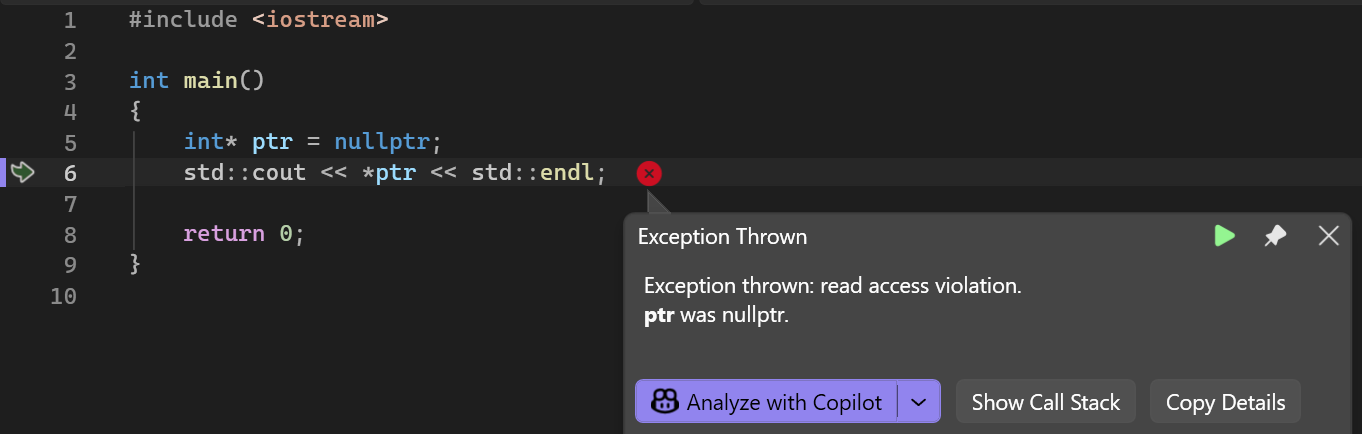
A crash that points straight at the guilty line, like this one, is a good crash. The dangerous bugs are the ones that don't crash, and we'll meet some shortly.
Uninitialized Pointers
There's one thing worse than a null pointer, and that's a pointer that was never set at all. Try this inside main:
int* wild;
std::cout << *wild << std::endl;
In the preceding code, wild is created without a value, so it holds whatever happened to be in its memory before, which is an address that could point anywhere. New Visual Studio projects have extra security checks turned on, so this doesn't even build: it stops with C4700: uninitialized local variable 'wild' used. In a Debug build, a pointer that's never set holds the same 0xCC pattern as the -858993460 in Chapter 9, which, as an address, points at nothing useful.
The fix is a habit: never create a pointer without a value. If you have nothing for it to point at yet, give it nullptr, so that it's null rather than wild.
The Arrow Operator
Pointers to structs are everywhere in games, and there's a piece of syntax made just for them. Put this struct above main:
struct Enemy
{
    int health;
    float x;
};
In the preceding code, an Enemy has a health and a position, just like Chapter 2's structs. Now make one, and point at it, inside main:
Enemy goblin = { 100, 50.0f };
Enemy* target = &goblin;   // target points at goblin

(*target).health = 90;     // the long way
target->health -= 10;      // the arrow: the same thing, shorter
std::cout << goblin.health << std::endl;
In the preceding code, target holds the address of goblin. To reach a member through it, you could follow the pointer with * and then use a dot, as the first assignment does. The parentheses are needed, because without them, the dot would be applied first.
That's clumsy, so C++ has a shortcut: the arrow operator, ->, typed as a minus sign and a greater-than sign. The expression target->health means exactly the same as (*target).health: follow the pointer, then take the member. The goblin's health goes from 100 to 90 to 80, and the console shows 80.
The arrow goes hand in hand with the null check, in the same short-circuit pattern. Try this inside main:
Enemy* nobody = nullptr;
if (nobody != nullptr && nobody->health > 0)
{
    std::cout << "still alive" << std::endl;
}
In the preceding code, nobody is null, so the first half of the condition is false, and thanks to the short-circuit, nobody->health is never looked at. Nothing is printed, and nothing crashes. Swap the two halves around, and the program crashes on the arrow before it ever gets to the check. You'll use the arrow constantly from Chapter 12 onward, whenever a pointer leads to a struct.
Pointers in the Debugger
Visual Studio is very good at showing you pointers, and it's worth a look now that you know what you're seeing. Keep the Enemy struct above main, and make this the whole of main:
int main()
{
    int score = 250;
    int* scorePtr = &score;

    Enemy goblin = { 80, 50.0f };
    Enemy* target = &goblin;
    Enemy* nobody = nullptr;

    std::cout << *scorePtr << " " << target->health << std::endl;

    return 0;
}
In the preceding code, there's one of everything: a pointer to an int, a pointer to a struct, and a null pointer, and the console line reads through the first two, printing "250 80". Put a breakpoint on the return 0; line, and press F5. Figure 10.5 shows what the Locals window makes of them.
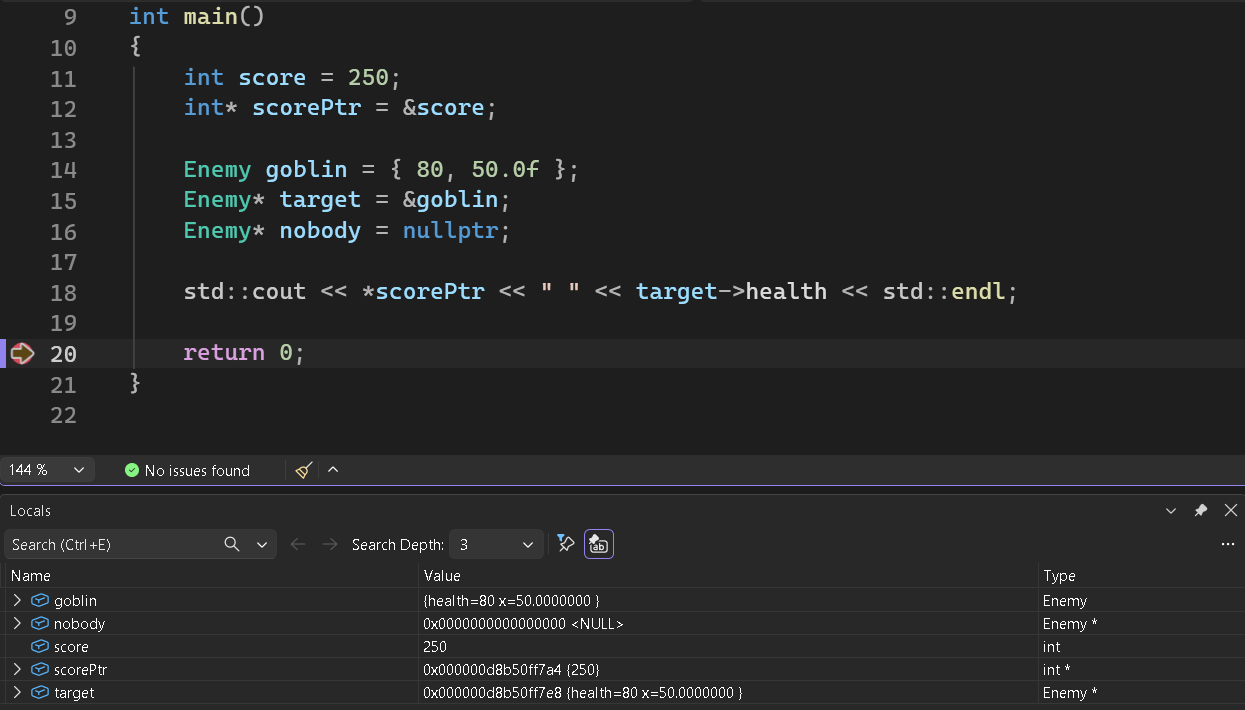
The pointer scorePtr shows an address, and then, in curly braces, the 250 it points at, so you get both at once. The target pointer shows the goblin's members, and the small triangle beside it opens the goblin up, just as the one beside goblin does. And nobody shows as 0x0000000000000000 <NULL>, the debugger's way of saying nullptr. You can also type an expression, such as *scorePtr or target->health, into the Watch 1 window, next to the Locals tab, and it shows its value, 250 and 80 here, updated every time the program pauses.
Pointer Arithmetic (Brief)
Pointers support a little arithmetic. Adding one to a pointer moves it along by one item of its type, not by one byte. Try this inside main:
int numbers[3] = { 10, 20, 30 };
int* ptr = &numbers[0];

std::cout << *ptr << std::endl;        // 10
std::cout << *(ptr + 1) << std::endl;  // 20
std::cout << ptr[2] << std::endl;      // 30, the same as *(ptr + 2)
In the preceding code, ptr points at the first number in the array, so *ptr is 10. Then ptr + 1 doesn't add one byte to the address: it moves along to the next int, four bytes further on, so *(ptr + 1) is 20. The compiler does the scaling for you, based on the pointer's type. Print ptr + 1 and ptr side by side, and you'll see two addresses that differ by exactly 4.
The last line shows the most useful fact of the lot: square brackets work on pointers, too. The expression ptr[2] means *(ptr + 2), the item two places along. That's how Chapter 1's keys[SDL_SCANCODE_W] works. The pointer keys holds the address of the first bool in SDL's table, and the scancode in the brackets counts along to the right one.
Pointer arithmetic is how C and older C++ code walk through arrays. In modern code, you'll rarely write it yourself, because arrays and vectors, in Chapter 13, give you safer tools that do the same job. It's worth recognizing when you see it, but we won't rely on it.
Why Raw Pointers Are Dangerous
Raw pointers are powerful, and they're also where most memory bugs come from. Here's the short list of what can go wrong:
- Following a null pointer. A crash, as you've seen.
- Following a pointer that was never set. Anything at all, which is why Visual Studio refuses to build it.
- Following a pointer to memory that's already been given back, which is called a dangling pointer. A crash, or worse, quietly corrupted data.
- Forgetting to give back heap memory. A memory leak.
- Giving the same memory back twice, which is called a double free. A crash, or corrupted data.
- Writing past the end of an array through a pointer. Silent corruption, until something breaks later, as Chapter 9's off-by-one loop did to the score.
These aren't exotic problems. They're everyday bugs in real C++ code. The good news is that modern C++ gives us smart pointers, which we'll meet shortly, and they make most of these mistakes much harder to make.
But raw pointers aren't out of date, and they're nothing to be ashamed of. They're the foundation that everything else is built on, they're everywhere in existing code, and SDL's whole API, every SDL_Window*, SDL_Renderer*, and SDL_Texture*, uses them. Learning raw pointers well is essential. Knowing when to reach for something safer is what separates learning C++ from writing good C++.
Now for the place where raw pointers most naturally turn up: the heap.
Dynamic Memory Allocation
Until now, every variable we've created inside a function has been on the stack. Its lifetime was tied to the function, or the block, that created it, and its size was known when the program was compiled. Dynamic allocation breaks both of those rules: we ask for memory on the heap while the program is running, and keep it for as long as we like.
The two keywords for this are new and delete. Try this inside main:
int* enemyHealth = new int(100);   // an int on the heap, set to 100

std::cout << *enemyHealth << std::endl;
*enemyHealth = 75;                 // change the value on the heap
std::cout << *enemyHealth << std::endl;

delete enemyHealth;                // give the memory back
enemyHealth = nullptr;             // and forget where it was
In the preceding code, new int(100) asks the heap for enough memory to hold an int, puts 100 in it, and hands back its address, which we keep in a pointer. We read and write the value through the pointer, as before, so the console shows 100 and then 75. When we're finished, delete enemyHealth tells the heap that we're done with that memory, and it can be reused. Setting enemyHealth to nullptr afterward isn't required, but it's a very good habit, because as far as C++ is concerned, the pointer still holds the old address after the delete, and that's a dangling pointer waiting to happen. As a bonus, deleting a null pointer is perfectly safe, and does nothing at all.
Every new needs exactly one matching delete. Forget the delete, and the memory leaks. Use the pointer after the delete, and you're following a dangling pointer. Try it, in place of the last example:
int* health = new int(100);
delete health;                          // the memory goes back...
std::cout << *health << std::endl;      // ...but health still points at it
In the preceding code, health is still pointing where the memory was, after the memory has been given back, so the last line reads memory that no longer belongs to the program. What happens next is anybody's guess. It might print a garbage number, or even 100, and carry on as if nothing were wrong. That's what undefined behavior means, and it's why dangling pointers are so nasty. Delete the same memory twice, which is the double free, and you're back in the same territory.
In a Visual Studio project, though, it crashes every time, and the debugger says "read access violation. health was 0x8123." That's the extra security checks again, the ones behind C4700. After a delete, they quietly change the pointer you deleted through to 0x8123, an address that's certain to crash, so the mistake shows up at once, on the right line. It's a safety net, but only a small one. Other compilers don't do it, and any other pointer that holds the same address, such as a copy, still points at memory that's gone.
After a delete, the pointer can still hold the old address, and nothing about it says that the memory has gone, so any code that uses it later follows a dangling pointer, and the resulting bug can surface far away from the mistake. Set a pointer to nullptr right after you delete what it points at. A later use then fails loudly, on the right line, instead of quietly corrupting something.
This one-to-one dance between new and delete is where most of the pain of raw pointers comes from. Here's a function that looks innocent, to put above main:
void loadEnemy(bool giveUpEarly)
{
    int* health = new int(100);

    if (giveUpEarly)
    {
        return;   // oops: the memory leaks
    }

    delete health;
}
In the preceding code, if giveUpEarly is true, the function returns before it reaches the delete. The pointer health disappears with the stack frame, but the memory it pointed at is still taken on the heap, and nothing points at it anymore, so nothing can ever give it back. It's leaked. You could fix it by adding a delete before the early return, but then there are two copies of the cleanup to keep in step. In a real function, with several ways out, manual new and delete becomes a minefield.
The modern answer is to stop writing new and delete yourself altogether, and we'll get there shortly. First, a quick word about null pointers.
nullptr vs NULL vs 0
You'll see three different ways of writing "a null pointer" in C++ code: nullptr, NULL, and a plain 0. All three were meant for the same job, but only one is right in modern C++:
nullptris a proper null pointer keyword, added in C++11. This is the one to use.NULLis an old macro from C: a name that's swapped for its value before the compiler sees your code. In C++, that value is just 0, so the compiler sees an integer, not a pointer, and that causes subtle bugs.0is a literal zero. It works as a null pointer, for historical reasons, but it's also the number zero, and which one it means depends on where it's used.
The problem shows up most clearly with Chapter 8's overloading. Put these two functions above main:
void process(int n)
{
    std::cout << "process(int)" << std::endl;
}

void process(int* ptr)
{
    std::cout << "process(int*)" << std::endl;
}
In the preceding code, the two functions share a name, and one takes a number while the other takes a pointer. Now call them, inside main:
process(NULL);      // which one does this call?
process(nullptr);
In the preceding code, the first call looks as if it passes a null pointer, but NULL is really the integer 0, so C++ calls process(int), and the console says so. The second call uses nullptr, which can only be a pointer, so it goes to process(int*), with no room for doubt.
The rule is easy: always write nullptr for a null pointer in new code. If you see NULL or 0 in older code, it isn't wrong, just dated.
const Pointers and Pointers to const
The const keyword and pointers combine in a way that looks confusing at first, but follows a simple pattern. There are two different things you might want to make const: the thing the pointer points at, or the pointer itself. For the examples, start main with two variables:
int someValue = 5;
int anotherValue = 6;
In the preceding code, the two numbers are just something to point at. The first combination is a pointer to const, which can't change what it points at, but can be pointed somewhere else. Add this below them:
const int* ptr = &someValue;   // a pointer to a const int
*ptr = 10;                     // error: can't change the value through ptr
ptr = &anotherValue;           // fine: ptr can point somewhere else
In the preceding code, the const belongs to the int, so the value can't be changed through ptr. The middle line stops the build with C3892: 'ptr': assignment to const-qualified variable of type 'const int *'. Delete it, and the last line is fine, because the pointer itself was never const.
The opposite is a const pointer, which is stuck pointing at one place, but can change the value there. Replace the last three lines with these:
int* const ptr = &someValue;   // a const pointer to an int
*ptr = 10;                     // fine: the value can change
ptr = &anotherValue;           // error: ptr can't point anywhere else
In the preceding code, the const comes after the *, so it belongs to the pointer. Changing the value is fine, but the last line stops the build with C3892 again, this time for type 'int *const'.
Put const in both places, and you get a const pointer to const, which can change neither. Replace the lines once more:
const int* const ptr = &someValue;   // neither can change
*ptr = 10;                           // error
ptr = &anotherValue;                 // error
In the preceding code, both of the last two lines stop the build, each with C3892.
To read a declaration with const in it, start at the name and read right to left. Read that way, int* const ptr says "ptr is a const pointer to an int," and const int* ptr says "ptr is a pointer to an int that's const." A const applies to whatever is just to its left, or, when it's at the very start, to whatever comes just after it.
In practice, the most common of the three, by far, is the pointer to const. It's how a function says "I need to read this through a pointer, but I promise not to change it," and it's exactly what Chapter 1's const bool* keys is: SDL lets you read its keyboard table, but not scribble on it. You'll see pointers to const so often that they'll become invisible, just like Chapter 8's const references.
Function Pointers (Brief)
C++ even lets you take the address of a function, keep it in a variable, and call the function through that variable. That's a function pointer, and its syntax is unlovely. Try this, with the function above main:
void greet()
{
    std::cout << "Hello!" << std::endl;
}
In the preceding code, greet is an ordinary function with no parameters. Now point at it, and call it, inside main:
void (*funcPtr)() = &greet;   // a pointer to a function
funcPtr();                    // calls greet
In the preceding code, void (*funcPtr)() creates a pointer called funcPtr to a function that takes nothing and returns void. It's given the address of greet, and then calling funcPtr() calls greet, so the console says "Hello!".
Function pointers exist because sometimes you want to hand a function to another function, such as a sorting function that takes your rule for which item comes first, or an event system that takes a function to call when something happens. They're one of C++'s oldest features, and they work. Modern C++ mostly uses lambdas for the same jobs instead: small, unnamed functions that you write right where they're needed, which you'll meet in Chapter 24. For now, it's enough to recognize a function pointer when you see one. You'll rarely need to write one yourself.
Smart Pointers
Everything that goes wrong with raw pointers, from the leaks to the dangling pointers and the double frees, comes from having to match every new with exactly one delete, by hand. A smart pointer solves that. It's a small object that holds a raw pointer and does the cleanup for you: when the smart pointer goes away, it gives the memory back automatically. That means no manual delete, no leaks from early returns, and no dangling pointers from forgetting to null things out.
Smart pointers come from the standard library, in the <memory> header, so add #include <memory> below #include <iostream> for the examples in this section. There are three kinds. Two are used all the time, and the third is a specialist.
Two ideas appear in them for the first time. The first is the angle brackets. A smart pointer can point at any type, so you say which type in angle brackets, as in std::unique_ptr<int>, just as Chapter 2's static_cast<int> names the type it converts to. That kind of type, one that needs another type to complete it, is called a template, and you'll meet more of them in Chapter 13.
The second idea is the destructor. When a smart pointer goes away, for example at the end of its function, a piece of cleanup code called its destructor runs by itself, and that's where the delete happens. We'll write destructors of our own in Chapter 18, and for now, it's enough to know that they're there.
unique_ptr
A std::unique_ptr owns something on the heap, and it owns it alone. There's exactly one unique_ptr for the object at any time, and when that unique_ptr goes away, the object goes with it. Here's the leaky loadEnemy from before, done properly, to replace the old one above main:
void loadEnemy(bool giveUpEarly)
{
    std::unique_ptr<int> health = std::make_unique<int>(100);

    std::cout << *health << std::endl;
    *health = 75;

    if (giveUpEarly)
    {
        return;   // no leak: health cleans up by itself
    }

    std::cout << *health << std::endl;
}   // no delete needed: health cleans up here, too
In the preceding code, std::make_unique<int>(100) creates an int on the heap, sets it to 100, and wraps it in a unique_ptr. You follow it with *, exactly as you would a raw pointer, and for a struct, the arrow works too. When the function ends, whichever way it ends, health goes away, its destructor runs, and the memory is given back. The leak we worried about is now impossible. Call loadEnemy(true); and loadEnemy(false); from main, and the first call prints 100, while the second prints 100 and 75, and neither leaks a thing.
You could also write std::unique_ptr<int>(new int(100)), and it works, but make_unique is shorter, and it means there's no new anywhere in your code to worry about. Use make_unique.
Because a unique_ptr owns its object alone, you can't copy one. Try it inside main:
std::unique_ptr<int> first = std::make_unique<int>(42);
std::unique_ptr<int> second = first;   // a copy: not allowed
In the preceding code, the second line would give the same int two owners, and the compiler refuses, with a long error that begins C2280, and ends "attempting to reference a deleted function." The copying has been switched off on purpose. You can, however, move a unique_ptr, which hands the object over from one owner to another. Change the second line to this:
std::unique_ptr<int> second = std::move(first);In the preceding code, std::move says "I'm handing this over." After the line runs, second owns the int, and first is empty, holding nullptr. Check it with if (first == nullptr), and it is, while *second is 42. Figure 10.6 shows the handover.

When should you use a unique_ptr? The short answer is: by default. Most of the time, when you create something on the heap, there's a single clear owner for it, and a unique_ptr says so in code. It's as fast as a raw pointer, it's safe, and it makes your intent obvious to anyone reading.
shared_ptr
Sometimes ownership really is shared. Several parts of a program hold on to the same object, and it should only go away when the last of them is finished with it. That's what std::shared_ptr is for.
A shared_ptr keeps a count of how many shared_ptr values point at the same object. Each time you copy one, the count goes up, and each time one goes away, the count goes down. When it reaches zero, nobody is left holding the object, so it's destroyed. Try this inside main:
std::shared_ptr<int> first = std::make_shared<int>(42);
std::cout << first.use_count() << std::endl;

{
    std::shared_ptr<int> second = first;   // a copy: the count goes up
    std::cout << first.use_count() << std::endl;
}   // second goes away here: the count goes down

std::cout << first.use_count() << std::endl;
In the preceding code, first owns an int, and use_count reports how many owners it has, so the console shows 1. Inside the extra pair of braces, we copy first into second, and the count goes up to 2. Those braces make a scope, as in Chapter 2, so second goes away at the closing brace, and the count drops back to 1. When first goes away too, at the end of main, the count reaches 0, and the int is destroyed. Figure 10.7 follows the count.

Just like unique_ptr, shared_ptr has a helper, std::make_shared, and you should use it, for the same reasons.
When should you use a shared_ptr instead of a unique_ptr? Only when ownership is genuinely shared, when several parts of the program all have a real claim on the same object, and it should live until the last of them is done. The count has a small cost, because it has to be kept up to date safely every time a copy is made or goes away, so using a shared_ptr where a unique_ptr would do is a minor waste. The rule of thumb is:
- One owner? Use a
unique_ptr. - Shared ownership? Use a
shared_ptr. - Not sure? Start with a
unique_ptr. You can almost always change your mind later.
weak_ptr
A std::weak_ptr is a specialist tool, and it solves one particular problem: the reference cycle.
Imagine two objects, A and B, where A holds a shared_ptr to B, and B holds a shared_ptr to A. Each keeps the other alive. Even when no other part of the program points at either of them, their counts never reach zero, because each is holding the other up, so neither is ever destroyed. The memory has leaked, even though every pointer is a smart one.
A weak_ptr watches an object that a shared_ptr owns, without owning it. It doesn't add to the count, so it doesn't keep the object alive. Try this inside main:
std::shared_ptr<int> owner = std::make_shared<int>(42);
std::weak_ptr<int> watcher = owner;          // watches, but doesn't own
std::cout << owner.use_count() << std::endl;
std::cout << watcher.expired() << std::endl;

owner.reset();                               // the last owner lets go
std::cout << watcher.expired() << std::endl;
In the preceding code, watcher watches the int that owner owns, but the count stays at 1, because a weak_ptr doesn't count. Its expired function answers whether the object has gone, and the console shows bool values as 1 and 0, so it prints 0, for false. Then owner.reset() makes the owner let go, the count reaches 0, the int is destroyed, and expired now prints 1, for true. When you want to use what a weak_ptr watches, you ask it for a temporary shared_ptr with its lock function, which gives you one if the object still exists, and an empty one if it doesn't.
That's the key to breaking a cycle. If B holds a weak_ptr to A, instead of a shared_ptr, then A's count can reach zero, A is destroyed, and that lets go of B, as Figure 10.8 shows.

You won't need weak_ptr very often, and when you do, you'll usually know exactly why. This book won't use it much, but it's worth knowing it's there, because the day you meet a reference cycle, weak_ptr is the fix.
When to Use Which
To pull the four together:
- A raw pointer is for pointing at something that someone else owns, without owning it. It's also what SDL, and most libraries written in C, hand you.
- A
unique_ptris for sole ownership. It's the default for anything you create on the heap. - A
shared_ptris for shared ownership, when several owners genuinely need to keep an object alive. - A
weak_ptris for watching something ashared_ptrowns, without owning it, and it's how you break a cycle.
The modern C++ rule of thumb is: never write new or delete by hand in everyday code. Use make_unique and make_shared, and let the smart pointers look after the memory. The only places you'll find new and delete in modern code are inside the smart pointers themselves, and in the occasional piece of very specialized, low-level code.
Pointers in Games
All of this might feel a bit abstract, so let's look at where pointers really turn up in game code.
The most obvious place is SDL itself. Every major SDL object, from the window and the renderer to the textures and surfaces, two kinds of picture you'll meet in Chapter 11, is handed to you as a raw pointer:
SDL_Window* window = SDL_CreateWindow(...);
SDL_Renderer* renderer = SDL_CreateRenderer(window, ...);
In the preceding code, each ... stands for the usual arguments, and the call to SDL_CreateWindow hands back a raw SDL_Window*, because SDL is written in C, and C has no smart pointers. When we're done, we call SDL_DestroyWindow and SDL_DestroyRenderer to give them back, which is exactly the new and delete dance, just with SDL's own names. Modern C++ game code often wraps these in smart pointers that call SDL's destroy functions for you, and you'll see how at the end of Chapter 11. In the next chapter, SDL_image will hand you textures as raw pointers, too, and managing them carefully is a big part of the project.
The second common use is pointing at a game object that you don't own. Imagine an enemy that chases the player. The enemy doesn't own the player, since the game owns them both, but it needs to know where the player is to do its job. A raw pointer is exactly right for that. Put these structs above main, in place of the earlier Enemy:
struct Player
{
    float x;
    float y;
};

struct Enemy
{
    float x;
    float y;
    Player* target;   // who to chase: the enemy doesn't own the player
};
In the preceding code, an Enemy has a position and a Player* called target. It never creates or deletes the player: it just points at one, so it's an observer, not an owner.
Now for a function that uses it. Put this below the structs:
void chase(Enemy& enemy, float step)
{
    if (enemy.target == nullptr)
        return;   // nobody to chase

    if (enemy.target->x > enemy.x)
        enemy.x += step;
    else if (enemy.target->x < enemy.x)
        enemy.x -= step;
}
In the preceding code, chase first checks that the enemy has a target at all, and returns early if it doesn't, just like Chapter 8's greetPlayer. Then it uses the arrow to read the player's x through the pointer, and moves the enemy a step toward it. In main, create Player hero = { 100.0f, 50.0f }; and Enemy goblin = { 20.0f, 50.0f, &hero };, call chase(goblin, 5.0f); twice, and the goblin has moved from 20 to 30. An enemy created with nullptr as its target just stays put. The one rule for an observing pointer like this is that the thing it points at must outlive it, and here the player does.
The third use is game objects created while the game runs. When your game spawns an enemy in response to something that happens, that enemy didn't exist when the program started. It has to be created on the heap, and destroyed when it's no longer needed, which is exactly what unique_ptr is for. Add #include <vector> at the top of the file, and add this below the chase function:
std::vector<std::unique_ptr<Enemy>> enemies;

void spawnEnemy(float x, float y)
{
    enemies.push_back(std::make_unique<Enemy>(x, y));
}
In the preceding code, enemies is a std::vector, a list that can grow as the game runs, which you'll meet properly in Chapter 13. Each item in it is a unique_ptr to an Enemy. When spawnEnemy is called, make_unique creates a new enemy on the heap, passing on x and y, which fill the enemy's members in order, just as curly braces would, and the target it isn't given starts as nullptr. The vector is global only to keep the example short. In a game, it would live in a struct like Chapter 9's Game, handed to each function by reference, as Chapter 8 advised.
Then push_back adds the new unique_ptr to the end of the list. The vector owns the enemies, so when an enemy is removed from it, or the vector itself goes away, the unique_ptr destroys the enemy. Call spawnEnemy twice from main, and enemies.size() is 2, while enemies[1]->x reads the second enemy's position through its smart pointer. There's no cleanup code, and there are no leaks.
A list of smart pointers to objects created as the game runs is the backbone of a lot of modern C++ game code, and you'll see plenty of it from Act 3 onward.
AI Exercise (Optional)
Pointers cause more bugs than any other part of C++, which makes them a good topic for a two-part exercise. The first part builds your sense of which kind of pointer to reach for, and the second gives you practice at spotting real memory bugs, the kind that will turn up in your own code sooner or later. As always, it's optional, and you won't miss any core content if you skip it.
Use a regular chatbot for this, such as Claude, ChatGPT, or Gemini, in its normal chat window. Don't use an AI agent that changes your files, or an assistant built into Visual Studio. The point is to build the habit of reading what the AI says and thinking about it, not letting it drive.
Part 1: which pointer? Open your chatbot and paste in this prompt:
"I'm a C++ beginner. I've just learned about raw pointers, unique_ptr, and shared_ptr. For each of the following game scenarios, tell me which kind of pointer (or reference) I should use and explain why: (1) a Renderer pointer returned by SDL_CreateRenderer, (2) an Enemy object that is spawned at runtime and owned by a central game manager, (3) an Enemy's reference to the Player it is chasing (the Player outlives the Enemy), (4) a Texture object that is loaded once and used by many Sprite objects. Give me your recommendation for each and one or two sentences of reasoning."
Notice what the preceding prompt is doing. It tells the AI your level, gives it four concrete scenarios that stand for real patterns in game code, and asks for both a recommendation and the reasoning behind it. The reasoning is the part that teaches you something. A recommendation on its own is just an answer.
When the response comes back, check it against this chapter. Does it recommend a raw pointer for SDL's renderer? It should, because that's what SDL gives us. Does it recommend a unique_ptr for the spawned enemy? Probably, since it has a single owner. A raw pointer for the enemy's link to the player? It should, because that link doesn't own the player, and the player outlives the enemy. And a shared_ptr for the texture? That's the case where several objects genuinely share ownership, although a good answer might point out that a single owner handing out raw pointers works too.
If any answer disagrees with what you expected, don't just accept it: ask why. Sometimes the AI will have a good reason you hadn't thought of. Sometimes it will be wrong, and pushing back will show it.
Part 2: spot the bugs. Now for something more practical. Here's a program with real memory bugs in it, to paste into the chat along with the prompt that follows it:
#include <iostream>

int* createEnemyHealth(int startingHealth)
{
    int* health = new int(startingHealth);
    return health;
}

void applyDamage(int* health, int damage)
{
    *health = *health - damage;
    if (*health <= 0)
    {
        std::cout << "Enemy defeated!" << std::endl;
        delete health;
    }
}

int main()
{
    int* enemy1Health = createEnemyHealth(50);
    applyDamage(enemy1Health, 20);
    applyDamage(enemy1Health, 40);   // enemy defeated here: memory freed
    applyDamage(enemy1Health, 10);   // then what happens?

    return 0;
}
In the preceding code, createEnemyHealth puts an enemy's health on the heap and hands back its address. The applyDamage function takes damage off through the pointer, and deletes the health once it runs out, and main hits the enemy three times. Don't run it yet. See what the AI makes of it first:
"I'm a C++ beginner learning about pointers and dynamic memory. The code above is supposed to simulate an enemy taking damage. There's at least one serious memory management bug in it. Please identify every bug you can find, explain why each is a problem, and then rewrite the code using modern C++ smart pointers so the bugs are impossible."
The preceding prompt asks for three things: find the bugs, explain why they're bugs, and fix them properly. The explanation is where you learn, and the rewrite is where you see what good modern code looks like.
When you read the response, check that the AI found the main bug: the use after free, when applyDamage is called for the third time, on memory that the second call already deleted. That's the dangling pointer from this chapter. A good answer will also spot what happens next: the freed memory holds garbage that's probably still 0 or less, so the function deletes it again, and that's a double free.
You can see both for yourself by running the code in the sandbox with Ctrl+F5, which runs it without the debugger. In a Debug build, it prints "Enemy defeated!" twice, and then a "Debug Assertion Failed!" message about _CrtIsValidHeapPointer(block) stops it, which is the double free being caught. With F5, the debugger gets there first: it stops inside delete with "Breakpoint Instruction Executed", and the same message follows when you click Continue.
The best answers also point out the design flaw: a function that sometimes deletes its argument, depending on the value, is a trap for whoever calls it. Look at the AI's rewrite carefully. Did it use a unique_ptr? Did it make it clear who owns the health? Could you follow every line?
The goal of both parts isn't to memorize answers. It's to build the habit of asking who owns what, for how long, and what happens when that ownership ends. In C++, that habit is worth a great deal.
Summary
You now understand the most important low-level idea in C++. Memory has two main regions, the automatic stack and the ask-and-give-back heap, and you know why you'd choose one over the other. Raw pointers are no longer a mystery: the & finds an address, the * follows one, the arrow reaches into a struct, and nullptr means "nothing here." Chapter 1's SDL_Window*, &event, and const bool* keys finally make sense, and so does the family resemblance between the two ampersands.
You've also watched pointers go wrong, with null pointers, wild pointers, dangling pointers, leaks, and double frees, and seen Visual Studio catch several of them in the act. Smart pointers make most of those mistakes impossible, with unique_ptr as the workhorse, shared_ptr for genuinely shared ownership, and weak_ptr for breaking cycles.
Pointers aren't optional knowledge in C++. Everything else in the language, and every real game written in it, depends on what you've just learned. In the next chapter, you'll put them to work on your first real resources: textures loaded from image files, in a game of Whack-a-Mole, where every texture has to be created, checked, and destroyed exactly once. After that, Chapter 12 puts new and delete to work in a particle project, and Chapter 13 brings arrays and vectors, the collections that turn a program that handles one object into one that handles thousands.