
This is the project Act 1 has been building toward. Everything from the last eight chapters comes together here, in one small, complete game: variables and structs, decisions, loops, and functions. You fly a green ship with W, A, S, and D, and fire lasers with Space, while red aliens stream in from the right, at random heights and random speeds. Each alien you shoot is worth 10 points, but let one hit you, and you lose one of your three lives. Lose all three, and the screen turns red until you press R to play again. It's nothing extravagant, just a proper little game, written in a way that won't fall apart as it grows.
The thing that's really new in this chapter is structure. Up to now, every project has piled all of its code into main. That worked for a bouncing ball, and it just about worked for Square Invader, whose main ran to about 200 lines with a single player, a single bullet, and a single invader. This game has a ship, three lasers, and 12 aliens, and piling all of that into main would make a tangle that nobody wants to read. So this time, just as Chapter 8 sketched, the game is built from a dozen small functions, each with a clear name and one job, and the game loop calls them in turn: more code than we've ever written, about 350 lines, but somehow less to read at any one moment.
SDL3 Projects/Capstone Shooter — the complete source for this chapter lives here.In this chapter, we will:
- Set up a new SDL project, using the checklist from Chapter 3
- Plan the game before we type: structs for its data, and a function for each of its jobs
- Keep the whole game in one struct, with numbered lists of lasers and aliens inside it
- Write a dozen small functions, and a game loop that calls them in turn
- Pass the game around by reference, and by
constreference when a function only needs to look - Reuse a fixed pool of lasers and aliens, instead of making new ones
- Send in aliens at random heights and speeds
- Check every laser against every alien, with one loop inside another
- Keep score, count lives, and restart with R
- Play the game, experiment with it, and fix the most common mistakes
- Try an optional AI exercise to extend the game
Let's build it.
Setting Up the Project
The setup is the same as for the last three projects, so here's the checklist again:
- Choose File > New > Project, pick Empty Project (the one tagged C++, Windows, and Console), name it
CapstoneShooter, and click Create. - In Solution Explorer, right-click Source Files, choose Add > New Item, and add a file called
main.cpp. - Right-click the project, choose Properties, set the two dropdowns to All Configurations and All Platforms, and then make the four changes:
- C/C++ > General > Additional Include Directories:
C:\SDL3\include - C/C++ > Language > C++ Language Standard: ISO C++20 Standard (/std:c++20)
- Linker > General > Additional Library Directories:
C:\SDL3\lib\x64 - Linker > Input > Additional Dependencies:
SDL3.lib
- C/C++ > General > Additional Include Directories:
- Right-click the project, choose Open Folder in File Explorer, and copy
SDL3.dllfromC:\SDL3\lib\x64into that folder, besidemain.cpp.
If you made a project template with the tip in Chapter 3, pick it in step 1 instead, and then you only need step 4. Either way, Chapter 1 walks through every step slowly, and its Common Errors section covers anything that goes wrong.
With the project ready, there's one more job before we type a line: planning.
Planning the Game
So far, we've been able to start typing right away and let each program grow as it went. That's fine for a small program, but for a game this size, five minutes of planning saves an hour of untangling later. A good way to plan any game is to ask two questions: what does it need to remember, and what does it need to do?
The Game's Data
Start with the things on the screen. There's one ship, which needs a position, a size, and a number of lives. There are lasers, each with a position, a size, and whether it's flying. And there are aliens, each with a position, a size, a speed, and whether it's in play. Each kind of thing gets a struct, Chapter 2's tool for bundling related variables together, and each struct keeps its position and size in an SDL_FRect, ready to hand straight to SDL.
How many lasers and aliens? In a bigger game, we'd create new ones whenever they were needed and throw them away afterward, but that takes tools from Act 2. Instead, we'll make a fixed set up front, three lasers and 12 aliens, and never any more. Each one gets an active flag that says whether it's in use. Firing a laser means finding one that isn't active and switching it on, and when it flies off the screen, it's switched off again, ready to be fired once more.
This is called an object pool, and it's Chapter 5's bulletActive flag, scaled up from one bullet to a whole set. Plenty of real games use pools for things like bullets and sparks, because a pool never wastes time creating or destroying anything in the middle of the action.
Finally, a few things belong to the game as a whole, rather than to any one object: the score, the best score so far, and whether the game is over. Rather than scatter all of this across a dozen variables in main, we'll put everything in one more struct, a Game, so that the whole game can be handed to a function in one piece.
The Game's Jobs
Now for what the game does. Following Chapter 8's advice, each job gets a function of its own, with a name that says what it does:
| Function | Its one job |
|---|---|
resetGame |
Puts everything back the way it is at the start of a game |
drawRect |
Fills one rectangle with one color |
updatePlayer |
Flies the ship with W, A, S, and D, keeping it inside the window |
randomBetween |
Picks a random number between two others |
spawnAlien |
Sends one alien in from past the right edge |
updateAliens |
Keeps every alien slot busy, and flies the aliens to the left |
fireLaser |
Fires a laser from the ship's nose, if one is free |
updateLasers |
Flies the lasers to the right, and frees any that leave the window |
rectsOverlap |
Says whether two rectangles overlap |
checkLaserHits |
Scores any laser that hits an alien, and frees them both |
checkPlayerHits |
Takes a life for any alien that hits the ship |
drawGame |
Draws the whole frame |
That leaves main with the jobs that only it can do: starting SDL, creating the game, running the game loop, calling the right functions at the right moments, and cleaning up at the end.
Notice how the table reads almost like a description of the game. That's a good sign. If you can't describe a function's job in a single line, it's probably doing too much, and it wants splitting up.
With the plan in hand, it's time to write the game.
Coding the Game
We'll build this game the same way as the last three. First comes the skeleton: the constants, the structs, and an empty window with a working game loop. Then comes the game itself, a function or two at a time, with a checkpoint whenever there's something new to see. As before, the blocks are shown without the indentation they'll have in your file, and the complete program at the end shows every line where it sits.
This is the first project with functions of its own, so there's one more rule: leave a blank line between one function or struct and the next. Each step says where any other blank lines go.
At about 350 lines, this is by far our longest program, so take it one checkpoint at a time. Each one leaves you with a program that works, which makes it a natural place for a break.
The Header Comment and Includes
Type this at the very top of main.cpp:
/*
    Act 1 Capstone Shooter
    The Chapter 9 project from Learning C++ by Building Games

    Fly a green ship with W, A, S, and D, and fire lasers with Space.
    Red aliens stream in from the right at random heights and speeds.
    Shooting one scores ten points, and letting one hit you costs one
    of your three lives. Lose them all, and the game is over: press R
    to play again, or Escape to quit.
*/

#include <SDL3/SDL.h>
#include <SDL3/SDL_main.h>
In the preceding code, the multi-line comment describes the game and its controls, and the two #include lines bring in SDL and its helper for main, as in every project so far.
The Constants
This game has a lot of numbers to tune, and every one of them gets a name. Add these below the includes, with a blank line in between:
const int   WINDOW_W       = 1024;     // window width in pixels
const int   WINDOW_H       = 600;      // window height in pixels
const float PLAYER_W       = 64.0f;    // the ship's width
const float PLAYER_H       = 48.0f;    // the ship's height
const float PLAYER_START_X = 40.0f;    // where the ship starts, across
const float PLAYER_SPEED   = 300.0f;   // pixels per second
const float LASER_W        = 24.0f;    // a laser's length
const float LASER_H        = 4.0f;     // a laser's thickness
const float LASER_SPEED    = 720.0f;   // pixels per second, to the right
const float ALIEN_SIZE     = 48.0f;    // an alien's width and height
const float ALIEN_MIN_SPD  = 120.0f;   // the slowest alien, pixels per second
const float ALIEN_MAX_SPD  = 300.0f;   // the fastest alien
const float SPAWN_SPREAD   = 200.0f;   // how far past the edge aliens start
const float LIFE_SIZE      = 12.0f;    // each square in the lives display
const float LIFE_GAP       = 8.0f;     // the space around those squares
const int   MAX_LASERS     = 3;        // lasers that can fly at once
const int   MAX_ALIENS     = 12;       // aliens that can be in play at once
const int   START_LIVES    = 3;        // lives at the start of a game
const int   POINTS_PER_HIT = 10;       // the score for each alien shot
In the preceding code, the constants come in groups, and each one has a comment saying what it's for. First comes the window, which is wider than before, at 1024 by 600, to give the aliens room to fly in. Then comes the ship: its width and height, how far in from the left edge it starts, and its speed.
The lasers are long and thin, 24 pixels by four, and at 720 pixels a second, they cross the whole window in just under a second and a half. The aliens are 48-pixel squares, and each one will get a speed of its own, somewhere between ALIEN_MIN_SPD and ALIEN_MAX_SPD. A new alien starts a random distance past the right edge, up to SPAWN_SPREAD pixels, so that aliens don't all arrive at once. The two LIFE_ constants size the small squares that show your lives in the corner of the window.
The last four constants are the rules of the game. The sizes of the two pools are MAX_LASERS and MAX_ALIENS, a game starts with START_LIVES lives, and each alien you shoot is worth POINTS_PER_HIT points.
Every speed is in pixels per second, and everything that moves will multiply its speed by delta, so the game runs at the same pace on any monitor, just as every project has since Chapter 1.
Now for the colors. Add these below the constants, with a blank line in between:
const SDL_Color BACKGROUND   = { 10, 10, 30, 255 };     // deep blue
const SDL_Color GAME_OVER_BG = { 60, 0, 0, 255 };       // dark red
const SDL_Color PLAYER_COLOR = { 0, 200, 0, 255 };      // green
const SDL_Color PLAYER_DIM   = { 0, 80, 0, 255 };       // dim green
const SDL_Color LASER_COLOR  = { 120, 255, 120, 255 };  // bright green
const SDL_Color ALIEN_COLOR  = { 220, 60, 60, 255 };    // red
In the preceding code, each color is an SDL_Color, as in the last three projects, and the scheme will look familiar from Square Invader. There's a deep-blue background that turns dark red when the game is over, and a green ship that dims to show it's out of action. The lasers are a brighter green than the ship, and the aliens are red.
The Structs
Now for the data from the plan, starting with the three kinds of thing on the screen. Add these below the colors, with a blank line in between:
// The player's ship: where it is, and how many lives it has left
struct Player
{
    SDL_FRect rect;
    int lives;
};

// A laser: where it is, and whether it's flying
struct Laser
{
    SDL_FRect rect;
    bool active;
};

// An alien: where it is, how fast it's coming, and whether it's in play
struct Alien
{
    SDL_FRect rect;
    float speed;
    bool active;
};
In the preceding code, each struct describes one kind of thing, and each begins with an SDL_FRect called rect, which holds its position and size. A struct can have another struct as a member, just like any other type, so a Player has a rectangle inside it, and the rectangle has its own x, y, w, and h. To reach the ship's left edge, you go in two levels, as in player.rect.x. That's the same trick as Chapter 2's event.key.key, and keeping each rectangle whole means we can hand it straight to SDL to draw. As always, each struct's closing brace needs a semicolon after it.
Beyond its rectangle, a Player has its lives, a Laser has an active flag, and an Alien has its speed and an active flag of its own. Those flags are the object pool from the plan: true while that laser or alien is in play, and false while its slot is free.
Next comes the struct that holds everything. Add it below the Alien struct, with a blank line in between:
// Everything the game needs to remember, in one place
struct Game
{
    Player player;
    Laser lasers[MAX_LASERS];
    Alien aliens[MAX_ALIENS];
    int score;
    int highScore;
    bool gameOver;
};
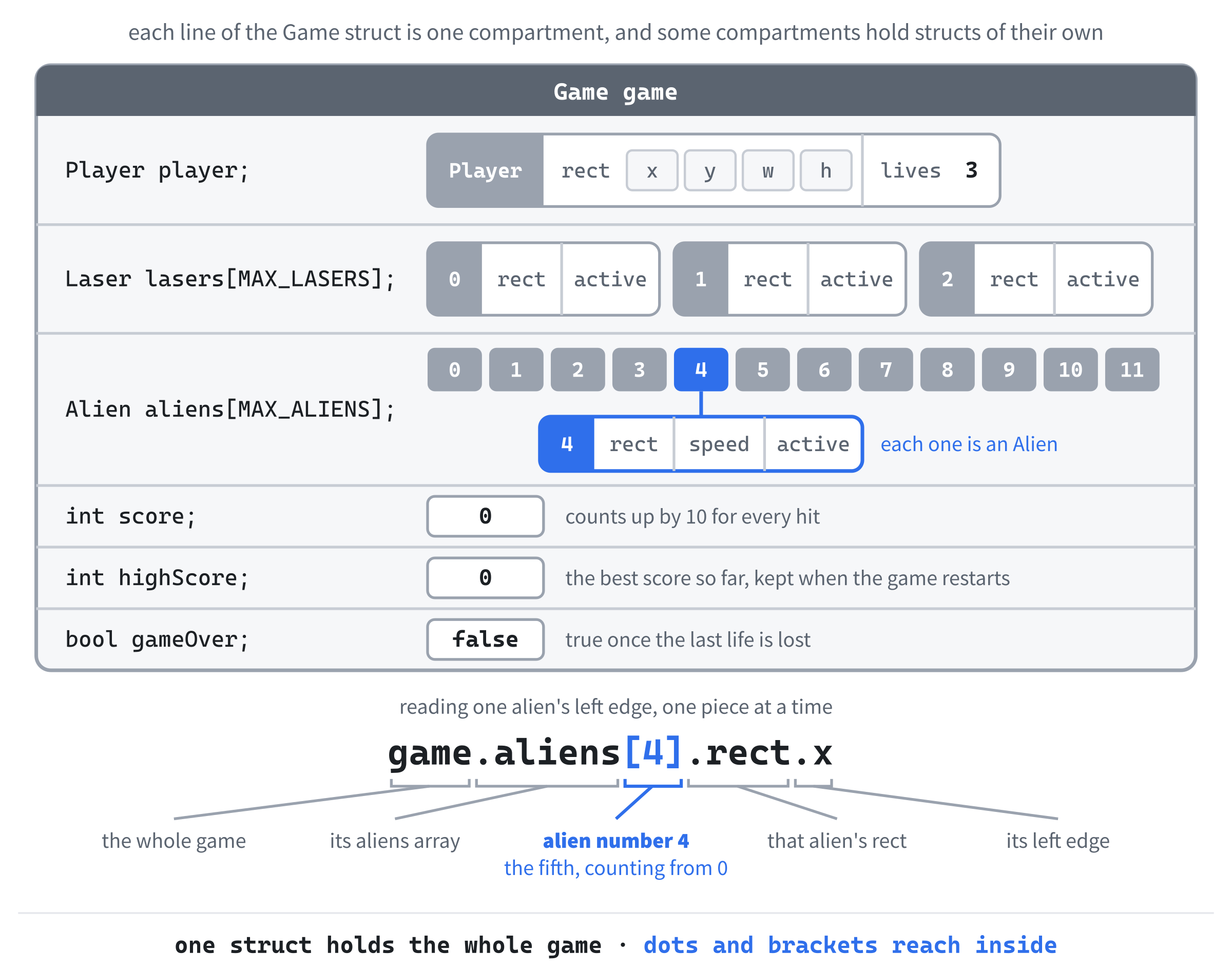
In the preceding code, a Game has a Player, three Laser values, 12 Alien values, and the three things that belong to the whole game.
Look at the line Laser lasers[MAX_LASERS];. The square brackets make lasers an array, like Chapter 7's palette: a numbered list of Laser values, called lasers[0], lasers[1], and lasers[2]. Chapter 7 left its brackets empty and let the compiler count the colors in the list, but there's no list here, so the size goes inside the brackets instead. It has to be a constant, fixed before the program runs, which is why MAX_LASERS is a const int. The aliens work the same way, with 12 of them, numbered 0 to 11.
Figure 9.1 draws a Game as one box of compartments, some of which hold boxes of their own. To reach any single value, you name the path to it, one level at a time. The expression game.aliens[4].rect.x, for example, means: in the game, go to the aliens, take alien number 4, and read the left edge of its rectangle.
Arrays get a whole chapter of their own in Chapter 13, where we'll see a lot more of what they can do. For this game, a numbered list of structs, and a loop to walk through it, are all we need.
Resetting the Game
The first function puts the game into its starting state. We'll call it once when the program starts, and again whenever the player presses R to play again. Add it below the Game struct, with a blank line in between:
// Put everything back the way it is at the start of a game
void resetGame(Game& game)
{
    game.player.rect = { PLAYER_START_X, (WINDOW_H - PLAYER_H) / 2.0f,
                         PLAYER_W, PLAYER_H };
    game.player.lives = START_LIVES;

    for (int i = 0; i < MAX_LASERS; i++)
        game.lasers[i].active = false;
    for (int i = 0; i < MAX_ALIENS; i++)
        game.aliens[i].active = false;

    game.score = 0;
    game.gameOver = false;
}
In the preceding code, the parameter is Game& game, Chapter 8's reference, because the whole point of the function is to change the caller's game, not a copy of it.
The first statement gives the ship its starting rectangle. Chapter 2 filled a struct's members with a list in curly braces as the struct was created, and the same kind of list works in an ordinary assignment, too, filling all four members at once. The ship starts PLAYER_START_X pixels in from the left edge, and halfway down: the window's height, less the ship's height, halved, leaves equal space above and below it. The statement is split over two lines, to keep it from running too long. Then the ship gets its three lives.
Next, two for loops walk through the pools and switch off every laser and every alien. Each loop controls a single short line, so, like the braceless if statements in Chapter 4, it leaves its braces off. The same rule applies to loops, and so does the same trap: the moment a loop needs more than one line, give it braces.
Finally, the score goes back to 0, and the game is no longer over. The high score is left alone, on purpose, so that your best score survives from one game to the next.
Notice what isn't here: the rectangles and speeds of the lasers and aliens. There's no need to set them, because a slot that isn't active is never moved, drawn, or checked, and each laser or alien is set up afresh when its slot is next used.
Checkpoint: There's no main yet, so there's nothing to run, but you can still check your typing. Press Ctrl+F7, or choose Build > Compile, and Visual Studio compiles just main.cpp, without trying to make a whole program out of it. If the Error List stays empty, everything so far is in good shape. If it shows an error, fix the first one on the list, and remember that a missing semicolon after a struct's closing brace is the usual suspect.
Drawing the Frame
Next comes the function that draws each frame. For now, it only clears the window and presents the frame, and it'll gain the ship, the aliens, and the lasers as the game grows. Add it below resetGame, with a blank line in between:
// Draw the frame: the background, then the aliens, lasers, ship, and lives
void drawGame(SDL_Renderer* renderer, const Game& game)
{
    SDL_Color backgroundColor = game.gameOver ? GAME_OVER_BG : BACKGROUND;
    SDL_SetRenderDrawColor(renderer, backgroundColor.r, backgroundColor.g,
                           backgroundColor.b, backgroundColor.a);
    SDL_RenderClear(renderer);

    SDL_RenderPresent(renderer);
}
In the preceding code, drawGame takes two parameters. The first is the renderer, the same SDL_Renderer* that every SDL drawing call needs. The second is the game, as a const Game&, Chapter 8's const reference. Drawing only needs to look at the game, never to change it, and the const turns that into a promise that the compiler keeps.
The body is Square Invader's background, moved into a function. The ternary picks GAME_OVER_BG if the game is over, and BACKGROUND if it isn't, and then we set the draw color from it, clear the window, and present the frame. The gap between clearing and presenting is where everything else will be drawn.
To see the const at work, try adding the line game.score = 0; to the function and pressing Ctrl+F7. The compiler refuses, with C3490: 'score' cannot be modified because it is being accessed through a const object. Delete the line again before you carry on.
main and the SDL Setup
Add main below drawGame, with just return 0; inside for now:
int main(int argc, char* argv[])
{
    return 0;
}
In the preceding code, main has its usual two parameters, and everything else will go inside it, above return 0;.
The setup comes first. Click at the end of the line with main’s opening brace, press Enter, and add this:
// Start SDL, then make the window and the renderer
if (!SDL_Init(SDL_INIT_VIDEO))
{
    SDL_Log("SDL_Init failed: %s", SDL_GetError());
    return 1;
}

SDL_Window* window = SDL_CreateWindow("Act 1 Shooter",
                                      WINDOW_W, WINDOW_H, 0);
if (!window)
{
    SDL_Log("SDL_CreateWindow failed: %s", SDL_GetError());
    SDL_Quit();
    return 1;
}
In the preceding code, we start SDL's video system and create the window, titled Act 1 Shooter, checking each step and bailing out with a message if it fails. The call to SDL_CreateWindow is split over two lines, to keep it from running too long.
The renderer and vsync finish the setup. Add this below the window check, with a blank line in between:
SDL_Renderer* renderer = SDL_CreateRenderer(window, nullptr);
if (!renderer)
{
    SDL_Log("SDL_CreateRenderer failed: %s", SDL_GetError());
    SDL_DestroyWindow(window);
    SDL_Quit();
    return 1;
}

// Show each frame in step with the monitor's refresh
SDL_SetRenderVSync(renderer, 1);
In the preceding code, we create the renderer, tidying up the window if that fails, and then turn on vsync, so the game runs in step with the monitor.
Now for the game itself. Add this below the vsync line, with a blank line in between:
// The whole game: the {} starts every member at zero
Game game{};
resetGame(game);

// The time at the last frame, in milliseconds
Uint64 lastTime = SDL_GetTicks();

bool running = true;
SDL_Event event;
In the preceding code, the first line creates the whole game, in a single variable. The empty curly braces after its name matter: they set every member to zero, so every number starts at 0, and every bool starts as false. Without them, a struct created inside a function starts out full of whatever happened to be in that memory before, and nobody wants a high score that starts at some random number. Then comes a call to resetGame, which sets up the starting state. It's the first time we've called a function we wrote ourselves in a game, and it's as simple as calling one of SDL's.
The rest is familiar: the time at the last frame, for working out delta time, then the running flag, and the event that the event loop will fill in.
The Game Loop
Next comes the game loop, with its event handling already inside. Add it below SDL_Event event;, with a blank line in between:
while (running)
{
    // Events: the window's X, and key presses (not held-key repeats)
    while (SDL_PollEvent(&event))
    {
        if (event.type == SDL_EVENT_QUIT)
        {
            running = false;
        }
        if (event.type == SDL_EVENT_KEY_DOWN && !event.key.repeat)
        {
            if (event.key.key == SDLK_ESCAPE)
                running = false;
        }
    }
}
In the preceding code, the running flag keeps the game loop going, and the event loop inside it reads every waiting event, as in every project so far. Clicking the window's X sets running to false.
The key-down check has something new in it, though: !event.key.repeat. As Chapter 5's note explained, when you hold a key down, Windows repeats it, and each repeat arrives as another key-down event, with its repeat member set to true. By ignoring the repeats, we make every press of a key count exactly once, which is just what firing will need. For now, the only key is Escape, which ends the game loop. The braces around the key checks will soon hold the keys for firing and restarting, too.
Now for the rest of each frame. Add this inside the game loop, below the event loop's closing brace, with a blank line in between:
// Delta time: how many seconds the last frame took
Uint64 now = SDL_GetTicks();
float delta = (now - lastTime) / 1000.0f;
lastTime = now;

// Update the game, unless it's over
if (!game.gameOver)
{
}

drawGame(renderer, game);
In the preceding code, the first three lines measure delta time, exactly as in the bouncing ball and Square Invader. Then comes the update, which is empty for now. The if asks whether the game is still going, and every function that moves something or checks for a hit will be called from inside its braces, so that a single question freezes the whole game once it's over. Last comes the call to drawGame. It sits outside the if, so the frame is drawn every time around the loop, even after the game is over, which is how the dark red game-over screen will appear.
Look at how short the game loop is. It handles the events, works out the time, updates the game, and draws it, and that's all it will ever do. All the detail lives in the functions.
Finally, add the cleanup below the game loop's closing brace, just above return 0;, with a blank line on each side:
// Clean up, in the reverse order we created things
SDL_DestroyRenderer(renderer);
SDL_DestroyWindow(window);
SDL_Quit();
In the preceding code, we destroy the renderer and the window and shut SDL down, in the reverse order we made them.
Checkpoint: Press F5. You should see an empty, deep-blue window titled Act 1 Shooter, and pressing Escape or clicking its X should close it. If it doesn't build, compare your file with the complete program at the end of this section.
See what the braces in Game game{}; do. Put a breakpoint on the resetGame(game); line, press F5, and when Visual Studio pauses, expand game in the Locals window: every number is 0, and every bool is false. Press Shift+F5, delete the {}, and run it again. This time, highScore, like every other int, is -858993460, the pattern a Debug build fills unused memory with, so anything you forgot to set stands out. Put the {} back.
With the skeleton finished, it's time to fill it in.
The Ship
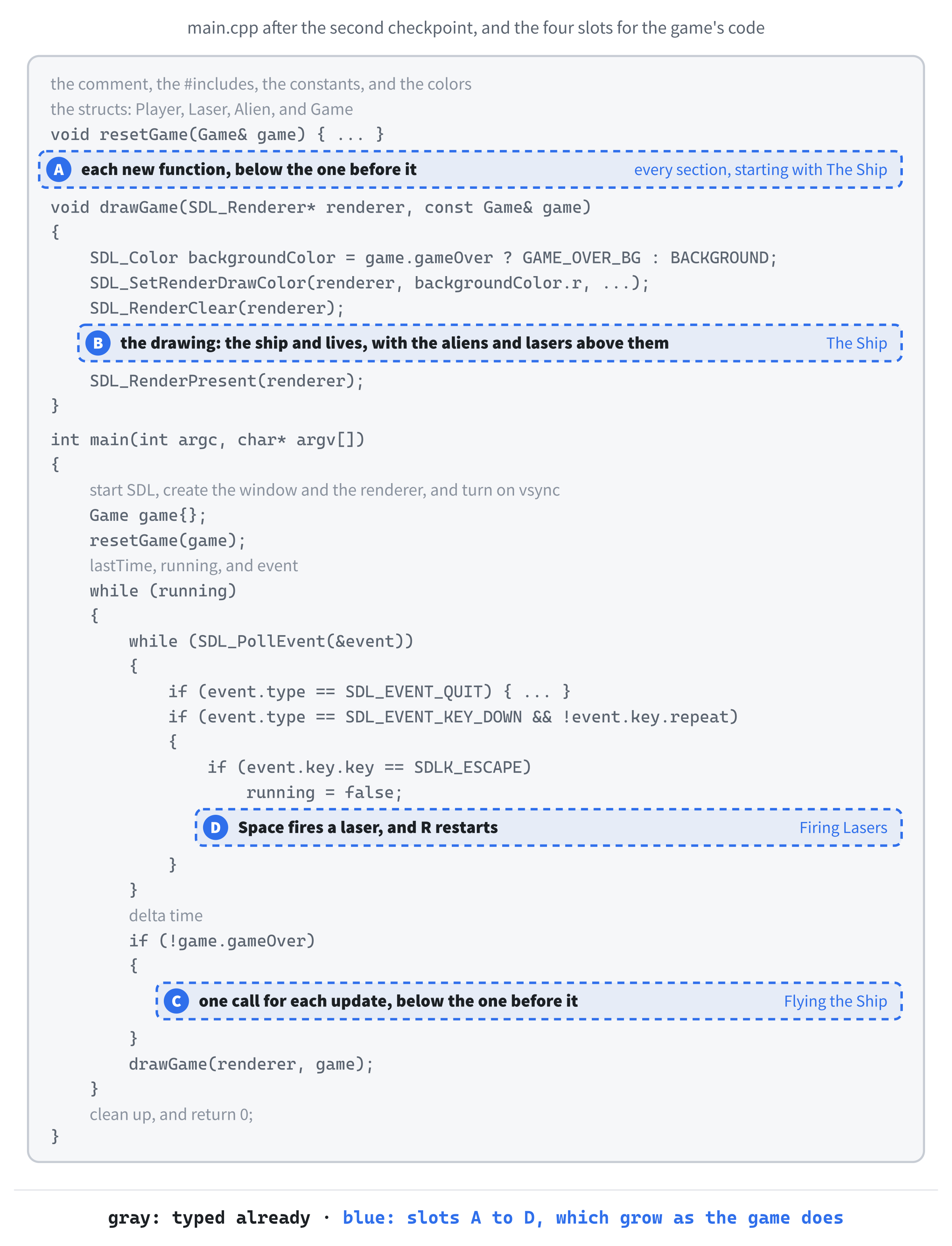
From here on, every block goes into a gap in the code you've already typed. Figure 9.2 is the map. There are four slots this time, and unlike in the last few projects, each one keeps growing as the game does. Every new function goes at the bottom of slot A, every new update call at the bottom of slot C, and every new key at the bottom of slot D. Slot B, the drawing, grows too, and each lead-in says exactly where in it the new lines go.
Everything in this game is drawn as a filled rectangle, so the first new function draws one. It goes in slot A, between the closing brace of resetGame and the // Draw the frame comment above drawGame:
// Fill a rectangle with a color
void drawRect(SDL_Renderer* renderer, const SDL_FRect& rect,
              const SDL_Color& color)
{
    SDL_SetRenderDrawColor(renderer, color.r, color.g, color.b, color.a);
    SDL_RenderFillRect(renderer, &rect);
}
In the preceding code, drawRect does the two steps that every rectangle in our projects has needed: it sets the draw color from an SDL_Color, and fills the rectangle. From now on, that's a single line wherever we use it. Both the rectangle and the color are passed by const reference, because the function only reads them, and the parameter list is split over two lines to keep it short. The call to SDL_RenderFillRect wants the rectangle's address, so it's given &rect, just as Chapter 1 gave it &square.
Now we can draw the ship. This block goes in slot B, between SDL_RenderClear(renderer); and SDL_RenderPresent(renderer);:
SDL_Color shipColor = game.gameOver ? PLAYER_DIM : PLAYER_COLOR;
drawRect(renderer, game.player.rect, shipColor);

// One small square for each life left, in the top-left corner
for (int i = 0; i < game.player.lives; i++)
{
    SDL_FRect life = { LIFE_GAP + i * (LIFE_SIZE + LIFE_GAP), LIFE_GAP,
                       LIFE_SIZE, LIFE_SIZE };
    drawRect(renderer, life, PLAYER_COLOR);
}
In the preceding code, the first line is another ternary: the ship is PLAYER_DIM once the game is over, and PLAYER_COLOR while it's going. Then a single call to drawRect draws it. The dots reach into the game for its player, and into the player for its rectangle, and the rectangle is handed over whole.
The loop draws one small square for each life left, along the top of the window, starting in the corner. Each pass builds a new SDL_FRect called life, LIFE_SIZE pixels across. The first square sits LIFE_GAP pixels in from each edge, and each one after it is LIFE_SIZE + LIFE_GAP pixels further right than the one before, so with three lives, the squares start at 8, 28, and 48 pixels across. As the lives run down, the loop runs fewer times, and the squares disappear, one by one.
Checkpoint: Press F5. The green ship sits halfway down the left side of the window, with three small green squares in the top-left corner, one for each life.
Flying the Ship
The ship flies in any direction for as long as a key is held down, so, as in Chapter 1, we read the keyboard's state every frame. Its function goes in slot A, below drawRect:
// Move the ship with W, A, S, and D, keeping it inside the window
void updatePlayer(Player& player, float delta)
{
    const bool* keys = SDL_GetKeyboardState(nullptr);
    if (keys[SDL_SCANCODE_W])
        player.rect.y -= PLAYER_SPEED * delta;
    if (keys[SDL_SCANCODE_S])
        player.rect.y += PLAYER_SPEED * delta;
    if (keys[SDL_SCANCODE_A])
        player.rect.x -= PLAYER_SPEED * delta;
    if (keys[SDL_SCANCODE_D])
        player.rect.x += PLAYER_SPEED * delta;

    player.rect.x = SDL_clamp(player.rect.x, 0.0f, WINDOW_W - PLAYER_W);
    player.rect.y = SDL_clamp(player.rect.y, 0.0f, WINDOW_H - PLAYER_H);
}
In the preceding code, updatePlayer takes the ship by reference, because it changes the ship's position, and delta by value. Notice that it takes just a Player, not the whole game. A function should be handed what it needs and no more, and this one only needs the ship.
Inside, SDL_GetKeyboardState gives us the table of keys that are down right now, indexed by scancodes, exactly as in Chapter 1. Each of the four if statements moves the ship by its speed times delta: W moves it up, S down, A left, and D right. Remember that y grows downward, so moving up means subtracting. Each if controls a single short line, so they leave their braces off. Hold two keys at once, such as W and D, and two of the if statements move the ship, so it flies diagonally.
The last two lines keep the whole ship inside the window with SDL_clamp, from Chapter 1. The ship's left edge stays between 0 and WINDOW_W - PLAYER_W, and its top edge between 0 and WINDOW_H - PLAYER_H, so no part of it can leave.
Now to call it. This line goes in slot C, inside the braces of if (!game.gameOver):
updatePlayer(game.player, delta);In the preceding code, game.player hands updatePlayer just the ship, and because its parameter is a reference, the function moves the game's own ship, not a copy of it.
Checkpoint: Press F5. Hold W, A, S, or D, and the ship flies around the window, diagonally if you hold two keys at once, stopping neatly at every edge.
The Aliens
Now for something to shoot at. Every alien needs a random height and a random speed, so the first function makes random numbers. It goes in slot A, below updatePlayer:
// A random number from low up to high
float randomBetween(float low, float high)
{
    return low + SDL_randf() * (high - low);
}
In the preceding code, SDL_randf is SDL's random number function. Each call gives a random float from 0.0 up to, but not including, 1.0. Multiplying that by the size of the range, high - low, stretches it to anywhere from 0 up to that size, and adding low shifts it along, so the answer lands somewhere from low up to high. For example, a call to randomBetween(120.0f, 300.0f) could give 120, or 213.7, or 299.9, but never less than 120, and never 300 or more.
Computers can't really roll dice. The SDL_randf function works through a long sequence of numbers that only look random, starting from a number called the seed. The first time you call it, SDL takes the seed from its high-resolution clock, so every game is different. If you ever want the same aliens in every game, which is handy for testing, call SDL_srand(42); once, before the game loop, and the sequence repeats exactly. Any seed works, except 0, which asks for the clock again.
With random numbers on tap, we can send in an alien. Add this function below randomBetween:
// Send an alien in from past the right edge, at a random height and speed
void spawnAlien(Alien& alien)
{
    alien.rect = { WINDOW_W + randomBetween(0.0f, SPAWN_SPREAD),
                   randomBetween(0.0f, WINDOW_H - ALIEN_SIZE),
                   ALIEN_SIZE, ALIEN_SIZE };
    alien.speed = randomBetween(ALIEN_MIN_SPD, ALIEN_MAX_SPD);
    alien.active = true;
}
In the preceding code, spawnAlien takes one alien by reference and sets it up from scratch. Its rectangle starts past the right edge of the window, at WINDOW_W plus a random amount up to SPAWN_SPREAD, so that aliens spawned at the same moment still arrive at different times. The top edge goes anywhere from 0 to WINDOW_H - ALIEN_SIZE, which keeps the whole alien within the window's height, and the alien is ALIEN_SIZE pixels square. It gets its own random speed, and finally, it's marked active, which puts it in play.
Next comes the function that keeps the aliens coming. Add it below spawnAlien:
// Keep every alien slot busy, and move the aliens to the left
void updateAliens(Game& game, float delta)
{
    for (int i = 0; i < MAX_ALIENS; i++)
    {
        Alien& alien = game.aliens[i];
        if (!alien.active)
            spawnAlien(alien);

        alien.rect.x -= alien.speed * delta;
        if (alien.rect.x + alien.rect.w < 0.0f)
            alien.active = false;   // it got past: free the slot
    }
}
In the preceding code, a for loop walks through all 12 aliens, and the first line of its body is new: Alien& alien = game.aliens[i];. A reference doesn't have to be a parameter. You can make one anywhere, as a second name for something that already exists, and here, alien becomes a second name for the alien in slot i. That saves typing game.aliens[i] over and over, and whatever we do to alien happens to the real alien in the game.
If the alien isn't active, its slot is free, so spawnAlien sends a fresh alien into it. Then the alien moves left, by its own speed times delta. Finally, if its right edge, at alien.rect.x + alien.rect.w, has gone past the left edge of the window, the alien is completely gone, so it's switched off. That frees its slot, and the very next frame, the loop fills it again. Figure 9.3 follows one alien all the way around.
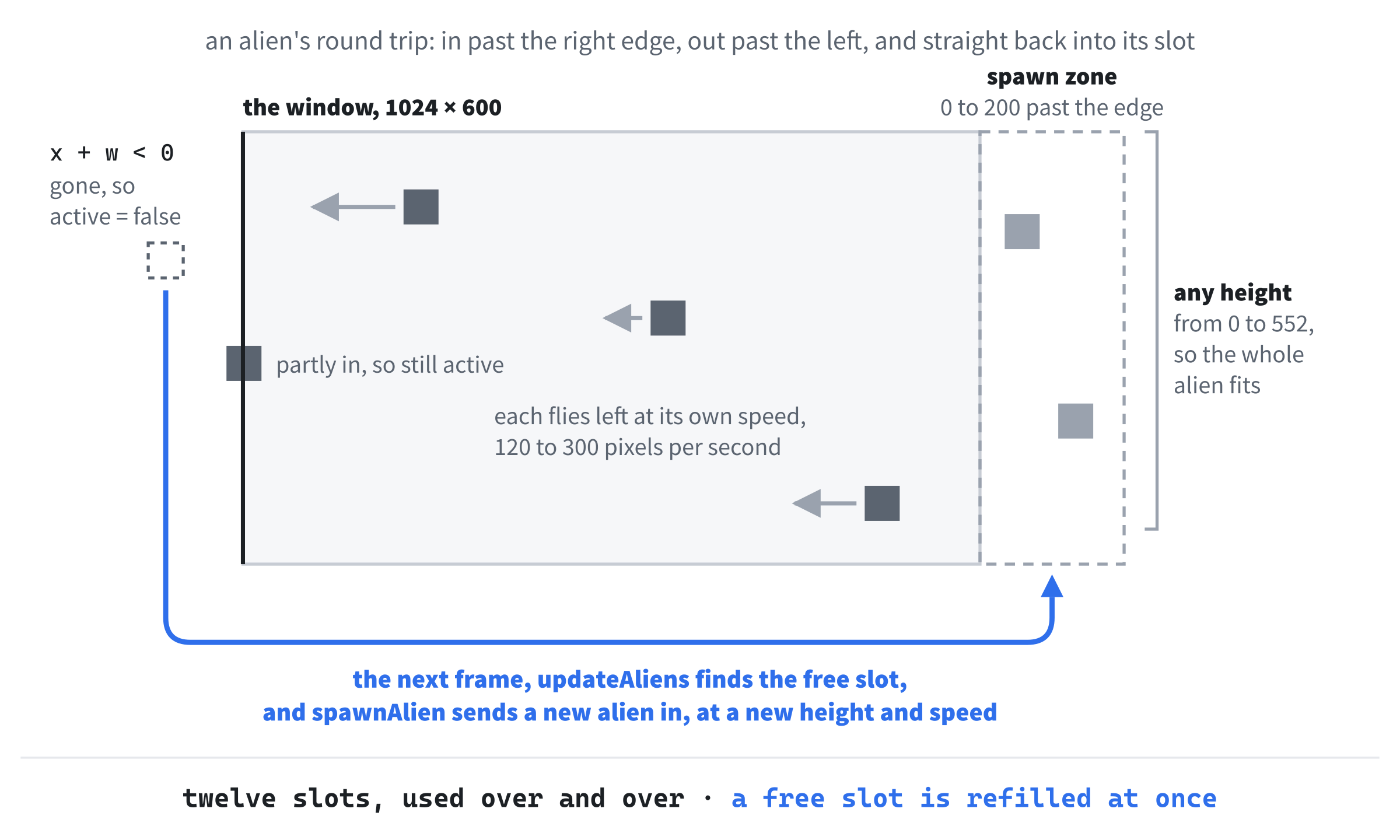
At the start of a game, all 12 slots are free, so the first frame fills every one of them, and from then on, the loop keeps them full.
Don't forget the & in Alien& alien. Without it, alien is a copy of the alien in the slot, not a second name for it. The loop spawns and moves the copy, which vanishes at the end of each pass, and the real aliens are never touched. The program builds and runs without a word of complaint, but no aliens ever appear.
Of course, aliens that nobody draws aren't much of a threat. To draw them, add this in slot B, between SDL_RenderClear(renderer); and the SDL_Color shipColor line, with a blank line on each side. Whatever's drawn later appears on top, so the aliens go first, and the ship and the lives are drawn over them:
for (int i = 0; i < MAX_ALIENS; i++)
{
    if (game.aliens[i].active)
        drawRect(renderer, game.aliens[i].rect, ALIEN_COLOR);
}
In the preceding code, the loop walks through the aliens and draws only the active ones. A free slot still holds its old rectangle, but nothing draws it.
Finally, the call. This line goes in slot C, below updatePlayer(game.player, delta);:
updateAliens(game, delta);In the preceding code, the whole game goes to updateAliens, because it needs the aliens, and it passes them on to spawnAlien one at a time.
Checkpoint: Press F5. A moment after the window opens, red aliens start streaming in from the right, at different heights and different speeds, and they keep on coming for as long as you care to watch. Twelve aliens, and one short loop keeps every one of them busy. They fly straight through the ship, because nothing checks for collisions yet, but it's starting to look like a game.
Firing Lasers
The ship needs some firepower. Firing a laser means finding a free slot in the laser pool. Add this function in slot A, below updateAliens:
// Fire a laser from the ship's nose, if a laser is free
void fireLaser(Game& game)
{
    const SDL_FRect& ship = game.player.rect;

    for (int i = 0; i < MAX_LASERS; i++)
    {
        if (!game.lasers[i].active)
        {
            game.lasers[i].rect = { ship.x + ship.w,
                                    ship.y + (ship.h - LASER_H) / 2.0f,
                                    LASER_W, LASER_H };
            game.lasers[i].active = true;
            return;   // one laser per press
        }
    }
}
In the preceding code, the first line makes ship a second name for the ship's rectangle. It's a const reference, because we only need to read the rectangle, and it keeps the lines below it short.
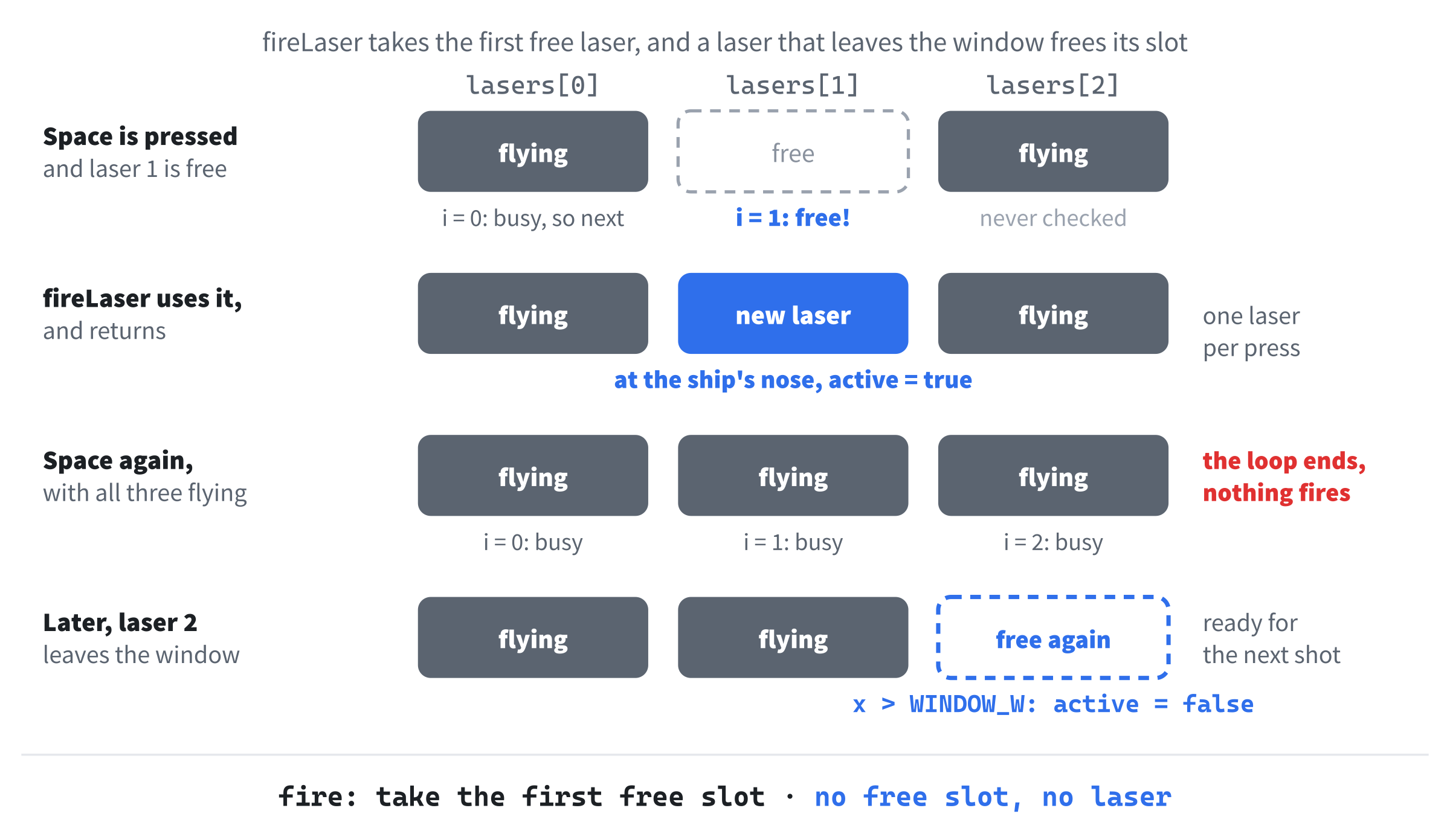
Then the loop looks through the lasers, in order, for one that isn't active. The first free laser it finds is placed at the ship's nose, with its left edge at the ship's right edge, ship.x + ship.w, and its top edge halfway down the ship, less half the laser's thickness. The difference between the two heights, halved, is the gap that centers the laser on the ship, and the laser's size comes from LASER_W and LASER_H. The laser is marked active, and then return ends the function at once, loop and all, just like the early return in Chapter 8's greetPlayer.
Without that return, the loop would carry on and fire every free laser at the same moment, all in the same place. And if all three lasers are already flying, the loop finds nothing, and the function ends without firing. Figure 9.4 shows both cases.
Space fires, and that's a key press, so it belongs in the event handling. It goes in slot D, directly below the running = false; under if (event.key.key == SDLK_ESCAPE):
else if (event.key.key == SDLK_SPACE && !game.gameOver)
    fireLaser(game);
In the preceding code, the else if joins the Escape check, so each key press is Escape, or Space, or neither. Space fires only while the game is still going, and thanks to the !event.key.repeat above it, holding Space down fires just once.
There's another way to get the same effect, which you'll see in plenty of games. Every frame, check whether Space is down in the keyboard state, remember the answer, and fire only when it's down now but wasn't in the previous frame. That's called detecting the rising edge, and it's handy when there's no event to tell you about a press. Here, the key-down event does the job for us.
Now to draw the lasers. This goes in slot B, between the aliens' loop and the SDL_Color shipColor line, with a blank line on each side:
for (int i = 0; i < MAX_LASERS; i++)
{
    if (game.lasers[i].active)
        drawRect(renderer, game.lasers[i].rect, LASER_COLOR);
}
In the preceding code, the loop draws each active laser, just as the aliens' loop draws each active alien.
Try it: press F5, and then press Space. A laser appears at the ship's nose and just hangs there, because nothing moves it yet. Fly somewhere else and press Space again, and a second laser appears, and then a third. Press it a fourth time, and nothing happens, because the pool is full. The aliens fly straight through them all, so it's time to get the lasers moving.
Here's the function that moves them. Add it in slot A, below fireLaser:
// Fly each laser to the right, and free any that leave the window
void updateLasers(Game& game, float delta)
{
    for (int i = 0; i < MAX_LASERS; i++)
    {
        Laser& laser = game.lasers[i];
        if (!laser.active)
            continue;

        laser.rect.x += LASER_SPEED * delta;
        if (laser.rect.x > WINDOW_W)
            laser.active = false;
    }
}
In the preceding code, the loop gives each laser a second name, laser, just as updateAliens did for each alien. If the laser isn't active, continue, from Chapter 6, skips the rest of the loop's body, and the loop moves on to the next laser. An active laser moves right, by LASER_SPEED times delta, and once its left edge has gone past the right edge of the window, it's switched off, which frees its slot for the next shot. That's the last row of Figure 9.4.
The call goes in slot C, below updateAliens(game, delta);:
updateLasers(game, delta);In the preceding code, the whole game goes to updateLasers, which moves every flying laser in it.
Checkpoint: Press F5, and fire. Each press of Space sends a laser streaking across the window, and you can have up to three in the air at once. Hold Space down, and you get just one, because the repeats are ignored. The lasers still pass straight through the aliens, but not for much longer.
Hits, Lives, and Game Over
The last piece is the collisions: lasers hitting aliens, and aliens hitting the ship. Both need Chapter 5's test for whether two rectangles overlap, so the test becomes a function of its own. Add it in slot A, below updateLasers:
// Chapter 5's test: do two rectangles overlap on both axes?
bool rectsOverlap(const SDL_FRect& a, const SDL_FRect& b)
{
    bool overlapX = (a.x < b.x + b.w) && (a.x + a.w > b.x);
    bool overlapY = (a.y < b.y + b.h) && (a.y + a.h > b.y);
    return overlapX && overlapY;
}
In the preceding code, rectsOverlap is Chapter 5's collision test with a name of its own. Two rectangles overlap only if their shadows overlap on both axes, as Figure 5.3 showed. On the x axis, each rectangle's left edge must be to the left of the other one's right edge, and on the y axis, each one's top edge must be above the other one's bottom edge. Both rectangles are passed by const reference, because the function only reads them, and it returns its answer as a bool.
Now for the lasers against the aliens. Add this in slot A, below rectsOverlap:
// Did a laser hit an alien? Score it, and free them both
void checkLaserHits(Game& game)
{
    for (int i = 0; i < MAX_LASERS; i++)
    {
        Laser& laser = game.lasers[i];
        if (!laser.active)
            continue;

        for (int j = 0; j < MAX_ALIENS; j++)
        {
            Alien& alien = game.aliens[j];
            if (alien.active && rectsOverlap(laser.rect, alien.rect))
            {
                alien.active = false;
                laser.active = false;
                game.score += POINTS_PER_HIT;
                SDL_Log("Hit! Score: %d", game.score);
                break;   // this laser is used up
            }
        }
    }
}
In the preceding code, there's a loop inside a loop, like the grid in Chapter 6. The outer loop walks through the lasers, and skips any that aren't flying with continue. For each flying laser, the inner loop walks through all 12 aliens, with j as its counter, because i is already taken by the outer loop. If an alien is active, and it overlaps the laser, it's a hit. The alien and the laser are both switched off, the score goes up by POINTS_PER_HIT, and SDL_Log reports the new score in the console window, using Chapter 5's %d.
Checking alien.active first matters. A free slot still holds its old alien's rectangle, and without the check, a laser could hit an alien that isn't there. Thanks to Chapter 4's short-circuit, rectsOverlap isn't even called for a free slot.
After a hit, break leaves the inner loop at once. That laser is used up, so there's no sense in checking it against the rest of the aliens, and the outer loop carries on with the next laser. Figure 9.5 shows the whole pattern.
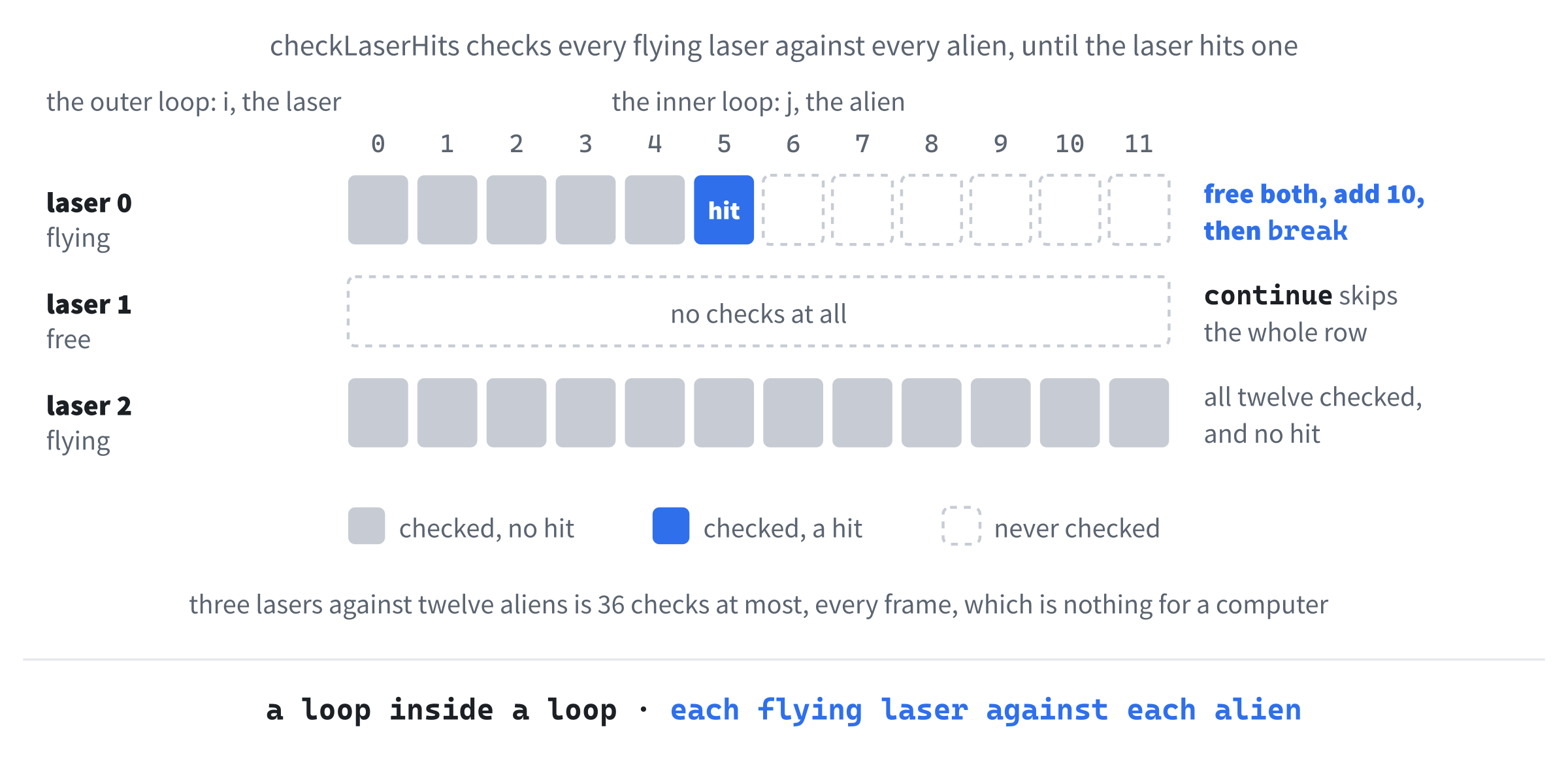
Three lasers against 12 aliens makes at most 36 checks a frame, which is nothing for a computer that can manage billions of simple steps a second.
Now for the aliens against the ship. Add this in slot A, below checkLaserHits:
// Did an alien hit the ship? Lose a life, and maybe the game
void checkPlayerHits(Game& game)
{
    for (int i = 0; i < MAX_ALIENS; i++)
    {
        Alien& alien = game.aliens[i];
        if (alien.active && rectsOverlap(game.player.rect, alien.rect))
        {
            alien.active = false;
            game.player.lives--;
            SDL_Log("Ouch! Lives left: %d", game.player.lives);

            if (game.player.lives <= 0)
            {
                game.gameOver = true;
                if (game.score > game.highScore)
                    game.highScore = game.score;
                SDL_Log("Game over! Score: %d, best: %d. Press R to restart.",
                        game.score, game.highScore);
                return;
            }
        }
    }
}
In the preceding code, the loop checks each active alien against the ship's rectangle. On a hit, the alien is switched off, so that it can't hit the ship again in the next frame. The ship loses a life, and the console reports how many are left.
If that was the last life, the game is over. The gameOver flag becomes true, and if this game's score beats the best so far, it becomes the new high score. The message that follows has two %d placeholders, and SDL swaps in the values after the message in order, so the first shows the score, and the second the best score. Then return ends the function right away, since there's no point checking the other aliens when the game has just ended.
Now for both calls. They go in slot C, below updateLasers(game, delta);:
checkLaserHits(game);
checkPlayerHits(game);
In the preceding code, the lasers are checked first, then the ship. The order matters: if a laser and the ship both touch the same alien in the same frame, the laser gets it first, and the ship survives. In a game loop, the order of the updates is part of the rules, and here it's on the player's side.
Last of all, the restart. This goes in slot D, below fireLaser(game);:
else if (event.key.key == SDLK_R && game.gameOver)
    resetGame(game);
In the preceding code, R restarts the game, but only once it's over, so a stray press in the middle of a game does nothing. The restart is just a call to resetGame, the same function that set up the first game. That's reuse, and it's one of the main reasons we write functions in the first place.
Checkpoint: Press F5, and you have a complete game. Shoot an alien, and the console reports your score. Let one hit you, and a square disappears from the corner, and the console reports your lives. Lose the third, and the screen turns dark red, the ship dims, and everything stops. Press R to play again, and your best score is there to beat.
Watch the call stack in a real game. Put a breakpoint on the game.player.lives--; line, press F5, and wait for an alien to reach you. When Visual Studio pauses, look at the Call Stack window: checkPlayerHits is on top, and below it is SDL_main, which is your main. The SDL_main.h header quietly renames it, so that SDL can do some setup of its own first, and the lines below it belong to SDL and Windows. Remove the breakpoint, and press F5 to carry on.
That fills the last slot, and the game is finished.
The Complete Program
Here's the whole file in one piece, with every line at its real indentation. If you've typed every block in the place described, this is exactly what you have:
/*
    Act 1 Capstone Shooter
    The Chapter 9 project from Learning C++ by Building Games

    Fly a green ship with W, A, S, and D, and fire lasers with Space.
    Red aliens stream in from the right at random heights and speeds.
    Shooting one scores ten points, and letting one hit you costs one
    of your three lives. Lose them all, and the game is over: press R
    to play again, or Escape to quit.
*/

#include <SDL3/SDL.h>
#include <SDL3/SDL_main.h>

const int   WINDOW_W       = 1024;     // window width in pixels
const int   WINDOW_H       = 600;      // window height in pixels
const float PLAYER_W       = 64.0f;    // the ship's width
const float PLAYER_H       = 48.0f;    // the ship's height
const float PLAYER_START_X = 40.0f;    // where the ship starts, across
const float PLAYER_SPEED   = 300.0f;   // pixels per second
const float LASER_W        = 24.0f;    // a laser's length
const float LASER_H        = 4.0f;     // a laser's thickness
const float LASER_SPEED    = 720.0f;   // pixels per second, to the right
const float ALIEN_SIZE     = 48.0f;    // an alien's width and height
const float ALIEN_MIN_SPD  = 120.0f;   // the slowest alien, pixels per second
const float ALIEN_MAX_SPD  = 300.0f;   // the fastest alien
const float SPAWN_SPREAD   = 200.0f;   // how far past the edge aliens start
const float LIFE_SIZE      = 12.0f;    // each square in the lives display
const float LIFE_GAP       = 8.0f;     // the space around those squares
const int   MAX_LASERS     = 3;        // lasers that can fly at once
const int   MAX_ALIENS     = 12;       // aliens that can be in play at once
const int   START_LIVES    = 3;        // lives at the start of a game
const int   POINTS_PER_HIT = 10;       // the score for each alien shot

const SDL_Color BACKGROUND   = { 10, 10, 30, 255 };     // deep blue
const SDL_Color GAME_OVER_BG = { 60, 0, 0, 255 };       // dark red
const SDL_Color PLAYER_COLOR = { 0, 200, 0, 255 };      // green
const SDL_Color PLAYER_DIM   = { 0, 80, 0, 255 };       // dim green
const SDL_Color LASER_COLOR  = { 120, 255, 120, 255 };  // bright green
const SDL_Color ALIEN_COLOR  = { 220, 60, 60, 255 };    // red

// The player's ship: where it is, and how many lives it has left
struct Player
{
    SDL_FRect rect;
    int lives;
};

// A laser: where it is, and whether it's flying
struct Laser
{
    SDL_FRect rect;
    bool active;
};

// An alien: where it is, how fast it's coming, and whether it's in play
struct Alien
{
    SDL_FRect rect;
    float speed;
    bool active;
};

// Everything the game needs to remember, in one place
struct Game
{
    Player player;
    Laser lasers[MAX_LASERS];
    Alien aliens[MAX_ALIENS];
    int score;
    int highScore;
    bool gameOver;
};

// Put everything back the way it is at the start of a game
void resetGame(Game& game)
{
    game.player.rect = { PLAYER_START_X, (WINDOW_H - PLAYER_H) / 2.0f,
                         PLAYER_W, PLAYER_H };
    game.player.lives = START_LIVES;

    for (int i = 0; i < MAX_LASERS; i++)
        game.lasers[i].active = false;
    for (int i = 0; i < MAX_ALIENS; i++)
        game.aliens[i].active = false;

    game.score = 0;
    game.gameOver = false;
}

// Fill a rectangle with a color
void drawRect(SDL_Renderer* renderer, const SDL_FRect& rect,
              const SDL_Color& color)
{
    SDL_SetRenderDrawColor(renderer, color.r, color.g, color.b, color.a);
    SDL_RenderFillRect(renderer, &rect);
}

// Move the ship with W, A, S, and D, keeping it inside the window
void updatePlayer(Player& player, float delta)
{
    const bool* keys = SDL_GetKeyboardState(nullptr);
    if (keys[SDL_SCANCODE_W])
        player.rect.y -= PLAYER_SPEED * delta;
    if (keys[SDL_SCANCODE_S])
        player.rect.y += PLAYER_SPEED * delta;
    if (keys[SDL_SCANCODE_A])
        player.rect.x -= PLAYER_SPEED * delta;
    if (keys[SDL_SCANCODE_D])
        player.rect.x += PLAYER_SPEED * delta;

    player.rect.x = SDL_clamp(player.rect.x, 0.0f, WINDOW_W - PLAYER_W);
    player.rect.y = SDL_clamp(player.rect.y, 0.0f, WINDOW_H - PLAYER_H);
}

// A random number from low up to high
float randomBetween(float low, float high)
{
    return low + SDL_randf() * (high - low);
}

// Send an alien in from past the right edge, at a random height and speed
void spawnAlien(Alien& alien)
{
    alien.rect = { WINDOW_W + randomBetween(0.0f, SPAWN_SPREAD),
                   randomBetween(0.0f, WINDOW_H - ALIEN_SIZE),
                   ALIEN_SIZE, ALIEN_SIZE };
    alien.speed = randomBetween(ALIEN_MIN_SPD, ALIEN_MAX_SPD);
    alien.active = true;
}

// Keep every alien slot busy, and move the aliens to the left
void updateAliens(Game& game, float delta)
{
    for (int i = 0; i < MAX_ALIENS; i++)
    {
        Alien& alien = game.aliens[i];
        if (!alien.active)
            spawnAlien(alien);

        alien.rect.x -= alien.speed * delta;
        if (alien.rect.x + alien.rect.w < 0.0f)
            alien.active = false;   // it got past: free the slot
    }
}

// Fire a laser from the ship's nose, if a laser is free
void fireLaser(Game& game)
{
    const SDL_FRect& ship = game.player.rect;

    for (int i = 0; i < MAX_LASERS; i++)
    {
        if (!game.lasers[i].active)
        {
            game.lasers[i].rect = { ship.x + ship.w,
                                    ship.y + (ship.h - LASER_H) / 2.0f,
                                    LASER_W, LASER_H };
            game.lasers[i].active = true;
            return;   // one laser per press
        }
    }
}

// Fly each laser to the right, and free any that leave the window
void updateLasers(Game& game, float delta)
{
    for (int i = 0; i < MAX_LASERS; i++)
    {
        Laser& laser = game.lasers[i];
        if (!laser.active)
            continue;

        laser.rect.x += LASER_SPEED * delta;
        if (laser.rect.x > WINDOW_W)
            laser.active = false;
    }
}

// Chapter 5's test: do two rectangles overlap on both axes?
bool rectsOverlap(const SDL_FRect& a, const SDL_FRect& b)
{
    bool overlapX = (a.x < b.x + b.w) && (a.x + a.w > b.x);
    bool overlapY = (a.y < b.y + b.h) && (a.y + a.h > b.y);
    return overlapX && overlapY;
}

// Did a laser hit an alien? Score it, and free them both
void checkLaserHits(Game& game)
{
    for (int i = 0; i < MAX_LASERS; i++)
    {
        Laser& laser = game.lasers[i];
        if (!laser.active)
            continue;

        for (int j = 0; j < MAX_ALIENS; j++)
        {
            Alien& alien = game.aliens[j];
            if (alien.active && rectsOverlap(laser.rect, alien.rect))
            {
                alien.active = false;
                laser.active = false;
                game.score += POINTS_PER_HIT;
                SDL_Log("Hit! Score: %d", game.score);
                break;   // this laser is used up
            }
        }
    }
}

// Did an alien hit the ship? Lose a life, and maybe the game
void checkPlayerHits(Game& game)
{
    for (int i = 0; i < MAX_ALIENS; i++)
    {
        Alien& alien = game.aliens[i];
        if (alien.active && rectsOverlap(game.player.rect, alien.rect))
        {
            alien.active = false;
            game.player.lives--;
            SDL_Log("Ouch! Lives left: %d", game.player.lives);

            if (game.player.lives <= 0)
            {
                game.gameOver = true;
                if (game.score > game.highScore)
                    game.highScore = game.score;
                SDL_Log("Game over! Score: %d, best: %d. Press R to restart.",
                        game.score, game.highScore);
                return;
            }
        }
    }
}

// Draw the frame: the background, then the aliens, lasers, ship, and lives
void drawGame(SDL_Renderer* renderer, const Game& game)
{
    SDL_Color backgroundColor = game.gameOver ? GAME_OVER_BG : BACKGROUND;
    SDL_SetRenderDrawColor(renderer, backgroundColor.r, backgroundColor.g,
                           backgroundColor.b, backgroundColor.a);
    SDL_RenderClear(renderer);

    for (int i = 0; i < MAX_ALIENS; i++)
    {
        if (game.aliens[i].active)
            drawRect(renderer, game.aliens[i].rect, ALIEN_COLOR);
    }

    for (int i = 0; i < MAX_LASERS; i++)
    {
        if (game.lasers[i].active)
            drawRect(renderer, game.lasers[i].rect, LASER_COLOR);
    }

    SDL_Color shipColor = game.gameOver ? PLAYER_DIM : PLAYER_COLOR;
    drawRect(renderer, game.player.rect, shipColor);

    // One small square for each life left, in the top-left corner
    for (int i = 0; i < game.player.lives; i++)
    {
        SDL_FRect life = { LIFE_GAP + i * (LIFE_SIZE + LIFE_GAP), LIFE_GAP,
                           LIFE_SIZE, LIFE_SIZE };
        drawRect(renderer, life, PLAYER_COLOR);
    }

    SDL_RenderPresent(renderer);
}

int main(int argc, char* argv[])
{
    // Start SDL, then make the window and the renderer
    if (!SDL_Init(SDL_INIT_VIDEO))
    {
        SDL_Log("SDL_Init failed: %s", SDL_GetError());
        return 1;
    }

    SDL_Window* window = SDL_CreateWindow("Act 1 Shooter",
                                          WINDOW_W, WINDOW_H, 0);
    if (!window)
    {
        SDL_Log("SDL_CreateWindow failed: %s", SDL_GetError());
        SDL_Quit();
        return 1;
    }

    SDL_Renderer* renderer = SDL_CreateRenderer(window, nullptr);
    if (!renderer)
    {
        SDL_Log("SDL_CreateRenderer failed: %s", SDL_GetError());
        SDL_DestroyWindow(window);
        SDL_Quit();
        return 1;
    }

    // Show each frame in step with the monitor's refresh
    SDL_SetRenderVSync(renderer, 1);

    // The whole game: the {} starts every member at zero
    Game game{};
    resetGame(game);

    // The time at the last frame, in milliseconds
    Uint64 lastTime = SDL_GetTicks();

    bool running = true;
    SDL_Event event;

    while (running)
    {
        // Events: the window's X, and key presses (not held-key repeats)
        while (SDL_PollEvent(&event))
        {
            if (event.type == SDL_EVENT_QUIT)
            {
                running = false;
            }
            if (event.type == SDL_EVENT_KEY_DOWN && !event.key.repeat)
            {
                if (event.key.key == SDLK_ESCAPE)
                    running = false;
                else if (event.key.key == SDLK_SPACE && !game.gameOver)
                    fireLaser(game);
                else if (event.key.key == SDLK_R && game.gameOver)
                    resetGame(game);
            }
        }

        // Delta time: how many seconds the last frame took
        Uint64 now = SDL_GetTicks();
        float delta = (now - lastTime) / 1000.0f;
        lastTime = now;

        // Update the game, unless it's over
        if (!game.gameOver)
        {
            updatePlayer(game.player, delta);
            updateAliens(game, delta);
            updateLasers(game, delta);
            checkLaserHits(game);
            checkPlayerHits(game);
        }

        drawGame(renderer, game);
    }

    // Clean up, in the reverse order we created things
    SDL_DestroyRenderer(renderer);
    SDL_DestroyWindow(window);
    SDL_Quit();

    return 0;
}
In the preceding code, the shape is the plan from the start of the chapter: the constants and colors at the top, then the structs, then the functions, in the order we wrote them, except for drawGame, which ended up last because every new function went in just above it, and finally main. Every function comes before the first line that calls it, which is all the compiler needs, and main comes last, because it calls nearly everything.
Playing the Game
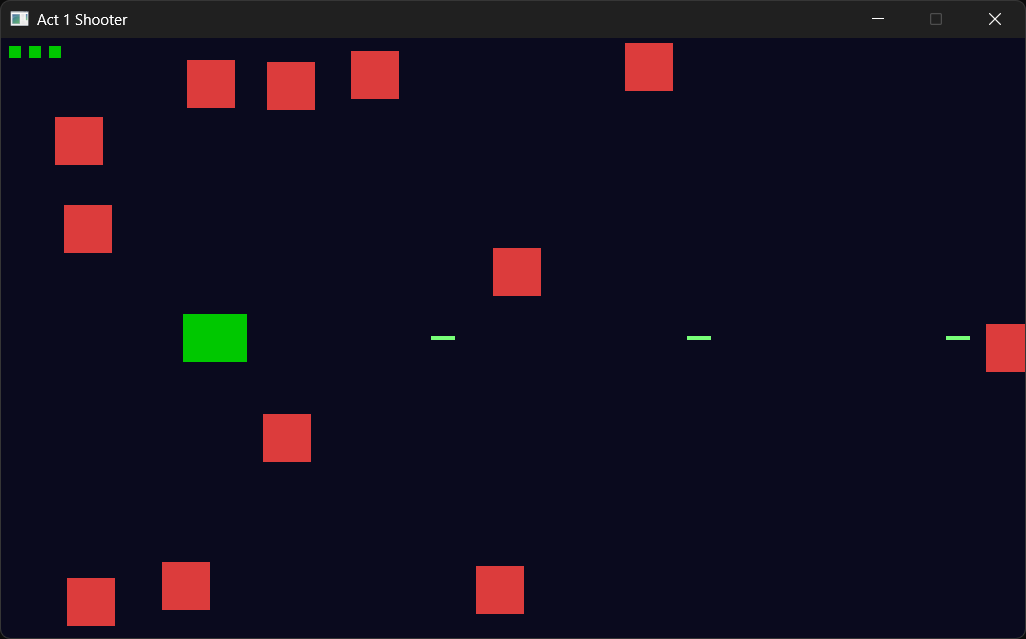
Press F5. The window opens, and after a moment, the aliens start streaming in from the right, as in Figure 9.6. Fly with W, A, S, and D, and fire with Space. Each alien you shoot is worth 10 points, and the console keeps count: "Hit! Score: 10", "Hit! Score: 20", and so on. You can have three lasers in the air at once, so don't waste them, because a laser that misses has to fly all the way to the right edge before you get it back.
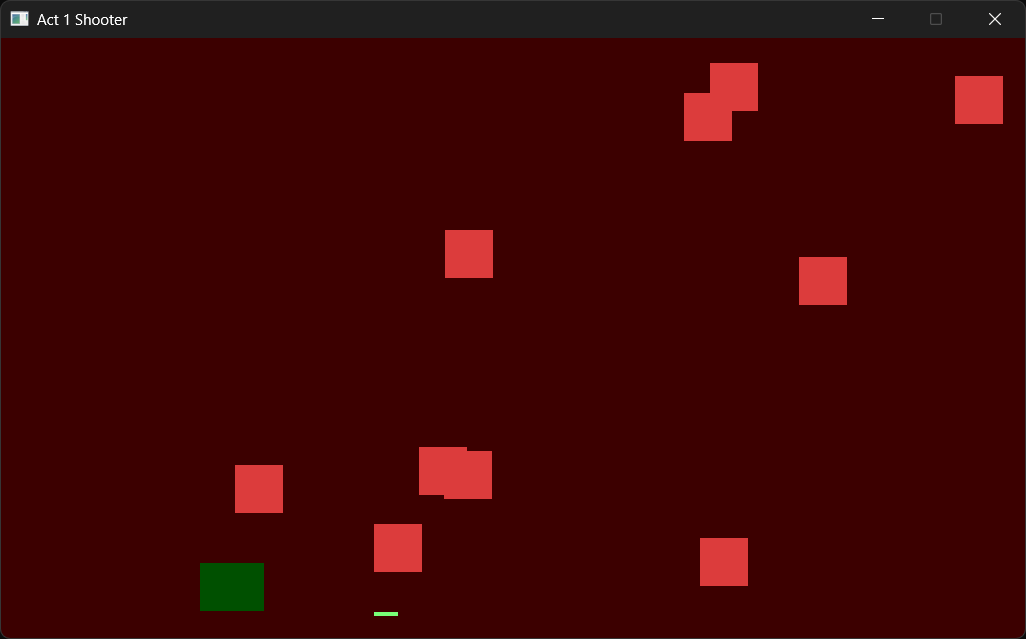
Let an alien hit you, and a square disappears from the corner, with "Ouch! Lives left: 2" in the console. When the last one goes, the console reports your score and your best so far, and the game freezes on the dark red screen of Figure 9.7.
Press R to play again. Your best score carries over from game to game, so there's always something to beat. Press Escape, or close the window, when you've had enough.
It's worth pausing a moment to appreciate what you've made: a ship, a pool of lasers, a stream of aliens, collisions, lives, a high score, and a restart, all from nothing but the tools of Act 1.
Understanding the Code
This is the first program in the book where the shape of the code is as interesting as what it does, so step back from the screen and look at the file from a height.
At the top, the constants and the structs describe the game: its numbers, and the things in it. Below them, a dozen small functions each do one job, and none of them needs to know how the others do theirs. At the bottom, main sets everything up and runs the game loop, which decides when each job happens. Figure 9.8 follows one frame through the loop.
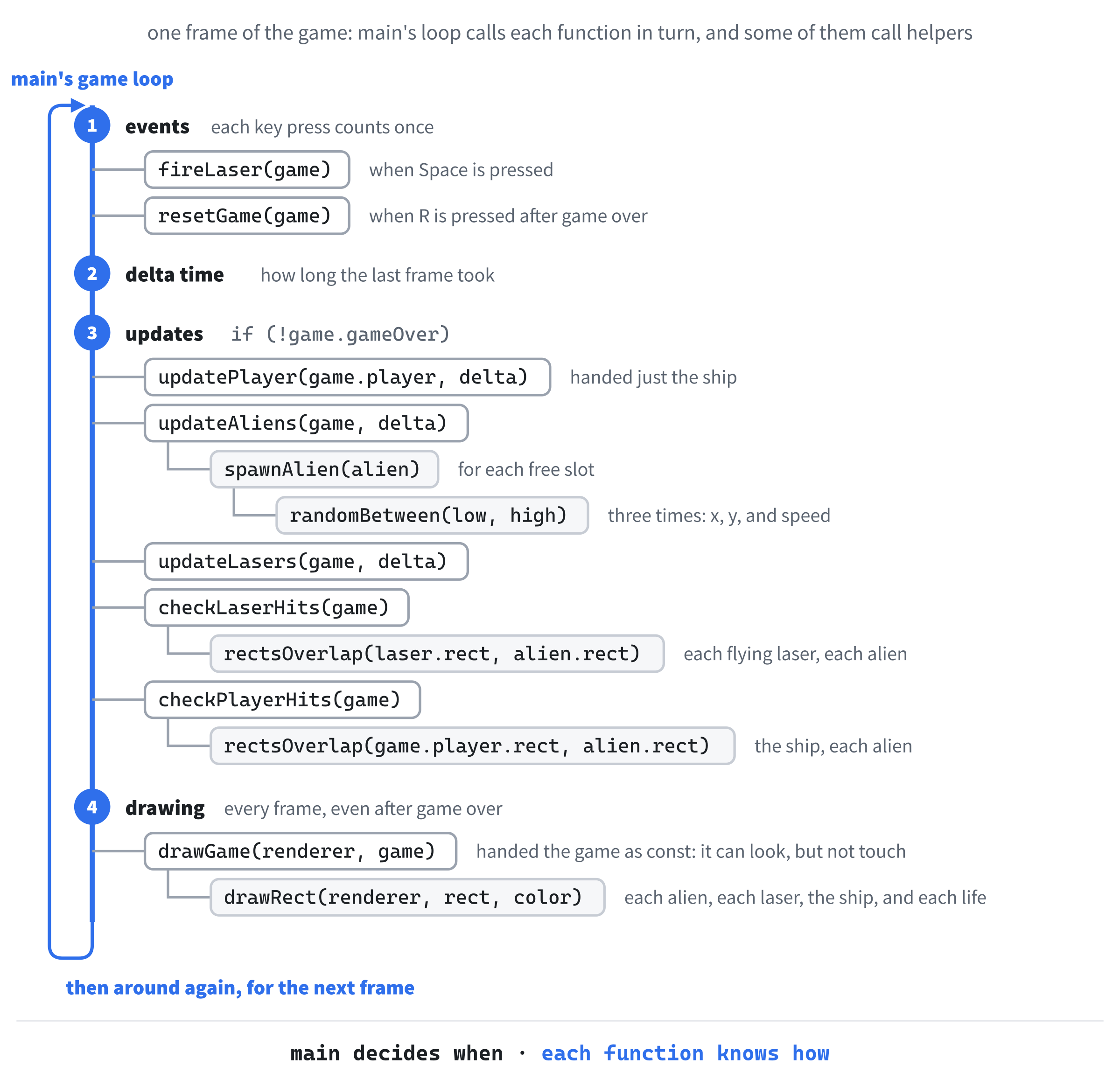
That split between when and how is the point of this chapter. Look at the game loop in the complete program. It's under 40 lines, and it reads almost like a description of the game: handle the keys, work out the time, update the ship, the aliens, and the lasers, check for hits, and draw. This is the loop that Chapter 8 sketched, with a real game behind it.
Each function is also handed exactly what it needs, and its first line says so. The functions that change the game take a Game&. The updatePlayer function only needs the ship, so it's handed the ship and nothing else, and drawGame takes a const Game&, because drawing should never change the game, and the compiler holds it to that. That makes bugs easier to hunt. If the score goes wrong, the only suspects are the functions that can change it, and updatePlayer and drawGame are off the list before you start.
You can also see the pool pattern all over the program. There are 11 for loops, and eight of them walk through a pool, checking each slot's active flag, and then skipping the slot, using it, or refilling it. Once you've seen the pattern a few times, you can read any of those loops at a glance.
Pools have their limits, of course. Three lasers is a rule of this game, and if we wanted a hundred, we'd need a hundred slots, in use or not. In Act 2, we'll meet pointers, which let a program create things whenever it needs them, and the standard library's vector, a list that can grow and shrink as the game runs. But the pool is a real technique, and real games still use it, especially for things like bullets and sparks, where the maximum is known and speed matters.
The thing to take from this chapter isn't this particular game. It's the experience of building a program in layers: small, well-named functions that each do one job, a loop that calls them in the right order, and data that's handed to each function only as far as it needs. Every program from here on is built that way, just with more of everything.
Experimenting
Try these one at a time, and see how the game changes:
- Change
MAX_ALIENSto30for a swarm, or to4for a gentle stroll. The size of the pool is the difficulty dial. - Change
ALIEN_MIN_SPDandALIEN_MAX_SPDto250.0fand500.0ffor a much harder game. - Change
MAX_LASERSto1, and every shot counts, just as in Square Invader. - Change
LASER_Wto200.0ffor a long beam that's much easier to aim. - Change
SPAWN_SPREADto0.0f, and the first wave arrives together, lined up at the right edge, before their different speeds pull them apart. - Change
START_LIVESto1to test the game over quickly, or to9for a practice run.
For a bigger challenge, try these:
- Pull a small idea out into its own function. Write
bool playerIsAlive(const Player& player), which returnsplayer.lives > 0, and useplayerIsAlive(game.player)in place of!game.gameOverin the game loop. The game plays exactly the same, and you've practiced the act of naming an idea. - Speed the aliens up as the score grows. Give
spawnAliena second parameter,int score, add it to each new alien's speed, and passgame.scorefromupdateAliens. Every 10 points makes the new aliens 10 pixels a second faster. - Move the event handling into a function, just like Chapter 8's sketch. Write
bool handleEvents(Game& game), with its ownSDL_Event, which returnsfalsewhen the player quits andtrueotherwise, and start the game loop withrunning = handleEvents(game);.
Each of these teaches you something about the game, or about how its code is organized. And when a change goes wrong, the function it's in tells you where to start looking.
Common Errors and Fixes
If the build fails with errors about SDL3/SDL.h, SDL3.lib, or unresolved external symbols, the problem is the project setup, and Chapter 1's Common Errors section covers each one. Here are the problems that are particular to this chapter.
C3861: 'drawRect': identifier not found. A function is being used above the place where it's defined. Here, drawRect has probably been typed below drawGame, which calls it. Move it back up into slot A, above drawGame, or add a declaration near the top of the file, as Chapter 8 showed.
C2664: 'void updatePlayer(Player &,float)': cannot convert argument 1 from 'Game' to 'Player &'. The call is handing the whole game to a function that only wants the ship. Change updatePlayer(game, delta); to updatePlayer(game.player, delta);.
C3490: 'score' cannot be modified because it is being accessed through a const object. Something in drawGame is trying to change the game, which its const Game& forbids. Drawing should only look, so move the change into one of the functions that update the game.
No aliens ever appear. Check the & in Alien& alien = game.aliens[i];, in updateAliens. Without it, the loop spawns and moves a copy of each alien, and the real aliens are never touched.
The lasers appear at the ship's nose, but they stay where they were fired. It's the same mistake, this time in updateLasers. Without the & in Laser& laser, the loop moves a copy of each laser. After three shots, Space does nothing, because all three lasers are stuck in the air, unless an alien happens to fly into one.
Holding Space fires a stream of lasers. The key-down check is missing its && !event.key.repeat, so every repeat of the held key fires again, as soon as a laser is free.
Space fires one laser, and then does nothing until it has left the window. The return; in fireLaser is missing. Without it, one press fires all three lasers at once, in the same spot, so they look like one, and there's no free laser until they've gone.
The aliens stop coming after the first wave. Check the last two lines of the loop in updateAliens. If an alien that gets past the left edge is never switched off, its slot is never freed, so it's never refilled, and only the aliens you shoot, or that hit the ship, come back.
Pressing R brings the lives back, but the screen stays red, and nothing moves. The game.gameOver = false; line is missing from resetGame, so the game is reset, but it's still over. Put the line back, at the end of the function.
The score jumps to a huge number, such as 1297261290. A loop is running one step too far, with <= where it should have <, such as i <= MAX_ALIENS. The last pass reaches aliens[12], which doesn't exist, and writes over whatever comes after the array, which in a Game is the score. As Chapter 7 warned, C++ doesn't check array positions, so this is undefined behavior: strange numbers in one program, a crash in another. Check every loop's condition.
A message box says "The code execution cannot proceed because SDL3.dll was not found." Copy SDL3.dll from C:\SDL3\lib\x64 into the project folder, beside main.cpp.
AI Exercise (Optional)
If you'd like to take this further with AI help, here's a vibe coding challenge that genuinely stretches what we've covered. As always, skip it if you'd rather not; nothing later in the book depends on it.
Open your AI chatbot of choice and try a prompt like this:
"I have a small C++ SDL 3 game. A Game struct holds a Player, a pool of three Lasers, and a pool of 12 Aliens, each with an active flag, plus the score, the high score, and a gameOver flag. The game loop in main calls small functions such as updatePlayer, updateAliens, fireLaser, updateLasers, checkLaserHits, and checkPlayerHits, passing the Game by reference. I have learned variables, structs, flow control, loops, and functions, including pass by reference. I have not learned classes, vectors, or pointers. Add a combo: when the player shoots five aliens in a row without being hit, the next alien they shoot is worth 50 points instead of 10, and the message 'COMBO!' appears in the console through SDL_Log. Use only the C++ features I have, put each curly brace on its own line, and show me every function you change, in full."
Notice the structure of the preceding prompt. It explains what you have, what you've learned, and what you want. It asks for whole functions back, rather than scattered fragments, so you can see exactly what changed and where it goes. And it picks a feature that's a real design exercise: the combo needs a counter, the counter needs a home, it has to reset when you're hit, and something has to notice the moment the bonus kicks in.
When the AI replies, scan it for sneaky upgrades. Did it slip a std::vector into your pools, or turn a struct into a class? If so, push back: "Please stick to the features I listed. I haven't learned those yet." Make the AI work inside your bubble of understanding. That's the whole skill.
Then look at where it put the counter. Did it add a member to the Game struct, or did it reach for a global variable? After Chapter 8's warning about globals, you know which one to prefer, and why.
Your version will look different from anyone else's, and that's the point.
Summary
You've built the biggest program in the book so far, and, more importantly, you've built it with the shape of a real program. Constants and structs describe the game. A dozen small functions each do one job, and each is handed only what it needs: by reference when it changes something, and by const reference when it only looks. The lasers and aliens live in pools that are reused rather than rebuilt, random numbers keep every wave different, and a loop inside a loop checks every laser against every alien. Holding it all together is a short game loop in main that reads like a description of the game itself.
This is the end of Act 1. In Act 2, we'll get serious about how data is stored and managed, starting in Chapter 10 with pointers, the feature behind Chapter 1's &event and every SDL_Window* we've created. With pointers, and then the standard library's collections, we'll be able to lift the fixed limits on this chapter's pools and let our games grow as big as we like. Take a moment before turning the page. Act 1 was a lot, and you've made it through.