
As our programs grow, something uncomfortable starts to happen. The same few lines of code turn up in two or three different places. A single block of logic becomes so long that you can't see its top and its bottom at the same time. You change one line, and something unrelated, three pages away, breaks. This is what code looks like before functions, and it doesn't scale to anything bigger than a toy.
Functions are how we carve a program up into named, reusable pieces. They let us give a chunk of code a clear name, a single job, and a clean boundary between what it does and how it does it. In this chapter, we'll learn how to write functions, how to pass data into them, how to get data back out, and how to organize a program around them. By the end, you'll have the tool that every program from here on is built with.
In this chapter, we will:
- Write, declare, and call functions of our own
- Pass data in with parameters, and get answers back with return values
- Choose between passing by value and passing by reference
- Give several functions one name with overloading, and give parameters default values
- See where variables live and die, and why global variables cause trouble
- Meet the call stack, and watch a function call itself with recursion
- Organize a program around well-named functions, and debug them in Visual Studio
- Try an optional AI exercise to tidy up some messy code
As in Chapters 2, 4, and 6, the examples are small experiments for your Sandbox project. This time, though, some of them go outside main: a new function, or anything else that belongs outside every function, goes above main, below the #include lines, and the lines that use it go inside main, above return 0;.
Let's start with the question the rest of the chapter depends on.
What Is a Function?
A function is a named block of code that does one specific job. You write it once and give it a name, and from then on, whenever you want that job done, you just use the name. C++ runs the function's code for you, and if the job produces an answer, it hands the answer back.
You've been writing a function since Chapter 1. Every program in this book has had a main: the sandbox's is int main(), and the SDL projects' is int main(int argc, char* argv[]). Either way, main is a function, and it's special only because it's the one that runs when the program starts. You've been calling other people's functions all along, too. Every SDL_Init, SDL_CreateWindow, and SDL_RenderFillRect is a function that someone at SDL wrote, so that you'd never have to.
The problem that functions solve is duplication. Chapter 5 gave us a small example. The three lines that sent the invader back to the start appeared twice, once when it landed and once when it was hit, and the same position was written a third time in its variables at the top. It works, but if you ever decide the invader should start somewhere else, you have to remember to change it in all three places. Miss one, and the game has a bug that only shows up some of the time.
A function replaces all the copies with one named piece of code. Write the logic once, call it by name wherever you need it, and fix it in one place when it changes. That's the whole deal, and by the end of the chapter, we'll have used it on that invader.
The Anatomy of a Function
Every function has four parts. Here's one that adds two numbers together, to try in the sandbox. Put it above main, below the #include lines:
int addTwoNumbers(int a, int b)
{
    int result = a + b;
    return result;
}
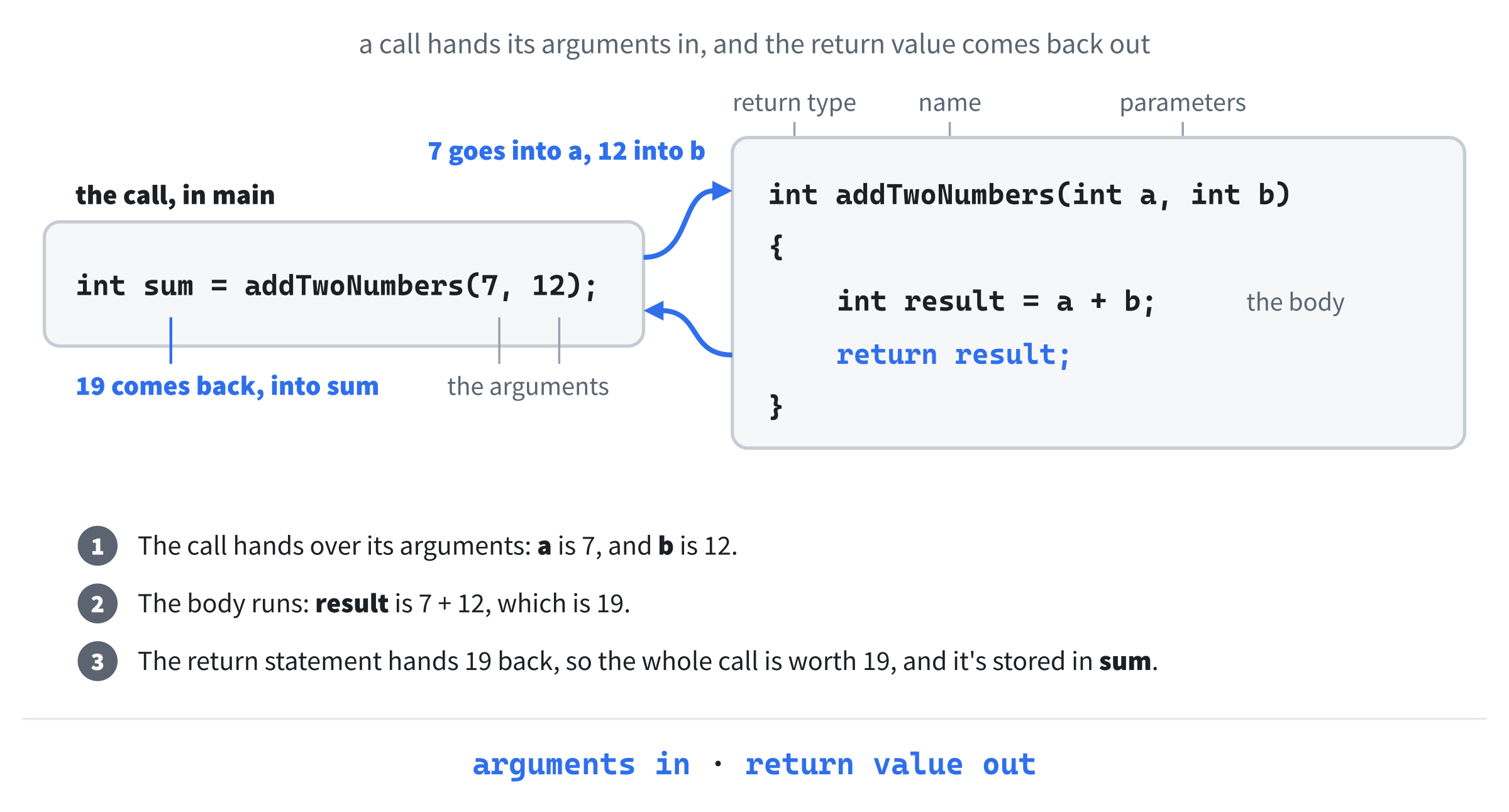
In the preceding code, the first line is the function's header, and it has three of the four parts. The return type comes first: int says the function hands back a whole number. The name comes next, addTwoNumbers, written in camelCase like a variable. Then, in parentheses, comes the parameter list, the values the function needs to do its job, each with a type and a name: here, two int values, called a and b. The fourth part is the body, the code between the curly braces, which adds a and b together and uses the return keyword to hand the result back.
Not every function has an answer to hand back. When a function just does something, such as printing a message or moving a sprite, its return type is void, which means "nothing." We'll write some of those shortly.
To use the function, we call it, by writing its name with values in the parentheses. Put these lines inside main, above return 0;:
int sum = addTwoNumbers(7, 12);
std::cout << sum << std::endl;
In the preceding code, the call addTwoNumbers(7, 12) runs the function with a set to 7 and b set to 12. The body works out 19 and returns it, so the whole call is worth 19, and that's what gets stored in sum. Run it, and the console shows 19. Figure 8.1 follows the round trip.
You'll notice we put the function above main. That wasn't a coincidence, and it's the next thing to look at.
Declaring and Defining Functions
C++ is a little old-fashioned about one thing: by the time the compiler reaches a call to a function, it needs to know that the function exists. It has to know the function's name, what it takes, and what it returns, so that it can check the call is correct. The compiler reads a file from top to bottom, so a function that's only defined further down hasn't been seen yet. Try this in the sandbox, as the whole of main.cpp:
#include <iostream>

int main()
{
    int sum = addTwoNumbers(3, 4);
    std::cout << sum << std::endl;

    return 0;
}

int addTwoNumbers(int a, int b)
{
    return a + b;
}
In the preceding code, main calls addTwoNumbers, but the function isn't written until after main, so when the compiler reaches the call, it's never heard of it. It stops with C3861: 'addTwoNumbers': identifier not found. (The shorter body, which returns a + b directly, does the same job as before, without the extra variable.)
There are two ways to fix it. The first is the one we used before: move the whole function above main. The second is to leave the function where it is and add a declaration above main:
#include <iostream>

int addTwoNumbers(int a, int b);   // a declaration

int main()
{
    int sum = addTwoNumbers(3, 4);
    std::cout << sum << std::endl;

    return 0;
}

int addTwoNumbers(int a, int b)    // the definition
{
    return a + b;
}
In the preceding code, the line above main is just the function's header, ending in a semicolon where the body would go. That's a declaration, sometimes called a prototype, and it tells the compiler everything it needs to check the call: the function's name, its parameters, and its return type. The full function, with its body, is the definition, and it can come later. Now the program builds, and prints 7.
For small programs, putting each function above the code that calls it is the simplest approach, and that's what most of this book does. Declarations come into their own in bigger programs, where they're gathered into separate header files that other files include. We'll meet header files properly in Chapter 18.
Parameters and Arguments
The variables in a function's parentheses are its parameters, and the values you pass in when you call it are its arguments. Parameters are the slots, and arguments are what you put in them. In Figure 8.1, a and b are the parameters, and 7 and 12 are the arguments. When the function runs, each parameter is a variable of its own, holding its argument's value.
A function can have as many parameters as it needs, of any types:
void spawnEnemy(int x, int y, int health, float speed, bool isBoss)
{
    // use x, y, health, speed, and isBoss to create an enemy
}
In the preceding code, spawnEnemy takes five parameters of three different types. Its return type is void, because creating an enemy is something it does, not an answer it works out.
A function can also have no parameters at all:
void printGameTitle()
{
    std::cout << "Square Invader" << std::endl;
}
In the preceding code, the parentheses are empty because the function needs nothing from the caller. You still need the parentheses when you call it, as in printGameTitle();, because they're what makes it a call.
Arguments are matched to parameters by their position, not their names. The first argument goes into the first parameter, the second into the second, and so on:
spawnEnemy(100, 5, 200, 2.5f, false); // x 100, y 5, health 200In the preceding code, 100 goes into x, 5 into y, 200 into health, 2.5 into speed, and false into isBoss. If you get the order wrong, the compiler can't tell, as long as the types fit. Swap the 5 and the 200, and you get an enemy much further down the screen, with only 5 health, and no error to warn you. Good parameter names help, and so does a comment when a call is hard to read.
Return Values
A function hands a value back to its caller with return, and that value is its return value. The return keyword does two things at once: it sends the value back, and it ends the function immediately. The value must match the return type in the function's header:
int squareIt(int n)
{
    return n * n;
}
In the preceding code, the return type is int, and n * n is an int, so everything lines up. A function's return value can go anywhere that a value of that type can go:
int score = squareIt(7);                  // stored in a variable
std::cout << squareIt(7) << std::endl;    // used directly
int doubled = squareIt(7) * 2;            // part of a bigger calculation
In the preceding code, each call to squareIt(7) is worth 49, so score gets 49, the console shows 49, and doubled gets 98.
Because return ends the function right away, any code after it in the same block never runs. That's often exactly what you want. An early return deals with a special case at the top of a function, so that the rest of it doesn't have to worry about it:
int sharePoints(int totalPoints, int numberOfPlayers)
{
    if (numberOfPlayers == 0)
    {
        return 0;   // no players: nothing to share, and no dividing by zero
    }

    return totalPoints / numberOfPlayers;
}
In the preceding code, if there are no players, the function returns 0 at once, and it never reaches the division, which would otherwise stop the program dead, as Chapter 4 showed. If there are players, the if is skipped, and the second return hands back each player's share. Early returns keep the main work of a function out of nested if statements.
void Functions
A function whose return type is void doesn't hand anything back. It just does its job:
void printScore(int score)
{
    std::cout << "Score: " << score << std::endl;
}
In the preceding code, printScore prints the score it's given, and that's all. There's nothing to return, so the function simply ends at its closing brace. You call it on a line of its own, as in printScore(150);.
A void function can still leave early, with return on its own, but it can't return a value:
void greetPlayer(bool isLoggedIn)
{
    if (!isLoggedIn)
    {
        return;   // leave now: there's no one to greet
    }

    std::cout << "Welcome back!" << std::endl;
}
In the preceding code, if the player isn't logged in, the function returns immediately, and the greeting is skipped. Otherwise, it carries on and prints it.
Pass by Value and Pass by Reference
This is one of those topics that trips up beginners, because something quiet and invisible is happening. Once you've seen it, it's obvious. Until then, it's a mystery.
When you pass an argument the way we've done so far, C++ makes a copy of it, and the function works on the copy. The original, back in the caller, is never touched. This is called pass by value, and here it is in action. Put this function above main:
void tryToDouble(int n)
{
    n = n * 2;   // doubles the copy
}
In the preceding code, tryToDouble takes an int and doubles it. Now call it from inside main, and print the variable you passed in:
int score = 10;
tryToDouble(score);
std::cout << score << std::endl;   // still 10
In the preceding code, tryToDouble looks as if it doubles its argument, but the console shows 10. The function was handed a copy of score, in its parameter n. It doubled the copy to 20, and the copy was thrown away when the function ended. The score in main never changed.
For small types like int and float, copying is cheap, and it's usually exactly what we want. It keeps functions contained: a function can't reach out and scribble on variables that don't belong to it.
Sometimes, though, we want a function to change the caller's variable. For that, C++ has pass by reference, and all it takes is an & after the parameter's type:
void actuallyDouble(int& n)
{
    n = n * 2;   // doubles the caller's variable itself
}
In the preceding code, the parameter is int& n instead of int n, and that one character changes everything. Call it the same way, with actuallyDouble(score);, and the console shows 20. The function isn't handed a copy anymore. Its parameter n is a reference: a second name for the caller's own score. When it doubles n, it's doubling score itself, as Figure 8.2 shows.

Think of it like this. Passing by value is handing someone a photocopy of a document. They can scribble all over it, and your original is safe. Passing by reference is handing them the original, and whatever they do to it, you'll see when you get it back.
Watch out for one thing: this & isn't the & in Chapter 1's SDL_PollEvent(&event). After a type, in a parameter like int& n, the & makes a reference. In front of a variable, in a call like SDL_PollEvent(&event), it takes the variable's address. They're closely related, as Chapter 10 will explain, but the position tells you which one you're looking at.
Keeping a Promise from Chapter 5
References are exactly what Chapter 5's invader needed. Here's a function that sends it back to the start:
void resetInvader(float& invaderX, float& invaderY, float& invaderSpeedX)
{
    invaderX = 0.0f;
    invaderY = EDGE_GAP;
    invaderSpeedX = INVADER_SPEED;
}
In the preceding code, the three parameters are references, because the whole point of the function is to change the caller's variables. It uses Chapter 5's constants, EDGE_GAP and INVADER_SPEED, which live at the top of the file, where every function can see them. With this function above main, each of the two copies of the reset in Chapter 5's game becomes a single line:
resetInvader(invaderX, invaderY, invaderSpeedX);In the preceding code, the call passes the game's three invader variables, and the function sets all three. The third place, where the three variables are created, can use it too: start them all at 0.0f, and call resetInvader once, just below them. Now there's one place that says where the invader starts, and if you ever change your mind, it's a one-function job.
const References
Passing by reference has a second use, which has nothing to do with changing anything: it avoids copying. Copying an int is free, but copying a long string, or a big collection of game data, every time you call a function would be a real waste. There's a snag, though. A reference lets the function change the original, and sometimes you want it to be able to read the original cheaply, but not change it. For that, you add const.
The example uses a std::string, so first put #include <string> back at the top of main.cpp, below #include <iostream>. Then try this, above main:
void printName(const std::string& name)
{
    std::cout << name << std::endl;
}
In the preceding code, const std::string& means "a reference to a string that can't be changed." No copy is made, so it's fast, and the function can't alter the caller's string, so it's safe. Try adding the line name = "Somebody else"; to the function, and the compiler stops you, with a long error that begins C2678: binary '=': no operator found which takes a left-hand operand of type 'const std::string'. This pattern, the const reference, is the standard way to pass anything bigger than a simple number into a function that only needs to read it. You'll see it constantly in real C++ code.
Here's the rule of thumb:
- For small, built-in types, such as
int,float,bool, andchar, pass by value. - For anything bigger that the function only needs to read, pass by
constreference. - For anything the function genuinely needs to change, pass by reference.
Function Overloading
C++ lets you have two or more functions with the same name, as long as their parameter lists are different. This is called function overloading, and the compiler decides which version to call by looking at the arguments. Here are three versions of printValue, to go above main:
void printValue(int n)
{
    std::cout << "Integer: " << n << std::endl;
}

void printValue(float f)
{
    std::cout << "Float: " << f << std::endl;
}

void printValue(const std::string& s)
{
    std::cout << "String: " << s << std::endl;
}
In the preceding code, the three functions share a name, but one takes an int, one takes a float, and one takes a string, by const reference. Now try these calls inside main:
printValue(42);        // the int version
printValue(3.14f);     // the float version
printValue("Hello");   // the string version
In the preceding code, the compiler looks at each argument and picks the version that fits, so the console shows "Integer: 42", "Float: 3.14", and "String: Hello". The choice is made when the program is built, so it costs nothing at all when it runs.
Watch out for decimals without an f. A literal like 3.14 is a double, and there's no double version of printValue. Since a double could be turned into an int or a float equally well, the compiler refuses to guess, and stops with C2668: 'printValue': ambiguous call to overloaded function. Add the f, as in 3.14f, and the call is no longer ambiguous.
Overloading is most useful when one idea, such as "print a value" or "draw a shape," needs to work with several kinds of input. The alternative is a clutter of names like printInt, printFloat, and printString, and a reader who has to remember which is which. Don't overdo it, though. Overload a name only when every version genuinely does the same job, and never to squeeze unrelated work under one name.
Scope
Chapter 2 took a first look at scope, the region of a program where a variable exists and can be used, and promised we'd come back to it. Functions are where it really matters. Here's a function with variables at three different levels, to go above main:
const int MAX_ENEMIES = 5;          // usable everywhere below here

void updateEnemies()
{
    int alive = 0;                  // usable anywhere in updateEnemies

    for (int i = 0; i < MAX_ENEMIES; i++)
    {
        int damage = i * 10;        // usable only inside the loop
        std::cout << "Enemy " << i << " takes " << damage << std::endl;
        alive++;
    }

    std::cout << alive << " enemies updated" << std::endl;
}
In the preceding code, MAX_ENEMIES is created outside any function, so it can be used anywhere in the file below it. The variable alive is created inside updateEnemies, so it's a local variable: it's created when the function is called, and it disappears when the function ends. And i and damage belong to the loop, so they exist only inside the loop's braces, as Chapter 6 showed. Figure 8.3 draws the three levels as boxes inside boxes. Call updateEnemies(); from main, and the console reports damage for enemies 0 to 4, and then that five enemies were updated.
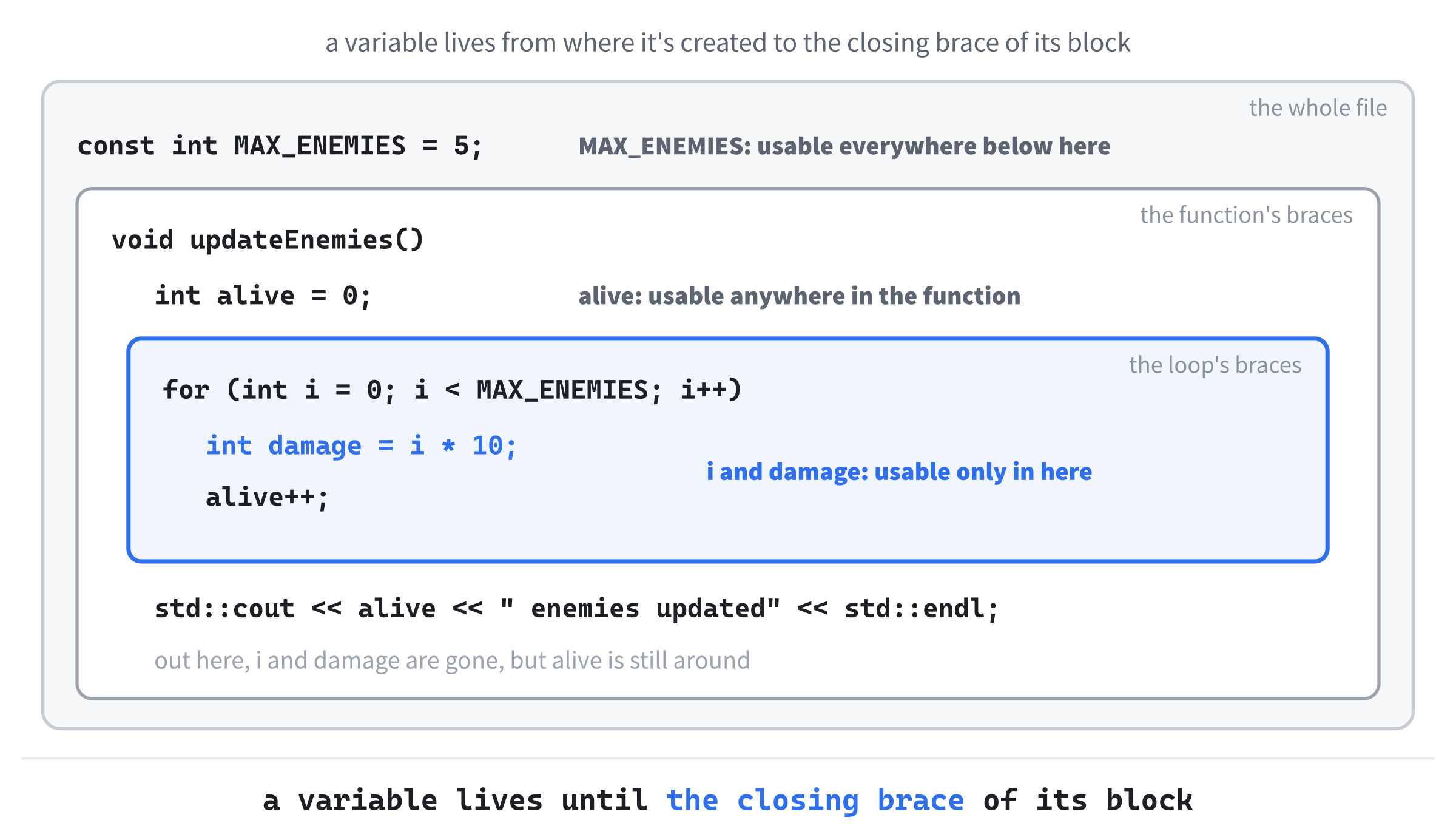
Scope is what makes it safe to reuse common names. Every function can have its own i, result, or count without interfering with any other function's, because each one lives in its own box. If main tries to use alive, the compiler stops it with C2065: 'alive': undeclared identifier, the same error Chapter 2 showed, because alive only exists inside updateEnemies.
Global Variables (and Why to Avoid Them)
A variable created outside every function, like MAX_ENEMIES, is global, and any function in the file can use it. For a constant, that's fine, and it's how every SDL project in this book shares its window size and speeds. For a variable that can change, it's a different story:
int globalScore = 0;   // any function can change this

void addPoints(int amount)
{
    globalScore = globalScore + amount;
}

void resetScore()
{
    globalScore = 0;
}
In the preceding code, both addPoints and resetScore can see and change globalScore, without it ever being passed to them. That looks convenient, and it's a trap.
Any code, anywhere in the program, can change a global variable at any time. If the score mysteriously drops to zero halfway through a level, and the score is global, the culprit could be any function in the whole program. With local variables and parameters, the suspects are only the functions the variable was handed to. Pass data in as parameters, and send it back with return values, and save global variables for true constants.
When we reach object-oriented programming, in Chapter 18, we'll meet even better ways to share data between the parts of a program without making it global.
Default Parameter Values
C++ lets you give a function's parameters default values, which are used whenever a call leaves those arguments out. That makes a function with a lot of parameters much friendlier to call:
void spawnEnemy(int x, int y, int health = 100, float speed = 1.0f)
{
    // create an enemy at (x, y), with this health and speed
}
In the preceding code, health has a default of 100, and speed has a default of 1.0. So the function can be called with two, three, or four arguments:
spawnEnemy(50, 75);               // health 100, speed 1.0
spawnEnemy(50, 75, 200);          // health 200, speed 1.0
spawnEnemy(50, 75, 200, 3.5f);    // health 200, speed 3.5
In the preceding code, each call fills the parameters from the left, and any it leaves out get their defaults.
There's one rule: the parameters with defaults must come at the end of the list. Once one parameter has a default, every parameter after it needs one, too. Replace spawnEnemy with this version, which breaks the rule:
void spawnEnemy(int x, int y = 75, int health, float speed)
{
}
In the preceding code, y has a default, but health and speed, which come after it, don't, so the compiler stops with C2548: 'spawnEnemy': missing default argument for parameter 3. The reason is that arguments are matched by position. If a call could leave out a parameter in the middle, C++ would have no way of knowing which parameters the remaining arguments were meant for.
Defaults are at their best for functions that are nearly always called the same way, but occasionally need a tweak. The common call stays short, and the full flexibility is still there when you need it.
Inline Functions
You'll sometimes see the keyword inline in front of a function:
inline int square(int n)
{
    return n * n;
}
In the preceding code, inline was originally a hint to the compiler that it might be worth pasting the function's body straight into each place it's called, which saves a tiny amount of work for very small functions. Modern compilers make that decision for themselves, and they're better at it than we are, so you don't need inline for speed. We mention it only so that you know what it is when you see it in other people's code.
The Call Stack and Recursion
Every time a function is called, the program needs somewhere to keep that call's parameters and local variables, and to remember where to go back to when it returns. That somewhere is a stack frame, and the frames are kept in a pile called the call stack. When main calls a function, a new frame goes on top of main’s. If that function calls another one, a third frame goes on top of that. When a function returns, its frame comes off the top, its local variables vanish, and the program carries on in the frame underneath, right after the call.
Recursion
The call stack is what makes one of the more surprising tricks in programming work. A function can call itself, and a function that does is called recursive. That sounds as if it should go on forever, but done properly, it's a neat way to solve certain problems.
The classic example is the factorial. The factorial of a number, written n!, is all the whole numbers from n down to 1 multiplied together, so 4! is 4 × 3 × 2 × 1, which is 24. It has a neat recursive definition: n! is n × (n − 1)!, except that 1! is simply 1. Here's that definition, translated directly into C++, to go above main:
int factorial(int n)
{
    if (n <= 1)
    {
        return 1;                      // the base case: stop here
    }

    return n * factorial(n - 1);       // call ourselves with a smaller n
}
In the preceding code, factorial calls itself with a smaller n each time. The if is the base case, the condition that finally stops the function from calling itself and gives a real answer. The last line is the recursive case, which does a little of the work, multiplying by n, and hands the rest to a smaller version of the same problem. Put std::cout << factorial(4) << std::endl; in main, and the console shows 24.
Here's how factorial(4) gets there. It can't answer right away, so it calls factorial(3), which calls factorial(2), which calls factorial(1). Each of those calls gets its own frame on the call stack, with its own n. Then factorial(1) hits the base case and returns 1, and the frames come off the stack one at a time: factorial(2) returns 2 × 1, which is 2, factorial(3) returns 3 × 2, which is 6, and factorial(4) returns 4 × 6, which is 24. Figure 8.4 shows the whole thing.

Every recursive function needs two things: a base case that stops the recursion, and a recursive case that moves closer to the base case every time. If either one is missing or wrong, the function calls itself over and over, piling frame after frame onto the call stack, until there's no room left. The program crashes with a stack overflow, which Visual Studio reports as 0xC00000FD: Stack overflow. Leave out the base case completely, and the compiler warns you in advance, with C4717: 'factorial': recursive on all control paths, function will cause runtime stack overflow.
As an interesting aside, that crash is where the famous programming website, Stack Overflow, gets its name: a nod to a bug that every programmer meets sooner or later, on a site where programmers go for help with exactly that kind of problem.
Recursion isn't always the right tool. The factorial could be written just as easily with a for loop, and the loop is usually a little faster. Recursion shines when a problem is naturally made of smaller copies of itself, such as the folders inside folders on a hard drive, or the branches of a maze that a character is exploring. For now, it's enough to know what recursion is, why the base case matters, and that it's there in your toolkit.
Organizing Code with Functions
Once you start writing functions, the shape of your programs changes. Instead of one enormous main that does everything, you end up with a short main that hands the work out to a handful of well-named functions, each with one job.
Think about the game loop. In our projects so far, it's been one long block inside main that handles the events, updates the game, and draws the frame, all in one place. With functions, it can look like this instead:
while (running)
{
    running = handleEvents();
    updateGame();
    drawFrame();
}
In the preceding code, the game loop reads almost like a description of a game: handle the events, update the game, draw the frame, and repeat. The handleEvents function returns false when the player quits, which becomes the new value of running. All the details of how each job is done are tucked away inside the functions. When you want to change how the drawing works, you go to drawFrame and nowhere else, and when something breaks, the suspects are narrowed down to the function whose job has gone wrong. Chapter 9's game puts this idea to work.
The guiding principle is one function, one job. If a function does three different things, it probably wants to be three functions. A good function name is usually a verb, or a short phrase that starts with one, that says exactly what the function does, such as updatePlayer, spawnEnemy, drawScore, or calculateDamage. If you can't think of a good name for a function, that's often a sign it's trying to do too much.
In bigger projects, functions are also spread across several files, with the declarations in header files and the definitions in .cpp files. That's how C++ programs grow without collapsing under their own weight, and we'll get there in Chapter 18.
Debugging Functions
Visual Studio's debugger has a feature that was handy before, but becomes invaluable once you're writing functions: the Call Stack window. It shows the call stack from the previous section, live, while the program is paused. Figure 8.5 shows it for our factorial program, paused at the base case.
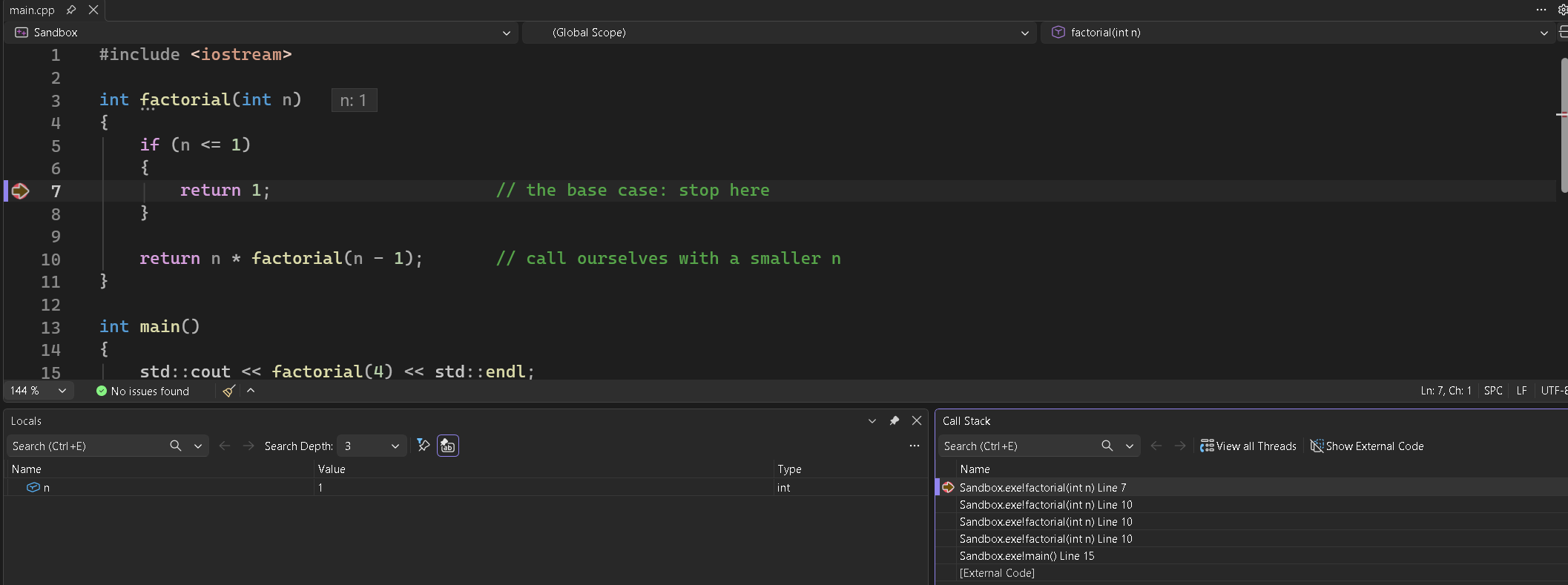
To get there, put the factorial program in the sandbox, set a breakpoint on the return 1; line, and press F5. When Visual Studio pauses, the Call Stack window appears at the bottom right, beside the Breakpoints tab. If it doesn't, open it with Debug > Windows > Call Stack.
The top line is the current call, factorial paused at the base case. Below it are the three factorial calls waiting for it, each paused at the recursive line, and below those is main, waiting for the answer. Double-click any line, and Visual Studio shows you that call's code, and its own n in the Locals window. When something goes wrong deep inside a chain of calls, the Call Stack window answers the question "how did we get here?"
Two debugger commands are especially useful with functions. Step Into, on F11, runs the current line, and if the line calls a function, it takes you inside, so you can watch the function run. Step Over, on F10, runs the whole line, function calls and all, as a single step. Use Step Into when you want to see what a function is doing, and Step Over when you trust it and just want to get past it.
If you step into a function and realize you've seen enough, press Shift+F11, Step Out. It runs the rest of the function and pauses again as soon as it returns, back in the code that called it.
Between the breakpoints, the three step commands, and the Call Stack window, you have everything you need for most of the debugging you'll ever do.
AI Exercise (Optional)
For this exercise, we'll start with a short, messy program, and then use an AI to help clean it up. This is one of the most common real-world uses of AI coding tools: not writing new code from scratch, but refactoring existing code, which means rearranging it into something better without changing what it does. As always, the exercise is optional, and you won't miss any core content if you skip it.
For this one, use a regular chatbot, such as Claude, ChatGPT, or Gemini, in its normal chat window. Don't use an AI agent that edits your files, or an assistant built into Visual Studio. The point is to paste code into a chat, read what comes back, and make your own decisions about it, and that's the habit to build first. The fancier tools can come later.
Step 1: Type in the messy version. Put this in your sandbox's main.cpp, in place of everything that's there:
#include <iostream>

int main()
{
    int playerHealth = 100;
    int playerDamage = 0;

    // The player takes a fire hit
    playerDamage = 25;
    if (playerHealth - playerDamage > 0)
    {
        playerHealth = playerHealth - playerDamage;
        std::cout << "Health is now: " << playerHealth << std::endl;
    }
    else
    {
        playerHealth = 0;
        std::cout << "Player died!" << std::endl;
    }

    // The player takes a poison hit
    playerDamage = 10;
    if (playerHealth - playerDamage > 0)
    {
        playerHealth = playerHealth - playerDamage;
        std::cout << "Health is now: " << playerHealth << std::endl;
    }
    else
    {
        playerHealth = 0;
        std::cout << "Player died!" << std::endl;
    }

    // The player drinks a health potion
    int healing = 30;
    playerHealth = playerHealth + healing;
    if (playerHealth > 100)
    {
        playerHealth = 100;
    }
    std::cout << "Health is now: " << playerHealth << std::endl;

    return 0;
}
In the preceding code, the player takes two hits and then drinks a potion. Build and run it, and the console tracks the player's health through all three: 75, then 65, then 95. Notice how the damage code appears twice, almost word for word, with only the number changed.
Step 2: Ask an AI to refactor it. Open your chatbot of choice, and paste in this prompt, followed by the whole program:
"I'm a C++ beginner. I've just learned about functions, parameters, return values, and pass by reference. Please refactor the code below so that the repeated damage logic becomes one function, and the healing logic becomes another. Keep main short and readable, and put each curly brace on its own line. After the refactored code, give me a short explanation of each function, the parameters you chose, and why. [paste the code here]"
Notice what the preceding prompt is doing. It tells the AI your level, names the C++ features you want it to use, and says exactly what should be refactored. The prompt also asks for an explanation, and that's the real payoff, because it turns the exercise from getting working code into learning something.
Step 3: Evaluate the result. When the AI responds, don't just copy and paste. Read the code carefully, and ask yourself these questions:
- Do the function names say clearly what each function does?
- Are the parameters sensible? Did the AI pass the health by value or by reference, and does its choice make sense?
- Is the new
mainreally easier to read than the old one? - Does every line make sense to you? If one doesn't, ask the AI to explain that specific part.
Then build and run the AI's version in your sandbox. If it doesn't compile, paste the error messages back into the chat and ask for a fix. If it compiles but the three health numbers come out differently, that's a bug, and finding it is your job.
The goal isn't a tidier program. The goal is to practice the habit that separates people who use AI well from people who use it badly: read what it gives you, understand every line, and don't move on until you do.
Summary
Functions are the foundation that everything else in this book is built on. You can now define and declare them, pass data in with parameters, get answers back with return values, and choose between passing by value, by reference, and by const reference. You've met overloading and default parameter values, seen how scope keeps each function's variables to itself, and learned why global variables cause more trouble than they save. Along the way, you've watched the call stack grow and shrink under a recursive function, and you know how to read it in Visual Studio, which turns "what on earth just happened?" into a precise trail of clues.
Everything from here on is organized around functions. In the next chapter, you'll use variables, decisions, loops, and functions together in Act 1's biggest project, a complete little shooter. After that, Act 2 begins, and we finally answer a question that has been lurking in the background since Chapter 1's &event: what exactly is a pointer, and why should we care?