
Chapter 25 set out the principles, and this chapter puts them to work. One evening, in about ninety minutes, I built a complete game of Snake with an AI writing nearly all of its code. I had an empty SDL 3 project open in Visual Studio, a chatbot open in a browser tab beside it, and a plan. Then I described the game to the AI one small step at a time, and at every step, I read what came back, ran it, played it, and decided what to do with it: accept it, edit it, or reject it.
What follows is that session, condensed. The prompts are the ones I typed, lightly tidied. The AI's answers were far too long to print, with an explanation wrapped around every piece of code, so I've kept the code that mattered and summed up the rest. The code is shown as it stood after my edits in each round, so by the last round it matches the project folder, and wherever I changed something, you'll see what the AI wrote first, and why I changed it.
This is a different kind of chapter from the project chapters. You won't type the game in. You'll watch it being built, and read its code the way I read it, looking for what's new, what's risky, and what's wrong. Then, in the AI exercise at the end, you'll build a game of your own in the same way. It will turn out differently from mine, and it should.
SDL3 Projects/Vibe Snake — my finished version, all in one file, main.cpp. Like Chapter 1's project, it uses the SDL3 folder that sits beside it, so it builds and runs as soon as you open it. Yours will differ.In this chapter, we will:
- Plan a small game before saying a word to the AI
- Build Snake in six rounds, each small enough to read in a few minutes and see working in a few more
- Read the AI's code the way a senior engineer does, and accept it, edit it, or reject it
- Catch SDL 2 code in an SDL 3 program, the AI's own style creeping back in, and a bug that only playing reveals
- Look back honestly at what worked, what didn't, and what the session cost
- Build a game of your own the same way, in an open-ended AI exercise
It's a long chapter, but it reads quickly, because you're reading, not typing.
Setting Up
A vibe-coded project needs very little setup, but the little it needs matters:
- An empty project, named
Vibe Snake, with an emptymain.cpp, set up for plain SDL exactly like Chapter 16's, or made from the template that Chapter 3's tip suggested. Chapter 25 said that project setup is the part AI tools most often get wrong, so it's the part to do yourself. - A regular chatbot, such as Claude, ChatGPT, or Gemini, in a browser tab beside Visual Studio.
- A rhythm for every round. Paste the whole of the current
main.cppinto the chat, with the prompt below it. Read every line of the answer. Copy what you accept into Visual Studio, and fix what needs fixing. Then build it, run it, and play it, before you decide on the next small step. - The habits from the last chapter, at the front of your mind. Read every line. Don't accept anything you don't understand. Push back early, and say exactly what's wrong.
That last one is the only setup that really matters.
The Plan
A vibe-coded project lives or dies on whether you can describe what you want, and you can't describe what you haven't decided. So before any prompting, I answered Chapter 9's two planning questions, what the game needs to remember and what it needs to do, in a one-paragraph design. It was just for me, and not for the AI, yet:
Classic Snake. An 800 by 600 window, on a grid of 20-pixel cells, so 40 across and 30 down. A snake three cells long starts in the middle, moving right. The arrow keys, and W, A, S, and D, change its direction, but it can't turn back on itself. An apple appears on a random empty cell. Eating it grows the snake by a cell, scores a point, and speeds the snake up a little. Hitting a wall, or the snake's own body, ends the game, and R starts a new one. The score goes in the window's title bar.
I added a few limits of my own. There would be no add-on libraries, no fonts, and no sound: just SDL 3, in one file. I guessed it would come to about 150 lines.
Then I split the work into six rounds. Each round would add one thing, small enough to read in a few minutes and see working in a few more, and each would leave behind a game that ran. Figure 26.1 shows the game at the end of every round, and the rest of this chapter follows them in order.

Round 1: The Skeleton and the First Render
The first prompt set the tone for the whole session. I tried to be specific without writing the code myself, and I named every constraint up front:
"I'm building Snake in C++20 with SDL 3. Not SDL 2: the API changed. One source file,
main.cpp. An 800 by 600 window, with 20-pixel grid cells, so 40 columns and 30 rows. Show me a complete program that opens the window, runs a basic game loop withSDL_PollEvent, and draws a snake three cells long, as filled rectangles in the middle of the grid, and a red apple at a fixed cell, (30, 15). No movement yet: just draw the starting position. Use a structCell { int x; int y; };for grid positions, and astd::vector<Cell>for the snake. Quit on Escape or the window's X. Clear the window to a very dark blue-gray, and draw the snake in green."
Look at everything that prompt pins down:
- The versions: C++20, and SDL 3, with a reason, since plain "SDL" would get SDL 2 code.
- The shape of the answer: one file, and a complete program.
- The sizes and the data: the window, the grid, and the data structures I wanted.
- The scope: drawing only, with no movement yet.
- The look: the colors of the background, the snake, and the apple.
That's a lot of constraint, and it paid off at once. The AI came back with about 80 lines, exactly the shape I'd asked for: a window, a renderer, a game loop, the Cell struct, the snake in a std::vector<Cell>, and a function to draw it all, with each part explained as it went.
The First Build
The very first line of main made me stop:
if (!SDL_Init(SDL_INIT_EVERYTHING))In the preceding code, the check is right for SDL 3, whose SDL_Init returns a bool that's true when SDL starts. The flag is the problem. SDL 2 had a flag called SDL_INIT_EVERYTHING, which started every part of SDL at once, and I couldn't remember whether SDL 3 had kept it. Building the program was the quickest way to find out, and the build stopped with C2065: 'SDL_INIT_EVERYTHING_deprecated_list_flags_explicitly': undeclared identifier.
That's a name that nobody wrote. SDL 3 dropped SDL_INIT_EVERYTHING, and to help people moving their code across from SDL 2, its headers quietly swap the old name for that long one, which doesn't exist. Any code that still uses the old name stops with an error that says what to do instead: list the flags you need, explicitly.
When an error names something you never wrote, a macro is usually behind it. Right-click SDL_INIT_EVERYTHING and choose Go To Definition, and Visual Studio opens SDL_oldnames.h at the line that makes the swap. The file has hundreds of lines like it, one for every SDL 2 name that SDL 3 renamed or dropped, and each long name says what became of it, such as SDL_QUIT_renamed_SDL_EVENT_QUIT.
This is Chapter 25's first failure mode, plausible nonsense, in the wild: half SDL 3 and half SDL 2, in one confident line. It's the lucky kind, because it doesn't compile. This game only needs video, which brings events with it, so the fix was a single word. Here's how main begins in the finished game:
// Start SDL, then make the window and the renderer
if (!SDL_Init(SDL_INIT_VIDEO))
{
    SDL_Log("SDL_Init failed: %s", SDL_GetError());
    return 1;
}

SDL_Window* window = SDL_CreateWindow("Vibe Snake",
                                      WINDOW_W, WINDOW_H, 0);
if (!window)
{
    SDL_Log("SDL_CreateWindow failed: %s", SDL_GetError());
    SDL_Quit();
    return 1;
}

SDL_Renderer* renderer = SDL_CreateRenderer(window, nullptr);
if (!renderer)
{
    SDL_Log("SDL_CreateRenderer failed: %s", SDL_GetError());
    SDL_DestroyWindow(window);
    SDL_Quit();
    return 1;
}
In the preceding code, main starts SDL with SDL_INIT_VIDEO, and the rest is the start of every SDL program since Chapter 1: make the window and the renderer, and if either fails, log the reason, tidy up whatever was made, and return 1. Familiar code reads quickly, but it still has to be read. The line that didn't build was in exactly this kind of code, the kind it's tempting to skip.
With that word changed, the program built and ran. A green snake, three cells long, sat in the middle of a dark window, with a red apple ten cells to its right, just as the first picture in Figure 26.1 shows. Nothing moved, and that was a win: every part of the drawing was in place.
My Edits
Before moving on, I made four more changes. This code would be the foundation of everything that followed, and Chapter 25's accept, edit, reject habit says that editing is the most common choice. It was certainly mine here.
The names. The AI had called the snake body, and I renamed it snake, because the vector holds the whole creature, head and all. It had also called the game g, the renderer r, and the event ev, and I spelled them out as game, renderer, and event. A one-letter name saves a moment when it's typed, and costs one every time it's read, and it wasn't the AI who'd be reading it.
The colors. The AI had typed every color as four numbers, right where it was used. I gave each color a name, as constants at the top of the file, as the book's games have done since Chapter 3.
The casts, and a repeated sum. Here's how the AI drew the apple:
SDL_FRect aRect {
    (float)(g.apple.x * CELL_PX + 2),
    (float)(g.apple.y * CELL_PX + 2),
    (float)(CELL_PX - 4), (float)(CELL_PX - 4)
};
In the preceding code, a cell's column and row become pixels, multiplied by the size of a cell, and moved in two pixels from the cell's edges. Every value is converted to a float with the old cast from C, the type in parentheses, which does the job here, but would just as quietly force through a conversion that static_cast refuses. The same sums appeared again for every cell of the snake, with 1 and 2 in place of 2 and 4. Writing the casts as static_cast<float> would have made both copies even longer, so I asked the AI for one small function that turns a cell into a rectangle, and to call it in both places. You'll see it in a moment.
The style. The AI had marked every function and constant static, which, outside a class, keeps a name private to its own file. A program with only one file has no use for that, so I took it out. It had also squeezed short if statements onto single lines, braces and all, and I gave every brace a line of its own, as the rest of the book does.
Just as important is what I didn't change. The AI had declared its constants constexpr, where this book has used const, and Chapter 2 said that the two behave the same for constants like these. That's a difference of taste, not of correctness, and not every difference is worth an edit. The AI had also drawn the snake's head a little brighter than its body, which I hadn't asked for. That's helpful drift, but it really was helpful, and I kept it.
The Skeleton, After My Edits
Here's the top of the file, as it stood at the end of Round 1:
#include <SDL3/SDL.h>
#include <SDL3/SDL_main.h>

#include <vector>   // std::vector, for the snake

// The grid, and the window it fills
constexpr int CELL_PX  = 20;                 // a cell's size, in pixels
constexpr int GRID_W   = 40;                 // cells across
constexpr int GRID_H   = 30;                 // cells down
constexpr int WINDOW_W = CELL_PX * GRID_W;   // 800 pixels
constexpr int WINDOW_H = CELL_PX * GRID_H;   // 600 pixels

// The colors
constexpr SDL_Color BACKGROUND  = { 16, 16, 20, 255 };    // almost black
constexpr SDL_Color APPLE_COLOR = { 230, 60, 60, 255 };   // red
constexpr SDL_Color HEAD_COLOR  = { 120, 230, 120, 255 }; // bright green
constexpr SDL_Color BODY_COLOR  = { 80, 180, 90, 255 };   // darker green

// A cell on the grid, or a step from one cell to the next
struct Cell
{
    int x;   // the column, counting from 0 at the left
    int y;   // the row, counting from 0 at the top
};
In the preceding code, the sizes are the AI's, with the window's size worked out from the grid's, so that changing CELL_PX or GRID_W would resize everything together. The colors are my named constants. The Cell struct is the one my prompt asked for: a column and a row, counted from the top-left corner, as in Chapter 16's grid. The comment's second half, a step from one cell to the next, is from Round 2, and it'll make sense there.
The function I asked for comes next:
// The rectangle a cell fills in the window, pulled in by inset pixels on
// every side, so that neighbors don't touch
SDL_FRect cellRect(Cell cell, float inset)
{
    float size = static_cast<float>(CELL_PX);
    return { cell.x * size + inset, cell.y * size + inset,
             size - 2.0f * inset, size - 2.0f * inset };
}
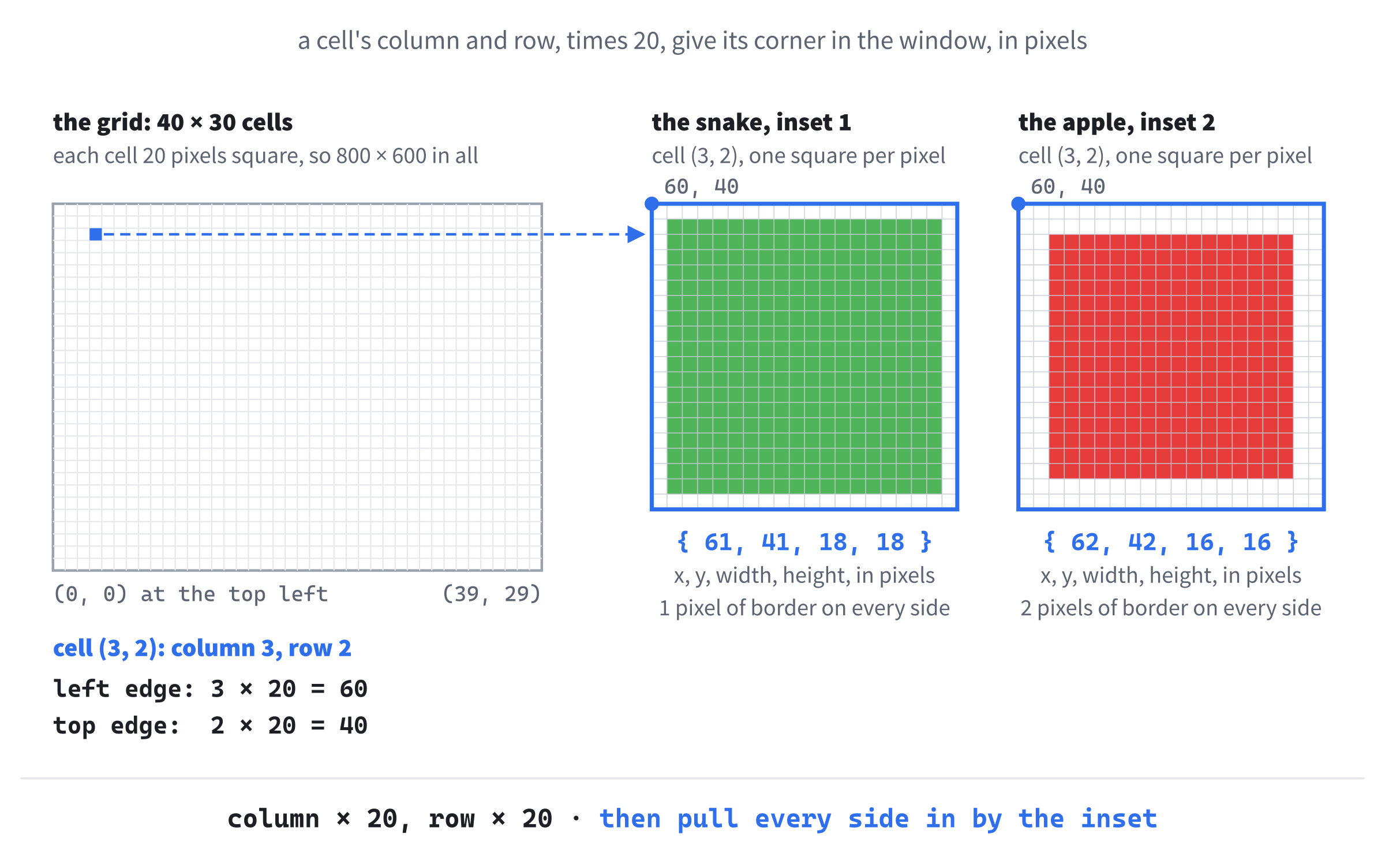
In the preceding code, cellRect turns a cell on the grid into a rectangle in the window. The size of a cell is converted to a float once, and after that, the sums need no casts at all, because an int multiplied by a float gives a float.
The column times the size is the left edge of the cell, in pixels, and the row times the size is its top edge. The inset moves all four sides in, so the rectangle is smaller than the cell by inset pixels on every side. The function returns its SDL_FRect as a list of four values in braces, as Chapter 17's hitbox did, and Figure 26.2 shows the sums for one cell.
Then the game's state, and a function to set it up:
// Everything that changes while you play
struct Game
{
    std::vector<Cell> snake;         // the head is snake[0]
    Cell apple;
};

// Start a new game: a snake three cells long in the middle
void resetGame(Game& game)
{
    int midX = GRID_W / 2;
    int midY = GRID_H / 2;
    game.snake.clear();
    game.snake.push_back({ midX, midY });       // the head
    game.snake.push_back({ midX - 1, midY });
    game.snake.push_back({ midX - 2, midY });

    game.apple = { 30, 15 };
}
In the preceding code, the AI gathered everything about the game into one struct, Game, as Chapters 9 and 11 did, so that a function can be handed the whole game at once. For now, that's just the snake and the apple. The snake is a vector of cells, with its head first.
The resetGame function empties the snake, and pushes on three cells, each written as a pair of values in braces, as Chapter 13 did with push_back. The head is at the middle of the grid, (20, 15), and the other two trail off to its left. The apple is at the fixed cell the prompt asked for.
The AI didn't need a function to set up the game just yet, since it only happens once. It wrote one anyway, and that paid off in Round 5, when R started a new game.
All the drawing happens in one function, render, the only one that uses the colors:
// Draw one frame: the background, the apple, and the snake
void render(SDL_Renderer* renderer, const Game& game)
{
    SDL_SetRenderDrawColor(renderer, BACKGROUND.r, BACKGROUND.g,
                           BACKGROUND.b, BACKGROUND.a);
    SDL_RenderClear(renderer);

    // The apple, 2 pixels in from its cell's edges
    SDL_SetRenderDrawColor(renderer, APPLE_COLOR.r, APPLE_COLOR.g,
                           APPLE_COLOR.b, APPLE_COLOR.a);
    SDL_FRect appleRect = cellRect(game.apple, 2.0f);
    SDL_RenderFillRect(renderer, &appleRect);

    // The snake, 1 pixel in, with its head brighter than its body
    for (size_t i = 0; i < game.snake.size(); i++)
    {
        SDL_Color color = (i == 0) ? HEAD_COLOR : BODY_COLOR;
        SDL_SetRenderDrawColor(renderer, color.r, color.g, color.b, color.a);
        SDL_FRect segmentRect = cellRect(game.snake[i], 1.0f);
        SDL_RenderFillRect(renderer, &segmentRect);
    }

    SDL_RenderPresent(renderer);
}
In the preceding code, render clears the window to the background color, and then fills the apple's rectangle and each of the snake's, handing SDL_SetRenderDrawColor each named color's four parts, as Chapter 16 did. The loop counts through the snake by index, because it needs to know which cell is the head, and Chapter 4's ternary picks the brighter green for index 0 and the darker green for the rest. The game is passed as a const Game&, because drawing only reads it.
Last came the game loop, at the end of main, which sets the game up and then draws it, over and over:
Game game;
resetGame(game);

bool running = true;
while (running)
{
    SDL_Event event;
    while (SDL_PollEvent(&event))
    {
        if (event.type == SDL_EVENT_QUIT)
        {
            running = false;
        }
        else if (event.type == SDL_EVENT_KEY_DOWN &&
                 event.key.scancode == SDL_SCANCODE_ESCAPE)
        {
            running = false;
        }
    }

    render(renderer, game);
    SDL_Delay(8);   // rest a moment, rather than loop flat out
}
In the preceding code, the game is set up once, and then the loop runs until the window's X or the Escape key sets running to false. Each time around, it handles the waiting events, and draws a frame. After the loop, main cleans up as every SDL program does, destroying the renderer and the window, in the reverse order they were made, and quitting SDL.
One line hasn't appeared in the book before. The call to SDL_Delay pauses the program for eight milliseconds, so the loop doesn't spin flat out, drawing the same frame thousands of times a second and keeping a processor core busy for nothing. The book's games have done that job with vsync since Chapter 1, which waits for the monitor instead. Either works for a game this simple, so I left the AI's choice alone.
Then I did the thing that made the rest of the session go smoothly:
Start every round by pasting your whole, current file into the chat, even when it's long, and say what it is: "Here's my current main.cpp. Build on this version, and keep its style." In a plain chat, the AI only knows the code it can see. Without your file, it builds on its own first answer, and cheerfully puts back everything you changed.
It worked better than I expected. Every round after this one came back in my style, with my names, my constants, and my braces, because that's what the AI could see. Well, nearly every round, as you'll see in Rounds 4 and 6.
Takeaway from Round 1
The biggest single factor in getting good code from an AI is front-loading the constraints: the versions, the files, the data structures, and the look, all in the first prompt. The more the AI knows about what you want, and what you don't, the less you have to fight it later. The second biggest is fixing its style early. The first round sets the pattern the AI copies for the rest of the session, so that's where to spend your editing time.
Round 2: Movement on a Timer
This is the round where Snake starts to feel like Snake. Every so often, the snake moves one cell. Its head moves forward, and every other cell follows the one in front of it. Here's the prompt I put below my pasted-in file:
"Add timed movement. The snake should move one cell every 125 milliseconds, using
SDL_GetTicksto track when it last moved. The head moves in the snake's current direction, which starts as right: dx = +1, dy = 0. To move the snake one step, put a new head on the front, and pop the tail off the back. Add adirmember toGame, aCell, for the direction. Don't handle input yet. I just want to see the snake glide to the right, to confirm that the movement works."
The answer came back in my style, with my names and my braces, which was Round 1's editing already paying off. The AI added a constant, TICK_MS, of 125 milliseconds, and two members to Game: dir, the direction, and lastMove, the time of the last move, starting at 0. The resetGame function now set dir to { 1, 0 }, one column to the right and no rows down, and lastMove to the time the game began.
That's a Cell used as a direction rather than a place: a step of one column and no rows, rather than a column and a row. It stretches the name a little, but it's the same two whole numbers either way, and adding a step to a cell gives the next cell, which is exactly what moving needs. I let it stand, and edited the comment on Cell to say so.
The move itself was a new function:
// Move the snake one cell in the direction it's heading
void stepSnake(Game& game)
{
    Cell head = game.snake.front();
    Cell newHead = { head.x + game.dir.x, head.y + game.dir.y };
    game.snake.insert(game.snake.begin(), newHead);
    game.snake.pop_back();   // the tail follows the head
}
In the preceding code, a vector's front function gives its first element, the head, and adding the direction to the head gives the cell it moves into. The insert function, which Chapter 15 mentioned in passing, is the opposite of Chapter 13's erase. It takes an iterator, here begin(), which marks the front of the vector, and puts the new element there, shuffling everything else up one place to make room. Then pop_back removes the last element, the old tail. Figure 26.3 shows the whole move.
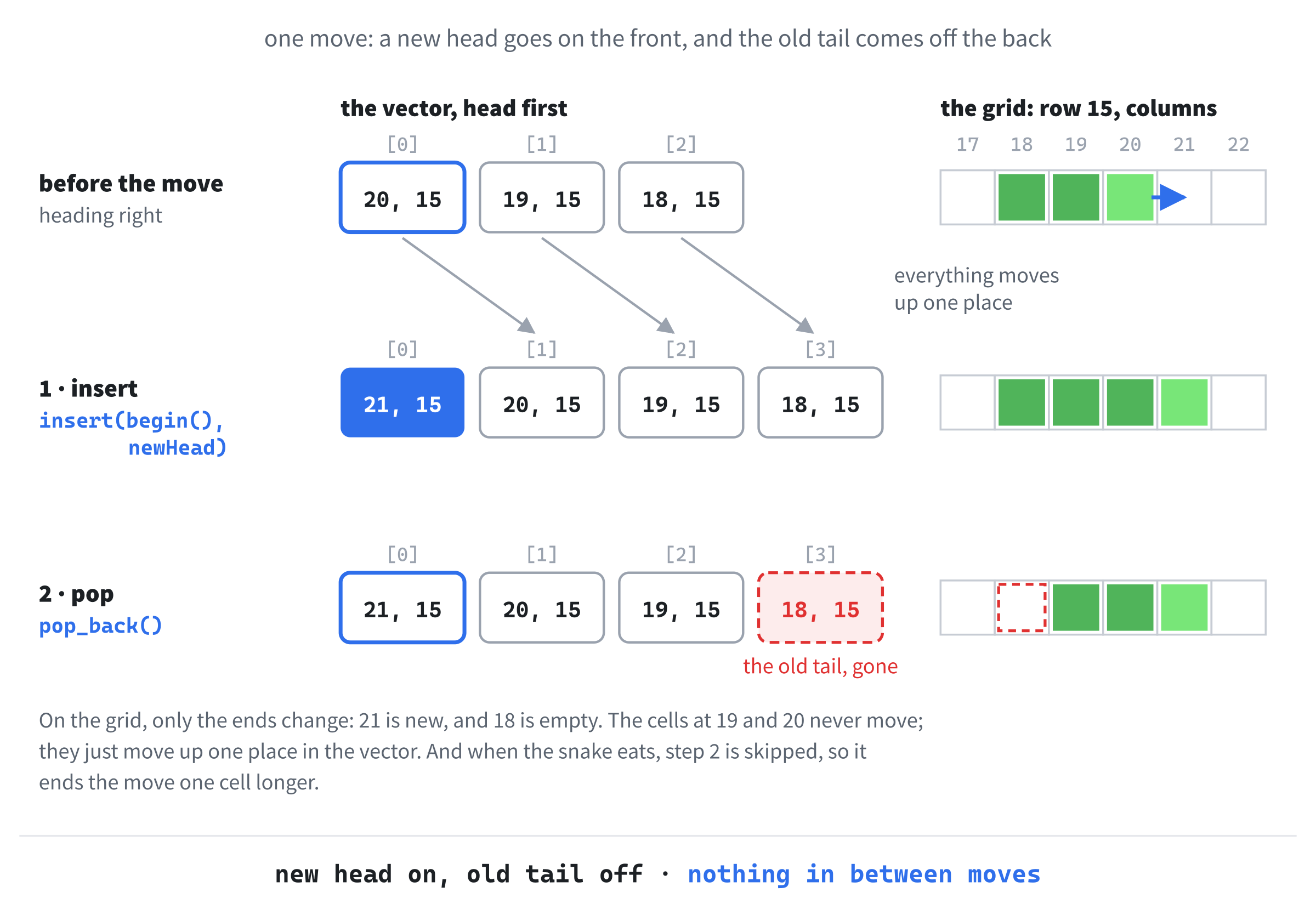
That's the classic Snake trick. The snake never moves its cells. It grows a new head and drops its tail, and in between, nothing changes, except each cell's place in the vector.
One thing about it bothered me. Chapter 15 said that insert at the front of a vector has to shuffle every element to make room, and that a std::deque, which can add to its front without shuffling, is the natural fit for exactly this: push the newest onto the front, and pop the oldest off the back. A snake is a deque's job. The AI used a vector because my own prompt said to, and it didn't say a word about the deque. An AI does what your prompt says, including the parts where you're wrong, and it rarely argues unless you invite it to, as Chapter 25 suggested.
For a snake of a few dozen cells, the shuffle takes no time you could ever measure, so I left it. If I were starting again, I'd leave the container out of the first prompt, or add "if there's a better choice, say so."
In the game loop, just above the call to render, the AI added the timer:
// Move the snake whenever its time between moves is up
Uint64 now = SDL_GetTicks();
if (now - game.lastMove >= TICK_MS)
{
    stepSnake(game);
    game.lastMove = now;
}
In the preceding code, SDL_GetTicks gives the number of milliseconds since SDL started, as it has since Chapter 1. Each time around the game loop, which is about a hundred times a second, the code asks whether 125 milliseconds have passed since the last move. When they have, it moves the snake and notes the time. So the snake moves eight times a second, however fast the loop runs, while the drawing still happens every time around.
I built it and ran it, and the snake glided to the right, a cell at a time, straight over the apple and out of the window, as the second picture in Figure 26.1 shows. That was no surprise, since there were no walls yet, but it's worth a pause, because the AI never asked what should happen at the edge, or at the apple. The AI does what you ask, and ignores what you didn't. It's the most common surprise in vibe coding. If you don't name a behavior, you get the simplest possible lack of one: in this case, a snake heading off into the distance, forever.
I let it go for now. The walls would come in Round 5.
Takeaway from Round 2
Single-purpose prompts are the easiest to check. "Add timed movement" is one change, and the answer was one function and a few lines, easy to read in a couple of minutes. As prompts get bigger and try to do more at once, the answers balloon, and so do the chances of a subtle mistake hiding inside them.
Round 3: Input
"Now wire up input. The arrow keys and W, A, S, and D both change the snake's direction. An important rule: the player can't reverse straight into the snake's own body, so if it's moving right, Left is ignored. Add a
pendingDirmember that the keys set, and copypendingDirintodirat the start of each move, not on every key press. That's the standard fix for the bug where two quick key presses between moves turn the snake back on itself."
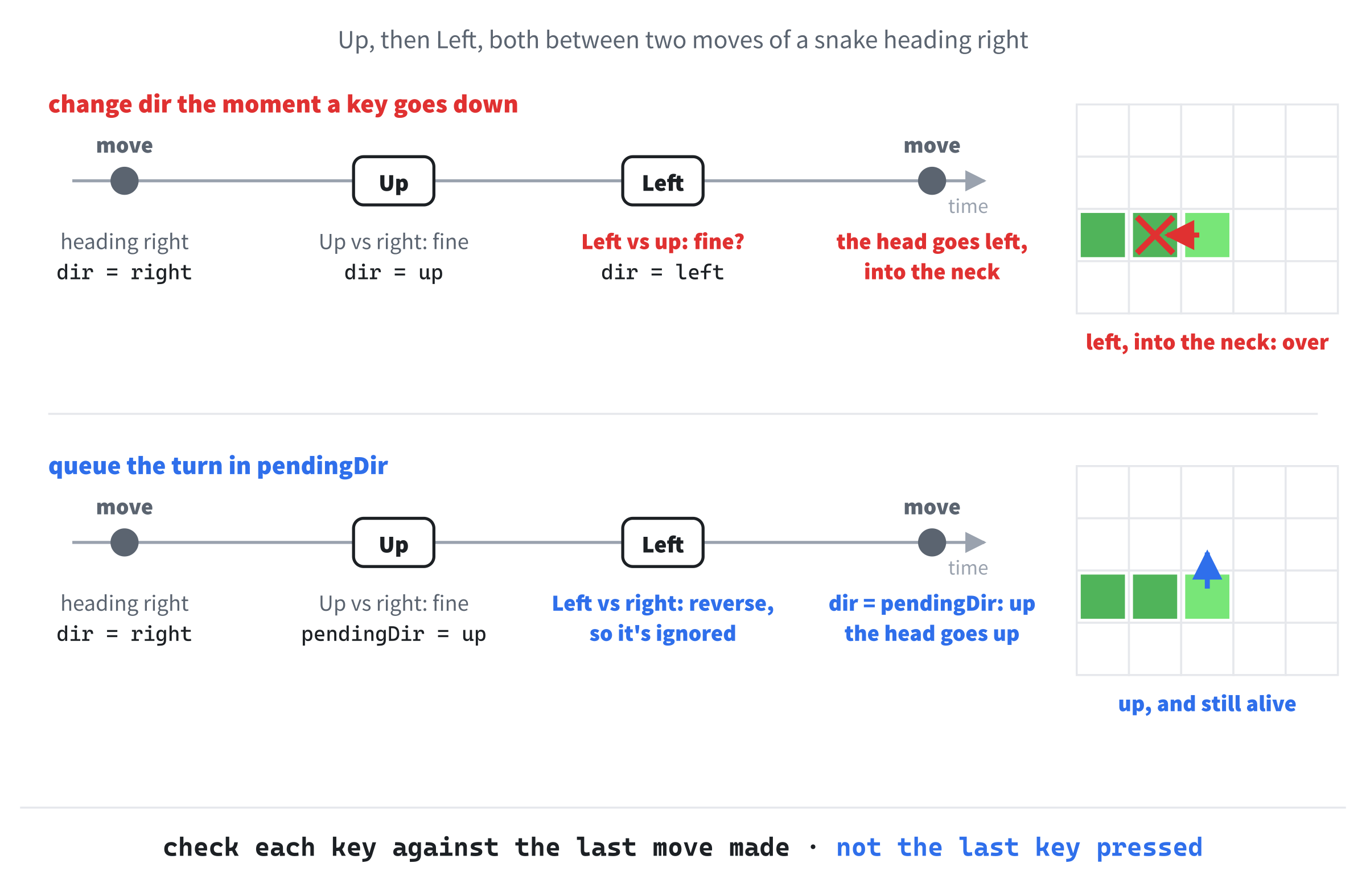
That prompt has a design decision baked into it, the pendingDir, and it's there because I know the bug it prevents, from playing plenty of Snake games that had it. The simple way to steer is to change dir the moment a key goes down, checking first that the new direction isn't the reverse of the old one. Now picture the snake moving right, and a quick player pressing Up and then Left, both before the next move. Up is fine, because it isn't the reverse of right. Then Left is checked against Up, and it isn't the reverse of that either, so it's allowed too.
At the next move, the head goes left, straight back into the snake's own neck, and the game is over, from two perfectly sensible key presses. The fix is to check each key against the last move the snake actually made, and hold the answer until the next move takes it. Figure 26.4 shows both.
The AI took the hint. Its Game struct got a pendingDir member, which resetGame sets to the starting direction, and stepSnake got one new line at its top, game.dir = game.pendingDir;, which takes the queued turn at the moment of the move. The Escape check in the game loop became a switch on the key, with the four directions added:
switch (event.key.scancode)
{
case SDL_SCANCODE_ESCAPE:
    running = false;
    break;
case SDL_SCANCODE_W:
case SDL_SCANCODE_UP:
    queueDir(game, 0, -1);
    break;
case SDL_SCANCODE_S:
case SDL_SCANCODE_DOWN:
    queueDir(game, 0, 1);
    break;
case SDL_SCANCODE_A:
case SDL_SCANCODE_LEFT:
    queueDir(game, -1, 0);
    break;
case SDL_SCANCODE_D:
case SDL_SCANCODE_RIGHT:
    queueDir(game, 1, 0);
    break;
default:
    break;
}
In the preceding code, the switch looks at the key's scancode, the physical key that Chapter 1 described, so W, A, S, and D stay in the same place on any keyboard layout. Each direction has two stacked case labels, one for the letter and one for the arrow, which is Chapter 4's fall-through on purpose, and both lead to a call to queueDir with a step to take: a column and a row. Rows are counted from the top of the window, so up is one row less, 0, -1, and down is one row more.
Every direction key goes through one small function, queueDir, and that's where the rule about reversing lives:
// Turn at the next move, unless that would reverse the snake into itself
void queueDir(Game& game, int dx, int dy)
{
    if (dx == -game.dir.x && dy == -game.dir.y)
        return;
    game.pendingDir = { dx, dy };
}
In the preceding code, the reverse of a step is the same step with both signs flipped, so the reverse of right, { 1, 0 }, is left, { -1, 0 }. If the new step is the reverse of dir, the direction of the last real move, the key is ignored. Otherwise, it becomes the pending direction. Two quick keys can only ever replace each other, and each one is checked against a move that really happened.
There's a small cost. Press Up and then Left, both before the next move, and the snake only goes up: the Left is ignored, and you have to press it again. A queue of turns would keep both, but at eight moves a second, it hardly ever matters, and Snake plays well without it.
One more thing caught my eye as I played. Holding a key down sends a stream of repeated key-down events, which Chapter 16 filtered out with !event.key.repeat. Here, each repeat just queues the same direction again, which does no harm, so I left them in. In a game where every press does something, like Chapter 16's one-cell steps, they'd matter a lot.
Takeaway from Round 3
The design hint about pendingDir saved me a debugging session that could easily have eaten half an hour. When you know an approach that's right but not obvious, put it in the prompt, rather than hoping the AI will choose it. An AI is very good at carrying out an approach you describe, and much less reliable at choosing one.
Round 4: The Apple, Eating, and Growing
"Now the apple. When the snake's head moves onto the apple's cell, three things happen: the score goes up by 1, the snake grows by one cell, by not popping its tail on that move, and the apple moves to a random empty cell, one the snake isn't in. Add a helper,
randomEmptyCell(const std::vector<Cell>&), that returns aCell. For now, print the score to the console withstd::cout."
The AI started with a small helper for comparing cells, which the rest of the round leaned on:
// Are a and b the same cell?
bool sameCell(Cell a, Cell b)
{
    return a.x == b.x && a.y == b.y;
}
In the preceding code, two cells are the same when their columns match and their rows match too. A Cell is only two ints, so the function takes them by value, as copies, which is the usual choice for something that small.
For the random cell, the AI reached for the C library's random numbers. It seeded them once, at the start of main, with srand((unsigned)time(nullptr)), which needs two more headers, <cstdlib> and <ctime>, and it picked each cell with rand() % GRID_W and rand() % GRID_H. That's the most common random-number code there is, and for decades it was the only kind, so it's the first thing an AI reaches for.
It works. But it's C, with an old-style cast, (unsigned), like the ones cellRect did away with, and the book's games have used SDL's random numbers since Chapter 9. Those need no seeding at all, because SDL seeds them from its clock by itself. So I edited it, and here's randomEmptyCell after my edit:
// A random cell that the snake isn't in, for the next apple
Cell randomEmptyCell(const std::vector<Cell>& occupied)
{
    for (int tries = 0; tries < 1000; tries++)
    {
        Cell cell = { SDL_rand(GRID_W), SDL_rand(GRID_H) };
        bool occupiedHere = false;
        for (Cell segment : occupied)
        {
            if (sameCell(segment, cell))
            {
                occupiedHere = true;
                break;
            }
        }
        if (!occupiedHere)
            return cell;
    }
    return Cell{ 0, 0 };   // 1000 misses: the grid is as good as full
}
In the preceding code, SDL_rand(GRID_W) gives a whole number from 0 up to 39, a random column, and SDL_rand(GRID_H) gives a random row, just as SDL_rand did in Chapter 11. Each try picks a random cell, and checks it against every cell in occupied, which is the snake. If none of them match, the cell is free, and the function returns it. Otherwise, it tries again.
That's the right approach for a game like Snake, where most of the grid is empty most of the time. A random guess almost always lands on a free cell, which is quicker than listing all the free cells and picking one. The limit of 1000 tries is a safety net. If the snake ever filled nearly the whole grid, random guesses would almost never find a free cell, and without a limit, the loop could go on for a very long time. After 1000 misses, the function gives up and returns the top-left cell, a corner I was happy to cut, because a snake that long means you've already won.
The eating went into stepSnake, in place of its pop_back line:
game.snake.insert(game.snake.begin(), newHead);

if (sameCell(newHead, game.apple))
{
    // Keep the tail, so the snake grows
    game.score++;
    std::cout << "Score: " << game.score << std::endl;
    game.apple = randomEmptyCell(game.snake);
}
else
{
    game.snake.pop_back();   // the tail follows the head
}
In the preceding code, the new head goes on the front as before, and then the snake either eats or moves on. If the new head is on the apple, the score goes up and is printed, and the tail stays where it is, so the snake is one cell longer after the move than it was before. Otherwise, the tail comes off, as usual. The Game struct got a score member, starting at 0, and resetGame now puts the first apple on a random empty cell, too, instead of at (30, 15).
This is where I most expected a subtle bug, and the AI got it right. The detail that matters is the order. The new head is already on the front of the snake when randomEmptyCell is called, so the whole snake, new head and all, is checked, and the next apple can't land on any cell the snake is in, including the one its head has only just moved into.
On a careful read, I noticed how much work randomEmptyCell does. Every try checks every cell of the snake, so the work grows with the snake's length, and as the snake fills the grid, the number of tries grows too, because more and more guesses land on it. For a snake of five cells, on a grid of 1,200, it's nothing. Even for a thousand cells, it's well under a millisecond, once per apple, so it doesn't matter here, but it's worth noticing:
Get into the habit of asking how the work in a piece of code grows as the game grows: with the number of enemies, the length of the snake, or the size of the level. Code that checks everything against everything is fine for dozens, slow for thousands, and hopeless for millions. You don't have to fix it before it matters, but you should know where it is, because the AI won't mention it.
Then I asked for one more change:
"Now make it speed up. Each time the snake eats an apple, take 5 milliseconds off the time between moves, but never let it go below 60."
The AI replaced the constant TICK_MS with two, START_TICK_MS, at 125, and MIN_TICK_MS, at 60. It moved the time between moves into Game, as a member called tickMs, because it now changes as you play. The resetGame function sets it back to START_TICK_MS for every new game, and the timer in the game loop compares against game.tickMs instead of the constant. The speed-up itself is two lines in the eating branch, just after the score goes up:
if (game.tickMs > MIN_TICK_MS)
    game.tickMs -= 5;
In the preceding code, each apple takes five milliseconds off the time between moves, as long as it's still above the minimum. Starting from 125, it takes 13 apples to reach 60, and from then on, the snake stays at a little over twice its starting speed. The minimum is a floor under the time between moves, which makes it a ceiling on the speed.
I played it for a few minutes, and it felt right: easy at first, and then quick enough to make me concentrate, without ever becoming impossible.
Takeaway from Round 4
The AI handled the trickiest part of Snake cleanly: eating, growing, and putting the next apple somewhere free. But I only knew it was right because I thought it through, line by line. Vibe coding works because the AI does the typing, and it only succeeds when you do the reading.
Round 5: Walls, Crashes, and Starting Again
"Now the ways to lose. The game ends if the snake's new head would be off the grid (x < 0, x >= GRID_W, y < 0, or y >= GRID_H), or on any cell of its own body. When that happens, set
gameOver = true, and stop moving the snake, so each move returns right away ifgameOveris set. Also draw a see-through black rectangle over the whole window once the game is over, so the player can see that the run has ended. Pressing R whengameOveris true should reset everything, for a fresh game."
The AI mostly nailed this one. The Game struct got a gameOver member, starting as false, which resetGame sets back to false, and the top of stepSnake grew two checks. Here's the first:
if (game.gameOver)
    return;

game.dir = game.pendingDir;

Cell head = game.snake.front();
Cell newHead = { head.x + game.dir.x, head.y + game.dir.y };

// Off the grid is into a wall
if (newHead.x < 0 || newHead.x >= GRID_W ||
    newHead.y < 0 || newHead.y >= GRID_H)
{
    game.gameOver = true;
    return;
}
In the preceding code, a finished game doesn't move at all, so the snake stays exactly where it crashed. While the game is still going, the queued turn is taken and the new head worked out, as before, and then comes the check. A new head in a column below 0, or at 40 or more, or in a row below 0, or at 30 or more, is off the grid, and into a wall. The game is over, and the function returns before the snake moves, leaving its head against the wall.
The Bug Only Playing Found
The second check was for the snake's own body, and the AI wrote it like this:
// Into the snake is a crash too
for (Cell segment : game.snake)
{
    if (sameCell(segment, newHead))
    {
        game.gameOver = true;
        return;
    }
}
In the preceding code, the loop checks the new head against every cell of the snake, and if it matches any of them, the game is over. It compiled cleanly, it read well, and it's wrong by one cell.
The last cell of the snake is its tail, and on any move where the snake doesn't eat, the tail is leaving. It comes off the back in the same move that puts the new head on the front. So the head moving into the cell the tail is just leaving isn't a crash. It's the snake chasing its own tail, which is perfectly legal, and in a tight corner, it's often the only way out. Figure 26.5 shows it happening.
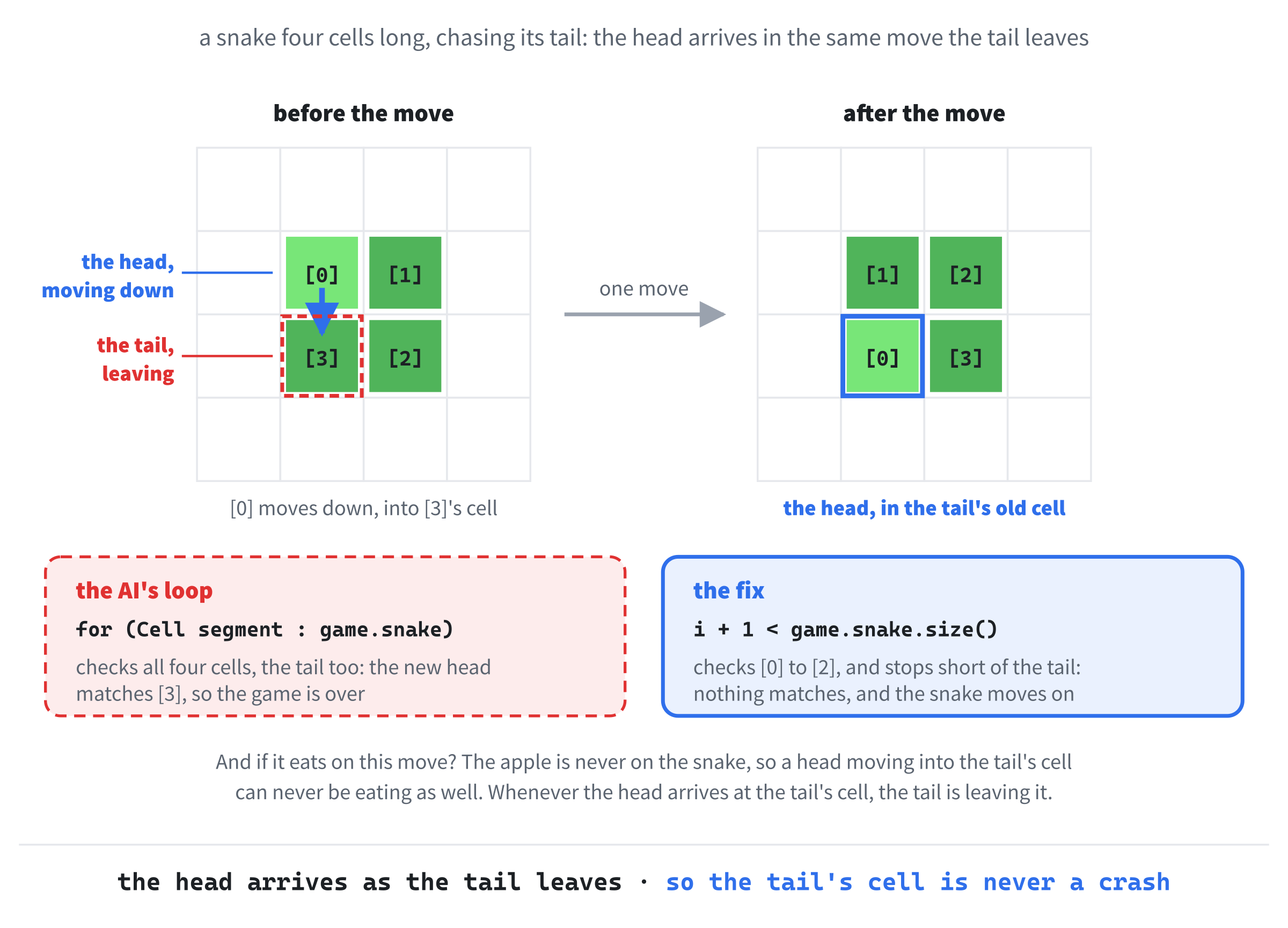
I didn't catch this by reading. Playing caught it, when I curled the snake into a tight loop to chase its own tail, and it died one cell too early. So I set a breakpoint in the loop, as Chapter 1 showed, played the same moves again, and watched sameCell return true for the tail. Then I pushed back:
"Your collision loop has an off-by-one error. The tail is leaving its cell on this move, because of the
pop_back, so the head moving onto the old tail's cell isn't a collision. Skip the last element in the loop."
The AI agreed, apologized, and fixed it:
// Into the snake is a crash too, except for the tail, which is leaving
for (size_t i = 0; i + 1 < game.snake.size(); i++)
{
    if (sameCell(game.snake[i], newHead))
    {
        game.gameOver = true;
        return;
    }
}
In the preceding code, the loop counts through the snake by index, with a size_t, the type that size() returns, as in Chapter 13, and it stops one cell short of the end, so the tail is never checked. The condition is written as i + 1 < game.snake.size(), rather than i < game.snake.size() - 1, and that's deliberate. A size_t can't go below zero, as Chapter 13 warned, so if the snake were ever empty, size() - 1 would wrap around to an enormous number, and the loop would run far past the end of the vector. Adding one to i can't wrap. Our snake is never empty, but the safe way costs nothing.
The fix raises one question, of exactly the kind that reading every line should: what if the snake eats on this move? Then the tail stays put. But the apple is never placed on the snake, so a head moving into the tail's cell can never be eating at the same time. Whenever the head arrives at the tail's cell, the tail is leaving it.
Don't let an AI's apology reassure you. "You're absolutely right, and I apologize for the oversight" costs the AI nothing, and tells you nothing about whether the new code is right. Read the fix as carefully as you read the bug, because code written in a hurry to fix a mistake is exactly where the next one hides.
This is the kind of bug that Chapter 25 warned about. The AI's code looked right, compiled cleanly, and ran, and it failed quietly, in a way you'd only notice by playing. Always play your game.
The rest of Round 5 went smoothly. The dimming went at the end of render, just before SDL_RenderPresent, with a new constant, DIM_COLOR, for its color:
// Game over: cover everything with see-through black
if (game.gameOver)
{
    SDL_SetRenderDrawBlendMode(renderer, SDL_BLENDMODE_BLEND);
    SDL_SetRenderDrawColor(renderer, DIM_COLOR.r, DIM_COLOR.g,
                           DIM_COLOR.b, DIM_COLOR.a);
    SDL_FRect everything = { 0.0f, 0.0f, static_cast<float>(WINDOW_W),
                             static_cast<float>(WINDOW_H) };
    SDL_RenderFillRect(renderer, &everything);
}
In the preceding code, once the game is over, a rectangle the size of the whole window is filled over everything already drawn, in DIM_COLOR: black, with an alpha of 160, out of 255. As in Chapter 11, SDL_BLENDMODE_BLEND tells the renderer to take the alpha into account, so the black only partly covers what's under it, and the snake and the apple show through, dimmed, as the fifth picture in Figure 26.1 shows. The blend mode stays switched on after that, even into the next game, which is harmless, because everything else is drawn with an alpha of 255, fully solid.
In the game loop's switch, the AI added R:
case SDL_SCANCODE_R:
    if (game.gameOver)
        resetGame(game);
    break;
In the preceding code, R only does anything once the game is over, so a stray press can't throw away a good game in the middle. Then resetGame puts everything back the way it started, which is where the AI's decision in Round 1 to write the setup as a function paid off.
Takeaway from Round 5
Even a careful code review misses bugs in behavior. Playing the game is part of code review. Vibe coding lets you build fast, so play fast too: every round, and after every change. If you're not playing, you're not reviewing.
Round 6: Polish, with a Grid and the Score
"Last round. Two bits of polish. First, show the score in the window's title bar, as 'Vibe Snake - Score: 5', using
SDL_SetWindowTitle, updated whenever the snake eats an apple. Second, draw faint grid lines, so the player can see the cells without being distracted by them, in a color just lighter than the background, such as 28, 28, 36."
The grid came back exactly as I'd have written it myself, and in the file's own style, static_cast and all. It went into render, just after the background is cleared, with a new constant, GRID_LINES, for its color:
// Faint grid lines, down every column's edge and across every row's
SDL_SetRenderDrawColor(renderer, GRID_LINES.r, GRID_LINES.g,
                       GRID_LINES.b, GRID_LINES.a);
for (int col = 0; col <= GRID_W; col++)
{
    float x = static_cast<float>(col * CELL_PX);
    SDL_RenderLine(renderer, x, 0.0f, x, static_cast<float>(WINDOW_H));
}
for (int row = 0; row <= GRID_H; row++)
{
    float y = static_cast<float>(row * CELL_PX);
    SDL_RenderLine(renderer, 0.0f, y, static_cast<float>(WINDOW_W), y);
}
In the preceding code, the first loop draws a line down the window at every multiple of 20 pixels, and the second draws one across, with SDL_RenderLine, just like Chapter 16's grid. Chapter 16 only drew the lines between the cells, while these loops draw the outside edges too, from 0 up to and including 800 across and 600 down. The last line each way falls just outside the window, where it can't be seen, which does no harm. The lines are drawn before the apple and the snake, so they sit underneath, and the insets from Round 1 leave room for them to show between the snake's cells.
The title was where the AI's style slipped. It put this in the eating branch of stepSnake, which now needed a second parameter, SDL_Window* window, to reach the title bar:
char title[64];
SDL_snprintf(title, sizeof(title), "Vibe Snake - Score: %d", game.score);
SDL_SetWindowTitle(window, title);
In the preceding code, title is an array of 64 chars, a C-style string, as Chapter 13 described. The SDL_snprintf function writes text into it, using the same codes as SDL_Log, so Chapter 16's %d is replaced by the score. Passing sizeof(title), which is 64, stops it from writing past the end of the array. It works, and it's safe. It's also C, from top to bottom, in a program that had been C++ until then, and Chapter 11 did the same job with a std::string.
That's worth understanding, because it will happen to you. The AI copies the style it can see, and by now, it could see my casts, my braces, and my names. But it had never seen this file build a piece of text, so for that, it fell back on the most common code it knew, which, for text in an SDL program, is C.
There was more. To show a score of 0 after a restart, it typed the whole title out again in the R case, as SDL_SetWindowTitle(window, "Vibe Snake - Score: 0");. And the window still started out with the plain title "Vibe Snake", and no score at all until the first apple. The same title was being built in two places, and was missing from a third.
So I edited it, and gave the title a function of its own:
// Show the score in the window's title bar
void showScore(SDL_Window* window, int score)
{
    std::string title = "Vibe Snake - Score: " + std::to_string(score);
    SDL_SetWindowTitle(window, title.c_str());
}
In the preceding code, showScore builds the title as a std::string, with std::to_string turning the score into text, and hands it to SDL_SetWindowTitle with c_str, exactly as Chapter 11's updateTitle did. It needs #include <string> at the top of the file. It's called in three places: in the eating branch of stepSnake, in place of the AI's three lines; in the R case, just after resetGame; and in main, just after the first resetGame, so the score is there from the start.
One last thing turned up when I ran it. The console window was still printing every score, because the std::cout line from Round 4 was still there. I'd asked for the score in the title bar, and the AI had added it, but I'd never said that the console's copy should go, so it didn't. Tell the AI to remove things when you change your mind. I took the line out myself, along with #include <iostream>.
Takeaway from Round 6
An AI's style drifts back toward its own, and toward C, wherever your file hasn't shown it the way yet, so watch hardest in the parts of a round that are new to your program. And when you change your mind about something, say so in the prompt, or the old version stays, right beside the new one.
That was the game done.
Common Errors I Hit That Weren't the AI's Fault
Not every mistake in the session was the AI's. These two were all mine:
- I forgot to copy
SDL3.dllinto the project folder. The program built, and then wouldn't start, with Chapter 1's message: "The code execution cannot proceed because SDL3.dll was not found." It was two minutes to fix, and thirty seconds of feeling silly. - I saved
main.cppinto a different folder from the project's. Visual Studio happily went on building the old copy, and for a few minutes, I couldn't work out why none of my changes were doing anything.
Neither had anything to do with vibe coding, which is the point. The ordinary mistakes don't go away just because an AI is writing the code.
The Finished Game
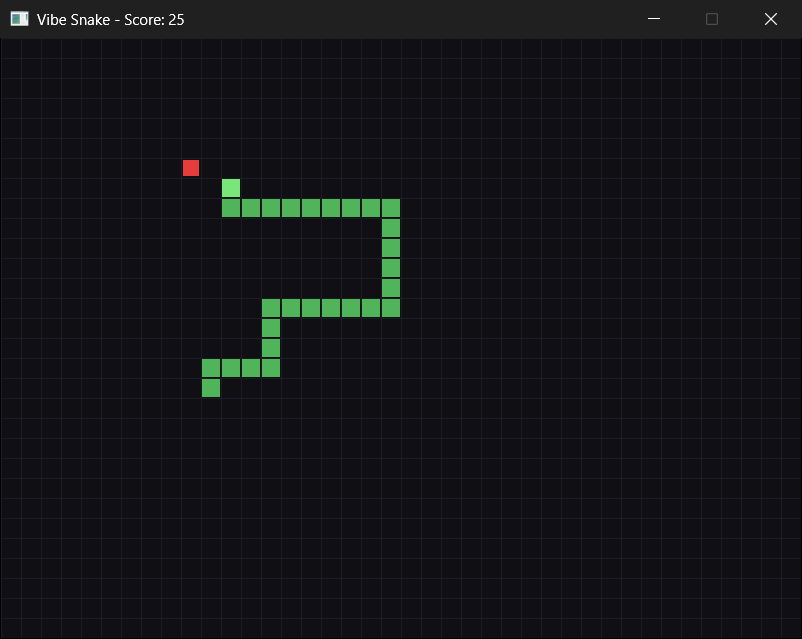
To play my version, open Vibe Snake.slnx in the project folder, and press F5. If Visual Studio warns that the project was downloaded from the web, that's the standard caution Chapter 1 described, and since it's the book's own code, choose Trust and Continue. The snake sets off to the right as soon as the window opens, and grows with every apple, as in Figure 26.6. Steer it with the arrow keys, or W, A, S, and D, and when you crash, press R to play again, or Escape to quit.
Here's the Game struct as it ended up, holding everything the six rounds added:
// Everything that changes while you play
struct Game
{
    std::vector<Cell> snake;         // the head is snake[0]
    Cell dir;                        // the direction the head is moving
    Cell pendingDir;                 // the direction the last key asked for
    Cell apple;
    int score = 0;
    bool gameOver = false;
    Uint64 lastMove = 0;             // when the snake last moved
    Uint64 tickMs = START_TICK_MS;   // milliseconds between moves
};
In the preceding code, each member arrived in its own round. The snake and the apple came in Round 1, and dir and lastMove in Round 2, when the snake started to move. Round 3 added pendingDir, for the keys, Round 4 added score and tickMs, for the apples, and Round 5 added gameOver. Some members start with values of their own, as Chapter 11's Textures struct did, but it doesn't matter which, because resetGame sets every one of them before the game begins.
The finished main.cpp is 322 lines long, a long way over my guess of 150. Some of the gap is the way it's written: 74 lines are comments or blank, and 66 are curly braces on lines of their own. But even without those, it's 182 lines, so my guess was simply low. Estimating is hard, even for a game as small as Snake, because the parts you forget to count, such as the startup and the cleanup, the event loop, and the keys, soon add up.
Without the AI, Snake would have taken me three or four hours. With it, it took about ninety minutes, which means an evening is enough for two games like this one, with time left over to play them. The leverage is real.
Retrospective
I'll do this section as questions I asked myself afterward. The retrospective is the most important part of a vibe-coded session, because without it, you've written the code without necessarily learning anything from the experience.
Q: What worked?
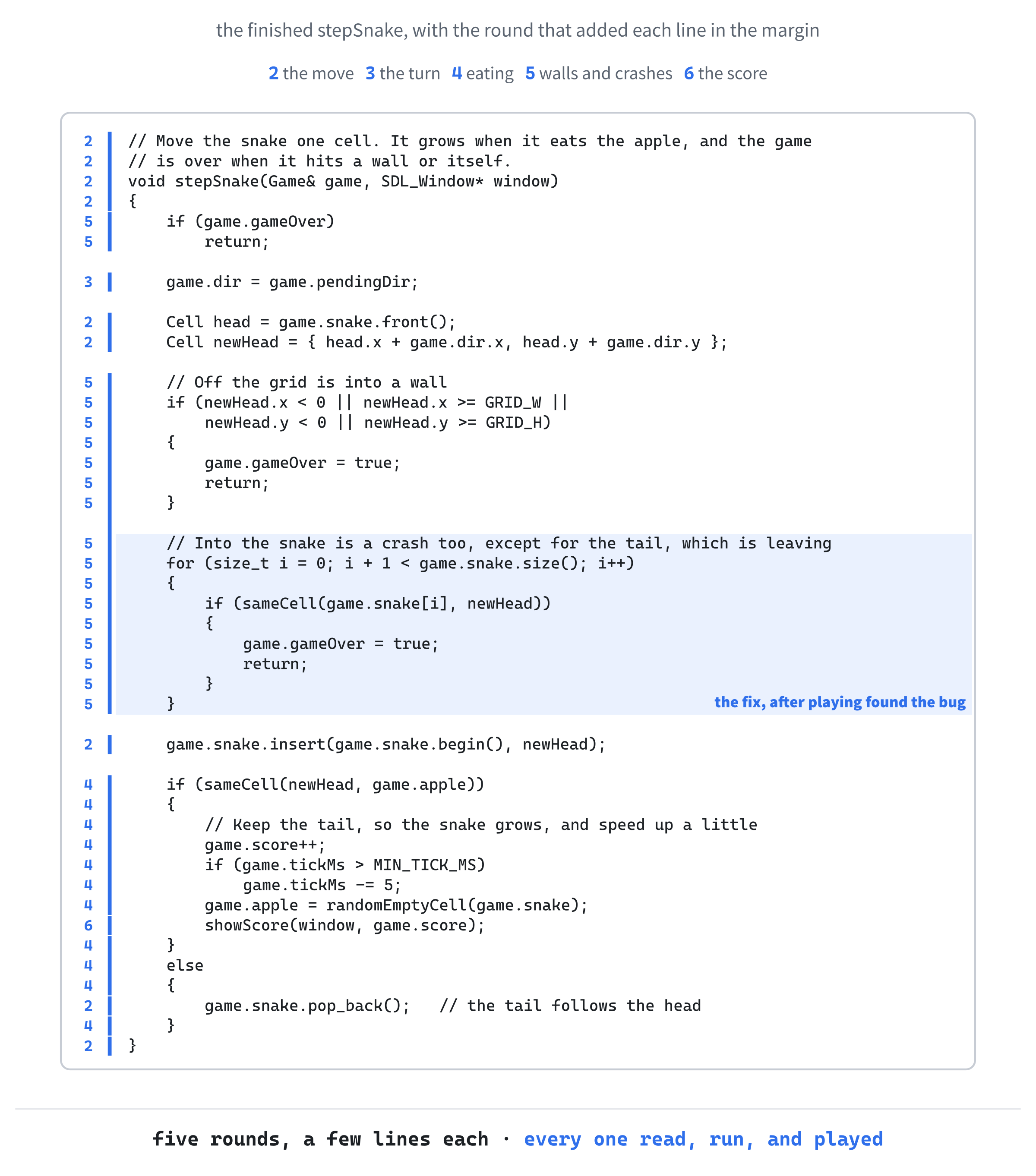
Front-loading the constraints, and keeping the rounds small. Every prompt that named the SDL version, the data structures, and exactly what should happen got a clean answer the first time. Vague prompts got something reasonable, but generic, which needed reshaping. And because each round was small, I could read everything that came back. Figure 26.7 shows how stepSnake grew: five rounds each added a piece to it, and no single piece was more than a dozen lines.
Q: What surprised me?
How often I read code, decided it was fine, and then found a bug only by playing. The tail check is the perfect example: reading the code is not enough, and playing it is essential. I was also surprised by how quickly the AI's style drifted back toward its own, and toward C, the moment it met something my file hadn't shown it.
Q: Where did the AI struggle?
Anywhere it needed knowledge it couldn't see. The bug where the snake reverses into its own neck isn't a compile error, or even a mistake in the logic. It's a flaw in the design, and you only know about it from playing. If I hadn't named pendingDir, the AI might never have suggested it.
It also struggled with versions: an SDL 2 flag in an SDL 3 program, and C's random numbers and C's strings in a C++ program. Each time, it wrote the code it had seen most often, rather than the right code for my program.
Q: How much faster was this than typing it myself?
Two or three times faster. Some of the saving was not typing. More of it was not having to make the small decisions, such as how to hold the game's state, or where the apple's code should go, which the AI made for me, and which I only had to check. Checking a decision is much quicker than making one, as long as you really do check it.
Q: What did I lose?
A little of my feel for the API. I haven't typed SDL_RenderFillRect myself in months, and if I had to write SDL code on a whiteboard right now, I'd hesitate where I used to be fluent. That's what Chapter 25 called skill atrophy, and it's real. The way to counter it is to write code without the AI, deliberately, every so often.
Q: Would I do it again?
For a small classic game like Snake, absolutely. The AI is genuinely good at small, well-defined projects with gameplay it has seen thousands of times. The next chapter takes on something more ambitious, Asteroids, where the AI is more useful for some parts than for others, and the messy middle gets messier.
AI Exercise (The Whole Chapter Was the Exercise)
This chapter's exercise is the chapter itself. Don't just read about mine: go and build your own.
Pick a small classic game. Snake again, if you like, and yours will still turn out differently. Pong, Breakout, Frogger, and Tetris all work, or a small puzzle game from the arcade era: anything with a clear scope, and rules you can describe in a paragraph.
Before you open the AI, write your one-paragraph design, on your own. Then open a regular chatbot, and build the game in six rounds, like the ones in Figure 26.1:
- Round 1: the skeleton, and the first thing drawn.
- Round 2: the main movement.
- Round 3: input.
- Round 4: the scoring, or whatever wins the game.
- Round 5: whatever loses it, and starting again.
- Round 6: polish.
Constrain the AI early: say "SDL 3", say "C++20", and describe the data you want. Paste your whole file in at the start of every round. Read every line. Play after every round. When something's wrong, push back by name, saying exactly what's wrong, rather than asking the AI to "fix it." If you're going fast, it's about a ninety-minute job.
At the end, go back to your design, and see what changed. Did you skip a feature, or add one you hadn't planned? That gap is where you learned the most.
Summary
You watched me build Snake by describing it, in six rounds, and read its code along the way. The pattern works: front-load the constraints, keep each prompt to one purpose, paste your file back in every round, read every line, play the game after every round, and when something's wrong, push back by name. The AI wrote an SDL 2 flag into an SDL 3 program, reached for C where the program was C++, and checked for crashes one cell too eagerly, and every one of those was caught by building, reading, or playing.
The next chapter takes the same workflow somewhere bigger: Asteroids, with real physics, a ship that drifts, wraparound at the edges of the screen, rocks that split, lives, and a game that restarts. It's bigger, and it has more places where the AI guesses wrong, and the retrospective at the end is honest about what got harder, and why. Bring your AI assistant, bring your patience, and bring your willingness to play the game after every change.