
Snake was the warm-up. Asteroids is the real thing. It's a bigger game, with real physics: a ship that turns, thrusts, drifts, and slows, and a world that wraps around at its edges. There are three kinds of thing, a ship, bullets, and asteroids, and rocks that split into smaller rocks when they're shot. There are lives, a ship that comes back after a crash, waves that follow one another, and the kind of decisions about how the game feels that don't come out right the first time.
The workflow is the same as Chapter 26's: describe, let the AI write, read, run, and judge. It took nine rounds, over two evenings, and this chapter adds three things on top.
The first is architecture first: deciding the shape of the whole program before the AI writes a line. The second is an honest look at the messy middle, where things went wrong in ways that only playing revealed. The third is the discipline of stopping.
SDL3 Projects/Vibe Asteroids — my finished version, all in one file, main.cpp. Like Chapter 26's, it uses the SDL3 folder beside it, so it builds and runs as soon as you open it. Yours will look different.In this chapter, we will:
- Decide the whole shape of a game before the first prompt, and hold the AI to it
- Build the core systems in five rounds: the ship, its physics, wrapping around, bullets, and asteroids
- Add the game on top in three more: shooting and splitting, crashes and lives, and waves and the score
- Read the math the AI writes: angles and directions, turning a shape, and whether two circles touch
- Be honest about the messy middle, and fix what playing found, in a ninth round
- Stop at done, and look back at where vibe coding stops being faster
It's a longer chapter than Chapter 26, because it's a bigger game, but it reads the same way.
Setting Up
The setup is the same as Chapter 26's: an empty project, named Vibe Asteroids, with an empty main.cpp, set up for plain SDL like Chapter 16's, and a regular chatbot in a browser tab beside Visual Studio. The rhythm is the same, too. Paste the whole of the current file into the chat at the start of every round, with the prompt below it, read every line of the answer, and build, run, and play before deciding on the next step.
One thing is different. For Snake, I wrote a paragraph about the game and started prompting. For Asteroids, I planned the program first.
Stage 1: Architecture First
The piece of Chapter 25's advice that matters most for a bigger project is to make the decisions yourself. An AI is very good at carrying out a plan, and much less reliable at choosing one. If you don't bring a plan, the AI will make one up as it goes, a round at a time, and a plan made up a round at a time costs far more to straighten out later than it saves at the start.
So before any prompting, I wrote the plan down:
One file,
main.cpp, in C++20 with SDL 3. A 1024 by 768 window. Three kinds of thing: one ship, a vector of bullets, and a vector of asteroids. Each has a position and a velocity, as aVec2, and the ship also has an angle, the way it's facing, in radians. Asteroids come in three sizes, large, medium, and small, and turn slowly as they drift. The ship turns with A and D, and thrusts with W, and drag slows it down when it isn't thrusting. Everything wraps around at the edges of the window. Bullets fire from the ship's nose, in the direction it's facing, last about 0.8 seconds, and then disappear. A bullet that hits a large asteroid splits it into two medium ones, a medium one splits into two small ones, and a small one is destroyed. A ship that hits an asteroid loses a life, and comes back in the middle after 1.5 seconds. Three lives. Clear the screen, and a new wave arrives. The score goes in the title bar, with no text on the screen. The ship is a triangle, and the asteroids are lumpy outlines. R starts again after the game is over.
That's a lot, but it's still only a paragraph. There's no code in it, and no function names. The shape of the program is decided, and so are the look and the controls, and Figure 27.1 draws it. The AI's job from here on is to carry out that plan, one prompt at a time.

A few of the decisions in that plan are worth spelling out, because the AI would have made each of them differently if I hadn't made them first:
- One ship and two vectors, not one list of everything. Chapter 23 built one list of entities, updated through virtual functions. Here, the three kinds of thing share almost nothing: a ship turns and thrusts, a bullet flies straight and vanishes, and an asteroid drifts and splits. A vector for each is simpler, with no base class and no virtual calls, and it's the right choice when the kinds of thing have so little in common. Use the simpler thing when it fits.
- One file. In a multi-file project, an AI tends to put new code wherever it likes, round after round, and you spend time putting it back. For a game of a few hundred lines, one file is much easier to keep in order.
Vec2as a plain struct, with Chapter 24's two operators,+and*, and nothing else. An AI loves to fill out a vector type, with lengths, dot products, normalizing, and a dozen operators. Asteroids needs to add two vectors and scale one, so that's all it gets.- Small functions, one job each. One function for the ship, one for the bullets, one for the asteroids, and one for each kind of collision, all called from one
update. A long update function is where a vibe-coded game's bugs go to hide. - The score in the title bar. It worked for Snake, and it saves adding SDL_ttf, SDL's add-on library for drawing text, which the final project uses.
Each of those would have turned into a round of "actually, I want something simpler" later on, if I hadn't said it up front. Decide early, and the prompts that follow can all be small.
Stage 2: Core Systems
The prompts follow the same pattern as Snake's: one purpose each, with the constraints up front, and pushback when the AI strays. Each round went faster than a Snake round, because I knew exactly what I wanted from it.
Round 1: The Skeleton, and a Ship That Sits Still
"Build me a C++20 SDL 3 program, in one file,
main.cpp. A 1024 by 768 window, with a dark background, RGB 8, 8, 16. Set up SDL, the window, and a renderer, run a main loop withSDL_PollEvent, and quit on Escape or the window's X. Define a structVec2 { float x, y; }, with anoperator+and anoperator*for scaling, like Chapter 24's, and a structShip { Vec2 pos; Vec2 vel; float angle; }. Draw the ship as a triangle of three lines, in the middle of the window, pointing in the direction of its angle, which starts at -π/2, facing up. No movement yet. Show me the complete code."
The AI came back with about 90 lines, with everything in place. The first thing I noticed was the loop: nothing slowed it down. There was no vsync, and no delay, so it drew frames as fast as the computer could make them. On my computer, that was more than seven thousand frames a second, to show a ship that didn't move. I added the line the book's games have used since Chapter 1, just after the renderer is made:
// Show each frame in step with the monitor's refresh
SDL_SetRenderVSync(renderer, 1);
In the preceding code, vsync makes SDL_RenderPresent wait for the monitor's next refresh, so the game draws as many frames as the monitor can show, and no more. On my monitor, that's 144 a second. The rest of main’s startup was the same as Chapter 26's, and I made the same style edits as there: static_cast for the old C-style casts, full names, braces on their own lines, and the colors as named constants. After those, here's the top of the file:
#include <SDL3/SDL.h>
#include <SDL3/SDL_main.h>

#include <cmath>    // std::cos and std::sin, for turning angles into steps

// The window
constexpr int WINDOW_W = 1024;
constexpr int WINDOW_H = 768;

// Angles are in radians: a full turn, and a quarter turn back from the
// right, which is straight up, because y points down
constexpr float TWO_PI = 6.2831853f;
constexpr float FACING_UP = -TWO_PI / 4.0f;

// The ship
constexpr float SHIP_RADIUS = 14.0f;       // from its center to its nose

// The colors
constexpr SDL_Color BACKGROUND = { 8, 8, 16, 255 };          // almost black
constexpr SDL_Color SHIP_COLOR = { 230, 230, 240, 255 };     // white
In the preceding code, the AI had written the starting angle as -1.5708f, which is right, but only if you already know what it means. I gave it a name, FACING_UP, a quarter of a turn back from pointing right, and wrote it with Chapter 12's TWO_PI, a full turn in radians, which the later rounds would need too.
Why is -π/2 up? Angles in C++'s math functions start at the right, pointing along x. On paper, where y points up, a positive angle turns counterclockwise. On the screen, y points down, so the same math turns clockwise, as Chapter 12's Figure 12.3 showed: a quarter turn, π/2, points straight down. To point up, you turn a quarter turn the other way, which is -π/2.
The Vec2 struct is exactly what the plan asked for:
// A position, a velocity, or a step: x across, and y down
struct Vec2
{
    float x = 0.0f;
    float y = 0.0f;
};

Vec2 operator+(const Vec2& a, const Vec2& b)
{
    return Vec2{ a.x + b.x, a.y + b.y };
}

Vec2 operator*(const Vec2& v, float scale)
{
    return Vec2{ v.x * scale, v.y * scale };
}
In the preceding code, Vec2 is Chapter 24's Vector2 under a shorter name: two floats, starting at zero, with + to add two of them and * to scale one by a number. That's enough to write pos + vel * delta, and that's all the plan wanted. The AI's first version also had a function called len, for a vector's length, which nothing ever called. That's helpful drift, and I took it out.
The ship itself is a struct, and a function puts it in the middle:
// The player's ship
struct Ship
{
    Vec2 pos;
    Vec2 vel;
    float angle = FACING_UP;     // radians, turning clockwise from the right
};
In the preceding code, a Ship has a position, a velocity, and the angle it's facing. The Game struct holds it, as game.ship, and a function called resetShip puts it in the middle of the window, standing still, with WINDOW_W / 2.0f and WINDOW_H / 2.0f, and facing up.
The interesting part was drawing it. The AI's first triangle had its three corners spaced evenly around a circle, a third of a turn apart. That's an equilateral triangle, which looks like a fat arrowhead, and makes it hard to see which way the ship is pointing. I asked:
"Make the ship narrower. The nose should stick out further than the back spreads sideways. Put the back corners about 0.8 times the radius behind the center, and 0.7 times the radius to each side."
Here's the result, with the narrower corners and the rest of the drawing:
// The ship: a narrow triangle
void drawShip(SDL_Renderer* renderer, const Ship& ship)
{
    // Turn a point from the ship's own frame, where the nose points along
    // x, by the ship's angle, and move it to the ship's position
    float c = std::cos(ship.angle);
    float s = std::sin(ship.angle);
    auto toWorld = [&ship, c, s](Vec2 p)
    {
        return Vec2{ ship.pos.x + p.x * c - p.y * s,
                     ship.pos.y + p.x * s + p.y * c };
    };
    Vec2 nose = toWorld(Vec2{ SHIP_RADIUS, 0.0f });
    Vec2 leftRear = toWorld(Vec2{ -0.8f * SHIP_RADIUS, -0.7f * SHIP_RADIUS });
    Vec2 rightRear = toWorld(Vec2{ -0.8f * SHIP_RADIUS, 0.7f * SHIP_RADIUS });

    SDL_SetRenderDrawColor(renderer, SHIP_COLOR.r, SHIP_COLOR.g,
                           SHIP_COLOR.b, SHIP_COLOR.a);
    SDL_RenderLine(renderer, nose.x, nose.y, leftRear.x, leftRear.y);
    SDL_RenderLine(renderer, leftRear.x, leftRear.y, rightRear.x, rightRear.y);
    SDL_RenderLine(renderer, rightRear.x, rightRear.y, nose.x, nose.y);
}
In the preceding code, the ship's three corners are first written in the ship's own frame, a little world of its own where the ship sits at 0, 0 and its nose points along x: the nose at SHIP_RADIUS ahead, and the two back corners behind and to each side. The lambda toWorld, from Chapter 24, turns one of those points into a point in the window, the world frame. It captures the ship by reference, and the cosine and sine of its angle by value, so they're worked out once, not for every corner.
The two lines in the lambda's braces are the standard way to turn a point by an angle. The new x mixes in the old x times the cosine, less the old y times the sine, and the new y adds the old x times the sine to the old y times the cosine, and then adding the ship's position moves the turned point to where the ship is. Figure 27.2 shows it for a ship facing up. Three calls to SDL_RenderLine, from Chapter 16, join the three corners.
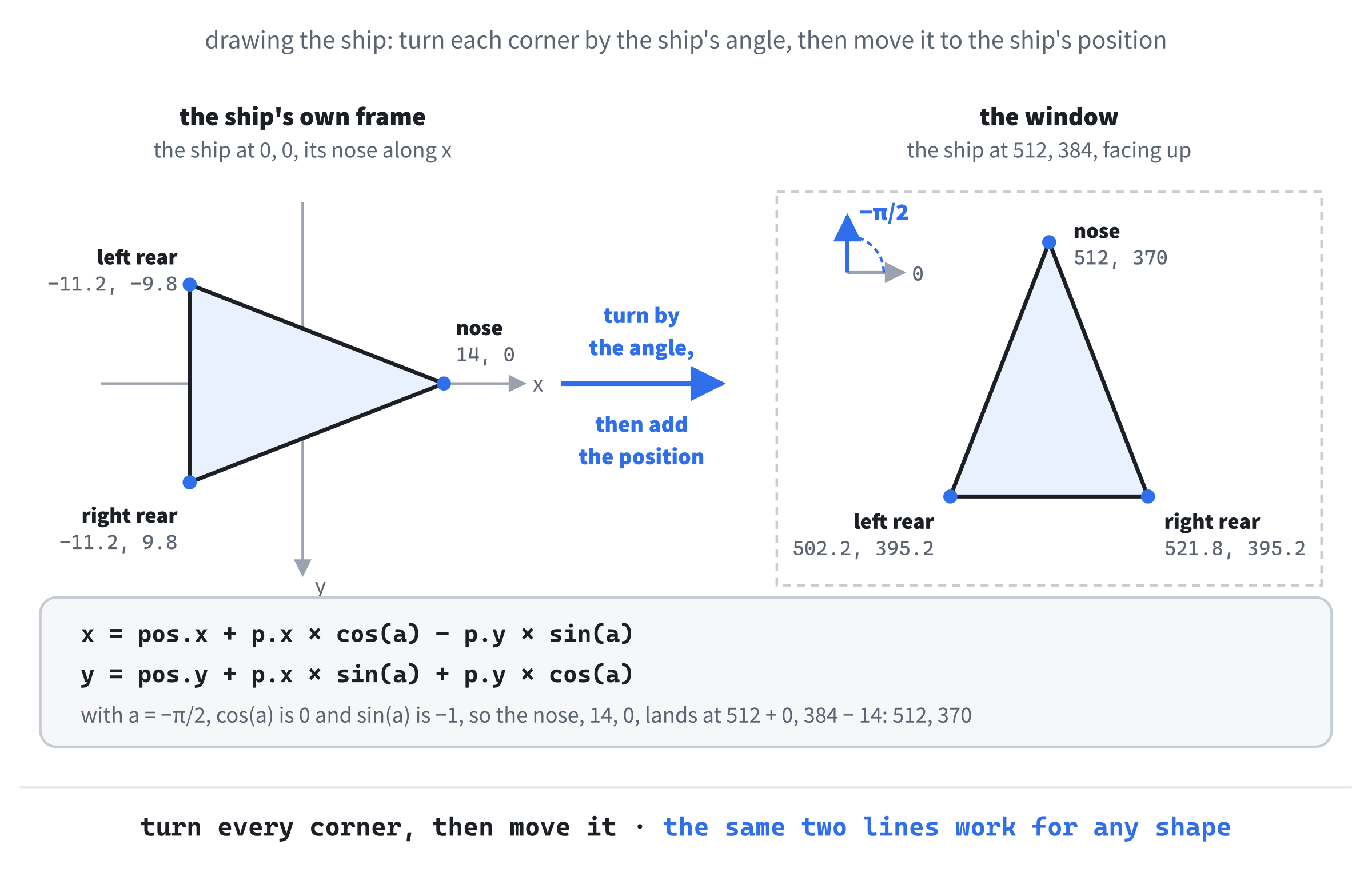
The same two lines work for any shape, at any angle: a rock, a turret, or a whole spaceship made of lines. It's the most useful piece of math in the game, and the AI got it right first time, which is exactly what you'd expect from code it has seen thousands of times.
It built, and it ran: a white triangle in the middle of a dark window, pointing up. Nothing moved, and that was the plan.
Round 2: Turning, Thrust, and Drag
"Add ship physics. While A or Left is held, decrease
anglebySHIP_TURN_SPEED * dt, withSHIP_TURN_SPEEDat 4.0 radians a second. While D or Right is held, increase it. While W or Up is held, add the direction the ship is facing, timesSHIP_THRUST * dt, tovel, withSHIP_THRUSTat 220. Then apply drag, multiplyingvelby(1 - SHIP_DRAG * dt), withSHIP_DRAGat 0.6. Then addvel * dtto the position. UseSDL_GetKeyboardStatefor the held keys, and work outdt, in seconds, fromSDL_GetTicksNS."
The AI wrote a small helper first, for the step that an angle points in, which it went on to use four more times before the game was done:
// The step one unit long in the direction of an angle, as in Chapter 12
Vec2 direction(float angle)
{
    return Vec2{ std::cos(angle), std::sin(angle) };
}
In the preceding code, direction turns an angle into a step one pixel long, pointing that way: the cosine across, and the sine down, just as Chapter 12's particles did. Multiply it by a speed, and you have a velocity in that direction.
The keys went into a function of their own:
// Turn and thrust, from the keys that are held down
void steerShip(Game& game, const bool* keys, float delta)
{
    Ship& ship = game.ship;
    if (keys[SDL_SCANCODE_A] || keys[SDL_SCANCODE_LEFT])
        ship.angle -= SHIP_TURN_SPEED * delta;
    if (keys[SDL_SCANCODE_D] || keys[SDL_SCANCODE_RIGHT])
        ship.angle += SHIP_TURN_SPEED * delta;
    ship.thrusting = keys[SDL_SCANCODE_W] || keys[SDL_SCANCODE_UP];
}
In the preceding code, keys is the keyboard's state, from SDL_GetKeyboardState, as in Chapter 1: one bool for every key, true while it's held down. Holding A turns the ship counterclockwise, and D turns it clockwise, by four radians a second, times the frame's delta time, so the ship turns at the same speed however fast the game runs. The new thrusting member of Ship remembers whether W is held, for the physics, and for the drawing.
The physics went into a function of its own, called once a frame:
// Move the ship
void updateShip(Game& game, float delta)
{
    Ship& ship = game.ship;
    if (ship.thrusting)
        ship.vel = ship.vel + direction(ship.angle) * (SHIP_THRUST * delta);

    // Drag takes a share of the speed
    ship.vel = ship.vel * (1.0f - SHIP_DRAG * delta);

    ship.pos = ship.pos + ship.vel * delta;
}
In the preceding code, each frame does three things, in order, as Figure 27.3 shows. Thrust adds to the velocity, in the direction the ship is facing: 220 pixels a second, every second, so a second of thrust on its own would add 220 to the ship's speed, though drag takes some of it back as it goes. Drag scales the velocity down a little every frame, with SHIP_DRAG setting how much, so a ship that stops thrusting loses a little under half its speed each second, and slows gradually, rather than stopping dead. Then the velocity, times the frame's time, moves the position. This is the pattern for almost every moving thing in every game: forces change the velocity, and the velocity changes the position.

The game loop in main works out the time each frame takes, and calls both new functions:
// Delta time, in seconds
Uint64 now = SDL_GetTicksNS();
float delta = (now - lastTicks) / 1.0e9f;
lastTicks = now;

steerShip(game, SDL_GetKeyboardState(nullptr), delta);
update(game, delta);
render(renderer, game);
In the preceding code, SDL_GetTicksNS is SDL_GetTicks in nanoseconds, billionths of a second, rather than milliseconds, and lastTicks holds the time of the frame before, set just before the loop begins. Dividing the difference by 1.0e9f, which is how C++ writes 1.0 times ten to the ninth, a billion, gives the frame's time in seconds. Then the keys steer the ship, update runs one frame of the game, which for now is just updateShip, and render draws it.
Say what units you want, every time a number has them. I asked for dt in seconds, and speeds in pixels per second, and the AI got them right. If I'd left it vague, it might as easily have used milliseconds, and every speed in the game would have been a thousand times too fast. Units are exactly the kind of thing an AI fills in with a guess.
The AI also drew a small orange flame out of the back of the ship while it thrusts, which I hadn't asked for. It's two points from toWorld, joined by one more SDL_RenderLine, in FLAME_COLOR, whenever ship.thrusting is true. That's helpful drift again, and again it really was helpful: you can see at a glance when the ship is pushing. I kept it.
I held W, and the ship pushed forward, faster and faster. When I let go, it coasted, slowing gradually, and when I turned it around and pushed back the other way, it swung through a curve. It felt right, and it ran straight out of the window at the first edge it came to.
Round 3: Wrapping Around
"When anything's position goes off the screen, bring it back in at the opposite edge. Write a
wrap(Vec2& p)helper, and call it on the ship's position after every move."
Here's what came back, one small helper for all four edges:
// Bring a position that has left the window back in at the opposite edge
void wrap(Vec2& p)
{
    while (p.x < 0.0f)
        p.x += WINDOW_W;
    while (p.x >= WINDOW_W)
        p.x -= WINDOW_W;
    while (p.y < 0.0f)
        p.y += WINDOW_H;
    while (p.y >= WINDOW_H)
        p.y -= WINDOW_H;
}
In the preceding code, a position that's gone off the left of the window has the window's width added to it, which puts it just inside the right-hand edge, and one that's gone off the right has the width taken away. The same goes for the top and the bottom, with the height. The position is passed by reference, so wrap changes the caller's own Vec2. The AI also added wrap(ship.pos); straight after the ship moves, in updateShip.
I noticed the AI used while where if would almost always do. In one frame, the ship moves a few pixels, so it can only ever be a little way past an edge, and one addition brings it back.
A while also copes with a position that's gone more than a whole window past an edge, which normal play never produces. It isn't wrong, just careful, so I left it. That turned out to matter, as you'll see in the messy middle, and Figure 27.4 shows both cases.
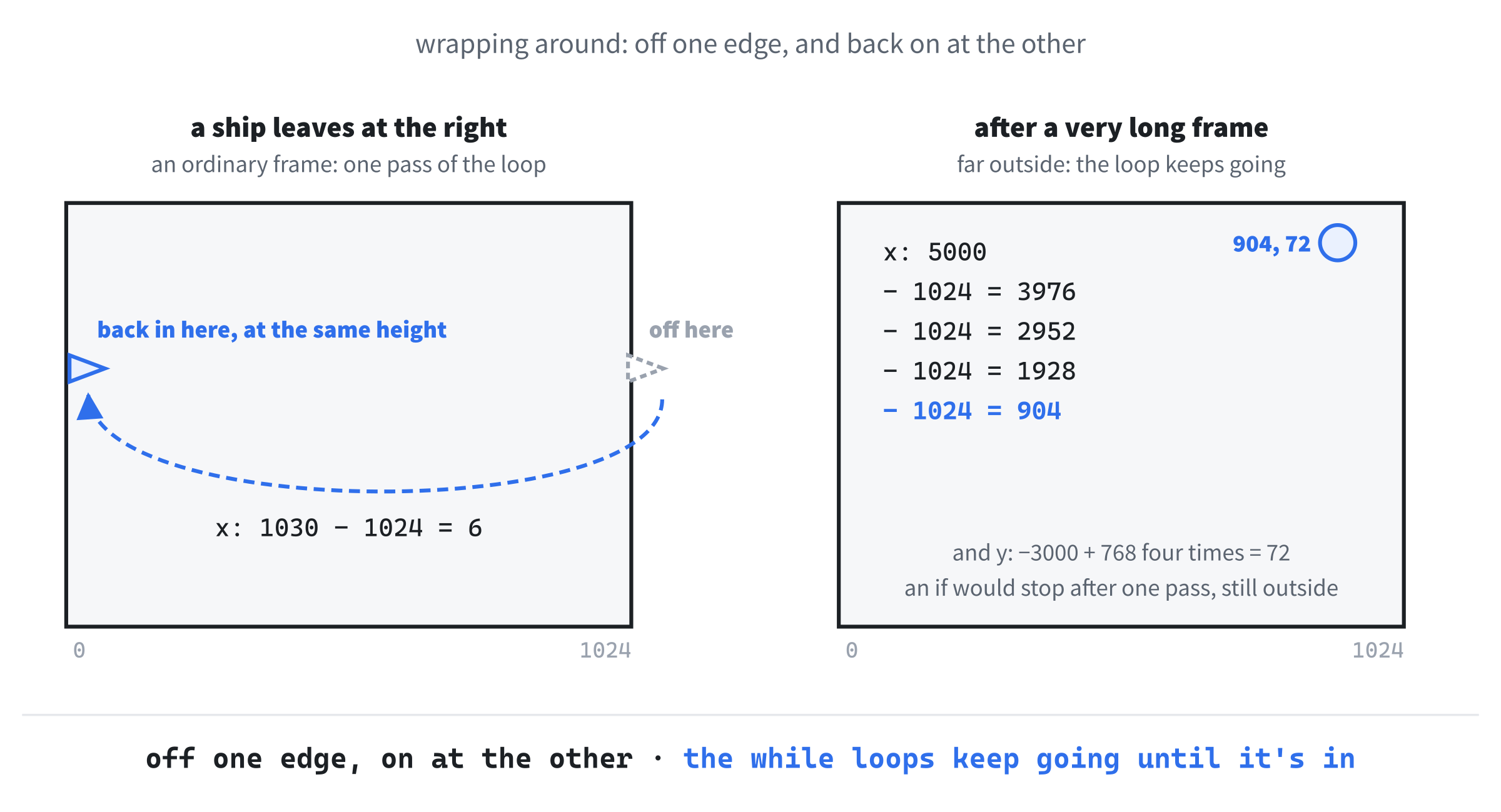
I flew the ship off the right-hand edge, and it came back on the left. That one feature is what makes a rectangle of space feel like somewhere a game of Asteroids could happen.
Round 4: Bullets
"Add a
Bullet { Vec2 pos; Vec2 vel; float lifeRemaining; }struct, and astd::vector<Bullet> bulletsinGame. While Space is held, fire a bullet from the ship's nose, in the direction it's facing, atBULLET_SPEED, 520 pixels a second, but only oncefireCooldown, a new member ofShip, has run down:FIRE_COOLDOWN_Sis 0.18 seconds. Each bullet lastsBULLET_LIFE_S, 0.8 seconds. Every frame, move each bullet, wrap it, and take the frame's time off its life, and then remove the bullets whose life has run out, with a lambda."
This is the round where the plan paid off most. Every constraint was named, the data was defined, and the numbers were given, down to how to tidy up. The AI's answer was about 40 new lines, and nearly all of it slotted straight in. The bullet itself is small:
// A bullet, which lasts BULLET_LIFE_S seconds
struct Bullet
{
    Vec2 pos;
    Vec2 vel;
    float lifeRemaining = 0.0f;  // seconds
};
In the preceding code, a Bullet has a position and a velocity, like everything else that moves, and the seconds it has left. The Game struct gained a std::vector<Bullet> called bullets, which resetGame empties, and Ship gained fireCooldown, the seconds until it can fire again, which resetShip sets to 0.
Firing went at the end of steerShip:
if (keys[SDL_SCANCODE_SPACE] && ship.fireCooldown <= 0.0f)
{
    Bullet bullet;
    bullet.pos = ship.pos + direction(ship.angle) * SHIP_RADIUS;
    bullet.vel = direction(ship.angle) * BULLET_SPEED;
    bullet.lifeRemaining = BULLET_LIFE_S;
    game.bullets.push_back(bullet);
    ship.fireCooldown = FIRE_COOLDOWN_S;
}
In the preceding code, a bullet only fires when Space is held and the cooldown has run out. It starts at the nose, one ship's radius from the center in the direction the ship faces, and it flies that way at 520 pixels a second. Then the cooldown starts again, so holding Space fires a steady stream, a little over five bullets a second, rather than one every frame. At the end of updateShip, the AI took each frame's time off the cooldown, with if (ship.fireCooldown > 0.0f) and ship.fireCooldown -= delta;.
I caught one thing on reading. As well as checking Space in steerShip, the AI had added a check for it in the event loop, on SDL_EVENT_KEY_DOWN, which fired a bullet too. Every press would have fired an extra bullet, with no cooldown at all, and there's no way you'd see why by looking at the screen. I asked for the event loop's check to go, and kept only the held key and its cooldown.
The bullets' own function came back like this:
auto firstDead = std::remove_if(game.bullets.begin(), game.bullets.end(),
                                [](const Bullet& b)
                                { return b.lifeRemaining <= 0.0f; });
game.bullets.erase(firstDead, game.bullets.end());
In the preceding code, the last two statements of the AI's updateBullets remove the dead bullets with the erase-remove idiom from Chapter 13. The std::remove_if function, from <algorithm>, moves every bullet the lambda doesn't pick to the front of the vector, and returns where the leftovers begin, and erase then cuts them off. It works, but it's the older way, and it's two steps that have to be done together. Chapter 24 showed C++20's std::erase_if, which does both halves at once, so I edited it, and dropped <algorithm>:
// Move the bullets, and remove the ones whose time is up
void updateBullets(Game& game, float delta)
{
    for (Bullet& bullet : game.bullets)
    {
        bullet.pos = bullet.pos + bullet.vel * delta;
        wrap(bullet.pos);
        bullet.lifeRemaining -= delta;
    }
    std::erase_if(game.bullets,
                  [](const Bullet& b) { return b.lifeRemaining <= 0.0f; });
}
In the preceding code, the loop moves every bullet, wraps it, and takes the frame's time off its life, working on each bullet through a reference, so the changes stick. Then std::erase_if removes every bullet whose life has run out, in one call. Moving first and removing afterward, in a separate step, is exactly how Chapter 13 said to avoid removing elements from a vector while looping over it. The AI also called updateBullets from update, and drew each bullet in render as a small square, three pixels across, in BULLET_COLOR, a pale yellow.
I held Space, and a stream of bullets sprayed out of the nose, turning as the ship turned, and vanishing after flying about 400 pixels, which is 520 pixels a second for 0.8 seconds.
Round 5: Asteroids
"Add
enum class AstSize { Large, Medium, Small };, and anAsteroid { Vec2 pos; Vec2 vel; AstSize size; float angle; float spin; }struct. Add small tables of each size's radius, 38, 22, and 12, and top speed, 90, 130, and 180. WritemakeAsteroid(Vec2 pos, AstSize size), which gives an asteroid a random direction, a random speed up to its size's top speed, and a random spin from -1.5 to 1.5 radians a second. At the start, put four large asteroids at random points on the edges of the window. Draw each one as a ten-sided outline, with lumps that don't change from frame to frame, turned by its angle. Asteroids drift, turn, and wrap."
The sizes came first, as an enum class, with a table of each size's numbers:
// An asteroid's size, which is also its place in the tables below
enum class AstSize
{
    Large,
    Medium,
    Small
};
constexpr float AST_RADIUS[] = { 38.0f, 22.0f, 12.0f };      // pixels
constexpr float AST_MAX_SPEED[] = { 90.0f, 130.0f, 180.0f }; // pixels a second
In the preceding code, AstSize is an enum class, as in Chapter 11, with the three sizes in order, and the two arrays hold each size's radius and top speed in the same order. An enum class won't turn into a number by itself, as Chapter 15 showed, so looking a size up in a table takes a static_cast, as in AST_RADIUS[static_cast<int>(rock.size)]: Large is 0, Medium is 1, and Small is 2.
The asteroid itself has everything the prompt listed:
// A lumpy rock that drifts, and slowly turns
struct Asteroid
{
    Vec2 pos;
    Vec2 vel;
    AstSize size = AstSize::Large;
    float angle = 0.0f;          // how far it has turned, in radians
    float spin = 0.0f;           // radians per second
};
In the preceding code, angle is how far the rock has turned so far, and spin is how fast it turns, and which way. The Game struct gained a vector of them, asteroids.
For the random numbers, the AI wrote a helper of its own, called randf, with C's rand() and RAND_MAX, and seeded it with srand((unsigned)time(nullptr)) at the start of main. That's exactly what it did in Chapter 26, and I made the same kind of edit, to SDL's random numbers: Chapter 9's randomBetween, which uses SDL_randf, and needs no seeding. With that, the new asteroid is a few lines:
// A new asteroid at pos, heading in a random direction, at a random speed
Asteroid makeAsteroid(Vec2 pos, AstSize size)
{
    float maxSpeed = AST_MAX_SPEED[static_cast<int>(size)];
    Asteroid rock;
    rock.pos = pos;
    rock.vel = direction(randomBetween(0.0f, TWO_PI)) *
               randomBetween(20.0f, maxSpeed);
    rock.size = size;
    rock.spin = randomBetween(-1.5f, 1.5f);
    return rock;
}
In the preceding code, the velocity is a random direction, anywhere in a full turn, times a random speed between 20 pixels a second and the size's top speed. Small rocks can go twice as fast as large ones, which is what makes a split feel like an explosion. The spin is random too, and so is its sign, so some rocks turn one way and some the other.
The starting positions came from another helper:
// A random point on one of the window's four edges
Vec2 randomEdge()
{
    float w = static_cast<float>(WINDOW_W);
    float h = static_cast<float>(WINDOW_H);
    switch (SDL_rand(4))
    {
    case 0:
        return Vec2{ randomBetween(0.0f, w), 0.0f };   // the top
    case 1:
        return Vec2{ w, randomBetween(0.0f, h) };      // the right
    case 2:
        return Vec2{ randomBetween(0.0f, w), h };      // the bottom
    default:
        return Vec2{ 0.0f, randomBetween(0.0f, h) };   // the left
    }
}
In the preceding code, SDL_rand(4) picks an edge, 0 to 3, and the switch makes a random point along it. Each case returns at once, so none of them needs a break. Starting the rocks on the edges keeps them away from the ship, which starts in the middle, at least for the first wave.
The function that used it put four large rocks on the edges:
// The first asteroids: large ones, each on a random edge of the window
void spawnInitialAsteroids(Game& game)
{
    game.asteroids.clear();
    for (int i = 0; i < START_ASTEROIDS; i++)
        game.asteroids.push_back(makeAsteroid(randomEdge(), AstSize::Large));
}
In the preceding code, the vector is emptied, and then four large asteroids go in, START_ASTEROIDS of them, each made by makeAsteroid at a random point on an edge. The AI called it from resetGame, just after the bullets are cleared.
Moving them was the same drift and wrap as the bullets, with a turn added:
// Drift and turn every asteroid
void updateAsteroids(Game& game, float delta)
{
    for (Asteroid& rock : game.asteroids)
    {
        rock.pos = rock.pos + rock.vel * delta;
        wrap(rock.pos);
        rock.angle += rock.spin * delta;
    }
}
In the preceding code, every rock drifts by its velocity, wraps like everything else, and turns by its spin.
The drawing is where this round went wrong, though not in a way the compiler could see. Here's the AI's first version:
// An asteroid: ten corners around a circle, pushed in and out in three
// lumps
void drawAsteroid(SDL_Renderer* renderer, const Asteroid& rock)
{
    const int SIDES = 10;
    float radius = AST_RADIUS[static_cast<int>(rock.size)];

    SDL_SetRenderDrawColor(renderer, ROCK_COLOR.r, ROCK_COLOR.g,
                           ROCK_COLOR.b, ROCK_COLOR.a);
    Vec2 prev;
    for (int i = 0; i <= SIDES; i++)
    {
        float around = TWO_PI * (i % SIDES) / SIDES + rock.angle;
        float lump = 0.85f + 0.15f * std::sin(around * 3.0f);
        Vec2 corner = rock.pos + direction(around) * (radius * lump);
        if (i > 0)
            SDL_RenderLine(renderer, prev.x, prev.y, corner.x, corner.y);
        prev = corner;
    }
}
In the preceding code, the loop visits ten corners, a tenth of a turn apart, and pushes each one in or out, to between 0.7 and 1.0 of the radius, with a sine wave that goes up and down three times around the rock: three lumps. The loop runs eleven times, with i % SIDES bringing the last corner back to the first, and each pass draws a line from the corner before, so the outline closes. Because the lumps come from a sine wave, not a random number, the shape is the same every frame, with none of the jittering you'd get from calling SDL_rand for each corner every frame, which was what the prompt's "lumps that don't change from frame to frame" was there to stop.
It read well, and it compiled, and I ran it: four gray, lumpy rocks, drifting smoothly. But something was off, and it took me a minute of watching to see what. The rocks were meant to be turning, and they weren't. They shimmered, very slightly, as if they were trying to.
The problem is the first line in the loop. The corner's angle, around, includes the rock's own angle, rock.angle, and the lump is worked out from that same angle, so the lumps are fixed to the window, not to the rock. As the rock turns, its corners slide around a lumpy shape that never moves, and all you see is the outline changing a little, as the corners land on different parts of it. Figure 27.5 shows three moments of both.
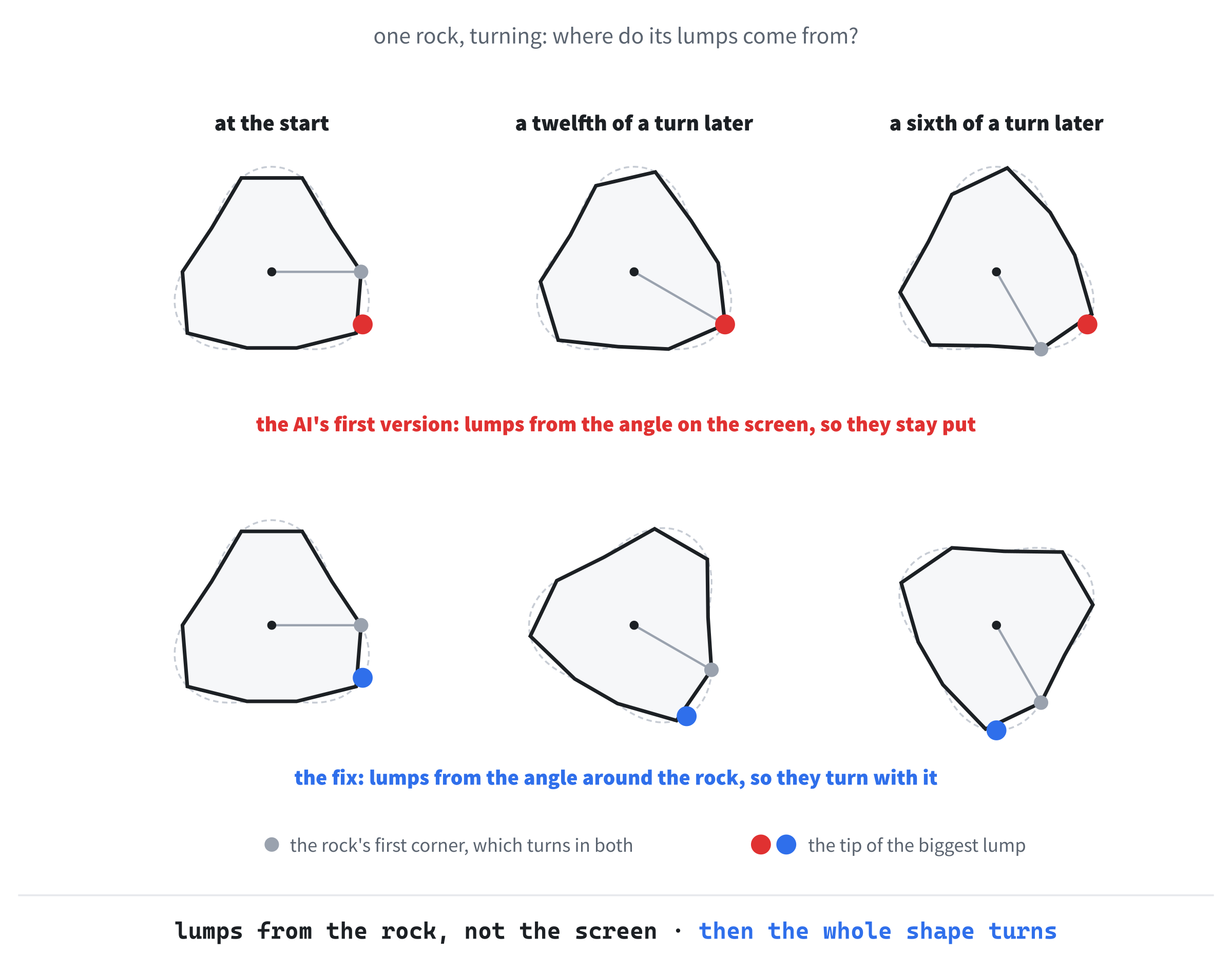
The fix is to work out each lump from the corner's place around the rock, before the rock's own turn is added. I asked the AI for that, and the three lines became four:
float around = TWO_PI * (i % SIDES) / SIDES;
float lump = 0.85f + 0.15f * std::sin(around * 3.0f);
Vec2 corner = rock.pos +
              direction(around + rock.angle) * (radius * lump);
In the preceding code, around is now the corner's angle around the rock itself, so each corner always gets the same lump. Only the direction the corner points in adds the rock's angle, so the whole lumpy outline turns, as one solid shape. The comment above drawAsteroid now says so too.
This is plausible nonsense of a subtle kind: the code does something, it does it smoothly, and it's not what anyone wanted. Only watching it, and comparing what you see with what you asked for, catches it.
Stage 3: Content
The five rounds so far built the systems. The next three put the game on top of them.
Round 6: Shooting, and Splitting
"Now collisions. Add a
circleHit(Vec2 a, float radiusA, Vec2 b, float radiusB)helper that returnstrueif two circles overlap. Every frame, check every bullet against every asteroid. On a hit, callsplitAsteroid(game, i), which returns the asteroid's score, from a table: large 20, medium 50, small 100. A large one becomes two medium ones, at the same place, and a medium one becomes two small ones, and a small one is just removed. Then set the bullet'slifeRemainingto 0, so the existing tidy-up removes it."
The collision test came first, one small function that every collision in the game would share:
// Do two circles overlap? Their centers must be closer than their two
// radii added together, and comparing the squares avoids a square root.
bool circleHit(Vec2 a, float radiusA, Vec2 b, float radiusB)
{
    float dx = a.x - b.x;
    float dy = a.y - b.y;
    float reach = radiusA + radiusB;
    return dx * dx + dy * dy <= reach * reach;
}
In the preceding code, two circles overlap when the distance between their centers is no more than their two radii added together, which the AI called reach. The distance between the centers is the hypotenuse of a right triangle whose sides are dx and dy, so by Pythagoras, it's the square root of dx * dx + dy * dy. Rather than take the square root, the function squares the other side too, and compares the squares, which gives the same answer, because neither side is ever negative, and skips the slowest part of the sum. Figure 27.6 shows it. Every shape in the game is treated as a circle for this: a bullet has a radius of 2, BULLET_RADIUS, the ship has its SHIP_RADIUS, and each asteroid has its size's.

Then the split, which is where the rocks multiply:
// Shoot asteroid i: it splits into two of the next size down, or, if it's
// small, it's gone. Returns the points it scores.
int splitAsteroid(Game& game, size_t i)
{
    AstSize size = game.asteroids[i].size;
    Vec2 pos = game.asteroids[i].pos;

    if (size == AstSize::Large)
    {
        game.asteroids.push_back(makeAsteroid(pos, AstSize::Medium));
        game.asteroids.push_back(makeAsteroid(pos, AstSize::Medium));
    }
    else if (size == AstSize::Medium)
    {
        game.asteroids.push_back(makeAsteroid(pos, AstSize::Small));
        game.asteroids.push_back(makeAsteroid(pos, AstSize::Small));
    }

    game.asteroids.erase(game.asteroids.begin() + i);
    return AST_SCORE[static_cast<int>(size)];
}
In the preceding code, the rock's size and position are copied out first, because the vector is about to change. A large rock adds two medium ones at its own position, each with its own random direction and speed, from makeAsteroid, and a medium one adds two small ones. Then Chapter 13's erase removes the rock that was hit, by its index, and the function returns its points, from a third table, AST_SCORE. Figure 27.7 follows one large rock all the way down.

And here's the loop that used them, as the AI first wrote it:
// Every bullet against every asteroid. A hit splits the asteroid, scores,
// and uses up the bullet.
void shootAsteroids(Game& game)
{
    for (Bullet& bullet : game.bullets)
    {
        for (size_t i = 0; i < game.asteroids.size(); i++)
        {
            const Asteroid& rock = game.asteroids[i];
            float radius = AST_RADIUS[static_cast<int>(rock.size)];
            if (circleHit(bullet.pos, BULLET_RADIUS, rock.pos, radius))
            {
                game.score += splitAsteroid(game, i);
                bullet.lifeRemaining = 0.0f;   // removed next frame
            }
        }
    }
}
In the preceding code, every bullet is checked against every asteroid, and a hit splits the asteroid, adds its points to score, a new member of Game, and uses up the bullet. It looks right, and I nearly accepted it. Then I noticed that splitAsteroid changes game.asteroids, the very vector the inner loop is walking through, in the middle of the walk.
That's Chapter 13's warning about removing from a vector while looping over it, and here it goes wrong in two ways at once. The erase shuffles every later rock down one place, so the loop's next step skips the rock that moved into the gap. And the new fragments go on the end of the vector, right where the rock was, and the used-up bullet is still being checked, so a bullet deep inside the rock goes on to hit them too. When I tried it, one bullet on a large rock scored 170 points in a single frame, destroying the large rock, one of its medium fragments, and one of that one's small fragments. So I pushed back:
"Your loop checks bullets, and inside it checks asteroids, and
splitAsteroidchanges the asteroid vector during the loop, which is dangerous. When a bullet hits, break out of the inner loop, and move on to the next bullet."
The AI added one line, and a comment:
if (circleHit(bullet.pos, BULLET_RADIUS, rock.pos, radius))
{
    game.score += splitAsteroid(game, i);
    bullet.lifeRemaining = 0.0f;   // removed next frame
    break;                         // the asteroids have changed
}
In the preceding code, the break leaves the inner loop the moment a bullet hits, so the loop never goes on through a vector that has just changed underneath it, and a bullet can only ever hit one rock, which is what a bullet should do anyway. The outer loop only walks through the bullets, which splitAsteroid never touches, so it's safe. For a game with more complicated rules, I'd collect the hits in a list first, and apply them after both loops, but for Asteroids, one break is all it needs.
I shot the first large rock, and two medium rocks tumbled away from where it had been, faster than it was, in different directions. It felt like Asteroids.
Round 7: Crashes, Lives, and Coming Back
"When the ship hits an asteroid, it's lost: set
alivetofalse, take away a life, and start a 1.5-secondrespawnTimer. While it's lost, the ship doesn't move or draw. When the timer runs out, callresetShip, which puts it back in the middle, still, and facing up. If the lives reach zero, setgameOver, and don't bring the ship back: R starts a new game."
The crash test came back clean, in a function of its own:
// The ship against every asteroid. A hit costs a life.
void crashShip(Game& game)
{
    if (!game.ship.alive)
        return;

    for (const Asteroid& rock : game.asteroids)
    {
        float radius = AST_RADIUS[static_cast<int>(rock.size)];
        if (circleHit(game.ship.pos, SHIP_RADIUS, rock.pos, radius))
        {
            game.ship.alive = false;
            game.lives--;
            game.respawnTimer = RESPAWN_S;
            if (game.lives <= 0)
                game.gameOver = true;
            return;
        }
    }
}
In the preceding code, a lost ship can't crash again, so the function starts by returning if the ship isn't alive. Otherwise, it's checked against every rock, as a circle of SHIP_RADIUS, and the first hit marks it lost, takes away a life, and starts the timer, RESPAWN_S, a new constant of 1.5 seconds. With no lives left, the game is over. One crash is enough, so the function returns right away, and it never changes the vector it's walking through.
The rest of the round was spread over several places. The Ship struct gained alive, which resetShip sets to true, and Game gained lives, gameOver, and respawnTimer, which resetGame sets up, with START_LIVES at 3. The drawShip function returns at once when the ship isn't alive, and so does steerShip, after setting thrusting to false, so a lost ship's flame goes out. And in the event loop, R starts a new game, with resetGame, but only once the game is over.
The ship's own update was messier. Here's how the AI changed it:
// Move the ship, and count down to its return once it's been lost
void updateShip(Game& game, float delta)
{
    Ship& ship = game.ship;
    if (ship.alive && ship.thrusting)
        ship.vel = ship.vel + direction(ship.angle) * (SHIP_THRUST * delta);

    // Drag takes a share of the speed
    if (ship.alive)
    {
        ship.vel = ship.vel * (1.0f - SHIP_DRAG * delta);
        ship.pos = ship.pos + ship.vel * delta;
        wrap(ship.pos);
    }

    if (ship.alive && ship.fireCooldown > 0.0f)
        ship.fireCooldown -= delta;

    if (!ship.alive && !game.gameOver)
    {
        game.respawnTimer -= delta;
        if (game.respawnTimer <= 0.0f)
            resetShip(ship);
    }
}
In the preceding code, every step asks again whether the ship is alive: three times that it is, and once that it isn't. It works. But the comment about drag is now above a block that does three things, and anyone adding a fourth step has to remember to add a fifth check. I asked:
"Refactor
updateShipso it has one early return if the ship isn't alive, which handles the respawn timer, instead of thealivechecks scattered through it."
The top of the function became this:
// Move the ship, or, once it's been lost, count down to its return
void updateShip(Game& game, float delta)
{
    Ship& ship = game.ship;
    if (!ship.alive)
    {
        game.respawnTimer -= delta;
        if (!game.gameOver && game.respawnTimer <= 0.0f)
            resetShip(ship);
        return;
    }
In the preceding code, a lost ship is dealt with first, and completely: the timer counts down, and when it runs out, the ship comes back, unless the game is over. Then the function returns, so everything below it, the thrust, the drag, the move, the wrap, and the cooldown, can assume the ship is alive, exactly as it did in Round 4, with no checks at all. Chapter 8's early return makes the rest of the function simpler, and it's usually the right shape for "if this isn't the normal case, handle it and leave."
I flew into a rock, on purpose. The ship vanished, the lives in my head went down by one, and a moment and a half later, the ship was back in the middle. After the third crash, it stayed gone, and R brought it back for a new game.
Round 8: Waves, and the Score
"When the asteroids are all gone, and the game isn't over, bring a fresh wave of four large ones, on the edges. Every frame, show 'Vibe Asteroids - Score: X Lives: Y' in the window's title bar, with ' GAME OVER' on the end once the game is over. Build the title with
std::stringandstd::to_string, not acharbuffer."
The last sentence of that prompt is Chapter 26's lesson, used. Left to itself, the AI reached for a char buffer and SDL_snprintf in Snake, so this time I said what I wanted, and it came back that way:
// Show the score and the lives in the window's title bar
void showStatus(SDL_Window* window, const Game& game)
{
    std::string title = "Vibe Asteroids - Score: " +
                        std::to_string(game.score) +
                        "   Lives: " + std::to_string(game.lives);
    if (game.gameOver)
        title += "   GAME OVER";
    SDL_SetWindowTitle(window, title.c_str());
}
In the preceding code, the title is built exactly like Chapter 26's showScore, with two numbers this time, and GAME OVER added to the end once the game is over. The file needed #include <string>, and update gained the window as a new parameter, to pass it on:
// One frame of the game
void update(Game& game, float delta, SDL_Window* window)
{
    updateShip(game, delta);
    updateBullets(game, delta);
    updateAsteroids(game, delta);
    shootAsteroids(game);
    crashShip(game);

    // A clear screen brings the next wave
    if (game.asteroids.empty() && !game.gameOver)
        spawnWave(game);

    showStatus(window, game);
}
In the preceding code, one frame of the game is a list of jobs, in order, one line each: move the ship, the bullets, and the asteroids, then check the bullets against the asteroids, and the ship against the asteroids. If no rocks are left, a new wave arrives, and the title shows the score. That's the plan from Stage 1, in code, and it's why the plan asked for small functions. The order matters, too: moving everything before checking collisions means every check sees where things are this frame.
One edit was mine. The AI brought each new wave by calling spawnInitialAsteroids, which was right, but the name wasn't anymore: it spawned every wave now, not just the first. I renamed the function spawnWave, and its constant WAVE_SIZE:
// A new wave of large asteroids, each on a random edge of the window
void spawnWave(Game& game)
{
    game.asteroids.clear();
    for (int i = 0; i < WAVE_SIZE; i++)
        game.asteroids.push_back(makeAsteroid(randomEdge(), AstSize::Large));
}
In the preceding code, nothing has changed but the names and the comment. A name that says what a function did once, rather than what it does now, is a small lie, and small lies in names add up to code nobody can read. Visual Studio's Rename, from the right-click menu, changes a name everywhere it's used, in one go.
That was the whole game, and it was very playable. A wave cleared, another arrived, and the score climbed in the title bar. It had taken eight rounds, and it was time to play it properly.
Stage 4: The Messy Middle
Here's the honest part. The rounds above make it look smooth, and it wasn't, entirely. Three things went wrong over the two evenings, and the fixes for two of them became the ninth and last round.
The Ship That Flew Backward
While I was testing Round 6's splitting, I put a breakpoint in splitAsteroid, as Chapter 1 showed, shot a rock while the ship was drifting, and looked around for a while. When I pressed F5 to carry on, the ship shot off backward, very fast.
Chapter 11 described exactly what had happened. While a program sits at a breakpoint, no frames are drawn, so the next frame's delta time is as long as you were stopped, several seconds. Dragging the window around does the same.
With a delta of three seconds, the drag's factor, 1 - 0.6 * 3, is -0.8, so instead of taking a share of the ship's speed away, it reversed the ship's direction. I tested it: a ship moving right at 100 pixels a second was moving left at 80 after one 3-second frame.
Everything else jumped too. Every rock moved three seconds' worth in one step, and every bullet's life ran out at once. After a long enough stop, a rock could move more than a whole window in one step, which is where the while loops in wrap earn their keep.
I asked the AI about the drag:
"If
(1 - SHIP_DRAG * dt)ever goes negative, with a long frame or a big drag, the velocity reverses. Make sure it can't."
It clamped the factor, so that it can never go below zero:
// Drag takes a share of the speed, but never more than all of it
float dragFactor = 1.0f - SHIP_DRAG * delta;
if (dragFactor < 0.0f)
    dragFactor = 0.0f;
ship.vel = ship.vel * dragFactor;
In the preceding code, drag can now take away at most all of the ship's speed, and never turn it around. That's a good, cheap fix, and I kept it, because it also protects the game if someone later turns SHIP_DRAG up a long way.
But it's a fix for one symptom, and the long frame was still there, doing its damage everywhere else. The real fix is the one Chapter 11 made, and I made it myself, in main, with a new constant, MAX_DELTA, of a tenth of a second:
// Delta time, in seconds, never more than MAX_DELTA
Uint64 now = SDL_GetTicksNS();
float delta = (now - lastTicks) / 1.0e9f;
lastTicks = now;
if (delta > MAX_DELTA)
    delta = MAX_DELTA;
In the preceding code, no frame counts for more than a tenth of a second, however long it really took, so after a breakpoint, or a drag of the window, the game just carries on from where it was. With delta at most 0.1, the drag factor is at least 0.94, so the clamp above can't even be reached, unless someone changes the drag.
There's a more thorough fix, which serious game physics uses: fixed-step integration. Instead of one physics step of whatever length the frame took, the game runs as many steps as it needs of one fixed length, such as a hundredth of a second, to catch up with the clock. Every step is then the same, however fast or slow the computer, so the physics behaves the same everywhere. For Asteroids, capping the delta is plenty.
The lesson is about where the AI's help stops. In Round 2, it implemented exactly what I asked for, and what I'd asked for was naive. Time-step-dependent physics is full of traps like this, and they only show up when frames get long, which is exactly when you're debugging.
The Bullet That Hit Everything
This one was Round 6's, caught by reading, and it's worth one more look, because it's the most common kind of mistake in AI-written game code: changing a container while looping over it. An AI knows about this trap perfectly well, and still writes it, now and then, because most of the code it has learned from gets away with it most of the time. The only defense is reading the loop and asking what changes inside it.
If I did it again, I'd put the constraint in the prompt: "When an asteroid is destroyed, break out of the inner loop, and don't go on through a container that has changed." An AI gets it right when it's reminded.
The Wave That Spawned on Top of Me
Once waves were working, I cleared the screen with some careful flying, watched the next wave arrive, and was killed at once by a large rock that appeared a few pixels from my ship. New waves arrive on the edges of the window, and my ship happened to be near an edge. I tested how often that happens: with the ship just inside the left-hand edge, about one wave in five put a rock within 84 pixels of it, six of the ship's radii, which is too close to get out of the way.
That's a gameplay bug, not a code bug. No compiler would find it, and no amount of reading would either, because the code does exactly what it says. You find it by playing, and playing again, with intent.
I described the problem to the AI, and its first suggestion was to spawn the waves in the four corners instead. That works, but it's artificial: players would soon learn to sit in the middle, where nothing ever arrives. I asked for something better:
"Keep spawning on random edges, but reject any spot within
SAFE_DISTANCEof the ship, six times its radius, and pick again."
The AI's answer was a loop that tries until it gets a good spot:
// A new wave of large asteroids, on the edges, but never near the ship
void spawnWave(Game& game)
{
    game.asteroids.clear();
    for (int i = 0; i < WAVE_SIZE; i++)
    {
        Vec2 pos;
        do
        {
            pos = randomEdge();
        } while (circleHit(pos, 0.0f, game.ship.pos, SAFE_DISTANCE));
        game.asteroids.push_back(makeAsteroid(pos, AstSize::Large));
    }
}
In the preceding code, each rock's spot is picked with Chapter 6's do-while, which always runs its body at least once: pick a spot, and pick again as long as it's within SAFE_DISTANCE of the ship. The check reuses circleHit, with a point, a circle of radius 0, and a circle of SAFE_DISTANCE around the ship. The edges are thousands of pixels long in all, and the ship can only rule out a couple of hundred of them, so the loop almost always finishes on its first or second try. It has one blind spot: it measures straight across the window, but the window wraps, so a rock placed on the far edge, heading outward, can reappear beside a ship at the near edge a frame later. It's rare, and measuring the distance the short way around, across the edge, would close it.
That made me ask where else a rock could appear on top of the ship, and there was one more place: a lost ship comes back in the middle, whatever is there. So I asked for the same idea there, and the AI wrote a helper, and used it in updateShip:
// Is every asteroid at least SAFE_DISTANCE from pos?
bool clearOfRocks(const Game& game, Vec2 pos)
{
    for (const Asteroid& rock : game.asteroids)
    {
        if (circleHit(pos, 0.0f, rock.pos, SAFE_DISTANCE))
            return false;
    }
    return true;
}
In the preceding code, clearOfRocks answers one question, whether any rock is within SAFE_DISTANCE of a point, and returns false as soon as it finds one. The respawn in updateShip now waits for it too:
if (!ship.alive)
{
    Vec2 middle = Vec2{ WINDOW_W / 2.0f, WINDOW_H / 2.0f };
    game.respawnTimer -= delta;
    if (!game.gameOver && game.respawnTimer <= 0.0f &&
        clearOfRocks(game, middle))
    {
        resetShip(ship);
    }
    return;
}
In the preceding code, a lost ship comes back once its 1.5 seconds are up, and the middle of the window is clear, whichever happens later. The function's comment changed to match: it brings the ship back "when it's safe." Asking "where else does this happen?" after fixing a bug is one of the best habits there is, and it's one an AI won't have for you.
Stage 5: Finishing
"Finishing" is mostly about not adding more. I had a list of "wouldn't it be good if…" ideas by the end of the second evening:
- An asteroid that shoots back
- Power-ups: an extra life, a double shot, or a shield
- A high-score table, saved to a file, as in Chapter 24
- Sound effects, which the final project adds, in Chapter 34
- Sparks flying out when something's destroyed, like Chapter 14's particles
- A hyperspace key that jumps the ship somewhere random
- A second player
Each of those is appealing, and none of them is Asteroids. The original game is famously spare: a ship, rocks, bullets, splitting, lives, and a score. So I stopped after the ninth round.
Done is a feature. An AI makes adding things so cheap that the temptation is to keep going, but cheap isn't free: every feature is more code to read, more places for bugs, and more time before you finish. Decide what done means before you start, and when you get there, stop.
The discipline of stopping is the most underrated part of vibe coding. The game you finish is worth more than the three you keep improving.
Common Errors and Fixes
These are the errors you're most likely to meet when you vibe code a game like this one, because they come from the AI's habits, not yours.
C2065: 'M_PI': undeclared identifier. An AI loves M_PI, for π, and Visual Studio doesn't define it unless you ask. The usual fix is #define _USE_MATH_DEFINES above every #include, but M_PI is a double, so a float made from it brings C4305: 'initializing': truncation from 'double' to 'const float'. Use Chapter 12's TWO_PI constant, or SDL's own SDL_PI_F, which is already a float.
C2440: 'initializing': cannot convert from 'const bool *' to 'const Uint8 *'. That's SDL 2 code again. In SDL 2, SDL_GetKeyboardState gave a const Uint8*, and in SDL 3, it gives a const bool*, as Chapter 1 used. Change the type, and the rest of the code works as it is.
The ship turns in jerks. If the AI turns the ship on SDL_EVENT_KEY_DOWN events, instead of the keyboard's state, the ship turns one step when you press the key, pauses, and then turns in a stream of little steps, because those are the key repeats Chapter 16 described. Anything that should happen for as long as a key is held belongs with SDL_GetKeyboardState, and anything that should happen once per press belongs in the event loop.
The game runs at thousands of frames a second. No vsync, and no delay, as in the AI's first answer in Round 1. It can still look fine, but your computer is working flat out to draw the same thing over and over. Add Chapter 1's SDL_SetRenderVSync(renderer, 1);.
Playing the Game
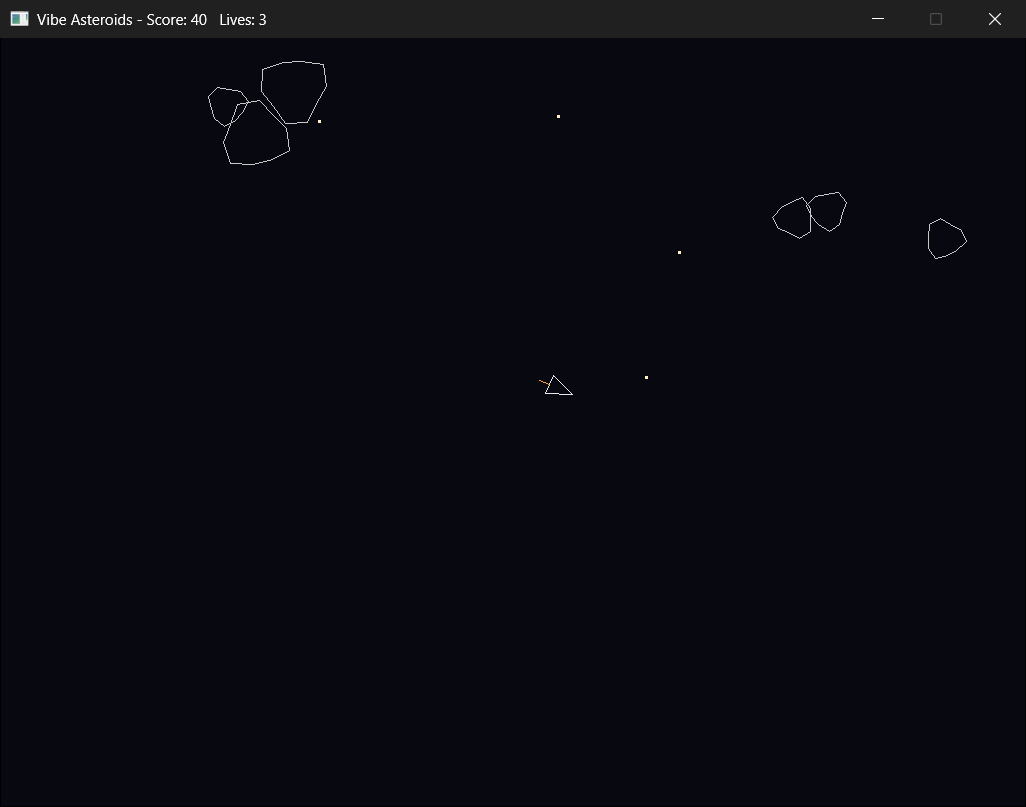
To play my version, open Vibe Asteroids.slnx in the project folder, and press F5, choosing Trust and Continue if Visual Studio asks, as in Chapter 1. Your ship sits in the middle, pointing up, and four large, lumpy rocks drift and turn around it. Turn with the left and right arrows, or A and D, thrust with the up arrow or W, and fire with Space.
Hit a large rock, and it splits into two medium ones, which fly apart, like the pair in Figure 27.8. Hit a medium one, and it splits into two small ones, and a small one is simply destroyed. Fly into a rock, and the ship vanishes, you lose a life, and it comes back in the middle once the coast is clear. Lose all three, and GAME OVER appears in the title bar, and R starts again. Clear the screen, and a new wave of four large rocks arrives on the edges, almost never right beside you.
Here's the Game struct as it ended up:
// Everything that changes while you play
struct Game
{
    Ship ship;
    std::vector<Bullet> bullets;
    std::vector<Asteroid> asteroids;
    int score = 0;
    int lives = START_LIVES;
    bool gameOver = false;
    float respawnTimer = 0.0f;   // seconds until a lost ship returns
};
In the preceding code, the game is the plan from Stage 1, almost word for word: one ship, a vector of bullets, and a vector of asteroids, with the score, the lives, whether the game is over, and the timer for a lost ship's return.
The finished main.cpp is 564 lines long. Of those, 128 are comments, blank lines, and the note at the top, and 115 are curly braces on lines of their own, which leaves 321 lines that do something. The AI's version, before my edits and the ninth round, was 422 lines.
Retrospective
Same questions as Chapter 26, and some new ones, because the project was different.
Q: How was this different from Snake?
The scope. Snake was six rounds and about ninety minutes. Asteroids was nine rounds, across two evenings. Each round was about the same size as a Snake round, but there were more of them, and the bugs were subtler: physics that went wrong when frames got long, a container changed while it was being looped over, lumps that didn't turn, and a wave that arrived on top of me. The messy middle only really exists for projects this size and up.
Either game could be "one-shot": ask an AI for the whole thing, and in five minutes, you'd have something that runs. But you'd have a few hundred lines you'd never read, with every bug above hiding somewhere in them, and nothing learned. Build it in rounds, and read what comes back, and you end up with a game you understand, and the skill to build the next one. And whichever way a program was written, leave time to tidy it, as I did in every round, because code nobody tidies keeps growing, until it's a thousand lines in one file.
Q: Where did the AI shine?
The physics and the math. The turning and the thrust, the bullets' velocity, the circle test, the ship's corners turned into the window, and the lumpy outlines are all standard game math the AI has seen thousands of times, and it got nearly all of it right the first time. Vibe coding multiplies your speed most on the parts of programming that the AI has seen most often.
Q: Where did the AI struggle?
Anything specific to how this game plays: the wave that arrived on top of me, the drag that reversed after a long frame, the missing break, and the lumps that stayed put. None of those is a mistake in C++. Each one is a mistake about the game, or about how physics behaves over time, and you only catch it by playing, or by knowing the trap already. The AI has never been blown up by an asteroid that appeared beside it. You have.
Q: What's the new lesson, on top of Chapter 26's?
Architecture first. Deciding the data and the shape of each frame before any prompting saved me hours. Without it, the AI would have invented a structure a round at a time, and I'd have spent the second evening making the rounds agree. With it, every prompt was one small, clear piece of a plan that already existed, and the rounds built on each other, instead of fighting.
Q: When does vibe coding stop being faster?
For me, somewhere around 300 to 400 lines, for a focused single-file program. Beyond that, the time you spend reading and fitting in what the AI writes starts to outweigh the time you save by not typing it. For a project of a thousand lines, across many files, AI helps in bursts, with a new module, some boilerplate, or a refactoring whose shape you already know, but it's no longer a steady speed-up. Big projects are about architecture and patience, and AI helps with the typing, not with those.
Q: Would I do it again?
Yes, for projects this size. For bigger ones, I'd use AI more selectively, as a pair programmer when I want one, rather than the driver. The point where "the AI is faster" turns into "I'm faster" moves up as you get better at scoping prompts. For me, it's somewhere around 300 to 400 lines right now, and it'll be lower for someone newer.
AI Exercise (Build Your Own)
Same as Chapter 26: don't stop at reading mine. Go and build a real game.
Pick an arcade classic that fits in one file, with real-time movement or a real game loop, bigger than Pong and smaller than Tetris. Some good choices:
- Frogger, on a grid, with two different kinds of hazard, traffic on the road and logs on the river, and lots of feel to tune.
- Galaga, or Galaxian, a shooter where the enemies swoop in patterns, which makes a good design problem.
- Pac-Man, which has real enemy behavior: the four ghosts each chase you differently. It's bigger, so choose it if you want a wrestle.
- Centipede, whose enemy splits where it's hit, a lot like Asteroids in spirit, and completely different in the code.
- Lunar Lander, a physics puzzle about landing gently. It's the smallest of these, and good if you want to keep it tight.
Plan it on paper before you talk to the AI, as in Stage 1. Build the systems, and then the content, in small rounds. Watch for your own messy middle, and when you reach done, stop.
Then give it to a friend, and watch them play it. Note every place where they didn't know what to do. That's your real polish list.
Summary
You watched me build Asteroids in nine rounds, with the architecture decided first, three honest bugs in the messy middle, and a deliberate stop at done. That's the workflow for anything bigger than Snake. The proportions change, with more planning, more rounds, and more of a messy middle, but the shape stays the same: small steps, each one described, read, run, and played.
Along the way, the AI wrote a lot of good math, and some plausible nonsense: lumps fixed to the screen instead of the rock, a loop that changed the vector it was walking through, and physics that reversed after a long frame. Reading caught one, playing caught the rest, and a plan made before the first prompt kept the whole program in a shape that made them easy to fix.
That's the end of the book's vibe coding, but not of Act 4. The next two chapters look at two patterns that real game engines are built on, starting with Chapter 28's Component pattern, which takes the one-list idea from Chapter 23 somewhere new. After those, the final project builds a whole game with everything you've learned.