
Act 3 left the runner's world in good shape. One list owns every runner, two loops update and draw everything, and adding a shadow took a single new class. So let's imagine the game carrying on for a year. The player needs footsteps, and a puff of dust when she lands, and the ghosts need to knock her over, so she needs a hitbox, and health, and a moment of flashing after each hit. Someone wants a double jump, and someone else wants the ghosts to have one too, but only the green one.
Every one of those features is small and reasonable, and every one of them lands in Entity, because that's where a runner's code lives. A year from now, Entity is three thousand lines long, nobody can change the jump without breaking the dust, and everyone on the team is a little afraid of it. Programmers have a name for a class like that: a god object, one class that knows everything and does everything. Every game that grows tends toward one.
This chapter is about a pattern that cuts a class like that into pieces before it gets there. The Component pattern splits a game object along the lines of its jobs: what it decides to do, how it moves, and how it looks. Each job becomes a small class of its own, called a component, and the object becomes a thin container that holds its components and asks each one to do its job. We'll do it to the runners, for real: in three steps, each of which builds and plays exactly as before, Chapter 23's project becomes one where the player, the ghosts, and the shadow are all the same class, with different components inside, and where the computer can take over the player at the press of a key, without a line of her code changing. Along the way, we'll see exactly where inheritance runs out, why C++ sometimes needs to be told that a class exists before it's told what's in it, and when all of this is more trouble than it's worth.
SDL3 Projects/Animated Character Components — Chapter 23's project after this chapter's three steps, with twenty-four files and the same assets folder. There's nothing to type in this chapter. Open Animated Character Components.slnx, choosing Trust and Continue if Visual Studio asks, as in Chapter 1, and press F5 to play it whenever you like. The two steps on the way aren't kept as projects of their own, but the chapter shows or describes every change they make.In this chapter, we will:
- See how a class that does everything grows into a god object, and why inheritance can't cut it apart
- Pull the runner's keyboard code out into her first component
- Split her movement and her looks into two more components, leaving a thin
GameObject - Use forward declarations to let two classes refer to each other
- Make the input swappable with an interface, and hand the player to the computer at the press of a key
- Build every runner from one class, and see how components talk to each other
- Decide when components earn their keep, and meet Entity-Component-System, the idea's next step
- Try an optional AI exercise on breaking an object into components
Let's start by looking honestly at the class Act 3 finished with.
The God Object Problem
Chapter 23's Entity is a good class, and it's worth saying so before we take it apart. It's about 140 lines over two files, every runner in the game is one, and it does its job well. Look at what it holds, though. Here are its member variables, from Entity.h:
protected:
    float x_;                   // the middle of her body, across the window

private:
    const Texture& sheet_;      // the runner's sprite sheet, used but not owned
    Animator animator_;         // counts through her running frames
    float groundTop_;           // the top of her frame when she's standing
    float y_;                   // the top of her frame
    float pace_;                // 1 for the usual speed, 2 for twice as fast
    SDL_Color tint_;            // her color, and how see-through she is
    float velY_ = 0.0f;         // pixels per second, and negative is up
    int direction_ = 0;         // -1 for left, 1 for right, 0 for standing
    bool facingLeft_ = false;
    bool jumping_ = false;
In the preceding code, every member is the runner's, but the members belong to two different jobs. Seven of them are about how she moves: where she is across the window (x_) and down it (y_), where the ground is (groundTop_), how fast she's rising or falling (velY_), which way she's running (direction_), how quickly (pace_), and whether she's in the air (jumping_). The other four are about how she looks: her sprite sheet (sheet_), her animator (animator_), her color (tint_), and which way she's facing (facingLeft_). Programmers call jobs like these domains, and these two have names. Moving is physics, even when the physics is as simple as a runner's jump, and looking is graphics.
There's a third domain, and it isn't in Entity at all: deciding what she does. For the player, that's the keyboard code in runGame, which tells her which way to run and when to jump, while a ghost has Ghost::update, with its random jumps, and the shadow has Shadow::update, which keeps an eye on her leader. Programmers usually call this domain input, even when nobody's pressing anything, because it's whatever feeds a character her orders. And each of those three places makes one more decision on the side: what happens at the window's edges. The player stops at them, a ghost wraps around them, and the shadow pays them no attention at all.
The domains don't sit neatly side by side, either. They reach into each other. Here's Entity’s constructor, from Entity.cpp:
Entity::Entity(const Texture& sheet, float x, float groundY, float pace,
               SDL_Color tint)
    : x_(x),
      sheet_(sheet),
      animator_(RUN_FRAMES, FRAME_TIME),
      groundTop_(groundY + FEET_GAP - FRAME_H),
      y_(groundTop_),
      pace_(pace),
      tint_(tint)
{
}
In the preceding code, groundTop_ is where her jumps land, which is physics, but it's worked out from FEET_GAP and FRAME_H, the empty pixels under her feet in the picture and the height of a frame, which are facts about her sprite sheet. The physics can't know where she stands without knowing how big her picture is. The rest of the class is knotted the same way. Her update moves her, and moves her animator on too, so the physics code runs the graphics, and her draw looks at jumping_ and direction_ to choose a frame, so the graphics reads the physics. Figure 28.1 sorts her members into their domains, and marks the knots.

None of that is a problem at this size. It becomes one as the game grows, because every new feature has to live somewhere, and the obvious place is the class that already is the runner. Give it the year from the opening, and the trouble arrives from several directions at once:
- Every change is risky. The programmer adding a puff of dust on landing is working in the same class as the jump, sometimes in the same function, and one slip breaks both.
- Nothing can be borrowed. A new kind of runner who needs a ghost's wrapping, but the player's controls, can't take one without the other, as the next section shows.
- Nobody can work alone. On a team, whoever's working on graphics and whoever's working on gameplay are forever editing the same two files, and treading on each other's changes.
- Everything has to be read at once. To change how she looks, you have to understand how she moves, because the two are tangled together.
So the class wants cutting up, along the lines of its domains. The question is how, and after Act 3, one tool comes to mind first.
Why Inheritance Isn't the Fix
Chapter 23's runners already use inheritance, so let's look closely at what it's doing for them. The Player, Ghost, and Shadow classes each inherit everything from Entity, and add what makes them different. Set their code side by side, and apart from their colors and paces, which are only numbers, the differences come down to two decisions: who decides where she goes, and what she does at the window's edges. The player is steered from the keyboard, by runGame, and Player stops her at the edges. A ghost steers herself, and Ghost wraps her around, while the shadow follows her leader, and Shadow lets her go wherever that leads.
Two decisions with three answers each make nine kinds of runner, and Chapter 23's classes are only three of them. Figure 28.2 lays out all nine.

Say you want one of the missing six: a ghost you drive. She's steered from the keyboard, like the player, but she wraps around the window, like a ghost. With inheritance, that means a class that's both a Player and a Ghost, and C++ allows exactly that, with the multiple inheritance that Chapter 20 warned about. Here it is, in a test program built on Chapter 23's files:
// Steered like the player, and wrapping around the window like a ghost:
// why not inherit from both?
class DrivenGhost : public Player, public Ghost
{
public:
    DrivenGhost(const Texture& sheet, float groundY, float windowWidth)
        : Player(sheet, groundY, windowWidth),
          Ghost(sheet, 0.0f, groundY, 1, 1.0f, RED_GHOST, windowWidth)
    {
    }

    void update(float delta) override
    {
        Player::update(delta);
        Ghost::update(delta);
    }
};
In the preceding code, DrivenGhost names both classes after the colon, so it's both. Its constructor calls both of their constructors in its initializer list, the way Chapter 20 called one, and its update calls both of theirs: the player's, which keeps her in the window, and the ghost's, which jumps her now and then and wraps her around. That should already feel odd, since one of them stops her at the edge and the other takes her past it, but it compiles.
The trouble starts when the game tries to use her. The runGame function steers the player with run and jump, so it would steer a driven ghost the same way:
void steer(DrivenGhost& driven)
{
    driven.run(1);
}
In the preceding code, a single call is enough to stop the build, with C2385: ambiguous access of 'run'. Underneath it, MSVC adds two notes, one saying could be the 'run' in base 'Entity', and the other, or could be the 'run' in base 'Entity'. That isn't the compiler repeating itself. A DrivenGhost really does have two Entity parts, one inside her Player part and one inside her Ghost part, and each has its own run, so driven.run(1) could mean either.
Putting her into Chapter 23's list of runners fails too, with C2665: no overloaded function could convert all the argument types, because a pointer to a DrivenGhost could become a pointer to either Entity. And sizeof tells the rest of the story: an Entity is 80 bytes, a Player and a Ghost are 88 each, and a DrivenGhost is 176, a whole player and a whole ghost, side by side. Figure 28.3 shows what's inside her.
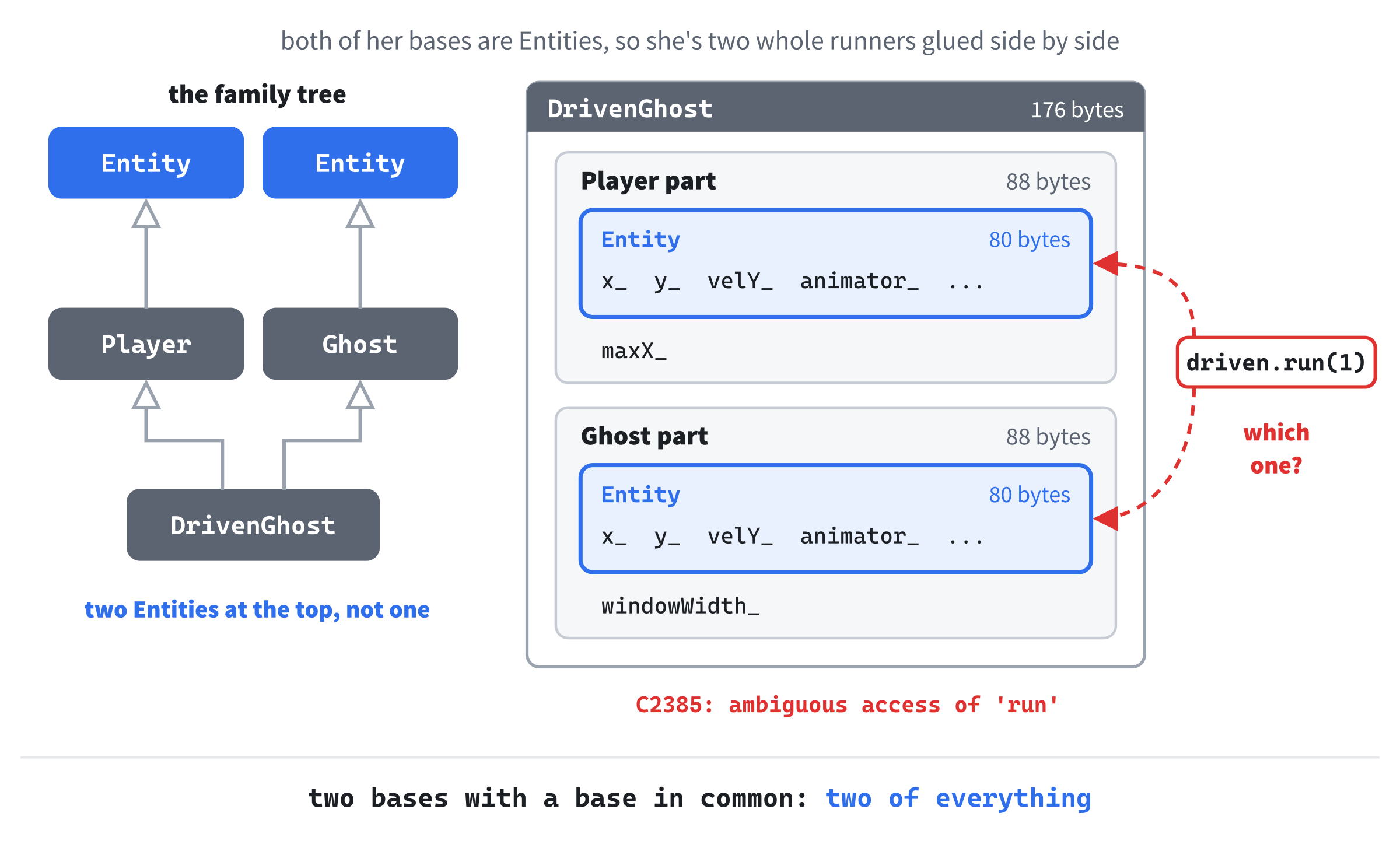
This is the diamond problem from Chapter 20's note: two base classes with a base of their own in common, so a class built on both gets two copies of it. C++ has a feature for sharing one copy, called virtual inheritance, and I tried it. The driven ghost shrinks to a single Entity, 120 bytes, and both updates move that one runner, so she runs at twice the player's speed, 72 pixels in a tenth of a second where the player covers 36. The syntax can be fixed, but the design can't, because the runners' differences don't fit a family tree. Their two decisions are independent of each other, and inheritance can only bundle them, one class for every bundle.
The way out is Chapter 20's advice about a FlyingEnemy: don't make her a kind of thing, give her things. A runner isn't a kind of keyboard runner, or a kind of wrapping runner. She has something that decides where she goes, something that moves her, and something that draws her. That's composition, the has-a that Chapter 18 named, and you've done it before.
Chapter 19's Animator is a component in all but name. It does one job, counting through the frames of an animation, and it knows nothing about the runner who owns it. She holds one as a member, and asks it to do its job every frame. This chapter does the same with every job a runner has, including the ones still tangled up inside Entity.
Doing that to every job an object has, on purpose, is called the Component pattern. Each domain becomes a small class, called a component, and the object becomes a thin container that owns its components and asks each one to do its job. Different objects can share a kind of component, or swap one for another, with no family tree in sight. The pattern has been at the heart of game engines for a long time, and the clearest explanation of it I know is the Component chapter of Robert Nystrom's Game Programming Patterns, which inspired this chapter and the next. There's more about his book at the end of the chapter.
Here's the plan for the runners. It comes in three steps, and after each one, the game builds and plays exactly as it did before, which is how Chapter 21 checked a refactoring:
- Lift the keyboard code out of
runGame, into a component the player owns. - Split
Entity’s physics and graphics into two components, leaving a thin container behind. - Turn every runner's deciding into a component, behind one interface, and let
Player,Ghost, andShadowgo.
Figure 28.4 shows where each piece of Chapter 23's code ends up.
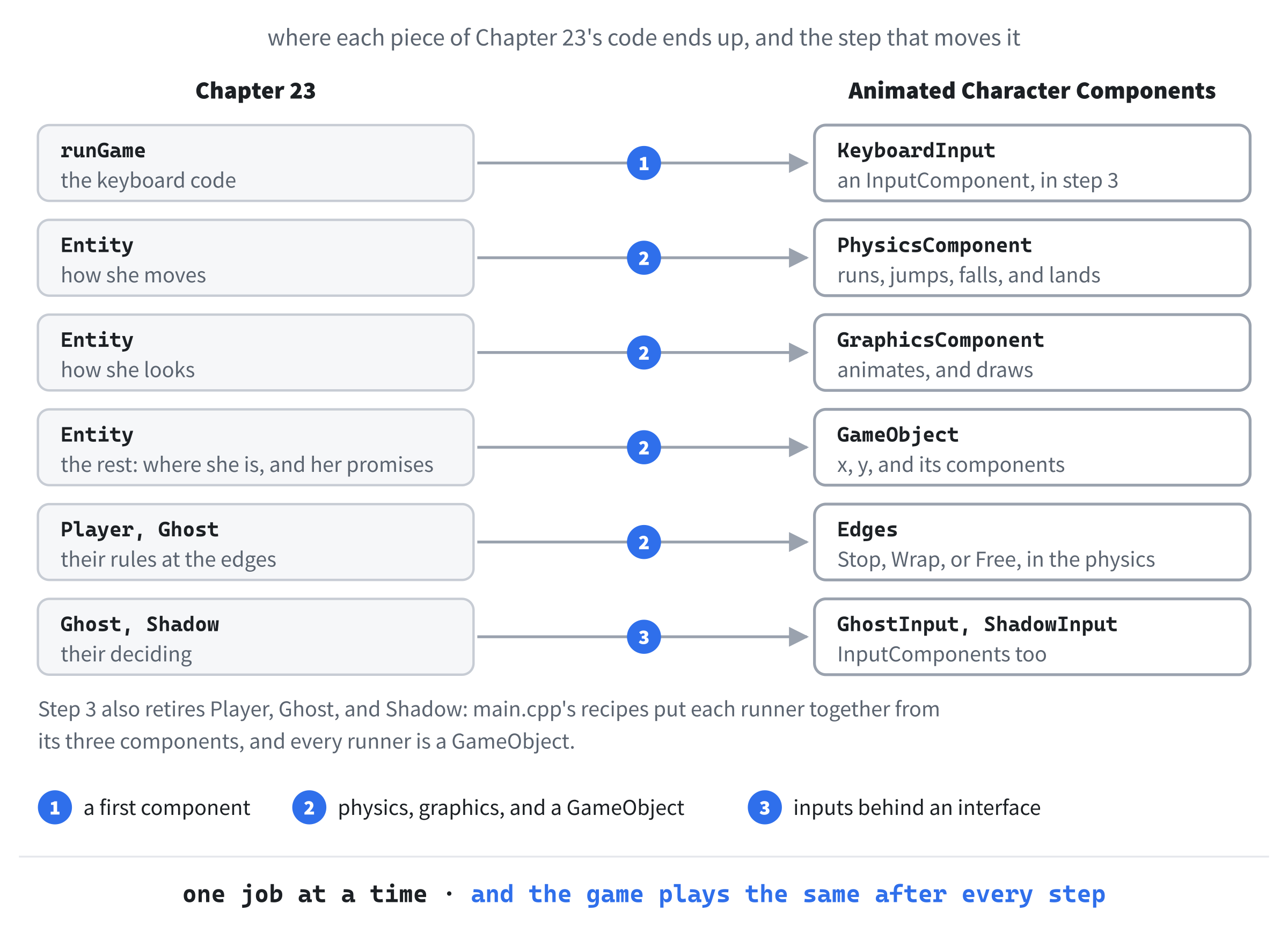
Every class in the finished project gets its turn in the chapter, in the order the steps create it.
A First Component
The keyboard code is the easiest job to lift out, because it's already separate from the runner. It lives in runGame, which reads the jump keys as key-down events in its switch, and the running keys from the keyboard's table every frame. The first step moves all of it into a class of its own, and here's the new class's header, KeyboardInput.h, all of it:
#pragma once

// To take a reference to an Entity, it's enough to know that it's a class,
// so this header doesn't need Entity.h
class Entity;

// The player at the keyboard: the arrow keys, or A and D, to run, and Space,
// W, or the up arrow to jump
class KeyboardInput
{
public:
    void update(Entity& owner);

private:
    bool jumpWasDown_ = false;  // whether a jump key was down last frame
};
In the preceding code, the class has one function, update, which takes the runner it steers, and one member, which we'll come to shortly. The runner arrives as an Entity&, since that's all a keyboard needs to steer her, and the parameter is called owner, because she's the one who'll own this component.
Above the class and its comment is a line that's new to the book. It's a forward declaration: class Entity; tells the compiler that there's a class called Entity, and nothing more, neither its members nor its size. That's enough for this header, because the only thing it does with an Entity is take one by reference, and a reference doesn't need to know what's inside the thing it refers to. So KeyboardInput.h doesn't include Entity.h, and a file that includes KeyboardInput.h doesn't drag in the whole of Entity.h, and everything that includes, as a side effect. Forward declarations keep headers light, and in the next step, you'll see that they're sometimes the only way two classes can mention each other at all.
The file that does the work needs the whole class, because it calls Entity’s functions. Here's the first half of KeyboardInput.cpp:
#include "KeyboardInput.h"
#include <SDL3/SDL.h>
#include "Entity.h"

void KeyboardInput::update(Entity& owner)
{
    // Run left or right while an arrow key, or A or D, is held
    const bool* keys = SDL_GetKeyboardState(nullptr);
    int direction = 0;
    if (keys[SDL_SCANCODE_LEFT] || keys[SDL_SCANCODE_A])
        direction -= 1;
    if (keys[SDL_SCANCODE_RIGHT] || keys[SDL_SCANCODE_D])
        direction += 1;
    owner.run(direction);
In the preceding code, <SDL3/SDL.h> is for the keyboard, and Entity.h is for run and jump, which the component calls. The running part is the code Chapter 19 wrote into runGame, moved over without a change, except that its orders now go to owner, where they used to go through the player observer. The jump needs more thought. Here's the rest of update:
    // Jump as a jump key goes down: down now, but not in the last frame
    bool jumpDown = keys[SDL_SCANCODE_SPACE] || keys[SDL_SCANCODE_W] ||
                    keys[SDL_SCANCODE_UP];
    if (jumpDown && !jumpWasDown_)
        owner.jump();
    jumpWasDown_ = jumpDown;
}
In the preceding code, the jump keys are read from the same table as the running keys, with scancodes, where Chapter 23 read them as key-down events, with keycodes. That's a real change, so it's worth a moment. Chapter 19 chose events for the jump because a jump happens once per press, and an event says that a key has just gone down. But a component isn't handed events: it's asked to update once a frame, and all it can do is look at the keys. The table only says which keys are down right now, so read that way, holding Space would jump her again the instant she landed.
The fix is the rising edge that Chapter 9 described: remember whether a jump key was down in the last frame, in jumpWasDown_, and jump only when one is down now and wasn't then. The last line updates the memory, ready for the next frame. The result is exactly what the event gave us: one jump per press, however long you hold the key.
Now the player needs one of these. Here's Player.h, with the component added:
#pragma once
#include "Entity.h"
#include "KeyboardInput.h"

// The runner you control: an Entity who can't leave the window, driven by
// the keyboard
class Player : public Entity
{
public:
    Player(const Texture& sheet, float groundY, float windowWidth);

    void update(float delta) override;

private:
    KeyboardInput input_;       // reads the keys, and tells her what to do
    float maxX_;                // the furthest right her middle can go
};
In the preceding code, Player.h includes KeyboardInput.h, because the player holds a KeyboardInput as a member, by value, and to know how big a player is, the compiler has to know how big a KeyboardInput is. The component is made along with her and destroyed with her, like her animator, and its comment says what it's for. Her update hands it the work:
// The keyboard decides, she does everything an Entity does, and then she's
// kept in the window
void Player::update(float delta)
{
    input_.update(*this);
    Entity::update(delta);

    if (x_ < EDGE)
        x_ = EDGE;
    if (x_ > maxX_)
        x_ = maxX_;
}
In the preceding code, the first line asks the keyboard to decide, before she moves, so its orders take effect in the same frame. Its argument is *this. As Chapter 18 showed, this is a pointer to the object whose function is running, here the player, and the star turns the pointer into the player herself, which the reference parameter then refers to. A Player is an Entity, so she fits an Entity&. The rest is Chapter 23's update, unchanged.
Back in runGame, the three jump keys come out of the switch, leaving only Escape, and the eight lines below the event loop that read the keyboard's table and gave the player her orders are gone. The observer, player, stays, because her shadow still needs to know who to follow. At this point, the game builds and plays exactly as it did in Chapter 23: she runs and jumps, holding Space jumps her just once, and her shadow follows her everywhere.
That's the whole of the first step, and it's worth noticing what it bought. The runGame function has one less job, and no longer knows that there's a keyboard. Everything about the keys is in one small class that can be read and changed on its own. And Player now says what she has, a keyboard input, where before she depended on code somewhere else to steer her. That's the pattern in miniature: find a job, give it a class of its own, and let the object own one and hand it the work.
Physics and Graphics Move Out
The second step does the same for Entity’s two domains, and it's a bigger job, because they're the two that are knotted together. Physics goes into a PhysicsComponent, and graphics into a GraphicsComponent. When they've gone, Entity has almost nothing left: a position, which both components need, the two components themselves, and a few lines to call them. There's nothing left in it about running or drawing, so it deserves a more general name. Game engines call a thing that's made of components a game object, so Entity becomes GameObject, and its files become GameObject.h and GameObject.cpp.
Start with the physics. It needs a way to say what a runner does at the window's edges, and a choice between a few named options is exactly what Chapter 11's enum class is for. Here's the top of PhysicsComponent.h:
#pragma once

// GameObject.h includes this file, so this file can't include it back. To
// take a reference to a GameObject, it's enough to know that it's a class
class GameObject;

// What a runner does at the window's sides
enum class Edges
{
    Stop,   // she stops at them
    Wrap,   // off one side, and back on at the other
    Free    // she pays them no attention
};
In the preceding code, the forward declaration is back, this time for GameObject, and its comment says why this header can't simply include GameObject.h: GameObject.h includes this file. We'll see what goes wrong when it tries, once GameObject itself has appeared. Below it, Edges gives the three rules a name each, with a comment on each, as Chapter 11's MoleState did. What used to take a whole subclass's update is now a single value: Stop, Wrap, or Free.
Next comes the class. Its public part is the runner's old way of taking orders, with a few additions:
// How a runner moves: she runs at her own pace, jumps, falls, and lands, and
// keeps to her rule at the window's sides
class PhysicsComponent
{
public:
    PhysicsComponent(float groundY, float windowWidth, Edges edges,
                     float pace = 1.0f);

    void run(int direction);
    void jump();
    int getDirection() const;
    bool isJumping() const;
    float getPace() const;

    void update(GameObject& owner, float delta);
In the preceding code, the constructor takes where the ground is, how wide the window is, her rule at the edges, and her pace, which defaults to 1, as Entity’s did. Then come run and jump, the orders Entity used to take, and three getters, which the other components will need: which way she's running, whether she's in the air, and how quick her pace is. Last, update moves her on by one frame. A component knows nothing about the object that owns it until it's told, so update is handed its owner, by reference, every frame, along with the frame's length.
The private part holds the physics that used to be in Entity:
private:
    void keepToEdges(GameObject& owner) const;

    float groundY_;             // the line her feet land on
    float windowWidth_;
    Edges edges_;               // her rule at the window's sides
    float pace_;                // 1 for the usual speed, 2 for twice as fast
    float velY_ = 0.0f;         // pixels per second, and negative is up
    int direction_ = 0;         // -1 for left, 1 for right, 0 for standing
    bool jumping_ = false;
};
In the preceding code, keepToEdges is a private member function, which update will call, and it's const because it changes the owner's position, never anything in the component. The member variables are the physics half of Figure 28.1, plus the rule for the window's sides, edges_, and the windowWidth_ it needs, with two other differences. The ground is now groundY_, the line her feet land on, where Entity kept groundTop_, the top of her frame when she stands, so the physics no longer needs to know how tall her picture is. And x_ and y_ aren't here at all: where she is belongs to the game object, because the graphics needs it too.
In PhysicsComponent.cpp, the physics constants come first. Some come from Entity.cpp, and the edge distances come from Player.cpp and Ghost.cpp:
// Running and jumping
const float RUN_SPEED  = 360.0f;    // pixels per second, at a pace of 1
const float JUMP_SPEED = -820.0f;   // pixels per second at take-off, upward
const float GRAVITY    = 2200.0f;   // pixels per second, per second

// The window's sides
const float EDGE      = 40.0f;      // how close to a side Stop lets her get
const float OFFSCREEN = 120.0f;     // how far past a side Wrap lets her go

PhysicsComponent::PhysicsComponent(float groundY, float windowWidth,
                                   Edges edges, float pace)
    : groundY_(groundY),
      windowWidth_(windowWidth),
      edges_(edges),
      pace_(pace)
{
}
In the preceding code, the running and jumping constants are Entity’s, unchanged, and EDGE and OFFSCREEN are the player's and the ghosts' distances from Chapter 23, with comments that now name the rules that use them. The constructor copies its four arguments into their members. After it come run and jump, moved over from Entity unchanged but for one thing: run no longer turns her to face the way she's going, because facing is about how she looks. The three getters return a member each, and then comes update:
void PhysicsComponent::update(GameObject& owner, float delta)
{
    // Run at her own pace
    owner.x += direction_ * RUN_SPEED * pace_ * delta;

    // Rise, fall, and land, just as in Chapter 17
    if (jumping_)
    {
        velY_ += GRAVITY * delta;
        owner.y += velY_ * delta;
        if (owner.y >= groundY_)
        {
            owner.y = groundY_;   // she has landed
            velY_ = 0.0f;
            jumping_ = false;
        }
    }

    keepToEdges(owner);
}
In the preceding code, she runs at her own pace, and rises, falls, and lands, just as she did in Entity, less the line that moved her animator on, which belongs to the graphics now. Her position is her owner's, owner.x and owner.y, and the ground she lands on is groundY_, where her feet touch it, rather than where the top of her frame stops. The last line calls keepToEdges, which does what the subclasses' updates used to do:
// Stop at the sides, wrap around them, or pay them no attention
void PhysicsComponent::keepToEdges(GameObject& owner) const
{
    switch (edges_)
    {
    case Edges::Stop:
        if (owner.x < EDGE)
            owner.x = EDGE;
        if (owner.x > windowWidth_ - EDGE)
            owner.x = windowWidth_ - EDGE;
        break;

    case Edges::Wrap:
        if (owner.x > windowWidth_ + OFFSCREEN)
            owner.x = -OFFSCREEN;
        else if (owner.x < -OFFSCREEN)
            owner.x = windowWidth_ + OFFSCREEN;
        break;

    case Edges::Free:
        break;
    }
}
In the preceding code, the switch picks the rule by the value of edges_, with its case labels level with its braces, as Chapter 4 set out, and a blank line between the cases. The Stop case is Player::update’s clamp, with her furthest right worked out on the spot, as windowWidth_ - EDGE. The Wrap case is Ghost::update’s wraparound, with owner.x where it had x_. And Free does nothing at all, which is exactly what the shadow always did at the edges.
Now the graphics. Its header is short:
// How a runner looks: a frame from the runner's sprite sheet, chosen by what
// she's doing, turned to face the way she's going, and tinted
class GraphicsComponent
{
public:
    GraphicsComponent(const Texture& sheet,
                      SDL_Color tint = { 255, 255, 255, 255 });

    void update(const GameObject& owner, float delta);
    void draw(SDL_Renderer* renderer, const GameObject& owner) const;

private:
    const Texture& sheet_;      // the runner's sprite sheet, used but not owned
    Animator animator_;         // counts through her running frames
    SDL_Color tint_;            // her color, and how see-through she is
    bool facingLeft_ = false;
};
In the preceding code, the constructor takes the sprite sheet and a tint, which defaults to plain white, and fully opaque, as in Chapter 21. There are two functions, and they do different jobs: update keeps the animation moving, once a frame, and draw draws her. Both take a const GameObject&, because all the graphics ever does with its owner is look, and draw is const itself, as Entity::draw was. The members are the graphics half of Figure 28.1, unchanged: the sheet, which it uses but doesn't own, the animator, the tint, and which way she's facing.
In GraphicsComponent.cpp, the sprite sheet's constants arrive from Entity.cpp unchanged, and the constructor sets up the animator, as Entity’s did. Here's update:
// Keep her legs in step with her running, and face the way she's going
void GraphicsComponent::update(const GameObject& owner, float delta)
{
    const PhysicsComponent& physics = owner.getPhysics();
    int direction = physics.getDirection();
    if (direction != 0)
    {
        animator_.update(delta * physics.getPace());
        facingLeft_ = direction < 0;
    }
}
In the preceding code, the first line asks the owner for her physics, with getPhysics, which we'll meet in GameObject shortly, and keeps a reference to it, called physics, for the two questions that follow: which way she's running, and at what pace. While she's running, her legs turn over at her pace, as they did in Entity::update, and she faces the way she's going, as she did in Entity::run. Standing still, she keeps facing whichever way she last ran. Here, one component is talking to another, and it reaches the other by asking their owner for it. We'll look at the ways components talk to each other later in the chapter.
Drawing her starts, as it did in Entity, by choosing a frame:
void GraphicsComponent::draw(SDL_Renderer* renderer,
                             const GameObject& owner) const
{
    // In the air, running, or standing still
    const PhysicsComponent& physics = owner.getPhysics();
    int frame = STAND_FRAME;
    if (physics.isJumping())
        frame = JUMP_FRAME;
    else if (physics.getDirection() != 0)
        frame = animator_.getFrame();
In the preceding code, the frame is chosen exactly as Entity::draw chose it, from whether she's in the air and whether she's running, except that the answers now come from her physics, through her owner. The rest of draw places the frame on the screen:
    // Her middle is HIPS_X from the frame's left edge, or from its right
    // edge when the frame is mirrored, so the frame moves to keep her
    // middle at x
    float left = owner.x - HIPS_X;
    SDL_FlipMode flip = SDL_FLIP_NONE;
    if (facingLeft_)
    {
        left = owner.x - (FRAME_W - HIPS_X);
        flip = SDL_FLIP_HORIZONTAL;
    }

    // Her feet are at y, so the frame's top is its height above them
    float top = owner.y + FEET_GAP - FRAME_H;

    SDL_FRect src = { frame * FRAME_W, 0.0f, FRAME_W, FRAME_H };
    SDL_FRect dst = { left, top, FRAME_W, FRAME_H };
    sheet_.draw(renderer, &src, &dst, flip, tint_);
}
In the preceding code, the left edge and the mirroring are Entity::draw’s, with owner.x as her middle. The new line works out the frame's top from her feet. Since owner.y is where her feet are, the top of her frame is a frame's height above them, less the few empty pixels below her feet in the picture. That's the knot from Entity’s constructor, untied. The graphics knows how big the frame is, and works out where to draw it from where the physics says she is, and the physics never needs to know how big her picture is.
What's left is the container. Here's GameObject.h, without its includes:
// Anything in the game, made of two components: a physics that moves it,
// and a graphics that draws it. On its own, a game object is only a place
class GameObject : public IUpdatable, public IDrawable
{
public:
    GameObject(float startX, float startY, const PhysicsComponent& physics,
               const GraphicsComponent& graphics);

    PhysicsComponent& getPhysics();
    const PhysicsComponent& getPhysics() const;

    void update(float delta) override;
    void draw(SDL_Renderer* renderer) const override;

    // Where it is, for every component to see: for a runner, the middle of
    // her body, across the window, and her feet, down it
    float x;
    float y;

private:
    PhysicsComponent physics_;
    GraphicsComponent graphics_;
};
In the preceding code, GameObject keeps Entity’s two promises, IUpdatable and IDrawable, so Chapter 23's two views, and the two loops that walk them, work unchanged. Its constructor takes a starting position and the two components, and there are two versions of getPhysics. The first is for a game object that can be changed, and it hands out a reference that can be used to give orders. The second is for a const game object, and it hands out a const reference, good only for asking questions.
C++ chooses between the two by whether the game object is const, the same idea that Chapter 18 met inside a const member function, where this points to a const object. A const game object gets the second version. So the graphics, which only ever has a const GameObject&, can ask the physics whatever it likes, and can't give it orders by mistake.
The two components are ordinary members, held by value, and the header includes PhysicsComponent.h and GraphicsComponent.h for them. The position is two public member variables, x and y, and being public, they have no underscore at the end. Public data breaks Chapter 18's habit of keeping member variables private, and it's a deliberate choice. Every component reads the position, and the physics writes it, so it's shared by design, and a getter and a setter for each would add ceremony without protecting anything.
The position is the one piece of state that belongs to the object rather than to any one component, and its comment says what it means for a runner: x is the middle of her body, as before, and y is now her feet.
In GameObject.cpp, the constructor copies the position and the two components into its members, the two versions of getPhysics both return physics_, and the two functions that keep its promises hand the work to the components:
// Every frame, in the same order: move, and look the part
void GameObject::update(float delta)
{
    physics_.update(*this, delta);
    graphics_.update(*this, delta);
}

void GameObject::draw(SDL_Renderer* renderer) const
{
    graphics_.draw(renderer, *this);
}
In the preceding code, the physics goes first, so she's moved before the graphics looks at her, and draw hands the drawing to the graphics. Both pass *this, the game object itself, so each component can reach the position, and the other component.
Last come the subclasses. The Player, Ghost, and Shadow classes now inherit from GameObject, and all that's left in each is her deciding, and her recipe for the constructor. Here's Ghost.cpp, all of it but its include:
const float JUMP_CHANCE = 0.5f;   // jumps a second on the ground, on average

// She wraps around the window's sides, at her own pace, in her own color
Ghost::Ghost(const Texture& sheet, float startX, float groundY, int direction,
             float pace, SDL_Color tint, float windowWidth)
    : GameObject(startX, groundY,
                 PhysicsComponent(groundY, windowWidth, Edges::Wrap, pace),
                 GraphicsComponent(sheet, tint))
{
    getPhysics().run(direction);   // she never stops
}

void Ghost::update(float delta)
{
    // A jump now and then, at random
    if (SDL_randf() < JUMP_CHANCE * delta)
        getPhysics().jump();

    GameObject::update(delta);
}
In the preceding code, the constructor hands GameObject’s constructor her starting place and two freshly made components: a physics that wraps, at her pace, and a graphics with her tint. Then it gives her physics her one standing order, to run her way forever. Her update decides whether to jump, through her physics, and then calls GameObject::update to move her and animate her. The player's update is now two lines, her keyboard and GameObject::update, and the shadow's is her old following code, with every order going through getPhysics. The keyboard input changes in two small ways too: its forward declaration and its parameter name GameObject now, and its two orders go through owner.getPhysics().
Once again, the game builds and plays exactly as before. But look at what the three subclasses have become. Each one is a way of deciding, wrapped in a class that's otherwise a plain GameObject, and deciding is the last job to turn into a component. First, though, there's a question this step raised and skated over.
Two Classes That Need Each Other
The game object's header includes PhysicsComponent.h, and the physics component's header mentions GameObject. Each class needs the other. So why does one get an include, while the other gets only a forward declaration?
The answer is in what each one needs to know. A game object holds a PhysicsComponent as a member, so the compiler has to know how big one is, to know how big a game object is, and for that it needs the whole class. The physics component, on the other hand, only takes a GameObject&, and a reference works the same whatever it refers to, so the name is enough. That gives a rule of thumb for any header: include the headers of the classes you hold by value or inherit from, and forward-declare the ones you only refer to, by reference or by pointer.
I tried it the other way, at this step, to see. With #include "GameObject.h" in place of the forward declaration in PhysicsComponent.h, the build stopped with 21 errors, and ten of them were error C2061: syntax error: identifier 'GameObject', in PhysicsComponent.h, even though that file now included GameObject.h at the top. The errors from PhysicsComponent.cpp were different, starting with C4430: missing type specifier - int assumed, and they pointed into GameObject.h.
Figure 28.5 follows what happens. Take GameObject.cpp, which includes GameObject.h first. The compiler starts reading GameObject.h, meets #include "PhysicsComponent.h", and goes off to read that. There, it meets #include "GameObject.h", and #pragma once stops it from reading GameObject.h a second time, since it has already started. So it carries on with PhysicsComponent, and reaches GameObject& before it has seen the GameObject class, which is further down the file it started with.
A file that includes PhysicsComponent.h first gets stuck the other way around, inside GameObject, not knowing what a PhysicsComponent is. Without #pragma once, it's worse: the two files include each other forever, until the compiler gives up with fatal error C1014: too many include files: depth = 1024.
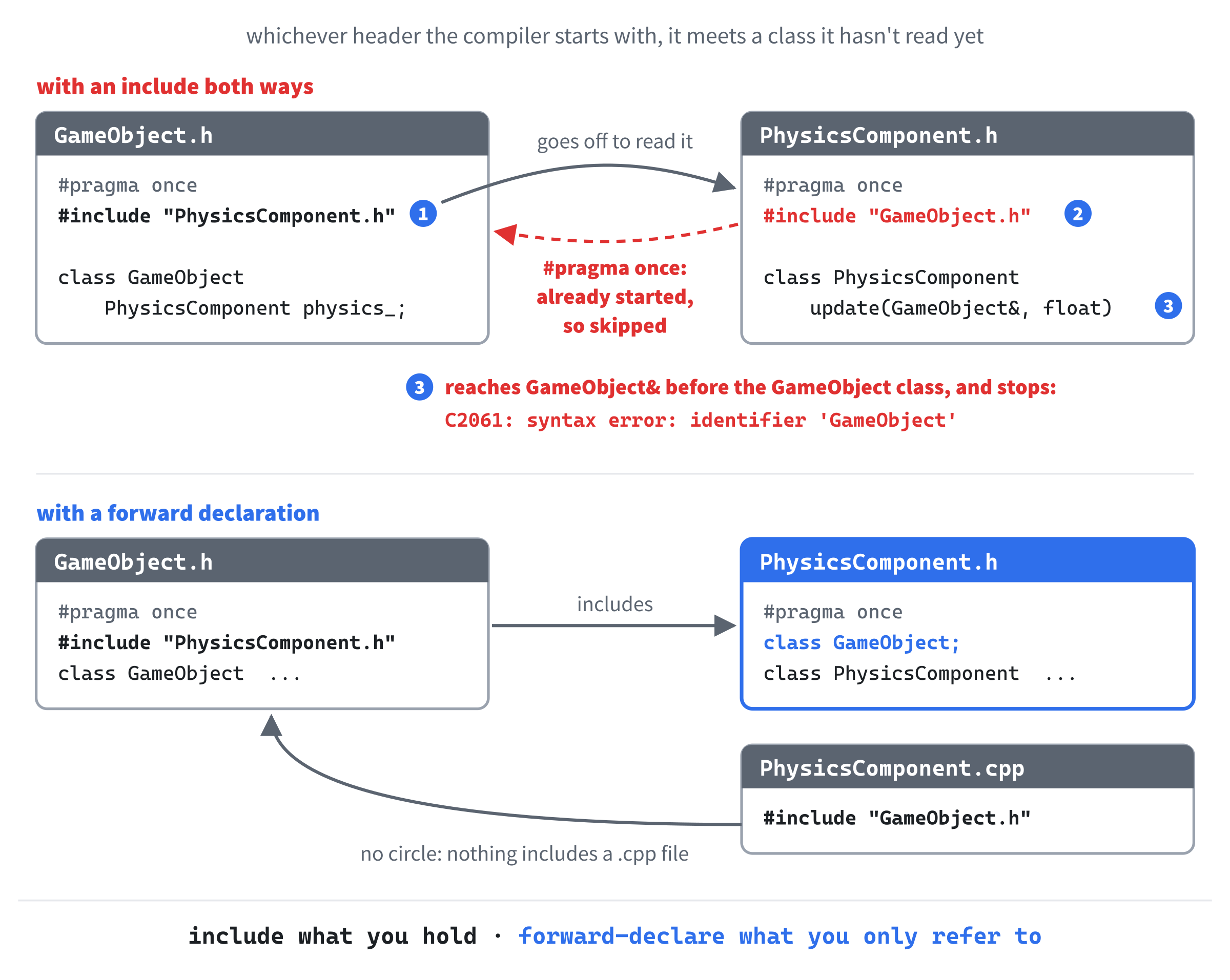
The forward declaration breaks the circle. With it, the physics header includes nothing about game objects, and only promises that there is such a class. Its .cpp file, which really does need to see inside a game object, includes GameObject.h, and there's no circle there, because nothing includes a .cpp file. The graphics header does the same, and so will the input header in the next step.
When a build fails with a pile of errors about a class that plainly exists, such as C2061 or C4430 in a header you know is fine, look for two headers that include each other. The first error usually names the class the compiler hadn't reached yet. Replace one of the two includes with a forward declaration, and include the header in the .cpp file instead.
With that settled, it's time for the last step, and the one that makes the whole pattern pay.
Interfaces Make Components Swappable
After the second step, what makes a player a player is her KeyboardInput, and what makes a ghost a ghost, or a shadow a shadow, is the few lines of deciding in her update. When there are three ways of doing the same job, that's what Chapter 22's interfaces are for. Here's the new interface, InputComponent.h:
#pragma once

// GameObject.h includes this file, so this file can't include it back. To
// take a reference to a GameObject, it's enough to know that it's a class
class GameObject;

// Whatever decides where a game object goes: the player at the keyboard, a
// ghost's own whims, or a shadow following her leader
class InputComponent
{
public:
    virtual ~InputComponent() = default;

    virtual void update(GameObject& owner, float delta) = 0;
};
In the preceding code, the forward declaration is the physics header's, for the same reason: a game object will own its input, so GameObject.h includes this file. The interface has a virtual destructor, = default, as Chapter 22's rule says every class with virtual functions needs, and one pure virtual function, update, which takes the owner and the frame's length. The keyboard never needed the frame's length, but a ghost's random jumps do, and an interface has to suit everyone who keeps its promise.
If you'd like to see the last section's circle for yourself, this is the forward declaration to try it on, in the finished project. Replace it with #include "GameObject.h", and the build fails both ways at once. Files that read GameObject.h first, such as GameObject.cpp and main.cpp, stop with C2061: syntax error: identifier 'GameObject', inside InputComponent.h. The three input files, which read InputComponent.h first, through their own headers, stop with C2065: 'InputComponent': undeclared identifier, inside GameObject.h. Put the forward declaration back, and everything builds again.
The keyboard input keeps the promise with a few small changes. Here's its header now:
#pragma once
#include "InputComponent.h"

// The player at the keyboard: the arrow keys, or A and D, to run, and Space,
// W, or the up arrow to jump
class KeyboardInput : public InputComponent
{
public:
    void update(GameObject& owner, float delta) override;

private:
    bool jumpWasDown_ = false;  // whether a jump key was down last frame
};
In the preceding code, KeyboardInput inherits from InputComponent, and its update takes the frame's length and says override, so the compiler checks that it really does override the interface's function, as in Chapter 22. The forward declaration has gone from this header, because it's in InputComponent.h, which this one includes. In KeyboardInput.cpp, only the start of update changes:
// The keyboard doesn't care how long the frame was, so the second parameter
// has no name
void KeyboardInput::update(GameObject& owner, float)
{
In the preceding code, the second parameter has a type, float, but no name. The keyboard has no use for the frame's length, and a parameter with no name can't be used, which says so plainly, to the compiler and to anyone reading. Give it a name and never use it, and at warning level 4, Visual Studio warns you, with C4100: unreferenced parameter.
The ghosts' deciding becomes a GhostInput. Here's its header:
#pragma once
#include "InputComponent.h"

// A ghost's own whims: she runs one way forever, with a jump now and then
class GhostInput : public InputComponent
{
public:
    GhostInput(int direction);

    void update(GameObject& owner, float delta) override;

private:
    int direction_;             // -1 for left, 1 for right
};
In the preceding code, a ghost's input remembers one thing, which way she runs, from its constructor. Here's the code, from GhostInput.cpp:
const float JUMP_CHANCE = 0.5f;   // jumps a second on the ground, on average

GhostInput::GhostInput(int direction) : direction_(direction)
{
}

void GhostInput::update(GameObject& owner, float delta)
{
    // She never stops, and now and then, at random, she jumps
    owner.getPhysics().run(direction_);
    if (SDL_randf() < JUMP_CHANCE * delta)
        owner.getPhysics().jump();
}
In the preceding code, JUMP_CHANCE has moved over from Ghost.cpp, and the constructor keeps the direction. Every frame, update tells her physics to run her way, which keeps her running whatever else happens, and then jumps her at random, with Chapter 21's chance per second times the frame's length.
The shadow's following becomes a ShadowInput. Its header is just like GhostInput’s, except that what it remembers is a const GameObject& leader_, used but not owned, and its update is the old Shadow::update, with its orders going to owner:
void ShadowInput::update(GameObject& owner, float)
{
    // Run after her leader until she's close behind, then wait
    float distance = leader_.x - owner.x;
    if (distance > GAP)
        owner.getPhysics().run(1);
    else if (distance < -GAP)
        owner.getPhysics().run(-1);
    else
        owner.getPhysics().run(0);

    // Jump when she jumps
    if (leader_.getPhysics().isJumping())
        owner.getPhysics().jump();
}
In the preceding code, the shadow compares her leader's x with her own, and runs toward her, or waits, and she jumps when her leader jumps. The frame's length goes unnamed, as it did for the keyboard. Notice that this component reads another game object's position, and asks another game object's physics a question, so a component can talk to other objects too, as long as it has been given them.
Now the game object can own an input of any kind. Here's the new public part of GameObject.h:
class GameObject : public IUpdatable, public IDrawable
{
public:
    GameObject(float startX, float startY,
               std::unique_ptr<InputComponent> input,
               const PhysicsComponent& physics,
               const GraphicsComponent& graphics);

    void setInput(std::unique_ptr<InputComponent> input);
    PhysicsComponent& getPhysics();
    const PhysicsComponent& getPhysics() const;

    void update(float delta) override;
    void draw(SDL_Renderer* renderer) const override;
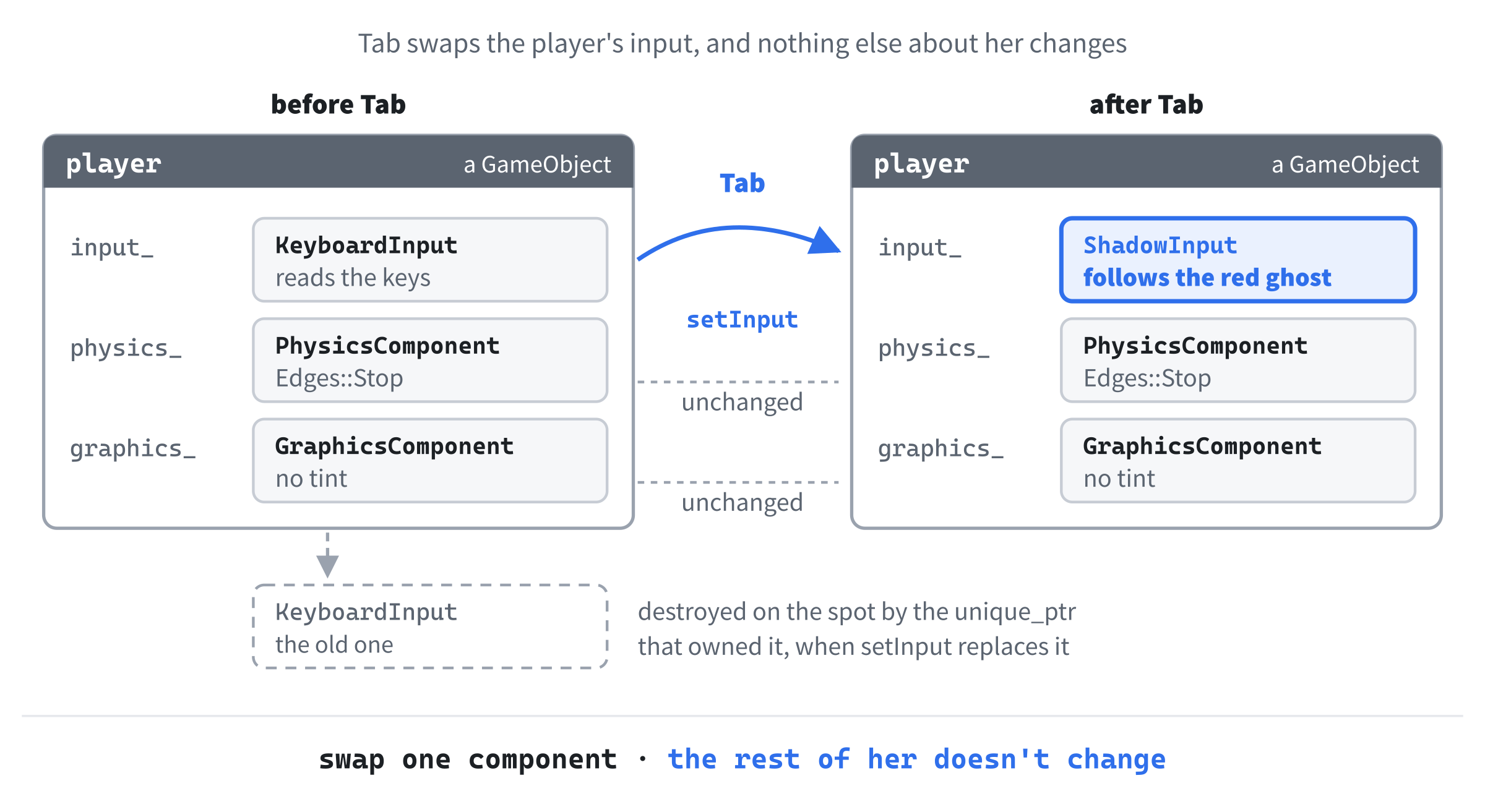
In the preceding code, the constructor takes a third component, the input, as a std::unique_ptr<InputComponent>, because the game object will own it, and it could be any kind of input. There's a new function, too, setInput, which swaps one input for another while the game runs. The private part gains one member, std::unique_ptr<InputComponent> input_;, and the header includes <memory> for the pointer, and InputComponent.h for the class, because owning something means destroying it one day, and destroying it takes the whole class.
In GameObject.cpp, which includes <utility> for std::move, the constructor moves the input into its member, as Chapter 10 moved a unique_ptr, and setInput does the same:
// Swap one input for another while the game runs. The old one is destroyed
// here, by the unique_ptr that owned it
void GameObject::setInput(std::unique_ptr<InputComponent> input)
{
    input_ = std::move(input);
}
In the preceding code, assigning to input_ hands it the new input, and the unique_ptr destroys the old one on the spot, so there's never an input that nobody owns, and never one left over. The last change is the one that matters most:
// Every frame, in the same order: decide, move, and look the part
void GameObject::update(float delta)
{
    input_->update(*this, delta);
    physics_.update(*this, delta);
    graphics_.update(*this, delta);
}
In the preceding code, the input goes first, then the physics, then the graphics, every frame, for every game object: decide, move, and look the part. The input's update is a virtual call, through the interface, so it reaches the keyboard's, a ghost's, or a shadow's, whichever this game object has. Figure 28.6 follows one frame.
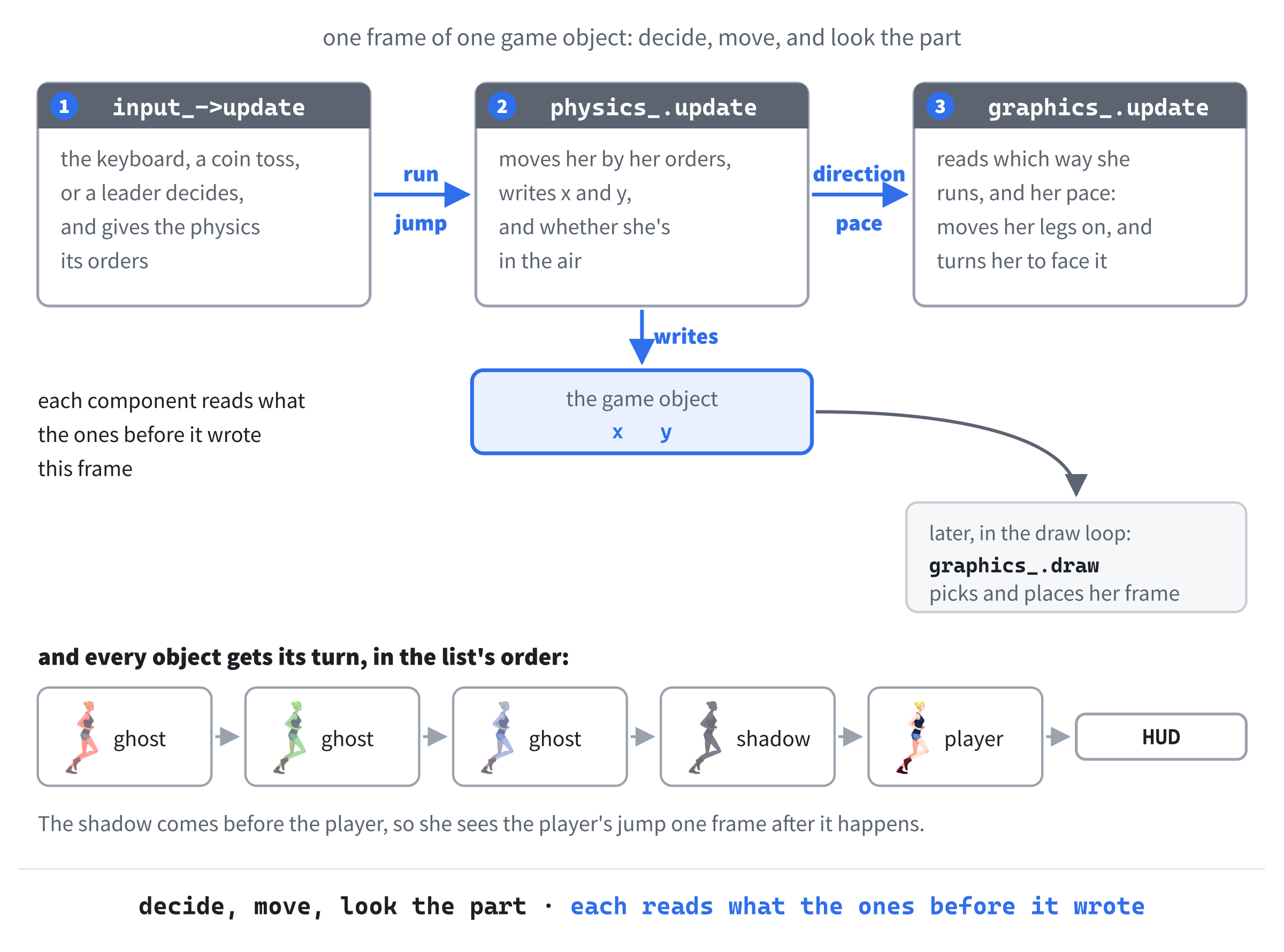
The order matters because each component reads what the ones before it wrote. Put the input last, and the physics would always be moving her by the last frame's orders, and with the graphics first, her legs and her facing would always be a frame behind her running. The order of the objects matters too, in a smaller way. The shadow comes before the player in the list, so that she's drawn behind the player, which means she's updated first, and sees the player's jump one frame after it happens. At sixty frames a second, that's a sixtieth of a second, and nobody will ever see it, but it's worth knowing that it's there.
That virtual call has a price, which Chapter 22 described: a trip through the object's vtable, which also stops the compiler from copying a small function's body straight into the call. Five runners making one each a frame will never notice it. A hundred thousand particles, each with an input of its own, would be a different story, and Chapter 29 is about how games lay out their data when it is.
With the inputs in place, Player, Ghost, and Shadow have nothing left to do, and their six files can go. Every runner is a GameObject now. What makes one a player, and another a ghost, is what she's made of.
One Class, Many Recipes
With no subclasses left, something has to put each kind of runner together, and it's a small function for each, called a factory function, because it makes things. Each one is a recipe: which input, which rule at the edges, what pace, and what color. Here's the player's, in main.cpp:
// The player: the keyboard drives her, and she stops at the window's sides
std::unique_ptr<GameObject> makePlayer(const Texture& sheet,
                                       float windowWidth)
{
    return std::make_unique<GameObject>(
        windowWidth / 2.0f, GROUND_Y,
        std::make_unique<KeyboardInput>(),
        PhysicsComponent(GROUND_Y, windowWidth, Edges::Stop),
        GraphicsComponent(sheet));
}
In the preceding code, makePlayer returns a std::unique_ptr<GameObject>, made with std::make_unique, which passes its arguments on to GameObject’s constructor: her starting place, in the middle of the window and on the ground, a new keyboard input, a physics that stops at the edges, at the usual pace, and a graphics with no tint. The input is made with std::make_unique<KeyboardInput>(), and a std::unique_ptr<KeyboardInput> turns into the std::unique_ptr<InputComponent> the constructor wants, just as Chapter 23's runners went into a list of std::unique_ptr<Entity>.
The ghost's recipe takes more, because the ghosts differ from each other:
// A ghost: she drives herself, round and round the window, at her own pace,
// and in her own color
std::unique_ptr<GameObject> makeGhost(const Texture& sheet, float x,
                                      int direction, float pace,
                                      SDL_Color tint, float windowWidth)
{
    return std::make_unique<GameObject>(
        x, GROUND_Y,
        std::make_unique<GhostInput>(direction),
        PhysicsComponent(GROUND_Y, windowWidth, Edges::Wrap, pace),
        GraphicsComponent(sheet, tint));
}
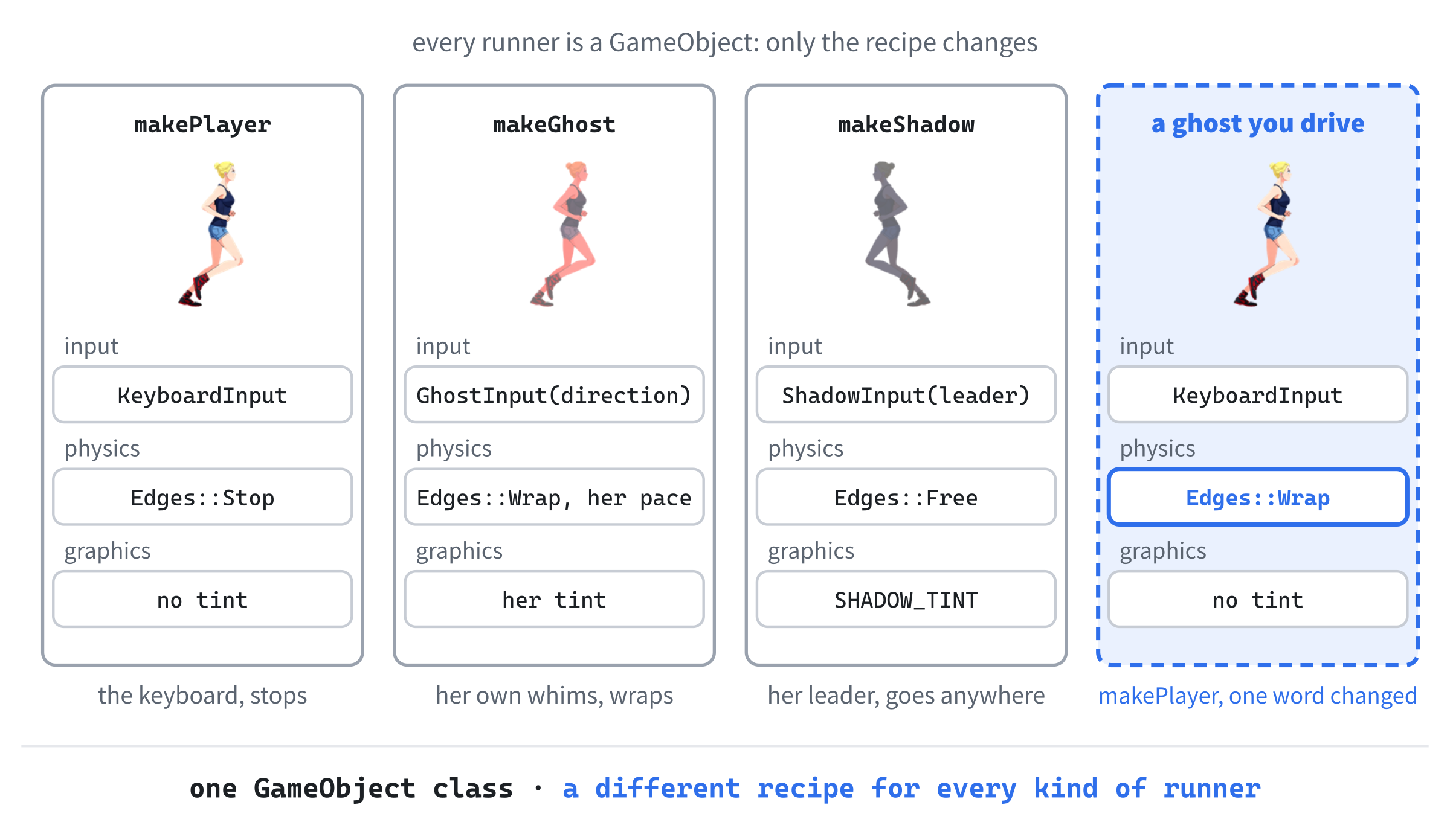
In the preceding code, each ghost gets her own starting place, direction, pace, and color, a GhostInput that runs her in her direction, and a physics that wraps, at her pace. The shadow's recipe, makeShadow, has the same shape, with a ShadowInput that follows the leader it's given, a physics that's Free at the edges, and her dark tint, SHADOW_TINT, which has moved to the top of main.cpp, beside the ghosts' colors. Figure 28.7 lays the three recipes side by side.
Here's how runGame uses the three recipes to fill its list:
// Every runner, owned by this one list, in the order they're drawn: the
// ghosts at the back, then the shadow, and the player in front
std::vector<std::unique_ptr<GameObject>> runners;
runners.push_back(makeGhost(runnerSheet, 150.0f, 1, 0.8f, RED_GHOST,
                            windowWidth));
runners.push_back(makeGhost(runnerSheet, 700.0f, -1, 1.25f, GREEN_GHOST,
                            windowWidth));
runners.push_back(makeGhost(runnerSheet, 420.0f, -1, 0.6f, BLUE_GHOST,
                            windowWidth));

// Two observers, which use runners the list owns: the red ghost, for
// the demo to follow, and the player, for her shadow and the demo
GameObject* redGhost = runners[0].get();
std::unique_ptr<GameObject> newPlayer = makePlayer(runnerSheet,
                                                   windowWidth);
GameObject* player = newPlayer.get();

runners.push_back(makeShadow(runnerSheet, *player, 300.0f,
                             windowWidth));
runners.push_back(std::move(newPlayer));
In the preceding code, the list is Chapter 23's, holding GameObjects now, and the recipes fill it in the same order as before: the three ghosts at the back, then the shadow, and the player in front. There are two observers this time, which use runners that the list owns. The first, redGhost, is for the demo mode we're about to add, and the second, player, is taken with get before the player is moved into the list, as in Chapter 23, so that her shadow can follow her. It's safe to keep redGhost while the list grows, because it points at the red ghost herself, out on the heap, and not at her unique_ptr inside the vector, which is the thing that moves when a vector grows, as Chapter 13 showed.
Make the ghost you drive. In makePlayer, change Edges::Stop to Edges::Wrap, and run. Now the player runs off one side of the window and back on at the other, like a ghost, steered from the keyboard. Watch her shadow, too: the shadow's physics is Free, so she doesn't wrap, and she turns around and runs back across the window to catch up. Put Stop back when you're done.
That's the driven ghost that inheritance couldn't give us, as one word in a recipe. This is how the big engines are built, too. In Unity, every object in a scene is a GameObject, and what it is comes from the components attached to it: a Transform for where it is, a Rigidbody for its physics, a SpriteRenderer to draw it, and scripts for everything else. Unreal builds its Actors out of components in much the same way. The components do the work, and the object is the wiring.
Handing the Player to the Computer
Here's the payoff for putting the input behind an interface. Many games have a demo mode, sometimes called attract mode, in which the game plays itself on the title screen, to show off. With a class for every kind of character, that means a second, computer-driven player class, or an if in every function that reads the controls. Components make it one input swapped for another. Here's a function that does the swapping, in main.cpp:
// Hand the player to the computer, which follows the leader, or give her
// back to the keyboard. The title bar says which
void setDemo(GameObject& player, const GameObject& leader, bool demo,
             SDL_Window* window)
{
    if (demo)
        player.setInput(std::make_unique<ShadowInput>(leader));
    else
        player.setInput(std::make_unique<KeyboardInput>());

    SDL_SetWindowTitle(window, demo ? DEMO_TITLE : PLAY_TITLE);
}
In the preceding code, setDemo takes the player, the runner she should follow, whether the demo is starting or stopping, and the window. For the demo, the player gets a brand new ShadowInput, the same kind of input the shadow has, following her leader, and at the end of the demo, a brand new KeyboardInput. Either way, setInput destroys the input she had before. The window's title says who's in charge, with Chapter 4's ternary operator picking between two constants, PLAY_TITLE and DEMO_TITLE, which sit at the top of the file, below the colors.
The game loop needs the window, and somewhere to remember whether the demo is running. These lines go above the loop, in runGame:
// The window the renderer draws in, for its title, and who's running
// the player: the keyboard, until Tab is pressed
SDL_Window* window = SDL_GetRenderWindow(renderer);
bool demo = false;
In the preceding code, SDL_GetRenderWindow hands back the window that a renderer draws in, so runGame can reach the window's title while still only being given the renderer. The demo flag starts out false, with the keyboard in charge. Tab flips it, in runGame’s switch, beside Escape:
case SDLK_TAB:
    demo = !demo;
    setDemo(*player, *redGhost, demo, window);
    break;
In the preceding code, each press of Tab flips demo, and calls setDemo with the player and the red ghost, through their observers. The player follows the red ghost in the demo, and her own shadow still follows her, so the demo is a little procession. Figure 28.8 shows the swap.
Now play it. Open Animated Character Components.slnx, press F5, and it's Chapter 23's game, exactly, until you press Tab. Then the title bar says demo mode, and the player sets off after the red ghost on her own. She jumps whenever the red ghost does, and her shadow jumps a moment after her. Figure 28.9 caught the three of them in the air together.
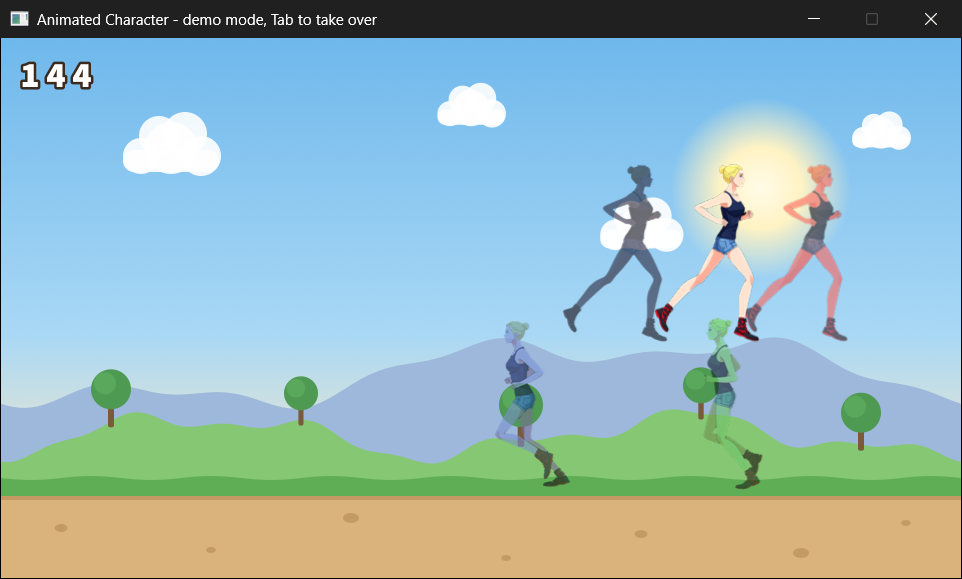
Nothing about the player changed but one pointer. Her physics still stops her at the window's edges, so when the red ghost runs off one side, the player waits at the edge, then runs back across the window to meet her as she comes around. And her graphics still draws her in her own colors. Press Tab again, and she's yours, wherever she happens to be.
One warning about swapping components while a game runs: never let a component swap itself. If KeyboardInput::update called owner.setInput, the unique_ptr would destroy the very object whose function was still running, and anything the rest of that function did with its own members would be using memory that had been handed back. Swapping from outside, as runGame does between frames, is always safe.
How Components Talk to Each Other
Components are meant to be independent, but a runner's three components can't do their jobs alone. The input's orders are for the physics, and the graphics needs to know what the physics is doing, to choose a frame. Perfectly separate components are an ideal, and real ones have to talk. There are three common ways, and Figure 28.10 shows them side by side.
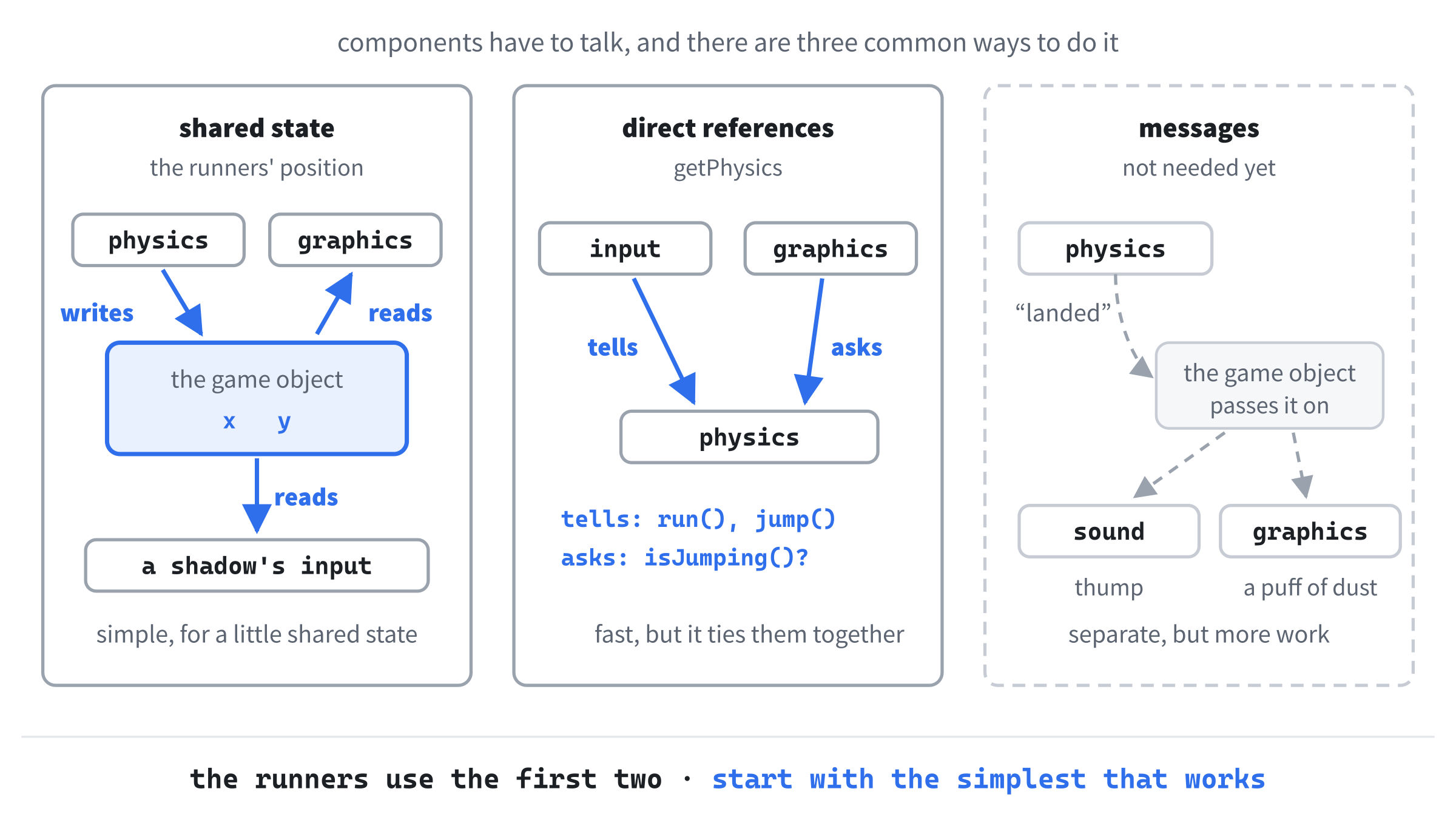
Shared state on the object. The simplest way is what x and y are for: state that belongs to the game object, which any component can read, and some can write. The physics writes the position, the graphics reads it, and a shadow's input reads her leader's. It's clean while the shared state is small and universal, as a position is. But it tempts you to put everything there, and a game object with forty public member variables is a god object again, with extra steps.
Direct references. The next way is what getPhysics is for: one component asks the game object for another, and talks to it directly. The inputs give the physics its orders this way, and the graphics asks it questions. It's fast and simple, and it's honest when two components really are close partners, as graphics and physics usually are. The cost is that the graphics now depends on there being a physics to ask: a game object without one couldn't be drawn.
Messages. The most separate way is for components never to talk to each other at all, only to their game object, which passes each message on to every component. When the physics lands her after a jump, it sends a "landed" message, and whoever cares responds: a sound component plays a thump, and a graphics component draws a puff of dust. Neither knows that there's a physics component, only that landings happen. Messages are the most flexible way, and the most work, and the runners don't need them yet. When a game does, the pattern to look for is the event queue, which Nystrom's book covers too.
Real games use all three, as the runners use two of them: shared state for the position, and direct references between the inputs, the physics, and the graphics. Start with the simplest thing that works, and reach for messages when the direct references start tying everything to everything else.
When Components Earn Their Keep
Components aren't free. Chapter 23's runners were four classes, and now they're seven: a game object, an interface and three kinds of input, a physics, and a graphics, with factory functions to put them together. Every runner is four objects instead of one, and every question one component asks another goes through her game object. For a small game, that's real overhead, in code to write, and in code to read.
Components help when:
- An object spans several domains that you want to change separately.
- You have many kinds of object that mix and match the same abilities, as the runners do.
- You want to swap behavior while the game runs: a demo mode, a companion the computer takes over, a character possessed by something else.
- Several people will work on the same objects at once.
- A class is growing, and changing it has started to feel dangerous.
Components are overkill when:
- The game is small, and has only a few kinds of thing.
- The kinds of thing share almost nothing.
- You're reaching for the pattern because you've read about it, not because the code is hurting.
The book's own games show both sides. Chapter 26's snake is one snake and one apple, and components would only add ceremony. Asteroids, in Chapter 27, chose one ship and two vectors, not one list of everything, because a ship, a bullet, and a rock share almost nothing, and that's the right call for components too: there's nothing to share. But give Asteroids a flying saucer that fires the ship's bullets but steers itself, and a second ship flown from a gamepad, and the kinds of thing start sharing parts, which is exactly when components start to pay.
The runners sit right on the line. Five runners of three kinds didn't need components to work, as Chapter 23 proved. But a year of features would have needed them badly, and now there's a place for every feature to go.
Patterns are cures for particular kinds of pain, so before you use one, name the pain in a sentence. "The player class is three thousand lines long, and every change breaks something" is a reason for components. "Real engines use components" isn't, on its own. If you can't name the pain yet, write the simple version, and refactor when the pain arrives, as this chapter did.
That's the judgment the AI exercise at the end of this chapter asks you to practice. Before that, there's one more step the pattern can take.
A Glimpse of Entity-Component-System
Beyond what we've built, there's one more step, and it's worth knowing about, because it has become common in modern engines. It's called Entity-Component-System, or ECS.
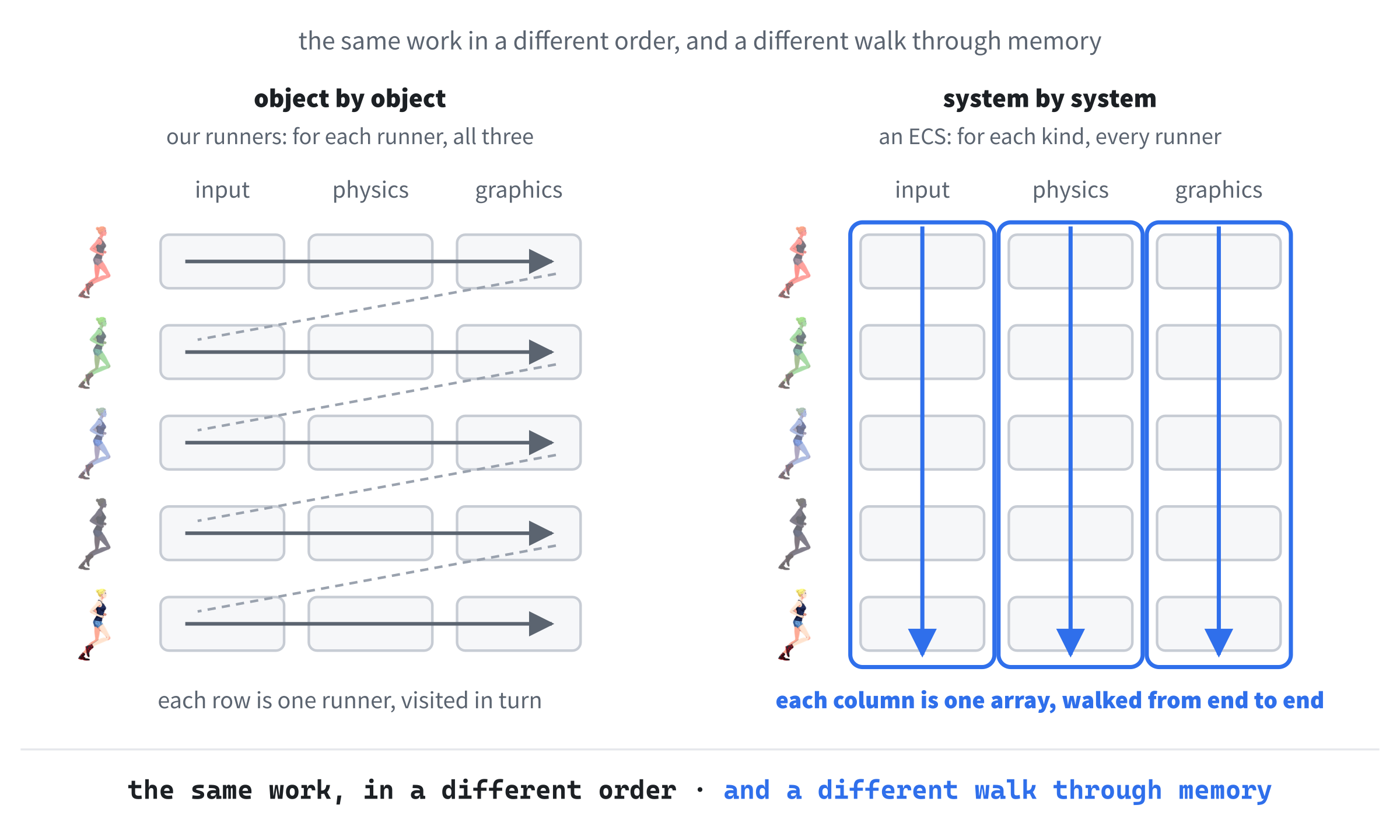
In ECS, the game object isn't a class at all. An entity is just a number, an ID. Components are plain data, with no functions, kept in one array for each kind: every physics component in the game in one array, every graphics component in another, each marked with the entity it belongs to. And the behavior moves out of the components into systems, one for each domain. A physics system walks through the whole physics array, moving everything in it, and then a graphics system walks through the graphics array, drawing everything in it.
That turns the game loop inside out, as Figure 28.11 shows. Our runners are updated one object at a time: for each runner, her input, her physics, and her graphics. An ECS updates one system at a time: every input, then every physics, then every graphics. The work is exactly the same. What changes is the order in which the computer walks through memory, and on modern hardware, that turns out to matter enormously.
We won't build an ECS in this book, but you'll meet the name everywhere. Unity's Data-Oriented Technology Stack, DOTS, is built on one, Unreal has its Mass framework, the Rust engine Bevy is an ECS from top to bottom, and EnTT, a C++ library for building them, is used in Minecraft. Their speed comes mostly from how they lay out their data in memory, which is where Chapter 29 picks up.
If this chapter has caught your interest, read Robert Nystrom's Game Programming Patterns. His Component chapter starts from a Danish baker named Bjørn, where we started from a runner, but this chapter follows the path his takes, and its main ideas come from his: the knots between domains, the diamond that inheritance leads to, splitting off the input first and then the other jobs, recipes that build objects from components, swapping one input to make a demo mode, and the three ways for components to talk. They're retold here with our own runners and our own code.
The rest of the book covers the game loop, the update method, the event queue, object pools, and more, each explained with the same clear, friendly care. It's in print and as an ebook, and you can read the whole thing free online, at gameprogrammingpatterns.com. I can't recommend it highly enough.
AI Exercise (Optional)
Choosing components is a judgment call, and a chatbot is good at proposing a split, and at defending it. Your job is to judge whether its split fits the game. As always, use a regular chatbot, in its ordinary chat window, and read what it says with care.
Paste in this prompt:
"I'm learning C++ game programming, and I've just rebuilt a small 2D SDL 3 runner game with the Component pattern. Each character is a GameObject with a public position (x and y) and three components: an InputComponent interface, with keyboard, random, and follow-the-leader versions; a PhysicsComponent, for running, jumping, and a rule at the window's edges; and a GraphicsComponent, which draws a tinted frame from a sprite sheet. I want to add a turret. It stands still on the ground, turns its barrel toward the nearest runner within 300 pixels, fires a slow bullet every two seconds, plays a sound when it fires, and is knocked out by three hits. Please do three things. First, propose the turret's components, saying what each one owns and does, and which of my existing components it could reuse. Second, say which state belongs on the GameObject, and which inside a component. Third, tell me honestly about one decision you weren't sure of, and what the trade-off is. Please don't write the whole program."
Notice what the prompt does. It gives the AI the design you already have, so it builds on your classes rather than inventing its own. The object it describes is concrete, with enough going on for a real decision. And it asks for three separate things, of which the last is the most useful. An AI that proposes a tidy split with complete confidence may be hiding a hard call, and asking for its uncertainty is how you get to see its reasoning.
When the answer comes back, judge it:
- How many components? Three to five is about right for a turret. Eight suggests it's splitting for the sake of splitting.
- Did it reuse yours sensibly? The turret doesn't run or jump, so your physics doesn't fit it, but its aiming is a kind of deciding, which is what your inputs do. Does the AI notice which of your parts fit, and which don't?
- Where did the firing timer go? A cooldown belongs with the firing, not on the game object.
- Where did the health go? Three hits and it's out. Is that a component of its own, which the player could have one day too, or state on the game object?
Then push back on one choice. "Why is the health on the GameObject, rather than in a HealthComponent?" is a good question, whichever way it went. If the AI defends its answer, you learn something about the trade-off. And if it changes its mind at once, ask it why, because an AI that gives way the moment it's questioned is telling you something about how far to trust its first answers.
Summary
You've met one of the most important ideas in game architecture, used it on real code, and picked up forward declarations on the way. The Component pattern cuts an object along the lines of its jobs, and gives each job a small class of its own, leaving a thin game object that owns its components and asks each one to do its job, in order. Inheritance couldn't do that for the runners, because their differences were independent choices, and a class for every combination ended in the diamond. Composition could: the player, the ghosts, and the shadow are one class now, made from different recipes, and swapping one input handed the player to the computer. It costs classes and wiring, so it's for objects that are growing, or mixing and matching abilities, not for everything.
The chapter ended by turning the game loop inside out, one kind of component at a time, with a promise that the order matters for speed. The next chapter is about why. Computers are astonishingly fast at arithmetic, and surprisingly slow at fetching data from memory, and Chapter 29 shows how laying data out the way the computer likes to read it can make the same loop several times faster. It's the other half of how modern engines are built, and after it comes the final project.