
A while back, I was working on a particle system. Nothing fancy: a few hundred sparks for an explosion, each with a position, a velocity, an age, a lifetime, and a color that faded as the spark aged.
I knew exactly what I wanted, so I asked an AI to write the update function. It gave me back fifteen clean-looking lines in seconds. I read them, nodded, and dropped them in. They compiled cleanly, and the sparks flew.
Three days later, deep into something else, I noticed that the explosions looked subtly off. The sparks weren't fading at all. Each one stayed at full brightness for its whole life, and then simply vanished. I went hunting, and found the line in five minutes: float ageRatio = spark.age / spark.lifetime;.
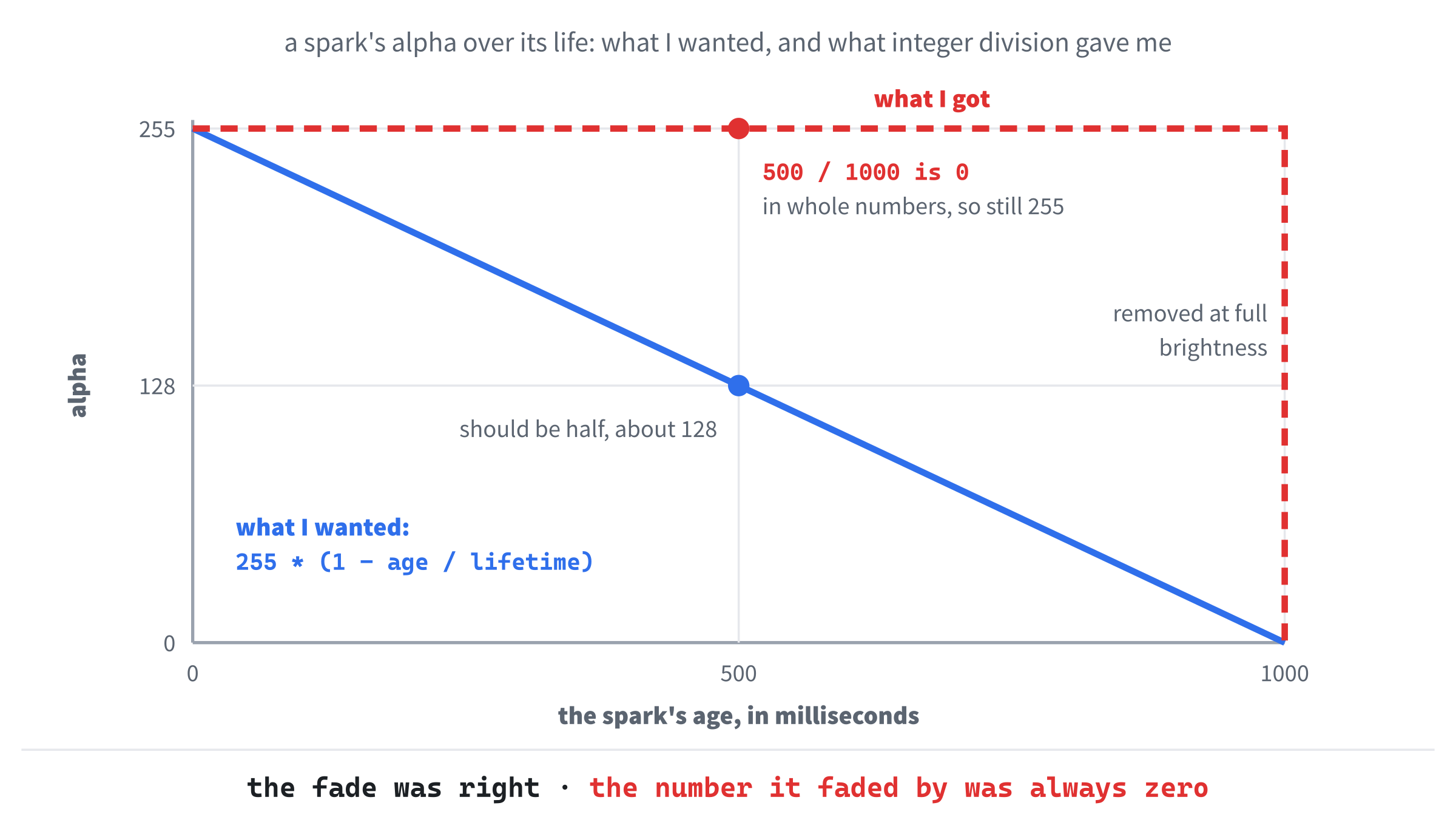
Both were ints, counted in milliseconds, so the division was Chapter 2's integer division. A spark 500 milliseconds into a 1,000-millisecond life has an age ratio of a half, but 500 divided by 1,000, in whole numbers, is 0.
The ratio was 0 for every frame of every spark's life, until the very last, when the spark was removed. The fade itself was written correctly. It was just fading by nothing. Figure 25.1 shows the difference.
I'd read the function. I'd nodded. I'd dropped it in. I hadn't been paying close enough attention, and that's what this chapter is about.
AI is a real tool, fast, capable, and sitting right next to you for the rest of your programming life, but the relationship between you and it is one you have to manage actively. This chapter is about how.
In this chapter, we will:
- Frame the relationship between you and the AI honestly
- Define vibe coding, which the next two chapters do for real
- Look at four ways AI-assisted programming goes wrong, and how to spot each one
- Distill what good prompting is, since you've been practicing it all through the book
- Build a working habit for handling every piece of AI-written code
- Be honest about where AI helps most, and where it helps least
- Use any AI you like with a Visual Studio project
- Try an AI exercise that's a little different: getting something wrong on purpose
This is one of the most important chapters in the book. Take it slowly.
The Relationship
Think of yourself as a senior engineer. You've shipped things. You know your project. You understand what it's supposed to do, why it's supposed to do that, and which parts of it are fragile.
Now picture an intern. Enthusiastic and confident, this intern has somehow read every programming book ever written, types impossibly fast, and will write you a hundred lines of plausible code in the time it takes to ask. The intern knows the syntax of every language and the functions of every library, but has never shipped anything, has no instinct for which corners can be cut safely and which can't, and, this is the important part, sounds equally confident whether right or wrong.
That's the AI, and the relationship is yours to manage.
A real intern would learn your project over time, pick up its patterns, and get a feel for what's risky in it. The AI doesn't. Every conversation starts fresh.
In a plain chat, it can't see your other files unless you paste them in, so it will cheerfully suggest things that contradict patterns you've set up three files away. Tools that can read your whole project see more, but even they don't know why your code is the way it is. The AI will use a coding style that isn't yours, reach for libraries you don't use, and write things in ways your project doesn't. Sometimes it will propose something genuinely better than what you'd written, and sometimes something flat wrong, and from its tone, you can't tell which is which.
The senior engineer's job is to do the things the intern can't: hold the project in your head, know what's been decided and why, know which parts of the code are battle-tested and which are still fragile, and know what the player actually needs, as opposed to what you literally asked for. The intern produces code. The senior engineer decides whether the code is right.
When this works, the speed-up is enormous. When it doesn't, when you let the intern make the senior calls, the project quietly fills up with subtle bugs, inconsistent patterns, and design choices nobody actually thought about. The whole program becomes one big version of my fading spark: right-looking at every point, and slightly off in ways that add up.
The rest of this chapter is about staying the senior engineer.
What Vibe Coding Is
Chapter 1 promised that we'd vibe code Snake and Asteroids, and the optional challenges at the end of the project chapters, which the first few called vibe coding challenges, have been small doses of it ever since. It's time to say exactly what that means.
Vibe coding is building a program by describing what you want to an AI, in plain language, running what it writes, and steering it with more descriptions, rather than writing the code yourself. The phrase was coined in 2025 by the AI researcher Andrej Karpathy, who described giving in to the vibes, and more or less forgetting that the code exists. For a quick experiment, that can be fine. For anything you care about, it's a recipe for a program full of fading sparks.
This book's kind of vibe coding keeps its eyes open. You describe, and the AI writes, but you read everything it writes, you run it, you judge the result, and you describe the next change from what you've learned. Figure 25.2 shows the loop, and the next two chapters go around it again and again, one small step at a time.

Two things make the loop work. The first is the size of each step. "Write me Snake" gets a whole program you didn't design and can't easily check. "Draw a grid of 20 by 15 cells" gets a few lines you can read in a minute, and see working in another. Small steps keep you in charge.
The second is that every step ends with a decision that's yours. The AI can write the code, but it can't tell you whether the snake feels right, or whether the code fits the rest of your program. You can, and the rest of this chapter is about doing it well.
Failure Mode 1: Plausible Nonsense
The most common way AI goes wrong isn't producing plainly broken code. The compiler catches plainly broken code. The dangerous failure is plausible nonsense: code that compiles, looks reasonable, and is subtly wrong.
Plausible nonsense comes in several kinds. The fading spark is one: math that looks right, and isn't. Another is code for the wrong version of a library, and SDL is a perfect example, because SDL 2 was around for a decade, and SDL 3 changed a lot of it. An AI that's seen far more SDL 2 than SDL 3 will happily write SDL_Init(SDL_INIT_EVERYTHING), which doesn't exist in SDL 3, or check SDL_Init for a result below zero, as SDL 2's returned an int, when SDL 3's returns a bool, so an error would go unnoticed. It will give SDL_CreateWindow a position that SDL 3's version doesn't take, and wait for SDL_QUIT, which SDL 3 calls SDL_EVENT_QUIT.
Some of those fail to compile, which is the lucky case. The SDL_Init check compiles, with nothing worse than a warning that's easy to miss, C4804: '<': unsafe use of type 'bool' in operation, and then quietly does nothing.
Always say "SDL 3" in a prompt about SDL, and say which version of C++ you're using, too. An AI fills in whatever you leave out with whatever it has seen most, and for SDL, that's the old version. If an answer uses a function you don't recognize, look it up on the SDL wiki before you trust it.
There are other kinds, too: an off-by-one error in a loop that handles "most cases" correctly, or a conversion in the wrong direction, radians where you wanted degrees, or window coordinates where you wanted world ones. It compiles, it runs, and it's wrong.
The defense against plausible nonsense is reading every line. Not skimming, not nodding: reading. For each line, ask yourself whether you understand what it does, and whether what it does is what you want. If you can't answer yes to both, don't accept the code yet. Ask the AI to explain it, look the function up to confirm that it exists and takes what the AI gave it, write a small test, or reject it and try again with a clearer prompt.
This is slower than accepting everything, and that's the cost. The benefit is that you don't ship a particle system that never fades. The speed at which an AI writes code is not the speed at which you should accept it. There's a temptation to match speeds, since the AI wrote fifteen lines in three seconds, and that temptation is exactly what produces plausible nonsense.
Slow down. Read. Confirm.
Failure Mode 2: Helpful Drift
You ask the AI to fix a bug in one function. It fixes the bug. It also rewrites the function in a "cleaner" style, renames two variables, adds a couple of features it thought you might want, and changes a constant from 100 to 128, because that's "more usual for buffer sizes." None of that was asked for.
Some of it might be an improvement. Some of it definitely isn't. All of it is now in your code.
This is helpful drift: the AI doing more than you asked. Sometimes it's genuinely helpful, sometimes it's noise, and sometimes it's destructive. The changed constant might break something else that counts on it being exactly 100. The renamed variables might collide with names elsewhere in a file the AI never saw. The cleaner style might not be your project's style, leaving an inconsistency that you'll have to tidy up later.
The defense is to look at what changed, not just at the new code. Compared with what you had before, what's different? For each difference, ask whether you asked for it, whether it's right, and whether it fits the rest of your program. Anything that fails gets put back, even if the AI's version is "better" by some abstract measure.
Ask the AI to list every change it made, and why, at the end of its answer. A list is much easier to check than two versions of a function side by side, and an AI that has to name each change is less likely to slip one in without saying so.
There's a related habit worth building: tight prompts produce tight changes. "Fix the off-by-one in this loop" gets a smaller, more focused change than "improve this function." When you want surgery, ask for surgery, and when you want a renovation, ask for that, and expect a bigger change. Don't ask for surgery, and accept a renovation.
Failure Mode 3: The Confidence Problem
A real engineer, asked something they're unsure about, will say so. "I think it's SDL_RenderClear, but let me check." "I'm not sure whether a vector's iterators survive a push_back." "I don't know this code well enough to say."
An AI rarely does. It gives its answer in the same confident tone whether it's drawing on solid knowledge or making something up. There's no quiver of doubt in its voice, and no "actually, I'm not sure about this part." Its answer looks the same, in style and confidence, whether it's right, nearly right, or invented from nothing, which is what people mean when they say an AI has hallucinated: it has produced something that sounds true, and isn't.
This is the confidence problem, and it catches even experienced programmers. We're used to reading confidence as a sign of knowledge. When a colleague speaks with certainty, we weigh it against what we know of them, and how deep their explanation goes. With an AI, we can't, because every answer comes in the same confident voice.
You have to supply the doubt yourself. The habit is simple to say: every AI answer might be wrong, and your job is to find out whether this one is. Three questions help:
- Could I check this myself, with the documentation, a small test, or a quick experiment?
- Does it match what I already know about the program, and the library?
- If it were wrong, what would happen, and would I notice?
The third question is especially useful. If the answer is "no, I'd never notice," that's a sign to check before trusting. If the answer is "the program would crash at once," you have a cheap way to find out.
You can ask an AI how sure it is. "How confident are you that SDL_PollEvent returns a bool in SDL 3?" sometimes gets a useful "fairly sure, but check the documentation", and sometimes another confident answer that's also wrong. For SDL, the SDL wiki is the documentation, with a page for every function in SDL 3, and it settles the question in a minute.
Asking is still worth doing, because sometimes the AI does flag its own doubt when invited to. But don't rely on it. The doubt is your job.
Failure Mode 4: The Atrophy Trap
The most dangerous failure of all isn't a bug in the code. It's a slow change in you.
Here's how it goes. You start using AI for the parts of programming you find tedious: the boilerplate, looking up a function's parameters, writing the obvious structure. Fine, and you speed up. Soon you're using it for things that are a little harder, the parts of an algorithm you'd have to think about. Fine again, and you speed up more.
Eventually, without ever deciding to, you find yourself using it for things you don't really understand. The code goes in, and it works, and you move on.
Six months later, you meet a problem the AI can't solve, because solving it means understanding code you're now too rusty to debug. The understanding never grew. You skipped the part where you'd have had to think it through, every time, and now the muscle isn't there.
This is skill atrophy, and it's the one failure you can't make up for by being more careful, because carefulness is itself a skill that needs practice. If you stop programming and only prompt, your programming quietly fades, until the only thing you can do is prompt. Then the only thing standing between you and the bugs is an AI that can't tell you when it's wrong.
The defense is the same one that worked before AI existed: you learn things by doing them. In particular:
- Write the code yourself for the things you want to get good at. If you want to be good at designing games, you have to design games yourself, not have one designed for you.
- Read AI-written code carefully enough that you could have written it. If you can't, you're not learning from accepting it. You're just collecting code you don't understand.
- Sometimes, deliberately, turn the AI off. Especially for the work that builds skill: debugging hard problems, designing systems, and working out an algorithm. The friction is the point. Friction is where learning happens.
- Now and then, take on problems where AI can't help. Open-ended design, performance problems in your own code, anything whose answer can't be looked up. They're the muscles that matter most, and the easiest to lose.
This isn't an argument against AI. It's a real tool, and you should use it. But use it the way a carpenter uses a power drill: for the work where it pays off, with the hand skills still there underneath. A carpenter who can only use a power drill isn't really a carpenter anymore.
The single best habit for staying sharp is the one this book's AI exercises have been pushing all along: never accept code you don't understand. If you understand every line, you've learned from it. If you don't, you've handed over your thinking, and that adds up the wrong way.
What Good Prompting Is
You've been writing prompts all through this book, in the AI exercises at the end of the project chapters and the theory chapters alike. You don't need a tutorial. But it's worth distilling what those exercises have been training you to do, because the same principles carry over from one prompt for an exercise to working with an AI all day. Figure 25.3 takes a good prompt apart.

A good prompt does a few particular things.
It sets the context. Say who you are, what you're working on, and what code and constraints already exist, because the AI knows none of it unless you tell it. A prompt that starts cold, such as "write me a function that does X", gets a generic answer. A prompt that starts "I'm writing a 2D platformer in C++20 with SDL 3, and I have a Player class that already handles input and movement" gets an answer that fits your actual project.
It says what shape the answer should take. Do you want a header, a complete function, a sketch, or a list of options? How long, and with or without comments? Most AIs lean toward more: more code, more explanation, and more options. If you want less, say so.
It states the rules. "Use only what I've learned so far", "no exceptions, because this code doesn't use them", or "put each curly brace on its own line": rules are how you stop helpful drift before it starts, and every AI exercise in this book has had some.
It asks for reasons when reasons matter. "Explain why you chose this approach", or "what are two other ways, and what would each cost?", makes the AI show its thinking, instead of just producing code. For design questions especially, the reasons are worth more than the code.
It invites pushback. "Tell me if this is the wrong way to think about the problem" sometimes gets a useful correction. An AI tends to agree with however your prompt frames things, and inviting disagreement loosens that a little.
End a prompt for anything bigger than a few lines with "Before writing the code, briefly tell me your approach, so I can confirm it." The AI proposes an approach, you read it, and you agree or correct it, and only then does the code get written, against a plan you've checked. It's far cheaper than reading a hundred lines, and then finding that the approach was wrong.
Put together, a good prompt states the context in a sentence or two, describes what you want in one more, lists the rules, and asks for the approach first. It takes a minute longer to write than "make it good", and it saves far more than a minute.
The Accept, Edit, Reject Habit
Here's a working method for every piece of AI-written code that lands in your project. There are three choices, and you make one of them, deliberately, every time, as Figure 25.4 shows.
Accept the code when it's correct, fits your project, does what you wanted, and you understand every line. Take it.
Edit the code when most of it is fine, but parts aren't. Maybe the algorithm is right, but the names don't match your style. Maybe the structure is good, but a constant should be a parameter. Maybe one line is wrong. Edit until it's right, and then accept it.
Reject the code when it's wrong, or the approach is wrong, or you don't understand it well enough to vouch for it. Try a better prompt, or write the code yourself.

Accepting without reading is the habit that causes most of the bugs in this chapter. Rejecting everything wastes what the AI is genuinely good at. The middle choice, edit, is the most common in practice, and it's where you stay engaged with the code, because you can't edit what you don't understand.
A useful question to ask of every AI suggestion: would I be embarrassed if a senior engineer found this in my code, and asked me to walk them through it? If you would, you're not ready to accept it. Edit it until you would be ready, or reject it and try again.
Where AI Helps Most, and Least
AI is transformative for some kinds of work, and barely useful for others. Knowing the difference saves you time and frustration.
AI helps most with:
- Boilerplate. The obvious structural code: class outlines, getters, and repetitive conversions. It's tedious to write, and easy to check.
- Looking things up. A function's parameters, syntax in a less familiar corner of the language, and library functions you've half forgotten. It's faster than searching the documentation, often right, and easy to check against the documentation when it matters.
- Translating. "Here's pseudocode for an algorithm: turn it into C++." "Here's a Python script: write it in C++." The job is concrete, well defined, and easy to check.
- Making test data. Lists of names, level descriptions, and varied inputs to try a function on. It's creative but mechanical work, and AI is great at it.
- Getting unstuck. When you've stared at an error for ten minutes and can't see what's wrong, paste it in. Often the AI spots the typo or the missing include in seconds.
- Exploring options. "Give me three different ways to structure this" can break you out of a rut, even if you don't use any of the three.
- Explaining code. Asking an AI to walk you through someone else's code, a line at a time, is one of the best uses there is.
AI helps least with:
- Design decisions for your particular project. It doesn't know your project: what you've already committed to, what's worked, what's failed, and what you're constrained by. Its design advice will be generic, and generic design advice is usually wrong for your particular situation.
- Debugging your game's own quirks. When a bug lives in the way three of your systems interact, in one odd situation, the AI can't see any of that. It can only see what you put in the prompt, and you don't yet know what to put there, because you don't know where the bug is.
- Speeding up code beyond the obvious. AI knows the usual patterns. It doesn't know what's slow in your code, on your computer. Measure first, with a profiler, such as the Performance Profiler built into Visual Studio, and then ask the AI for ideas about the one slow spot you've found.
- Anything that depends on knowing the player. Game feel, difficulty curves, and whether a mechanic is fun take taste and playtesting, and the AI has neither.
- Genuinely new problems. AI is good at variations on things it has seen many times. For things it hasn't, it produces plausible nonsense, which takes us back to the first failure mode.
A general pattern holds. AI multiplies your speed at mechanical work, and it's a poor substitute for judgment. The more your work is "carry out this clear plan," the more AI helps. The more it's "work out what the plan should be," the less it helps, and the more dangerous it is to trust.
The Senior Engineer Mindset
If one mental shift matters most when working with AI, it's this: you are the engineer, and the AI is a tool you use. It's not a colleague, not a replacement, and not an authority. It's a tool.
That has practical consequences. You don't ask the AI's permission. You don't defer to its preferences over yours, or accept its style over your project's. You don't let it decide how your program is structured. You decide all of those things, using whatever the AI offers that's genuinely useful, and discarding the rest.
It also shapes how you ask. You're not asking the AI to make decisions for you. You're asking it to do particular work that fits a plan you already have. "I've decided on interfaces for everything that updates and draws, as in Chapter 23. Please write a Stopwatch class that implements both" is a request from an engineer to a tool.
"Should I use inheritance or interfaces?" asks the tool to make the call, and it isn't qualified to, because it doesn't know your project, your constraints, or your plans.
This isn't about being arrogant toward the AI, which really is very capable, and wrong less often than you might expect, especially on well-trodden problems. It's about who holds which job. You're the one who understands the project, you're the one who's responsible for the result, and you're the one who'll be debugging this code at eleven at night, three months from now. The AI shares none of that, so the calls have to be yours, even when you use its output to make them.
Using Any AI with Your Visual Studio Project
For the exercises in this book, a regular chatbot in its own window has been the right tool, because you read every line it writes, and type what you keep. For your own projects, you'll want AI closer to the code, and there are two ways to get it.
The first is built in. Visual Studio comes with GitHub Copilot, which suggests code as you type, and has a chat window of its own, which can see the files you have open.
The second works with any AI tool you like. A Visual Studio project is just a folder of files, and nothing about it is tied to Visual Studio's own AI. Set the project up in Visual Studio first, with its include folders, libraries, DLLs, and assets, exactly as Chapter 11 showed, because that setup is the part AI tools most often get wrong. Then open the same folder in any other tool that can read and change files: an editor with AI built in, or a coding agent that runs in a terminal. The AI works on the source files in the folder, and you keep building and running in Visual Studio, which notices when a file has changed outside it, and offers to reload it.
Whichever you use, the habits are the same, and they matter more, not less, when the AI can change files by itself. Keep each request small, read every change before you build it, and accept, edit, or reject it deliberately. A tool that can change twenty files in a minute can fill a project with plausible nonsense just as fast.
AI Exercise (Optional)
Every AI exercise in this book has asked you to use the AI well. This one is different. It asks you to use it badly, on purpose, and to dissect the result.
The point is to train your eye for plausible nonsense. You'll give the AI a deliberately poor prompt, take its answer seriously, and look hard for what's wrong with it. The failures you cause here have the same shape as the ones that would otherwise sneak past you in real work, and causing them on purpose is how you learn to spot them when they happen by accident.
As always, use a regular chatbot, such as Claude, ChatGPT, or Gemini, in its ordinary chat window. Open it, and paste in this prompt, exactly as written, even though you'll recognize its problems:
"Write me a C++ function that handles collision detection between game objects. Make it good."
That prompt is bad on purpose. It has no context: what kind of game, what kind of objects, and what counts as a collision? It has no rules: are the objects rectangles lined up with the window's edges, which programmers call axis-aligned bounding boxes, or AABBs, the kind every rectangle in this book has been?
Are they circles? Should it check the whole path an object moved along in a frame, so that fast objects can't pass straight through each other? It says nothing about what goes in or comes out, or about the rest of the program. And "make it good" means nothing at all.
When the AI replies, it will produce something, and it will probably look plausible. Read it carefully, and then ask yourself, in writing if you can:
- What did the AI assume that you didn't tell it? Rectangles or circles? Objects with members called
x,y,width, andheight? Where did those assumptions come from, and would they fit a game you were actually building? Probably not. An AI falls back on the most common case it has seen, which may have nothing to do with your game. - What would break if your objects' members had different names? Probably the whole function. The AI's code depends on assumptions you never made, and using it would mean bending your code to fit its guesses, rather than the other way around.
- Is the algorithm even right, for the case the AI assumed? Read it line by line. Rectangle collision has a couple of classic subtle bugs: a boundary check that's off by one, comparing the wrong sides, or forgetting that overlapping on one axis alone isn't a collision. Did the AI get it right? Are you sure? If you're not, write a small test, with two boxes at known positions and a known answer, and run it.
- What did the AI add that you didn't ask for? Helper functions, constants, or comments that claim things you'd want to check? Each one is helpful drift.
- Did the AI flag any doubt about its assumptions? Probably not. It produced confident code. A real engineer given this prompt would ask what kind of objects and what kind of game. The AI just guessed, and carried on.
Now write a much better prompt, something like this: "I'm writing a 2D platformer in C++20 with SDL 3. Each game object has a position, x and y, as floats, and an axis-aligned bounding box, a width and a height, as floats. Write a function bool overlaps(const GameObject& a, const GameObject& b) that returns true if the two boxes overlap. Don't add helper functions or comments unless they're needed. If anything about what I want is unclear, ask before you write the code." Run it, and compare the two answers. The difference between them, everything that changed because you gave context, rules, and an invitation to ask, is the whole skill of working with AI, in two answers.
If you do this exercise honestly, actually reading both answers, finding the assumptions, and noticing the drift, you'll come out of it better at AI-assisted programming than any number of articles about prompting could make you. The failures are where the learning is. Cause them on purpose, study them, and you'll spot them faster when they happen on their own.
Summary
This chapter has been about how to work with AI without letting it work you over. The relationship is yours to manage: you're the senior engineer, and the AI is an enthusiastic, fast collaborator who is sometimes confidently wrong. Vibe coding, done with your eyes open, is a loop of small steps, each one described, written, read, run, and judged. Plausible nonsense, helpful drift, the confidence problem, and skill atrophy are the four ways it goes wrong, and the same habits defend against all of them.
Read the code carefully, and read what changed, not just the result. Supply the doubt the AI can't. Stay sharp by writing real code yourself.
Use AI for the work where it multiplies your speed, such as boilerplate, looking things up, and getting unstuck, and don't let it make the design calls or stand in for your judgment. Above all, never accept code you don't understand, because the version of you that doesn't understand it is the version that won't be able to debug it later.
The next two chapters put all of this to work. Each is a whole game, Snake and then Asteroids, built by describing it to an AI, one small step at a time, with you firmly in the senior engineer's seat. The AI exercises at the end of each chapter were the warm-up. These are the main event.