
You've got a complete toolkit now: variables, decisions, loops, functions, pointers, collections, classes, inheritance, virtual functions, and interfaces. With what you know, you can build real games, and you have. But C++ is a big language, and the moment you start reading other people's code, you'll meet things this book hasn't needed: angle brackets with a T inside them, a function written in square brackets and passed as an argument, try and catch, dynamic_cast, and the word friend inside a class.
This chapter is a field guide to that wilderness. Most of these features could fill a chapter of their own, so the goal isn't mastery. The goal is to recognize each one when you meet it, to know what it's for, and to be able to use it in a small way, which is often all a game needs.
Several earlier chapters have been pointing here, too. Chapter 10 promised lambdas, Chapter 13 promised a way to catch an exception, Chapter 18 promised operators of your own, and Chapter 20 promised friend. They're all here, along with the files a game saves its high scores in.
In this chapter, we will:
- Group names into namespaces, and take a second look at
auto - Write a function template and a class template of our own
- Give a struct operators of its own, and let a function in as a
friend - Write lambdas, and hand them to the standard library's algorithms
- Catch exceptions, throw our own, and see what happens to objects along the way
- Save a file and read it back, with
<fstream> - Meet the four named casts, the standard way to make random numbers, and the preprocessor
- Look further out, and try an optional AI exercise
Let's head in.
A Fresh Sandbox
As in the other theory chapters, the examples are experiments for your Sandbox project. Chapter 22 left a family of enemies in main.cpp, so start this chapter with a clean file. Delete everything in main.cpp, and type this in its place:
#include <iostream>
#include <string>
#include <vector>

int main()
{
    return 0;
}
In the preceding code, the three headers are the ones you've used most: printing, text, and vectors. The chapter adds others as it needs them, each below #include <vector>.
Namespaces
Every time you've written std::cout or std::vector, the std:: in front has been a namespace. A namespace is a named group of names. The standard library puts everything it provides into one called std, so that its names can't collide with yours. Without namespaces, every library would put its names into one shared pool, and sooner or later two of them would both want a function called log, or a class called Timer, and the program wouldn't build.
You can make a namespace of your own. Add this above main, with a blank line in between:
namespace game
{
    const int MAX_LIVES = 3;

    int bonusFor(int level)
    {
        return level * 100;
    }
}
In the preceding code, the constant MAX_LIVES and the function bonusFor are inside the namespace game. Everything between the braces belongs to it, and the braces don't end with a semicolon, because a namespace isn't a class. Now try them. Add this inside main, above return 0;:
std::cout << game::MAX_LIVES << " " << game::bonusFor(2) << std::endl;In the preceding code, outside the namespace, each name needs game:: in front, just as the standard library's need std::. The :: is the scope resolution operator, the same one Chapter 18 used for Player::takeDamage, and it does the same job: it reaches into a named scope for a name. The console shows 3 and 200.
The point of a namespace is that the same name can mean different things in different places. Add this function above main, below the namespace, with a blank line in between:
int bonusFor(int level)
{
    return level * 10;
}
In the preceding code, there's a second bonusFor, outside any namespace we've made. It lives in the global namespace, where everything has lived until now, and it doesn't clash with the one in game, because the two have different full names. Add this below the line in main:
std::cout << bonusFor(2) << std::endl;In the preceding code, plain bonusFor means the global one, so the console shows 20 below the first line. Inside the namespace, plain bonusFor would mean the namespace's own, because a name is looked for in the nearest scope first, just as a local variable hides a global one. Figure 24.1 shows the three namespaces in play.
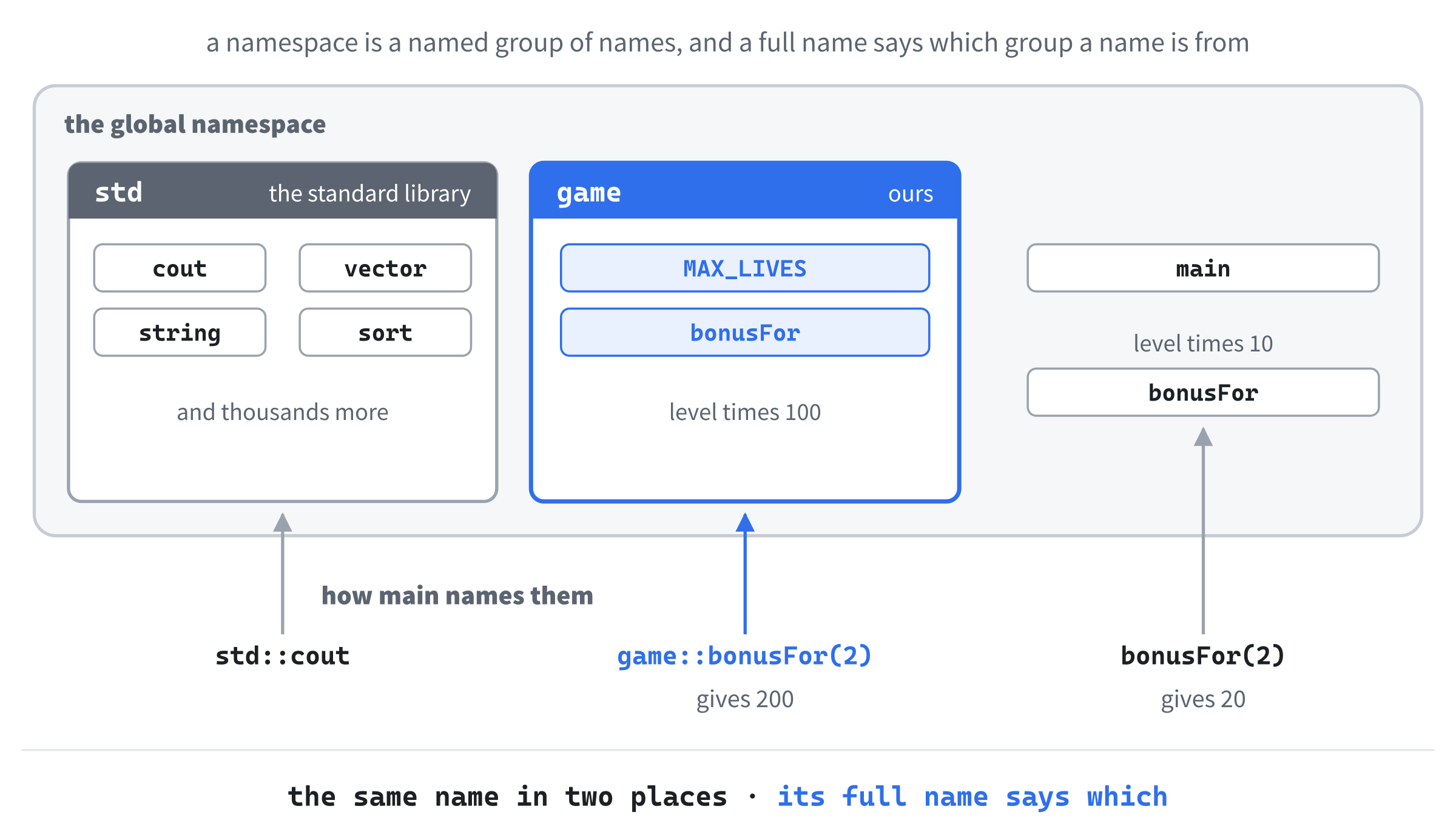
You'll see using namespace std; at the top of a lot of code on the internet. It brings every name in std into the current scope, so that cout works without its std::. This book has never used it, and there's a good reason: std holds thousands of names, and bringing them all in invites exactly the collisions that namespaces exist to prevent. A narrower form, using std::cout;, brings in just one name, which is safer, though a little std:: is rarely a burden.
Never put a using namespace line, or even a single using std::cout;, in a header file. Every file that includes the header gets it too, whether it wants it or not, and a name that suddenly means something else in a file you've never seen is a miserable bug to find. In a .cpp file, it only affects that one file, but in a header, it's everybody's problem.
Games use namespaces to keep their own names tidy, too, as in physics::step or audio::play, and the bigger the program, the more they help.
auto, Revisited
Chapter 2 introduced auto, which asks the compiler to work out a variable's type from its value, Chapter 13 used it for an iterator, and Chapter 15 used const auto& to loop over a map. There's one detail worth making sure of: auto on its own always makes a copy. Try this inside main, in place of the other examples:
std::vector<int> scores = { 10, 20, 30 };
for (auto score : scores)
    score += 5;
for (auto& score : scores)
    score += 1;
for (const auto& score : scores)
    std::cout << score << " ";
std::cout << std::endl;
In the preceding code, the first loop's score is a copy of each element, so adding 5 to it changes nothing in the vector. The second loop's score is an auto&, a reference to each element itself, so adding 1 changes the vector. The third loop only reads, so it uses const auto&. The console shows 11, 21, and 31: the 5s were added to copies, and thrown away.
Pointers are different. Plain auto first = &scores[0]; already makes first a pointer, because it's given an address. Writing auto* first = &scores[0]; changes nothing for the compiler, but a reader can see at a glance that first is a pointer.
As a rule of thumb, write auto& when a loop changes what it loops over, const auto& when it only reads something bigger than a number, and plain auto when a copy is what you want. Using auto never makes a variable's type go away. The variable still has one type, fixed when the program is built. The compiler just writes it for you.
Templates
Here's a question that's been hiding in plain sight since Chapter 13: how can std::vector<int> hold ints and std::vector<std::string> hold strings, when somebody only wrote std::vector once? The answer is a template: code written once, with a type left as a blank, which the compiler fills in with each type you use it with.
Function Templates
Add this above main, with a blank line in between:
template <typename T>
T maximum(T a, T b)
{
    if (a > b)
        return a;
    return b;
}
In the preceding code, template <typename T> says that what follows is a template with one blank in it, a type called T. Inside the function, T stands for whatever type the function is called with, so maximum takes two values of the same type, and returns the larger. You'll also see template <class T>, which means exactly the same thing.
Now use it. Try this inside main, in place of the other examples:
std::cout << maximum(3, 7) << " " << maximum(3.1, 2.9) << " "
          << maximum(std::string("apple"), std::string("pear")) << std::endl;
In the preceding code, maximum is called with two ints, then two doubles, then two strings, and the console shows 7, 3.1, and pear. Each time, the compiler works out T from the arguments, and writes a separate version of the function for that type, as Figure 24.2 shows. Strings compare alphabetically, so "pear" beats "apple".
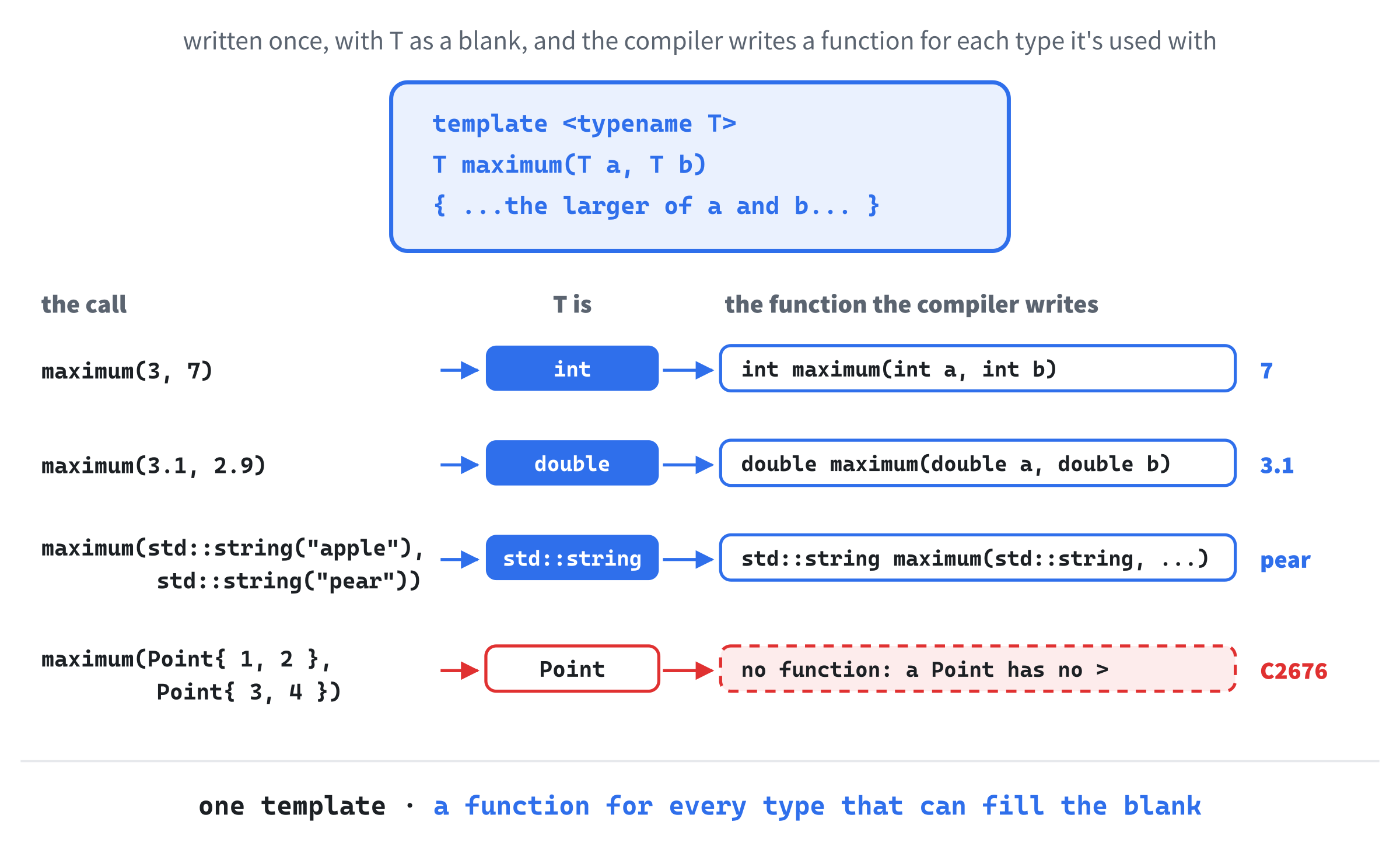
The compiler checks each version as it writes it. Call maximum(3, 7.5), with an int and a double, and it can't decide what T should be, so the build stops with C2672: 'maximum': no matching overloaded function found. Saying which type you mean, as maximum<double>(3, 7.5), fixes it, and the 3 becomes 3.0 on the way in. Call it with two values of a struct that has no >, and the build stops with C2676: binary '>': 'T' does not define this operator or a conversion to a type acceptable to the predefined operator. A template can only be filled in with a type that can do everything the template asks of it.
Class Templates
A class can be a template too, which is exactly what std::vector is. Here's a small one of our own, a grid of cells like Chapter 16's loot grid, which can hold any type. Add this above main, below maximum, with a blank line in between:
// A rectangle of cells, each holding one T
template <typename T>
class Grid
{
public:
    Grid(int width, int height, T fill)
        : width_(width), cells_(width * height, fill)
    {
    }

private:
    int width_;
    std::vector<T> cells_;
};
In the preceding code, Grid keeps its cells in one vector, width times height of them, all starting as fill. The vector's own constructor, with a count and a value, does the filling. Notice that the vector is a std::vector<T>: the template's blank is passed straight on to another template.
Now the functions that read and change a cell. Add this to the public part of Grid, below the constructor, with a blank line in between:
T get(int x, int y) const
{
    return cells_[y * width_ + x];
}

void set(int x, int y, T value)
{
    cells_[y * width_ + x] = value;
}
In the preceding code, a cell's place in the vector is its row times the width, plus its column, so the first row fills the first width places, the second row the next, and so on. Try it inside main, in place of the other examples:
Grid<char> map(4, 2, '.');
map.set(1, 0, '#');
map.set(3, 1, '@');
for (int y = 0; y < 2; y++)
{
    for (int x = 0; x < 4; x++)
        std::cout << map.get(x, y);
    std::cout << std::endl;
}
In the preceding code, Grid<char> fills the blank with char, so map is a grid of characters, four wide and two high, like a tiny dungeon. A wall goes at 1, 0, and the player at 3, 1, and the console shows the map, row by row:
.#..
...@
In the preceding output, each row is one line of the grid. A Grid<int> would hold numbers in exactly the same way, such as the height of the ground in each cell, from the same template.
Keep a template's code in its header. Chapter 18 split every class into a .h and a .cpp, but a template can't be split that way. The compiler writes each version of a template where it's used, so it has to see the whole template there, not just its declarations. Move Grid’s functions into a Grid.cpp, and every file that uses a Grid<char> stops at the linker with LNK2019, unresolved external symbol, naming Grid<char>::get.
That's why the standard library's headers are full of code, rather than just declarations. Templates can also take numbers as well as types, as std::array<int, 5> does, with its size, but the idea is always the same: write it once, and let the compiler fill in the blanks.
Operators of Your Own
Chapter 18 wrote operator=, to control what = does for a class, and promised the same for other operators. Here they are. Games are full of positions and velocities, each an x and a y, and adding one to another is exactly the sort of thing + should do. Add this struct above main, below Grid, with a blank line in between:
struct Vector2
{
    float x = 0.0f;
    float y = 0.0f;
};
In the preceding code, Vector2 is plain data, so it's a struct, with two public members. Now teach + and * what to do with it. Add these functions below Vector2, with a blank line in between:
Vector2 operator+(const Vector2& a, const Vector2& b)
{
    return Vector2{ a.x + b.x, a.y + b.y };
}

Vector2 operator*(const Vector2& v, float scale)
{
    return Vector2{ v.x * scale, v.y * scale };
}
In the preceding code, a function called operator+ is what C++ calls when it meets + between two Vector2s. It takes both sides by const reference, and returns a new Vector2, made in braces, whose parts are the two sums. The operator* scales a vector by a number. Writing functions like these is called operator overloading. Try it inside main, in place of the other examples:
Vector2 position = { 100.0f, 50.0f };
Vector2 velocity = { 30.0f, -10.0f };
Vector2 next = position + velocity * 0.5f;
std::cout << next.x << ", " << next.y << std::endl;
In the preceding code, velocity * 0.5f calls operator*, and its result is added to position by operator+, with the usual rule that * comes before +. The console shows 115, 45: half a second's movement, written the way you'd write it on paper.
Printing a vector takes one more operator. Add this below operator*, with a blank line in between:
std::ostream& operator<<(std::ostream& out, const Vector2& v)
{
    out << "(" << v.x << ", " << v.y << ")";
    return out;
}
In the preceding code, operator<< is what std::cout << next calls. The stream arrives as a reference, of type std::ostream&, the type of anything you can print to, including std::cout. The function prints the vector's parts, in parentheses, and returns the same stream, so that another << can follow it. Change the line that prints next to std::cout << next << std::endl;, and the console shows (115, 45).
Some operators are better as members. Add this to Vector2, below its members, with a blank line in between:
Vector2& operator+=(const Vector2& other)
{
    x += other.x;
    y += other.y;
    return *this;
}

bool operator==(const Vector2& other) const = default;
In the preceding code, operator+= changes the vector it's called on, so it's a member. It returns the vector itself: Chapter 18's this points at the vector, so *this, with Chapter 10's *, is the vector, and returning it by reference is what an operator that changes its left-hand side does, as the ScoreTable& in Chapter 18's operator= declaration showed. The last line asks the compiler for ==, which compares each member in turn, and from C++20, it writes != too. Add position += velocity; and std::cout << position << " " << (position == next) << std::endl; below the other lines, and the console shows (130, 40), and then 0, because they differ.
Operator overloading is a power to use with restraint. A + should add, an == should compare, and a << should print. An operator that does something surprising, like a + that saves the game, makes code harder to read, not easier, so only give a class an operator when its meaning is obvious.
friend
Chapter 20 mentioned that a class can let a particular function or class see its private members, by naming it as a friend. The most common reason is an operator like <<, which can't be a member, because the stream comes first. Add this class above main, below the Vector2 operators, with a blank line in between:
class Health
{
public:
    Health(int max) : current_(max), max_(max)
    {
    }

    void takeDamage(int amount)
    {
        current_ -= amount;
        if (current_ < 0)
            current_ = 0;
    }

    friend std::ostream& operator<<(std::ostream& out, const Health& h);

private:
    int current_;
    int max_;
};
In the preceding code, Health’s members are private, as they should be, but the line starting with friend names one function outside the class, the operator<< for Health, and lets it see them. It's not a member function. It's a declaration of friendship. Now write the function. Add this below Health, with a blank line in between:
std::ostream& operator<<(std::ostream& out, const Health& h)
{
    out << h.current_ << "/" << h.max_;
    return out;
}
In the preceding code, the function reads current_ and max_ directly, which it's only allowed to do because Health named it a friend. Try it inside main, in place of the other examples:
Health health(100);
health.takeDamage(30);
std::cout << "Health: " << health << std::endl;
In the preceding code, the damage takes health from 100 to 70, and the console shows "Health: 70/100". Take the friend line out of the class, and the build stops with C2248, cannot access private member, just as it would for main.
A class can make a whole class its friend, too, with a line such as friend class SaveGame;, and then every function of SaveGame can see its private members. That's occasionally the right thing, for two classes that really are one design, split in two. But friendship breaks encapsulation on purpose, so ask why the other code needs to see inside, and whether a public function would do instead. Friendship is also given, never taken: a class decides who its friends are, and nothing outside can make itself one.
Lambdas
A lambda is a function without a name, written right where it's needed. Chapter 10 met function pointers, and said that modern C++ mostly uses lambdas for the same jobs. The standard library's algorithms are where you'll use them most, so add this below #include <vector>:
#include <algorithm>
#include <functional>
In the preceding code, <algorithm> holds the standard algorithms, such as std::sort, and <functional> holds std::function, which we'll meet at the end of this section. Now for a first lambda. Try this inside main, in place of the other examples:
auto doubled = [](int x) { return x * 2; };
std::cout << doubled(21) << std::endl;
In the preceding code, the square brackets start a lambda. Then come its parameters, in parentheses, and its body, in braces, just like a function's, and the whole thing is a value, stored in a variable made with auto, because a lambda's type has no name you could write. Calling doubled(21) runs the body, and the console shows 42.
A lambda earns its keep when it's handed to something else. The algorithm std::sort puts a vector's elements in order, smallest first, but it can take a third argument, a function that decides which of two elements comes first. Add these lines below the others:
std::vector<int> highScores = { 300, 1200, 850, 40 };
std::sort(highScores.begin(), highScores.end(),
          [](int a, int b) { return a > b; });
for (int score : highScores)
    std::cout << score << " ";
std::cout << std::endl;
In the preceding code, the lambda answers one question: should a come before b? It says yes when a is bigger, so the biggest scores come first, and the console shows 1200, 850, 300, and 40. The rule for any ordering function is the same: return true only if the first argument belongs strictly before the second.
Captures
The square brackets aren't just decoration. They're the capture list, and they let a lambda use variables from around it. Add these lines below the others:
int limit = 100;
auto isLow = [limit](int score) { return score < limit; };
limit = 1000;
std::cout << isLow(500) << std::endl;
In the preceding code, [limit] captures limit by value: the lambda gets its own copy, made when the lambda is. Changing limit to 1000 afterward doesn't change the lambda's copy, which is still 100, so 500 isn't low, and the console shows 0.
Capturing by reference is different. Add these lines below the others:
int calls = 0;
auto countCall = [&calls]() { calls++; };
countCall();
countCall();
std::cout << calls << std::endl;
In the preceding code, [&calls] captures calls by reference, so the lambda works on the variable itself, not a copy, and each call adds one to it. The console shows 2. Figure 24.3 shows the difference. You'll also see [=], which captures everything the body uses by value, and [&], which captures everything by reference.
![Capturing by value and by reference. [limit] copies limit into the lambda when the lambda is made, so later changes to limit don't reach it. [&calls] refers to calls itself, so the lambda's changes are the variable's changes.](../images/learning-cpp/c24/lambda_capture.png)
A reference capture has the same catch as any reference: the variable has to outlive the lambda. A lambda that's stored somewhere and called later, after the variable it refers to has gone, is a dangling reference, like Chapter 10's dangling pointer.
Chapter 13 removed elements with the erase-remove idiom. C++20 gives vectors std::erase_if, which does both halves at once, and takes a lambda to say what to remove. Add these lines below the others:
std::erase_if(highScores, [limit](int score) { return score < limit; });
std::cout << highScores.size() << std::endl;
In the preceding code, limit is 1000 by now, and this lambda captures it afresh, so every score under 1000 is removed. Only the 1200 is left, and the console shows 1. The same pattern removes dead enemies, spent bullets, or collected coins, in one line.
std::function
A lambda's type has no name, which is fine for a local variable made with auto, but not for a member of a class, or a vector of lambdas. That's what std::function is for. Add these lines below the others:
std::function<void()> onClick = []() { std::cout << "Clicked!" << std::endl; };
onClick();
In the preceding code, std::function<void()> can hold anything that can be called with no arguments and returns nothing, a lambda included. The line after it calls whatever onClick holds, and the console shows "Clicked!". A button in a game's menu could keep a std::function like this, set to a different lambda for each button, and call it when it's clicked.
Exceptions
Chapter 13 used a vector's at, which checks its index, and stops the program with an unhandled exception if the index is out of range. It promised that a program could catch that exception instead. An exception is C++'s way of reporting an error that the code where it happened can't deal with: it leaves the function, and every function that called it, until it reaches code that says it will handle it. Add this below #include <functional>:
#include <stdexcept>In the preceding code, <stdexcept> holds the standard library's exception types, such as std::out_of_range and std::runtime_error. Now try this inside main, in place of the other examples:
std::vector<int> scores = { 10, 20, 30 };
try
{
    std::cout << scores.at(5) << std::endl;
}
catch (const std::out_of_range& error)
{
    std::cout << "No such score: " << error.what() << std::endl;
}
In the preceding code, the try block runs as usual, until at(5) finds there's no element 5, and throws a std::out_of_range. The rest of the try block is skipped, and the program jumps to the catch block that matches the exception's type. Its what function gives a description of the error, so the console shows "No such score: invalid vector subscript". The program carries on after the catch, rather than stopping.
The standard library throws in other places too. The function std::stoi, from <string>, turns text into an int, so that std::stoi("42") gives 42, and it throws a std::invalid_argument if the text isn't a number. Add these lines below the others:
try
{
    int level = std::stoi("abc");
    std::cout << level << std::endl;
}
catch (const std::invalid_argument& error)
{
    std::cout << "Not a number: " << error.what() << std::endl;
}
In the preceding code, "abc" can't be turned into a number, so std::stoi throws before level is ever set, and the console shows "Not a number: invalid stoi argument". That's worth catching when the text comes from somewhere you don't control, such as a file, or the player's typing.
Throwing, and Cleaning Up
Your own code can throw too. Add this above main, below Health’s operator<<, with a blank line in between:
struct Guard
{
    ~Guard()
    {
        std::cout << "Guard cleaned up" << std::endl;
    }
};

void loadLevel(int level)
{
    Guard guard;
    if (level > 3)
        throw std::runtime_error("no such level");
    std::cout << "Level " << level << " loaded" << std::endl;
}
In the preceding code, Guard is a struct whose only job is to announce its destruction, like Chapter 18's Noisy. The function loadLevel makes one, and then, for a level above 3, it throws a std::runtime_error, with a message of our own, using the word throw. Now try this inside main, in place of the other examples:
try
{
    loadLevel(2);
    loadLevel(5);
    std::cout << "Never printed" << std::endl;
}
catch (const std::exception& error)
{
    std::cout << "Caught: " << error.what() << std::endl;
}
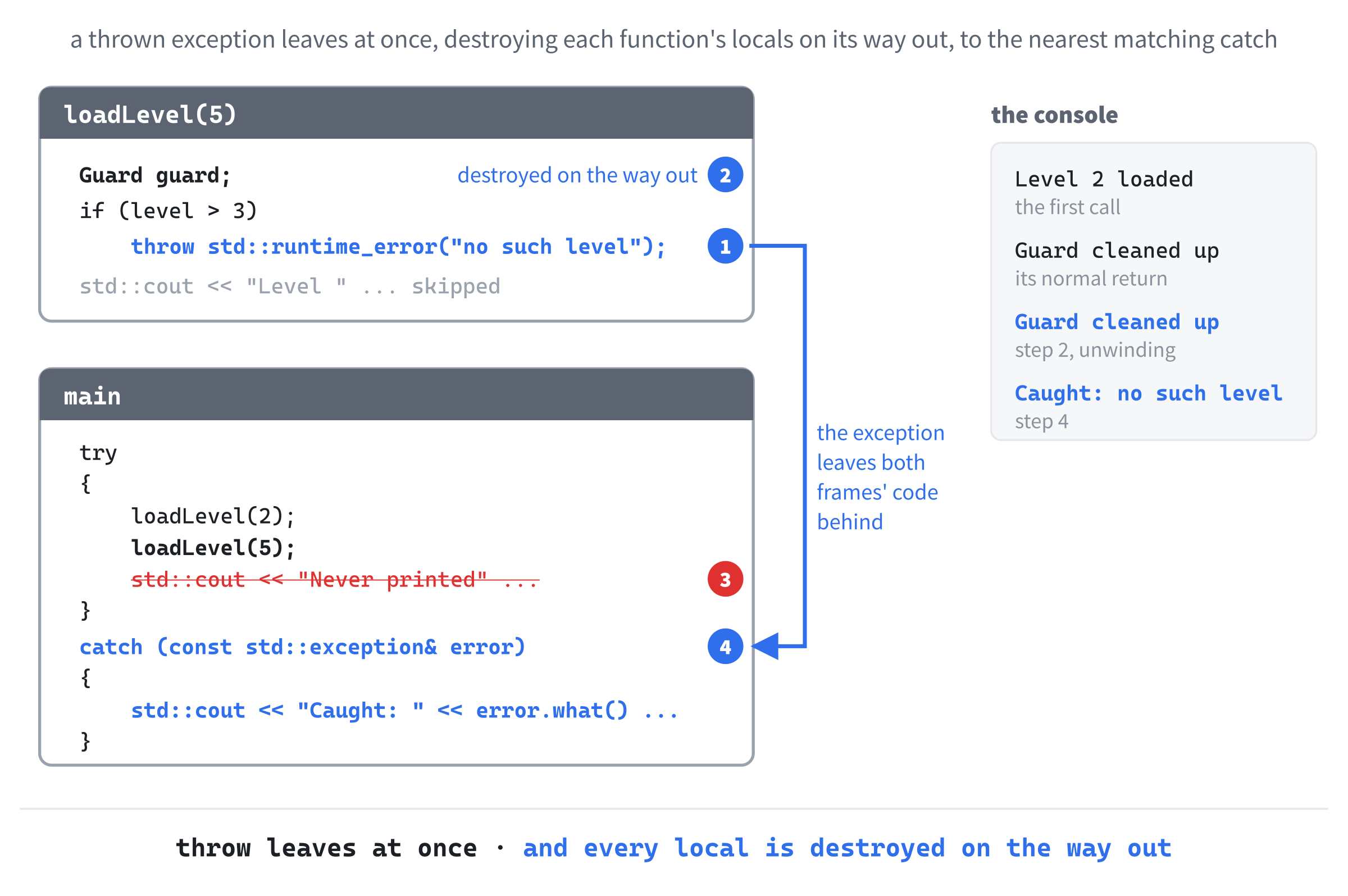
In the preceding code, the first call loads level 2 and returns normally, and the second throws. The catch asks for a std::exception, the base class of all the standard exceptions, so it catches a std::runtime_error too, through a reference, as Chapter 22's base references did. The console shows this:
Level 2 loaded
Guard cleaned up
Guard cleaned up
Caught: no such level
In the preceding output, the first guard is cleaned up when level 2's call returns, as you'd expect. The second is the interesting one. When loadLevel(5) throws, the exception leaves the function at once, and on its way out, every local variable in the function is destroyed, so the second guard's destructor runs before the catch does. That's called stack unwinding, and Figure 24.4 follows it. It's why Chapter 18's RAII matters so much: a unique_ptr, a Texture, or anything else that cleans up in its destructor cleans up even when an exception passes through, and nothing leaks.
Catch exceptions by const reference, as every example here does. Catching by value makes a copy, and catching a std::exception by value slices a std::runtime_error down to a plain std::exception, just as Chapter 20 sliced a chaser down to an enemy, and its message can be lost with its derived part.
Games use exceptions less than most programs. Many engines switch them off, for speed and for control, and SDL never throws: its functions return false, or nullptr, as you've seen since Chapter 1. But the standard library throws, and when you use it, it's good to know how to catch.
Saving to a File
A game that forgets its high scores the moment it closes isn't much of a game. The standard library reads and writes files with file streams, from the <fstream> header, and they work just like std::cout. Add this below #include <stdexcept>:
#include <fstream>In the preceding code, <fstream> brings in std::ofstream, an output file stream for writing, and std::ifstream, an input file stream for reading. Now write a file. Try this inside main, in place of the other examples:
{
    std::ofstream out("scores.txt");
    out << "Ada 1200" << std::endl;
    out << "Grace 850" << std::endl;
}
In the preceding code, making the std::ofstream opens a file called scores.txt for writing, and makes it if it isn't there. Then << writes to it, exactly as it writes to std::cout. The braces around the lines matter. When they end, out is destroyed, and its destructor closes the file, so the writing is finished, which is RAII again.
Run it, and nothing appears in the console, but a file called scores.txt appears in your project's folder, which is where a program run from Visual Studio reads and writes files, just as it finds its assets. Open it, and it holds the two lines.
Now read them back. Add these lines below the braces:
std::ifstream in("scores.txt");
std::string name;
int points = 0;
while (in >> name >> points)
    std::cout << name << " scored " << points << std::endl;
In the preceding code, the std::ifstream opens the file for reading, and >> reads from it, as it reads from Chapter 6's std::cin, skipping spaces and line ends, so each pass of the loop reads a name and then a number. When there's nothing left to read, in >> name >> points becomes false, and the loop stops. The console shows this:
Ada scored 1200
Grace scored 850
In the preceding output, each line of the file became a line of output. Figure 24.5 shows the round trip.

A few more things are worth knowing. If a file can't be opened, because it isn't there, say, the stream is left in a failed state, so check it with if (!in) before relying on it, and treat a missing file as normal, since a game's first run has no high scores yet. To add to the end of a file rather than replacing it, open it as std::ofstream log("log.txt", std::ios::app);, where app means append. And to read a whole line at a time, spaces and all, give std::getline the stream and a string, as in std::getline(in, line), which reads the next line into line, and is false when there are no more lines.
Where Should a Game Save?
The project folder is fine while you're developing, but an installed game can't count on being allowed to write next to its own program. Each system has a proper place for a game's saved files, and SDL knows where it is: SDL_GetPrefPath, given the name of your company and your game, returns a folder the game is allowed to write to. SDL also has SDL_SaveFile and SDL_LoadFile, which write and read a whole file in one call.
The book's repository has a small program that uses them, in SDL3 Projects/File IO and System. It asks SDL about the computer it's running on, saves what it finds in the folder SDL_GetPrefPath gives it, and counts how many times it's been run. Open its project, and run it a few times, to see a saved file surviving from one run to the next.
The Four Named Casts
A cast converts a value from one type to another, on purpose. C++ has four named casts, each for its own kind of conversion, so that a reader can tell at a glance what kind is happening.
The first, static_cast, is the one you already know, from Chapter 2: the everyday conversions the compiler can check, such as a float to an int, or an int to a float, as Chapter 23 did for the window's width.
The second, dynamic_cast, is the one that goes with Chapter 22. Through a base pointer, you sometimes need to ask what kind of object is really there. Add these classes above main, below loadLevel, with a blank line in between:
class Shape
{
public:
    virtual ~Shape() = default;
};

class Circle : public Shape
{
public:
    float radius = 2.0f;
};

class Square : public Shape
{
public:
    float side = 3.0f;
};
In the preceding code, Shape has a virtual destructor, which makes it a class with a vtable, and Circle and Square derive from it, each with a member of its own. Now try this inside main, in place of the other examples:
Circle circle;
Shape* shape = &circle;
if (Circle* c = dynamic_cast<Circle*>(shape))
    std::cout << "A circle, radius " << c->radius << std::endl;
if (Square* s = dynamic_cast<Square*>(shape))
    std::cout << "A square, side " << s->side << std::endl;
else
    std::cout << "Not a square" << std::endl;
In the preceding code, shape is a Shape* that points at a circle. The dynamic_cast asks, while the program runs, whether the object really is a Circle, using the object's vtable, and gives back a Circle* if it is, or nullptr if it isn't. Each if declares its pointer inside its own condition, which C++ allows, and the condition is true when the pointer isn't nullptr. The pointer only exists inside that if statement, its else included, and the branch that uses it only runs when it's safe.
The console shows "A circle, radius 2", and then "Not a square". A dynamic_cast only works on classes with at least one virtual function, because the vtable is how it checks.
Reaching for dynamic_cast often is a sign that a virtual function is missing. Chapter 22's loop never asked what each enemy was: it called update, and each enemy did its own thing. A dynamic_cast is for the times you genuinely need to know, such as a level editor that shows different settings for each kind of enemy.
The other two are rare. The third, const_cast, removes const, mostly to call old code that takes a pointer to something it doesn't really change, and if you need it in your own code, the const is probably wrong somewhere. The fourth, reinterpret_cast, treats the bits of one type as another, for file formats, networking, and hardware, and it checks nothing at all.
You'll also meet the old cast from C, which puts the type in parentheses, as (int)damage. It tries the named casts in turn until one of them works, without saying which, so it can quietly do a dangerous conversion that a named cast would have refused. This book has used static_cast throughout, and so should your own code. Recognize the old form in other people's code, and be a little suspicious of it.
Random Numbers, the Standard Way
Since Chapter 9, the book's games have used SDL's random numbers, SDL_randf and SDL_rand, which are simple, and good enough for games. The standard library has its own, in <random>, which gives you more control. Add this below #include <fstream>:
#include <random>In the preceding code, <random> brings in the random number engines, which make the raw numbers, and distributions, which shape them into what you want. Try this inside main, in place of the other examples:
std::mt19937 engine(42);
std::uniform_int_distribution<int> die(1, 6);
for (int i = 0; i < 5; i++)
    std::cout << die(engine) << " ";
std::cout << std::endl;
In the preceding code, std::mt19937 is an engine, the Mersenne Twister, a well-known way of making numbers that look random, started from a seed of 42. The distribution die turns the engine's numbers into whole numbers from 1 to 6, each equally likely, so die(engine) rolls a die. The console shows five rolls. Run it again, and you get the same five, because the same seed always gives the same sequence.
That's more useful than it sounds. A game that saves its seed can replay a level exactly, and a bug that appears after a particular roll can be seen again and again. For different numbers each run, make the seed from std::random_device, which asks the computer for a truly unpredictable number, as in std::mt19937 engine(std::random_device{}());. SDL's own SDL_srand, which Chapter 9 mentioned, sets the seed for SDL's random numbers in just the same way.
The Preprocessor
Before the compiler sees your code, the preprocessor goes through it, and deals with every line starting with #. You've used two of its lines already: #include, since the beginning, which pastes a header in, and #pragma once, since Chapter 18, which stops a header from being pasted in twice. There are a few more worth recognizing.
The line #define makes a name that's replaced by text before compiling, as in #define MAX_ENEMIES 100. It was C's way of making constants, and you'll see it all over older code, but Chapter 2's const and constexpr do the job better, because they have a type, obey scope, and show up in the debugger. Leave #define constants to old code.
The lines that choose what gets compiled are still useful, though. Try this inside main, in place of the other examples:
#ifdef _DEBUG
std::cout << "This is a Debug build" << std::endl;
#endif
In the preceding code, _DEBUG is a name that Visual Studio defines in a Debug build, and not in a Release build. The #ifdef keeps the line between it and #endif only when _DEBUG is defined, so in a Debug build, the console shows "This is a Debug build". Switch the toolbar's configuration from Debug to Release, run it again, and the console shows nothing, because the line was never compiled. The same trick keeps extra checks and logging in Debug builds only, and #ifdef _WIN32 picks out code for Windows, in a program that also runs elsewhere.
Further Out
The wilderness goes on well past this chapter. Here are a few landmarks, so that you'll know them when you see them.
More of the Standard Library
The standard library has a type for almost everything. A std::optional<int> holds an int or nothing, which is a clearer way to say "there might not be an answer" than a special value such as -1. A std::variant holds one of several types, and knows which. There's also std::array, a fixed-size array that knows its size, and std::span, a view of an array or a vector that doesn't own it. The best reference for all of them is cppreference.com, which lists every part of the standard library, with examples.
Threads
A modern computer has several cores, and a thread is a separate path through a program that can run on one of them, at the same time as the others. The standard library makes them with std::thread, and SDL has threads of its own. They're powerful, and notoriously hard to get right, because two threads changing the same variable at once can corrupt it in ways that are almost impossible to reproduce. Big games use them for loading, audio, and physics, usually through a system of small jobs rather than threads by hand.
Building Bigger Programs
Every project in this book has been a Visual Studio project. Many C++ projects are built with CMake instead, which describes a project once and makes the files for Visual Studio, or for other tools on other systems. vcpkg, Microsoft's package manager, installs libraries such as SDL for you, with their include and library folders already set up, instead of by hand as in Chapter 11.
Tools for Finding Bugs
The Visual Studio debugger has been your companion since Chapter 1's first breakpoint. There's more. The Address Sanitizer, switched on in a project's properties, catches many of Chapter 10's pointer mistakes the moment they happen, and Visual Studio's Performance Profiler shows which functions a program spends its time in, which is where Chapter 29's ideas begin.
Books
When you want to go deeper, Bjarne Stroustrup, who created C++, wrote A Tour of C++, a short book that covers the whole modern language. Robert Nystrom's Game Programming Patterns, free to read online, is the inspiration for Chapters 28 and 29.
AI Exercise (Optional)
The wilderness is too big for one chapter, and sooner or later you'll meet a feature in someone's code and wonder what it is. That's exactly what a chatbot is good at: a reference you can ask follow-up questions, with examples shaped to what you're doing. So this exercise is open-ended. Pick a feature, and learn it with an AI's help.
As always, use a regular chatbot, such as Claude, ChatGPT, or Gemini, in its ordinary chat window. Pick one of these, which this chapter only pointed at, or didn't reach at all:
std::optional, a value that might not be therestd::variant, a value that's one of several typesconstexprfunctions, which can run while the program is being builtstd::span, a view of an array or a vector- Concepts, which say what a template's
Tmust be able to do
Then try a prompt like this, with the feature's name in place of the first one:
"I'm learning C++, and I've learned classes, inheritance, virtual functions, interfaces, unique_ptr, templates, lambdas, exceptions, and file streams, and I write small games with SDL 3. Please explain std::optional to me: what problem it solves, how to write it, a short example from a game, and one or two mistakes beginners make with it. Keep the example small enough to type into a console program, and put each curly brace on its own line."
Notice what the preceding prompt does. It says what you know, so the answer builds on that instead of starting from nothing or leaping too far ahead. It asks for the answer in a particular shape, from the problem, to the syntax, to an example, to the mistakes. And it asks for a game example small enough to try, so you can run it rather than just read it.
When the answer comes back, type the example into your sandbox, and run it. Does it do what the explanation said? Change it a little, and predict what will happen before you run it again. Then ask a follow-up, such as "Why would I use std::optional rather than returning -1 for no answer?", and see whether the answer teaches you something. Learning a feature this way, by asking, trying, and asking again, is a habit that will serve you long after this book is finished.
Summary
You've mapped the wilderness, at least roughly. Namespaces keep names apart, which is what std:: has been doing all along, and auto works out types, with auto& when you mean the real thing. Templates let the compiler write a function or a class for every type you use it with, and they live in headers. Operators of your own make a Vector2 add up like numbers, and friend lets a chosen function past a class's private. Lambdas are functions written where they're needed, with captures by value or by reference, and std::sort, std::erase_if, and std::function put them to work.
Exceptions carry an error to the code that can deal with it, unwinding the stack as they go, and file streams write and read a file just as std::cout and std::cin write and read the console. The named casts each say what kind of conversion they make, <random> makes random numbers you can repeat, and the preprocessor decides what gets compiled at all.
That's the last chapter about the language itself. In the next chapter, the book turns to programming with AI: what it's good at, what it isn't, and how to work with it well. Then Chapters 26 and 27 build two games that way, Chapters 28 and 29 look at two patterns from real game engines, and the final project builds a whole game, using everything you've learned.