
We've now got the two ingredients that every real game depends on. Chapter 2 gave us variables to remember what's going on, and Chapter 4 gave us decisions to react to it. Put them together, and you can build something that actually plays like a game: a thing on screen that takes input, follows rules, and changes in response to what the player does.
This chapter is that put-them-together moment. We're going to build a deliberately stripped-down homage to Space Invaders: a green player square at the bottom of the window that you slide left and right, a yellow bullet that you fire upward, and a red invader that marches across the top of the window and drops a row whenever it hits a wall. Shoot the invader, and you score a point and it starts again at the top. Let it reach your row, and you lose a life. Lose all three, and it's game over. Almost every interesting line in the program is an if, a comparison, or a combination of the two, and that's the whole point.
SDL3 Projects/Square Invader — the complete source for this chapter lives here.In this chapter, we will:
- Set up a new SDL project, using the checklist from Chapter 3
- Sort SDL's events with a
switch, and fire a bullet with a three-part condition - Move a player, a bullet, and an invader with delta time
- March the invader across the window and down it, a row at a time
- Detect a collision between two rectangles with
&& - Keep score, count lives, and end the game when the lives run out
- Play the game, experiment with it, and fix the most common mistakes
- Try an optional AI exercise to extend the game
Let's build it.
Setting Up the Project
The setup is exactly the same as in Chapter 3, so here's the checklist again:
- Choose File > New > Project, pick Empty Project (the one tagged C++, Windows, and Console), name it
SquareInvader, and click Create. - In Solution Explorer, right-click Source Files, choose Add > New Item, and add a file called
main.cpp. - Right-click the project, choose Properties, set the two dropdowns to All Configurations and All Platforms, and then make the four changes:
- C/C++ > General > Additional Include Directories:
C:\SDL3\include - C/C++ > Language > C++ Language Standard: ISO C++20 Standard (/std:c++20)
- Linker > General > Additional Library Directories:
C:\SDL3\lib\x64 - Linker > Input > Additional Dependencies:
SDL3.lib
- C/C++ > General > Additional Include Directories:
- Right-click the project, choose Open Folder in File Explorer, and copy
SDL3.dllfromC:\SDL3\lib\x64into that folder, besidemain.cpp.
If you made a project template with the tip in Chapter 3, pick it in step 1 instead, and then you only need step 4. Either way, Chapter 1 walks through every step slowly, and its Common Errors section covers anything that goes wrong.
With the project ready, it's time to write the game.
Coding the Game
We'll build this game the same way as the last two. First comes an empty window with a working game loop, and then the game itself, one piece at a time, with a checkpoint whenever there's something new to see. At about 230 lines, it's our longest program yet, but much of it follows patterns you've already typed twice. As before, the blocks are shown without the indentation they'll have in your file, and the complete program at the end shows every line where it sits.
The Header Comment and Includes
Type this at the very top of main.cpp:
/*
    Square Invader
    The Chapter 5 project from Learning C++ by Building Games

    A green player slides along the bottom of the window with A and D,
    or the arrow keys, and Space fires a yellow bullet. A red invader
    marches across the top, dropping a row at each wall. Shoot it to
    score, but let it reach your row and you lose a life. Lose all
    three, and the game is over. Escape, or the window's X, quits.
*/

#include <SDL3/SDL.h>
#include <SDL3/SDL_main.h>
In the preceding code, the multi-line comment describes the game, and the two #include lines bring in SDL and its helper for main, just as in the last two projects.
The Constants
Now for the numbers that describe the game. Add these below the includes, with a blank line in between:
const int   WINDOW_W       = 800;      // window width in pixels
const int   WINDOW_H       = 600;      // window height in pixels
const float PLAYER_SIZE    = 40.0f;    // the player's width and height
const float BULLET_SIZE    = 10.0f;    // the bullet's width and height
const float INVADER_SIZE   = 40.0f;    // the invader's width and height
const float EDGE_GAP       = 10.0f;    // space at the top and bottom
const float PLAYER_SPEED   = 300.0f;   // pixels per second
const float BULLET_SPEED   = 480.0f;   // pixels per second, straight up
const float INVADER_SPEED  = 120.0f;   // pixels per second, sideways
const int   STARTING_LIVES = 3;        // lives at the start of the game
In the preceding code, the first two constants are the window's size, as before. The next three are the sizes of our three objects, and, like Chapter 1's SQUARE_SZ, they're float constants, even though they hold whole numbers. That's because they'll go straight into SDL_FRect rectangles, whose members are floats, so making them floats from the start means we never need to convert them. Then EDGE_GAP is the small space we'll leave at the top and bottom of the window.
The three speeds are in pixels per second, ready for delta time, just like Chapter 3's velocities. The player slides at 300 pixels per second, the bullet flies at 480, and the invader marches at a slow and relentless 120. Finally, STARTING_LIVES says how many lives the player gets. Because it has a name, changing the game's difficulty is a one-line job, as you'll see when we experiment.
Next come the colors. Add these below the other constants, with a blank line in between:
const SDL_Color BACKGROUND    = { 20, 20, 30, 255 };    // near-black
const SDL_Color GAME_OVER_BG  = { 60, 0, 0, 255 };      // dark red
const SDL_Color PLAYER_COLOR  = { 0, 200, 0, 255 };     // green
const SDL_Color PLAYER_DIM    = { 0, 80, 0, 255 };      // dim green
const SDL_Color BULLET_COLOR  = { 255, 255, 0, 255 };   // yellow
const SDL_Color INVADER_COLOR = { 200, 0, 0, 255 };     // red
In the preceding code, each color is an SDL_Color, exactly as in Chapter 3, with its red, green, blue, and alpha parts in curly braces. There's one color for each object, plus two extras for when the game is over: a dark red background and a dim green for the player.
main and the SDL Setup
Now add main below the colors, leaving a blank line after them, with just return 0; inside for now:
int main(int argc, char* argv[])
{
    return 0;
}
In the preceding code, main has its usual two parameters, and everything else will go inside it, above return 0;.
The setup comes first. Click at the end of the line with main’s opening brace, press Enter, and add this:
// Start SDL, then make the window and the renderer
if (!SDL_Init(SDL_INIT_VIDEO))
{
    SDL_Log("SDL_Init failed: %s", SDL_GetError());
    return 1;
}

SDL_Window* window = SDL_CreateWindow("Square Invader",
                                      WINDOW_W, WINDOW_H, 0);
if (!window)
{
    SDL_Log("SDL_CreateWindow failed: %s", SDL_GetError());
    SDL_Quit();
    return 1;
}
In the preceding code, we start SDL's video system and create an 800 by 600 window titled Square Invader, checking each step and bailing out with a message if it fails. It's Chapter 3's setup with a new title.
The renderer and vsync finish the setup. Add this below the window check, with a blank line in between:
SDL_Renderer* renderer = SDL_CreateRenderer(window, nullptr);
if (!renderer)
{
    SDL_Log("SDL_CreateRenderer failed: %s", SDL_GetError());
    SDL_DestroyWindow(window);
    SDL_Quit();
    return 1;
}

// Show each frame in step with the monitor's refresh
SDL_SetRenderVSync(renderer, 1);
In the preceding code, we create the renderer, tidying up the window if that fails, and then turn on vsync, so the game runs in step with the monitor.
The Game Loop
Before the loop, the game needs three variables that describe the state of the whole game. Add these below the vsync line:
// The score, the lives left, and whether the game is over
int score = 0;
int lives = STARTING_LIVES;
bool gameOver = false;
In the preceding code, score counts the invaders we've shot, and lives starts at STARTING_LIVES and counts down each time the invader gets through. The gameOver flag starts out false, and it becomes true when the last life is lost, which switches the gameplay off. It might seem odd to create it before there's a game to lose, but the empty window is going to use it right away.
Next comes the game loop, which sorts its events with a switch this time. Add this below bool gameOver = false;, with a blank line in between:
// The time at the last frame, in milliseconds
Uint64 lastTime = SDL_GetTicks();

bool running = true;
SDL_Event event;

while (running)
{
    // Events: quit on the window's X, or on Escape
    while (SDL_PollEvent(&event))
    {
        switch (event.type)
        {
        case SDL_EVENT_QUIT:
            running = false;
            break;
        case SDL_EVENT_KEY_DOWN:
            if (event.key.key == SDLK_ESCAPE)
            {
                running = false;
            }
            break;
        }
    }
}
In the preceding code, the clock, the running flag, and the event loop are all familiar, but the inside of the event loop is new. The last two projects asked two separate if questions about every event. Now that we have switch from Chapter 4, we can sort the events by their type instead. The event.type member says what kind of event it is, and the switch jumps straight to the matching case.
A quit event, from the window's X, sets running to false. For a key-down event, the code checks which key it was, and if it was Escape, it sets running to false too. Every other kind of event, such as the mouse moving, matches no case, so the switch does nothing with it. Each case ends with a break, so neither can fall through into the other, and the case labels sit level with the switch's braces, which is how Visual Studio lays them out. The key-down case will get a second job when we come to firing.
Now for delta time. Add this inside the game loop, below the event loop's closing brace, with a blank line in between:
// Delta time: how many seconds the last frame took
Uint64 now = SDL_GetTicks();
float delta = (now - lastTime) / 1000.0f;
lastTime = now;
In the preceding code, we measure how many seconds the last frame took, exactly as in the last two projects. Everything that moves in this game will multiply its speed by delta.
The last job in each frame is drawing it. Add this below the delta time lines, still inside the game loop:
// Draw the frame, on a dark red background once the game is over
SDL_Color backgroundColor = gameOver ? GAME_OVER_BG : BACKGROUND;
SDL_SetRenderDrawColor(renderer, backgroundColor.r, backgroundColor.g,
                       backgroundColor.b, backgroundColor.a);
SDL_RenderClear(renderer);

SDL_RenderPresent(renderer);
In the preceding code, the first line uses Chapter 4's ternary operator to choose the background color: GAME_OVER_BG if the game is over, and BACKGROUND if it isn't. The chosen color goes into a new SDL_Color variable called backgroundColor. Then we set the draw color from its four parts, clear the window with it, and present the frame, leaving a gap between the two for the game's objects. It's one line of decision-making, and the whole window tells the player whether the game is over.
Finally, add the cleanup below the game loop's closing brace, just above return 0;, with a blank line on each side:
// Clean up, in the reverse order we created things
SDL_DestroyRenderer(renderer);
SDL_DestroyWindow(window);
SDL_Quit();
In the preceding code, we destroy the renderer and the window and shut SDL down, in the reverse order we made them.
Checkpoint: Press F5. You should see an empty, near-black window titled Square Invader, and pressing Escape or clicking its X should close it. Now try a quick experiment. Change bool gameOver = false; to true, and run it again. The window turns dark red, because the ternary now picks the other color. Change it back to false before you carry on.
The Player and the Invader
From here on, every block goes into a gap in the code you've already typed, just as in the last two projects. Figure 5.1 is the map. There are six slots this time, and one of them is tucked inside the switch.

The game has three objects, and each one needs a few variables. They go in slot A, between the vsync line and the // The score, the lives left, and whether the game is over comment, with a blank line on each side:
// The player: its top-left corner, centered near the bottom
float playerX = (WINDOW_W - PLAYER_SIZE) / 2.0f;
float playerY = WINDOW_H - PLAYER_SIZE - EDGE_GAP;

// The bullet: only one can be flying at a time
float bulletX = 0.0f;
float bulletY = 0.0f;
bool bulletActive = false;

// The invader: starts in the top-left corner, heading right
float invaderX = 0.0f;
float invaderY = EDGE_GAP;
float invaderSpeedX = INVADER_SPEED;   // + is right, - is left
In the preceding code, each object is tracked by its top-left corner, which is how SDL places a rectangle. Chapter 3's ball was tracked by its center, because that made bouncing symmetrical, but here, corners make the collision check simpler, as we'll see.
The player's playerX centers it across the window. Take the player's width away from the window's width, and what's left is the empty space on both sides together, 760 pixels, so half of that, 380, puts the player in the middle. Its playerY puts it one EDGE_GAP above the bottom of the window: 600, minus its own height of 40, minus 10, is 550.
The bullet needs a position, too, but it doesn't matter where it starts, because it isn't drawn until it's fired. That's what the bulletActive flag is for. A bullet is either flying or it isn't, and only one can fly at a time, because we only have one set of bullet variables.
Finally, the invader starts in the top-left corner, just below the top edge, and invaderSpeedX holds its sideways velocity, like Chapter 3's ballVelX. It starts at INVADER_SPEED, so the invader heads right, and we'll change its sign whenever it hits a wall.
Now we can draw the objects. They go in slot B, between SDL_RenderClear(renderer); and SDL_RenderPresent(renderer);, with a blank line on each side, starting with the player:
// The player, dimmed once the game is over
SDL_Color playerColor = gameOver ? PLAYER_DIM : PLAYER_COLOR;
SDL_SetRenderDrawColor(renderer, playerColor.r, playerColor.g,
                       playerColor.b, playerColor.a);
SDL_FRect playerRect = { playerX, playerY, PLAYER_SIZE, PLAYER_SIZE };
SDL_RenderFillRect(renderer, &playerRect);
In the preceding code, a second ternary picks the player's color: a dim green once the game is over, and a bright green before that. Then we set the draw color, build an SDL_FRect from the player's position and size, and fill it. Because PLAYER_SIZE is a float, it goes straight into the rectangle, with no converting.
The invader and the bullet come next. Add these below the player's lines, still above SDL_RenderPresent(renderer);, with a blank line on each side:
// The invader
SDL_SetRenderDrawColor(renderer, INVADER_COLOR.r, INVADER_COLOR.g,
                       INVADER_COLOR.b, INVADER_COLOR.a);
SDL_FRect invaderRect = { invaderX, invaderY,
                          INVADER_SIZE, INVADER_SIZE };
SDL_RenderFillRect(renderer, &invaderRect);

// The bullet, only while it's flying
if (bulletActive)
{
    SDL_SetRenderDrawColor(renderer, BULLET_COLOR.r, BULLET_COLOR.g,
                           BULLET_COLOR.b, BULLET_COLOR.a);
    SDL_FRect bulletRect = { bulletX, bulletY,
                             BULLET_SIZE, BULLET_SIZE };
    SDL_RenderFillRect(renderer, &bulletRect);
}
In the preceding code, the invader is drawn the same way as the player, in red, with its rectangle's four values split over two lines to keep them short. The bullet is drawn only if bulletActive is true, so while no bullet is flying, those lines are skipped entirely. That's the whole job of the flag: one bool decides whether the bullet exists.
Checkpoint: Press F5. A green player sits in the middle of the bottom of the window, and a red invader sits in the top-left corner. Nothing moves yet, and there's no bullet, because bulletActive is still false.
Moving the Player
The player slides left and right for as long as a key is held down, so, as in Chapter 1, we read the keyboard's state every frame. This block goes in slot C, below the delta time lines and above the // Draw the frame comment, with a blank line on each side:
// The player: slide while A or D, or an arrow key, is held
if (!gameOver)
{
    const bool* keys = SDL_GetKeyboardState(nullptr);
    if (keys[SDL_SCANCODE_A] || keys[SDL_SCANCODE_LEFT])
        playerX -= PLAYER_SPEED * delta;
    if (keys[SDL_SCANCODE_D] || keys[SDL_SCANCODE_RIGHT])
        playerX += PLAYER_SPEED * delta;

    // Keep the whole player inside the window
    playerX = SDL_clamp(playerX, 0.0f, WINDOW_W - PLAYER_SIZE);
}
In the preceding code, the whole block is wrapped in if (!gameOver). The ! flips gameOver, so the condition is true while the game is still going, and once it's over, the player freezes. You'll see that same gate on every piece of gameplay from here on.
Inside, SDL_GetKeyboardState gives us the table of which keys are down right now, and, as in Chapter 1, it's indexed by scancodes, which name the physical keys. The first if uses Chapter 4's ||: if A is held, OR the left arrow is, the player moves left by its speed times delta. The second if does the same for D and the right arrow. Each if controls a single short line, so we've left the braces off, exactly as Chapter 4 described.
The last line keeps the player inside the window with SDL_clamp, which you met in Chapter 1. The player's left edge can't go below 0, and it can't go past WINDOW_W - PLAYER_SIZE, or its right edge would slide out of the window.
Checkpoint: Press F5. Hold A or D, or the arrow keys, and the player slides along the bottom of the window, stopping neatly at each edge.
The Invader's March
The invader marches sideways, and every time it reaches a wall, it drops down a row and turns around. Its march goes in slot D, below the player's block and still above // Draw the frame, with a blank line on each side:
// The invader: march sideways, dropping a row at each wall
if (!gameOver)
{
    invaderX += invaderSpeedX * delta;

    if (invaderX + INVADER_SIZE > WINDOW_W)
    {
        invaderX = WINDOW_W - INVADER_SIZE;   // snap back inside,
        invaderY += INVADER_SIZE;             // drop a row,
        invaderSpeedX = -INVADER_SPEED;       // and head left
    }
    else if (invaderX < 0.0f)
    {
        invaderX = 0.0f;
        invaderY += INVADER_SIZE;
        invaderSpeedX = INVADER_SPEED;        // head right
    }
}
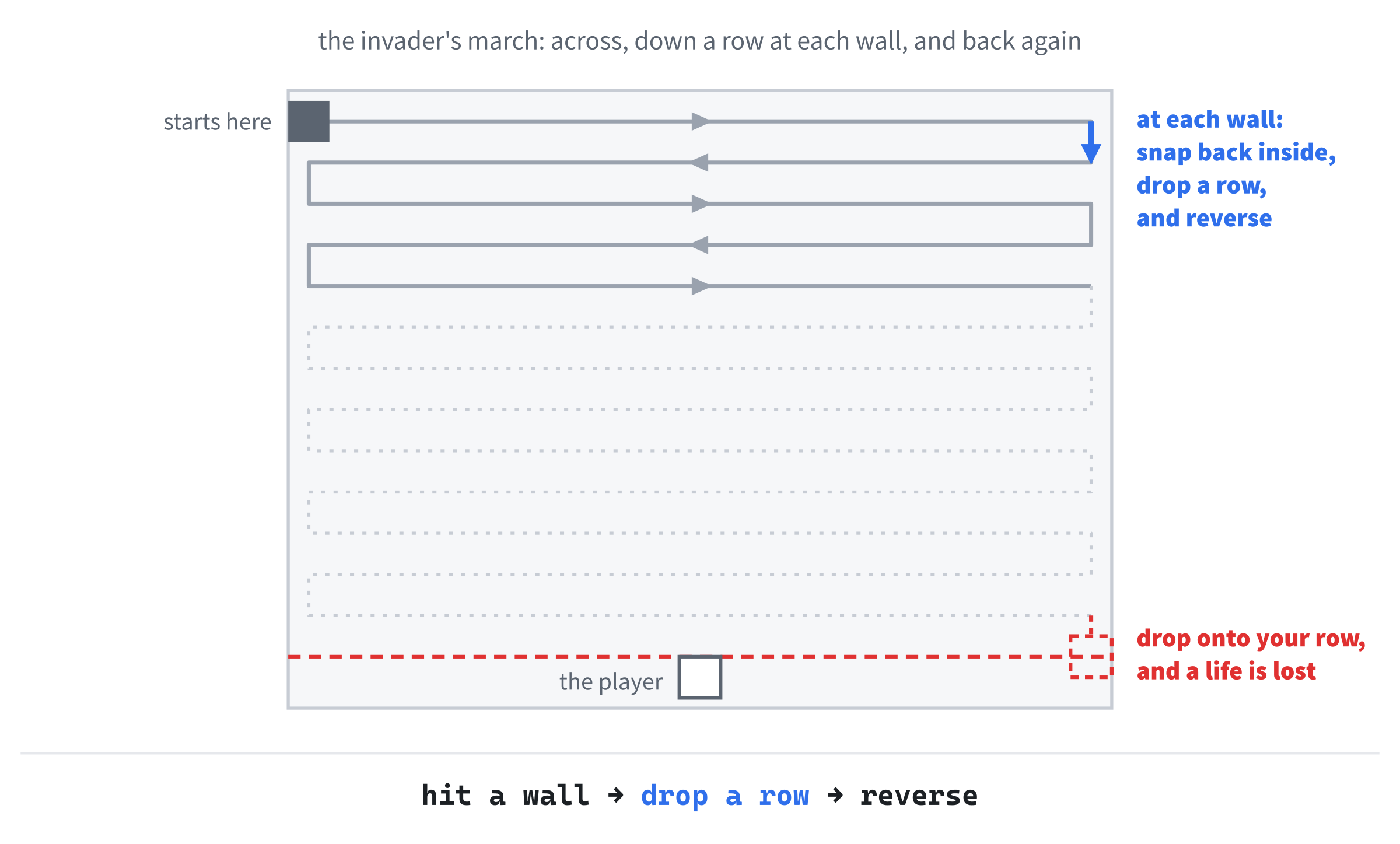
In the preceding code, the gate comes first again, and then the invader moves by its speed times delta, just as Chapter 3's ball did. The first if checks the right wall. The invader's right edge is invaderX + INVADER_SIZE, and if that's past WINDOW_W, the invader has gone too far. Chapter 3's bounce had two steps, snap back inside and reverse, and the invader adds a third in the middle: it drops down by its own height, one row. Setting invaderSpeedX to -INVADER_SPEED then sends it left.
The else if handles the left wall the same way, snapping the invader back to 0, dropping it a row, and sending it right. It's an else if rather than a second if because the invader can't be past both walls at once, so when the first question gets a yes, there's no point asking the second. Figure 5.2 shows the zigzag that results.
That zigzag is slow and steady. The invader takes about six seconds to cross the window, so it needs well over a minute to work its way down, but if it gets all the way, the player loses a life. The landing check goes inside the invader's block, below the else if’s closing brace and above the block's own closing brace, leaving a blank line after the else if’s brace:
// Has it reached the player's row? Then a life is lost
if (invaderY + INVADER_SIZE >= playerY)
{
    lives--;
    SDL_Log("The invader got through! Lives left: %d", lives);

    invaderX = 0.0f;                      // back to the start
    invaderY = EDGE_GAP;
    invaderSpeedX = INVADER_SPEED;

    gameOver = (lives <= 0);
    if (gameOver)
        SDL_Log("Game over! Final score: %d", score);
}
In the preceding code, the if asks whether the invader's bottom edge has reached the top of the player's row. If it has, lives-- takes away a life, with the decrement operator from Chapter 2.
The SDL_Log line reports the loss in the console window. You met %s in Chapter 1 as a placeholder for text, and %d is the same idea for a whole number: SDL swaps it for the value of lives, so the console shows a message like "The invader got through! Lives left: 2". The d stands for decimal, because the number is printed in ordinary base 10.
The next three lines put the invader back where it started, in the top-left corner, heading right, ready for another march.
The last three lines decide whether that was the final life. As in Chapter 4, (lives <= 0) is a comparison, so it gives a bool, and we store that answer straight into gameOver, with no if and no else. While lives remain, gameOver stays false. When the last one goes, it becomes true, and a braceless if logs the final score. From then on, every !gameOver gate stays shut, so the gameplay freezes, and the background and the player change color.
Checkpoint: Press F5, keep an eye on the console window, and watch the invader march back and forth, a row lower each time. When it reaches your row, the console reports a lost life, and the invader starts again at the top. The third time, the console reports that the game is over, the window turns dark red, the player dims, and everything stops.
Waiting for the invader to land three times takes about four minutes. To test the game over sooner, temporarily change INVADER_SPEED to 2000.0f, and the invader races down in a few seconds. Change it back to 120.0f when you're done.
The invader is now a real threat, and the player has no way to fight back. That's next.
Firing
Firing happens when a key is pressed, so it belongs in the event handling. It goes in slot E, inside the switch, between the closing brace of the Escape check and the break; below it:
else if ((event.key.key == SDLK_SPACE) && !bulletActive &&
         !gameOver)
{
    // Fire: start the bullet just above the player
    bulletX = playerX + (PLAYER_SIZE - BULLET_SIZE) / 2.0f;
    bulletY = playerY - BULLET_SIZE;
    bulletActive = true;
}
In the preceding code, the else if joins the Escape check, so each key press is Escape, or Space, or neither. The condition asks three questions at once, joined with &&: was the key Space, is there no bullet flying already, and is the game still going? All three must be true to fire, so the player can't fire a second bullet while the first is in the air, or fire at all once the game is over. As with Escape, the key arrives as a keycode, SDLK_SPACE, because it's a key-down event, while the held keys in the player's block were scancodes.
The body puts the bullet just above the player, centered. The difference between the two widths, 40 minus 10, is 30 pixels, and half of that, 15, is how far in from the player's left edge the bullet's left edge must be for the bullet to sit in the middle. The bullet's top edge goes at playerY - BULLET_SIZE, so it sits right on top of the player. Finally, bulletActive becomes true, and from then on, the drawing code draws the bullet.
Try it: press F5, and then press Space. A yellow bullet appears above the player and just hangs there, because nothing moves it yet. You can't fire another, either, because bulletActive is stuck at true. Both of those get fixed in a moment.
Once the bullet can fly, try holding Space down. The player keeps firing, because Windows repeats a held key, just as it does when you hold down a letter in a text editor. After a short pause, SDL receives a stream of extra key-down events, and each one fires as soon as the last bullet has gone. Every repeat has event.key.repeat set to true, so adding && !event.key.repeat to the condition would make the player tap Space for every shot.
Let's get that bullet moving.
The Bullet in Flight
A flying bullet moves up the window every frame, and it disappears when it goes off the top. This block goes in slot F, below the invader's block and still above // Draw the frame, with a blank line on each side:
// The bullet: fly up, and vanish off the top or on a hit
if (bulletActive && !gameOver)
{
    bulletY -= BULLET_SPEED * delta;

    if (bulletY + BULLET_SIZE < 0.0f)
        bulletActive = false;                 // gone off the top
}
In the preceding code, the gate asks two questions this time: the bullet must be flying, and the game must still be going. Then the bullet moves up. On screen, y grows downward, so going up means subtracting from bulletY, at BULLET_SPEED pixels per second. If the bullet's bottom edge, bulletY + BULLET_SIZE, has gone above the top of the window, where y is 0, the bullet has left the screen, so we set bulletActive back to false. That stops it from being drawn, and it lets the player fire again.
Hitting the Invader
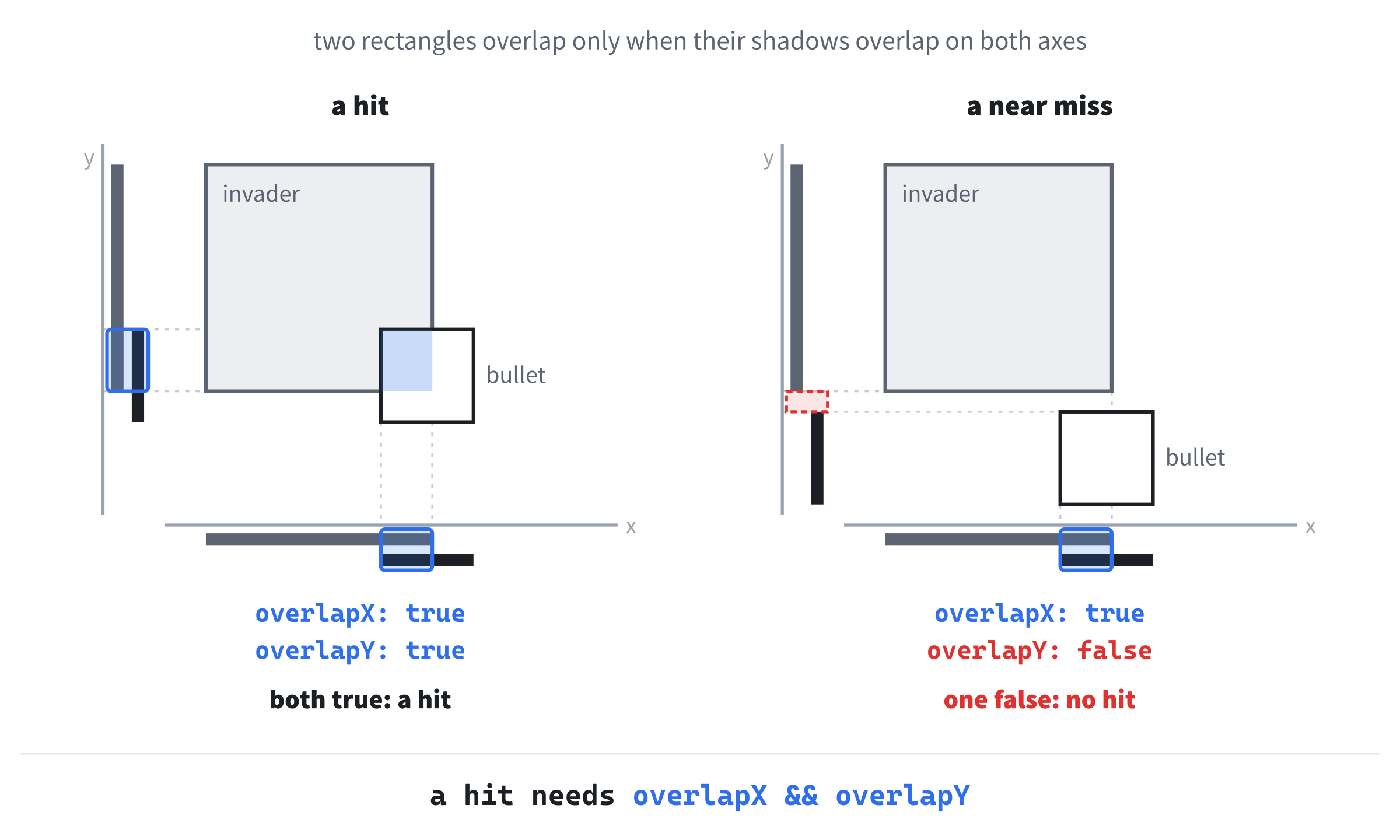
The last piece of the game is the most interesting one: working out whether the bullet has hit the invader. Both of them are rectangles, so the question is whether two rectangles overlap, and the answer is surprisingly neat. Picture each rectangle casting a shadow straight down onto the x axis, and another one sideways onto the y axis. Two rectangles overlap if, and only if, their shadows overlap on both axes, as Figure 5.3 shows.
Here's that idea in code. Add it inside the bullet's block, below the line that ends // gone off the top, with a blank line in between, and above the block's closing brace:
// Do the bullet and the invader overlap on both axes?
bool overlapX = (bulletX < invaderX + INVADER_SIZE) &&
                (bulletX + BULLET_SIZE > invaderX);
bool overlapY = (bulletY < invaderY + INVADER_SIZE) &&
                (bulletY + BULLET_SIZE > invaderY);

if (overlapX && overlapY)
{
    score++;
    SDL_Log("Hit! Score: %d", score);
    bulletActive = false;

    invaderX = 0.0f;                      // back to the start
    invaderY = EDGE_GAP;
    invaderSpeedX = INVADER_SPEED;
}
In the preceding code, overlapX asks whether the two shadows on the x axis overlap, and it takes two comparisons to answer. The first, bulletX < invaderX + INVADER_SIZE, says the bullet's left edge is to the left of the invader's right edge. The second, bulletX + BULLET_SIZE > invaderX, says the bullet's right edge is to the right of the invader's left edge. If either one is false, the bullet is entirely off to one side of the invader, and if both are true, the shadows overlap. The overlapY line asks the same question on the y axis, with tops and bottoms in place of lefts and rights.
That second comparison can feel backward at first, so try it with numbers. Suppose the invader spans x from 100 to 140. A bullet spanning 150 to 160 is entirely to its right: the bullet's left edge, 150, isn't less than 140, so the first comparison fails. A bullet spanning 80 to 90 is entirely to its left: the bullet's right edge, 90, isn't greater than 100, so the second comparison fails. Only a bullet with some part between 100 and 140 passes both.
SDL can answer the overlap question for you. Its SDL_HasRectIntersectionFloat function takes two SDL_FRect rectangles, each with an & in front, just like SDL_RenderFillRect, and returns true if they overlap. We've written our own version because it's worth knowing what's going on underneath. This test, known as an axis-aligned bounding box check, or AABB for short, sits at the heart of collision detection in countless games.
Then if (overlapX && overlapY) puts the two answers together, just as Figure 5.3 does, and a hit needs both. On a hit, score++ adds a point, SDL_Log reports the new score in the console, the bullet is deactivated so the player can fire again, and the invader goes back to the start.
You might notice that those last three lines are exactly the same as the three in the landing check. Writing the same code twice works, but if you ever change where the invader starts, you have to remember to change it in both places, as well as in the variables at the top. In Chapter 8, functions will let us write it once and use it wherever we need it.
Checkpoint: Press F5, and you have a complete game. Slide under the invader's path, fire, and watch the bullet fly. Hit the invader, and the console reports your score as the invader starts again at the top. Miss, and the bullet flies off the top of the window, and you can fire again.
That fills the last slot, and the game is finished.
The Complete Program
Here's the whole file in one piece, with every line at its real indentation. If you've typed every block in the place described, this is exactly what you have:
/*
    Square Invader
    The Chapter 5 project from Learning C++ by Building Games

    A green player slides along the bottom of the window with A and D,
    or the arrow keys, and Space fires a yellow bullet. A red invader
    marches across the top, dropping a row at each wall. Shoot it to
    score, but let it reach your row and you lose a life. Lose all
    three, and the game is over. Escape, or the window's X, quits.
*/

#include <SDL3/SDL.h>
#include <SDL3/SDL_main.h>

const int   WINDOW_W       = 800;      // window width in pixels
const int   WINDOW_H       = 600;      // window height in pixels
const float PLAYER_SIZE    = 40.0f;    // the player's width and height
const float BULLET_SIZE    = 10.0f;    // the bullet's width and height
const float INVADER_SIZE   = 40.0f;    // the invader's width and height
const float EDGE_GAP       = 10.0f;    // space at the top and bottom
const float PLAYER_SPEED   = 300.0f;   // pixels per second
const float BULLET_SPEED   = 480.0f;   // pixels per second, straight up
const float INVADER_SPEED  = 120.0f;   // pixels per second, sideways
const int   STARTING_LIVES = 3;        // lives at the start of the game

const SDL_Color BACKGROUND    = { 20, 20, 30, 255 };    // near-black
const SDL_Color GAME_OVER_BG  = { 60, 0, 0, 255 };      // dark red
const SDL_Color PLAYER_COLOR  = { 0, 200, 0, 255 };     // green
const SDL_Color PLAYER_DIM    = { 0, 80, 0, 255 };      // dim green
const SDL_Color BULLET_COLOR  = { 255, 255, 0, 255 };   // yellow
const SDL_Color INVADER_COLOR = { 200, 0, 0, 255 };     // red

int main(int argc, char* argv[])
{
    // Start SDL, then make the window and the renderer
    if (!SDL_Init(SDL_INIT_VIDEO))
    {
        SDL_Log("SDL_Init failed: %s", SDL_GetError());
        return 1;
    }

    SDL_Window* window = SDL_CreateWindow("Square Invader",
                                          WINDOW_W, WINDOW_H, 0);
    if (!window)
    {
        SDL_Log("SDL_CreateWindow failed: %s", SDL_GetError());
        SDL_Quit();
        return 1;
    }

    SDL_Renderer* renderer = SDL_CreateRenderer(window, nullptr);
    if (!renderer)
    {
        SDL_Log("SDL_CreateRenderer failed: %s", SDL_GetError());
        SDL_DestroyWindow(window);
        SDL_Quit();
        return 1;
    }

    // Show each frame in step with the monitor's refresh
    SDL_SetRenderVSync(renderer, 1);

    // The player: its top-left corner, centered near the bottom
    float playerX = (WINDOW_W - PLAYER_SIZE) / 2.0f;
    float playerY = WINDOW_H - PLAYER_SIZE - EDGE_GAP;

    // The bullet: only one can be flying at a time
    float bulletX = 0.0f;
    float bulletY = 0.0f;
    bool bulletActive = false;

    // The invader: starts in the top-left corner, heading right
    float invaderX = 0.0f;
    float invaderY = EDGE_GAP;
    float invaderSpeedX = INVADER_SPEED;   // + is right, - is left

    // The score, the lives left, and whether the game is over
    int score = 0;
    int lives = STARTING_LIVES;
    bool gameOver = false;

    // The time at the last frame, in milliseconds
    Uint64 lastTime = SDL_GetTicks();

    bool running = true;
    SDL_Event event;

    while (running)
    {
        // Events: quit on the window's X, or on Escape
        while (SDL_PollEvent(&event))
        {
            switch (event.type)
            {
            case SDL_EVENT_QUIT:
                running = false;
                break;
            case SDL_EVENT_KEY_DOWN:
                if (event.key.key == SDLK_ESCAPE)
                {
                    running = false;
                }
                else if ((event.key.key == SDLK_SPACE) && !bulletActive &&
                         !gameOver)
                {
                    // Fire: start the bullet just above the player
                    bulletX = playerX + (PLAYER_SIZE - BULLET_SIZE) / 2.0f;
                    bulletY = playerY - BULLET_SIZE;
                    bulletActive = true;
                }
                break;
            }
        }

        // Delta time: how many seconds the last frame took
        Uint64 now = SDL_GetTicks();
        float delta = (now - lastTime) / 1000.0f;
        lastTime = now;

        // The player: slide while A or D, or an arrow key, is held
        if (!gameOver)
        {
            const bool* keys = SDL_GetKeyboardState(nullptr);
            if (keys[SDL_SCANCODE_A] || keys[SDL_SCANCODE_LEFT])
                playerX -= PLAYER_SPEED * delta;
            if (keys[SDL_SCANCODE_D] || keys[SDL_SCANCODE_RIGHT])
                playerX += PLAYER_SPEED * delta;

            // Keep the whole player inside the window
            playerX = SDL_clamp(playerX, 0.0f, WINDOW_W - PLAYER_SIZE);
        }

        // The invader: march sideways, dropping a row at each wall
        if (!gameOver)
        {
            invaderX += invaderSpeedX * delta;

            if (invaderX + INVADER_SIZE > WINDOW_W)
            {
                invaderX = WINDOW_W - INVADER_SIZE;   // snap back inside,
                invaderY += INVADER_SIZE;             // drop a row,
                invaderSpeedX = -INVADER_SPEED;       // and head left
            }
            else if (invaderX < 0.0f)
            {
                invaderX = 0.0f;
                invaderY += INVADER_SIZE;
                invaderSpeedX = INVADER_SPEED;        // head right
            }

            // Has it reached the player's row? Then a life is lost
            if (invaderY + INVADER_SIZE >= playerY)
            {
                lives--;
                SDL_Log("The invader got through! Lives left: %d", lives);

                invaderX = 0.0f;                      // back to the start
                invaderY = EDGE_GAP;
                invaderSpeedX = INVADER_SPEED;

                gameOver = (lives <= 0);
                if (gameOver)
                    SDL_Log("Game over! Final score: %d", score);
            }
        }

        // The bullet: fly up, and vanish off the top or on a hit
        if (bulletActive && !gameOver)
        {
            bulletY -= BULLET_SPEED * delta;

            if (bulletY + BULLET_SIZE < 0.0f)
                bulletActive = false;                 // gone off the top

            // Do the bullet and the invader overlap on both axes?
            bool overlapX = (bulletX < invaderX + INVADER_SIZE) &&
                            (bulletX + BULLET_SIZE > invaderX);
            bool overlapY = (bulletY < invaderY + INVADER_SIZE) &&
                            (bulletY + BULLET_SIZE > invaderY);

            if (overlapX && overlapY)
            {
                score++;
                SDL_Log("Hit! Score: %d", score);
                bulletActive = false;

                invaderX = 0.0f;                      // back to the start
                invaderY = EDGE_GAP;
                invaderSpeedX = INVADER_SPEED;
            }
        }

        // Draw the frame, on a dark red background once the game is over
        SDL_Color backgroundColor = gameOver ? GAME_OVER_BG : BACKGROUND;
        SDL_SetRenderDrawColor(renderer, backgroundColor.r, backgroundColor.g,
                               backgroundColor.b, backgroundColor.a);
        SDL_RenderClear(renderer);

        // The player, dimmed once the game is over
        SDL_Color playerColor = gameOver ? PLAYER_DIM : PLAYER_COLOR;
        SDL_SetRenderDrawColor(renderer, playerColor.r, playerColor.g,
                               playerColor.b, playerColor.a);
        SDL_FRect playerRect = { playerX, playerY, PLAYER_SIZE, PLAYER_SIZE };
        SDL_RenderFillRect(renderer, &playerRect);

        // The invader
        SDL_SetRenderDrawColor(renderer, INVADER_COLOR.r, INVADER_COLOR.g,
                               INVADER_COLOR.b, INVADER_COLOR.a);
        SDL_FRect invaderRect = { invaderX, invaderY,
                                  INVADER_SIZE, INVADER_SIZE };
        SDL_RenderFillRect(renderer, &invaderRect);

        // The bullet, only while it's flying
        if (bulletActive)
        {
            SDL_SetRenderDrawColor(renderer, BULLET_COLOR.r, BULLET_COLOR.g,
                                   BULLET_COLOR.b, BULLET_COLOR.a);
            SDL_FRect bulletRect = { bulletX, bulletY,
                                     BULLET_SIZE, BULLET_SIZE };
            SDL_RenderFillRect(renderer, &bulletRect);
        }

        SDL_RenderPresent(renderer);
    }

    // Clean up, in the reverse order we created things
    SDL_DestroyRenderer(renderer);
    SDL_DestroyWindow(window);
    SDL_Quit();

    return 0;
}
In the preceding code, the shape is the same as in the last two projects: constants at the top, then the setup, the game loop, and the cleanup inside main. The game loop handles the events, updates the player, the invader, and the bullet, and then draws everything, with each piece in the slot that Figure 5.1 promised.
Playing the Game
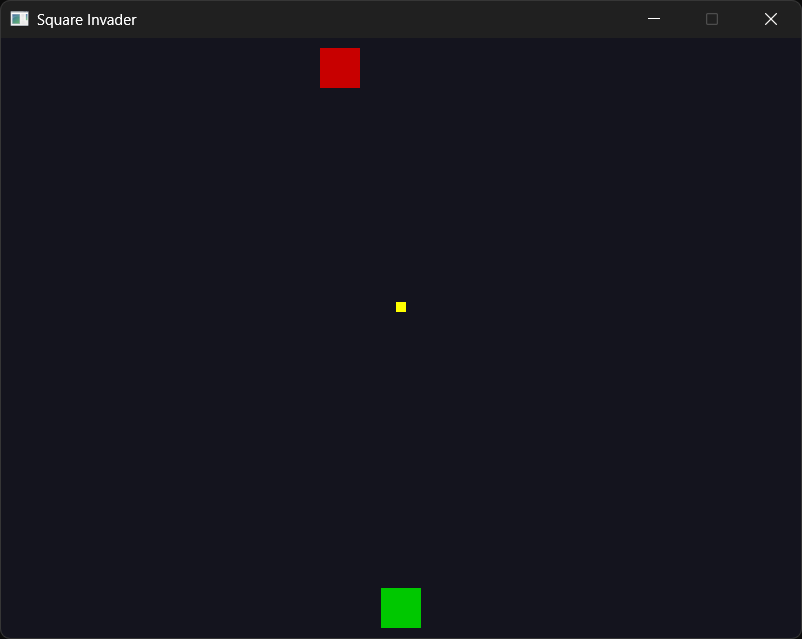
Press F5. The game's window opens, with the console window behind it. The green player waits at the bottom, and the red invader sets off from the top-left corner. Slide left and right with A and D, or the arrow keys, and press Space to fire.
The trick is to lead your target. The bullet takes about a second to reach the top row, and by then the invader has moved on, so fire at where it's going to be, not where it is, as in Figure 5.4.
Each hit sends the invader back to the top, but each miss gives it more time to work its way down. Every hit and every lost life is reported in the console window, which might look like this after a short game:
Hit! Score: 1
Hit! Score: 2
The invader got through! Lives left: 2
Hit! Score: 3
The invader got through! Lives left: 1
The invader got through! Lives left: 0
Game over! Final score: 3
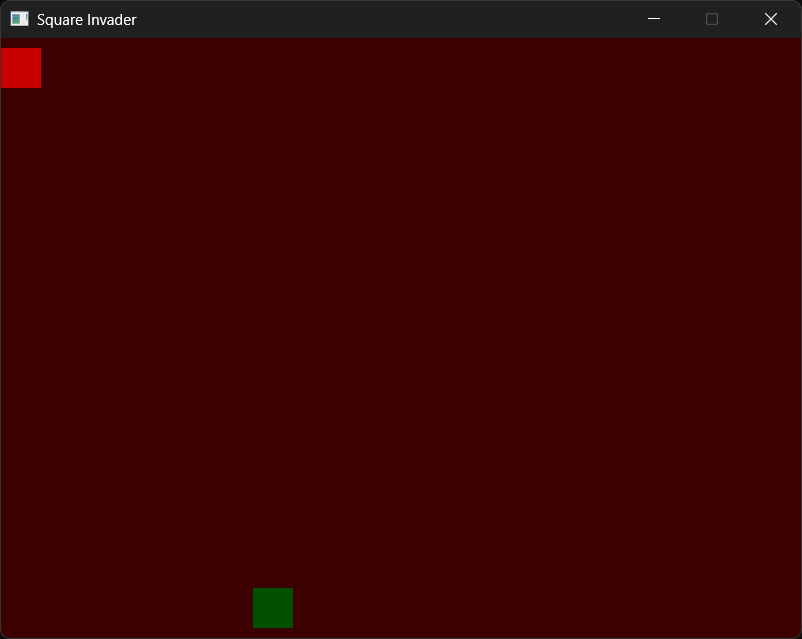
Notice that you can follow the whole game in the preceding output: three hits, and three times the invader got through, the last of which ended it. When the last life goes, the window turns dark red and the player dims, as Figure 5.5 shows. The gameplay stops, but the drawing carries on every frame, and you can press Escape, or close the window, to quit.
That's a real game, with a goal, rules, and a way to lose. It's small, but it's genuinely playable, and trying to beat your own score is surprisingly addictive.
Understanding the Code
This is the biggest program we've written so far, but its shape is exactly the same as the bouncing ball's in Chapter 3: the setup, then the game loop, then the cleanup. What's changed is how much deciding happens inside the loop, between reading the events and drawing the frame. Figure 5.6 shows one frame, in order, with the question that has to be answered before each job can run.

Read down the game loop, and count the questions it asks every single frame:
- Was that event the window closing, or Escape? Was it Space, with no bullet flying and the game still going?
- Is the game still going, so the player can move? Is A or the left arrow held? Is D or the right arrow?
- Is the invader past the right wall? The left wall? Has it reached the player's row? Was that the last life?
- Is a bullet flying? Has it gone off the top? Does it overlap the invader on x? On y? On both?
- Is the game over, so the background and the player should change color? Is there a bullet to draw?
Every one of those is a comparison, a logical combination of comparisons, or a bool that stores an earlier answer. That's the difference between a bouncing ball and a game. The ball reacts to one thing, the walls, but Square Invader reacts to the player, the invader, the bullet, and the state of the game itself, and all of it is built from the operators in Chapter 4.
Notice, too, how much work three bool variables do. The running flag keeps the loop going, bulletActive decides whether the bullet exists at all, and gameOver switches the whole game off with a single true. A handful of yes-or-no values, checked in the right places, is most of what game logic is.
Experimenting
Now that you've got it running, try changing a value or two and see how the game feels. Each of these is a small change, so try them one at a time:
- Change
STARTING_LIVESto10for a much more forgiving game. - Change
INVADER_SPEEDto300.0ffor an invader that means business. - Change
PLAYER_SPEEDto60.0ffor a player who feels stuck in treacle. - Change
BULLET_SIZEto30.0ffor enormous, easy-to-aim bullets. The collision check copes with any size, because it works from the constants. - Add
&& !event.key.repeatto the end of the firing condition, and the player has to tap Space for every shot. - Delete
!bulletActive &&from the firing condition. Now every press of Space fires, but the old bullet vanishes and starts again above the player, because there's only one set of bullet variables. Real multiple bullets need an array, which Chapter 7 introduces, and Chapter 9's shooter uses one to keep three lasers in the air.
For a bigger challenge, make the invader speed up every time you hit it. You'll need a new variable for the invader's current speed, and every line inside the game loop that uses INVADER_SPEED needs to use that variable instead.
Tuning numbers like these is most of game design. The code stays the same, and the game feels completely different.
Common Errors and Fixes
If the build fails with errors about SDL3/SDL.h, SDL3.lib, or unresolved external symbols, the problem is the project setup, and Chapter 1's Common Errors section covers each one. Here are the problems that are particular to this chapter.
Pressing Space does nothing, but the comma key fires. The firing condition compares event.key.key with SDL_SCANCODE_SPACE instead of SDLK_SPACE. A key-down event's key member holds a keycode, and scancodes and keycodes are two different numbering systems, so the code compiles without a warning and quietly tests the wrong key. The scancode for Space happens to be 44, and 44 is the keycode for the comma. Use SDLK_ names with event.key.key, and SDL_SCANCODE_ names with the keyboard state.
Pressing Space does nothing at all, or fires only once. If nothing happens, click on the game window to make sure it has the focus. If you could fire once but never again, look at the off-the-top check, which should be bulletY + BULLET_SIZE < 0.0f. When it's wrong, the first bullet flies upward forever, out of sight, and bulletActive never goes back to false.
The invader plunges straight down the side of the window. One of the wall checks doesn't reverse the invader. Without invaderSpeedX = -INVADER_SPEED; in the right-wall check, for example, the invader is snapped back and dropped a row, but it still heads right. On the next frame, it's past the wall again, so it drops again, a row every frame, and it lands in a fraction of a second.
The bullet passes straight through the invader. One of the four comparisons in the overlap check is the wrong way around, or uses the wrong variable. Compare each one carefully with the listing, and remember Figure 5.3: each axis needs one comparison for each edge.
The invader vanishes the moment you fire underneath it. The hit check is asking about only one axis. With just overlapX, a bullet anywhere below the invader counts as a hit at once, however far away it is. The if needs both answers: overlapX && overlapY.
The player slides partly out of the window on the right. The upper limit in the SDL_clamp call should be WINDOW_W - PLAYER_SIZE, not WINDOW_W. The clamp limits the player's left edge, so the right edge only stays inside if the limit allows for the player's width.
The window turns red, but something keeps moving. One of the gameplay blocks is missing its gate. Check that the player's block and the invader's block both start with if (!gameOver), and that the bullet's block starts with if (bulletActive && !gameOver).
The game ends the first time the invader gets through. Check that STARTING_LIVES is 3, and that the landing check says gameOver = (lives <= 0);, not gameOver = true;. This is a logic bug rather than a syntax error, so the compiler can't help, but the debugger can.
Put a breakpoint on the lives--; line and press F5. When the invader lands, Visual Studio pauses there. Find lives in the Autos window, press F10, and watch it drop by one. Keep pressing F10 to step through the reset, and watch gameOver get its answer. To save waiting, speed the invader up first, as in the tip earlier in the chapter.
A message box says "The code execution cannot proceed because SDL3.dll was not found." Copy SDL3.dll from C:\SDL3\lib\x64 into the project folder, beside main.cpp.
AI Exercise (Optional)
If you'd like to take this game further with AI help, here's a vibe coding challenge that stretches your decision-making code. As always, skip it if you'd rather not; nothing later depends on it.
Open your AI chatbot of choice and try a prompt like this:
"I have a small C++ SDL 3 game with one player, one bullet, and one invader. The invader is tracked with invaderX, invaderY, and invaderSpeedX, and I track the score, the lives (three at the start), and a gameOver bool. So far, I've only learned variables, structs, and flow control: if, else, switch, the comparison and logical operators, and the ternary operator. The only loops are the game loop and the event loop, the only function is main, and there are no arrays, vectors, or classes. Show me how to add a second invader that starts on the right and moves at a different speed. Use only the C++ features I've listed, and show me the complete program so I can compare it with mine line by line."
Notice what the preceding prompt does. It names the language and the library precisely, so the AI doesn't reach for SDL 2 code, which is still all over the internet. Describing the variables you already have lets the AI build on them instead of starting again, and spelling out what you haven't learned keeps the answer inside what you can read. Finally, asking for the whole program rather than a snippet means you can see exactly where every change goes.
Look at the result carefully. Did the AI copy the first invader's variables and code for the second, or find a tidier way? Has it remembered the second invader in the collision check, the landing check, and the drawing code? Did it slip in anything you don't recognize? If it did, push back: "That uses a feature I haven't learned yet. Try again using only what I listed." Keeping the AI inside your bubble of understanding, and growing the bubble on purpose, is exactly how to work with it while you're learning.
Whatever you end up with, notice how much copying it took to add just one more invader. Arrays, in Chapter 13, are the cure for that, and a whole army of invaders is only a few chapters away.
Summary
You've built your first program that really plays: a thing on screen with rules, a goal, and a way to lose. Under the gameplay, every meaningful decision is a comparison or a combination of comparisons. A switch sorts the events, && decides when the player may fire and when two rectangles overlap, || lets the arrow keys join in, and the ternary operator picks the colors. Three bool variables, running, bulletActive, and gameOver, switch whole parts of the game on and off. That's what flow control gives you: the power to ask the game's world questions, and act on the answers.
In the next chapter, we'll cover loops, the proper, structured way to repeat work. We've been using two of them all along, the game loop and the event loop, without looking at them closely. Once loops are in our toolkit, we'll be ready for Chapter 7's project, where doing the same thing to lots of objects at once finally becomes practical. Until then, take a moment to enjoy what you've made: a tiny game, built from variables, decisions, and not much else.