
You've already written code that makes decisions. Chapter 1's square moved only while a key was held down, because an if checked each key on every frame, and Chapter 3's ball bounced because four more if statements asked whether it had crossed a wall. We used them without stopping to look at them closely, and that was fine for a first game. But games are made of decisions. Is the player touching the enemy? If so, lose a life. Did they collect the key? If so, open the door. Is the score high enough for a bonus? If so, award an extra life, and if not, carry on.
This chapter takes decision-making apart properly. We'll learn how to compare values, how to combine comparisons into bigger questions, and how to send our code down different paths depending on the answers. Along the way, we'll meet the handful of traps that catch almost every beginner, and find out which of them Visual Studio can warn you about. By the end of the chapter, you'll be able to read every decision in the first three chapters, and write your own.
In this chapter, we will:
- Compare values with the six comparison operators, and compare decimals safely
- Combine conditions with the logical operators
&&,||, and! - Branch our code with
if,else if, andelse, and learn when the braces can go - Choose between two values in a single line with the ternary operator
- Handle many possible values cleanly with
switch, and know when a missingbreakis a bug - Use short-circuit evaluation to make risky checks safe
- Find out why
gotoexists, and why we avoid it - Try an optional AI exercise to sharpen our logic
Like Chapter 2, this chapter is built from small experiments, so keep your Sandbox project open as you read. To try an example, put it inside main, above return 0;, in place of whatever's there from last time, and press F5.
Let's start with the tool that underpins everything else: comparing values.
Comparison Operators
To make decisions in code, we first need to ask questions with yes-or-no answers. Is this number bigger than that one? Are these two values the same? Is this value different from that one? C++ gives us a set of comparison operators for exactly this job.
Every comparison operator takes two values, compares them, and gives back a bool: true or false. That's all there is to it. Ask a question, get a yes or a no. There are six of them, and this table shows what each one asks, using a player's score of 100 and a boss's score of 250:
| Operator | Asks | Example | Answer |
|---|---|---|---|
== |
is equal to? | 100 == 250 |
false |
!= |
is not equal to? | 100 != 250 |
true |
< |
is less than? | 100 < 250 |
true |
> |
is greater than? | 100 > 250 |
false |
<= |
is less than or equal to? | 100 <= 250 |
true |
>= |
is greater than or equal to? | 100 >= 250 |
false |
Two of them are worth a second look. The != operator starts with an exclamation mark, which C++ reads as "not," so it asks "not equal?" The difference between < and <= is the boundary itself: 250 <= 250 is true, but 250 < 250 is false. That difference matters more than it looks, because being off by one at a boundary is one of the most common bugs in games.
Here are all six in action, printed so you can see the answers. Try them in your sandbox:
int playerScore = 100;
int bossScore = 250;

std::cout << (playerScore == bossScore) << std::endl;   // 0
std::cout << (playerScore != bossScore) << std::endl;   // 1
std::cout << (playerScore < bossScore) << std::endl;    // 1
std::cout << (playerScore > bossScore) << std::endl;    // 0
std::cout << (playerScore <= bossScore) << std::endl;   // 1
std::cout << (playerScore >= bossScore) << std::endl;   // 0
In the preceding code, we compare the same two int variables in six different ways and print each answer. As you saw in Chapter 2, std::cout prints a bool as 1 for true and 0 for false, so the console shows the column of ones and zeros in the comments. The parentheses around each comparison are needed here. Without them, the << in front of playerScore would grab it and send it to the console before the comparison ever happened, and the line wouldn't compile. Elsewhere, they're usually optional, but they make a comparison easy to spot, so they're a good habit.
Because a comparison gives back a bool, you can store its answer like any other value:
bool isBehind = (playerScore < bossScore); // trueIn the preceding code, isBehind holds the answer to "is the player's score less than the boss's?", which is true. Storing an answer under a good name makes the code that uses it read almost like English, and you'll see plenty of bool variables like this one in our games.
You've met comparisons before, too. Chapter 1's event.type == SDL_EVENT_QUIT asked whether an event was the player closing the window, and Chapter 3's ballX - BALL_RADIUS < 0.0f asked whether the ball's left edge had gone past the left side of the window. Comparisons work on text as well: Chapter 2's firstName == "Alex" compared two strings.
One Equals Sign or Two
There's one comparison operator that causes more beginner bugs than all the others put together, and it's ==.
When you want to ask whether two values are equal, you use two equals signs, ==. When you want to put a value into a variable, you use one equals sign, =, which is the assignment operator from Chapter 2. The two look almost identical, but they do completely different jobs:
int lives = 3;                // one equals sign: put 3 into lives
bool isOut = (lives == 0);    // two: is lives equal to 0?
In the preceding code, the first line puts 3 into lives. The second line asks whether lives is equal to 0, and stores the answer, false, in isOut. A handy way to keep the two apart is to read = as "becomes" and == as "is equal to." So the first line says "lives becomes 3," and the second asks "is lives equal to 0?"
Mixing them up is easy to do and surprisingly hard to spot. We'll look at if properly later in this chapter, but you've used it in both projects already: the code in its braces runs only when the condition in its parentheses is true. Here's what happens when an if gets one equals sign instead of two:
int lives = 3;

if (lives = 0)
{
    std::cout << "Game over!" << std::endl;
}

std::cout << "Lives: " << lives << std::endl;
In the preceding code, the if was meant to ask whether the player is out of lives. With one equals sign, it doesn't ask anything. It puts 0 into lives, and then the if looks at the value that was just stored. C++ treats 0 as false and any other number as true, so "Game over!" never appears. Run it, and the console shows this:
Lives: 0Notice that lives is now 0, even though nothing in the code was supposed to take a life away. That's two bugs for the price of one missing keystroke: the check never fires, and the player has lost all their lives anyway. Write if (lives = 5) instead, and it goes wrong the other way around. The message appears every time, and the player is topped back up to five lives, whatever they had before.
At its standard settings, the compiler builds this code without a word of complaint, because putting an assignment inside a condition is legal C++, and occasionally it's even deliberate. Visual Studio's editor is more suspicious. As you type, it runs a checker called a linter, which looks for code that's legal but probably wrong. The linter underlines the condition with a green squiggle and adds a warning to the Error List, as Figure 4.1 shows.
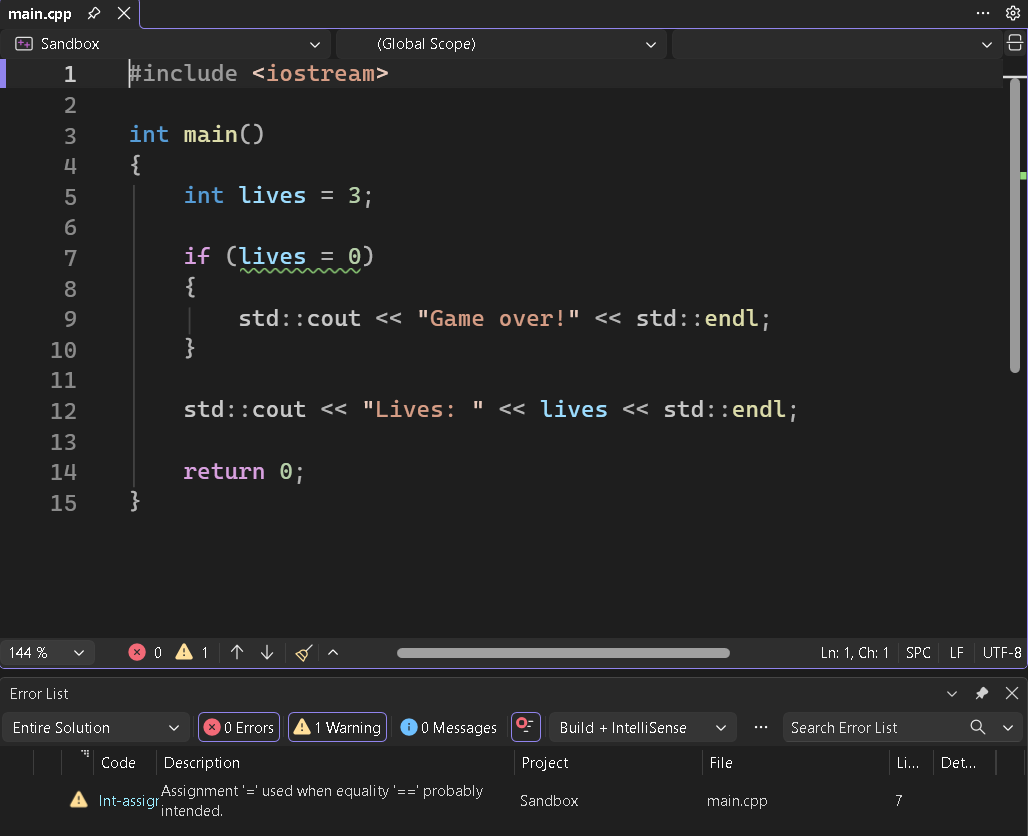
If you can't see the Error List, open it from View > Error List. Green squiggles are warnings rather than errors, so the program still builds and runs, which is exactly why they're so easy to ignore. Make a habit of reading them. The fix, of course, is to add the missing equals sign, so that the line reads if (lives == 0).
You can make the compiler catch this trap too. Open your sandbox's Properties, choose All Configurations, and set C/C++ > General > Warning Level to Level4 (/W4). Now building gives warning C4706: assignment used as a condition. Level 4 is worth using in the SDL projects as well. There, it also reports C4100: 'argc': unreferenced parameter, and the same for argv, because our main never uses the two values in its parentheses. Those two are harmless.
That trap is all about typing. The next one is sneakier, because the code looks perfectly correct.
Comparing Decimals
In Chapter 2, we saw that a float can't store most decimals exactly. The float that was meant to hold 0.1 really held 0.100000001. Most of the time, a tiny error like that doesn't matter, but it matters a lot to ==, which only says true when two values match exactly, down to the very last bit. Try this in the sandbox:
float fuel = 1.0f;
fuel -= 0.9f;   // burn most of the tank

if (fuel == 0.1f)
{
    std::cout << "Low fuel!" << std::endl;
}
In the preceding code, the tank starts full, at 1.0, and the -= shortcut from Chapter 2 burns 0.9 of it, which should leave 0.1. Then the if asks whether exactly 0.1 is left, and prints a warning if so. Run it, and nothing appears. The subtraction really left 0.100000024 in fuel, while 0.1f is 0.100000001, so the two values differ in the eighth decimal place, and == says false. If you print fuel, the console rounds it to 0.1, which makes the bug even more baffling.
The fix is to stop asking whether two decimals are equal, and ask whether they're close enough instead. For that, we need a tool from the standard library's math header. Add this line at the top of main.cpp, just under #include <iostream>:
#include <cmath>In the preceding code, cmath is the standard library's collection of math tools. It includes square roots, powers, and the one we need now: absolute values.
Now replace the if from the fuel example with this version, which asks whether the fuel is close enough to 0.1:
const float CLOSE_ENOUGH = 0.0001f;

if (std::abs(fuel - 0.1f) < CLOSE_ENOUGH)
{
    std::cout << "Low fuel!" << std::endl;
}
In the preceding code, fuel - 0.1f works out how far apart the two values are. That gap could come out negative, depending on which value is bigger, so std::abs turns it into its absolute value, which is its distance from zero with the sign thrown away. For example, std::abs(-3.0f) is 3.0, and so is std::abs(3.0f).
Then < asks whether the distance is smaller than CLOSE_ENOUGH, a named constant set to one ten-thousandth. Here, the gap is about two hundred-millionths, which is far smaller, so this time "Low fuel!" appears. Pick a tolerance that suits your numbers. For positions measured in pixels, one ten-thousandth is far finer than anyone could ever see.
In practice, games rarely need to ask whether two decimals are equal at all. The questions they ask about decimals are usually "has it gone past?" Has the ball crossed the wall? Has the timer run out? Has the ship run out of fuel?
Those questions use <, >, <=, and >=, just like Chapter 3's wall checks, and a rounding error in the eighth decimal place makes no practical difference to them. So if (fuel <= 0.0f) is a perfectly good way to ask whether the tank is empty. Save == for whole numbers, characters, bool values, and strings, where equal really means equal.
Now that we can ask single questions, let's learn how to ask several at once.
Logical Operators
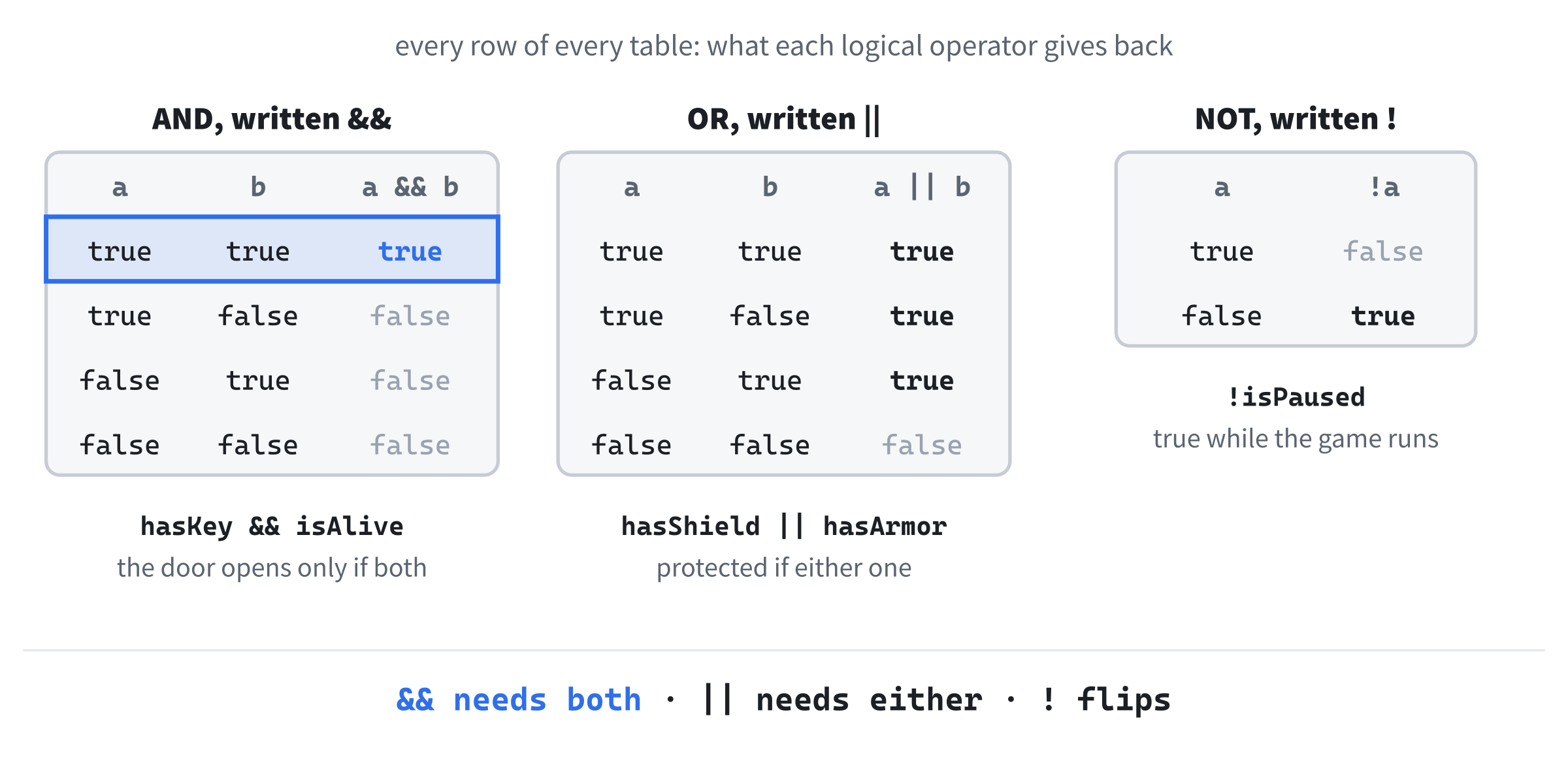
A lot of game logic isn't just "is this one thing true?" It's "are this AND that true?" or "is this OR that true?" C++ gives us three logical operators for combining bool values into bigger questions:
&&means AND: the answer istrueonly when both sides are true.||means OR: the answer istruewhen at least one side is true.!means NOT: it flips a single value, sotruebecomesfalse, andfalsebecomestrue.
If you're hunting for the | character, it shares a key with the backslash, and you type it with Shift. Figure 4.2 shows every possible combination of values for each operator, in what programmers call a truth table.
Here are all three operators in action, with a player's score, their lives, and whether they're holding a key:
int playerScore = 150;
int playerLives = 2;
bool hasKey = true;

bool canUnlockBonus = (playerScore > 100) && (playerLives > 0);   // true
bool canContinue = (playerLives > 0) || hasKey;                   // true
bool isGameOver = !canContinue;                                   // false
In the preceding code, the canUnlockBonus line asks "is the score over 100, AND does the player have lives left?" Both halves are true, so the answer is true. The canContinue line asks "does the player have lives left, OR a key?" Either would do, so that's true as well. The isGameOver line flips canContinue: if the player can continue, the game isn't over, so the answer is false. Print all three, and you'll see 1, 1, and 0.
You've used two of these operators already. Chapter 1's Escape check was event.type == SDL_EVENT_KEY_DOWN && event.key.key == SDLK_ESCAPE, which is true only when the event is a key press AND the key is Escape. The same chapter's startup code began with if (!SDL_Init(SDL_INIT_VIDEO)), which reads "if SDL did not start." The SDL_Init function answers true when it succeeds, and the ! flips that answer, so the error-handling code in the braces runs only when something went wrong.
Logical operators can be chained to build longer conditions:
bool canEnterSecretRoom = hasKey && (playerLives > 0) && (playerScore >= 500);In the preceding code, all three conditions must hold: the player needs the key, at least one life, and a score of at least 500. If any one of them fails, the whole thing is false. With a score of 150, this player isn't getting in.
Grouping with Parentheses
When && and || appear in the same condition, the grouping changes the meaning. Suppose a treasure chest opens with a key or with a lockpick, but a lockpick won't work in a rusty lock. Here are two ways to write that, for a player who has the key but no lockpick, standing in front of a rusty lock:
bool hasKey = true;
bool hasLockpick = false;
bool isRusted = true;

bool opensA = hasKey || (hasLockpick && !isRusted);   // true
bool opensB = (hasKey || hasLockpick) && !isRusted;   // false
In the preceding code, version A says "the key, or else a lockpick in a lock that isn't rusted," so the key opens the chest whatever the rust. Version B says "the key or a lockpick, as long as the lock isn't rusted," so the rust stops even the key. It's the same names and the same operators, with opposite answers. Version A is the one we meant.
If you leave the parentheses out and write hasKey || hasLockpick && !isRusted, C++ does the && first, just as math does * before +, so you get version A. But nobody reading your code should have to remember that rule, and that includes you, six months from now. Whenever && and || share a condition, use parentheses to show the grouping.
Now we can ask all the questions we need. It's time to actually do something with the answers.
if and else
The if statement is the most fundamental decision-making tool in C++, and you've been using it since Chapter 1. Here's its shape:
if (condition)
{
    // this code runs only when the condition is true
}
In the preceding code, condition stands for anything that gives a bool: a comparison, a combination made with the logical operators, or a plain bool variable. If the condition is true, the code inside the curly braces runs. If it's false, the program skips the braces entirely and carries on from the line after the closing brace. Those braces make a scope, just like the scopes in Chapter 2, so a variable created inside them disappears at the closing brace.
Here's a game-over check, the kind that every game needs somewhere:
int playerHealth = 0;

if (playerHealth <= 0)
{
    std::cout << "Game over!" << std::endl;
}
In the preceding code, the if asks whether playerHealth is zero or less. It is, so "Game over!" appears. Change playerHealth to 10 and run it again, and nothing appears, because the program skips the braces. Notice that the check uses <= rather than ==. A big hit can knock health below zero, and == 0 would miss that, while <= 0 catches every case.
Adding an else
Often we want to do one thing when a condition is true, and something different when it's false. For that, we add an else block:
int playerScore = 150;

if (playerScore >= 100)
{
    std::cout << "You made the bonus round!" << std::endl;
}
else
{
    std::cout << "You need 100 points for the bonus round." << std::endl;
}
In the preceding code, exactly one of the two messages appears. If the score is 100 or more, the first block runs. Otherwise, the else block runs. It's impossible for both to run, and impossible for neither to run, which is what makes if and else such a dependable pair. With a score of 150, the console shows "You made the bonus round!"
Chaining with else if
Sometimes there are more than two possible paths. A player's score might put them in one of several ranks, and for that, we chain else if blocks together:
int playerScore = 750;

if (playerScore >= 1000)
{
    std::cout << "Gold rank!" << std::endl;
}
else if (playerScore >= 500)
{
    std::cout << "Silver rank!" << std::endl;
}
else if (playerScore >= 100)
{
    std::cout << "Bronze rank!" << std::endl;
}
else
{
    std::cout << "Keep practicing!" << std::endl;
}
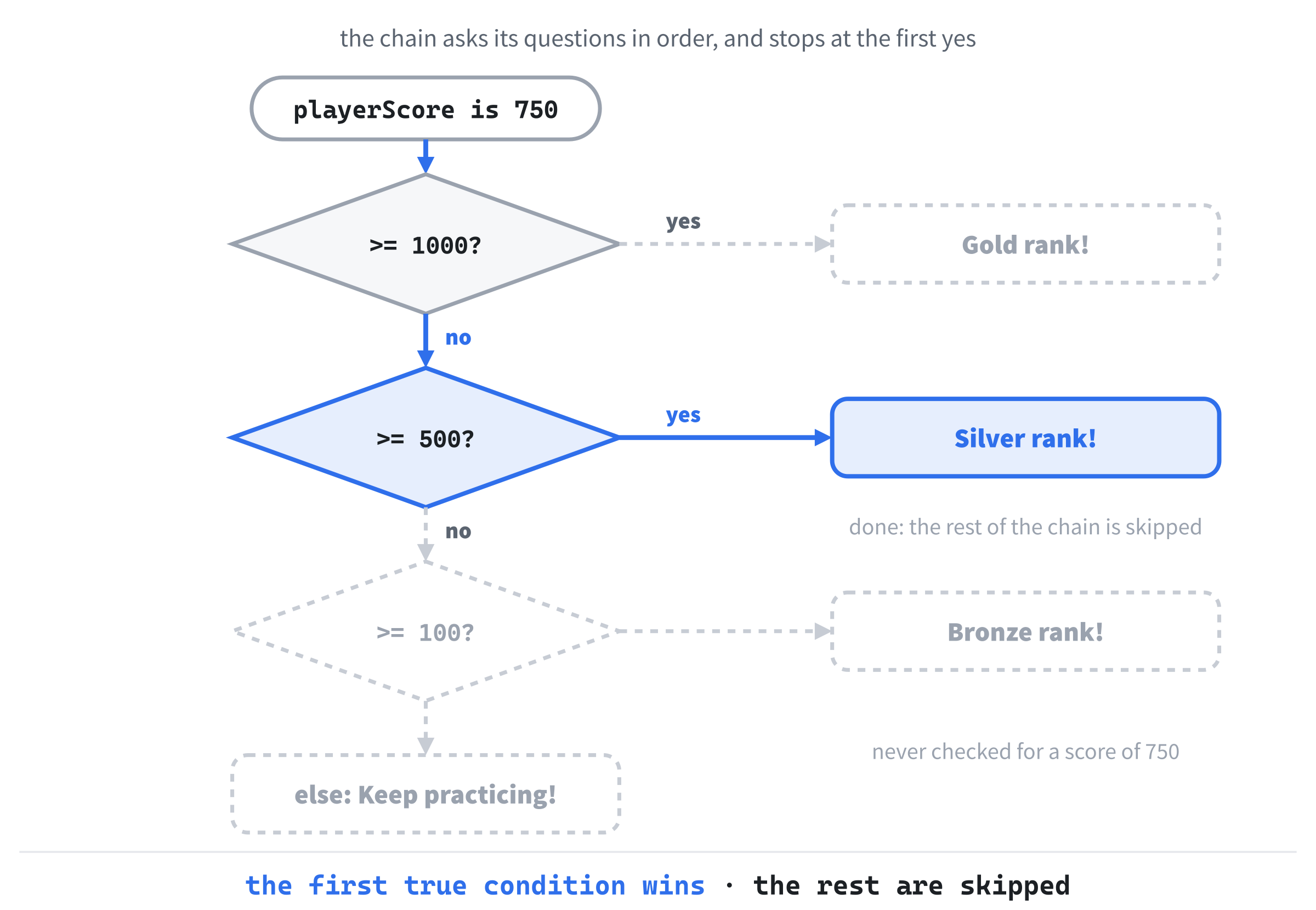
In the preceding code, C++ checks the conditions in order, from top to bottom. As soon as one of them is true, its block runs and the rest of the chain is skipped. If none of them is true, the final else runs as a catch-all.
With a score of 750, the first question, "at least 1000?", gets a no, so the program moves on. The second, "at least 500?", gets a yes, so "Silver rank!" appears, and the program leaves the chain without asking anything else. Figure 4.3 follows that path.
Watch the chain make its choice. Click in the margin to put a breakpoint on the if (playerScore >= 1000) line, press F5, and then press F10 a few times. The yellow arrow stops at the first condition, moves on to the second, steps into the Silver block, and then jumps straight past the rest of the chain. Change playerScore to 50 and try again, to watch it fall all the way through to the else.
The order of the conditions matters. If the 100 check came first, a player with 5,000 points would get "Bronze rank!", because the first true condition wins, and 5,000 is certainly at least 100. When the conditions overlap like this, put the most demanding one first and work down.
Nested if Statements
You can put an if inside another if. This is called nesting, and it's sometimes exactly what you need:
bool hasKey = true;
int playerLives = 3;

if (hasKey)
{
    if (playerLives > 0)
    {
        std::cout << "You open the door." << std::endl;
    }
    else
    {
        std::cout << "You have the key, but no lives left." << std::endl;
    }
}
In the preceding code, the inner if only runs when the outer condition is true. First, we check whether the player has the key. If they do, we then check whether they have any lives left, and pick one of two messages. A player without the key gets no message at all, because the outer if has no else.
Nesting is useful, but it gets out of hand quickly. Two levels deep is usually fine. Three is pushing it. Any deeper, and your code starts to look like the side of a pyramid. When the levels don't really mean different things, a single combined condition often reads better:
if (hasKey && (playerLives > 0))
{
    std::cout << "You open the door." << std::endl;
}
In the preceding code, one if asks both questions at once, and the parentheses around the comparison keep the two halves easy to see. It does the same job as the nested version, minus the second message. Keep nesting for when the levels genuinely mean different things, like the key-but-no-lives message, and combine the conditions when they don't.
Leaving Out the Braces
When an if controls only a single statement, C++ lets you leave the braces out:
if (playerHealth <= 0)
    std::cout << "Game over!" << std::endl;
In the preceding code, the if controls exactly one statement, the line under it, just as if it had braces around it. The same goes for else. You'll see braceless one-liners like this in plenty of C++ code, including some of this book's later projects, where they keep short checks short.
They come with a trap, though, and it's a nasty one. Suppose you later decide that losing all your health should also cost a life, so you add a line straight under the if:
if (playerHealth <= 0)
    playerLives--;
    std::cout << "Game over!" << std::endl;
In the preceding code, the indentation says that both lines belong to the if. The compiler doesn't care about indentation at all, though. Without braces, the if controls exactly one statement, which is now playerLives--;. The "Game over!" line has quietly fallen out of the if, so it appears every time, whatever the player's health.
Visual Studio doesn't help here, either. It indents your new line as the if’s single statement, which is correct, and it leaves the old line where it was, still indented as if it belonged to the if.
Visual Studio does catch the other version of this mistake. If you add the new line under the old one instead, it pulls the new line back level with the if as you type its semicolon, which is its way of telling you the truth. That's worth noticing when it happens, but it's no protection against the version above.
The compiler never warns about misleading indentation, not even at Level 4, so this bug can hide for a long time. The cure is simple: the moment an if or an else needs more than one line, give it braces. In this book, you'll only see the braces left off when there's a single short line to control.
With the braces sorted out, let's look at a shortcut for the simplest if and else of all.
The Ternary Operator
There's a compact shorthand for an if and else whose only job is to pick one of two values. It's called the ternary operator, because it's the only operator in C++ that takes three values. Our example stores its answer in a std::string, so first make sure #include <string> is at the top of main.cpp, as in Chapter 2. Then try this:
int playerLives = 3;
std::string status = (playerLives > 0) ? "Alive" : "Dead";
In the preceding code, status gets either "Alive" or "Dead", depending on whether playerLives is greater than zero. With three lives, it's "Alive". The general pattern looks like this:
condition ? valueIfTrue : valueIfFalseIn the preceding code, the condition comes first, followed by a question mark, which makes the pattern easy to remember: the condition really is a question. Then comes the value to use if the answer is yes, a colon, and the value to use if the answer is no. The whole thing is itself a value, which is why it can sit on the right of an =.
That same choice, written with a regular if and else, looks like this:
std::string status;

if (playerLives > 0)
{
    status = "Alive";
}
else
{
    status = "Dead";
}
In the preceding code, status starts out empty, and then the if and else fill it in. Both versions do exactly the same thing, but the ternary version says it in a single line, and for a simple choice like this one, it's arguably clearer.
A word of warning, though. The ternary operator is great when the condition and both values are short and easy to read, and it becomes awful when they aren't. If a ternary runs past the end of the line, or you find yourself putting one ternary inside another, stop and rewrite it as a regular if and else. Cleverness isn't the goal. Clarity is.
switch
When a single value could match many possible choices, such as a menu option, a difficulty level, or a key the player pressed, you can certainly use a long else if chain. But C++ has a tool made for exactly this situation, called switch, and it's often cleaner:
int menuChoice = 2;

switch (menuChoice)
{
case 1:
    std::cout << "Start New Game" << std::endl;
    break;
case 2:
    std::cout << "Load Game" << std::endl;
    break;
default:
    std::cout << "Invalid choice" << std::endl;
    break;
}
In the preceding code, the switch looks at the value in its parentheses, menuChoice, and jumps straight to the case label with the matching value. Each label is the keyword case, a value, and a colon. With a choice of 2, the program jumps to case 2: and prints "Load Game". Then it reaches break, which means "this case is done, so leave the switch," and the program carries on from the line after the closing brace.
The default label at the bottom catches any value that no case matches, so a choice of 7 would print "Invalid choice". It's the switch version of a final else, and although it's optional, it's good practice to include one.
Notice that the case lines sit level with the switch's braces, rather than indented inside them. That's how Visual Studio lays out a switch: indent the case lines yourself, and Visual Studio pulls them back into line as soon as you type the closing brace. You'll see both layouts in other people's code, and the compiler doesn't mind either.
The break at the very end isn't strictly needed, because the switch finishes there anyway, but writing it every time is a good habit. It means you can add another case at the bottom later without creating the bug we're about to meet.
A switch has two limitations. First, it only works with whole-number types. That means int, char, and the exact-size types from Chapter 2, such as Uint8. It also works with enumerations, a kind of type for naming a fixed set of choices, which we'll meet in Chapter 11. You can't switch on a float, a double, or a std::string.
Second, each case must be a single fixed value that's known when the program is built, like 2, 'W', or a named constant. A case can't ask a question like "at least 500?", which is why the rank chain from earlier stays an else if chain.
So when should you pick switch over else if? Pick switch when you're checking one value against a list of specific possibilities: menu choices, game states, keys, and levels are all perfect for it. When the conditions involve ranges, several different variables, or logical operators, stick with if.
Fall-Through
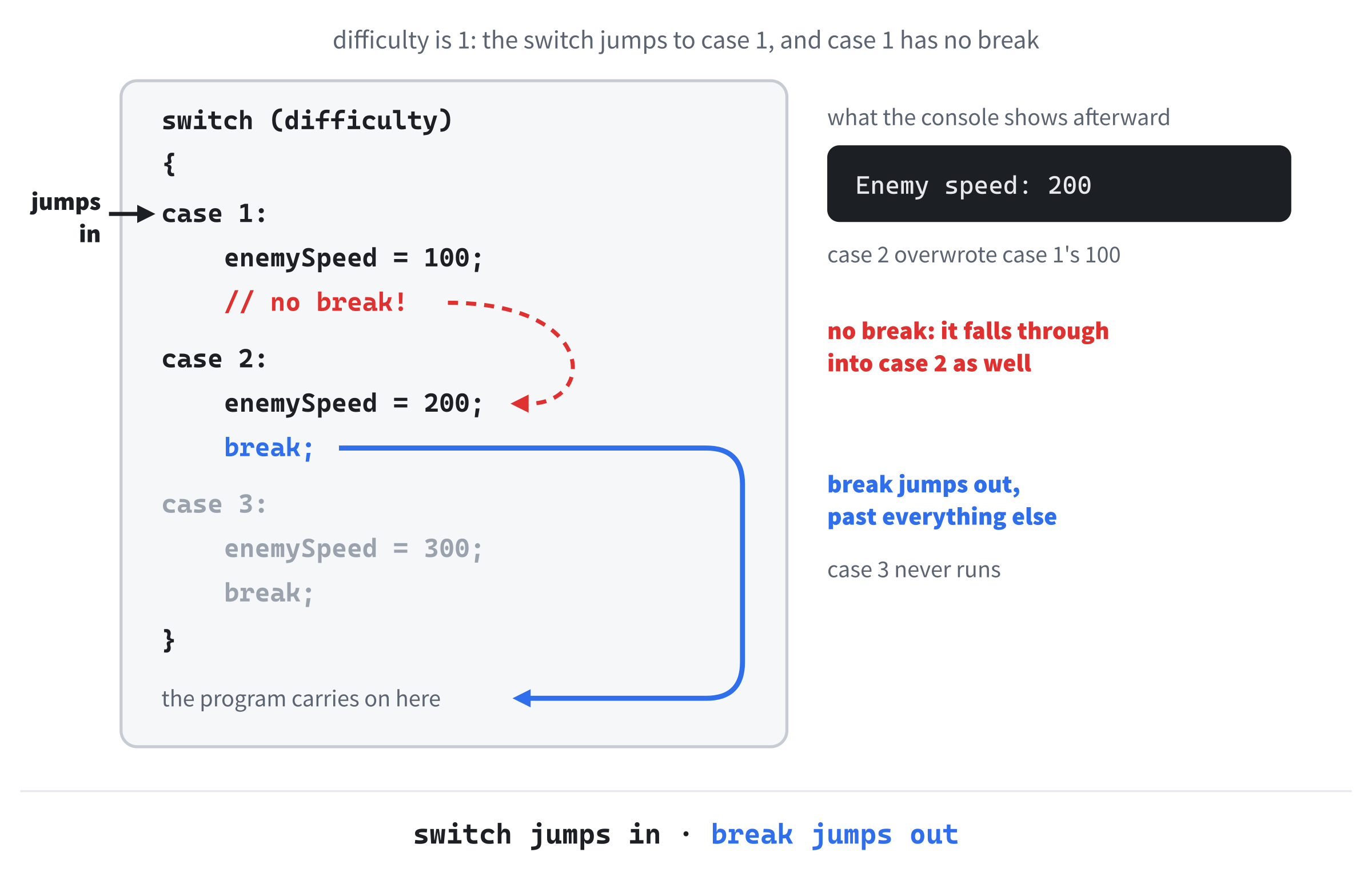
Here's a feature of switch that trips up beginners. When the switch jumps to a case, the program runs the code from that point onward, and it doesn't stop at the next case label. It only stops when it reaches a break or the end of the switch. So if you forget a break, the program falls through into the next case. Here's a difficulty setting with a break missing:
int difficulty = 1;
int enemySpeed = 0;

switch (difficulty)
{
case 1:
    enemySpeed = 100;
    // no break!
case 2:
    enemySpeed = 200;
    break;
case 3:
    enemySpeed = 300;
    break;
}

std::cout << "Enemy speed: " << enemySpeed << std::endl;
In the preceding code, a difficulty of 1 is meant to give the enemies a gentle speed of 100. The switch jumps to case 1:, and enemySpeed becomes 100. There's no break, though, so the program carries straight on into case 2's code, where enemySpeed becomes 200. Only then does it reach a break and leave the switch.
Run it, and the console shows "Enemy speed: 200". The player chose Easy and got Normal, and nothing crashed or complained. Figure 4.4 traces the path.
Forgetting a break is the most common switch bug of all, and the compiler won't warn you about it, even at Level 4.
Fall-through isn't always a mistake, though. Sometimes several values should do exactly the same thing, and stacking their case labels is a neat way to say so:
char key = 'W';

switch (key)
{
case 'w':
case 'W':
    std::cout << "Moving up" << std::endl;
    break;
case 's':
case 'S':
    std::cout << "Moving down" << std::endl;
    break;
}
In the preceding code, key holds a capital 'W', as it would with Caps Lock on, so the switch jumps to the case 'W': label and prints "Moving up". A lowercase 'w' would jump to the label just above it instead. That label has no code of its own, so the program falls straight through to the same lines, and the player moves up either way. That's fall-through on purpose, and it's perfectly fine, because stacked labels with nothing between them can't mean anything else.
As an interesting aside, C++17 added a way to mark a deliberate fall-through from a case that does some work of its own first. Write [[fallthrough]]; on its own line, where the break would otherwise go. Visual Studio's compiler accepts the code either way, but some other compilers warn about a missing break unless the marker is there, and anyone reading your code can see at a glance that you meant it. Stacked labels, like the ones above, don't need it.
With switch in the toolbox, we've met all of C++'s everyday tools for choosing a path. There's one more thing to know about how conditions are checked, and it's genuinely useful.
Short-Circuit Evaluation
When C++ checks a condition like A && B, it checks A first. If A is false, the whole answer must be false, whatever B is, so C++ doesn't bother checking B at all. The same thing happens with ||, the other way around: if A is true, the whole answer must be true, so B is never checked. This is called short-circuit evaluation.
Most of the time, you'll never notice it. Occasionally, though, it's the thing that makes a condition safe. Here's an attack that counts as a crushing blow when it does an average of 50 damage or more to each enemy it hits:
int totalDamage = 120;
int enemiesHit = 0;

if ((enemiesHit > 0) && (totalDamage / enemiesHit >= 50))
{
    std::cout << "Crushing blow!" << std::endl;
}
In the preceding code, the attack missed everyone, so enemiesHit is 0. The first check, enemiesHit > 0, is false, and thanks to short-circuit evaluation, the second check, which divides by enemiesHit, never happens.
That matters, because dividing a whole number by zero is one of the few things that stops a program dead. Take the first check out, run it, and Visual Studio halts the program with an unhandled exception: 0xC0000094: Integer division by zero. With the check in place, the program prints nothing and carries on. Set enemiesHit to 2, and the average is 60, so "Crushing blow!" appears.
The same idea protects Chapter 1's Escape check. For an event that isn't a key press, the first half, event.type == SDL_EVENT_KEY_DOWN, is false, so the second half never looks at event.key.key, which only means something for keyboard events. You'll meet the most famous use of short-circuiting in Chapter 10, where it stops a program from using a pointer that doesn't point at anything.
This is also why the order of your conditions can matter. Put the protective check first, and the risky one after it. Swap them around, as in (totalDamage / enemiesHit >= 50) && (enemiesHit > 0), and the division happens before the check that was supposed to prevent it.
goto (and Why Not to Use It)
C++ has a keyword called goto, which jumps straight to a labeled line somewhere else in your code. It exists, and it works. It's a leftover from older languages, where jumping around like this was the only way to repeat a section of code or skip over one.
In modern C++, you should essentially never use it. Every job that goto used to do is done better by if, switch, the loops we'll meet in Chapter 6, and the functions we'll meet in Chapter 8. Code that uses goto tends to become tangled, because to understand it, a reader has to follow a web of jumps rather than a clean flow from top to bottom. Programmers even have a name for the result: spaghetti code.
We're mentioning it only so that if you ever see goto in someone else's code, you'll know what it is, and why it's probably a warning sign. That's all. Let's move on.
AI Exercise (Optional)
If you'd like to explore decision-making code a little further, here's an AI exercise to try. As always, it's optional, and you won't miss any core content if you skip it.
Open your AI chatbot of choice and paste in this prompt:
"I'm a C++ beginner. I've just learned about if, else if, else, switch, the ternary operator, and the logical operators &&, ||, and !. Please write a short C++ program, 15 to 25 lines inside main, that works out how much damage a player's attack does in a simple game, based on a few factors, such as the weapon, a critical hit, and whether the enemy is blocking. Use only what I've listed, plus int, float, bool, and std::cout. Put braces on every if, with each curly brace on its own line, and add comments explaining each decision. Then point out one subtle bug or possible improvement in your own code, so I can learn to spot problems myself."
Notice what the preceding prompt is doing. It tells the AI who you are, exactly what you've learned, and the size and subject of the example you want. The prompt sets guardrails, too: only the tools you know, laid out the way this book lays them out, so the result looks like the code you've been reading. And it asks the AI to critique its own output, which flips it from writing code to reviewing code, a mode that's often more useful for learning.
When the answer comes back, read the code and try to predict what it will print. Then paste it into your sandbox, run it, and check your prediction.
Did the AI stick to the tools you listed, or slip in something you haven't learned yet, like a loop or a function? AIs often do. Can you follow every decision, and could you say why it used a switch in one place and an if in another? Does the bug it pointed out really exist? If anything doesn't click, ask a follow-up question. "Why did you use switch here instead of else if?" is a perfectly good one, and the answer is usually thoughtful.
The goal isn't to get working code. The goal is to sharpen your instinct for which decision-making tool fits which job.
Summary
You now have the whole decision-making toolkit of C++. The six comparison operators ask the questions, a tolerance compares decimals safely, and &&, ||, and ! combine the answers, with parentheses to make the grouping clear. You can branch with if, else if, and else, nest them when the levels mean different things, and leave the braces off a single short line without falling into the indentation trap. The ternary operator picks between two values in one line, switch handles a list of possible values, and you can tell a deliberate fall-through from a forgotten break. Short-circuit evaluation makes risky checks safe, and as for goto, you know about it mostly so that you can avoid it. Along the way, you've also seen that Visual Studio's warnings are worth reading, and how to turn them up.
Decisions are half of what makes a game interactive. The other half is repetition, doing something over and over until a condition changes, which is what loops are for, and they're coming up in Chapter 6. First, though, the next chapter puts everything from this one to work in a real game, Square Invader, where if statements decide when a bullet hits, when the invader turns around, and when the game is over.