
Every game in this book so far has taken a chapter or two. The last one takes seven. It's a roguelike called Rogue SDL: a dungeon crawler in the tradition of Rogue, a game written around 1980 that people still play, copy, and argue about today.
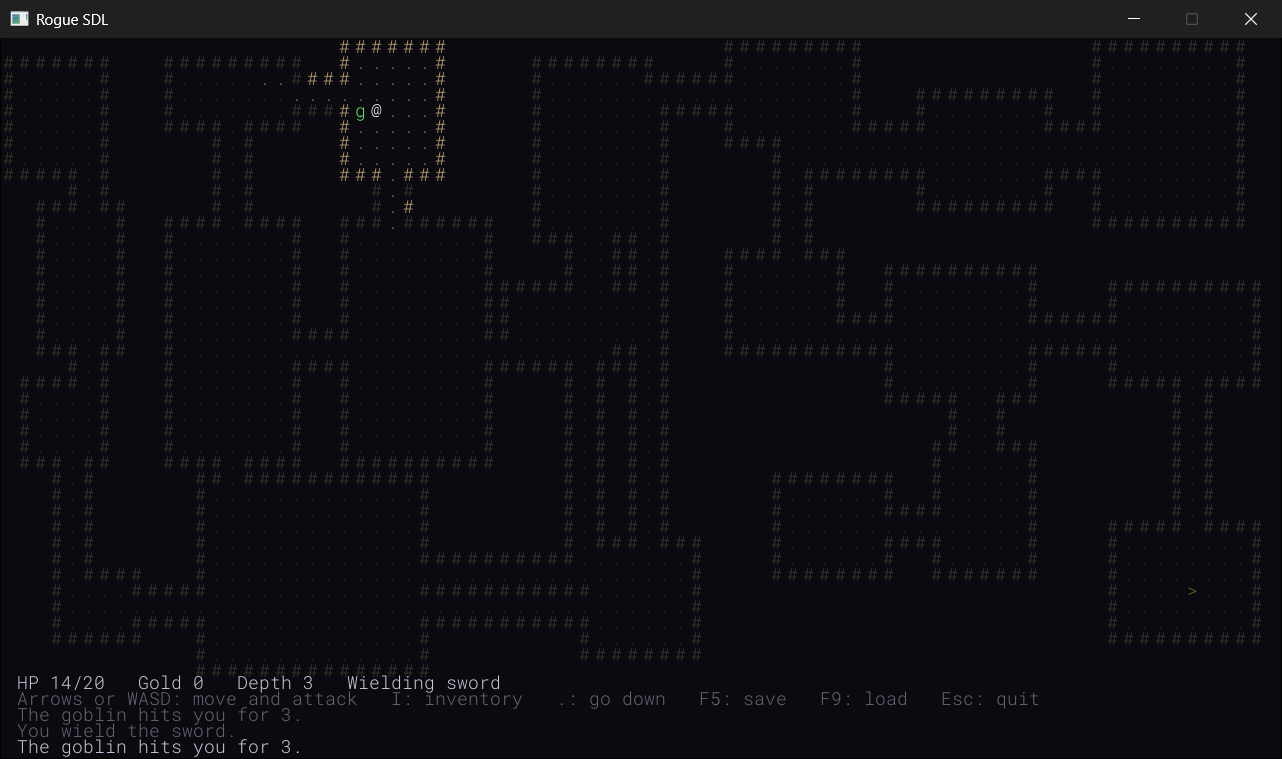
You explore a dungeon that's different every time, one room and corridor at a time. You fight monsters, pick up potions, scrolls, and weapons, and go down the stairs to deeper and deadlier levels, until you die and start again. And everything on the screen, the walls, the floors, the monsters, and you, is a single character of text, as Figure 30.1 shows. You are the @.
It's big enough to need almost everything the book has taught, so we'll build it in seven parts, and every chapter ends with a game you can play. This first one lays the foundations: a new library, SDL3_ttf, that turns a font into pictures; a grid of cells to draw them on; the @ itself; and a game loop of a kind we haven't written before, one that sleeps until you press a key. By the end of the chapter, you'll walk the @ around a room drawn entirely in characters.
SDL3 Projects/Rogue SDL Part 1 — the complete source for this chapter lives here, with its twelve files and the assets folder that holds the font. Each of the next six chapters has a folder of its own, from Rogue SDL Part 2 to Rogue SDL Part 7, so you can pick up the project at the start of any of them. To play one, open its .slnx file, choosing Trust and Continue if Visual Studio asks, as in Chapter 1, and press F5.In this chapter, we will:
- Add SDL3_ttf, SDL's add-on library for drawing text, to a project
- Turn a font into a texture for every character, just once, and tint each one as it's drawn
- Keep the whole map in one flat vector, and work out where each cell is in it
- Draw the floor and the walls around it, but never the solid rock behind them
- Give the player a class of their own, built on a base class that monsters and treasure will share later
- Write a game loop that sleeps until something happens
- Walk the
@around a room, experiment with it, fix the most common mistakes, and try an optional AI exercise
Let's build it.
Setting Up the Project
Rogue SDL draws every character from a font, and SDL can't read fonts by itself. It needs SDL3_ttf, the add-on library for TrueType fonts that Chapter 11 mentioned when it added SDL_image. Getting it works exactly the same way.
Downloading SDL3_ttf
Go to https://github.com/libsdl-org/SDL_ttf/releases, SDL_ttf's releases page on GitHub. Scroll down the latest release to its list of downloads, labeled Assets, and click Show all if the list is cut short. Find the file whose name ends in -VC.zip, such as SDL3_ttf-devel-3.2.2-VC.zip. As before, the version may be higher by the time you read this, and the name needs "devel" and "VC" in it, not win32-x64.
Download the zip, then unpack it next to SDL:
- Right-click the zip file and choose Extract All.
- Change the destination to
C:\and click Extract. This creates a folder with a name likeC:\SDL3_ttf-3.2.2. - Rename that folder to plain
SDL3_ttf.
Open C:\SDL3_ttf and check that include and lib are right there, with no other folder in between. The pieces are the three that Figure 11.1 showed. The include folder holds a folder called SDL3_ttf, with the header file SDL_ttf.h inside. The lib\x64 folder holds SDL3_ttf.lib, for building, and SDL3_ttf.dll, for running. That one DLL is all SDL3_ttf needs, since the code that reads fonts is built into it.
Most of the SDL_ttf examples online are for SDL2_ttf, and several of its functions changed for SDL 3. Font sizes are a float now, the functions that draw text take the text's length, and TTF_Init returns true when it works, like the rest of SDL 3. SDL2_ttf's if (TTF_Init() < 0) still compiles, with warning C4804: '<': unsafe use of type 'bool' in operation, but it can never be true. So when you look something up, check that it's for SDL3_ttf.
The SDL wiki's pages for SDL3_ttf, starting at https://wiki.libsdl.org/SDL3_ttf/FrontPage, describe every function as it is now, and they're the place to look.
Creating the Project
The project is Chapter 11's, with SDL3_ttf where SDL_image was. Here's the checklist:
- Choose File > New > Project, pick Empty Project (the one tagged C++, Windows, and Console), name it
Rogue SDL, and click Create. - In Solution Explorer, right-click Source Files, choose Add > New Item, and add a file called
main.cpp. - Right-click the project, choose Properties, set the two dropdowns to All Configurations and All Platforms, and then make the four changes:
- C/C++ > General > Additional Include Directories:
C:\SDL3\include;C:\SDL3_ttf\include - C/C++ > Language > C++ Language Standard: ISO C++20 Standard (/std:c++20)
- Linker > General > Additional Library Directories:
C:\SDL3\lib\x64;C:\SDL3_ttf\lib\x64 - Linker > Input > Additional Dependencies:
SDL3.lib;SDL3_ttf.lib
- C/C++ > General > Additional Include Directories:
- Right-click the project, choose Open Folder in File Explorer, and copy two DLLs into that folder, beside
main.cpp:SDL3.dllfromC:\SDL3\lib\x64, andSDL3_ttf.dllfromC:\SDL3_ttf\lib\x64.
If you exported a template after Chapter 11, you can start from it and swap SDL3_image for SDL3_ttf in each setting. You'll keep this one project for all seven chapters, since each of them carries on from where the one before finished.
The Font
In the project folder, beside main.cpp, make a folder called assets, and copy the font RobotoMono-Light.ttf into it from SDL3 Projects/Rogue SDL Part 1/assets in the book's repository. Roboto Mono is one of the free fonts at https://fonts.google.com, and any other font will do instead, as long as it's monospaced, which we'll come to shortly. Like code, fonts come with licenses. Roboto Mono's, the Apache License, lets you ship it with games of your own, even ones you sell, as long as a copy of the license goes with it, and the repository keeps one beside the font.
The path in the code will be assets/RobotoMono-Light.ttf. That's a relative path, as Chapter 11 explained, so it's found from the working directory, which is the project folder when the game runs from Visual Studio.
Planning the Game
A roguelike doesn't move the way our other games did. Nothing in the dungeon happens until you press a key, and then everything happens at once: you take a step, the monsters take theirs, and the game waits again. Each of those moments is called a turn, and turns, rather than frames, are what a roguelike counts. That's why the game can sleep between them.
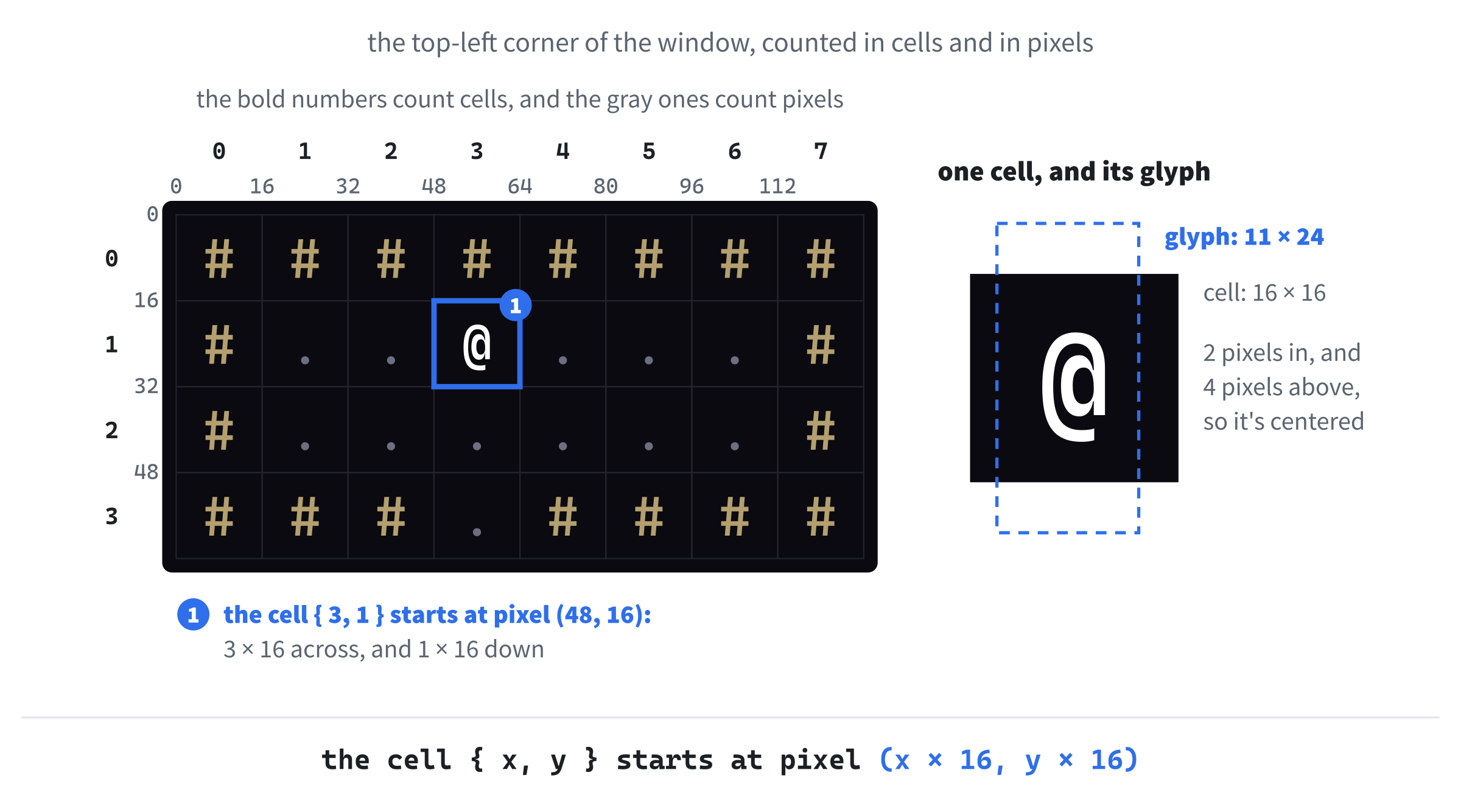
The dungeon is a grid of square cells, 80 across and 45 down, and each one shows a single character: # for a wall, . for floor, and @ for you. Every cell is 16 pixels square, so the grid exactly fills a window 1280 pixels wide and 720 tall.
The @ goes back to Rogue itself, written around 1980 by Michael Toy and Glenn Wichman at the University of California, Santa Cruz, and later with Ken Arnold, at Berkeley. It ran on terminals that could only show text, so a character was all anything could be. Rogue was so popular that a whole genre is named after it: games with random dungeons, turns, and death that's permanent are still called roguelikes.
The characters come from a font, but we won't ask SDL3_ttf to draw text every time the window is drawn. It's much faster to turn each character into a texture once, when the game starts, and then draw those textures, the way the Runner drew its digits from a strip of pictures in Chapter 17. So the game needs these twelve files:
| File | What it's for |
|---|---|
main.cpp |
Starts SDL and SDL3_ttf, makes the window, and runs the game |
Common.h |
What everything shares: a Point for a cell, the sizes, and the colors |
GlyphCache.h, GlyphCache.cpp |
A texture for every character in the font, and drawing them |
Map.h, Map.cpp |
The grid of cells, and what each one is made of |
Entity.h, Entity.cpp |
Anything that stands on the map, drawn as one character |
Player.h, Player.cpp |
You: an Entity that moves, unless there's a wall in the way |
Game.h, Game.cpp |
The game itself: it owns everything above, and runs the loop |
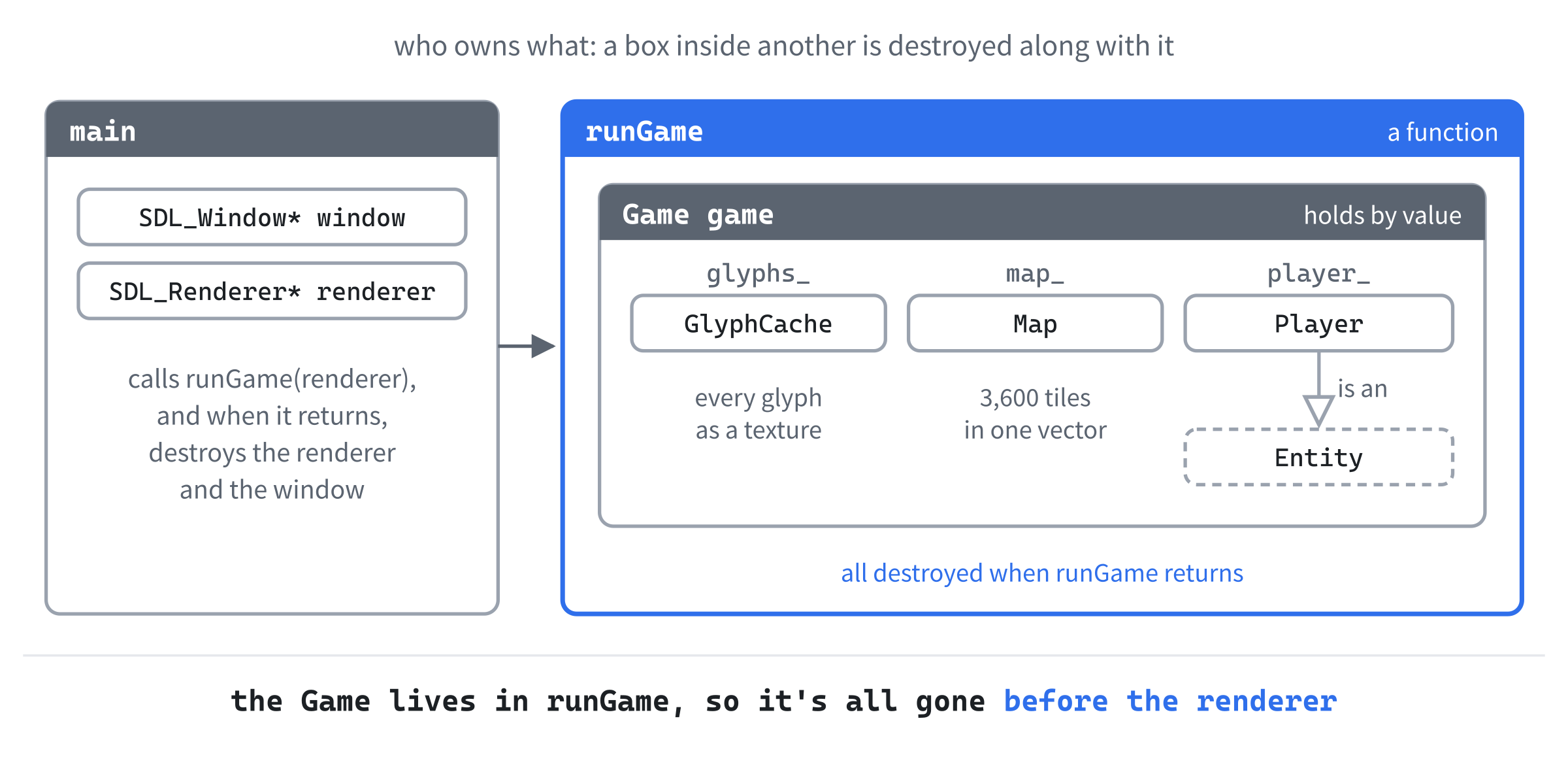
They're all new, and Figure 30.2 shows who owns what. The function runGame owns the Game, as it owned the runner and her textures in Chapter 19, and the Game owns the glyphs, the map, and the player. The Player is an Entity, which is the "is a" of Chapter 20.
We'll write the files in an order that lets you run the program early and often. First, Common.h and main.cpp, for a window. Then the glyph cache, to put characters in it. Then the map and the player, and last, the Game that brings them together.
Common Types and Constants
Every file needs to talk about cells, so the first file is the one they'll all include. In Solution Explorer, right-click Header Files, choose Add > New Item, and add a header called Common.h. Visual Studio has already typed its first line, #pragma once. Below it, type the rest, so that the file reads like this:
#pragma once
#include <SDL3/SDL.h>

// A place on the map, counted in cells, not pixels
struct Point
{
    int x = 0;
    int y = 0;
};

// The map is a grid of square cells, CELL_PX pixels across, MAP_W cells
// wide and MAP_H cells tall, and the window is exactly its size: 1280 by
// 720 pixels
constexpr int CELL_PX = 16;
constexpr int MAP_W = 80;
constexpr int MAP_H = 45;
constexpr int WINDOW_W = MAP_W * CELL_PX;
constexpr int WINDOW_H = MAP_H * CELL_PX;
In the preceding code, Point is a place on the map, counted in cells: { 0, 0 } is the top-left cell, and { 79, 44 } the bottom-right. Its members start at 0, with the default member values that Chapter 11 gave its structs, so a Point is never left holding garbage. Below it come the sizes. The constant CELL_PX is how many pixels across a cell is, and MAP_W and MAP_H are the map's size in cells, so the window's size is worked out from them: 80 times 16 is 1280, and 45 times 16 is 720.
They're constexpr, which Chapter 2 introduced: constants whose values are known while the program is being built. Chapter 2 promised that you'd meet them in the final project, and here they are, doing what they do best. The window's size is calculated from the other constants, before the program ever runs, and if you change CELL_PX or MAP_W, the window follows. Figure 30.3 shows how cells and pixels fit together.
The last part of Common.h is the colors. Add them below the constants, with a blank line in between:
// Every color in the game, in one place
namespace Palette
{
    constexpr SDL_Color BACKGROUND = { 10, 10, 16, 255 };
    constexpr SDL_Color WALL = { 180, 160, 110, 255 };
    constexpr SDL_Color FLOOR = { 110, 110, 130, 255 };
    constexpr SDL_Color PLAYER = { 255, 255, 255, 255 };
}
In the preceding code, the colors live in a namespace, which Chapter 24 introduced, so their names are Palette::WALL and Palette::FLOOR, and they can't clash with anything else called WALL. Each is an SDL_Color, the struct of red, green, blue, and alpha that Chapter 11 used for its tints. The background is almost black, with a little blue in it, and the walls are a sandy brown. More colors will join them as the game grows, and keeping them all in one place means that changing the look of the game is a matter of changing a few numbers here.
Starting SDL and SDL3_ttf
Now main.cpp, which you added when you made the project. Open it, and type the comment at the top of the file, and the includes:
/*
    Rogue SDL
    The final project from Learning C++ by Building Games, built over
    Chapters 30 to 36

    A dungeon crawler in the tradition of Rogue, drawn entirely in
    characters. You're the @, and nothing happens until you move.

    New in this project: SDL3_ttf, SDL's add-on library for drawing text.
*/

#include <SDL3/SDL.h>
#include <SDL3/SDL_main.h>
#include <SDL3_ttf/SDL_ttf.h>

#include "Common.h"
In the preceding code, the comment says what the program is, as every project's has since Chapter 11, and it'll stay true for all seven chapters. SDL's headers come first, as before, and then SDL_ttf.h, from the SDL3_ttf folder inside the include folder you added. Last, after a blank line, comes the project's own header, Common.h, in quotation marks.
In Chapter 19, runGame held the whole game, so that everything it made was destroyed before main destroyed the renderer. This game will work the same way, but there's no game yet to run, so for now, runGame just keeps a window open. Add it below the includes, with a blank line in between:
// The whole game. For now, a window that waits to be closed, and draws
// itself again whenever anything happens
bool runGame(SDL_Renderer* renderer)
{
    SDL_Event event;
    while (SDL_WaitEvent(&event) && event.type != SDL_EVENT_QUIT)
    {
        SDL_SetRenderDrawColor(renderer, Palette::BACKGROUND.r,
                               Palette::BACKGROUND.g, Palette::BACKGROUND.b,
                               255);
        SDL_RenderClear(renderer);
        SDL_RenderPresent(renderer);
    }
    return true;
}
In the preceding code, the while loop's condition does two jobs, from left to right. First, SDL_WaitEvent waits until something happens, such as a key press, a click, or a click on the window's X, and puts it in event. Then the condition checks that it wasn't the X, SDL_EVENT_QUIT, and if it wasn't, the loop clears the window to the background color and shows it. It doesn't matter what the event was: for now, every event just draws the window again. We'll see why SDL_WaitEvent is so important later in the chapter.
Now for main, which starts everything. Add the first part of it below runGame, with a blank line in between:
int main(int argc, char* argv[])
{
    // Start SDL and SDL3_ttf, then make the window and the renderer
    if (!SDL_Init(SDL_INIT_VIDEO))
    {
        SDL_Log("SDL_Init failed: %s", SDL_GetError());
        return 1;
    }

    if (!TTF_Init())
    {
        SDL_Log("TTF_Init failed: %s", SDL_GetError());
        SDL_Quit();
        return 1;
    }
In the preceding code, SDL_Init starts SDL, as it has since Chapter 1. Then TTF_Init starts SDL3_ttf, which must happen before any font is opened. It returns true when it works, so if it doesn't, main logs SDL's reason and returns 1, after calling SDL_Quit to undo the SDL_Init that did work.
Next come the window and the renderer. Add these lines below the ones you just typed, with a blank line in between:
SDL_Window* window = SDL_CreateWindow("Rogue SDL", WINDOW_W, WINDOW_H, 0);
if (!window)
{
    SDL_Log("SDL_CreateWindow failed: %s", SDL_GetError());
    TTF_Quit();
    SDL_Quit();
    return 1;
}

SDL_Renderer* renderer = SDL_CreateRenderer(window, nullptr);
if (!renderer)
{
    SDL_Log("SDL_CreateRenderer failed: %s", SDL_GetError());
    SDL_DestroyWindow(window);
    TTF_Quit();
    SDL_Quit();
    return 1;
}
In the preceding code, the window is WINDOW_W by WINDOW_H, from Common.h, titled Rogue SDL. The renderer is made for it as usual, and if either one fails, main undoes everything that worked, in the reverse order, before it returns: TTF_Quit undoes TTF_Init, and SDL_Quit undoes SDL_Init.
The rest of main runs the game and cleans up. Add it below the renderer's check, with a blank line in between:
    // Show each frame in step with the monitor's refresh
    SDL_SetRenderVSync(renderer, 1);

    // Play until the player quits, then clean up, in the reverse order
    // we created things
    bool played = runGame(renderer);

    SDL_DestroyRenderer(renderer);
    SDL_DestroyWindow(window);
    TTF_Quit();
    SDL_Quit();

    return played ? 0 : 1;
}
In the preceding code, vsync goes on, as in Chapter 1, and then runGame plays the game until the player quits, and says whether it managed to start. After that, main destroys the renderer and the window, and quits SDL3_ttf and SDL, in the reverse of the order they started. Its last line is Chapter 19's: main returns 0 if the game was played, and 1 if it couldn't start.
Checkpoint: Press F5. A dark window titled Rogue SDL opens, 1280 by 720 pixels. It doesn't do anything yet, and the Escape key doesn't close it, so click its X. If the build stops with C1083: Cannot open include file: 'SDL3_ttf/SDL_ttf.h', check the include folders in the checklist, and if a message box says that SDL3_ttf.dll was not found, check that you copied it beside main.cpp.
Characters as Pictures
A font is a set of drawings, one for each character, and each drawing is called a glyph. SDL3_ttf can draw a glyph into a surface, the kind of picture in ordinary memory that Chapter 11 met, which we can then turn into a texture, ready to draw. Doing that every time the window is drawn would work, but slowly, since turning a glyph into pixels is a lot of work, and the window can show thousands of glyphs at once.
So the game does it once, when it starts. It makes a texture for every character it might ever need, in white, and keeps them. When it needs a red r or a brown #, it draws the white one with a color modulation, which Chapter 11 used to tint its moles: white times a color is that color. One texture per character serves every color. This is the glyph cache, and Figure 30.4 shows it at work.
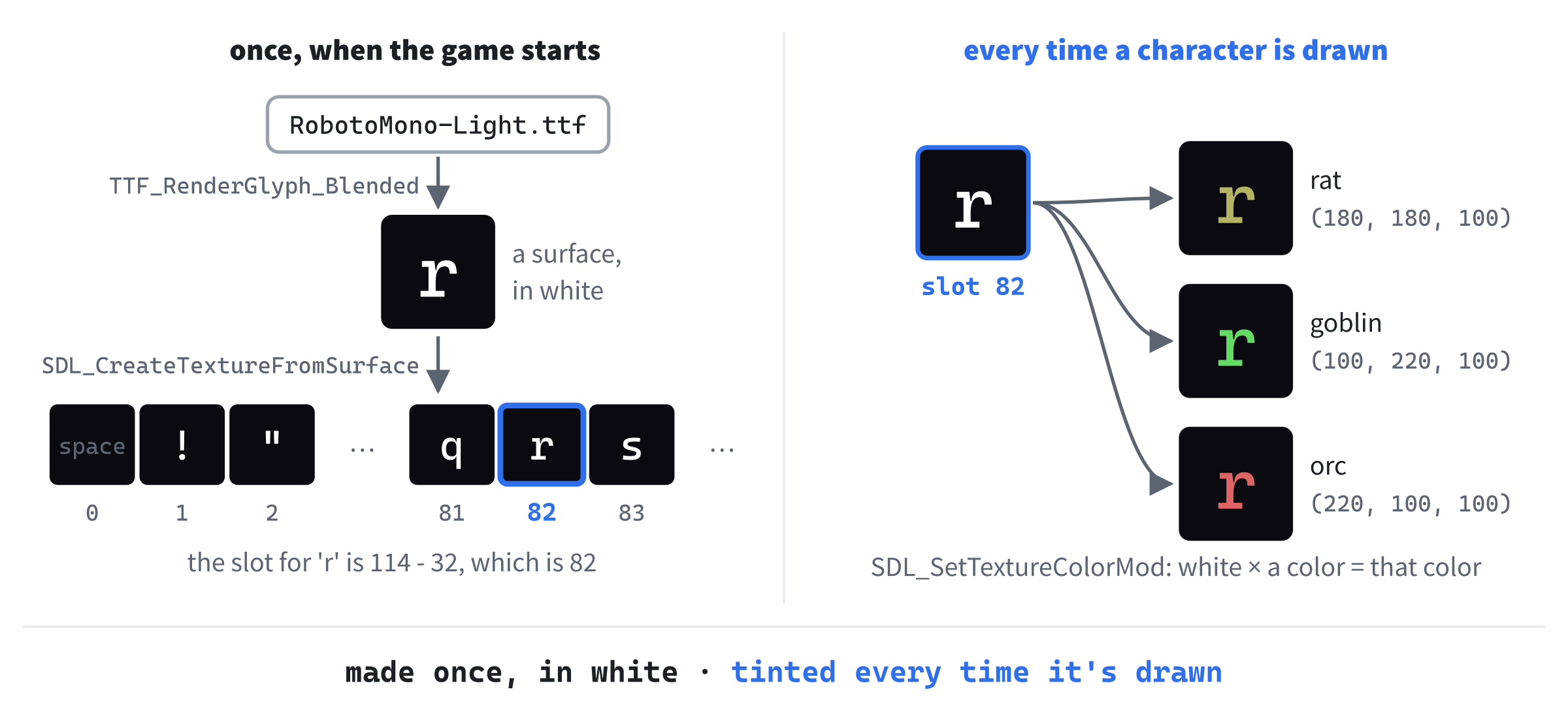
The font is monospaced, which means that every character is exactly as wide as every other, as on an old typewriter. In most fonts, an i is much narrower than an m, but in Roboto Mono, they're the same. That's what we want for a grid, since every character then fits its cell in the same way, and it means that the cache only needs to know one size for them all.
GlyphCache.h
The cache is a class, with its two files. In Solution Explorer, add a header called GlyphCache.h, and below its #pragma once, type the includes and three constants, so that the file starts like this:
#pragma once
#include <SDL3/SDL.h>
#include <array>   // std::array, for the glyphs
#include <string>   // std::string, for the font's path
#include "Common.h"

// The printable characters, from the space (code 32) to the tilde (126)
constexpr char FIRST_GLYPH = ' ';
constexpr char LAST_GLYPH = '~';
constexpr int GLYPH_COUNT = LAST_GLYPH - FIRST_GLYPH + 1;
In the preceding code, the includes bring in std::array and std::string, each with a comment saying what it's for, as in Chapter 23, and Common.h, for Point. Then come the characters that the cache will hold: the printable ones, from the space to the tilde, ~. A char is a small number, as Chapter 2 said, and these are the characters numbered 32 to 126, which are every letter, digit, and symbol on a US keyboard. So GLYPH_COUNT, the tilde's number less the space's, plus one, is 95.
Now the class. Add this below the constants, with a blank line in between:
// Every character the game can draw, made once from a font as a white
// picture, and tinted to whatever color it's drawn in
class GlyphCache
{
public:
    GlyphCache(SDL_Renderer* renderer, const std::string& fontPath,
               float size);
    ~GlyphCache();

    GlyphCache(const GlyphCache&) = delete;
    GlyphCache& operator=(const GlyphCache&) = delete;

    bool isLoaded() const;
    void draw(SDL_Renderer* renderer, char c, Point cell,
              SDL_Color color) const;
In the preceding code, the constructor takes the renderer that the textures are for, the path of the font, and its size. The destructor will destroy the textures, which is Chapter 18's RAII, and the two lines after it are Chapter 18's deleted copy operations. A copy of a GlyphCache would copy 95 pointers, not the 95 textures, so the copy and the original would each try to destroy the same textures: a GlyphCache can't be copied at all. The function isLoaded says whether the font loaded, as the Texture class's did in Chapter 19, and draw draws one character, c, in a cell, in a color.
The private part finishes the class. Add it below draw’s declaration, with a blank line in between:
private:
    void drawAt(SDL_Renderer* renderer, char c, float x, float y,
                SDL_Color color) const;

    std::array<SDL_Texture*, GLYPH_COUNT> glyphs_ = {};
    float glyphW_ = 0.0f;   // the size of every glyph, since the font is
    float glyphH_ = 0.0f;   // monospaced
    bool loaded_ = false;
};
In the preceding code, drawAt is a private member function, as in Chapter 19's HUD. It draws a character at a pixel rather than in a cell, and draw will work out the pixel. The textures live in glyphs_, a std::array of 95 texture pointers, one for each character. The = {} sets every one of them to nullptr to begin with, just as Chapter 13's empty braces set every element of an array to 0. Then come the size of a glyph, which is the same for every character in a monospaced font, and loaded_, which starts false, and only becomes true once the textures are made.
Why an array, rather than a std::unordered_map<char, SDL_Texture*>, which Chapter 15 would have suggested for looking something up by a key? Because the keys here are small numbers, all in a row, from 32 to 126, so a character's own number, less 32, is already its place in an array. A map would do the same job, but it would have to hash each key to find it. When the keys are a short run of whole numbers, an array indexed by them is simpler and faster.
The character's place in the array is its number less the space's, which is exactly how Chapter 17 found a digit's picture with c - '0'.
GlyphCache.cpp
Now add a C++ file called GlyphCache.cpp, and type the includes and the first part of the constructor:
#include "GlyphCache.h"
#include <SDL3_ttf/SDL_ttf.h>
#include <cmath>   // std::floor

GlyphCache::GlyphCache(SDL_Renderer* renderer, const std::string& fontPath,
                       float size)
{
    TTF_Font* font = TTF_OpenFont(fontPath.c_str(), size);
    if (!font)
    {
        SDL_Log("Couldn't open %s: %s", fontPath.c_str(), SDL_GetError());
        return;
    }
In the preceding code, the file includes its own header first, then SDL_ttf.h, here rather than in the header, since GlyphCache is the only class that uses SDL3_ttf, and <cmath>, for std::floor. The constructor opens the font with TTF_OpenFont, which takes the file's path, as a const char*, and the size, in points. The c_str turns the std::string into a const char*, as in Chapter 11. If the font can't be opened, TTF_OpenFont returns nullptr, and the constructor logs the reason and returns, leaving loaded_ false, which is all isLoaded needs to report the failure.
The rest of the constructor makes the textures. Add it below the check, with a blank line in between:
    // Draw each character once, in white, and keep it as a texture
    const SDL_Color white = { 255, 255, 255, 255 };
    for (char c = FIRST_GLYPH; c <= LAST_GLYPH; ++c)
    {
        SDL_Surface* surface = TTF_RenderGlyph_Blended(font, c, white);
        glyphs_[c - FIRST_GLYPH] =
            SDL_CreateTextureFromSurface(renderer, surface);
        SDL_DestroySurface(surface);
    }
    TTF_CloseFont(font);

    // In a monospaced font, every character is the same size, so the
    // first one gives us the size of them all
    SDL_GetTextureSize(glyphs_[0], &glyphW_, &glyphH_);
    loaded_ = true;
}
In the preceding code, the loop goes through the characters from the space to the tilde. For each, TTF_RenderGlyph_Blended draws its glyph into a new surface, in the color white. "Blended" means smooth: the edges of the glyph are partly see-through, so it doesn't look jagged. Then SDL_CreateTextureFromSurface turns the surface into a texture, which goes into the array at the character's place, c - FIRST_GLYPH. The surface isn't needed after that, so SDL_DestroySurface frees it.
Once the loop is done, the font isn't needed either, and TTF_CloseFont closes it. Last, SDL_GetTextureSize measures the first texture, the space's, and puts its width and height in glyphW_ and glyphH_. In a monospaced font, that's the size of every glyph: at 18 points, Roboto Mono's are 11 pixels wide and 24 tall, taller than a cell, since a glyph leaves room above and below its letters for accents and tails. Then loaded_ becomes true.
The destructor and isLoaded come next. Add them below the constructor, with a blank line in between:
GlyphCache::~GlyphCache()
{
    for (SDL_Texture* glyph : glyphs_)
    {
        if (glyph)
            SDL_DestroyTexture(glyph);
    }
}

bool GlyphCache::isLoaded() const
{
    return loaded_;
}
In the preceding code, the destructor goes through the array with a range-based for, and destroys every texture that was made. The if skips any that are nullptr, as all of them are if the font didn't load. Then isLoaded returns loaded_.
Next, draw, which draws a character in a cell. Add it below isLoaded, with a blank line in between:
// Draws one character in the middle of a cell
void GlyphCache::draw(SDL_Renderer* renderer, char c, Point cell,
                      SDL_Color color) const
{
    // Whole pixels only, so that the glyph stays sharp
    float x = cell.x * CELL_PX + std::floor((CELL_PX - glyphW_) / 2);
    float y = cell.y * CELL_PX + std::floor((CELL_PX - glyphH_) / 2);
    drawAt(renderer, c, x, y, color);
}
In the preceding code, the cell's top-left pixel is its x times CELL_PX, and its y times CELL_PX, as Figure 30.3 showed. The glyph is centered in it, by adding half the difference between the cell's size and the glyph's. For the width, that's half of 16 less 11, which is 2.5, and std::floor rounds it down to 2, because a texture drawn half a pixel off is smoothed across two pixels, and a character would look blurred. For the height, it's half of 16 less 24, which is -4 exactly, so the glyph starts four pixels above its cell, and its letters end up in the middle.
Last, drawAt, which does the drawing. Add it below draw, with a blank line in between:
// Draws one character with its top-left corner at a pixel, tinted to a
// color. Characters without a glyph are skipped
void GlyphCache::drawAt(SDL_Renderer* renderer, char c, float x, float y,
                        SDL_Color color) const
{
    if (c < FIRST_GLYPH || c > LAST_GLYPH)
        return;

    SDL_Texture* glyph = glyphs_[c - FIRST_GLYPH];
    SDL_FRect box = { x, y, glyphW_, glyphH_ };
    SDL_SetTextureColorMod(glyph, color.r, color.g, color.b);
    SDL_RenderTexture(renderer, glyph, nullptr, &box);
}
In the preceding code, a character outside the 95 that the cache holds, such as a tab, is skipped, so it can never reach past either end of the array. For any other, glyph is its texture. The rectangle box is where it goes, at the pixel, and the glyph's own size. Then SDL_SetTextureColorMod tints it, and SDL_RenderTexture copies it in. Every draw sets its own color, so a tint can never be left over from the one before, which was Chapter 21's lesson.
A First Look
The cache is ready, so let's try it before writing anything else. In main.cpp, add this below #include "Common.h":
#include "GlyphCache.h"In the preceding code, main.cpp includes the cache's header, so that runGame can make one. Now add these lines at the top of runGame, above SDL_Event event;, with a blank line in between:
GlyphCache glyphs(renderer, "assets/RobotoMono-Light.ttf", 18.0f);
if (!glyphs.isLoaded())
    return false;
In the preceding code, runGame makes a GlyphCache from the font in the assets folder, at 18 points. If it didn't load, runGame returns false, which ends the program. Then add these lines to the loop, below the call to SDL_RenderClear:
glyphs.draw(renderer, '#', { 38, 22 }, Palette::WALL);
glyphs.draw(renderer, '@', { 40, 22 }, Palette::PLAYER);
glyphs.draw(renderer, '.', { 42, 22 }, Palette::FLOOR);
In the preceding code, the cache draws three characters in a row, in the middle of the window: a wall at { 38, 22 }, you at { 40, 22 }, and a floor at { 42, 22 }, each in its color from the palette. The braces around { 38, 22 } make a Point right where it's needed, since a Point is what draw asks for.
Checkpoint: Press F5. The same dark window opens, with # @ . in the middle, in brown, white, and gray, as in Figure 30.5. If the window flashes up and closes, look in the console window: if it says Couldn't open assets/RobotoMono-Light.ttf, the font isn't in an assets folder in the project folder. Click the X to close the window.

The Map
The map is a grid of cells, and each cell needs to remember what it's made of. Chapter 13 kept a grid like this as a vector of vectors, one vector for each row, and drew a little dungeon with it. That works, but it's a vector of rows, each with its own block of memory, and the map doesn't need that. Its rows are all the same length, so it can keep every cell in one vector, a row at a time: the first 80 cells are the top row, the next 80 are the second, and so on.
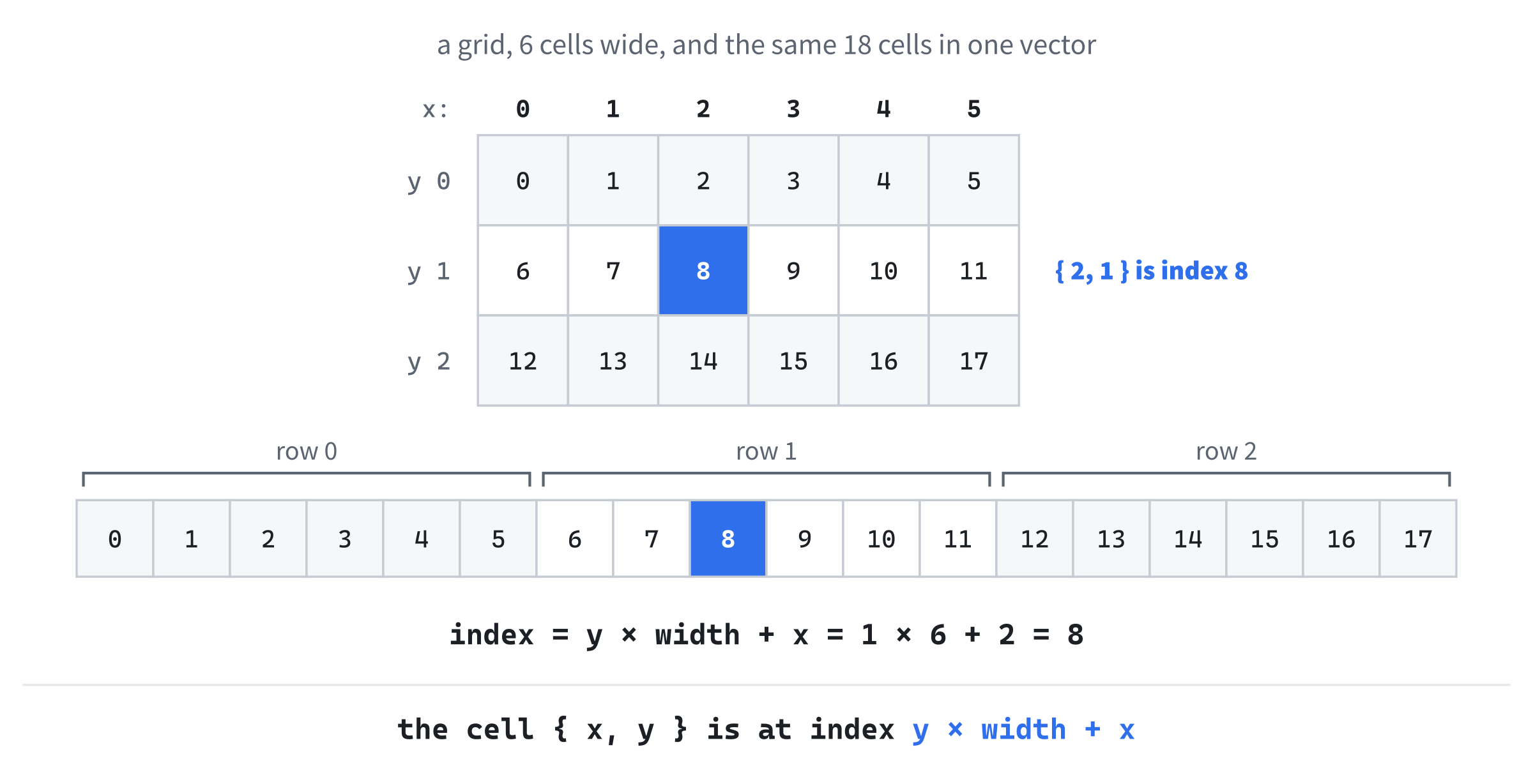
To find a cell in that vector, skip the rows above it, then count along: the cell { x, y } is at index y * MAP_W + x, just as Chapter 24's Grid template found its cells. Figure 30.6 shows the idea on a small grid. Reading memory in order, from each cell to the next, is what a processor does fastest, as Chapter 29 measured, and when the map is drawn, row by row, it reads straight along the vector.
Map.h
Add a header called Map.h, and below its #pragma once, type the includes, and the two types a map is made of:
#pragma once
#include <SDL3/SDL.h>
#include <vector>   // std::vector, for the tiles
#include "Common.h"

class GlyphCache;

// What a cell of the map is made of
enum class Terrain
{
    Wall,
    Floor
};

// One cell of the map
struct Tile
{
    Terrain terrain = Terrain::Wall;
};
In the preceding code, the header forward-declares GlyphCache, as Chapter 28 taught, because the map only refers to the cache, in draw’s parameters, and doesn't hold one: include what you hold, and forward-declare what you only refer to. The Terrain enum says what a cell is made of, with the enum class of Chapter 11, and for now, there are only two kinds, wall and floor. A Tile is everything a cell remembers, which is only its terrain, for now, and it starts as wall. Chapter 31 will give it more to remember.
Now the class itself. Add this below Tile, with a blank line in between:
// The dungeon: a grid of tiles, MAP_W across and MAP_H down, kept in one
// vector, a row at a time
class Map
{
public:
    Map();

    Tile& at(Point cell);
    const Tile& at(Point cell) const;
    bool isInside(Point cell) const;
    bool isBlocked(Point cell) const;
    bool isNextToOpen(Point cell) const;

    void fill(Terrain terrain);
    void draw(SDL_Renderer* renderer, const GlyphCache& glyphs) const;

private:
    std::vector<Tile> tiles_;
};
In the preceding code, at gives the tile at a cell, and there are two versions of it: one for a map that can be changed, and a const one for a map that can only be looked at, which Chapter 28 used for its getPhysics. The next three answer questions about a cell: isInside says whether it's on the map at all, isBlocked whether something can walk into it, and isNextToOpen whether there's floor beside it, which we'll need for drawing. Then fill sets every tile, and draw draws the map. The tiles themselves are in tiles_, the one vector.
Map.cpp
Add a C++ file called Map.cpp, and start it with the includes, the constructor, and at:
#include "Map.h"
#include "GlyphCache.h"

Map::Map()
    : tiles_(MAP_W * MAP_H)
{
}

// The tile at a cell. Row y starts y whole rows into the vector
Tile& Map::at(Point cell)
{
    return tiles_[cell.y * MAP_W + cell.x];
}

const Tile& Map::at(Point cell) const
{
    return tiles_[cell.y * MAP_W + cell.x];
}
In the preceding code, Map.cpp includes GlyphCache.h, since draw will use the cache. The constructor makes tiles_ with MAP_W * MAP_H tiles, which is 3,600, all walls, since that's how a Tile starts. The two versions of at are the same one line, which is Figure 30.6's formula: the cell's row, times the width, plus its column. One returns a Tile& that can change the tile, and the const one returns a const Tile& that can only look.
Neither version checks that the cell is on the map, so a cell off the edge would give an index outside the vector. The rule is to ask isInside first, and in a Debug build, the vector's [] checks anyway, as Chapter 13 said. Add isInside and isBlocked below the second at, with a blank line in between:
bool Map::isInside(Point cell) const
{
    return cell.x >= 0 && cell.x < MAP_W && cell.y >= 0 && cell.y < MAP_H;
}

// Walls block the way, and so does everything outside the map
bool Map::isBlocked(Point cell) const
{
    return !isInside(cell) || at(cell).terrain == Terrain::Wall;
}
In the preceding code, isInside checks that both of the cell's coordinates are within the map. Then isBlocked says that a cell is blocked if it's outside the map, or if it's a wall. The || stops as soon as its left side is true, as Chapter 4 explained, so at is only ever called for a cell that's inside. That's why the order of the two sides matters.
Most of the map will be solid rock, and a roguelike doesn't draw rock. It draws the floor, and the walls that border the floor, and leaves the rest black. So the map needs to know whether a wall has any floor beside it. Add isNextToOpen below isBlocked, with a blank line in between:
// Whether any of the eight cells around this one is open ground, rather
// than wall
bool Map::isNextToOpen(Point cell) const
{
    for (int dy = -1; dy <= 1; ++dy)
    {
        for (int dx = -1; dx <= 1; ++dx)
        {
            Point next = { cell.x + dx, cell.y + dy };
            if (isInside(next) && at(next).terrain != Terrain::Wall)
                return true;
        }
    }
    return false;
}
In the preceding code, the two loops go through the nine cells in the three-by-three square around the cell, from one up and one left, dx and dy both -1, to one down and one right. For each, next is that cell, and if it's inside the map and isn't a wall, the cell is next to open ground, and the function returns true at once. The cell itself is one of the nine, but it doesn't matter, since it's only ever asked about walls. If none of the nine is open, the answer is false.
Next, fill, which sets the whole map to one kind of terrain. Add it below isNextToOpen, with a blank line in between:
// Replaces every tile with a new one, made of the given terrain
void Map::fill(Terrain terrain)
{
    for (Tile& tile : tiles_)
        tile = { terrain };
}
In the preceding code, tile = { terrain } replaces each tile with a brand-new one, made from the braces, with terrain as its terrain. Once Chapter 31 gives Tile more to remember, everything else in a new tile starts from its default value too, so filling the map will always give a completely fresh map.
Last, draw. Add it below fill, with a blank line in between:
// Draws the floors, and the walls around them. Solid rock, with no open
// ground beside it, isn't drawn at all
void Map::draw(SDL_Renderer* renderer, const GlyphCache& glyphs) const
{
    for (int y = 0; y < MAP_H; ++y)
    {
        for (int x = 0; x < MAP_W; ++x)
        {
            Point cell = { x, y };
            if (at(cell).terrain == Terrain::Floor)
                glyphs.draw(renderer, '.', cell, Palette::FLOOR);
            else if (isNextToOpen(cell))
                glyphs.draw(renderer, '#', cell, Palette::WALL);
        }
    }
}
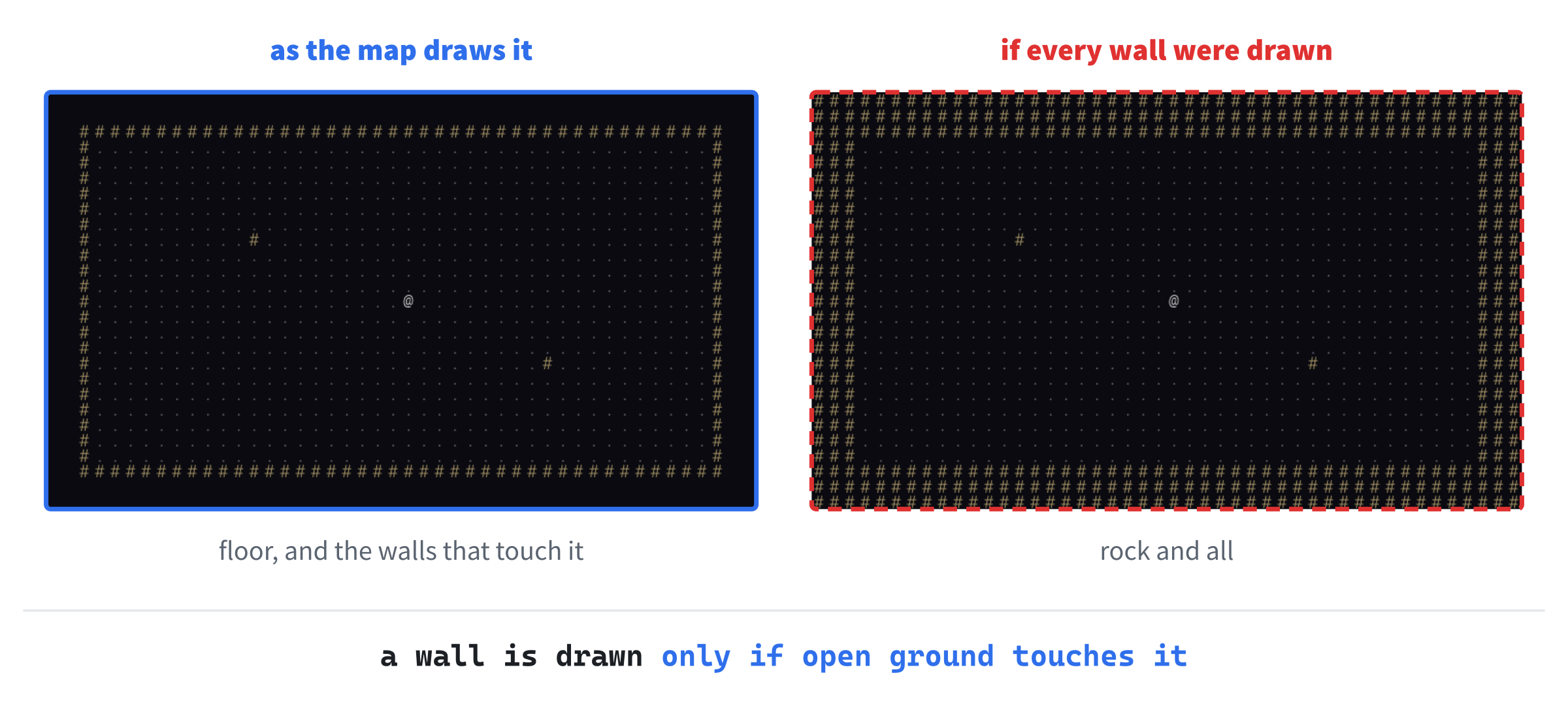
In the preceding code, the loops go through the map a row at a time, from the top. A floor cell is drawn as a ., and a wall as a #, but only if it's next to open ground. Rock, which is wall with nothing but more wall around it, isn't drawn at all. Figure 30.7 shows the difference that makes.
Checkpoint: There's nothing new to see yet, since nothing makes a map, but you can check your typing. Click in Map.cpp, and press Ctrl+F7 to compile it on its own, as Chapter 9 did. The Error List should stay empty. If it shows C2661: 'Map::at': no overloaded function takes 2 arguments, a call is passing x, y where it should pass { x, y }, a single Point.
The Player
Anything that stands on the map, whether it's you, a rat, or a pile of gold, is drawn as one character in one color, at a cell. So they'll all share a base class, Entity, as Chapter 21's runners did. It's the "is a" of Chapter 20: the player is an entity, and in Chapter 32, so are the monsters and the treasure.
Add a header called Entity.h, and below its #pragma once, type the rest, so that the file reads like this:
#pragma once
#include <SDL3/SDL.h>
#include "Common.h"

class GlyphCache;

// Anything that stands on the map, drawn as one character in one color
class Entity
{
public:
    Entity(Point position, char glyph, SDL_Color color);

    Point getPosition() const;
    void setPosition(Point position);
    void draw(SDL_Renderer* renderer, const GlyphCache& glyphs) const;

private:
    Point position_;
    char glyph_;
    SDL_Color color_;
};
In the preceding code, an Entity is made with its position, its character, and its color, and it can say where it is, be moved, and draw itself. Its members are private, and anything built on it moves it with setPosition, like anything else. There's nothing virtual here, because nothing needs it: every kind of entity draws itself in exactly the same way, and the game will keep each kind in a place of its own, as Chapter 27's Asteroids kept its ship and its rocks apart. Chapter 35 is where virtual earns its keep, in a family of classes that really do behave differently.
Now add a C++ file called Entity.cpp, and type its four functions:
#include "Entity.h"
#include "GlyphCache.h"

Entity::Entity(Point position, char glyph, SDL_Color color)
    : position_(position), glyph_(glyph), color_(color)
{
}

Point Entity::getPosition() const
{
    return position_;
}

void Entity::setPosition(Point position)
{
    position_ = position;
}

void Entity::draw(SDL_Renderer* renderer, const GlyphCache& glyphs) const
{
    glyphs.draw(renderer, glyph_, position_, color_);
}
In the preceding code, the constructor puts its three arguments into the members, in its initializer list. The next two functions are a getter and a setter, and draw asks the glyph cache to draw the entity's character at its position, in its color. That's all an entity needs to be seen.
The player is the first entity. Add a header called Player.h, and below its #pragma once, type the rest:
#pragma once
#include "Entity.h"

class Map;

// You: the @
class Player : public Entity
{
public:
    Player();

    bool tryMove(int dx, int dy, const Map& map);
};
In the preceding code, Player is built publicly on Entity, as Chapter 20's classes were, so it has everything an entity has. It forward-declares Map, since tryMove only refers to one. Its constructor takes no arguments, because every player starts the same way, and tryMove takes a step, if it can.
Now add a C++ file called Player.cpp, and type its two functions:
#include "Player.h"
#include "Map.h"

Player::Player()
    : Entity({ 0, 0 }, '@', Palette::PLAYER)
{
}

// Steps one cell, unless the way is blocked. Returns true if the player
// moved
bool Player::tryMove(int dx, int dy, const Map& map)
{
    Point next = { getPosition().x + dx, getPosition().y + dy };
    if (map.isBlocked(next))
        return false;

    setPosition(next);
    return true;
}
In the preceding code, the constructor passes three things to Entity’s constructor, in its initializer list, as Chapter 20's derived classes did: a position of { 0, 0 }, since the game will put the player where they belong, the @, and the player's color. Then tryMove works out the cell one step away, dx across and dy down, and if the map says it's blocked, returns false without moving. Otherwise, the player steps there, and it returns true. Returning whether the step happened costs nothing now, and Chapter 31 will use it.
Checkpoint: Click in Player.cpp, and press Ctrl+F7 again. It compiles Player.cpp, and the headers it includes, which checks Entity.h and Player.h as well. Do the same in Entity.cpp.
The Game
The Game class owns everything, and runs the loop. Add a header called Game.h, and below its #pragma once, type the includes and the public part of the class:
#pragma once
#include <SDL3/SDL.h>
#include "GlyphCache.h"
#include "Map.h"
#include "Player.h"

// The whole game. It owns the glyphs, the map, and the player, and runs
// the loop that waits for a key, acts on it, and draws what happened
class Game
{
public:
    Game(SDL_Renderer* renderer);

    bool isLoaded() const;
    void run();
In the preceding code, Game.h includes the headers of the three classes it holds, since a class needs to know the size of its members. The comment says what the class is for. The constructor takes the renderer, isLoaded says whether the game is ready, and run plays it until the player quits.
Now the private part. Add it below run’s declaration, with a blank line in between:
private:
    void makeTestRoom();
    void handleKey(SDL_Keycode key);
    void draw() const;

    SDL_Renderer* renderer_;
    GlyphCache glyphs_;
    Map map_;
    Player player_;
    bool running_ = true;
    bool dirty_ = true;      // true when the window needs drawing again
};
In the preceding code, the three private member functions make a room to try the game in, deal with a key, and draw the window. Then come the members. The renderer is kept for drawing. The glyph cache, the map, and the player are held by value, so they're made when the Game is made, and destroyed when it's destroyed, which is Chapter 18's composition. Last come two flags: running_, which stays true until it's time to quit, and dirty_, which says that the window needs drawing again, and starts true, so that it's drawn at least once.
Game.cpp
Add a C++ file called Game.cpp, and type the includes, the font's path and size, the constructor, and isLoaded:
#include "Game.h"
#include <string>   // std::string, for the font's path

// The font every character is drawn in, and its size
const std::string FONT_PATH = "assets/RobotoMono-Light.ttf";
constexpr float FONT_SIZE = 18.0f;

Game::Game(SDL_Renderer* renderer)
    : renderer_(renderer), glyphs_(renderer, FONT_PATH, FONT_SIZE)
{
    makeTestRoom();
}

bool Game::isLoaded() const
{
    return glyphs_.isLoaded();
}
In the preceding code, FONT_PATH and FONT_SIZE are the font and its size, as constants at the top of the file, where they're easy to find and change. The constructor's initializer list keeps the renderer, and makes the glyph cache from the font, and since map_ and player_ aren't in the list, they're made by their own constructors. Then the body makes the test room. The cache is made from renderer, the constructor's parameter, rather than from the member renderer_, so it doesn't matter which of the two members is made first, the trap that Chapter 18 warned about.
Then isLoaded passes on the cache's answer, since the font is the only thing that can fail. The game can't do without its characters.
A Loop That Sleeps
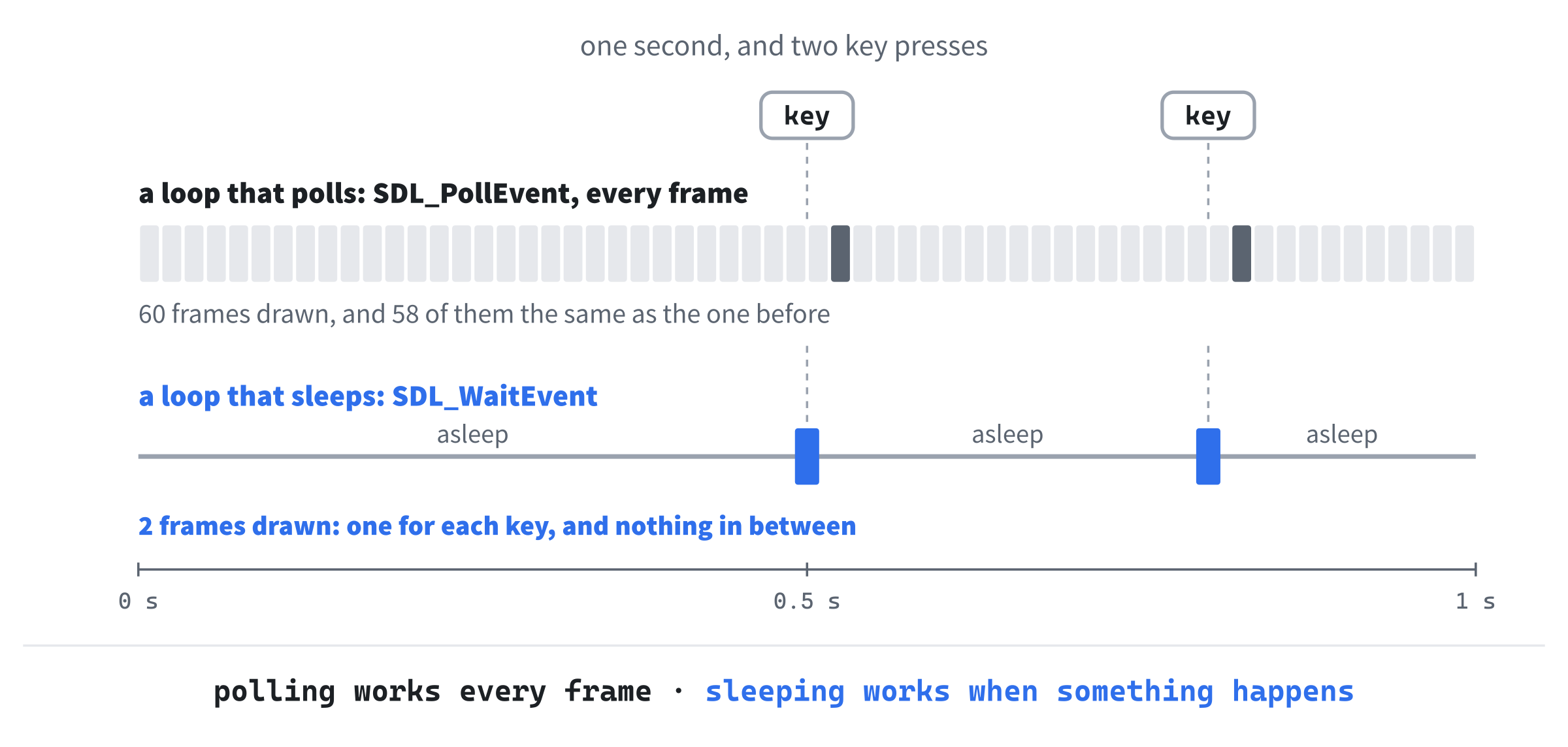
Every game loop in this book has been busy. Each one called SDL_PollEvent to see if anything had happened, and got on with the frame either way, 60 times a second, because the runner and the rocks kept moving whether you did anything or not. A roguelike is the opposite: between key presses, nothing at all happens, so there's nothing to update and nothing new to draw. A loop that ran 60 times a second would just draw the same picture, over and over.
So this loop calls SDL_WaitEvent instead. It doesn't return until something happens, and while it waits, the program is asleep, and uses no processor time at all. Add the first half of run below isLoaded, with a blank line in between:
// Sleeps until something happens, deals with it, and draws the window again
// if anything changed
void Game::run()
{
    while (running_)
    {
        if (dirty_)
        {
            draw();
            dirty_ = false;
        }

        SDL_Event event;
        if (!SDL_WaitEvent(&event))
            break;
In the preceding code, each time around, the loop draws the window if it needs drawing, and marks it as up to date. Then SDL_WaitEvent sleeps until there's an event, and puts it in event. It only returns false if something went wrong while it waited, which ends the loop. Figure 30.8 compares the two kinds of loop.
Now for what the loop does with the event. Add this below break;, with a blank line in between:
        switch (event.type)
        {
        case SDL_EVENT_QUIT:
            running_ = false;
            break;
        case SDL_EVENT_WINDOW_EXPOSED:
            dirty_ = true;
            break;
        case SDL_EVENT_KEY_DOWN:
            handleKey(event.key.key);
            dirty_ = true;
            break;
        }
    }
}
In the preceding code, a switch on the event's type handles three kinds of event. Clicking the X, SDL_EVENT_QUIT, ends the loop. An SDL_EVENT_WINDOW_EXPOSED event is Windows asking for the window to be drawn again, because it was covered, or minimized, and its picture was lost, so the loop marks it dirty. A key press goes to handleKey, along with the key, and marks the window dirty too, since a key press might change something. Every other event, such as the mouse moving, is ignored, and the loop goes back to sleep without drawing anything.
Like Chapter 16's Loot Grid, the loop doesn't use delta time. There's nothing to move smoothly between turns, so there's no time to measure, and the loop only draws when something changes. Vsync is still on, from main, so when the window is drawn, it's shown in step with the monitor, without tearing. Chapter 34 will add flashes that fade, and then the loop will learn to wake up for them, too.
The key to a key press is event.key.key, which is its keycode, a value of SDL's type SDL_Keycode, which is what handleKey takes. Chapter 1 explained the two ways SDL names keys: a scancode is a key's place on the keyboard, and a keycode is what it's labeled. The book's rule has been keycodes for single presses, and in a roguelike, every key is a single press.
The catch is Chapter 1's, too: a keycode follows the letter on the key, so on a French keyboard, W, A, S, and D aren't in their usual shape, which is why Chapter 26's Snake used scancodes. The arrow keys are in the same place on every keyboard.
Checkpoint: Click in Game.cpp, and press Ctrl+F7. It compiles, even though handleKey, draw, and makeTestRoom don't exist yet, because they're declared, and compiling one file only needs declarations. The linker would notice they're missing, so don't press F5 just yet.
A Room to Walk Around In
Chapter 31 will build whole dungeons, but for now, the game needs a room to try things out in. Add makeTestRoom below run, with a blank line in between:
// A room to try the game out in, for now: floor, with a wall all around it
// and two pillars inside
void Game::makeTestRoom()
{
    map_.fill(Terrain::Wall);
    for (int y = 12; y < 33; ++y)
    {
        for (int x = 20; x < 60; ++x)
            map_.at({ x, y }).terrain = Terrain::Floor;
    }
    map_.at({ 30, 18 }).terrain = Terrain::Wall;
    map_.at({ 49, 26 }).terrain = Terrain::Wall;
    player_.setPosition({ 40, 22 });
}
In the preceding code, the whole map starts as wall. Then the loops turn a block of cells into floor: 40 across, from column 20 to 59, and 21 down, from row 12 to 32. The two cells after that go back to wall, as two pillars in the room, to show that walls stop the player. Last, the player goes to { 40, 22 }, near the middle. There's no need to build walls around the room: the rock beside the floor is wall already, and isNextToOpen will draw it.
Next, the keys. Add the first part of handleKey below makeTestRoom, with a blank line in between:
// Every key press is one action, or none
void Game::handleKey(SDL_Keycode key)
{
    int dx = 0;
    int dy = 0;
    switch (key)
    {
    case SDLK_UP:
    case SDLK_W:
        dy = -1;
        break;
    case SDLK_DOWN:
    case SDLK_S:
        dy = 1;
        break;
In the preceding code, dx and dy are the step a key asks for, and they start at 0, for no step at all. The switch goes by the keycode, with the case labels level with the braces, as Chapter 4 set out. The up arrow and W both mean a step up, so their two labels share the same code, as Chapter 4's stacked labels did: dy becomes -1, since rows count down the window. The down arrow and S are a step down.
Now the rest of the switch, and the step itself. Add these lines below the down arrow's break;, to finish the function:
    case SDLK_LEFT:
    case SDLK_A:
        dx = -1;
        break;
    case SDLK_RIGHT:
    case SDLK_D:
        dx = 1;
        break;
    case SDLK_ESCAPE:
        running_ = false;
        return;
    default:
        return;
    }

    player_.tryMove(dx, dy, map_);
}
In the preceding code, the left arrow and A are a step left, and the right arrow and D are a step right. Escape ends the game, by setting running_ to false, and returns. Every other key returns too, through default, so only the direction keys reach the last line, which asks the player to try the step. It doesn't matter here whether the step worked: if it didn't, nothing changed, and drawing the window again does no harm.
Last, draw. Add it below handleKey, with a blank line in between:
void Game::draw() const
{
    SDL_SetRenderDrawColor(renderer_, Palette::BACKGROUND.r,
                           Palette::BACKGROUND.g, Palette::BACKGROUND.b, 255);
    SDL_RenderClear(renderer_);

    map_.draw(renderer_, glyphs_);
    player_.draw(renderer_, glyphs_);

    SDL_RenderPresent(renderer_);
}
In the preceding code, draw clears the window to the background color, draws the map and then the player, so the player is on top, and shows the result. It's const, since drawing the game doesn't change it, and that's why the map's and the player's draw functions are const too.
Handing Over from runGame
The Game is finished, so runGame can run it instead of its own loop. In main.cpp, find this line:
#include "GlyphCache.h"And change it to this:
#include "Game.h"In the preceding code, main.cpp includes Game.h instead, which includes GlyphCache.h itself. Now replace the whole of runGame, from the comment above it to its closing brace, with this:
// The whole game. The Game, and everything it owns, is destroyed when this
// returns, before main destroys the renderer
bool runGame(SDL_Renderer* renderer)
{
    Game game(renderer);
    if (!game.isLoaded())
        return false;

    game.run();
    return true;
}
In the preceding code, runGame makes the Game, and if it isn't loaded, returns false, as before. Otherwise, it runs the game until the player quits, and returns true. The comment says why it's a function of its own: the Game, and everything inside it, is destroyed when runGame returns, and that's before main destroys the renderer.
A texture belongs to the renderer that made it, and destroying a renderer destroys all of its textures too. So if the glyph cache outlived the renderer, its destructor would be destroying 95 textures that were already gone. SDL 3 checks what it's given, so each call would only fail, with the error Parameter 'texture' is invalid, but it's the wrong way around, and not every library is so forgiving. Keeping the Game in runGame makes the right order automatic.
That's the whole program: twelve files, and every line of them typed.
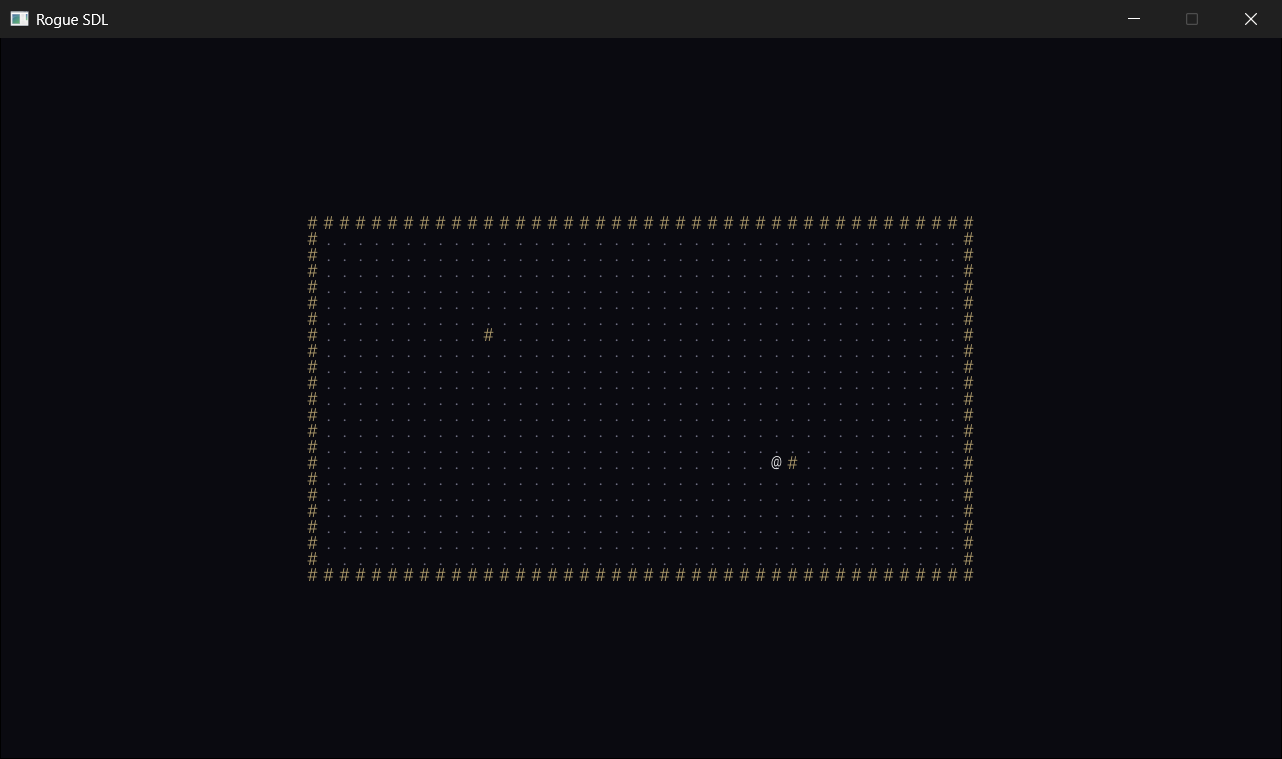
Checkpoint: Press F5. The room appears, with the @ near the middle, as in Figure 30.9. Walk with the arrow keys, or W, A, S, and D, and try walking into the walls and the pillars, which stop you. Hold a key down, and the @ keeps walking, because Windows repeats a key that's held. Press Escape, and the game ends.
The Complete Files
Here are all twelve files, in full, exactly as they are in the repository's SDL3 Projects/Rogue SDL Part 1. If something doesn't work, these are the files to compare yours with. First, main.cpp, which starts everything:
/*
    Rogue SDL
    The final project from Learning C++ by Building Games, built over
    Chapters 30 to 36

    A dungeon crawler in the tradition of Rogue, drawn entirely in
    characters. You're the @, and nothing happens until you move.

    New in this project: SDL3_ttf, SDL's add-on library for drawing text.
*/

#include <SDL3/SDL.h>
#include <SDL3/SDL_main.h>
#include <SDL3_ttf/SDL_ttf.h>

#include "Common.h"
#include "Game.h"

// The whole game. The Game, and everything it owns, is destroyed when this
// returns, before main destroys the renderer
bool runGame(SDL_Renderer* renderer)
{
    Game game(renderer);
    if (!game.isLoaded())
        return false;

    game.run();
    return true;
}

int main(int argc, char* argv[])
{
    // Start SDL and SDL3_ttf, then make the window and the renderer
    if (!SDL_Init(SDL_INIT_VIDEO))
    {
        SDL_Log("SDL_Init failed: %s", SDL_GetError());
        return 1;
    }

    if (!TTF_Init())
    {
        SDL_Log("TTF_Init failed: %s", SDL_GetError());
        SDL_Quit();
        return 1;
    }

    SDL_Window* window = SDL_CreateWindow("Rogue SDL", WINDOW_W, WINDOW_H, 0);
    if (!window)
    {
        SDL_Log("SDL_CreateWindow failed: %s", SDL_GetError());
        TTF_Quit();
        SDL_Quit();
        return 1;
    }

    SDL_Renderer* renderer = SDL_CreateRenderer(window, nullptr);
    if (!renderer)
    {
        SDL_Log("SDL_CreateRenderer failed: %s", SDL_GetError());
        SDL_DestroyWindow(window);
        TTF_Quit();
        SDL_Quit();
        return 1;
    }

    // Show each frame in step with the monitor's refresh
    SDL_SetRenderVSync(renderer, 1);

    // Play until the player quits, then clean up, in the reverse order
    // we created things
    bool played = runGame(renderer);

    SDL_DestroyRenderer(renderer);
    SDL_DestroyWindow(window);
    TTF_Quit();
    SDL_Quit();

    return played ? 0 : 1;
}
In the preceding code, main starts SDL and SDL3_ttf, makes the window and the renderer, and hands them to runGame, which owns the game.
Next, Common.h, which every other file includes, one way or another:
#pragma once
#include <SDL3/SDL.h>

// A place on the map, counted in cells, not pixels
struct Point
{
    int x = 0;
    int y = 0;
};

// The map is a grid of square cells, CELL_PX pixels across, MAP_W cells
// wide and MAP_H cells tall, and the window is exactly its size: 1280 by
// 720 pixels
constexpr int CELL_PX = 16;
constexpr int MAP_W = 80;
constexpr int MAP_H = 45;
constexpr int WINDOW_W = MAP_W * CELL_PX;
constexpr int WINDOW_H = MAP_H * CELL_PX;

// Every color in the game, in one place
namespace Palette
{
    constexpr SDL_Color BACKGROUND = { 10, 10, 16, 255 };
    constexpr SDL_Color WALL = { 180, 160, 110, 255 };
    constexpr SDL_Color FLOOR = { 110, 110, 130, 255 };
    constexpr SDL_Color PLAYER = { 255, 255, 255, 255 };
}
In the preceding code, a Point is a cell, and the constants and colors are shared by every file.
Then GlyphCache.h, the cache of characters:
#pragma once
#include <SDL3/SDL.h>
#include <array>   // std::array, for the glyphs
#include <string>   // std::string, for the font's path
#include "Common.h"

// The printable characters, from the space (code 32) to the tilde (126)
constexpr char FIRST_GLYPH = ' ';
constexpr char LAST_GLYPH = '~';
constexpr int GLYPH_COUNT = LAST_GLYPH - FIRST_GLYPH + 1;

// Every character the game can draw, made once from a font as a white
// picture, and tinted to whatever color it's drawn in
class GlyphCache
{
public:
    GlyphCache(SDL_Renderer* renderer, const std::string& fontPath,
               float size);
    ~GlyphCache();

    GlyphCache(const GlyphCache&) = delete;
    GlyphCache& operator=(const GlyphCache&) = delete;

    bool isLoaded() const;
    void draw(SDL_Renderer* renderer, char c, Point cell,
              SDL_Color color) const;

private:
    void drawAt(SDL_Renderer* renderer, char c, float x, float y,
                SDL_Color color) const;

    std::array<SDL_Texture*, GLYPH_COUNT> glyphs_ = {};
    float glyphW_ = 0.0f;   // the size of every glyph, since the font is
    float glyphH_ = 0.0f;   // monospaced
    bool loaded_ = false;
};
In the preceding code, the cache holds a texture for each of the 95 printable characters, and can't be copied.
Then GlyphCache.cpp:
#include "GlyphCache.h"
#include <SDL3_ttf/SDL_ttf.h>
#include <cmath>   // std::floor

GlyphCache::GlyphCache(SDL_Renderer* renderer, const std::string& fontPath,
                       float size)
{
    TTF_Font* font = TTF_OpenFont(fontPath.c_str(), size);
    if (!font)
    {
        SDL_Log("Couldn't open %s: %s", fontPath.c_str(), SDL_GetError());
        return;
    }

    // Draw each character once, in white, and keep it as a texture
    const SDL_Color white = { 255, 255, 255, 255 };
    for (char c = FIRST_GLYPH; c <= LAST_GLYPH; ++c)
    {
        SDL_Surface* surface = TTF_RenderGlyph_Blended(font, c, white);
        glyphs_[c - FIRST_GLYPH] =
            SDL_CreateTextureFromSurface(renderer, surface);
        SDL_DestroySurface(surface);
    }
    TTF_CloseFont(font);

    // In a monospaced font, every character is the same size, so the
    // first one gives us the size of them all
    SDL_GetTextureSize(glyphs_[0], &glyphW_, &glyphH_);
    loaded_ = true;
}

GlyphCache::~GlyphCache()
{
    for (SDL_Texture* glyph : glyphs_)
    {
        if (glyph)
            SDL_DestroyTexture(glyph);
    }
}

bool GlyphCache::isLoaded() const
{
    return loaded_;
}

// Draws one character in the middle of a cell
void GlyphCache::draw(SDL_Renderer* renderer, char c, Point cell,
                      SDL_Color color) const
{
    // Whole pixels only, so that the glyph stays sharp
    float x = cell.x * CELL_PX + std::floor((CELL_PX - glyphW_) / 2);
    float y = cell.y * CELL_PX + std::floor((CELL_PX - glyphH_) / 2);
    drawAt(renderer, c, x, y, color);
}

// Draws one character with its top-left corner at a pixel, tinted to a
// color. Characters without a glyph are skipped
void GlyphCache::drawAt(SDL_Renderer* renderer, char c, float x, float y,
                        SDL_Color color) const
{
    if (c < FIRST_GLYPH || c > LAST_GLYPH)
        return;

    SDL_Texture* glyph = glyphs_[c - FIRST_GLYPH];
    SDL_FRect box = { x, y, glyphW_, glyphH_ };
    SDL_SetTextureColorMod(glyph, color.r, color.g, color.b);
    SDL_RenderTexture(renderer, glyph, nullptr, &box);
}
In the preceding code, the constructor makes every texture from the font, in white, and drawAt tints each one as it's drawn.
Then Map.h, with the terrain and the tiles:
#pragma once
#include <SDL3/SDL.h>
#include <vector>   // std::vector, for the tiles
#include "Common.h"

class GlyphCache;

// What a cell of the map is made of
enum class Terrain
{
    Wall,
    Floor
};

// One cell of the map
struct Tile
{
    Terrain terrain = Terrain::Wall;
};

// The dungeon: a grid of tiles, MAP_W across and MAP_H down, kept in one
// vector, a row at a time
class Map
{
public:
    Map();

    Tile& at(Point cell);
    const Tile& at(Point cell) const;
    bool isInside(Point cell) const;
    bool isBlocked(Point cell) const;
    bool isNextToOpen(Point cell) const;

    void fill(Terrain terrain);
    void draw(SDL_Renderer* renderer, const GlyphCache& glyphs) const;

private:
    std::vector<Tile> tiles_;
};
In the preceding code, the map keeps its tiles in one vector, a row at a time.
Then Map.cpp:
#include "Map.h"
#include "GlyphCache.h"

Map::Map()
    : tiles_(MAP_W * MAP_H)
{
}

// The tile at a cell. Row y starts y whole rows into the vector
Tile& Map::at(Point cell)
{
    return tiles_[cell.y * MAP_W + cell.x];
}

const Tile& Map::at(Point cell) const
{
    return tiles_[cell.y * MAP_W + cell.x];
}

bool Map::isInside(Point cell) const
{
    return cell.x >= 0 && cell.x < MAP_W && cell.y >= 0 && cell.y < MAP_H;
}

// Walls block the way, and so does everything outside the map
bool Map::isBlocked(Point cell) const
{
    return !isInside(cell) || at(cell).terrain == Terrain::Wall;
}

// Whether any of the eight cells around this one is open ground, rather
// than wall
bool Map::isNextToOpen(Point cell) const
{
    for (int dy = -1; dy <= 1; ++dy)
    {
        for (int dx = -1; dx <= 1; ++dx)
        {
            Point next = { cell.x + dx, cell.y + dy };
            if (isInside(next) && at(next).terrain != Terrain::Wall)
                return true;
        }
    }
    return false;
}

// Replaces every tile with a new one, made of the given terrain
void Map::fill(Terrain terrain)
{
    for (Tile& tile : tiles_)
        tile = { terrain };
}

// Draws the floors, and the walls around them. Solid rock, with no open
// ground beside it, isn't drawn at all
void Map::draw(SDL_Renderer* renderer, const GlyphCache& glyphs) const
{
    for (int y = 0; y < MAP_H; ++y)
    {
        for (int x = 0; x < MAP_W; ++x)
        {
            Point cell = { x, y };
            if (at(cell).terrain == Terrain::Floor)
                glyphs.draw(renderer, '.', cell, Palette::FLOOR);
            else if (isNextToOpen(cell))
                glyphs.draw(renderer, '#', cell, Palette::WALL);
        }
    }
}
In the preceding code, at finds a cell's tile with Figure 30.6's formula, and draw leaves the rock out.
Then Entity.h, the base class for anything on the map:
#pragma once
#include <SDL3/SDL.h>
#include "Common.h"

class GlyphCache;

// Anything that stands on the map, drawn as one character in one color
class Entity
{
public:
    Entity(Point position, char glyph, SDL_Color color);

    Point getPosition() const;
    void setPosition(Point position);
    void draw(SDL_Renderer* renderer, const GlyphCache& glyphs) const;

private:
    Point position_;
    char glyph_;
    SDL_Color color_;
};
In the preceding code, an entity is a position, a character, and a color, with nothing virtual.
Then Entity.cpp:
#include "Entity.h"
#include "GlyphCache.h"

Entity::Entity(Point position, char glyph, SDL_Color color)
    : position_(position), glyph_(glyph), color_(color)
{
}

Point Entity::getPosition() const
{
    return position_;
}

void Entity::setPosition(Point position)
{
    position_ = position;
}

void Entity::draw(SDL_Renderer* renderer, const GlyphCache& glyphs) const
{
    glyphs.draw(renderer, glyph_, position_, color_);
}
In the preceding code, an entity draws itself by asking the glyph cache to draw its character.
Then Player.h:
#pragma once
#include "Entity.h"

class Map;

// You: the @
class Player : public Entity
{
public:
    Player();

    bool tryMove(int dx, int dy, const Map& map);
};
In the preceding code, the player is an entity that can try to take a step.
Then Player.cpp:
#include "Player.h"
#include "Map.h"

Player::Player()
    : Entity({ 0, 0 }, '@', Palette::PLAYER)
{
}

// Steps one cell, unless the way is blocked. Returns true if the player
// moved
bool Player::tryMove(int dx, int dy, const Map& map)
{
    Point next = { getPosition().x + dx, getPosition().y + dy };
    if (map.isBlocked(next))
        return false;

    setPosition(next);
    return true;
}
In the preceding code, tryMove steps unless the map says the way is blocked.
Then Game.h, the class that owns everything:
#pragma once
#include <SDL3/SDL.h>
#include "GlyphCache.h"
#include "Map.h"
#include "Player.h"

// The whole game. It owns the glyphs, the map, and the player, and runs
// the loop that waits for a key, acts on it, and draws what happened
class Game
{
public:
    Game(SDL_Renderer* renderer);

    bool isLoaded() const;
    void run();

private:
    void makeTestRoom();
    void handleKey(SDL_Keycode key);
    void draw() const;

    SDL_Renderer* renderer_;
    GlyphCache glyphs_;
    Map map_;
    Player player_;
    bool running_ = true;
    bool dirty_ = true;      // true when the window needs drawing again
};
In the preceding code, the game holds the glyphs, the map, and the player by value, and two flags for the loop.
And last, Game.cpp:
#include "Game.h"
#include <string>   // std::string, for the font's path

// The font every character is drawn in, and its size
const std::string FONT_PATH = "assets/RobotoMono-Light.ttf";
constexpr float FONT_SIZE = 18.0f;

Game::Game(SDL_Renderer* renderer)
    : renderer_(renderer), glyphs_(renderer, FONT_PATH, FONT_SIZE)
{
    makeTestRoom();
}

bool Game::isLoaded() const
{
    return glyphs_.isLoaded();
}

// Sleeps until something happens, deals with it, and draws the window again
// if anything changed
void Game::run()
{
    while (running_)
    {
        if (dirty_)
        {
            draw();
            dirty_ = false;
        }

        SDL_Event event;
        if (!SDL_WaitEvent(&event))
            break;

        switch (event.type)
        {
        case SDL_EVENT_QUIT:
            running_ = false;
            break;
        case SDL_EVENT_WINDOW_EXPOSED:
            dirty_ = true;
            break;
        case SDL_EVENT_KEY_DOWN:
            handleKey(event.key.key);
            dirty_ = true;
            break;
        }
    }
}

// A room to try the game out in, for now: floor, with a wall all around it
// and two pillars inside
void Game::makeTestRoom()
{
    map_.fill(Terrain::Wall);
    for (int y = 12; y < 33; ++y)
    {
        for (int x = 20; x < 60; ++x)
            map_.at({ x, y }).terrain = Terrain::Floor;
    }
    map_.at({ 30, 18 }).terrain = Terrain::Wall;
    map_.at({ 49, 26 }).terrain = Terrain::Wall;
    player_.setPosition({ 40, 22 });
}

// Every key press is one action, or none
void Game::handleKey(SDL_Keycode key)
{
    int dx = 0;
    int dy = 0;
    switch (key)
    {
    case SDLK_UP:
    case SDLK_W:
        dy = -1;
        break;
    case SDLK_DOWN:
    case SDLK_S:
        dy = 1;
        break;
    case SDLK_LEFT:
    case SDLK_A:
        dx = -1;
        break;
    case SDLK_RIGHT:
    case SDLK_D:
        dx = 1;
        break;
    case SDLK_ESCAPE:
        running_ = false;
        return;
    default:
        return;
    }

    player_.tryMove(dx, dy, map_);
}

void Game::draw() const
{
    SDL_SetRenderDrawColor(renderer_, Palette::BACKGROUND.r,
                           Palette::BACKGROUND.g, Palette::BACKGROUND.b, 255);
    SDL_RenderClear(renderer_);

    map_.draw(renderer_, glyphs_);
    player_.draw(renderer_, glyphs_);

    SDL_RenderPresent(renderer_);
}
In the preceding code, run sleeps until something happens, handleKey turns keys into steps, and draw draws the map and the player.
Playing the Game
Press F5, and walk around the room. It isn't much of a game yet, since there's nothing to find and nothing to fight, but everything you can see is a character from a font, made once and tinted as it's drawn, and every step you take is a turn.
Now watch the program do nothing. Open Task Manager, with Ctrl+Shift+Esc, and find Rogue SDL in the list. While you're not pressing anything, its CPU column shows 0%, and it stays there. The program is asleep in SDL_WaitEvent, and Windows won't wake it until something happens.
Press a key, and it wakes for a moment, takes the step, draws the room, and sleeps again. For comparison, Chapter 28's runners kept about a third of one of the processor's cores busy the whole time, in a Debug build, even with nobody at the keyboard. A game that sleeps between turns leaves a laptop cool, quiet, and running on its battery for longer.
There's a console window too, behind the game, as in every project since Chapter 1. It's empty while all goes well, but if the font can't be found, that's where the game says so.
Understanding the Code
Follow a key press through the program, and you've seen all of it. The game is asleep in SDL_WaitEvent, until you press the right arrow. Then SDL_WaitEvent returns, with an SDL_EVENT_KEY_DOWN event, and run hands its keycode to handleKey, and marks the window dirty.
Then handleKey turns the key into a step of one to the right, and asks the player to try it. The player asks the map whether the cell is blocked, and if it isn't, moves there. Back in run, the window is dirty, so draw clears it, draws the map and the player, and shows it. Then SDL_WaitEvent sleeps again.
Every class does one job, and none of them knows more than it needs to. The glyph cache knows how to draw a character, but nothing about maps or players. The map knows what's where, and how to draw it, with the cache it's handed. The player knows where it is, and how to step, if the map allows it. And the Game knows about all of them, and nothing about how any of them works inside.
That's what will let the next six chapters add dungeons, monsters, treasure, sound, and spells, mostly by adding classes, rather than rewriting these.
Two ideas in this chapter will come back again and again. The first is the grid: every place in the game is a Point, a cell, and the map finds a cell's tile with one multiplication and one addition. The second is the turn: nothing happens until the player acts, and then the game works out everything that follows, and draws the result. In Chapter 32, the monsters will take their turns after yours.
Experimenting
Everything in this chapter is controlled by a handful of numbers, so it's a good time to play with them. Put each one back afterward, since the next chapter carries on from this one.
- A bigger font. Change
FONT_SIZEto 24. The glyphs get bigger, but the cells don't, so they start to crowd into each other. ChangeCELL_PXto 20 as well, and the window grows to 1600 by 900 to make room. - A different font. Download another monospaced font, such as Cascadia Mono or JetBrains Mono, put it in
assets, and changeFONT_PATH. Then try a font that isn't monospaced, and see what happens to the look of the room. - A different room. Change the loops in
makeTestRoomto make a room of a different size, or two rooms, joined by a row of floor cells as a corridor. The walls will follow the floor wherever it goes. - See the rock. In
Map::draw, changeelse if (isNextToOpen(cell))to plainelse, and every wall is drawn, as on the right of Figure 30.7. - New colors. Change the palette in
Common.h: pure black for the background, gray for the walls, or green for the player. One line each, and the whole game changes. - Diagonal steps. Add keys that step diagonally, such as Q, E, Z, and C, each setting both
dxanddy. Then make two pillars that touch at their corners, such as{ 30, 18 }and{ 31, 19 }, and try to step diagonally between them. Decide whether you think that ought to be allowed.
Common Errors and Fixes
C1083: Cannot open include file: 'SDL3_ttf/SDL_ttf.h': No such file or directory. The compiler can't find SDL3_ttf's headers. Check that Additional Include Directories has C:\SDL3_ttf\include after C:\SDL3\include, with a semicolon between them, and that the folder really has an SDL3_ttf folder inside it, not a folder with a version number in its name.
LNK2019: unresolved external symbol TTF_Init referenced in function SDL_main, and the same for TTF_Quit, TTF_OpenFont, TTF_RenderGlyph_Blended, and TTF_CloseFont, and then LNK1120: 5 unresolved externals. The linker can't find SDL3_ttf's code. Check that Additional Dependencies has SDL3_ttf.lib, and that Additional Library Directories has C:\SDL3_ttf\lib\x64. The SDL_main in the message is main, renamed by SDL_main.h, as it has been all along.
A message box says "The code execution cannot proceed because SDL3_ttf.dll was not found." Copy SDL3_ttf.dll from C:\SDL3_ttf\lib\x64 into the project folder, beside main.cpp and SDL3.dll.
The window appears and vanishes at once, and the console says: Couldn't open assets/RobotoMono-Light.ttf: Couldn't open assets/RobotoMono-Light.ttf: The system cannot find the path specified. The font isn't where the game looks for it. Make sure the assets folder is in the project folder, beside main.cpp, and not in the solution folder above it, or in x64\Debug, and that the font's name is spelled exactly as in FONT_PATH. If you run the .exe from x64\Debug yourself, it needs an assets folder beside it too.
The console says: Couldn't open assets/RobotoMono-Light.ttf: Library not initialized. The font is there, but SDL3_ttf wasn't started. Check that main calls TTF_Init, and that it comes before runGame.
C2661: 'Map::at': no overloaded function takes 2 arguments. A call is passing two numbers, as in map_.at(x, y), but at takes one Point. Put braces around them, as in map_.at({ x, y }).
Everything is white. The glyphs are drawn, but not tinted. Check that drawAt calls SDL_SetTextureColorMod before SDL_RenderTexture.
The whole window is full of # signs, with the room in the middle. Every wall is being drawn, rock and all. Check the else if (isNextToOpen(cell)) in Map::draw.
AI Exercise (Optional)
If you'd like to take the game somewhere of your own with an AI's help, here's a challenge, and as always, it's optional.
Open your AI chatbot of choice and try a prompt like this:
"I'm writing a roguelike in C++ with SDL 3 and SDL3_ttf. The map is a class called Map, holding a std::vector of Tile structs, one for each cell, a row at a time, and a Tile has a Terrain, an enum class with the values Wall and Floor. Map has Tile& at(Point cell), bool isInside(Point cell), and bool isBlocked(Point cell), where Point is a struct with int members x and y. In my Game class, handleKey(SDL_Keycode key) turns the arrow keys and W, A, S, and D into a step, dx and dy, and calls player_.tryMove(dx, dy, map_), which moves the player unless the cell is blocked. I'd like the player to be able to step diagonally too, with the keys Q, E, Z, and C, but never by squeezing between two walls that only touch at their corners. Show me the changes to handleKey, and any to tryMove, with each curly brace on its own line, and explain how the corner rule works."
Notice what the preceding prompt does. It describes the classes and the functions that the answer has to fit into, down to their parameters, so that the AI builds on your code, rather than inventing its own. And it asks for a rule that's easy to overlook: squeezing between the corners of two walls, which a simple diagonal step would allow. Asking for an explanation means you get the reasoning, not just the code.
When the answer comes back, check it against your code. Does it use isBlocked to check the two cells beside the diagonal, the one across and the one down, and refuse the step if both are walls? Some games refuse if either one is, so see which the AI chose, and whether it said why. And does it keep handleKey’s shape, with the new keys in the same switch?
To try its answer, add two pillars that touch at their corners, such as { 30, 18 } and { 31, 19 }, to makeTestRoom, and try to step between them. If it lets you squeeze through a gap it shouldn't, tell it what happened, and ask it to fix the rule.
Summary
You've started the final project, and the foundations are in. SDL3_ttf turns a font into a texture for every character, made once and tinted as it's drawn. The map keeps its cells in one vector, a row at a time, and draws only the floor and the walls around it. The player is an entity that steps, unless a wall is in the way. And the game loop sleeps until something happens, which a turn-based game can, since nothing moves between turns.
Next, in Chapter 31, the test room makes way for real dungeons, built by cutting the map into pieces, again and again, and putting a room in each. The player will only see what's in sight, and remember the rest; there'll be stairs down to new levels; and the rows below the map will start telling you how it's going.