
In Chapter 30, you walked the @ around a room that we built by hand, with a pair of loops and two pillars. That's fine for trying things out, but it isn't a roguelike yet. A roguelike builds a new dungeon every time you play, and another every time you go down the stairs, and you never know what's around the next corner, because you can't see it until you get there.
This chapter gives Rogue SDL both of those things. It builds dungeons by cutting the map into pieces, and each piece into smaller pieces, and putting a room in every piece that's left, with corridors between them. Then it puts out the lights. You only see what's in your line of sight, the game remembers everything you've seen, and stairs take you down to a new level, deeper each time.
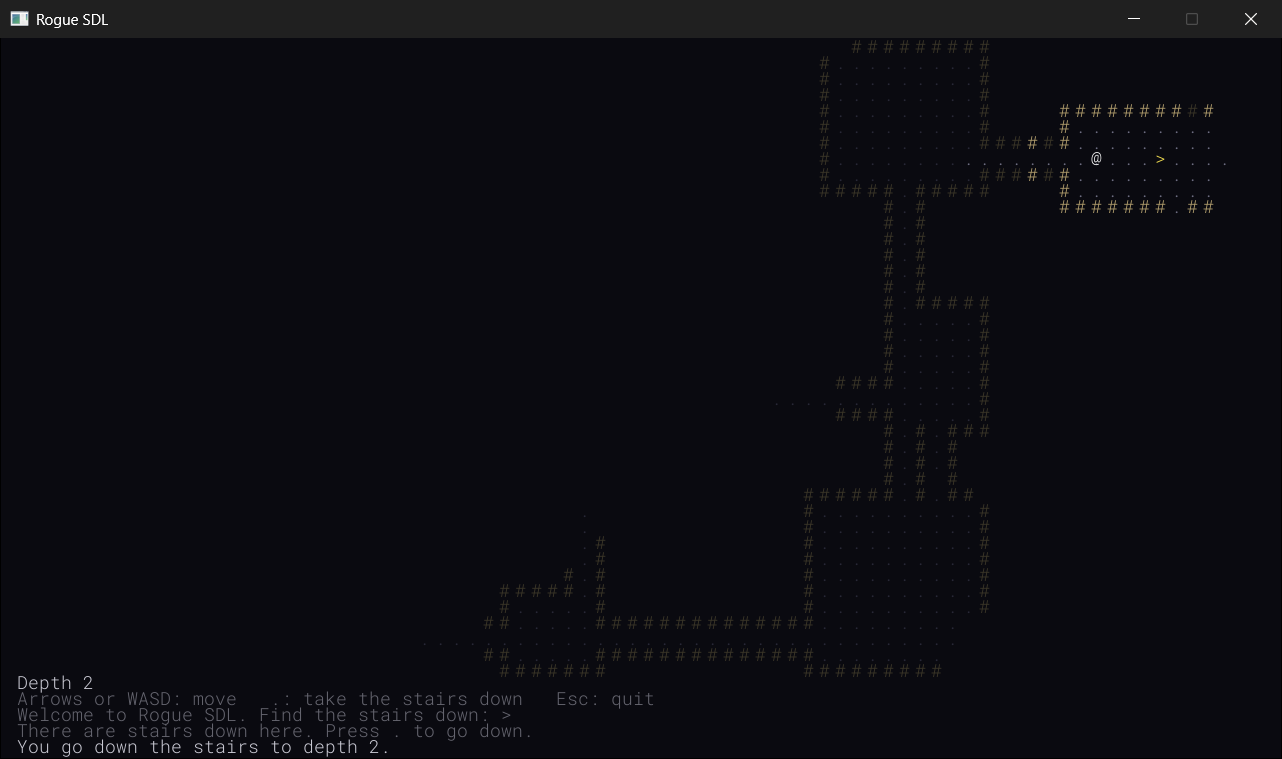
Along the way, the window gets rows of text below the map, which tell you how deep you are, which keys do what, and what just happened. By the end of the chapter, you'll explore a dungeon that's different every time, one room at a time, as in Figure 31.1.
SDL3 Projects/Rogue SDL Part 2 — the complete source for this chapter lives here, with its eighteen files and the assets folder. The chapter carries on in your own project from Chapter 30. If you'd rather start from the book's copy of Part 1, make a copy of the Rogue SDL Part 1 folder beside it in SDL3 Projects, where it still finds the SDL3 and SDL3_ttf folders, and open the copy's .slnx file.In this chapter, we will:
- Build a new dungeon for every level, by cutting the map into pieces, again and again, with a function that calls itself
- Put a room in every piece, and join the rooms with corridors, so that every room can be reached
- Put stairs down in the room farthest from the start, and build a new level whenever they're taken
- Work out what the player can see, by casting rays of sight out from the
@ - Remember everything the player has seen, and draw it dimly when it's out of sight
- Carve rows of text out of the bottom of the window, to show the depth, the keys, and messages
- Explore the dungeons, experiment with them, fix the most common mistakes, and try an optional AI exercise
Let's start digging.
Planning Part 2
Part 1 finished with twelve files. Part 2 adds six more, and changes seven of the old ones. Here's what each is for:
| File | What's new |
|---|---|
MapGenerator.h, MapGenerator.cpp |
New: builds a level, with its rooms, its corridors, and its stairs |
FOV.h, FOV.cpp |
New: works out which cells the player can see |
HUD.h, HUD.cpp |
New: the rows of text below the map |
Common.h |
Room for the HUD, how far the player can see, and more colors |
GlyphCache.h, GlyphCache.cpp |
A second way to draw: a whole line of text |
Map.h, Map.cpp |
Stairs, and tiles that remember whether they've been seen |
Game.h, Game.cpp |
New levels instead of the test room, the stairs, sight, and the HUD |
The other five files, main.cpp and the two files each for Entity and Player, don't change at all. That's the payoff for Chapter 30's rule that every class does one job. Building dungeons, working out what can be seen, and showing text are all new jobs, so they mostly go in new classes, rather than in changes to the old ones.
We'll add them in four stages, and you'll play the game at the end of each. First come the dungeons, which you'll see whole, with the lights on, so you can check the builder's work. Then the stairs, to get from one level to the next. Then sight and memory, which put the lights out. And last, the HUD, which gives the game a voice.
Building a Dungeon
There are many ways to build a dungeon, and this one is a classic, called binary space partitioning, or BSP for short. It's "binary" because it cuts things in two, and "space partitioning" because what it cuts up is space: the map.
Cutting the Map into Pieces
It starts with the whole map, 80 cells by 45, and cuts it in two with a straight line, at a random place. Then it takes each of the two pieces, and cuts that in two as well, and then each of those, and so on. When a piece is too small to cut again, it gets a room of a random size inside it, with a border of wall around it. No two pieces overlap, so no two rooms do either.
Figure 31.2 shows the idea, with the tree that the cuts make beside it. The whole map is at the top of the tree, each piece's two halves are below it, and the pieces that get rooms are at the bottom, which are called the tree's leaves.
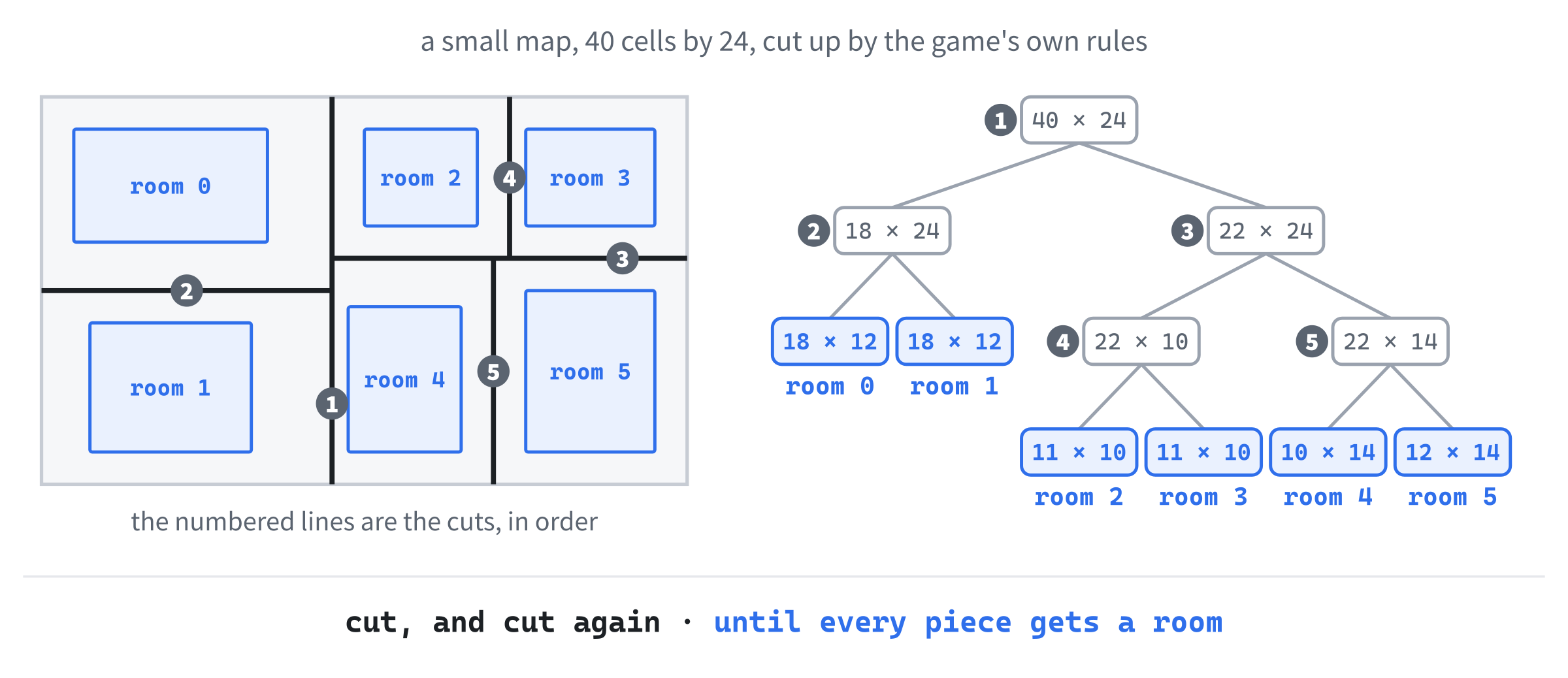
Each cut goes across the longer side of its piece, so that the pieces stay roughly square, rather than turning into strips too thin for a room. Every cut leaves at least 10 cells on each side of it, so a piece is only cut if it's at least 20 cells long. And there's a limit on how many cuts deep a piece can be, counting down from the whole map, so that the pieces don't all end up as small as they can be.
Rogue itself didn't cut its levels up like this. It divided each one into a three-by-three grid, and put up to nine rooms in it, one to each part. Binary space partitioning comes from 3D graphics, where it was developed around 1980 to sort the surfaces of a scene from front to back, and Doom famously used it in 1993 to draw its levels quickly. Roguelike programmers borrowed it because it fills a map with rooms that can never overlap.
You might recognize the shape of this job. Cutting up the whole map is the same job as cutting up one of its pieces, only bigger, and that's exactly where Chapter 8 said recursion shines: a problem made of smaller copies of itself. The function that does the cutting will call itself twice, once for each piece. Its base case, the one that stops the calling, is a piece that's too small to cut, which gets a room instead.
MapGenerator.h
The dungeon builder is a class, MapGenerator, with its two files. Add a header called MapGenerator.h, and below its #pragma once, type the includes and the public part of the class:
#pragma once
#include <SDL3/SDL.h>
#include <vector>   // std::vector, for the rooms
#include "Common.h"

class Map;

// Builds a new level on a map: it splits the map into areas, puts a room
// in each one, joins the rooms with corridors, and puts stairs down in one
// of them
class MapGenerator
{
public:
    MapGenerator(Map& map);

    Point generate();
In the preceding code, the header includes <vector>, for a list of the rooms, and Common.h, for Point. It forward-declares Map, since the generator only refers to the map it builds, which is Chapter 28's rule. The constructor takes that map, and generate builds a new level on it, and returns the cell where the player starts.
The private part does the work. Add it below generate’s declaration, with a blank line in between:
private:
    void split(SDL_Rect area, int cuts);
    void addRoom(SDL_Rect area);
    void carve(Point a, Point b);
    void carveCorridor(Point from, Point to);

    Map& map_;                      // the map being built, not owned
    std::vector<SDL_Rect> rooms_;   // every room, in the order it was made
};
In the preceding code, the four private functions are the builder's four jobs. The function split cuts an area in two, and calls itself on the pieces, addRoom puts a room in an area, carve turns a box of cells into floor, and carveCorridor joins two cells with a corridor. Then come the two members. The first, map_, is a reference to the map being built, since the generator uses a map that it doesn't own, as Chapter 19's Player used its sprite sheet, and the comment says so. The second, rooms_, is a vector of the rooms, each one an SDL_Rect.
An SDL_Rect is the twin of the SDL_FRect that every project since Chapter 1 has drawn with. It has the same four members, x, y, w, and h, but they're ints, not floats, which suits a map that's counted in whole cells.
MapGenerator.cpp
Now add a C++ file called MapGenerator.cpp, and type its includes, and the numbers that shape every dungeon:
#include "MapGenerator.h"
#include <algorithm>   // std::min and std::max
#include "Map.h"

// An area is cut in two only if its longer side is at least twice this, so
// both pieces are at least this long
constexpr int MIN_AREA = 10;
// and after this many cuts, it isn't cut again, however big it is
constexpr int MAX_CUTS = 6;
// The smallest room, in cells
constexpr int MIN_ROOM_W = 4;
constexpr int MIN_ROOM_H = 3;
In the preceding code, <algorithm> brings in std::min and std::max, which give the smaller and the larger of two values, for carving. Then come the four constants, which are the generator's rules. A piece is only cut if its longer side is at least twice MIN_AREA, so that both of its halves are at least 10 cells long. No piece is cut more than MAX_CUTS times, counting from the whole map, however big it still is. And the smallest room is 4 cells wide and 3 tall.
The comments on the first two constants read as a single sentence, split across them. All four are in the .cpp file, rather than in Common.h, because nothing else needs them.
The generator needs two little helpers, which are only for this file, so they go in a namespace with no name. Add this below the constants, with a blank line in between:
namespace
{
    // A random whole number from low to high, including both
    int randomBetween(int low, int high)
    {
        if (high <= low)
            return low;
        return low + SDL_rand(high - low + 1);
    }

    Point centerOf(SDL_Rect room)
    {
        return { room.x + room.w / 2, room.y + room.h / 2 };
    }
}
In the preceding code, randomBetween returns a random whole number from low to high, including both. Chapter 11's SDL_rand(n) gives a number from 0 to one less than n, so SDL_rand(high - low + 1) has one possible answer for each number from low to high, and adding low moves them up to start from low. For example, randomBetween(10, 12) is 10 + SDL_rand(3), which is 10, 11, or 12. If high isn't above low, there's only one possible answer, and it's returned without asking.
The other helper, centerOf, returns the cell in the middle of a room: half its width across from its left edge, and half its height down from its top. Both halves are divisions of one int by another, so they round down, as Chapter 2 showed.
A namespace with no name is called an unnamed namespace. Chapter 24's namespaces keep names apart, which is why Chapter 30's Palette::WALL can't clash with anything else called WALL. An unnamed namespace goes further: what's inside it can only be used in this one file. Another file could have a randomBetween of its own, and the two would never meet, not even in the linker. It's the modern way to say "private to this file", and older code does the same job with static in front of each function.
Inside the file, the helpers are used like any other functions, with no prefix, as plain randomBetween and centerOf. Next, the constructor. Add it below the namespace, with a blank line in between:
MapGenerator::MapGenerator(Map& map)
    : map_(map)
{
}
In the preceding code, the constructor sets map_ in its initializer list, and that's the only place it can be set. A reference must refer to something from the moment it's made, and it can never be changed to refer to something else, so a reference member has to be given its target in the initializer list, as Chapter 18 warned, and as Chapter 19's Player was given its sprite sheet.
Now generate, which is the whole recipe for a level, in one function. Add it below the constructor, with a blank line in between:
// Builds the level, and returns the cell where the player starts
Point MapGenerator::generate()
{
    map_.fill(Terrain::Wall);
    rooms_.clear();
    split({ 0, 0, MAP_W, MAP_H }, 0);

    // Join each room to the one made after it, so that every room can be
    // reached from every other
    for (size_t i = 1; i < rooms_.size(); ++i)
        carveCorridor(centerOf(rooms_[i - 1]), centerOf(rooms_[i]));

    // Start in the middle of a room chosen at random
    int roomCount = static_cast<int>(rooms_.size());
    Point start = centerOf(rooms_[SDL_rand(roomCount)]);

    return start;
}
In the preceding code, generate starts by filling the whole map with wall, since everything that isn't dug out is rock, and by forgetting the rooms of any level before. Then it calls split on the whole map: an SDL_Rect that starts at { 0, 0 }, and is MAP_W cells wide and MAP_H tall, with no cuts made yet. By the time that call returns, the map has been cut up, and every piece has a room, in rooms_.
The loop joins the rooms together. It starts at 1, not 0, and joins each room to the one before it, from middle to middle: rooms 0 and 1 first, then rooms 1 and 2, and so on, to the last. Every room is joined to the one before it, so you can walk from any room to any other, along the chain. The loop counts with a size_t, Chapter 13's type for counting the elements of a vector.
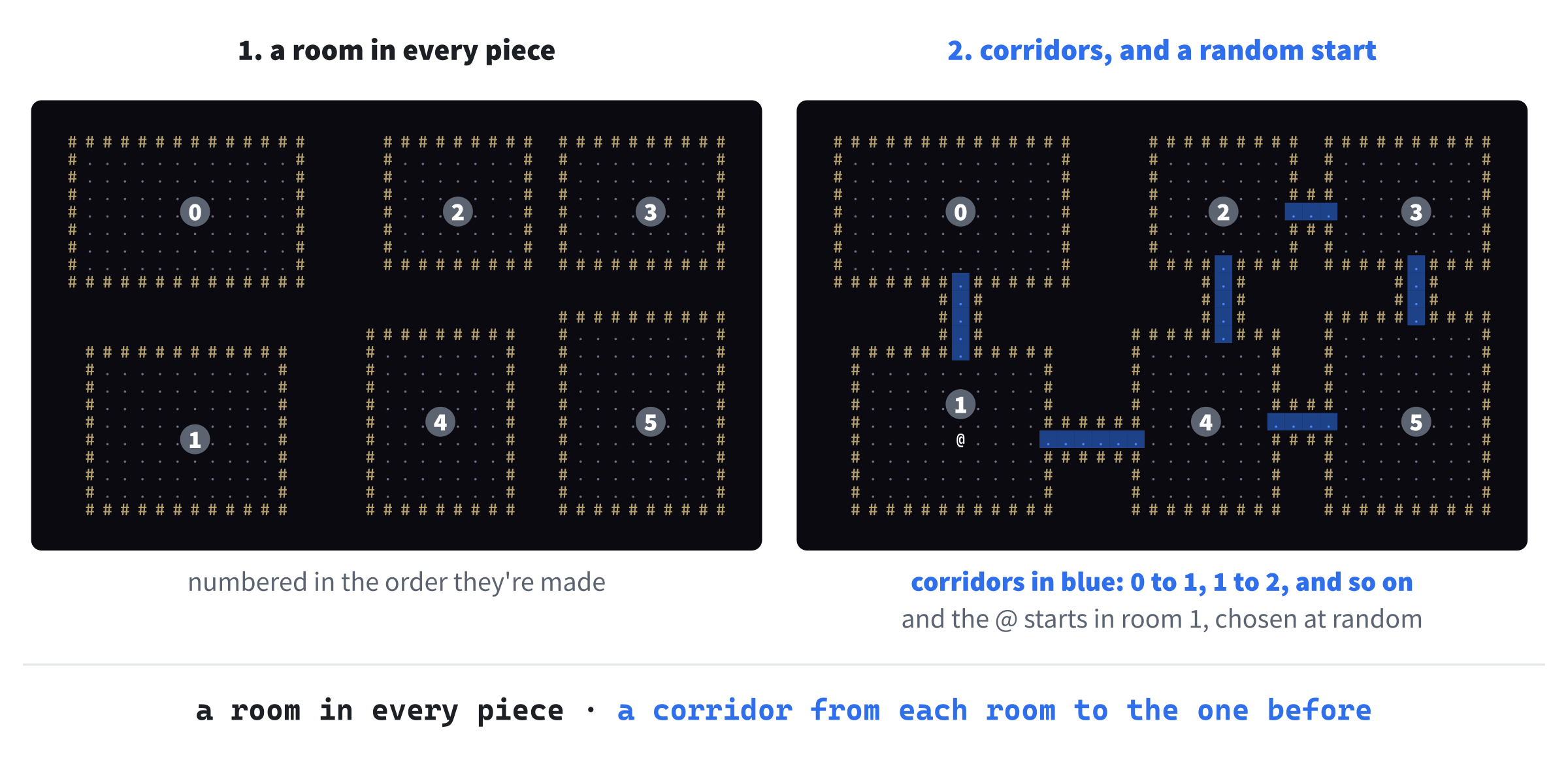
Last, the player starts in the middle of a room chosen at random. The number of rooms is a size_t, and SDL_rand takes an int, so a static_cast turns one into the other, which is Chapter 13's way of saying that the vector will never be too big for an int. Then SDL_rand picks a room from 0 to one less than the number of rooms, centerOf finds its middle, and generate returns it. Figure 31.3 shows the whole recipe, from the pieces to the start.
Checkpoint: Click in MapGenerator.cpp, and press Ctrl+F7 to compile it. It compiles, even though split and carveCorridor aren't written yet, since the header declares them. The Error List should stay empty.
Splitting, Rooms, and Corridors
Now the recursion. Add the first part of split below generate, with a blank line in between:
// Cuts an area in two, then cuts each piece in two, and so on. An area
// that's too small to cut, or has been cut out by MAX_CUTS cuts, gets a
// room instead
void MapGenerator::split(SDL_Rect area, int cuts)
{
    // Cut across the longer side, so that the pieces don't get too thin
    bool cutAcross = area.h > area.w;
    int length = cutAcross ? area.h : area.w;
    if (cuts == MAX_CUTS || length < MIN_AREA * 2)
    {
        addRoom(area);
        return;
    }
In the preceding code, split takes an area, and the number of cuts it took to make it. First, it decides which way to cut. If the area is taller than it's wide, cutAcross is true, and the cut goes straight across it, from side to side, leaving a top piece and a bottom piece. Otherwise, the cut goes from top to bottom, leaving a left piece and a right piece. Either way, the side being cut is the longer one, and length is how long it is.
Then comes the base case. If the area is already MAX_CUTS cuts deep, or its longer side is less than twice MIN_AREA, it isn't cut. Instead, addRoom puts a room in it, and split returns. Every call ends up here in the end, since each cut makes its pieces smaller, and each piece is one more cut deep than the area it came from.
Otherwise, the area is cut. Add the rest of split below the if’s closing brace, with a blank line in between, to finish the function:
    int cut = randomBetween(MIN_AREA, length - MIN_AREA);
    if (cutAcross)
    {
        split({ area.x, area.y, area.w, cut }, cuts + 1);
        split({ area.x, area.y + cut, area.w, area.h - cut }, cuts + 1);
    }
    else
    {
        split({ area.x, area.y, cut, area.h }, cuts + 1);
        split({ area.x + cut, area.y, area.w - cut, area.h }, cuts + 1);
    }
}
In the preceding code, cut is where the cut goes, counted from the area's top or left edge, somewhere from 10 cells in to 10 cells from the far end, so that both pieces are at least MIN_AREA long. Then come the two recursive calls. For a cut across, the first piece is the top one, cut cells tall, and the second is everything below it, starting cut cells down and area.h - cut cells tall. For a cut from top to bottom, it's the left piece and then the right one, in the same way. Each call gets cuts + 1, since its piece is one cut deeper.
It's worth following the calls for a moment, since they're the whole trick. The first call gets the whole map, 80 by 45. It's wider than it's tall, so it cuts from top to bottom, somewhere from 10 to 70 cells across, and calls split on the left piece. That call cuts its piece in two, and calls split on its own first piece, and so on, deeper and deeper, until a piece is too small, and gets a room. Only then does the call that made that piece move on to its second piece.
So the rooms are made one piece at a time, in order along the bottom of Figure 31.2's tree, from left to right, and that's the order that rooms_ keeps them in. The calls pile up on the call stack while they wait, as the calls of Chapter 8's factorial did, but never more than seven deep: the whole map, and six cuts.
Next, the rooms. Add addRoom below split, with a blank line in between:
// Carves a room of a random size somewhere inside an area, with at least
// one cell of wall between it and the area's edges
void MapGenerator::addRoom(SDL_Rect area)
{
    SDL_Rect room;
    room.w = randomBetween(MIN_ROOM_W, area.w - 2);
    room.h = randomBetween(MIN_ROOM_H, area.h - 2);
    room.x = randomBetween(area.x + 1, area.x + area.w - room.w - 1);
    room.y = randomBetween(area.y + 1, area.y + area.h - room.h - 1);

    carve({ room.x, room.y }, { room.x + room.w - 1, room.y + room.h - 1 });
    rooms_.push_back(room);
}
In the preceding code, the room's width is a random number of cells, at least MIN_ROOM_W, and at most 2 less than the area's width. Its height is at least MIN_ROOM_H, and at most 2 less than the area's height. The 2 leaves space for a wall on each side. Then its left edge goes somewhere from one cell in from the area's left, to wherever still leaves one cell to its right, and its top goes in the same way. So there's always a wall between a room and the edge of its area. Since the areas don't overlap, two rooms never touch, and no room touches the edge of the map.
With its size and place decided, carve turns the room into floor, from its top-left cell to its bottom-right one, and the room goes on the end of rooms_.
The function carve itself is short. Add it below addRoom, with a blank line in between:
// Turns every cell in the box with corners a and b into floor. When a and
// b are in the same row, or the same column, the box is a straight line
void MapGenerator::carve(Point a, Point b)
{
    for (int y = std::min(a.y, b.y); y <= std::max(a.y, b.y); ++y)
    {
        for (int x = std::min(a.x, b.x); x <= std::max(a.x, b.x); ++x)
            map_.at({ x, y }).terrain = Terrain::Floor;
    }
}
In the preceding code, the two loops go through every cell in the box that has a and b at two opposite corners, and make each one floor. The corners might come either way around, so std::min and std::max find where each loop starts and stops: from the smaller y to the larger, and from the smaller x to the larger. When a and b are in the same row, the box is one cell tall, which makes it a straight corridor across, and when they're in the same column, it's a straight corridor down. That's why one function can dig both rooms and corridors.
Last, the corridors. Add carveCorridor below carve, with a blank line in between:
// Carves an L-shaped corridor between two cells, turning its corner at
// one end or the other, chosen at random
void MapGenerator::carveCorridor(Point from, Point to)
{
    Point corner = { to.x, from.y };
    if (SDL_rand(2) == 0)
        corner = { from.x, to.y };

    carve(from, corner);
    carve(corner, to);
}
In the preceding code, a corridor goes from one cell to the other in two straight lines, with a corner between them, like an L. The corner at { to.x, from.y } is in the same row as from, and the same column as to, so the corridor goes across first, and then up or down. The other corner, { from.x, to.y }, makes it go up or down first. A coin toss with SDL_rand(2), as in Chapter 11, picks one of the two. Then two calls to carve dig the two straight lines, from from to the corner, and from the corner to to.
A corridor on its way between two rooms might run straight through a third, or across another corridor. That's fine: carving floor where there's floor already changes nothing, and it makes the dungeon more tangled, which is how a dungeon should be.
A New Level Instead of a Test Room
The generator is ready, and the test room can go. In Game.h, find this line in the private part:
void makeTestRoom();And change it to this:
void newLevel();In the preceding code, the game's private function for setting up the map is now called newLevel, since it'll build a new level every time it's called, rather than the same room.
In Game.cpp, add this below #include <string>:
#include "MapGenerator.h"In the preceding code, the game includes the generator's header, since newLevel makes a generator. Then find this line in the constructor:
makeTestRoom();And change it to this:
newLevel();In the preceding code, the constructor builds the first level, rather than the test room. Now replace the whole of makeTestRoom, from its comment to its closing brace, with this:
// Builds a new level, and puts the player at its start
void Game::newLevel()
{
    MapGenerator generator(map_);
    player_.setPosition(generator.generate());
}
In the preceding code, newLevel makes a MapGenerator for the game's map, asks it to generate a level, and puts the player where it says the level starts. The generator is a local variable, made fresh for each level, and destroyed as soon as newLevel returns, since it has nothing to remember from one level to the next. The level it built stays, in the game's map_.
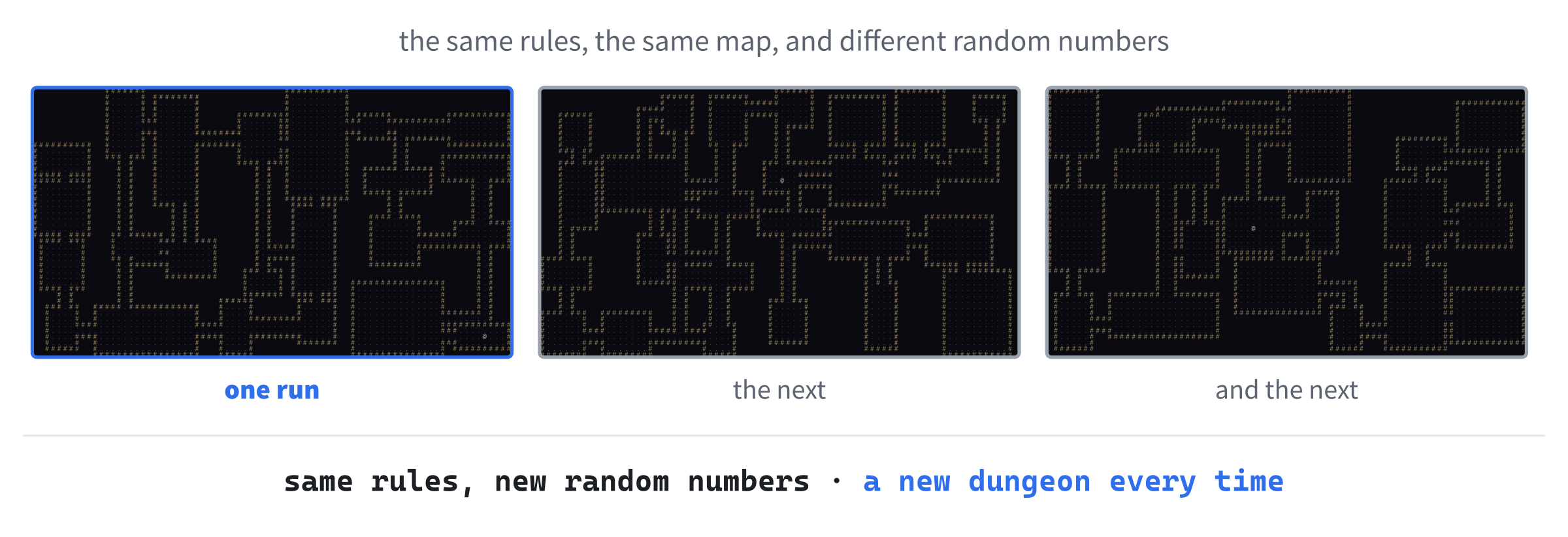
Checkpoint: Press F5. Instead of the test room, a whole dungeon fills the window, with the @ in the middle of one of its rooms, as in Figure 31.4. Walk around it: every room can be reached, although some are a long way from others. Close the window, press F5 again, and the dungeon is a different one, every time.
The random numbers make the dungeons different, and they can make a bug hard to catch, too, since a problem with one dungeon might not show up again for a long time.
A dungeon that's different every time is what you want from a game, but not from a bug hunt. If something goes wrong in some dungeons but not others, add SDL_srand(1); to main, below the SDL_Init check, and every run makes exactly the same dungeons, in the same order. Each number gives its own dungeons, so try a few until one shows the problem, and then you'll see it every time. Take the line out when you're done, and SDL_rand goes back to starting somewhere different every run.
Now that there are levels, the player needs a way to get from one to the next.
Stairs Down
Every level needs a way down, and in a roguelike, that's a staircase, drawn as a >. It'll go in the room that's farthest from the player's start, so that getting down means exploring the level. The map needs a new kind of terrain for it. In Map.h, find this line in the Terrain enum:
FloorAnd change it to this, with a comma after Floor:
Floor,
StairsDown
In the preceding code, StairsDown is a third kind of terrain. It isn't a wall, so isBlocked lets the player walk onto it, and isNextToOpen counts it as open ground, so the walls around it are drawn.
The stairs need a color. In Common.h, add this to the palette, below PLAYER, with a blank line in between:
// The stairs down
constexpr SDL_Color STAIRS = { 240, 220, 80, 255 };
In the preceding code, the stairs are a bright yellow, so they stand out from the gray floor around them. Now the map has to draw them. In Map.cpp’s draw, add these two lines below the floor's two, above the line else if (isNextToOpen(cell)):
else if (at(cell).terrain == Terrain::StairsDown)
    glyphs.draw(renderer, '>', cell, Palette::STAIRS);
In the preceding code, a cell whose terrain is StairsDown is drawn as a >, in the stairs' color. It has to come before the isNextToOpen test, because that test is true for any cell with floor beside it, which the stairs always have, and it would draw them as a wall.
Next, the generator puts the stairs on the map. At the top of MapGenerator.cpp, add this below #include <algorithm>:
#include <cstdlib> // std::absIn the preceding code, <cstdlib> brings in the std::abs for whole numbers, the absolute value that Chapter 4 met, which will measure distances. Then add these lines to generate, above return start;, with a blank line in between:
// and put the stairs in the middle of the room farthest away from it
Point stairs = start;
int farthest = 0;
for (const SDL_Rect& room : rooms_)
{
    Point center = centerOf(room);
    int distance = std::abs(center.x - start.x) +
                   std::abs(center.y - start.y);
    if (distance > farthest)
    {
        farthest = distance;
        stairs = center;
    }
}
map_.at(stairs).terrain = Terrain::StairsDown;
In the preceding code, the stairs start out at the start, and the loop looks for somewhere farther away. For each room, it works out how far its middle is from the start, and if that's farther than any room so far, the room's middle becomes the place for the stairs, and its distance the one to beat. When the loop is done, stairs is the middle of the farthest room, and that cell becomes StairsDown.
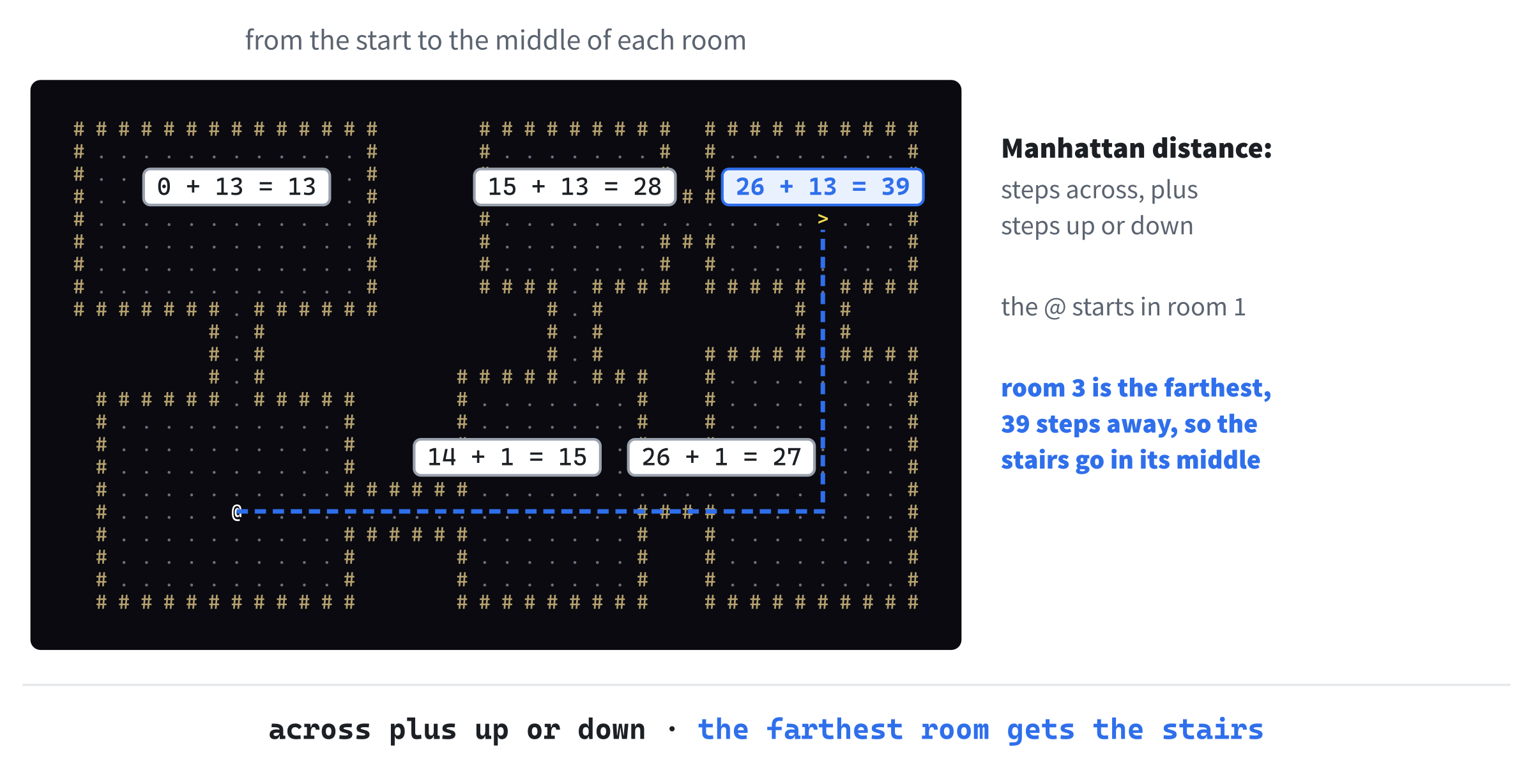
The distance is the Manhattan distance: how far apart the two cells are across, plus how far apart they are down, with std::abs making each part positive, whichever cell comes first. It's named after the streets of Manhattan, which run in a grid, so that walking from one corner to another means going so many blocks across and so many up, and never diagonally. The @ walks that way too, a step across or down at a time, so it's a fair measure of how far away a room is. Figure 31.5 shows it at work.
The stairs are on the map, so the player needs a way to take them. In Game.h, add this below handleKey’s declaration:
void takeStairs();In the preceding code, takeStairs will take the player down, if they're standing on the stairs. Then add this below Player player_;:
int depth_ = 1; // how many levels down the player isIn the preceding code, depth_ counts how many levels down the player is, starting at 1, with a default member value, as Chapter 19's members had. Nothing shows it yet, but the HUD will, later in the chapter, and Chapter 32 will use it to make the deeper levels more dangerous.
In Game.cpp, the period key takes the stairs. Add this case to the switch in handleKey, below the right arrow's break;:
case SDLK_PERIOD:
    takeStairs();
    return;
In the preceding code, the period, SDLK_PERIOD, calls takeStairs, and returns, since taking the stairs isn't a step. Rogue itself had you press > to go down a >, which on a US keyboard is the same key with Shift held, so plain . saves you the Shift.
Then add takeStairs below handleKey, with a blank line in between:
// Goes down to a new level, if the player is standing on the stairs
void Game::takeStairs()
{
    if (map_.at(player_.getPosition()).terrain != Terrain::StairsDown)
        return;

    ++depth_;
    newLevel();
}
In the preceding code, takeStairs checks what the player is standing on, by looking at the terrain of the tile at their position. If it isn't StairsDown, there's nothing to do, and it returns. Otherwise, the player is one level deeper, and newLevel builds the new level, and puts the player at its start.
Checkpoint: Press F5. Somewhere in the dungeon, usually a long way from the @, there's a yellow >. Walk to it, and press the period key, and a brand-new dungeon replaces the old one, with stairs of its own. Press the period anywhere else, and nothing happens.
Sight and Memory
So far, you can see the whole dungeon from the moment it's made, stairs and all, which makes getting down rather easy. In a roguelike, you only see what's in your line of sight. Everything else is either remembered, if you've seen it before, or dark. So each tile needs to remember two things: whether the player has ever seen it, and whether the player can see it right now.
Tiles That Remember
In Map.h, add these two members to Tile, below terrain:
bool explored = false;   // the player has seen it, at least once
bool visible = false;    // the player can see it right now
In the preceding code, explored becomes true the first time the player sees a tile, and stays true, while visible is only true while the player can see it. Both start false, with default member values. Chapter 30's fill gives every tile a brand-new Tile, made from { terrain }, so these two start from false again on every new level, too, as Chapter 30 promised. A new level is always completely unexplored.
The map also needs a way to forget what's visible, since what you can see changes every time you move. Add this below fill’s declaration:
void clearVisible();In the preceding code, clearVisible will make every tile not visible, and leave explored as it is. Add its definition to Map.cpp, below fill, with a blank line in between:
void Map::clearVisible()
{
    for (Tile& tile : tiles_)
        tile.visible = false;
}
In the preceding code, clearVisible goes through every tile with a range-based for, by reference, and sets its visible to false.
Tiles that are only remembered are drawn in darker colors. In Common.h, add these to the palette, below the stairs' color, with a blank line in between:
// The colors of things remembered, but out of sight
constexpr SDL_Color WALL_REMEMBERED = { 60, 55, 40, 255 };
constexpr SDL_Color FLOOR_REMEMBERED = { 40, 40, 55, 255 };
constexpr SDL_Color STAIRS_REMEMBERED = { 110, 100, 40, 255 };
In the preceding code, each kind of terrain gets a remembered color, much darker than its usual one, and a little grayer, so that what's in sight stands out from what's only remembered.
A Table of Looks
Now Map::draw has a lot to decide. There are three kinds of terrain, each drawn with its own character, and each in two colors, one for in sight and one for remembered. That's six combinations, and an if for each would be a lot of ifs. When a choice depends on an enum class, a table is neater, as Chapter 27 found with the sizes of its rocks. In Map.cpp, add this below the includes, with a blank line in between:
namespace
{
    // How each kind of terrain looks: its character, its color when it's
    // in sight, and its color when it's only remembered
    struct TerrainLook
    {
        char glyph;
        SDL_Color inSight;
        SDL_Color remembered;
    };

    // One for each kind of terrain, in the same order as the enum
    constexpr TerrainLook TERRAIN_LOOKS[] = {
        { '#', Palette::WALL, Palette::WALL_REMEMBERED },
        { '.', Palette::FLOOR, Palette::FLOOR_REMEMBERED },
        { '>', Palette::STAIRS, Palette::STAIRS_REMEMBERED }
    };
}
In the preceding code, a TerrainLook is everything about how a kind of terrain looks: its character, its color in sight, and its color remembered. The array TERRAIN_LOOKS has one for each kind of terrain, in the same order as the Terrain enum: wall, then floor, then the stairs. It's constexpr, since it never changes, and its square brackets are empty, so the compiler counts the looks, as it counted Chapter 7's colors. Both the struct and the table are in an unnamed namespace, since only Map.cpp needs them.
The order matters, because the table is read by turning a Terrain into a number. The values of an enum class are numbered from 0, in the order they're written, so Terrain::Wall is 0, Terrain::Floor is 1, and Terrain::StairsDown is 2, and static_cast<int> turns each into its number, which is its place in the table.
The table and the enum have to stay in step. When you add a kind of terrain, add it at the end of the enum, and its look at the end of the table. Put a look in the wrong place, and the kinds are drawn with each other's characters and colors. Leave one out, and the last kind reads past the end of the table. Neither mistake is one the compiler can catch, since it has no way to know which look belongs to which kind.
With the table in place, draw becomes a few lines. Replace the whole of draw, from its comment to its closing brace, with this:
// Draws every tile the player has explored: brightly if it's in sight, and
// dimly if it's only remembered. Solid rock, with no open ground beside
// it, isn't drawn at all
void Map::draw(SDL_Renderer* renderer, const GlyphCache& glyphs) const
{
    for (int y = 0; y < MAP_H; ++y)
    {
        for (int x = 0; x < MAP_W; ++x)
        {
            Point cell = { x, y };
            const Tile& tile = at(cell);
            bool isRock = tile.terrain == Terrain::Wall && !isNextToOpen(cell);
            if (!tile.explored || isRock)
                continue;

            int kind = static_cast<int>(tile.terrain);
            const TerrainLook& look = TERRAIN_LOOKS[kind];
            glyphs.draw(renderer, look.glyph, cell,
                        tile.visible ? look.inSight : look.remembered);
        }
    }
}
In the preceding code, each cell's tile is looked up once, and kept in tile, a const reference, rather than calling at over and over. Two kinds of tile are skipped with continue: one the player has never explored, which stays dark, and rock, which is wall with no open ground beside it, as before. For every other tile, kind is its terrain as a number, look is that kind's row of the table, and the glyph cache draws the look's character, in the in-sight color if the tile is visible, and in the remembered color if it isn't. The ? : is Chapter 4's ternary operator, choosing between the two.
Checkpoint: Press F5. The dungeon has gone, and the @ is alone in the dark. That's right, for now: every tile starts unexplored, and nothing explores them yet, so draw skips them all. The map is still there, though. Walk around, and the @ still stops at the walls you can't see.
Rays of Sight
Working out what the player can see is called computing the field of view, or FOV. The idea is simple: you can see a cell if a straight line from you to it doesn't pass through a wall. So the game sends straight lines out from the player, like the rays of light from a lamp, and walks along each one a cell at a time, marking each cell as seen, until the ray meets a wall. The wall is seen, since the light reaches it, but nothing behind it is.
Which lines? The player can see SIGHT_RADIUS cells in every direction, 8 in this game, so everything in sight fits in a square 17 cells across, with the player in the middle. A ray goes to every cell around the edge of that square. The four sides of 17 cells make 68 rays, and since each corner belongs to two sides, they go to 64 different cells.
Each ray stops when it leaves a circle of radius 8, which gives the view its round shape. Figure 31.6 shows the rays, and a wall that stops some of them.
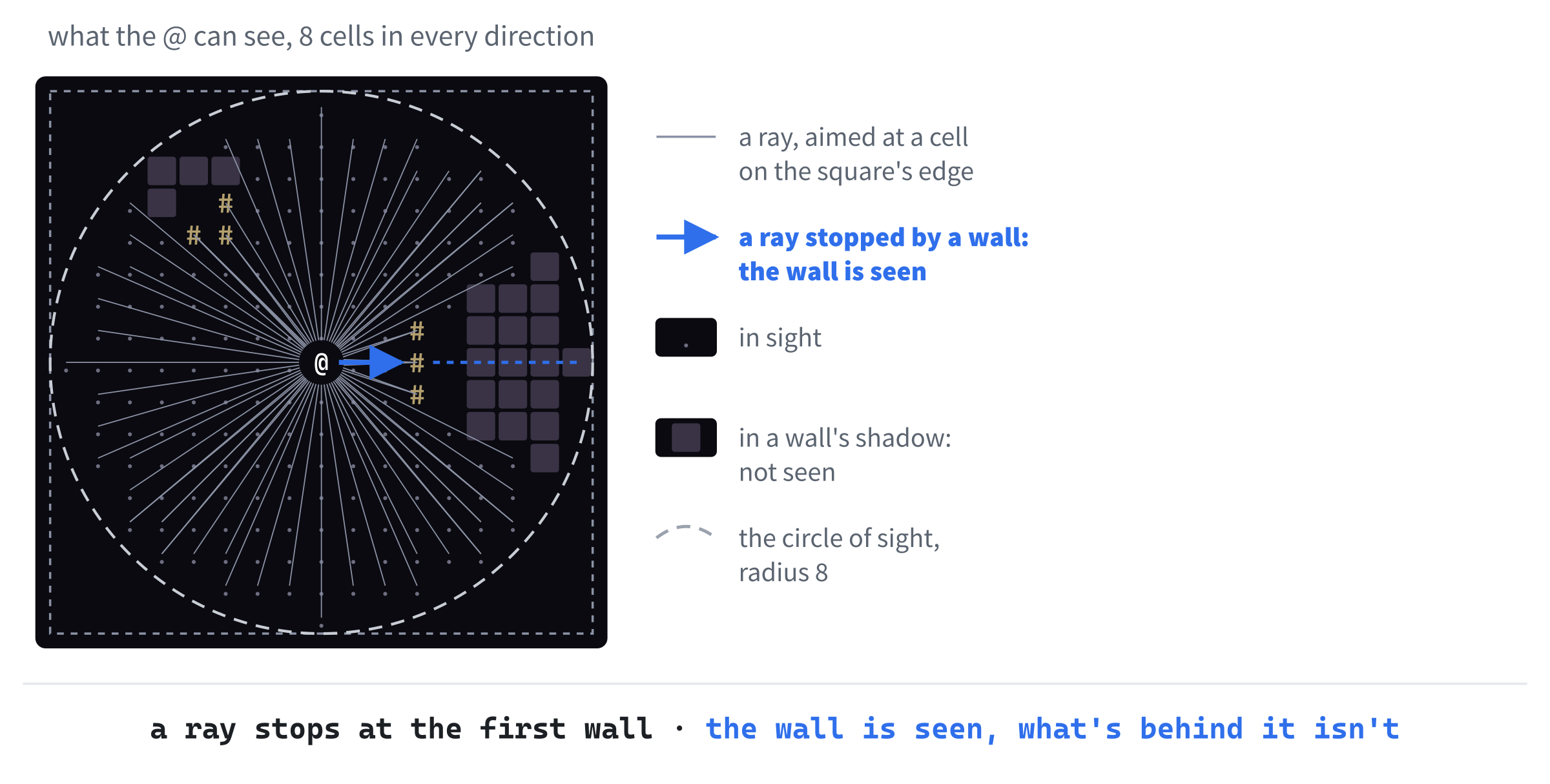
In the open, with no walls in the way, those 68 rays reach every one of the 197 cells in the circle, and don't miss a single one. The circle is measured with the ordinary straight-line distance, which Chapter 27 used for its collisions, and compared as a square, with no square root. A cell 3 across and 4 down is 5 away, since 3 × 3 + 4 × 4 is 25, which is 5 × 5, so it's in sight.
First, the radius. In Common.h, add this below WINDOW_H, with a blank line in between:
// How far the player can see, in cells
constexpr int SIGHT_RADIUS = 8;
In the preceding code, SIGHT_RADIUS is how many cells the player can see, in any direction. It's a constant in Common.h, where it's easy to find and change.
The field of view doesn't need to remember anything from one move to the next, so it isn't a class. It's a function, in a namespace of its own, as Chapter 24's functions were. Add a header called FOV.h, and below its #pragma once, type the rest, so that the file reads like this:
#pragma once
#include "Common.h"

class Map;

// Field of view: which cells the player can see from where they stand
namespace FOV
{
    void compute(Map& map, Point from, int radius);
}
In the preceding code, FOV::compute works out what can be seen from a cell, from, up to radius cells away, and marks it on the map, so it takes the map by reference, to change its tiles. The header includes Common.h, for Point, and forward-declares Map.
Now add a C++ file called FOV.cpp, and type its includes, and an unnamed namespace, empty for now:
#include "FOV.h"
#include <algorithm>   // std::max
#include <cmath>   // std::round
#include <cstdlib>   // std::abs
#include "Map.h"

namespace
{
}
In the preceding code, the includes bring in std::max, std::round, and std::abs, and the map. The unnamed namespace will hold castRay, which walks one ray, since nothing outside this file needs it. Add the first part of castRay inside the namespace's braces:
// Walks a straight line from one cell toward another, a cell at a
// time, and marks each cell seen, until the line leaves the circle of
// sight or meets a wall. The wall is seen, but nothing behind it
void castRay(Map& map, Point from, Point to, int radius)
{
    int dx = to.x - from.x;
    int dy = to.y - from.y;
    int steps = std::max(std::abs(dx), std::abs(dy));

    for (int step = 1; step <= steps; ++step)
    {
        // This far along the line, rounded to the nearest cell
        float t = static_cast<float>(step) / steps;
        int offsetX = static_cast<int>(std::round(dx * t));
        int offsetY = static_cast<int>(std::round(dy * t));
        Point cell = { from.x + offsetX, from.y + offsetY };
In the preceding code, castRay walks from from toward to. First, it works out how far apart the two are, dx across and dy down, and how many steps the walk takes, which is one for every cell along the longer of the two. That's what std::max of the two absolute values gives, and for a ray to the edge of the square, it's always the radius, 8.
The loop takes the steps, from 1 to steps. At each one, t is how far along the line the walk has come, as a fraction: a quarter of the way at step 2 of 8, and all the way at step 8. The static_cast<float> makes the division a real one, since Chapter 2's whole-number division would give 0 until the very last step. Then dx * t and dy * t are how far across and down the line has come at that point, which is Chapter 11's lerp, from 0 to dx, with its a left out, since it's 0. That point usually falls between cells, so std::round rounds it to the nearest whole one, and cell is the cell it lands in.
Now the checks. Add these lines below the line that makes cell, with a blank line in between, to finish castRay:
        bool inCircle =
            offsetX * offsetX + offsetY * offsetY <= radius * radius;
        if (!inCircle || !map.isInside(cell))
            return;

        Tile& tile = map.at(cell);
        tile.visible = true;
        tile.explored = true;
        if (tile.terrain == Terrain::Wall)
            return;
    }
}
In the preceding code, the ray stops if it has left the circle of sight, which is the circle test on the distances across and down, or if it has gone off the map. Otherwise, the tile at the cell is marked visible, and explored. If it's a wall, the ray stops there: the wall itself has been seen, but nothing beyond it can be. That return ends the whole of castRay, which is just what's wanted, since the rest of the ray is hidden.
Last, compute, which casts all the rays. Add this below the unnamed namespace's closing brace, with a blank line in between:
namespace FOV
{
    // Marks every cell the player can see as visible, and explored, and
    // every other cell as not visible
    void compute(Map& map, Point from, int radius)
    {
        map.clearVisible();
        map.at(from).visible = true;
        map.at(from).explored = true;

        // A ray to every cell around the edge of the square that the
        // circle of sight fits in
        for (int i = -radius; i <= radius; ++i)
        {
            castRay(map, from, { from.x + i, from.y - radius }, radius);
            castRay(map, from, { from.x + i, from.y + radius }, radius);
            castRay(map, from, { from.x - radius, from.y + i }, radius);
            castRay(map, from, { from.x + radius, from.y + i }, radius);
        }
    }
}
In the preceding code, compute is inside the FOV namespace, which makes it the FOV::compute that the header declared. It starts by clearing every tile's visible, since what could be seen from the last cell isn't what can be seen from this one. The player's own cell is always visible, and explored. Then the loop goes along the four sides of the square at once, casting a ray at every step to a cell on the top side, the bottom side, the left, and the right. With a radius of 8, i goes from -8 to 8, which is 17 steps, with four rays each: 68 rays in all.
Roguelike programmers have been inventing ways to work out a field of view for decades, and arguing about which is best. Casting rays, as here, is the simplest to understand, and plenty for a map this size. The best-known alternative, shadowcasting, sweeps outward from the player a row at a time, working out which parts of each row are in the shadow of a wall, and looks at each cell only once. RogueBasin, a wiki for roguelike developers, has articles on it and many others.
All that's left is to call it.
Looking Around
The game should look around whenever the player arrives somewhere: at the start of each level, and after each step. In Game.cpp, add this above #include "MapGenerator.h":
#include "FOV.h"In the preceding code, Game.cpp includes the field of view's header, with the project's other headers in alphabetical order. Now replace the whole of newLevel with this:
// Builds a new level, puts the player at its start, and looks around
void Game::newLevel()
{
    MapGenerator generator(map_);
    player_.setPosition(generator.generate());
    FOV::compute(map_, player_.getPosition(), SIGHT_RADIUS);
}
In the preceding code, once the player is at the start, FOV::compute works out what they can see from there, up to SIGHT_RADIUS cells away, and the comment says so, too. Then find this line, at the end of handleKey:
player_.tryMove(dx, dy, map_);And change it to this:
if (player_.tryMove(dx, dy, map_))
    FOV::compute(map_, player_.getPosition(), SIGHT_RADIUS);
In the preceding code, the bool that tryMove returns, which Chapter 30 said we'd use, decides whether to look around again. If the player moved, the view is worked out from their new cell. If the step was into a wall, nothing moved, so nothing new can be seen, and there's no need.
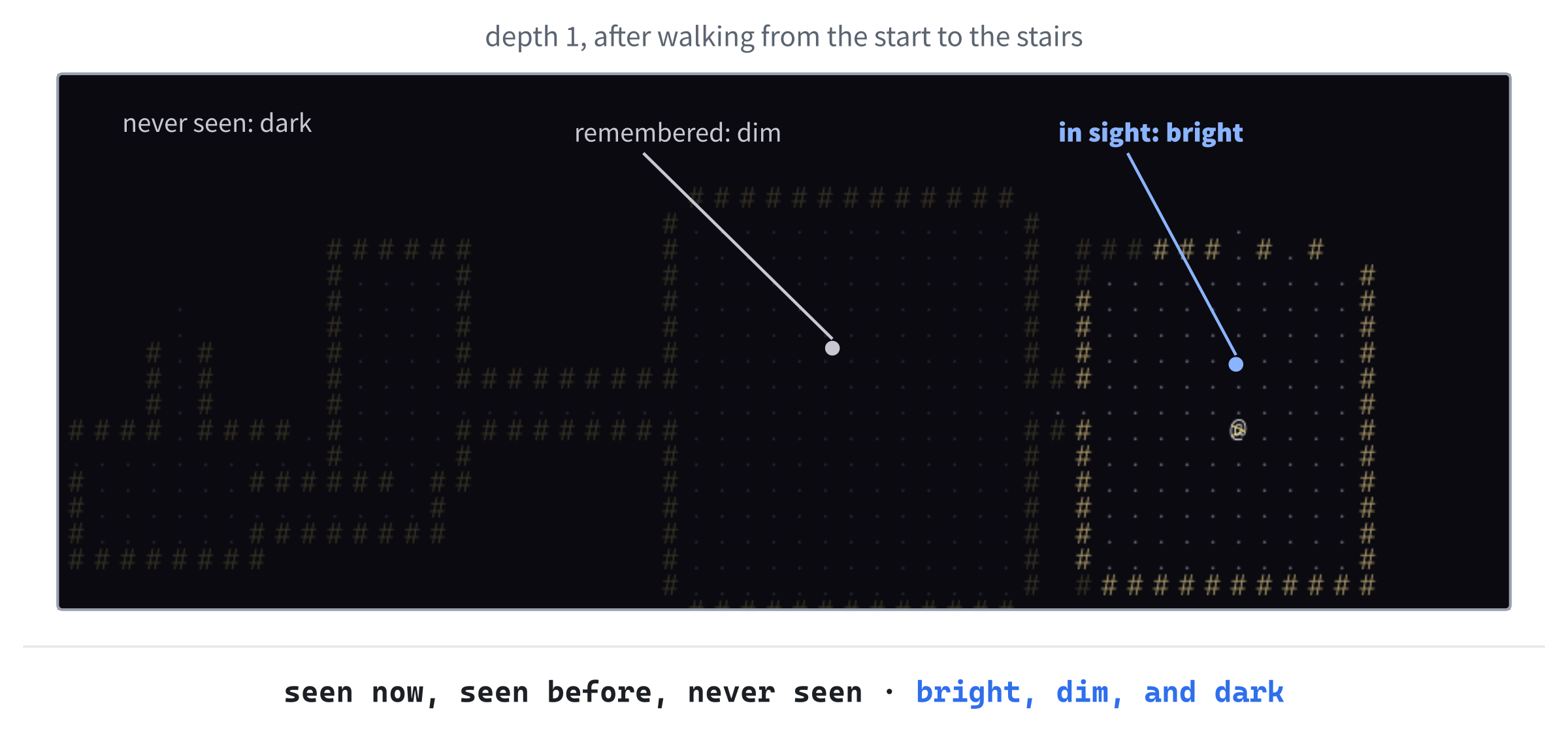
Checkpoint: Press F5. Now you see the room around you, and as far along the corridors as your sight reaches, and nothing else. Walk out of the room, and it stays behind you in dim colors, remembered, as in Figure 31.7. The stairs are out there somewhere, and you'll have to explore to find them.
The HUD
A roguelike talks to you. It tells you what you've found, what's hit you, and how deep you are, in a few lines of text. That's the game's HUD, the heads-up display that Chapter 17 gave the Runner, for its coins and its distance. In Rogue SDL, it's five rows of text along the bottom of the window.
Making Room
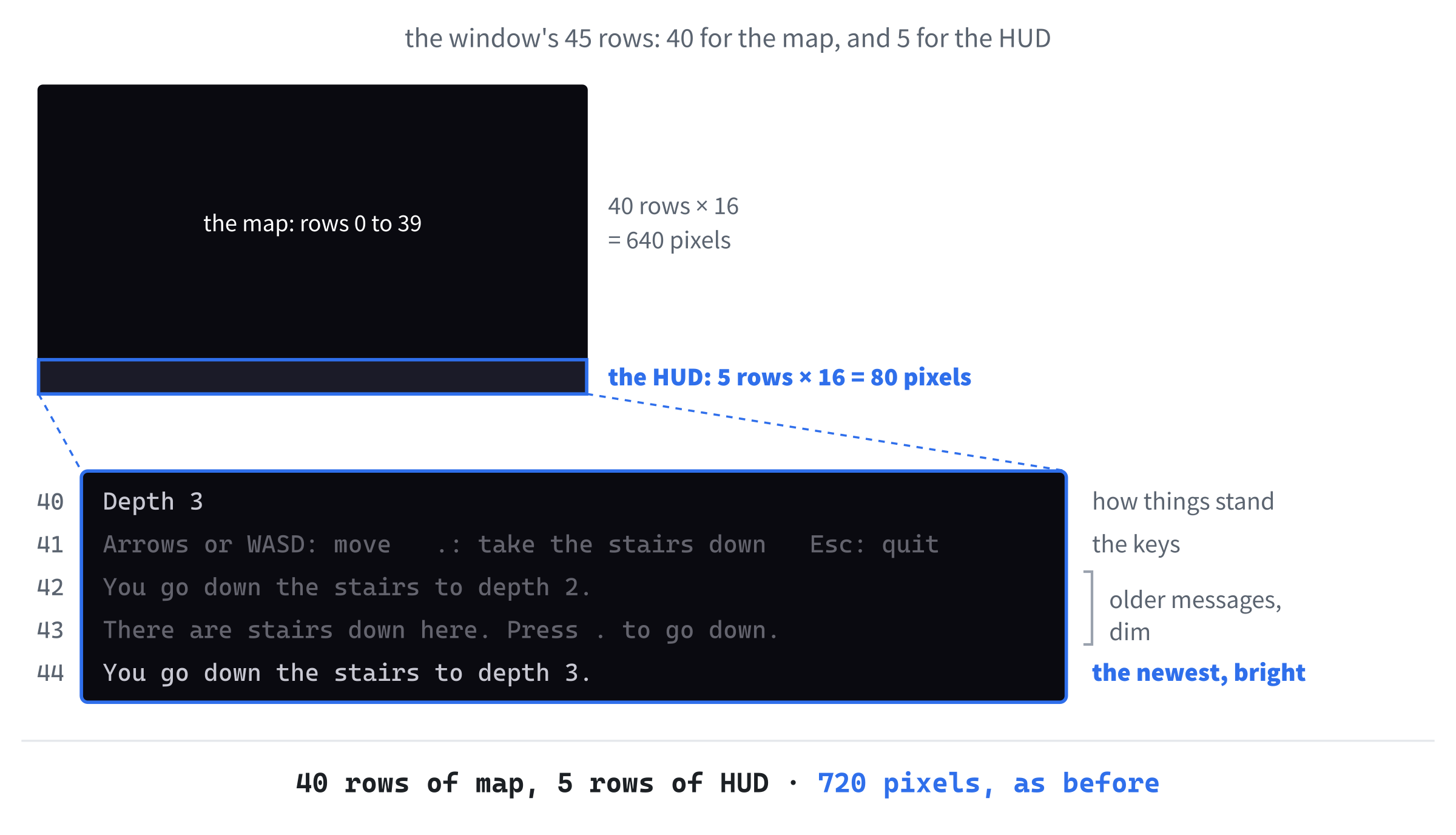
The map is 45 rows tall, and fills the window, so it gives up five of its rows to the HUD: the map becomes 40 rows tall, and the window stays the same size. Figure 31.8 shows how the rows are shared out.
All it takes is a change to the sizes at the top of Common.h. Find these lines there:
// The map is a grid of square cells, CELL_PX pixels across, MAP_W cells
// wide and MAP_H cells tall, and the window is exactly its size: 1280 by
// 720 pixels
constexpr int CELL_PX = 16;
constexpr int MAP_W = 80;
constexpr int MAP_H = 45;
constexpr int WINDOW_W = MAP_W * CELL_PX;
constexpr int WINDOW_H = MAP_H * CELL_PX;
And change them to this:
// The map is a grid of square cells, CELL_PX pixels across, MAP_W cells
// wide and MAP_H cells tall. Below it are HUD_ROWS rows of text, and the
// window is exactly the size of both: 1280 by 720 pixels
constexpr int CELL_PX = 16;
constexpr int MAP_W = 80;
constexpr int MAP_H = 40;
constexpr int HUD_ROWS = 5;
constexpr int WINDOW_W = MAP_W * CELL_PX;
constexpr int WINDOW_H = (MAP_H + HUD_ROWS) * CELL_PX;
In the preceding code, MAP_H is 40 now, and HUD_ROWS is the five rows below it. The window's height is worked out from both: 40 and 5 make 45 rows, of 16 pixels each, which is 720 pixels, the same as before, and the comment says what's where. Everything else that uses MAP_H follows along without another change. The generator cuts up a map 40 rows tall, the map's vector has 3,200 tiles, and isInside stops at row 39.
The HUD's text needs two colors of its own. Add them at the end of the palette, below the remembered colors, with a blank line in between:
// The HUD's text
constexpr SDL_Color TEXT = { 200, 200, 210, 255 };
constexpr SDL_Color TEXT_DIM = { 100, 100, 110, 255 };
In the preceding code, TEXT is a light gray for anything important, and TEXT_DIM is a darker one for everything else.
Lines of Text
The glyph cache draws one character in the middle of a cell, which is right for the map, where every character is a thing in a place. It isn't right for text. A glyph is 11 pixels wide, and a cell is 16, so with one character to a cell, every word has a gap after each of its letters.
Text looks better with its characters as close together as their glyphs allow, as in a word processor. So the cache needs a second way to draw, for a whole line of text at once. In GlyphCache.h, add this below draw’s declaration:
void drawText(SDL_Renderer* renderer, const std::string& text,
              Point cell, SDL_Color color) const;
In the preceding code, drawText takes a whole std::string, the cell where the text starts, and a color. The header already includes <string>, for the font's path, so there's nothing more to include.
Now the definition. In GlyphCache.cpp, add drawText below draw, with a blank line in between:
// Draws a line of text, starting at a cell. The characters sit as close
// together as their glyphs allow, as in ordinary text, rather than one to
// a cell, and on the bottom of the row, so that even on the window's last
// row, the tails of letters such as g and y are inside the window
void GlyphCache::drawText(SDL_Renderer* renderer, const std::string& text,
                          Point cell, SDL_Color color) const
{
    float x = static_cast<float>(cell.x * CELL_PX);
    float y = (cell.y + 1) * CELL_PX - glyphH_;
    for (char c : text)
    {
        drawAt(renderer, c, x, y, color);
        x += glyphW_;
    }
}
In the preceding code, x starts at the left edge of the starting cell, and moves along by a glyph's width, 11 pixels, after each character, so that the characters sit side by side, with no gaps between them. The range-based for goes through the string one char at a time, and drawAt draws each one, the same private function that draw uses. Figure 31.9 shows the difference.
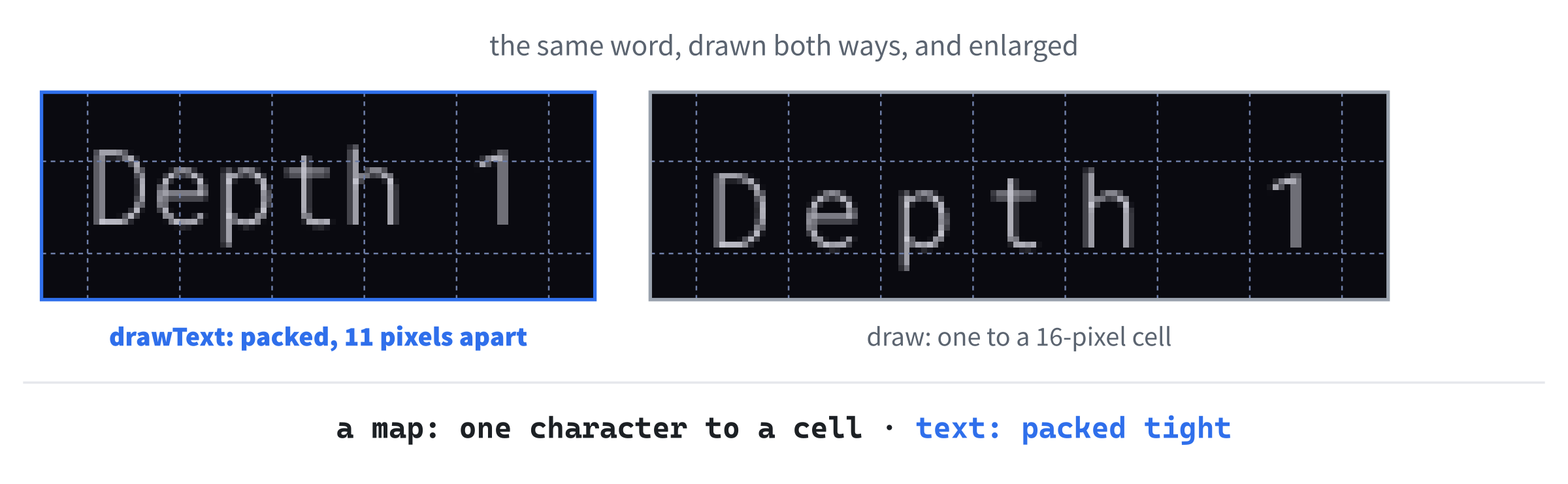
The y is different from draw’s, too. A glyph is 24 pixels tall, taller than a row, and draw centers it on its cell, so that it hangs 4 pixels over the rows above and below. On the window's last row, that would push the tails of letters such as g and y off the bottom of the window.
So drawText puts the bottom of each glyph on the bottom of its row, instead. The row's bottom is where the next row starts, (cell.y + 1) * CELL_PX pixels down, and the glyph starts glyphH_ pixels above that. It hangs 8 pixels over the row above instead, but the top of a glyph is mostly the empty space that a font keeps for accents, so the rows of text sit neatly one above another.
HUD.h and HUD.cpp
The HUD itself is a class. Add a header called HUD.h, and below its #pragma once, type the rest, so that the file reads like this:
#pragma once
#include <SDL3/SDL.h>
#include <deque>   // std::deque, for the messages
#include <string>   // std::string, for the messages

class GlyphCache;

// The rows of text below the map: how things stand, which keys do what,
// and the last few things that happened, with the newest at the bottom
class HUD
{
public:
    void addMessage(const std::string& message);
    void draw(SDL_Renderer* renderer, const GlyphCache& glyphs,
              int depth) const;

private:
    std::deque<std::string> messages_;
};
In the preceding code, the HUD keeps its messages in a std::deque of strings, the double-ended queue that Chapter 15 suggested for exactly this: a window onto recent history. New messages go on the back, and the oldest come off the front. The HUD has two functions. The first, addMessage, adds a message, and draw draws the HUD's rows. To do that, it needs the renderer and the glyph cache, and the depth, which the HUD shows, but doesn't keep.
Now add a C++ file called HUD.cpp, and type its includes, how many rows the messages get, and addMessage:
#include "HUD.h"
#include "Common.h"
#include "GlyphCache.h"

// The first row is how things stand, and the second is the keys, so the
// messages get the rows left over
constexpr int MESSAGE_ROWS = HUD_ROWS - 2;

// Adds a message at the bottom, and drops the oldest from the top when
// there are too many to show
void HUD::addMessage(const std::string& message)
{
    messages_.push_back(message);
    if (messages_.size() > MESSAGE_ROWS)
        messages_.pop_front();
}
In the preceding code, the HUD's first two rows are for how things stand and for the keys, so the messages get the rest, HUD_ROWS - 2, which is three rows. Then addMessage puts the new message on the back of the deque, and if that makes too many to show, pop_front drops the oldest, so the deque never holds more than three.
Last, draw. Add it below addMessage, with a blank line in between:
void HUD::draw(SDL_Renderer* renderer, const GlyphCache& glyphs,
               int depth) const
{
    int row = MAP_H;   // the first row below the map
    std::string status = "Depth " + std::to_string(depth);
    glyphs.drawText(renderer, status, { 1, row }, Palette::TEXT);

    // The keys
    std::string help = "Arrows or WASD: move   .: take the stairs down"
                       "   Esc: quit";
    glyphs.drawText(renderer, help, { 1, row + 1 }, Palette::TEXT_DIM);

    // The newest message is bright, and the older ones are dim
    for (size_t i = 0; i < messages_.size(); ++i)
    {
        bool newest = i + 1 == messages_.size();
        glyphs.drawText(renderer, messages_[i],
                        { 1, row + 2 + static_cast<int>(i) },
                        newest ? Palette::TEXT : Palette::TEXT_DIM);
    }
}
In the preceding code, row is the HUD's first row, the one just below the map. The map's rows are numbered from 0 to 39, so that's row MAP_H, 40. The first row shows the depth, in a std::string made with Chapter 11's std::to_string, in the brighter text color. The second shows the keys, in the dimmer one. Its two pieces of text in quotation marks, one on each line, are joined into one by the compiler, since there's nothing between them but spaces and a line break, which keeps each line of code short.
Then the loop draws the messages, one to a row, from the third row down, oldest first. The bool called newest is true for the last one, which is drawn in the brighter color, while the rest are dim, so your eye goes straight to what just happened. The static_cast<int> turns i, a size_t, into an int for the cell's row, since a Point holds ints.
Checkpoint: Click in HUD.cpp, and press Ctrl+F7. It compiles on its own, and so does GlyphCache.cpp, if you'd like to check drawText too. There's no HUD on the screen yet, since the game doesn't have one.
Messages
The game owns the HUD, and fills it with messages. In Game.h, find the comment above the class:
// The whole game. It owns the glyphs, the map, and the player, and runs
// the loop that waits for a key, acts on it, and draws what happened
And change it to this:
// The whole game. It owns the glyphs, the map, the player, and the HUD,
// and runs the loop that waits for a key, acts on it, and draws what
// happened
In the preceding code, the comment adds the HUD to what the game owns. Now add the HUD's header below #include "GlyphCache.h":
#include "HUD.h"In the preceding code, Game.h includes HUD.h, since the game holds its HUD by value, and a class needs to know the size of every member. Then add the HUD itself below Player player_;:
HUD hud_;In the preceding code, hud_ is the game's HUD, made and destroyed along with the game, like the map and the player.
In Game.cpp, the messages will need std::to_string. Find this line:
#include <string> // std::string, for the font's pathAnd change it to this:
#include <string> // std::string and std::to_stringIn the preceding code, the comment says what <string> is for now: the std::string of the font's path, as before, and std::to_string, which a message about the stairs will use. Then welcome the player, by adding this to the constructor, below newLevel();:
hud_.addMessage("Welcome to Rogue SDL. Find the stairs down: >");In the preceding code, the first message tells the player what to look for, and what it looks like. Next, find these two lines at the end of handleKey:
if (player_.tryMove(dx, dy, map_))
    FOV::compute(map_, player_.getPosition(), SIGHT_RADIUS);
And change them to this:
if (player_.tryMove(dx, dy, map_))
{
    FOV::compute(map_, player_.getPosition(), SIGHT_RADIUS);
    if (map_.at(player_.getPosition()).terrain == Terrain::StairsDown)
        hud_.addMessage("There are stairs down here. Press . to go down.");
}
In the preceding code, the if has braces now, since it controls two statements. After the player has looked around, if they're standing on the stairs, the HUD tells them so, and which key takes them down.
The stairs can explain themselves too. Replace the whole of takeStairs with this:
// Goes down to a new level, if the player is standing on the stairs
void Game::takeStairs()
{
    if (map_.at(player_.getPosition()).terrain != Terrain::StairsDown)
    {
        hud_.addMessage("There are no stairs here.");
        return;
    }

    ++depth_;
    newLevel();
    hud_.addMessage("You go down the stairs to depth " +
                    std::to_string(depth_) + ".");
}
In the preceding code, pressing the period anywhere but the stairs gets a message saying there are no stairs there, rather than doing nothing without a word, and the if has braces now, for its two statements. Going down gets a message too, with the new depth, joined onto the end of the words with + and std::to_string.
Last, the HUD has to be drawn. In draw, add this below the player's draw:
hud_.draw(renderer_, glyphs_, depth_);In the preceding code, the HUD is drawn after the map and the player, in its own rows below them, with the depth passed in from the game.
That's the whole of Part 2: six new files, and every change to the old ones typed.
Checkpoint: Press F5. The dungeon is a little shorter, and below it are the HUD's rows: the depth, the keys, and a welcome. Find the stairs, and the HUD says so. Press the period, and you're at depth 2.
The Complete Files
Here are the thirteen files that are new or changed, in full, exactly as they are in the repository's SDL3 Projects/Rogue SDL Part 2. The other five, main.cpp, Entity.h, Entity.cpp, Player.h, and Player.cpp, are just as they were at the end of Chapter 30. First, Common.h:
#pragma once
#include <SDL3/SDL.h>

// A place on the map, counted in cells, not pixels
struct Point
{
    int x = 0;
    int y = 0;
};

// The map is a grid of square cells, CELL_PX pixels across, MAP_W cells
// wide and MAP_H cells tall. Below it are HUD_ROWS rows of text, and the
// window is exactly the size of both: 1280 by 720 pixels
constexpr int CELL_PX = 16;
constexpr int MAP_W = 80;
constexpr int MAP_H = 40;
constexpr int HUD_ROWS = 5;
constexpr int WINDOW_W = MAP_W * CELL_PX;
constexpr int WINDOW_H = (MAP_H + HUD_ROWS) * CELL_PX;

// How far the player can see, in cells
constexpr int SIGHT_RADIUS = 8;

// Every color in the game, in one place
namespace Palette
{
    constexpr SDL_Color BACKGROUND = { 10, 10, 16, 255 };
    constexpr SDL_Color WALL = { 180, 160, 110, 255 };
    constexpr SDL_Color FLOOR = { 110, 110, 130, 255 };
    constexpr SDL_Color PLAYER = { 255, 255, 255, 255 };

    // The stairs down
    constexpr SDL_Color STAIRS = { 240, 220, 80, 255 };

    // The colors of things remembered, but out of sight
    constexpr SDL_Color WALL_REMEMBERED = { 60, 55, 40, 255 };
    constexpr SDL_Color FLOOR_REMEMBERED = { 40, 40, 55, 255 };
    constexpr SDL_Color STAIRS_REMEMBERED = { 110, 100, 40, 255 };

    // The HUD's text
    constexpr SDL_Color TEXT = { 200, 200, 210, 255 };
    constexpr SDL_Color TEXT_DIM = { 100, 100, 110, 255 };
}
In the preceding code, the map is 40 rows tall, with the HUD's five below it, and the palette has the stairs, the remembered colors, and the HUD's text.
Next, GlyphCache.h:
#pragma once
#include <SDL3/SDL.h>
#include <array>   // std::array, for the glyphs
#include <string>   // std::string, for the font's path
#include "Common.h"

// The printable characters, from the space (code 32) to the tilde (126)
constexpr char FIRST_GLYPH = ' ';
constexpr char LAST_GLYPH = '~';
constexpr int GLYPH_COUNT = LAST_GLYPH - FIRST_GLYPH + 1;

// Every character the game can draw, made once from a font as a white
// picture, and tinted to whatever color it's drawn in
class GlyphCache
{
public:
    GlyphCache(SDL_Renderer* renderer, const std::string& fontPath,
               float size);
    ~GlyphCache();

    GlyphCache(const GlyphCache&) = delete;
    GlyphCache& operator=(const GlyphCache&) = delete;

    bool isLoaded() const;
    void draw(SDL_Renderer* renderer, char c, Point cell,
              SDL_Color color) const;
    void drawText(SDL_Renderer* renderer, const std::string& text,
                  Point cell, SDL_Color color) const;

private:
    void drawAt(SDL_Renderer* renderer, char c, float x, float y,
                SDL_Color color) const;

    std::array<SDL_Texture*, GLYPH_COUNT> glyphs_ = {};
    float glyphW_ = 0.0f;   // the size of every glyph, since the font is
    float glyphH_ = 0.0f;   // monospaced
    bool loaded_ = false;
};
In the preceding code, the only new line is the declaration of drawText.
Then GlyphCache.cpp:
#include "GlyphCache.h"
#include <SDL3_ttf/SDL_ttf.h>
#include <cmath>   // std::floor

GlyphCache::GlyphCache(SDL_Renderer* renderer, const std::string& fontPath,
                       float size)
{
    TTF_Font* font = TTF_OpenFont(fontPath.c_str(), size);
    if (!font)
    {
        SDL_Log("Couldn't open %s: %s", fontPath.c_str(), SDL_GetError());
        return;
    }

    // Draw each character once, in white, and keep it as a texture
    const SDL_Color white = { 255, 255, 255, 255 };
    for (char c = FIRST_GLYPH; c <= LAST_GLYPH; ++c)
    {
        SDL_Surface* surface = TTF_RenderGlyph_Blended(font, c, white);
        glyphs_[c - FIRST_GLYPH] =
            SDL_CreateTextureFromSurface(renderer, surface);
        SDL_DestroySurface(surface);
    }
    TTF_CloseFont(font);

    // In a monospaced font, every character is the same size, so the
    // first one gives us the size of them all
    SDL_GetTextureSize(glyphs_[0], &glyphW_, &glyphH_);
    loaded_ = true;
}

GlyphCache::~GlyphCache()
{
    for (SDL_Texture* glyph : glyphs_)
    {
        if (glyph)
            SDL_DestroyTexture(glyph);
    }
}

bool GlyphCache::isLoaded() const
{
    return loaded_;
}

// Draws one character in the middle of a cell
void GlyphCache::draw(SDL_Renderer* renderer, char c, Point cell,
                      SDL_Color color) const
{
    // Whole pixels only, so that the glyph stays sharp
    float x = cell.x * CELL_PX + std::floor((CELL_PX - glyphW_) / 2);
    float y = cell.y * CELL_PX + std::floor((CELL_PX - glyphH_) / 2);
    drawAt(renderer, c, x, y, color);
}

// Draws a line of text, starting at a cell. The characters sit as close
// together as their glyphs allow, as in ordinary text, rather than one to
// a cell, and on the bottom of the row, so that even on the window's last
// row, the tails of letters such as g and y are inside the window
void GlyphCache::drawText(SDL_Renderer* renderer, const std::string& text,
                          Point cell, SDL_Color color) const
{
    float x = static_cast<float>(cell.x * CELL_PX);
    float y = (cell.y + 1) * CELL_PX - glyphH_;
    for (char c : text)
    {
        drawAt(renderer, c, x, y, color);
        x += glyphW_;
    }
}

// Draws one character with its top-left corner at a pixel, tinted to a
// color. Characters without a glyph are skipped
void GlyphCache::drawAt(SDL_Renderer* renderer, char c, float x, float y,
                        SDL_Color color) const
{
    if (c < FIRST_GLYPH || c > LAST_GLYPH)
        return;

    SDL_Texture* glyph = glyphs_[c - FIRST_GLYPH];
    SDL_FRect box = { x, y, glyphW_, glyphH_ };
    SDL_SetTextureColorMod(glyph, color.r, color.g, color.b);
    SDL_RenderTexture(renderer, glyph, nullptr, &box);
}
In the preceding code, drawText packs a line of text together, and sits it on the bottom of its row.
Then Map.h:
#pragma once
#include <SDL3/SDL.h>
#include <vector>   // std::vector, for the tiles
#include "Common.h"

class GlyphCache;

// What a cell of the map is made of
enum class Terrain
{
    Wall,
    Floor,
    StairsDown
};

// One cell of the map
struct Tile
{
    Terrain terrain = Terrain::Wall;
    bool explored = false;   // the player has seen it, at least once
    bool visible = false;    // the player can see it right now
};

// The dungeon: a grid of tiles, MAP_W across and MAP_H down, kept in one
// vector, a row at a time
class Map
{
public:
    Map();

    Tile& at(Point cell);
    const Tile& at(Point cell) const;
    bool isInside(Point cell) const;
    bool isBlocked(Point cell) const;
    bool isNextToOpen(Point cell) const;

    void fill(Terrain terrain);
    void clearVisible();
    void draw(SDL_Renderer* renderer, const GlyphCache& glyphs) const;

private:
    std::vector<Tile> tiles_;
};
In the preceding code, the terrain has stairs, and every tile knows whether it's been explored, and whether it's visible.
Then Map.cpp:
#include "Map.h"
#include "GlyphCache.h"

namespace
{
    // How each kind of terrain looks: its character, its color when it's
    // in sight, and its color when it's only remembered
    struct TerrainLook
    {
        char glyph;
        SDL_Color inSight;
        SDL_Color remembered;
    };

    // One for each kind of terrain, in the same order as the enum
    constexpr TerrainLook TERRAIN_LOOKS[] = {
        { '#', Palette::WALL, Palette::WALL_REMEMBERED },
        { '.', Palette::FLOOR, Palette::FLOOR_REMEMBERED },
        { '>', Palette::STAIRS, Palette::STAIRS_REMEMBERED }
    };
}

Map::Map()
    : tiles_(MAP_W * MAP_H)
{
}

// The tile at a cell. Row y starts y whole rows into the vector
Tile& Map::at(Point cell)
{
    return tiles_[cell.y * MAP_W + cell.x];
}

const Tile& Map::at(Point cell) const
{
    return tiles_[cell.y * MAP_W + cell.x];
}

bool Map::isInside(Point cell) const
{
    return cell.x >= 0 && cell.x < MAP_W && cell.y >= 0 && cell.y < MAP_H;
}

// Walls block the way, and so does everything outside the map
bool Map::isBlocked(Point cell) const
{
    return !isInside(cell) || at(cell).terrain == Terrain::Wall;
}

// Whether any of the eight cells around this one is open ground, rather
// than wall
bool Map::isNextToOpen(Point cell) const
{
    for (int dy = -1; dy <= 1; ++dy)
    {
        for (int dx = -1; dx <= 1; ++dx)
        {
            Point next = { cell.x + dx, cell.y + dy };
            if (isInside(next) && at(next).terrain != Terrain::Wall)
                return true;
        }
    }
    return false;
}

// Replaces every tile with a new one, made of the given terrain
void Map::fill(Terrain terrain)
{
    for (Tile& tile : tiles_)
        tile = { terrain };
}

void Map::clearVisible()
{
    for (Tile& tile : tiles_)
        tile.visible = false;
}

// Draws every tile the player has explored: brightly if it's in sight, and
// dimly if it's only remembered. Solid rock, with no open ground beside
// it, isn't drawn at all
void Map::draw(SDL_Renderer* renderer, const GlyphCache& glyphs) const
{
    for (int y = 0; y < MAP_H; ++y)
    {
        for (int x = 0; x < MAP_W; ++x)
        {
            Point cell = { x, y };
            const Tile& tile = at(cell);
            bool isRock = tile.terrain == Terrain::Wall && !isNextToOpen(cell);
            if (!tile.explored || isRock)
                continue;

            int kind = static_cast<int>(tile.terrain);
            const TerrainLook& look = TERRAIN_LOOKS[kind];
            glyphs.draw(renderer, look.glyph, cell,
                        tile.visible ? look.inSight : look.remembered);
        }
    }
}
In the preceding code, the table of looks gives every kind of terrain its character and its two colors, and draw uses it for every tile that's been explored.
Next, the generator. First MapGenerator.h:
#pragma once
#include <SDL3/SDL.h>
#include <vector>   // std::vector, for the rooms
#include "Common.h"

class Map;

// Builds a new level on a map: it splits the map into areas, puts a room
// in each one, joins the rooms with corridors, and puts stairs down in one
// of them
class MapGenerator
{
public:
    MapGenerator(Map& map);

    Point generate();

private:
    void split(SDL_Rect area, int cuts);
    void addRoom(SDL_Rect area);
    void carve(Point a, Point b);
    void carveCorridor(Point from, Point to);

    Map& map_;                      // the map being built, not owned
    std::vector<SDL_Rect> rooms_;   // every room, in the order it was made
};
In the preceding code, the generator refers to a map it doesn't own, and keeps the rooms it makes.
Then MapGenerator.cpp:
#include "MapGenerator.h"
#include <algorithm>   // std::min and std::max
#include <cstdlib>   // std::abs
#include "Map.h"

// An area is cut in two only if its longer side is at least twice this, so
// both pieces are at least this long
constexpr int MIN_AREA = 10;
// and after this many cuts, it isn't cut again, however big it is
constexpr int MAX_CUTS = 6;
// The smallest room, in cells
constexpr int MIN_ROOM_W = 4;
constexpr int MIN_ROOM_H = 3;

namespace
{
    // A random whole number from low to high, including both
    int randomBetween(int low, int high)
    {
        if (high <= low)
            return low;
        return low + SDL_rand(high - low + 1);
    }

    Point centerOf(SDL_Rect room)
    {
        return { room.x + room.w / 2, room.y + room.h / 2 };
    }
}

MapGenerator::MapGenerator(Map& map)
    : map_(map)
{
}

// Builds the level, and returns the cell where the player starts
Point MapGenerator::generate()
{
    map_.fill(Terrain::Wall);
    rooms_.clear();
    split({ 0, 0, MAP_W, MAP_H }, 0);

    // Join each room to the one made after it, so that every room can be
    // reached from every other
    for (size_t i = 1; i < rooms_.size(); ++i)
        carveCorridor(centerOf(rooms_[i - 1]), centerOf(rooms_[i]));

    // Start in the middle of a room chosen at random
    int roomCount = static_cast<int>(rooms_.size());
    Point start = centerOf(rooms_[SDL_rand(roomCount)]);

    // and put the stairs in the middle of the room farthest away from it
    Point stairs = start;
    int farthest = 0;
    for (const SDL_Rect& room : rooms_)
    {
        Point center = centerOf(room);
        int distance = std::abs(center.x - start.x) +
                       std::abs(center.y - start.y);
        if (distance > farthest)
        {
            farthest = distance;
            stairs = center;
        }
    }
    map_.at(stairs).terrain = Terrain::StairsDown;

    return start;
}

// Cuts an area in two, then cuts each piece in two, and so on. An area
// that's too small to cut, or has been cut out by MAX_CUTS cuts, gets a
// room instead
void MapGenerator::split(SDL_Rect area, int cuts)
{
    // Cut across the longer side, so that the pieces don't get too thin
    bool cutAcross = area.h > area.w;
    int length = cutAcross ? area.h : area.w;
    if (cuts == MAX_CUTS || length < MIN_AREA * 2)
    {
        addRoom(area);
        return;
    }

    int cut = randomBetween(MIN_AREA, length - MIN_AREA);
    if (cutAcross)
    {
        split({ area.x, area.y, area.w, cut }, cuts + 1);
        split({ area.x, area.y + cut, area.w, area.h - cut }, cuts + 1);
    }
    else
    {
        split({ area.x, area.y, cut, area.h }, cuts + 1);
        split({ area.x + cut, area.y, area.w - cut, area.h }, cuts + 1);
    }
}

// Carves a room of a random size somewhere inside an area, with at least
// one cell of wall between it and the area's edges
void MapGenerator::addRoom(SDL_Rect area)
{
    SDL_Rect room;
    room.w = randomBetween(MIN_ROOM_W, area.w - 2);
    room.h = randomBetween(MIN_ROOM_H, area.h - 2);
    room.x = randomBetween(area.x + 1, area.x + area.w - room.w - 1);
    room.y = randomBetween(area.y + 1, area.y + area.h - room.h - 1);

    carve({ room.x, room.y }, { room.x + room.w - 1, room.y + room.h - 1 });
    rooms_.push_back(room);
}

// Turns every cell in the box with corners a and b into floor. When a and
// b are in the same row, or the same column, the box is a straight line
void MapGenerator::carve(Point a, Point b)
{
    for (int y = std::min(a.y, b.y); y <= std::max(a.y, b.y); ++y)
    {
        for (int x = std::min(a.x, b.x); x <= std::max(a.x, b.x); ++x)
            map_.at({ x, y }).terrain = Terrain::Floor;
    }
}

// Carves an L-shaped corridor between two cells, turning its corner at
// one end or the other, chosen at random
void MapGenerator::carveCorridor(Point from, Point to)
{
    Point corner = { to.x, from.y };
    if (SDL_rand(2) == 0)
        corner = { from.x, to.y };

    carve(from, corner);
    carve(corner, to);
}
In the preceding code, split cuts the map up and puts a room in every piece, and generate joins the rooms with corridors, and picks the start and the stairs.
Next, the field of view. First FOV.h:
#pragma once
#include "Common.h"

class Map;

// Field of view: which cells the player can see from where they stand
namespace FOV
{
    void compute(Map& map, Point from, int radius);
}
In the preceding code, the whole of the field of view is one function, in a namespace.
Then FOV.cpp:
#include "FOV.h"
#include <algorithm>   // std::max
#include <cmath>   // std::round
#include <cstdlib>   // std::abs
#include "Map.h"

namespace
{
    // Walks a straight line from one cell toward another, a cell at a
    // time, and marks each cell seen, until the line leaves the circle of
    // sight or meets a wall. The wall is seen, but nothing behind it
    void castRay(Map& map, Point from, Point to, int radius)
    {
        int dx = to.x - from.x;
        int dy = to.y - from.y;
        int steps = std::max(std::abs(dx), std::abs(dy));

        for (int step = 1; step <= steps; ++step)
        {
            // This far along the line, rounded to the nearest cell
            float t = static_cast<float>(step) / steps;
            int offsetX = static_cast<int>(std::round(dx * t));
            int offsetY = static_cast<int>(std::round(dy * t));
            Point cell = { from.x + offsetX, from.y + offsetY };

            bool inCircle =
                offsetX * offsetX + offsetY * offsetY <= radius * radius;
            if (!inCircle || !map.isInside(cell))
                return;

            Tile& tile = map.at(cell);
            tile.visible = true;
            tile.explored = true;
            if (tile.terrain == Terrain::Wall)
                return;
        }
    }
}

namespace FOV
{
    // Marks every cell the player can see as visible, and explored, and
    // every other cell as not visible
    void compute(Map& map, Point from, int radius)
    {
        map.clearVisible();
        map.at(from).visible = true;
        map.at(from).explored = true;

        // A ray to every cell around the edge of the square that the
        // circle of sight fits in
        for (int i = -radius; i <= radius; ++i)
        {
            castRay(map, from, { from.x + i, from.y - radius }, radius);
            castRay(map, from, { from.x + i, from.y + radius }, radius);
            castRay(map, from, { from.x - radius, from.y + i }, radius);
            castRay(map, from, { from.x + radius, from.y + i }, radius);
        }
    }
}
In the preceding code, compute casts 68 rays, and castRay walks each one until it leaves the circle or meets a wall.
Next, the HUD. First HUD.h:
#pragma once
#include <SDL3/SDL.h>
#include <deque>   // std::deque, for the messages
#include <string>   // std::string, for the messages

class GlyphCache;

// The rows of text below the map: how things stand, which keys do what,
// and the last few things that happened, with the newest at the bottom
class HUD
{
public:
    void addMessage(const std::string& message);
    void draw(SDL_Renderer* renderer, const GlyphCache& glyphs,
              int depth) const;

private:
    std::deque<std::string> messages_;
};
In the preceding code, the HUD keeps its messages in a deque.
Then HUD.cpp:
#include "HUD.h"
#include "Common.h"
#include "GlyphCache.h"

// The first row is how things stand, and the second is the keys, so the
// messages get the rows left over
constexpr int MESSAGE_ROWS = HUD_ROWS - 2;

// Adds a message at the bottom, and drops the oldest from the top when
// there are too many to show
void HUD::addMessage(const std::string& message)
{
    messages_.push_back(message);
    if (messages_.size() > MESSAGE_ROWS)
        messages_.pop_front();
}

void HUD::draw(SDL_Renderer* renderer, const GlyphCache& glyphs,
               int depth) const
{
    int row = MAP_H;   // the first row below the map
    std::string status = "Depth " + std::to_string(depth);
    glyphs.drawText(renderer, status, { 1, row }, Palette::TEXT);

    // The keys
    std::string help = "Arrows or WASD: move   .: take the stairs down"
                       "   Esc: quit";
    glyphs.drawText(renderer, help, { 1, row + 1 }, Palette::TEXT_DIM);

    // The newest message is bright, and the older ones are dim
    for (size_t i = 0; i < messages_.size(); ++i)
    {
        bool newest = i + 1 == messages_.size();
        glyphs.drawText(renderer, messages_[i],
                        { 1, row + 2 + static_cast<int>(i) },
                        newest ? Palette::TEXT : Palette::TEXT_DIM);
    }
}
In the preceding code, the HUD keeps the last three messages, and draws the depth, the keys, and the messages below the map.
Then Game.h:
#pragma once
#include <SDL3/SDL.h>
#include "GlyphCache.h"
#include "HUD.h"
#include "Map.h"
#include "Player.h"

// The whole game. It owns the glyphs, the map, the player, and the HUD,
// and runs the loop that waits for a key, acts on it, and draws what
// happened
class Game
{
public:
    Game(SDL_Renderer* renderer);

    bool isLoaded() const;
    void run();

private:
    void newLevel();
    void handleKey(SDL_Keycode key);
    void takeStairs();
    void draw() const;

    SDL_Renderer* renderer_;
    GlyphCache glyphs_;
    Map map_;
    Player player_;
    HUD hud_;
    int depth_ = 1;          // how many levels down the player is
    bool running_ = true;
    bool dirty_ = true;      // true when the window needs drawing again
};
In the preceding code, the game has a HUD and a depth, and new private functions for levels and stairs.
And last, Game.cpp:
#include "Game.h"
#include <string>   // std::string and std::to_string
#include "FOV.h"
#include "MapGenerator.h"

// The font every character is drawn in, and its size
const std::string FONT_PATH = "assets/RobotoMono-Light.ttf";
constexpr float FONT_SIZE = 18.0f;

Game::Game(SDL_Renderer* renderer)
    : renderer_(renderer), glyphs_(renderer, FONT_PATH, FONT_SIZE)
{
    newLevel();
    hud_.addMessage("Welcome to Rogue SDL. Find the stairs down: >");
}

bool Game::isLoaded() const
{
    return glyphs_.isLoaded();
}

// Sleeps until something happens, deals with it, and draws the window again
// if anything changed
void Game::run()
{
    while (running_)
    {
        if (dirty_)
        {
            draw();
            dirty_ = false;
        }

        SDL_Event event;
        if (!SDL_WaitEvent(&event))
            break;

        switch (event.type)
        {
        case SDL_EVENT_QUIT:
            running_ = false;
            break;
        case SDL_EVENT_WINDOW_EXPOSED:
            dirty_ = true;
            break;
        case SDL_EVENT_KEY_DOWN:
            handleKey(event.key.key);
            dirty_ = true;
            break;
        }
    }
}

// Builds a new level, puts the player at its start, and looks around
void Game::newLevel()
{
    MapGenerator generator(map_);
    player_.setPosition(generator.generate());
    FOV::compute(map_, player_.getPosition(), SIGHT_RADIUS);
}

// Every key press is one action, or none
void Game::handleKey(SDL_Keycode key)
{
    int dx = 0;
    int dy = 0;
    switch (key)
    {
    case SDLK_UP:
    case SDLK_W:
        dy = -1;
        break;
    case SDLK_DOWN:
    case SDLK_S:
        dy = 1;
        break;
    case SDLK_LEFT:
    case SDLK_A:
        dx = -1;
        break;
    case SDLK_RIGHT:
    case SDLK_D:
        dx = 1;
        break;
    case SDLK_PERIOD:
        takeStairs();
        return;
    case SDLK_ESCAPE:
        running_ = false;
        return;
    default:
        return;
    }

    if (player_.tryMove(dx, dy, map_))
    {
        FOV::compute(map_, player_.getPosition(), SIGHT_RADIUS);
        if (map_.at(player_.getPosition()).terrain == Terrain::StairsDown)
            hud_.addMessage("There are stairs down here. Press . to go down.");
    }
}

// Goes down to a new level, if the player is standing on the stairs
void Game::takeStairs()
{
    if (map_.at(player_.getPosition()).terrain != Terrain::StairsDown)
    {
        hud_.addMessage("There are no stairs here.");
        return;
    }

    ++depth_;
    newLevel();
    hud_.addMessage("You go down the stairs to depth " +
                    std::to_string(depth_) + ".");
}

void Game::draw() const
{
    SDL_SetRenderDrawColor(renderer_, Palette::BACKGROUND.r,
                           Palette::BACKGROUND.g, Palette::BACKGROUND.b, 255);
    SDL_RenderClear(renderer_);

    map_.draw(renderer_, glyphs_);
    player_.draw(renderer_, glyphs_);
    hud_.draw(renderer_, glyphs_, depth_);

    SDL_RenderPresent(renderer_);
}
In the preceding code, newLevel builds each level and looks around it, handleKey looks around again after every step, and takeStairs takes the player down, with a message either way.
Playing the Game
Press F5, and explore. Every level is new, and the stairs are always in the room farthest from where you start, so each one means crossing most of the level, room by room and corridor by corridor. The HUD tells you when you've found them. Go down a few levels, and watch the depth count up, as in Figure 31.10.
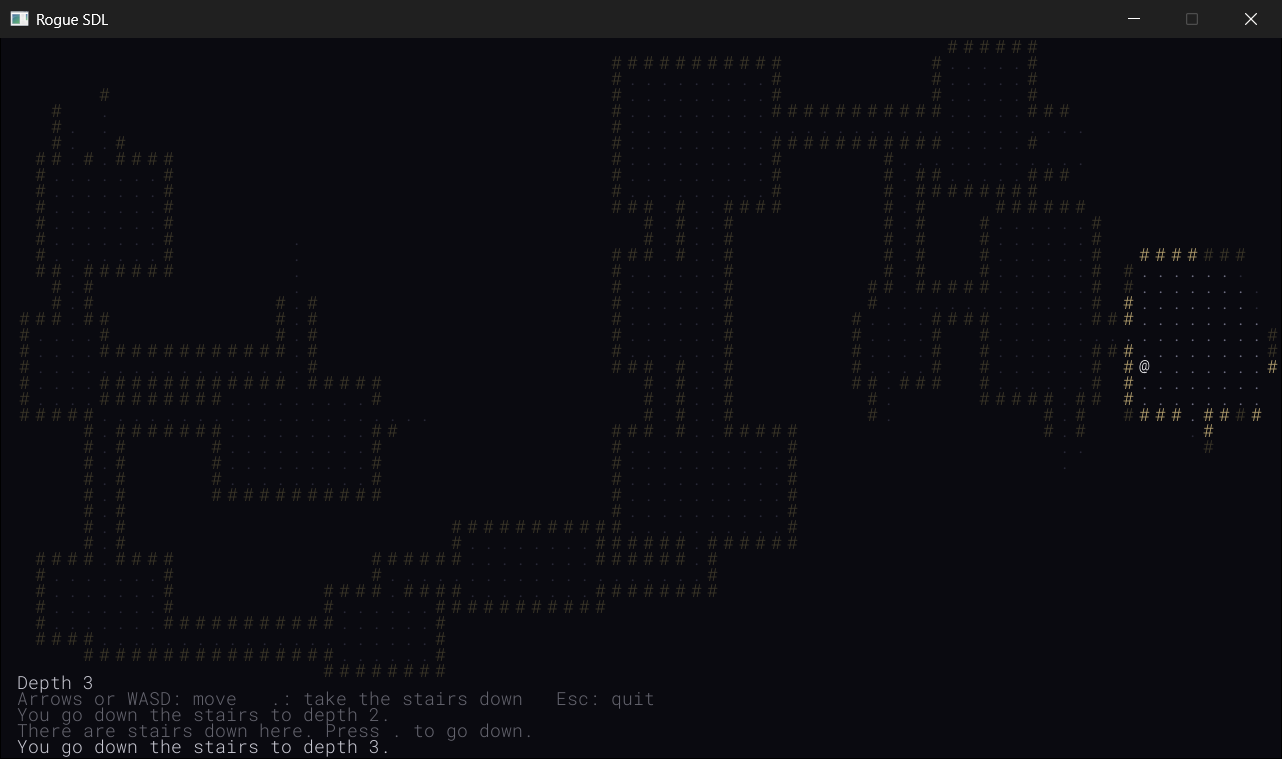
It's a dungeon crawler with nothing in the dungeon yet, but it already has the feel of one: you never know where the corridor you're in leads until you've walked it. And the game still sleeps between key presses, so the generator, the rays, and the drawing only ever run when you press a key.
Understanding the Code
Follow a level from the start. When the game starts, or you take the stairs, newLevel makes a MapGenerator, and generate fills the map with rock, and calls split on the whole of it. The calls fan out into a tree, never more than seven deep, and by the time the first one returns, every piece has a room. On a map 40 rows tall, that's between 15 and 28 rooms, and most often 18. The corridors chain the rooms together in the order they were made, the player starts in one of them at random, and the stairs go in the one farthest away.
Then the level is played one step at a time. Each step that works calls FOV::compute, which clears every tile's visible, and casts its 68 rays, marking every cell they reach as visible, and explored. Then draw draws the tiles: bright if they're visible, dim if they're only explored, and not at all if they're neither. Nothing is drawn until it's been seen, and nothing that's been seen is forgotten, until the next level's fill makes every tile new.
Notice how little each part knows about the others. The generator knows nothing about sight, and the field of view knows nothing about rooms: the only thing they share is the map. The map doesn't know how its tiles came to be explored, only that they are. And the HUD doesn't know what a dungeon is at all: it's handed some strings and a number, and draws them.
The table of looks is worth remembering too. A new kind of terrain now takes one line in the enum, one line in the table, and a color or two, and draw doesn't change at all. Chapter 32 uses the same idea for its monsters and its treasure.
Experimenting
Most of this chapter is controlled by a handful of constants, so they're a good place to start. Put each one back afterward, since the next chapter carries on from this one.
- Bigger or smaller pieces. Change
MIN_AREAto 6, and the map is cut into many more, smaller pieces, with between 22 and 54 little rooms. Change it to 16, and there are only 6 to 10 big ones. Then put it back, and tryMAX_CUTSat 2, which always leaves exactly four rooms. - A candle or a floodlight. Change
SIGHT_RADIUSto 3, and exploring becomes a slow, nervous business. Change it to 20, and whole rooms light up the moment you walk in. - Corridors that always turn the same way. In
carveCorridor, take out the coin toss, so that the corner is always{ to.x, from.y }. Every corridor goes across first, then up or down, and the dungeon looks more regular. - See it all. In
Map::draw, changeif (!tile.explored || isRock)toif (isRock), and the whole level is drawn, in remembered colors, apart from what's in sight. It's a good way to check the generator's work, and Chapter 35 does it properly, with a scroll of magic mapping. - More messages. Change
HUD_ROWSto 8, and there's room for six messages, but the window grows by three rows, sinceWINDOW_Hadds the map's rows and the HUD's together. ChangeMAP_Hto 37 as well, and the window is back to 720 pixels tall. - The same dungeon twice. Add the tip's
SDL_srand(1);tomain, run the game a few times, and it's the same dungeon every time. Then trySDL_srand(2);.
Common Errors and Fixes
C2065: 'MapGenerator': undeclared identifier, followed by C2146: syntax error: missing ';' before identifier 'generator', in Game.cpp. The game doesn't know what a MapGenerator is, because Game.cpp doesn't include its header. Add #include "MapGenerator.h" with the other includes.
C2530: 'MapGenerator::map_': references must be initialized. The constructor sets map_ in its body, with map_ = map;, rather than in its initializer list. A reference must be given what it refers to as it's made, so move it to the initializer list: : map_(map).
C2027: use of undefined type 'Map', with the note see declaration of 'Map', followed by C2653: 'Terrain': is not a class or namespace name. MapGenerator.cpp is missing #include "Map.h". The header's forward declaration tells the compiler that there's a class called Map, which is enough for the header, but the .cpp file calls the map's functions, so it needs the whole class, as Chapter 28 explained.
LNK2019: unresolved external symbol "void __cdecl FOV::compute(class Map &,struct Point,int)" referenced in function "private: void __cdecl Game::handleKey(unsigned int)", and LNK1120: 1 unresolved externals. The function compute is written in FOV.cpp, but not inside the braces of namespace FOV, so it's a different function, plain compute, and the FOV::compute that the game calls was never written. Put it inside the namespace.
C2039: 'drawText': is not a member of 'GlyphCache', in GlyphCache.cpp and HUD.cpp. The declaration of drawText is missing from GlyphCache.h. A member function has to be declared in its class before it can be defined, or called.
C3646: 'hud_': unknown override specifier, and C4430: missing type specifier - int assumed. Note: C++ does not support default-int, in Game.h. When these two turn up together, on the line of a member, the member's type is one the compiler has never heard of, and it's reading the line some other way. Here, Game.h is missing #include "HUD.h".
A dialog box says Debug Assertion Failed!, with Expression: vector subscript out of range, as soon as the game starts. The corridor loop in generate starts at 0 instead of 1, so it asks for rooms_[i - 1] when i is 0. Since a size_t can't be negative, 0 minus 1 wraps around to its largest possible value, far past the end of the vector, as Chapter 13 warned. Click Abort, and start the loop at 1.
Everything you've ever seen stays bright. The field of view never forgets what was visible. Check that FOV::compute calls map.clearVisible() before it casts any rays.
The light doesn't follow you, and you walk off into the dark. The view isn't worked out again after a step. Check that handleKey calls FOV::compute when tryMove returns true.
You can see through walls. Everything within 8 cells is in sight, whatever's in the way. The last check in castRay, the one that returns when the tile is a wall, is missing.
The rooms are full of # signs, and their walls are dots. The first two rows of TERRAIN_LOOKS are the wrong way around. They must be in the same order as the Terrain enum: wall, floor, stairs.
The HUD is missing, and the window is 80 pixels shorter than it should be. WINDOW_H is still MAP_H * CELL_PX, so the window only has room for the map. It needs the HUD's rows too: (MAP_H + HUD_ROWS) * CELL_PX.
AI Exercise (Optional)
If you'd like to add something of your own to the dungeons with an AI's help, here's a challenge that touches the map, the generator, and the field of view. As always, it's optional.
Open your AI chatbot of choice and try a prompt like this:
"I'm writing a roguelike in C++ with SDL 3. The map is a grid of Tile structs, and a Tile has a Terrain, an enum class with the values Wall, Floor, and StairsDown, and two bools, explored and visible. Map has Tile& at(Point cell), and bool isBlocked(Point cell), which is true for walls. Each kind of terrain is drawn from a table, TERRAIN_LOOKS, with a character and two colors, in the same order as the enum. My MapGenerator carves rooms, and joins each room to the next with an L-shaped corridor, using carve(Point a, Point b), which turns a box of cells into Floor. My field of view casts rays from the player, and stops each ray at the first Wall. I'd like doors, drawn as +, wherever a corridor passes through the wall around a room. A door should block sight, like a wall, but not movement. Show me every change, with each curly brace on its own line, and explain where the doors go, and why."
Notice what the preceding prompt does. It describes every part of the game that a door touches, the enum, the table, the generator, and the field of view, down to their names, so that the answer fits your code. It says exactly what a door is: something that blocks sight, but not movement, which is two separate rules in two separate places. And it asks where the doors go, which is the hardest part.
When the answer comes back, check it against this chapter. Is Door added at the end of the enum, and its look at the end of the table, as the warning said? Does castRay stop at doors as well as walls, while isBlocked still blocks only walls? And are the doors put in after every corridor has been carved? A corridor carved later could run straight through a door, and turn it back into floor.
To try it, build the game, and walk up to a door. You shouldn't be able to see into the room beyond it until you're standing in the doorway. If you can, or if you find a door in the middle of a corridor, tell the AI what you saw, and ask it to explain.
Summary
Rogue SDL is a real dungeon crawler now, even if the dungeon is empty. The generator cuts the map into pieces with a function that calls itself, puts a room in every piece, and chains the rooms together with corridors, with the stairs in the room farthest from the start. The field of view casts rays out from the player to find what's in sight, and every tile remembers whether it's been seen, so the map is drawn in three ways, bright, dim, or not at all, from a table of looks. And the HUD gives the game a voice, in rows of text below the map.
Next, in Chapter 32, the dungeon fills up: rats, goblins, and orcs that take their turns after yours, potions and gold to pick up, and fights to the death, followed by a fresh start.