
The last chapter built Vec2, and taught it to add, subtract and scale. This chapter is about what those operations mean on the screen, and it gives Vec2 three abilities that turn it from a pair of numbers into a real tool. It will measure its own length, give the distance between two points, and reduce itself to a pure direction.
That last ability, normalization, is the quiet star of the chapter. A normalized vector is a direction with its size stripped away, and it's exactly what you need to say "move that way, at this speed", however far away "that way" happens to be. By the end of the chapter, a dot will chase your mouse at a steady speed, and stop exactly on it, and you'll understand every line that makes it do so.
In this chapter, we will:
- See why
B - Ais the vector fromAtoB, the most useful identity in the book - Measure a vector's length with Pythagoras, and learn when to skip the square root
- Find the distance between two points
- Normalize a vector into a pure direction, and give it any length we like
- Handle the vector with no direction: zero, and nearly zero
- Arrive at a target without overshooting it
- Build Chase, in which one dot chases the mouse at a constant speed, and another slows as it closes in
We'll start with subtraction, since everything else in the chapter leans on it.
From One Point to Another
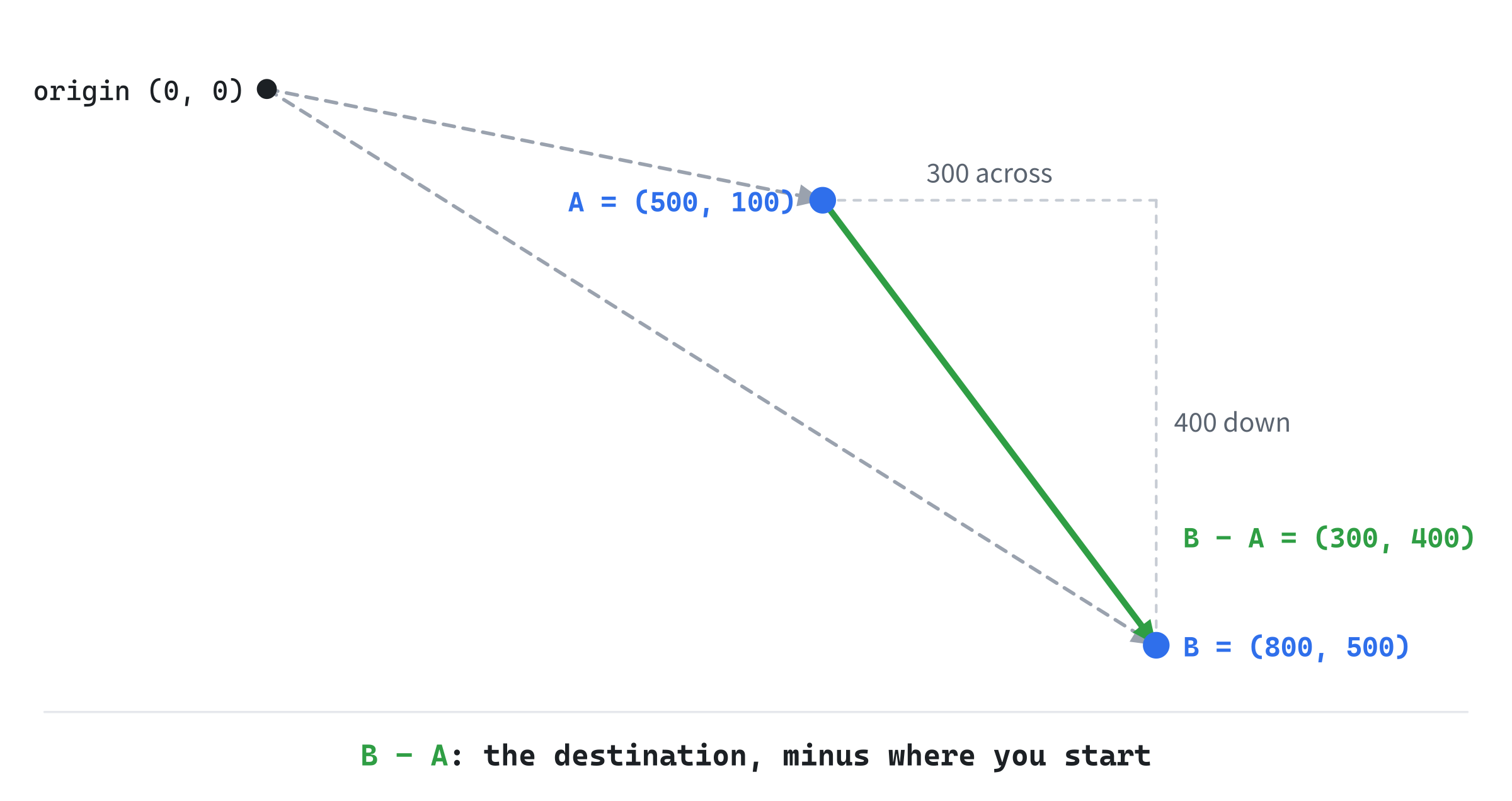
Chapter 2 showed that a - b is the arrow from b's head to a's head. Read with positions, that's the most useful identity in this book: for two points A and B, the vector B - A points from A to B. If you want to know which way to go to get from where you are to where a target is, you subtract: target - position. The result points from you to the target, and its length is how far away the target is.
The order matters, and it's easy to remember why. Adding the vector from A to B to the position A must land on B. And A + (B - A) is B, as the second rule for points and vectors says. So B - A is the vector from A to B: the destination, minus where you start. Get the order backwards, and your enemies flee the player instead of chasing it.
Some numbers make it concrete. Take A = (500, 100) and B = (800, 500). Then B - A = (300, 400): from A, go 300 to the right and 400 down the screen, and you're at B. The next image shows the two points, with the arrows from the origin that make them positions, and the vector between them.
Every chase, every aim and every line of sight in this book starts with a subtraction like this one.
Scaling
Multiplying a vector by a number changes its length, and not its direction. The vector v * 2.0f is twice as long, and points the same way, and v * 0.5f is half as long. A negative number flips the direction too, which is why v * -1.0f and Chapter 2's unary -v are the same vector.
In numbers, scaling a vector by k scales its length by k's size, ignoring its sign. So if we can find a vector's length, and if we have a vector with a length of exactly 1, we can make a vector of any length we want, pointing any way we want. Scaling is how we'll turn a direction into a velocity: a direction of length 1, times a speed. First, though, Vec2 needs a ruler.
Length
A vector's length, which is also called its magnitude, is how long its arrow is, and it comes straight from Pythagoras. The vector's x and y components are the two short sides of a right-angled triangle, and the vector itself is the long side. The next image shows (300, 400) as a triangle.
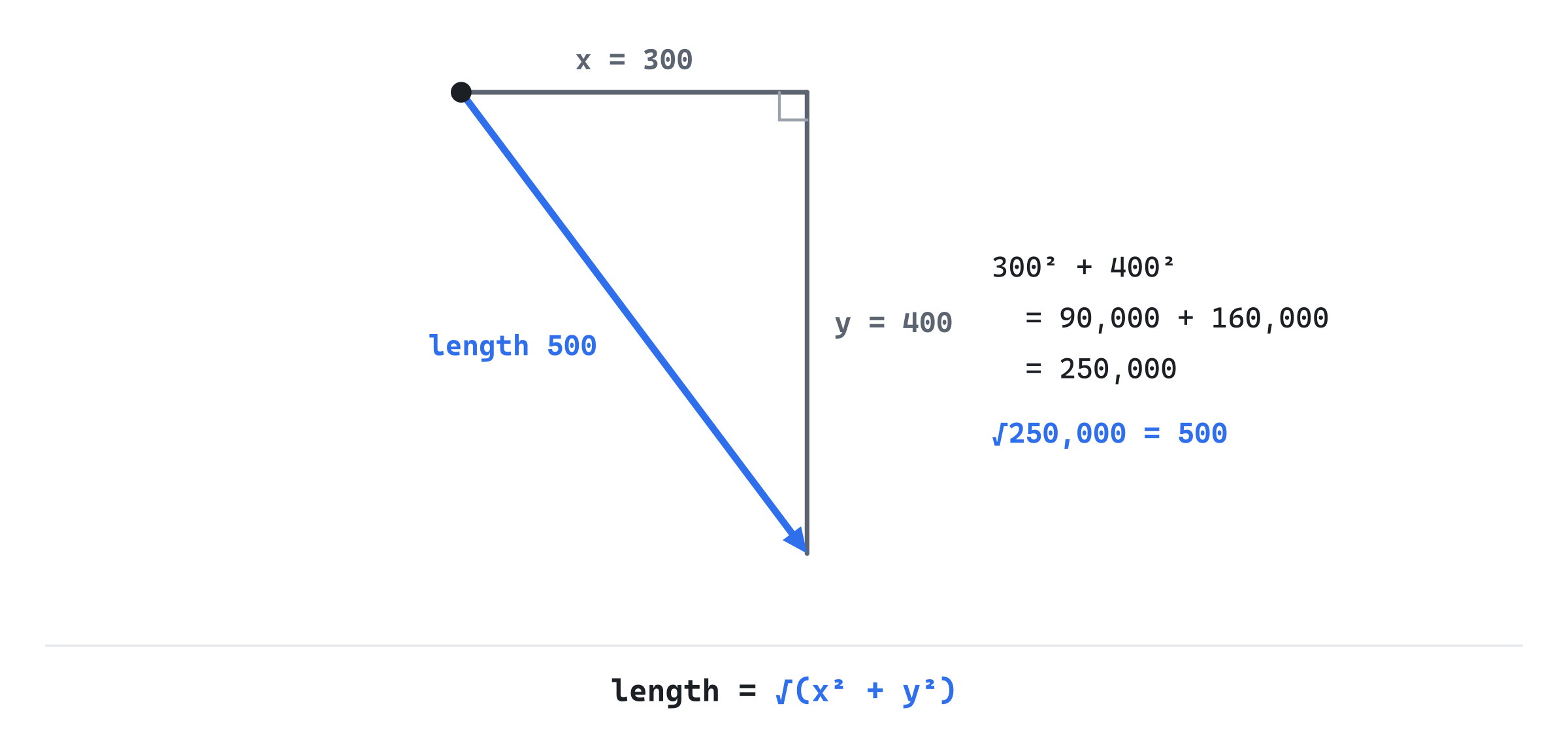
Square the components, add them, and take the square root. For (300, 400), that's 90,000 + 160,000, which is 250,000, and its square root is 500. So A and B are 500 pixels apart.
The square root needs <cmath>, so in Vec2.h, add the line #include <cmath> below #pragma once. Then add two methods to Vec2, below operator==:
// Length (Chapter 3). lengthSquared skips the square root, for when
// we only need to compare lengths.
float lengthSquared() const { return x * x + y * y; }
float length()        const { return std::sqrt(lengthSquared()); }
The length method is the whole answer: square the components, add them, and take the square root. Its sibling, lengthSquared, stops one step short, and skips the square root. That isn't laziness. It's one of the most useful habits in game math.
When to Skip the Square Root
Very often, we don't need a vector's length. We only need to compare lengths. Is this enemy nearer than that one? Is the target within 100 pixels? For questions like these, comparing squared lengths gives the same answer as comparing lengths, since for numbers that aren't negative, the bigger number always has the bigger square. So instead of v.length() < 100.0f, we can write v.lengthSquared() < 100.0f * 100.0f, and dodge the square root entirely.
A square root costs only about as much as a few multiplications on a modern processor, so one alone hardly matters. Thousands of them every frame, in a loop over every pair of objects, start to. And the squared length is exact too: for whole-number components, it's a whole number, while a square root almost always has to be rounded.
There are two classic slips with it. The first is comparing a squared length with an unsquared distance: v.lengthSquared() < 100.0f asks whether v is within 10 pixels, not 100. The second is taking the same square root twice, by calling length and then normalized, which calls length again. The demo shows how to avoid that.
Distance
The distance between two points is the length of the vector between them, and we know that vector is B - A. So distance is one line. Add it to Vec2.h, at the end, below the free operator*:
// The straight-line distance between two points (Chapter 3).
inline float distance(const Vec2& a, const Vec2& b) { return (b - a).length(); }
It's a free function rather than a member, because the distance between a and b belongs to neither point: distance(a, b) reads more naturally than a.distance(b), and it's the same either way round. When you only need to compare distances, (b - a).lengthSquared() is waiting to skip the square root.
Normalization
To normalize a vector is to scale it until its length is exactly 1, without changing its direction. The result is a unit vector, and it stands for pure direction: which way, with how far thrown away. The next image shows (300, 400) and its unit vector.
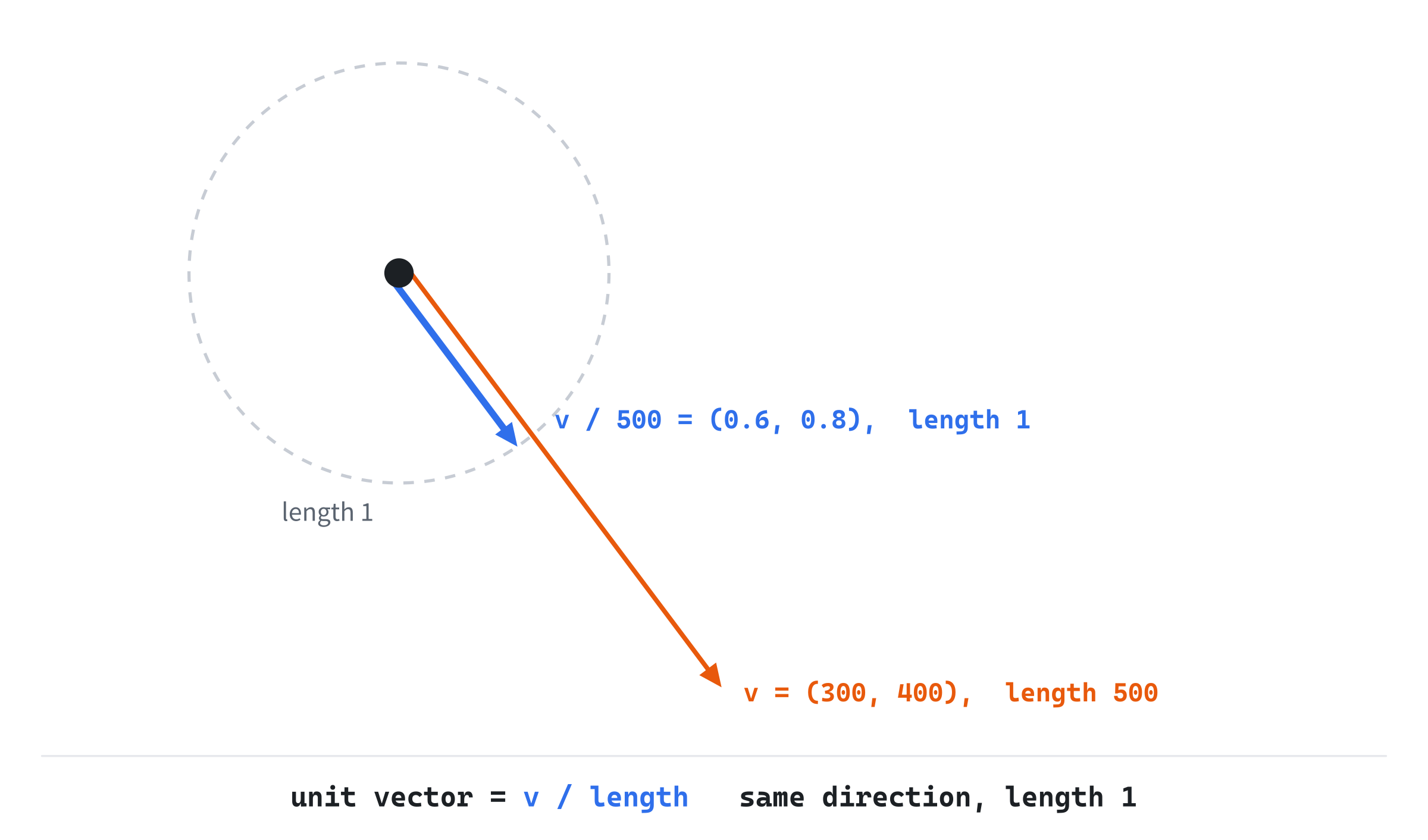
The recipe is simple: divide the vector by its own length. The vector (300, 400) is 500 long, so dividing both components by 500 gives (0.6, 0.8). Its length is the square root of 0.36 + 0.64, which is exactly 1, and it points just where (300, 400) does. Add normalized to Vec2, below length:
// The same direction with a length of 1. The zero vector has no
// direction, so it stays zero, rather than being divided by zero.
Vec2 normalized() const
{
    float len = length();
    return (len > 0.0f) ? Vec2{ x / len, y / len } : Vec2{ 0.0f, 0.0f };
}
It finds the length, and divides each component by it, but only when the length is more than zero. A unit vector times a number is a vector of that length: (0.6, 0.8) * 280 is a vector 280 long, pointing from A toward B. That's how the demo will turn a direction into a velocity.
The Vector With No Direction
The guard in normalized isn't optional. What's the direction of a vector with no length? The zero vector, (0, 0), doesn't point anywhere: it's a dot, not an arrow. Normalizing it would divide zero by zero, and for floats, that doesn't crash. It gives a special value, NaN, which stands for "not a number". NaN quietly poisons every calculation it touches: anything plus NaN is NaN. One stray NaN, and a few frames later an object vanishes, or jumps to an impossible position, with no visible cause.
So normalized checks first, and returns zero for zero. The check also catches a NaN that has crept in from elsewhere, since every comparison with NaN is false, even len > 0.0f. To look for NaN yourself, use std::isnan, since NaN isn't even equal to itself.
Vectors that are nearly zero are a problem too. A vector 0.001 pixels long has a direction, in principle. But its components are so small that rounding decides which way it points, so its direction is close to random. That's why the demos' helpers, such as drawArrow, give up on a vector that's under a pixel long. And a unit vector made by normalized may not have a length of exactly 1, but 0.99999994, because of rounding. That's harmless, as long as nothing tests it with == 1.0f.
Arriving
Normalization gives us a way to chase. Each frame, find the direction to the target, (target - position).normalized(). Scale it by a speed and by delta time, and add it to the position. The dot moves toward the target at the same speed, near or far.
There's a catch at the end of the chase. At 280 pixels a second and 60 frames a second, each step is 280 × 1/60, about 4.7 pixels. When the dot is closer to the target than that, a full step carries it past the target. Next frame, the direction to the target points back, and the dot steps back past it again. Without care, the dot ends its chase shaking back and forth on top of the target, forever.
The fix is to notice when one step would reach the target, and to stop on it instead:
step = speed × dt
if distance to target <= step:  position = target
otherwise:                      position = position + direction × step
A dot chasing a moving target closes the gap a step at a time, and lands exactly on the target the frame it gets within reach. The demo does exactly this.
Building Chase
Chase makes two dots follow the mouse. The blue one does it with normalization: it moves at a steady 280 pixels a second, and stops on the target when it arrives. The amber one does it a tempting, simpler way: each frame, it moves a share of the remaining gap. You'll see exactly how the two differ.
Get the code. The complete project is in the
Chasefolder of the book's repository.
Chase starts from the skeleton, with its timing, since this time things move by themselves. It includes <cmath> and Vec2.h, and adds a blue and an amber:
#include <cmath>
#include <string>
#include "Vec2.h"

constexpr int WINDOW_WIDTH  = 1000;
constexpr int WINDOW_HEIGHT = 700;

constexpr SDL_Color TEXT = { 235, 238, 242, 255 };
constexpr SDL_Color GREY = { 90, 100, 112, 255 };
constexpr SDL_Color BLUE = { 47, 111, 235, 255 };
constexpr SDL_Color AMBER = { 232, 89, 12, 255 };
It reuses drawGrid, from Chapter 1, and drawArrow, from Chapter 2. And it brings in fillCircle, which now takes its center as a Vec2, and its radius as a float:
// Fill a circle. SDL draws lines but not discs, so we draw one horizontal
// line for each row of pixels, as wide as Pythagoras says the circle is
// at that row.
void fillCircle(SDL_Renderer* renderer, Vec2 center, float radius)
{
    for (int dy = -(int)radius; dy <= (int)radius; ++dy)
    {
        float dx = std::sqrt(radius * radius - (float)(dy * dy));
        SDL_RenderLine(renderer, center.x - dx, center.y + dy,
                       center.x + dx, center.y + dy);
    }
}
Apart from its first line, this is Chapter 1's fillCircle, with cx and cy read from center. It's the version every later demo uses.
The Two Dots
The state goes after the font is loaded, before the loop:
Vec2 smart = { 150.0f, 300.0f };   // moves at a constant speed
Vec2 naive = { 150.0f, 430.0f };   // steps a share of the gap
const float speed = 280.0f;        // pixels a second
const float rate = 3.0f;           // a frame closes rate * dt of the gap
The blue dot is smart, and the amber one is naive. The blue dot's speed, in pixels a second, is speed. And rate is how fast the amber dot closes the gap: each frame, it moves rate * dt of the gap that's left. At 60 frames a second, that's 3/60, or a twentieth of the gap, each frame.
After the skeleton reads the mouse, the mouse becomes the target:
Vec2 target = { mx, my };The target is a Vec2, so each dot can subtract its own position from it.
The Blue Dot
The blue dot moves as Arriving said it should:
// The blue dot moves a step of speed * dt toward the target, along
// the direction to it: toTarget / dist is toTarget.normalized(),
// with no second square root. A step that would reach the target
// ends on it, so the dot can't overshoot.
Vec2 smartWas = smart;
Vec2 toTarget = target - smart;
float dist = toTarget.length();
float step = speed * dt;
if (dist <= step) smart = target;
else smart += toTarget / dist * step;
The vector toTarget runs from the dot to the target: the target's position minus the dot's. Its length is the distance between them, and step is how far the dot moves this frame. When the step would reach the target, the dot stops on it. Otherwise, it moves a step's worth along the direction to the target.
Notice toTarget / dist. That's the direction, a unit vector, the same as toTarget.normalized(). But normalized would work out the length again, and the code already has it in dist. Dividing by dist directly saves the second square root. It's also safe from the zero-length trap: the division only happens when dist is more than step, which is more than zero.
The smartWas variable keeps the dot's position from before the move, for the speed that the readout shows.
The Amber Dot
The amber dot moves a share of the whole gap:
// The amber dot steps a share of the whole gap. The closer it gets,
// the smaller the gap, and the slower it moves.
Vec2 naiveWas = naive;
Vec2 gap = target - naive;
naive += gap * (rate * dt);
There's no normalization here, and no fixed speed. The dot moves rate * dt of the gap each frame. When the gap is big, so is the step. As the gap shrinks, so do the steps, and the dot slows down as it closes in. It never quite arrives, since each step covers only a share of what's left. But within two and a half seconds, it's within a pixel of a still target, from anywhere in the window.
This simpler way has a weakness. The share, rate * dt, has to stay below 1. If the frame rate fell to 3 frames a second, dt would be a third of a second, the share would be 1, and the dot would land on the target in a single jump. Below that, it would overshoot. At normal frame rates, it's nowhere near, and the skeleton's cap on dt keeps it there. Chapter 8 shows a way to write this kind of easing that doesn't depend on the frame rate at all.
Then both dots' speeds are measured, for the readout:
// Each dot's speed this frame: how far it moved, over dt.
float smartSpeed = (dt > 0.0f) ? distance(smartWas, smart) / dt : 0.0f;
float naiveSpeed = (dt > 0.0f) ? distance(naiveWas, naive) / dt : 0.0f;
Each speed is the distance the dot moved this frame, over the frame's length. That's the speed it really moved at, not the speed it was meant to have. The check that dt is more than zero avoids a division by zero, though with vsync on, dt is never zero.
Drawing
After the grid, a small cross marks the target, at the mouse:
// The target: a small cross at the mouse.
SDL_SetRenderDrawColor(renderer, 200, 205, 212, 255);
SDL_RenderLine(renderer, mx - 8, my, mx + 8, my);
SDL_RenderLine(renderer, mx, my - 8, mx, my + 8);
Then come the dots, each with an arrow:
// Each dot, with an arrow: the blue one's direction, at a fixed
// length, and the amber one's whole gap.
if (smart != target)
{
    Vec2 dir = (target - smart).normalized();
    drawArrow(renderer, smart, smart + dir * 55.0f, BLUE);
}
SDL_SetRenderDrawColor(renderer, BLUE.r, BLUE.g, BLUE.b, BLUE.a);
fillCircle(renderer, smart, 9);
drawArrow(renderer, naive, target, AMBER);
SDL_SetRenderDrawColor(renderer, AMBER.r, AMBER.g, AMBER.b, AMBER.a);
fillCircle(renderer, naive, 9);
The blue dot's arrow shows its direction, at a fixed length of 55 pixels: the unit vector to the target, times 55. Once the dot has arrived, there's no direction to show, and the arrow is left out. The test smart != target works without an operator!=, as Chapter 2 explained. The amber dot's arrow runs to the target, so its length is the whole gap that the dot is closing a share of.
The readout gives each dot's distance from the target, and the speed it's moving at:
std::string blue = "blue  (normalize, then step):  " +
                   std::to_string((int)distance(smart, target)) +
                   " px away, moving at " +
                   std::to_string((int)(smartSpeed + 0.5f)) + " px/s";
std::string amber = "amber (a share of the gap):    " +
                    std::to_string((int)distance(naive, target)) +
                    " px away, moving at " +
                    std::to_string((int)(naiveSpeed + 0.5f)) + " px/s";
drawText(renderer, font, blue, 12, 10, BLUE);
drawText(renderer, font, amber, 12, 30, AMBER);
drawText(renderer, font,
         "move the mouse: blue keeps its speed, amber slows as it "
         "nears   [Esc] quit", 12, WINDOW_HEIGHT - 26, GREY);
The distances are cast to int, so they read as whole pixels, and each speed is rounded to the nearest whole number, by adding 0.5 before the cast.
Trying It Out
Run the demo, and move the mouse. The next image shows both dots chasing a mouse held still, a moment after it stopped.

The readout tells the story. The blue dot is 474 pixels from the target, moving at 280 pixels a second, as it does wherever the target is. The amber dot set off fast, while its gap was big, and is already only 74 pixels away. But it has slowed to 228 pixels a second, which is 3 times the gap it had at the start of the frame, and it will keep slowing as the gap shrinks.
Some things to try:
- Fling the mouse to a far corner. The blue dot sets off at the same pace as always, while the amber dot lunges, and then slows.
- Hold the mouse still, and watch the blue dot arrive. Its speed drops straight from 280 to 0, with no shaking.
- In the state, change
speedfrom 280 to 120, for a slower, more menacing chaser.
Then make the blue dot shake, to see what the fix prevents. Change the blue dot's if (dist <= step) to if (dist <= 0.0f), so that it only stops when it lands exactly on the target, which it almost never does. Hold the mouse still, and the dot jitters over the target forever, overshooting one way and then the other. On a fast screen, each overshoot is only a pixel or two, but the readout gives it away: the dot is 0 or 1 pixel from the target, yet still moving at full speed.
FAQ
Q) Why does my character move faster diagonally?
A) Because two keys add up to a longer vector. Right gives a direction of (1, 0), and down gives (0, 1). Held together, they make (1, 1), whose length is the square root of 2, about 1.41. Scaled by a speed, the diagonal is 41% faster than either key alone. The fix is to normalize the direction from the keys, if it isn't zero, before scaling it by the speed.
Q) Is there a distance that doesn't need a square root at all?
A) Two, and both are used on grids. The Manhattan distance is |dx| + |dy|: how far you'd walk on a grid of streets, with no diagonals. The Chebyshev distance is the larger of |dx| and |dy|: the number of moves a king needs on a chessboard, where diagonal steps cost the same as straight ones. Chapters 22 and 23 use distances like these to find paths on a grid.
Q) How do I find the nearest of a thousand enemies quickly?
A) For one search, loop over them all, and compare squared distances, keeping the smallest. A thousand squared distances take a tiny fraction of a frame. The trouble comes when a thousand enemies each want their nearest neighbor, which is a million comparisons. Chapter 19 sorts objects into the parts of space they're in, so each one only checks its neighbors.
Q) What's the "fast inverse square root" I've read about?
A) A famous trick from the source code of Quake III Arena, a 1999 game. It works out 1 over a square root, which is just what normalizing needs. It starts from a strange-looking magic number, 0x5f3759df, and some bit-twiddling, then sharpens the answer with one step of Newton's method. It was fast on the processors of its day. Today's processors have square root instructions that are faster and more accurate, so it's a lovely curiosity, not a tool.
Q) My chaser turns instantly to face the mouse. How do I make it turn gradually?
A) Instead of setting the velocity straight to the direction it wants, change the velocity a little toward it each frame. That's the idea behind steering, in Chapter 9. Work out the velocity you want, and take away the velocity you have. Then add only a small, limited part of the difference each frame. The chaser then curves toward its target, and can overshoot and swing back, as a real creature would.
Exercises
The first exercise needs only a pencil. The others change Chase.
- Length by hand (paper). For
v = (6, 8), work outlengthSquared,lengthandnormalized. Check that the normalized vector's length is 1. Then make a vector 25 pixels long that points the same way asv. - Skip the root (code). Add a line to the readout that says "close" when the blue dot is within 50 pixels of the target. Use
lengthSquared, and a squared threshold, with no call tolengthordistance. - A speed that grows (code). Make the blue dot's speed grow with its distance from the target: twice the distance, in pixels a second. Describe the motion you get. How does it compare with the amber dot's?
- The zero-length trap (challenge). What happens in Chase at the moment the blue dot is exactly on the target, so
toTargetis the zero vector? Trace the code. Which line keeps the zero vector from being divided by zero?
For the code exercises, work on a copy of the demo's folder, so that the original stays as the chapter describes it.
AI Exercise (Optional)
Chase is two dots and a mouse. With an AI's help, you can make it a tiny game, in which you are the mouse, and the dots are hunting you. It doesn't matter if it comes out lopsided or silly. Open your AI chatbot of choice, and try a prompt like this:
"I have a C++ demo using SDL3. A struct Vec2 has float x and y, the usual operators, length(), lengthSquared() and normalized(), and a free function distance(a, b). Each frame I have delta time, dt, in seconds, and the mouse's position as Vec2 target. A dot moves toward the target at a constant speed, normalizing the direction and stopping on the target when one step would reach it. I'd like to turn this into a survival game. There should be four chasers, starting at the corners of the 1000 by 700 window, each with its own speed between 120 and 220 pixels a second. The player is the mouse, drawn as a circle 10 pixels across. If a chaser of radius 9 touches the player, the game stops and shows how many seconds you survived. R restarts. Use lengthSquared, not length, to test for a touch, and explain why that's safe."
That prompt describes the code you already have, so the AI builds on Chase instead of starting again. It sets the numbers, the window, the radii and the speeds, so the result is playable at once. And it asks for one specific choice, the squared test for a touch, with a reason, which is this chapter's habit put to work.
Then play it, and look at what came back. Two circles touch when the distance between their centers is less than the sum of their radii. So the squared distance should be compared with the square of 14, the two radii added, not with 14, which is the classic slip from When to Skip the Square Root. If you survive forever, the chasers' arrival code may be stopping them a step short. If they all bunch into one blob, that's a real result, not a bug: nothing tells them to keep apart. Ask the AI to push each chaser away from the others when they get too close. It's the first taste of the steering behaviors in Chapter 9.
Summary
The vector B - A points from A to B, and Vec2 can now measure it: its length by Pythagoras, its squared length for comparing without a square root, and the distance between two points. It can also normalize, dividing a vector by its length to leave a pure direction, which a speed then turns into a velocity, with a guard for the zero vector that would otherwise make NaN. Chase used all of it, with a step that stops on the target rather than overshooting. In Chapter 4, Vec2 learns the dot and cross products, which tell you which way something faces and which side of a line it's on.