
Chapter 24 drew an image on a quad, with each corner placed by hand. That's fine for one quad. But a game has many things, and many of them are attached to something else: a turret on a tank, a sword in a hand, a moon going around a planet. When the tank moves, its turret has to go with it. Placing each attached thing by hand, in the window's coordinates, would mean working out every attachment again, every frame.
This chapter places things with transforms. A transform is a move, a turn and a size, kept together. A scene graph hangs transforms on one another, so that each thing is placed relative to its parent, and goes wherever its parent goes. By the end of the chapter, a sun, two planets and their moons go around each other from a few numbers each. Dragging the sun drags the whole system.
It's all done with vectors, before matrices: the rotation from Chapter 6, and the arithmetic from Chapters 2 and 3. Chapter 26 then puts a transform into a matrix. Doing the work by hand first shows what a transform is, and so what the matrix is for.
In this chapter, we will:
- Place a point by scaling it, rotating it and then moving it, and see why the order matters
- Tell a thing's own space from the world it's placed in
- Combine a child's transform with its parent's, and work one through by hand
- Take a click back from the world into a thing's own space, to see what it hit
- See why a moon goes around faster than its own speed, and how to stop it
- See why a transform holds only one scale
- Build Solar System, a scene graph of a sun, its planets and their moons
We'll start with the three steps that every placement is made of.
Translate, Rotate and Scale
Three Steps
A thing's shape is usually drawn around its own origin, as Chapter 6 drew an arrow's points around its center. Placing the thing in the window comes down to three steps, each done to every point:
- Scaling multiplies a point's coordinates by a factor, as
p * s. It moves the point toward the origin or away from it, so a shape around the origin shrinks or grows in place. - Rotating turns a point about the origin, as
p.rotated(angle)does, from Chapter 6. A positive angle turns it clockwise on the screen. - Translating moves a point by an offset, as
p + offset, which is Chapter 2's vector addition.
A scale that multiplies x and y by the same factor is a uniform scale. It changes a shape's size without changing its proportions. It's the only kind of scale in this chapter, for a reason a later section gives. With these three steps, a shape can be put anywhere, at any angle and at any size.
A Transform
The numbers for the three steps fit in a struct:
// A transform: a place, a turn and a size. It places a point by scaling
// it, then rotating it, then moving it by pos.
struct Transform
{
    Vec2 pos;
    float rot = 0.0f;
    float scale = 1.0f;
};
A transform places a point by scaling it by scale, then rotating it by rot, and then moving it by pos. That order is part of what a transform means, and the next section shows why it's the right one. A transform left at its defaults leaves every point where it was. Placing a point by a transform takes one line:
// A point in a transform's own space, taken out into the space around it:
// scaled, then rotated, then moved.
Vec2 toWorld(const Transform& t, Vec2 local)
{
    return t.pos + (local * t.scale).rotated(t.rot);
}
Read from the inside out, the toWorld function does the three steps in order. The multiplication by t.scale scales the point, rotated turns it, and adding t.pos moves it. The function's name says which way the point goes: out of the transform's own space, and into the space around it. Local space and world space get their own section, after a look at the order.
Order Matters
Turn, Then Move
The three steps don't give the same result in every order. Take a small arrowhead, drawn around the origin and pointing right, and two steps: a quarter turn, and a move of 100 to the right. Turn first, and the arrowhead turns in place, to point down, since a positive angle turns clockwise on the screen. Then the move takes it to (100, 0). Move first, and the arrowhead is at (100, 0) when the turn comes. The turn is about the origin, so it swings the arrowhead a quarter of the way around the origin, to (0, 100), below it. The next image shows the two orders.
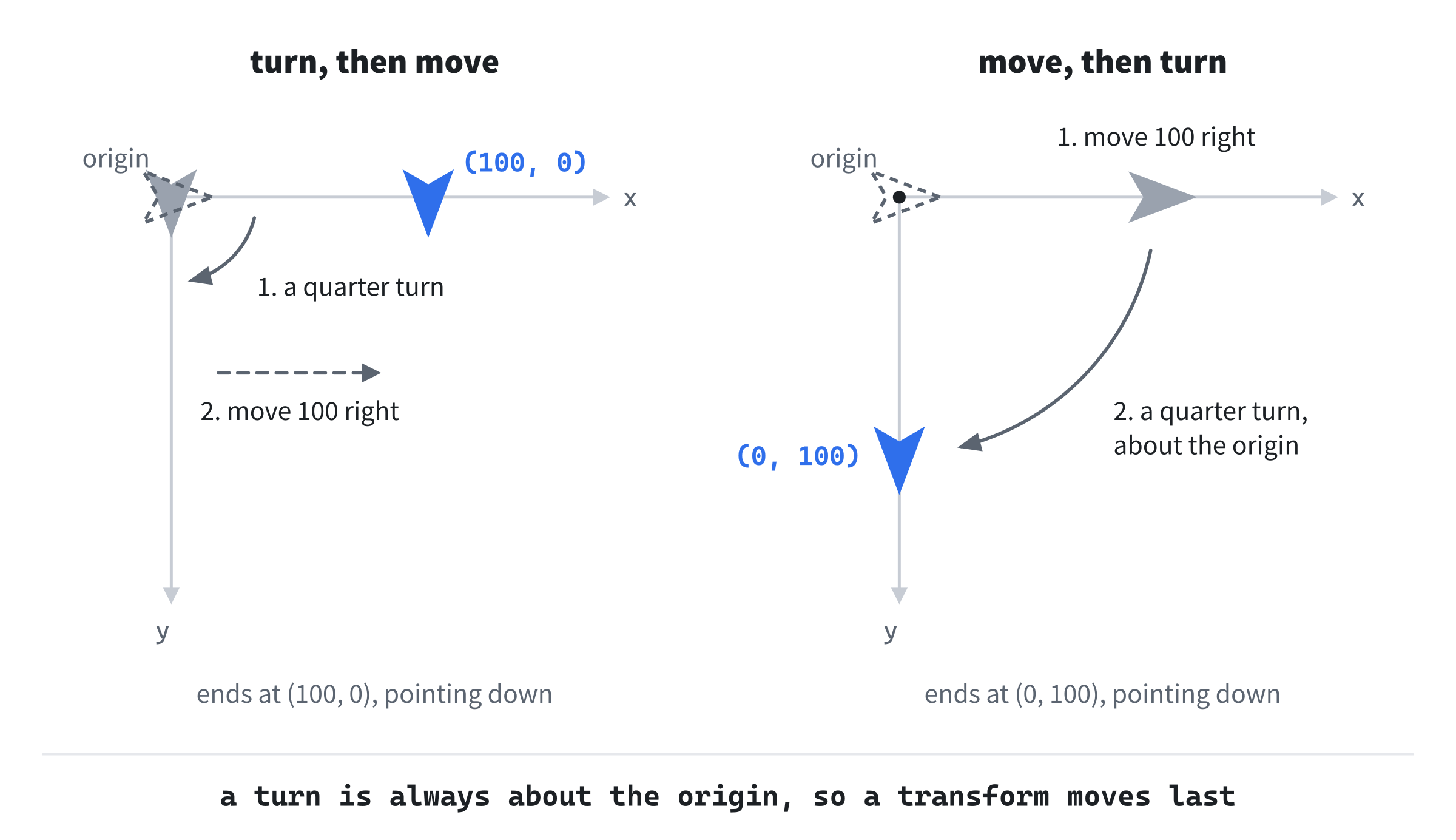
Both arrowheads end up pointing down, but in different places. That's the trap: a turn is always about the origin, so anything already moved away from the origin gets swung around it. So a transform turns and scales first, while the shape is still around the origin, and moves it last. Turning about the origin is then turning about the shape's own center, and scaling makes it grow in place.
Scale and Turn Can Swap
With a uniform scale, the first two steps can come in either order. Scale a point by 2 and then turn it, or turn it and then scale it by 2: either way, it ends up twice as far from the origin, at the same angle. So of the three steps, only the move has to keep its place, last. That stops being true for a scale that stretches x more than y, as a later section shows.
This is Chapter 6's pivot again. To turn a shape about a pivot, Chapter 6 moved the pivot to the origin, turned, and moved it back. The order mattered there for the same reason it matters here: a turn is always about the origin.
Local Space and World Space
Two Places for Everything
A moon is most simply described from its planet: 46 pixels out, at an angle that grows steadily. Where it is in the window is harder to say. That depends on where its planet is, which depends on where the sun is. The moon's description from its planet is its local transform: its place, turn and size, measured in its parent's space. Its place, turn and size in the window make its world transform.
Each thing keeps its local transform, and works out its world transform when it's needed. The local transform stays simple, since it only says how the thing sits on its parent. The world transform is worked out each frame, from the local transforms of the thing and of everything above it.
Chapter 1 told world space from screen space: a game's world can be far larger than the window, and a camera decides which part of it the window shows. Here, the two are the same, since there's no camera until Chapter 27. So for now, the world is the window.
A Tree of Transforms
A scene graph is the tree that hangs transforms on one another. Each thing in it is a node, with a local transform and a parent. In Solar System, the sun is the root, and its parent is the window. Planets A and B hang on the sun, and each moon hangs on its planet. The next image shows the tree, and where each body sits on its parent.
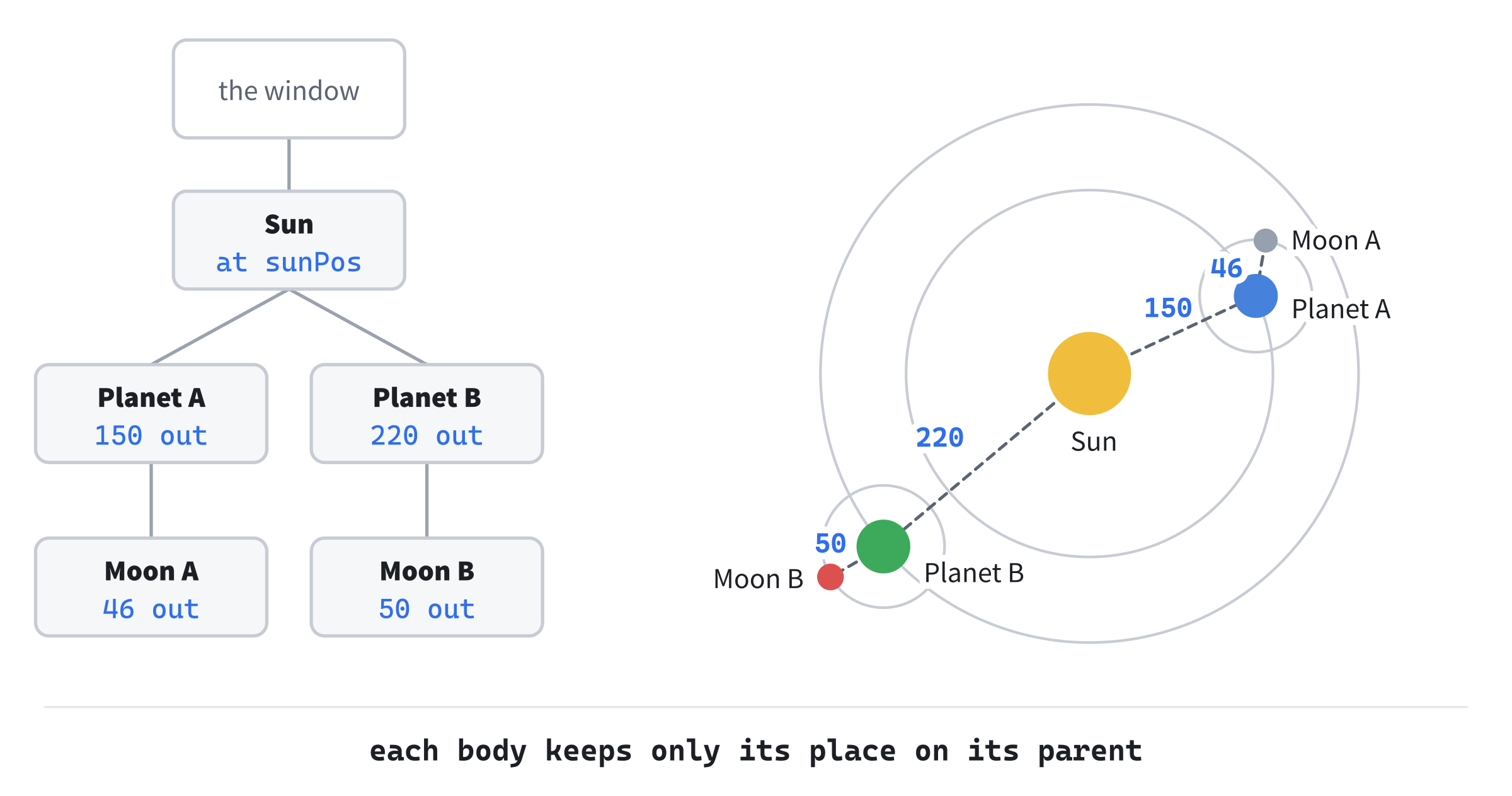
Each body keeps only its place on its parent: Moon A, for one, is 46 out from Planet A. To place a body in the world, start at the root, and combine transforms down the tree, as far as the body. So when the sun moves, everything below it moves too, since every world transform is worked out from the sun's. That's the point of a scene graph: one change at the top reaches everything below it.
Combining Transforms
A Child in the World
All a scene graph needs is the answer to one question. Given a parent's world transform and a child's local transform, what's the child's world transform? Each of its three parts has a rule:
- Its scale is its parent's scale times its own. A moon at half its planet's size, on a planet at twice the sun's size, is the sun's size.
- Its turn is its parent's turn plus its own. Turn a planet, and its moon's own axes turn with it.
- Its place is its local position, taken into the world by its parent's transform. The local position is measured in the parent's space. So it's scaled by the parent's scale, turned by the parent's turn, and then moved by the parent's position. That's
toWorld, with the parent's transform.
The combine function puts the three rules together:
// A child's world transform, from its parent's and its own local one. Its
// place is its local position, taken into the world by its parent. Its
// turn adds to its parent's, and its scale multiplies its parent's.
Transform combine(const Transform& parent, const Transform& local)
{
    return { toWorld(parent, local.pos), parent.rot + local.rot,
             parent.scale * local.scale };
}
Applied down the tree, from the root, it places every node in the world.
A Worked Example
Numbers make it concrete. Say the sun is at (500, 360), unturned, at a scale of 2. Planet A's local transform puts it at (150, 0), 150 out along the sun's x axis. Its spin has turned it a quarter turn, and its own scale is 1. Combining the two gives Planet A's world transform:
position = (500, 360) + (150, 0) * 2 = (800, 360)
turn = 0 + a quarter turn = a quarter turn
scale = 2 * 1 = 2
The sun's turn is 0, so turning Planet A's offset by it changes nothing. Moon A's local transform puts it at (46, 0), turned 0.5 radians, at a scale of 1. Combining it with Planet A's world transform takes three steps for its position. The next image shows them.

The offset (46, 0) is scaled by Planet A's 2, to (92, 0). It's turned by Planet A's quarter turn, to (0, 92): from along x to along y, which is down on the screen. Then it's moved by Planet A's position, to (800, 452). The moon's turn is a quarter turn plus 0.5, which is about 2.07 radians. Its scale is 2 times 1, which is 2, so it's drawn with a radius of 16, twice its own 8. In all, the moon sits 92 pixels below its planet, at twice its own size.
The moon's offset points along its planet's x axis. Planet A's quarter turn carried that axis around to point down, and the moon went with it. A later section shows what that costs.
Rotations Add
Adding the turns works because turns in a plane add: a quarter turn, then 0.5 radians more, is one turn of a quarter turn plus 0.5. In 3D, it's not so. Turns about different axes don't simply add, and their order matters, which is why Part 7 keeps its rotations in matrices.
Back From the World
The Inverse
A click arrives in the window's coordinates. To find which body it hit, the click has to go the other way, from the world into the body's own space. That's the inverse of toWorld: its steps undone, in reverse order. The move came last, so it's undone first, by subtracting the position. The turn is undone next, by turning back through the same angle. The scale came first, so it's undone last, by dividing by it:
// The inverse: a point in the space around a transform, taken into the
// transform's own space. It undoes the steps in reverse order: the move,
// then the turn, then the scale.
Vec2 toLocal(const Transform& t, Vec2 world)
{
    return (world - t.pos).rotated(-t.rot) / t.scale;
}
The last step done is the first undone, as with socks and shoes: the socks go on first, but the shoes come off first.
A Click on a Moon
Take Moon A from the worked example, at (800, 452), turned 2.07 radians, at a scale of 2. Say a click lands at (805, 440). Subtracting the moon's position gives (5, -12), which is 13 pixels from the moon's center. Turning that back through 2.07 radians gives about (-12.93, 1.37), still 13 long, since a turn keeps lengths. Dividing by the scale of 2 gives (-6.46, 0.68), which is 6.5 from the center in the moon's own units. The moon's radius is 8 in its own units, so the click is inside it.
The test happens in the moon's own space, where the moon never changes. Its radius there is always 8, whatever its world scale, so it never needs scaling to match the window. For a circle, the turn makes no difference to the test. For a box, it does. A turned box, taken back into its own space, is an upright box again. Checking x and y against its sides is then enough. Solar System picks bodies this way, and its readout shows the mouse in the selected body's own space.
Spin That's Inherited
Faster Than Its Own Speed
Solar System's Moon A has an orbit speed of 1.8 radians a second. So it should go around Planet A once every 2π / 1.8 seconds, which is 3.49. It actually goes around every 2.09 seconds. The reason is in combine. The moon's position is taken into the world by Planet A's transform, and that transform's turn includes Planet A's spin, which grows by 1.0 radians a second. It also includes the sun's spin, growing by 0.2 radians a second, which Planet A inherits. So the moon's offset is turned by its own orbit angle, and also by everything Planet A's axes have turned through. As the window shows it, the moon's speed around its planet adds them all up:
1.8 + 1.0 + 0.2 = 3.0 radians a second
2π / 3.0 = 2.09 seconds a lap
The next image shows the moon's angle on the screen, measured two ways.

On the left, the moon's orbit angle is measured from Planet A's x axis, which the planet's spin has turned. So the angle the window shows is the planet's turn plus the moon's orbit angle. On the right, the moon hangs on a pivot whose axes don't turn, so the window shows its orbit angle alone. Planet A does the same as its moon, on a smaller scale. Its orbit speed is 0.5, but it rides the sun's spin of 0.2. So it goes around the sun at 0.7 radians a second, a lap every 8.98 seconds instead of every 12.57. Solar System's readout works the speed out by this rule:
// How fast body i goes around its parent, as the window shows it, in
// radians a second of the demo's time: its own orbit speed, and, while
// children inherit spin, the spin of every body above it.
float screenSpeed(const std::vector<Body>& body, int i, bool inherit)
{
    float speed = body[i].orbitSpeed;
    if (inherit)
        for (int p = body[i].parent; p >= 0; p = body[p].parent)
            speed += body[p].spinSpeed;
    return speed;
}
The loop climbs the tree from a body's parent to the root, adding each spin. It stops when it passes the root, whose parent is -1. While children don't inherit spin, the speed is the body's own orbit speed.
A Pivot That Doesn't Spin
Sometimes, riding a parent's spin is what's wanted. A turret on a tank should turn with the tank. But a moon's orbit has nothing to do with how fast its planet spins, and a moon that goes faster when its planet spins faster is a bug. The cure is to keep each body's spin out of what its children hang on.
Solar System does this by giving each body two transforms. Its pivot is its world transform without its own spin: where it is, and how big. Its world transform is its pivot, turned by its spin. A child hangs on its parent's pivot, so its parent's spin never reaches it. The spin is a transform of its own, with no move, a turn and a scale of 1, combined onto the pivot. Combining it adds its turn to the pivot's, and leaves the pivot's place and scale alone.
The S key switches Solar System between the two. With spin inherited, each body hangs on its parent's world transform, as in a plain scene graph. After S, each hangs on its parent's pivot, and Moon A's lap takes the 3.49 seconds its own speed promises. Building Solar System shows the code.
Uneven Scale and Shear
Why the Scale Is Uniform
A transform here has one scale, for both x and y. A transform with two, one for x and one for y, could stretch a thing unevenly, as a ball squashes when it lands. That works for a thing on its own. But give the stretched thing a child that's turned, and something new appears. The next image shows a parent stretched to twice its width, and its child, a square turned an eighth of a turn.

The square's sides run diagonally in its parent's space. The stretch pulls everything out along x, so the square's corners move apart sideways, and its sides tilt toward the horizontal. The square becomes a rhombus, whose corners aren't right angles. That slant, which turns squares into rhombuses, is a shear.
No transform of a move, a turn and a scale can hold a shear, even with a scale for each axis. Scaling a square along its own axes makes a rectangle, and turning and moving a rectangle leave it a rectangle. So combine would have nowhere to put the result. That's why a Transform has one scale. With it, combining two transforms always gives a transform, since a uniform scale and a turn can swap, and no shear ever appears. Chapter 26's matrices can hold a shear, along with every move, turn and scale, and combine any chain of them with one multiplication.
Building Solar System
Solar System is a scene graph of five bodies: a sun, Planets A and B around it, and a moon around each planet. Each body keeps its orbit, its spin and its scale, and combine works out its world transform each frame. Drag the sun, and the whole system follows it. The S key switches between children that ride their parent's spin and children that hang on a pivot. A click selects a body, by taking the mouse into the body's own space. Space pauses, Up and Down change the speed of time, Left and Right scale the sun, and R puts it back.
Get the code. The complete project is in the
Solar Systemfolder of the book's repository.
Solar System starts from the skeleton, with its timing and its mouse. It reuses fillCircle from Chapter 3, fmt2 from Chapter 4, drawCircleOutline from Chapter 5 and setColor from Chapter 8. Its Vec2.h is Texture Quad's, since this chapter adds nothing to it. Here are its includes and its colors:
#include <cmath>
#include <string>
#include <vector>
#include "Vec2.h"

constexpr int WINDOW_WIDTH  = 1000;
constexpr int WINDOW_HEIGHT = 700;

constexpr SDL_Color TEXT = { 235, 238, 242, 255 };
constexpr SDL_Color GREY = { 90, 100, 112, 255 };
constexpr SDL_Color RING = { 50, 55, 66, 255 };
constexpr SDL_Color LINK = { 70, 77, 90, 255 };
constexpr SDL_Color TICK = { 245, 245, 245, 255 };
constexpr SDL_Color AMBER = { 232, 89, 12, 255 };
The orbits are dim rings, and the lines from parents to children are a little brighter. Each body's tick is near white, and the body selected is ringed in amber. Then come Transform and its three functions, as the chapter showed them. After them come the bodies:
// A body of the solar system. Its orbit around its parent gives its local
// position, its spin gives its turn, and its scale its size.
struct Body
{
    int parent;          // The parent's index in the list, or -1 for the root.
    float orbitRadius;   // How far out from its parent it orbits,
    float orbitAngle;    // the angle it's at, in radians,
    float orbitSpeed;    // and how fast that angle grows, a second.
    float spinAngle;     // Its own turn, and how fast that grows.
    float spinSpeed;
    float scale;         // Its size, as a multiple of its parent's.
    float radius;        // How big it's drawn, in its own units.
    SDL_Color color;
    const char* name;
};
A body's local transform is made from its fields. Its orbit's radius and angle give its position, as Chapter 5's fromAngle gives a point at an angle and a distance. Its spin gives its turn, and its scale its size. Its radius is in its own units, so a body at a world scale of 2 is drawn twice as large. Then comes screenSpeed, as the chapter showed it.
The State
The state goes after the font is loaded. First comes the scene graph:
// The scene graph: each body's parent comes before it in the list, so
// one pass down the list always finds a parent's transform worked out.
std::vector<Body> body = {
    { -1, 0.0f, 0.0f, 0.0f, 0.0f, 0.2f, 1.0f, 34.0f,
      { 240, 190, 60, 255 }, "Sun" },
    { 0, 150.0f, 0.0f, 0.5f, 0.0f, 1.0f, 1.0f, 18.0f,
      { 70, 130, 220, 255 }, "Planet A" },
    { 1, 46.0f, 0.0f, 1.8f, 0.0f, 1.5f, 1.0f, 8.0f,
      { 150, 160, 175, 255 }, "Moon A" },
    { 0, 220.0f, 1.0f, 0.3f, 0.0f, 0.8f, 1.0f, 22.0f,
      { 60, 170, 90, 255 }, "Planet B" },
    { 3, 50.0f, 0.0f, 1.2f, 0.0f, 1.3f, 1.0f, 9.0f,
      { 220, 80, 80, 255 }, "Moon B" },
};
The sun is the root, with a parent of -1. Planets A and B hang on body 0, the sun, and the moons hang on bodies 1 and 3. Each body comes after its parent in the list. That's the rule that lets one pass down the list place every body: a parent's transform is always ready before its children need it. The speeds are in radians a second. Planet B starts 1 radian around its orbit, so that the two planets don't start in a line. Then come the transforms, and the rest:
// Each body's pivot, its world transform without its own spin, and its
// world transform, which turns the pivot by the spin.
std::vector<Transform> pivot(body.size());
std::vector<Transform> world(body.size());

// Where the sun sits, and where R puts it back. Then the speed of time,
// and whether it's paused; whether children inherit their parent's
// spin; the body selected; and whether the sun is being dragged, with
// its offset from the mouse when it was grabbed.
const Vec2 SUN_HOME = { 500.0f, 360.0f };
Vec2 sunPos = SUN_HOME;
float timeScale = 1.0f;
bool paused = false;
bool inherit = true;
int selected = 2;
bool dragging = false;
Vec2 grab;
The pivots and the world transforms are worked out each frame, but they're kept from one frame to the next. A click is handled before the frame's work, so it's tested against the bodies where the window last showed them. Moon A, body 2, starts selected.
The Events
The keys change the time, the sun and the spin, and a click picks a body:
// Events: quitting, and the keys and clicks that happen once.
SDL_Event event;
while (SDL_PollEvent(&event))
{
    if (event.type == SDL_EVENT_QUIT) running = false;
    else if (event.type == SDL_EVENT_KEY_DOWN)
    {
        if (event.key.key == SDLK_ESCAPE) running = false;
        else if (event.key.key == SDLK_SPACE) paused = !paused;
        else if (event.key.key == SDLK_S) inherit = !inherit;
        else if (event.key.key == SDLK_UP)
            timeScale = SDL_min(timeScale + 0.25f, 4.0f);
        else if (event.key.key == SDLK_DOWN)
            timeScale = SDL_max(timeScale - 0.25f, 0.25f);
        else if (event.key.key == SDLK_RIGHT)
            body[0].scale = SDL_min(body[0].scale + 0.1f, 2.0f);
        else if (event.key.key == SDLK_LEFT)
            body[0].scale = SDL_max(body[0].scale - 0.1f, 0.4f);
        else if (event.key.key == SDLK_R)
        {
            sunPos = SUN_HOME;
            body[0].scale = 1.0f;
            timeScale = 1.0f;
        }
    }
    else if (event.type == SDL_EVENT_MOUSE_BUTTON_DOWN &&
             event.button.button == SDL_BUTTON_LEFT)
    {
        // The body under the mouse, tested in its own space, where
        // its radius is its own. The last drawn is on top, so the
        // test runs from the end of the list.
        Vec2 press = { event.button.x, event.button.y };
        for (int i = (int)body.size() - 1; i >= 0; --i)
        {
            if (toLocal(world[i], press).length() <= body[i].radius)
            {
                selected = i;
                dragging = (i == 0);
                grab = sunPos - press;
                break;
            }
        }
    }
    else if (event.type == SDL_EVENT_MOUSE_BUTTON_UP) dragging = false;
}
In the preceding code, Up and Down change the speed of time by a quarter, from a quarter up to 4. Left and Right change the sun's own scale by a tenth, from 0.4 up to 2, and everything below the sun grows and shrinks with it. A click takes the press into each body's space, as A Click on a Moon did, starting from the end of the list. The first body hit is selected. If it's the sun, it's grabbed too, and grab keeps the sun's offset from the press. Then the sun doesn't jump to put its center under the mouse.
Each Frame's Work
Each frame, the sun follows the mouse while it's dragged, and the angles grow:
// A dragged sun follows the mouse, with the point grabbed under it.
if (dragging) sunPos = Vec2{ mx, my } + grab;

// Each body's angles grow at their own speeds. Nothing here touches
// a position in the window.
if (!paused)
{
    for (Body& b : body)
    {
        b.orbitAngle += b.orbitSpeed * dt * timeScale;
        b.spinAngle += b.spinSpeed * dt * timeScale;
    }
}
Each angle grows by its speed, times dt, the seconds since the last frame, times the speed of time. Nothing here touches a position in the window: each body only turns its own angles. Then the transforms are worked out afresh:
// The transforms, worked out afresh. The sun's pivot is its local
// transform, since its parent is the window. Each other body's local
// transform puts it on its orbit, and combines with its parent's
// world transform, spin and all, or with S, its parent's pivot.
// Then a spin, a transform of its own, turns the pivot.
for (size_t i = 0; i < body.size(); ++i)
{
    const Body& b = body[i];
    Transform local = { Vec2::fromAngle(b.orbitAngle, b.orbitRadius),
                        0.0f, b.scale };
    if (b.parent < 0) pivot[i] = { sunPos, 0.0f, b.scale };
    else if (inherit) pivot[i] = combine(world[b.parent], local);
    else pivot[i] = combine(pivot[b.parent], local);
    Transform spin = { { 0.0f, 0.0f }, b.spinAngle, 1.0f };
    world[i] = combine(pivot[i], spin);
}
Each body's local transform puts it on its orbit, orbitRadius out at orbitAngle, with no turn of its own yet, and at its own scale. The sun's pivot is its place in the window, at its scale, since the window is its parent. Every other body's pivot combines its parent's transform with its local one. That's its parent's world transform while children inherit spin, or its parent's pivot after S. Then the spin turns the pivot into the body's world transform. With spin inherited, the result is what a plain scene graph gives. Combining a turn onto a pivot only adds to its turn, so it's the same as putting the spin into the local transform.
Drawing
After the skeleton clears the screen, the orbits and the links are drawn:
// Each orbit, a ring around the parent, scaled with it, and the scene
// graph's links, a line from each parent to its child.
for (size_t i = 0; i < body.size(); ++i)
{
    if (body[i].parent < 0) continue;
    Transform parent = world[body[i].parent];
    drawCircleOutline(renderer, parent.pos,
                      body[i].orbitRadius * parent.scale, RING);
    setColor(renderer, LINK);
    SDL_RenderLine(renderer, parent.pos.x, parent.pos.y,
                   world[i].pos.x, world[i].pos.y);
}
Each body but the root has its orbit drawn as a ring around its parent. The ring's radius is orbitRadius times the parent's scale, since the orbit is measured in the parent's units. A line from the parent to the child draws the link between them in the scene graph. Then come the bodies:
// The bodies, each with a tick along its own x axis, from its center
// to its edge, which shows its turn. The one selected is ringed.
for (size_t i = 0; i < body.size(); ++i)
{
    Vec2 center = world[i].pos;
    float radius = body[i].radius * world[i].scale;
    setColor(renderer, body[i].color);
    fillCircle(renderer, center, radius);
    Vec2 edge = toWorld(world[i], { body[i].radius, 0.0f });
    setColor(renderer, TICK);
    SDL_RenderLine(renderer, center.x, center.y, edge.x, edge.y);
    if ((int)i == selected)
        drawCircleOutline(renderer, center, radius + 5.0f, AMBER);
    drawText(renderer, font, body[i].name, center.x + radius + 6.0f,
             center.y - 9.0f, TEXT);
}
A body is drawn at its radius times its world scale. Its tick runs from its center to the point (radius, 0) in its own space, which toWorld takes into the window. That's the body's own x axis, so the tick shows its turn. Last come the readout and the controls:
// The readout: the time, and how children hang on their parents.
// Then the body selected: how fast it goes around its parent, as the
// window shows it, and the mouse in its own space. Then the controls.
drawText(renderer, font,
         "time x" + fmt2(timeScale) + (paused ? ", paused" : "") +
         (inherit ? "   children ride their parent's spin"
                  : "   children hang on a pivot that doesn't spin"),
         12, 8, TEXT);
const Body& b = body[selected];
std::string lap = std::string(b.name) + ": the root, in the window";
if (b.parent >= 0)
{
    float speed = screenSpeed(body, selected, inherit) * timeScale;
    lap = std::string(b.name) + " around " + body[b.parent].name +
          ": " + fmt2(speed) + " rad/s, a lap every " +
          fmt2(2.0f * PI / speed) + " s";
}
drawText(renderer, font, lap, 12, 26, TEXT);
Vec2 mouse = toLocal(world[selected], { mx, my });
drawText(renderer, font,
         std::string(b.name) + "'s space: the mouse at (" +
         fmt2(mouse.x) + ", " + fmt2(mouse.y) + "), " +
         fmt2(mouse.length()) + " from its center, " +
         (mouse.length() <= b.radius ? "inside" : "outside"),
         12, 44, GREY);
drawText(renderer, font,
         "[Click] select a body   [Drag] the sun   "
         "[S] spin inherited or not   [Space] pause",
         12, WINDOW_HEIGHT - 46, GREY);
drawText(renderer, font,
         "[Up] [Down] speed   [Left] [Right] the sun's scale   "
         "[R] reset   [Esc] quit", 12, WINDOW_HEIGHT - 26, GREY);
In the preceding code, the second line gives the selected body's speed around its parent, from screenSpeed, times the speed of time. So it's the speed the window shows. A lap is a whole turn, 2π radians, so it takes 2π over the speed. The third line takes the mouse into the selected body's space with toLocal, and tests it against the body's radius, as a click does. There's nothing to add to the skeleton's cleanup.
Trying It Out
Run the demo. The planets go around the sun, and Moon A starts selected, ringed in amber. Then try it, step by step:
- Watch the tree. Each moon goes around its planet while its planet goes around the sun, and the lines show what hangs on what. Each tick turns with its body.
- Time a moon. The readout says Moon A goes around Planet A at 3.00 radians a second, a lap every 2.09 seconds, though its orbit speed is 1.8. Press S. The moon slows, and the readout says 1.80 radians a second, a lap every 3.49 seconds. Press S again.
- Time the planets. Click Planet A. It goes around the sun at 0.70 radians a second, or 0.50 after S. Click Planet B, which goes around at 0.50, or 0.30 after S.
- Feel the inverse. Click the sun, and hold the mouse still over it, near its edge. The readout's third line gives the mouse in the sun's own space. Those numbers go around as the sun spins under the mouse, but their distance from the center stays the same. Press Right a few times. The sun grows, and the same spot in the window is fewer of the sun's units from its center.
- Drag the sun. Press on the sun, and drag it. The whole system follows it, rings and all, though only
sunPoschanges. The spot you pressed stays under the mouse. - Scale the system. Press Right a few more times. The orbits and the bodies grow together, and the laps take as long as before: a scale changes sizes, not angles. Press Left to shrink it again, and R to put it back.
- Change the time. Press Space to pause, and again to go on. Press Down three times, for a quarter of the speed. Each lap in the readout takes four times as long.
The next image shows step 2, before S, with the mouse on Moon A.

The readout gives Moon A's lap with spin inherited, 2.09 seconds. The mouse is 3.78 of the moon's units from its center, so it's inside. Each body's tick points along its own x axis, turned by its world turn. The next image shows the sun dragged to the right, and scaled by 1.2, after S.
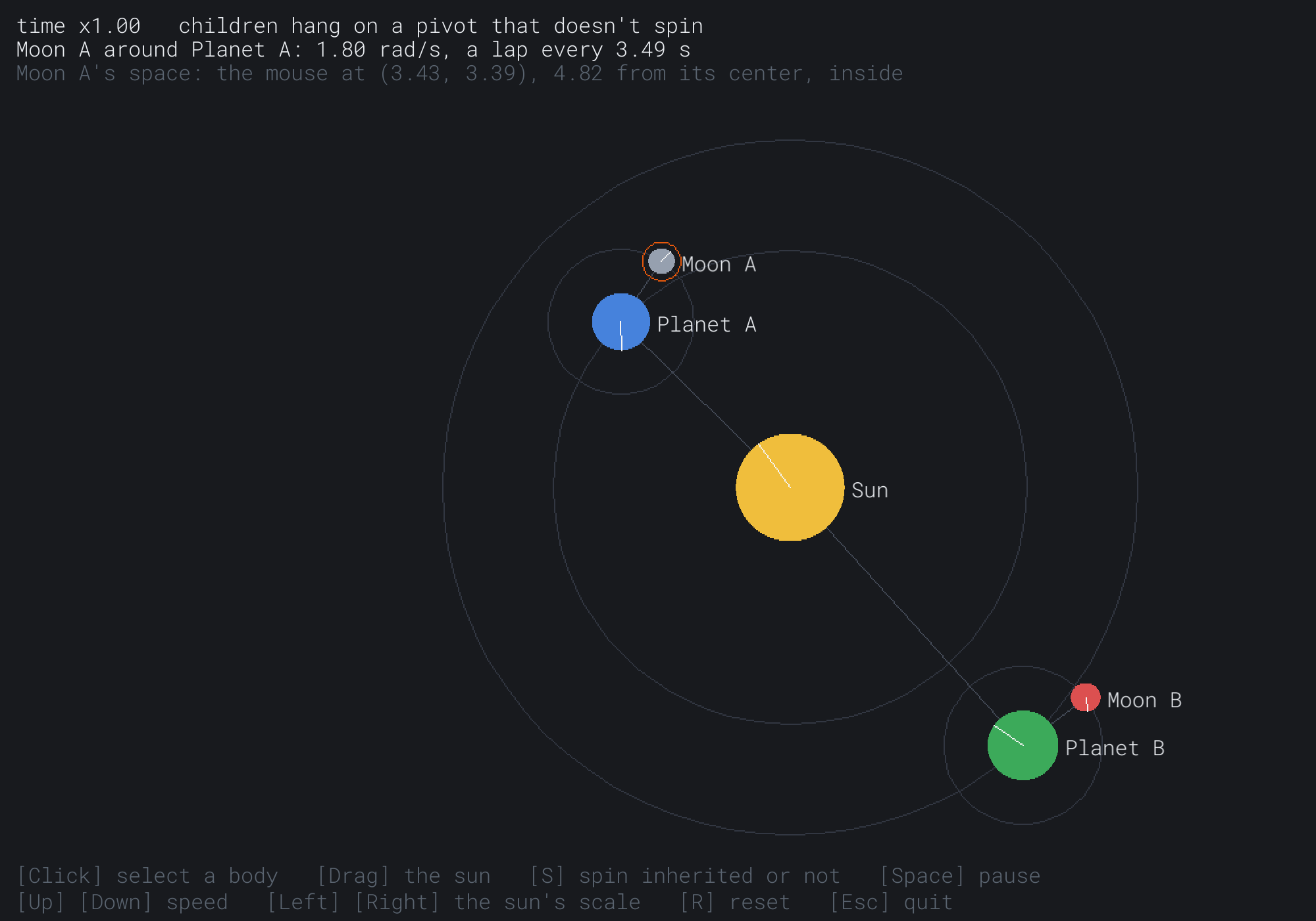
The rings and the bodies grew with the sun, a fifth larger than before. Moon A's lap is now 3.49 seconds, its own speed, since its planet's spin no longer turns its orbit. The mouse is 5.78 pixels from the moon's center, which the readout gives as 4.82 of the moon's own units, at a scale of 1.2.
FAQ
Q) What if a child comes before its parent in the list?
A) Then the child is placed before its parent's transform is worked out that frame. Solar System keeps its transforms from frame to frame, so the child would combine with its parent's transform from the frame before, and trail a frame behind. Keep every parent before its children, by sorting the list when it's built, or walk the tree from the root, which needs no order. And never let a chain of parents loop back on itself, since a loop has no root to start from. A scene graph that lets nodes change parents should refuse any change that would make one.
Q) Isn't it slow to work out every transform, every frame?
A) Not for hundreds of nodes, since each combine is a few multiplications, a sine and a cosine. Engines with many thousands of nodes keep each world transform, and mark a node when its local transform changes. Then only the marked nodes, and the nodes below them, are worked out again.
Q) How do I move a child to a new parent without it jumping?
A) Keep its world transform, and work out the local transform that gives the same world transform under the new parent. Its local position is its world position, taken into the new parent's space with toLocal. Its turn is its world turn less the new parent's, and its scale is its world scale over the new parent's. That's how a sword picked up from the ground keeps its place on the screen, and from then on follows the hand.
Exercises
The first three exercises need only a pencil. The others change Solar System.
- Combine by hand (paper). A parent's world transform is at
(100, 50), turned a quarter turn, at a scale of 2. Its child's local transform is at(3, 0), turned 0.5 radians, at a scale of 0.5. Where's the child in the world, how far is it turned, and how big is it? - Take it back (paper). Take the point
(100, 60)into that child's space. Is it inside a circle of radius 5 there? - Laps by hand (paper). Moon B's orbit speed is 1.2, its planet spins at 0.8, and the sun spins at 0.2. How long does Moon B take to go around Planet B, with spin inherited and with a pivot? Check your answers against the readout.
- A moon of a moon (code). Add a sixth body, which orbits Moon A. Check that it follows the whole chain above it, with S and without.
- The same face (code). Our Moon always shows Earth the same face. Make Moon A's tick always point at Planet A, by choosing its spin's speed and starting angle. Does it still work after S?
- The view from a planet (challenge). Draw the whole system as Planet A sees it. Each frame, take every body's world position into Planet A's space with
toLocal, and draw it from there, around the middle of the window. What does the sun do? What changes if you use Planet A's pivot instead of its world transform? Chapter 27's camera works this way.
For the code exercises, work on a copy of the demo's folder, so that the original stays as the chapter describes it.
AI Exercise (Optional)
A scene graph is how games build anything with moving parts. With an AI's help, you can turn this chapter's functions into a small tank game. Open your AI chatbot of choice, and try a prompt like this:
"I have a C++ demo using SDL3, in a 1000 by 700 window with y pointing down. A struct Vec2 has the usual operators, rotated(radians), which turns clockwise on the screen for a positive angle, and angle(), which gives atan2(y, x). A struct Transform has Vec2 pos, float rot and float scale, and there are three functions: toWorld(t, local), which scales, rotates and then moves a point; toLocal(t, world), which undoes those steps in reverse order; and combine(parent, local), which gives a child's world transform. Please use them to make a tank. Its hull is the root, driven forward and back with W and S, and turned with A and D. Its turret is a child of the hull, and its barrel a child of the turret. Draw each part as a polygon of points in its own space, taken into the window with toWorld. The turret should aim at the mouse: take the mouse into the hull's space with toLocal, and turn the turret toward that point's angle, at no more than 3 radians a second. Space fires a shell from the barrel's tip. Explain why the turret keeps aiming at the mouse while the hull turns under it."
That prompt describes the functions, so the AI builds on them, rather than writing its own. The turret is this chapter in small. It rides the hull, which is the scene graph, and it aims by the inverse, taking the mouse into the hull's space. The barrel's tip is a point in the barrel's own space, taken into the world, which is how a shell knows where to start.
Then give the turret a limit, so that it can't turn more than a quarter turn either way from straight ahead. Then add a second tank, and see how little new code it needs.
Summary
A transform places a point by scaling it, rotating it and then moving it. The order matters, since a turn is always about the origin. With a uniform scale, the scale and the turn can swap, so only the move must come last. A thing's local transform places it in its parent's space, and its world transform places it in the window, which is the world until Chapter 27's camera. A scene graph is a tree of local transforms. The combine function gives a child's world transform from its parent's: the child's position taken into the world by the parent, the turns added and the scales multiplied. With every parent before its children in a list, one pass places the whole tree. The inverse undoes a transform's steps in reverse order, which takes a click into a thing's own space, where hit tests are simple. A child that hangs on its parent's world transform rides its spin, so Moon A goes around at 3.0 radians a second instead of its own 1.8. Hanging it on a pivot, its parent's transform without the spin, cures that. A transform holds one scale, since an uneven scale with a turned child makes a shear, which no move, turn and scale can hold. Chapter 26 puts transforms into matrices, which can hold a shear, and which combine any chain of transforms by multiplying.