
Chapter 25 placed things with a Transform: a move, a turn and one scale. Its combine function stacked transforms, and toLocal undid them. But a Transform can't hold everything. An uneven scale under a turn makes a shear, and a Transform has nowhere to put one. And each part of a transform has its own rule: turns add, scales multiply, and positions go through the parent.
A matrix holds all of these in nine numbers: a move, a turn, a scale of any shape, a flip and a shear. It holds any mix of them, too. Two matrices combine by one rule, multiplication, whatever they hold. One rule undoes a matrix, too: its inverse. Part 7's 3D is built from matrices, a size larger, so this chapter's ideas carry straight on.
This chapter builds Mat3, a 3 by 3 matrix for 2D, from the ground up. It covers what the numbers mean, how two matrices multiply and how to undo one. Then Matrix Sandbox shows one at work, with its numbers changing as you move, turn, stretch and flip a square.
In this chapter, we will:
- See a transform as a table of weights, applied with one dot product for each coordinate
- Read a matrix's columns as where the axes land
- Add the move with a third coordinate, and build
Mat3 - Combine transforms by multiplying their matrices, and see why a product reads from the right
- Measure what a matrix does to areas, with its determinant
- Undo a matrix with its inverse
- Build Matrix Sandbox, a square placed by one matrix, with the matrix and its inverse shown as they change
We'll start with what a transform does to a point's coordinates.
A Table of Weights
Weighted Sums
Chapter 6 turned a point by an angle θ with two formulas:
x' = x cos θ - y sin θ
y' = x sin θ + y cos θ
Each new coordinate is a weighted sum of the old ones: so much of x, plus so much of y. A scale has the same shape, with weights of 0 for the other coordinate:
x' = sx x + 0 y
y' = 0 x + sy y
So does a flip, which is a scale of -1. So does a shear, such as x' = x + 0.5 y, which slides each row across by half its height. Four weights describe each of them. A matrix is those weights in a grid, with a row for each new coordinate. The rotation's matrix is:
| cos θ   -sin θ |
| sin θ    cos θ |
Its top row holds the weights that make x', and its bottom row the weights that make y'. A transform is a set of weights, and its matrix is those weights, kept in rows.
One Dot Product for Each Coordinate
To apply a matrix to a point, take each row and dot it with the point, as Chapter 4 did with two vectors: multiply the matching numbers, and add them. Name the top row's weights a and b, and the bottom row's c and d:
x' = (a, b) · (x, y) = a x + b y
y' = (c, d) · (x, y) = c x + d y
So applying a matrix is one dot product for each coordinate. With the rotation's matrix, it gives back Chapter 6's formulas. With a scale's, it gives back x' = sx x and y' = sy y.
A transform that a 2 by 2 matrix can do is called linear. It leaves the origin where it is, and it keeps straight lines straight and evenly spaced points evenly spaced. Turns, scales, flips and shears are all linear, and so is any mix of them.
The Columns Are the Axes
The rows say how to work out each coordinate. The columns say something easier to picture. Apply a matrix to the x axis's unit, (1, 0), and the result is (a, c), the first column. Apply it to the y axis's unit, (0, 1), and the result is (b, d), the second column. So a matrix's first column is where the x axis lands, and its second is where the y axis lands. The next image shows a unit square, and where a matrix sends it.

Every other point follows the axes. The point (x, y) is x steps along the x axis and y steps along the y axis. So it lands x steps along the first column and y steps along the second, and the square becomes the parallelogram that the two columns span. Reading a matrix starts with its columns. Chapter 6 built the rotation this way: a turn sends the x axis to (cos θ, sin θ) and the y axis to (-sin θ, cos θ), and those are its matrix's columns. A shear by 0.5 has the columns (1, 0) and (0.5, 1). The x axis stays put, and the y axis leans over by half a step.
Homogeneous Coordinates
The Move That's Missing
There's one transform a 2 by 2 matrix can't do, and it's the one games use most: a move. Moving a point across by tx gives x' = x + tx, and no weights of x and y can add a number that doesn't depend on them. A 2 by 2 matrix always leaves the origin where it was, and a move doesn't.
The way around it is to give each point a third coordinate, always 1, so that (x, y) becomes (x, y, 1). A 3 by 3 matrix then has a third column of weights, which multiply that 1, and so are added just as they are:
| 1  0  tx |   | x |   | x + tx |
| 0  1  ty | · | y | = | y + ty |
| 0  0  1  |   | 1 |   |   1    |
The top row, dotted with (x, y, 1), gives x + tx: a move, made by a matrix. The bottom row gives back the 1, so that the next matrix finds it there too. Points with that extra 1 are in homogeneous coordinates. They're why graphics uses matrices a size larger than the space they work in: 3 by 3 for 2D, and 4 by 4 for 3D, in Part 7. The next image shows the parts of a 3 by 3 matrix.
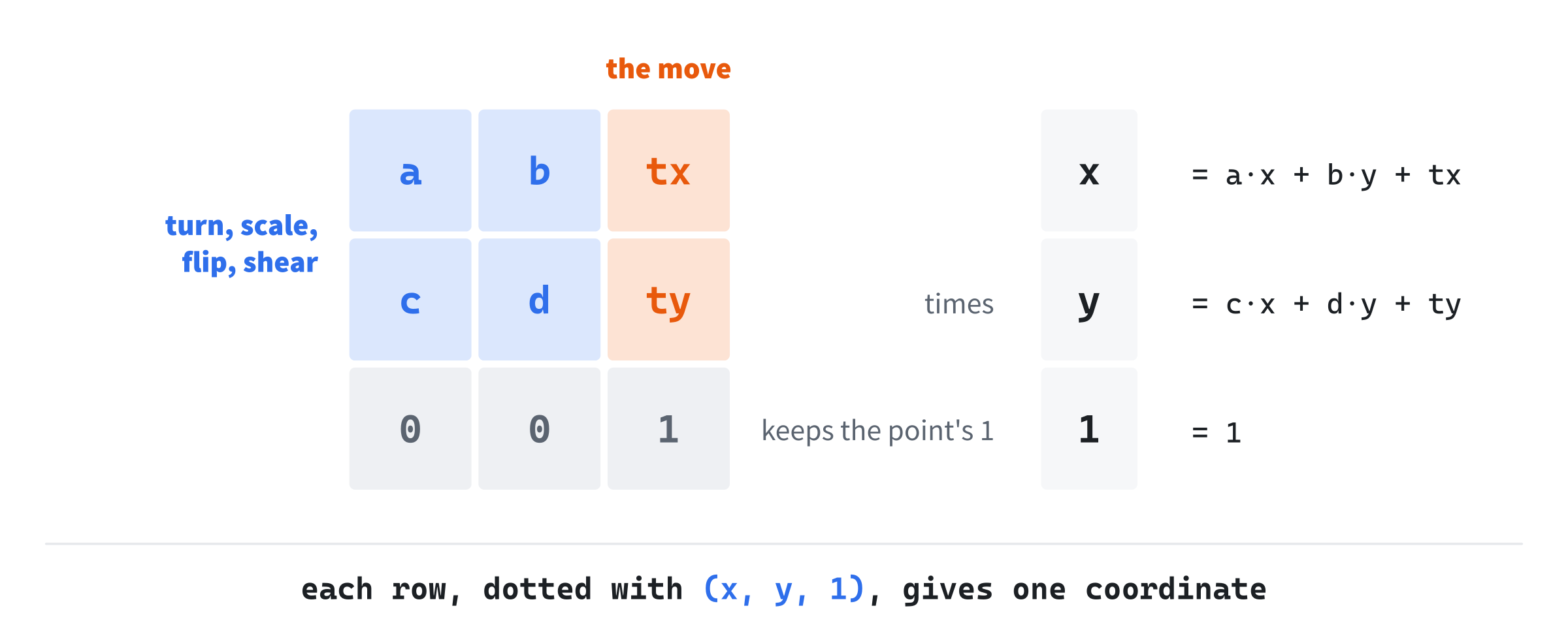
The 2 by 2 block at the top left holds the turn, the scale, the flip and the shear, as before. The third column's top two numbers are the move. The bottom row stays 0, 0, 1 for every transform in this chapter.
Points and Directions
Not everything a game transforms is a point. A velocity, an offset from one point to another, and an axis are directions, and moving them makes no sense. A ship's velocity is the same wherever the ship is. So a direction gets a third coordinate of 0, which multiplies the move's column away. A matrix turns and scales a direction, but doesn't move it. The difference of two points works out that way by itself: (x1, y1, 1) minus (x2, y2, 1) has a 0 for its third coordinate, so it's a direction.
Mat3
The Struct
This chapter's new header, Mat3.h, starts with the struct and its nine numbers:
#pragma once
#include <cmath>
#include "Vec2.h"

// Mat3: a 3 by 3 matrix, for transforms in 2D (Chapter 26). A point is the
// column (x, y, 1), and a matrix transforms it from the left: M times p.
// The bottom row stays 0, 0, 1, so that a move rides along with a turn and
// a scale. The numbers are kept by rows: m[row][column].
struct Mat3
{
    // A new Mat3 is the identity, which changes nothing: ones down the
    // diagonal, and zeros everywhere else.
    float m[3][3] = { { 1, 0, 0 }, { 0, 1, 0 }, { 0, 0, 1 } };
The numbers are kept by rows, so m[1][2] is the number in row 1 and column 2, counting from 0. Every new Mat3 starts as the identity, with ones down the diagonal and zeros everywhere else. Its columns are (1, 0) and (0, 1), so it leaves the axes where they are, and so every point. Then come the builders. Each starts from the identity, and sets only the numbers it needs:
// A move by (tx, ty), in the third column.
static Mat3 translation(float tx, float ty)
{
    Mat3 r;
    r.m[0][2] = tx;
    r.m[1][2] = ty;
    return r;
}

// A scale by sx across and sy down, on the diagonal.
static Mat3 scale(float sx, float sy)
{
    Mat3 r;
    r.m[0][0] = sx;
    r.m[1][1] = sy;
    return r;
}
A move sets the third column, and a scale sets the diagonal. Starting from the identity matters: a scale keeps the 1 in the bottom corner, which carries a point's 1 through. The rotation sets the 2 by 2 block, from the angle's cosine and sine:
// A turn by an angle, in radians, clockwise on the screen. Its first
// two columns are where the turn sends the x and y axes (Chapter 6).
static Mat3 rotation(float radians)
{
    float c = std::cos(radians);
    float s = std::sin(radians);
    Mat3 r;
    r.m[0][0] = c;
    r.m[0][1] = -s;
    r.m[1][0] = s;
    r.m[1][1] = c;
    return r;
}
Its four numbers are the two columns Chapter 6 found: (c, s) for the x axis, and (-s, c) for the y axis.
Applying It
Applying a matrix is the dot products, written out:
// A point, transformed: each row dotted with (x, y, 1), so the move in
// the third column is added.
Vec2 apply(const Vec2& p) const
{
    return { m[0][0] * p.x + m[0][1] * p.y + m[0][2],
             m[1][0] * p.x + m[1][1] * p.y + m[1][2] };
}

// A direction, transformed: each row dotted with (x, y, 0), so it's
// turned and scaled, but never moved.
Vec2 applyDir(const Vec2& v) const
{
    return { m[0][0] * v.x + m[0][1] * v.y,
             m[1][0] * v.x + m[1][1] * v.y };
}
The apply function treats its argument as a point, with a third coordinate of 1. That's why each of its lines ends by adding the third column, m[0][2] or m[1][2]. The applyDir function treats its argument as a direction, with a 0, so the third column doesn't appear. Use apply for positions, and applyDir for velocities, offsets and axes.
Combining Transforms
The Product
Two matrices multiply into one, which does both of their transforms. Each number in the product is a dot product: the number in row i and column j is row i of the left matrix, dotted with column j of the right one. The product goes in the struct, after applyDir:
// The product: one matrix that does b's transform, and then this
// one's. Entry (i, j) is row i of this matrix dotted with column j of b.
Mat3 operator*(const Mat3& b) const
{
    Mat3 r;
    for (int i = 0; i < 3; ++i)
        for (int j = 0; j < 3; ++j)
        {
            float sum = 0.0f;
            for (int k = 0; k < 3; ++k) sum += m[i][k] * b.m[k][j];
            r.m[i][j] = sum;
        }
    return r;
}
Its three loops pick the row, the column, and each pair of numbers to multiply. So a product is 9 numbers, each made from 3 multiplications.
Read From the Right
Matrix Sandbox places its square with three matrices, where T is a move, R a turn and S a scale:
M = T R SApplying M to a point p is the same as applying the three, one at a time, from the right:
M p = T (R (S p))That's because a product of matrices can be grouped either way without changing it, as long as the order stays the same. So the matrix nearest the point acts first. The scale happens first, then the turn, then the move, which is Chapter 25's order. A product reads from the right, in the order the point travels through it.
A Worked Product
Take Matrix Sandbox's square, turned a quarter turn: a move to (380, 360), a quarter turn, and a scale of 70. A quarter turn's cosine is 0 and its sine is 1. The turn times the scale is:
| 0  -1 |   | 70   0 |   | 0   -70 |
| 1   0 | · | 0   70 | = | 70    0 |
The move then puts (380, 360) in the third column:
| 0   -70   380 |
| 70    0   360 |
| 0     0     1 |
The square's corner at (1, 1) lands at 0 - 70 + 380 across and 70 + 0 + 360 down, which is (310, 430). Step by step, the scale takes the corner to (70, 70). The quarter turn, clockwise on the screen, takes it on to (-70, 70), and the move takes it to (310, 430). The corner was at the square's bottom right, and the turn has carried it to the bottom left. The columns say the same thing: the x axis now points down, 70 long, and the y axis points left.
Order Still Matters
A product can be grouped either way, but its order can't change. Turn the point (1, 0) a quarter turn and then move it by (5, 0), as T R, and it turns to (0, 1), then moves to (5, 1). Move it first, as R T, and it moves to (6, 0), then turns about the origin to (0, 6). Those are Figure 25.1's two orders, as matrices. The order of the product is the order of the steps, read from the right.
Chapter 25, as Matrices
Chapter 25's combine is a product of matrices. A transform's matrix is T R S, made from its place, its turn and its scale. The matrix of a child's world transform is its parent's matrix times its own local one. The product does everything combine did: the scales multiply, the turns add, and the child's position is taken through its parent's matrix. But a product can hold anything. An uneven scale under a turn gives a shear, which is just four more numbers in the block. That's the case Chapter 25 couldn't hold.
What It Costs
A product of two 3 by 3 matrices takes 27 multiplications. Using what's known about the bottom row would cut that to 12. Either way, a product is cheap next to what it saves. Build a shape's matrix once a frame, and applying it to each corner costs 4 multiplications and 4 additions, however many matrices went into it. A chain of ten transforms costs no more to apply than one.
The Determinant
Area and Order
One number says what a matrix does to areas. It's the determinant of the matrix's 2 by 2 block:
det = a d - b cIt's Chapter 4's cross product of the two columns, (a, c) and (b, d). So it's the area of the parallelogram the columns span, with a sign. The unit square has an area of 1, so its image's area is the determinant's size, and every other area is multiplied by the same amount. The next image shows a matrix with a determinant of 2.22, and the same matrix, flipped across.

The sign says which way around a shape's corners go. The unit square's corners, a to d, go clockwise on the screen. Under a matrix with a positive determinant, they still do. A flip turns them the other way, and makes the determinant negative, with the same size. In Matrix Sandbox, the determinant is the scale across times the scale down: 4900 at the start, with 70 each way. The square runs from -1 to 1 each way, an area of 4. So it covers 4 times 4900 square pixels, which is 140 by 140. Flip it, and the determinant is -4900.
When It's Zero
A determinant of 0 means the parallelogram has no area. The matrix flattens the plane onto a line, or even onto a point. A scale of 0 does that, and so does a block whose two columns point along the same line. Many points then land on the same spot, so there's no telling which one came from where. Such a matrix can't be undone.
The determinant is a free function, after the struct's closing brace, as distance is in Vec2.h:
};

// The determinant of a matrix's 2 by 2 block: how many times the matrix
// scales areas, negative when it also flips them over.
inline float determinant(const Mat3& a)
{
    return a.m[0][0] * a.m[1][1] - a.m[0][1] * a.m[1][0];
}
It's called the way math writes it, as determinant(M), and so is the inverse, which comes next.
The Inverse
Undoing a Matrix
A matrix takes a point from a shape's own space into the window. Its inverse takes it back, which is what a click needs: the window's coordinates, turned into the shape's own. Call the matrix's 2 by 2 block A, and its move t, so that a point p lands at:
p' = A p + tTo get p back, undo the move, and then the block:
p = A⁻¹ (p' - t)
p = A⁻¹ p' - A⁻¹ t
So the inverse is a matrix too. Its block is A⁻¹, the inverse of the 2 by 2 block, and its move is -A⁻¹ t, the move taken through that block and reversed. It undoes the steps in reverse order, the move first and then the block, as Chapter 25's toLocal did.
The 2 by 2 Inverse
The inverse of a 2 by 2 block has a short formula. Swap the two numbers on the diagonal, negate the other two, and divide all four by the determinant. Without the division, the block times the swapped one is:
| a  b |   |  d  -b |   | a d - b c       0     |
| c  d | · | -c   a | = |     0       a d - b c |
That's the determinant times the identity. So dividing by the determinant leaves the identity, which means the formula undoes the block. It also shows why a determinant of 0 has no inverse: there's nothing to divide by. Here's the inverse, after the determinant:
// The inverse, which undoes a matrix whose bottom row is 0, 0, 1. Its
// 2 by 2 block is a's block, inverted: the diagonal swapped, the other two
// negated, and all four divided by the determinant. Its move is a's move,
// taken through that block and reversed. A determinant of 0 flattens the
// plane, which can't be undone, so it gives the identity instead.
inline Mat3 inverse(const Mat3& a)
{
    Mat3 r;
    float det = determinant(a);
    if (det == 0.0f) return r;
    r.m[0][0] = a.m[1][1] / det;
    r.m[0][1] = -a.m[0][1] / det;
    r.m[1][0] = -a.m[1][0] / det;
    r.m[1][1] = a.m[0][0] / det;
    r.m[0][2] = -(r.m[0][0] * a.m[0][2] + r.m[0][1] * a.m[1][2]);
    r.m[1][2] = -(r.m[1][0] * a.m[0][2] + r.m[1][1] * a.m[1][2]);
    return r;
}
The four lines after the test are the 2 by 2 formula. The last two take the move through the new block, and negate it, which is the -A⁻¹ t from before. A matrix whose determinant is exactly 0 gives back the identity. That answer is wrong, but it's made of ordinary numbers. Dividing by 0 would give infinities, which spread into everything worked out from them.
Undoing a Chain
The inverse of a product is the product of the inverses, in reverse order:
(A B)⁻¹ = B⁻¹ A⁻¹It's Chapter 25's socks and shoes again: what was done last is undone first. For Matrix Sandbox's matrix:
(T R S)⁻¹ = S⁻¹ R⁻¹ T⁻¹Each piece is easy to undo. Here, T⁻¹ moves by the negated move, R⁻¹ turns by the negated angle, and S⁻¹ divides by the scales. Read from the right, the point is moved back, then turned back and then scaled back. That's exactly Chapter 25's toLocal. Chapter 27's camera builds its matrix this way.
Close Isn't Exact
Floats are rounded at every step, so a matrix times its inverse is only nearly the identity. For the worked product above, the largest error is about 0.00003, in the move's column. A point taken into the window and back comes back within about 0.00001 of where it started. At a scale of 1000, the point (1, 0) comes back as (0.9999999, 0). So compare the results of a round trip with a tolerance, as Chapter 5's nearlyEqual does, and never with ==.
A determinant near 0, without being 0, is worse. Its inverse holds huge numbers, and its answers are far less accurate. A game that might build one, with a scale that can shrink toward nothing, should check the determinant against a small tolerance before it inverts.
Building Matrix Sandbox
Matrix Sandbox places a square with one matrix, M = T R S, built from a move, a turn and a scale across and down. Drag the square to move it, and hold Left and Right to turn it. Hold Up and Down to scale it, and W and S to stretch its height. F flips it, and a right-click drops a probe, which the inverse takes into the square's own space. The readout shows M, its inverse and its determinant as they change.
Get the code. The complete project is in the
Matrix Sandboxfolder of the book's repository.
Matrix Sandbox starts from the skeleton, with its timing and its mouse. It reuses drawGrid from Chapter 1, drawArrow from Chapter 2, fmt2 from Chapter 4 and setColor from Chapter 8. Its Vec2.h is Solar System's, since this chapter adds nothing to it, and its Mat3.h is the one this chapter built. Here are its includes and its colors:
#include <cmath>
#include <string>
#include "Vec2.h"
#include "Mat3.h"

constexpr int WINDOW_WIDTH  = 1000;
constexpr int WINDOW_HEIGHT = 700;

constexpr SDL_Color TEXT = { 235, 238, 242, 255 };
constexpr SDL_Color GREY = { 90, 100, 112, 255 };
constexpr SDL_Color RED = { 235, 80, 80, 255 };
constexpr SDL_Color GREEN = { 60, 190, 100, 255 };
constexpr SDL_Color OUTLINE = { 120, 160, 230, 255 };
The square's x axis is drawn in red, its y axis in green, and its outline in a pale blue. Then come the constants:
// How fast the held keys turn the square, in radians a second, and scale
// it, in pixels a unit, a second; the smallest and largest scales; and the
// readout's left edge.
constexpr float TURN_SPEED = 1.6f;
constexpr float SCALE_SPEED = 45.0f;
constexpr float MIN_SCALE = 12.0f;
constexpr float MAX_SCALE = 220.0f;
constexpr float PANEL_X = 610.0f;
The square turns at 1.6 radians a second, about 92 degrees. Its scales grow or shrink by 45 pixels a unit, each second, and stay between 12 and 220, so the determinant never gets near 0. Then come two helpers of its own:
// A number as text, rounded to the decimals asked for, and right-aligned
// in 9 characters, so that a matrix's columns line up. Rounding first
// keeps a tiny negative number from showing as -0.00.
std::string padded(float v, int decimals)
{
    float shift = std::pow(10.0f, (float)decimals);
    v = std::round(v * shift) / shift + 0.0f;
    char buf[32];
    SDL_snprintf(buf, sizeof(buf), "%9.*f", decimals, v);
    return buf;
}
The format %9.*f pads a number to 9 characters, and the star takes the number of decimals from the next argument. Rounding first matters for numbers that should be 0. A quarter turn's cosine comes out as -0.00000004, which would otherwise show as -0.00. Adding 0 to the rounded number turns a -0 into a 0. The second helper is the hit test:
// Whether a point in the square's own space is inside the square, which
// runs from -1 to 1 each way.
bool inSquare(Vec2 local)
{
    return std::fabs(local.x) <= 1.0f && std::fabs(local.y) <= 1.0f;
}
In its own space, the square is upright and runs from -1 to 1 each way, so a point is inside it when both of its coordinates are between -1 and 1.
The State
The state goes after the font is loaded:
// The square's corners, in its own space, and where R puts it back.
const Vec2 CORNER[4] = { { -1, -1 }, { 1, -1 }, { 1, 1 }, { -1, 1 } };
const Vec2 HOME = { 380.0f, 360.0f };

// The matrix's parts: the move, the turn in radians, the scale across
// and down, in pixels for each of the square's units, and the flip.
// Then the drag, and the probe.
Vec2 pos = HOME;
float rot = 0.0f;
float sx = 70.0f;
float sy = 70.0f;
bool flipped = false;
bool dragging = false;
Vec2 grab;
Vec2 probe;
bool hasProbe = false;

// The matrix and its inverse, built each frame and kept to the next,
// so that a click is tested against the square the window shows.
Mat3 M;
Mat3 Minv;
In the preceding code, the square's corners never change. It's always the square from (-1, -1) to (1, 1) in its own space, and everything on the screen is that square, seen through M. The matrix's parts are what the keys and the mouse change: the move, the turn, the two scales and the flip. M and its inverse are kept from one frame to the next, as Solar System's transforms were. A click is handled before the frame's work, so it's tested against the square where the window last showed it.
The Events
The keys flip the square and reset it, and the mouse buttons grab it and drop the probe:
// Events: quitting, and the keys and clicks that happen once.
SDL_Event event;
while (SDL_PollEvent(&event))
{
    if (event.type == SDL_EVENT_QUIT) running = false;
    else if (event.type == SDL_EVENT_KEY_DOWN)
    {
        if (event.key.key == SDLK_ESCAPE) running = false;
        else if (event.key.key == SDLK_F) flipped = !flipped;
        else if (event.key.key == SDLK_R)
        {
            pos = HOME;
            rot = 0.0f;
            sx = 70.0f;
            sy = 70.0f;
            flipped = false;
            hasProbe = false;
        }
    }
    else if (event.type == SDL_EVENT_MOUSE_BUTTON_DOWN)
    {
        // A left press inside the square grabs it, tested in the
        // square's own space, through the inverse. A right press
        // drops the probe.
        Vec2 press = { event.button.x, event.button.y };
        if (event.button.button == SDL_BUTTON_LEFT &&
            inSquare(Minv.apply(press)))
        {
            dragging = true;
            grab = pos - press;
        }
        else if (event.button.button == SDL_BUTTON_RIGHT)
        {
            probe = press;
            hasProbe = true;
        }
    }
    else if (event.type == SDL_EVENT_MOUSE_BUTTON_UP) dragging = false;
}
In the preceding code, R puts the square back where it started, and takes the probe away. A left press grabs the square only if the press is inside it. The inverse takes the press into the square's space, and inSquare checks it there, which is the same test the probe uses. A right press drops the probe where the mouse is.
Each Frame's Work
Each frame, the keys that are held change the parts, and the matrix is built from them:
// A dragged square follows the mouse, with the point grabbed under it.
if (dragging) pos = Vec2{ mx, my } + grab;

// Keys held down turn the square, scale it, and stretch its height.
const bool* keys = SDL_GetKeyboardState(nullptr);
if (keys[SDL_SCANCODE_LEFT]) rot = wrapAngle(rot - TURN_SPEED * dt);
if (keys[SDL_SCANCODE_RIGHT]) rot = wrapAngle(rot + TURN_SPEED * dt);
float grow = 0.0f;
if (keys[SDL_SCANCODE_UP]) grow += SCALE_SPEED * dt;
if (keys[SDL_SCANCODE_DOWN]) grow -= SCALE_SPEED * dt;
float stretch = 0.0f;
if (keys[SDL_SCANCODE_W]) stretch += SCALE_SPEED * dt;
if (keys[SDL_SCANCODE_S]) stretch -= SCALE_SPEED * dt;
sx = SDL_clamp(sx + grow, MIN_SCALE, MAX_SCALE);
sy = SDL_clamp(sy + grow + stretch, MIN_SCALE, MAX_SCALE);

// The matrix, from its parts: scale, then turn, then move, read from
// the right. A flip is a scale of -1 across. Then its inverse.
M = Mat3::translation(pos.x, pos.y) * Mat3::rotation(rot) *
    Mat3::scale(flipped ? -sx : sx, sy);
Minv = inverse(M);
In the preceding code, the turn is wrapped by Chapter 5's wrapAngle, so the readout's degrees stay between -180 and 180. Up and Down change both scales, and W and S change only the height. The matrix is the product of its three parts, with the scale's x negated when the square is flipped. Then inverse undoes it, once a frame, for the probe, the readout and the next frame's clicks.
Drawing
After the skeleton clears the screen, the grid and the square are drawn:
drawGrid(renderer);

// The square: its corners, taken onto the window by M, filled as two
// triangles with no texture, then outlined.
SDL_Vertex verts[4];
for (int i = 0; i < 4; ++i)
{
    Vec2 p = M.apply(CORNER[i]);
    verts[i].position = { p.x, p.y };
    verts[i].color = { 0.13f, 0.24f, 0.42f, 1.0f };
    verts[i].tex_coord = { 0.0f, 0.0f };
}
const int indices[6] = { 0, 1, 2, 0, 2, 3 };
SDL_RenderGeometry(renderer, nullptr, verts, 4, indices, 6);
setColor(renderer, OUTLINE);
for (int i = 0; i < 4; ++i)
{
    Vec2 a = M.apply(CORNER[i]);
    Vec2 b = M.apply(CORNER[(i + 1) % 4]);
    SDL_RenderLine(renderer, a.x, a.y, b.x, b.y);
}
In the preceding code, the grid has a line every 50 pixels, to read positions against. M takes the square's corners onto the window, and SDL_RenderGeometry, from Chapter 24, fills them as two triangles. This time its texture is nullptr, so the triangles are filled with the vertices' color. Then the outline joins each corner to the next, and (i + 1) % 4 joins the last corner back to the first. The axes come next:
// The square's own axes, from its center to where M sends the points
// (1, 0) and (0, 1), and a marker at (0.8, 0.8), which shows a flip.
Vec2 center = M.apply({ 0.0f, 0.0f });
drawArrow(renderer, center, M.apply({ 1.0f, 0.0f }), RED);
drawArrow(renderer, center, M.apply({ 0.0f, 1.0f }), GREEN);
Vec2 mark = M.apply({ 0.8f, 0.8f });
setColor(renderer, TEXT);
SDL_FRect markRect = { mark.x - 4, mark.y - 4, 8, 8 };
SDL_RenderFillRect(renderer, &markRect);
The arrows run from where M sends the square's center to where it sends (1, 0) and (0, 1). Those are the center plus M's first and second columns, so the arrows draw the columns. The marker at (0.8, 0.8) sits near one corner, and a flip moves it across. Then comes the probe:
// The probe, a fixed point in the window, taken into the square's
// space by the inverse: green when it's inside the square there.
Vec2 local = Minv.apply(probe);
if (hasProbe)
{
    setColor(renderer, inSquare(local) ? GREEN : RED);
    SDL_FRect dot = { probe.x - 5, probe.y - 5, 10, 10 };
    SDL_RenderFillRect(renderer, &dot);
}
The probe stays where it was dropped, in the window's coordinates. Each frame, the inverse takes it into the square's space, where inSquare decides its color. The readout comes last, starting with M:
// The readout. First M, with its first column in red and its second
// in green, the colors of the axes they draw, and the move in the
// third. Then the inverse, to four decimals, since its numbers are
// small. Then the determinant, the parts, and the probe.
drawText(renderer, font, "M = T * R * S, square to window",
         PANEL_X, 40, TEXT);
drawText(renderer, font, "   x axis", PANEL_X, 62, RED);
drawText(renderer, font, "   y axis", PANEL_X + 90, 62, GREEN);
drawText(renderer, font, "     move", PANEL_X + 180, 62, TEXT);
for (int i = 0; i < 3; ++i)
{
    float y = 84.0f + i * 22.0f;
    drawText(renderer, font, padded(M.m[i][0], 2), PANEL_X, y, RED);
    drawText(renderer, font, padded(M.m[i][1], 2), PANEL_X + 90, y,
             GREEN);
    drawText(renderer, font, padded(M.m[i][2], 2), PANEL_X + 180, y,
             TEXT);
}
Each of M's numbers is drawn on its own, 90 pixels apart, so that each column can have its color. The first column is red and the second green, like the arrows they draw. Then comes the inverse:
drawText(renderer, font, "the inverse, window to square",
         PANEL_X, 162, TEXT);
for (int i = 0; i < 3; ++i)
{
    float y = 186.0f + i * 22.0f;
    for (int j = 0; j < 3; ++j)
        drawText(renderer, font, padded(Minv.m[i][j], 4),
                 PANEL_X + j * 90.0f, y, TEXT);
}
Its numbers are small, around 1 over 70, so they're shown to four decimals. Then come the determinant, the parts, the probe and the controls:
float det = determinant(M);
drawText(renderer, font,
         "determinant " + fmt2(det) + (det < 0.0f ? ", flipped" : ""),
         PANEL_X, 270, TEXT);
drawText(renderer, font,
         "turn " + std::to_string((int)std::lround(rot * 180.0f / PI)) +
         " degrees", PANEL_X, 292, TEXT);
drawText(renderer, font,
         "scale " + fmt2(flipped ? -sx : sx) + " across, " +
         fmt2(sy) + " down",
         PANEL_X, 314, TEXT);
drawText(renderer, font, "the probe, in the square's space:",
         PANEL_X, 350, TEXT);
std::string where = "right-click to drop one";
if (hasProbe)
    where = "(" + fmt2(local.x) + ", " + fmt2(local.y) + "), " +
            (inSquare(local) ? "inside" : "outside");
drawText(renderer, font, where, PANEL_X, 372,
         hasProbe ? (inSquare(local) ? GREEN : RED) : GREY);
drawText(renderer, font,
         "[Drag] move   [Left] [Right] turn   [Up] [Down] scale   "
         "[W] [S] height", 12, WINDOW_HEIGHT - 46, GREY);
drawText(renderer, font,
         "[F] flip   [Right-click] probe   [R] reset   [Esc] quit",
         12, WINDOW_HEIGHT - 26, GREY);
In the preceding code, the turn is shown in whole degrees, rounded by std::lround. A flip shows in two places: the scale across is negative, and so is the determinant. The probe's line is grey until there's a probe, and then green or red, as the probe is. There's nothing to add to the skeleton's cleanup.
Trying It Out
Run the demo. The square sits on the left, with its red and green arrows, and the readout is on the right. Then try it, step by step:
- Move it. Drag the square. Only M's third column changes, following the mouse, and the 2 by 2 block stays still. The inverse's third column changes too, since the way back starts by undoing the move.
- Turn it. Hold Right. The red column becomes 70 times the cosine and the sine of the turn. The green column becomes 70 times the negated sine and the cosine. The arrows on the square turn with them, since they're the same numbers. Turn it to about 90 degrees, and the red column reads about
(0, 70): the x axis points down. - Scale and stretch it. Hold Up, and both arrows grow, with the determinant as the product of the scales. Then hold W. Only the green arrow grows, since only the second column changes, and the square becomes a rectangle.
- Flip it. Press F. The red arrow points the other way, the marker jumps across the square, and the determinant turns negative. The readout says the square is flipped.
- Probe it. Press R, then right-click inside the square, about halfway from its middle to its top-right corner. The probe is green, with its coordinates in the square's space. Hold Right. The probe stays where it is in the window, but its numbers go around, since the square turns under it. Then hold Down. As the square shrinks, the probe's numbers grow, and when one passes 1, the probe turns red.
- Grab it. Turn the square to about 45 degrees, and press just outside one of its sides. Nothing happens, since the press is outside the square in the square's own space. A test against an upright box around the square would have grabbed it. Press inside, and the square is grabbed.
The next image shows step 2, at 30 degrees.
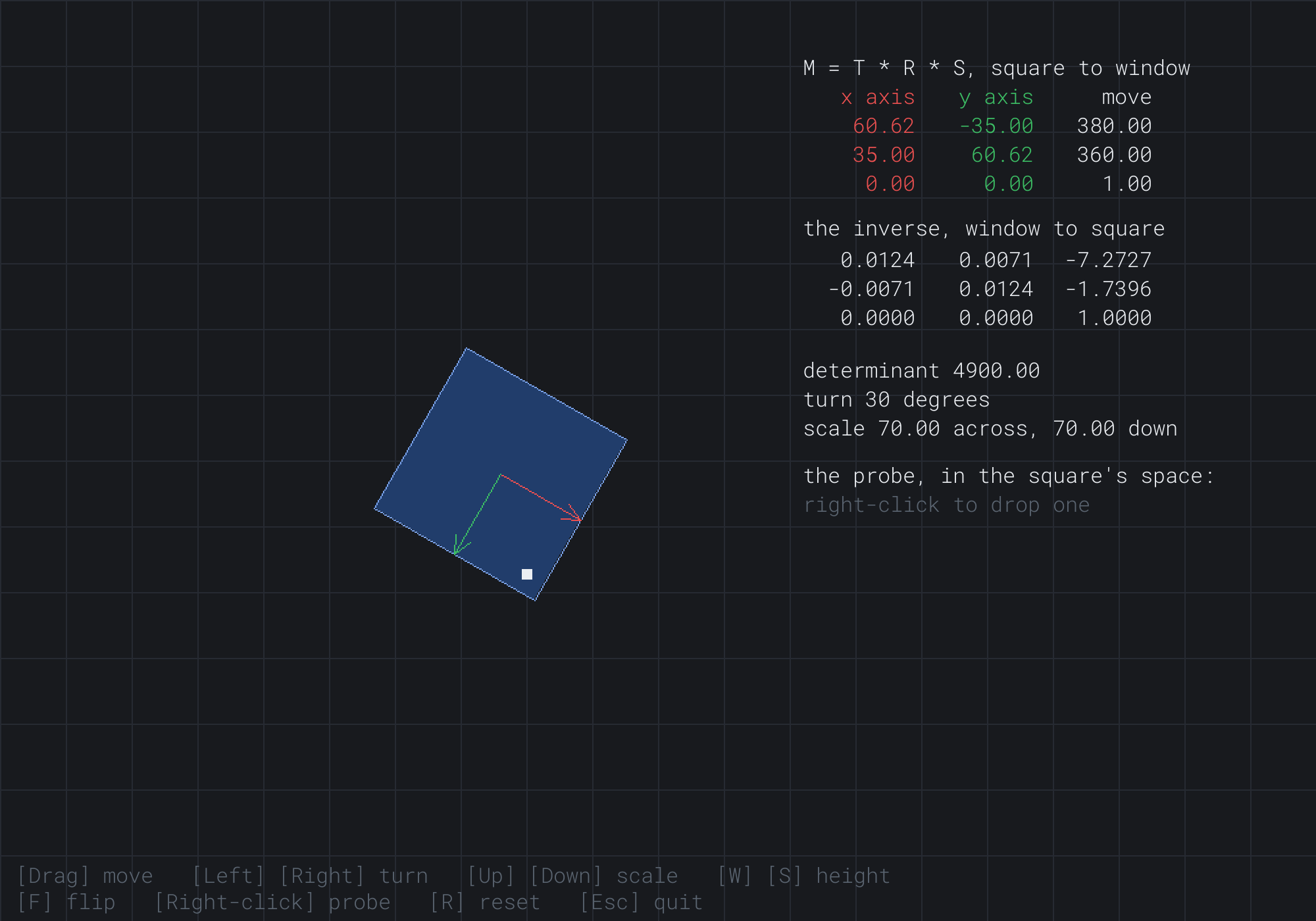
The red column is 70 times the cosine and the sine of 30 degrees, (60.62, 35.00), and the green column is (-35.00, 60.62). The inverse's block is the turn back, divided by 70, and the determinant is still 4900. The next image shows the square flipped, turned back 20 degrees, stretched to 100 across and 60 down, with a probe.

The red arrow points left, and a little down, and the marker has moved to the square's lower left. The determinant is 100 times 60, negated: -6000. The probe, at (430, 330) in the window, is at about (-0.57, -0.18) in the square's space, so it's inside.
FAQ
Q) Why do some libraries write these matrices with their rows and columns swapped?
A) Two choices hide in how a library writes its matrices. One is the order it stores the numbers in, by rows or by columns. The other is whether it treats a point as a column, multiplied from the right as Mat3 does, or as a row, multiplied from the left. A library that multiplies rows has the transpose of every matrix here, with rows and columns swapped, and its products read from the left, as S R T. Neither is wrong, so check a library's documentation for both choices before copying a matrix from it.
Q) How do I scale a shape about a point that isn't its origin?
A) Move that point to the origin, scale, and move it back, as Chapter 6 did to turn about a pivot. As matrices, with the point at c, that's T(c) S T(-c), read from the right. The same product turns a shape about any point, with a turn in place of the scale.
Q) Why keep a bottom row that's always 0, 0, 1?
A) It keeps the product to one rule, with nothing special to handle. Many engines store only the top two rows, six numbers, and treat the bottom row as known, which saves a little memory and some multiplications by 0. Part 7 needs its whole bottom row, since a 3D perspective matrix puts numbers there.
Exercises
The first three exercises need only a pencil. The others change Matrix Sandbox.
- Order by hand (paper). Work out R S and S R, where R is a quarter turn and S scales by 2 across and 1 down. Apply each to
(1, 0). Why do the answers differ? - Read the columns (paper). A matrix's columns are
(0, 2)and(-1, 0). Where do the x and y axes land? What's its determinant, and does it flip? Which product from Exercise 1 is it? - Invert by hand (paper). Write the inverse of M = T S, a move to
(380, 360)and a scale of 70. Where does the window's point(415, 325)land in the square's space? Check it with the probe, after pressing R. - A shear (code). Add a shear matrix to Matrix Sandbox, with the top-right number of its 2 by 2 block,
m[0][1], set by two keys. Put it between R and S. Watch the green arrow lean, and the determinant stay the same. Why doesn't it change? - Undo a chain (code). Build the inverse a second way, as S⁻¹ R⁻¹ T⁻¹ from M's parts, remembering the flip. Show the largest difference between its numbers and those of
inverse(M)in the readout. - Solar System with matrices (challenge). Rewrite Chapter 25's demo with
Mat3: each body's local matrix is T R S, and its world matrix is its parent's times its own. Then give the sun a scale of 2 across and 1 down, and draw each orbit as 72 points taken through its parent's matrix. What happens to the orbits that noTransformcould have done?
For the code exercises, work on a copy of the demo's folder, so that the original stays as the chapter describes it.
AI Exercise (Optional)
A matrix for each shape is how an editor lets you move, turn and stretch things with the mouse. With an AI's help, you can build a small level editor on Mat3. Open your AI chatbot of choice, and try a prompt like this:
"I have a C++ demo using SDL3, in a 1000 by 700 window with y pointing down. A struct Vec2 has the usual operators. A struct Mat3 is a 3 by 3 matrix for 2D, stored as m[row][column], with static translation(tx, ty), scale(sx, sy) and rotation(radians), which turns clockwise on the screen for a positive angle. It has operator* for the product, apply(p) for points and applyDir(v) for directions, and there are free functions determinant(M) and inverse(M). Please use them to make a small level editor. N adds a rectangle at the mouse, kept as a position, a turn and a scale across and down, and drawn by its matrix, M = T * R * S, from a unit square. A click selects the top rectangle under the mouse, tested by taking the mouse into each rectangle's own space with inverse(M). A selected rectangle shows a handle at each corner and a turn handle above it. Dragging its body moves it; dragging a corner handle stretches it along its own axes, measured in its own space; and dragging the turn handle turns it to face the mouse. Delete removes the selection. Explain why the corner handles still stretch along the rectangle's own sides when it's turned."
That prompt describes Mat3, so the AI builds on it, rather than writing a matrix type of its own. Every handle is the chapter's inverse at work. Taking the mouse into a rectangle's own space turns a hard question, how far along a turned side the mouse is, into an easy one.
Then add a key that duplicates the selection, and a snap that rounds each turn to 15 degrees. Then save the level to a file and load it back.
Summary
A transform's new coordinates are weighted sums of the old ones, and a matrix is that table of weights. Applying it is one dot product for each coordinate, and its columns are where the axes land. A 2 by 2 matrix holds every linear transform: turns, scales, flips, shears and their mixes. A move needs a third coordinate, which is 1 for points and 0 for directions. So Mat3 is 3 by 3, with the move in its third column. Multiplying two matrices gives one that does both, and a product reads from the right, since the matrix nearest the point acts first. Grouping doesn't change a product, but the order does. The determinant is how many times a matrix scales areas, negative when it flips them, and 0 when it flattens the plane and can't be undone. The inverse undoes a matrix: its 2 by 2 block inverted, and its move taken through that block and reversed. A chain's inverse is its parts' inverses in reverse order. Floats make round trips close but not exact, so they're compared with a tolerance. Chapter 27 points a matrix at a whole world, with a camera that pans, zooms and turns, and an inverse that turns every click into a place in the world.