
Every world so far has fit inside the window. Games rarely allow that luxury. A platformer's level runs on for screen after screen, and a strategy map is many times the size of the monitor. The window is a small pane onto something larger, and the camera decides which part of the world shows through it. This chapter builds one, over a world of 40 by 40 tiles. That world is about 2.6 times the window's width and 3.7 times its height, more than 9 times its area. The camera pans, zooms and turns, follows a wandering rover, and turns a click into the tile under it.
The idea that makes it simple is this: a camera doesn't move the world. It's a thing in the world, with a place, a turn and a zoom, like any other. Drawing the world as the camera sees it means applying the inverse of the camera's placement to everything. Move the camera to the right, and the world is drawn further to the left. Chapter 26 built matrices that invert, and this chapter points one at a whole world.
In this chapter, we will:
- See a camera as a thing in the world, and the view as its inverse
- Take points from the world onto the window and back, and work one round trip by hand
- Pan, zoom and turn, with each move made on the window and taken into the world
- Follow a moving target with a dead zone, at the same pace at any frame rate
- Pick the tile under a click, and draw only the tiles the window can show
- Build Camera, a view over a world of tiles that's larger than the window
We'll start with the camera itself.
The Camera Is a Transform
A Thing in the World
A camera has three numbers. The first is its position in the world, camPos, which is the point the window's middle shows. The second is its turn, camRot. The third is its zoom, the number of pixels on the window that each unit of the world covers. As a thing in the world, the camera is placed by a matrix, like Matrix Sandbox's square:
camera = T(camPos) R(camRot) S(1 / zoom)The scale is 1 over the zoom, since a camera that zooms in shows less of the world. At a zoom of 2, the window shows a part of the world half its width and half its height. That part is the camera's footprint, and the camera's matrix places it in the world. The next image shows a footprint, and the window it becomes.

The footprint is a turned rectangle in the world, centered on camPos. The window shows it upright, scaled up to fill the window, so the world appears turned the other way.
The View Is Its Inverse
Drawing needs the opposite direction: a point in the world, taken onto the window. The camera's matrix takes the camera's own space into the world, so its inverse takes the world into the camera's space. The camera's own space has its origin at the camera's center, which should land in the window's middle. So the matrix that draws the world, the view, is the inverse, followed by a move to the middle:
view = T(middle) camera⁻¹Chapter 26 showed how to invert a chain: invert each part, and reverse the order. So the view is:
view = T(middle) S(zoom) R(-camRot) T(-camPos)Read from the right, that takes away the camera's position, turns back through the camera's turn, and scales up by the zoom. Then it moves the result to the window's middle. Every sign in it comes from the inverse, and none is a choice. Camera builds its view this way:
// The view: the matrix that takes the world onto the window. The camera's
// place in the world is T(camPos) R(camRot) S(1 / zoom), and the view is
// its inverse, its parts undone in reverse order: move by -camPos, turn by
// -camRot, and scale by zoom. Then a move puts the camera's center in the
// middle of the window.
Mat3 makeView(Vec2 camPos, float camRot, float zoom)
{
    return Mat3::translation(WINDOW_WIDTH / 2.0f, WINDOW_HEIGHT / 2.0f) *
           Mat3::scale(zoom, zoom) * Mat3::rotation(-camRot) *
           Mat3::translation(-camPos.x, -camPos.y);
}
Building the view from its four parts gives the same matrix as the move to the middle times inverse of the camera's matrix, but it says what the view does, step by step.
A Round Trip
Take a camera at (1280, 1280), turned a quarter turn, with a zoom of 2. Take the world point (1344, 1280), 64 units from the camera along the world's x axis. The next image shows the four steps that take the point onto the window.
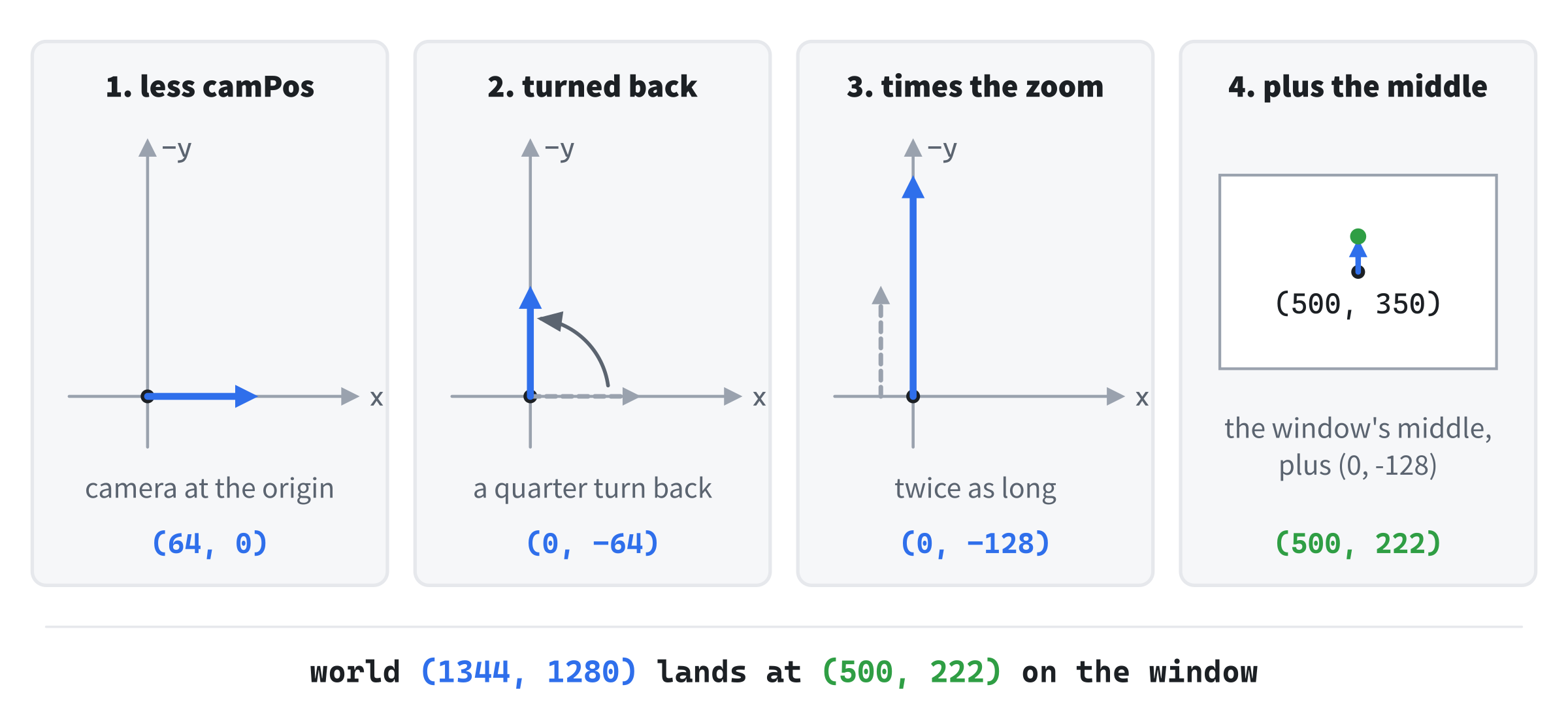
Taking away the camera's position leaves (64, 0). Turning back a quarter turn gives (0, -64), which is up on the window. The camera's turn has pointed its own right down the world's y axis, so the world's x axis now points up the window. The zoom doubles it to (0, -128), and the window's middle, (500, 350), moves it to (500, 222). The inverse of the view takes (500, 222) back to (1344, 1280): the same four steps, undone in reverse order.
Two Directions
The World and the Window
A camera needs both directions, and they're a matrix and its inverse. The view takes the world onto the window: every tile, the rover, and the picked tile's outline are drawn through it. Its inverse, screenToWorld, takes the window back into the world. That's the direction that's easy to forget until a game has to answer what the player just clicked. Camera uses it for clicks, and for the window's corners, to find which tiles it needs to draw.
Moves on the Window
Panning, dragging and following each start as a move on the window. A key pans the view so many pixels right, the mouse moves so many pixels, or the rover is so many pixels outside a box. Each must become a move of the camera, in the world. A move is a direction, not a point, so it's Chapter 26's applyDir on the inverse:
move in the world = screenToWorld.applyDir(move on the window)The inverse turns the move with the camera, and divides it by the zoom, but doesn't add the camera's position, as a direction shouldn't. At the round trip's camera, 100 pixels to the right on the window is (0, 50) in the world. That's down the world's y axis, since the camera's right points that way, and half as far, at a zoom of 2. One line serves all three kinds of move.
Panning, Zooming and Turning
Panning
The arrows pan the camera along the window's own directions, at 300 pixels a second, whatever the turn or the zoom. Right on the window is right as the camera sees it, which applyDir takes into the world. Dragging works the same way, but backward. A drag moves the camera against the mouse, so that the world slides with the mouse, and the point that was grabbed stays under it.
Zooming
Each notch of the mouse's wheel multiplies the zoom by 1.12, or divides it by 1.12 when the wheel turns the other way. A zoom is a ratio, so multiplying is the natural step: every notch changes the size of everything by the same share. A notch in and then a notch out gets back to where it started, and the zoom can never reach 0 or go below it. Adding a fixed amount instead would make the notches feel uneven, large at a small zoom and small at a large one. The zoom stays between 0.2 and 5.
Turning
Q and E turn the camera, at 1.2 radians a second. The world turns the other way, about the window's middle, since the view is the camera's inverse. The arrows then pan along the turned window's directions, as they should.
Following
A Dead Zone
A camera that sticks to its target makes the whole world shake with every small move the target makes. The usual cure is a dead zone: a box around the window's middle, inside which the target can move without the camera moving at all. When the target leaves the box, the camera follows. Camera's dead zone is 300 by 220 pixels. This function measures how far a point on the window is outside it:
// How far a point on the window is outside the dead zone, the box around
// the window's middle, each way: 0 while it's inside.
Vec2 beyondDeadZone(Vec2 s)
{
    Vec2 middle = { WINDOW_WIDTH / 2.0f, WINDOW_HEIGHT / 2.0f };
    Vec2 over = { 0.0f, 0.0f };
    if (s.x < middle.x - DEAD_X) over.x = s.x - (middle.x - DEAD_X);
    if (s.x > middle.x + DEAD_X) over.x = s.x - (middle.x + DEAD_X);
    if (s.y < middle.y - DEAD_Y) over.y = s.y - (middle.y - DEAD_Y);
    if (s.y > middle.y + DEAD_Y) over.y = s.y - (middle.y + DEAD_Y);
    return over;
}
Its answer is a move on the window: how far the camera would have to go to put the target back on the box's edge.
A Rate, Not a Share
The camera shouldn't jump the whole way at once, or a target that leaves the box would yank the view. A common way to soften it is to move a share of the way each frame, such as 0.18 of the distance. But that's the trap Chapter 8 warned about. A share of each frame depends on how many frames there are, so the camera chases twice as fast on a screen that draws twice as many. The cure, from Chapter 8, is a share that depends on the time that's passed:
share = 1 - e^(-rate × dt)With a rate of 12, the camera closes the same part of the gap each second, at any frame rate. The two decisions stay apart. The dead zone decides whether the camera moves, and the rate decides how fast.
The Leash
A camera that closes a share of the gap never quite catches a target that keeps moving. It trails behind by the target's speed over the rate, a leash. The rover's top speed is about 394 units a second, and 394 over 12 is about 33. So at a zoom of 1, the rover runs up to about 30 pixels outside the dead zone. Measured, it's 27 at 30 frames a second, 30 at 60, and 32 at 500: about the same at any frame rate. At a zoom of 2 it's twice that, since the rover moves twice as many pixels a second. A share of 0.18 a frame, by contrast, lets it run 60 pixels out at 30 frames a second, and under 4 at 500.
Picking
The Tile Under a Click
Picking turns a click into the thing under it. The click is a point on the window, so the inverse takes it into the world. There, the world's tiles are a grid, so the tile is the point divided by the tile's size, and rounded down. The view might be panned, zoomed and turned, and the click still finds the right tile, since the inverse undoes all three at once.
Floor, Not a Cast
Rounding down needs std::floor, not a cast to int. A cast cuts off the fraction, which rounds toward 0, and that's wrong for negative numbers. A click just left of the world, at x = -0.5, is in tile -1, outside the world. The floor of -0.5 over 64 is -1, but a cast of it gives 0, and picks the world's first tile. With the floor, the click lands in tile -1, and the check for the world's edges turns it away.
Culling
Only What the Window Shows
The world has 1600 tiles, and drawing them all every frame would waste most of the work, since the window shows a few hundred at most. So Camera takes the window's four corners into the world, and finds the upright box that holds them. Only the tiles that box touches are drawn: at a zoom of 1 with no turn, 192 of the 1600. It's the same instinct as Chapter 19's broad phase: skip the work for what can't matter.
A Box Is Generous
When the camera turns, the footprint is a turned rectangle, and the upright box around it is bigger than the footprint. The next image shows the worst case, at 45 degrees.

At 45 degrees, the box has about twice the footprint's area, so about half the tiles drawn are off the window: 400 drawn, at a zoom of 1. That's still a fraction of the world, and testing each tile against the turned rectangle exactly would cost more than drawing the few extra. A box that holds everything visible is all culling needs.
Building Camera
Camera is a view over a world of 40 by 40 tiles, each 64 units across, with a rover that wanders it. Drag or use the arrows to pan, roll the wheel to zoom, and hold Q and E to turn. F follows the rover, inside a dead zone, and a right-click picks a tile. Everything in the world is drawn through one view matrix, and every click is answered through its inverse.
Get the code. The complete project is in the
Camerafolder of the book's repository.
Camera starts from the skeleton, with its timing and its mouse. It reuses fillCircle from Chapter 3, fmt2 from Chapter 4 and setColor from Chapter 8. Its Vec2.h and Mat3.h are Matrix Sandbox's, since this chapter adds nothing to either. Here are its includes and its colors:
#include <cmath>
#include <string>
#include <vector>
#include "Vec2.h"
#include "Mat3.h"

constexpr int WINDOW_WIDTH  = 1000;
constexpr int WINDOW_HEIGHT = 700;

constexpr SDL_Color TEXT = { 235, 238, 242, 255 };
constexpr SDL_Color GREY = { 90, 100, 112, 255 };
constexpr SDL_Color AMBER = { 232, 89, 12, 255 };
constexpr SDL_Color ROVER = { 220, 80, 80, 255 };
constexpr SDL_Color EDGE = { 120, 130, 145, 255 };
The picked tile is outlined in amber, the rover is red, and the dead zone's edge is grey. Then come the world's size and the camera's speeds:
// The world: TILES by TILES tiles, each TILE units across.
constexpr int TILES = 40;
constexpr float TILE = 64.0f;
constexpr float WORLD = TILES * TILE;

// How fast the arrows pan, in pixels on the window a second; how fast Q
// and E turn, in radians a second; how much one notch of the wheel zooms,
// and the zoom's limits. Then the dead zone's half width and half height,
// in pixels, and how fast the camera closes on its goal when following.
constexpr float PAN_SPEED = 300.0f;
constexpr float TURN_SPEED = 1.2f;
constexpr float ZOOM_STEP = 1.12f;
constexpr float MIN_ZOOM = 0.2f;
constexpr float MAX_ZOOM = 5.0f;
constexpr float DEAD_X = 150.0f;
constexpr float DEAD_Y = 110.0f;
constexpr float FOLLOW_RATE = 12.0f;
The world is 2560 units across each way. The dead zone is given by its half width and half height, so that one pair of numbers sets both the test and the box that's drawn. Then come makeView, as the chapter showed it, and a helper that finds a tile's corners on the window:
// The four corners of tile (tx, ty), taken from the world onto the window
// by the view: top left, top right, bottom right and bottom left.
void tileCorners(const Mat3& view, int tx, int ty, Vec2 out[4])
{
    Vec2 w = { tx * TILE, ty * TILE };
    out[0] = view.apply(w);
    out[1] = view.apply(w + Vec2{ TILE, 0.0f });
    out[2] = view.apply(w + Vec2{ TILE, TILE });
    out[3] = view.apply(w + Vec2{ 0.0f, TILE });
}
A tile's top-left corner is its column and row times the tile's size, and the view takes each corner onto the window. The tiles and the picked tile's outline both use it. Then comes beyondDeadZone, as the chapter showed it.
The State
The state goes after the font is loaded. First, the camera, and its view:
// The camera: where it is in the world, its turn, and its zoom, which
// is how many pixels on the window each unit of the world covers.
const Vec2 HOME = { WORLD / 2.0f, WORLD / 2.0f };
Vec2 camPos = HOME;
float camRot = 0.0f;
float zoom = 1.0f;

// The view and its inverse, kept from one frame to the next, so that a
// click is read against the world the window shows.
Mat3 view = makeView(camPos, camRot, zoom);
Mat3 screenToWorld = inverse(view);
The camera starts in the middle of the world, unturned, at a zoom of 1. The view and its inverse are kept from one frame to the next, as Matrix Sandbox's matrices were, so that a click is read against the world the window shows. Then the rest:
// The drag, and where the mouse was last frame; the following; the tile
// picked, or -1; the rover and its clock; and the tiles' triangles.
bool dragging = false;
Vec2 prevMouse = { 0.0f, 0.0f };
bool follow = false;
int pickedX = -1;
int pickedY = -1;
Vec2 rover = HOME;
float roverTime = 0.0f;
std::vector<SDL_Vertex> verts;
std::vector<int> indices;
The rover has its own clock, which drives its path. The tiles' vertices and indices are kept in two vectors, filled afresh each frame, so that their memory is reused.
The Events
The keys follow and reset, the wheel zooms, and the mouse's buttons drag and pick:
// Events: quitting, and the keys and clicks that happen once.
SDL_Event event;
while (SDL_PollEvent(&event))
{
    if (event.type == SDL_EVENT_QUIT) running = false;
    else if (event.type == SDL_EVENT_KEY_DOWN)
    {
        if (event.key.key == SDLK_ESCAPE) running = false;
        else if (event.key.key == SDLK_F) follow = !follow;
        else if (event.key.key == SDLK_R)
        {
            camPos = HOME;
            camRot = 0.0f;
            zoom = 1.0f;
            follow = false;
        }
    }
    else if (event.type == SDL_EVENT_MOUSE_WHEEL)
    {
        // Each notch multiplies the zoom, up or down.
        zoom *= std::pow(ZOOM_STEP, event.wheel.y);
        zoom = SDL_clamp(zoom, MIN_ZOOM, MAX_ZOOM);
    }
    else if (event.type == SDL_EVENT_MOUSE_BUTTON_DOWN)
    {
        Vec2 press = { event.button.x, event.button.y };
        if (event.button.button == SDL_BUTTON_LEFT)
        {
            dragging = true;
            prevMouse = press;
        }
        else if (event.button.button == SDL_BUTTON_RIGHT)
        {
            // The tile under the click: the click, taken into the
            // world, divided by the tile's size and rounded down.
            Vec2 w = screenToWorld.apply(press);
            pickedX = (int)std::floor(w.x / TILE);
            pickedY = (int)std::floor(w.y / TILE);
            if (pickedX < 0 || pickedX >= TILES ||
                pickedY < 0 || pickedY >= TILES)
            {
                pickedX = -1;
                pickedY = -1;
            }
        }
    }
    else if (event.type == SDL_EVENT_MOUSE_BUTTON_UP) dragging = false;
}
In the preceding code, the wheel's y is how many notches it turned, and negative when it turned toward you. So std::pow(ZOOM_STEP, event.wheel.y) multiplies the zoom by 1.12 for each notch one way, and divides by it for each notch the other way. A left press starts a drag, and notes where the mouse is. A right press picks a tile at once, through the inverse from the last frame, which is the world the click landed on. The test after the floor clears the pick when the click is outside the world.
Each Frame's Work
Each frame, the camera turns, the rover moves, and the view is built for the camera as it stands:
// Q and E turn the camera. The rover wanders on a slow, looping path.
const bool* keys = SDL_GetKeyboardState(nullptr);
if (keys[SDL_SCANCODE_Q]) camRot = wrapAngle(camRot - TURN_SPEED * dt);
if (keys[SDL_SCANCODE_E]) camRot = wrapAngle(camRot + TURN_SPEED * dt);
roverTime += dt;
rover = HOME + Vec2{ std::cos(roverTime * 0.5f) * 700.0f,
                     std::sin(roverTime * 0.35f) * 520.0f };

// The view and its inverse, for the camera as it now stands.
view = makeView(camPos, camRot, zoom);
screenToWorld = inverse(view);
The rover runs along a Lissajous path, a loop made from two waves at different speeds, 700 units across and 520 down from the world's middle. Then come the moves made on the window:
// Panning, dragging and following each start as a move on the
// window, which applyDir takes into the world: turned with the
// camera, and divided by its zoom.
Vec2 pan = { 0.0f, 0.0f };
if (keys[SDL_SCANCODE_LEFT]) pan.x -= PAN_SPEED * dt;
if (keys[SDL_SCANCODE_RIGHT]) pan.x += PAN_SPEED * dt;
if (keys[SDL_SCANCODE_UP]) pan.y -= PAN_SPEED * dt;
if (keys[SDL_SCANCODE_DOWN]) pan.y += PAN_SPEED * dt;
camPos += screenToWorld.applyDir(pan);
Vec2 mouse = { mx, my };
if (dragging) camPos -= screenToWorld.applyDir(mouse - prevMouse);
prevMouse = mouse;
The arrows make a move on the window, of 300 pixels a second, and applyDir takes it into the world. A drag takes the mouse's move since the last frame into the world, and subtracts it, so that the world moves with the mouse. Then comes the follow:
// Following: the dead zone decides whether the camera moves, by how
// far the rover is outside it. The rate decides how fast: the share
// of the way to its goal that the camera moves this frame is the
// same each second, whatever the frame rate (Chapter 8).
if (follow)
{
    Vec2 over = beyondDeadZone(view.apply(rover));
    float share = 1.0f - std::exp(-FOLLOW_RATE * dt);
    camPos += screenToWorld.applyDir(over) * share;
}
While following, the camera moves that share of the way, taken into the world. Last, the view is built again, since the camera may have moved. Then the rover's distance outside the dead zone is measured where it's now drawn, for the readout:
// The view and its inverse again, after the camera moved. Then how
// far outside the dead zone the rover is drawn, for the readout.
view = makeView(camPos, camRot, zoom);
screenToWorld = inverse(view);
float outside = beyondDeadZone(view.apply(rover)).length();
The drawing that follows uses this view, so it shows the camera where it now is.
Drawing
After the skeleton clears the screen, Camera works out which tiles to draw:
// Only the tiles the window can show: its four corners, taken into
// the world, give a box of tiles that holds all of it.
const Vec2 WINDOW_CORNER[4] = {
    { 0.0f, 0.0f }, { (float)WINDOW_WIDTH, 0.0f },
    { (float)WINDOW_WIDTH, (float)WINDOW_HEIGHT },
    { 0.0f, (float)WINDOW_HEIGHT } };
Vec2 low = screenToWorld.apply(WINDOW_CORNER[0]);
Vec2 high = low;
for (int i = 1; i < 4; ++i)
{
    Vec2 w = screenToWorld.apply(WINDOW_CORNER[i]);
    low = { SDL_min(low.x, w.x), SDL_min(low.y, w.y) };
    high = { SDL_max(high.x, w.x), SDL_max(high.y, w.y) };
}
int tx0 = SDL_clamp((int)std::floor(low.x / TILE), 0, TILES - 1);
int tx1 = SDL_clamp((int)std::floor(high.x / TILE), 0, TILES - 1);
int ty0 = SDL_clamp((int)std::floor(low.y / TILE), 0, TILES - 1);
int ty1 = SDL_clamp((int)std::floor(high.y / TILE), 0, TILES - 1);
The inverse takes the window's four corners into the world, and the smallest and largest of their coordinates make the box. Dividing by the tile's size and rounding down gives the range of tiles, clamped to the world, so that a view past its edge never asks for a tile that isn't there. Then come the tiles:
// Those tiles, as a checkerboard of two colors, all filled by one call:
// four corners for each tile, and two triangles.
verts.clear();
indices.clear();
for (int ty = ty0; ty <= ty1; ++ty)
    for (int tx = tx0; tx <= tx1; ++tx)
    {
        SDL_FColor color = ((tx + ty) % 2 == 1)
            ? SDL_FColor{ 0.20f, 0.24f, 0.32f, 1.0f }
            : SDL_FColor{ 0.14f, 0.17f, 0.23f, 1.0f };
        Vec2 c[4];
        tileCorners(view, tx, ty, c);
        int first = (int)verts.size();
        for (int i = 0; i < 4; ++i)
            verts.push_back({ { c[i].x, c[i].y }, color, { 0, 0 } });
        indices.insert(indices.end(), { first, first + 1, first + 2,
                                        first, first + 2, first + 3 });
    }
SDL_RenderGeometry(renderer, nullptr, verts.data(), (int)verts.size(),
                   indices.data(), (int)indices.size());
In the preceding code, each tile's color alternates with the sum of its column and row, which makes the checkerboard. Each tile adds its four corners as vertices, and two triangles that share the corners' indices, offset by first, the number of vertices before it. One call to SDL_RenderGeometry, with no texture, fills every tile at once, as Matrix Sandbox filled its square. Then the picked tile and the rover:
// The picked tile, outlined, and the rover, sized with the zoom.
if (pickedX >= 0)
{
    Vec2 c[4];
    tileCorners(view, pickedX, pickedY, c);
    setColor(renderer, AMBER);
    for (int i = 0; i < 4; ++i)
        SDL_RenderLine(renderer, c[i].x, c[i].y,
                       c[(i + 1) % 4].x, c[(i + 1) % 4].y);
}
setColor(renderer, ROVER);
fillCircle(renderer, view.apply(rover), 14.0f * zoom);
The picked tile's outline joins its corners on the window. The rover's radius is 14 units in the world, so it's drawn at 14 times the zoom, and grows and shrinks with everything else in the world. Then the dead zone:
// The dead zone, while following. It belongs to the window, not to
// the world, so it's drawn without the view.
if (follow)
{
    setColor(renderer, EDGE);
    SDL_FRect box = { WINDOW_WIDTH / 2.0f - DEAD_X,
                      WINDOW_HEIGHT / 2.0f - DEAD_Y,
                      2.0f * DEAD_X, 2.0f * DEAD_Y };
    SDL_RenderRect(renderer, &box);
}
The dead zone belongs to the window, not to the world, so it's drawn without the view, in the window's own coordinates. Things in the world go through the view, and things on the window don't. The readout's strips are the same:
// Strips of the background's color for the readout and the controls,
// so that the tiles don't show through the text. Like the dead zone,
// they belong to the window, and are drawn without the view.
SDL_SetRenderDrawColor(renderer, 24, 26, 30, 255);
SDL_FRect top = { 0.0f, 0.0f, (float)WINDOW_WIDTH, 66.0f };
SDL_FRect bottom = { 0.0f, WINDOW_HEIGHT - 52.0f, (float)WINDOW_WIDTH,
                     52.0f };
SDL_RenderFillRect(renderer, &top);
SDL_RenderFillRect(renderer, &bottom);
Last come the readout and the controls:
// The readout: the camera, the tiles drawn and the tile picked, and
// how far outside the dead zone the rover is. Then the controls.
int drawn = (tx1 - tx0 + 1) * (ty1 - ty0 + 1);
drawText(renderer, font,
         "camera (" + std::to_string((int)std::lround(camPos.x)) +
         ", " + std::to_string((int)std::lround(camPos.y)) +
         ")   zoom " + fmt2(zoom) + "   turn " +
         std::to_string((int)std::lround(camRot * 180.0f / PI)) +
         " degrees", 12, 8, TEXT);
std::string picked = "none";
if (pickedX >= 0)
    picked = "(" + std::to_string(pickedX) + ", " +
             std::to_string(pickedY) + ")";
drawText(renderer, font,
         "tiles drawn " + std::to_string(drawn) + " of " +
         std::to_string(TILES * TILES) + "   picked tile " + picked,
         12, 26, TEXT);
std::string beyond = "follow off";
if (follow)
    beyond = "following: the rover is " +
             std::to_string((int)std::lround(outside)) +
             " pixels outside the dead zone";
drawText(renderer, font, beyond, 12, 44, TEXT);
drawText(renderer, font,
         "[Drag] or [Arrows] pan   [Wheel] zoom   [Q] [E] turn   "
         "[F] follow the rover", 12, WINDOW_HEIGHT - 46, GREY);
drawText(renderer, font,
         "[Right-click] pick a tile   [R] reset   [Esc] quit",
         12, WINDOW_HEIGHT - 26, GREY);
In the preceding code, the tiles drawn are the box's columns times its rows. The rover's distance outside the dead zone is outside, measured after the camera's move, where the rover is drawn. There's nothing to add to the skeleton's cleanup.
Trying It Out
Run the demo. The camera starts in the middle of the world, over a checkerboard of tiles. Then try it, step by step:
- Pan. Drag with the mouse, and the world slides with it, as if you'd grabbed it. Then pan with the arrows, and watch the camera's position change in the readout.
- Zoom. Roll the wheel. The tiles grow or shrink about the window's middle, and the count of tiles drawn falls as you zoom in and rises as you zoom out.
- Turn. Hold E. The world turns the other way about the window's middle. Then pan with the arrows, and right on the window is still right, along the turned window.
- Pick. Right-click a tile, after panning, zooming and turning. That tile is outlined, and its column and row appear in the readout. Right-click outside the world, and the pick is cleared.
- Follow. Press F. The dead zone's box appears, and the camera sits still while the rover moves inside it. When the rover leaves, the camera follows it, with the rover trailing outside the box by up to about 30 pixels, as the readout shows.
- Cull. Press R, and the readout shows 192 tiles drawn. Hold E until the turn is about 45 degrees, and the count doubles, to 400, though the window shows no more of the world than before.
The next image shows the camera turned 30 degrees, at a zoom of 1.5, with a picked tile.
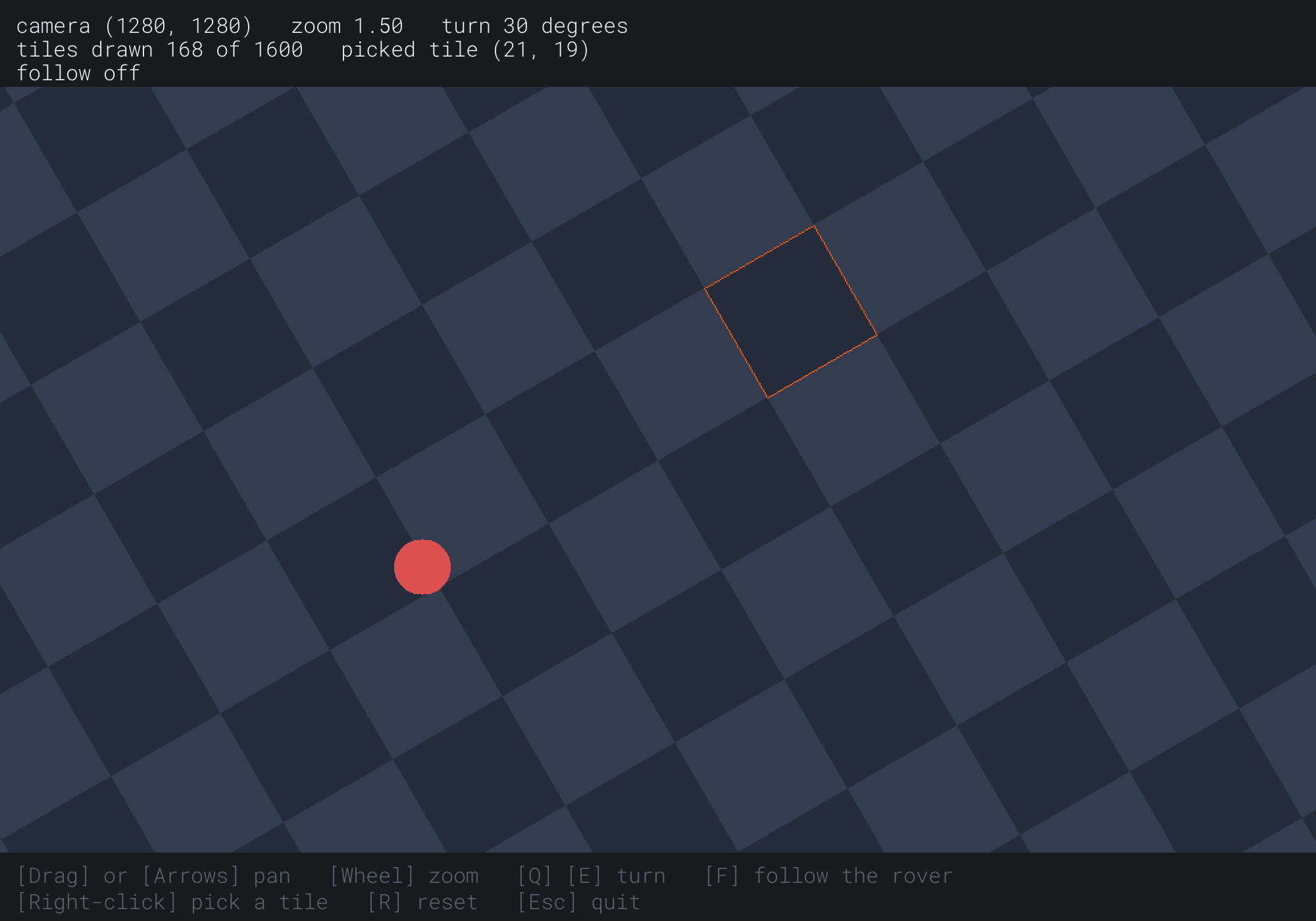
The world is turned 30 degrees the other way, and each tile is 96 pixels across, 64 units at a zoom of 1.5. The picked tile, (21, 19), is outlined, and 168 tiles are drawn. The next image shows the camera following the rover.
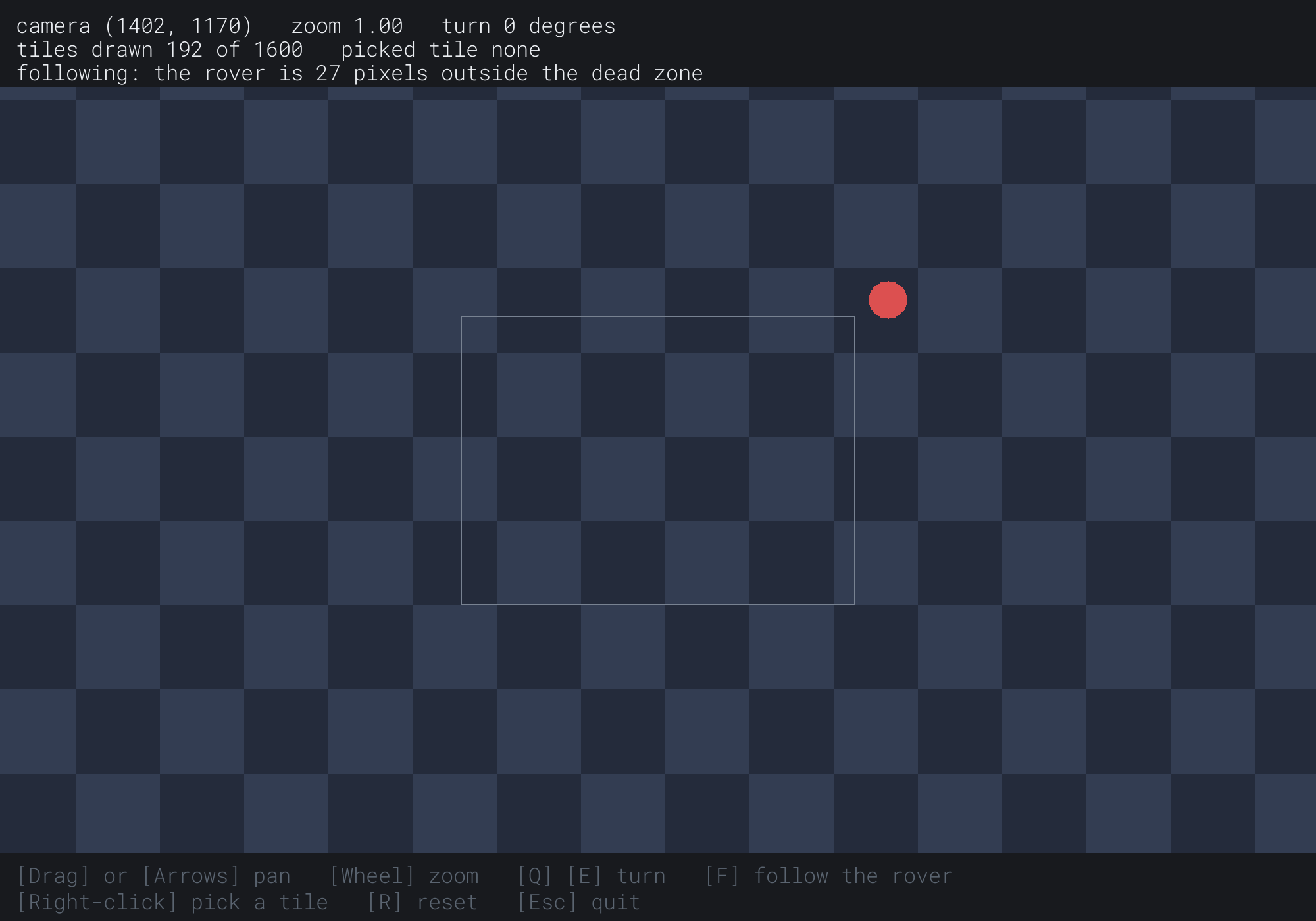
The rover has run up and to the right of the dead zone, and the camera is closing on it. The readout puts it 27 pixels outside the box, its usual leash at its speed there.
FAQ
Q) How do I draw a score or a menu that doesn't move with the camera?
A) Draw it without the view, in the window's own coordinates, as Camera draws its dead zone and its readout. Things that belong to the world go through the view, and things that belong to the window don't. Draw the world first, then the window's things on top.
Q) Why do the tiles shimmer when the camera pans slowly?
A) The view puts the tiles' edges between pixels, and each edge lands on a slightly different share of a pixel each frame. Round the view's move to whole pixels before drawing. Then the world moves a whole pixel at a time, and the edges stay crisp. That's especially worth doing for pixel art, at a whole-number zoom.
Q) Can a game have more than one camera?
A) Yes. Each camera has its own view, and each draws into its own part of the window. SDL's SDL_SetRenderViewport sets the part, so two players can each have half the screen. The middle in each view is then the middle of that half, not of the window.
Exercises
The first three exercises need only a pencil. The others change Camera.
- World to window (paper). A camera is at
(200, 100), unturned, with a zoom of 2, on Camera's window. Where do the world points(200, 100)and(300, 100)land on the window? - Window to world (paper). Turn that camera a quarter turn. Which world point lands at
(500, 250)on the window? - The leash (paper). At a zoom of 1, a target moves at 240 units a second. With a rate of 12, about how far behind does the camera trail it? What about at a zoom of 3?
- Zoom toward the mouse (code). Make the wheel zoom about the mouse rather than the window's middle. Take the mouse into the world before changing the zoom, and again after, and move the camera by the difference.
- Stay in the world (code). Keep the camera from showing past the world's edges. With no turn, clamp
camPosto the world, less half the footprint's size on each side. Where the footprint is bigger than the world, center the camera on that axis instead. With a turn, use the box around the window's corners. - A minimap (challenge). Draw the whole world small, in a corner of the window, with a second view of its own. On it, draw the main camera's footprint, as the window's four corners taken into the world, then onto the minimap.
For the code exercises, work on a copy of the demo's folder, so that the original stays as the chapter describes it.
AI Exercise (Optional)
A camera is what turns a small window into a large world. With an AI's help, you can turn Camera into a small top-down game. Open your AI chatbot of choice, and try a prompt like this:
"I have a C++ demo using SDL3, in a 1000 by 700 window with y pointing down. A struct Vec2 has the usual operators, and a struct Mat3 is a 3 by 3 matrix for 2D, with translation, rotation and scale, operator*, apply(p) for points and applyDir(v) for directions, and a free function inverse(M). A function makeView(camPos, camRot, zoom) returns the view, T(middle) * S(zoom) * R(-camRot) * T(-camPos), over a world of 40 by 40 tiles of 64 units. Please turn it into a small game. The player is a little boat, steered with W, A, S and D, which the camera follows with a dead zone and a frame-rate-independent rate. Some tiles are rocks, drawn darker, which the boat can't enter. Ten coins float on open tiles, and the boat collects one by touching it. Show the coins left in a corner, drawn without the view, and an arrow at the window's edge pointing toward the nearest coin when it's off the window. Explain how the arrow finds its direction, and why it's drawn without the view."
That prompt describes the camera you built, so the AI builds on it, rather than writing one of its own. The arrow is the chapter's two directions at work. The coin's place in the world goes through the view onto the window, and the arrow, which belongs to the window, is drawn there without it.
Then let the mouse's wheel zoom about the boat, and add a minimap. Then turn the camera with the boat's heading, and see which one you prefer to steer.
Summary
A camera is a thing in the world, placed by T(camPos) R(camRot) S(1 / zoom), and its footprint is the part of the world the window shows. The view, which draws the world, is its inverse, moved to the window's middle. Its parts are T(middle) S(zoom) R(-camRot) T(-camPos), and every sign comes from the inverse. The view takes the world onto the window, and its inverse takes the window back into the world, for clicks and for the window's corners. Panning, dragging and following each start as a move on the window, which applyDir on the inverse takes into the world. The zoom multiplies by a ratio for each notch of the wheel. A dead zone decides whether the camera follows, and a rate decides how fast, through 1 - e^(-rate × dt), so the follow keeps the same pace at any frame rate. A moving target trails by its speed over the rate. Picking divides a click's place in the world by the tile's size and rounds down with std::floor, which a cast would get wrong left of 0. Culling draws only the tiles in the box around the window's corners, a box that grows to twice the footprint at 45 degrees. That closes Part 6. Part 7 adds a third coordinate, with Vec3 and 4 by 4 matrices, and finds that a 3D camera is the same inverse, one dimension up.