
Everything so far has lived on a flat plane. That was the right place to learn, since a vector, a turn, a matrix and a camera are all easier to see in two dimensions. Every idea from those chapters was chosen because it survives the step into three, and Part 7 takes that step. It adds one more axis, z, and leaves the page for space.
Very little changes. A 3D vector is a 2D vector with one more number. Its length is still Pythagoras, with a third square under the root, and the dot product still measures how much two vectors agree. Two things are new, and this chapter is mostly about them. In 3D, the axes can be arranged two ways, mirror images of each other, so a book has to choose one. And the cross product, which was a number in 2D, becomes a vector at right angles to two others. That vector is a surface's normal, the direction it faces, and it's behind every lit surface in a 3D game.
In this chapter, we will:
- Add a third axis, z, and choose which way it points
- Build
Vec3, which isVec2with a third component - Meet the cross product as a vector, and use it to find a triangle's normal
- See how the order of a triangle's corners decides which side is its front
- Light a surface by Lambert's law, a dot product, and see why it's a cosine
- Describe a plane by a point and a normal, split a vector against it, and measure distances from it
- Build Normals, a triangle that tumbles in space, lit by a light you move
We'll start with the third axis.
The Third Axis
Depth
A point in 3D is (x, y, z). Its x and y are the axes we know, and z is depth: how near or far the point is. A position, a direction or a velocity in space is three numbers instead of two. That's the whole extension, one more coordinate for one more independent direction.
Two Ways to Arrange the Axes
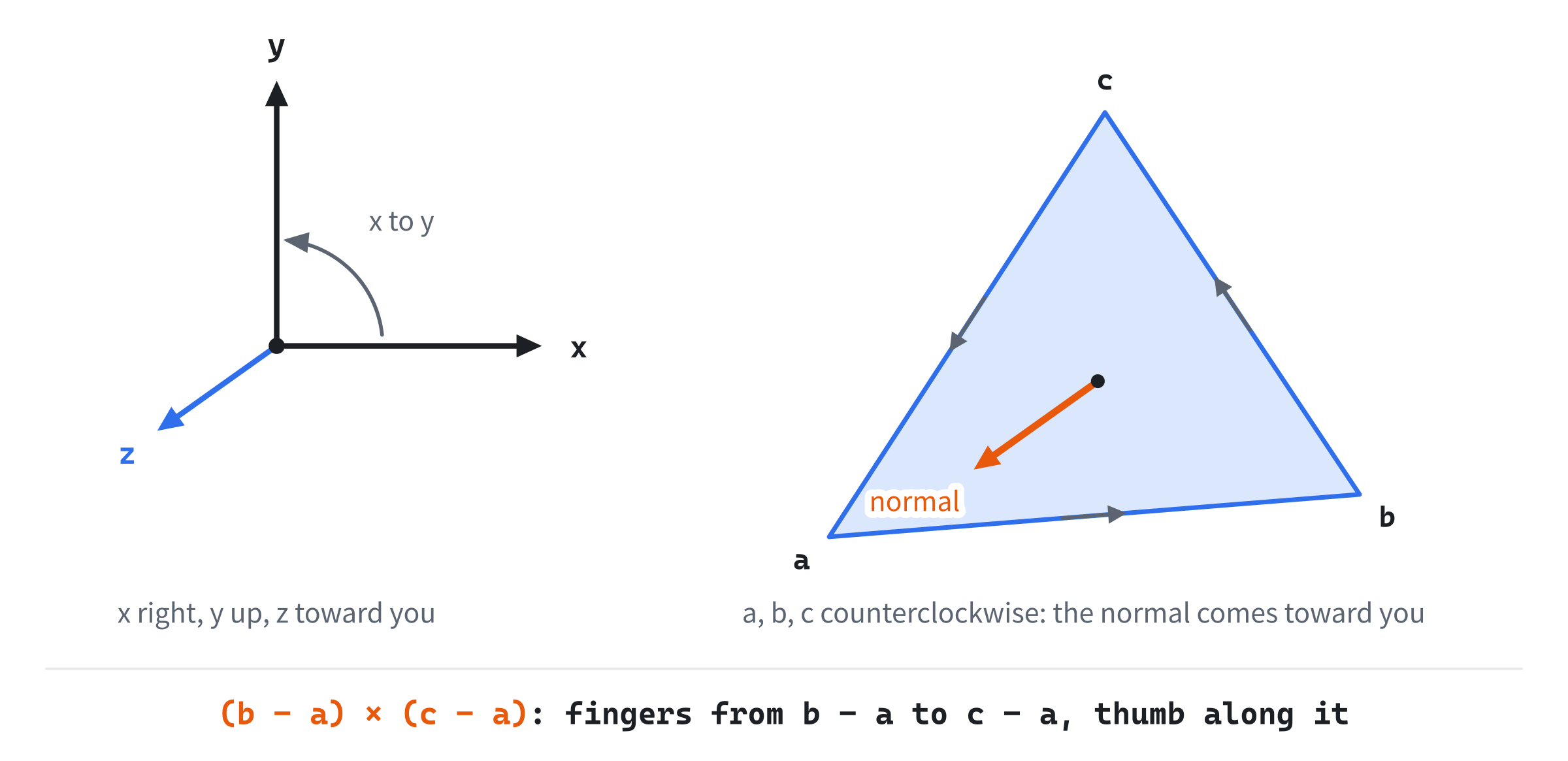
Three axes can be arranged in two different ways. With x pointing right and y pointing up, z can point toward you, out of the screen. Or it can point away from you, into the screen. No turn changes one arrangement into the other, since they're mirror images, like your two hands. This is handedness, and every 3D system has to choose. This book chooses a right-handed system: x right, y up, and z toward you.
The name comes from a test with your right hand. Point its fingers along x, and curl them toward y: the thumb points along z. The same test will give the direction of the cross product, later in this chapter. The next image shows the axes, and a triangle's normal.
Neither handedness is more correct. OpenGL's tradition is right-handed, and Direct3D's left-handed, and Chapter 30 meets a space inside the drawing process that's left-handed even in OpenGL. A program has to know which it's in, since the wrong guess turns its world inside out, and flips every normal.
Up Is Up Again
In the world, y now points up, as it does in math, and only the step that draws onto the window turns it over. That reverses Chapter 6's warning. On the screen, a positive turn looked clockwise, since y pointed down. In this chapter's world, a positive turn about the z axis looks counterclockwise from where you sit, at the end of the z axis, looking back at the origin.
Vec3
The Struct
This chapter's new header, Vec3.h, is Vec2.h with a third component:
#pragma once
#include <cmath>

// Vec3: a vector in three dimensions (Chapter 28). It's Vec2 with a third
// component, z, and the same arithmetic, length and dot product, each with
// a z term added. Its cross product is new: a vector at right angles to
// the two it came from. Its functions take a Vec3 by value, a copy of three
// floats, which costs no more than a reference.
struct Vec3
{
    float x = 0.0f;
    float y = 0.0f;
    float z = 0.0f;

    Vec3() = default;
    Vec3(float x, float y, float z) : x(x), y(y), z(z) {}
It starts as Vec2 did: three floats, each 0 unless set, and a constructor that takes all three.
Arithmetic
The arithmetic is Vec2's, with z added to each line:
// Arithmetic: Vec2's, with z added to each.
Vec3 operator+(Vec3 r) const { return { x + r.x, y + r.y, z + r.z }; }
Vec3 operator-(Vec3 r) const { return { x - r.x, y - r.y, z - r.z }; }
Vec3 operator*(float s) const { return { x * s, y * s, z * s }; }
Vec3 operator/(float s) const { return { x / s, y / s, z / s }; }
Vec3 operator-() const { return { -x, -y, -z }; }
Vec3& operator+=(Vec3 r) { x += r.x; y += r.y; z += r.z; return *this; }
Vec3& operator-=(Vec3 r) { x -= r.x; y -= r.y; z -= r.z; return *this; }
Vec3& operator*=(float s) { x *= s; y *= s; z *= s; return *this; }
bool operator==(Vec3 r) const { return x == r.x && y == r.y && z == r.z; }
Adding is still tip to tail, and subtracting still gives the vector from the second point to the first. One thing differs from Vec2. These functions take a Vec3 by value, as a copy, rather than as a const reference. Chapter 2 said either is fine for so small a type, and three floats, 12 bytes, are as cheap to copy as a reference is to pass.
Length
Length is Pythagoras, with a third square:
// Length: Pythagoras, with a third square under the root.
float lengthSquared() const { return x * x + y * y + z * z; }
float length() const { return std::sqrt(lengthSquared()); }

// The same direction with a length of 1, or zero for the zero vector.
Vec3 normalized() const
{
    float len = length();
    return (len > 0.0f) ? Vec3{ x / len, y / len, z / len } : Vec3{};
}
Pythagoras works twice to give it. Across the floor, from the origin to (x, 0, z), the distance is the square root of x² + z². Then straight up, by y, the floor's distance and y are the two short sides of another right triangle. So the length is the square root of x² + z² + y². The vector (2, 3, 6), for one, has a length of 7, since 4 + 9 + 36 is 49. Normalizing still divides by the length, and still leaves the zero vector alone.
The Cross Product
A Vector at Right Angles
In 2D, Chapter 4's cross product was a number, the signed area of two vectors. In 3D, the cross product of two vectors is a vector, at right angles to both. The dot product comes first, with a z term:
// The dot product: Chapter 4's, with a z term.
float dot(Vec3 r) const { return x * r.x + y * r.y + z * r.z; }
It means just what it did in Chapter 4. It's the lengths times the cosine of the angle between the two vectors, so it's the cosine itself for vectors of length 1. Then comes the cross product:
// The cross product: a vector at right angles to this one and r, as
// long as the area of the parallelogram the two span. Each component is
// a 2D cross product of the other two axes.
Vec3 cross(Vec3 r) const
{
    return { y * r.z - z * r.y,
             z * r.x - x * r.z,
             x * r.y - y * r.x };
}
Each component is a 2D cross product of the other two axes. The z component, x times r.y less y times r.x, is Chapter 4's 2D cross product exactly. So two vectors that lie flat, with a z of 0, have a cross product that points straight along the z axis, with Chapter 4's number as its z.
It's at right angles to both of its inputs, which a dot product proves. Dot a with a × b, and multiply it out:
a.x (a.y b.z - a.z b.y) + a.y (a.z b.x - a.x b.z) + a.z (a.x b.y - a.y b.x)Each product of three appears twice, once with each sign. The product a.x a.y b.z, for one, is added in the first term and taken away in the second. So everything cancels, and the dot product is 0, which means the two are at right angles. The same holds for b.
Which of the two directions at right angles it points comes from the handedness: fingers along the first vector, curled toward the second, and the thumb gives the cross product. So the order matters. Swap the two, and the cross product points the other way:
b × a = -(a × b)Its length is the area of the parallelogram the two vectors span. So two vectors at right angles have the longest cross product for their lengths, and two that are parallel have a cross product of 0: they span no area, and there's no single direction at right angles to both.
That's the last of the struct. After its closing brace come two free functions, as in Vec2.h:
};

// A number on the left, so that 2.0f * v works as well as v * 2.0f.
inline Vec3 operator*(float s, Vec3 v) { return v * s; }

// The straight-line distance between two points.
inline float distance(Vec3 a, Vec3 b) { return (b - a).length(); }
The first lets 2.0f * v work as well as v * 2.0f, by turning it around. The second is the length of the vector from one point to the other.
A Triangle's Normal
A triangle with the corners a, b and c has two edges that start at a: b - a and c - a. Their cross product is at right angles to both edges, and so to the whole triangle: it's the triangle's normal, the direction it faces. Normalized, it's a direction of length 1:
normal = ((b - a) × (c - a)), normalizedTake a triangle that tilts: a at (0, 0, 0), b at (2, 0, 0) and c at (0, 1, -1). Its edges are (2, 0, 0) and (0, 1, -1), and their cross product is (0, 2, 2). Its length is the square root of 8, about 2.83, which is the area of the parallelogram the edges span. The triangle is half of it, 1.41. Normalized, the normal is (0, 0.71, 0.71): half up, half toward you, as a triangle tilted back by an eighth of a turn should face.
A triangle whose corners lie on one line has no area, so its cross product is (0, 0, 0). That's a degenerate triangle. It has no normal, and normalized gives back the zero vector rather than dividing by zero. A mesh can hold such triangles by accident, and a lighting step that reads their zero normals draws them black.
Which Side Is the Front
The cross product's sign makes the order of a triangle's corners matter. Seen from one side, a, b and c run counterclockwise. Seen from the other side, the same three run clockwise. The normal, from the right-hand rule, comes out of the side where they run counterclockwise. That side is the triangle's front. The next image shows one triangle from both sides.

Listing the corners the other way round, as a, c and b, swaps the two edges in the cross product. That negates the normal. The triangle hasn't moved, but its front is now the other side. This order is the triangle's winding, and every 3D model stores its triangles with a winding that puts each front on the outside. Normals' triangle, at rest, runs counterclockwise as you see it. Its cross product is (0, 0, 5.49), straight toward you, and normalized it's (0, 0, 1).
Light
Lambert's Law
How bright a surface looks depends on how squarely it faces the light. It's brightest when the light falls straight onto it, darker as it turns away, and darkest when the light only grazes it. The reason is in the next image: the same beam, falling at a slant, spreads over more of the surface.
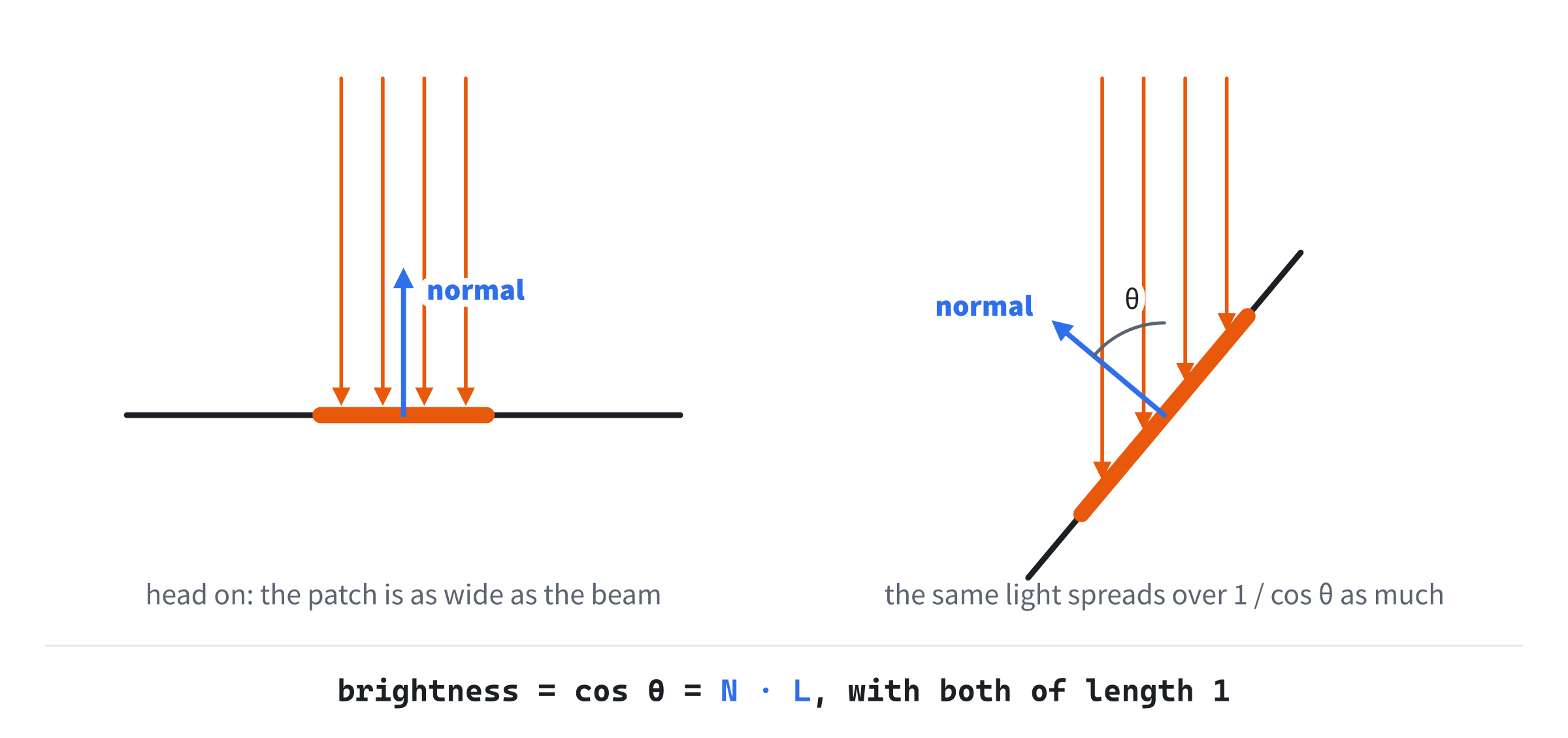
A beam that falls on a surface at an angle θ from its normal lights a patch longer by 1 over cos θ. So each part of the patch gets cos θ of the light it would get head on. That's Lambert's law: the brightness is the cosine of the angle between the normal and the direction to the light. For two vectors of length 1, that cosine is their dot product:
brightness = N · LThree details matter. Both vectors must have a length of 1, or the dot product isn't the cosine. L points from the surface toward the light, not the way the light travels. And past a quarter turn, the dot product goes negative, which means the light is behind the surface: no light at all, not less than none. So the brightness is clamped at 0, and a game usually adds a little ambient light, so that a face turned away isn't pure black.
Planes
A Point and a Normal
A plane is a flat surface that goes on forever: the surface a wall, a floor or a triangle lies in. A point on it, p0, and its normal n describe it. A point p lies in the plane when the vector from p0 to p is at right angles to the normal:
n · (p - p0) = 0So a triangle's plane is one of its corners and its normal. Multiplied out, the same test is n · p = d, where d is n · p0, a number. A floor at height 0 has the normal (0, 1, 0) and a d of 0, and its test says simply y = 0.
Along the Normal, and in the Plane
Chapter 4 split a vector into a part along a direction and a part across it. The same split works in 3D against a plane's normal. A vector's part along the normal is (v · n) n, and what's left is its part in the plane:
v = (v · n) n + (v - (v · n) n)Take v = (3, -4, 1) against the floor, with n = (0, 1, 0). Its part along the normal is (0, -4, 0), straight down, and its part in the floor is (3, 0, 1). That's Chapter 18's slide, in 3D: a ball that falls onto a floor keeps the part in the plane, and loses the part along the normal.
Distance From a Plane
The same dot product measures how far a point is from a plane. With n of length 1, the signed distance of p from the plane is n · (p - p0). It's positive in front of the plane, on the side the normal points to, negative behind it, and 0 in it. The point (3, 2, 5), for one, is 2 units above the floor. Taking that distance along the normal, back off the point, gives the point on the plane straight below it, its foot. The next image shows both uses.

The sign alone answers which side of the plane a point is on. That's the 3D form of Chapter 4's which-side test. Its 2D cross product was a dot product with a line's normal, too.
Building Normals
Normals puts a single triangle in space, and lets you tumble it with the mouse. It finds the triangle's normal with the cross product, draws it as an arrow, and shades the triangle by Lambert's law, with a light you can move around the scene. A probe, a point fixed in the world, shows its signed distance from the triangle's plane. W lists the corners the other way round, Space spins the triangle, and R puts everything back.
Get the code. The complete project is in the
Normalsfolder of the book's repository.
Normals starts from the skeleton, with its timing. It reads the mouse's movement in its events, but not its position, so it drops the skeleton's lines for that. It reuses drawArrow from Chapter 2, fmt2 from Chapter 4 and setColor from Chapter 8. Its Vec2.h is Camera's, for points on the window, and its Vec3.h is the one this chapter built. Here are its includes and its colors:
#include <cmath>
#include <string>
#include <utility>
#include "Vec2.h"
#include "Vec3.h"

constexpr int WINDOW_WIDTH  = 1000;
constexpr int WINDOW_HEIGHT = 700;

constexpr SDL_Color TEXT = { 235, 238, 242, 255 };
constexpr SDL_Color GREY = { 90, 100, 112, 255 };
constexpr SDL_Color BLUE = { 90, 150, 240, 255 };
constexpr SDL_Color AMBER = { 240, 200, 60, 255 };
constexpr SDL_Color EDGE = { 230, 235, 240, 255 };
constexpr SDL_Color PROBE = { 240, 120, 60, 255 };
The <utility> header is for std::swap, which swaps two corners. The normal is drawn in blue, the light in amber, and the probe in orange. Then come the constants:
// The view: pixels for each unit of the world, and where the world's
// origin is in the window. Then how fast things turn, in radians a second,
// or radians a pixel for a drag.
constexpr float SCALE = 130.0f;
constexpr float CX = 380.0f;
constexpr float CY = 360.0f;
constexpr float SPIN_YAW = 0.7f;
constexpr float SPIN_PITCH = 0.25f;
constexpr float LIGHT_SPEED = 1.5f;
constexpr float DRAG_TURN = 0.01f;
Each unit of the world is 130 pixels on the window, and the world's origin is at (380, 360). The triangle spins at 0.7 radians a second about y and 0.25 about x, and a drag turns it a hundredth of a radian for each pixel the mouse moves.
The next chapter brings 3D matrices, so for now the triangle is turned by hand, with two helpers that are Chapter 6's rotation applied to two of the three axes:
// A turn about the x axis: x stays, and y and z turn as Chapter 6's x and
// y did.
Vec3 rotX(Vec3 p, float a)
{
    float c = std::cos(a);
    float s = std::sin(a);
    return { p.x, p.y * c - p.z * s, p.y * s + p.z * c };
}

// A turn about the y axis: y stays, and z and x turn as Chapter 6's x and
// y did.
Vec3 rotY(Vec3 p, float a)
{
    float c = std::cos(a);
    float s = std::sin(a);
    return { p.x * c + p.z * s, p.y, -p.x * s + p.z * c };
}
A turn about the x axis leaves x alone and turns y and z, just as Chapter 6 turned x and y. A turn about y leaves y alone and turns z and x, in that order, which keeps the turn right-handed. Then the projection, which puts a point in the world onto the window:
// A point in the world, on the window: an orthographic projection, which
// drops z. The world's y points up and the window's down, so y is negated.
Vec2 project(Vec3 p)
{
    return { CX + p.x * SCALE, CY - p.y * SCALE };
}
That's an orthographic projection. It drops z, so parallel lines stay parallel, and nearness has no effect on size. Eyes and cameras don't see that way, and Chapter 30 gives distant things their proper shrink. But it's honest, and it keeps this chapter on the normal. The y is negated here and nowhere else, since the world's y points up and the window's down.
The State
The state goes after the font is loaded:
// The triangle, in its own space, in the plane z = 0; the probe, a
// point fixed in the world; and their starting turn and light.
const Vec3 TRI[3] = { { -1.2f, -1.0f, 0.0f }, { 1.3f, -0.8f, 0.0f },
                      { 0.1f, 1.3f, 0.0f } };
const Vec3 PROBE_AT = { 1.6f, 1.0f, 0.5f };
const float START_YAW = 0.5f;
const float START_PITCH = -0.4f;
const float START_LIGHT = 2.2f;

// How the triangle is turned, and where the light is around the scene;
// whether it spins, whether it's being dragged, and whether its corners
// are listed the other way round.
float yaw = START_YAW;
float pitch = START_PITCH;
float lightAngle = START_LIGHT;
bool spin = true;
bool dragging = false;
bool otherWay = false;
In the preceding code, the triangle lies in the plane z = 0 of its own space, with its corners counterclockwise as seen from the front. The probe is at (1.6, 1.0, 0.5), fixed in the world while the triangle turns. The yaw is the turn about y, and the pitch the turn about x. The light's angle sweeps it around the scene. When otherWay is set, the corners are listed the other way round.
The Events
The keys spin, wind and reset, and a drag tumbles the triangle:
// Events: quitting, and the keys and clicks that happen once. A drag
// turns the triangle by the mouse's movement.
SDL_Event event;
while (SDL_PollEvent(&event))
{
    if (event.type == SDL_EVENT_QUIT) running = false;
    else if (event.type == SDL_EVENT_KEY_DOWN)
    {
        if (event.key.key == SDLK_ESCAPE) running = false;
        else if (event.key.key == SDLK_SPACE) spin = !spin;
        else if (event.key.key == SDLK_W) otherWay = !otherWay;
        else if (event.key.key == SDLK_R)
        {
            yaw = START_YAW;
            pitch = START_PITCH;
            lightAngle = START_LIGHT;
            spin = true;
            otherWay = false;
        }
    }
    else if (event.type == SDL_EVENT_MOUSE_BUTTON_DOWN &&
             event.button.button == SDL_BUTTON_LEFT)
    {
        dragging = true;
        spin = false;
    }
    else if (event.type == SDL_EVENT_MOUSE_BUTTON_UP) dragging = false;
    else if (event.type == SDL_EVENT_MOUSE_MOTION && dragging)
    {
        yaw += event.motion.xrel * DRAG_TURN;
        pitch += event.motion.yrel * DRAG_TURN;
    }
}
In the preceding code, a left press starts a drag and stops the spin. While the button is held, each mouse movement's xrel and yrel, the pixels it moved, turn the triangle about y and x. W lists the corners the other way round. R puts the turn, the light and the winding back as they started.
Each Frame's Work
Each frame, the light moves while Left or Right is held, and the triangle spins while it's left alone:
// Left and Right move the light around the scene, and the triangle
// spins while it's left alone.
const bool* keys = SDL_GetKeyboardState(nullptr);
if (keys[SDL_SCANCODE_LEFT]) lightAngle -= LIGHT_SPEED * dt;
if (keys[SDL_SCANCODE_RIGHT]) lightAngle += LIGHT_SPEED * dt;
if (spin)
{
    yaw += SPIN_YAW * dt;
    pitch += SPIN_PITCH * dt;
}
Then the corners are turned into the world:
// The corners, turned into the world: about x, then about y. The
// other way round lists the same corners as a, c, b.
Vec3 a = rotY(rotX(TRI[0], pitch), yaw);
Vec3 b = rotY(rotX(TRI[1], pitch), yaw);
Vec3 c = rotY(rotX(TRI[2], pitch), yaw);
if (otherWay) std::swap(b, c);
Each corner is turned about x, then about y. Swapping b and c lists the same three corners as a, c and b, the other way round. Then comes the normal:
// The normal: the cross product of two edges, at right angles to
// both, and so to the triangle. Its length is twice the triangle's
// area, so it's normalized to a length of 1.
Vec3 cross = (b - a).cross(c - a);
Vec3 normal = cross.normalized();
Vec3 centroid = (a + b + c) / 3.0f;
The normal is worked out again each frame, since turning the triangle turns its normal with it. The cross product's length doesn't change as it turns, and the readout shows it, twice the triangle's area. The centroid, the average of the corners, is where the arrows start. Then comes the light:
// The direction toward the light, and Lambert's law: the brightness
// is the dot product of the normal and the light, clamped at 0, on
// top of a little ambient light.
Vec3 light = Vec3{ std::cos(lightAngle), 0.5f,
                   std::sin(lightAngle) }.normalized();
float ndotl = normal.dot(light);
float bright = SDL_max(ndotl, 0.0f) * 0.85f + 0.15f;
The light is a direction, toward a light that's far away, so it's the same for every point of the triangle. It goes around the scene in x and z, with a y of 0.5, so it shines from a little above. The brightness is the dot product, clamped at 0, times 0.85, plus 0.15 of ambient light. Last, the probe:
// The probe's signed distance from the triangle's plane, along the
// normal, and its foot: the point on the plane straight below it.
float above = normal.dot(PROBE_AT - a);
Vec3 foot = PROBE_AT - normal * above;
The probe's signed distance is the normal dotted with the vector from a corner, a point on the plane, to the probe. Its foot is the probe, moved back along the normal by that distance.
Drawing
After the skeleton clears the screen, the triangle is drawn:
// The triangle, filled in its shade of teal, and outlined.
Vec2 pa = project(a);
Vec2 pb = project(b);
Vec2 pc = project(c);
SDL_FColor fill = { 0.20f * bright, 0.80f * bright, 0.75f * bright,
                    1.0f };
SDL_Vertex verts[3] = { { { pa.x, pa.y }, fill, { 0, 0 } },
                        { { pb.x, pb.y }, fill, { 0, 0 } },
                        { { pc.x, pc.y }, fill, { 0, 0 } } };
SDL_RenderGeometry(renderer, nullptr, verts, 3, nullptr, 0);
setColor(renderer, EDGE);
SDL_RenderLine(renderer, pa.x, pa.y, pb.x, pb.y);
SDL_RenderLine(renderer, pb.x, pb.y, pc.x, pc.y);
SDL_RenderLine(renderer, pc.x, pc.y, pa.x, pa.y);
The fill is teal, darkened by the brightness. Then SDL_RenderGeometry, from Chapter 24, fills the triangle with no texture. With no indices, its last two arguments nullptr and 0, it takes the vertices three at a time. Then come the arrows:
// The normal and the light, as arrows from the centroid, each 1.1
// units long in the world, then projected.
Vec2 from = project(centroid);
Vec2 toNormal = project(centroid + normal * 1.1f);
Vec2 toLight = project(centroid + light * 1.1f);
drawArrow(renderer, from, toNormal, BLUE);
drawArrow(renderer, from, toLight, AMBER);
drawText(renderer, font, "normal", toNormal.x + 6, toNormal.y - 9,
         BLUE);
drawText(renderer, font, "light", toLight.x + 6, toLight.y - 9,
         AMBER);
Both arrows are worked out in the world, 1.1 units from the centroid, and then projected. An arrow that points toward you looks short, since the projection drops its z. Then the probe:
// The probe, a line to its foot on the plane, and the foot.
Vec2 p = project(PROBE_AT);
Vec2 f = project(foot);
setColor(renderer, PROBE);
SDL_RenderLine(renderer, p.x, p.y, f.x, f.y);
SDL_FRect dot = { p.x - 5, p.y - 5, 10, 10 };
SDL_RenderFillRect(renderer, &dot);
SDL_FRect ring = { f.x - 5, f.y - 5, 10, 10 };
SDL_RenderRect(renderer, &ring);
The probe is a filled square, and its foot an empty one, joined by a line along the normal. The foot can lie outside the triangle, since the plane goes on forever. Last, the readout:
// The readout: the normal, the cross product's length, the light's
// dot product, its angle and the brightness, the facing, and the
// probe. Then the controls.
float degrees = std::acos(SDL_clamp(ndotl, -1.0f, 1.0f)) * 180.0f / PI;
drawText(renderer, font,
         "normal (" + fmt2(normal.x) + ", " + fmt2(normal.y) + ", " +
         fmt2(normal.z) + ")", 640, 40, TEXT);
drawText(renderer, font,
         "cross length " + fmt2(cross.length()) + ", twice the area",
         640, 62, TEXT);
drawText(renderer, font,
         "N dot light " + fmt2(ndotl) + ", " +
         std::to_string((int)std::lround(degrees)) + " degrees apart",
         640, 84, TEXT);
drawText(renderer, font,
         "brightness " +
         std::to_string((int)std::lround(bright * 100.0f)) + "%",
         640, 106, TEXT);
drawText(renderer, font,
         std::string("facing ") +
         (normal.z > 0.0f ? "front: normal z above 0"
                          : "back: normal z below 0"), 640, 128, TEXT);
drawText(renderer, font,
         "probe " + fmt2(std::fabs(above)) +
         (above >= 0.0f ? " in front of the plane"
                        : " behind the plane"), 640, 150, PROBE);
drawText(renderer, font,
         "[Drag] tumble   [Left] [Right] move the light   "
         "[Space] spin", 12, WINDOW_HEIGHT - 46, GREY);
drawText(renderer, font,
         "[W] wind the other way   [R] reset   [Esc] quit",
         12, WINDOW_HEIGHT - 26, GREY);
In the preceding code, the angle between the normal and the light comes back from its cosine through std::acos. The dot product is clamped to between -1 and 1 first, since rounding can leave it a hair outside, where acos has no answer. The facing reads the normal's z, which is positive when the normal comes toward you. That works because this view looks straight down the z axis, from in front. Chapter 33's test for any view dots the normal with the direction to the eye. There's nothing to add to the skeleton's cleanup.
Trying It Out
Run the demo. The triangle tumbles slowly, lit from the side, with its normal and the light drawn from its middle. Then try it, step by step:
- Watch the normal. Let it spin. The blue arrow stays at right angles to the face as it turns, since it's the cross product of two edges, worked out each frame.
- Tumble it. Drag the triangle until it faces you squarely. The normal shrinks almost to a point, since it's coming straight toward you. Turn it edge on, and the arrow lies flat on the window.
- Light it. Hold Left or Right to move the light. As the two arrows line up, the dot product nears 1 and the face brightens. As they part, it darkens, down to 15% when the angle passes 90 degrees.
- Wind it the other way. Press W. The triangle doesn't move, but its normal points the other way. Now the dot product is negative, the face is dark, the facing reads back, and the probe is behind the plane. Press W again.
- Watch the probe. Tumble the triangle. The probe stays put, but its distance changes, and its foot slides around the plane, often far outside the triangle. When the plane turns past the probe, the distance's sign flips.
The next image shows the triangle lit, at the starting tumble, with the light moved to 1.68 radians around the scene.
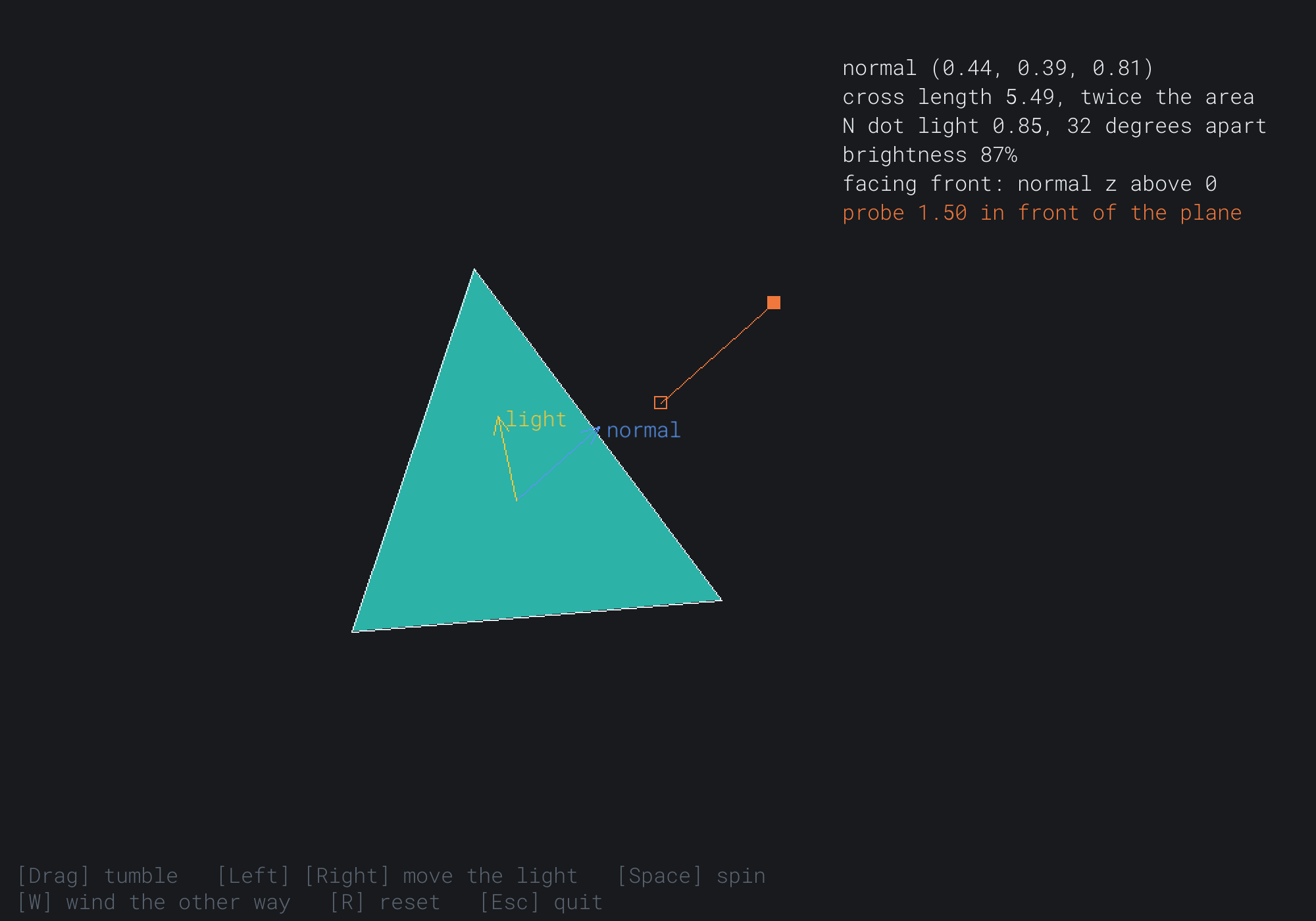
The normal is (0.44, 0.39, 0.81), mostly toward you, which is why its arrow looks short. The dot product with the light is 0.85, an angle of 32 degrees, so the brightness is 0.15 + 0.85 × 0.85, which is 87%. The next image shows the same moment after W.
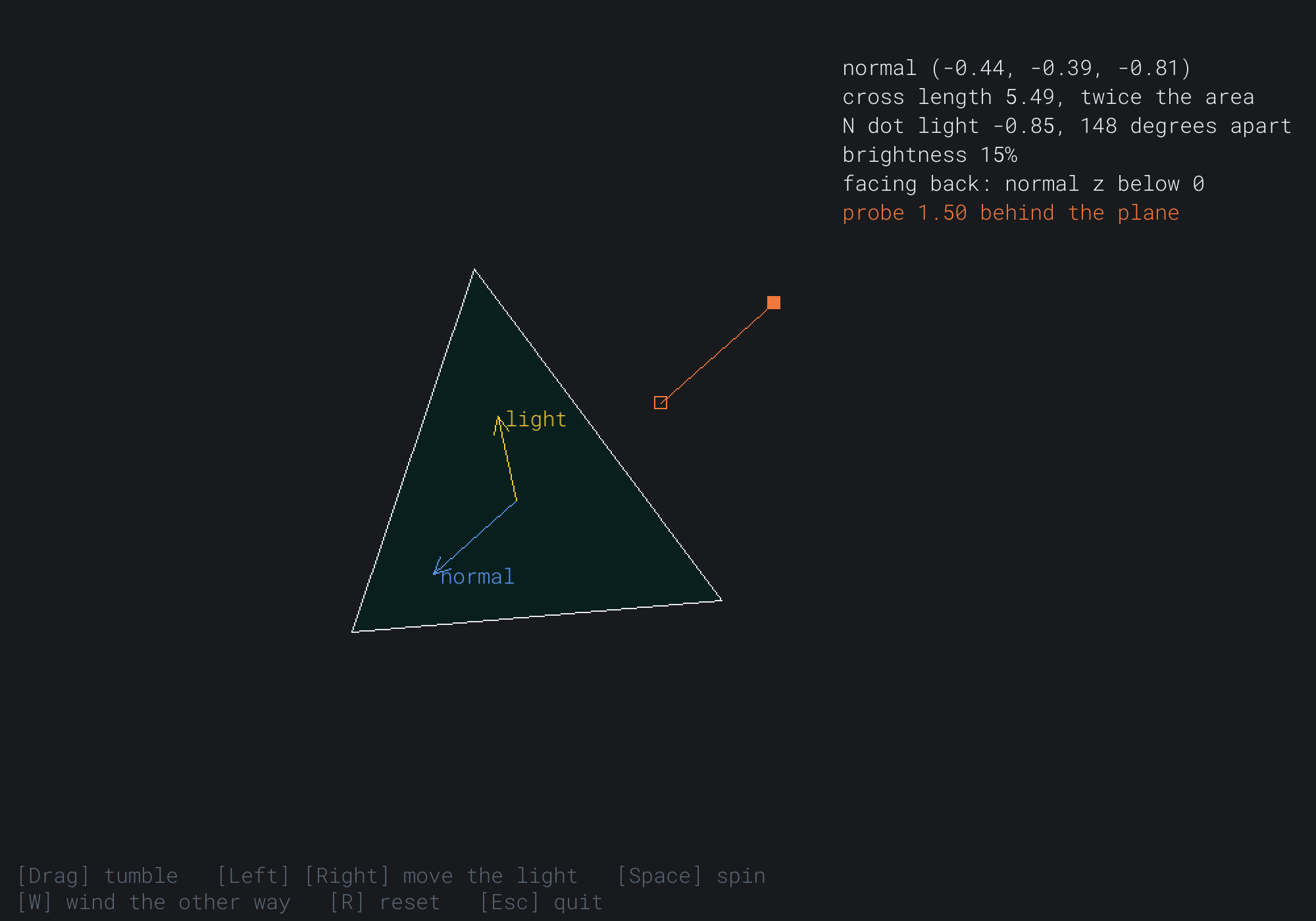
Every sign has flipped. The normal is (-0.44, -0.39, -0.81), the dot product is -0.85, and the brightness is the ambient 15%. The facing reads back, and the probe, still 1.50 from the plane, is now behind it.
FAQ
Q) Why is the side facing my light dark?
A) The light's direction probably points the way the light travels, as many models and engines store it, rather than toward the light. Lambert's law needs the direction toward the light, so negate it.
Q) My triangle runs counterclockwise in my model, but clockwise in pixels. Which is right?
A) Both are readings of the same triangle. The projection negates y, so on the window it still looks counterclockwise. But pixel y points down, so the cross product of its pixel corners has the opposite sign, and a formula written for y up calls it clockwise. Chapter 4's rule for the screen reads that same sign as counterclockwise. Decide the winding in the world, where the cross product is worked out, and say which convention a file uses when you load it.
Q) Do Unity, Unreal or Blender change any of this math?
A) No, but they choose differently. A left-handed engine, such as Unity, has z pointing away from you. Its cross product has the same formula, but on its axes it follows the left-hand rule, and its front faces are the ones whose corners run clockwise. Which axis points up, y or z, is a separate choice: Blender's z is up. The dot and cross products themselves don't change.
Exercises
The first three exercises need only a pencil. The others change Normals.
- Cross by hand (paper). Work out
(1, 0, 0) × (0, 1, 0)and(0, 1, 0) × (1, 0, 0). Which axis does each point along, and does the right-hand rule agree? - A normal by hand (paper). A triangle has its corners at
(0, 0, 0),(0, 2, 0)and(1, 0, 1). Find its normal, and its area. - A plane by hand (paper). A plane goes through
(0, 3, 0)with the normal(0, 1, 0). How far is(4, 5, -2)from it, and on which side? Where's its foot on the plane? - Lit from both sides (code). Paper lanterns glow on both sides. When the triangle faces away from you, negate its normal before lighting it, so that its back is lit too. What does W do now?
- Move the probe (code). Let six keys move the probe along the three axes, two for each. Then watch its distance, its side and its foot.
- A light that's near (challenge). Make the light a point, at a place in the world, rather than a direction. Then each corner has its own direction to the light, and its own brightness. Give each vertex its own color, and let
SDL_RenderGeometryblend them across the triangle. What happens as the light moves close to the face?
For the code exercises, work on a copy of the demo's folder, so that the original stays as the chapter describes it.
AI Exercise (Optional)
Normals and Lambert's law are enough for a small game about facing the light. With an AI's help, you can build one. Open your AI chatbot of choice, and try a prompt like this:
"I have a C++ demo using SDL3, in a 1000 by 700 window, with a struct Vec3 that has the usual operators, length, normalized(), dot and cross, in a right-handed world with y up. I draw by an orthographic projection that drops z. Please make a small game about a solar panel. The panel is a square made of two triangles, turned by the arrow keys about the x and y axes. The sun crosses the sky over 60 seconds: its direction rises from the east, passes high overhead, and sets in the west. Each frame, the panel collects energy equal to the dot product of its normal and the direction to the sun, clamped at 0, times the frame's seconds. Shade the panel by that dot product, show the energy collected, and draw a graph of the power over the day. At sunset, show the score, and the best possible score, from a panel that always faced the sun. Explain why a panel facing the sun at a slant collects less."
That prompt describes the vector you built, so the AI uses it rather than writing its own. The panel's normal is a cross product of two edges, and its power is Lambert's law, the dot product with the sun. The best score is the sun's whole path at a dot product of 1, which no panel turned by hand will quite reach.
Then add clouds that dim the sun, and a battery that empties at night. Then try a panel that turns itself to follow the sun, and see how close it comes to the best.
Summary
A point in 3D is (x, y, z), and this book's axes are right-handed: x right, y up and z toward you, where the right hand's fingers curl from x to y and its thumb gives z. In the world, y points up, and only the projection onto the window turns it over. A Vec3 is a Vec2 with a z: the same arithmetic, a length from Pythagoras with a third square, and a dot product with a third term, still the lengths times the cosine of the angle between. The cross product is new in 3D. It's a vector at right angles to both of its inputs, with its direction from the right-hand rule and its length the area of their parallelogram, and swapping its inputs negates it. A triangle's normal is the cross product of two edges, normalized. It comes out of the side where the corners run counterclockwise, which is the front, so the winding decides the front. A triangle with no area has a zero normal. Lambert's law makes a surface's brightness the dot product of its normal and the direction toward the light, since light at a slant spreads over more surface, and it's clamped at 0. A plane is a point and a normal, a vector splits into its part along the normal and its part in the plane, and n · (p - p0) is a point's signed distance from the plane. Chapter 29 stops turning points by hand, with 4 by 4 matrices that move, turn and scale in 3D.