
Chapter 15's tests each worked for one pair of shapes, circle and circle, or box and box, and each gave a bare yes or no. This chapter builds one test for any two convex shapes, with any number of sides, turned at any angle. And it tells you not only that they collide, but how deep, and which way to push them apart. It's the Separating Axis Theorem, shortened to SAT, and it's the workhorse behind polygon collision in a great many games and physics engines.
It sounds harder than it is. Its idea is one you can act out with a ruler: if you can lay a straight line between two shapes, with one wholly on each side, they don't touch. The theorem says that for convex shapes, you only have to try a few directions for that line, and it tells you which. We'll see why those directions are enough, which is the heart of the chapter. Then we'll find the shortest push out of an overlap, fixing a shortcut that gets it wrong one time in ten.
In this chapter, we will:
- Project a shape onto an axis, to get its shadow
- See why a gap between two shadows means the shapes are apart
- See why the shapes' edge normals are the only axes to test
- Find the shortest push out of an overlap, checking both ways out
- Fit circles into the same test
- Build SAT Visualizer, which shows the dividing line or the push, live
We'll start with shadows.
Shadows on an Axis
Picture two convex shapes on a table. If they don't touch, you can always lay a ruler between them, with all of one shape on one side and all of the other on the other side. And if they do touch, you can't. That's the whole idea.
The Big Idea
Look at the shapes along a direction at right angles to the ruler. That direction is called an axis. Shine a light across the axis, and each shape casts a shadow on it: a stretch of the axis, from where the shape begins to where it ends. If the ruler fits between the shapes, their shadows on that axis have a gap between them. So two convex shapes are apart exactly when there's some axis on which their shadows don't overlap.
Notice that the axis is at right angles to the ruler, not along it. The ruler is the dividing line between the shapes, and the axis is the direction that line separates them along. The next image shows two shapes, their shadows, and the line through the gap.

That turns a question about shapes into a question about numbers. Each shadow is two numbers, where it begins and where it ends, and two pairs of numbers either overlap or don't.
Projecting a Shape
A shape's shadow on an axis comes from Chapter 4's projection. For a unit axis, a point's dot product with it is how far along the axis the point is. So a polygon's shadow runs from the least of its corners' dot products to the most. In between, its edges fill in the rest, since a straight edge's shadow runs straight between its ends' shadows. A shadow is two numbers, which get a struct of their own:
// A shape's shadow on an axis: the least and the most of its points' dot
// products with the axis.
struct Interval
{
    float min;
    float max;
};
Finding one is a loop over the corners:
// A polygon's shadow on an axis, a unit vector: how far along the axis its
// corners reach, by the dot product, from the least to the most.
Interval projectPolygon(const Polygon& poly, Vec2 axis)
{
    float first = poly.points[0].dot(axis);
    Interval shadow = { first, first };
    for (const Vec2& p : poly.points)
    {
        float d = p.dot(axis);
        shadow.min = std::min(shadow.min, d);
        shadow.max = std::max(shadow.max, d);
    }
    return shadow;
}
It starts both ends at the first corner's place, and widens them as each corner comes along.
A Gap or an Overlap
Two shadows, a and b, have a gap when one ends before the other begins. The gap is the larger of b.min - a.max, when A's shadow comes first, and a.min - b.max, when B's does. Only one of them can be positive. If neither is, the shadows overlap, or just touch. By Chapter 15's rule, touching counts as overlapping, so the shapes are apart on this axis only when the gap is more than 0.
That's Chapter 15's box test again. A box's sides line up with x and y, so the box test was this test on just those two axes. The question is which axes to try for shapes that aren't boxes.
Which Axes to Test
There are endless directions an axis could take, and we can't try them all. For convex polygons, we don't need to. It's enough to try the directions at right angles to each shape's edges: the edge normals of both shapes. If any axis has a gap, one of those does.
Why Edge Normals Are Enough
Here's why. Hold A still, and slide B around it without turning it, so that B always just touches A. Watch B's center as it goes. While a corner of B slides along an edge of A, B's center moves parallel to that edge of A. While an edge of B slides past a corner of A, B's center moves parallel to that edge of B. So B's center traces a closed path whose straight sides each run parallel to an edge of A or an edge of B. And since both shapes are convex, so is the path.
Wherever B's center is inside that path, B overlaps A, and wherever it's outside, B is clear of A. Now recall Chapter 15's convex test: a point is outside a convex polygon exactly when it's on the outer side of one of its edges. So when the shapes are apart, B's center is past one of the path's edges. And along that edge's normal, B is clear of A by a gap: B's center is beyond where touching would put it. That edge's normal is the normal of an edge of A or of B, since the path's edges run parallel to theirs. So the axis with the gap is always one of the edge normals. The next image shows the path, and the edge that B's center is past.
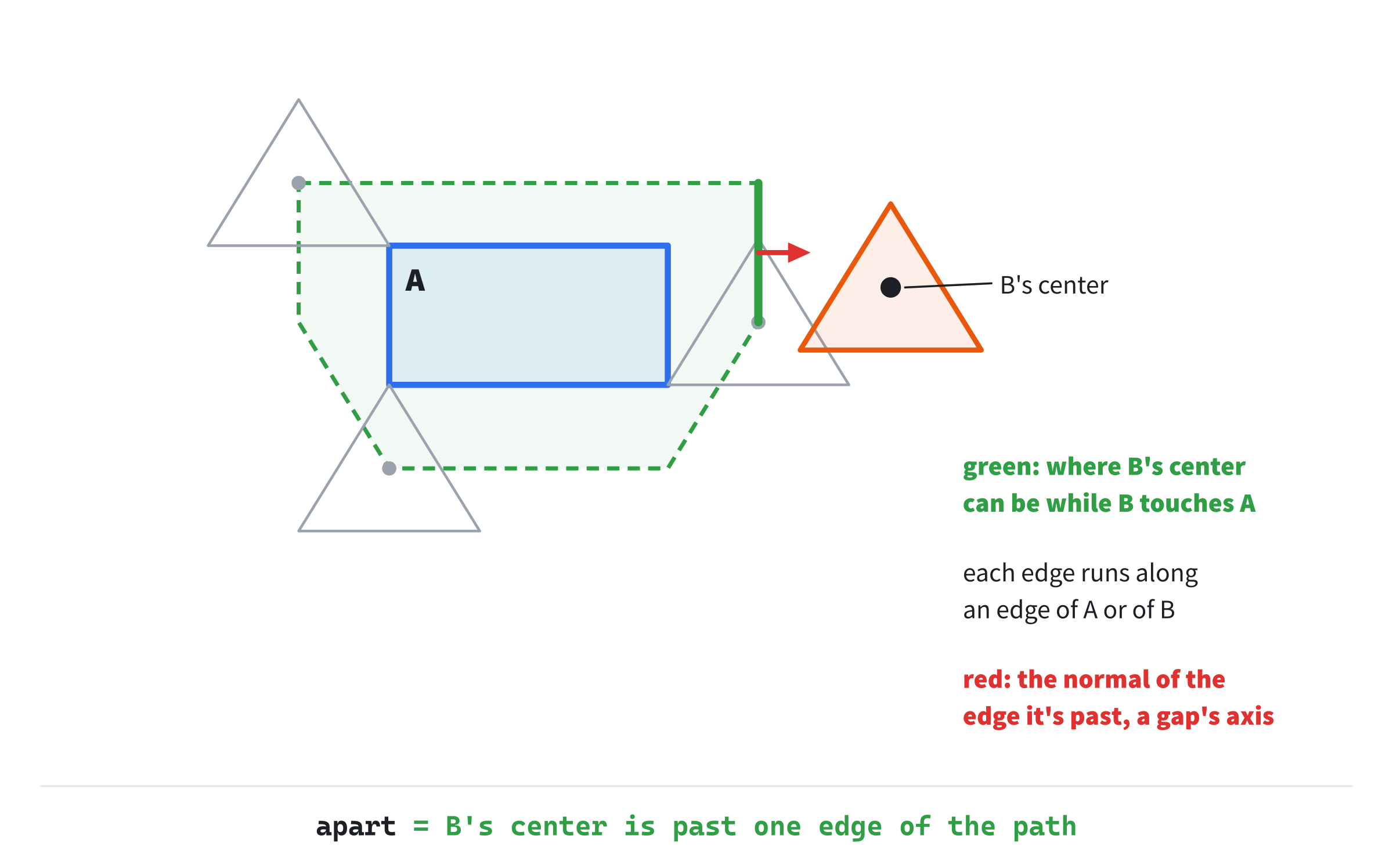
The same picture explains the push, later in this chapter. When the shapes overlap, B's center is inside the path, and the shortest way out is to the nearest edge of the path. That's Chapter 13's closest point on a convex shape's boundary, from inside it.
Counting the Axes
Each edge gives one axis, so a triangle gives three and a pentagon five. Edges that are parallel give the same axis, pointing one way or the other, so a box has only two different axes, though it has four edges. Two boxes that line up with x and y share those two, which is why Chapter 15's box test needed only x and y. Two boxes turned to different angles need 2 + 2. Two general polygons need one axis for each edge of each, and testing a repeat twice costs a little time, but gives the same answer.
The axes come from turning each edge a quarter turn, with Chapter 4's perp, and normalizing it:
// The unit normals of a polygon's edges: the axes it gives the test.
std::vector<Vec2> edgeNormals(const Polygon& poly)
{
    std::vector<Vec2> normals;
    size_t n = poly.points.size();
    for (size_t i = 0; i < n; ++i)
    {
        Vec2 edge = poly.points[(i + 1) % n] - poly.points[i];
        normals.push_back(edge.perp().normalized());
    }
    return normals;
}
The % n joins the last corner back to the first, as Chapter 11's polygon code did. The axes must be unit vectors for the shadows to come out in pixels, which the push will need.
Running the Test
Now the test itself: every axis, both shadows, and a gap or an overlap on each.
Two Ways Out
When the shadows overlap on an axis, there are two ways to move A along it so that they don't. A can move forward along the axis, until its shadow's start passes the end of B's: that's a move of b.max - a.min. Or A can move backward, until its shadow's end passes the start of B's: a move of a.max - b.min. The shorter of the two is the push that this axis offers.
There's a tempting shortcut: measure the overlap's length, the smaller end less the larger start, and call that the push. It's right when the shadows overlap only partly. But when one shadow lies inside the other, the overlap's length is the shorter shadow's length, and that's not far enough. Put A's shadow, from 2 to 4, inside B's, from 0 to 10. The overlap is 2 long. But a move of 2 either way leaves A's shadow still inside B's. The true pushes are 8 forward, which is 10 - 2, and 4 backward, which is 4 - 0. The next image shows the case.
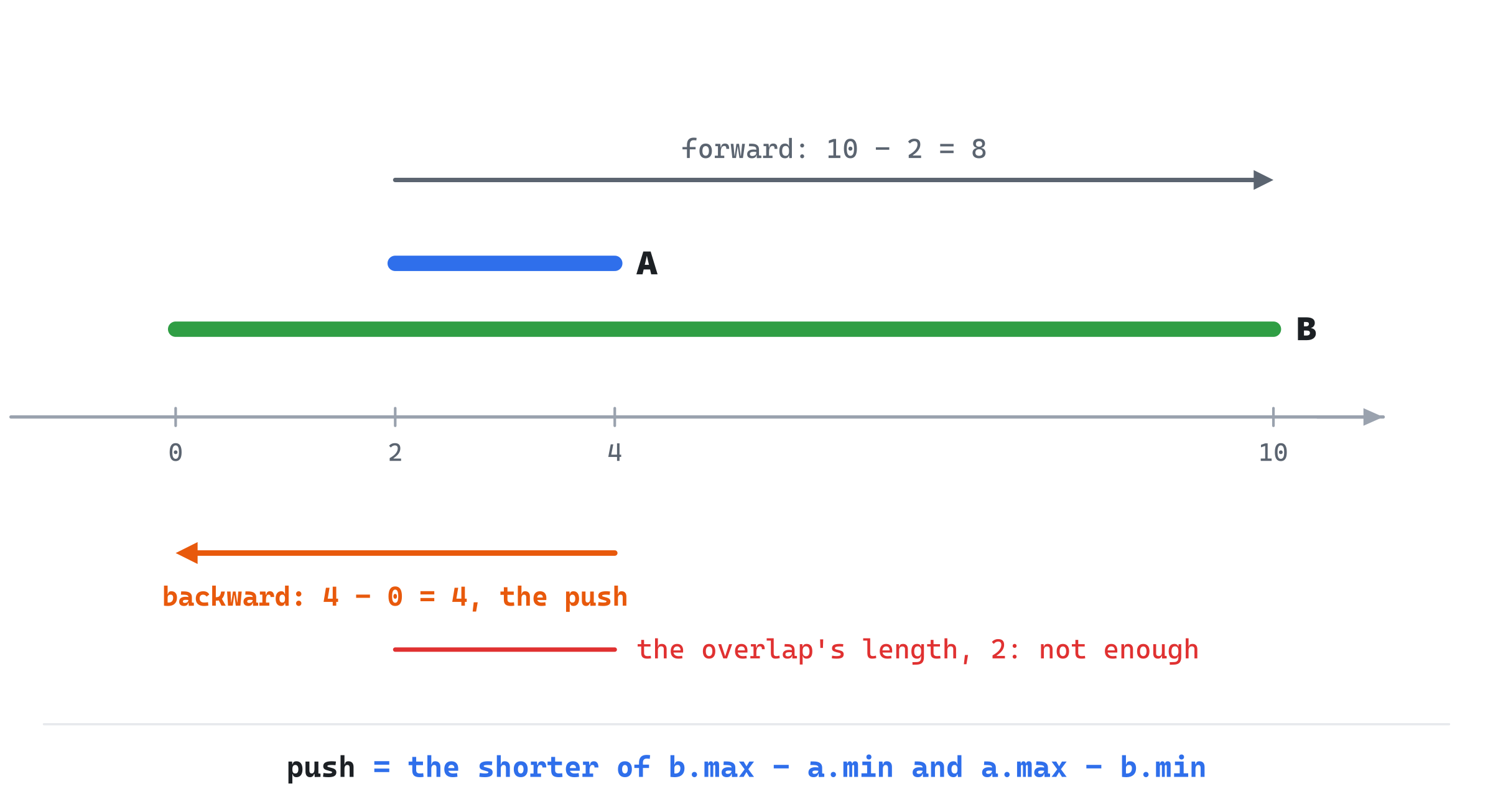
The shortcut isn't rare trouble. With SAT Visualizer's box and pentagon, placed at random so that they overlap, pushing by the shortcut leaves them still overlapping 10.8% of the time. With the box centered on the pentagon, the shortcut says to push it 90 pixels, and the true push is 121. Checking both ways out, as this chapter's test does, gets every one of those cases right.
One Axis at a Time
The test's result has three parts:
// What the separating axis test found. When the shapes overlap, axis is
// the way the box must move to get out, and depth is how far. When they're
// apart, axis is the one with the gap, and depth is the gap's width.
struct SatResult
{
    bool overlapping;
    Vec2 axis;
    float depth;
};
And one function tests one axis, with both shapes' shadows on it:
// One axis of the test, with A's and B's shadows on it. A gap means the
// shapes are apart: the result says so, and this returns true, which ends
// the test. Otherwise, A could get out along this axis by moving its
// shadow past either end of B's, and the shorter way is kept, if it's the
// shortest push so far. A zero axis, from an edge with no length, says
// nothing, so it's skipped.
bool gapOnAxis(Vec2 axis, Interval a, Interval b, SatResult& result)
{
    if (axis.lengthSquared() < 0.5f) return false;
    float gap = std::max(b.min - a.max, a.min - b.max);
    if (gap > 0.0f)
    {
        result = { false, axis, gap };
        return true;
    }
    float forward = b.max - a.min;
    float backward = a.max - b.min;
    float push = std::min(forward, backward);
    if (push < result.depth)
        result = { true, (forward < backward) ? axis : -axis, push };
    return false;
}
In the preceding code, a gap ends the whole test. The result is filled in, apart, with that axis and the gap's width, and the function returns true to say so. Otherwise, the two ways out are measured, and the shorter is kept, if it's shorter than the best push so far. The kept axis is flipped to -axis when backward is the way out, so the result's axis always points the way A must move.
The first line skips a zero axis. A polygon with a corner listed twice has an edge of no length, and its normal normalizes to the zero vector. Every shadow on a zero axis is the single number 0. That gives a gap of 0, which isn't a gap. It also gives a push of 0, which would win as the shortest push, and say that overlapping shapes only touch. So a zero axis is skipped, since it says nothing.
The Whole Test
The whole test runs one axis after another, for both polygons' edge normals:
// The separating axis test for two convex polygons: the normals of both
// polygons' edges are the axes. One gap ends it. An overlap on every one
// means the shapes collide, and the shortest push is kept.
SatResult satPolygons(const Polygon& A, const Polygon& B)
{
    std::vector<Vec2> axes = edgeNormals(A);
    for (Vec2 axis : edgeNormals(B)) axes.push_back(axis);

    SatResult result = { true, { 0.0f, 0.0f }, 1e9f };
    for (Vec2 axis : axes)
    {
        Interval a = projectPolygon(A, axis);
        Interval b = projectPolygon(B, axis);
        if (gapOnAxis(axis, a, b, result)) return result;
    }
    return result;
}
The result starts as an overlap with an enormous push, so that the first axis's push always replaces it. The first gap ends the test at once, since one gap proves the shapes are apart, and the other axes needn't be tried. If every axis overlaps, the shapes collide, and the result holds the shortest push of all.
A Worked Example
Take the square from (0, 0) to (2, 2) as A, and the triangle with corners (1, 1.5), (4, 1.5) and (1, 4.5) as B. The square's edges give the axes x and y, each twice. The triangle's give x and y again, and one diagonal, (-0.707, -0.707). So there are seven axes, but only three directions to think about:
x:        A 0 to 2,  B 1 to 4:      forward 4,    backward 1
y:        A 0 to 2,  B 1.5 to 4.5:  forward 4.5,  backward 0.5
diagonal: A -2.83 to 0,  B -3.89 to -1.77:  1.06 one way, 3.89 the other
No axis has a gap, so they overlap. The shorter pushes are 1, 0.5 and 1.06. The shortest of all is 0.5, backward along y, which moves the square up by half a unit. The next image shows the shapes, two of the axes, and the push.

Move the square up by 0.5, and its bottom edge meets the triangle's top edge exactly: touching, and no longer overlapping.
The Minimum Translation Vector
The push the test finds, its axis times its depth, is the minimum translation vector, or MTV. Moving A by it is the shortest move that frees A from B. That's exactly what a game needs to stop a box sinking into a wall, or to push two bodies apart.
Why is the least of the axes' pushes the shortest move of all? Go back to Figure 16.2. When the shapes overlap, B's center is inside the path it traces around A. Each edge of the path is one axis, and how far B's center is from that edge is the push along that axis. The shortest way out of a convex shape, from inside, is to its nearest edge: Chapter 13's closest point on the boundary. So the least push over all the axes is the shortest way out. Moving B out by it frees B. Moving A by the same distance the opposite way frees A, which is what the result's axis gives.
Notice that the result's axis already points the way A must move. A common alternative is to keep the axis as found, then flip it to point from B's center toward A's. That guess goes wrong when the centers sit awkwardly, as with a long box lying across a small shape. With SAT Visualizer's shapes placed at random, the flip by the centers points the wrong way in about 1% of overlaps. Measuring both ways out on each axis never needs the guess.
Circles
A circle has no edges, so it has no edge normals. It fits into the test with two small changes.
A Circle's Shadow
A circle's shadow on any axis is easy. Its center's place on the axis is the dot product, and the circle reaches its radius either side of that, whichever way the axis points:
// A circle's shadow on an axis: its center's place on the axis, less and
// plus the radius, since a circle reaches as far in every direction.
Interval projectCircle(const Circle& c, Vec2 axis)
{
    float center = c.center.dot(axis);
    return { center - c.radius, center + c.radius };
}
It's two numbers, like a polygon's shadow, so the rest of the test can't tell the difference.
The Circle's Own Axis
A polygon's edge normals aren't enough against a circle. Picture a box's corner pointing at a circle, just short of it. Every edge normal of the box shows the circle's shadow overlapping the corner's, since a circle reaches out round the corner on every one of those axes. The gap is real, but it's along the line from the corner to the circle's center, which isn't any edge's normal.
So the circle adds one axis: from the polygon's corner nearest the circle's center, toward the center. When the nearest part of the polygon is an edge, that edge's normal finds any gap. When it's a corner, this axis does:
// The corner of a polygon that's nearest to a point.
Vec2 nearestCorner(const Polygon& poly, Vec2 P)
{
    Vec2 best = poly.points[0];
    for (const Vec2& p : poly.points)
        if ((p - P).lengthSquared() < (best - P).lengthSquared()) best = p;
    return best;
}
Then the test is the same as for two polygons, with the box's edge normals and that one axis, and the circle's shadows from projectCircle:
// The separating axis test for a convex polygon and a circle. A circle has
// no edges, so it gives one axis of its own: from the polygon's corner
// nearest the circle's center, toward the center.
SatResult satPolygonCircle(const Polygon& A, const Circle& B)
{
    std::vector<Vec2> axes = edgeNormals(A);
    axes.push_back((B.center - nearestCorner(A, B.center)).normalized());

    SatResult result = { true, { 0.0f, 0.0f }, 1e9f };
    for (Vec2 axis : axes)
    {
        Interval a = projectPolygon(A, axis);
        Interval b = projectCircle(B, axis);
        if (gapOnAxis(axis, a, b, result)) return result;
    }
    return result;
}
If the circle's center were exactly on the nearest corner, that axis would be zero, and gapOnAxis would skip it. That's safe, since the center would then be on the polygon, and the shapes overlap whatever the axis.
Building SAT Visualizer
SAT Visualizer runs the test every frame, on a box you drag and turn, against a fixed pentagon or circle. When they're apart, it draws the dividing line through the middle of the gap it found. When they overlap, it draws the push as an arrow, and the box's outline where the push would leave it.
Get the code. The complete project is in the
SAT Visualizerfolder of the book's repository.
SAT Visualizer starts from the skeleton, with the timing, since the held keys turn the box by dt. It reuses drawGrid, drawArrow and drawDashed, with drawCircleOutline, drawPolygon and setColor. From Chapter 13, it takes insideConvex. Its Vec2.h is Overlap Playground's, since this chapter adds nothing to it. Here are its includes, its colors and its one constant:
#include <algorithm>
#include <cmath>
#include <string>
#include <vector>
#include "Vec2.h"

constexpr int WINDOW_WIDTH  = 1000;
constexpr int WINDOW_HEIGHT = 700;

constexpr SDL_Color TEXT = { 235, 238, 242, 255 };
constexpr SDL_Color GREY = { 90, 100, 112, 255 };
constexpr SDL_Color BLUE = { 47, 111, 235, 255 };
constexpr SDL_Color AMBER = { 232, 89, 12, 255 };
constexpr SDL_Color GREEN = { 47, 158, 68, 255 };
constexpr SDL_Color SILVER = { 150, 158, 170, 255 };

// How fast the held keys turn the box, in radians a second.
constexpr float TURN_SPEED = 1.8f;
Next come Chapter 11's circle and polygon:
// A circle: its center and its radius.
struct Circle
{
    Vec2 center;
    float radius;
};

// A polygon: its corners, in order around its edge, each once.
struct Polygon
{
    std::vector<Vec2> points;
};
Then the two structs and the functions this chapter built, and one more, which puts a shape in its place in the world:
// A shape placed in the world: its own corners, around its center, turned
// by its angle and moved to its position, as Chapter 6 placed shapes.
Polygon placed(const std::vector<Vec2>& corners, Vec2 pos, float angle)
{
    Polygon poly;
    for (const Vec2& c : corners) poly.points.push_back(pos + c.rotated(angle));
    return poly;
}
Each corner is turned about the shape's center by its angle, then moved to its position, as Chapter 6 placed its shapes. The box's corners are kept around its center, so turning it turns it about its middle.
The State
The state goes after the font is loaded:
// The box, A: its corners around its center, its position and its
// angle. The mouse drags it, and the keys turn it.
const std::vector<Vec2> boxCorners = { { -70, -45 }, { 70, -45 },
                                       { 70, 45 }, { -70, 45 } };
Vec2 posA = { 320, 300 };
float angleA = 0.3f;
bool grabbed = false;
Vec2 lastMouse = { 0.0f, 0.0f };

// The fixed shape, B: a regular pentagon around (620, 380), or a
// circle there with the same radius, which C switches between.
const Vec2 posB = { 620, 380 };
std::vector<Vec2> pentagonCorners;
for (int i = 0; i < 5; ++i)
{
    float angle = -PI / 2 + (float)i * 2.0f * PI / 5;
    pentagonCorners.push_back(Vec2::fromAngle(angle, 80.0f));
}
const Polygon pentagon = placed(pentagonCorners, posB, 0.0f);
const Circle circle = { posB, 80.0f };
bool useCircle = false;
In the preceding code, the box is 140 by 90, around its center. It starts at (320, 300), turned by 0.3 radians. The pentagon's corners are 80 pixels from its center, at five equal angles, starting straight up. The pentagon never moves, so it's placed once. The circle has the same center and radius, so switching between them keeps the scene the same size. And lastMouse lets the drag move the box as far as the mouse moved, as Overlap Playground's did.
The Events
C switches between the pentagon and the circle. A click grabs the box only when it's inside the box's outline, by Chapter 13's insideConvex:
// Events: quitting, and the keys and clicks that happen once.
SDL_Event event;
while (SDL_PollEvent(&event))
{
    if (event.type == SDL_EVENT_QUIT) running = false;
    else if (event.type == SDL_EVENT_KEY_DOWN)
    {
        if (event.key.key == SDLK_ESCAPE) running = false;
        else if (event.key.key == SDLK_C) useCircle = !useCircle;
    }
    else if (event.type == SDL_EVENT_MOUSE_BUTTON_DOWN &&
             event.button.button == SDL_BUTTON_LEFT)
    {
        Vec2 press = { event.button.x, event.button.y };
        Polygon box = placed(boxCorners, posA, angleA);
        if (insideConvex(press, box)) grabbed = true;
    }
    else if (event.type == SDL_EVENT_MOUSE_BUTTON_UP) grabbed = false;
}
Letting go of the button drops the box.
Each Frame's Work
After the mouse is read, the held keys turn the box, the drag moves it, and the test runs:
// The held keys turn the box, at TURN_SPEED radians a second.
const bool* keys = SDL_GetKeyboardState(nullptr);
if (keys[SDL_SCANCODE_LEFT]) angleA -= TURN_SPEED * dt;
if (keys[SDL_SCANCODE_RIGHT]) angleA += TURN_SPEED * dt;

// A held box moves as far as the mouse has since last frame.
Vec2 mouse = { mx, my };
if (grabbed) posA += mouse - lastMouse;
lastMouse = mouse;

// The test, against whichever shape B is.
Polygon box = placed(boxCorners, posA, angleA);
SatResult result = useCircle ? satPolygonCircle(box, circle)
                             : satPolygons(box, pentagon);
The arrow keys are held keys, read from SDL_GetKeyboardState, as Chapter 7's ship read its thrust. Turning by TURN_SPEED * dt turns the box at the same rate whatever the frame rate.
Drawing
After the grid come the shapes, and what the test found:
// The shapes: amber when they overlap, and blue and green when
// they don't.
SDL_Color colorA = result.overlapping ? AMBER : BLUE;
SDL_Color colorB = result.overlapping ? AMBER : GREEN;
drawPolygon(renderer, box.points, colorA);
if (useCircle)
    drawCircleOutline(renderer, circle.center, circle.radius, colorB);
else
    drawPolygon(renderer, pentagon.points, colorB);

if (result.overlapping)
{
    // The shortest push, as an arrow from the box's center, and
    // the box where the push would leave it, just touching.
    Vec2 tip = posA + result.axis * result.depth;
    drawArrow(renderer, posA, tip, AMBER);
    drawPolygon(renderer, placed(boxCorners, tip, angleA).points, GREY);
}
else
{
    // The line through the middle of the gap, at right angles to
    // the axis that found it: the ruler that proves they're apart.
    Interval a = projectPolygon(box, result.axis);
    Interval b = useCircle ? projectCircle(circle, result.axis)
                           : projectPolygon(pentagon, result.axis);
    float middle = (a.max < b.min) ? (a.max + b.min) / 2.0f
                                   : (b.max + a.min) / 2.0f;
    Vec2 halfway = lerp(posA, posB, 0.5f);
    Vec2 onLine =
        halfway + result.axis * (middle - halfway.dot(result.axis));
    Vec2 along = result.axis.perp();
    drawDashed(renderer, onLine - along * 700.0f,
               onLine + along * 700.0f, GREY);
}
In the preceding code, overlapping shapes are amber. The push is an arrow from the box's center, along the result's axis, as long as the depth. The grey outline is the box placed at the arrow's tip, so you can see that it would just touch.
When they're apart, the dividing line goes through the middle of the gap. Both shadows on the gap's axis give the gap's two ends, and middle is halfway between them, as a place on the axis. A point on the line is then found from the point halfway between the shapes' centers, moved along the axis until its own place is middle. The line runs along the axis's quarter turn, 700 pixels each way, which is enough to cross the window.
Last come the readout and the controls:
// The readout: what the test found, and the axes it had to try.
std::string depth = std::to_string(std::lround(result.depth));
drawText(renderer, font,
         result.overlapping
             ? "overlapping: push the box " + depth + " px, as shown"
             : "apart: a gap of " + depth + " px on one axis",
         12, 10, result.overlapping ? AMBER : TEXT);
drawText(renderer, font,
         useCircle ? "axes: the box's 4 edge normals, and 1 toward "
                     "the circle's center"
                   : "axes: the box's 4 edge normals, and the "
                     "pentagon's 5",
         12, 30, SILVER);
drawText(renderer, font,
         "[Drag] the box   [Left] [Right] turn it   "
         "[C] pentagon or circle   [Esc] quit",
         12, WINDOW_HEIGHT - 26, GREY);
The first line gives the push or the gap, in whole pixels, and the second lists the axes being tried.
Trying It Out
Run the demo, and drag the box toward the pentagon, stopping before they meet. The next image shows the box 36 pixels short of the pentagon.

The gap is on the axis of the box's right edge, so the dividing line runs parallel to that edge, through the middle of the gap.
Then try it, step by step:
- Close the gap. Drag the box slowly toward the pentagon. The dividing line stays in the gap. It jumps from one axis to another as the box moves, since the test stops at the first axis with a gap, in the order it tries them.
- Touch. Push the box into the pentagon. The line vanishes, and the arrow and the grey outline appear: the shortest push, and where it would leave the box.
- Go deep. Before turning the box, drag it right over the pentagon's center. The push grows to about 121 pixels, all the way out, where the shortcut would have said 90.
- Turn while overlapping. Hold Left or Right. The arrow jumps from one edge's normal to another as the shortest way out changes.
- Switch to the circle. Press C, and bring a corner of the box up to the circle. The second line of the readout counts the circle's own axis. When the corner pokes in, the push often runs along it, straight out from the circle's center.
The next image shows step 5, with the box's corner just inside the circle.
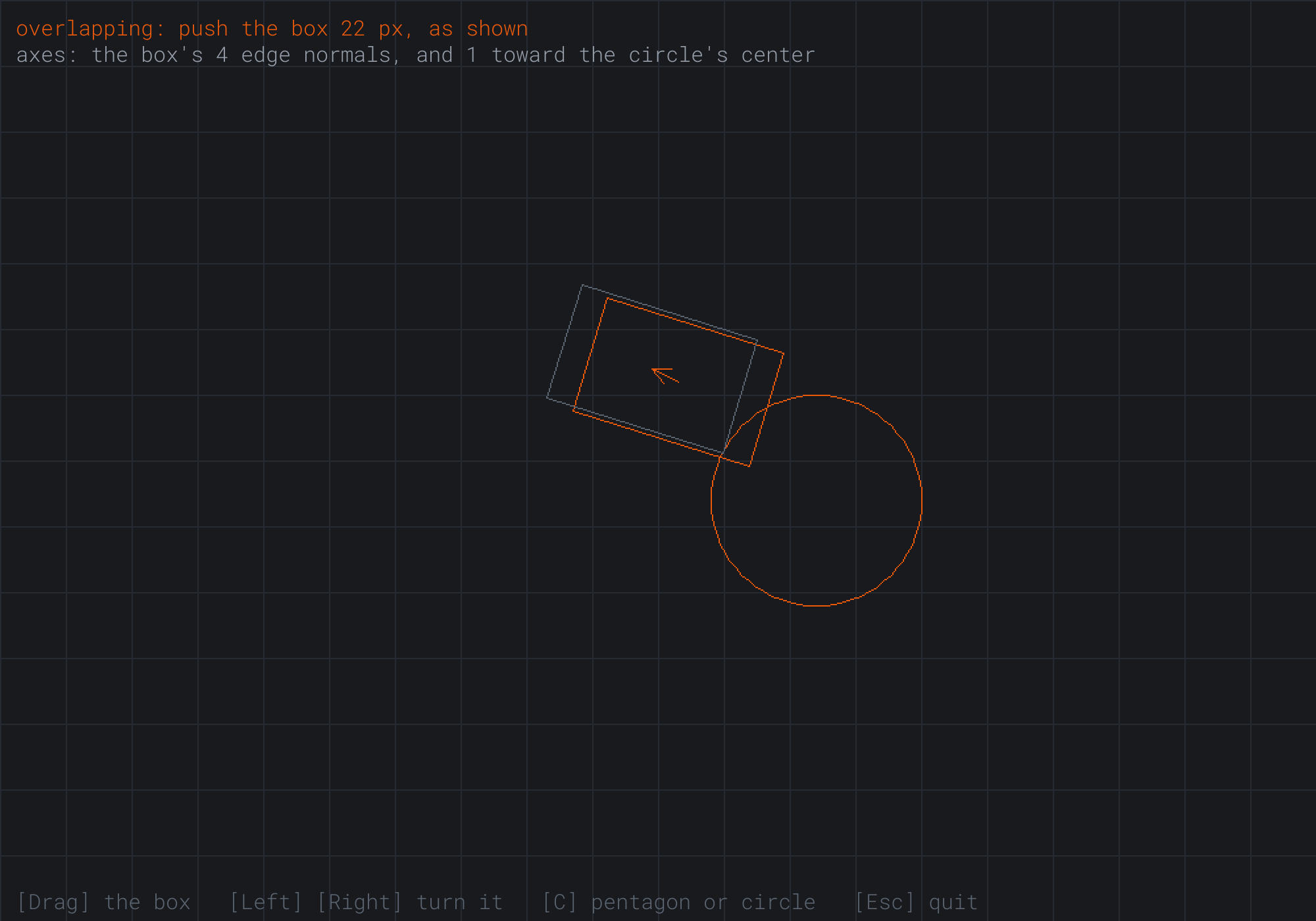
The push is 22 pixels, up and to the left, along the line from the circle's center through the box's corner. None of the box's edge normals points that way, so without the circle's own axis, the test couldn't have found it.
FAQ
Q) Why not just test the line between the two centers?
A) Because a gap there isn't guaranteed when the shapes are apart. Two long boxes side by side, one a little ahead of the other, can be apart while their shadows on the line between their centers overlap. It's still a good first guess, since a gap on it ends the test at once, and some engines try it before the edge normals. But the edge normals are what the test can't do without.
Q) Must the axes be unit vectors?
A) For a yes or no, no. Stretching an axis stretches both shadows alike, so a gap stays a gap. For the push, yes: a shadow on an axis of length 2 comes out twice as long, so the depth would be in the wrong units. Normalizing costs a square root for each edge. Some engines test with raw edge normals first, and only normalize the one they need.
Q) What does the test do with a shape that has a dent?
A) It treats the shape as if the dent were filled in, since a shape's shadow on any axis is the same as its filled-in shape's. So it never misses a real overlap, but it can report one in the dent, where there's none. Games split such shapes into convex pieces, and test each piece.
Q) Does it matter which way round the corners go?
A) No. Clockwise or counterclockwise, the edge normals give the same axes, pointing one way or the other, and the test measures both ways out on each. The corners must go round the outline in order, though, or the edges are wrong. And a corner listed twice gives an edge with no length, whose zero axis gapOnAxis skips.
Exercises
The first three exercises need only a pencil. The others change SAT Visualizer.
- Project a shape (paper). Project the square with corners
(0, 0),(1, 0),(1, 1)and(0, 1)onto the axes(1, 0),(0, 1)and(0.6, 0.8). What shadow does it cast on each? - Two ways out (paper). On one axis, A's shadow runs from 3 to 7, and B's from 5 to 9. Find the two pushes, and the shorter. Then do the same for A from 4 to 6, inside B from 0 to 7. What would the shortcut have said?
- The whole test (paper). Find the push between the square from
(0, 0)to(2, 2)and the square from(1, 1.5)to(3, 3.5). How many different axes are there to try? - Show the shadows (code). Draw the deciding axis beside the shapes, as a faint line parallel to it, with each shape's shadow on it: the gap's axis when they're apart, and the push's axis when they overlap.
- Push it out (code). When Space is pressed while the shapes overlap, move the box by the push. Then check the readout: the shapes should just touch.
For the code exercises, work on a copy of the demo's folder, so that the original stays as the chapter describes it.
AI Exercise (Optional)
The push is all a game needs to keep a moving shape out of walls. With an AI's help, you can turn SAT Visualizer into a little top-down tank that drives among tilted walls, sliding along them instead of stopping dead. Open your AI chatbot of choice, and try a prompt like this:
"I have a C++ demo using SDL3, with a struct Polygon holding a std::vector of Vec2 corners, a function placed(corners, pos, angle) that puts a shape's corners in the world, and a separating axis test, satPolygons(A, B), which returns a SatResult with a bool overlapping, a unit Vec2 axis, and a float depth. When the shapes overlap, A moved by axis times depth just touches B. Please make a small game. The player is a box tank, 60 by 40, that turns with Left and Right and drives forward and back with Up and Down. Add six walls, long thin boxes at different angles, and a few fixed pentagons. Each frame, after moving the tank, test it against every wall and pentagon, and move it out by each push. Explain why the tank slides along a wall, rather than stopping, when it drives into it at an angle."
That prompt describes your shapes and your test, so the AI builds the game from them, instead of from a physics library of its own. It spells out what the result means, which the AI needs to use it the right way round. And it asks about sliding, which comes for free: the push removes only the part of the move that went into the wall.
Then drive into the walls at different angles, and into the corners where two walls meet. If the tank jitters in a corner, it's being pushed out of one wall into the other. Test it against the walls a second time each frame, and see if that settles it.
Summary
The Separating Axis Theorem says that two convex shapes are apart exactly when there's an axis on which their shadows have a gap. A shape's shadow on a unit axis runs from the least of its corners' dot products with it to the most. The axes to test are the shapes' edge normals: slid around A, B's center traces a convex path whose edges run parallel to theirs, and B is apart from A exactly when its center is past one of those edges. One gap ends the test. If every axis overlaps, the shapes collide. Each axis then offers two ways out, forward by b.max - a.min or backward by a.max - b.min, and the shorter counts. The least of those over all the axes is the minimum translation vector: the shortest push that frees A. The overlap's length is a shortcut that's wrong when one shadow is inside another, one time in ten for the demo's shapes. A circle's shadow is its center's place on the axis, give or take the radius, and it adds one axis, from the polygon's nearest corner toward its center. SAT Visualizer showed both the dividing line and the push. Chapter 17 deals with shapes that move too fast for a test of where they are now to catch.