
Everything in Parts 1 to 3 has been leading here. We have vectors, distances, shapes and closest points. Now we get to the question every game asks thousands of times a second: are these two things touching? That's collision detection, and it opens, as it should, with the simplest forms of the question. Is a point inside a shape? And do two shapes overlap at all?
These tests are the bread and butter of collision. Is the mouse over the button? Has the bullet reached the enemy? Is the player standing on the platform? Each is a point test or an overlap test, and most of them cost a subtraction or two and a comparison. We'll build the whole set, settle the one rule they must all share, and be honest about what a yes-or-no answer leaves out, which sets up the chapters that follow.
In this chapter, we will:
- Settle on one rule for shapes that only touch
- Test whether a point is in a circle or a box
- Test whether a point is in a polygon, with or without dents
- Test circles against circles, boxes against boxes, and circles against boxes
- See what a yes-or-no answer leaves out
- Build Overlap Playground, where shapes light up as you drag them together
We'll start with the rule.
One Rule for Touching
Before any test, there's a decision to make. Two shapes that only touch, with nothing between them but no overlap either, either count as overlapping, or they don't.
With floats, exact touching is rare for shapes that move freely. But it's common for shapes on a grid: two tiles side by side share an edge exactly. A test that counts touching uses <= and >=. A test that doesn't uses < and >. Either rule works. What doesn't work is a mix of the two, since then two boxes resting against each other overlap by one test and not by another, and a bug hides in the difference.
This book counts touching as overlapping, everywhere. That's the rule Chapter 13 used, where a point on an edge counted as inside. Some games pick the other rule, especially tile games, where tiles that share an edge mustn't collide. If yours does, change every test, not just some.
Point in Circle, Point in Box
Start with a point and a shape. Is the point inside?
For a circle, it's the definition of a circle: a point is inside when it's no farther from the center than the radius. Comparing squared distances skips the square root, as Chapter 3 found, and takes Chapter 11's Circle:
// Whether a point is in a circle: no farther from the center than the
// radius, by squared distances. On the rim counts as in.
bool pointInCircle(Vec2 P, const Circle& c)
{
    return (P - c.center).lengthSquared() <= c.radius * c.radius;
}
For an axis-aligned box, it's four comparisons. The point's x must be in the box's range of x, and its y in its range of y:
// Whether a point is in a box: inside its range on both axes. On an edge
// counts as in.
bool pointInBox(Vec2 P, const AABB& box)
{
    return P.x >= box.min.x && P.x <= box.max.x &&
           P.y >= box.min.y && P.y <= box.max.y;
}
There's no distance and no square root, just four comparisons. That's one of the cheapest tests in game making, and much of the reason boxes are everywhere. Both tests are cheap enough to run on thousands of objects every frame.
Point in a Polygon
A polygon is harder, because it can be any shape. There are two classic tests, one for convex polygons only, and one for any polygon.
The Convex Test
Chapter 4 tested which side of a line a point is on, and Chapter 13 turned that into insideConvex: a point is inside a convex polygon when it's on the same side of every edge. It's simple, and for a convex polygon, it's exactly right.
For a polygon with a dent, it's wrong. Overlap Playground's pentagon is a box with a notch cut up into its bottom. A point in either of its arms is inside the pentagon, but it's on the outer side of the line through one of the notch's edges, so insideConvex calls it outside. Over the pentagon, the convex test gets 62% of the inside points wrong. The next image shows the only region where it's right.
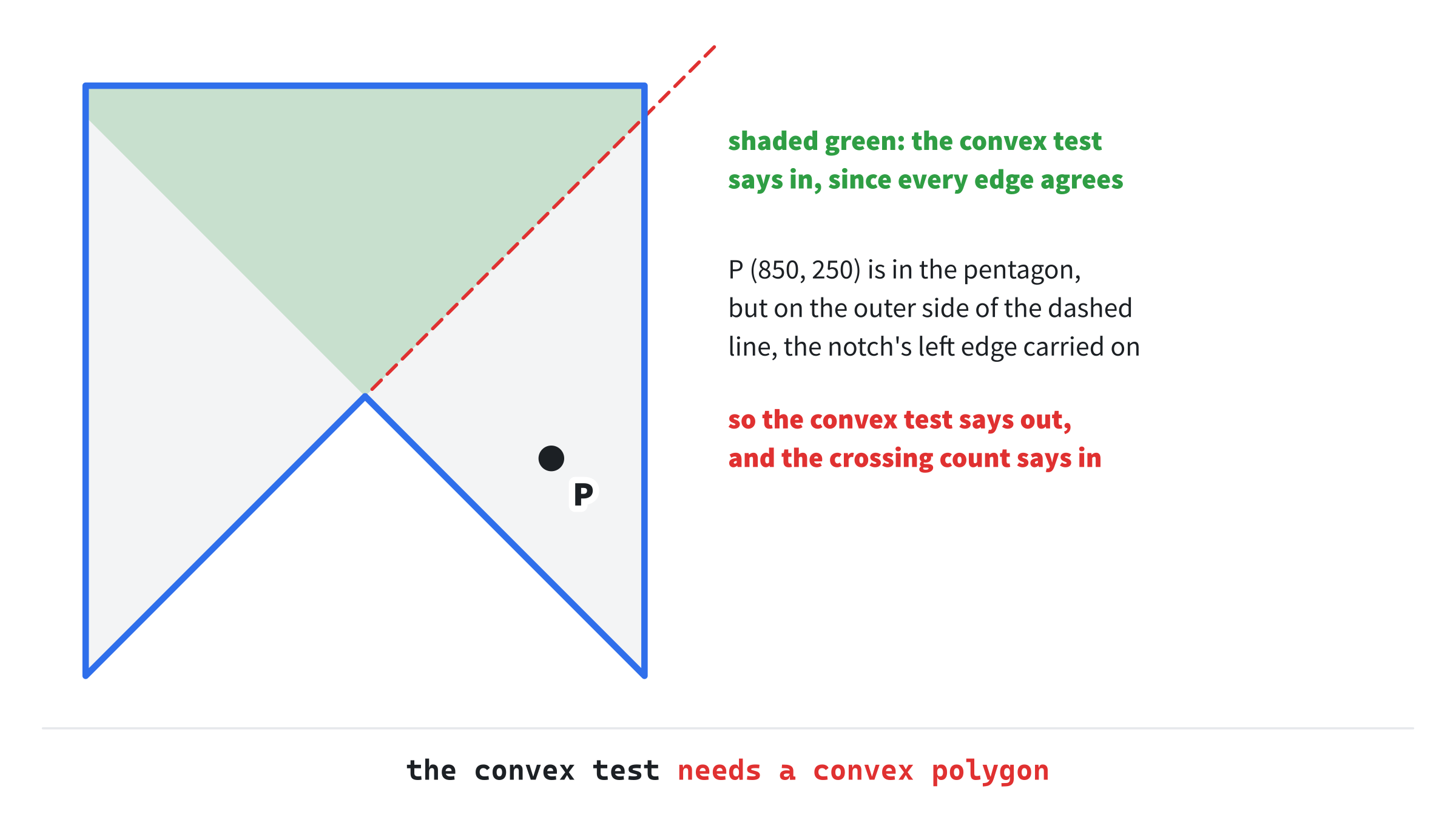
The point P, at (850, 250), is in the pentagon's right arm. The notch's left edge, carried on past the notch, cuts the pentagon in two, and P is on the far side of it. So the convex test needs a convex polygon, as Chapter 13 warned. For any polygon, there's a better way.
Counting Crossings
The general test is the crossing count. From the point, send a ray off in one direction, and count how many times it crosses the polygon's outline. Each crossing takes the ray from inside to outside, or from outside to inside. The ray ends up outside, far away. So if it crosses an odd number of times, it must have started inside, and if it crosses an even number of times, it started outside.
The ray goes right, along the point's own row, so finding where it meets an edge is easy:
// Whether a point is in any polygon, by counting the edges that a ray from
// it, going right, crosses: an odd count means in. An edge counts only
// when one of its ends is below the point and the other isn't, so a ray
// through a corner meets it once, and a flat edge never counts.
bool insidePolygon(Vec2 P, const Polygon& poly)
{
    bool inside = false;
    size_t n = poly.points.size();
    for (size_t i = 0; i < n; ++i)
    {
        Vec2 a = poly.points[i];
        Vec2 b = poly.points[(i + 1) % n];
        if ((a.y > P.y) != (b.y > P.y))
        {
            float x = lerp(a.x, b.x, inverseLerp(a.y, b.y, P.y));
            if (x > P.x) inside = !inside;
        }
    }
    return inside;
}
In the preceding code, the loop walks the edges, from each point to the next. An edge can only cross the ray if one of its ends is below the point and the other isn't: (a.y > P.y) != (b.y > P.y). Where it does, its x at the point's height comes from Chapter 8's two tools: inverseLerp finds how far down the edge the point's y is, and lerp takes x that far along. If that x is to the right of the point, the ray crosses the edge, and inside flips. After the loop, an odd number of flips leaves it true.
The test for which edges count is the clever part. Each end of an edge is either below the point, or not, so a point exactly at an end's height counts as not below. That's a half-open rule, and it handles the two cases that break simpler versions:
- A ray through a corner meets two edges at once. If the outline carries on past the corner, one edge has an end below and the other doesn't, so exactly one counts: the corner is counted once, as it should be. If the corner is a peak or a valley, which the ray only grazes, both edges count or neither does. Either way, the count stays even, and the ray carries on as if it hadn't touched.
- A flat edge has both ends at the same height, so either both are below the point or neither is. It never counts, which is right for one along the ray's row, since the ray slides along it rather than through it. It also means
inverseLerpnever meets a flat edge, so it never divides by zero.
The next image shows three rays: one from inside, one from outside, and one through a corner.

The one thing the crossing count doesn't promise is the answer for a point exactly on an edge. Depending on the edge, it can come out either way. The FAQ comes back to that.
The Winding Number
There's a third test, the winding number. It walks around the outline, adding up how far it turns around the point, in whole turns. Outside, the turns cancel, and the total is 0. Inside a simple polygon, the total is one turn. The two tests agree for any polygon whose outline doesn't cross itself, which is nearly all of them in games. They differ for a star drawn as five crossing lines, a pentagram. Its middle is crossed an even number of times, so the crossing count calls it outside, but it's wound around twice, so the winding number calls it inside. Drawing programs let you choose between the two rules for filling shapes like that. For collision, the crossing count is the usual choice: it's simpler, and just as right for outlines that don't cross themselves.
Overlap Tests
Now two shapes. Do they overlap?
Circle Against Circle
Two circles overlap when their centers are no farther apart than their two radii added together. Closer than that, and they bite into each other. Farther, and there's a gap. Squared distances work here too, against the square of the radii's sum:
// Whether two circles overlap: their centers no farther apart than their
// radii added together, by squared distances. Touching counts.
bool circlesOverlap(const Circle& a, const Circle& b)
{
    float reach = a.radius + b.radius;
    return (b.center - a.center).lengthSquared() <= reach * reach;
}
Here's a worked example. Take a circle at (0, 0) with a radius of 2, and one at (3, 4) with a radius of 3. The squared distance between the centers is 3² + 4², or 25. The radii add up to 5, whose square is 25. So 25 is no more than 25: the circles touch exactly, and by this book's rule, they overlap. Shrink the second radius to 2.9, and the square of the sum is 24.01, so they no longer do.
It's a few lines of arithmetic and one comparison, whatever the circles' sizes or places, with no awkward cases at all. That's why games use circles for collision wherever an object is roughly round.
Box Against Box
Two boxes overlap when they overlap on both axes at once: their ranges of x overlap, and their ranges of y overlap. A gap on either axis means they miss. Two ranges overlap when each one starts no later than the other ends:
// Whether two boxes overlap: their ranges overlap on both axes, so each
// box's min is no more than the other's max. Touching counts.
bool boxesOverlap(const AABB& a, const AABB& b)
{
    return a.min.x <= b.max.x && b.min.x <= a.max.x &&
           a.min.y <= b.max.y && b.min.y <= a.max.y;
}
For the box from (0, 0) to (4, 3) and the box from (3, 2) to (7, 6): on x, 0 is no more than 7, and 3 is no more than 4. On y, 0 is no more than 6, and 2 is no more than 3. All four hold, so they overlap, in the little square from (3, 2) to (4, 3).
Chapter 11 showed the other way to store a box, by its center and its half-size. In that form, the test reads like the circles' one. On each axis, the distance between the centers must be no more than the two half-sizes added together:
// A sketch: the same test for boxes stored by their centers and their
// half-sizes, two comparisons instead of four.
bool boxesOverlapByCenter(Vec2 centerA, Vec2 halfA, Vec2 centerB, Vec2 halfB)
{
    return std::fabs(centerA.x - centerB.x) <= halfA.x + halfB.x &&
           std::fabs(centerA.y - centerB.y) <= halfA.y + halfB.y;
}
For the same two boxes, the centers are (2, 1.5) and (5, 4), and the half-sizes (2, 1.5) and (2, 2). On x, the centers are 3 apart, which is no more than 2 + 2. On y, they're 2.5 apart, no more than 1.5 + 2. The same answer, in two comparisons. Overlap Playground stores its boxes by their corners, as Chapters 11 and 13 did, so it uses the first form. The next image shows both tests' worked examples.

Notice the shape of the box test: a gap on any one axis means no overlap. That's the seed of the next chapter's Separating Axis Theorem, of which the box test is the simplest case.
Circle Against Box
Here Chapter 13's closest point pays off. A circle overlaps a box exactly when the closest point in the box to the circle's center is within the circle's radius, and closestInBox finds that point:
// Whether a circle and a box overlap: the closest point in the box to the
// circle's center is within the radius. Chapter 13's closestInBox finds
// that point beside a side, past a corner, or with the center inside.
bool circleBoxOverlap(const Circle& c, const AABB& box)
{
    Vec2 closest = closestInBox(c.center, box);
    return (closest - c.center).lengthSquared() <= c.radius * c.radius;
}
It handles every case at once. Beside a side of the box, the closest point is straight across, on that side. Past a corner, it's the corner. With the center inside the box, it's the center itself, at a distance of 0. Those are Chapter 13's nine regions.
The corner is where a simpler test goes wrong. It's tempting to grow the box by the radius on every side, and test whether the circle's center is inside that. Take the box from (0, 0) to (4, 3), and a circle at (6.5, 5.5) with a radius of 3. The grown box runs from (-3, -3) to (7, 6), and holds the center. But the closest point in the box is the corner, (4, 3). It's (2.5, 2.5) away, a squared distance of 12.5, against a squared radius of 9. That's a distance of about 3.54, more than 3, so they don't overlap. The centers that do touch the box fill the grown box with its corners rounded off, and this center is in a corner the grown box keeps, but the true shape cuts away. The next image shows it.
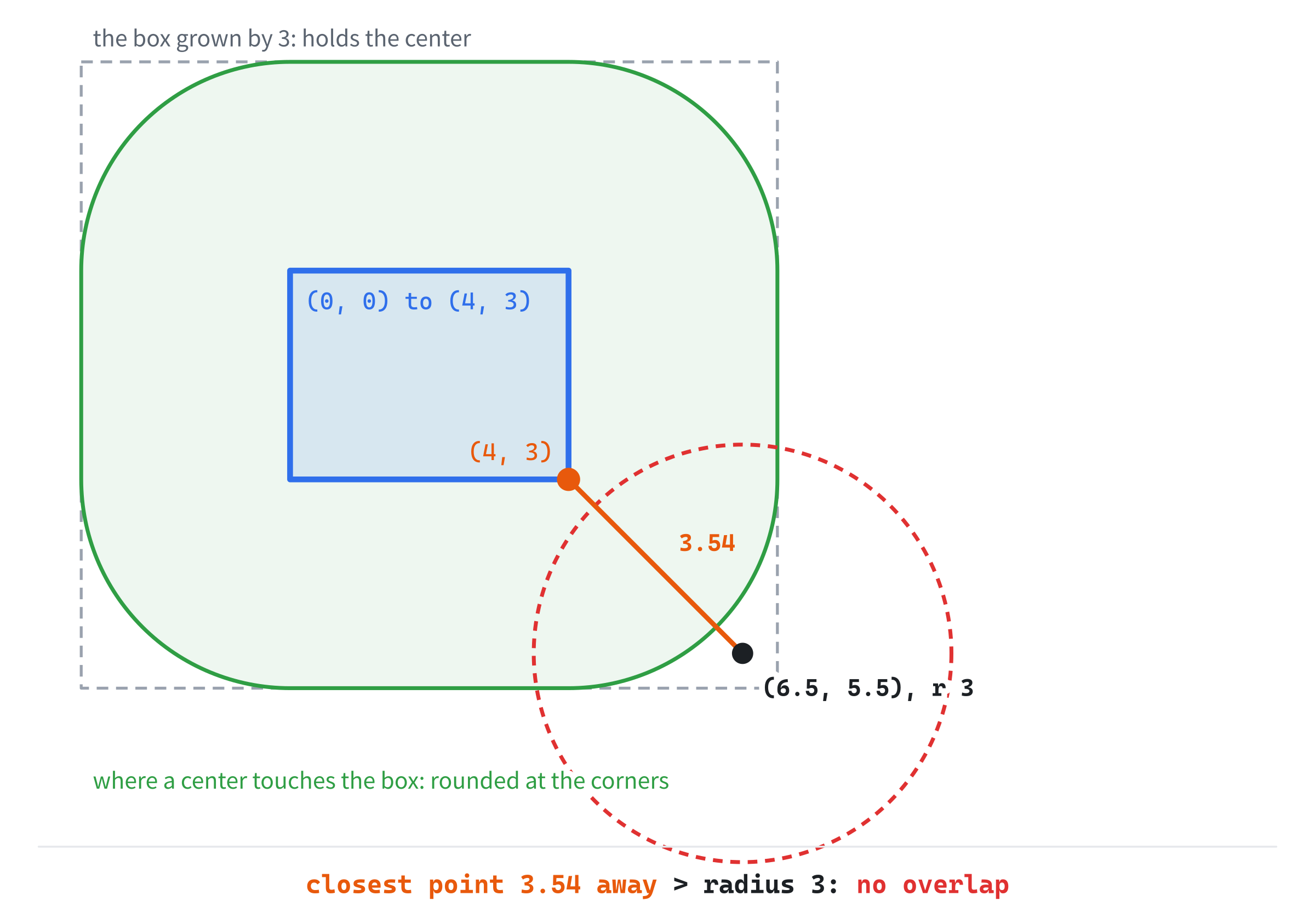
The rounded corners are the closest point's doing. Past a corner, the closest point is the corner itself, so the centers that touch there are the ones within the radius of the corner: a quarter of a circle.
What a Yes or No Leaves Out
Step back and take stock. For every pair of these shapes, you can now say whether they overlap, cheaply. That's a large part of a game already: pickups, triggers, hits and buttons all need nothing more.
But notice what these tests don't say. When two shapes overlap, they say that they do, but not how deep, and not which way to push them apart. A yes or no isn't enough the moment you want to respond to a collision: to stop a player at a wall, to bounce a ball, or to push two bodies apart. You need the depth and the direction.
The next three chapters supply them. Chapter 16's Separating Axis Theorem tests any two convex shapes, and finds the shortest push that separates them. Chapter 17 catches things that move so fast that they'd pass through each other between frames, which a test of where they are now can miss. And Chapter 18 responds to collisions, with the closest point's depth and direction. For now, a yes or no is plenty.
Building Overlap Playground
Overlap Playground has two circles and two boxes to drag. Every pair that overlaps lights up in amber, with the name of the test that found it written between the two shapes. Any shape the mouse is in turns white, by the point tests. And the dented pentagon is there for the two polygon tests. The readout says what each of them makes of the mouse, so you can find the places where they disagree.
Get the code. The complete project is in the
Overlap Playgroundfolder of the book's repository.
Overlap Playground starts from the skeleton, without the timing, since nothing moves by itself. It reuses drawGrid, fillCircle and drawCircleOutline, with drawPolygon and setColor. From Chapter 13, it takes closestInBox and insideConvex. Its Vec2.h is Path Designer's, since this chapter adds nothing to it. Here are its includes and colors:
#include <algorithm>
#include <cmath>
#include <string>
#include <vector>
#include "Vec2.h"

constexpr int WINDOW_WIDTH  = 1000;
constexpr int WINDOW_HEIGHT = 700;

constexpr SDL_Color TEXT = { 235, 238, 242, 255 };
constexpr SDL_Color GREY = { 90, 100, 112, 255 };
constexpr SDL_Color BLUE = { 47, 111, 235, 255 };
constexpr SDL_Color AMBER = { 232, 89, 12, 255 };
constexpr SDL_Color SILVER = { 150, 158, 170, 255 };

// Amber with an alpha of 70 out of 255, so that it's mostly see-through.
constexpr SDL_Color HOT_FILL = { 232, 89, 12, 70 };
The fourth number in an SDL_Color is its alpha, its opacity, from 0 for invisible to 255 for solid. Every color so far has been solid. The amber fill has an alpha of 70, so the shapes under it show through.
Next come Chapter 11's shapes, all but the segment and the ray, and one more struct:
// A circle: its center and its radius.
struct Circle
{
    Vec2 center;
    float radius;
};

// An axis-aligned box: its smallest and largest corners. Neither of min's
// coordinates is ever more than max's.
struct AABB
{
    Vec2 min;
    Vec2 max;
};

// A polygon: its corners, in order around its edge, each once.
struct Polygon
{
    std::vector<Vec2> points;
};

// An overlapping pair, for the readout: the point halfway between the two
// shapes' centers, and the name of the test that found it.
struct Overlap
{
    Vec2 at;
    std::string test;
};
The Overlap struct holds what the readout needs about each overlapping pair: where to write the test's name, and the name itself.
Helpers for the Drawing
Three small helpers come next. The first writes text centered on a point, which the names between the shapes need:
// Draw a line of text centered on a point. TTF_GetStringSize measures it,
// in pixels, as it did for Magnet's distances.
void drawTextCentered(SDL_Renderer* renderer, TTF_Font* font,
                      const std::string& text, Vec2 at, SDL_Color color)
{
    int w = 0, h = 0;
    if (font) TTF_GetStringSize(font, text.c_str(), 0, &w, &h);
    drawText(renderer, font, text, at.x - w / 2.0f, at.y - h / 2.0f, color);
}
It's Magnet's centering, from Chapter 13, as a function of its own. The other two turn a box into what the drawing needs: its center, for placing the names, and SDL's own rectangle type:
// A box's center, halfway between its corners.
Vec2 centerOf(const AABB& box)
{
    return lerp(box.min, box.max, 0.5f);
}

// A box as SDL's rectangle: its top-left corner, its width and its height.
SDL_FRect rectOf(const AABB& box)
{
    return { box.min.x, box.min.y, box.max.x - box.min.x,
             box.max.y - box.min.y };
}
An SDL_FRect holds a rectangle's top-left corner, its width and its height, as Ease Lab's did in Chapter 8. The SDL_RenderRect function draws one's outline, and SDL_RenderFillRect fills it, so a box takes one call to draw instead of four lines.
Blending
For the alpha to do anything, the renderer must blend, so the demo turns blending on just after it makes the renderer:
// Blending, so that a color's alpha lets what's under it show
// through, for the translucent fills.
SDL_SetRenderDrawBlendMode(renderer, SDL_BLENDMODE_BLEND);
With SDL_BLENDMODE_BLEND, each pixel drawn is mixed with the one already there, by its alpha. An alpha of 70 is about 27% of 255, so the result is about 27% amber and 73% whatever was under it. Without blending, SDL ignores alpha, and the fill would hide the grid and the other shapes.
The Shapes
The shapes go after the font is loaded:
// The shapes, in Chapter 11's structs: two circles, two boxes, and a
// pentagon with a dent in its bottom, for the point tests.
std::vector<Circle> circles = { { { 280, 250 }, 80.0f },
                                { { 640, 470 }, 60.0f } };
std::vector<AABB> boxes = { { { 400, 150 }, { 570, 270 } },
                            { { 270, 380 }, { 410, 560 } } };
Polygon pentagon = { { { 700, 130 }, { 880, 130 }, { 880, 320 },
                       { 790, 230 }, { 700, 320 } } };

// A grab holds pointers to the grabbed shape's points, which all move
// with the mouse, and the mouse's position the frame before.
std::vector<Vec2*> grabbed;
Vec2 lastMouse = { 0.0f, 0.0f };
Each kind of shape has its own list, in its own struct, so there's no need for a single struct that could be any shape, with fields that some kinds don't use. The pentagon's corners go clockwise, on the screen, with the notch's point at (790, 230).
A grab is a list of pointers, one to each of the grabbed shape's points: a circle's center, a box's two corners, or the pentagon's five corners. Moving a shape is moving all of its points by the same amount, so one loop can drag any kind of shape. That's Chapter 11's handles again, with every point of a shape moving together.
Grabbing and Dragging
A click grabs the first shape it's in:
// Events: quitting, and the keys and clicks that happen once.
SDL_Event event;
while (SDL_PollEvent(&event))
{
    if (event.type == SDL_EVENT_QUIT) running = false;
    else if (event.type == SDL_EVENT_KEY_DOWN)
    {
        if (event.key.key == SDLK_ESCAPE) running = false;
    }
    else if (event.type == SDL_EVENT_MOUSE_BUTTON_DOWN &&
             event.button.button == SDL_BUTTON_LEFT)
    {
        // Grab the first shape the press is in: the pentagon, then
        // the boxes, then the circles, the reverse of the order
        // they're drawn in, so that the one on top wins.
        Vec2 press = { event.button.x, event.button.y };
        if (insidePolygon(press, pentagon))
            for (Vec2& p : pentagon.points) grabbed.push_back(&p);
        for (AABB& box : boxes)
            if (grabbed.empty() && pointInBox(press, box))
                grabbed = { &box.min, &box.max };
        for (Circle& c : circles)
            if (grabbed.empty() && pointInCircle(press, c))
                grabbed = { &c.center };
    }
    else if (event.type == SDL_EVENT_MOUSE_BUTTON_UP) grabbed.clear();
}
In the preceding code, the pentagon is checked first, then the boxes, then the circles. The circles are drawn first and the pentagon last, so this is the reverse of the drawing order, and a click where shapes of two kinds overlap grabs the one drawn on top. Where two of the same kind overlap, it grabs the first in its list. Each check only runs while nothing has been grabbed yet. Letting go of the button empties the list.
After the mouse is read, the grabbed shape follows it:
// A grabbed shape moves as far as the mouse has since last frame.
Vec2 mouse = { mx, my };
for (Vec2* p : grabbed) *p += mouse - lastMouse;
lastMouse = mouse;
Each point moves as far as the mouse moved since the last frame. So the shape keeps the same place under the mouse that it had when it was grabbed, rather than jumping to put its center there.
Testing the Pairs
Then every pair of shapes that has a test is tested:
// Test every pair that has a test: circles with circles, boxes
// with boxes, and circles with boxes. Both shapes of a pair that
// overlaps are hot, and the pair is kept for the readout.
std::vector<bool> circleHot(circles.size(), false);
std::vector<bool> boxHot(boxes.size(), false);
std::vector<Overlap> overlaps;
for (size_t i = 0; i < circles.size(); ++i)
{
    for (size_t j = i + 1; j < circles.size(); ++j)
    {
        if (!circlesOverlap(circles[i], circles[j])) continue;
        circleHot[i] = circleHot[j] = true;
        Vec2 at = lerp(circles[i].center, circles[j].center, 0.5f);
        overlaps.push_back({ at, "circles" });
    }
}
for (size_t i = 0; i < boxes.size(); ++i)
{
    for (size_t j = i + 1; j < boxes.size(); ++j)
    {
        if (!boxesOverlap(boxes[i], boxes[j])) continue;
        boxHot[i] = boxHot[j] = true;
        Vec2 at = lerp(centerOf(boxes[i]), centerOf(boxes[j]), 0.5f);
        overlaps.push_back({ at, "boxes" });
    }
}
for (size_t i = 0; i < circles.size(); ++i)
{
    for (size_t j = 0; j < boxes.size(); ++j)
    {
        if (!circleBoxOverlap(circles[i], boxes[j])) continue;
        circleHot[i] = boxHot[j] = true;
        Vec2 at = lerp(circles[i].center, centerOf(boxes[j]), 0.5f);
        overlaps.push_back({ at, "circle and box" });
    }
}
In the preceding code, the first loop tests each circle against each later circle. Its inner loop starts at i + 1, so that no circle is tested against itself, and no pair is tested twice. The second loop does the same for the boxes. The third tests every circle against every box, and there both loops start at 0, since a circle and a box are never the same shape. Both shapes of an overlapping pair are marked hot, and the pair goes into overlaps, with the point halfway between their centers and the test's name.
The pentagon isn't in any pair. Testing a polygon against a box, or against another polygon, is Chapter 16's job. Testing it against a circle is one of this chapter's exercises.
Notice how the work grows. Four shapes make six pairs, but a hundred shapes make 4,950, and the number grows with the square of the shapes. Part 5 deals with that, by testing only the pairs that are near each other.
Drawing
After the grid come the circles:
// The circles: a translucent amber fill and an amber outline when
// they overlap something, and a blue outline when they don't. A
// circle the mouse is in has a white outline.
for (size_t i = 0; i < circles.size(); ++i)
{
    const Circle& c = circles[i];
    if (circleHot[i])
    {
        setColor(renderer, HOT_FILL);
        fillCircle(renderer, c.center, c.radius);
    }
    SDL_Color edge = circleHot[i] ? AMBER : BLUE;
    if (pointInCircle(mouse, c)) edge = TEXT;
    drawCircleOutline(renderer, c.center, c.radius, edge);
}
A hot circle gets the translucent fill, then an amber outline, and a cold one just a blue outline. A circle the mouse is in has a white outline instead, by pointInCircle. The boxes are drawn the same way, with the two rectangle calls:
// The boxes, the same way, with SDL's own rectangle calls.
for (size_t i = 0; i < boxes.size(); ++i)
{
    SDL_FRect rect = rectOf(boxes[i]);
    if (boxHot[i])
    {
        setColor(renderer, HOT_FILL);
        SDL_RenderFillRect(renderer, &rect);
    }
    SDL_Color edge = boxHot[i] ? AMBER : BLUE;
    if (pointInBox(mouse, boxes[i])) edge = TEXT;
    setColor(renderer, edge);
    SDL_RenderRect(renderer, &rect);
}
Then come the pentagon, the names of the overlaps, and the mouse:
// The pentagon: white when the crossing count finds the mouse in
// it, and silver when it doesn't.
bool inByCount = insidePolygon(mouse, pentagon);
bool inByConvex = insideConvex(mouse, pentagon);
drawPolygon(renderer, pentagon.points, inByCount ? TEXT : SILVER);

// Each overlapping pair's test, named halfway between the shapes.
for (const Overlap& o : overlaps)
    drawTextCentered(renderer, font, o.test, o.at, TEXT);

// The mouse, as a cross, named P.
setColor(renderer, TEXT);
SDL_RenderLine(renderer, mx - 7, my, mx + 7, my);
SDL_RenderLine(renderer, mx, my - 7, mx, my + 7);
drawText(renderer, font, "P", mx + 8, my + 2, TEXT);
The pentagon's outline goes by the crossing count, which is the right answer, and both tests' answers are kept for the readout. Each overlap's name is centered halfway between its two shapes. The mouse is drawn as a cross, named P, as in Magnet.
Last come the readout and the controls:
// The readout: how many pairs overlap, and what each point test
// says about the mouse and the pentagon.
drawText(renderer, font,
         "overlapping pairs: " + std::to_string(overlaps.size()),
         12, 10, TEXT);
drawText(renderer, font,
         std::string("pentagon: the crossing count says ") +
         (inByCount ? "in" : "out") + ", the convex test says " +
         (inByConvex ? "in" : "out"), 12, 30, SILVER);
drawText(renderer, font, "[Drag] a shape   [Esc] quit",
         12, WINDOW_HEIGHT - 26, GREY);
The first line counts the overlapping pairs. The second gives both polygon tests' answers for the mouse, whether or not it's anywhere near the pentagon.
Trying It Out
Run the demo, and drag the shapes together. The next image shows three of them overlapping, with P in the pentagon's right arm.
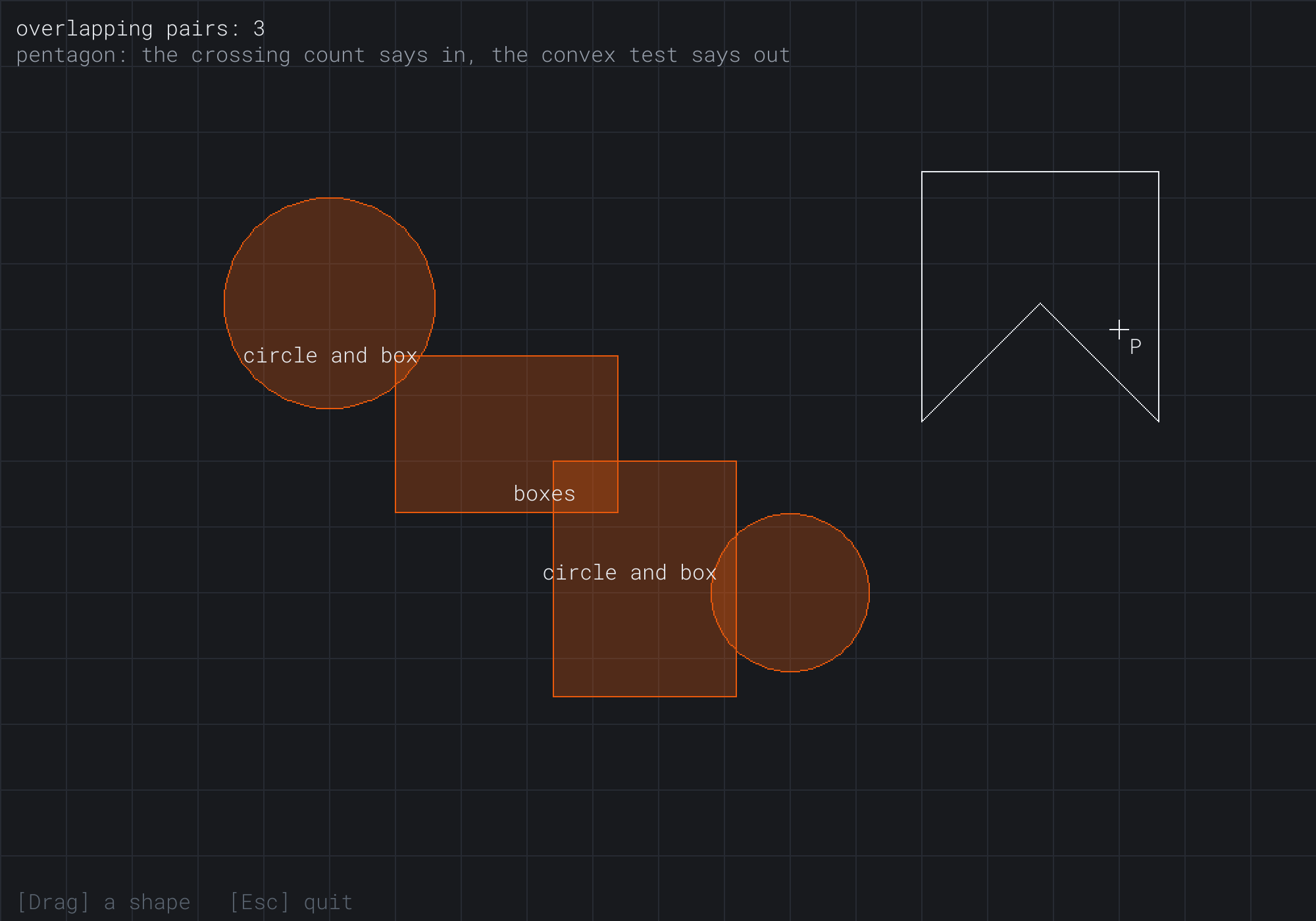
The upper circle, at (250, 230) with a radius of 80, has met the upper box past its corner, which is 64 pixels from its center. The two boxes overlap. And the lower circle, with a radius of 60, has met the lower box's side, 40 pixels from its center. Each pair is named by its test. P is at (850, 250), in the pentagon's right arm, so the pentagon is white. The readout shows the two polygon tests disagreeing, as Figure 15.1 predicted.
Some things to try:
- Slide two circles together, and watch them light up the moment their edges meet.
- Bring a circle up to a box's corner, and watch it light up only when the corner is inside the circle, not when it's merely inside the grown box.
- Move the mouse around inside the pentagon. The crossing count says in everywhere, and the convex test only above the notch.
- Drag the pentagon over a circle or a box. Nothing lights up, since it isn't in any pair.
Every amber light is one of this chapter's tests answering yes.
FAQ
Q) Do I need an epsilon in these tests?
A) Rarely. Chapter 5 compared floats with a tolerance because arithmetic leaves them a hair off. A yes-or-no test that's a hair off is wrong only when two shapes are within a hair of touching, and then either answer is fine. An epsilon matters when a collision is answered, as Chapter 18 shows: there, a gap of a thousandth of a pixel can decide whether a player counts as standing on the ground or falling.
Q) What does the crossing count say for a point exactly on an edge?
A) It depends on the edge. For a square, a point on its top or left edge comes out inside, and a point on its bottom or right edge comes out outside. That's fine when shapes only meet by chance. When it matters, as for a point snapped onto an outline, test for it first. Find the closest point on the edges with Chapter 13's closestOnPolygon. If it's within a tiny distance, decide by your touching rule.
Q) How do I test two polygons against each other?
A) For two convex polygons, with the next chapter's Separating Axis Theorem, which also gives the push that separates them. A polygon with a dent is usually split into convex pieces first, and each piece is tested. Games keep their collision shapes convex wherever they can for that reason.
Q) How do games test thousands of shapes?
A) Not by testing every pair. Overlap Playground's double loops test every pair, which is fine for four shapes, but a thousand shapes make almost half a million pairs. Games first find the pairs that could possibly overlap, from a grid or from shapes' bounding boxes, and test only those. Chapter 19 builds that kind of grid.
Exercises
The first three exercises need only a pencil. The others change Overlap Playground.
- Point tests (paper). Is P
(3, 4)in the circle at(0, 0)with a radius of 5? Is it in the box from(0, 0)to(3, 3)? Show the comparisons, and say where the touching rule matters. - Counting crossings (paper). Take the square with corners
(0, 0),(4, 0),(4, 4)and(0, 4). Count the crossings for P at(2, 2)and at(5, 2), and at(2, 4), on the square's bottom edge. What does the half-open rule decide for each? - Circle against box (paper). For the box from
(0, 0)to(4, 3), does a circle at(5, 1.5)with a radius of 1 overlap it? Does one at(6, 5)with a radius of 3? Find the closest point for each. - Circle against the pentagon (code). Add the pentagon to the pairs, against the circles. A circle overlaps it when its center is inside, by the crossing count. It also overlaps when the closest point on the pentagon's edges, from Chapter 13's
closestOnPolygon, is within its radius. - The other rule (code). Change every test to count touching as apart, with
<and>. Then put two boxes in the code that share an edge exactly, and check what each rule says.
For the code exercises, work on a copy of the demo's folder, so that the original stays as the chapter describes it.
AI Exercise (Optional)
These tests are enough for a whole game, as long as it doesn't need to push anything apart. With an AI's help, you can turn Overlap Playground into one: a dash to collect coins while dodging moving hazards. Open your AI chatbot of choice, and try a prompt like this:
"I have a C++ demo using SDL3, with structs Circle, holding a center and a radius, and AABB, holding min and max corners, and two functions: circlesOverlap(a, b) and circleBoxOverlap(circle, box), which return true when the shapes touch or overlap. Please turn it into a small game. The player is a circle of radius 15 that follows the mouse. Scatter twelve coins, circles of radius 8, at random places. Add four hazards, boxes of different sizes, that slide slowly back and forth. Touching a coin collects it and adds to the score. Touching a hazard sends the player back to the start and puts every coin back. Show the score and a timer, and stop the timer when the last coin is taken. Use my two functions for every test, and explain why a circle is a good shape for the player."
That prompt describes your shapes and your tests, so the AI builds the game from them, instead of from tests of its own. It keeps to the tests this chapter built: coins and hazards only need a yes or no. And it asks about the player's shape, which this chapter's circles answer: a circle's test is the cheapest, and it has no corners to snag on.
Then play it, and look for unfairness. A hazard that slides fast enough can jump past the player between two frames, which is exactly the problem Chapter 17 solves. Try a speed that makes it happen, and remember it for then.
Summary
Collision detection starts with yes-or-no tests, and they must all share one rule for touching: this book counts it as overlapping, everywhere. A point is in a circle when its squared distance from the center is no more than the squared radius, and in a box when it's in the box's range on both axes. A point is in a convex polygon when it's on the same side of every edge, but that test fails in a dent's shadow. For any polygon, the crossing count sends a ray from the point and counts the edges it crosses, with a half-open rule that counts a corner once and a flat edge never: odd means inside. Two circles overlap when their centers are no farther apart than their radii added together. Two boxes overlap when their ranges overlap on both axes, a test that can be written with corners or with centers. A circle and a box overlap when the closest point in the box is within the radius, which gets the corners right where a grown box doesn't. Overlap Playground showed them all, and showed what they leave out: how deep an overlap is, and which way to push. Chapter 16 finds both, for any two convex shapes, with the Separating Axis Theorem.