
Every test so far looks at a single moment. It asks whether two shapes overlap now, and for things that move slowly, that's enough. But a game moves things in steps. Between one step and the next, a ball doesn't slide from place to place: it jumps. A ball that's fast enough can end one step just short of a thin wall, and the next step just past it, without ever overlapping it. A test of where the ball is never sees the hit, and the ball goes straight through the wall. That's tunneling, and it's a baffling bug, since the overlap test is correct.
This chapter tests the path instead of the places. The tool is Chapter 12's ray, which finds where a line first meets a shape. We'll cast rays against circles, boxes and polygons. Then we'll turn the ball's whole move into a ray, and find the exact moment it first touches the wall, however fast it's going. That's a swept test, and it's how games make fast things collide.
In this chapter, we will:
- See exactly when a fast ball can tunnel through a thin wall
- Cast a ray against a circle, by solving a quadratic
- Cast a ray against a box, with the slab method, and against a polygon
- Sweep a ball's move against the wall grown by its radius, to find its first contact
- Build Bullet Time, where a naive test and a swept test take turns at catching a fast ball
We'll start with the problem.
The Tunneling Problem
Each step, a game moves a ball by its velocity times the step's time. The ball is at its old place, then at its new one, and nowhere in between. An overlap test at the end of each step sees only those places.
Steps, Not Paths
Picture a ball with a radius of 7 pixels, moving right at 2,000 pixels a second, toward a thin wall. A step of a sixtieth of a second moves it 33 pixels. The ball overlaps the wall when its center is within 7 pixels of it, on either side. So the only steps a test can catch are those that end in a band 14 pixels wide, centered on the wall. A step of 33 pixels can jump right over a band of 14. The next image shows two steps in a row. One ends with the ball's center 19 pixels short of the wall, and the next ends with it 14 pixels past.
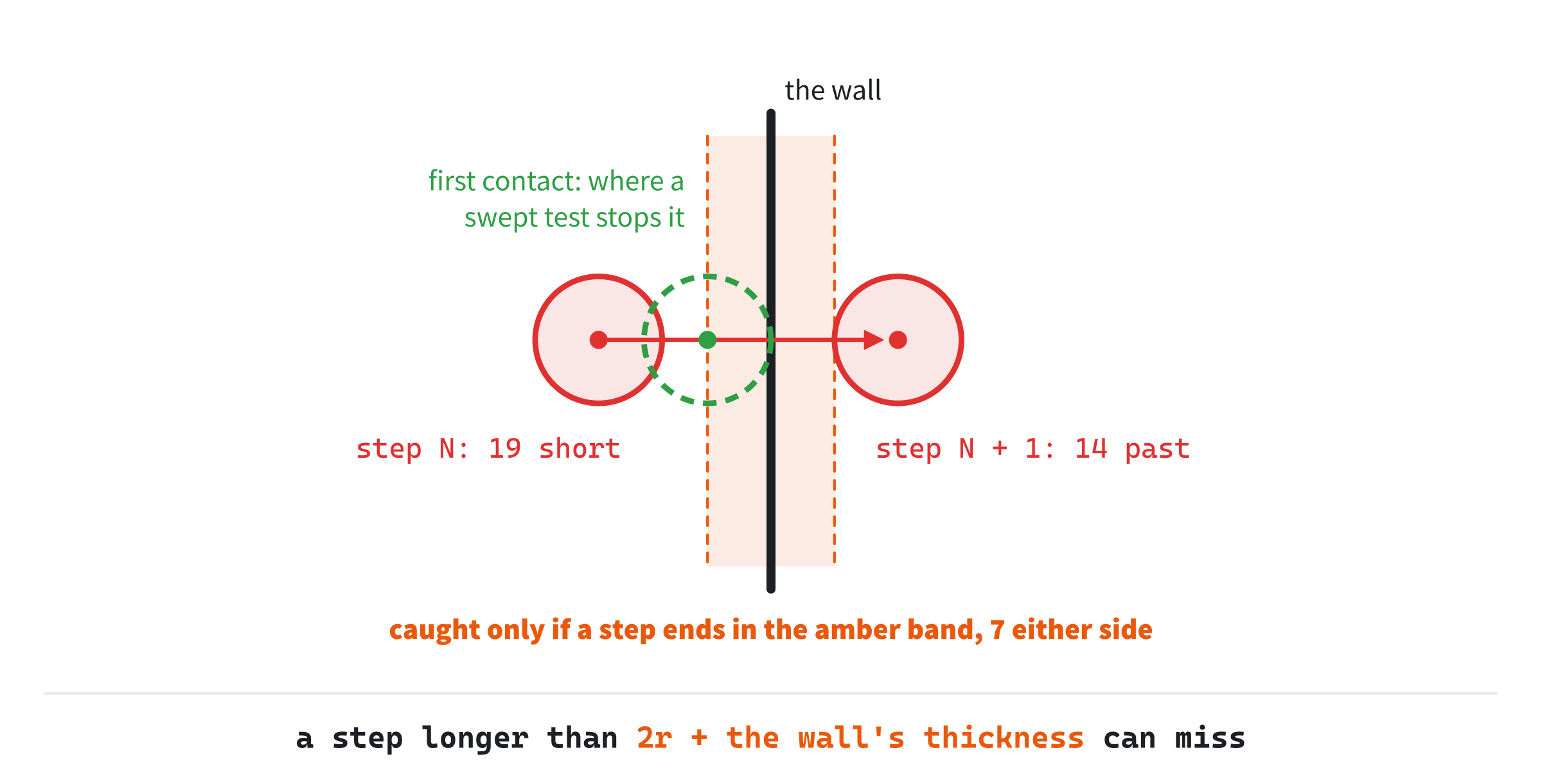
Neither end of step is in the band, so the test sees no overlap at either, and the ball carries on. The dashed green circle is where the ball really first touched the wall, partway through the second step. A swept test finds that place, and stops the ball there.
When It Can Happen
The band's width is the ball's diameter, plus the wall's own thickness, if it has one. If a step moves the ball less than that across the wall, some step must end inside the band, so the test can't miss. If a step moves it more, the test can miss. Across the wall means along the wall's normal. A ball moving at an angle to the normal crosses less than its whole step: for an angle θ between its path and the normal, it crosses the step's length times cos θ. So the naive test is safe exactly when:
step × cos θ ≤ 2r + thicknessBullet Time's wall is a segment, with no thickness, and its ball has a radius of 7, so the band is 14 pixels wide. The ball travels at 0.16 radians, about 9 degrees, to the wall's normal. At 2,000 pixels a second, a step is 33.3 pixels, and 32.9 of them are across the wall. That's well over 14. The test is safe only up to 14 pixels across, which is about 851 pixels a second.
Above that speed, the test catches the ball only when a step happens to end in the band. If the ends of steps fell at random, a step of 32.9 pixels would end in a band of 14 pixels 14 / 32.9 of the time, or 43%. Bullet Time, run at 2,000 pixels a second, catches about 37% of the ball's approaches to the wall. The ball's path around the arena repeats, so its steps don't land quite at random, but the estimate is the right size: the test misses more often than it catches.
The fix is to stop testing places, and to test the path between them. In one step, the ball's center moves along a straight line, from its old place to its new one. That's a ray, cut off at the step's length. So a swept test is a ray cast, and the first thing it needs is a ray against each kind of shape a ball can hit.
Ray Against Circle
Chapter 12 cast a ray against a segment. A circle needs a different equation, and it's one worth knowing well. Circles are everywhere in games: balls and coins, and, as this chapter will show, the ends of walls.
Setting It Up
A ray, in Chapter 12's parametric form, is the point O + t × d. Here O is where it starts, and d is its direction, a unit vector, so t is the distance along it in pixels. A point is on a circle when its distance from the center C is the radius r. Distances need a square root, so we square both sides instead:
|O + t × d - C|² = r²Call the vector from the center to the ray's start m, so m is O - C. The left side is then (m + t × d) · (m + t × d), the dot product of a vector with itself, which is its length squared. The dot product multiplies out like ordinary multiplication, so it's:
m · m + 2t × (m · d) + t² × (d · d) = r²Since d is a unit vector, its dot product with itself is 1. Name the two numbers that are left: b is m · d, and c is m · m - r². The equation becomes a quadratic in t:
t² + 2bt + c = 0Each t that solves it is a distance along the ray at which the ray is on the rim.
Solving It
The quadratic formula solves it. For this form, with 1 in front of t² and 2b in front of t, the formula's twos and fours cancel, and it comes out as:
t = -b ± √(b² - c)The part under the square root, b² - c, is the discriminant, and it decides everything. It has a meaning you can see. The number −b is how far along the ray its closest approach to the center is, since it's the projection of C - O onto the unit direction d, as in Chapter 4. At that point, the line from the center meets the ray at a right angle. So by Pythagoras, the squared distance from the center there is m · m - b². And b² - c is r² - (m · m - b²): the radius squared, less the closest distance squared.
So there are three cases:
- Negative: the ray's line passes farther from the center than the radius. It misses.
- Zero: it passes exactly the radius away, touching the rim at one point. By this book's rule, touching counts as a hit.
- Positive: it passes inside. The square root is then how far the ray is inside the circle, either side of the closest approach, so the two roots are where it goes in and where it comes out.
The nearer root, -b - √(b² - c), is the one a ray cast wants: the first place the ray meets the rim.
All of this depends on d being a unit vector. If it were twice as long, its dot product with itself would be 4. The equation would then have a 4 in front of t², and the formula above would give the wrong roots. And t would no longer be a distance in pixels. So normalize a ray's direction first, as Laser did.
A Worked Example
Take the ray from (0, 0) along (1, 0), and the circle at (5, 1) with a radius of 1.5. The vector m is (0, 0) - (5, 1), which is (-5, -1). Then b is m · d, which is −5. And c is m · m - r², which is 26 − 2.25, or 23.75. The discriminant is 25 − 23.75, which is 1.25, and its square root is 1.12. So the roots are 5 − 1.12 and 5 + 1.12: the ray enters the circle at t = 3.88, and leaves at t = 6.12.
The geometry agrees. The closest approach is at t = 5, the point (5, 0), which is 1 from the center. The rim is 1.5 from the center, so by Pythagoras, the ray is inside the circle for √1.25 either side of t = 5. The next image shows the ray, the circle and the right triangle.
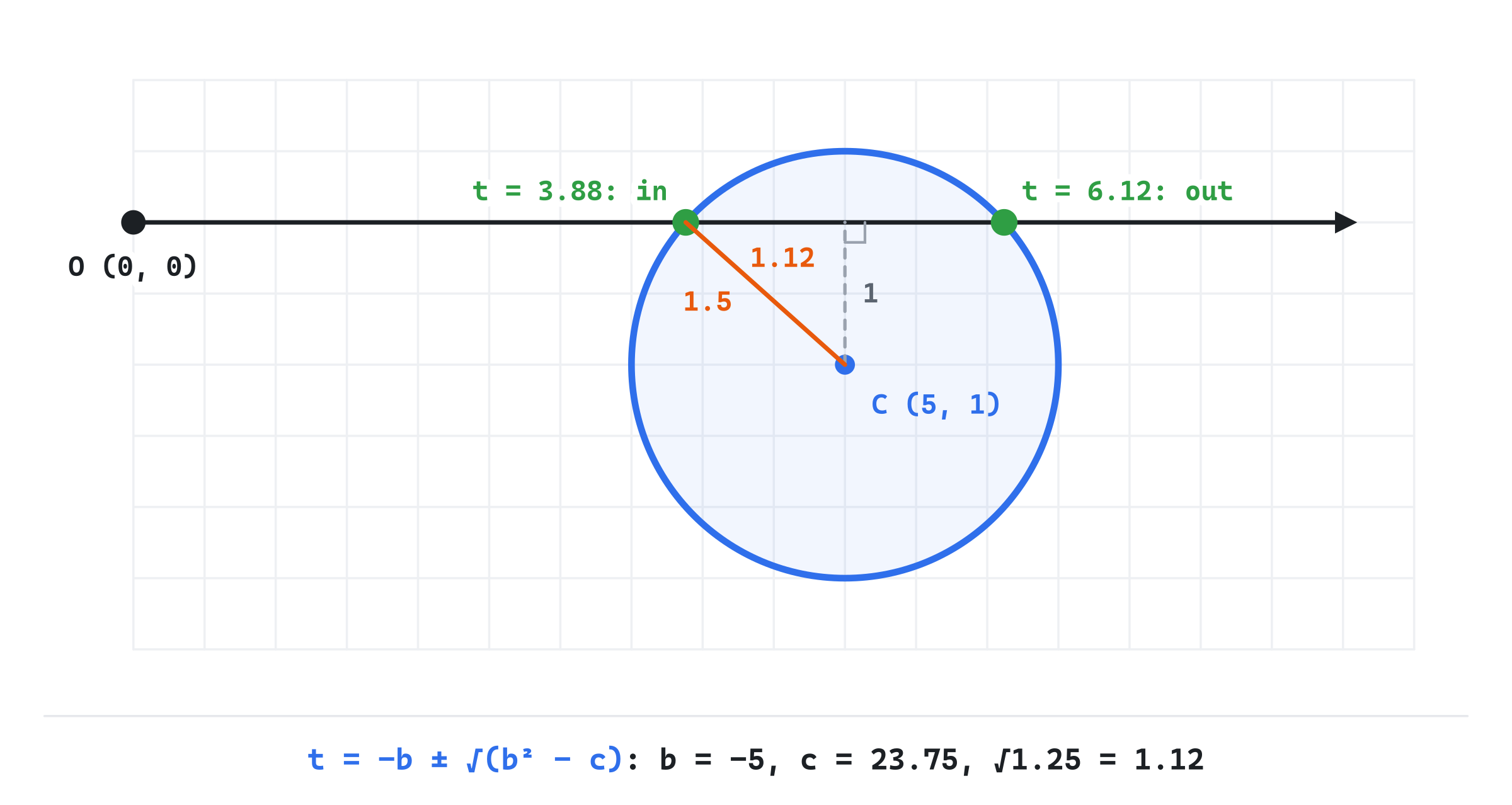
Shrink the radius to 0.9, and c is 26 − 0.81, or 25.19. The discriminant is then 25 − 25.19, which is negative, so the ray misses. It passes 1 from the center, and the rim is only 0.9 out.
Behind and Inside
The roots can be negative. A negative t is behind the ray's start, where the ray doesn't go. If both roots are negative, the whole circle is behind the ray, which is a miss. If only the nearer one is, the ray starts inside the circle, and the farther root is where it leaves. That happens exactly when c is negative, since c is the start's squared distance from the center, less the radius squared.
For a collision, a start inside the circle means the two already touch, so the answer is 0: they meet at once. Here's the function, as Bullet Time has it:
// Where a ray, from O along the unit vector d, first meets a circle: the
// nearer root of |O + t d - C|^2 = r^2. A ray that starts inside the
// circle, or on it, meets it at once, at 0. It returns the distance along
// the ray, or -1 for a miss.
float rayCircle(Vec2 O, Vec2 d, Vec2 C, float r)
{
    Vec2 m = O - C;
    float b = m.dot(d);
    float c = m.lengthSquared() - r * r;
    if (c <= 0.0f) return 0.0f;
    if (b > 0.0f) return -1.0f;
    float disc = b * b - c;
    if (disc < 0.0f) return -1.0f;
    return -b - std::sqrt(disc);
}
The first test catches a start inside the circle, or on its rim. The second catches a circle behind the ray. When the start is outside, c is positive. If b is positive too, then m and d point the same way, so the ray heads away from the center. Both roots are then negative, and the function knows it's a miss without taking a square root. The third test is the discriminant. What's left is a hit, and the nearer root, which by then can't be negative.
Ray Against Box
A box that lines up with x and y has a neat test of its own, the slab method. It goes back to Timothy Kay and James Kajiya, who used it in 1986 to speed up ray tracing. It's still the standard way to cast a ray against a box.
Slabs
Think of the box as two strips that cross. Its x slab is the strip between its left and right sides, running up and down forever. Its y slab is the strip between its top and bottom, running left and right. The box is exactly where the two cross: a point is in the box when it's in both slabs.
A ray crosses each slab over a stretch of t. For the x slab, the ray's x is O.x + t × d.x. So it reaches the left side at (min.x - O.x) / d.x, and the right side at (max.x - O.x) / d.x. The smaller of the two is where it enters the slab, and the larger is where it leaves. A ray heading left reaches the right side first, so the smaller isn't always the left side's. The y slab is the same, with y.
The ray is in the box while it's in both slabs at once: from the later of the two entries to the earlier of the two exits. If the later entry comes after the earlier exit, the ray left one slab before it entered the other, and it misses the box. The next image shows a hit and a miss.
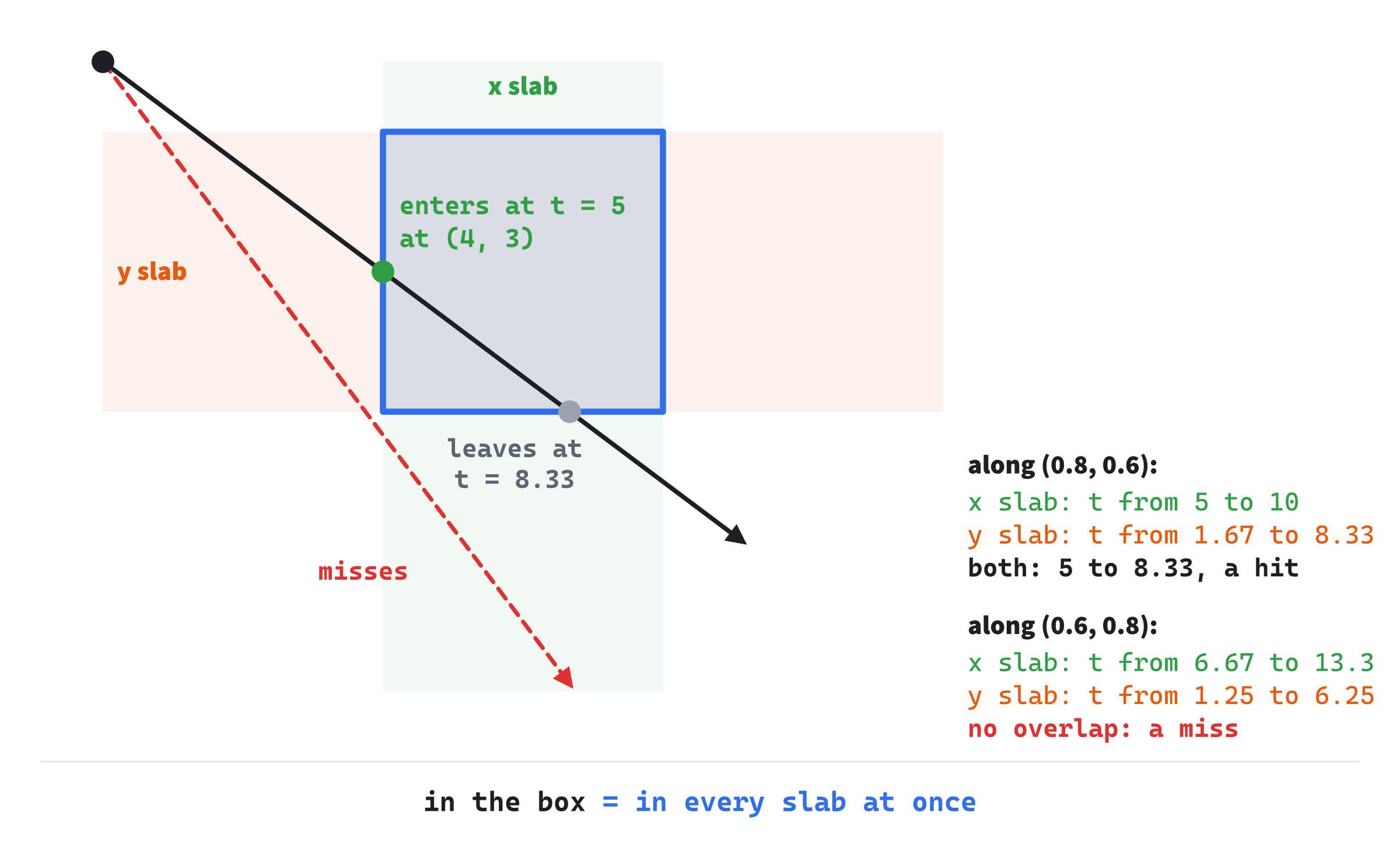
The black ray is in both slabs at once from its green dot to its grey one. The red ray leaves the y slab before it reaches the x slab, so it's never in both.
A Worked Example
The box runs from (4, 1) to (8, 5). A ray from (0, 0) along (0.8, 0.6) reaches x = 4 at t = 4 / 0.8, which is 5, and x = 8 at t = 10. It reaches y = 1 at t = 1 / 0.6, which is 1.67, and y = 5 at t = 8.33. So it's in the x slab from 5 to 10, and in the y slab from 1.67 to 8.33. The later entry is 5, and the earlier exit is 8.33. Since 5 comes first, it's a hit: the ray enters the box at t = 5, at (4, 3), and leaves at t = 8.33.
A ray along (0.6, 0.8) is in the x slab from 6.67 to 13.33, and in the y slab from 1.25 to 6.25. The later entry is 6.67, and the earlier exit is 6.25. The ray leaves the y slab, below the box, before it enters the x slab, so it misses.
In Code
Bullet Time's wall is a segment, so the demo doesn't need a box test. Here's a sketch of one, in two functions. The first narrows a range of t to the part inside one slab, and the second calls it for each slab:
// The part of a ray that's inside one slab, the strip from lo to hi on one
// axis, where o and dir are the ray's start and direction on that axis.
// It narrows tEnter and tExit to that part, and returns false if the ray
// is never inside the slab while it's inside the others.
bool slab(float o, float dir, float lo, float hi, float& tEnter, float& tExit)
{
    if (std::fabs(dir) < 0.00001f)       // Parallel to the slab's sides:
        return o >= lo && o <= hi;       // inside it always, or never.
    float t1 = (lo - o) / dir;
    float t2 = (hi - o) / dir;
    if (t1 > t2) std::swap(t1, t2);
    tEnter = std::max(tEnter, t1);
    tExit = std::min(tExit, t2);
    return tEnter <= tExit;
}

// Where a ray, from O along the unit vector d, first meets a box: the
// distance along the ray, 0 if it starts inside, or -1 for a miss.
float rayBox(Vec2 O, Vec2 d, const AABB& box)
{
    float tEnter = 0.0f;
    float tExit = 1e9f;
    if (!slab(O.x, d.x, box.min.x, box.max.x, tEnter, tExit)) return -1.0f;
    if (!slab(O.y, d.y, box.min.y, box.max.y, tEnter, tExit)) return -1.0f;
    return tEnter;
}
In the preceding code, the range starts at 0, not at minus infinity, so a box behind the ray misses. A ray that starts inside the box meets it at 0, as it does a circle. The end of the range starts enormous. Each slab can only raise the start and lower the end, and std::swap puts the slab's entry first, whichever way the ray heads.
The first line of slab handles a ray that's parallel to the slab's sides, with no movement along that axis. Dividing by its direction there would give infinities, so it gets a simpler test. Such a ray never crosses the slab's sides, so it's inside the slab for its whole length, or never. Touching counts throughout, by the <= and >=. In three dimensions, a box has a third slab, for z, and rayBox makes one more call.
Ray Against Polygon
A polygon is a ring of segments, and Chapter 12's ray cast already handles a list of segments: test each, and keep the nearest hit. Laser did exactly that with its walls. For a collision, the hit's normal matters too, since a bounce needs it. An edge's normal is its quarter turn, normalized. It points to one side of the edge or the other, depending on which way round the corners go, so it's flipped when it doesn't face the ray. Here's a sketch, which uses Chapter 12's raySegment and Chapter 11's Polygon:
// Where a ray, from O along the unit vector d, first meets a polygon's
// edges, and the edge's unit normal there, turned to face the ray. It
// returns the distance along the ray, or -1 for a miss.
float rayPolygon(Vec2 O, Vec2 d, const Polygon& poly, Vec2& normal)
{
    float best = -1.0f;
    size_t n = poly.points.size();
    for (size_t i = 0; i < n; ++i)
    {
        Vec2 A = poly.points[i];
        Vec2 B = poly.points[(i + 1) % n];
        float t, u;
        if (raySegment(O, d, A, B, t, u) && (best < 0.0f || t < best))
        {
            best = t;
            normal = (B - A).perp().normalized();
            if (normal.dot(d) > 0.0f) normal = -normal;
        }
    }
    return best;
}
In the preceding code, the % n joins the last corner back to the first, as in Chapter 11's polygon code. A normal faces the ray when it points against the ray's direction, so a positive dot product flips it. For a convex polygon, a ray from outside crosses at most two edges, going in and coming out, and the nearer is the way in. A polygon with dents can be crossed more often, but the nearest hit is still the first, so the same loop works for any polygon.
Sweeping the Path
Now for the swept test itself. In one step, the ball's center moves along a ray, for the step's length. We need to know where along it the ball first touches the wall.
The Wall Grown by the Radius
The ball touches the wall when its center is r from the nearest point of the wall. So picture every point within r of the wall: it's the wall grown by the ball's radius. For a segment, that's a capsule. It has two sides parallel to the wall, r out on each side, and a half circle of radius r around each end. The ball touches the wall exactly when its center is on the capsule's outline, and overlaps it when its center is inside.
So a ball moving against a wall is a point moving against the grown wall. The ball's first contact is where its center's ray first meets the capsule. That's four ray casts we already have: Chapter 12's ray against a segment, for the two sides, and this chapter's ray against a circle, for the two ends. The next image shows one path that meets a side, and another that meets an end.
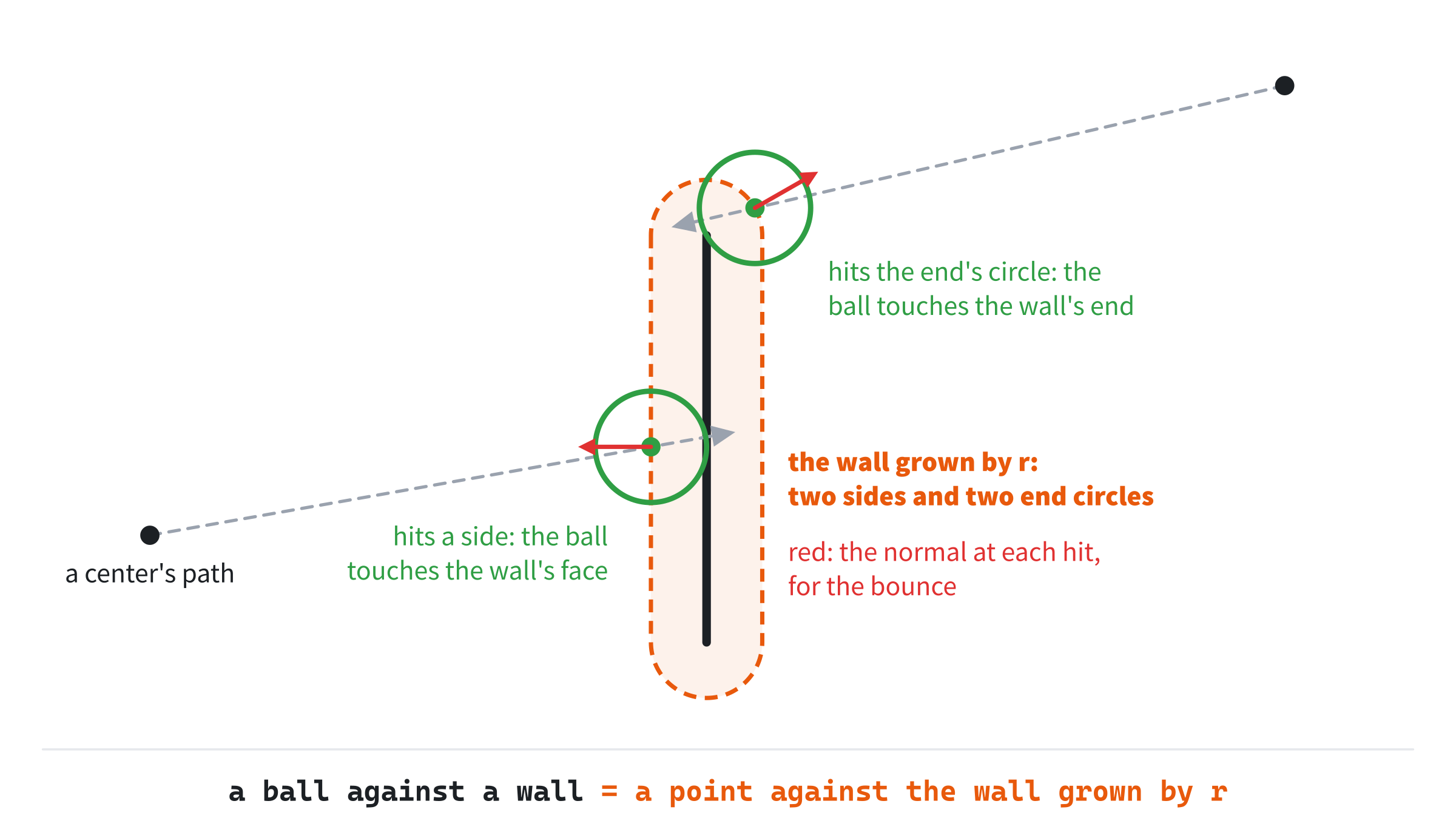
The normal at the hit comes with it. On a side, it's the wall's normal, pointing out on that side. On an end, it's the direction from the end to the hit point, since there the ball touches the end itself. That's the normal a bounce needs.
The Tempting Shortcut
It's tempting to skip the capsule: cast the center against the thin wall itself, and stop the ball r short of the hit, back along its path. That's right only when the ball meets the wall head on. At an angle θ to the wall's normal, backing up r along the path leaves the center only r × cos θ from the wall. At 60 degrees, that's half of r. So a ball of radius 7 stops with its center 3.5 pixels from the wall, sunk 3.5 pixels into it. Worse, a center that passes just beyond the wall's end misses the thin wall altogether, though the ball's edge clips the end. The capsule gets both cases right, since it's built from what touching really means.
In Code
The function casts against all four pieces, and keeps the nearest hit with its normal:
// Where a ray first meets a segment grown by a radius, a capsule: two sides
// parallel to the segment, r out on each side, and a circle around each
// end. It's the nearest hit on any of the four that the ray is heading
// into, not out of, and it fills in the normal there: straight out from a
// side, or out from an end's center. It returns -1 for a miss.
float rayCapsule(Vec2 O, Vec2 d, Vec2 A, Vec2 B, float r, Vec2& normal)
{
    Vec2 n = (B - A).perp().normalized();
    float best = -1.0f;

    // The two sides: the segment moved r out along its normal, each way.
    for (float side : { 1.0f, -1.0f })
    {
        Vec2 out = n * side;
        float t, u;
        if (d.dot(out) < 0.0f &&
            raySegment(O, d, A + out * r, B + out * r, t, u) &&
            (best < 0.0f || t < best))
        {
            best = t;
            normal = out;
        }
    }

    // The two ends: circles of radius r around A and around B.
    for (Vec2 end : { A, B })
    {
        float t = rayCircle(O, d, end, r);
        if (t < 0.0f) continue;
        Vec2 out = (O + d * t - end).normalized();
        if (d.dot(out) < 0.0f && (best < 0.0f || t < best))
        {
            best = t;
            normal = out;
        }
    }
    return best;
}
In the preceding code, n is the wall's unit normal, from Chapter 12's quarter turn. The first loop tries the segment moved r out along n, then along -n. The second loop tries a circle of radius r around each end. The normal at an end's hit is the vector from the end to the hit point, normalized. Before it's normalized, it's r long, since the hit is on the circle.
Each piece counts only if the ray heads into it, which is d.dot(out) < 0: moving against the piece's outward normal. That test matters most just after a bounce. The ball then sits exactly on the capsule, and its new direction leads away. Without the test, the next cast would find the piece the ball sits on, at a distance of 0, and bounce it straight back in. The rayCircle function returns 0 for a start on the rim, and the test throws that hit away. It does the job of Laser's rule against hits within 0.01 pixels of the start, and does it exactly.
The Rest of the Step
When the cast finds a hit within the step, the ball moves to the point of contact. Its velocity is reflected about the hit's normal, with Chapter 10's reflect. But the step isn't over. The ball has used only part of its move, and the rest goes in its new direction:
// One swept step: cast the ball's center along its move against the wall
// grown by the radius. A hit is the moment of first contact, so the ball
// moves there and bounces, and spends the rest of its move in its new
// direction, which may meet the wall again. Returns whether it bounced.
bool sweptStep(Vec2& pos, Vec2& vel, Vec2 A, Vec2 B)
{
    bool bounced = false;
    float remaining = vel.length() * STEP;
    for (int i = 0; i < 4 && remaining > 0.0f; ++i)
    {
        Vec2 dir = vel.normalized();
        Vec2 normal;
        float t = rayCapsule(pos, dir, A, B, RADIUS, normal);
        if (t < 0.0f || t > remaining)
        {
            pos += dir * remaining;
            return bounced;
        }
        pos += dir * t;
        vel = reflect(vel, normal);
        remaining -= t;
        bounced = true;
    }
    return bounced;
}
In the preceding code, remaining starts as the step's whole length: the speed times the step's time. Each cast looks along the ball's direction. If there's no hit within remaining, the ball moves the rest of the way, and the step is done. If there is a hit, the ball moves to the contact and bounces, and remaining shrinks by the distance it moved. The loop then casts again, from the contact, in the new direction.
The new direction might meet a wall again in the same step, as in a narrow corner. The loop allows four casts, which is plenty for one wall, and the limit stops a ball wedged between walls from looping forever. A ball with no speed has a remaining of 0, so the loop doesn't run at all.
Stopping at the contact, and throwing the rest of the step away, would be simpler. But the ball would then travel less than its speed says at every bounce, by up to a whole step: 83 pixels at Bullet Time's top speed. For a bullet that's destroyed when it hits, though, the rest of the step doesn't matter.
Two Moving Objects
So far the wall stands still. When both things move, the trick is to watch from one of them. Subtract B's velocity from A's, and you have A's velocity as B sees it: its relative velocity. From B's point of view, B stands still, and A moves with that velocity. So the test is a ray against a still shape again.
For two balls, it's simpler still. They touch when the distance between their centers is the sum of their radii. So the test is a ray from A's center against a circle around B's center, whose radius is the two radii added together. It's this chapter's ray against a circle.
Take two balls with radii of 10. Ball A is at (0, 0), moving at (300, 0) pixels a second, and ball B is at (100, 5), moving at (-200, 0). A's velocity relative to B is (500, 0). So cast a ray from (0, 0) along (1, 0) against a circle at (100, 5) with a radius of 20. Then b is −100. And c is 10,025 − 400, which is 9,625. The discriminant is 375, whose square root is 19.36, so the nearer root is 80.64. That's in pixels of relative movement, and at 500 pixels a second, it takes 0.16 seconds. A is then at about (48.4, 0), and B at about (67.7, 5): 20 apart, just touching.
Beyond Straight Lines
A ray works because the ball's center moves in a straight line during a step. A spinning box's corners don't, so there's no single ray to cast. The method for that case is conservative advancement. It measures the gap between the two shapes, and works out a time short enough that the gap can't close within it, however the shapes move and turn. It moves both shapes on by that much, measures again, and repeats, closing in on the moment of contact. It's beyond this book, but it's the name to look for when straight lines aren't enough.
Building Bullet Time
Bullet Time drops a fast ball into an arena with a thin wall across its middle. With the naive test, at high speed, the ball often passes straight through the wall. With the swept test, it bounces off it every time. Space switches between the two, Up and Down change the speed, and P pauses. A trail of dots marks where the ball was at the end of each step, and the readout counts how many of its approaches to the wall the test caught.
Get the code. The complete project is in the
Bullet Timefolder of the book's repository.
Bullet Time starts from the skeleton, with its timing, which feeds the ball's fixed step. It leaves out the mouse, since it reads only keys. It reuses drawGrid, fillCircle, drawCircleOutline and setColor. From this part of the book, it takes Laser's raySegment, Magnet's fractionAlong and closestOnSegment, and Overlap Playground's rectOf. Its Vec2.h is SAT Visualizer's, since this chapter adds nothing to it. Here are its includes, its colors and its two constants:
#include <algorithm>
#include <cmath>
#include <string>
#include <vector>
#include "Vec2.h"

constexpr int WINDOW_WIDTH  = 1000;
constexpr int WINDOW_HEIGHT = 700;

constexpr SDL_Color TEXT = { 235, 238, 242, 255 };
constexpr SDL_Color GREY = { 90, 100, 112, 255 };
constexpr SDL_Color GREEN = { 47, 158, 68, 255 };
constexpr SDL_Color RED = { 224, 49, 49, 255 };
constexpr SDL_Color FAINT = { 70, 78, 90, 255 };
constexpr SDL_Color SILVER = { 150, 158, 170, 255 };

// The simulation's fixed step, a sixtieth of a second, and the ball's
// radius.
constexpr float STEP = 1.0f / 60.0f;
constexpr float RADIUS = 7.0f;
It includes <algorithm> for std::clamp, <cmath> for std::fabs and std::sqrt, and <vector> for the trail. The faint color draws the grown wall, and the silver draws the arena and the wall. The ball moves in steps of STEP, a sixtieth of a second, and its radius is 7 pixels. Next comes Chapter 11's box, for the arena:
// An axis-aligned box: its smallest and largest corners. Neither of min's
// coordinates is ever more than max's.
struct AABB
{
    Vec2 min;
    Vec2 max;
};
Then come the helpers, this chapter's rayCircle, rayCapsule and sweptStep, and two more functions.
The Naive Step
The naive step is the test that the swept step replaces. It moves the ball the whole way, then looks at where it ended up:
// One naive step: move the whole way, then test where the ball is now. If
// it overlaps the wall, it bounces back toward the side it started the
// step on: the distance it went past the point of contact is folded back
// out, as a bounce would have done, and its velocity is reflected.
// Returns whether it bounced.
bool naiveStep(Vec2& pos, Vec2& vel, Vec2 A, Vec2 B, Vec2 normal)
{
    Vec2 from = pos;
    pos += vel * STEP;
    Vec2 closest = closestOnSegment(pos, A, B);
    if ((pos - closest).lengthSquared() > RADIUS * RADIUS) return false;
    Vec2 back = ((from - A).dot(normal) >= 0.0f) ? normal : -normal;
    if (vel.dot(back) >= 0.0f) return false;
    float depth = RADIUS - (pos - closest).dot(back);
    pos += back * (2.0f * depth);
    vel = reflect(vel, back);
    return true;
}
The closest point on the wall is Chapter 13's closestOnSegment. If the ball's center is farther from it than the radius, there's no overlap, and nothing to do. Otherwise, the step ended with the ball overlapping the wall, or just touching it. The vector back is the wall's normal, turned toward the side the ball started the step on, by the sign of Chapter 12's signed distance. The ball bounces only if it's moving into the wall, against back.
The value depth is how far the ball went past the point of contact, along the normal. Moving the ball back by twice that folds the overshoot back out, as if it had bounced at the moment of contact and carried on. Its velocity is reflected, as in the swept step. Turning back toward the starting side matters when the ball's center has crossed the wall's line. The ball is then still sent back the way it came, rather than pushed out the far side.
The Arena
The arena's sides keep the ball in:
// Keep the ball inside the arena, bouncing it off the sides. Any distance
// it went past a side is folded back, so that it travels its whole step.
// The sides can't be tunneled through, since this tests which side of
// each the ball is on, however far past it the ball has gone.
void keepInArena(Vec2& pos, Vec2& vel, const AABB& arena)
{
    float left = arena.min.x + RADIUS;
    float right = arena.max.x - RADIUS;
    float top = arena.min.y + RADIUS;
    float bottom = arena.max.y - RADIUS;
    if (pos.x < left)
    {
        pos.x = 2.0f * left - pos.x;
        vel.x = std::fabs(vel.x);
    }
    if (pos.x > right)
    {
        pos.x = 2.0f * right - pos.x;
        vel.x = -std::fabs(vel.x);
    }
    if (pos.y < top)
    {
        pos.y = 2.0f * top - pos.y;
        vel.y = std::fabs(vel.y);
    }
    if (pos.y > bottom)
    {
        pos.y = 2.0f * bottom - pos.y;
        vel.y = -std::fabs(vel.y);
    }
}
In the preceding code, each side folds the ball back, as the naive step does. When the ball's center is past the left limit, 2.0f * left - pos.x mirrors it about that limit, so it's as far inside as it went past. Its x velocity is then made positive, so it heads right. Folding the ball back, rather than clamping it, keeps it moving its whole step every time, so its speed stays true.
The arena's sides can't be tunneled through, however fast the ball goes. They don't test for an overlap. They test which side of each line the ball is on, and a ball can't get past a line without ending up on its far side. A wall that fills all the space beyond it can't be skipped. Thin walls, with space on both sides, are the trouble.
The State
The state goes after the font is loaded:
// The arena, the thin wall across its middle, and the wall's unit
// normal, which faces left.
const AABB arena = { { 60, 90 }, { 940, 640 } };
const Vec2 wallA = { 500, 240 };
const Vec2 wallB = { 500, 500 };
const Vec2 wallNormal = (wallB - wallA).perp().normalized();

// The ball: where it is, its speed, and its velocity.
Vec2 pos = { 150, 300 };
float speed = 2000.0f;
Vec2 vel = Vec2::fromAngle(0.16f) * speed;

// The test in use, the pause, the time not yet stepped, the trail of
// the ball's places, and the count of its approaches to the wall.
bool swept = false;
bool paused = false;
float accumulator = 0.0f;
std::vector<Vec2> trail;
int caught = 0;
int missed = 0;
The arena runs from (60, 90) to (940, 640). The wall runs straight down the middle, from (500, 240) to (500, 500). Its normal is the quarter turn of (0, 260), normalized, which is (-1, 0), facing left. The ball starts at (150, 300), at 2,000 pixels a second, heading 0.16 radians below the horizontal. The test starts naive. The accumulator holds the time not yet stepped, and the trail and the counts start empty.
The Events
P pauses, and Space, Up and Down change the test or the speed:
// Events: quitting, and the keys and clicks that happen once.
SDL_Event event;
while (SDL_PollEvent(&event))
{
    if (event.type == SDL_EVENT_QUIT) running = false;
    else if (event.type == SDL_EVENT_KEY_DOWN)
    {
        if (event.key.key == SDLK_ESCAPE) running = false;
        else if (event.key.key == SDLK_P) paused = !paused;
        else if (event.key.key == SDLK_SPACE ||
                 event.key.key == SDLK_UP ||
                 event.key.key == SDLK_DOWN)
        {
            // A new test or a new speed starts the counts afresh.
            // The speed stays from 300 to 5,000 pixels a second.
            if (event.key.key == SDLK_SPACE) swept = !swept;
            if (event.key.key == SDLK_UP) speed *= 1.15f;
            if (event.key.key == SDLK_DOWN) speed *= 0.87f;
            speed = std::clamp(speed, 300.0f, 5000.0f);
            vel = vel.normalized() * speed;
            caught = missed = 0;
        }
    }
}
In the preceding code, pressing Up multiplies the speed by 1.15, and pressing Down multiplies it by 0.87. Then std::clamp keeps it from 300 to 5,000 pixels a second. The velocity keeps its direction, at the new speed. A new test or a new speed changes what the counts measure, so both counts start again from 0.
Each Frame's Work
After the events, the ball takes its steps. Bullet Time doesn't move the ball by each frame's dt, as the earlier demos moved things. It moves it in fixed steps of a sixtieth of a second:
// The fixed step: the frame's time goes into the accumulator, and
// the ball takes as many whole steps of STEP as it holds.
if (!paused) accumulator += dt;
while (!paused && accumulator >= STEP)
{
    accumulator -= STEP;
    Vec2 from = pos;
    bool bounced =
        swept ? sweptStep(pos, vel, wallA, wallB)
              : naiveStep(pos, vel, wallA, wallB, wallNormal);

    // An approach the test missed: the center's path went straight
    // through the wall, with no bounce.
    Vec2 move = pos - from;
    float t, u;
    if (bounced) ++caught;
    else if (move.lengthSquared() > 0.0f &&
             raySegment(from, move.normalized(), wallA, wallB, t, u) &&
             t <= move.length())
        ++missed;

    keepInArena(pos, vel, arena);

    // The trail: the ball's place at the end of each step.
    trail.push_back(pos);
    if (trail.size() > 30) trail.erase(trail.begin());
}
In the preceding code, each frame's time goes into accumulator. While it holds a whole step, the ball takes one, and the step's time comes out. Whatever is left, less than a step, waits for the next frame. So the ball takes 60 steps a second, whatever the frame rate: about one each frame on a screen that refreshes 60 times a second, and one every two or three frames on a screen that refreshes 144 times.
The fixed step keeps the demo honest. With steps of dt on a 144 Hz screen, a step at 2,000 pixels a second would be 13.9 pixels, and only 13.7 of them across the wall. That's less than the band, so the naive test would never miss, and the demo would hide the very problem it's about. Chapter 20 comes back to the fixed step, as the way to make a whole simulation behave the same on every machine.
Each step runs the test in use, then counts the approach, if there was one. A bounce is an approach caught. A step that didn't bounce, but whose center went straight through the wall, is an approach missed. Chapter 12's raySegment, cast along the step's move, finds that. Then the arena keeps the ball in, and the ball's new place joins the trail, which keeps the last 30.
Drawing
After the grid come the arena and the wall, and the grown wall when the test is swept:
// The arena, and the thin wall, two pixels wide.
setColor(renderer, SILVER);
SDL_FRect box = rectOf(arena);
SDL_RenderRect(renderer, &box);
SDL_RenderLine(renderer, wallA.x, wallA.y, wallB.x, wallB.y);
SDL_RenderLine(renderer, wallA.x + 1, wallA.y, wallB.x + 1, wallB.y);

// When swept, the wall grown by the radius, faintly: the outline
// the ball's center can't cross.
if (swept)
{
    Vec2 side = wallNormal * RADIUS;
    setColor(renderer, FAINT);
    SDL_RenderLine(renderer, wallA.x + side.x, wallA.y + side.y,
                   wallB.x + side.x, wallB.y + side.y);
    SDL_RenderLine(renderer, wallA.x - side.x, wallA.y - side.y,
                   wallB.x - side.x, wallB.y - side.y);
    drawCircleOutline(renderer, wallA, RADIUS, FAINT);
    drawCircleOutline(renderer, wallB, RADIUS, FAINT);
}
The arena is a rectangle's outline, from Chapter 8's SDL_RenderRect, with Overlap Playground's rectOf. The wall is drawn twice, a pixel apart, so that it's two pixels wide, though the tests treat it as a line with no thickness. The grown wall is faint: its two sides, RADIUS either side of the wall, and a circle of the same radius around each end.
Then come the trail and the ball:
// The trail: a line through the ball's places, with a dot at each.
setColor(renderer, GREY);
for (size_t i = 1; i < trail.size(); ++i)
{
    SDL_RenderLine(renderer, trail[i - 1].x, trail[i - 1].y,
                   trail[i].x, trail[i].y);
}
for (const Vec2& p : trail) fillCircle(renderer, p, 2.0f);

// The ball: green when swept, and red when naive.
setColor(renderer, swept ? GREEN : RED);
fillCircle(renderer, pos, RADIUS);
The trail joins the ball's places at the ends of its last 30 steps, with a dot at each. The ball is green when the test is swept, and red when it's naive.
Last come the readout and the controls:
// The readout: the test, how many approaches it caught, the
// speed, and how far a step moves the ball.
int approaches = caught + missed;
int share = (approaches > 0) ? 100 * caught / approaches : 100;
drawText(renderer, font,
         std::string(swept ? "swept" : "naive") + " test: caught " +
         std::to_string(caught) + " of " + std::to_string(approaches) +
         " approaches (" + std::to_string(share) + "%)",
         12, 10, swept ? GREEN : RED);
drawText(renderer, font,
         "speed " + std::to_string(std::lround(speed)) + " px/s: " +
         std::to_string(std::lround(speed * STEP)) + " px a step" +
         (paused ? "   (paused)" : ""),
         12, 30, SILVER);
drawText(renderer, font,
         "[Space] naive or swept   [Up] [Down] speed   [P] pause   "
         "[Esc] quit", 12, WINDOW_HEIGHT - 26, GREY);
The first line names the test, and gives the approaches it caught, out of all the approaches, as a whole percentage. Before the first approach, it shows 100%. The second line gives the speed, and how far a step moves the ball, in whole pixels.
Trying It Out
Run the demo. It starts with the naive test, at 2,000 pixels a second, which is 33 pixels a step. Within a fifth of a second, the ball passes straight through the wall, and the readout shows that it caught 0 of 1 approaches. The next image shows the demo paused after 327 steps, about five and a half seconds.
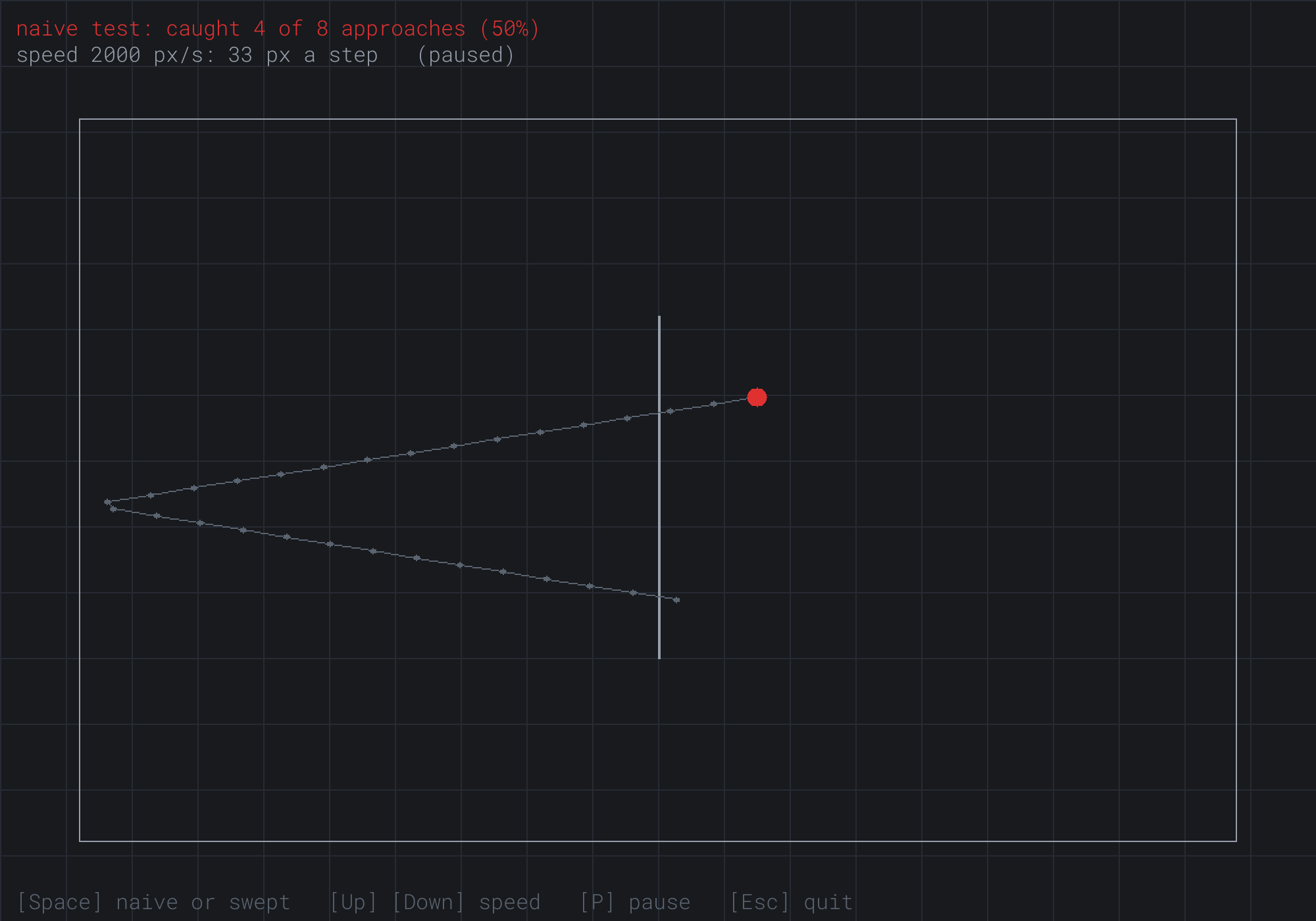
The test has caught 4 of the ball's 8 approaches. The trail shows two of the misses: it crosses the wall going left, low down, and again going right, higher up. In the second, the step ended with the ball's center 9 pixels past the wall, so its edge was 2 pixels clear. The test never saw the ball touch the wall.
Then try it, step by step:
- Slow it down. Press Down seven times, to 755 pixels a second, 13 pixels a step. A step now moves the ball 12.4 pixels across the wall, less than the band's 14, so some step always ends in the band. Every approach is caught.
- Speed it up. Press Up until the speed tops out at 5,000 pixels a second, 83 pixels a step. Now the naive test catches only about a third of the approaches.
- Sweep it. Press Space. The ball turns green, and the grown wall's faint outline appears. The count starts again, and now every approach is caught, at any speed.
- Watch the ends. Leave it running. Now and then, the ball meets one of the wall's ends. It usually bounces off at a new angle, since an end's normal points out from the end, not straight across. Its zigzag then takes a new slope.
The next image shows step 3, paused.
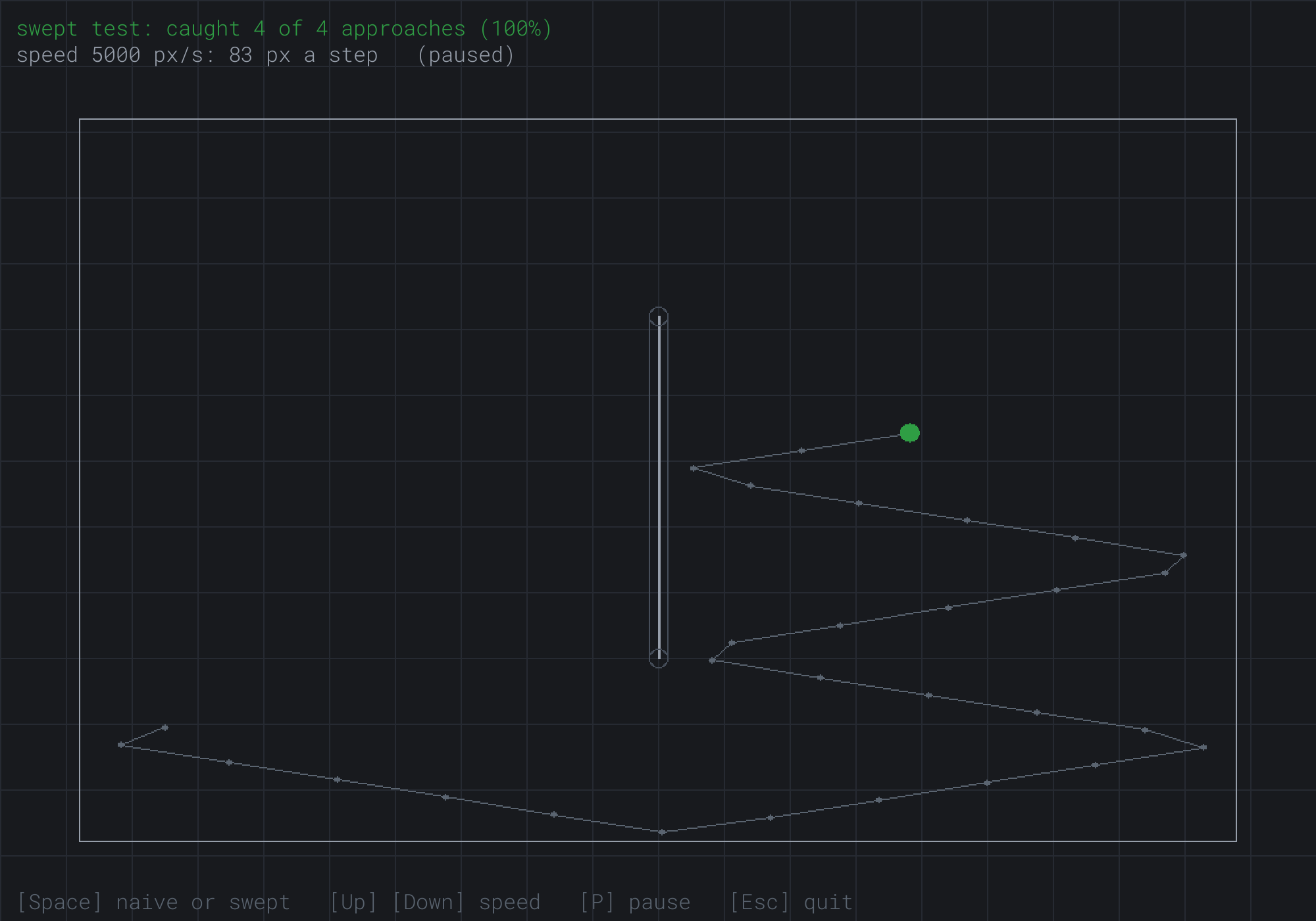
The swept test has caught 4 approaches of 4. The trail turns back twice beside the wall's right side, once near its middle and once only 4 pixels above its lower end. Yet the trail never touches the wall. It joins the ends of steps, and at 83 pixels a step, no step ended with the ball touching the wall. The bounces happened partway through steps, at the moments of first contact.
That's the demo's lesson. The naive test isn't wrong: it's blind to everything between the ends of steps. The swept test looks at the path itself, so no speed can outrun it.
FAQ
Q) Can the swept test ever miss?
A) Not in Bullet Time, where the count stays at 100%. In a game, it can, in three ways. It assumes that the wall stands still during the step, so a moving wall needs the relative velocity. A ball wedged in a narrow corner can need more bounces in one step than the loop allows. And a ball that starts a step already overlapping a wall, pushed in by something else, isn't stopped, since the test finds only where a ball first touches a wall from outside. Chapter 18 pushes overlapping shapes apart.
Q) Why not just make the walls thicker?
A) A thicker wall widens the band, so the naive test is safe up to a higher speed. A step can then cross as much as the ball's diameter plus the wall's thickness. That moves the problem, but doesn't remove it, and bullets are fast and small. Some games do it anyway, with a speed limit to match, and that's a fine answer when it suits the game.
Q) Doesn't a higher frame rate fix it?
A) It hides it. Smaller steps make tunneling rarer, until a slow frame comes along. The skeleton lets a frame last up to a twentieth of a second, and a step that long is 100 pixels at 2,000 pixels a second. It also makes the game's collisions depend on the player's machine, so it works for one player and fails for another. A swept test works the same everywhere.
Q) Why does the naive test's share jump around from one speed to another?
A) Because the ball's steps don't land at random places. The arena's size and the step's length set up a pattern of places that repeats, and some speeds happen to put more ends of steps in the band than others. The estimate from the step's length, 14 pixels over the step across the wall, is the share you'd see if the ends of steps fell at random. It gets the size right, but not the exact number.
Q) Isn't casting against every wall, every step, slow?
A) Against one wall, it's a few multiplications and a square root. Against a thousand, it adds up, and most of the walls are nowhere near the ball. Games rule those out first with a quick test, such as whether the box around the ball's move overlaps the box around a wall, and cast only against the few that pass. Chapter 19 shows how to find the nearby walls without checking them all.
Exercises
The first three exercises need only a pencil. The others change Bullet Time.
- Ray against circle (paper). A ray leaves
(0, 0)along(0.6, 0.8). Find b and c for the circle at(7, 1)with a radius of 5, and say what the ray does. Then do the same for radii of 4 and 13. - Slabs (paper). A ray leaves
(10, 0)along(-0.6, 0.8). Find the stretch of t it spends in each slab of the box from(2, 4)to(6, 8). Does it hit the box, and if so, where does it enter? - How fast is safe? (paper) A ball with a radius of 5 moves straight at a wall 4 pixels thick, in steps of a sixtieth of a second. What's the fastest speed at which the naive test can't miss it? What would it be with 144 steps a second?
- Show the contact (code). In
sweptStep, find how far through the step the ball was at its last contact, as a fraction: the distance it had moved, over the step's whole length. Show it in the readout. What range of values do you see? - Two walls (code). Add a second thin wall, from
(700, 150)to(760, 560), and draw it. GivesweptStepboth walls, and on each pass of its loop, cast against both grown walls and keep the nearer hit. Then watch the swept ball at top speed.
For the code exercises, work on a copy of the demo's folder, so that the original stays as the chapter describes it.
AI Exercise (Optional)
Fast bullets are where swept tests earn their keep. With an AI's help, you can turn this chapter's functions into a little shooting gallery, with bullets far too fast for a naive test. Open your AI chatbot of choice, and try a prompt like this:
"I have a C++ demo using SDL3, with a Vec2 struct that has dot, length, normalized and perp, and a function reflect(v, n). It also has rayCircle(O, d, C, r), which returns the distance along a ray, from O along the unit vector d, to where it first meets a circle, or -1 for a miss. And it has rayCapsule(O, d, A, B, r, normal), which does the same for the segment from A to B grown by r, and fills in the unit normal at the hit. Everything moves in fixed steps of 1/60 s. Please make a small shooting gallery in a 1000 by 700 window. A turret at the bottom middle aims at the mouse, and each click fires a bullet with a radius of 3, at 3,000 pixels a second. Five targets, circles with a radius of 15, slide left and right at different speeds across the top half, behind three short thin walls. Each step, sweep each bullet against the walls with rayCapsule, bouncing it off the first wall it hits and removing it at the second. Test it against each target as a ray against a circle with a radius of 18, using the bullet's velocity minus the target's. A hit removes the target and scores a point. Explain why the target test uses the bullet's velocity minus the target's."
That prompt names your functions and what they return, so the AI builds on them, rather than writing a physics engine of its own. It gives speeds that make the bullets 50 pixels a step, so without your tests, they really would pass through the targets. And it asks about the relative velocity, which is the part that's easiest to get wrong.
Then play it. Make the targets faster, and check that bullets still hit them. If a fast target seems to pass through a bullet's path, look at the target test, and see whether it uses the bullet's own velocity instead of the difference.
Summary
A test of where things are can't see what happens between steps. When a ball's step carries it farther across a thin wall than its diameter plus the wall's thickness, it can end one step short of the wall and the next past it. That's tunneling. At 2,000 pixels a second, Bullet Time's naive test catches only about 37% of its approaches. The fix is to test the path, as a ray. A ray meets a circle where |O + t × d - C|² is r², a quadratic whose roots are -b ± √(b² - c), for a unit direction d. Its discriminant is the radius squared, less the closest approach squared, and a negative c means the ray starts inside. A ray meets a box where it's in both slabs at once, from the later entry to the earlier exit. It meets a polygon at the nearest of its edges' hits, with the normal turned to face it. A ball against a wall is a point against the wall grown by the radius, a capsule of two sides and two end circles, and the first hit on it is the ball's first contact, with the normal for the bounce. After a bounce, the rest of the step goes in the new direction. Two moving things become one still and one moving, by the relative velocity. Bullet Time steps at a fixed sixtieth of a second, so its tunneling is the same on every screen, and its swept test caught every approach at every speed. Chapter 18 turns from finding collisions to responding to them: pushing shapes apart, sliding along walls, and bouncing.