
Detection tells you that two shapes touch, and since Chapter 16, how deep and which way. It doesn't do anything about it. A ball that's found inside a wall is still inside the wall. This chapter is the other half of collision: collision response, the part that pushes the ball back out, and then changes how it moves, so that it slides along the wall or bounces off it. It's where a game's world starts to feel solid.
Response is short to write, and easy to get subtly wrong. Get it wrong, and a player sticks to walls or sinks through floors. It jams in corners, or pops out of the far side of a wall it was pressed against. Each of those faults has a clear cause, and this chapter finds each one, with numbers. The tools are ones we already have: Chapter 13's closest points, Chapter 16's shortest push, and Chapter 10's bounce.
In this chapter, we will:
- Push a ball out of a wall, along the normal, by the depth
- See why a ball sunk past a wall's middle comes out of the far side
- Fix the velocity, so that the ball slides along a wall, or bounces off it
- Resolve several contacts at once, in corners where one pass isn't enough
- Split detection from response, with a contact that one finds and the other uses
- Build Walls and Slides, where a ball chases the mouse among walls and bumpers
We'll start with the push.
Pushing Out
Each step, the ball moves, and it may end the step sunk into a wall. The response's first job is to undo that, by moving the ball back out. It needs two things from detection: the direction out, which is the normal, and how far, which is the depth.
The Normal and the Depth
For a ball, Chapter 13's closest point gives both. Find the point on the wall that's nearest the ball's center. The line from there to the center is the way out, and normalized, it's the normal. The ball overlaps the wall when its center is less than its radius from that point, and the depth is the radius less that distance. Moving the ball by the normal times the depth puts its center exactly one radius from the closest point: just touching.
Take a ball with a radius of 16, under Walls and Slides' long wall, which runs from y = 120 down to y = 160. The ball's center is at (300, 170). The closest point on the wall is (300, 160), straight above the center and 10 away. So the normal is (0, 1), straight down, and the depth is 16 − 10, which is 6. Moving the ball down by 6 puts its center at (300, 176), 16 from the wall. The next image shows that ball, and another by the wall's corner.
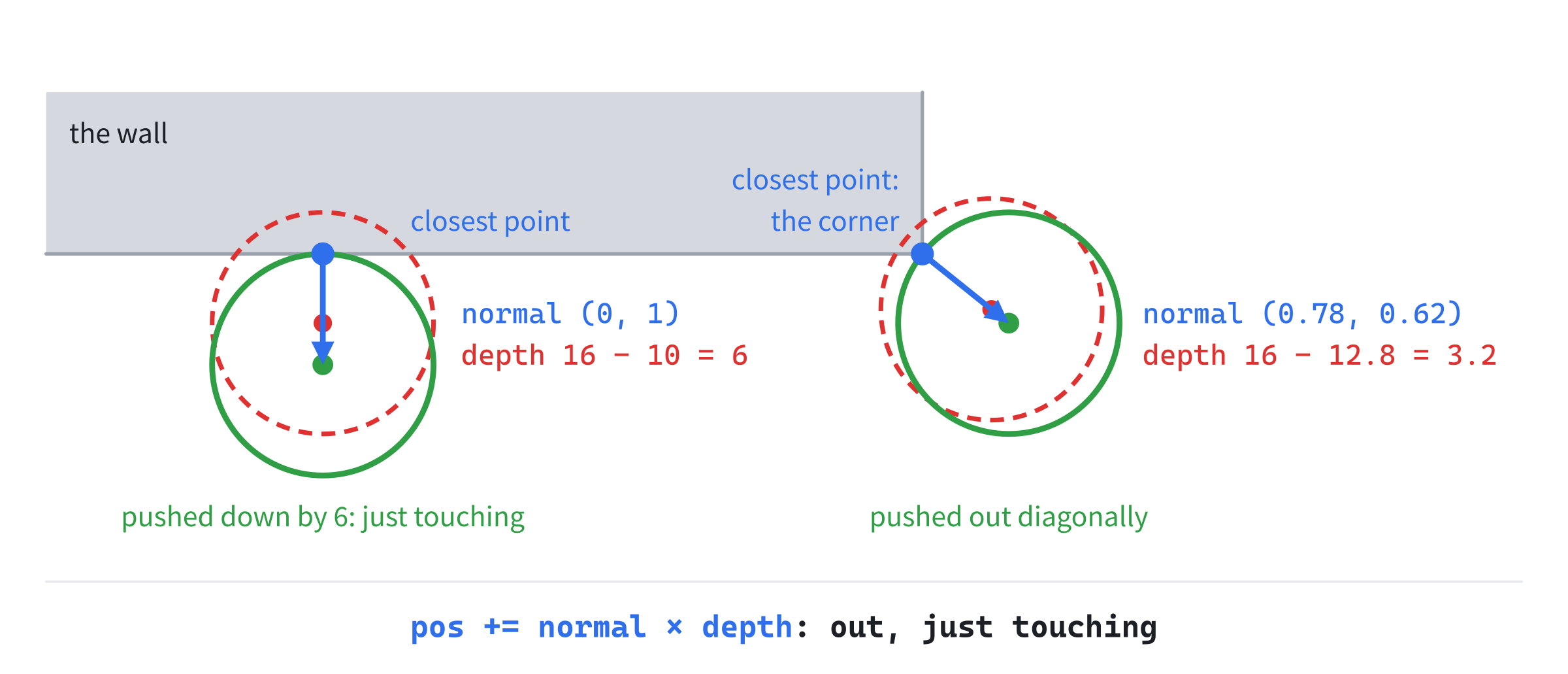
By a corner, the closest point is the corner itself, so the normal points diagonally away from it. The second ball's center is 10 across and 8 down from the corner, 12.8 away. So its normal is (0.78, 0.62), and its depth is 16 − 12.8, or 3.2. That's why a ball sliding along a wall rolls round its end. As the ball passes the corner, its normal turns from straight out of one face to straight out of the next, through every diagonal between.
The Shortest Push
The shortest way out of a convex wall is through the point of it that's nearest the ball. So this push is Chapter 16's minimum translation vector: its axis times its depth. Chapter 16's satPolygonCircle finds the same push for any convex wall, turned at any angle, and Walls and Slides uses it for all of its walls. The test's push is the way the first shape, the wall, must move, so the ball's way out is the opposite.
The two ways agree for a ball outside a wall. In the worked example, the wall's shadow on the y axis runs from 120 to 160, and the ball's runs from 154 to 186. One way out moves them apart by 186 − 120, which is 66. The other moves them apart by 160 − 154, which is 6: the same depth, along the same line. They part company only when the ball's center is inside the wall, which the closest point alone can't handle.
When the Center Is Inside
A ball can sink so far that its center is inside the wall. A fast ball can, and so can one put there by a click. Then the closest point in the solid wall is the center itself, at a distance of 0, which gives no direction at all. The way out is through the nearest face. That's what Chapter 13's boundary version of the closest point finds. The normal then points from the center toward the nearest point of the wall's edge, and the depth is the radius plus that distance. Chapter 16's test finds the same push, as the face with the least overlap.
Take a wall 40 pixels wide, and a ball of radius 16 whose center is 15 from the wall's left face, and so 25 from its right face. It goes out to the left, by 15 + 16, or 31. Now put the center 25 from the left face, past the wall's middle. The right face is nearer, so it goes out to the right. The next image shows both.
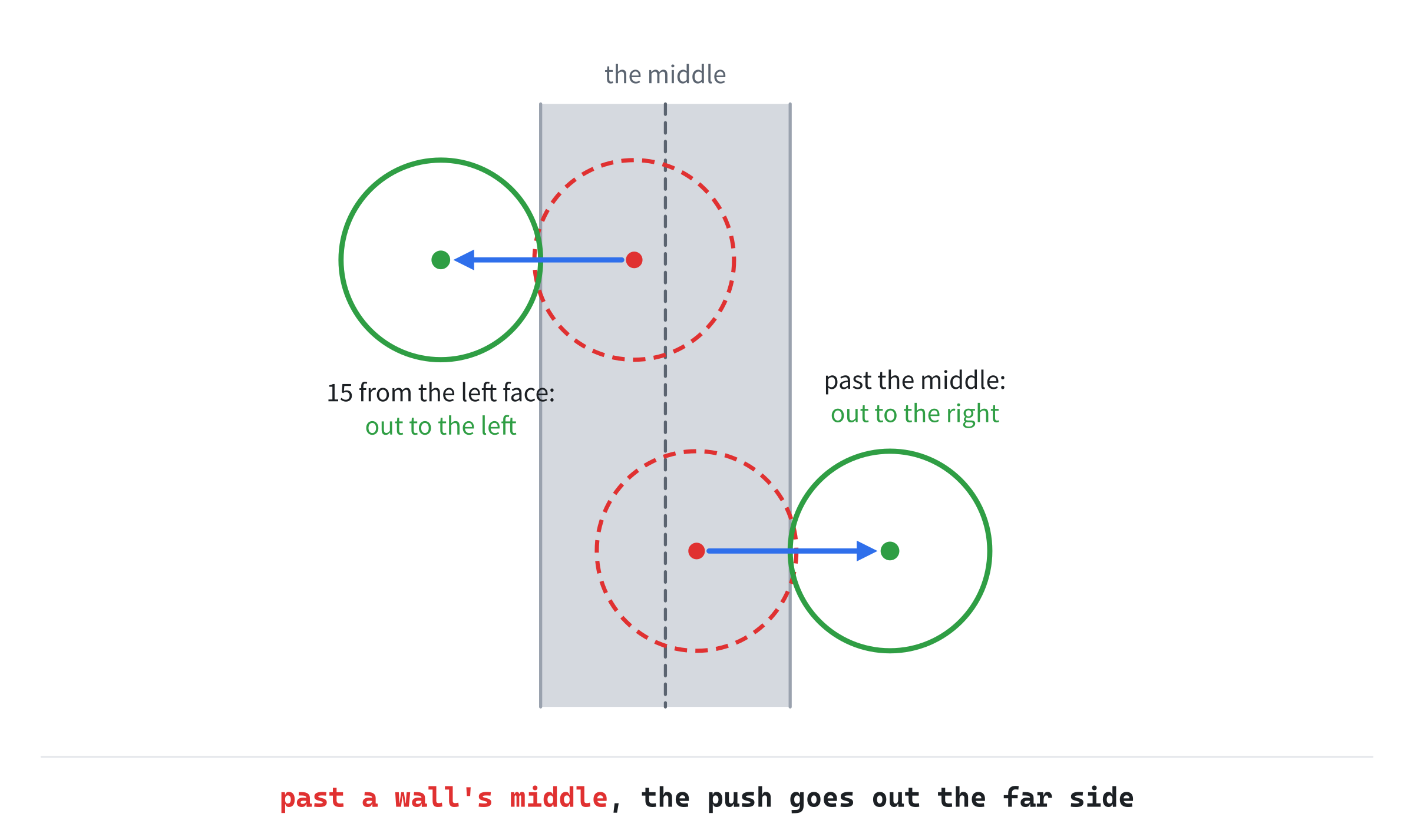
This is Chapter 13's jump. Across the line down the wall's middle, the nearest face changes sides, and the push swings from one way to the other. For a ball that came in from the left, out to the right is straight through the wall: tunneling, in another form. The cure is Chapter 17's. Keep every step short of a wall's middle, which means less than the ball's radius plus half the wall's thickness, or sweep the move. Walls and Slides' ball moves at most 650 pixels a second, which is 10.8 pixels a step. So it never gets its center inside a wall by moving, and only a click can put it there.
Fixing the Velocity
After the push, the ball's place is right, but its velocity isn't. The velocity still points into the wall, so the next step moves the ball back in, and the next push moves it back out.
Sliding
To slide, take away the part of the velocity that goes across the wall, and keep the part along it. Chapter 10 split a velocity this way, by its dot product with the unit normal. The part across is negative when the ball is moving into the wall, since the normal points out. Taking away the normal times that part leaves only the part along:
across = vel · n
vel = vel - n × across
Only a velocity going into the wall needs it. One that's already moving away, with a positive part across, is left alone.
Since the push moves the ball back out anyway, it's fair to ask why the velocity matters. It matters in three ways, and Walls and Slides lets you turn the fix off and see them:
- It slows the slide. The ball's speed is capped at 650 pixels a second. Pulled into a wall at 45 degrees, with the fix, it slides along at up to 631 pixels a second. Without the fix, its velocity is 650 at 45 degrees. Only 460 of that runs along the wall, and the other 460 presses into it, to be undone by the push every step.
- It makes walls sticky. The part going into the wall must be undone before the ball can leave. Walls and Slides' ball, pressed into a wall without the fix, takes about a quarter of a second to come away from it. With the fix, it leaves on the next step.
- Under gravity, it grows forever. Each step, Bouncy's gravity adds 15 pixels a second to the speed into a floor, and nothing takes it away. A ball of radius 16, resting on a floor 40 pixels thick, is falling at 2,160 pixels a second after 2.4 seconds. That's 36 pixels a step, enough to take its center to the floor's middle, and it drops through. With the fix, it rests for good.
The numbers come from simulating Walls and Slides' ball at the demo's fixed step. For the third, the ball has Bouncy's gravity and nothing else: the demo's drag and top speed would keep it far too slow to drop through.
Bouncing
A bounce reverses the part across, instead of taking it away. It also scales it by the restitution e, as Chapter 10 did. Only the part across is scaled. The slide and the bounce both fit one formula:
vel = vel - n × ((1 + e) × across)With e at 0, the formula takes the part across away once: a slide. With e at 1, it takes it away twice, which reverses it: a perfect bounce, Chapter 10's reflect. In between, the ball leaves more slowly than it came.
A worked example: a ball moving at (300, 400) hits a floor whose normal is (0, -1), pointing up. The part across is −400. With e at 0.5, the velocity loses the normal times 1.5 × −400. That's (0, -1) times −600, or (0, 600), which leaves (300, -200): the same 300 along the floor, and half the speed back up. Sliding instead leaves (300, 0). The next image shows both, and a common mistake.

The mistake is to reflect the whole velocity, then scale all of it by the restitution. That gives (150, -200). It bounces as high, but it loses half its speed along the floor too, which is friction, hidden in the bounce. Chapter 10 met the same mistake on Bouncy's slope.
Detection and Response
There's a line worth drawing here, since collision code that ignores it gets tangled. Detection finds facts: whether two shapes touch, which way is out, and how far. Response decides what to do about them. The facts go in a small struct of their own:
// What detection finds, for a response to use: whether a ball touches a
// shape, the unit normal pointing out of the shape toward the ball, and
// how far the ball has sunk in along it.
struct Contact
{
    bool touching;
    Vec2 normal;
    float depth;
};
Detection fills one in. For a wall, it's Chapter 16's test, with the push turned round:
// Detection for a ball against a convex wall, by Chapter 16's test, with
// the wall as the first shape. The test's axis is the way the wall would
// move out of the ball, so the ball's way out of the wall is the opposite.
Contact contactWall(const Circle& ball, const Polygon& wall)
{
    SatResult result = satPolygonCircle(wall, ball);
    if (!result.overlapping) return { false, { 0.0f, 0.0f }, 0.0f };
    return { true, -result.axis, result.depth };
}
For a round bumper, it's simpler. Two circles touch when their centers are no farther apart than their radii added together, and the way out runs straight from one center to the other:
// Detection for a ball against a round bumper. They touch when their
// centers are no farther apart than their radii added together. The
// normal runs from the bumper's center to the ball's, and the depth is how
// much nearer than that they are. Centers in the same place give no
// direction, so the ball goes straight right, as Chapter 13 chose.
Contact contactBumper(const Circle& ball, const Circle& bumper)
{
    Vec2 out = ball.center - bumper.center;
    float dist = out.length();
    float reach = ball.radius + bumper.radius;
    if (dist > reach) return { false, { 0.0f, 0.0f }, 0.0f };
    Vec2 normal = (dist > 0.0001f) ? out / dist : Vec2{ 1.0f, 0.0f };
    return { true, normal, reach - dist };
}
If the two centers are in the same place, there's no line between them, so the ball is pushed straight right. That's the choice Chapter 13's closest point on a circle made.
The response takes a contact and acts on it:
// The response to a contact. The ball moves out along the normal by the
// depth, so that it just touches. Then the part of its velocity going
// into the shape is taken away, times 1 plus the restitution: 0 leaves the
// ball sliding along the surface, and 1 sends it back out as fast as it
// went in. Walls and Slides can skip the velocity, to show what it's for.
void respond(Vec2& pos, Vec2& vel, const Contact& c, float restitution,
             bool fixVelocity)
{
    pos += c.normal * c.depth;
    if (!fixVelocity) return;
    float across = vel.dot(c.normal);
    if (across < 0.0f) vel -= c.normal * ((1.0f + restitution) * across);
}
The push and the formula are this chapter's. The fixVelocity switch is only for the demo, so that you can turn the fix off and see what it does.
Keeping the two apart pays off quickly. The same contact can drive quite different responses. In Walls and Slides, walls get a restitution of 0, so the ball slides along them. Bumpers get 0.9, so it bounces off them. In a game, a coin's contact would make the coin vanish, and a spike's would hurt the player, with no push at all. None of that changes the detection code, which never needs to know what a wall is for.
Several Contacts at Once
A ball can touch two walls in the same step, in a corner. The simple way to handle it is to respond to each contact in turn: the first wall's push, then the second's.
Corners
Where two walls meet at a right angle, that's enough. Their normals are at right angles too, so the push out of one wall moves the ball along the other, neither into it nor out of it. After both pushes, the ball is clear of both walls.
In a sharper corner, it isn't. In a wedge, the push out of one arm moves the ball toward the other, and sinks it deeper into that arm by the push times the cosine of the angle between the arms. In a wedge 40 degrees wide, a push of 10 out of one arm sinks the ball 10 × cos 40°, or 7.7, deeper into the other. The next image follows a ball sunk 10 into each wall, through one pass, at a right angle and in that wedge.
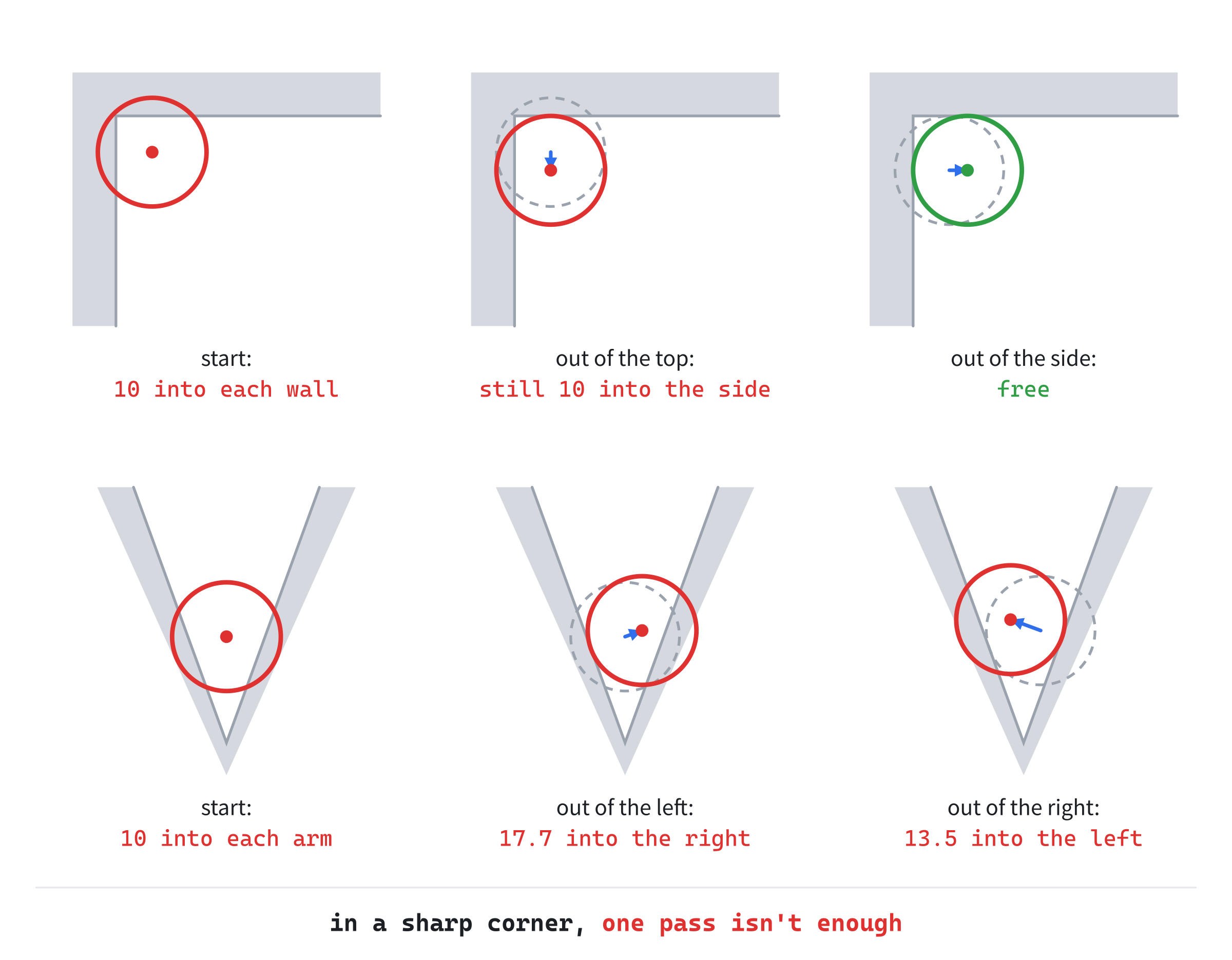
In the wedge, the ball ends the pass 13.5 into the first arm, deeper than it started.
Passes
The fix is to go over every contact again, and again. After the first pass, each pass shrinks what's left by the same share. In the 40-degree wedge, that's the square of 0.77, which is about 0.59. A few passes leave too little to see, though never quite nothing. Physics engines do the same, with a set number of passes each step, since a ball truly wedged in a corner may never come out exactly.
Walls and Slides makes eight passes, and P switches to one. Its wedge is narrower, 20 degrees wide, so each push sinks the ball 94% of its own length into the other arm. Pulled down into it with one pass, the ball sits 9.78 pixels into one arm. With eight, it's 0.18. The order matters as well. With one pass, what's left is always in the wall the pass resolved first.
Building Walls and Slides
Walls and Slides puts a blue ball among grey walls and amber bumpers. The ball chases the mouse, with momentum, so it presses into whatever lies between it and the mouse. It slides along the walls, and bounces off the bumpers. V turns the fix of the velocity off and on, P switches between one pass and eight, and a click puts the ball where the mouse is.
Get the code. The complete project is in the
Walls and Slidesfolder of the book's repository.
Walls and Slides starts from the skeleton, with its timing, which feeds the fixed step, and its mouse. It reuses drawGrid, fillCircle and drawArrow, with fmt2 and setColor. It also takes Chapter 11's corners. From Chapter 16, it takes the separating axis test for a polygon and a circle, with the functions it calls, and placed. Its Vec2.h is Bullet Time's, since this chapter adds nothing to it. Here are its includes, its colors and its constants:
#include <algorithm>
#include <cmath>
#include <string>
#include <vector>
#include "Vec2.h"

constexpr int WINDOW_WIDTH  = 1000;
constexpr int WINDOW_HEIGHT = 700;

constexpr SDL_Color TEXT = { 235, 238, 242, 255 };
constexpr SDL_Color GREY = { 90, 100, 112, 255 };
constexpr SDL_Color BLUE = { 47, 111, 235, 255 };
constexpr SDL_Color AMBER = { 232, 89, 12, 255 };
constexpr SDL_Color SILVER = { 150, 158, 170, 255 };
constexpr SDL_Color WALL = { 104, 112, 124, 255 };

// The simulation's fixed step, a sixtieth of a second, and the ball's
// radius.
constexpr float STEP = 1.0f / 60.0f;
constexpr float RADIUS = 16.0f;

// How the ball chases the mouse: its acceleration, in pixels a second,
// every second; its drag, as in Chapter 10; and its top speed, in pixels
// a second.
constexpr float ACCEL = 2000.0f;
constexpr float DRAG = 2.2f;
constexpr float MAX_SPEED = 650.0f;

// The bumpers' restitution: the ball leaves them at 90% of the speed it
// came in with, across their surface.
constexpr float BOUNCE = 0.9f;
In the preceding code, the ball accelerates toward the mouse at 2,000 pixels a second every second, up to a top speed of 650. Its drag is Chapter 10's kind, a share of the speed lost each second, taken exactly with std::exp. The bumpers' restitution of 0.9 sends the ball off them almost as fast as it came.
Next come Chapter 11's box, circle and polygon:
// An axis-aligned box: its smallest and largest corners. Neither of min's
// coordinates is ever more than max's.
struct AABB
{
    Vec2 min;
    Vec2 max;
};

// A circle: its center and its radius.
struct Circle
{
    Vec2 center;
    float radius;
};

// A polygon: its corners, in order around its edge, each once.
struct Polygon
{
    std::vector<Vec2> points;
};
Then come Chapter 16's shadow and result. The result's comment now says "the first shape", since here the first shape is a wall, where Chapter 16's was the box:
// A shape's shadow on an axis: the least and the most of its points' dot
// products with the axis.
struct Interval
{
    float min;
    float max;
};

// What the separating axis test found. When the shapes overlap, axis is
// the way the first shape must move to get out, and depth is how far.
// When they're apart, axis is the one with the gap, and depth is the
// gap's width.
struct SatResult
{
    bool overlapping;
    Vec2 axis;
    float depth;
};
The Contact struct comes next in the file, as Detection and Response showed it.
Filling the Walls
The walls are convex polygons, and SDL fills rectangles but not polygons. So one more function fills a convex polygon, a row of pixels at a time, as Chapter 3's fillCircle fills a circle:
// Fill a convex polygon, a row of pixels at a time, as fillCircle fills a
// circle. Each row runs between the two places where it crosses the
// polygon's edges, found as Chapter 15's crossing test found them.
void fillConvex(SDL_Renderer* renderer, const Polygon& poly)
{
    float top = poly.points[0].y;
    float bottom = top;
    for (const Vec2& p : poly.points)
    {
        top = std::min(top, p.y);
        bottom = std::max(bottom, p.y);
    }
    size_t n = poly.points.size();
    for (float y = std::ceil(top); y <= bottom; y += 1.0f)
    {
        float left = 1e9f;
        float right = -1e9f;
        for (size_t i = 0; i < n; ++i)
        {
            Vec2 a = poly.points[i];
            Vec2 b = poly.points[(i + 1) % n];
            if ((a.y > y) != (b.y > y))
            {
                float x = lerp(a.x, b.x, inverseLerp(a.y, b.y, y));
                left = std::min(left, x);
                right = std::max(right, x);
            }
        }
        if (left <= right) SDL_RenderLine(renderer, left, y, right, y);
    }
}
In the preceding code, the first loop finds the polygon's top and bottom. Then each row of pixels between them is a line, from the leftmost place where the row crosses an edge to the rightmost. An edge crosses the row when one end is below it and the other isn't, and lerp and inverseLerp find where, just as in Chapter 15's crossing test. A row crosses a convex polygon's edges in exactly two places, so the leftmost and rightmost crossings are the row's two ends.
After the functions this chapter has shown, one more measures what the passes leave, for the readout:
// How deep the ball still is in anything, after the response: the deepest
// of its contacts, or 0 if it touches nothing.
float deepestOverlap(Vec2 pos, const std::vector<Polygon>& walls,
                     const std::vector<Circle>& bumpers)
{
    float deepest = 0.0f;
    for (const Polygon& wall : walls)
    {
        Contact c = contactWall({ pos, RADIUS }, wall);
        deepest = std::max(deepest, c.depth);
    }
    for (const Circle& bumper : bumpers)
    {
        Contact c = contactBumper({ pos, RADIUS }, bumper);
        deepest = std::max(deepest, c.depth);
    }
    return deepest;
}
It asks detection again, after the response, and keeps the deepest overlap it finds.
The State
The state goes after the font is loaded:
// The walls, each a convex polygon: a long wall made of two boxes, a
// wall down from its left end, a narrow wedge of two thin boxes, each
// turned 10 degrees, and four boxes just outside the window's edges.
const std::vector<Vec2> arm = { { -15, -140 }, { 15, -140 },
                                { 15, 140 }, { -15, 140 } };
const std::vector<Polygon> walls = {
    { corners({ { 220, 120 }, { 440, 160 } }) },
    { corners({ { 440, 120 }, { 660, 160 } }) },
    { corners({ { 220, 160 }, { 260, 440 } }) },
    placed(arm, { 776, 462 }, -0.1745f),
    placed(arm, { 824, 462 }, 0.1745f),
    { corners({ { -100, -100 }, { 1100, 0 } }) },
    { corners({ { -100, 700 }, { 1100, 800 } }) },
    { corners({ { -100, 0 }, { 0, 700 } }) },
    { corners({ { 1000, 0 }, { 1100, 700 } }) },
};

// The bumpers, which the ball bounces off.
const std::vector<Circle> bumpers = { { { 560, 330 }, 40.0f },
                                      { { 400, 540 }, 34.0f },
                                      { { 640, 560 }, 30.0f } };

// The ball. Then the settings: whether the response fixes the
// velocity, and how many passes it makes over the walls. And the time
// not yet stepped.
Vec2 pos = { 120, 350 };
Vec2 vel = { 0, 0 };
bool fixVelocity = true;
int passes = 8;
float accumulator = 0.0f;
In the preceding code, the boxes come from Chapter 11's corners, which lists a box's four corners in order around it, and the braces make each list a Polygon. The long wall is two boxes side by side, which meet at x = 440. The wedge's arms are one thin box, 30 by 280, placed twice by Chapter 16's placed. They're turned 0.1745 radians, or 10 degrees, one each way, and their lower ends meet at about (800, 600). Four more boxes sit just outside the window's edges, so that the ball slides along those too. The ball starts at rest at (120, 350), with the fix on and eight passes.
The Events
V and P change the settings, and a click moves the ball:
// Events: quitting, and the keys and clicks that happen once.
SDL_Event event;
while (SDL_PollEvent(&event))
{
    if (event.type == SDL_EVENT_QUIT) running = false;
    else if (event.type == SDL_EVENT_KEY_DOWN)
    {
        if (event.key.key == SDLK_ESCAPE) running = false;
        else if (event.key.key == SDLK_V) fixVelocity = !fixVelocity;
        else if (event.key.key == SDLK_P)
            passes = (passes == 1) ? 8 : 1;
    }
    else if (event.type == SDL_EVENT_MOUSE_BUTTON_DOWN &&
             event.button.button == SDL_BUTTON_LEFT)
    {
        // A click puts the ball where the mouse is, at rest.
        pos = { event.button.x, event.button.y };
        vel = { 0.0f, 0.0f };
    }
}
In the preceding code, a click puts the ball at the mouse and stops it, even inside a wall. That's how to try the inside case.
Each Frame's Work
After the mouse is read, the ball takes its steps:
// The fixed step, as in Bullet Time: the frame's time goes into the
// accumulator, and the ball takes as many whole steps as it holds.
Vec2 mouse = { mx, my };
accumulator += dt;
while (accumulator >= STEP)
{
    accumulator -= STEP;

    // The ball's move: toward the mouse, with drag and a top speed.
    Vec2 toMouse = mouse - pos;
    if (toMouse.length() > 4.0f)
        vel += toMouse.normalized() * (ACCEL * STEP);
    vel *= std::exp(-DRAG * STEP);
    vel = vel.truncated(MAX_SPEED);
    pos += vel * STEP;

    // Detection, then response, for every wall and every bumper,
    // in as many passes as the setting asks for.
    for (int pass = 0; pass < passes; ++pass)
    {
        for (const Polygon& wall : walls)
        {
            Contact c = contactWall({ pos, RADIUS }, wall);
            if (c.touching) respond(pos, vel, c, 0.0f, fixVelocity);
        }
        for (const Circle& bumper : bumpers)
        {
            Contact c = contactBumper({ pos, RADIUS }, bumper);
            if (c.touching) respond(pos, vel, c, BOUNCE, fixVelocity);
        }
    }
}
In the preceding code, the fixed step works as Bullet Time's did, so the numbers in this chapter come out the same at any frame rate. Each step, the ball accelerates toward the mouse, unless it's within 4 pixels of it. Then the drag takes its share, Chapter 9's truncated caps the speed, and the ball moves. Then come detection and response: every wall, then every bumper, in as many passes as the setting asks for. Each contact is answered as soon as it's found, so the next detection sees where the last response put the ball.
Drawing
After the grid come the walls, the bumpers and the ball:
// The walls, and the bumpers.
setColor(renderer, WALL);
for (const Polygon& wall : walls) fillConvex(renderer, wall);
setColor(renderer, AMBER);
for (const Circle& bumper : bumpers)
    fillCircle(renderer, bumper.center, bumper.radius);

// The ball, with an arrow for its velocity: how far it would go in
// 0.15 seconds.
setColor(renderer, BLUE);
fillCircle(renderer, pos, RADIUS);
if (vel.length() > 20.0f)
    drawArrow(renderer, pos, pos + vel * 0.15f, TEXT);
The arrow shows the ball's velocity: where it would be in 0.15 seconds. It's left out at very low speeds, when it would be too short to see. Last come the readout and the controls:
// The readout: the ball's speed and the deepest overlap the passes
// left, then the settings.
float deepest = deepestOverlap(pos, walls, bumpers);
drawText(renderer, font,
         "speed " + std::to_string(std::lround(vel.length())) +
         " px/s   deepest overlap left " + fmt2(deepest) + " px",
         12, 10, TEXT);
drawText(renderer, font,
         std::string("velocity fix ") + (fixVelocity ? "on" : "off") +
         "   passes " + std::to_string(passes),
         12, 30, SILVER);
drawText(renderer, font,
         "[Click] place the ball   [V] velocity fix   [P] passes   "
         "[Esc] quit", 12, WINDOW_HEIGHT - 26, GREY);
The first line gives the ball's speed and the deepest overlap the passes left, and the second gives the settings.
Trying It Out
Run the demo, and put the mouse above the long wall, to the right of it. The ball runs into the wall's underside, and slides along it toward the mouse. The next image shows the ball after two-thirds of a second, having started at (276, 200), just right of the wall below the long one, with the mouse at (700, 60).
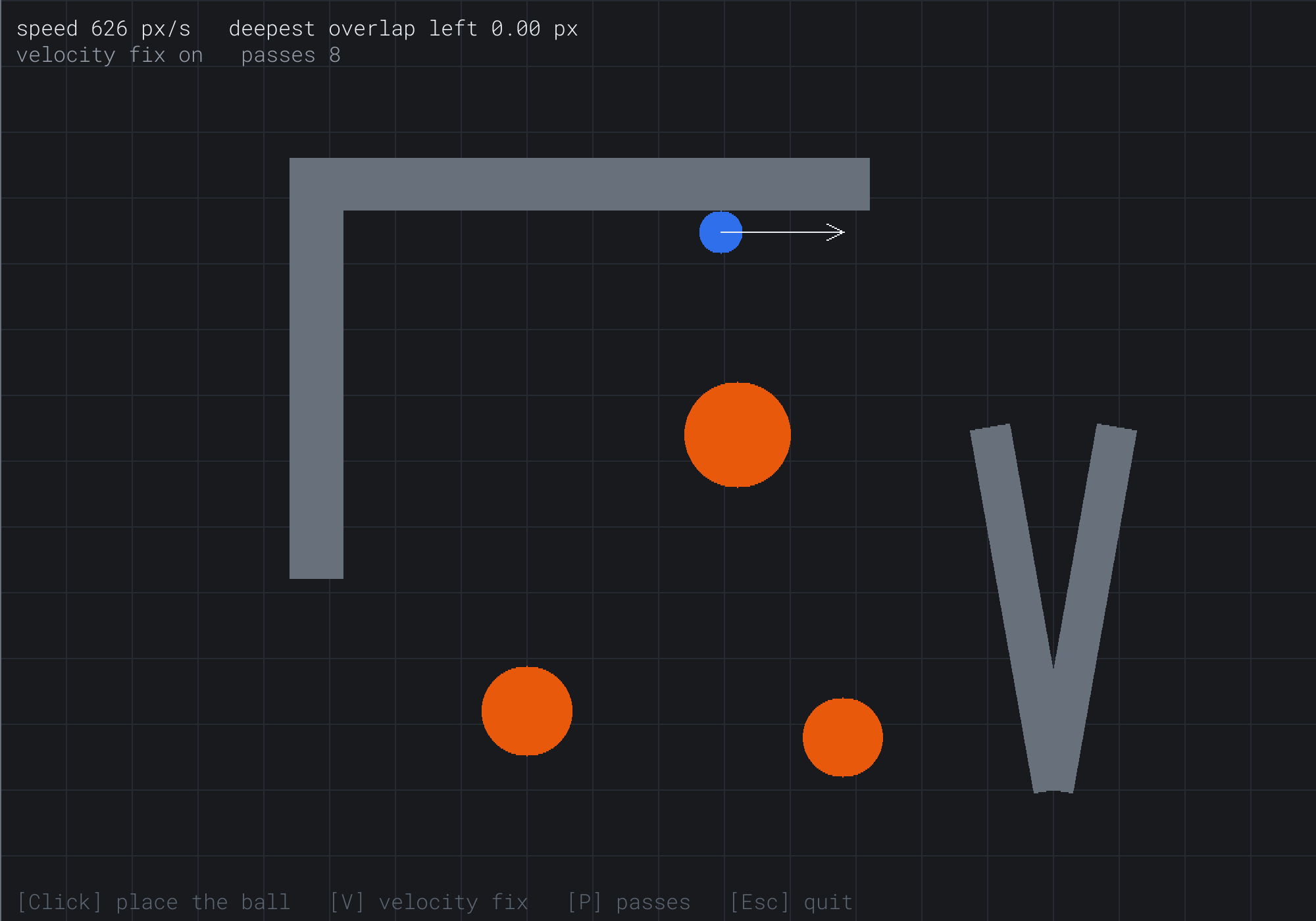
The arrow lies along the wall, and the readout shows 626 pixels a second, with no overlap left. The ball has crossed the place where the wall's two boxes meet, at x = 440, without a bump.
Then try it, step by step:
- Take the fix away. Press V, and slide the ball down the right side of the wall below the long one: put the mouse to the left of that wall, a little below the ball. The readout's speed now climbs faster than the ball slides, since part of the velocity points into the wall. When the ball comes to rest, level with the mouse, the readout still says 650 pixels a second, and the arrow points straight into the wall. Then move the mouse well to the right. The ball clings to the wall for about a quarter of a second before it leaves.
- Bounce. Press V again, and send the ball at a bumper. It comes off fast, at 90% of its speed across the bumper. With the fix off, it doesn't bounce at all, but squeezes round the bumper, since only the push acts.
- Round a corner. Slide the ball along the long wall's underside, past its right end. The ball curls round the corner, as its normal turns.
- Push it in. Click inside the wall below the long one, a little left of its middle, at about x = 235. The ball pops out to the left. Click a little right of its middle, at about x = 245, and it pops out to the right.
- Wedge it. Click above the wedge, at about
(800, 300), to put the ball there, and move the mouse below the wedge's tip. The ball falls into the wedge, and with eight passes, it settles there, touching both arms. Press P for one pass, and it sinks into the left arm, by almost 10 pixels.
The next image shows step 5, with the ball pulled down into the wedge, at one pass.
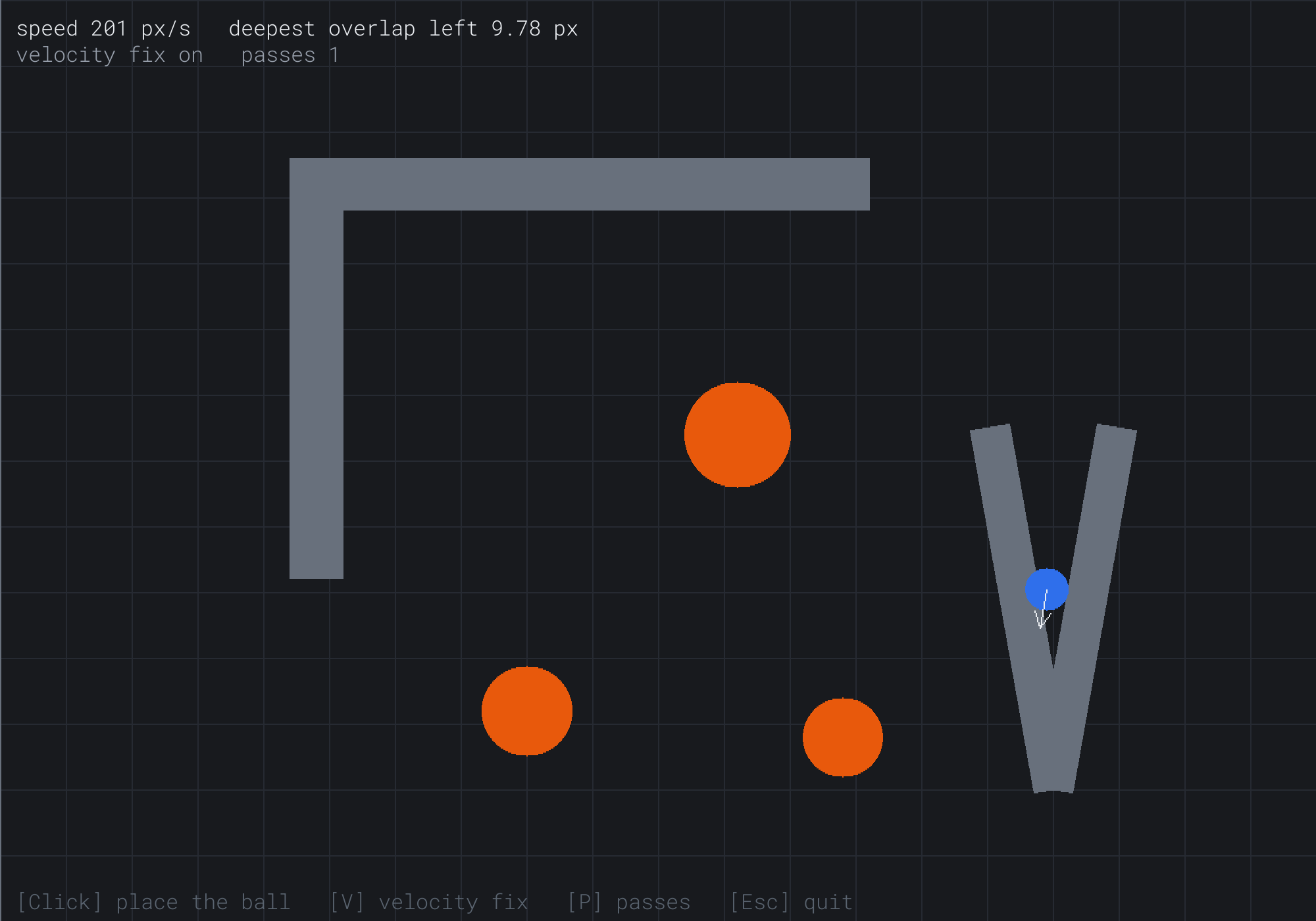
The ball is 9.78 pixels into the left arm, which each pass resolves first, and it doesn't move. Yet the readout gives its speed as 201 pixels a second. That's velocity the pass takes out along one arm's normal and puts back along the other's, and the ball goes nowhere with it. With eight passes, the overlap left is 0.18 pixels, and the speed reads 19.
That's the whole of response. Push out along the normal, fix the velocity, and go over the contacts again where they fight each other.
FAQ
Q) Why does a player snag on the join between two boxes?
A) A ball barely does: Walls and Slides' long wall is two boxes, and its ball crosses the join smoothly. A box-shaped player does. It sinks a little into the floor each step, under gravity, and at a join, its front corner also sinks a hair into the next box's side. Chapter 16's test then finds the shortest way out sideways, back against the player's walk, and the player stops dead. The fixes are to merge the boxes into one wherever you can, to round the player's corners, or to ignore pushes that point back into a neighboring box.
Q) How do I give a wall friction, so that sliding slows down?
A) Shrink the part along the wall too, as Bouncy's friction did. After the part across is taken away, scale what's left down a little, by an amount that grows with how hard the ball was pressing in, which is the part across that the response took away. A wall with friction then slows a ball that rubs along it, and leaves alone a ball that only grazes it.
Q) How do I know the player is standing on something?
A) Keep the contacts the response used. If one of them had a normal pointing mostly up, the player was standing on it this step. Testing again afterward is less reliable. The push leaves the player exactly touching, which in floats means a hair either side. A test that's a hair off then says "standing" on some steps and "falling" on others, and a jump works only half the time. If you must test again, allow a small gap, such as a hundredth of a pixel.
Q) When two moving objects collide, which one gets pushed?
A) Both, in a share that suits the game. Two balls of the same weight are usually pushed apart by half the depth each, and each has its velocity fixed. A heavy object should move less than a light one, and Chapter 20 shares the push and the bounce by mass.
Exercises
The first three exercises need only a pencil. The others change Walls and Slides.
- Push out (paper). A ball with a radius of 10 has its center at
(5, 8). A floor's surface runs along y = 15, with the floor below it. Find the closest point, the normal and the depth, and where the push leaves the ball. - Slide and bounce (paper). A body moving at
(4, 4)meets a wall whose normal is(0, -1). Find its velocity after a slide, and after a bounce with a restitution of 0.5. Then find what reflecting the whole velocity and scaling it by 0.5 would give. - A sharper corner (paper). A ball is sunk 2 pixels into each of two walls that meet at 60 degrees, so pushing it out of one sinks it into the other by half the push. One pass resolves the first wall, then the second. How deep is it in the first wall after one pass? After two?
- Show the contacts (code). In the last pass of each step, draw each contact's normal as an arrow, from the point where the ball touches. Then watch the normals turn as the ball rounds a corner.
- Kickers (code). Make the bumpers into pinball kickers. After a bounce, if the ball is leaving a bumper at less than 500 pixels a second across it, speed that part up to 500.
For the code exercises, work on a copy of the demo's folder, so that the original stays as the chapter describes it.
AI Exercise (Optional)
Detection that only finds facts is easy to reuse, since each kind of thing can respond in its own way. With an AI's help, you can turn Walls and Slides into a small top-down dungeon. It has walls and bouncy mushrooms, and a key for a locked door. Open your AI chatbot of choice, and try a prompt like this:
"I have a C++ demo using SDL3, with a Vec2 struct, a Polygon struct holding a std::vector of Vec2 corners, and a Circle struct with a center and a radius. Its detection functions, contactWall(ball, wall) and contactBumper(ball, bumper), return a Contact with a bool touching, a unit normal pointing out of the shape, and a depth. Its response, respond(pos, vel, contact, restitution, true), pushes the ball out along the normal by the depth, and takes away the part of its velocity going into the shape, times 1 plus the restitution. Everything moves in fixed steps of 1/60 s. Please make a small top-down dungeon in a 1000 by 700 window. The player is a ball with a radius of 14, moved with W, A, S and D, at up to 300 pixels a second. Build three rooms from box walls, with doorways between them. Put a key, a small circle, in the first room, and a locked door, a box across a doorway, between the second and third. Add two mushrooms, circles that the player bounces off with a restitution of 1.2. Use the same detection for every wall, the door, the key and the mushrooms, but respond to each in its own way: the walls and the door slide the player, the mushrooms bounce it, and the key vanishes when touched, which opens the door. Resolve the walls in four passes. Explain why the key's contact needs no push at all."
That prompt describes your detection and your response, and what each one returns, so the AI builds on them, rather than writing a physics engine of its own. It asks for one detection for everything, with a response for each kind of thing, which is this chapter's line between the two. And a restitution of 1.2 makes the mushrooms give back more speed than they take, which is fun, and which a real bounce never would.
Then play it. Run along a wall into a doorway's corner, and watch the player roll round it. If the player jitters in a narrow spot, try more passes, and see whether it settles.
Summary
Collision response starts where detection stops. The ball is pushed out along the normal by the depth, so that it just touches. For a ball, the normal runs from the wall's closest point to the ball's center, and the depth is the radius less their distance. That's Chapter 16's minimum translation vector, and Chapter 16's test finds it for any convex wall. A center inside a wall goes out through the nearest face, so a ball sunk past a wall's middle comes out of the far side, which a short enough step or a swept test prevents. Then the velocity is fixed. Taking away its part across the wall makes the ball slide, and reversing that part, scaled by the restitution, makes it bounce: vel - n × ((1 + e) × across) does both. Without the fix, the ball slides more slowly under a speed cap, sticks to walls, and under gravity falls through a floor after 2.4 seconds. Detection finds the facts, in a Contact, and response decides what to do with them. So the same contact can slide a ball, bounce it or open a door. Several contacts are resolved in turn, in passes. One pass frees a ball from a right-angle corner, but not from a sharp wedge, where each push sinks it into the other wall. Walls and Slides showed every case, and with it, Part 4 is complete. Part 5 begins with a cost the book has ignored so far, that of testing every pair of shapes, and Chapter 19 tests ten thousand balls without doing so.