
Chapter 30's camera sat on the z axis, looking down -z, and its view matrix was a single move. That was enough for studying projection, but it's no camera. A real camera stands anywhere and looks anywhere: down from a crane, up from the floor, or round to follow a player. This chapter builds the matrix that says where a camera stands and which way it looks, the view matrix, and flies it with the mouse and the keys.
The idea is Chapter 27's, one dimension up. A camera's view is its placement undone. In 3D, the placement is a turn and a move, and undoing the turn is cheap, since a turn's inverse is its transpose. The recipe that builds the view from an eye, a target and a hint of which way is up is called look-at, and nearly every 3D program has one. This chapter builds it, turns two angles from the mouse into a direction, finds where the up hint fails, and clips the lines that cross behind the camera.
In this chapter, we will:
- Describe a camera by its place and its own three axes
- See the view matrix as the camera's placement undone
- Show that a turn's inverse is its transpose
- Build a look-at matrix from an eye, a target and an up hint
- Turn a yaw and a pitch into a direction, and fly with the keys
- See where the up hint fails, and why the pitch is limited
- Clip lines at the near plane
- Build Fly Camera, a flight through a wireframe world
We'll start with where a camera is.
The Camera's Placement
A Place and Three Axes
A camera needs a place, its eye, and a way to face. The way to face is easiest to hold as the camera's own three axes, seen from the world: its right, its up and its back. In view space, those are its x, y and z axes, since the camera looks down its own -z. Call the right s, for side, the up u, and the back b. The back is -f, where f is forward, the way the camera looks. Each of the three is 1 long, and each is at right angles to the other two.
Chapter 29 found that a turn's columns are where it sends the axes. So the camera's turn is the matrix R whose columns are s, u and b, which sends x to s, y to u and z to b. The camera's whole placement is that turn, then a move to the eye:
C = T(eye) RThe placement C takes a point from view space into the world. A point 10 in front of the camera, (0, 0, -10) in view space, is turned to 10 along f, and then moved to the eye.
The View Is the Placement Undone
Drawing needs the opposite: every point of the world in view space, where the projection can take it. That's C's inverse, the camera's placement undone. Chapter 26 found that the inverse of a product is the product of the inverses, in reverse order:
V = R⁻¹ T(-eye)So the view moves the world by -eye, putting the eye at the origin, and then undoes the turn. Undoing the move is easy. Undoing the turn would seem to need the inverse of a 3 by 3 block, which this book has never built. But a turn has a short cut.
A Turn's Inverse Is Its Transpose
The transpose of a matrix is its numbers with the rows and the columns swapped: row i of the transpose is column i of the matrix. So the rows of Rᵀ are s, u and b. Now multiply Rᵀ by R. Each number of the product is a row of Rᵀ dotted with a column of R, and those are the camera's axes, dotted in pairs:
| s·s  s·u  s·b |   | 1  0  0 |
| u·s  u·u  u·b | = | 0  1  0 |
| b·s  b·u  b·b |   | 0  0  1 |
An axis dotted with itself is 1, since it's 1 long. Dotted with another axis, it's 0, since they're at right angles. So Rᵀ R is the identity, which means Rᵀ undoes R. A turn's inverse is its transpose, with no division and no determinant. That's true of every turn, since every turn keeps the axes 1 long and at right angles. So the view is:
V = Rᵀ T(-eye)Its 3 by 3 block is Rᵀ, with the camera's axes as its rows. The move puts in the fourth column each of those rows dotted with -eye: -s·eye, -u·eye and -b·eye, which is f·eye. So each row of the view asks how far a point is along one of the camera's axes, measured from the eye. That's all a view matrix is.
Look-At
The Camera's Axes
A camera is usually aimed rather than turned: put the eye here, and look at that. Look-at builds the three axes from an eye, a target to look at, and an up hint. The hint is roughly which way is up, usually the world's (0, 1, 0). Forward is the way from the eye to the target, normalized. Right must be at right angles to forward and to up, which is what Chapter 28's cross product gives. The hint isn't usually at right angles to forward, since a camera looking down a little has its true up leaning forward. So a second cross product, of right and forward, gives the true up. The next image shows the three.

A normalized difference and two cross products make all three axes. Right is normalized, since f × up is only as long as the sine of the angle between them. The true up needs no normalizing, since s and f are both 1 long and at right angles, so their cross product is 1 long too.
The Matrix
The last builder in Mat4.h, after perspective, finds the three axes and builds the view from them:
// A view matrix, for a camera at eye looking toward target (Chapter 31).
// The up vector is a hint for which way is up, such as the world's
// (0, 1, 0). The camera's own axes are right, s, a true up, u, and back,
// -f. The view is the camera's placement undone: a move by -eye, then
// the turn transposed, so its rows are the axes.
static Mat4 lookAt(Vec3 eye, Vec3 target, Vec3 up)
{
    Vec3 f = (target - eye).normalized();
    Vec3 s = f.cross(up).normalized();
    Vec3 u = s.cross(f);
    Mat4 r;
    r.m[0][0] = s.x;
    r.m[0][1] = s.y;
    r.m[0][2] = s.z;
    r.m[1][0] = u.x;
    r.m[1][1] = u.y;
    r.m[1][2] = u.z;
    r.m[2][0] = -f.x;
    r.m[2][1] = -f.y;
    r.m[2][2] = -f.z;
    r.m[0][3] = -s.dot(eye);
    r.m[1][3] = -u.dot(eye);
    r.m[2][3] = f.dot(eye);
    return r;
}
Its rows are s, u and -f, the transpose's rows. Its fourth column is each axis dotted with -eye, as the move made it. There's no product and no general inverse in it, only the answer, written out. The bottom row is left as 0, 0, 0, 1.
Two Cameras by Hand
Put the eye at (0, 2, 10), looking down -z, with the world's up as the hint. Then f is (0, 0, -1), s = f × up is (1, 0, 0), and u = s × f is (0, 1, 0). The camera's axes are the world's, and the view is:
| 1  0  0    0 |
| 0  1  0   -2 |
| 0  0  1  -10 |
| 0  0  0    1 |
It's only a move, by -2 in y and -10 in z. A point at (0, 2, 0), at the eye's height, goes to (0, 0, -10): 10 straight ahead.
Now turn the camera a quarter turn to the right, so that it looks along +x. Then f is (1, 0, 0), s is (0, 0, 1) and u is (0, 1, 0). Facing +x, the camera's right is toward +z. The view is:
|  0  0  1  -10 |
|  0  1  0   -2 |
| -1  0  0    0 |
|  0  0  0    1 |
A point at (5, 2, 10), 5 ahead of the eye along x, goes to (0, 0, -5), 5 straight ahead. The point (0, 2, 0) goes to (-10, 0, 0). That's 10 to the camera's left, at a depth of 0: beside the camera, and out of view.
Yaw and Pitch
Forward from Two Angles
A mouse moves across and up and down, so a flying camera keeps two angles. The yaw turns it about the world's vertical axis, and the pitch tips it up and down. The next image shows how the two make forward.
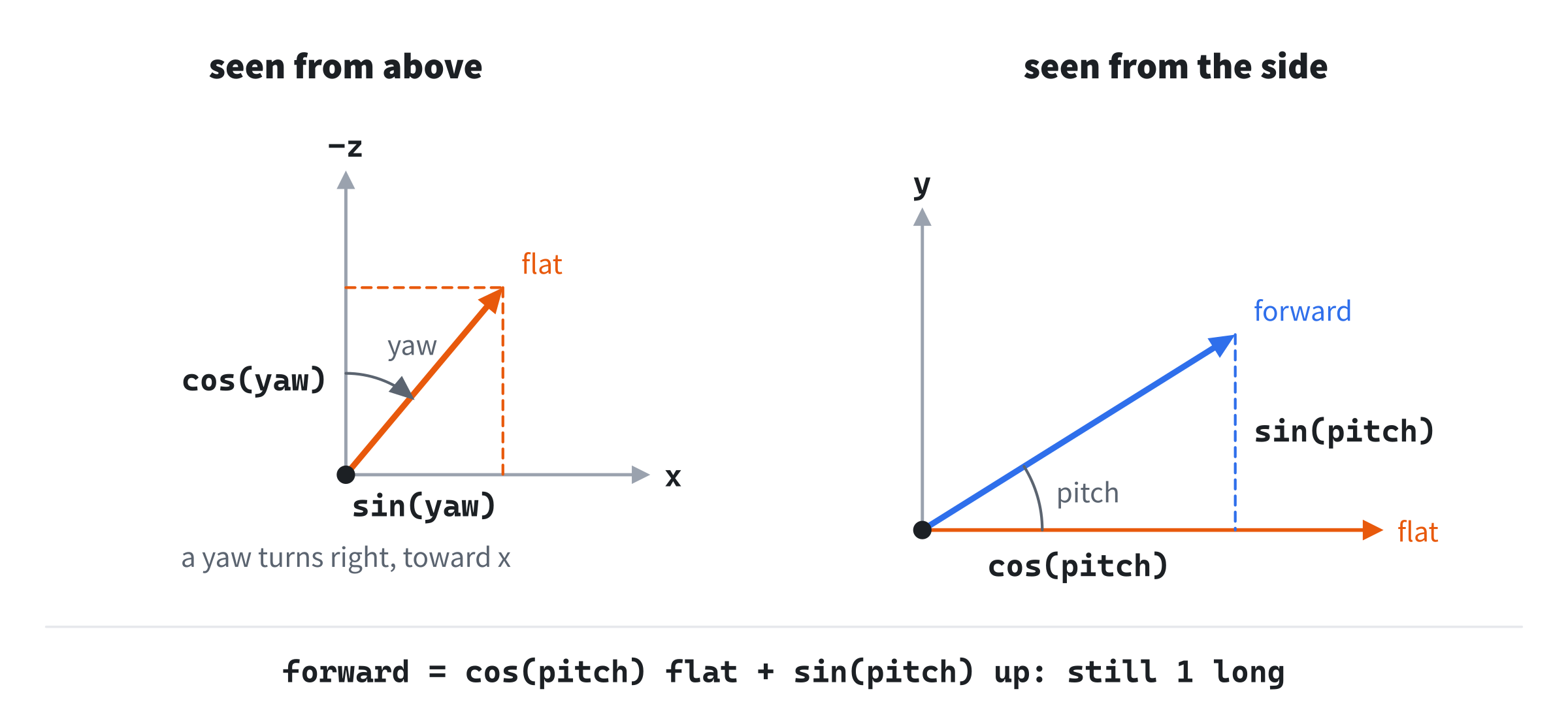
Seen from above, a yaw of 0 looks down -z. A yaw turns the level direction, called flat, toward x:
flat = (sin(yaw), 0, -cos(yaw))That's 1 long, and at a yaw of a quarter turn, it's (1, 0, 0). Seen from the side, the pitch lifts forward out of the level by its own angle. Its height is sin(pitch), and its reach along flat shrinks to cos(pitch):
forward = (sin(yaw) cos(pitch), sin(pitch), -cos(yaw) cos(pitch))Its length is still 1, since cos²(pitch) + sin²(pitch) is 1.
Here, a positive yaw turns the camera to the right, as a mouse moved right should. That's the opposite of rotationY, which turns z toward x: with a positive angle, it turns a camera looking down -z to look down -x, to the left. So a camera's yaw and an object's rotationY angle turn opposite ways, and a program that mixes them up turns the wrong way.
Looking Straight Up
The up hint has one place where it fails. Look-at's right is f × up, normalized, and that cross product's length is the sine of the angle between forward and up. With a pitch, the angle from up is 90 degrees less the pitch, so the length is cos(pitch). Level, it's 1. At a pitch of 85 degrees, it's 0.087, and at 89.9, it's 0.0017.
Aimed exactly along the hint, as at a target straight above the eye, f × up is the zero vector. Then normalized returns zero, right and the true up are both zero, and the view's first two rows are zeros. Every point of the world lands at the middle of the window. Pitch past a quarter turn, and cos(pitch) turns negative. Forward's reach then points backward, right turns round, and the picture turns upside down. Even short of the vertical, something goes wrong. A yaw turns the camera about the world's vertical, which is now nearly the way it looks, so moving the mouse across spins the picture about its middle instead of turning the view.
So Fly Camera limits its pitch to 1.5 radians either way, about 86 degrees, where the length is still 0.071. Flying never needs a look straight up, and the limit avoids all of it. It's a cousin of Chapter 29's gimbal lock: near the vertical, the yaw turns the camera about the way it looks, and no control turns it across.
A Level Horizon
With the world's up as its hint, look-at never rolls the camera. Right is f × up, and with up as (0, 1, 0), that's (-f.z, 0, f.x), whose y is always 0. So right is always level, and the horizon stays level, whatever the yaw and the pitch. That's what a walking or flying camera wants. A camera that banks, as a plane's does, turns its hint about forward before calling lookAt, and Exercise 4 does that.
Clipping at the Near Plane
Why the Near Plane
Projector never flew into its cubes, but a flying camera does. It passes through cubes, and the grid runs under it and behind it. A line from a point in front of the camera to one behind it can't simply be projected. The point behind has a negative w, and dividing by it throws the point to the opposite side of the window. Take a line from (1, 0, 1), 1 behind the eye and 1 to its right, to (1, 0, -5), in front. Projected as it is, the end behind lands at the window's left edge, while the end in front is right of the middle. So the line is drawn across the window, the wrong way, where nothing is. A point at the eye's own depth is worse, since its w is 0.
The fix is to cut the line where it crosses the near plane, and keep only the part beyond it. Every point beyond the near plane has a w of at least nearDist, so the divide is safe. Only the near plane needs this. SDL already clips lines to the window's edges, and a line beyond the far plane still divides safely, even if a renderer wouldn't draw it. The next image shows the cut.
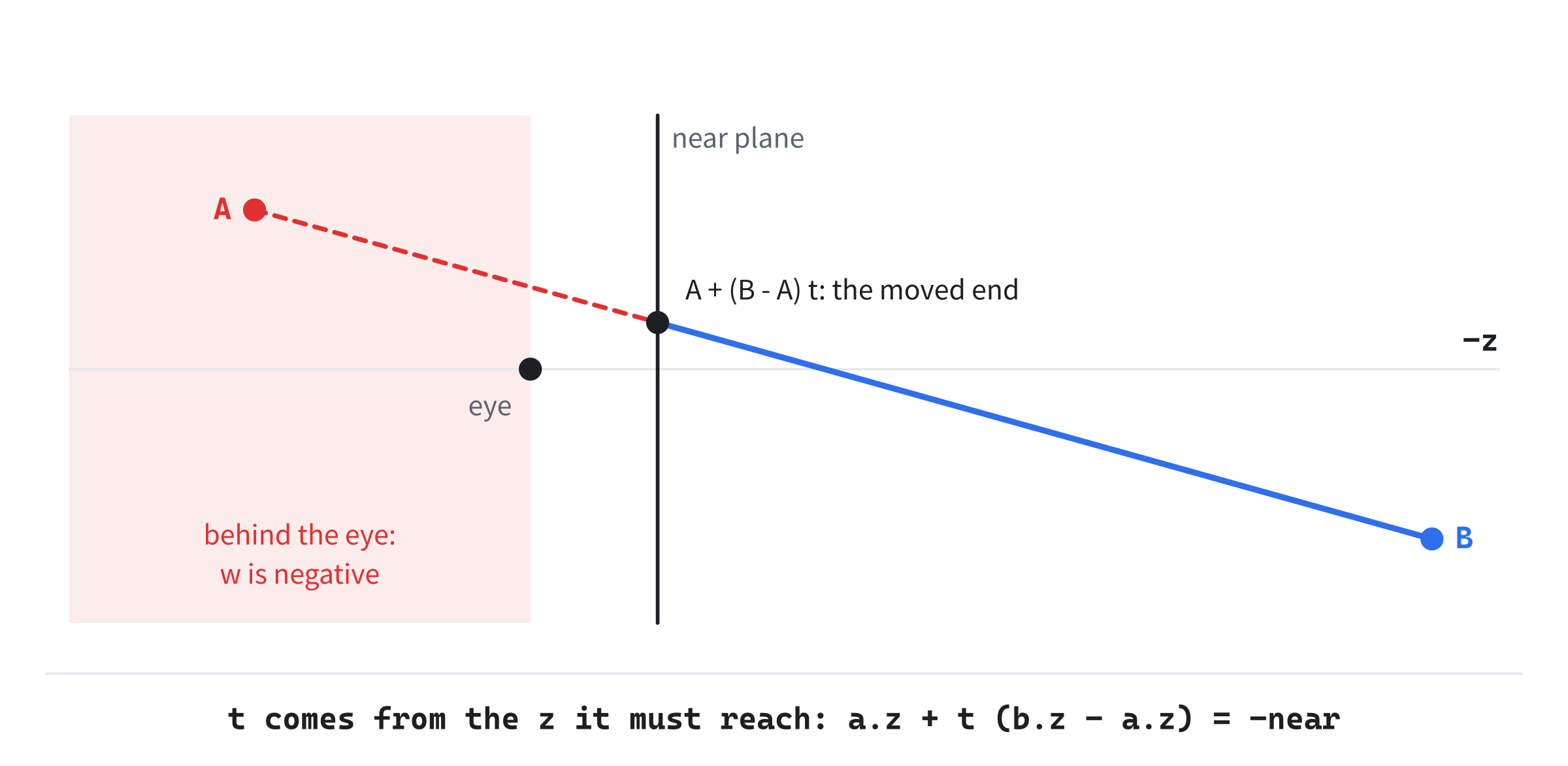
The part of the line on the camera's side of the plane is dropped, and the rest is drawn from the moved end.
Where a Line Crosses
A point along the line from a to b is a + (b - a) t, for a t from 0 to 1, as in Chapter 8's interpolation. The point on the near plane is the one whose z is -nearDist:
a.z + t * (b.z - a.z) = -nearDist
t = (-nearDist - a.z) / (b.z - a.z)
For the line above, with Fly Camera's near plane of 0.1, t is 0.183, and the moved end is (1, 0, -0.1). Its w is 0.1, and it lands far off the window's right edge, so the line runs off to the right, as it should. Chapter 32 clips its meshes at the same plane, in clip space. A real renderer clips against all six planes of the frustum there, before the divide.
Building Fly Camera
Fly Camera puts you in a small wireframe world: a ground grid and five cubes. The mouse turns the camera, WASD moves it along the ground, and E and Q move it up and down. Tab frees the mouse, and R puts the camera back where it started. Every line of the world goes through the whole pipeline: the view, the near clip, the projection, the divide and the viewport. The readout shows the eye, the angles and the view matrix.
Get the code. The complete project is in the
Fly Camerafolder of the book's repository.
Fly Camera starts from the skeleton, with its timing. It reads the mouse's movement, in a mode of its own that the state explains. It reuses fmt2 from Chapter 4, setColor from Chapter 8 and padded from Chapter 26. Its Vec2.h and Vec3.h are Projector's, and its Mat4.h is Projector's with lookAt. Here are its includes and its colors:
#include <cmath>
#include <string>
#include <vector>
#include "Vec2.h"
#include "Vec3.h"
#include "Mat4.h"

constexpr int WINDOW_WIDTH  = 1000;
constexpr int WINDOW_HEIGHT = 700;

constexpr SDL_Color TEXT = { 235, 238, 242, 255 };
constexpr SDL_Color GREY = { 90, 100, 112, 255 };
constexpr SDL_Color RED = { 235, 80, 80, 255 };
constexpr SDL_Color GREEN = { 60, 190, 100, 255 };
constexpr SDL_Color BLUE = { 90, 150, 240, 255 };
The red, green and blue are for the view matrix's rows: right, up and back. The world is a list of lines, which needs <vector>. Then come the constants:
// The projection: the window's aspect, a field of view of 70 degrees, and
// the near and far planes. Then the camera's speed, in units a second, how
// far the mouse turns it, in radians a pixel, and the limit on its pitch,
// just short of a quarter turn.
constexpr float ASPECT = (float)WINDOW_WIDTH / (float)WINDOW_HEIGHT;
constexpr float FOV = 70.0f * PI / 180.0f;
constexpr float NEAR_DIST = 0.1f;
constexpr float FAR_DIST = 200.0f;
constexpr float FLY_SPEED = 7.0f;
constexpr float LOOK_TURN = 0.0022f;
constexpr float PITCH_LIMIT = 1.5f;
The field of view is 70 degrees, which at this window's aspect is 90 degrees across. The near plane is close, at 0.1, so that the camera can fly near things. The far plane is 200 away, well beyond the world. The camera flies at 7 units a second. Each pixel the mouse moves turns it 0.0022 radians, so 714 pixels make a quarter turn. The pitch is limited to 1.5 radians, about 86 degrees. Then comes one line of the world:
// A line of the world, from a to b, in its color.
struct Seg
{
    Vec3 a;
    Vec3 b;
    SDL_Color color;
};
Each line has its two ends, in the world, and its color.
Two Helpers
The near clip goes before main:
// Clip a line in view space at the near plane, z = -nearDist. A line that's
// all on the camera's side of the plane gives false. A line that crosses
// the plane has its end on the camera's side moved to where it crosses.
bool clipNear(Vec3& a, Vec3& b, float nearDist)
{
    bool aOut = a.z > -nearDist;
    bool bOut = b.z > -nearDist;
    if (aOut && bOut) return false;
    if (aOut || bOut)
    {
        float t = (-nearDist - a.z) / (b.z - a.z);
        Vec3 onPlane = a + (b - a) * t;
        if (aOut) a = onPlane;
        else b = onPlane;
    }
    return true;
}
An end is out when it's on the camera's side of the near plane, with a z above -nearDist. A line with both ends out is dropped. A line with one end out has that end moved to where the line crosses, by the last section's t. The formula is the same whichever end is out, since it finds the crossing going from a toward b. Then a point that's passed the clip is put on the window:
// A point in view space, beyond the near plane, on the window: the
// projection, the divide by w, and the stretch across the window.
Vec2 toPixels(const Mat4& proj, Vec3 p)
{
    Vec4 c = proj.apply4(p);
    return { (c.x / c.w * 0.5f + 0.5f) * WINDOW_WIDTH,
             (0.5f - c.y / c.w * 0.5f) * WINDOW_HEIGHT };
}
It's Projector's toWindow without the depth test, which the clip has done. The far plane goes untested, since a line beyond it still divides safely.
The World
The state goes after the font is loaded. First comes the ground:
// The world, as a list of lines. First the ground: a grid on y = 0, 40
// units across, with a line every 2.
std::vector<Seg> world;
const SDL_Color GRID = { 60, 66, 78, 255 };
for (int i = -10; i <= 10; ++i)
{
    float k = i * 2.0f;
    world.push_back({ { k, 0.0f, -20.0f }, { k, 0.0f, 20.0f }, GRID });
    world.push_back({ { -20.0f, 0.0f, k }, { 20.0f, 0.0f, k }, GRID });
}
Twenty-one lines run each way, from -20 to 20, every 2 units. Each is one segment, in a dim grey. Then come the cubes:
// Then five cubes standing on it, each Transforming a Cube's cube moved
// into place: its corners, its edges, the cubes' centers and colors.
const Vec3 CORNER[8] = { { -1, -1, -1 }, { 1, -1, -1 }, { 1, 1, -1 },
                         { -1, 1, -1 }, { -1, -1, 1 }, { 1, -1, 1 },
                         { 1, 1, 1 }, { -1, 1, 1 } };
const int EDGE[12][2] = { { 0, 1 }, { 1, 2 }, { 2, 3 }, { 3, 0 },
                          { 4, 5 }, { 5, 6 }, { 6, 7 }, { 7, 4 },
                          { 0, 4 }, { 1, 5 }, { 2, 6 }, { 3, 7 } };
const Vec3 CUBE_AT[5] = { { -6, 1, -6 }, { 5, 1, -8 }, { 0, 1, -13 },
                          { 8, 1, 3 }, { -7, 1, 5 } };
const SDL_Color CUBE_COLOR[5] = { { 90, 150, 240, 255 },
                                  { 230, 120, 60, 255 },
                                  { 80, 200, 120, 255 },
                                  { 220, 80, 110, 255 },
                                  { 200, 190, 70, 255 } };
for (int c = 0; c < 5; ++c)
    for (int e = 0; e < 12; ++e)
        world.push_back({ CUBE_AT[c] + CORNER[EDGE[e][0]],
                          CUBE_AT[c] + CORNER[EDGE[e][1]],
                          CUBE_COLOR[c] });
In the preceding code, each cube is Transforming a Cube's cube, 2 units on a side, with its corners moved by its center. The centers are 1 above the ground, so the cubes stand on it. There's no model matrix, since the cubes never move: each corner is moved into place once, as the world is built. The world has 42 lines of grid and 60 of cubes, and never changes. Then comes the camera:
// The camera: where it is, and its yaw and pitch, in radians. A yaw of
// 0 looks down -z, and a pitch of 0 looks level. The mouse is captured
// for looking: hidden, and read as movement only.
Vec3 eye = { 0.0f, 2.0f, 10.0f };
float yaw = 0.0f;
float pitch = 0.0f;
bool captured = true;
SDL_SetWindowRelativeMouseMode(window, captured);
The camera starts at (0, 2, 10), level, looking down -z: the first camera worked by hand. Relative mouse mode hides the cursor and keeps it in the window, and SDL then reports only how far the mouse moves. The projection never changes, so it's made once:
// The projection, which never changes.
Mat4 proj = Mat4::perspective(FOV, ASPECT, NEAR_DIST, FAR_DIST);
It's Chapter 30's perspective, with this demo's field of view and planes.
The Events
Tab frees the mouse, R puts the camera back, and the mouse's movement turns it:
// Events: quitting, and the keys that happen once. Tab frees the
// mouse or captures it again. While it's captured, its movement turns
// the camera: across for the yaw, and up and down for the pitch.
SDL_Event event;
while (SDL_PollEvent(&event))
{
    if (event.type == SDL_EVENT_QUIT) running = false;
    else if (event.type == SDL_EVENT_KEY_DOWN)
    {
        if (event.key.key == SDLK_ESCAPE) running = false;
        else if (event.key.key == SDLK_TAB)
        {
            captured = !captured;
            SDL_SetWindowRelativeMouseMode(window, captured);
        }
        else if (event.key.key == SDLK_R)
        {
            eye = { 0.0f, 2.0f, 10.0f };
            yaw = 0.0f;
            pitch = 0.0f;
        }
    }
    else if (event.type == SDL_EVENT_MOUSE_MOTION && captured)
    {
        yaw += event.motion.xrel * LOOK_TURN;
        pitch -= event.motion.yrel * LOOK_TURN;
        pitch = SDL_clamp(pitch, -PITCH_LIMIT, PITCH_LIMIT);
    }
}
In the preceding code, the yaw grows as the mouse moves right, and the pitch as it moves up, since the window's y runs down. The movement isn't multiplied by dt. It's already a distance, the pixels moved since the last event, so the camera turns as far as the hand moves. Multiplying by dt would tie the turn to the frame rate instead. The pitch is clamped after every change.
Each Frame's Work
Each frame, the camera's directions come from its angles:
// The camera's directions, from its yaw and pitch. Forward is the way
// it looks. Flat is forward made level, and right is at right angles
// to flat, along the ground.
Vec3 forward = { std::sin(yaw) * std::cos(pitch), std::sin(pitch),
                 -std::cos(yaw) * std::cos(pitch) };
Vec3 flat = { std::sin(yaw), 0.0f, -std::cos(yaw) };
Vec3 right = { std::cos(yaw), 0.0f, std::sin(yaw) };
Forward is the formula from Forward from Two Angles. Flat is the same with the pitch left out, and right is flat × up, (cos(yaw), 0, sin(yaw)). Then the keys move the camera:
// Keys held down move the camera: W and S along flat, D and A along
// right, and E and Q straight up and down. Their sum is normalized,
// so that two keys at once are no faster than one.
const bool* keys = SDL_GetKeyboardState(nullptr);
Vec3 move;
if (keys[SDL_SCANCODE_W]) move += flat;
if (keys[SDL_SCANCODE_S]) move -= flat;
if (keys[SDL_SCANCODE_D]) move += right;
if (keys[SDL_SCANCODE_A]) move -= right;
if (keys[SDL_SCANCODE_E]) move.y += 1.0f;
if (keys[SDL_SCANCODE_Q]) move.y -= 1.0f;
eye += move.normalized() * (FLY_SPEED * dt);
The keys move the camera along flat, not forward, so that looking down while holding W doesn't steer it into the ground. Each key adds a direction to move, and the sum is normalized before it's scaled. Without that, W and D together would add flat and right, two directions 1 long at right angles. Their sum is √2 long, so the camera would fly 1.41 times as fast along the diagonal. With nothing held, move is zero, and so is its normalized form. Then comes the view:
// The view matrix, from the eye, a point 1 unit ahead of it, and the
// world's up as the hint.
const Vec3 UP = { 0.0f, 1.0f, 0.0f };
Mat4 view = Mat4::lookAt(eye, eye + forward, UP);
The target is a point 1 unit ahead of the eye, along forward, and the hint is the world's up. That's the whole camera: a place, two angles and one call to lookAt.
Drawing
After the skeleton clears the screen, the world is drawn:
// The world, line by line. Both ends go into view space, the line is
// clipped at the near plane, and its ends are put on the window.
for (const Seg& seg : world)
{
    Vec3 a = view.apply(seg.a);
    Vec3 b = view.apply(seg.b);
    if (!clipNear(a, b, NEAR_DIST)) continue;
    Vec2 pa = toPixels(proj, a);
    Vec2 pb = toPixels(proj, b);
    setColor(renderer, seg.color);
    SDL_RenderLine(renderer, pa.x, pa.y, pb.x, pb.y);
}
Each line's ends go into view space by the view matrix. Then the line is clipped at the near plane, or dropped, and its ends are put on the window. That's the whole pipeline, with the model step done once, when the world was built. Then come the strips that the readout and the controls sit on:
// Strips of the background's color for the readout and the controls,
// so that the world's lines don't show through the text.
SDL_SetRenderDrawColor(renderer, 24, 26, 30, 255);
SDL_FRect top = { 0.0f, 0.0f, (float)WINDOW_WIDTH, 100.0f };
SDL_FRect bottom = { 0.0f, WINDOW_HEIGHT - 36.0f, (float)WINDOW_WIDTH,
                     36.0f };
SDL_RenderFillRect(renderer, &top);
SDL_RenderFillRect(renderer, &bottom);
Then the readout:
// The readout: the eye, the yaw and pitch in degrees, forward, and
// the length of forward x up, which lookAt normalizes to get right.
int yawDeg = (int)std::lround(yaw * 180.0f / PI);
int pitchDeg = (int)std::lround(pitch * 180.0f / PI);
drawText(renderer, font,
         "eye (" + fmt2(eye.x) + ", " + fmt2(eye.y) + ", " +
         fmt2(eye.z) + ")", 12, 10, TEXT);
drawText(renderer, font,
         "yaw " + std::to_string(yawDeg) + ", pitch " +
         std::to_string(pitchDeg) + " degrees", 12, 32, TEXT);
drawText(renderer, font,
         "forward (" + fmt2(forward.x) + ", " + fmt2(forward.y) +
         ", " + fmt2(forward.z) + ")", 12, 54, TEXT);
drawText(renderer, font,
         "forward x up is " + fmt2(forward.cross(UP).length()) +
         " long", 12, 76, TEXT);
The angles are shown in whole degrees. The fourth line is the length of forward × up, which is cos(pitch), and which lookAt normalizes to get its right. It's 1 when the camera is level, and falls to 0.07 at the pitch's limit. Last come the view matrix and the controls:
// The view matrix, with its rows in the colors of the camera's axes:
// right in red, up in green and back in blue. Then the controls.
const SDL_Color ROW[4] = { RED, GREEN, BLUE, TEXT };
for (int i = 0; i < 4; ++i)
    for (int j = 0; j < 4; ++j)
        drawText(renderer, font, padded(view.m[i][j], 2),
                 640 + j * 86.0f, 10 + i * 22.0f, ROW[i]);
drawText(renderer, font,
         "[Mouse] look   [WASD] move   [E] [Q] up and down   "
         "[Tab] free the mouse   [R] reset   [Esc] quit",
         12, WINDOW_HEIGHT - 26, GREY);
Each row is drawn in its axis's color. There's nothing to add to the skeleton's cleanup.
Trying It Out
Run the demo. The mouse is captured, so the cursor vanishes, and the world swings as you move the mouse. Then try it, step by step:
- Read the start. Press R, and leave the mouse alone. The view matrix is the first camera worked by hand: the identity, with -2 and -10 in its fourth column.
- Turn a quarter turn. Move the mouse right until the yaw reads 90. The rows match the second camera: right is
(0, 0, 1), and back is(-1, 0, 0). The fourth column, -10, -2 and 0, is each axis dotted with -eye. - Fly. Hold W to move the way you face, along the ground, and A and D to slide sideways. Weave between the cubes, and circle one to see its other sides. Hold W and D together, and you go no faster than with W alone.
- Look down and fly. Look down at the grid and hold W. The camera skims along above the ground instead of diving into it, since W moves along flat. Hold E to climb and Q to drop.
- Watch the right row. Fly and turn anywhere. The red row's second number, the y of right, stays 0, so the horizon stays level.
- Look straight up. Move the mouse up until the pitch stops, at 86 degrees. The fourth line reads 0.07. Now move the mouse across, and the world turns about the middle of the window, rather than across it.
- Fly through a cube. Fly into a cube and out through its far side. Its edges slide off the window's edges as they pass the camera, cut at the near plane, with nothing streaking across the window.
The next image shows the start.
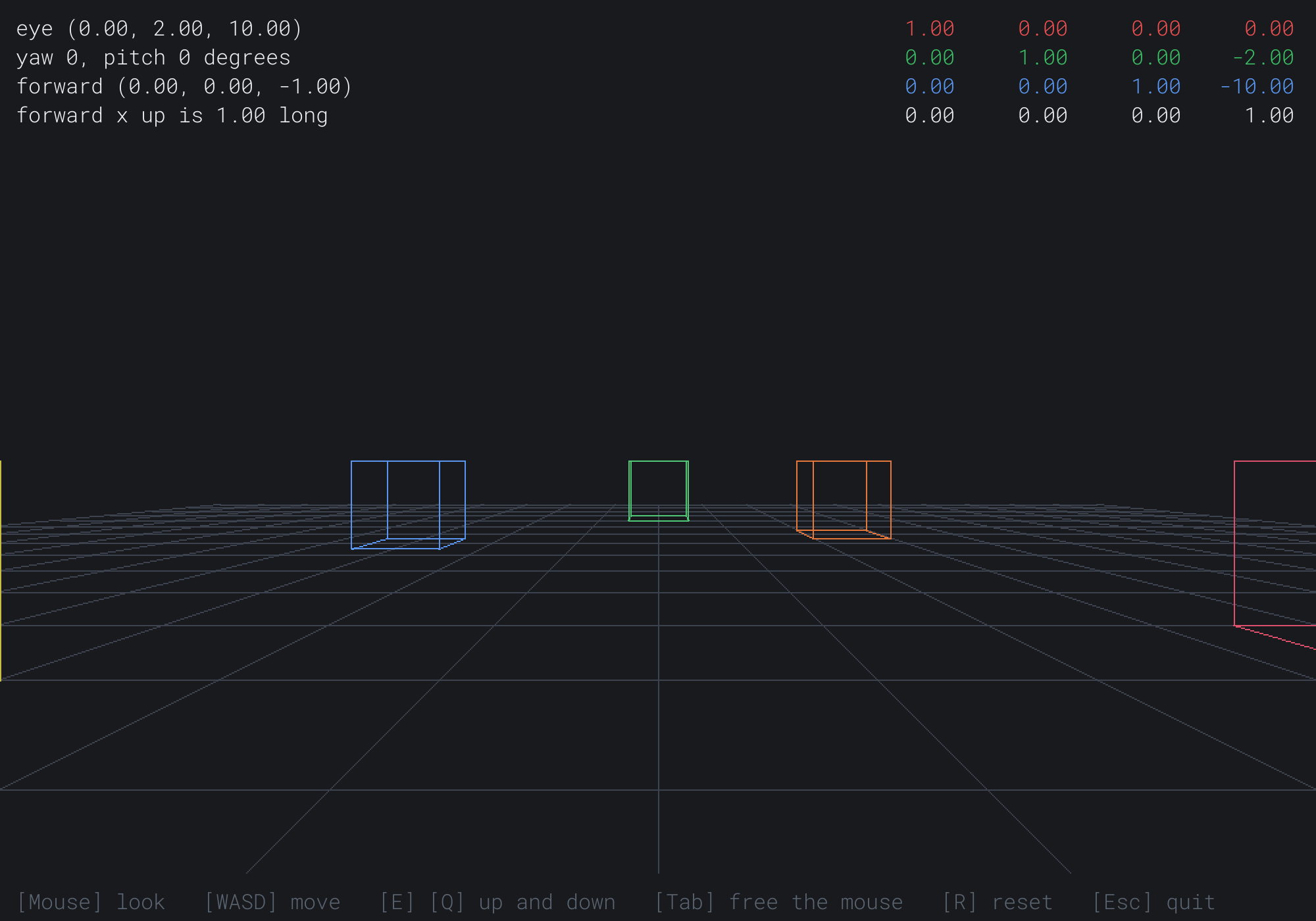
The camera is level, so the horizon is at the middle of the window, just above the grid's far edge. The view matrix is the first camera's: a move by -2 in y and -10 in z. The next image shows the camera flown up to (-16, 14, 18), turned 43 degrees to the right and looking 34 degrees down.
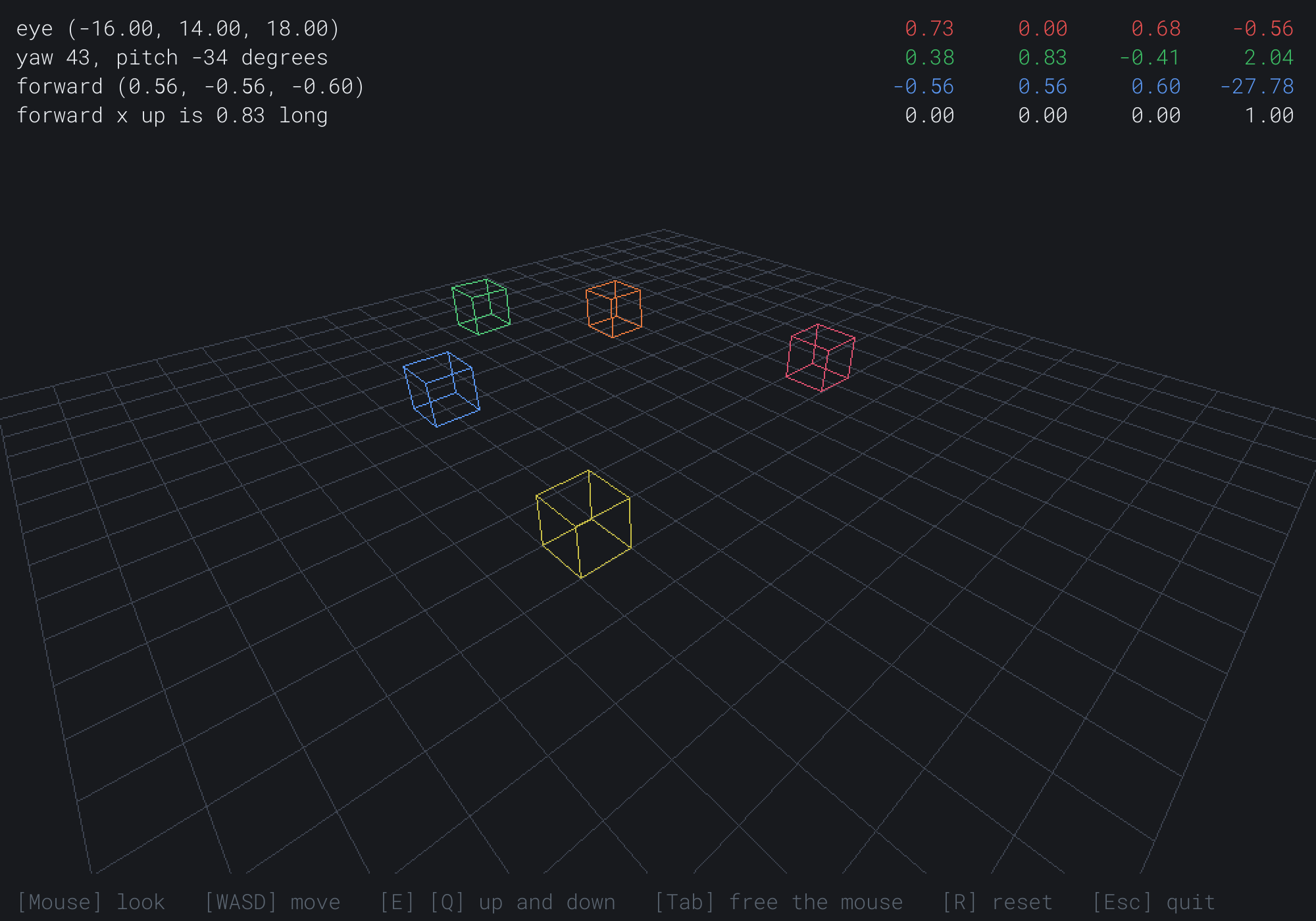
The grid now reads as a floor, with the cubes standing on it. Forward is (0.56, -0.56, -0.60), and forward × up is 0.83 long, the cosine of 34 degrees. The red row is right, (0.73, 0.00, 0.68). It's level, as look-at keeps it. The fourth column is each axis dotted with -eye.
FAQ
Q) Why not build the camera's placement, and invert it?
A) You can, and the result is the same. But a general 4 by 4 inverse is long, and it divides by a determinant. Look-at is that inverse, worked out once on paper for a turn and a move. It needs no division, and it sets only a dozen numbers.
Q) What if the target is the same as the eye?
A) Then forward is the zero vector, and so are right and the true up. The view's 3 by 3 block is all zeros, so every point lands on the eye itself, and nothing can be drawn. That happens to a camera that follows an object, when the object reaches it. A camera like that should keep a distance from its target, or keep its last forward while the two are too close.
Q) How do I make the camera roll?
A) Find the camera's right and true up without the roll first, as look-at does. Then pass lookAt a hint turned by the roll: cos(roll) times that up, plus sin(roll) times that right. That's Chapter 6's rotation, in the camera's own plane, and the horizon tilts by the roll. A camera that can tumble any way, such as a spaceship's, keeps its whole turn instead of angles. Chapter 35 builds the quaternion that holds it.
Exercises
The first three exercises need only a pencil. The others change Fly Camera.
- Forward from angles (paper). Find forward for a yaw of 90 degrees and a pitch of 30. Which way is the camera looking?
- A view by hand (paper). A camera at
(3, 0, 0)looks at the origin, with(0, 1, 0)as the hint. Find f, s and u, and write the view matrix. Check that it sends the origin to(0, 0, -3). - Undo it (paper). For the camera in Exercise 2, write its placement C, with s, u and -f as its first three columns and the eye as its fourth. Multiply it by the view, and check that you get the identity.
- Roll (code). Add a roll angle that Z and X change. Pass
lookAta hint turned by it, as the FAQ describes, and watch the horizon tilt. - Fly where you look (code). Add a key that switches W and S to move along forward instead of flat, so that the camera flies where it looks.
- Without the clip (challenge). Take out the call to
clipNear, and project every line as it is. Fly through a cube, and describe what you see. Then clip at the far plane instead, and explain why that doesn't help.
For the code exercises, work on a copy of the demo's folder, so that the original stays as the chapter describes it.
AI Exercise (Optional)
A camera that flies is half of a racing game. With an AI's help, you can build the other half: a course of rings to fly through. Open your AI chatbot of choice, and try a prompt like this:
"I have a C++ demo using SDL3, in a 1000 by 700 window, with a struct Vec3 (with dot, cross, length and normalized), a struct Vec4, and a struct Mat4 stored as m[row][column], with static translation, perspective(fovY, aspect, nearDist, farDist) and lookAt(eye, target, up), operator* for the product, apply(p) and apply4(p). My camera flies with a yaw and a pitch: forward is (sin(yaw) cos(pitch), sin(pitch), -cos(yaw) cos(pitch)), the mouse turns it, and WASD moves it. Each line of the world goes into view space by the view matrix, is clipped at the near plane, and is divided by w and stretched across the window. Please add a race course of eight rings, each a circle of 32 lines, 3 units across, hanging in the air along a winding path. The next ring to fly through glows, and the others are dim. A ring counts as passed when the eye crosses the ring's plane within its radius, which you can test with a dot product against the ring's facing direction. Show a timer, and the best time so far. Explain how the dot product tells which side of a ring's plane the eye is on."
That prompt describes the camera and the pipeline you built, so the AI builds on them, rather than writing its own. Passing a ring is Chapter 4's which-side test, in 3D. The dot product of the eye's offset from the ring's center with the ring's facing direction changes sign as the eye crosses the ring's plane.
Then add a ghost of your best run: a small cube that flies the path you took, so that you can race it.
Summary
A camera is a place, its eye, and a turn. The turn is held as the camera's own three axes: right, up and back. Its placement is the turn and then a move to the eye, and the view matrix is that placement undone: a move by -eye, then the turn's inverse. A turn's inverse is its transpose, since its columns are 1 long and at right angles, so their dot products make the identity. So a view matrix's rows are the camera's axes, and its fourth column is each axis dotted with -eye. Look-at builds the axes from an eye, a target and an up hint, with two cross products. Right is forward × up, normalized, and the true up is right × forward. A flying camera keeps a yaw and a pitch, and forward comes from the sines and cosines of both, still 1 long. Near the vertical, forward × up shrinks to nothing, so the pitch is limited. With the world's up as the hint, the horizon stays level. A line that crosses the near plane is cut where its z is -near, so that nothing behind the eye is divided by a negative w. Chapter 32 puts the whole pipeline together, with meshes of triangles.