
Our objects move, but none of them yet chooses where to go. Chapter 7's ship went where you flew it, and Chapter 8's markers ran along fixed tracks. This chapter gives motion a will of its own, with steering behaviors: small rules that let an agent decide where it wants to go, and get there believably. Craig Reynolds described them in 1999, and games have used them ever since. They move flocks of birds, schools of fish, crowds, and enemies that chase and scatter.
Their charm is how little they take. There's no planning and no map. Each frame, an agent works out the velocity it would like, and nudges its real velocity toward it, within limits. Every behavior in the chapter is one way of choosing that velocity. By the end, you'll have five of them, combined into creatures with personalities. You'll also know why a common version of steering overshoots its target, and why random wandering needs the square root of dt.
In this chapter, we will:
- Build the steering model: a desired velocity, a response time, and two limits
- Seek a target, and arrive on it without overshooting
- Flee a threat, and pursue a moving target by aiming where it will be
- Wander, with random steps that work the same at any frame rate
- Combine behaviors, so that one agent can graze and then bolt
- Build Critters, fifteen agents steering around your mouse
We'll start with the model that every behavior shares.
The Steering Model
An agent has a position and a velocity, and it moves by semi-implicit Euler, just as Thrust's ship did. What's new is what pushes it. Instead of a player's keys, the agent's own behavior decides, every frame, in two steps.
First, the behavior picks a desired velocity: the velocity the agent would like to have right now. An agent chasing a target wants to head straight at it, at full speed. An agent running from a threat wants to head straight away from it.
Second, the agent steers toward that velocity. It doesn't jump to it, since a real creature can't change its speed or direction in an instant, and an agent that does looks like a cursor rather than a creature. Instead, it changes its velocity a little each frame, by an acceleration called its steering force.
The Response Time
How hard should an agent steer? The change it needs is the difference between the velocity it wants and the velocity it has, desired - vel. Choose a time to make that change in, the response time, and the steering is the acceleration that would make the whole change in that time:
steering = (desired - vel) / responseTimeWith a response time of 0.15 seconds, an agent tries to make any change in 0.15 seconds. It never quite does, as Chapter 8's follow never quite arrived. As the velocity closes in on the desired velocity, the gap shrinks, and the steering shrinks with it. After one response time, about two thirds of the gap has gone. So the response time is the agent's reaction time. A short one makes it nimble, and a long one makes it sluggish.
You'll often see steering written as just desired - vel, with no response time at all. That's the same formula with a response time of one second, hidden inside it. A second is a long time to react, and Arrive shows what it costs.
Two Limits
An agent with a tiny response time could still turn on the spot. Two limits stop that. The first, MAX_FORCE, caps the steering. It's the most that the velocity can change in a second, in pixels a second, every second. The second, MAX_SPEED, caps the velocity itself.
Both limits shorten a vector to a maximum length, if it's longer, and keep its direction. That's a job for a new method of Vec2. Add truncated to Vec2, below rotated:
// A length limit (Chapter 9): this vector, shortened to maxLength if
// it's longer than that, with its direction kept.
Vec2 truncated(float maxLength) const
{
    float len = length();
    return (len > maxLength) ? *this * (maxLength / len) : *this;
}
If the vector is longer than the limit, it's scaled by maxLength / len, a number less than 1, which makes it exactly maxLength long. Otherwise, it comes back as it was. There's no division by zero to guard against, since a vector of length 0 is never longer than the limit. The next image shows one frame of steering: the change an agent wants in its velocity, and the part of it that the cap allows.
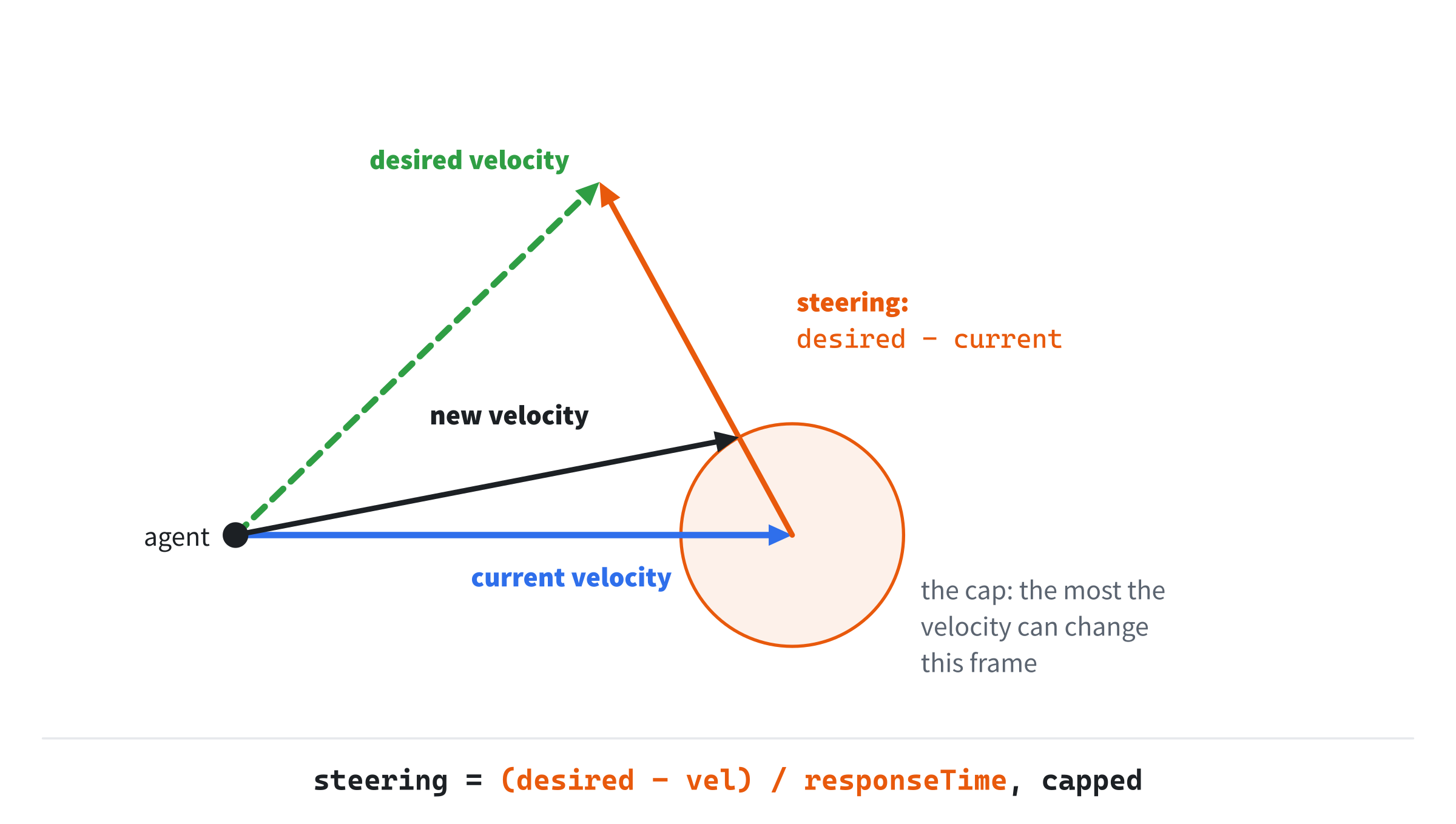
The steering points from the tip of the current velocity toward the tip of the desired one. Each frame, the velocity moves a step along it, no longer than the cap allows.
In Code
In Critters, the model's last three lines are the same for every agent, whatever its behavior:
// The steering is capped at MAX_FORCE, and the speed at MAX_SPEED.
// Then the agent moves by semi-implicit Euler, as Thrust did.
a.vel += steer.truncated(MAX_FORCE) * dt;
a.vel = a.vel.truncated(MAX_SPEED);
a.pos += a.vel * dt;
The capped steering changes the velocity, as Thrust's thrust did. The velocity is capped in turn, and then it moves the agent. Critters' limits are a top speed of 220 pixels a second, and a steering force of 380 pixels a second, every second. So an agent reaches its top speed from a standstill in 0.58 seconds, and turning around from full speed one way to full speed the other takes 1.16 seconds.
Every behavior that follows differs in only one thing: the desired velocity it chooses.
Seek
The simplest behavior is seek: head straight at the target, at full speed.
// Seek: full speed, straight at the target.
Vec2 seek(Vec2 pos, Vec2 target)
{
    return (target - pos).normalized() * MAX_SPEED;
}
The vector target - pos runs from the agent to the target, as Chapter 3 found. Normalized, it's the direction to the target, and times MAX_SPEED, it's the desired velocity. An agent exactly on its target wants a velocity of zero, rather than NaN, since normalized turns the zero vector into the zero vector.
A seeker chases well, but it can't stop. It wants full speed right up to the target, so it arrives at full speed and flies past. Only then does its desired velocity flip around, and turning takes time. With Critters' numbers, a seeker that reaches a still target at full speed overshoots it by about 65 pixels. Then it comes back, overshoots the other way, and does it again, for as long as the target stays put.
Arrive
Arrive is seek with brakes. Far from the target, it's seek. But inside a slowing radius, its desired speed is in step with the distance left: full speed at the edge of the radius, half speed halfway in, and zero on the target.
// Arrive: seek, but inside SLOW_RADIUS, a speed in step with the distance
// left, down to zero on the target.
Vec2 arrive(Vec2 pos, Vec2 target)
{
    Vec2 toTarget = target - pos;
    float d = toTarget.length();
    float speed = (d < SLOW_RADIUS) ? MAX_SPEED * d / SLOW_RADIUS : MAX_SPEED;
    return toTarget.normalized() * speed;
}
Inside the radius, the speed is the top speed times d / SLOW_RADIUS, the fraction of the radius still to go. In Chapter 8's words, it's a remap of the distance onto the speed: 0 to 150 pixels away becomes 0 to 220 pixels a second. On the target, the distance is 0, and so is the speed.
Why It Overshoots
That's the theory. With the response time hidden at a second, an arriver doesn't arrive. Starting from rest, 400 pixels from a still target, it overshoots the target by 64 pixels. Then it swings back, and it takes about 11 seconds to settle. Coming in at full speed, it overshoots by 73 pixels. A second is too slow a reaction. By the time the agent's velocity has caught up with its wish to slow down, it's already past the target.
With a response time of 0.15 seconds, the same agent doesn't overshoot at all. Its velocity follows its wish closely, so it slows down as fast as the wish does, and it settles on the target in under four seconds. Those numbers come from simulating Critters' own update, at 60 and at 144 frames a second, which agree to within a pixel.
There's a second condition, too. Stopping takes room. At 380 pixels a second, every second, an agent going 220 pixels a second needs 0.58 seconds to stop. Its speed falls steadily from 220 to 0, so it averages 110 pixels a second. In 0.58 seconds, that covers 64 pixels. In general, a speed v with a steering limit a needs a braking distance of:
braking distance = v² / (2 × a)The slowing radius must be comfortably bigger than that. At 150 pixels, Critters' is. At 50, which is less than the 64 pixels needed, even the quick response overshoots by 21 pixels. The agent is asked to stop sooner than it can. The next image shows arrive's desired speed against the distance to the target, for both radii, with the fastest speed from which an agent can still stop in time.

Where the desired speed stays under the braking curve, the agent can always slow down as fast as it's asked to. Where it pokes above the curve, as the smaller radius does, the agent overshoots.
Flee
Flee is seek turned around: its desired velocity points straight away from the threat. Running from a threat on the far side of the window would look odd, though, so a fleer only panics inside a radius. Outside it, a fleer wants the velocity it already has:
// Flee: full speed, straight away from the threat, inside PANIC_RADIUS.
// Farther off, it wants the velocity the agent already has, which asks
// for no steering at all.
Vec2 flee(const Agent& a, Vec2 threat)
{
    Vec2 away = a.pos - threat;
    if (away.length() > PANIC_RADIUS) return a.vel;
    return away.normalized() * MAX_SPEED;
}
The vector a.pos - threat runs from the threat to the agent, the reverse of seek's. Notice that flee takes the whole agent, not just its position, since it needs the agent's velocity.
That choice outside the radius matters. A fleer that wanted to stop there would brake hard the moment it escaped. One that wants the velocity it has needs no steering at all, since desired - vel is zero, so it simply keeps going, as a frightened animal does. But it keeps going forever, at whatever speed it fled at. Combining Behaviors puts that right.
Pursue and Evade
Seek aims at where the target is. Against a moving target, that's a poor plan, since by the time the agent gets there, the target has moved on. A seeker chasing a moving target ends up trailing behind it, on a curve. Pursue aims at where the target will be.
If the target keeps its velocity for T seconds, it'll be at target + targetVel × T. The right T is about the time the agent needs to get there: the distance, divided by its top speed. Far away, the agent looks far ahead. Close in, it hardly looks ahead at all. On the target, T is 0, and pursue is just seek. The look-ahead is capped at one second, since few targets keep the same velocity for longer than that:
// Pursue: seek where the target will be, if it keeps its velocity, by the
// time the agent could get there, but never more than a second ahead.
Vec2 pursue(Vec2 pos, Vec2 target, Vec2 targetVel)
{
    float ahead = std::min(distance(pos, target) / MAX_SPEED, 1.0f);
    return seek(pos, target + targetVel * ahead);
}
The std::min function, from <algorithm>, gives the smaller of its two arguments. As a worked example, take an agent 440 pixels from a target that's moving right at 100 pixels a second. Its look-ahead is 440 / 220, or 2 seconds, capped to 1, so it aims 100 pixels ahead of the target. At 110 pixels away, the look-ahead is half a second, and it aims 50 pixels ahead. The next image shows a seeker and a pursuer, side by side, aiming at the same moving target.

The paths come from Critters' own steering. The pursuer cuts almost straight across, and meets the target after 1.35 seconds. The seeker, aiming at where the target was, bends round after it, and only catches it after 2.5 seconds.
The Target's Velocity
Pursue needs the target's velocity. For another agent, that's simply its vel. Critters' target is the mouse, which has no velocity of its own, so Critters measures one. It takes how far the mouse moved since the last frame, and divides that by dt:
// The mouse's velocity: how far it moved since the last frame, over
// dt, smoothed as Chapter 8 followed a target, so that one jerky
// frame doesn't throw the pursuers off.
Vec2 mouse = { mx, my };
if (dt > 0.0f)
{
    Vec2 measured = (mouse - lastMouse) / dt;
    float share = 1.0f - std::pow(0.5f, dt / 0.1f);
    mouseVel = lerp(mouseVel, measured, share);
}
lastMouse = mouse;
The raw measurement is jumpy. The mouse moves in whole pixels, and its reports don't line up with the frames, so one frame may see the mouse move 4 pixels and the next see it move none. So the measurement is smoothed by Chapter 8's follow, with a half-life of a tenth of a second, and the pursuers steer by the smoothed velocity. The check that dt is more than 0 keeps the division safe. Then the mouse's position is kept, for the next frame's measurement.
Evade
Evade is to flee what pursue is to seek: it flees from where the threat will be, rather than from where it is. Critters doesn't use it, but it's one line more than flee:
// A sketch: evade a threat by fleeing from where it will be.
float ahead = std::min(distance(a.pos, threat) / MAX_SPEED, 1.0f);
Vec2 desired = flee(a, threat + threatVel * ahead);
An evader starts running before a fast threat even reaches its panic radius, which is the smarter thing to do.
Wander
The behaviors so far all react to something. Wander has no target at all: the agent just ambles about. The obvious way, picking a random direction every frame, looks terrible. Each frame's wish has nothing to do with the last one's, so the agent jitters on the spot. The better way is to let the direction drift. Each agent keeps a wander angle, nudges it by a small random step every frame, and heads that way.
The random steps come from the standard library's <random>. Critters makes one generator, and a function that uses it:
// A random float from lo to hi. The generator is made once, and seeded
// from the system, so that every run is different.
std::mt19937 rng{ std::random_device{}() };

float randRange(float lo, float hi)
{
    std::uniform_real_distribution<float> spread(lo, hi);
    return spread(rng);
}
The generator, std::mt19937, is the Mersenne Twister, a fast and well-tested source of random numbers. It's seeded once, from std::random_device, which asks the system for a truly unpredictable number, so each run of the demo is different. A std::uniform_real_distribution<float> then turns the generator's raw numbers into floats spread evenly from lo to hi. Then wander uses randRange:
// Wander: drift the agent's own angle by a small random step, and head
// that way at full speed. The step grows with the square root of dt, so
// the drift over a second is the same at any frame rate.
Vec2 wander(Agent& a, float dt)
{
    a.wanderAngle += randRange(-1.0f, 1.0f) * 0.65f * std::sqrt(dt);
    return Vec2::fromAngle(a.wanderAngle) * MAX_SPEED;
}
Each frame, the wander angle moves by a random amount. Then Chapter 5's fromAngle turns it into the desired direction. The angle drifts rather than jumps, so the agent curves gently one way, then another, like something nosing about.
Random Steps and the Frame Rate
The step is randRange(-1, 1) * 0.65f * std::sqrt(dt), which is scaled by the square root of dt, not by dt itself. Chapter 7 warned that multiplying by dt gets a random nudge wrong, and this is that nudge.
Random steps don't add up as steady ones do, since they partly cancel. Take 100 steps, each one pace to the left or right, at random. You won't end up 100 paces away, or back at the start. Typically, you'll end up about 10 paces away, which is the square root of 100. The spread grows with the square root of the number of steps.
Now suppose each step is scaled by dt, as the rule for rates says. At 240 frames a second, each step is a quarter of its size at 60, and there are four times as many of them. Four times as many steps spread only twice as far, so the drift over a second is half as big. A version with 5.0f * dt drifts by about 30 degrees over a second at 30 frames a second, 21 at 60, and only 14 at 144. Wanderers on a fast screen wander in straighter lines.
Scaled by the square root of dt instead, each step at 240 frames a second is half its size at 60, and four times as many half-size steps spread exactly as far as before. The drift over a second is about 21 degrees at every frame rate, as the 0.65 was chosen to give. The next image shows the wander angle's paths over one second, at 30 and 144 frames a second, scaled both ways.

Steps scaled by dt drift less at the higher frame rate. Steps scaled by its square root drift the same at both.
Combining Behaviors
Real creatures do more than one thing at a time. A deer grazes, wandering about, until something comes too close, and then it runs. Steering forces are vectors, so behaviors combine simply. Work out each behavior's steering, weight each one by how much it matters, and add them up. Then cap the sum, once, with MAX_FORCE. Capping the sum, not each part, means that the weights decide each behavior's share.
Critters' grazers combine wander and flee in exactly this way, with flee weighted three times as much as wander. Here's Critters' update function, whole, which shows how each behavior plugs into the model, and how the grazer combines two:
// One agent's frame. Its behavior gives the velocity it wants, and its
// steering is the change that would get its velocity there in
// responseTime seconds. A grazer adds up two behaviors' steering, with
// fleeing weighted three times as much as wandering.
void update(Agent& a, Vec2 target, Vec2 targetVel, float responseTime, float dt)
{
    Vec2 steer;
    if (a.behavior == SEEK)
        steer = (seek(a.pos, target) - a.vel) / responseTime;
    else if (a.behavior == ARRIVE)
        steer = (arrive(a.pos, target) - a.vel) / responseTime;
    else if (a.behavior == PURSUE)
        steer = (pursue(a.pos, target, targetVel) - a.vel) / responseTime;
    else if (a.behavior == WANDER)
        steer = (wander(a, dt) - a.vel) / responseTime;
    else
        steer = (wander(a, dt) - a.vel) / responseTime +
                (flee(a, target) - a.vel) / responseTime * 3.0f;

    // The steering is capped at MAX_FORCE, and the speed at MAX_SPEED.
    // Then the agent moves by semi-implicit Euler, as Thrust did.
    a.vel += steer.truncated(MAX_FORCE) * dt;
    a.vel = a.vel.truncated(MAX_SPEED);
    a.pos += a.vel * dt;

    // Off one edge, back on at the opposite one.
    if (a.pos.x < 0) a.pos.x += WINDOW_WIDTH;
    if (a.pos.x > WINDOW_WIDTH) a.pos.x -= WINDOW_WIDTH;
    if (a.pos.y < 0) a.pos.y += WINDOW_HEIGHT;
    if (a.pos.y > WINDOW_HEIGHT) a.pos.y -= WINDOW_HEIGHT;

    // It faces the way it's moving. Stopped, it keeps the way it faced.
    if (a.vel.length() > 1.0f) a.heading = a.vel.angle();
}
In the preceding code, the first part picks the steering by the agent's behavior. Each line is the model's formula, (desired - vel) / responseTime, with a different desired velocity. The grazer's line adds two of them, and the second counts three times over.
Remember flee's choice outside its radius. There, it wants the velocity the agent already has, so its steering is zero, and the sum is just wander's. A grazer far from the mouse simply wanders. Inside the radius, flee's steering counts three times over, and it swamps wander's, so the grazer bolts. And once it's safe again, wander takes over, so it goes back to wandering, instead of running straight on forever.
The rest of the function is the model's last three lines, from The Steering Model, then the wrap around the window's edges, as Thrust's ship wrapped. Last, the agent's heading follows its velocity, for drawing. A stopped agent has no direction to follow, so below a speed of 1 pixel a second, it keeps the heading it had, rather than snapping to face right.
Building Critters
Critters puts all five behaviors on the screen at once: fifteen agents, three of each, steering around the mouse. Seekers chase it, and arrivers slow down to stop on it. Pursuers aim where it's going. Wanderers ignore it, and grazers wander until it comes close, then flee. Each agent leaves a trail of dots behind it, so you can see the paths the behaviors make, and R switches every agent between the quick response and the slow one.
Get the code. The complete project is in the
Crittersfolder of the book's repository.
Critters starts from the skeleton, with its timing and its mouse. It reuses drawGrid, fillCircle, drawArrow, fmt2, drawCircleOutline, drawPolygon and setColor. Its Vec2.h is Ease Lab's, with truncated added. It includes <algorithm> for std::min, <random> for the random numbers, and <vector> for the agents and their trails. Here are its colors, and the numbers that set how the agents handle:
#include <algorithm>
#include <cmath>
#include <random>
#include <string>
#include <vector>
#include "Vec2.h"

constexpr int WINDOW_WIDTH  = 1000;
constexpr int WINDOW_HEIGHT = 700;

constexpr SDL_Color TEXT = { 235, 238, 242, 255 };
constexpr SDL_Color GREY = { 90, 100, 112, 255 };
constexpr SDL_Color BLUE = { 47, 111, 235, 255 };
constexpr SDL_Color GREEN = { 47, 158, 68, 255 };
constexpr SDL_Color RED = { 224, 49, 49, 255 };
constexpr SDL_Color VIOLET = { 150, 102, 230, 255 };
constexpr SDL_Color FAINT = { 70, 78, 90, 255 };

// How the agents move: their top speed, and the most that their steering
// can change their velocity in a second.
constexpr float MAX_SPEED = 220.0f;      // pixels a second
constexpr float MAX_FORCE = 380.0f;      // pixels a second, every second

// Arrivers slow down inside SLOW_RADIUS of the mouse, and grazers flee
// inside PANIC_RADIUS.
constexpr float SLOW_RADIUS = 150.0f;
constexpr float PANIC_RADIUS = 220.0f;
The rest of the demo comes in three parts: the agents, each frame's work, and the drawing.
The Agents
The behaviors are an enum, a named list of choices, and each has a name and a color for the screen:
// The five behaviors, and each one's name and color, in the same order.
enum Behavior { SEEK, ARRIVE, PURSUE, WANDER, GRAZE };

struct Kind
{
    const char* name;
    SDL_Color color;
};

constexpr Kind KINDS[] = {
    { "seek", BLUE },
    { "arrive", GREEN },
    { "pursue", VIOLET },
    { "wander", TEXT },
    { "graze", RED },
};

// An agent: where it is, how fast it's going, what it does, the angle it
// wanders toward, the way it faces, and where it's been, oldest first.
struct Agent
{
    Vec2 pos;
    Vec2 vel;
    Behavior behavior;
    float wanderAngle;
    float heading;
    std::vector<Vec2> trail;
};
An unscoped enum like Behavior numbers its names from 0, so SEEK is 0 and GRAZE is 4. That lets a behavior pick its own entry from KINDS, as KINDS[a.behavior], which is why the two lists must stay in the same order. The array of structs is Ease Lab's pattern again. Each Agent holds its own state, including its trail: a std::vector of the places it's been, oldest first.
The agents are made after the font is loaded:
// Three agents of each behavior, still, at random places, each with a
// random angle to face and to wander toward, and no trail yet.
std::vector<Agent> agents;
for (Behavior b : { SEEK, ARRIVE, PURSUE, WANDER, GRAZE })
{
    for (int i = 0; i < 3; ++i)
    {
        Vec2 pos = { randRange(100.0f, 900.0f),
                     randRange(100.0f, 600.0f) };
        float angle = randRange(-PI, PI);
        agents.push_back({ pos, Vec2{}, b, angle, angle, {} });
    }
}
The outer loop runs through a list of behaviors written in place, in braces, and the inner loop makes three agents of each. Each starts still, at a random place, with a random angle that it both faces and wanders toward. The braces passed to push_back build an Agent from its members in order, with {} for an empty trail.
Then come an agent's shape, as Thrust's ship had one, and the rest of the state:
// An agent's shape: a triangle around its center, facing along x.
const std::vector<Vec2> body = { { 12, 0 }, { -9, -7 }, { -9, 7 } };

// R switches the agents between a quick response and a slow one.
bool slow = false;

// The mouse's velocity, for the pursuers, and where it was the frame
// before, to measure it.
Vec2 mouseVel;
Vec2 lastMouse = { WINDOW_WIDTH / 2.0f, WINDOW_HEIGHT / 2.0f };

// The time since the agents last added to their trails.
float trailTimer = 0.0f;
The flag slow picks the response time, and R flips it, in the events:
else if (event.key.key == SDLK_R) slow = !slow;The mouse's velocity and its last position are for the pursuers, as Pursue and Evade described. The trail timer is for the trails, which come next.
Each Frame
After the mouse's velocity is measured, every agent is updated, and the trails grow:
float responseTime = slow ? 1.0f : 0.15f;
for (Agent& a : agents) update(a, mouse, mouseVel, responseTime, dt);

// Every 20th of a second, each agent adds where it is to its trail,
// which keeps the last 30 places: a second and a half of its path.
trailTimer += dt;
if (trailTimer >= 0.05f)
{
    trailTimer -= 0.05f;
    for (Agent& a : agents)
    {
        a.trail.push_back(a.pos);
        if (a.trail.size() > 30) a.trail.erase(a.trail.begin());
    }
}
The response time is 1 second when slow is set, and 0.15 seconds otherwise. Each agent's update gets the mouse as its target, the mouse's velocity for pursuing, the response time, and dt.
The trails are sampled by time, not by frame. A timer adds up dt, and every 20th of a second, each agent adds where it is to the end of its trail. Then, if the trail has more than 30 places, erase removes the oldest from the front. So a trail always shows the last second and a half of the agent's path, at any frame rate. Sampled every frame instead, a trail would be half as long at 120 frames a second as at 60.
Drawing
After the grid, the mouse is drawn:
// The mouse: a cross, with the arrivers' slowing circle and the
// grazers' panic circle around it, and an arrow to where it will be
// in half a second, at the velocity the pursuers use.
setColor(renderer, TEXT);
SDL_RenderLine(renderer, mx - 8, my, mx + 8, my);
SDL_RenderLine(renderer, mx, my - 8, mx, my + 8);
drawCircleOutline(renderer, mouse, SLOW_RADIUS, FAINT);
drawCircleOutline(renderer, mouse, PANIC_RADIUS, FAINT);
drawArrow(renderer, mouse, mouse + mouseVel * 0.5f, VIOLET);
The two faint circles around it are the arrivers' slowing radius and the grazers' panic radius, so you can see where each behavior changes its mind. The violet arrow runs to where the mouse will be in half a second, at the smoothed velocity that the pursuers use.
Then each agent is drawn, with its trail:
// Each agent: its trail, as dots, and its body, turned to its
// heading and moved to its position, as Chapter 6 drew its shape.
for (const Agent& a : agents)
{
    SDL_Color color = KINDS[a.behavior].color;
    setColor(renderer, color);
    for (const Vec2& p : a.trail) fillCircle(renderer, p, 1.5f);
    std::vector<Vec2> shape;
    for (const Vec2& p : body)
        shape.push_back(a.pos + p.rotated(a.heading));
    drawPolygon(renderer, shape, color);
}
The trail's places are drawn as small dots, each a circle of radius 1.5, in the agent's color. The body is drawn as Thrust drew its ship: each local point turned to the agent's heading, then moved to its position.
Last come the key, the readout and the controls:
// The key: each behavior's color and name.
float y = 10.0f;
for (const Kind& k : KINDS)
{
    setColor(renderer, k.color);
    fillCircle(renderer, { 20.0f, y + 10.0f }, 6.0f);
    drawText(renderer, font, k.name, 34, y, k.color);
    y += 22.0f;
}

drawText(renderer, font, "response time: " + fmt2(responseTime) + " s",
         12, 126, TEXT);
drawText(renderer, font,
         "[Move the mouse] lead them   [R] slow or quick   [Esc] quit",
         12, WINDOW_HEIGHT - 26, GREY);
The key draws a dot and a name for each entry in KINDS. The readout shows the response time in use.
Trying It Out
Run the demo, and move the mouse around. The next image shows Critters after the mouse has spent six seconds going round a circle, clockwise, at 144 pixels a second.
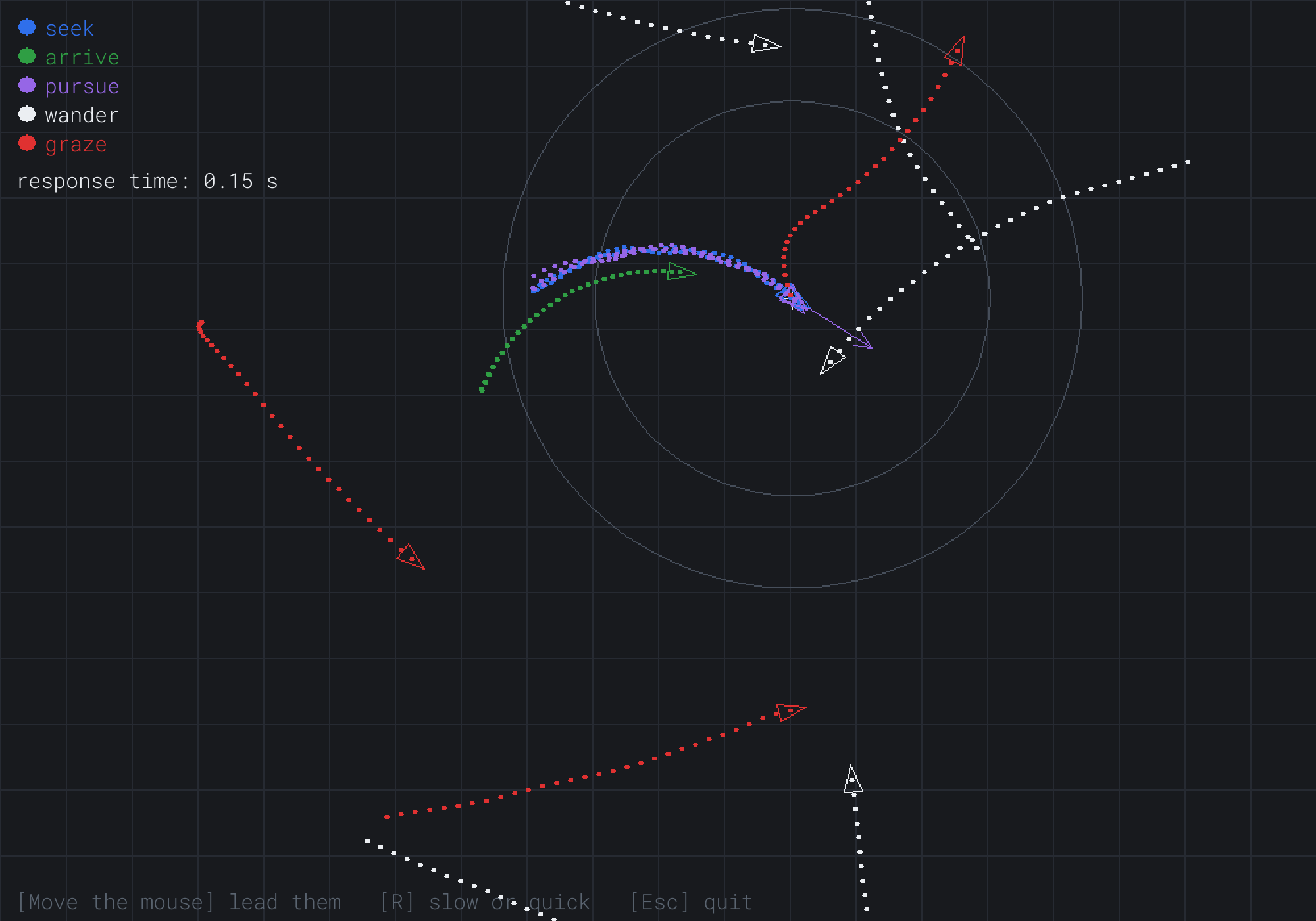
The seekers and the pursuers, in blue and violet, have caught the mouse. They ride along on top of it, since their top speed is faster than the mouse's. The green arrivers follow on an arc inside the mouse's circle, some way behind it. An arriver only wants the mouse's speed, 144 pixels a second, when it's nearly 100 pixels away, so that's how far it trails. One grazer's red trail turns sharply away where the mouse came close, and the white wanderers drift wherever they please.
Some things to try:
- Hold the mouse still, and watch the arrivers settle on it, while the seekers fly back and forth through it.
- Press R, for the slow response, then move the mouse to a new spot and hold it still. The arrivers' trails now loop past the mouse and back, which is the overshoot that the hidden one-second response causes. Press R again to put things right.
- Sweep the mouse quickly across the window, past a group of pursuers and seekers. The pursuers cut ahead to meet it, while the seekers swing round behind it.
- Bring the mouse slowly toward a grazer. It wanders until the mouse reaches its panic radius, the outer circle, and then it bolts.
Then leave the mouse alone for a while, and watch the wanderers. Each one's path curves gently one way and then the other, never quite repeating.
FAQ
Q) Why is it called a steering force, when it's an acceleration?
A) Because Reynolds' agents had a mass. A force changes a velocity at a rate of the force divided by the mass, so a heavy agent steers more sluggishly than a light one with the same force. Critters' agents all have a mass of 1, so the force and the acceleration are the same number. To give an agent a mass, divide its capped steering by the mass before adding it to the velocity. Chapter 20 gives objects mass properly.
Q) How do I stop the arrivers piling up on one spot?
A) Give each agent a little separation: a steering force away from any other agent that's too close, stronger the closer it is. Add it to every agent's steering, with a weight, as the grazer adds flee to wander. The arrivers then settle in a loose huddle around the target, instead of on top of each other. Separation is the first of the three rules of flocking, which the AI exercise builds.
Q) How do I make an agent turn like a car, which can't spin on the spot?
A) Limit how fast its heading can change, rather than only how fast its velocity can. Split the steering into a part along the velocity and a part across it, with the dot product, as Chapter 4 split vectors. The part along it speeds up or slows down, and the part across it turns. Then cap the part across it more tightly than the part along it. A car-like agent then swings round in wide arcs, instead of reversing on the spot.
Q) How do I make an agent follow a path?
A) Seek each point of the path in turn. When the agent comes within a small radius of the point it's seeking, move on to the next one, and arrive at the last, so that it stops at the end. With a radius of a few times the agent's size, it rounds the corners smoothly, instead of touching each point. Chapter 14's curves make smooth paths to follow.
Q) Can steering take an agent round a wall, or through a maze?
A) Round a wall, yes, with one more behavior: obstacle avoidance, which looks ahead along the agent's velocity and steers away from anything in its path. Chapter 12's rays give it a way to look. Through a maze, no. Steering only ever looks at the next moment, so an agent seeking a target on the far side of a wall presses against the wall forever. Finding a way through is pathfinding, which Chapters 22 and 23 build. Games use both: pathfinding chooses the route, and steering follows it smoothly.
Exercises
The first three exercises need only a pencil. The others change Critters.
- Steering by hand (paper). An agent's velocity is
(0, 50), it wants(100, 0), and its response time is 0.25 seconds. Work out its steering. Then cap it at 380, astruncatedwould. - Braking (paper). How far does an agent going 300 pixels a second need to stop, with a steering limit of 500? What's the smallest slowing radius that could work?
- The look-ahead (paper). A pursuer with a top speed of 220 is 330 pixels from a target that's moving at
(0, 120). How far ahead of the target does it aim? What about at 66 pixels away? - Evade (code). Make the grazers evade the mouse, as the sketch in Evade does, instead of fleeing it. Do they escape a fast mouse more often?
- A distracted seeker (code). Give the seekers some wander, with a weight of 0.5, as the grazers combine wander and flee. How do their paths around a still mouse change?
For the code exercises, work on a copy of the demo's folder, so that the original stays as the chapter describes it.
AI Exercise (Optional)
Steering behaviors were born in a flock. Reynolds' first agents, in 1987, were simulated birds called boids. Three simple rules were enough to make them flock like the real thing. With an AI's help, you can add a flock to Critters. If your first flock collapses into a ball or flies apart, that's part of the fun of tuning it. Open your AI chatbot of choice, and try a prompt like this:
"I have a C++ demo using SDL3 with steering agents. An Agent has a Vec2 pos and vel. Each frame, a behavior gives a desired velocity, the steering is (desired - vel) / responseTime, the steering is capped with truncated(MAX_FORCE), then vel += steer times dt, vel is capped with truncated(MAX_SPEED), and pos += vel times dt. Please add a flock of 40 boids, using Reynolds' three rules as three steering forces of the same kind. Separation steers away from neighbors within 25 pixels, more strongly the closer they are. Alignment steers toward the average velocity of neighbors within 70 pixels. Cohesion seeks the average position of neighbors within 70 pixels. Add the three forces with weights of 1.5, 1.0 and 1.0, and cap the sum once. Let the keys 1, 2 and 3 turn each rule off and on, and explain what each rule does to the flock on its own."
That prompt describes your steering model exactly, so the AI fits the boids into it, instead of inventing a model of its own. It asks for each rule as an ordinary steering force, which is this chapter's way of combining behaviors. And the keys let you take the flock apart, one rule at a time, which teaches more than any explanation.
Then experiment. With separation alone, the boids keep their distance, but each flies its own way. With alignment alone, neighbors end up flying the same way, but they drift apart. With cohesion alone, they clump. All three together make a flock, which no rule describes on its own. Try making the mouse a threat that the boids flee, and watch the flock split around it and join up again behind.
One warning. Checking every boid against every other is 1,600 checks a frame for 40 boids, but a million for 1,000. Chapter 19's spatial partitioning is how big flocks stay fast.
Summary
A steering agent chooses a desired velocity, and steers toward it. Its steering is the change it needs divided by a response time, capped at a maximum force, and its speed is capped too. The response time is its reaction time, and a hidden one of a second is why many arrivers overshoot. Seek heads for the target, arrive slows inside a radius bigger than its braking distance, flee runs within a panic radius, and pursue and evade aim at where a target will be. Wander drifts an angle by random steps scaled by the square root of dt, since random steps spread with the square root of their number. Behaviors combine by adding their weighted steering and capping the sum once. Critters showed all five, with trails. In Chapter 10, the world pushes back: gravity pulls things down, friction slows them, and balls bounce off walls.