
Part 2 has been about motion: steady, accelerating, eased and steered. This chapter closes it with the forces that the world itself applies. Gravity pulls everything down. Air drags on anything that moves through it. And surfaces push back, so that a ball bounces off the ground, comes to rest on it, or slides down it when it tilts.
None of these needs new machinery. Gravity is an acceleration, which Chapter 7 handled, and drag is Thrust's drag. The new idea is what happens at a surface, and it rests on Chapter 4's dot product. A velocity that meets a surface splits into two parts: the part going across the surface, into it, and the part going along it. A bounce reverses the first part. Friction slows the second. Get that split right, and balls bounce, settle and slide as real ones do. Get it wrong, and they creep, jitter or bounce forever.
In this chapter, we will:
- Make gravity a constant acceleration, and see why everything falls alike
- Slow things with drag, and find the speed at which a fall stops speeding up
- Split a velocity into its parts across a surface and along it
- Bounce by reflection, and lose energy with restitution
- Let a ball come to rest, rather than bounce forever
- Add friction, which holds a ball on a slope until the slope's too steep
- Build Bouncy, a box of balls with a ground that tilts
We'll start with the force that everything feels.
Gravity
Gravity is the simplest force in a game: a constant acceleration, straight down, the same for everything. In code, it's one line, Chapter 7's acceleration step with a fixed downward acceleration. The screen's y axis points down, so down means adding to vel.y:
// A sketch: gravity speeds a fall up by GRAVITY pixels a second, every
// second.
vel.y += GRAVITY * dt;
Each frame, the downward velocity grows a little, so a falling object starts slowly and falls faster and faster, as real things do.
Why Everything Falls Alike
It seems as though a heavy thing should fall faster than a light one, since gravity pulls on it harder. It does pull harder, in exact proportion to the mass. But a heavier thing is also harder to speed up, in exact proportion to the mass. The force is the mass times g, and the acceleration is the force divided by the mass. So the mass cancels out, and every object falls with the same acceleration, g. In 1971, the astronaut David Scott dropped a hammer and a feather on the Moon, where there's no air, and they landed together. On Earth, it's the air that holds the feather back, not gravity.
So a game's gravity needs no mass at all. Bouncy's is a constant:
// Gravity: a fall's speed grows by this many pixels a second, every
// second, whatever is falling.
constexpr float GRAVITY = 900.0f;
It's in pixels, not meters, as everything on the screen is.
Choosing a Value
Real gravity is 9.81 meters a second, every second. If a meter is 100 pixels on your screen, real gravity is 981 pixels a second, every second, and Bouncy's 900 is a meter of about 92 pixels. But most games choose gravity by feel, not by measurement, and two formulas from Chapter 7's constant acceleration make that easy. An object dropped from a height h takes this long to fall, and lands this fast:
time  = √(2 × h / g)
speed = √(2 × g × h)
With Bouncy's 900, a drop of 500 pixels takes 1.05 seconds, and lands at 949 pixels a second. A game that wants a snappier fall raises the gravity. Doubling it makes the same drop take 0.75 seconds, since the time goes down with the square root of g.
Drag
Thrust's drag took a share of the velocity away each second, with vel -= vel * (drag * dt). That's Chapter 8's share per frame in its simple form, which is very nearly right at normal frame rates. Bouncy uses the exact form, as Chapter 8 worked it out, since it costs nothing more:
// A sketch: the air keeps a share of the velocity that doesn't depend on
// the frame rate.
vel *= std::exp(-drag * dt);
The std::exp function, as Chapter 8's FAQ explained, raises the number e to a power. Over a second, the frames' shares multiply to e^(-drag), whatever the frame rate. With Bouncy's thin air, a drag of 0.15, a moving ball keeps 86% of its speed after a second.
Terminal Velocity
Gravity and drag pull against each other. Gravity adds speed at a steady rate, g pixels a second, every second. Drag takes speed away at a rate that grows with the speed itself: the drag times the speed. A falling object speeds up until the two rates are equal, and then it stops speeding up. That speed is its terminal velocity:
terminal velocity = g / dragBouncy's thin air gives 900 / 0.15, or 6,000 pixels a second. That's far faster than anything in the window ever goes. To reach 95% of it, a ball would have to fall for 20 seconds. That's a fall of about 82,000 pixels, or 117 windows' worth. Thin air hardly touches a ball in Bouncy: a 500-pixel drop lands at 900 pixels a second, instead of 949.
Bouncy's thick air, a drag of 3, gives 900 / 3, or 300 pixels a second. A falling ball gets within 5% of it in one second. Then it falls at a steady speed, like a feather. The next image shows the speed of a fall from rest, with no drag, in thin air and in thick air.
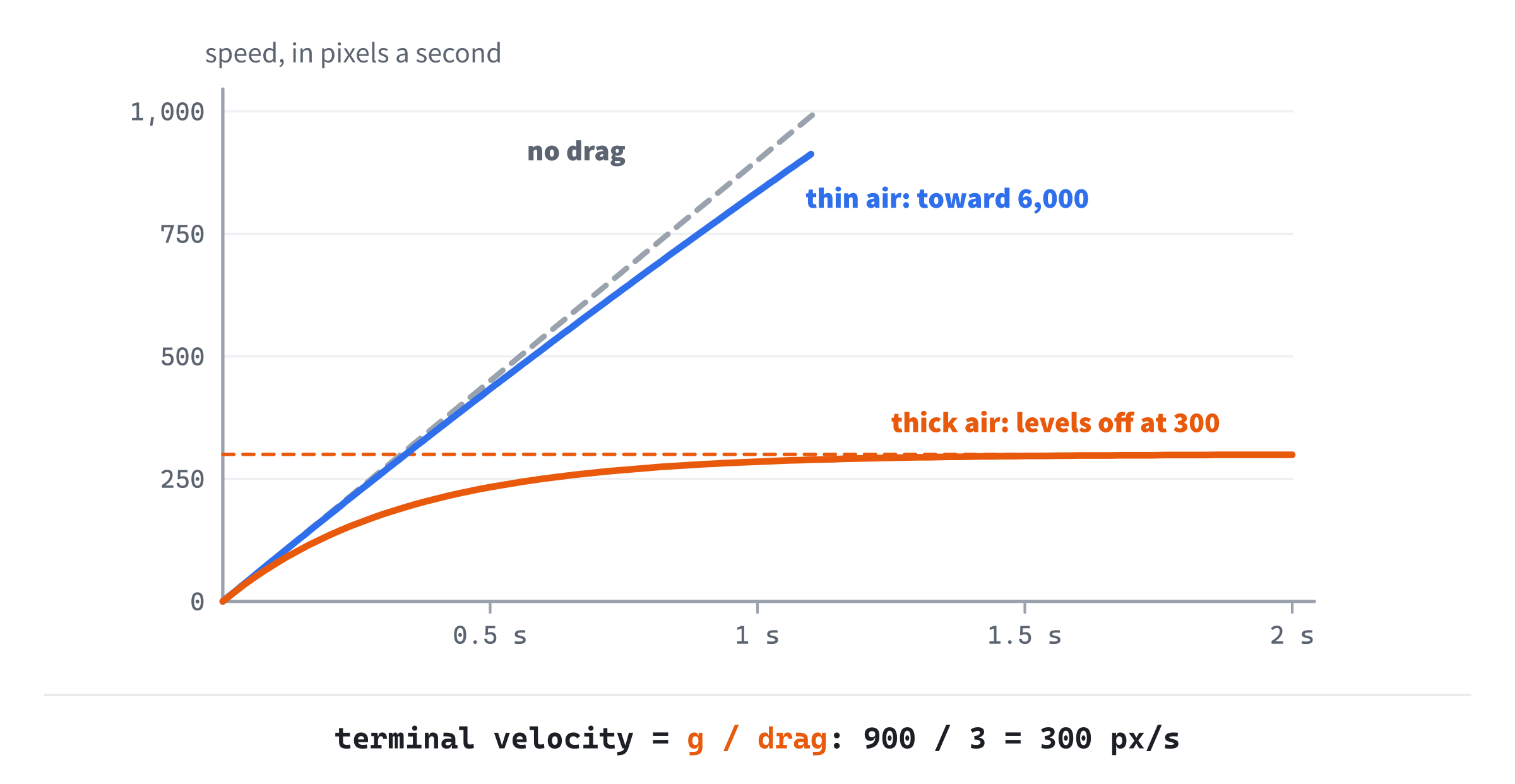
With no drag, the speed grows in a straight line forever. With drag, it bends over and levels off at gravity divided by the drag. Real air resistance grows faster than this, with roughly the square of the speed. But drag in step with the speed is cheap and stable, and it feels right in a game.
Bouncing
Now for the surfaces. In this chapter, a surface is flat: a line on the screen. It has a normal, the unit vector that points straight out of it, to the side where the balls are. A level floor's normal points up, (0, -1) on the screen. The window's left edge has a normal of (1, 0), pointing into the window.
Across and Along
A velocity that meets a surface has two parts. The part across the surface is how fast the ball is going into it, or out of it. The part along the surface is how fast it's sliding past. The dot product finds the first, as Chapter 4 found a projection. Since the normal is a unit vector, the velocity's dot product with it is the length of the part across, with a sign:
across = v · n
along  = v - n × across
The sign says which way it's going. A negative across means the velocity points against the normal, into the surface. A positive one means it's moving away. Taking the across part, n × across, away from the velocity leaves the along part, which is at right angles to the normal.
A worked example. A slope has the normal (0.6, -0.8), so it leans down to the right. A ball meets it with a velocity of (100, 300), falling and drifting right. Then across is 100 × 0.6 + 300 × (−0.8), which is 60 − 240, or −180: into the surface at 180 pixels a second. The part along is (100, 300) - (0.6, -0.8) × (-180), which is (100, 300) + (108, -144), or (208, 156). Check it: its dot product with the normal is 124.8 − 124.8, which is 0, so it really is along the surface.
Reflection
A perfect bounce, as a mirror bounces light, keeps the part along the surface and reverses the part across it. The ball leaves as fast as it came, at the mirror image of the angle it came in at:
reflected = along - n × across
          = v - 2 × (v · n) × n
The second line is the same thing written with the velocity alone, since along is v - n × across, and taking n × across away once more makes two of them. That's why the 2 is there. Taking the across part away once leaves the ball sliding along the surface, and taking it away twice reverses it. Add reflect to Vec2.h, at the end:
// A velocity bounced off a surface with unit normal n, as a mirror bounces
// light (Chapter 10): the part across the surface reversed, and the part
// along it kept.
inline Vec2 reflect(const Vec2& v, const Vec2& n)
{
    return v - n * (2.0f * v.dot(n));
}
For the worked example, the reflected velocity is the part along, (208, 156), minus the normal times −180. That's (208, 156) + (108, -144), or (316, 12). The ball came in falling steeply, and it leaves skimming off to the right, almost level. Its speed hasn't changed: the length of (100, 300) and the length of (316, 12) are both 316.2. The next image shows the split, and the bounce.
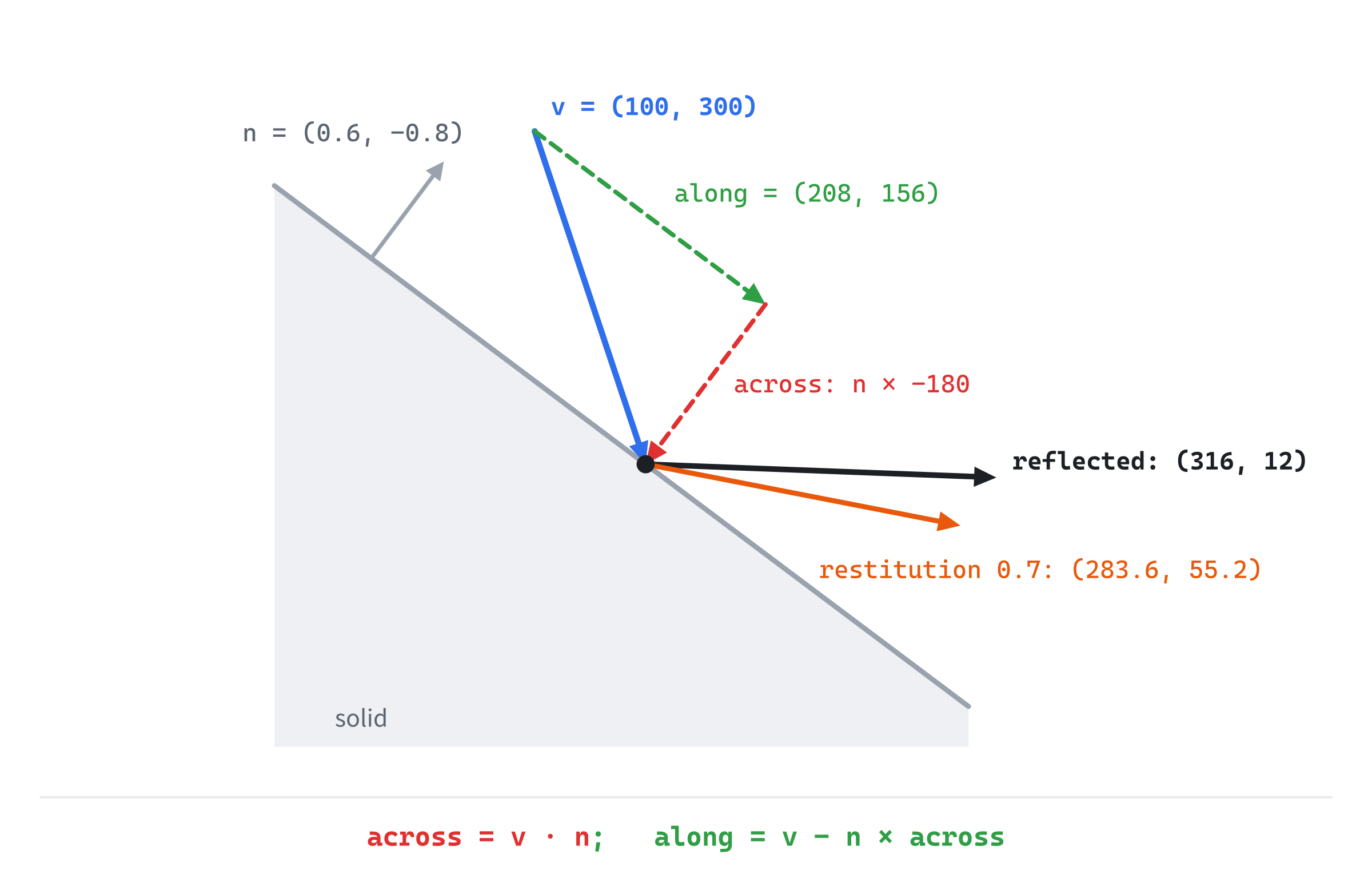
Two details matter. The normal must be a unit vector: a normal twice as long makes the across part four times too big, since the normal appears twice in the formula. But the normal's direction doesn't matter to reflect, since flipping it flips both of its appearances, and the two minus signs cancel. It does matter elsewhere, as Bouncy will show: it says which side of the surface is open.
Restitution
A real bounce loses some energy. A dropped ball never quite returns to the height it fell from. Restitution, a number from 0 to 1, says how much of the speed across the surface a bounce keeps. At 1, the bounce is perfect. At 0, the ball stops dead against the surface. In between, the part across reverses and shrinks, and the part along is left alone:
bounced = along - n × (across × restitution)With a restitution of 0.7, the worked example's ball leaves at (208, 156) + (0.6, -0.8) × 126, which is (283.6, 55.2).
Notice that only the part across is scaled. It's tempting to bounce with reflect(v, n) * restitution, which scales the whole velocity, but that's a mistake you can see. A ball resting on a slope touches it every frame, so every frame, it would lose 30% of its speed along the slope too. That's friction, hidden in the bounce, and it depends on the frame rate. On a 20-degree slope with no friction, in Bouncy's thin air, a ball should be sliding at 742 pixels a second after three seconds. Scaling the whole velocity, it's creeping at 26 pixels a second at 30 frames a second, 13 at 60, and 5.5 at 144. Friction belongs in a separate step, which comes after the next section.
A bounce keeps 70% of the speed, but less than 70% of the height. A fall's speed grows with the square root of its height, as the formulas in Choosing a Value showed, so the height a speed can reach goes with its square. A bounce that keeps 0.7 of the speed reaches 0.7 × 0.7, or 0.49, of the height: just under half. The next image shows a ball dropped from 500 pixels, with a restitution of 0.7 and no air.

The bounces shrink from 500 pixels to 245, then 120, then 59, and each one takes less time than the last. In Bouncy, the air takes a little more, so the first bounce reaches about 210.
Coming to Rest
On paper, those bounces go on forever, getting smaller and quicker. In a simulation, they cause trouble. A ball resting on the ground still falls into it a little every frame, since gravity adds 15 pixels a second to its speed in a 60th of a second. Bounce that, and the ball hops a tiny bit, falls back and hops again. It jitters on the ground for good.
The cure is a rest speed. A ball that meets a surface slower than this doesn't bounce: the part of its velocity across the surface is simply set to zero, and it rests. Bouncy's rest speed is 60 pixels a second, which is the speed of a fall of 2 pixels, so it only skips bounces too small to see:
// A ball that meets a surface slower than this, in pixels a second, stops
// bouncing and rests.
constexpr float REST_SPEED = 60.0f;
A ball dropped from 500 pixels makes about eight bounces in Bouncy, and comes to rest five or six seconds after it was dropped, at any frame rate.
Friction
Friction is the push back against sliding. A ball sliding along a surface is slowed by it, and a ball resting on a slope can be held there by it. The usual model, which matches real surfaces well, says how strong it is. Friction can push back with up to μ, the Greek letter mu, times how hard the surfaces press together. The number μ is the coefficient of friction. It's below 0.1 for ice on ice, between a quarter and a half for wood on wood, and about 1 for rubber on dry concrete. Real surfaces grip a little harder when they're still than when they're sliding, but one number is plenty for a game.
On a slope, gravity does two things at once. Its pull splits into a part across the slope, which presses the ball into it, and a part along the slope, which drags the ball down it. For a slope at an angle θ, the part pressing in is g × cos θ, and the part pulling down the slope is g × sin θ. So friction can hold back at most μ × g × cos θ, and the ball stays put while that's at least g × sin θ:
holds while  μ × g × cos θ ≥ g × sin θ
that is,     tan θ ≤ μ
The gravity cancels again, and so does everything else, apart from the slope's angle and μ. A ball with a μ of 0.3 holds on any slope up to 16.7 degrees, since the tangent of 16.7 degrees is 0.3. Beyond that, it slides, and friction only slows it down. The next image shows the parts of gravity on a slope, and friction against them.
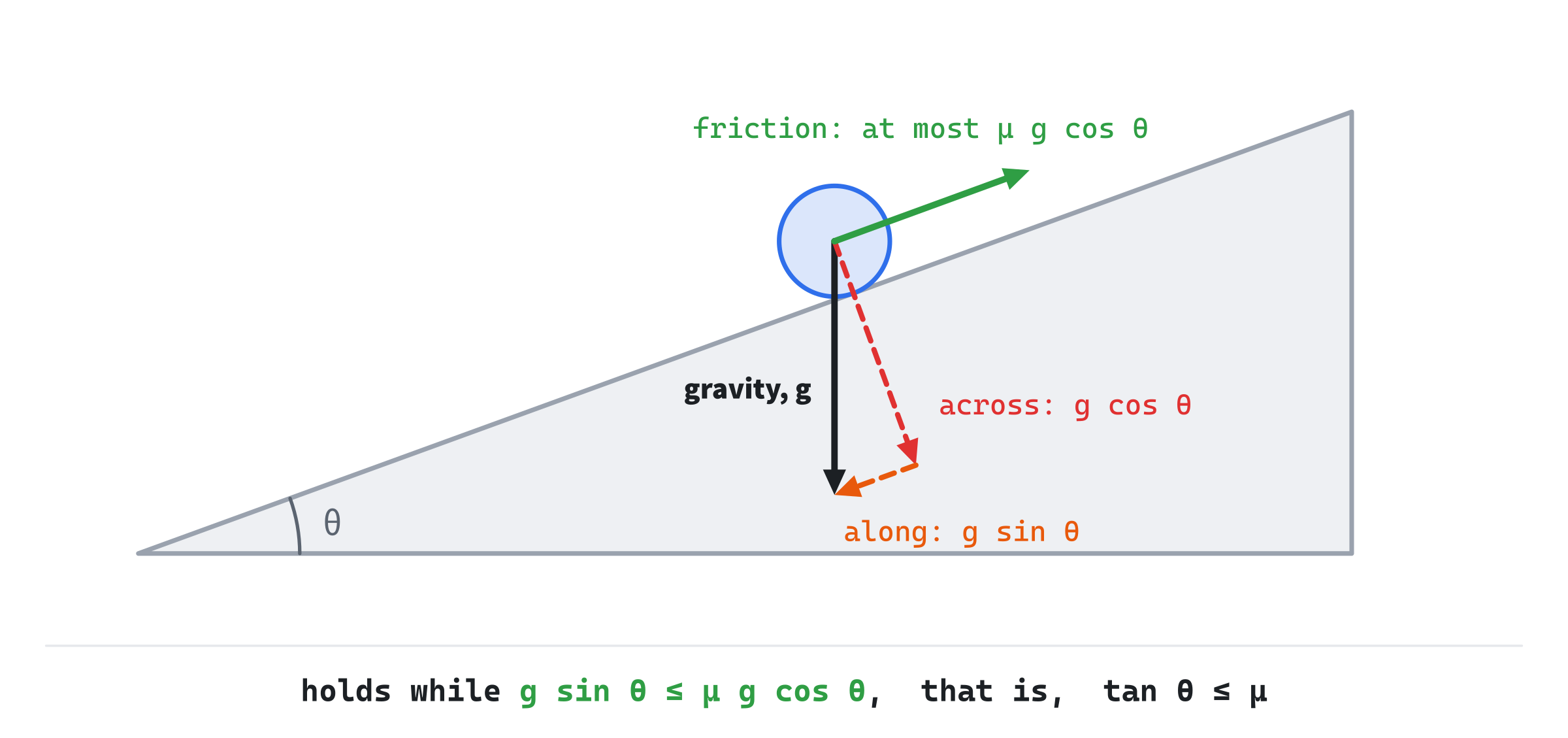
Two more facts complete the model. Friction only ever slows sliding down. It can bring a ball to a stop, but it can never push it backward, so it stops at zero. And Bouncy's balls don't spin, so they slide, rather than roll. A rolling ball needs a spin of its own, which a ball's friction with the ground keeps in step with its speed. This book's balls make do without one.
Building Bouncy
Bouncy drops balls into the window, and lets them bounce off the sides and a ground that tilts. Every bounce splits a ball's velocity into its parts across the surface and along it, and friction slows the part along while the ball touches. Click to drop a ball. Left and Right tilt the ground, up to 25 degrees either way. Up and Down change the bounciness, F changes the friction, and D switches between thin air and thick.
Get the code. The complete project is in the
Bouncyfolder of the book's repository.
Bouncy starts from the skeleton, with its timing, but it leaves out the mouse's position, since it only needs clicks. It reuses drawGrid, fillCircle, drawArrow, fmt2, setColor and Critters' randRange. Its Vec2.h is Critters', with reflect added. It includes <algorithm> for std::max and std::clamp, <random> for the random numbers, as Critters did, and <vector> for the balls. Its colors are the book's usual ones, with a silver for the ground:
#include <algorithm>
#include <cmath>
#include <random>
#include <string>
#include <vector>
#include "Vec2.h"

constexpr int WINDOW_WIDTH  = 1000;
constexpr int WINDOW_HEIGHT = 700;

constexpr SDL_Color TEXT = { 235, 238, 242, 255 };
constexpr SDL_Color GREY = { 90, 100, 112, 255 };
constexpr SDL_Color BLUE = { 47, 111, 235, 255 };
constexpr SDL_Color AMBER = { 232, 89, 12, 255 };
constexpr SDL_Color GREEN = { 47, 158, 68, 255 };
constexpr SDL_Color RED = { 224, 49, 49, 255 };
constexpr SDL_Color VIOLET = { 150, 102, 230, 255 };
constexpr SDL_Color SILVER = { 150, 158, 170, 255 };
The rest of the demo comes in four parts: the balls and the surfaces, the touch between them, each frame's work, and the drawing.
Balls and Surfaces
A ball has a position, a velocity, a radius and a color. New balls take five colors in turn:
// A ball, and the five colors balls take in turn.
struct Ball
{
    Vec2 pos;
    Vec2 vel;
    float radius;
    SDL_Color color;
};

constexpr SDL_Color BALL_COLORS[] = { BLUE, GREEN, RED, AMBER, VIOLET };
The radius is a float, since fillCircle takes one. A surface is the point and the normal that this chapter has been using:
// A flat surface: a point on it, and its normal, a unit vector that points
// out of it, to the side the balls are on.
struct Surface
{
    Vec2 point;
    Vec2 normal;
};
The random numbers come from Critters' generator and its randRange, unchanged:
// A random float from lo to hi. The generator is made once, and seeded
// from the system, so that every run is different.
std::mt19937 rng{ std::random_device{}() };
A new ball comes from a helper, which gives it a random size, and a small random speed across the window:
// A new ball at a point, with a random size, a small random speed across
// the window, and the next color of the five.
Ball makeBall(Vec2 at, size_t count)
{
    Vec2 vel = { randRange(-120.0f, 120.0f), 0.0f };
    return { at, vel, randRange(9.0f, 17.0f), BALL_COLORS[count % 5] };
}
Its color is the next of the five, chosen by how many balls there are already. The % operator gives the remainder after dividing by 5, so the colors go round in order.
The distance from a ball's center to a surface is a dot product, as Chapter 4's projection measured how far a vector goes in a direction:
// How far a ball's center is from a surface, along its normal: positive on
// the open side, and negative once the center has sunk through.
float distanceTo(const Ball& b, const Surface& s)
{
    return (b.pos - s.point).dot(s.normal);
}
The vector from the surface's point to the ball's center, dotted with the unit normal, is how far the center is from the surface, measured straight out from it. It's positive on the open side, the side the normal points to, and negative once the center has sunk through. This is where the normal's direction matters: flip it, and the open side and the solid side swap.
Touching a Surface
One function holds the whole of this chapter's bouncing, resting and friction:
// A ball touches a surface when it's within half a pixel of it, or when
// this frame's move would carry it in. Then it's set down on the surface,
// and its velocity splits into the part across the surface and the part
// along it. The part across bounces back, scaled by restitution, unless
// it's too slow to bother with, when it stops and the ball rests. Friction
// slows the part along, by up to friction times how hard gravity presses
// the ball into the surface, but never past zero.
void touch(Ball& b, const Surface& s, float restitution, float friction,
           float dt)
{
    float across = b.vel.dot(s.normal);
    float gap = distanceTo(b, s) - b.radius;
    if (across > 0.0f || gap + across * dt > 0.5f) return;   // not touching

    b.pos -= s.normal * gap;
    Vec2 along = b.vel - s.normal * across;
    across = (across < -REST_SPEED) ? -across * restitution : 0.0f;

    float press = std::max(0.0f, -GRAVITY * s.normal.y);
    float slow = friction * press * dt;
    float speed = along.length();
    along = (speed > slow) ? along * ((speed - slow) / speed) : Vec2{};

    b.vel = along + s.normal * across;
}
In the preceding code, the first part decides whether the ball is touching the surface at all. The variable gap is how far the ball's edge is from the surface: its center's distance, less its radius. A ball counts as touching when its gap is within half a pixel, or when this frame's move, at its speed across, would carry it in. A ball moving away, with a positive across, never touches.
That look ahead matters. Without it, a fast ball would sink into the surface before it was noticed, and pushing it back out would lift it without slowing it. That lift adds a little energy to every bounce. It's too little to see in a big bounce, but enough to keep tiny bounces going forever at 30 frames a second. Bouncing the ball as it arrives, instead, means it never sinks in.
A touching ball is then set down on the surface, by moving it against the normal by its gap. That also lifts out a ball that has sunk in, since its gap is negative. Then its velocity splits into across and along, as Across and Along split it. Below the rest speed, the part across becomes zero, and the ball rests. Above it, the part across reverses and shrinks by the restitution.
Friction comes last. The press of gravity into the surface is the part of gravity against the normal. For the ground, whose normal points up, that's GRAVITY times the cosine of the tilt, as the slope's diagram showed. For the side walls, whose normals point across, it's zero. For the top edge, gravity pulls away from the surface, so std::max makes it zero too. Friction can take up to μ times the press, times dt, off the speed along. If that's more than the ball has, the part along stops, which is friction never pushing past zero. Last, the two parts are put back together.
Each Frame
The balls are made after the font is loaded, eight to start, near the top:
// Eight balls to start, at random places near the top.
std::vector<Ball> balls;
for (int i = 0; i < 8; ++i)
{
    Vec2 at = { randRange(150.0f, 850.0f), randRange(50.0f, 200.0f) };
    balls.push_back(makeBall(at, balls.size()));
}
Then come the ground, and the settings that the keys change:
// The ground: a point on it, and its tilt, in radians, from level.
const Vec2 groundPoint = { WINDOW_WIDTH / 2.0f, 440.0f };
const float maxTilt = 25.0f * PI / 180.0f;
float tilt = 0.0f;

// The settings the keys change: how bouncy the balls are, how much
// friction the surfaces have, and whether the air is thin or thick.
float restitution = 0.7f;
const float frictions[] = { 0.0f, 0.3f, 0.6f };
int frictionChoice = 1;
bool thickAir = false;
The friction is one of three values, from none to grippy. The ground's tilt is capped at 25 degrees, so that its lower end stays inside the window. At a friction of 0.3, the balls slide at 16.7 degrees, so you can watch them start. At 0.6, they never slide, since that needs 31 degrees.
The keys change the settings, in the events, and a click drops a new ball where it lands:
else if (event.type == SDL_EVENT_KEY_DOWN)
{
    if (event.key.key == SDLK_ESCAPE) running = false;
    else if (event.key.key == SDLK_UP) restitution += 0.05f;
    else if (event.key.key == SDLK_DOWN) restitution -= 0.05f;
    else if (event.key.key == SDLK_F)
        frictionChoice = (frictionChoice + 1) % 3;
    else if (event.key.key == SDLK_D) thickAir = !thickAir;
    restitution = std::clamp(restitution, 0.0f, 1.0f);
}
else if (event.type == SDL_EVENT_MOUSE_BUTTON_DOWN &&
         event.button.button == SDL_BUTTON_LEFT)
{
    Vec2 at = { event.button.x, event.button.y };
    balls.push_back(makeBall(at, balls.size()));
}
The restitution is clamped between 0 and 1 after each key, by std::clamp, as Ease Lab clamped its t. The % operator steps the friction round its three values. A click's position comes with its event, in event.button.x and event.button.y, so Bouncy needs no mouse position of its own.
After the events, Left and Right tilt the ground while they're held, as Thrust turned its ship:
// Left and Right tilt the ground while they're held, by 0.35
// radians, or 20 degrees, a second, up to 25 degrees either way.
const bool* keys = SDL_GetKeyboardState(nullptr);
if (keys[SDL_SCANCODE_LEFT]) tilt -= 0.35f * dt;
if (keys[SDL_SCANCODE_RIGHT]) tilt += 0.35f * dt;
tilt = std::clamp(tilt, -maxTilt, maxTilt);
Then the four surfaces are set up for this frame:
// The four surfaces: the ground, whose normal turns with its tilt,
// and the window's left, right and top edges.
Vec2 groundNormal = Vec2::fromAngle(-PI / 2.0f + tilt);
const Surface surfaces[] = {
    { groundPoint, groundNormal },
    { { 0.0f, 0.0f }, { 1.0f, 0.0f } },
    { { (float)WINDOW_WIDTH, 0.0f }, { -1.0f, 0.0f } },
    { { 0.0f, 0.0f }, { 0.0f, 1.0f } },
};
The ground's normal is the unit vector at an angle of −π/2, which points straight up on the screen, turned by the tilt. The window's sides are surfaces too, each a point on the edge, with a normal pointing into the window. So one touch function handles every bounce, against the ground at any tilt and against the walls alike.
Then the friction and the drag are picked, and every ball is moved:
float friction = frictions[frictionChoice];
float drag = thickAir ? 3.0f : 0.15f;

// Each ball: gravity and the air change its velocity, and so does
// every surface it touches. Then the velocity moves it.
for (Ball& b : balls)
{
    b.vel.y += GRAVITY * dt;
    b.vel *= std::exp(-drag * dt);
    for (const Surface& s : surfaces)
        touch(b, s, restitution, friction, dt);
    b.pos += b.vel * dt;
}
The order matters. Gravity and the air change the velocity first. Then each surface the ball touches changes it, and only then does the velocity move the ball. A ball resting on a slope has its velocity stopped by friction before it moves, so it doesn't move at all. Moving it first would let it slip a fraction of a pixel downhill every frame, before the touch could stop it, and it would creep.
Drawing
After the grid, the ground is drawn:
// The ground: a long line along the surface, which is the normal
// turned a quarter turn, and the normal itself, as an arrow.
Vec2 along = groundNormal.perp();
Vec2 left = groundPoint - along * 700.0f;
Vec2 right = groundPoint + along * 700.0f;
setColor(renderer, SILVER);
SDL_RenderLine(renderer, left.x, left.y, right.x, right.y);
drawArrow(renderer, groundPoint, groundPoint + groundNormal * 60.0f,
          AMBER);
The ground's direction is its normal turned a quarter turn, by Chapter 4's perp. The line runs 700 pixels each way from the ground's point, which reaches past both sides of the window at any tilt. The normal is drawn as an amber arrow, 60 pixels long.
Then the balls, and the fastest one's speed:
// The balls, and the fastest one's speed, for the readout.
float fastest = 0.0f;
for (const Ball& b : balls)
{
    setColor(renderer, b.color);
    fillCircle(renderer, b.pos, b.radius);
    fastest = std::max(fastest, b.vel.length());
}
Last come the readouts and the controls:
long degrees = std::lround(tilt * 180.0f / PI);
drawText(renderer, font,
         "balls: " + std::to_string(balls.size()) +
         "   bounciness: " + fmt2(restitution) +
         "   friction: " + fmt2(friction) +
         "   tilt: " + std::to_string(degrees) + " deg",
         12, 10, TEXT);
long terminal = std::lround(GRAVITY / drag);
std::string air = thickAir ? "thick air" : "thin air";
drawText(renderer, font,
         air + ": terminal speed " + std::to_string(terminal) +
         " px/s   fastest ball: " +
         std::to_string(std::lround(fastest)) + " px/s",
         12, 30, GREY);
drawText(renderer, font,
         "[Click] drop   [Left/Right] tilt   [Up/Down] bounciness"
         "   [F] friction   [D] air   [Esc] quit",
         12, WINDOW_HEIGHT - 26, GREY);
The second readout gives the terminal speed, gravity divided by the drag, beside the fastest ball's speed, so you can watch one approach the other. The controls are two string literals side by side, which C++ joins into one, to keep each line of code short.
Trying It Out
Run the demo, and watch the eight balls fall, bounce and settle. The next image shows Bouncy with the ground tilted 12 degrees, and the bounciness turned down to 0.3, so that the balls settle quickly.
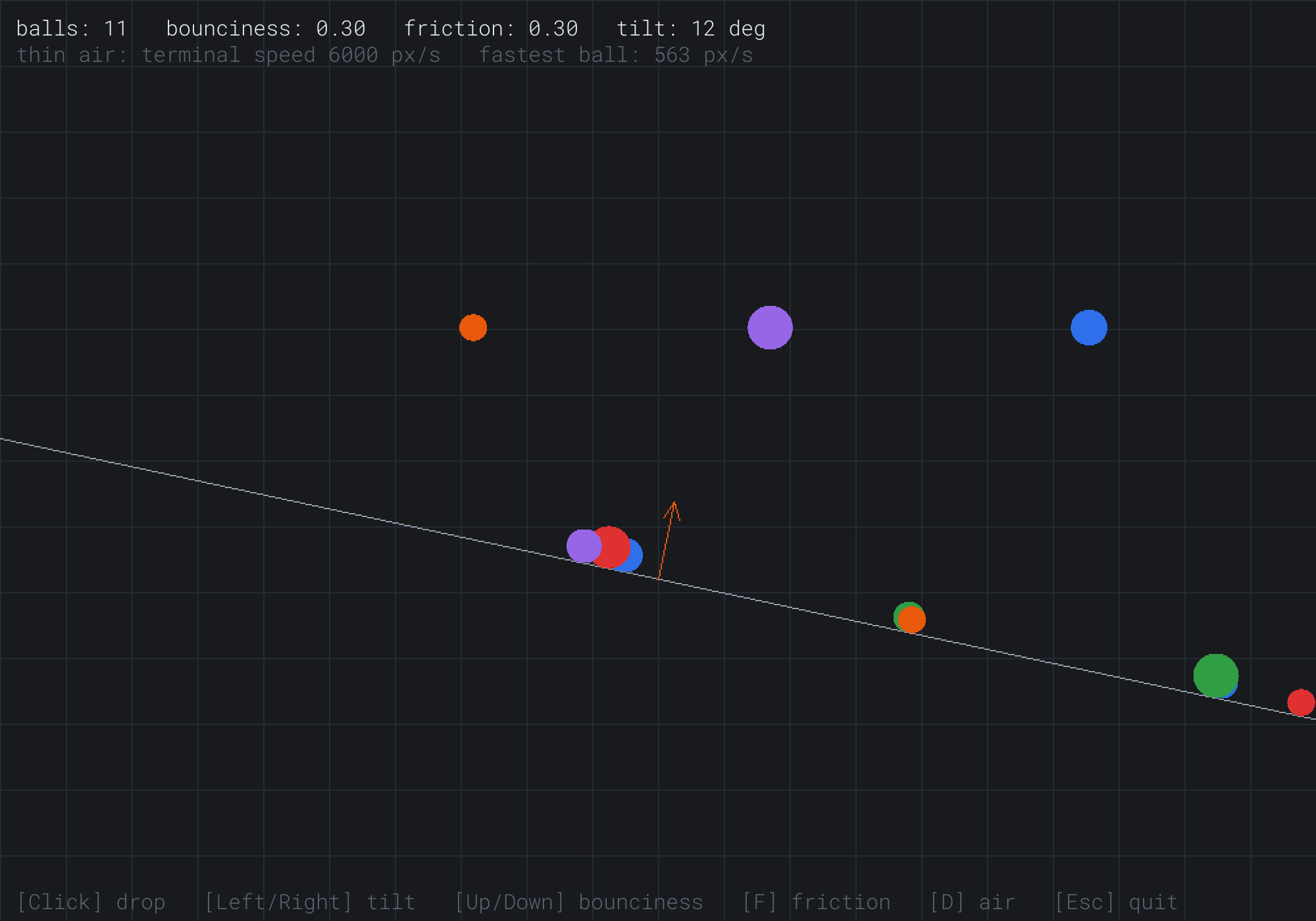
The first eight balls have landed, and friction holds each one where it stopped, since 12 degrees is less than 16.7. Before they settled, each bounce sent them a little downhill, since the ground's normal leans that way. So they came to rest in clusters, lower down the slope than they landed. Three more balls were dropped from the top a moment ago, and the fastest of them is falling at 563 pixels a second.
Some things to try:
- Tilt the ground slowly to the right, and watch the readout. At 17 degrees, the settled balls start to slide. Press F for a friction of 0.6, and they stop again. Press F once more, for none, and they slide at any tilt.
- Press D for thick air, and drop a ball from the top. The fastest ball's speed creeps up to just under 300, the terminal speed, and holds there until the ball lands.
- Press Up until the bounciness reads 1.00, and click near the top to drop a few balls. They bounce nearly as high as they fell, losing only what the thin air takes.
- Press Down until it reads 0.00, and drop another ball. It stops dead against the ground. On a tilted ground, the part of its fall along the slope carries it on, until friction stops it.
Then click a dozen balls into one corner. They overlap, since nothing yet tells one ball about another. That's a job for Part 4.
FAQ
Q) Why do the balls pass through each other?
A) Because each ball only knows about the surfaces, not about the other balls. Two balls overlap when the distance between their centers is no more than the sum of their radii, which Chapter 15 tests for. What to do about it, pushing them apart and bouncing them off each other with the right share of the speed each, is collision response, which Chapters 18 and 20 build. The bounce there is this chapter's, with the normal running from one ball's center to the other's.
Q) Why do platform games feel snappier than real physics?
A) Because they cheat, on purpose. Many use gravity two to four times stronger than real, so that jumps are quick, and stronger again on the way down, so that a jump rises gently and falls fast. Many also cap the falling speed, a terminal velocity that's set rather than worked out. Since the time to fall a height goes with the square root of 1 / g, doubling the gravity makes every fall about 30% quicker.
Q) Can restitution be more than 1?
A) Not for a plain bounce. With a restitution above 1, a ball leaves faster than it arrived, so it bounces higher each time, gaining energy from nowhere. But games use it on purpose for bumpers and springs, which really do push the ball, such as a pinball bumper that kicks the ball away faster than it came. Bouncy's keys stop at 1, since its ground is plain ground.
Q) Why does the ground's normal point up? Couldn't it point down?
A) It could, but then Bouncy would treat the space above the ground as solid, and the space below as open. The reflect function doesn't care which way a normal points, but distanceTo and touch do. The distance is positive on the side the normal points to, and a velocity is going into the surface when it's against the normal. So a surface's normal always points to the side where things can be.
Q) How would I make the balls roll?
A) Give each ball an angle, and turn it as the ball moves along the ground. A ball rolling without slipping turns by its speed along the ground divided by its radius, in radians a second. Draw a line from its center to its edge at that angle, and it will look as though it rolls. Real rolling physics, where friction changes the spin and the spin changes the speed, takes a moment of inertia and a torque, which are beyond this book.
Exercises
The first four exercises need only a pencil. The others change Bouncy.
- Across and along (paper). A ball's velocity is
(3, 4), and it hits a level floor with the normal(0, -1). Work outacrossandalong. Then work out the velocity after a bounce with a restitution of 0.5. - Bounce heights (paper). A ball dropped from 100 pixels has a restitution of 0.8. How high are its first three bounces? Which bounce is the first lower than 2 pixels?
- Terminal speed (paper). With a gravity of 900 and a drag of 0.5, what's the terminal speed? What happens to it if the drag doubles?
- Slopes (paper). At what angle does a ball with a friction of 0.5 start to slide? Would it hold on Bouncy's steepest tilt?
- Superballs (code). Let the bounciness go up to 1.2. What happens to a ball dropped from halfway up the window, and why does it break the rule that a bounce can't add energy?
- A sticky wall (code). Give the right wall a restitution of its own, 0, so that balls stop dead against it, by passing a different restitution for that surface.
For the code exercises, work on a copy of the demo's folder, so that the original stays as the chapter describes it.
AI Exercise (Optional)
A surface in this chapter is a point and a normal, and nothing says it has to be a wall. A ball that hits a round peg meets a surface too: at the point of contact, the normal runs from the peg's center to the ball's. With an AI's help, you can build a Galton board, a wall of pegs that balls rattle down through, and watch something surprising appear at the bottom. Open your AI chatbot of choice, and try a prompt like this:
"I have a C++ demo using SDL3: balls in a 1000 by 700 window, with a Vec2 struct that has dot, length and normalized. A Ball has pos, vel, radius and color. A Surface has a point and a unit normal, and a function touch(ball, surface, restitution, friction, dt) bounces a ball off a surface when it's touching it, splitting the velocity into its parts across the surface and along it. Please build a Galton board: 12 staggered rows of round pegs of radius 5, 40 pixels apart, in a triangle that widens downward. For each peg a ball overlaps, make a Surface on the spot, at the peg's edge, with its normal from the peg's center to the ball's, and call touch. Under the pegs, put 13 slots, and count the balls that land in each, drawn as bars. Drop a ball of radius 6 from the top center every 0.2 seconds, with a tiny random speed across. Explain why the counts make the shape they do."
That prompt hands the AI your own touch function, so the pegs bounce balls exactly as the ground does, instead of a physics of the AI's own. It asks for a surface made on the spot for a curved peg, which is the most useful idea in this chapter, stretched a little further. And it ends on a question with a lovely answer.
Then watch the slots fill. The bars grow into a bell shape, tall in the middle and low at the edges. Each peg sends a ball left or right, nearly at random, so a ball's path is a random walk, as Chapter 9's wander was. Its spread grows with the square root of the number of rows, so most balls end near the middle. If the shape comes out lopsided, check that the board is centered under the drop point, and that the tiny random speed is the same either way. Then try a restitution of 0.3, and then 0.9, and see how the bell changes.
Summary
Gravity is a constant acceleration, the same for everything, since mass cancels out, and a drop of h takes √(2h / g) seconds. Drag takes a share of the velocity, exactly with std::exp, and a fall levels off at a terminal velocity of gravity divided by the drag. At a surface, the dot product with the unit normal splits a velocity into its parts across the surface and along it. A perfect bounce reverses the part across, which is reflect. Restitution shrinks only that part, so a bounce reaches the height before, times the restitution squared. A rest speed stops endless tiny bounces, and friction slows the part along, holding a ball on a slope while the slope's tangent is no more than μ. Bouncy treats the ground and the walls alike, as surfaces, and lets every surface touch a ball before the ball moves. That ends Part 2. Part 3 turns to the geometry of shapes themselves: how to describe them, and how to measure the distances between them.