
Part 2 gave things motion. Parts 3 and 4 are about the shapes that motion runs into, since the moment two objects can touch, you need to describe what they are. This chapter is the foundation: the handful of shapes that nearly every 2D game is built from, and the small structs that hold them.
There's less arithmetic here than in Part 2, but the choices matter. Everything that follows, from distances and closest points to the whole of Part 4's collision detection, is written in terms of these shapes. A clean way to store a circle now makes every collision routine that touches a circle later read clearly. A muddled one makes every one of them harder. So this chapter meets each shape, decides how to store it, and works out what has to stay true about it. Then it builds a gallery where you can grab every shape by its handles, and watch its data change. The next image shows the shapes, each with the data that defines it.
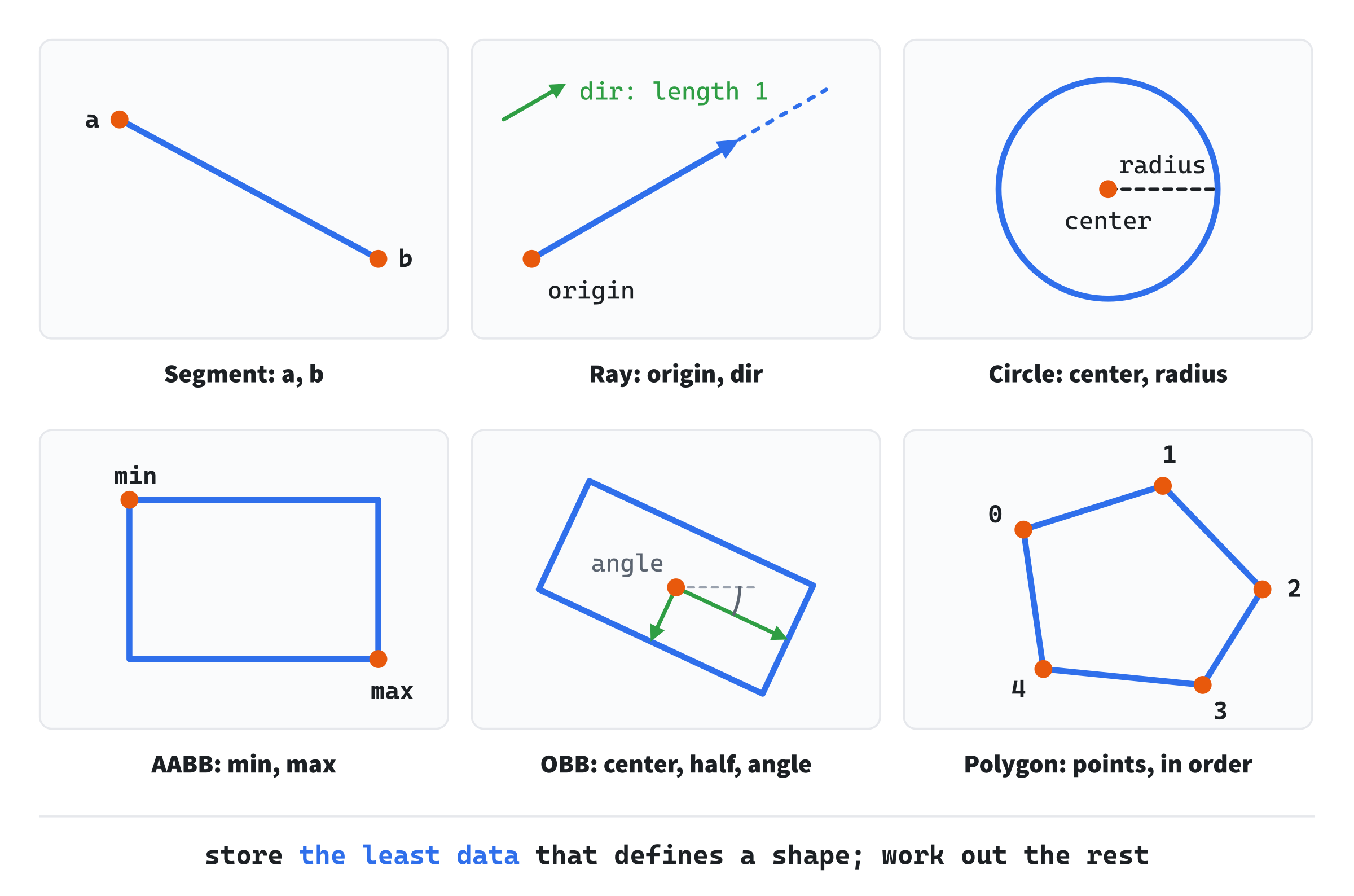
Each label is a struct's members, and nothing more: everything else about a shape is worked out from them.
In this chapter, we will:
- Store segments and rays, with the least data that defines each
- Store circles and axis-aligned boxes, and find the box that bounds any shape
- Choose between two ways of storing a box
- Store an oriented box, and work out its corners
- Store a polygon, and test whether it's convex
- Keep each shape's data valid, and spot shapes that have collapsed
- Build Shape Gallery, where every shape is yours to drag
We'll start with the simplest shapes of all.
Points and Segments
A point is a Vec2, as it has been since Chapter 2: a position on the plane. Every other shape is built from points.
A segment is a straight piece of a line, with two ends. It's the workhorse of 2D geometry. Walls, the edges of shapes, laser beams and lines of sight are all segments, and storing one takes only its two ends:
// A segment: its two ends.
struct Segment
{
    Vec2 a;
    Vec2 b;
};
Everything else about a segment comes from a and b, with the vector tools of Part 1. Its length is distance(a, b), its direction is (b - a).normalized(), and its midpoint is lerp(a, b, 0.5f). None of those is stored, since each can be worked out whenever it's needed.
That's the rule for every shape in this chapter: store the least data that defines the shape, and work everything else out on demand. If a struct stored a segment's length as well as its ends, the two could disagree, the moment someone moved an end and forgot the length. A struct that stores each fact once can't contradict itself.
Rays
A ray is a segment that never stops. It has a starting point and a direction, and it runs on forever that way, like a laser beam, or a line of sight that goes on until it hits something. It's stored as an origin and a direction:
// A ray: where it starts, and the way it goes, as a unit vector.
struct Ray
{
    Vec2 origin;
    Vec2 dir;
};
The direction is kept as a unit vector, with a length of 1. That makes every point along the ray simple to describe. The point a distance t along it is origin + dir * t, and t is in pixels, precisely because dir is 1 pixel long. When Chapter 12 shoots a ray and asks how far it went before it hit something, the answer comes out as a t, and the unit direction makes that t a distance you can use at once.
A ray and a segment differ only in where they end: a segment stops at b, and a ray goes on forever. That difference changes which tests apply, and which answers count as hits, so the two are kept apart.
Circles
A circle is the friendliest shape in collision detection, and it's stored as a center and a radius:
// A circle: its center and its radius.
struct Circle
{
    Vec2 center;
    float radius;
};
A point is inside a circle when its distance from the center is less than the radius, or, without the square root, when its squared distance is less than the radius squared. That's one subtraction, a dot product and a comparison. And since a circle looks the same from every angle, no test against it ever has to care which way it's turned. Whenever something can be treated as a circle for collisions, it usually should be.
Axis-Aligned Boxes
An axis-aligned bounding box, or AABB, is a rectangle whose sides line up with the x and y axes. It can slide and stretch, but it can't tilt, and that limit is exactly what makes it fast. After the circle, it's the most common collision shape in 2D games. It's stored as two opposite corners:
// An axis-aligned box: its smallest and largest corners. Neither of min's
// coordinates is ever more than max's.
struct AABB
{
    Vec2 min;
    Vec2 max;
};
The corner min has the smallest x and the smallest y, so on the screen it's the top-left corner, and max is the bottom-right. The box's width is max.x - min.x, and its height is max.y - min.y. A point is inside it when its x is between min.x and max.x, and its y is between min.y and max.y: four comparisons, and no trigonometry, since the box can't turn.
Two Ways to Store a Box
There's a second way to store the same box: its center, and its half-size, the distance from the center to each side. A box with min at (430, 150) and max at (580, 260) has its center at (505, 205), halfway between, and a half-size of (75, 55). Each form is four floats, and each turns into the other with a line or two:
center = (min + max) / 2          min = center - half
half   = (max - min) / 2          max = center + half
Which form is better depends on what you do with it most. Testing whether two boxes overlap is four comparisons with corners: each box's min must be no more than the other's max, on both axes. With centers, it's two: on each axis, the distance between the centers must be no more than the two half-sizes added together. Moving a box is one change with a center, but two with corners. This book stores boxes by their corners, and Chapter 15 writes the overlap test both ways. The next image shows one box both ways.
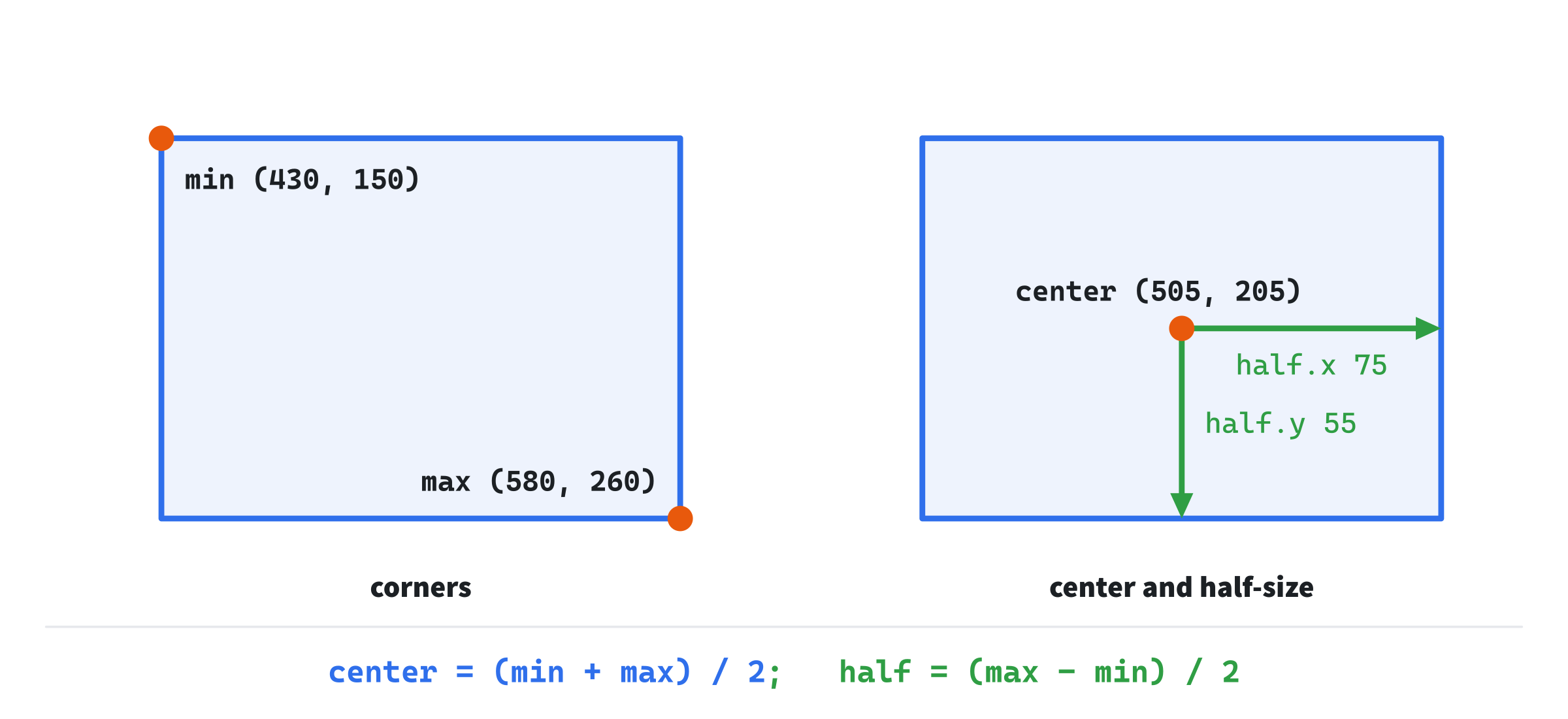
Neither form is right in general. Pick the one that your commonest test needs, and convert when another test needs the other.
Bounding Boxes
The name says what an AABB is often for. A bounding box of a shape is the smallest axis-aligned box that holds all of it. For a shape made of points, such as a polygon or a segment, it's the smallest and the largest of each coordinate over all the points:
// The bounding box of some points: the smallest box around them all.
AABB boundsOf(const std::vector<Vec2>& points)
{
    AABB box = { points[0], points[0] };
    for (const Vec2& p : points)
    {
        box.min = { std::min(box.min.x, p.x), std::min(box.min.y, p.y) };
        box.max = { std::max(box.max.x, p.x), std::max(box.max.y, p.y) };
    }
    return box;
}
It starts as a box of no size around the first point, and then each point stretches it, if it lies outside. The std::min and std::max functions, from <algorithm>, give the smaller and the larger of two values. A circle's bounding box is simpler still. It's the circle's center, less and plus its radius each way:
// A circle's bounding box: its center, less and plus its radius each way.
AABB boundsOf(const Circle& c)
{
    Vec2 r = { c.radius, c.radius };
    return { c.center - r, c.center + r };
}
Both functions are called boundsOf, and C++ picks the right one from the argument, as it picked between Chapter 8's two lerp functions.
Bounding boxes are how games avoid most of their collision tests. Two complicated shapes can only touch if their bounding boxes overlap, and testing two boxes is four comparisons. So a game tests the boxes first, and only does the real, slower test for the few pairs whose boxes overlap. Chapter 19 builds on exactly this idea.
Oriented Boxes
An oriented bounding box, or OBB, is a box that can tilt. It's stored as a center, a half-size and an angle:
// A sketch: a box that can tilt, as its center, its half-size along its
// own axes, and the angle those axes are turned by, in radians.
struct OBB
{
    Vec2 center;
    Vec2 half;
    float angle;
};
That's five numbers to an AABB's four, and the fifth changes a great deal. An OBB's sides no longer run along x and y. They run along the box's own axes: the unit vector at its angle, from Chapter 5's fromAngle, and that vector turned a quarter turn, by Chapter 4's perp. The corners are the center, plus or minus each axis times its half-size:
// A sketch: an OBB's four corners, in order around it.
std::vector<Vec2> corners(const OBB& box)
{
    Vec2 x = Vec2::fromAngle(box.angle) * box.half.x;
    Vec2 y = Vec2::fromAngle(box.angle).perp() * box.half.y;
    return { box.center - x - y, box.center + x - y,
             box.center + x + y, box.center - x + y };
}
A worked example. A box centered at (100, 100), with a half-size of (40, 20), turned by 30 degrees, has the axes (0.87, 0.5) and (-0.5, 0.87). Times the half-sizes, they're (34.6, 20) and (-10, 17.3), so one corner is (100, 100) + (34.6, 20) + (-10, 17.3), or (124.6, 137.3). The next image shows the box, its axes and its corners.
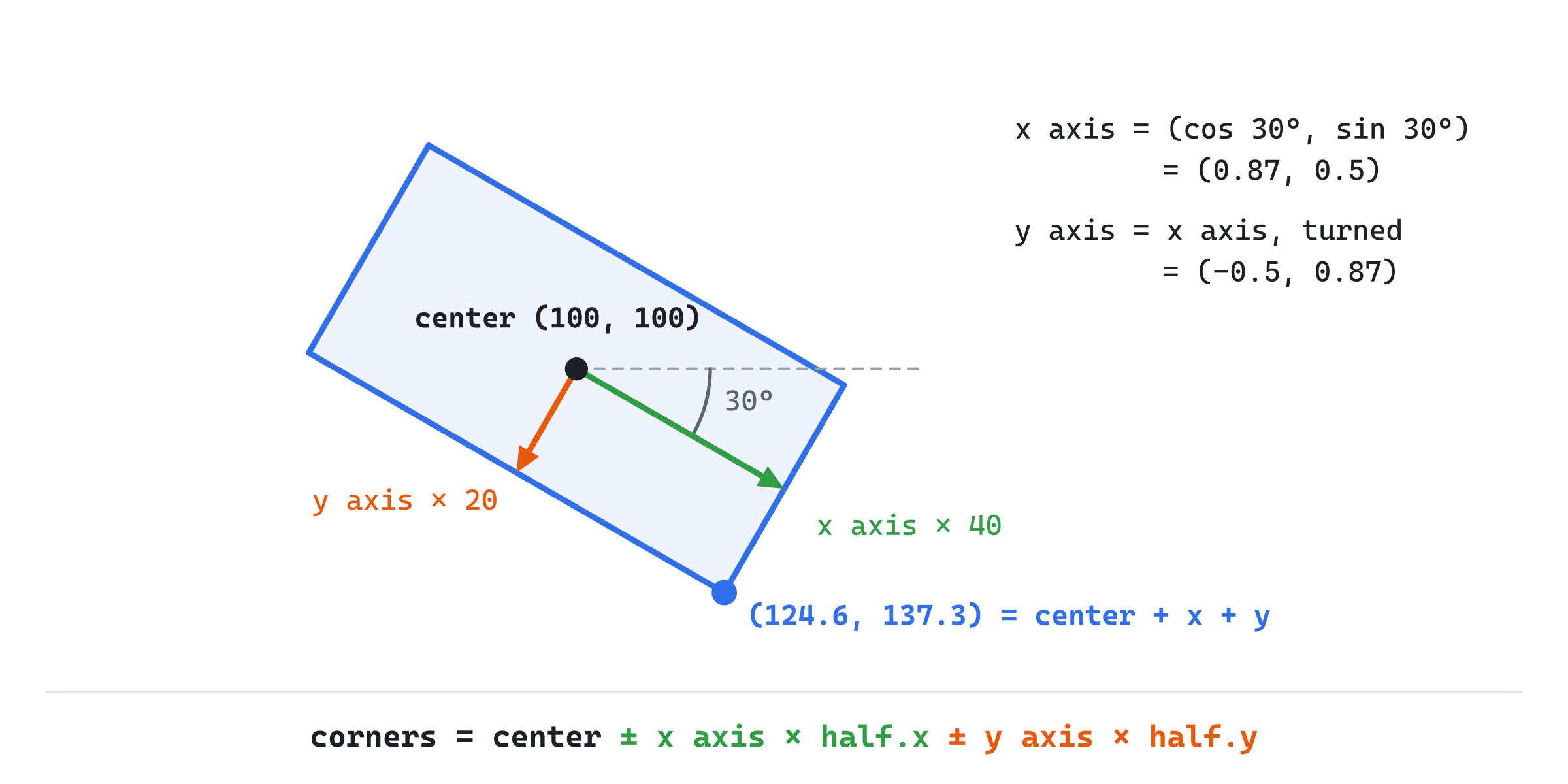
The price of the tilt is in the tests. Testing whether a point is inside an OBB means first turning the point into the box's own frame, with a rotation, before the four comparisons. And testing two OBBs against each other takes several projections, rather than four comparisons. Part 4 tests a tilted box as a polygon with four corners, which is what Chapter 16's separating axis test does.
Polygons
A polygon is the general case: any shape bounded by straight edges, stored as its corners, in order around its edge:
// A polygon: its corners, in order around its edge, each once.
struct Polygon
{
    std::vector<Vec2> points;
};
Two rules keep a polygon's points easy to use. First, each corner appears once. The edge from the last point back to the first is understood, so code that walks the edges takes the next point as points[(i + 1) % n], wrapping round to the first. Second, the order goes one way round, and stays that way. That's its winding, as Chapter 4 found for triangles. On the screen, with y pointing down, a polygon listed clockwise as you look at it turns right at every convex corner, which Chapter 4's cross product calls positive.
Convex and Concave
The most important thing to know about a polygon is whether it's convex. A convex polygon has no dents: a straight line between any two points inside it stays inside. A concave polygon has at least one dent, where such a line can leave the shape and come back.
It matters because the fast collision tests, Chapter 16's separating axis test above all, only work on convex shapes. A concave shape has to be split into convex pieces before they can test it. So when a game says polygon, for collisions, it nearly always means a convex one. A triangle is always convex, which is one reason games are so fond of them.
Testing for Convexity
There's a neat test for convexity, built on Chapter 4's cross product. Walk around the polygon, and at each corner, ask which way the edge turns: the cross product of the edge coming in and the edge going out. A convex polygon turns the same way at every corner. A dent is a corner that turns back the other way:
// The turn at a polygon's corner i: the cross product of the edge coming
// in and the edge going out. On the screen, it's positive where the edge
// turns right, and negative where it turns left.
float turnAt(const Polygon& poly, size_t i)
{
    size_t n = poly.points.size();
    Vec2 before = poly.points[(i + n - 1) % n];
    Vec2 here = poly.points[i];
    Vec2 after = poly.points[(i + 1) % n];
    return (here - before).cross(after - here);
}
The corner before i is (i + n - 1) % n, which wraps from the first corner back to the last without going negative, and the corner after is (i + 1) % n. Then the polygon is convex when no two corners disagree:
// A polygon is convex when every corner turns the same way.
bool isConvex(const Polygon& poly)
{
    bool turnsRight = false;
    bool turnsLeft = false;
    for (size_t i = 0; i < poly.points.size(); ++i)
    {
        float turn = turnAt(poly, i);
        if (turn > 0.0f) turnsRight = true;
        if (turn < 0.0f) turnsLeft = true;
    }
    return !(turnsRight && turnsLeft);
}
A worked example. Take a square whose corners are (0, 0), (4, 0), (4, 4) and (0, 4), in that order. That order is clockwise on the screen. At (4, 0), the edge coming in is (4, 0), and the edge going out is (0, 4). Their cross product is 4 × 4 − 0 × 0, which is 16, and it's 16 at every corner, since a square turns the same way all round. Now push the corner at (4, 4) in, to (2, 1). At the new corner, the edge coming in is (-2, 1), and the edge going out is (-2, 3). Their cross product is (−2) × 3 − 1 × (−2), which is −4. The other corners are 16, 4 and 8, all positive, so that one negative corner is the dent. The next image shows both shapes, with each corner's turn.
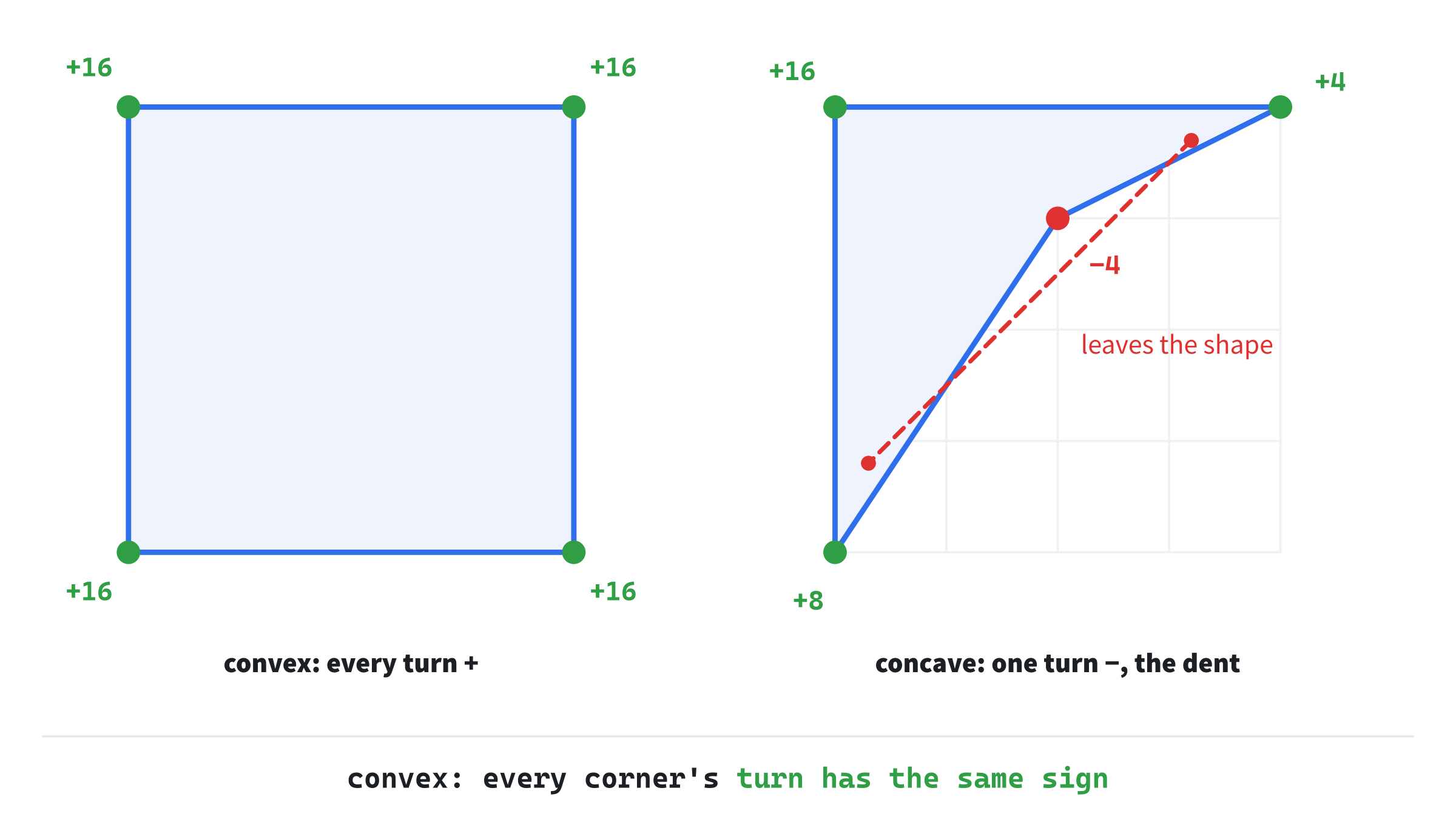
The test has one blind spot. A polygon whose edges cross each other, such as a five-pointed star drawn in one stroke, turns the same way at every corner too, so it passes. Such a polygon isn't really a shape with an inside at all. Code that can be handed one must also check that no two edges cross, which Chapter 12's segment tests can do.
Keeping Shapes Valid
Each struct in this chapter can hold numbers that don't make a sensible shape. A box whose min is to the right of its max is inside out, and a ray whose dir isn't a unit vector gives distances in the wrong units. These are the shapes' invariants: facts about their data that must always be true, for the code that uses them to work. Here are the ones this chapter's shapes rely on:
- an AABB's
minis never past itsmax, on either axis - a ray's
dirhas a length of 1 - a circle's radius is never negative
- a polygon's corners are in order, one way round, each listed once
A broken invariant rarely crashes anything. Every test just quietly gives the wrong answer. An inside-out box contains no points at all, since no x can be both more than its min.x and less than a smaller max.x. So the safest place to keep an invariant is where the shape is made. Shape Gallery makes its box from two corners that you drag, in either order, and sorts them as it goes:
// A box from two opposite corners, in either order: the smaller of each
// coordinate goes in min, and the larger in max.
AABB boxFromCorners(Vec2 p, Vec2 q)
{
    return { { std::min(p.x, q.x), std::min(p.y, q.y) },
             { std::max(p.x, q.x), std::max(p.y, q.y) } };
}
However the corners are dragged, the smaller of each coordinate goes in min, and the larger in max, so the box is never inside out.
A related problem is a degenerate shape: one that has collapsed into something smaller. A segment whose ends are in the same place has no length and no direction. A circle with a radius of 0 is a point, and a polygon whose corners all lie on one line has no area, and a turn of 0 at every corner. None of these breaks an invariant, but each can break the arithmetic. Normalizing a segment of no length divides by 0, unless normalized guards it, as Chapter 3's does. The small checks against tiny values that Chapter 13 makes, such as lengthSq < 0.0001f for a segment with no length, are guards against exactly these collapsed shapes.
Building Shape Gallery
Shape Gallery puts five shapes on the screen, each held in its struct, and each with handles to drag. Grab a handle and drag it, and the shape changes, with its data beside it, read straight from its struct. The polygon says whether it's convex, and rings each corner green or red by its turn. B draws each shape's bounding box.
Get the code. The complete project is in the
Shape Galleryfolder of the book's repository.
Shape Gallery starts from the skeleton, without the timing, since nothing moves by itself. It reuses drawGrid, fillCircle, drawArrow, fmt2, drawCircleOutline, drawPolygon and setColor. Its Vec2.h is Bouncy's, since this chapter adds nothing to it. It includes <algorithm> for std::min and std::max, and <vector> for the polygon's points:
#include <algorithm>
#include <cmath>
#include <string>
#include <vector>
#include "Vec2.h"

constexpr int WINDOW_WIDTH  = 1000;
constexpr int WINDOW_HEIGHT = 700;

constexpr SDL_Color TEXT = { 235, 238, 242, 255 };
constexpr SDL_Color GREY = { 90, 100, 112, 255 };
constexpr SDL_Color BLUE = { 47, 111, 235, 255 };
constexpr SDL_Color AMBER = { 232, 89, 12, 255 };
constexpr SDL_Color GREEN = { 47, 158, 68, 255 };
constexpr SDL_Color RED = { 224, 49, 49, 255 };
constexpr SDL_Color FAINT = { 70, 78, 90, 255 };
constexpr SDL_Color SILVER = { 150, 158, 170, 255 };
The five structs come next, as this chapter printed them. The rest of the demo comes in three parts: the handles, the shapes they make, and the drawing.
The Handles
Some shapes are held directly in their structs, and some are worked out from their handles each frame:
// The shapes' handles. A segment's two ends are handles themselves,
// and so are a polygon's corners. The circle, the box and the ray are
// worked out from their handles each frame.
Vec2 circleCenter = { 210, 210 }, circleRim = { 288, 210 };
Vec2 cornerA = { 430, 150 }, cornerB = { 580, 260 };
Segment segment = { { 720, 150 }, { 860, 270 } };
Vec2 rayOrigin = { 120, 480 }, rayToward = { 260, 520 };
Polygon polygon = { { { 560, 450 }, { 650, 410 }, { 730, 460 },
                      { 700, 560 }, { 590, 560 } } };

// Pointers to every handle, so that one loop can grab any of them.
std::vector<Vec2*> handles = { &circleCenter, &circleRim, &cornerA,
                               &cornerB, &segment.a, &segment.b,
                               &rayOrigin, &rayToward };
for (Vec2& p : polygon.points) handles.push_back(&p);
Vec2* grabbed = nullptr;
bool showBounds = false;
A segment's ends and a polygon's corners are the handles themselves. A circle is made from two handles, its center and a point on its rim, since a radius is easier to drag as a point than as a number. The box is made from two corners, in either order, and the ray from its origin and a point it goes toward.
So that one loop can grab any handle, whichever shape it belongs to, the demo keeps a std::vector<Vec2*>: a vector of pointers to the handles. Each & takes a handle's address. The polygon's corners are added by a loop, since there are five of them. The vector of points never grows, so the pointers into it stay good. A push_back that grew it could move its points, and leave the pointers pointing at nothing.
A click grabs the first handle within 15 pixels of it, and letting go drops it, in the events:
else if (event.type == SDL_EVENT_MOUSE_BUTTON_DOWN &&
         event.button.button == SDL_BUTTON_LEFT)
{
    Vec2 press = { event.button.x, event.button.y };
    for (Vec2* h : handles)
    {
        if (distance(press, *h) < 15.0f)
        {
            grabbed = h;
            break;
        }
    }
}
else if (event.type == SDL_EVENT_MOUSE_BUTTON_UP) grabbed = nullptr;
The click's own position, event.button.x and event.button.y, is where the grab happens, as in Which Side. Then, after the mouse is read, a grabbed handle follows it:
// A grabbed handle follows the mouse, written through its pointer.
if (grabbed) *grabbed = { mx, my };
Writing *grabbed writes through the pointer, to the handle it points to, whichever it is. That's the whole of dragging, for thirteen handles and five shapes. The B key flips the flag for the bounding boxes:
else if (event.key.key == SDLK_B) showBounds = !showBounds;The flag starts off, so the boxes appear only when you ask for them.
The Shapes
Then the shapes that come from their handles are made:
// The shapes that are worked out from their handles.
Circle circle = { circleCenter, distance(circleCenter, circleRim) };
AABB box = boxFromCorners(cornerA, cornerB);
Ray ray = { rayOrigin, (rayToward - rayOrigin).normalized() };
The circle's radius is the distance from its center to its rim. The box comes from boxFromCorners, which keeps it valid. The ray's direction is the vector toward its second handle, normalized to a unit vector. Drag that handle onto the origin, and the direction becomes the zero vector, which normalized returns rather than dividing by 0: a degenerate ray, which you can see in the readout.
Drawing
After the grid come the bounding boxes, when B has turned them on, under the shapes:
// The bounding boxes, faint, under the shapes. The box is its own,
// and a ray, which runs forever, has none.
if (showBounds)
{
    drawPolygon(renderer, corners(boundsOf(circle)), FAINT);
    drawPolygon(renderer, corners(boundsOf({ segment.a, segment.b })),
                FAINT);
    drawPolygon(renderer, corners(boundsOf(polygon.points)), FAINT);
}
Each box is drawn as a closed outline through its four corners, from a helper:
// A box's four corners, in order around it, for drawing.
std::vector<Vec2> corners(const AABB& box)
{
    return { box.min, { box.max.x, box.min.y }, box.max,
             { box.min.x, box.max.y } };
}
The segment's bounding box comes from the points version of boundsOf, handed its two ends in braces, which make a std::vector<Vec2> on the spot.
Then each shape is drawn, with its name and its struct's data, one line for each member, so the readout is exactly what the struct holds. The circle and the box come first:
// Each shape, with its name and then its struct's data, a line for
// each member. The circle comes first.
drawCircleOutline(renderer, circle.center, circle.radius, BLUE);
Vec2 at = circle.center + Vec2{ -60.0f, circle.radius + 10.0f };
drawText(renderer, font, "Circle", at.x, at.y, TEXT);
drawText(renderer, font, "center " + fmtPoint(circle.center),
         at.x, at.y + 20, SILVER);
drawText(renderer, font,
         "radius " + std::to_string(std::lround(circle.radius)),
         at.x, at.y + 40, SILVER);

// The box.
drawPolygon(renderer, corners(box), BLUE);
at = { box.min.x, box.max.y + 10.0f };
drawText(renderer, font, "AABB", at.x, at.y, TEXT);
drawText(renderer, font, "min " + fmtPoint(box.min), at.x, at.y + 20,
         SILVER);
drawText(renderer, font, "max " + fmtPoint(box.max), at.x, at.y + 40,
         SILVER);
The labels' places are worked out from each shape, so that they move with it. The variable at is the top-left of the label, set once for each shape. The points are formatted by a small helper:
// A point as text, in whole pixels, such as (210, 210).
std::string fmtPoint(Vec2 p)
{
    return "(" + std::to_string(std::lround(p.x)) + ", " +
           std::to_string(std::lround(p.y)) + ")";
}
It rounds each coordinate to a whole pixel, with std::lround. The segment and the ray come next:
// The segment.
setColor(renderer, BLUE);
SDL_RenderLine(renderer, segment.a.x, segment.a.y, segment.b.x,
               segment.b.y);
at = { std::min(segment.a.x, segment.b.x),
       std::max(segment.a.y, segment.b.y) + 10.0f };
drawText(renderer, font, "Segment", at.x, at.y, TEXT);
drawText(renderer, font, "a " + fmtPoint(segment.a), at.x, at.y + 20,
         SILVER);
drawText(renderer, font, "b " + fmtPoint(segment.b), at.x, at.y + 40,
         SILVER);

// The ray, drawn 300 pixels long, though it never ends.
drawArrow(renderer, ray.origin, ray.origin + ray.dir * 300.0f, BLUE);
at = ray.origin + Vec2{ 0.0f, -66.0f };
drawText(renderer, font, "Ray", at.x, at.y, TEXT);
drawText(renderer, font, "origin " + fmtPoint(ray.origin),
         at.x, at.y + 20, SILVER);
drawText(renderer, font,
         "dir (" + fmt2(ray.dir.x) + ", " + fmt2(ray.dir.y) + ")",
         at.x, at.y + 40, SILVER);
The ray is drawn 300 pixels long, as an arrow, though it never really ends. Its direction is shown with two decimals, by Chapter 4's fmt2, so you can watch it stay a unit vector as you drag.
Then the polygon, with its corners ringed by their turns:
// The polygon, with each corner ringed: green where it turns the
// way most corners do, and red where it turns back, as a dent does.
bool convex = isConvex(polygon);
drawPolygon(renderer, polygon.points, BLUE);
size_t n = polygon.points.size();
size_t rights = 0;
for (size_t i = 0; i < n; ++i)
    if (turnAt(polygon, i) > 0.0f) ++rights;
bool mostlyRight = rights * 2 > n;
for (size_t i = 0; i < n; ++i)
{
    bool right = turnAt(polygon, i) > 0.0f;
    SDL_Color ring = (right == mostlyRight) ? GREEN : RED;
    drawCircleOutline(renderer, polygon.points[i], 11.0f, ring);
}
at = { boundsOf(polygon.points).min.x,
       boundsOf(polygon.points).max.y + 14.0f };
drawText(renderer, font, "Polygon", at.x, at.y, TEXT);
drawText(renderer, font, std::to_string(n) + " points", at.x,
         at.y + 20, SILVER);
drawText(renderer, font, convex ? "convex" : "concave", at.x,
         at.y + 40, convex ? GREEN : RED);
In the preceding code, the demo first counts the corners that turn right. When more than half of them do, most corners turn right, and the ones that turn left are the dents, ringed in red. With five corners, there can't be a tie. Rings in green mark the corners that turn the way most do. The label says convex or concave, from isConvex.
Last come the handles, on top of everything, and the controls:
// Every handle, so you can see what's draggable.
for (Vec2* h : handles)
{
    setColor(renderer, (h == grabbed) ? TEXT : AMBER);
    fillCircle(renderer, *h, 5.0f);
}

drawText(renderer, font,
         "[Drag] an amber handle   [B] bounding boxes   [Esc] quit",
         12, WINDOW_HEIGHT - 26, GREY);
A grabbed handle is drawn in white, and the rest in amber.
Trying It Out
Run the demo, and drag things around. The next image shows Shape Gallery with the bounding boxes on, and one corner of the polygon pushed in.

The pushed-in corner is ringed in red, since it turns left while the other four turn right, and the polygon reads concave. Each faint box is the smallest axis-aligned box around its shape. The circle's runs from its center less its radius to its center plus its radius, and the polygon's from its smallest coordinates to its largest.
Some things to try:
- Drag one of the box's corners past the other. The box stays a box, and
minandmaxswap their roles. - Drag the ray's second handle onto its origin. Its direction drops to
(0.00, 0.00): a degenerate ray. - Drag the polygon's corners into a five-pointed star. Every corner turns the same way, and it reads convex, which is the blind spot of the turn test.
Then press B, and watch the bounding boxes follow the shapes as you drag them. They're the cheap first test that saves games most of their collision work.
FAQ
Q) Why not give the shapes a base class, with virtual functions?
A) Because collision tests depend on two shapes at once. A circle against a box is a different test from a circle against a circle, so a virtual function on one shape can't choose it alone. Each pair needs its own function, which plain structs and free functions handle simply, with no virtual calls in the way. Games that do need a mixed list of shapes often keep a type tag in each one, and switch on the two tags to pick the test. Part 4 writes one function for each pair it needs.
Q) What's a capsule, and why do games use it?
A) A capsule is a segment with a radius: every point within that distance of the segment, which makes a sausage shape. It's stored as two points and a float. Characters in games are often capsules, since a capsule slides smoothly over steps and bumps, with no corners to catch on. Testing a point against one is Chapter 13's closest point on a segment, and a comparison with the radius.
Q) Should a shape be stored where it is, or around its own center?
A) Both, often. A shape that moves and turns is easiest stored around its own center, as Chapter 6 stored its arrow, with a position and an angle beside it. Then the shape itself never changes, and its corners in the world are worked out when they're needed, by turning and moving them. Tests between two shapes need them in the same frame, so a game either works out the world corners each frame, or turns one shape into the other's frame for each test.
Q) How do games handle concave shapes, then?
A) They split them into convex pieces. Any polygon whose edges don't cross can be cut into triangles, n − 2 of them for n corners, and triangles are always convex. Larger convex pieces are fewer to test, so tools that prepare a game's shapes often merge triangles back into the biggest convex pieces they can. The AI exercise splits a polygon into triangles.
Exercises
The first four exercises need only a pencil. The others change Shape Gallery.
- The least data (paper). How many floats does each of these need: a circle, an AABB, an OBB, a segment, and a ray? Why does a ray's unit direction mean it has fewer than four free numbers?
- Box arithmetic (paper). A box has
minat(2, 3)andmaxat(8, 7). What are its width, height, center and half-size? - A bounding box (paper). What's the bounding box of the triangle with the corners
(4, 1),(9, 6)and(2, 8)? - Turns (paper). Work out the turn at each corner of the polygon
(0, 0),(6, 0),(6, 6),(3, 2),(0, 6). Which corner is the dent? - A capsule (code). Add a capsule to the gallery: two handles for its ends and a third whose distance from the first end is the radius. Draw it as two circles joined by two lines, and show its data.
- Area (code). Show the polygon's area, from the cross products of its consecutive points, as Chapter 4 found a triangle's. Watch it fall as you push a corner in.
For the code exercises, work on a copy of the demo's folder, so that the original stays as the chapter describes it.
AI Exercise (Optional)
A concave polygon can always be split into triangles, and there's a lovely way to do it called ear clipping. An ear is a corner that turns the same way as the polygon's convex corners, with no other corner inside the triangle it makes with its neighbors. Cut that triangle off, and what's left is a polygon with one corner fewer. Repeat until a triangle is all that's left. With an AI's help, you can add it to Shape Gallery, and watch any shape you drag split into triangles. Open your AI chatbot of choice, and try a prompt like this:
"I have a C++ demo using SDL3, with a struct Polygon that holds a std::vector of Vec2 corners, in order, each once, and a function turnAt(poly, i) that returns the cross product of the edge into corner i and the edge out of it. On the screen, a positive turn is a right turn. Please add triangulation by ear clipping. A corner is an ear when it turns the same way as the polygon as a whole, worked out from the sign of its area, and no other corner lies inside the triangle it makes with its two neighbors. Use the same cross products for the inside test. Draw each triangle filled in a different faint color, using SDL_RenderGeometry. Make the polygon draggable with 8 corners, and if no ear can be found, show a message rather than looping forever. Explain why a polygon whose edges don't cross always has at least two ears."
That prompt describes your polygon and your turn function, so the AI builds on them instead of starting from scratch. It asks for the polygon's overall winding from its area, which is what makes the ear test work for shapes listed either way round. And it asks for a way out, since a polygon whose edges cross can have no ear at all, and a careless loop would hang.
Then drag the corners into strange shapes, and watch the triangles rearrange. A spiral, a comb, a star with a dent: each splits into n − 2 triangles. Drag two edges across each other, and you should see the message. Then ask the AI for the classic improvement: merging neighboring triangles back into the biggest convex pieces, which is what a game would store.
Summary
Each shape is stored as the least data that defines it, with everything else worked out on demand, so that no struct can contradict itself. A segment is two ends, a ray is an origin and a unit direction, and a circle is a center and a radius. An AABB is two corners or a center and half-size, whichever the commonest test prefers, and a shape's bounding box is the smallest AABB around it. An OBB adds an angle, and its corners are its center plus and minus its own axes. A polygon is its corners in order, and it's convex when every corner turns the same way, which the cross product tests. Invariants, such as min never past max, keep shapes sensible, and degenerate shapes need guards. Shape Gallery made all of it draggable. In Chapter 12, the shapes start answering questions: how far a point is from a line, and where a ray meets a wall.