
Turning things is half of what a game does. A ship turns to face its heading, a turret swings toward its target, a wheel spins, and a planet orbits its sun. All of it comes down to one operation: rotating a point, or a vector, by an angle. Chapter 4 already did it once, quietly, when it turned Field of View's facing by the half-angle to find the cone's edges. This chapter builds the operation properly, and gives Vec2 a method for it.
We'll build the rotation formula two ways, so it never feels handed down: once from where the axes go, and once from the angles themselves. Then we'll rotate about a pivot other than the origin, and rotate a whole shape. By the end of the chapter, you'll have a demo in which an arrow spins in place, or swings around a pivot that follows the mouse.
In this chapter, we will:
- Build the rotation formula from where the x and y axes go
- Build it again from the angle sum identities of trigonometry
- Give
Vec2arotatedmethod, and see which way it turns on the screen - Learn what rotation keeps: lengths, and turns that add up
- Rotate about any pivot, by moving the pivot to the origin and back
- Rotate a whole shape, rebuilt each frame from its own points
- Build Rotator, in which an arrow spins, or orbits the mouse
We'll start with the simplest vectors there are: the axes.
Where the Axes Go
Rotating a vector means turning it by an angle, θ, while keeping its length. Two vectors are especially easy to rotate. The first is (1, 0), one step along the x axis. Turned by θ, it becomes the unit vector at angle θ, which Chapter 5 called fromAngle(θ): (cos θ, sin θ).
The second is (0, 1), one step along the y axis. It starts a quarter turn from (1, 0), so after the rotation, it's still a quarter turn from wherever (1, 0) went. That's Chapter 4's perp of (cos θ, sin θ), which is (-sin θ, cos θ). The next image shows the two axes, before and after a turn.
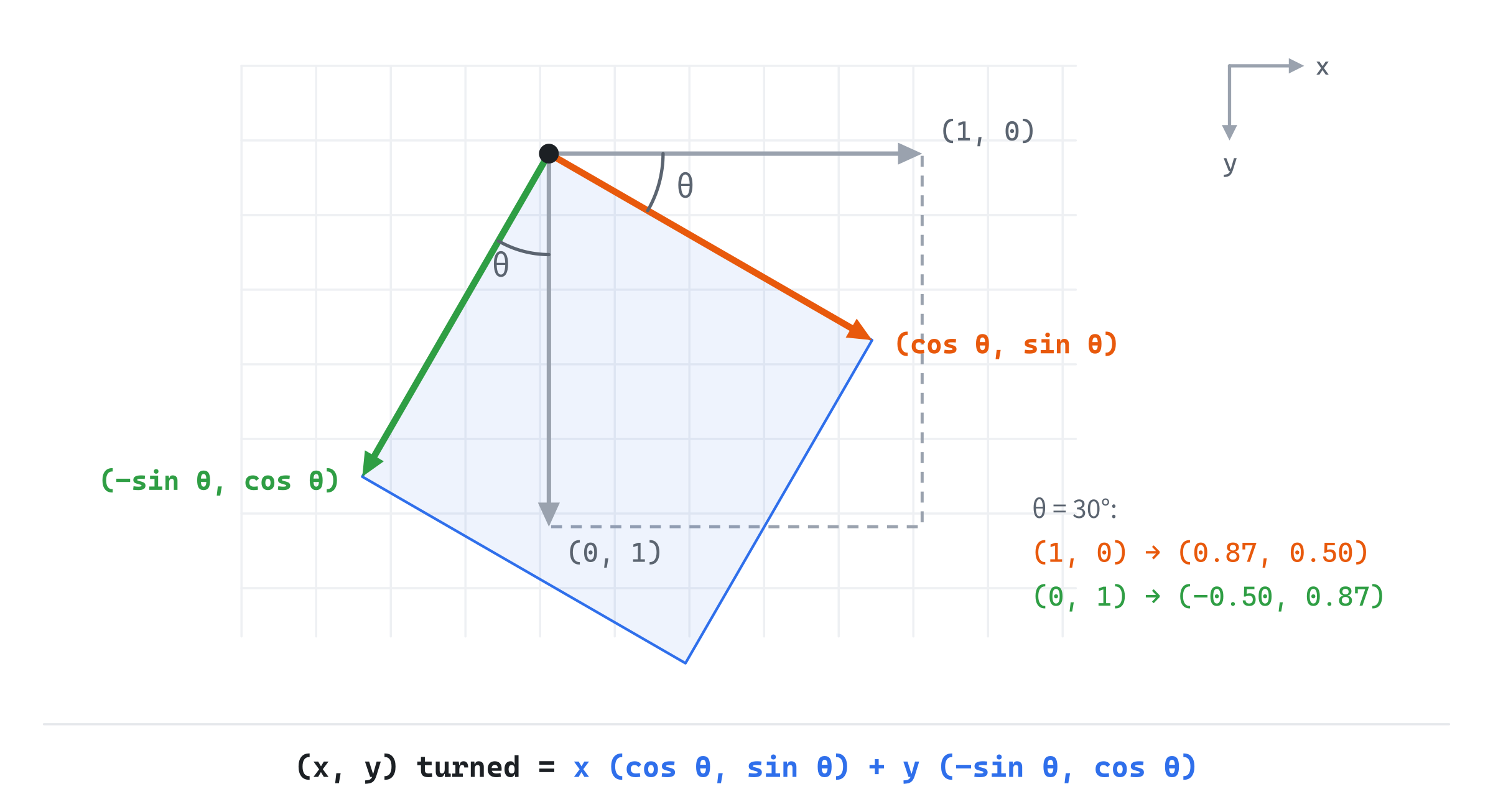
Every other vector is made of those two. The vector (x, y) is x steps along the x axis and y steps along the y axis: x × (1, 0) + y × (0, 1). Rotating the whole picture turns both axes, and the steps along them stay the same. So the rotated vector is x steps along the turned x axis, plus y steps along the turned y axis:
rotated  =  x (cos θ, sin θ)  +  y (-sin θ, cos θ)
         =  (x cos θ - y sin θ,  x sin θ + y cos θ)
That's the rotation formula. It needs no identities at all, only the two places the axes go. Look again at the first line: it's x and y mixing a turned x axis and a turned y axis. With v = (x, y), it's also v × cos θ + perp(v) × sin θ, which is exactly how Field of View turned its facing into the cone's edges. Chapter 4 was rotating all along.
The Same Formula From Angles
There's a second route to the formula, through the angles themselves. Chapter 5 showed that any vector can be written as its length times the unit vector at its angle. Call the length r, and the angle φ (phi):
v = (r cos φ, r sin φ)Rotating v by θ keeps its length, and adds θ to its angle. So the rotated vector is (r cos(φ + θ), r sin(φ + θ)). Two classic identities of trigonometry, the angle sum identities, split those up:
cos(φ + θ)  =  cos φ cos θ - sin φ sin θ
sin(φ + θ)  =  sin φ cos θ + cos φ sin θ
Multiply both by r, and notice that r cos φ is just x, and r sin φ is just y:
r cos(φ + θ)  =  x cos θ - y sin θ
r sin(φ + θ)  =  y cos θ + x sin θ
That's the same formula. Where the axes go gave it from geometry, and the identities gave it from algebra. Both agree, as they must.
In Code
Add rotated to Vec2, below angle:
// Rotation (Chapter 6). This vector turned by an angle, in radians,
// keeping its length: clockwise on the screen when the angle's positive.
Vec2 rotated(float radians) const
{
    float c = std::cos(radians);
    float s = std::sin(radians);
    return { x * c - y * s, x * s + y * c };
}
It works out the cosine and the sine of the angle once, and applies the formula. A worked example: rotating (3, 4) by a quarter turn, π/2, has a cosine of 0 and a sine of 1. So x becomes 3 × 0 - 4 × 1, which is −4, and y becomes 3 × 1 + 4 × 0, which is 3. The result is (-4, 3).
Which Way It Turns
On the screen, y points down, so a positive angle turns clockwise, as Chapter 5's unit circle swept. Take (700, 350), a point on the right of our window, and rotate it by a quarter turn. It becomes (-350, 700): clockwise around the origin, past the bottom of the window, and off its left edge. The origin is the window's top-left corner, so turning a point about the origin swings it around that corner, not around the middle of the window. To turn about anywhere else, we need a pivot, which is the next section's subject.
What Rotation Keeps
Rotation never changes a vector's length. Squaring and adding the rotated components gives x² + y² again, since the cosine and sine terms combine into cos² θ + sin² θ, which is 1. So a shape whose points are rotated together keeps its size and its shape: it's turned, not stretched.
Turns also add up. Rotating by α and then by β is the same as rotating by α + β, so rotating by −θ undoes a turn of θ. And a quarter turn is perp: v.rotated(PI / 2) points the same way as v.perp(). But perp is exact, while rotated works with a rounded cosine and sine. As floats, (3, 4).rotated(PI / 2) is (-4, 2.9999998), where perp gives exactly (-4, 3). For a quarter turn, use perp.
Rotating About a Pivot
The formula rotates about the origin. To rotate a point about any other point, a pivot, there are three steps. First, find the point's offset from the pivot, the pivot's position subtracted from the point's. Then rotate the offset, which turns it about the origin. Last, add the pivot back. The next image shows the three steps.
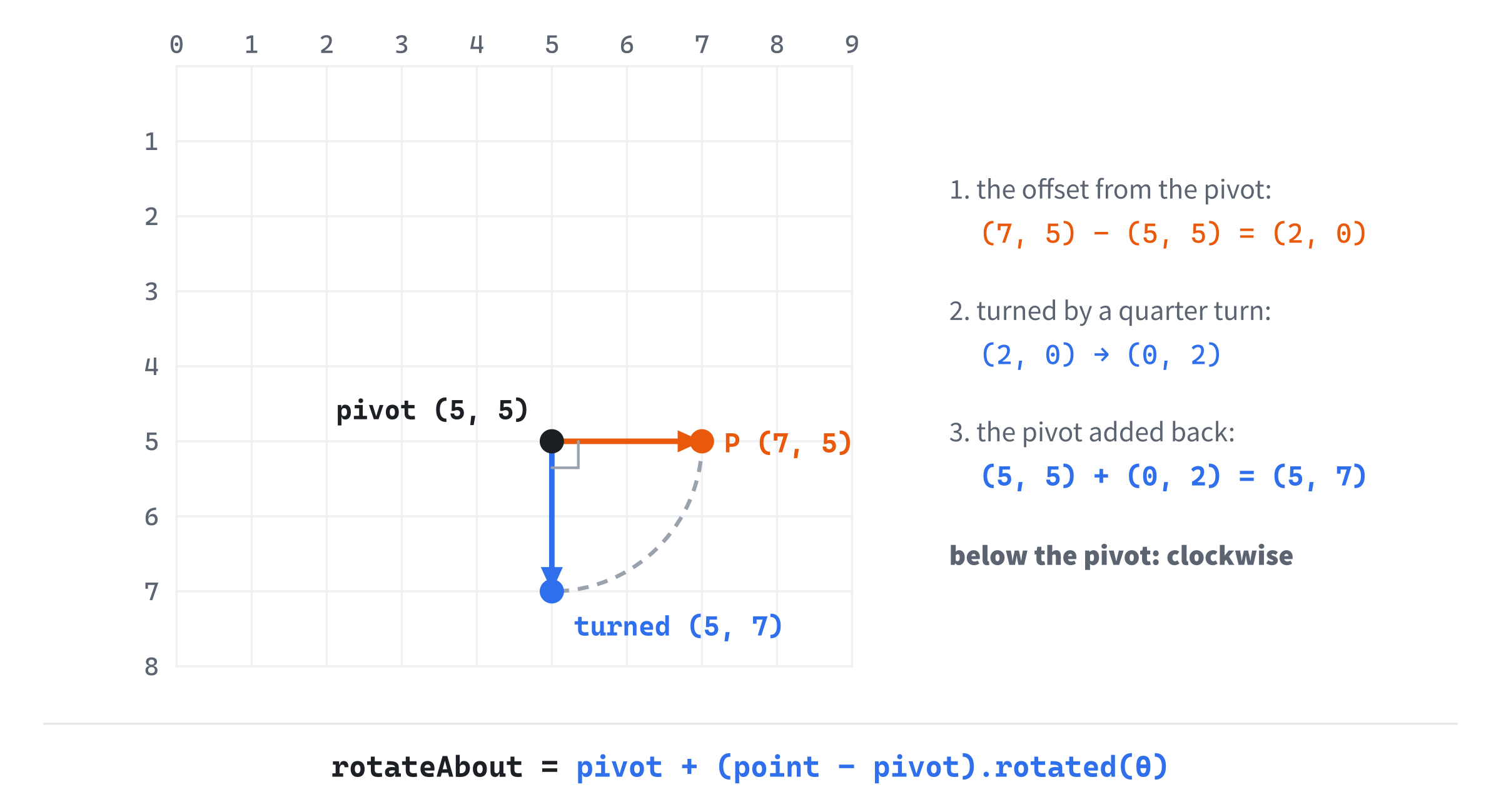
A worked example makes it concrete. Rotate the point (7, 5) about the pivot (5, 5) by a quarter turn. The offset is (7, 5) - (5, 5), which is (2, 0): two steps to the right of the pivot. Rotated by a quarter turn, it becomes (0, 2): two steps down. Added back to the pivot, it's (5, 7), below the pivot. So the point swung clockwise around the pivot, from its right to below it, as a positive angle does on the screen. Add rotateAbout to Vec2.h, at the end:
// A point turned about a pivot (Chapter 6): its offset from the pivot,
// rotated, and put back.
inline Vec2 rotateAbout(const Vec2& point, const Vec2& pivot, float radians)
{
    return pivot + (point - pivot).rotated(radians);
}
It's a free function, since a pivot and a point are two positions, and neither owns the other.
Rotating a Whole Shape
A shape, such as a ship or an arrow, is a list of points. The trick to rotating it is to store its points around its own center, as though the center were the origin. Those are its local points. To draw the shape, rotate each local point by the shape's angle, which turns it about the shape's own center. Then add the shape's position, which moves it to where it is:
// A sketch: a shape's points, from local to where they're drawn
std::vector<Vec2> world;
for (const Vec2& p : shape)
    world.push_back(position + p.rotated(angle));
The order matters. Rotate first, about the local origin, and then move. Moving first, and then rotating, would turn the shape about the window's top-left corner, as the last section warned.
Rebuild, Don't Accumulate
A spinning shape could be turned a little more each frame, by rotating last frame's points by a small step. Don't do that. Each rotation rounds its result a little, and the rounding adds up. Turning a point 60 pixels from its center by a small step every frame, for an hour, left it 60.22 pixels from the center at 60 frames a second, and 59.84 at 144. The shape slowly grows or shrinks, and loses its form.
Instead, keep the shape's local points, which never change, and its total angle, which grows each frame. Then rebuild the drawn points from the local ones every frame. The rounding never builds up, since every frame starts fresh. And wrap the angle, as Chapter 5 did, so it never grows large enough to lose precision.
Rebuilding has a cost: rotated works out a cosine and a sine for every point. For a shape with a handful of points, that's nothing. But the same cosine and sine serve every point of a shape, so a shape with thousands of points would work them out once, and apply them to every point. Chapter 26 packs that once-only work into a matrix, which can also scale and move a shape in the same step.
Building Rotator
Rotator draws an arrow, built from seven points, that turns all the time. At first, it spins in place, about its own center, beside a faint copy that doesn't turn. Press Space, and it switches to orbiting a pivot that follows the mouse, so you can watch the whole shape swing around any point you like. Two short arrows at the shape's center show where its own x and y axes have gone, in amber and green.
Get the code. The complete project is in the
Rotatorfolder of the book's repository.
Rotator starts from the skeleton, with its timing. It reuses drawGrid, drawArrow, fillCircle, fmt2 and Chapter 5's drawCircleOutline, and its Vec2.h is Chapter 5's with rotated and rotateAbout added. It includes <vector>, for the shape's points, and adds a faint grey to Unit Circle's colors:
#include <cmath>
#include <string>
#include <vector>
#include "Vec2.h"

constexpr int WINDOW_WIDTH  = 1000;
constexpr int WINDOW_HEIGHT = 700;

constexpr SDL_Color TEXT = { 235, 238, 242, 255 };
constexpr SDL_Color GREY = { 90, 100, 112, 255 };
constexpr SDL_Color BLUE = { 47, 111, 235, 255 };
constexpr SDL_Color AMBER = { 232, 89, 12, 255 };
constexpr SDL_Color GREEN = { 47, 158, 68, 255 };
constexpr SDL_Color FAINT = { 70, 78, 90, 255 };
The rest of the demo comes in three parts: a helper that draws a shape, the shape and its angle, and the drawing.
Drawing a Shape
A new helper draws a closed outline through a list of points, and goes after drawCircleOutline. Every later demo with a polygon in it uses it:
// A closed outline through a list of points: a line from each point to
// the next, and from the last back to the first.
void drawPolygon(SDL_Renderer* renderer, const std::vector<Vec2>& points,
                 SDL_Color color)
{
    SDL_SetRenderDrawColor(renderer, color.r, color.g, color.b, color.a);
    for (size_t i = 0; i < points.size(); ++i)
    {
        const Vec2& a = points[i];
        const Vec2& b = points[(i + 1) % points.size()];
        SDL_RenderLine(renderer, a.x, a.y, b.x, b.y);
    }
}
It draws a line from each point to the next. The % wraps the last point's "next" around to the first, as Chapter 4's winding sketch did, which closes the outline.
The Shape and Its Angle
The state goes after the font is loaded:
// The arrow, as points around its own center, which is its origin. It
// sits at home, to the right of the window's middle. spin is the angle
// it's turned by, in radians.
const std::vector<Vec2> shape = {
    { -45, -18 }, { 15, -18 }, { 15, -38 }, { 60, 0 },
    { 15, 38 }, { 15, 18 }, { -45, 18 }
};
const Vec2 home = { WINDOW_WIDTH / 2.0f + 200.0f, WINDOW_HEIGHT / 2.0f };
const float spinSpeed = 0.8f;   // radians a second
float spin = 0.0f;
bool orbit = false;             // spin in place, or orbit the pivot
The arrow's seven points are its local points, around its own center, so its tip is 60 pixels ahead of the center, along its local x axis. The home position is where its center sits, 200 pixels to the right of the window's middle. The angle it's turned by is spin, which grows at 0.8 radians a second.
In the event loop, Space switches between spinning and orbiting:
else if (event.key.key == SDLK_SPACE) orbit = !orbit;After the skeleton reads the mouse, the angle grows, and the pivot is chosen:
// The total angle grows each frame, wrapped so it stays small.
spin = wrapAngle(spin + spinSpeed * dt);

// The pivot: the shape's own center, or the mouse when orbiting.
Vec2 pivot = orbit ? Vec2{ mx, my } : home;
The angle is the total turn, wrapped, never a step from last frame's points. Spinning, the pivot is the shape's own center, at home. Orbiting, it's the mouse.
Rebuilding the Shape
Each frame, the shape is rebuilt from its local points:
// The shape, rebuilt from its own points each frame by the total
// angle. Spinning, each point is rotated, then moved home. Orbiting,
// each point is turned about the pivot, from where it sits at home.
std::vector<Vec2> world;
for (const Vec2& p : shape)
{
    if (orbit) world.push_back(rotateAbout(home + p, pivot, spin));
    else world.push_back(home + p.rotated(spin));
}
Vec2 center = rotateAbout(home, pivot, spin);
Spinning, each local point is rotated about the local origin, and moved home, which is the sketch from Rotating a Whole Shape. Orbiting, each point starts where it sits at home, and is turned about the pivot by rotateAbout. The center gets the same treatment, so the demo knows where to draw the axes. Spinning, the pivot is home, so turning the center about it leaves it where it is.
Notice that orbiting also turns the shape itself. Every point turns about the pivot by the same angle, so the arrow keeps the same facing relative to the pivot, as the Moon keeps one face toward the Earth. The FAQ shows how to orbit without turning.
Then come the shape's own axes:
// Where the shape's own axes have gone: its x axis to (cos, sin),
// and its y axis to a quarter turn of that.
Vec2 xAxis = Vec2{ 1.0f, 0.0f }.rotated(spin);
Vec2 yAxis = Vec2{ 0.0f, 1.0f }.rotated(spin);
These are the two vectors from Where the Axes Go, turned by the shape's angle. Every point of the shape is its local x times the first, plus its local y times the second. They're the shape's own right and down, wherever it has turned.
Drawing
After the grid, each mode draws a guide of its own:
if (orbit)
{
    // The circle the shape's center travels, and the line from the
    // pivot to the center.
    drawCircleOutline(renderer, pivot, distance(home, pivot), FAINT);
    SDL_SetRenderDrawColor(renderer, GREY.r, GREY.g, GREY.b, GREY.a);
    SDL_RenderLine(renderer, pivot.x, pivot.y, center.x, center.y);
}
else
{
    // A faint copy of the shape that doesn't turn, to compare with.
    std::vector<Vec2> still;
    for (const Vec2& p : shape) still.push_back(home + p);
    drawPolygon(renderer, still, FAINT);
}
Orbiting, a faint circle shows the path the shape's center travels around the pivot, with a grey line from the pivot to the center. Its radius is the distance from the pivot to home, since turning keeps that distance. Spinning, a faint, unturned copy of the shape sits at home, to compare with the turned one.
Then the shape itself, its axes, and the pivot:
drawPolygon(renderer, world, BLUE);
drawArrow(renderer, center, center + xAxis * 40.0f, AMBER);
drawArrow(renderer, center, center + yAxis * 40.0f, GREEN);
SDL_SetRenderDrawColor(renderer, TEXT.r, TEXT.g, TEXT.b, TEXT.a);
fillCircle(renderer, pivot, 5);
The axes are drawn 40 pixels long, from the shape's center. The readout comes last:
std::string mode = orbit ? "orbiting the pivot, at the mouse"
                         : "spinning about its own center";
long degrees = std::lround(spin * 180.0f / PI);
drawText(renderer, font, "mode: " + mode, 12, 10, TEXT);
drawText(renderer, font,
         "rotation: " + std::to_string(degrees) + " deg", 12, 30, TEXT);
drawText(renderer, font,
         "x axis -> (" + fmt2(xAxis.x) + ", " + fmt2(xAxis.y) + ")",
         12, 50, AMBER);
drawText(renderer, font,
         "y axis -> (" + fmt2(yAxis.x) + ", " + fmt2(yAxis.y) + ")",
         12, 70, GREEN);
drawText(renderer, font,
         "[Space] spin or orbit   [mouse] move the pivot   [Esc] quit",
         12, WINDOW_HEIGHT - 26, GREY);
The readout gives the mode, the angle in degrees, and where each axis has gone, to two decimal places.
Trying It Out
Run the demo, and watch the arrow spin beside its unturned copy, clockwise, as a positive angle turns on the screen. Then press Space. The next image shows the arrow orbiting, with the mouse below and to the left of its home, and the angle at 60 degrees.
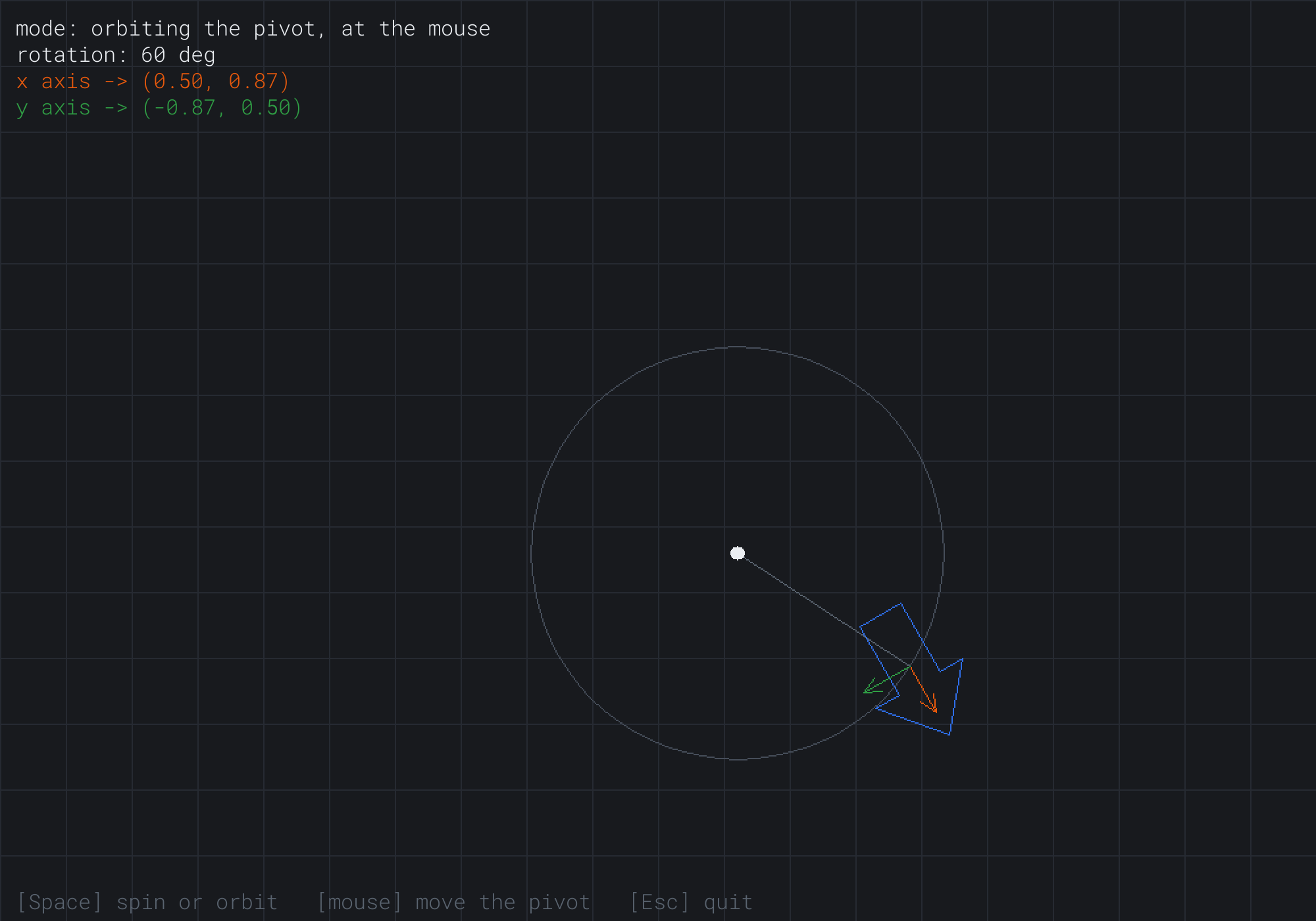
The readout shows where the axes have gone. The x axis has turned to (0.50, 0.87), the cosine and sine of 60 degrees, and the y axis to (-0.87, 0.50), a quarter turn further on. The shape's center is on the faint circle, where its home has been turned by 60 degrees about the pivot.
Some things to try:
- In orbit mode, put the mouse on the shape's home, 200 pixels right of the window's middle, where it spun before you pressed Space. Its faint orbit shrinks to nothing, and the shape spins in place, just as in the other mode.
- Move the mouse far away, and watch the shape swing on a huge circle, as a planet orbits a distant sun.
- Press Space while orbiting, with the mouse far from home. The shape jumps, since it's rebuilt about the new pivot.
The jump is worth a moment. The shape has no memory of where it was. Each frame, it's rebuilt from its local points, its angle and its pivot. Change the pivot, and the whole picture changes at once.
FAQ
Q) Why does the orbiting arrow keep the same face toward the pivot?
A) Because every one of its points turns about the pivot by the same angle, so the whole shape turns with its orbit. To orbit without turning, rotate only the shape's center about the pivot, and then add the local points without rotating them: rotateAbout(home, pivot, spin) + p, instead of rotating home + p. To orbit and spin at different speeds, as a planet does, rotate the center by one angle, and the local points by another.
Q) How do I turn a shape to face a target?
A) Find the direction to the target, (target - position).normalized(). Its angle is the angle to rotate the shape by. There's a neat shortcut, too. A unit direction's x and y are already the cosine and sine of its angle, so the rotation formula can use them directly, with no call to std::cos or std::sin: { p.x * d.x - p.y * d.y, p.x * d.y + p.y * d.x }.
Q) How do I rotate a picture, rather than a shape made of points?
A) Let SDL do it. The SDL_RenderTextureRotated function draws a texture turned by an angle about a center you choose. It takes the angle in degrees, not radians, and turns clockwise for a positive angle, matching our screen. Chapter 24 draws textures.
Q) Does the order of two rotations matter?
A) Not in 2D. Turning by α and then by β lands in the same place as turning by β and then by α, since both add up to α + β. In 3D, it matters a great deal: tilting a box forward and then turning it left is not the same as turning it left and then tilting it. Chapter 29 shows why, and Chapter 35 deals with the trouble it causes.
Exercises
The first two exercises need only a pencil. The others change Rotator.
- Rotate by hand (paper). Rotate
(4, 0)by 30, 90 and −90 degrees, using the table in Chapter 5. Then rotate(2, 1)about the pivot(1, 1)by a quarter turn, and say which way it turned on the screen. - Four quarter turns (paper). Rotating
(3, 4)by a quarter turn four times should bring it back to(3, 4). Show that it does, with exact numbers. Why might it not, quite, with floats androtated? Would it withperp? - A planet (code). Make the arrow orbit the pivot at one speed, and spin about its own center at another, as a planet does, using two angles.
- Face the mouse (code). In spin mode, make the arrow point at the mouse instead of spinning, using the shortcut from the FAQ.
- A ghost in orbit (code). In orbit mode, also draw the shape's unturned copy at home, and a faint line from home to the turned center, so you can see the angle of the orbit.
For the code exercises, work on a copy of the demo's folder, so that the original stays as the chapter describes it.
AI Exercise (Optional)
A rotation and a few repeats make one of the prettiest toys there is: a kaleidoscope. Whatever you draw with the mouse is drawn again, turned about the middle of the window by equal steps, so six or eight copies make a pattern with perfect symmetry. It doesn't matter if it comes out lopsided at first, and it's mesmerizing when it works. Open your AI chatbot of choice, and try a prompt like this:
"I have a C++ demo using SDL3, in a 1000 by 700 window with y pointing down. A struct Vec2 has float x and y, the usual operators, rotated(radians), which turns a vector clockwise on the screen for a positive angle, and a free function rotateAbout(point, pivot, radians). The constant PI is defined. I'd like a kaleidoscope. While the left mouse button is held, the mouse leaves a trail of points. Every segment of the trail should be drawn 8 times, each copy turned about the middle of the window by another eighth of a turn, and also mirrored across the line through the middle at each copy's angle, for 16 copies in all. Each new stroke should get a new color. C clears the drawing, and the number keys 3 to 9 set how many copies there are."
That prompt describes rotateAbout and its direction, so the AI uses the tools you have, rather than writing a rotation of its own. It asks for mirroring as well as turning, which is what makes a kaleidoscope look like one, and leaves the AI to work out how to mirror a point across a line, a good test of its geometry. And the number keys make the result something to play with.
Then draw, and look at what came back. The turned copies should use rotateAbout with the window's middle as the pivot, and angles of 2 * PI * k / n for copy k of n. The mirroring is the part most likely to go wrong. One correct way is to turn a point to the line's angle, flip the sign of its y, and turn it back. If your mirrored strokes land in the wrong place, ask the AI to explain its reflection with a worked example, using a point and a line you choose.
If it all works, try asking for the copies to turn slowly, all together, while you draw. Then the pattern rotates as a whole.
Summary
A rotation turns a vector by an angle while keeping its length, and its formula came two ways: from where the axes go, (cos θ, sin θ) and (-sin θ, cos θ), and from the angle sum identities. The Vec2 type now has rotated, which turns clockwise on the screen for a positive angle. It also has rotateAbout, which moves a pivot to the origin, turns, and moves it back. A whole shape is rebuilt each frame from its local points and its total angle, rather than turned a little more each frame. In Chapter 7, things start to move under their own power, with velocity, acceleration and delta time. A ship steers there with exactly this chapter's rotation.