
We've leaned on angles twice already. Field of View compared a dot product with the cosine of an angle, and drew its cone's edges with a sine. Chapter 4 also promised that the cross product is a length times a sine. Each time, the trigonometry was taken on trust. This chapter pays that debt. By the end of it, you'll know exactly what sine and cosine are, and why the dot and cross products are the cosine and sine of the angle between two vectors.
It's also a bridge between two ways of describing a direction. So far, a direction has been a vector: a pair of numbers. Sometimes an angle is more natural: "turn 5 degrees to the left", or "the turret points at 90 degrees". Angles and direction vectors are two languages for the same idea, and trigonometry is the dictionary between them. You'll learn to translate both ways, to find the shortest way to turn from one angle to another, and to compare angles safely, which is harder than it sounds.
In this chapter, we will:
- Measure angles in radians, and see why code prefers them to degrees
- Meet the unit circle, on which cosine and sine are a point's coordinates
- Connect it to the triangles of school trigonometry, with a table of special angles
- Turn an angle into a direction, and a direction back into an angle, with
atan2 - See that the dot and cross products are the cosine and sine of the angle between two vectors
- Wrap angles, and find the shortest turn from one angle to another
- Compare floats, and angles, with a tolerance
- Build Unit Circle, in which a sweeping point draws its own cosine and sine
We'll start with how to measure an angle at all.
Radians
You already know one way to measure an angle: degrees, with 360 to a full turn. It's a fine unit for people. But the mathematics of angles, and every trigonometry function in C++, works in a different unit, the radian.
A radian measures an angle by a length. Draw a circle, and walk around its edge from one point to another. The angle that a walk exactly one radius long sweeps out is one radian. The next image shows it.
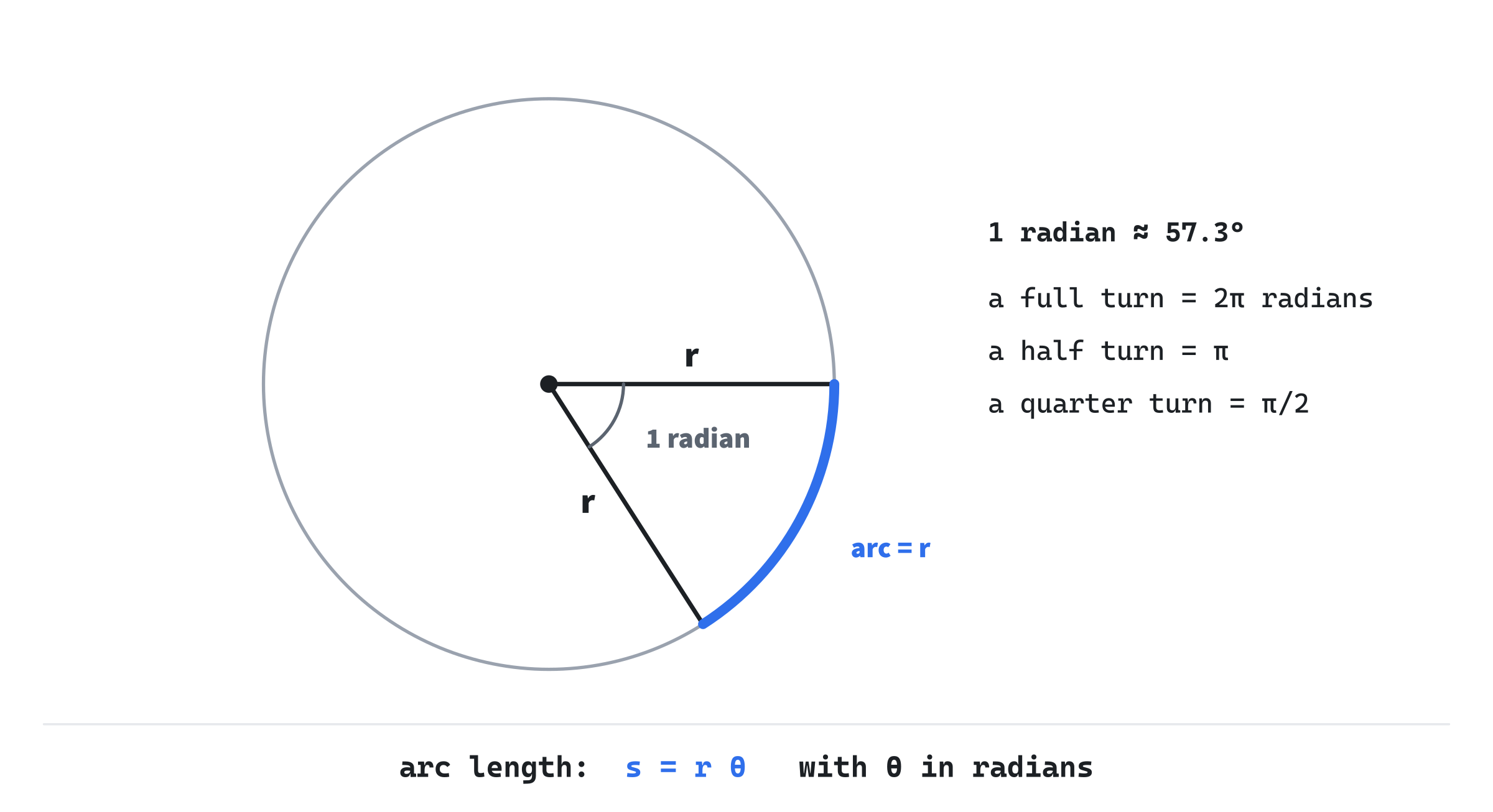
A circle's circumference is 2π times its radius, so a full turn is a walk of 2π radii, which makes it 2π radians. A half turn is π radians, and a quarter turn is π/2. One radian is about 57.3 degrees.
Why does code prefer radians? Because they make the formulas clean. On a circle of radius r, an angle of θ radians cuts off an arc of length:
s = r θThat's all, with no conversion factor anywhere. The demo in this chapter sweeps a point around a circle 220 pixels in radius, at 0.6 radians a second. So the point moves along the edge at 220 × 0.6, or 132 pixels a second. In degrees, the same sum needs a factor of π/180 tucked inside it. Small angles are simple in radians too: the sine of a small angle is almost exactly the angle itself. The sine of 0.01 radians is 0.0099998. In degrees, that neat fact disappears.
People think in degrees, though, so we convert at the edges: multiply degrees by π/180 to get radians, and radians by 180/π to get degrees. Inside the code, we work in radians throughout, and convert only to show a number to a person.
Field of View, in Chapter 4, defined its own value for π. From this chapter on, Vec2.h holds it, since angles are now part of the vector's toolkit. In Vec2.h, add it at the end, below distance:
// Pi, for turning degrees into radians (Chapter 5).
constexpr float PI = 3.14159265f;
The value is as precise as a float can hold. A constexpr variable in a header is fine to include in many files, since each file gets its own private copy.
The Unit Circle
Picture a circle with a radius of 1, centered on the origin. Pick an angle, θ, measured from the positive x axis, and mark the point on the circle at that angle. By definition, that point's coordinates are the angle's cosine and sine. Its x is the cosine, cos θ, and its y is the sine, sin θ.
That's the whole foundation of trigonometry. Cosine and sine aren't mysterious buttons on a calculator. They're the coordinates of a point going around a circle. At an angle of 0, the point is at (1, 0), so the cosine is 1 and the sine is 0. A quarter turn later, it's at (0, 1): cosine 0, sine 1.
On the screen, y points down. So as the angle grows, the point at (cos θ, sin θ) moves clockwise, not counterclockwise as in a math book. The numbers are the same. Only the picture is mirrored, as it was for Chapter 4's quarter turn. The next image shows the unit circle as the screen draws it.
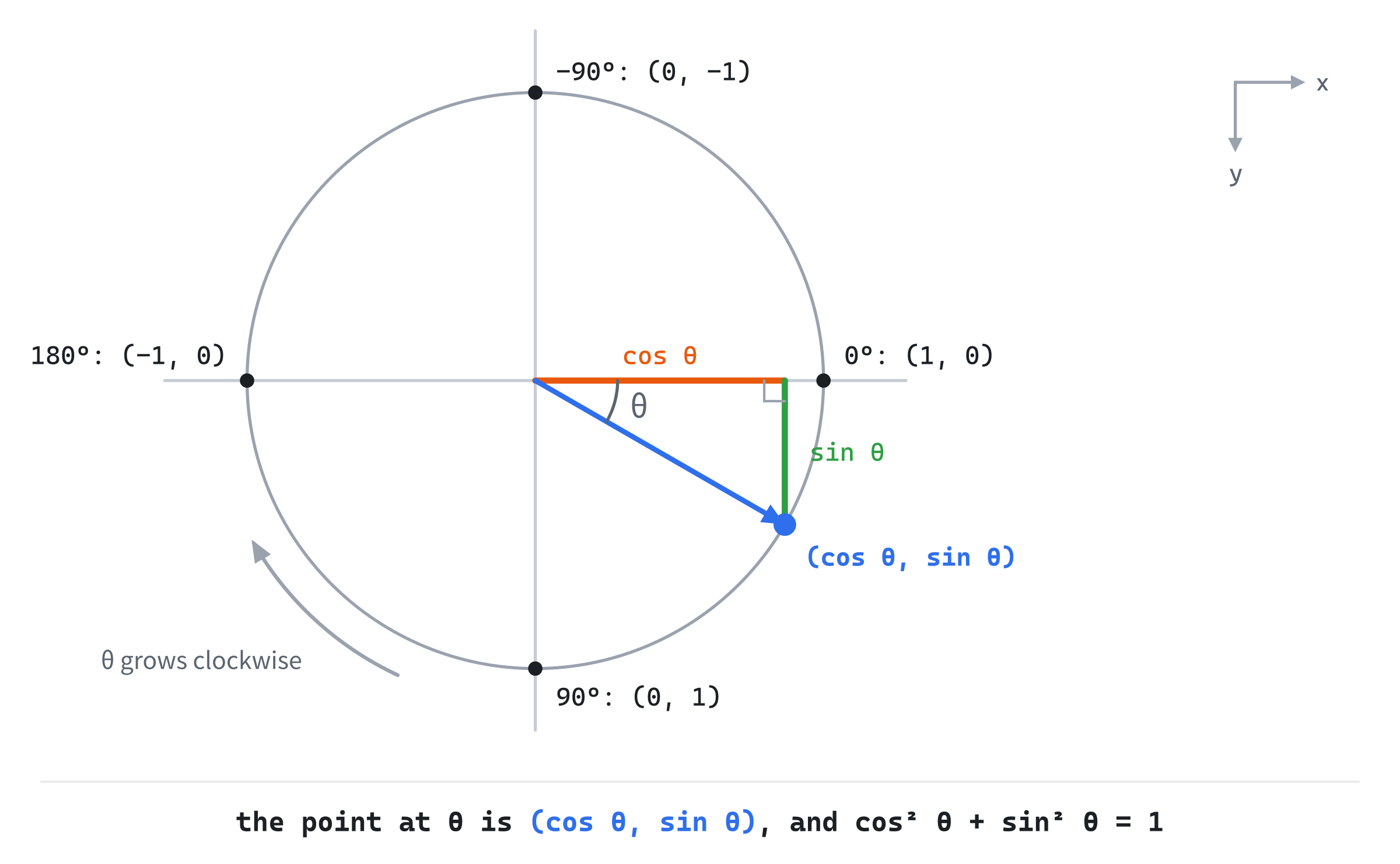
The point is always 1 from the center, so Pythagoras gives an identity that holds for every angle:
cos² θ + sin² θ = 1In words, the vector (cos θ, sin θ) always has a length of 1. That's why an angle turns so neatly into a unit vector, as we'll see shortly.
The Triangle Behind It
School trigonometry starts from right-angled triangles, not circles, and the two are the same thing. In Figure 5.2, the point, the center and the foot of the point's drop onto the x axis make a right-angled triangle. Its long side is the radius, 1. The side along the axis is cos θ, and the side across is sin θ. Make the triangle bigger, with a long side of length h, and every side grows in proportion: the side next to θ is h cos θ, and the side opposite it is h sin θ.
That's where the school definitions come from: the sine is the opposite side over the long side, the cosine is the adjacent side over the long side, and the tangent is the opposite side over the adjacent. A few angles have values worth knowing by heart, since they turn up everywhere:
| Angle | Radians | cos | sin | tan |
|---|---|---|---|---|
| 0° | 0 | 1 | 0 | 0 |
| 30° | π/6 | 0.866 | 0.5 | 0.577 |
| 45° | π/4 | 0.707 | 0.707 | 1 |
| 60° | π/3 | 0.5 | 0.866 | 1.732 |
| 90° | π/2 | 0 | 1 | none |
| 180° | π | −1 | 0 | 0 |
The tangent is the sine over the cosine, which is the slope of the line from the center to the point. At a quarter turn, the cosine is 0, and the slope is straight up: the tangent has no value, and the formula divides by zero.
In C++
The functions live in <cmath>, as std::sin, std::cos and std::tan, and all of them take radians. Cosine and sine run from −1 to 1, since that's as far as the unit circle reaches. The tangent has no limit, and grows huge near a quarter turn. We'll mostly use sine and cosine, and reach for the tangent rarely.
From Angle to Vector, and Back
Here's where trigonometry earns its place in this book. If the cosine and sine are the coordinates of the point at an angle, then turning an angle into a direction vector is just taking its cosine and sine. That's worth a method on Vec2. Add it below cross:
// Angles (Chapter 5). A vector at an angle, in radians, with the
// length given: 1 unless asked otherwise.
static Vec2 fromAngle(float radians, float length = 1.0f)
{
    return { std::cos(radians) * length, std::sin(radians) * length };
}
The fromAngle method makes a vector at the given angle. With its default length of 1, it's a unit vector: a pure direction. But it can make any length, which is handy for "a step of 5 pixels that way". It's static, because it doesn't belong to any existing vector: it makes a new one. It's called as Vec2::fromAngle(angle).
Going the other way, from a vector back to its angle, needs std::atan2. You might expect the plain arctangent, std::atan, which undoes the tangent. But it takes the ratio y / x, which loses which quarter of the circle the vector is in. The vectors (1, 1) and (-1, -1) have the same ratio, 1, and std::atan says 45 degrees for both. The second actually points the opposite way. The std::atan2 function takes y and x separately, and gets the angle right all the way around. Add angle to Vec2, below fromAngle:
// The angle this vector points at, in radians, from -PI to PI,
// measured from the x axis. y comes first in atan2.
float angle() const { return std::atan2(y, x); }
Note the order: std::atan2 takes y first, then x. Get it backwards, and every angle comes out wrong. The answer runs from −π to π, so (-1, -1) gives −135 degrees, up and to the left on the screen, which is right. The zero vector has no direction, and std::atan2(0, 0) returns 0 for it. That's a guess, not an answer, so guard against it, as normalized guards against dividing by zero.
With fromAngle and angle, Vec2 can translate both ways. An angle becomes a direction, and a direction becomes an angle.
The Debt From Chapter 4
Now we can see the dot and cross products in a new light. Take two unit vectors, at angles α and β. Their components are cosines and sines, so their dot product is:
fromAngle(α) · fromAngle(β) = cos α cos β + sin α sin βA classic identity of school trigonometry says that this is cos(α − β): the cosine of the angle between them. That's Chapter 4's result, from a second direction. Try it with α at 60 degrees and β at 20: 0.5 × 0.940 + 0.866 × 0.342 is 0.470 + 0.296, which is 0.766, the cosine of 40 degrees.
Their cross product works the same way:
fromAngle(α) × fromAngle(β) = cos α sin β − sin α cos β = sin(β − α)That's the sine of the angle from the first to the second, positive when the second is clockwise from the first on the screen. This is the |b| sin θ that Chapter 4 promised, for unit vectors. For any two vectors, both products are multiplied by the same two lengths.
Together, they give the signed angle from one vector to another, in one call: std::atan2(a.cross(b), a.dot(b)). The atan2 function only needs y and x in the right proportion, and both products carry the same lengths, so nothing needs normalizing. And unlike std::acos, it needs no clamping. With a = (1, 0) and b = (0, 1), the cross product is 1 and the dot product is 0, and std::atan2(1, 0) is 90 degrees: clockwise, as (0, 1) is from (1, 0) on the screen.
Wrapping Angles
Angles have a seam. As you sweep the mouse around a point, atan2 counts up to 180 degrees, and then jumps straight to −180, since those are the same direction. In the same way, 30 degrees and 390 degrees point the same way, as do 30 and −330. An angle plus any number of whole turns is the same direction.
That seam causes trouble whenever we subtract two angles. Suppose a turret faces 170 degrees, and its target is at −170. Subtracting gives a turn of −340 degrees: nearly all the way around, the long way. But the two directions are only 20 degrees apart, across the seam. The next image shows both turns.
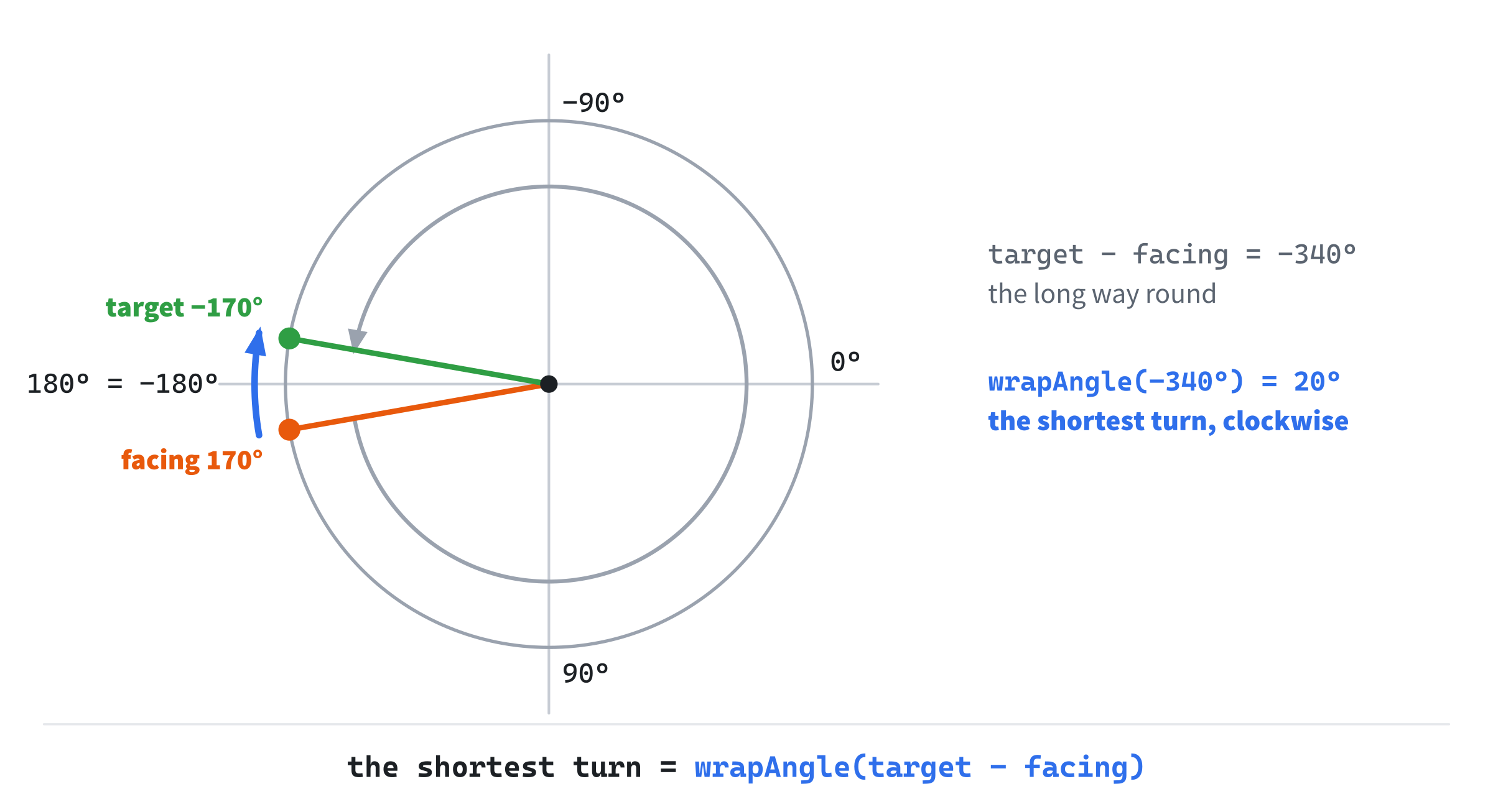
The fix is to wrap the difference: take away whole turns until it's between −180 and 180 degrees. Add wrapAngle to Vec2.h, below PI:
// An angle wrapped into the range from -PI to PI: the same direction,
// with any whole turns taken away. The wrapped difference of two angles
// is the shortest turn from one to the other.
inline float wrapAngle(float radians)
{
    return std::remainder(radians, 2.0f * PI);
}
The std::remainder function, from <cmath>, does the work. It takes away the whole number of turns that leaves the smallest remainder, so the answer always lands between −π and π. Wrapped, −340 degrees becomes 20: the shortest turn from 170 degrees to −170 is 20 degrees, clockwise. In general, the shortest turn from one angle to another is the wrapped difference, wrapAngle(target - current), and its sign says which way to turn.
Turning toward a target at a limited speed, as a turret or a ship would, then takes three lines. This sketch turns facing toward target, by at most maxTurn radians a second:
// A sketch: turn the facing toward the target, the shortest way round,
// by at most maxTurn radians a second
float turn = wrapAngle(target - facing);
float most = maxTurn * dt;
facing = wrapAngle(facing + SDL_clamp(turn, -most, most));
Wrapping also keeps an angle that grows forever from losing precision. The demo sweeps its point by adding a little to its angle, t, every frame. A float holds only about seven significant digits. If t grew forever, then within two hours it would reach thousands of radians, and each frame's small step would be rounded several percent too big or too small, so the sweep would run at the wrong speed. After a few days, each step would round away to nothing, and the sweep would freeze. Wrapping t each frame keeps it small, and its steps accurate.
Comparing Floats
Chapter 2 flagged a hazard, and deferred it until now: comparing floats with ==. A float holds only so many digits, so a value that should come out exactly is often a hair off. Work out a full turn two ways, as π/4 times 8, and as π/4 added up eight times. As floats, the first is 6.2831855, and the second is 6.2831850. They mean the same turn, but == says they differ, and a whole afternoon can disappear hunting a bug that isn't there.
The fix is to ask whether two floats are close enough, not whether they're equal. Add nearlyEqual to Vec2.h, below wrapAngle:
// Whether two floats are within a small tolerance of each other, which is
// how floats that come from arithmetic should be compared.
inline bool nearlyEqual(float a, float b, float epsilon = 0.0001f)
{
    return std::fabs(a - b) < epsilon;
}
The std::fabs function gives a float's size, without its sign, so std::fabs(a - b) is the gap between the two numbers, whichever is bigger. If the gap is smaller than a tiny tolerance, called epsilon, they count as equal. That tolerance is a choice about how close is close enough. The default, 0.0001, suits the numbers in this book: angles in radians, screen positions, and unit vectors.
One caveat keeps that from going too far. A fixed tolerance works when numbers stay in a familiar range. Floats lose precision as they grow, since the gaps between the numbers a float can hold widen with size. Two numbers in the millions can't be compared to within 0.0001, because a float can't tell them apart that finely. For numbers that can grow large, the tolerance must grow with them.
Angles need one more step, because of the seam. An angle of 179.99 degrees and one of −179.99 are nearly the same direction, but their difference is 359.98. So compare their wrapped difference with zero: nearlyEqual(wrapAngle(a - b), 0.0f). The two full turns above, wrapped, are 0 and −0.0000005, which are nearly equal.
Building Unit Circle
Unit Circle makes all of this visible. A point sweeps around a circle, and the demo draws its cosine across and its sine up or down, so you watch the two numbers rise and fall. A needle points from the center toward the mouse, at the angle atan2 gives. An arc shows the shortest turn from the point's angle to the needle's, and the needle turns green when the two line up. Space pauses the sweep.
Get the code. The complete project is in the
Unit Circlefolder of the book's repository.
Unit Circle starts from the skeleton, with its timing, since the point sweeps by itself. It reuses drawGrid, drawArrow, fillCircle and fmt2, and its Vec2.h is Chapter 4's with this chapter's angles added. It no longer defines π, since Vec2.h now does. Its colors are Vector Lab's:
#include <cmath>
#include <string>
#include "Vec2.h"

constexpr int WINDOW_WIDTH  = 1000;
constexpr int WINDOW_HEIGHT = 700;

constexpr SDL_Color TEXT = { 235, 238, 242, 255 };
constexpr SDL_Color GREY = { 90, 100, 112, 255 };
constexpr SDL_Color BLUE = { 47, 111, 235, 255 };
constexpr SDL_Color AMBER = { 232, 89, 12, 255 };
constexpr SDL_Color GREEN = { 47, 158, 68, 255 };
The rest of the demo comes in four parts: a helper that draws a circle, the sweep, the needle and its turn, and the drawing.
Drawing a Circle
SDL can't draw a circle's outline, but fromAngle can find any point on one. So a helper draws a circle as 72 short lines around its edge, and every later demo with a circle in it uses the same helper. It goes after fmt2:
// A circle's outline: 72 short lines around its edge, each from one point
// on the circle to the next, a 72nd of a turn on.
void drawCircleOutline(SDL_Renderer* renderer, Vec2 center, float radius,
                       SDL_Color color)
{
    SDL_SetRenderDrawColor(renderer, color.r, color.g, color.b, color.a);
    Vec2 prev = center + Vec2{ radius, 0.0f };
    for (int i = 1; i <= 72; ++i)
    {
        float angle = (float)i / 72.0f * 2.0f * PI;
        Vec2 p = center + Vec2::fromAngle(angle, radius);
        SDL_RenderLine(renderer, prev.x, prev.y, p.x, p.y);
        prev = p;
    }
}
The loop steps an angle around the circle in 72 equal parts, each a 72nd of 2π. For each one, fromAngle finds the point on the circle, at the radius's length from the center, and a line joins it to the point before. Seventy-two lines look smooth even on a large circle.
The Sweep
The state goes before the loop:
// The circle, and the point that sweeps around it: its angle, t, in
// radians, and how fast that grows.
const Vec2 C = { WINDOW_WIDTH / 2.0f, WINDOW_HEIGHT / 2.0f };
const float R = 220.0f;
const float sweepSpeed = 0.6f;   // radians a second
float t = 0.0f;
bool playing = true;
The circle's center and radius are C and R, and t is the point's angle, in radians. The point sweeps at 0.6 radians a second, which, by s = r θ, is 132 pixels a second along the edge. In the event loop, Space pauses and restarts it:
else if (event.key.key == SDLK_SPACE) playing = !playing;After the skeleton reads the mouse, the point sweeps on:
// Sweep the point. Wrapping keeps t between -PI and PI, so it never
// grows large enough to lose its precision.
if (playing) t = wrapAngle(t + sweepSpeed * dt);
Each frame adds the sweep's speed times dt to the angle, and wraps it, so t stays between −π and π. Then the point and its triangle are found:
// The swept point: dir.x is cos(t), and dir.y is sin(t). The foot
// is level with the center, straight below or above the point.
Vec2 dir = Vec2::fromAngle(t);
Vec2 P = C + dir * R;
Vec2 foot = { P.x, C.y };
The dir vector is the unit vector at the angle t, so dir.x is cos(t), and dir.y is sin(t). The point, P, is dir stretched to the circle's radius, from the center. Its foot is level with the center, straight across from it: the corner of the right-angled triangle.
The Needle and the Turn
The needle points from the center toward the mouse:
// The needle's angle, from the center toward the mouse, by atan2.
float needle = (Vec2{ mx, my } - C).angle();
The vector from the center to the mouse is the mouse's position minus the center's, and its angle is atan2, so the needle's angle runs from −π to π. Then comes the shortest turn from the point to the needle:
// The shortest turn from the point's angle to the needle's: their
// difference, wrapped. Within a degree, the two line up.
float turn = wrapAngle(needle - t);
bool lined = nearlyEqual(turn, 0.0f, PI / 180.0f);
The turn is the wrapped difference of the two angles. Its sign says which way: positive is clockwise on the screen. And the two line up when the turn is within a degree of zero, a degree being π/180 radians. That's nearlyEqual, with a tolerance chosen for what the eye can see.
Drawing
After the grid come the axes through the center, and the circle, in grey:
// The axes through the center, and the circle.
SDL_SetRenderDrawColor(renderer, 70, 78, 90, 255);
SDL_RenderLine(renderer, C.x - R - 30, C.y, C.x + R + 30, C.y);
SDL_RenderLine(renderer, C.x, C.y - R - 30, C.x, C.y + R + 30);
drawCircleOutline(renderer, C, R, { 120, 128, 140, 255 });
The shortest turn is drawn as an arc, a little inside the circle:
// The shortest turn, as an arc inside the circle, from the point's
// angle to the needle's, in 40 short steps.
SDL_SetRenderDrawColor(renderer, TEXT.r, TEXT.g, TEXT.b, TEXT.a);
Vec2 from = C + Vec2::fromAngle(t, R * 0.35f);
for (int i = 1; i <= 40; ++i)
{
    float a = t + turn * (float)i / 40.0f;
    Vec2 to = C + Vec2::fromAngle(a, R * 0.35f);
    SDL_RenderLine(renderer, from.x, from.y, to.x, to.y);
    from = to;
}
The arc starts at the point's angle, and steps toward the needle's in 40 equal parts of the turn. Since the turn is the wrapped one, the arc always goes the short way, even across the seam.
The triangle comes next:
// The cosine leg, across, and the sine leg, down or up. With the
// radius, they make a right-angled triangle inside the circle.
SDL_SetRenderDrawColor(renderer, AMBER.r, AMBER.g, AMBER.b, AMBER.a);
SDL_RenderLine(renderer, C.x, C.y, foot.x, foot.y);
SDL_SetRenderDrawColor(renderer, GREEN.r, GREEN.g, GREEN.b, GREEN.a);
SDL_RenderLine(renderer, foot.x, foot.y, P.x, P.y);
drawArrow(renderer, C, P, BLUE);
SDL_SetRenderDrawColor(renderer, BLUE.r, BLUE.g, BLUE.b, BLUE.a);
fillCircle(renderer, P, 6);
The amber line runs from the center across to the foot: its length is the cosine, times the radius. The green line runs from the foot to the point: the sine, times the radius. With the blue radius, they make the right-angled triangle that's the unit circle's meaning.
The needle is drawn over it all, green when it lines up with the point, and the two legs get their names:
// The needle, green when it lines up with the point.
SDL_Color nc = lined ? GREEN : GREY;
Vec2 tip = C + Vec2::fromAngle(needle, R);
SDL_SetRenderDrawColor(renderer, nc.r, nc.g, nc.b, nc.a);
SDL_RenderLine(renderer, C.x, C.y, tip.x, tip.y);

Vec2 cosAt = { (C.x + foot.x) / 2 - 12, C.y + 6 };
Vec2 sinAt = { foot.x + 6, (foot.y + P.y) / 2 - 8 };
drawText(renderer, font, "cos", cosAt.x, cosAt.y, AMBER);
drawText(renderer, font, "sin", sinAt.x, sinAt.y, GREEN);
Last comes the readout:
// The readout, in degrees for people. tan is sin over cos, which
// has no value where cos is 0.
long degrees = std::lround(t * 180.0f / PI);
std::string tanText = (std::fabs(dir.x) < 0.01f) ? "none"
                                                  : fmt2(dir.y / dir.x);
long needleDegrees = std::lround(needle * 180.0f / PI);
long turnDegrees = std::lround(turn * 180.0f / PI);
std::string way = lined ? "lined up"
                : (turn > 0.0f) ? "clockwise" : "counterclockwise";
drawText(renderer, font,
         "angle t: " + std::to_string(degrees) + " deg = " + fmt2(t) +
         " rad", 12, 10, TEXT);
drawText(renderer, font,
         "cos t = " + fmt2(dir.x) + "   sin t = " + fmt2(dir.y) +
         "   tan t = " + tanText, 12, 30, TEXT);
drawText(renderer, font,
         "needle, by atan2: " + std::to_string(needleDegrees) + " deg",
         12, 50, nc);
drawText(renderer, font,
         "shortest turn to the needle: " +
         std::to_string(turnDegrees) + " deg, " + way, 12, 70, TEXT);
drawText(renderer, font,
         "[Space] pause or play   [mouse] aim the needle   [Esc] quit",
         12, WINDOW_HEIGHT - 26, GREY);
In the preceding code, each angle is turned into degrees, for people to read, and rounded with std::lround. The tangent is the sine over the cosine, except near a quarter turn, where the cosine is nearly 0, and the readout says "none". The turn's line says which way it goes, or "lined up" when the two match.
Trying It Out
Run the demo, and watch the amber and green legs grow and shrink as the point sweeps. The amber leg is longest at the sides, and vanishes at the top and the bottom. The green leg does the opposite. The next image shows the sweep paused at 150 degrees, with the mouse up and to the left.

The point is at 150 degrees: below and to the left of the center, since angles grow clockwise on the screen. Its cosine is −0.87 and its sine 0.50, the table's values for 30 degrees, with the cosine's sign flipped. The needle, from atan2, is at −160 degrees. Subtracting gives −310, but the shortest turn is 50 degrees clockwise, across the seam at 180, which is the way the white arc goes.
Some things to try:
- Pause the sweep as near to 90 degrees as you can. The cosine is about 0, and the sine about 1. The tangent is huge, and within about half a degree of 90, the readout says none.
- Move the mouse slowly across the circle's left edge. The needle's angle jumps from 180 to −180, but the shortest turn changes smoothly.
- Line the needle up with the point, and watch it turn green within a degree of it.
Notice how the arc behaves when the turn passes half a turn. At 180 degrees either way, the shortest turn flips from one side to the other, since both ways are equally short.
FAQ
Q) Is there a built-in π?
A) Since C++20, yes: std::numbers::pi_v<float>, from the <numbers> header, or std::numbers::pi for a double. You may also see M_PI, which many compilers provide. It isn't standard C++, though, and Visual Studio only defines it if you ask, with _USE_MATH_DEFINES. The PI in Vec2.h is the same value, written out.
Q) Should a game store a direction as an angle or as a vector?
A) It depends on what it does with it. An angle is natural for turning: a turret's speed of turn, a player's steering, or an animation that spins. A vector is natural for moving, for the dot and cross products, and it has no seam. Many games keep a vector, and work out an angle when they need one, with angle. Converting either way takes one call.
Q) Why do games use sine for things that have nothing to do with circles?
A) Because a sine is the smoothest way to go back and forth. As time goes on, std::sin(t) rises and falls between −1 and 1, easing in and out at each end. So y = baseY + 6.0f * std::sin(2.0f * PI * 0.5f * time) bobs a pickup up and down by 6 pixels, once every two seconds. The same line pulses a glow, sways a flag, or breathes an idle animation.
Q) Are std::sin and std::cos slow?
A) Not today. Each takes a small fraction of a microsecond, so a few thousand a frame is nothing. Old games kept tables of precomputed sines, to avoid working them out, and you'll still see the trick in old code. When it does matter, the usual saving is to work out the cosine and the sine once, and use them for every point that turns by the same angle, as Chapter 6 explains.
Q) Why does pointing straight up read −90 degrees?
A) Because y points down the screen. Straight up is (0, -1), and std::atan2(-1, 0) is −90 degrees. Down is +90. It's the same mirror as in Chapter 4's quarter turn, and once you expect it, it stops being a surprise.
Exercises
The first two exercises need only a pencil. The others change Unit Circle.
- Special angles (paper). Using the table, work out
Vec2::fromAngle(a)for 30, 135 and −90 degrees. Say which way each points on the screen. - Shortest turns (paper). Find the shortest turn, and which way it goes, from 350 degrees to 10; from −170 to 170; and from 90 to −90. What's special about the last one?
- A clock (code). Draw a clock face with three hands, for the hours, minutes and seconds since the demo started, with
fromAngle. Remember that 12 o'clock is straight up, at −90 degrees on the screen. - A steady pace (code). Make the point move along the circle at 200 pixels a second, whatever the radius. Use
s = r θto find how fast its angle must change. Check it by changingR. - A turret (code). Add a turret: a line from the center that turns toward the needle at no more than 90 degrees a second, the shortest way round, using the sketch from Wrapping Angles.
For the code exercises, work on a copy of the demo's folder, so that the original stays as the chapter describes it.
AI Exercise (Optional)
Unit Circle has one sweeping point and one needle. With an AI's help, you can turn it into a radar: a line sweeps around a screen, and blips light up as the sweep passes over them, then fade away. It's an experiment, so it doesn't matter if it comes out strange, and it looks wonderful when it works. Open your AI chatbot of choice, and try a prompt like this:
"I have a C++ demo using SDL3, in a 1000 by 700 window with y pointing down. A struct Vec2 has float x and y, the usual operators, angle(), which is atan2(y, x), and a static fromAngle(radians, length). Free functions wrapAngle(radians), which returns the angle between -PI and PI, and nearlyEqual(a, b, epsilon) are in the same header, with the constant PI. Each frame I have dt in seconds. I'd like a radar: a green line from the center sweeping clockwise once every three seconds, with a faint trail behind it. There should be eight blips at fixed points around the center. When the sweep passes a blip, it should flash bright and fade over two seconds. Use each blip's angle from the center, and wrapAngle, to tell when the sweep has just passed it, so it works across the seam at 180 degrees. Explain how that test works."
That prompt hands the AI this chapter's tools by name, so its code uses wrapAngle, rather than a test of its own that breaks at the seam. It describes the screen's y direction, which decides which way is clockwise. And it asks for an explanation of the one tricky test, which is where the interesting idea is.
Then run it, and read the test. A good one checks whether the wrapped difference between the sweep's angle and a blip's angle changed sign this frame, as the sweep passed the blip. The difference also flips on the far side of the dial, where it jumps from −180 to 180 degrees, and a good test ignores that one. If blips light up on one side of the screen but not the other, the test is probably comparing raw angles, and failing at the seam. Ask the AI how its test behaves when the sweep crosses 180 degrees.
If it all works, ask for more. Blips that move slowly, so the radar shows their positions as they were when the sweep last passed. A range ring every 100 pixels. Or a sweep you can speed up and slow down with the arrow keys.
Summary
An angle is measured in radians, in which an arc's length is the radius times the angle, and on the unit circle, an angle's cosine and sine are the coordinates of its point. The Vec2 type can now translate both ways, with fromAngle and angle, and the dot and cross products turned out to be the cosine and sine of the angle between two vectors. Angles have a seam, so the shortest turn between two is their wrapped difference. And floats, angles among them, are compared with a tolerance. In Chapter 6, which turns vectors by any angle, Vec2 learns to rotate.