
So far, things have moved only as far as we've pushed them: a dot chasing the mouse, a shape turning by an angle that grows. This chapter gives an object a life of its own. It gets a velocity, and carries itself across the screen. It gets an acceleration, and builds up speed. And it's all tied to the clock, so it moves the same on a slow laptop and a fast desktop, at 60 frames a second or 144.
The ideas are small. Position changes at a rate called velocity, velocity changes at a rate called acceleration, and each frame nudges both along by a slice of time. But those small ideas drive every moving thing in every game. By the end of the chapter, you'll fly a ship with real momentum, which drifts on after you stop pushing, as in the classic arcade games. You'll also know exactly how far off its path is, and what to do when a frame takes far too long.
In this chapter, we will:
- See why movement must be scaled by time, not by frames, and where that rule stops being exact
- Treat velocity as a vector, the rate at which position changes
- Add acceleration, the rate at which velocity changes
- Step a simulation forward with Euler integration, and measure its error
- Survive a long frame, with the skeleton's cap on delta time
- Slow things down with drag, and find a ship's top speed
- Build Thrust, a ship with momentum, which turns and thrusts with held keys
We'll start with the rule that everything else rests on.
Time, Not Frames
A frame isn't a fixed slice of time. It's however long one trip around the game loop happened to take, and that depends on the screen, the computer, and what else is going on. If a game moved a ship 5 pixels every frame, the ship would cross the screen more than twice as fast on a screen that shows 144 frames a second as on one that shows 60.
So we move by time, not by frames. The skeleton measures dt, the length of the last frame in seconds, and the rule is absolute: every rate is multiplied by dt. To move at 300 pixels a second, a frame doesn't add 5 pixels. It adds 300 * dt. At 60 frames a second, that's 5 pixels each frame. At 144, it's about 2.1 pixels each frame, but there are 144 of them. Either way, a second of real time moves the ship 300 pixels.
For a constant velocity, that's exact. For an object that's speeding up, it's only very nearly right, and the error depends on the frame rate, as Euler Integration measures below. And there are two kinds of change that multiplying by dt doesn't get right. One is a share of something taken each frame, such as Chase's amber dot, which moved rate * dt of its gap. A share per frame doesn't scale with time in a straight line, so multiplying by dt makes it only nearly right, as Chapter 8 shows. The other is a random nudge each frame, which it gets wrong altogether, as Chapter 9 shows. For plain rates, though, the rule holds.
Velocity
Velocity is the rate at which position changes. Position is a vector, so velocity is one too: its direction is the way the thing is moving, and its length is how fast. An object moves by adding its velocity, times delta time, to its position:
pos += vel * dtThat one line is the whole of movement. A velocity of (200, -50) means 200 pixels a second to the right, and 50 a second up the screen. Times dt, it's this frame's slice of that motion. Because the velocity is a vector, the line moves an object in any direction at once, with no special case for diagonals.
An object's speed is its velocity's length, vel.length(), in pixels a second. A velocity of (300, -400) is a speed of 500, by Chapter 3's Pythagoras.
Crucially, a velocity lasts. Nothing erases it between frames. Set an object's velocity once, and it drifts on forever, at the same speed and in the same direction, until something changes it. That persistence is momentum, and it's what makes a ship in space glide.
Acceleration
Acceleration is the rate at which velocity changes. It's the same idea, one level up, and it works the same way. Add the acceleration, times delta time, to the velocity:
vel += acc * dtAn acceleration is measured in pixels a second, every second. A ship's thrust, gravity pulling a ball down, and a car speeding up are all accelerations. They don't move anything directly. They change the velocity, and the velocity then changes the position. The next image shows one frame's change, tip to tail, as Chapter 2 added vectors.
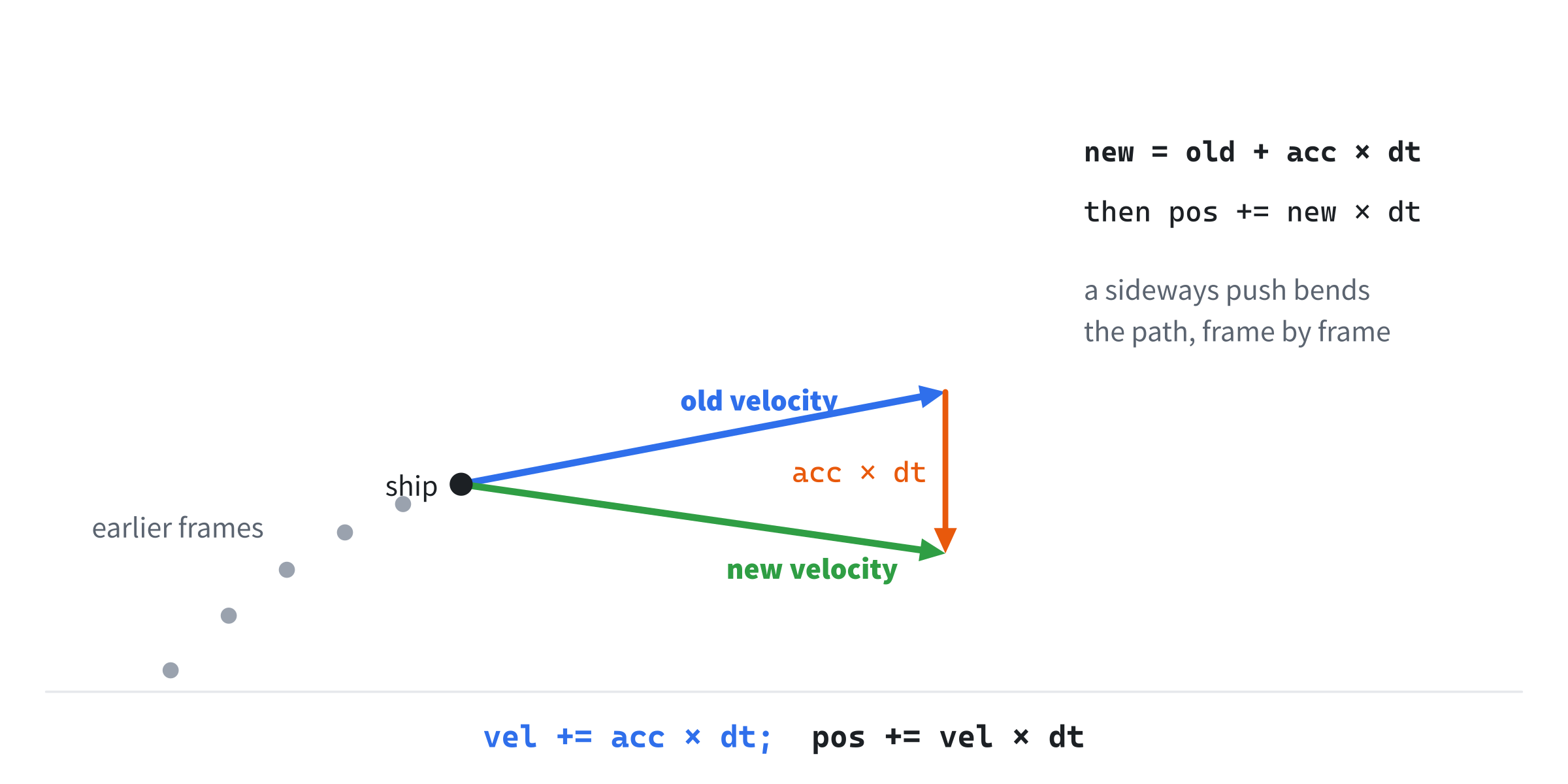
The old velocity, plus the acceleration times dt, is the new velocity. Frame after frame, a sideways acceleration bends the velocity around, and the path curves. That two-step chain is the shape of nearly all game motion, and it's why pressing Up on a spaceship doesn't move it up: it changes how it's moving.
Euler Integration
Put the two lines together, and each frame steps the whole simulation forward:
vel += acc * dt     the acceleration changes the velocity
pos += vel * dt     the new velocity changes the position
Following a quantity that changes all the time, by adding up many small steps, is called integration. This way of doing it is Euler integration, after the mathematician Leonhard Euler. There are two versions, which differ only in their order. This one changes the velocity first, and then moves with the new velocity, which makes it semi-implicit Euler. Swap the two lines, and the position moves with the old velocity, before it changes, which is explicit Euler.
How Far Off It Is
Neither version is exact while something accelerates, since each step treats the velocity as fixed for the whole frame, when really it changes all the way through. Some numbers show how much it matters. A ship starts from rest, with a constant acceleration of 320 pixels a second, every second. After one second, it should have gone exactly half of 320, times one second squared: 160 pixels. Here's what each version gives:
| Frame rate | Semi-implicit | Explicit |
|---|---|---|
| 30 frames a second | 165.3 px | 154.7 px |
| 60 frames a second | 162.7 px | 157.3 px |
| 144 frames a second | 161.1 px | 158.9 px |
Semi-implicit Euler always goes a little too far under a constant acceleration, and explicit Euler a little short. Each is off by the same amount: half the acceleration, times dt, times the time so far. Double the frame rate, and the error halves. The next image shows the true path and the two versions' steps, at a coarse four steps a second, to make the steps easy to see.
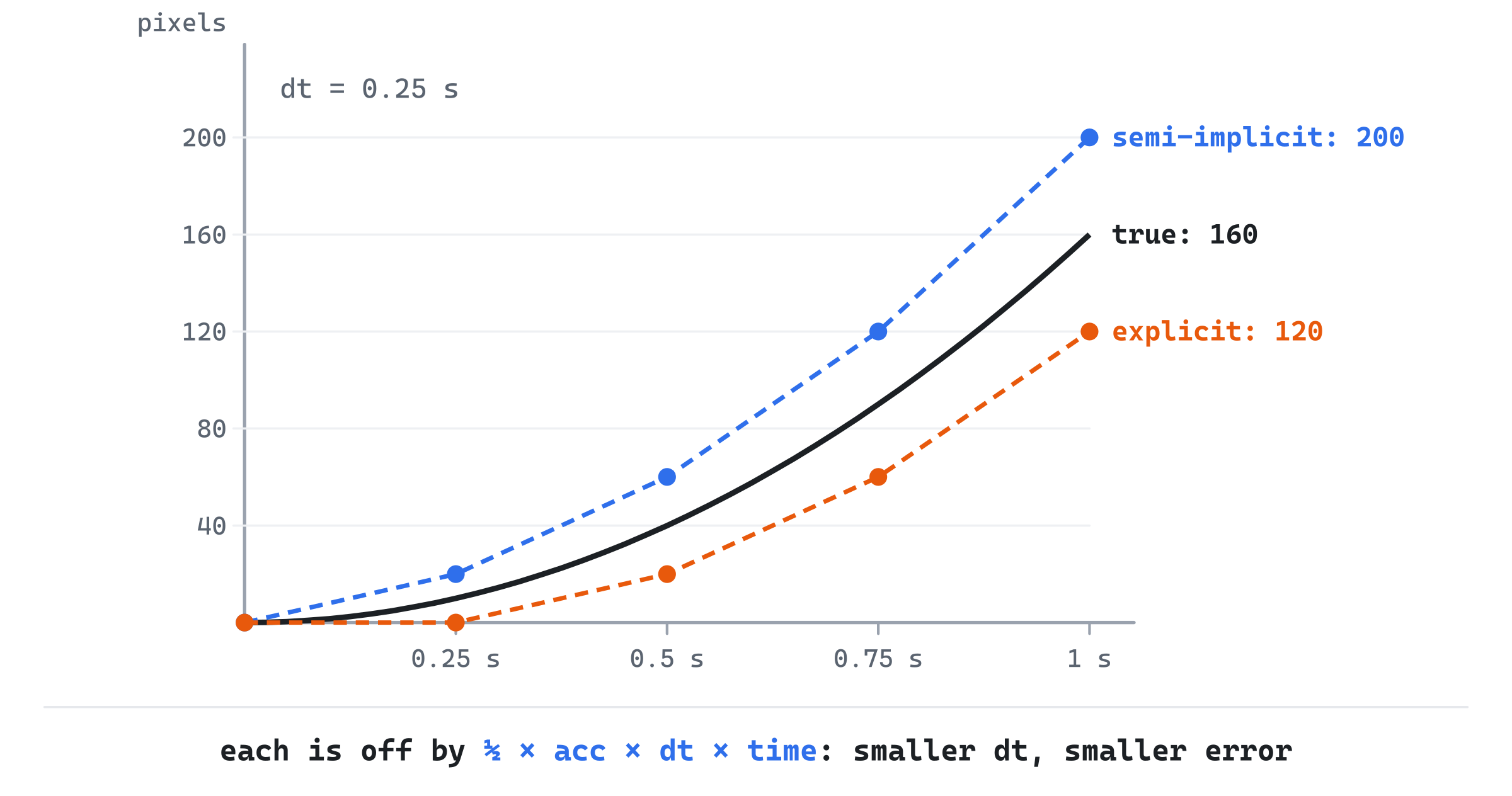
A hand trace shows where the difference comes from. Take steps of a tenth of a second, from rest, with an acceleration of 300. Semi-implicit Euler gives a velocity of 30 after the first step, and moves 3 pixels with it. Then 60, and 6 more pixels, to 9. Then 90, and 9 more, to 18. Explicit Euler moves first, with the old velocity: 0 pixels, then 3, then 6, for 9 in all. The true distance after 0.3 seconds is 13.5, and the two sit either side of it.
Games use semi-implicit Euler. It costs nothing more, and it behaves far better for anything that swings back and forth, such as a spring or an orbit. Explicit Euler slowly adds energy to them, so a spring swings wider and wider, while semi-implicit Euler keeps them steady. For a ship, the difference is a couple of pixels a second. When it matters, as when a jump must reach the same height on every computer, Chapter 20 steps the simulation with a fixed dt, the same every time.
The Long Frame
There's one frame that breaks everything. On Windows, while you drag a window around by its title bar, the program's loop can stop until you let go. When it starts again, the next dt is the whole time the loop was stopped: perhaps two seconds.
Feed two seconds into the physics, and a ship at its top speed of 800 pixels a second jumps 1,600 pixels in one step, through walls and off the screen. Worse, the ship's drag, which takes 0.4 of its velocity away each second, would take away 0.8 of it in that one step. With a stall over 2.5 seconds, the drag would take away more than all of it, and the ship would bounce backwards.
That's why the skeleton caps dt, with the line Chapter 1 promised to explain:
if (dt > 0.05f) dt = 0.05f; // A long stall counts as 1/20 s.A frame that took longer than a twentieth of a second counts as a twentieth. During a stall, the game simply pauses, and then carries on as though one slow frame had passed. A twentieth is about three frames at 60 frames a second, so a normal slow frame still counts in full, and only a real stall is cut short. The game runs slow during a slowdown, rather than jumping, which players find far less jarring.
Drag
In space, a ship would drift forever. Games usually add drag, which takes a share of the velocity away each second:
vel -= vel * (drag * dt)With a drag of 0.4, each frame at 60 frames a second takes away 0.4 × 1/60 of the velocity, a 150th. Taken 60 times over, that leaves about 67% of the speed after a second, not 60%, since each frame takes its share of a velocity that's already shrunk a little. That's a share per frame, which multiplying by dt only nearly gets right, as Time, Not Frames warned. Here, the difference is tiny.
Drag also gives a ship a top speed. Thrust adds speed at a steady rate, and drag takes it away faster the faster the ship goes. They balance where the thrust equals the drag times the speed, so the top speed is the thrust divided by the drag. With a thrust of 320 and a drag of 0.4, that's 800 pixels a second. The ship tops out just under that, at 795 at 60 frames a second and 798 at 144, because each frame's thrust goes in before the drag takes its share.
Building Thrust
Thrust is a ship in the style of Asteroids. The Left and Right keys turn it, as do A and D. Up, or W, thrusts it forward, with a flame. Let go, and momentum carries it on, slowed by drag. It wraps around the window's edges, and a green arrow shows its velocity: where it will be in 0.35 seconds.
Get the code. The complete project is in the
Thrustfolder of the book's repository.
Thrust starts from the skeleton, with its timing, but it leaves out the mouse, which it doesn't use. It reuses drawGrid from Chapter 1, drawArrow from Chapter 2, and drawPolygon from Chapter 6. Its Vec2.h is Chapter 6's, since this chapter adds nothing to it. It includes <vector> for the ship's points, and uses Unit Circle's colors:
#include <cmath>
#include <string>
#include <vector>
#include "Vec2.h"

constexpr int WINDOW_WIDTH  = 1000;
constexpr int WINDOW_HEIGHT = 700;

constexpr SDL_Color TEXT = { 235, 238, 242, 255 };
constexpr SDL_Color GREY = { 90, 100, 112, 255 };
constexpr SDL_Color BLUE = { 47, 111, 235, 255 };
constexpr SDL_Color AMBER = { 232, 89, 12, 255 };
constexpr SDL_Color GREEN = { 47, 158, 68, 255 };
The rest of the demo comes in four parts: the ship's state, the keys, the physics, and the drawing.
The Ship
The state goes after the font is loaded:
// The ship: where it is, how fast it's going, and which way it faces,
// in radians. It starts in the middle, still, pointing up.
Vec2 pos = { WINDOW_WIDTH / 2.0f, WINDOW_HEIGHT / 2.0f };
Vec2 vel = { 0.0f, 0.0f };
float heading = -PI / 2.0f;

const float turnRate = 3.2f;       // radians a second
const float thrust = 320.0f;       // pixels a second, every second
const float drag = 0.4f;           // a share of the speed lost a second
The ship's position and velocity are vectors, and its heading is an angle, in radians, starting at −π/2: straight up, on the screen. The three constants set how it handles: how fast it turns, how hard it thrusts, and how much drag slows it.
The ship's outline and its flame are local points, as in Chapter 6, around the ship's center, with its nose pointing along its own x axis:
// The ship's outline, and its flame, as points around its own center,
// facing along its x axis.
const std::vector<Vec2> hull = { { 30, 0 }, { -21, -18 }, { -21, 18 } };
const std::vector<Vec2> flame = { { -21, -9 }, { -42, 0 }, { -21, 9 } };
The flame sits behind the ship's tail, and it's drawn only while the ship thrusts.
Held Keys
Turning and thrusting last as long as a key is held, so they don't come from events. Instead, the demo asks SDL each frame which keys are down:
// Keys held down: SDL's array of which keys are down this frame.
// Turning changes the heading, at a steady rate.
const bool* keys = SDL_GetKeyboardState(nullptr);
bool left = keys[SDL_SCANCODE_LEFT] || keys[SDL_SCANCODE_A];
bool right = keys[SDL_SCANCODE_RIGHT] || keys[SDL_SCANCODE_D];
bool thrusting = keys[SDL_SCANCODE_UP] || keys[SDL_SCANCODE_W];
if (left) heading = wrapAngle(heading - turnRate * dt);
if (right) heading = wrapAngle(heading + turnRate * dt);
The SDL_GetKeyboardState function returns SDL's array of key states, one bool for each key, true while it's down. Its argument, nullptr, means we don't need the array's length. The array is indexed by scancodes, which name a key by its place on the keyboard, not by its letter. So SDL_SCANCODE_W is the key where W is on an American keyboard, wherever it is on yours. That keeps W, A, S and D in a comfortable cluster on every keyboard.
Turning left takes from the heading, because angles grow clockwise on the screen, and left is counterclockwise. The turn is a rate, so it's multiplied by dt: 3.2 radians a second is about half a turn a second. And the heading is wrapped, as Chapter 5 wrapped its angles, so it stays between −π and π, and the readout never grows without limit.
The Physics
Then the physics, exactly as this chapter built it:
// The physics, by semi-implicit Euler: the acceleration changes the
// velocity first, then the new velocity changes the position. Drag
// takes a share of the velocity away each second.
Vec2 acc = thrusting ? Vec2::fromAngle(heading) * thrust : Vec2{};
vel += acc * dt;
vel -= vel * (drag * dt);
pos += vel * dt;
While thrusting, the acceleration is the unit vector at the heading, from fromAngle, times the thrust. Otherwise, it's zero: Vec2{}, whose members start at zero. The velocity changes first, then drag takes its share, and the new velocity moves the ship. That's semi-implicit Euler, with drag in the middle.
Notice what turning doesn't do: it doesn't change the velocity. It only changes the heading, which is the way the thrust will push next time. So a ship that turns, without thrusting, keeps sliding the way it was going, which is just what momentum means.
The window's edges wrap:
// Off one edge, back on at the opposite one.
if (pos.x < 0) pos.x += WINDOW_WIDTH;
if (pos.x > WINDOW_WIDTH) pos.x -= WINDOW_WIDTH;
if (pos.y < 0) pos.y += WINDOW_HEIGHT;
if (pos.y > WINDOW_HEIGHT) pos.y -= WINDOW_HEIGHT;
A ship that drifts off one edge comes back on the opposite one, by moving its position a window's width or height.
Drawing
After the grid, the velocity is drawn as an arrow from the ship:
// The velocity, drawn as an arrow to where the ship will be in
// 0.35 seconds, if nothing changes.
drawArrow(renderer, pos, pos + vel * 0.35f, GREEN);
The arrow's length is the velocity times 0.35, so its tip is where the ship will be in 0.35 seconds if nothing changes: position plus velocity times time. At top speed, it's 280 pixels long.
The ship and its flame are drawn as Chapter 6 drew its arrow: each local point is rotated to the heading, then moved to the ship's position:
// The ship, and its flame while it thrusts: each local point turned
// to the heading, then moved to the ship's position.
std::vector<Vec2> ship;
for (const Vec2& p : hull) ship.push_back(pos + p.rotated(heading));
drawPolygon(renderer, ship, BLUE);
if (thrusting)
{
    std::vector<Vec2> fire;
    for (const Vec2& p : flame)
        fire.push_back(pos + p.rotated(heading));
    drawPolygon(renderer, fire, AMBER);
}
The readout gives the speed, the velocity's length, and the heading in degrees, with the top speed that the thrust and the drag set:
long speed = std::lround(vel.length());
long degrees = std::lround(heading * 180.0f / PI);
drawText(renderer, font,
         "speed: " + std::to_string(speed) + " px/s   heading: " +
         std::to_string(degrees) + " deg", 12, 10, TEXT);
drawText(renderer, font,
         "top speed: thrust / drag = " +
         std::to_string(std::lround(thrust / drag)) + " px/s",
         12, 30, GREY);
drawText(renderer, font,
         "[Left/Right or A/D] turn   [Up or W] thrust   [Esc] quit",
         12, WINDOW_HEIGHT - 26, GREY);
The speed is rounded with std::lround, so it reads in whole pixels a second.
Trying It Out
Run the demo, and fly. Thrust a little, then let go, and watch the ship drift on, slowing gently. The next image shows the ship mid-flight, thrusting, with its flame lit.
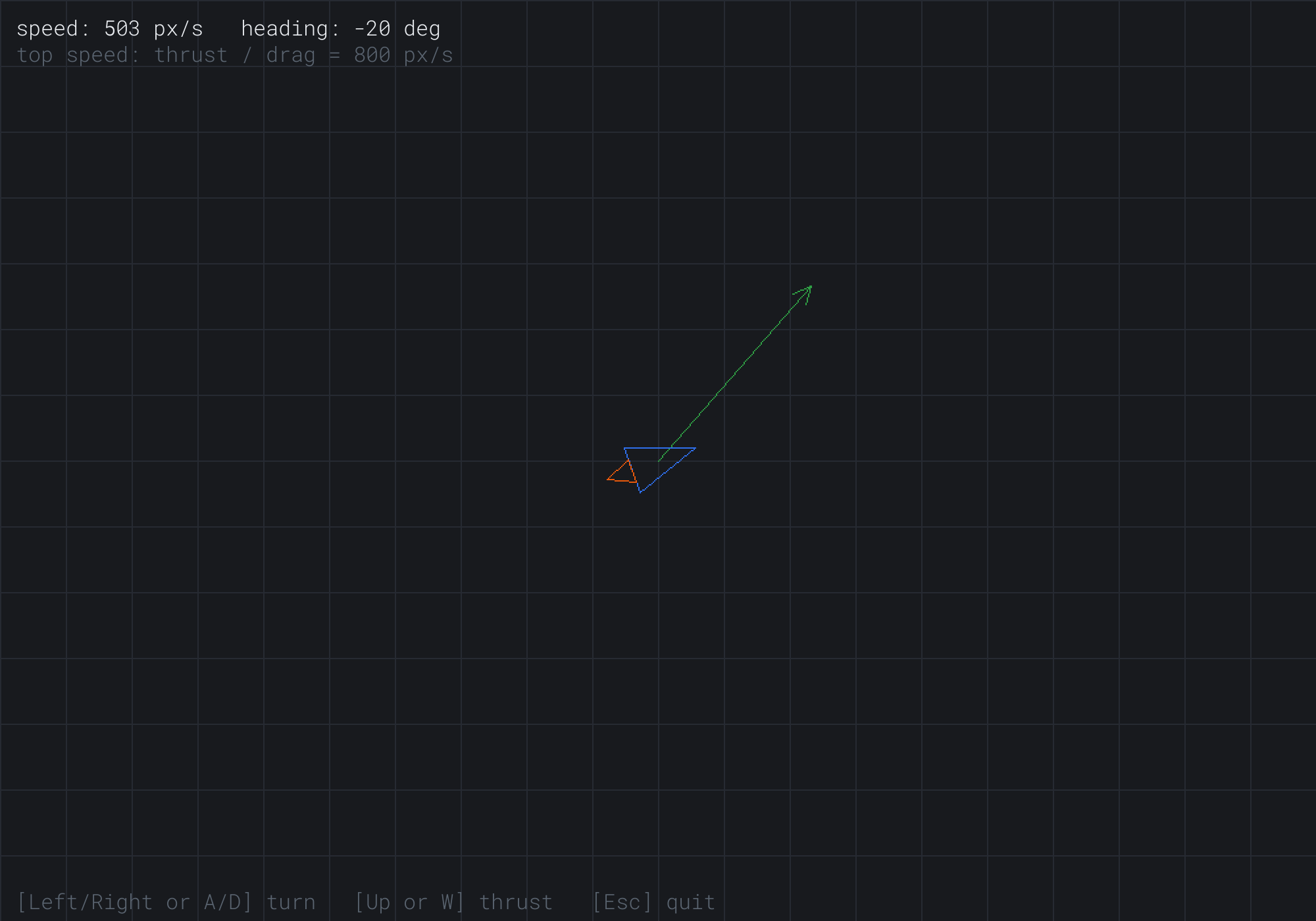
The ship faces 20 degrees above the horizontal, but its green velocity arrow points up and to the right, more steeply, at 503 pixels a second. It was moving that way before it turned, and its thrust is only now starting to bend its path toward its heading. Turning changed where the thrust pushes, not where the ship is going.
Some things to try:
- Hold Up from a standstill, and watch the speed climb toward 800, quickly at first, then more and more slowly, as the drag catches up with the thrust.
- Thrust one way, then turn around and thrust the other way, to brake. It takes a while, which is what momentum feels like.
- Fly slowly off an edge, and watch the ship pop to the other side. Only its center wraps, so it vanishes and reappears whole.
Then try the long frame. Thrust to a good speed, and drag the window by its title bar for a few seconds. When you let go, the ship carries on from where it was, since the cap counts the stall as one short frame.
FAQ
Q) Why does the ship keep sliding the old way after I turn?
A) Because turning changes the heading, not the velocity. The heading is only the direction the next thrust will push. Until you thrust, the velocity, and so the ship's path, stays as it was. Thrusting slowly bends the velocity toward the heading, which is what Figure 7.3 shows.
Q) How do I make the ship wrap smoothly, instead of popping at the edge?
A) Draw it more than once. When the ship is within its own size of an edge, draw it a second time at the opposite edge: at its position plus or minus the window's width, and plus or minus its height. Each copy is clipped by the window, so the two halves join up across the edge, and the ship seems to slide through.
Q) Will my game's jump reach the same height on every computer?
A) Not quite, with Euler integration and a varying dt. As How Far Off It Is showed, the error depends on the frame rate, so a jump reaches a slightly different height at 60 frames a second than at 144, and a gap that's just jumpable on one computer may not be on another. The cure is a fixed timestep, which Chapter 20 builds: the simulation always steps by the same dt, so it gives the same answer everywhere.
Q) How do I give the ship a hard speed limit?
A) After changing the velocity, check its length, and shorten it if it's too long: if (vel.length() > maxSpeed) vel = vel.normalized() * maxSpeed;. Unlike drag, that's a hard cap, with no slowing before it. Chapter 9 gives Vec2 a method that does exactly this, truncated.
Q) Why scancodes, and not the keycodes the events use?
A) Because held keys are about where a key is, and events are about what it means. A scancode is the key's place on the keyboard, the same on every layout. A keycode is the character it types, so on a French keyboard, the key in W's place types Z. For movement keys, the place matters. For a key like C, to clear, the letter does, which is why the skeleton's events use keycodes.
Exercises
The first two exercises need only a pencil. The others change Thrust.
- A hand trace (paper). A ship starts from rest, with an acceleration of 200 along x, and steps of 0.2 seconds. Work out its velocity and position after three steps, with semi-implicit Euler, and then with explicit Euler. Compare both with the exact distance, half of 200 times 0.6 squared.
- Drag (paper). A ship cuts its thrust at 800 pixels a second, with a drag of 0.4. Roughly how fast is it going two seconds later? (A share of about 67% survives each second.)
- Brakes (code). Make Down, or S, slow the ship while held, by adding a second, stronger drag.
- A smooth wrap (code). Draw the ship a second time across the edge, as the FAQ describes.
- A speed limit (code). Remove the drag, and give the ship a hard top speed of 500 pixels a second instead. How does it feel to fly, compared with drag?
For the code exercises, work on a copy of the demo's folder, so that the original stays as the chapter describes it.
AI Exercise (Optional)
A ship with thrust is begging for gravity. With an AI's help, you can put a planet in the middle of the window that pulls the ship toward it. Then you can fall into orbit, slingshot around it, or crash. It doesn't matter if your first orbits spiral off into space, and it's thrilling when you finally hold one. First, set Thrust's drag to 0, since it takes 0.4 of the speed away each second, and no orbit lasts with it. Open your AI chatbot of choice, and try a prompt like this:
"I have a C++ demo using SDL3: a ship in a 1000 by 700 window, y pointing down. A struct Vec2 has float x and y, the usual operators, length(), normalized(), rotated(radians) and the static fromAngle(radians). Each frame, with dt in seconds, I do semi-implicit Euler: vel += acc * dt, then pos += vel * dt. I'd like a planet at the middle of the window, 40 pixels in radius, that pulls the ship with an acceleration toward it of strength / (distance squared), with strength chosen so a circular orbit 200 pixels out is about 150 pixels a second. Add that to the ship's acceleration. If the ship touches the planet, reset it. Then draw the ship's predicted path for the next 4 seconds as a dotted line, by stepping a copy of the ship's physics forward 240 times at 1/60 of a second each. Explain how to work out the strength from the orbit's speed and radius."
That prompt describes your integrator, so the AI adds gravity to the acceleration instead of inventing a physics system. It asks for the strength to be worked out from an orbit you can picture, rather than a magic number, and it asks how. And the predicted path is the best part: it's the same physics, run ahead on a copy, which is a trick games use for aiming lines and trajectories.
Then fly. For a circular orbit, the pull must equal the speed squared over the radius, so the strength should come out at 150 squared, times 200, which is 4,500,000. If the AI's number differs, ask it to check. Watch the predicted path, too. If it disagrees with where the ship really goes, the copy isn't stepping the same way the ship does. Make sure it uses the same order, velocity first, and the same step.
If it all works, try a second planet, or a moon that orbits the first. The predicted path will show you some wonderfully strange routes.
Summary
Every rate is multiplied by delta time, which makes constant velocities exact and accelerations very nearly so. Velocity changes position, and acceleration changes velocity. Semi-implicit Euler steps both, the velocity first, with an error that halves each time the frame rate doubles. The skeleton's cap on dt turns a stalled loop into one slow frame instead of a jump, and drag gives a ship a top speed, where the thrust balances it. Thrust put it all together, with held keys and a ship drawn by Chapter 6's rotation. In Chapter 8, motion gets shape: instead of only speeding up and slowing down, things will ease from one place to another along curves of our choosing.