
So far, the dungeon has been letters: # for a wall, . for floor, and a letter for each monster. That's how roguelikes began, and many players still like them best. But a dungeon of pictures is easier on newcomers, and some players never take to letters at all. This chapter gives the game both.
It starts by drawing a line through the code. On one side is what's on each cell, which the game decides. The other side is how a cell looks, which a view decides. With that line drawn, a second view can draw the same dungeon in pictures, called tiles, and F2 switches between the two. The next image shows the end of the chapter: one moment, in both views.
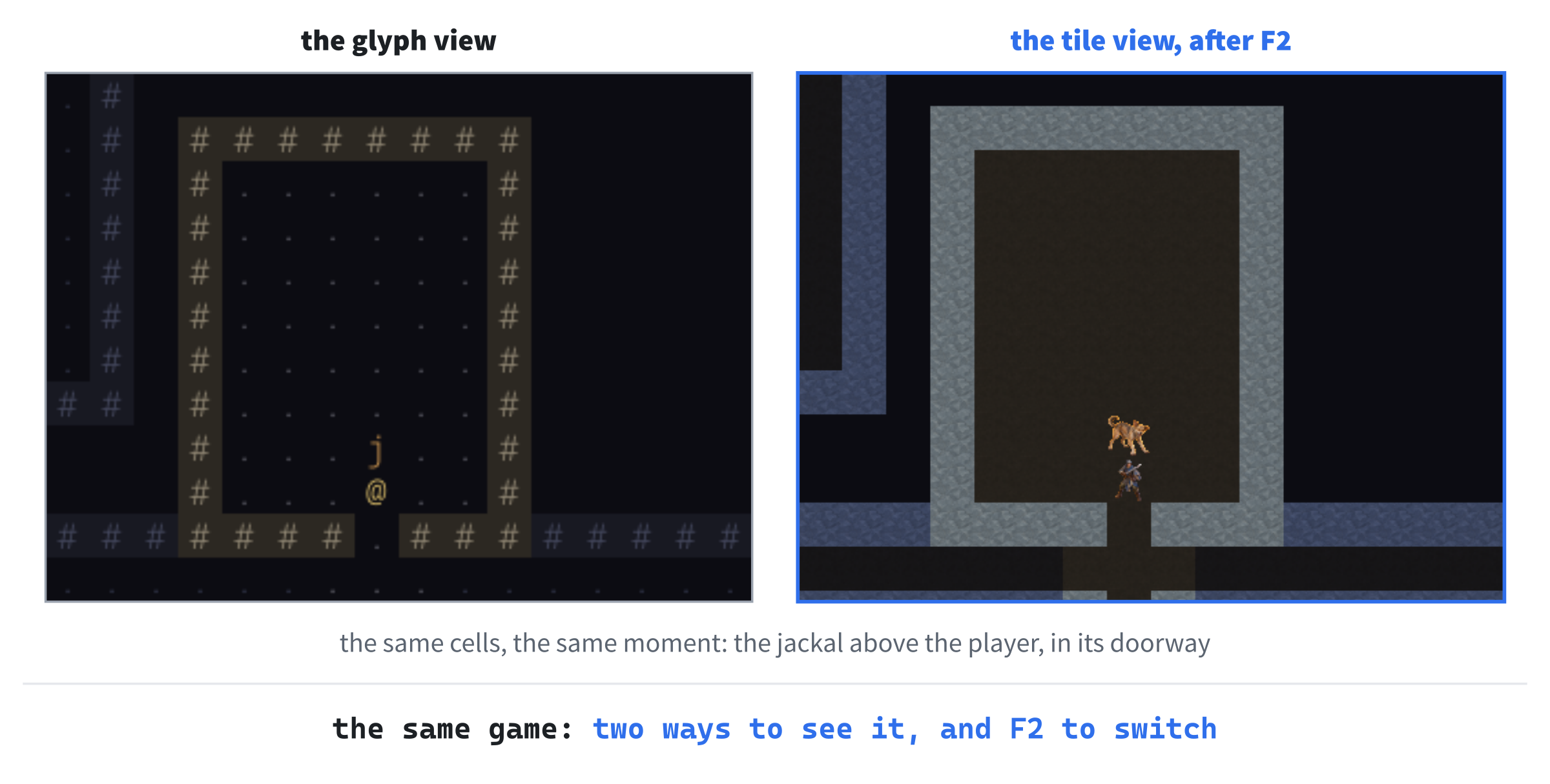
Tiles are bigger than letters, so the tile view can't fit the whole map in the window. It gets a camera, which follows the player across the map.
Chapter 08 in the book's repository holds this chapter's finished project, and the tiles' picture and index, in its assets folder. The chapter carries on in your own project from Chapter 7, or from the book's Chapter 07 folder.In this chapter, we will:
- Split the drawing of the map from the rules, behind an interface,
View - Move the drawing that's there into a view of its own, the glyph view
- Draw the map in pictures from one atlas, with a tile view
- Switch between the two views with F2
- Follow the player with a camera, since the tiles' map is bigger than the window
There are five checkpoints along the way. Let's draw a line through the code.
Planning the Chapter
This chapter adds four classes, with the tiles they draw, and changes five files:
| File | Status | What it's for |
|---|---|---|
src/View.h |
New | The interface: what any way of drawing the map must do |
src/GlyphView.h, src/GlyphView.cpp |
New | The map in characters, as it's drawn now |
src/TileView.h, src/TileView.cpp |
New | The map in pictures |
src/Camera.h, src/Camera.cpp |
New | Which part of the map the map view shows |
assets/tiles.png, assets/tiles.txt |
New, from the repository | The pictures, and where each one is |
src/Game.h, src/Game.cpp |
Changed | Draw the map through a view, and switch views with F2 |
src/Common.h, src/Monster.h, src/main.cpp |
Changed | The tiles' size, each kind's picture, and the view kept between runs |
| The other files | Unchanged |
The next image shows how the files fit together at the end of the chapter. The views have a row of their own, below everything that's been there since Chapter 7.
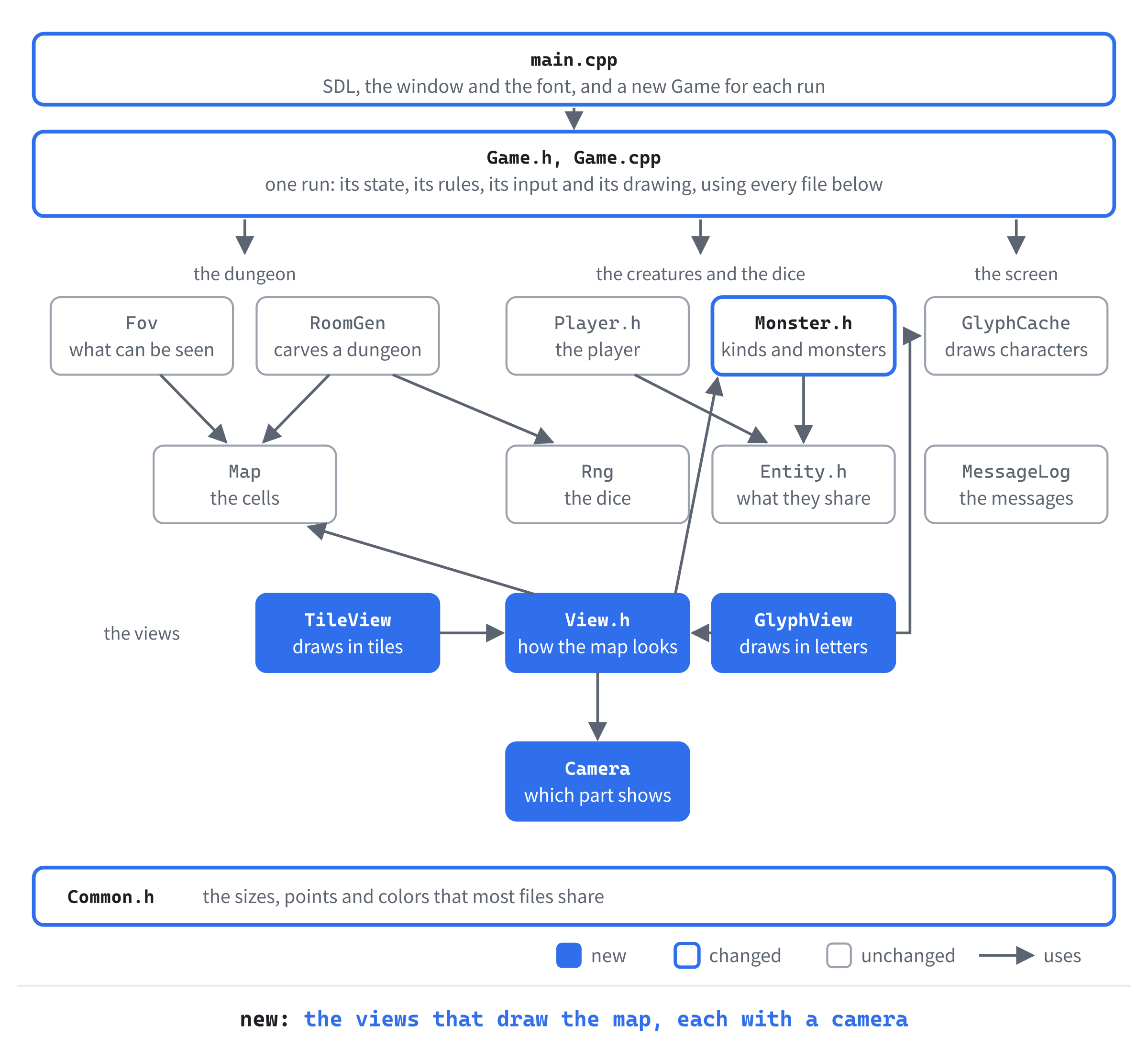
The game knows what's on every cell: whether it's floor or wall, whether the player can see it or only remembers it, and which monster stands there. What it shouldn't have to care about is how any of that looks. So the drawing of the map moves behind an interface: a class that says what a view must be able to do, without saying how. The game calls the interface, and whichever view is in use does the drawing.
Only the map changes with the view. The side panel and the log look the same in both, so they stay where they are, in Game.
We'll build it in three steps: the interface and the glyph view, which change nothing on the screen; the tile view, and F2; and the camera.
A View of the Map
The first step moves the drawing of the map out of Game, into a view. Nothing changes on the screen, which is the sign that it's been moved correctly.
The View Interface
In Solution Explorer, right-click src, choose Add > New Item, and add a Header File (.h) called View.h. Type the whole file, so that it reads like this:
#pragma once
#include "Common.h"
#include "Map.h"
#include "Monster.h"

// The way the map is drawn. The game decides what's on each cell, and a
// View draws it there: GlyphView with characters, and TileView with
// pictures
class View
{
public:
    virtual ~View() = default;

    // A cell's terrain: lit if the player can see it, and otherwise as the
    // player remembers it
    virtual void drawTerrain(Point cell, Terrain terrain, bool lit) const = 0;

    // The player, and a monster, on the cell they stand on
    virtual void drawPlayer(Point cell) const = 0;
    virtual void drawMonster(Point cell, const MonsterDef& def) const = 0;
};
In the preceding code, View is an abstract class. Each of its three functions ends in = 0, which makes it pure virtual: the class says the function exists, but doesn't write it. A class with even one pure virtual function can't be made on its own. It exists to be derived from, and a class derived from it must write every one of them before it can be made.
The word virtual is what lets one call do different things. When the game calls drawPlayer through a pointer to a View, the function that runs is chosen by what the pointer really points at, rather than by the pointer's type. The choice is made while the program runs. That's polymorphism, and it's how the game will draw with whichever view is in use, without knowing which.
The destructor is virtual too, as it should be in any class that's meant to be derived from. It makes sure that destroying an object through a pointer to its base runs the derived class's destructor, as well as the base's. And = default asks the compiler to write it.
The three functions are everything a view must draw: a cell's terrain, the player, and a monster. Terrain is lit if the player can see it, and remembered if not. The comment names TileView, which arrives later in this chapter.
The Glyph View
The drawing that's in Game now becomes the first view. Add a Header File (.h) called GlyphView.h, and type the whole file:
#pragma once
#include <SDL3/SDL.h>
#include "GlyphCache.h"
#include "View.h"

// The map in characters: # for walls, . for floor, @ for the player, and
// a letter for each monster, in 20-pixel cells
class GlyphView : public View
{
public:
    GlyphView(SDL_Renderer* renderer, const GlyphCache& glyphs);

    void drawTerrain(Point cell, Terrain terrain, bool lit) const override;
    void drawPlayer(Point cell) const override;
    void drawMonster(Point cell, const MonsterDef& def) const override;

private:
    void drawCell(Point cell, char c, SDL_Color color,
                  SDL_Color background = Palette::BACKGROUND) const;

    SDL_Renderer* renderer_;
    const GlyphCache& glyphs_;
};
The : public View means that GlyphView inherits from View, publicly. With class, unlike struct, inheritance is private unless it says otherwise. And private inheritance would hide that a GlyphView is a View. Each of the three functions is marked override. That asks the compiler to check that it really does override one of View's, with exactly the same parameters, and the same const.
The view keeps its own pointer to the renderer and a reference to the glyph cache, since it draws with both. And drawCell, the helper that Game had, moves here, as a private function. Now add a C++ File (.cpp) called GlyphView.cpp, and type its include and constructor:
#include "GlyphView.h"

GlyphView::GlyphView(SDL_Renderer* renderer, const GlyphCache& glyphs)
    : renderer_(renderer), glyphs_(glyphs)
{
}
Then drawTerrain, which draws floor and walls. Add it below the constructor:
// Floor is a dot, and wall a # on dark stone. Remembered cells are drawn
// in the dimmer, cooler colors
void GlyphView::drawTerrain(Point cell, Terrain terrain, bool lit) const
{
    if (terrain == Terrain::Floor)
    {
        SDL_Color color = lit ? Palette::FLOOR : Palette::MEMORY_FLOOR;
        drawCell(cell, '.', color);
    }
    else
    {
        SDL_Color color = lit ? Palette::WALL : Palette::MEMORY_WALL;
        SDL_Color back = lit ? Palette::WALL_BACK : Palette::MEMORY_WALL_BACK;
        drawCell(cell, '#', color, back);
    }
}
The choice of character and colors is the one drawMap made, moved here, where it belongs. A floor is a dot, and a wall a # on dark stone, in full color if the cell is lit, and in the memory colors if it isn't. The player and a monster are simpler. Add them below drawTerrain:
void GlyphView::drawPlayer(Point cell) const
{
    drawCell(cell, '@', Palette::PLAYER);
}

void GlyphView::drawMonster(Point cell, const MonsterDef& def) const
{
    drawCell(cell, def.glyph, def.color);
}
Last, drawCell, the helper that all three use. Add it below them:
// One map cell: its background first, so nothing drawn there before can
// show through, then its character
void GlyphView::drawCell(Point cell, char c, SDL_Color color,
                         SDL_Color background) const
{
    float x = static_cast<float>(cell.x * CELL_PX);
    float y = static_cast<float>(cell.y * CELL_PX);
    float size = static_cast<float>(CELL_PX);
    SDL_FRect rect = { x, y, size, size };
    SDL_SetRenderDrawColor(renderer_, background.r, background.g,
                           background.b, background.a);
    SDL_RenderFillRect(renderer_, &rect);
    glyphs_.drawInCell(c, x, y, size, color);
}
It's Game's drawCell, with two changes. It takes the cell as a Point, and it sets the color with SDL_SetRenderDrawColor itself, since setColor belongs to Game.
Checkpoint: Click in GlyphView.cpp, and press Ctrl+F7 to compile it. It compiles. Nothing uses the view yet, so the game is unchanged.
Drawing Through the View
Now Game draws through a view. Open Game.h, and add the glyph view's header below #include "GlyphCache.h":
#include "GlyphView.h"The helper has moved to the view, so in Game.h, delete the lines from void drawCell(int col, int row, char c, SDL_Color color, down to SDL_Color background = Palette::BACKGROUND) const;, its declaration. Then add these lines below glyphs_:
// The map is drawn through view_, which points at the view in use
GlyphView glyphView_;
const View* view_;
The Game holds its glyph view, and view_ points at the view in use. It's a pointer to a View, not to a GlyphView, so that it can point at either view, once there are two. And it's const, since drawing doesn't change a view. In Game.cpp, find the start of the constructor's member initializer list:
: renderer_(renderer), glyphs_(glyphs), seed_(chooseSeed(seed)),
  rng_(seed_)
Replace it with these lines:
: renderer_(renderer), glyphs_(glyphs), glyphView_(renderer, glyphs),
  view_(&glyphView_), seed_(chooseSeed(seed)), rng_(seed_)
The glyph view is made with the renderer and the cache it draws with, and view_ starts out pointing at it, using & to take its address. The members are made in the order they're declared, as Chapter 7 showed. And glyphView_ comes before view_, so the view exists when view_ points at it.
In draw, change drawCell(player_.pos.x, player_.pos.y, '@', Palette::PLAYER); to view_->drawPlayer(player_.pos);. The arrow, ->, calls a function through a pointer, so this calls drawPlayer on whichever view view_ points at.
The helper's definition goes too. In Game.cpp, delete everything from // One map cell: its background first down to the closing brace of drawCell, along with the blank line above it. Then replace the whole of drawMap with this:
// The map as the player knows it: what they can see, lit, and what they
// remember. With revealMap_, a debugging aid, all the rest is drawn as if
// remembered too. Walls are drawn only where they border floor. The view
// decides how each cell looks
void Game::drawMap() const
{
    for (int y = 0; y < MAP_H; ++y)
    {
        for (int x = 0; x < MAP_W; ++x)
        {
            bool visible = map_.isVisible(x, y);
            if (!visible && !map_.isExplored(x, y) && !revealMap_)
            {
                continue;
            }
            Terrain terrain = map_.at(x, y);
            if (terrain == Terrain::Floor || map_.bordersFloor(x, y))
            {
                view_->drawTerrain({ x, y }, terrain, visible);
            }
        }
    }
}
In the preceding code, the game still decides which cells are drawn: the ones the player has seen, or all of them with F1, and walls only where they border floor. It also decides whether each is lit. But how a cell looks is the view's business now. So a cell to be drawn goes to drawTerrain, with its terrain, and whether it's lit. The braces in { x, y } make a Point on the spot, for the call.
Last, in drawMonsters, find the call to drawCell:
drawCell(monster.pos.x, monster.pos.y, monster.def->glyph,
         monster.def->color);
Replace it with this line:
view_->drawMonster(monster.pos, *monster.def);The view gets the monster's kind, as *monster.def, the row that def points at, and draws it however it draws that kind. The next image shows the classes, and how one call reaches either view.
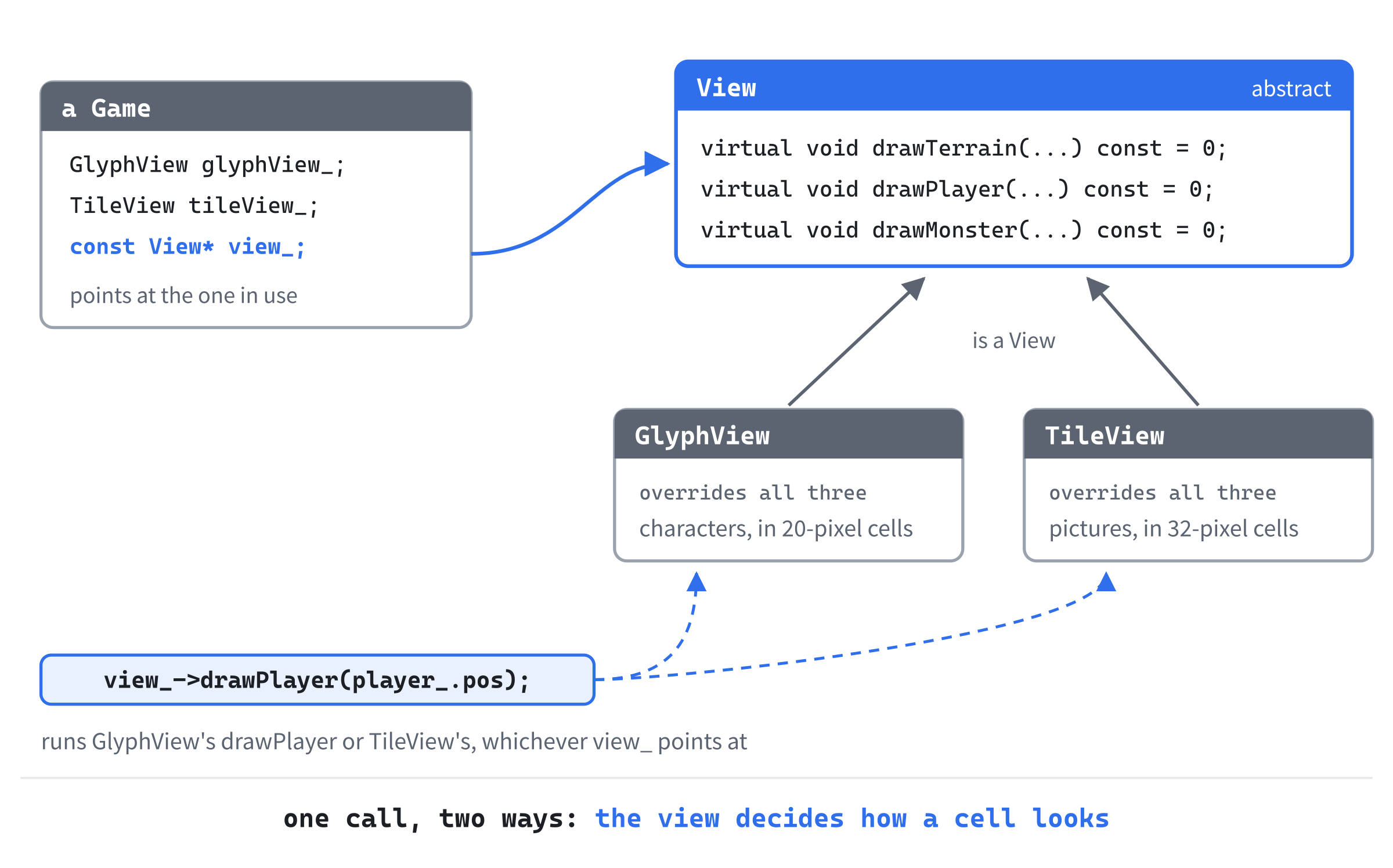
The game makes three calls to draw the map, and none of them says which view. That's the whole point of the interface: the code that calls it never changes, however many views there are.
Checkpoint: Press F5. The game looks exactly as it did, down to the last pixel, since the glyph view draws exactly what Game drew. The drawing has moved, and nothing else has.
Design note: letters or pictures. Rogue drew its dungeon in letters because the terminals of 1980 could draw nothing else, and the habit stuck: a letter says exactly what something is, takes no artist to make, and lets a whole level fit on a small screen. Pictures came later, and they're friendlier, especially to newcomers, who don't yet know that a
kis a kobold. Some games offer both. Dungeon Crawl Stone Soup, one of the best-known roguelikes today, comes in a console version in letters and a Tiles version with pictures, both built from the same source. This game does the same, so that the rules never need to know which is on the screen.
For now, the glyph view is the only view there is. The next section gives it company.
Tiles
Now the second view, which draws the map in pictures. The pictures come first.
The Atlas
The tiles are all in one picture, called an atlas. A small text file, its index, says where each one is. One picture is one file to load, rather than dozens. And it's one texture, which the renderer can draw from again and again without switching.
You don't make the atlas. It comes with the book. From the book's repository, copy tiles.png and tiles.txt from the Chapter 08 folder's assets folder into your project's assets folder, beside the font. They're a small selection of 32-pixel tiles, packed into one picture for this book, and the repository's ASSETS-LICENSE.md says how you may use them in games of your own. The next image shows the atlas, and its index.
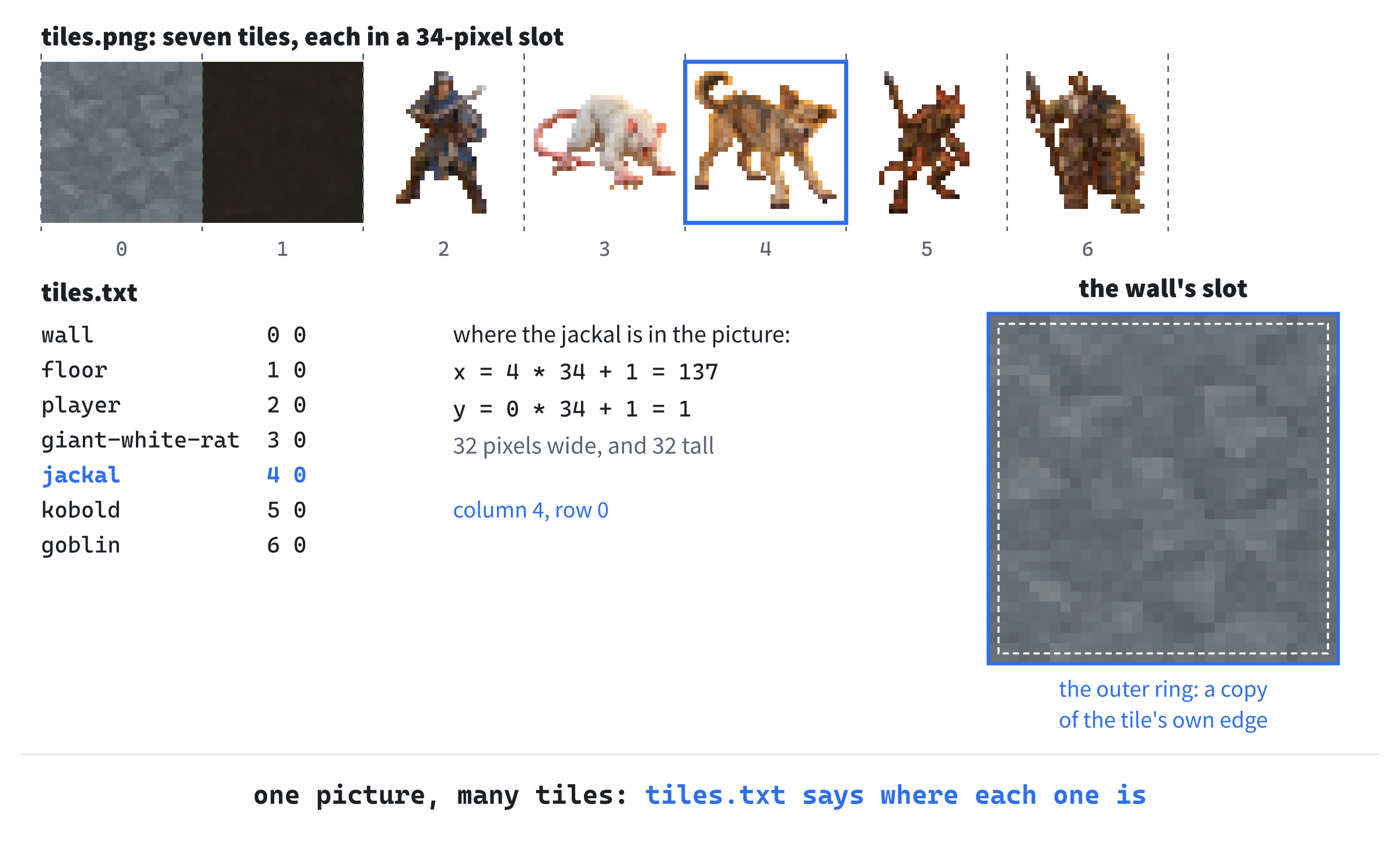
Each line of tiles.txt is a tile's name, then the column and row of its slot in the atlas. Open the file in Visual Studio to see it: the first lines are comments, which start with #. So jackal 4 0 says the jackal is in the fifth slot along, counting from 0, in the first row.
Each tile is 32 pixels square, but its slot is 34. It has a border, one pixel wide, that copies the tile's own edge.
That's not for show. When the window scales the picture, SDL works out each pixel on the screen by blending a little of the tile's pixels near it. At a tile's edge, that reaches one pixel past it. Without the border, it would reach into the next tile in the atlas, and a thin line of the wrong color would show at the edge of every tile. The next image shows the difference.

The lines are called seams, a bug as old as tile games. A border that repeats each tile's edge is the standard cure. The view still draws only the 32-pixel tile, one pixel inside its slot.
Each Kind's Picture
The tile view needs the tiles' size, and a way to tint a remembered tile, as the glyph view dims a remembered cell. Open Common.h, and add the size below MAP_H:
// The tile view's cells are bigger: the size of one of its pictures
constexpr int TILE_PX = 32;
A tile is 32 pixels, so the tile view's cells are 32 pixels, against the glyph view's 20. Then add the tint to Palette, below MEMORY_FLOOR:
// The same for tiles: a remembered tile's colors are multiplied by
// this, which darkens them, and the blue the least. Not by much, or
// the dark floor tile would vanish into the unexplored dark
constexpr SDL_Color MEMORY_TINT = { 150, 160, 210, 255 };
A tint multiplies a picture's red, green and blue by the tint's own, each as a share of 255. So MEMORY_TINT darkens a tile, and keeps more of its blue than of its red. Remembered tiles come out darker and cooler, as the glyph view's memory colors do.
Each kind of monster needs the name of its picture. Open Monster.h, and find the members from sight to maxDamage, in MonsterDef:
int sight;       // how far it can see, in cells
int hp;          // its health when it's made
int minDamage;   // each of its blows does minDamage to maxDamage,
int maxDamage;   // before the target's defense
Replace them with these lines:
const char* tile;   // its picture's name in tiles.txt
int sight;          // how far it can see, in cells
int hp;             // its health when it's made
int minDamage;      // each of its blows does minDamage to maxDamage,
int maxDamage;      // before the target's defense
The new tile is a name from tiles.txt, and the comments line up again. Every row needs it. Find the table's rows, with the comment above them:
// name, glyph, color, sight, hp, damage from and to, defense
{ "giant white rat", 'r', { 215, 215, 205, 255 }, 6, 4, 1, 3, 0 },
{ "jackal", 'j', { 205, 150, 80, 255 }, 7, 5, 1, 3, 0 },
{ "kobold", 'k', { 110, 185, 95, 255 }, 6, 7, 2, 4, 1 },
{ "goblin", 'g', { 160, 205, 60, 255 }, 7, 9, 2, 5, 1 },
Replace them with these lines:
// name, glyph, color, tile,
//     sight, hp, damage from and to, defense
{ "giant white rat", 'r', { 215, 215, 205, 255 }, "giant-white-rat",
  6, 4, 1, 3, 0 },
{ "jackal", 'j', { 205, 150, 80, 255 }, "jackal",
  7, 5, 1, 3, 0 },
{ "kobold", 'k', { 110, 185, 95, 255 }, "kobold",
  6, 7, 2, 4, 1 },
{ "goblin", 'g', { 160, 205, 60, 255 }, "goblin",
  7, 9, 2, 5, 1 },
Each row has its picture's name after its color. The rows are too long for one line now, so each goes over two, with the numbers on the second. The jackal's picture is a tan dog, and the goblin's a squat, greenish humanoid. In tiles.txt, they're simply called jackal and goblin.
The Tile View
Add a Header File (.h) called TileView.h, and type the first part of the class:
#pragma once
#include <SDL3/SDL.h>
#include <string>          // std::string, for the tiles' names
#include <unordered_map>   // std::unordered_map, to find tiles by name
#include "View.h"

// The map in pictures: TILE_PX tiles from one picture, tiles.png, found
// by the names that tiles.txt gives them
class TileView : public View
{
public:
    TileView(SDL_Renderer* renderer, const std::string& atlasPath,
             const std::string& indexPath);
    ~TileView();

    TileView(const TileView&) = delete;
    TileView& operator=(const TileView&) = delete;

    bool isLoaded() const;

    void drawTerrain(Point cell, Terrain terrain, bool lit) const override;
    void drawPlayer(Point cell) const override;
    void drawMonster(Point cell, const MonsterDef& def) const override;
In the preceding code, TileView is a View, as GlyphView is, and overrides the same three functions. It also has a destructor, since it owns something that must be destroyed: the atlas, as a texture. So, as with Chapter 1's glyph cache, copying is deleted, since two copies would both destroy the same texture. The function isLoaded says whether the atlas and its index were read, since a view with no pictures can't draw.
Then its private part, below the overrides, with a blank line in between:
private:
    bool readIndex(const std::string& path);
    void drawTile(Point cell, const std::string& name,
                  SDL_Color tint) const;

    SDL_Renderer* renderer_;
    SDL_Texture* atlas_ = nullptr;

    // Where each tile is in the atlas, by name
    std::unordered_map<std::string, SDL_FRect> tiles_;
    bool loaded_ = false;
};
The atlas is a texture, atlas_, and tiles_ finds each tile in it by name. It's a std::unordered_map, a table of keys and values, here from a tile's name to its rectangle in the atlas, with #include <unordered_map>. Looking up a key in one takes about the same short time however many keys it holds.
Now add a C++ File (.cpp) called TileView.cpp, and type its includes, and the constants it needs:
#include "TileView.h"
#include <fstream>   // std::ifstream, to read tiles.txt
#include <sstream>   // std::istringstream, to read each of its lines

namespace
{
    // Full color: the tile drawn as it is
    constexpr SDL_Color NO_TINT = { 255, 255, 255, 255 };

    // Each tile sits in a slot 2 pixels bigger than itself, with a 1-pixel
    // border that copies its edge pixels. Scaling blends a little across a
    // tile's edges, and the border keeps that blend to the tile's own
    // colors, so no seams show between tiles
    constexpr int TILE_BORDER = 1;
    constexpr int TILE_SLOT = TILE_PX + 2 * TILE_BORDER;
}
A tint of white, NO_TINT, leaves a tile's colors as they are. The border is 1 pixel, and a slot is TILE_PX plus a border on each side, 34 pixels. Add the constructor below the namespace:
TileView::TileView(SDL_Renderer* renderer, const std::string& atlasPath,
                   const std::string& indexPath)
    : renderer_(renderer)
{
    SDL_Surface* surface = SDL_LoadPNG(atlasPath.c_str());
    if (surface == nullptr)
    {
        SDL_Log("Couldn't load %s: %s", atlasPath.c_str(), SDL_GetError());
        return;
    }
    atlas_ = SDL_CreateTextureFromSurface(renderer_, surface);
    SDL_DestroySurface(surface);
    if (atlas_ == nullptr)
    {
        SDL_Log("Couldn't make a texture of %s: %s", atlasPath.c_str(),
                SDL_GetError());
        return;
    }

    // Pixel art stays crisp at any size: each pixel of a tile becomes a
    // sharp block, with only its edges smoothed when the scale isn't whole
    SDL_SetTextureScaleMode(atlas_, SDL_SCALEMODE_PIXELART);
    loaded_ = readIndex(indexPath);
}
In the preceding code, SDL_LoadPNG, new in SDL 3.4, reads the PNG file into a surface, a picture in memory. Then SDL_CreateTextureFromSurface makes a texture of it, which the renderer can draw from. The surface is no longer needed. If either fails, SDL_Log says why, in the console window, and the constructor returns, leaving loaded_ as false.
The scale mode SDL_SCALEMODE_PIXELART, also new in SDL 3.4, is made for pictures like these. Scaled up, each pixel stays a sharp square. Only where a square's edge falls between two of the screen's pixels is it smoothed a little. So the tiles stay crisp at any window size. Last, readIndex reads tiles.txt, and the view is loaded if that works.
Add the destructor and isLoaded below the constructor:
TileView::~TileView()
{
    if (atlas_ != nullptr)
    {
        SDL_DestroyTexture(atlas_);
    }
}

bool TileView::isLoaded() const
{
    return loaded_;
}
The destructor destroys the texture, if there's one. Then comes readIndex, in two parts. Add the first below isLoaded:
// Reads lines like "kobold 5 0": a tile's name, then the column and row of
// its slot in the atlas. Lines that start with # are comments, and blank
// lines are skipped
bool TileView::readIndex(const std::string& path)
{
    std::ifstream file(path);
    if (!file)
    {
        SDL_Log("Couldn't open %s", path.c_str());
        return false;
    }

    std::string line;
    int lineNumber = 0;
A std::ifstream, from <fstream>, reads a file. It's opened with the file's path. If it couldn't be, it's false when it's tested, so !file catches a missing file. Add the rest below int lineNumber = 0;:
    while (std::getline(file, line))
    {
        ++lineNumber;
        if (line.empty() || line[0] == '#')
        {
            continue;
        }
        std::istringstream fields(line);
        std::string name;
        int col = 0;
        int row = 0;
        if (!(fields >> name >> col >> row))
        {
            SDL_Log("%s:%d: expected a name, a column and a row",
                    path.c_str(), lineNumber);
            return false;
        }
        tiles_[name] = { static_cast<float>(col * TILE_SLOT + TILE_BORDER),
                         static_cast<float>(row * TILE_SLOT + TILE_BORDER),
                         static_cast<float>(TILE_PX),
                         static_cast<float>(TILE_PX) };
    }
    return true;
}
In the preceding code, std::getline reads the file a line at a time, into line, until there are no more. Blank lines and comments are skipped. Then a std::istringstream, from <sstream>, reads from the line as if it were a file of its own. So >> takes the name, then the column, then the row, each up to the next space. If any of them is missing, or isn't a number, the stream fails, and the log names the file and the line.
Each tile's rectangle is worked out from its slot. Across, it's the column times the slot's size, plus the border. Down, it's the same for the row. It goes into tiles_ under its name, with tiles_[name], which adds the name if it's new.
Now the three overrides. Add them below readIndex:
// Remembered cells are tinted, which darkens and cools them, as the glyph
// view's memory colors do
void TileView::drawTerrain(Point cell, Terrain terrain, bool lit) const
{
    const char* name = terrain == Terrain::Floor ? "floor" : "wall";
    drawTile(cell, name, lit ? NO_TINT : Palette::MEMORY_TINT);
}

void TileView::drawPlayer(Point cell) const
{
    drawTile(cell, "player", NO_TINT);
}

void TileView::drawMonster(Point cell, const MonsterDef& def) const
{
    drawTile(cell, def.tile, NO_TINT);
}
The terrain is the floor tile or the wall tile, tinted if it's remembered. The player and a monster are drawn in full color, a monster with its kind's tile. Last, the helper they all use, below them:
// One tile on its cell. A name tiles.txt doesn't have is drawn as a
// square in the debugging color, so the mistake can't go unnoticed
void TileView::drawTile(Point cell, const std::string& name,
                        SDL_Color tint) const
{
    SDL_FRect where = { static_cast<float>(cell.x * TILE_PX),
                        static_cast<float>(cell.y * TILE_PX),
                        static_cast<float>(TILE_PX),
                        static_cast<float>(TILE_PX) };
    auto found = tiles_.find(name);
    if (found == tiles_.end())
    {
        SDL_SetRenderDrawColor(renderer_, Palette::DEBUG.r, Palette::DEBUG.g,
                               Palette::DEBUG.b, Palette::DEBUG.a);
        SDL_RenderFillRect(renderer_, &where);
        return;
    }
    SDL_SetTextureColorMod(atlas_, tint.r, tint.g, tint.b);
    SDL_RenderTexture(renderer_, atlas_, &found->second, &where);
}
In the preceding code, tiles_.find(name) looks for the name, and gives tiles_.end() if it isn't there. Then the cell is filled with the debugging color, so a misspelled name shows up at once, as a pink square, rather than as nothing. Otherwise, SDL_SetTextureColorMod sets the tint. And SDL_RenderTexture draws the tile's rectangle of the atlas, found->second, onto the cell's rectangle on the screen.
Checkpoint: Click in TileView.cpp, and press Ctrl+F7 to compile it. It compiles, and the game is still unchanged, since nothing uses the tile view yet.
Switching Views
Now the game gets its second view, and F2. Open Game.h, and add the tile view's header below #include "Rng.h":
#include "TileView.h"A new run starts in whichever view the last one ended in, so the constructor needs to know which. Find the constructor's declaration, with the comment above it:
// A seed of 0 means a random one
Game(SDL_Renderer* renderer, GlyphCache& glyphs, unsigned int seed);
Replace them with these lines:
// A seed of 0 means a random one. With useTiles, the run starts in
// the tile view
Game(SDL_Renderer* renderer, GlyphCache& glyphs, unsigned int seed,
     bool useTiles);
Then add a way to ask which view is in use, below run:
// True if the tile view is the one in use, so the next run can start
// in the same view
bool usesTiles() const;
The function usesTiles is public, since main asks it, at the end of each run. Add the function that switches views below handleDeadKey's declaration:
void switchView();And add the tile view itself below glyphView_:
TileView tileView_;Then open Game.cpp, and add the tiles' paths below HEALTH_BAR_H:
// The tiles' picture and index. Like the font's, the paths are
// relative to the working directory
const char* const TILES_PATH = "assets/tiles.png";
const char* const TILES_INDEX_PATH = "assets/tiles.txt";
Find the constructor's first lines, down to its member initializer list:
Game::Game(SDL_Renderer* renderer, GlyphCache& glyphs, unsigned int seed)
    : renderer_(renderer), glyphs_(glyphs), glyphView_(renderer, glyphs),
      view_(&glyphView_), seed_(chooseSeed(seed)), rng_(seed_)
Replace them with these lines:
Game::Game(SDL_Renderer* renderer, GlyphCache& glyphs, unsigned int seed,
           bool useTiles)
    : renderer_(renderer), glyphs_(glyphs), glyphView_(renderer, glyphs),
      tileView_(renderer, TILES_PATH, TILES_INDEX_PATH),
      view_(&glyphView_), seed_(chooseSeed(seed)), rng_(seed_)
The tile view is made with the paths of its picture and index. A run always starts with view_ at the glyph view, and the end of the constructor switches it if it should. Add these lines at the end of the constructor, below the welcome messages, with a blank line in between:
if (useTiles && tileView_.isLoaded())
{
    view_ = &tileView_;
}
Then add usesTiles, which main asks at the end of a run, below the constructor:
bool Game::usesTiles() const
{
    return view_ == &tileView_;
}
It compares two addresses: the one in view_, and the tile view's. F2 needs a check of its own. In handleKey, add it above the F1 key's:
if (key.key == SDLK_F2)
{
    if (!key.repeat)
    {
        switchView();
    }
    return;
}
F2 works in every state, as F1 does. It ignores a held key's repeats, so it doesn't flicker between the views. Add switchView below handleDeadKey:
// F2 switches between the glyph view and the tile view. If the tiles
// couldn't be loaded, the glyph view is all there is, and the log says why
void Game::switchView()
{
    if (view_ == &tileView_)
    {
        view_ = &glyphView_;
    }
    else if (tileView_.isLoaded())
    {
        view_ = &tileView_;
    }
    else
    {
        log_.add("The tiles couldn't be loaded, so there's no tile view.");
    }
    redraw_ = true;
}
Pressing F2 points view_ at the other view, and the frame is drawn again. If the tiles couldn't be loaded, there's only the glyph view, and the log says why, rather than F2 doing nothing.
Last, main keeps the view from one run to the next. Open main.cpp, and find the loop that plays the runs:
// Each run is a new Game, with everything in it made afresh.
// Only the first uses the seed from the command line
bool playAgain = true;
while (playAgain)
{
    Game game(renderer, glyphs, seed);
    playAgain = game.run();
    seed = 0;
}
Replace it with these lines:
// Each run is a new Game, with everything in it made afresh.
// Only the first uses the seed from the command line, and each
// starts in the view the last one ended in
bool playAgain = true;
bool useTiles = false;
while (playAgain)
{
    Game game(renderer, glyphs, seed, useTiles);
    playAgain = game.run();
    useTiles = game.usesTiles();
    seed = 0;
}
Each run is told which view to start in. When it ends, main asks which view it ended in, for the next run.
Checkpoint: Press F5, with seed 42 in Command Arguments, and press F2. The dungeon appears in tiles, with the player and the rooms around them. Press F2 again, and it's letters. Now, in the tile view, take Chapter 5's walk to the jackal, and kill it. Then walk on: back down to the long corridor below, and then right, thirty steps along it.
The next image shows where that leaves you.

The player has walked off the map view, and under the side panel. At 32 pixels a cell, the map is 2,048 pixels across, and the map view only 1,280. So most of the map is out of sight. The view needs a camera.
The Camera
A camera decides which part of the map the map view shows. It follows the player, and moves the map under the view, rather than the player across it.
A Window onto the Map
Add a Header File (.h) called Camera.h, and type the first part of the class:
#pragma once
#include <SDL3/SDL.h>
#include "Common.h"

// Which part of the map the map view shows: a window onto the map,
// measured in the map's own pixels, at cellSize pixels a cell. It follows
// a cell, but never shows past the map's edges, so a map that fits the
// view (the glyph view's) never moves at all
class Camera
{
public:
    explicit Camera(int cellSize);

    int cellSize() const;

    // Centers the view on a cell, as near as the map's edges allow
    void follow(Point cell);

    // Where a cell is drawn on the screen
    SDL_FRect cellRect(Point cell) const;

    // True if any part of the cell is inside the map view
    bool shows(Point cell) const;
Then its private part, below shows, with a blank line in between:
private:
    int cellSize_;
    float left_ = 0.0f;   // the map's pixel at the view's left edge
    float top_ = 0.0f;    // and the one at its top edge
};
A Camera knows the size of its cells, and the map's pixel at the view's top-left corner, left_ and top_. That's all it needs. The function follow moves the view to a cell, cellRect says where a cell is drawn on the screen, and shows says whether any of a cell is in the view, so that cells out of sight aren't drawn at all.
The constructor is explicit, as Rng's is, so a number can't quietly become a camera. Now add a C++ File (.cpp) called Camera.cpp, and type its include, the constructor, and cellSize:
#include "Camera.h"

Camera::Camera(int cellSize)
    : cellSize_(cellSize)
{
}

int Camera::cellSize() const
{
    return cellSize_;
}
Then follow, which moves the view to a cell. Add it below cellSize:
// The cell's middle goes to the middle of the view. Then the view is held
// inside the map: its left edge can't go below 0, or past the point where
// its right edge would leave the map, and the same for its top
void Camera::follow(Point cell)
{
    float mapW = static_cast<float>(MAP_W * cellSize_);
    float mapH = static_cast<float>(MAP_H * cellSize_);
    float centerX = (cell.x + 0.5f) * cellSize_;
    float centerY = (cell.y + 0.5f) * cellSize_;
    float maxLeft = SDL_max(0.0f, mapW - MAP_VIEW_W);
    float maxTop = SDL_max(0.0f, mapH - MAP_VIEW_H);
    left_ = SDL_clamp(centerX - MAP_VIEW_W / 2.0f, 0.0f, maxLeft);
    top_ = SDL_clamp(centerY - MAP_VIEW_H / 2.0f, 0.0f, maxTop);
}
First, the cell's middle is worked out in the map's pixels: its column and a half, times the cell's size. Then maxLeft is as far as the view can move before its right edge passes the map's, and SDL_max makes that 0 for a map no wider than the view. Last, SDL_clamp keeps left_ between 0 and maxLeft, and top_ the same way. The next image shows the camera at the end of Figure 8.6's walk.
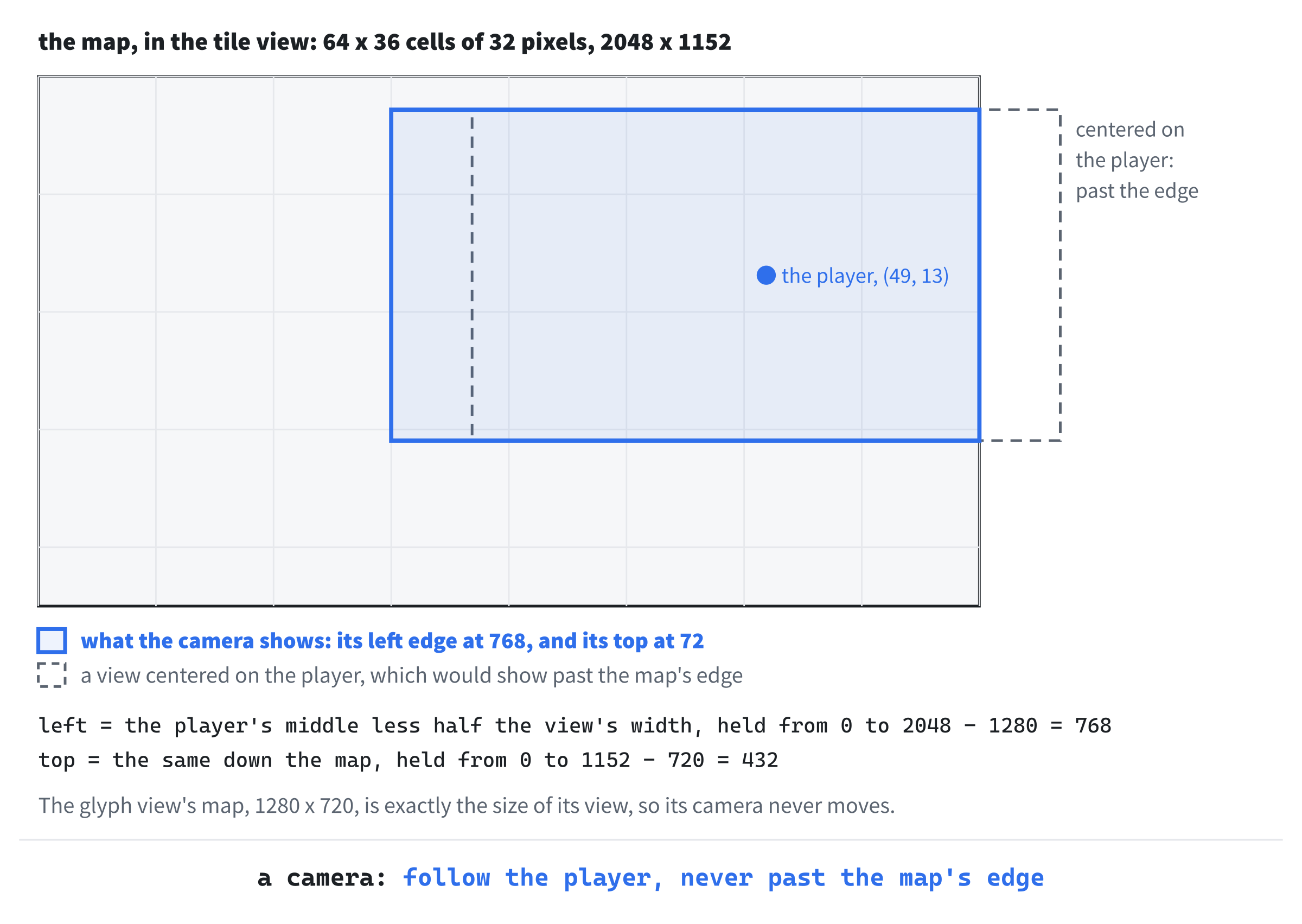
The glyph view's map is 1,280 by 720 pixels, exactly the size of its view, so the furthest its camera can move is 0. It never moves, which is why the glyph view looks just as it always has. Add the rest of Camera.cpp below follow:
SDL_FRect Camera::cellRect(Point cell) const
{
    float size = static_cast<float>(cellSize_);
    return { cell.x * size - left_, cell.y * size - top_, size, size };
}

bool Camera::shows(Point cell) const
{
    SDL_FRect rect = cellRect(cell);
    return rect.x + rect.w > 0.0f && rect.x < MAP_VIEW_W &&
           rect.y + rect.h > 0.0f && rect.y < MAP_VIEW_H;
}
A cell's place on the screen is its place on the map, less the view's left and top. And a cell is shown if any part of its rectangle is inside the map view, so a cell that's half in view is drawn, and cut off at the edge.
Every View Has a Camera
The two views' cells are different sizes, so each needs a camera of its own. Open View.h, and add the camera's header below #pragma once:
#include "Camera.h"Replace the comment above class View with this:
// The way the map is drawn. The game decides what's on each cell, and a
// View draws it there: GlyphView with characters, and TileView with
// pictures. Each has its own camera, since their cells differ in size
Add the view's constructor above virtual ~View() = default;, with a blank line in between:
explicit View(int cellSize)
    : camera_(cellSize)
{
}
Now View has a constructor, which makes the camera with the view's cell size, so each derived view must call it. Below the destructor, add the functions that hand out the camera:
Camera& camera()
{
    return camera_;
}

const Camera& camera() const
{
    return camera_;
}
There are two functions called camera. One is const, and gives a const camera, for code that only looks; the other gives a camera that can be moved. C++ picks the one that fits the view it's called on.
Then add the camera itself, at the end of the class, below drawMonster, with a blank line in between:
protected:
    Camera camera_;
A protected member is private to the world, but the classes derived from this one can reach it, so each view can ask its own camera where to draw. With its camera, View isn't a pure interface any more: it has a member, and a constructor to make it. It's an abstract class that gives every view one part they share. Many C++ programmers avoid protected members, since any derived class can change them. Here the views only read their camera, and the game moves it, through camera().
In GlyphView.cpp, change : renderer_(renderer), glyphs_(glyphs) to : View(CELL_PX), renderer_(renderer), glyphs_(glyphs), so that the glyph view's camera has 20-pixel cells. A base class is made first, so its constructor comes first in the list.
Then replace the whole of drawCell, in GlyphView.cpp, with this:
// One map cell, where the camera puts it: its background first, so
// nothing drawn there before can show through, then its character
void GlyphView::drawCell(Point cell, char c, SDL_Color color,
                         SDL_Color background) const
{
    if (!camera_.shows(cell))
    {
        return;
    }
    SDL_FRect rect = camera_.cellRect(cell);
    SDL_SetRenderDrawColor(renderer_, background.r, background.g,
                           background.b, background.a);
    SDL_RenderFillRect(renderer_, &rect);
    glyphs_.drawInCell(c, rect.x, rect.y, rect.w, color);
}
A cell the camera doesn't show isn't drawn, and the rest are drawn where the camera says. The tile view gets the same. In TileView.cpp, change : renderer_(renderer) to : View(TILE_PX), renderer_(renderer). Then replace the whole of drawTile, in TileView.cpp, with this:
// One tile on its cell, where the camera puts it. A name tiles.txt doesn't
// have is drawn as a square in the debugging color, so the mistake can't
// go unnoticed
void TileView::drawTile(Point cell, const std::string& name,
                        SDL_Color tint) const
{
    if (!camera_.shows(cell))
    {
        return;
    }
    SDL_FRect where = camera_.cellRect(cell);
    auto found = tiles_.find(name);
    if (found == tiles_.end())
    {
        SDL_SetRenderDrawColor(renderer_, Palette::DEBUG.r, Palette::DEBUG.g,
                               Palette::DEBUG.b, Palette::DEBUG.a);
        SDL_RenderFillRect(renderer_, &where);
        return;
    }
    SDL_SetTextureColorMod(atlas_, tint.r, tint.g, tint.b);
    SDL_RenderTexture(renderer_, atlas_, &found->second, &where);
}
The camera moves, so view_ must be able to move it. In Game.h, change const View* view_; to View* view_;. Then, in Game.cpp, the camera follows the player before each frame. In run, add these lines above draw();:
// The view's camera keeps the player in sight
view_->camera().follow(player_.pos);
Last, the map is drawn inside the map view, and nowhere else. In draw, add these lines below SDL_RenderClear(renderer_);:
// Cells half in the map view are cut off at its edges, so nothing in
// the map is ever drawn over the panels
SDL_Rect mapView = { 0, 0, MAP_VIEW_W, MAP_VIEW_H };
SDL_SetRenderClipRect(renderer_, &mapView);
Add this line above drawPanels();, with a blank line in between:
SDL_SetRenderClipRect(renderer_, nullptr);The call to SDL_SetRenderClipRect limits all drawing to a rectangle, until it's set to nullptr again. So a cell half in the map view is cut off at its edge. The panels are drawn after the map, and would cover anything that strayed onto them anyway, so you won't see a difference today. But the clip makes the map view's edge a rule, rather than something that depends on the order things are drawn in. And later chapters draw a good deal more over the map.
Checkpoint: Press F5, with seed 42, press F2, and take the same walk as before. The map scrolls as you go, and the player stays in view. The next image shows the end of the walk.
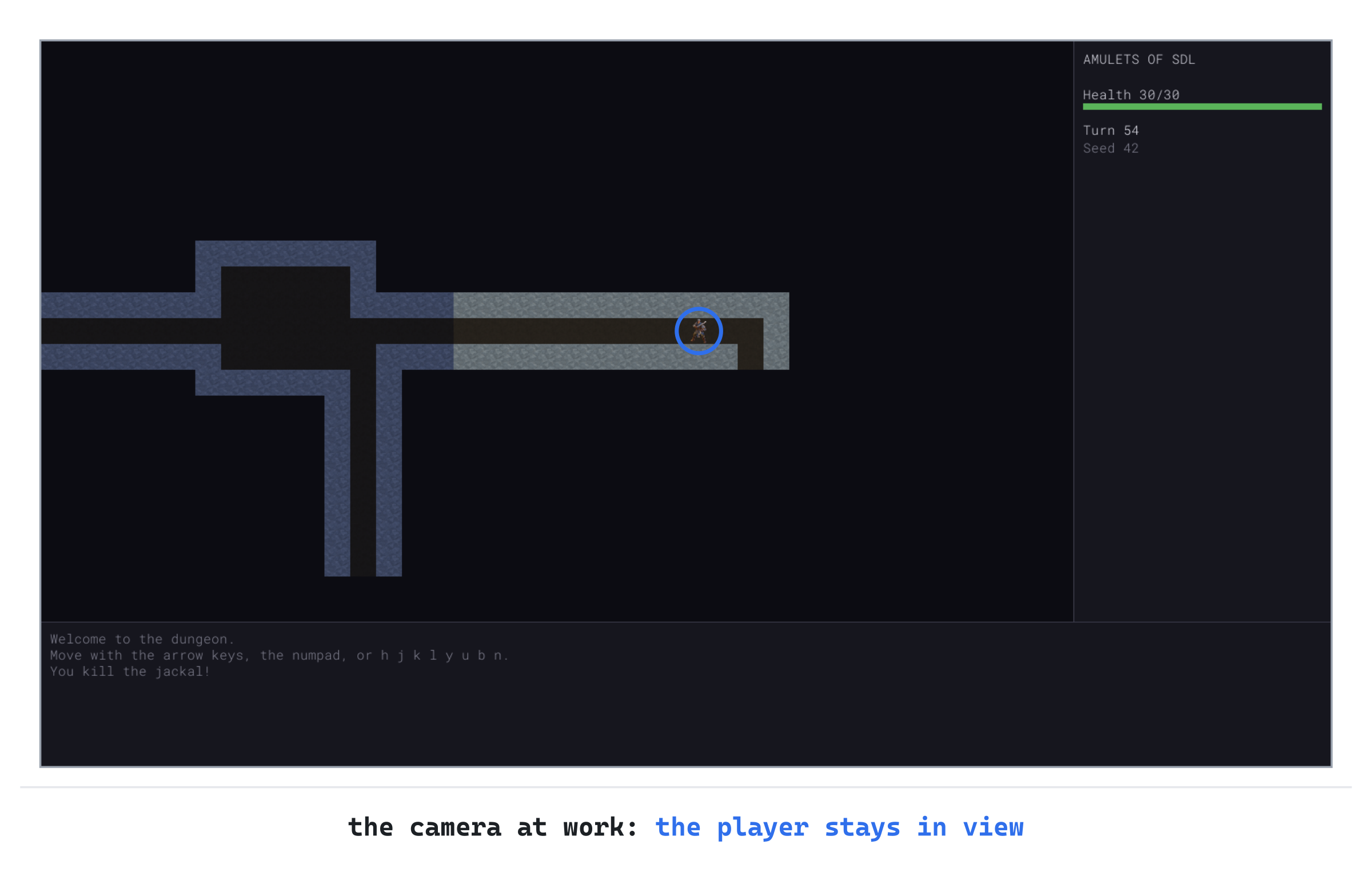
The player isn't quite in the middle, since the camera has stopped at the map's right edge. Walk back to the left, and the map scrolls with you. Press F2, and the glyph view shows the whole map, as it always has.
Playing the Game
There's nothing new to fight in this chapter, but there's a new way to see it all. Play a few runs in each view, and switch with F2 whenever you like. It takes no turn, and the next run, after R, starts in whichever view you left. Notice how much more of the map the glyph view shows at once, and how much easier the tile view makes it to tell a jackal from a kobold at a glance.
Try making the window smaller, and then larger, in the tile view. The pictures stay crisp at every size, with no seams between the floor tiles.
Understanding the Code
The game decides what's on each cell, and a View draws it. The class View is abstract, with pure virtual functions for a cell's terrain, the player, and a monster. The glyph view, GlyphView, draws them in characters, as the game always has. The tile view, TileView, draws them in pictures from an atlas, found by name in the index, tiles.txt. The game draws through view_, a pointer to the view in use, so the same calls draw in either view, and F2 points it at the other.
Each tile sits in its atlas slot with a 1-pixel border, a copy of its edge, so scaling never blends in the next tile's colors. And the pixel-art scale mode keeps the pictures crisp. A remembered tile is drawn with a tint, which darkens and cools it.
Each view has a Camera, which centers the map view on the player, as near as the map's edges allow. The camera also says where each cell is drawn. The glyph view's map fits its view, so its camera never moves. The tile view's doesn't, so its camera scrolls the map. And the map's drawing is clipped to the map view.
Experimenting
The views are easy to play with, since each is a small class of its own. Try each of these, and put each back afterward:
- A different memory. Change
MEMORY_TINTto{ 255, 150, 150, 255 }, and remembered tiles turn red, since the tint keeps their red and cuts the rest. - A typo. In the table in
Monster.h, change the jackal's tile to"jackall". In the tile view, the jackal is a pink square: the debugging color, for a nametiles.txtdoesn't have. - A wrong picture. Change the jackal's tile to
"kobold". The game's jackal is drawn as a kobold, and nothing else changes, since the picture is only a name. - A soft scale. In
TileView's constructor, changeSDL_SCALEMODE_PIXELARTtoSDL_SCALEMODE_LINEAR, and make the window bigger. The tiles blur, the way photographs are scaled. - A camera that doesn't stop. In
Camera::follow, setleft_andtop_withoutSDL_clamp, ascenterX - MAP_VIEW_W / 2.0fandcenterY - MAP_VIEW_H / 2.0f. The player is always in the middle now. Near the map's edges, the view shows the empty dark beyond them.
The last one shows why the camera clamps. A view that shows nothing at its edges wastes the screen, and the player can see less of the dungeon just where it ends.
Common Errors and Fixes
If the game didn't build, or doesn't behave as described, the problem is probably one of these.
C3668: 'GlyphView::drawPlayer': method with override specifier 'override' did not override any base class methods, followed by C2259: 'GlyphView': cannot instantiate abstract class. The function doesn't match View's exactly. Here, its const is missing, in GlyphView.h and GlyphView.cpp. So it's a different function, and View's is still unwritten.
C2259: 'GlyphView': cannot instantiate abstract class, on its own. One of View's three functions isn't overridden at all. A view must write every one of them.
LNK2001: unresolved external symbol "public: virtual void __cdecl View::drawPlayer(struct Point)const ", followed by LNK1120: 1 unresolved externals. In View.h, the function is missing its = 0, so C++ expects View to write it, and nobody has.
C2504: 'View': base class undefined, followed by many more. The view's header doesn't include View.h.
C2440: 'initializing': cannot convert from 'int' to 'const char *', in Monster.h. A row of the table has no tile's name, so its sight lands where the name should be.
C2662: 'void Camera::follow(Point)': cannot convert 'this' pointer from 'const Camera' to 'Camera &'. The pointer view_ is still const View*, in Game.h, so its camera can't be moved. It should be View* view_;.
F2 says "The tiles couldn't be loaded, so there's no tile view." The tile view couldn't read its files. Check that tiles.png and tiles.txt are in your project's assets folder, beside the font. The console window says which file it couldn't open.
FAQ
Q) Why not an if in each drawing function, rather than two classes?
A) Every drawing function would then need to know about every view, and a third view would mean changing all of them. With an interface, the game's drawing never changes when a view is added: a new view is a new class. Only the code that chooses a view, such as switchView, has to know it's there.
Q) Why does each view have its own camera, rather than the game having one?
A) A camera works in its view's pixels, and the two views' cells are different sizes. So the same player is in a different place on the screen in each. Keeping a camera in each view means that F2 never has to work anything out: each camera knows where its own view is.
Q) Why does the game keep both views, all the time, rather than making a new one on F2?
A) The tile view reads its files when it's made, and switching should be instant. Both views are small, and both live as long as the run does. So F2 is just a change of pointer.
The views do belong to the run, though, so every run makes its own, and the tile view reads its atlas again at the start of each. The atlas is small, about 60 KB by the end of the book, so that's quick, but a missing atlas is reported again every run. A game with big pictures would load them once, in main, as this one makes its glyph cache, and lend them to each run.
Q) How do the tiles stay sharp when the window is bigger than the picture?
A) The tiles are 32 pixels in the game's 1600 by 900 picture, which SDL scales to fit the window. In a bigger window, each of a tile's pixels becomes a bigger square, and the pixel-art scale mode keeps the squares sharp. Letters are different: Chapter 3 draws them again at the window's scale, since a font can be drawn at any size, and a picture can't.
AI Exercise (Optional)
A third view is a good test of the interface: if it's right, a new view needs no change to the game's rules at all. If you'd like to try one with an AI's help, open your AI chatbot of choice, and try a prompt like this:
"I'm writing a roguelike in C++ with SDL 3. The map is drawn through an abstract class, View, with three pure virtual functions: drawTerrain(Point cell, Terrain terrain, bool lit) const, drawPlayer(Point cell) const, and drawMonster(Point cell, const MonsterDef& def) const. A View has a protected Camera camera_, made by View's constructor from a cell size, and camera_.shows(cell) and camera_.cellRect(cell) say whether and where a cell is drawn. MonsterDef has a color, an SDL_Color. I'd like a third view, BlockView, that draws every cell as a plain colored square: dark gray for floor, lighter gray for walls, both darker when not lit, yellow for the player, and each monster in its own color. Show me BlockView.h and BlockView.cpp, with each curly brace on its own line, and explain them."
Notice what the preceding prompt does. It describes the interface exactly, and the camera's two functions, so the AI can write a class that fits the game as it is. The prompt doesn't ask for any change to the game's rules, since a view shouldn't need one.
When the answer comes back, check that BlockView overrides all three functions, with override, and calls View's constructor with a cell size. Then add it to Game beside the other two, and make F2 cycle through all three. That last part is yours to work out, and it touches only switchView, usesTiles, and main.
Summary
The game draws its map through an interface now: a glyph view, a tile view from an atlas whose borders stop the seams, F2 to switch, and a camera for each view, which keeps the player in sight. In Chapter 9, the mouse joins the keyboard. The game turns a pixel under the pointer into a cell, through the camera, and tells you what's there.