
So far, the keyboard does everything. That's how traditional roguelikes are played, and it will stay that way. But it leaves a newcomer with no way to ask about what's on the screen.
What is that j? How hurt is the goblin? Is that wall really there, or only remembered? This chapter lets the player point at a cell, and find out.
Move the mouse over the map, and the cell under it is outlined. A panel at the bottom of the side panel, the look panel, says what's there: the creature, how hurt it looks, and the ground, as far as the player knows. And for players who'd rather keep their hands on the keys, x does the same with a look cursor, moved with the moving keys. The next image shows the end of the chapter: the player has hit the jackal once, and is looking at it.

The mouse gives its place in the window's pixels, and the game thinks in cells. So the heart of the chapter is getting from one to the other, and the camera from Chapter 8 does the most important part of it.
Chapter 09 in the book's repository holds this chapter's finished project. The chapter carries on in your own project from Chapter 8, or from the book's Chapter 08 folder.In this chapter, we will:
- Turn a point on the screen into a cell on the map, through the camera
- Keep track of the mouse, with
std::optionalfor when it isn't over the map - Outline the cell under the mouse, in either view
- Describe that cell in a look panel, without telling the player more than they know
- Wrap the panel's text between words, so that nothing runs off its edge
- Add a
Lookstate, so that x looks around from the keyboard, taking no turns - Make a held key's repeats count only in the state it was pressed in
There are three checkpoints along the way. Let's start with the pixels.
Planning the Chapter
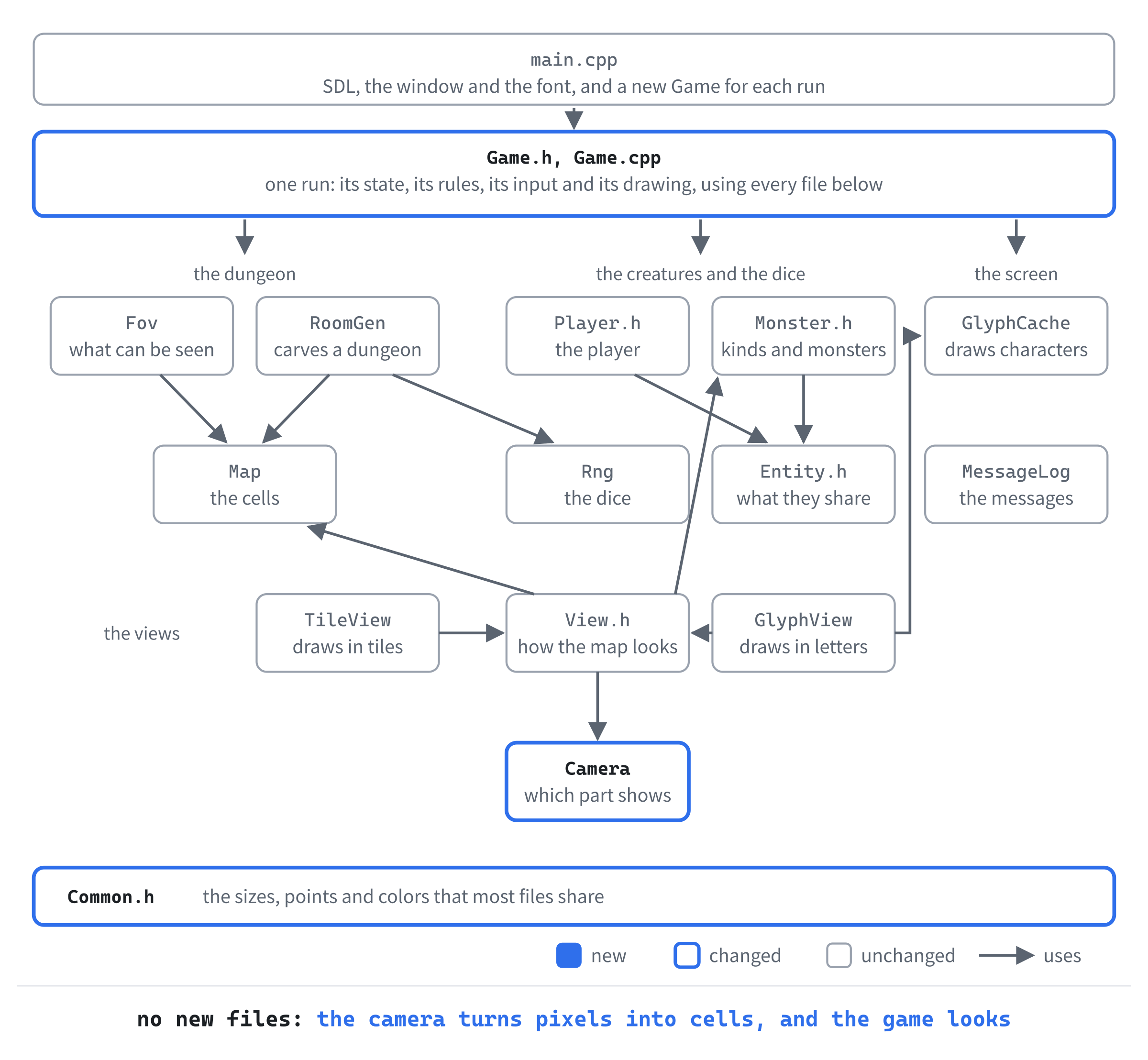
This chapter adds no files. It changes five:
| File | Status | What it's for |
|---|---|---|
src/Camera.h, src/Camera.cpp |
Changed | Find the cell at a point on the screen |
src/Common.h |
Changed | The outline's color |
src/Game.h, src/Game.cpp |
Changed | Track the mouse, outline its cell, describe the cell in the look panel, and look with the keyboard |
| The other files | Unchanged |
The next image shows how the files fit together at the end of the chapter. Nothing is new, and three are changed: the camera, Common.h, and the game.
The mouse's place arrives in the window's pixels, and finding the cell under it means undoing what the drawing did. Figure 9.3, at the start of the first part, shows how.
The mouse isn't always over the map, so the game needs a way to say "nowhere". C++ has a type for exactly that, std::optional. With the cell found, outlining it takes a few lines. Describing it takes a little more care, since the description must never tell the player more than they know.
We'll build it in three parts: the cell under the mouse, outlined; the look panel, which says what's there; and a look state, which does the same from the keyboard.
The Cell Under the Mouse
The first part finds the cell under the mouse, and outlines it. The next image follows one place of the mouse from the window to the map. It's in the tile view, at the end of Chapter 8's walk east, where the camera's left and top are 768 and 72.

The window in the figure is 1920 by 1200 pixels, a different shape from the game's picture. So the picture fills the window's width, at 1.2 times its own size, and Chapter 1's letterboxing adds a bar above and below.
Getting back to the cell takes three steps, from each row of the figure to the next. SDL drew the bars and the scaling, so one call of SDL's takes off the bar and divides by the scale. That gives the point in the game's picture. Then the camera adds its left and top, which gives the point on the map, in pixels. Last, dividing by the size of a cell, and rounding down, gives the cell.
From a Pixel to a Cell
The camera already goes one way. Its cellRect says where a cell is drawn on the screen: the cell's place on the map, in pixels, less the camera's left and top. Finding the cell at a point is the same sum, the other way around. Open Camera.h, and add a declaration below shows:
// The cell at a point on the screen: the other way from cellRect
Point cellAt(float x, float y) const;
The point is in the game's picture, where SDL's mouse positions will be once they're converted. And SDL gives them as floats. Open Camera.cpp, and add the header it needs below #include "Camera.h":
#include <cmath> // std::floor, to find the cell a pixel is inThen add cellAt below cellRect:
// The point's place on the map, in the map's pixels, divided by the size
// of a cell. std::floor rounds down, so the pixels from 0 to 31 are all in
// cell 0, at 32 pixels a cell
Point Camera::cellAt(float x, float y) const
{
    float size = static_cast<float>(cellSize_);
    return { static_cast<int>(std::floor((x + left_) / size)),
             static_cast<int>(std::floor((y + top_) / size)) };
}
The point's place on the map is its place in the map view, plus the camera's left and top. Divided by the size of a cell, that gives the cell, with a fraction left over: 49.6, say, for a point six tenths of the way across cell 49. Then std::floor, from <cmath>, rounds it down, to 49. And static_cast<int> turns the result into an int.
Why not just a cast? A cast to int drops the fraction, which rounds toward zero. That's the same as rounding down for a positive number, but not for a negative one: -0.4 would become 0, though a point just left of the map is in column -1. No point in the map view is left of the map today, since the camera stops at the map's edges. But std::floor makes cellAt right for every point, not just the ones it happens to be given now.
Where the Mouse Is
Now the game needs somewhere to keep the mouse's place. But the mouse isn't always over the map. It may be over the side panel, or the log, or outside the window altogether. Then there's no cell under it, and nothing to outline. So the game's record of the mouse must be able to say "nowhere".
One way would be a special value, such as a point at (-1, -1), that stands for nowhere. But a special value looks like any other, and nothing stops code from using it as a real place. Another way would be a pointer, with nullptr for nowhere, but a pointer needs something to point at.
The answer C++ gives is std::optional, from <optional>. A std::optional<SDL_FPoint> either holds an SDL_FPoint, SDL's point with float coordinates, or holds nothing at all. Its type says so, to everyone who reads it.
Open Game.h, and find the two standard includes at its top:
#include <string>   // std::string, for text on the screen
#include <vector>   // std::vector, for the monsters and the rooms
Replace them with these lines:
#include <optional>   // std::optional, for the mouse, which may not be there
#include <string>     // std::string, for text on the screen
#include <vector>     // std::vector, for the monsters and the rooms
The new header's name is longer than the others, so their comments move along, to stay in line. Add the declarations of two new functions below switchView's:
void trackMouse(SDL_Event event);
std::optional<Point> hoveredCell() const;
The function trackMouse will keep the mouse's place up to date. And hoveredCell will say which cell is under the mouse, if any, so it returns an optional too: a Point, or nothing. Add a third declaration below drawMonsters's:
void drawHighlight(Point cell) const;Then add the mouse's place below state_, with a blank line on each side:
// Where the mouse is, in the game's picture, while it's over the map
// view. Empty while it's anywhere else
std::optional<SDL_FPoint> mouse_;
An optional starts out empty, so a new run starts out knowing nothing about the mouse. That's right, since SDL hasn't said where it is yet. The next image shows the two states an optional can be in, and what the code can do with one.
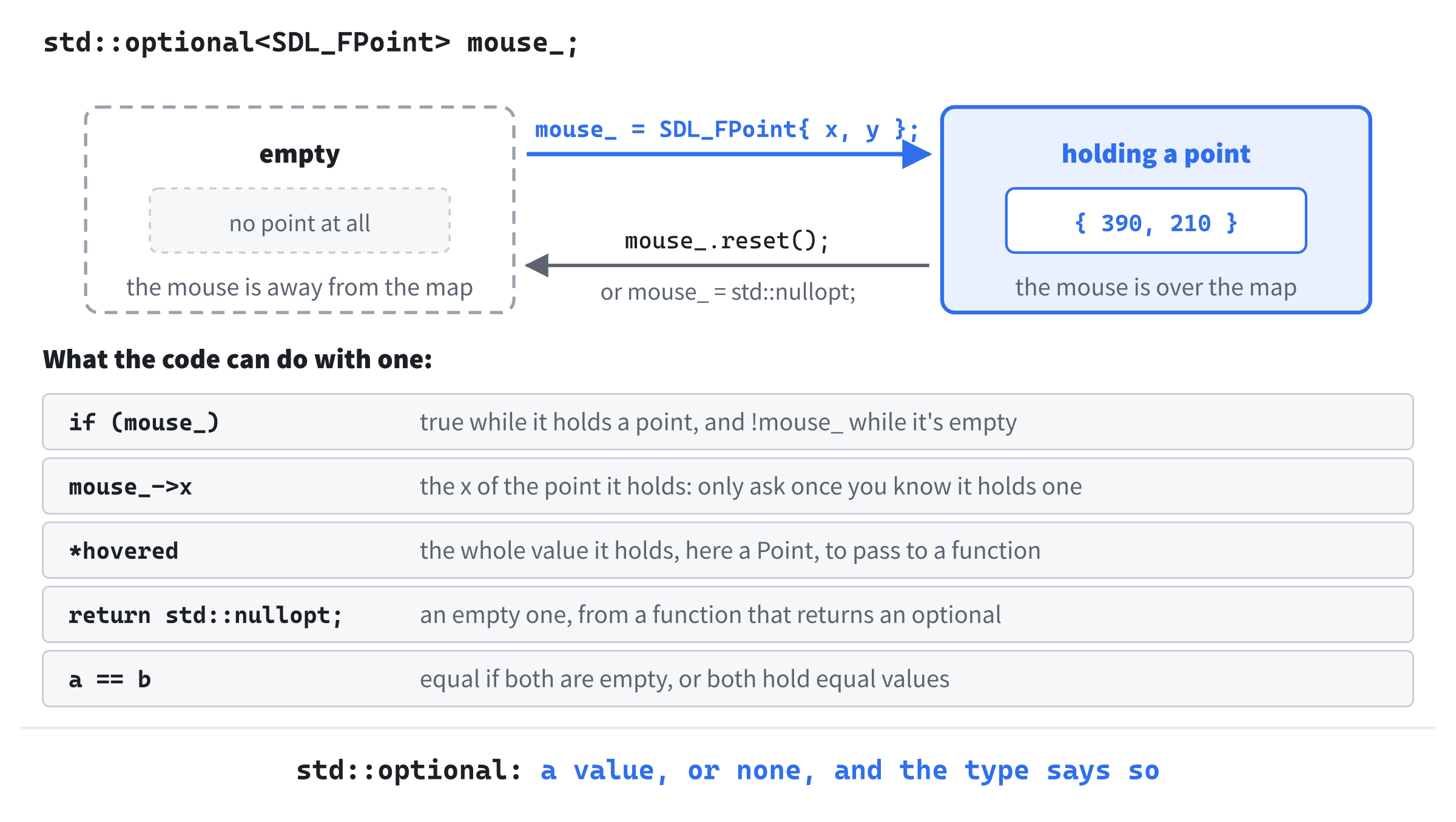
An optional is filled by giving it a value, and emptied with reset, or by giving it std::nullopt, the value that means "nothing". Used as a condition, as in if (mouse_), it's true while it holds a value. To reach the value, it borrows a pointer's operators: *mouse_ is the point itself, and mouse_->x is the point's x.
But it isn't a pointer. The value lives inside the optional, so there's nothing to allocate, and nothing to delete. And using * or -> on an empty one is a mistake that C++ won't stop you making, so the code always asks first.
Following the Mouse
Chapter 1's loop let the mouse's events fall through all of its checks. Now two of them get branches of their own. In Game.cpp, add these branches to handleEvent, below the one for keys:
else if (event.type == SDL_EVENT_MOUSE_MOTION)
{
    trackMouse(event);
}
else if (event.type == SDL_EVENT_WINDOW_MOUSE_LEAVE)
{
    mouse_.reset();
    redraw_ = true;
}
SDL sends SDL_EVENT_MOUSE_MOTION whenever the mouse moves over the window, and SDL_EVENT_WINDOW_MOUSE_LEAVE when it leaves. After that, there are no more motion events until it comes back. So without the second branch, the outline would stay wherever the mouse was last seen. Instead, the game forgets the mouse, and draws the frame again, without the outline. Now add trackMouse below handleEvent:
// Keeps track of where the mouse is. The event gives its place in the
// window's pixels, so SDL first converts it to the game's 1600 x 900
// picture, which is why the event is taken by value: a copy to change. The
// screen is drawn again only if the mouse is over a different cell
void Game::trackMouse(SDL_Event event)
{
    SDL_ConvertEventToRenderCoordinates(renderer_, &event);
    std::optional<Point> before = hoveredCell();

    float x = event.motion.x;
    float y = event.motion.y;
    if (x >= 0.0f && x < MAP_VIEW_W && y >= 0.0f && y < MAP_VIEW_H)
    {
        mouse_ = SDL_FPoint{ x, y };
    }
    else
    {
        mouse_.reset();
    }

    if (hoveredCell() != before)
    {
        redraw_ = true;
    }
}
In the preceding code, SDL_ConvertEventToRenderCoordinates is the first step of Figure 9.3. The event's position is in the window's pixels. The call converts it, in place, to the picture's, taking off the bar and dividing by the scale. It changes the event it's given, through a pointer, but handleEvent's event is const. That's why trackMouse takes its event by value: a copy of its own, which it's free to change.
An SDL_Event holds one event of any kind, and its type says which. Each kind keeps its details in a part of its own: a key's in event.key, as Chapter 1 showed, and a mouse movement's in event.motion. Its x and y are where the mouse is now. The mouse is kept only while it's over the map view, the top-left part of the picture, MAP_VIEW_W by MAP_VIEW_H pixels. Anywhere else, mouse_ is emptied.
Last, the frame is drawn again only if the cell under the mouse has changed. A mouse sends a motion event for every pixel or so that it moves, and most of them leave it over the same cell, where the outline stays put. So trackMouse finds the cell before and after, and asks for a new frame only if they differ.
Two optionals are equal if both are empty, or if both hold equal values, which Chapter 5's == for Point decides. So the cells differ when the mouse moves onto the map, off it, or from one cell to the next. Add hoveredCell below trackMouse:
// The map cell under the mouse, worked out through the view's camera. It's
// empty when the mouse is away from the map
std::optional<Point> Game::hoveredCell() const
{
    if (!mouse_)
    {
        return std::nullopt;
    }
    Point cell = view_->camera().cellAt(mouse_->x, mouse_->y);
    if (!map_.inBounds(cell.x, cell.y))
    {
        return std::nullopt;
    }
    return cell;
}
The function is the rest of Figure 9.3. With no mouse, there's no cell, and std::nullopt makes an empty optional to return. Otherwise, the view's camera turns the mouse's place into a cell. The function returns cell, a Point, and C++ wraps it in an optional on the way out. So there's nothing more to write.
The check with inBounds is a guard. The camera stops at the map's edges, so today, every pixel of the map view is over the map. But a cell off the map has nothing on it to describe. So if a later change ever lets the camera show past the edge, the mouse over the dark there means no cell, rather than a cell that doesn't exist.
The Outline
The outline needs a color. Open Common.h, and add one to Palette, below SHADE:
// The outline around the cell under the mouse
constexpr SDL_Color HIGHLIGHT = { 255, 230, 140, 255 };
It's a pale yellow, which shows up well on the dark floor of either view. Back in Game.cpp, add drawHighlight below drawMap:
// An outline around a cell, in whichever view is in use: its camera knows
// where the cell is, and how big
void Game::drawHighlight(Point cell) const
{
    SDL_FRect rect = view_->camera().cellRect(cell);
    setColor(Palette::HIGHLIGHT);
    SDL_RenderRect(renderer_, &rect);
}
The camera of the view in use says where the cell is drawn, and how big it is, so the outline fits a 20-pixel glyph and a 32-pixel tile alike. The call to SDL_RenderRect draws a rectangle's outline, one pixel wide, where SDL_RenderFillRect would fill it in.
Last, the frame draws it. In draw, add these lines below view_->drawPlayer(player_.pos);:
std::optional<Point> hovered = hoveredCell();
if (hovered)
{
    drawHighlight(*hovered);
}
The outline goes on top of everything in the map, the player and the monsters included. It's still inside the map view's clip, so a cell that's half in view is outlined only as far as the view's edge. The * hands drawHighlight the cell inside the optional, once if (hovered) has made sure there's one.
Checkpoint: Press F5, and move the mouse over the map. A pale yellow outline follows it, a cell at a time. Move it onto the side panel, or out of the window, and the outline disappears. Press F2, and the outline is the size of a tile. Then make the window a different size and shape, or press Alt+Enter, and move the mouse over the map again: the outline is under it, wherever the bars are.
The Look Panel
An outline says where. The look panel says what: the creature on the cell, if there's one the player can see, how hurt it looks, and the ground. It goes at the bottom of the side panel, below everything that's there now.
How Hurt It Looks
A player wants to know whether the goblin they're fighting is nearly dead. The panel will say so twice: in words, which are quick to read, and with the monster's health bar, which is exact. The words need two small helpers. In Game.cpp, add the first to the unnamed namespace, below withArticle:
// The same text, with its first letter a capital, to start a sentence
std::string capitalized(std::string text)
{
    if (!text.empty())
    {
        text[0] = static_cast<char>(SDL_toupper(text[0]));
    }
    return text;
}
The panel's sentences start with a creature's name, and withArticle gives the name with its article: "a jackal". A sentence starts with a capital, so capitalized makes the first letter one: "A jackal". It takes its text by value, a copy of its own to change, and returns it. The function SDL_toupper makes a lowercase letter a capital, and leaves anything else alone. Add the second helper below capitalized:
// How hurt a creature looks, in words, from its share of health left
std::string woundsOf(const Entity& entity)
{
    if (entity.hp >= entity.maxHp)
    {
        return "unhurt";
    }
    if (entity.hp * 3 >= entity.maxHp * 2)
    {
        return "lightly wounded";
    }
    if (entity.hp * 3 >= entity.maxHp)
    {
        return "wounded";
    }
    return "badly wounded";
}
The words come in thirds. A creature with all its health is unhurt, one with two thirds or more is lightly wounded, one with a third or more is wounded, and below that, it's badly wounded. The checks go from the healthiest down, and the first that's true returns. So each needs only its lower limit.
The test for two thirds, entity.hp * 3 >= entity.maxHp * 2, is the same as asking whether hp / maxHp is at least 2/3, with both sides multiplied by 3 * maxHp. That's not just tidier. In C++, dividing one int by another throws the fraction away. So 2 / 3 is 0, and hp / maxHp is 0 for any creature that's hurt at all. Multiplying instead keeps every comparison in whole numbers, where it's exact.
The function takes an Entity, Chapter 6's base for the player and the monsters. So it could describe either, though the panel uses it only for monsters. The next image shows what it says about a jackal, at each health a jackal can have, beside the health bar the panel draws with it.
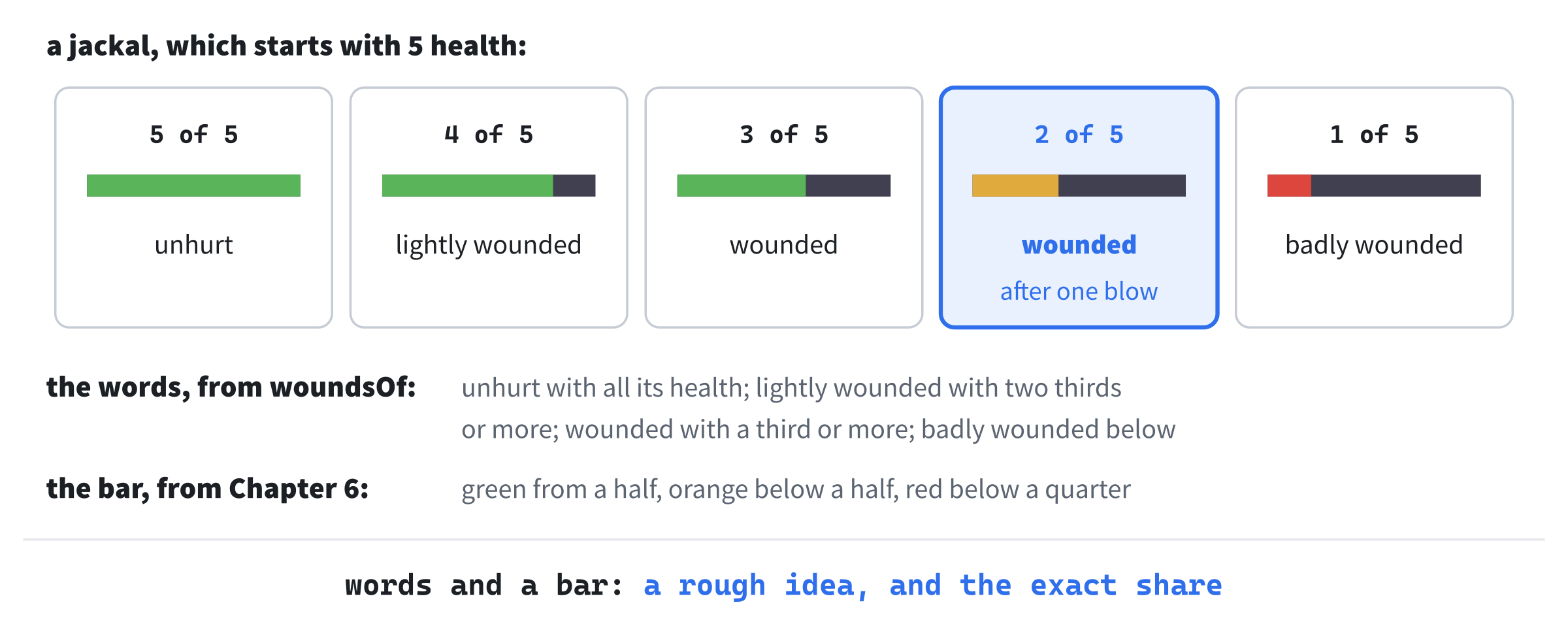
The words and the bar's colors don't change at the same places, since the bar's colors, from Chapter 6, change at a half and a quarter. They don't need to agree. The words give a rough idea at a glance, and the bar shows the exact share, for a player who wants it.
Only What the Player Knows
The panel must describe a cell as the player knows it, not as it is. A monster out of sight must not be named, or the panel would be a way to find monsters through walls. In Game.h, add three declarations below drawSidePanel's:
void drawLookPanel() const;
float drawWrapped(const std::string& text, float y, SDL_Color color) const;
const Monster* visibleMonsterAt(Point cell) const;
The first two draw the panel, and the next sections explain them. The third finds a monster the player can see. In Game.cpp, add it below drawSidePanel:
// The monster on a cell, if the player can see it there (or the map is
// revealed). The look panel must never tell the player more than they know
const Monster* Game::visibleMonsterAt(Point cell) const
{
    if (!map_.isVisible(cell.x, cell.y) && !revealMap_)
    {
        return nullptr;
    }
    for (const Monster& monster : monsters_)
    {
        if (monster.pos == cell)
        {
            return &monster;
        }
    }
    return nullptr;
}
It's Chapter 5's monsterAt, with a check first. On a cell out of sight, there's no monster, as far as the player knows, unless F1 has revealed the map. It returns a pointer to a const Monster, since describing a monster mustn't change it, and nullptr if there's none. A pointer is the right tool here, rather than an optional. The monster already exists, in monsters_, and the function points at it rather than copying it.
Text That Wraps
The panel is narrow. It's as wide as the side panel, 320 pixels. Inside its margins, there's room for 29 characters, each 10 pixels wide. Most of what it says fits, but not all of it: "A giant white rat, lightly wounded." is 35 characters. On one line, it would run off the edge of the picture, and lose its end.
So text that's too long for a line carries on onto the next, broken between words, as a word processor does it. That's called wrapping. The next image shows the difference.
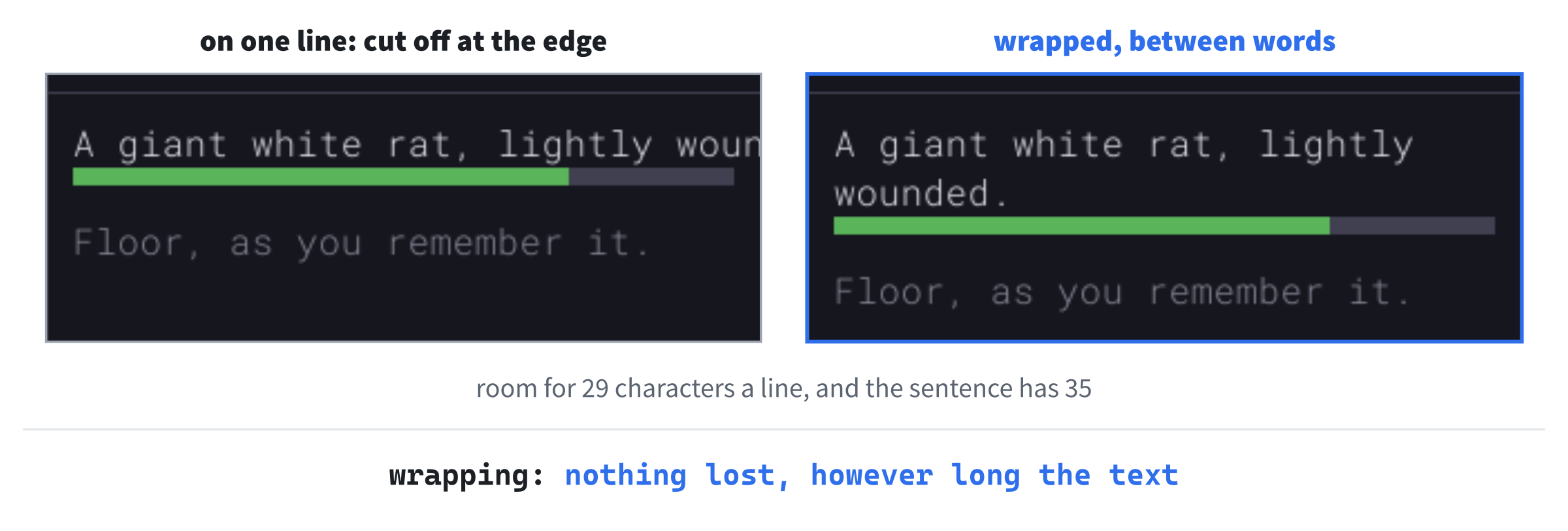
Wrapping means that a sentence can take more than one line, so the panel's size is counted in lines. Near the top of Game.cpp, add it to the unnamed namespace, below HEALTH_BAR_H:
// The look panel, at the bottom of the side panel, has room for this
// many lines of text
constexpr int LOOK_PANEL_LINES = 4;
Four lines is room for the most the panel says so far: a creature's name and wounds, its health bar, and the ground. The name and wounds can take two lines. Counting lines, rather than pixels, keeps the panel the right size for the font, whatever size that is. Wrapping needs one more header. Add it below #include <random>:
#include <sstream> // std::istringstream, to break text into wordsThen add the function that does the wrapping to the unnamed namespace, below woundsOf:
// Text broken between words into lines of at most width characters
std::vector<std::string> wrapped(const std::string& text, int width)
{
    std::vector<std::string> lines;
    std::istringstream words(text);
    std::string word;
    std::string line;
    while (words >> word)
    {
        // The line so far, with this word on the end
        std::string longer = line.empty() ? word : line + " " + word;
        if (!line.empty() && static_cast<int>(longer.size()) > width)
        {
            // Too long: the line is done, and the word starts the next
            lines.push_back(line);
            longer = word;
        }
        line = longer;
    }
    if (!line.empty())
    {
        lines.push_back(line);
    }
    return lines;
}
In the preceding code, a std::istringstream, as in Chapter 8's tile view, reads from a string as if it were a file. And >> takes the next word, up to the next space, until there are no more. Each word goes on the end of the line so far, after a space, unless it starts the line. If that makes the line longer than width, the line is done: it goes into lines, and the word starts the next one.
A string's size is unsigned, a number that can't be negative, while width is an int. Compared as they are, C++ would quietly make width unsigned too, which goes wrong for a negative number. So the cast turns the size into an int instead.
With "A giant white rat, lightly wounded." and a width of 29, the first five words make "A giant white rat, lightly", 26 characters. Adding "wounded." would make 35, so the first line ends there, and "wounded." starts the second. A word that's longer than a whole line can't be broken between words, so it gets a line to itself, and runs past the edge. But none of the game's words comes near that.
Now the function that draws wrapped text in the panel. Add drawWrapped below visibleMonsterAt:
// Text in the look panel, broken between words onto as many lines as it
// takes to fit inside the panel's margins. Returns the y of the next line
float Game::drawWrapped(const std::string& text, float y,
                        SDL_Color color) const
{
    float x = PANEL_X + MARGIN;
    int width = static_cast<int>((PANEL_W - 2 * MARGIN) /
                                 glyphs_.charWidth());
    for (const std::string& line : wrapped(text, width))
    {
        glyphs_.drawText(line, x, y, color);
        y += glyphs_.lineHeight();
    }
    return y;
}
The width in characters is the panel's width inside its margins, divided by the width of one character. Every character is the same width, since Chapter 1 chose a monospaced font. So that's exact. Each line is drawn a row below the one before. And the function returns the y of the next line, so that whatever comes next goes straight below the text, however many lines it took.
Drawing the Panel
Now drawLookPanel, in three parts. Add the first below drawWrapped:
// The look panel, at the bottom of the side panel: what's on the cell
// under the mouse, as far as the player knows. A creature comes first,
// with its health, then the ground
void Game::drawLookPanel() const
{
    std::optional<Point> cell = hoveredCell();
    if (!cell)
    {
        return;
    }

    float x = PANEL_X + MARGIN;
    float row = glyphs_.lineHeight();
    float top = MAP_VIEW_H - (LOOK_PANEL_LINES * row + 2 * MARGIN);
    setColor(Palette::FRAME);
    SDL_RenderLine(renderer_, static_cast<float>(PANEL_X), top,
                   static_cast<float>(SCREEN_W), top);

    float y = top + MARGIN;
    bool known = map_.isExplored(cell->x, cell->y) || revealMap_;
    if (!known)
    {
        drawWrapped("Unexplored.", y, Palette::DIM_TEXT);
        return;
    }
In the preceding code, the panel has nothing to say while the mouse is away from the map, so it draws nothing. Otherwise, its top is as far above the bottom of the side panel as its lines and its two margins need. A line across the side panel marks it, in the frame's color, as the panels' edges are drawn. Then the text starts a margin below the line. The arrow reaches into an optional, as with mouse_, so cell->x is the x of the cell inside cell.
A cell the player has never seen is "Unexplored.", and that's all. It may be floor, or a wall, or have a monster on it. But the player doesn't know, so neither does the panel. Next comes the creature. Add the second part below the first, with a blank line in between:
const Monster* monster = visibleMonsterAt(*cell);
if (*cell == player_.pos)
{
    y = drawWrapped("You.", y, Palette::TEXT);
}
else if (monster != nullptr)
{
    std::string name = withArticle(monster->def->name);
    y = drawWrapped(capitalized(name) + ", " + woundsOf(*monster) + ".",
                    y, Palette::TEXT);
    drawHealthBar(x, y, PANEL_W - 2 * MARGIN, *monster);
    y += row;
}
The player's own cell is "You.", and a monster in sight gets a sentence, such as "A jackal, wounded.", built from the two helpers. Each call to drawWrapped returns the y below its text, so the health bar goes straight below the sentence, whether it took one line or two. The bar is drawn by Chapter 6's drawHealthBar, as wide as the panel's text. Last, the ground. Add the third part below the second, with a blank line in between:
    // The ground: what it is, and whether it's in sight or remembered
    bool floor = map_.at(cell->x, cell->y) == Terrain::Floor;
    std::string ground = floor ? "Floor" : "A wall";
    if (!map_.isVisible(cell->x, cell->y))
    {
        ground += ", as you remember it";
    }
    drawWrapped(ground + ".", y, Palette::DIM_TEXT);
}
The ground is floor or a wall, and if the player can't see it right now, the panel says it's "as you remember it". A remembered cell may have changed since, and later chapters, with doors that open and close, will make that matter. One line draws the panel. In draw, add it below drawSidePanel();:
drawLookPanel();Checkpoint: Press F5, with seed 42 in Command Arguments, and take Chapter 5's walk to the jackal: eight steps down, eleven to the right, and two up. It comes to meet you, as before. Don't attack it yet. Move the mouse over it, and the look panel describes it. The next image shows the moment.
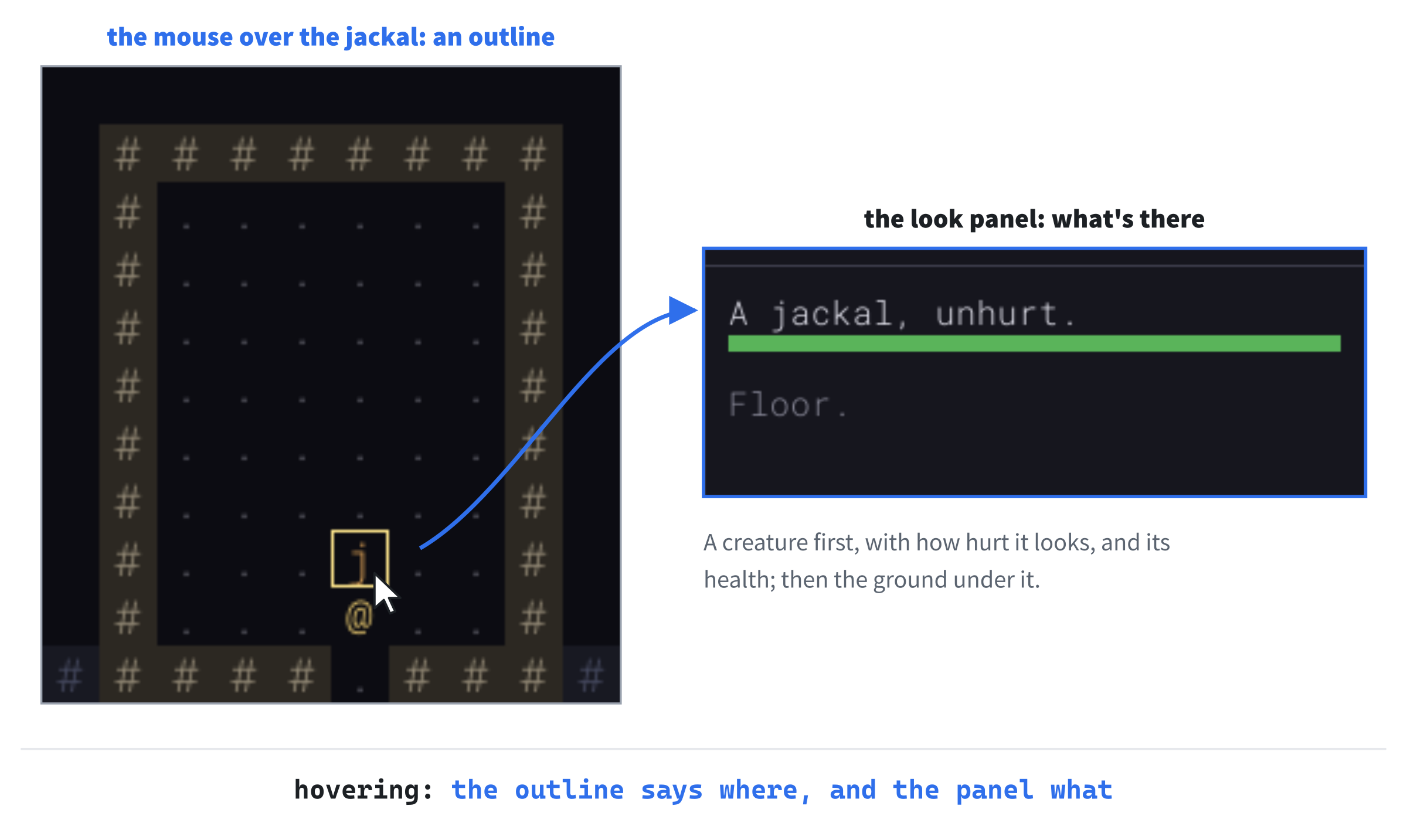
Now start Chapter 6's fight: step to the left, with h, so that the jackal bites, and then hit it once, with u. With the mouse still on it, the panel says it's wounded, with an orange bar. Point at the floor, and then at a wall you passed on the way, which is out of sight now: "A wall, as you remember it." Point at the dark beyond the walls, and it's "Unexplored." Then press F1, and with the map revealed, the panel describes everything, as a debugging aid should.
Design note: looking, but not being told. Since Rogue, roguelikes have let you ask what's on the screen, without spending a turn. Rogue's
/told you what a character meant. NetHack's;puts a cursor on the map and describes what's under it, and Dungeon Crawl Stone Soup'sxdoes the same. The rule they share is the one this panel follows: the answer is only what your character knows. A monster out of sight isn't named, and a remembered wall is only a memory. If a look command told more, it would be a cheat that every player used, and the fog of war from Chapter 4 would mean nothing.
The panel answers the mouse, so far. The last step gives the keyboard the same powers.
Looking with the Keyboard
Many roguelike players never touch the mouse. Every command is a key, and their hands stay on the keys. So a game that needed the mouse to look around would make them reach for it. In this game, the mouse is a convenience, never a need: anything it does, a key can do too.
So x starts looking from the keyboard. A cursor appears on the player, the moving keys move it instead of the player, and the look panel describes whatever it's on. Looking takes no turns, and x or Esc stops.
A Look State
While looking, the moving keys do something else, which is exactly what Chapter 7's states are for. As Chapter 7 said, a new state takes a value in GameState, a case in handleKey's switch, a function for its keys, and whatever it draws. Open Game.h, and add the value below Playing:
Look,Then add the declaration of its function for keys, below handlePlayingKey's:
void handleLookKey(const SDL_KeyboardEvent& key);And add one for a function that says which cell the look panel describes, below hoveredCell's:
std::optional<Point> lookTarget() const;The cursor needs a place to be. Add it below mouse_, with a blank line in between:
// The cell the look cursor is on, in the Look state
Point lookCursor_;
The cursor is a plain Point, not an optional, since it's always somewhere while the look state is using it. The next image shows the three states, and the keys that move between them.
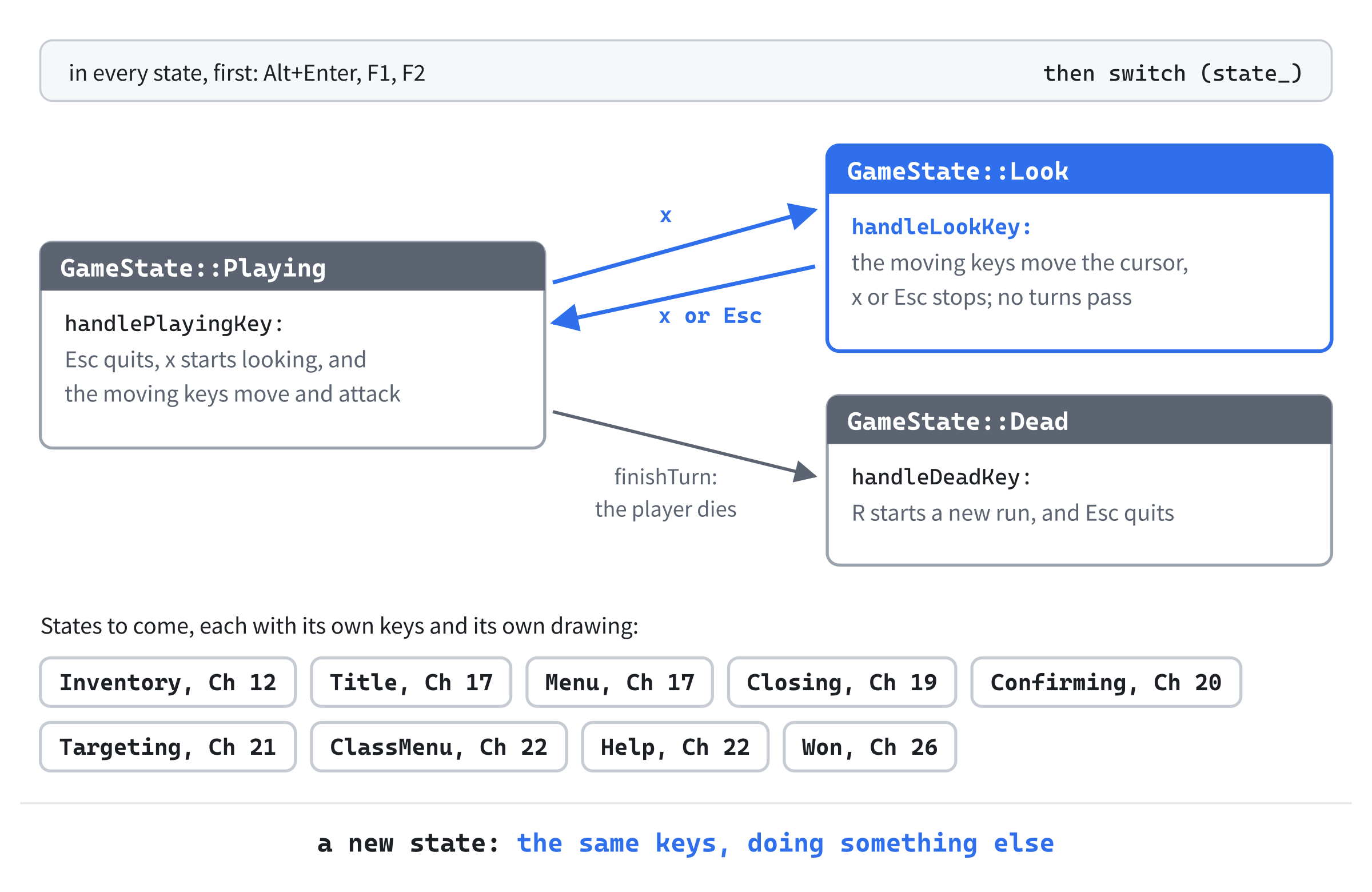
Notice that Esc has moved. Until now, it quit the game in any state, so handleKey checked for it before the switch. But while looking, Esc should stop looking, not end the run. So now each state decides what Esc does, just as each decides what the moving keys do.
Esc Depends on the State
In Game.cpp, find the check for Esc at the top of handleKey, and delete it:
if (key.key == SDLK_ESCAPE)
{
    running_ = false;
    return;
}
Then add the new state's case to the switch at the end of handleKey, between the other two:
case GameState::Look:
    handleLookKey(key);
    break;
Now replace the whole of handlePlayingKey with this:
// Esc quits, x starts looking around, and the moving keys move the player
void Game::handlePlayingKey(const SDL_KeyboardEvent& key)
{
    if (key.key == SDLK_ESCAPE)
    {
        running_ = false;
        return;
    }
    if (key.key == SDLK_X)
    {
        state_ = GameState::Look;
        lookCursor_ = player_.pos;
        redraw_ = true;
        return;
    }

    Point step;
    if (stepFor(key, step))
    {
        playerStep(step);
        redraw_ = true;
    }
}
In the preceding code, Esc quits while playing, as it always has. And x starts looking: the state becomes Look, and the cursor starts on the player, the natural place to look from. Neither key takes a turn, and both return, so neither falls through to the moving keys.
The death screen needs Esc back too. Replace the whole of handleDeadKey with this:
// The death screen is up. R ends this run, and asks for another, and Esc
// quits. The other keys do nothing
void Game::handleDeadKey(const SDL_KeyboardEvent& key)
{
    if (key.key == SDLK_R)
    {
        playAgain_ = true;
        running_ = false;
    }
    else if (key.key == SDLK_ESCAPE)
    {
        running_ = false;
    }
}
Esc quits from the death screen, as it did when handleKey checked it for every state, and R still starts another run.
Moving the Cursor
Now the look state's own keys. Add handleLookKey below handlePlayingKey:
// Looking around: the moving keys move the look cursor instead of the
// player, and it stays on the map. x or Esc stops looking. Looking takes no
// turns
void Game::handleLookKey(const SDL_KeyboardEvent& key)
{
    if (key.key == SDLK_X || key.key == SDLK_ESCAPE)
    {
        state_ = GameState::Playing;
        redraw_ = true;
        return;
    }

    Point step;
    if (stepFor(key, step))
    {
        Point to = { lookCursor_.x + step.x, lookCursor_.y + step.y };
        if (map_.inBounds(to.x, to.y))
        {
            lookCursor_ = to;
            redraw_ = true;
        }
    }
}
In the preceding code, x or Esc goes back to playing. Otherwise, the moving keys move the cursor, with the same stepFor that moves the player. So every key that walks also looks: the arrow keys, the numpad, and h j k l y u b n.
The cursor stays on the map, which inBounds checks. But walls don't stop it, since looking at a wall is as useful as looking at anything else. Nothing here calls finishTurn, so no turns pass, and the monsters wait.
Then lookTarget, which says which cell the panel and the outline are about. Add it below hoveredCell:
// The cell the look panel describes: the look cursor's while looking, and
// otherwise the one under the mouse, if any
std::optional<Point> Game::lookTarget() const
{
    if (state_ == GameState::Look)
    {
        return lookCursor_;
    }
    return hoveredCell();
}
While looking, it's the cursor's cell, and otherwise, the mouse's, if there is one. Returning lookCursor_, a Point, from a function that returns an optional wraps it, as hoveredCell did with its cell. Both drawings switch to it. In draw, find the lines that outline the cell under the mouse:
std::optional<Point> hovered = hoveredCell();
if (hovered)
{
    drawHighlight(*hovered);
}
Replace them with these lines:
std::optional<Point> target = lookTarget();
if (target)
{
    drawHighlight(*target);
}
Then, in drawLookPanel, change std::optional<Point> cell = hoveredCell(); to std::optional<Point> cell = lookTarget();. While looking, the panel also says how to stop. Add these lines above bool known, with a blank line in between:
if (state_ == GameState::Look)
{
    y = drawWrapped("Looking: x or Esc to stop", y, Palette::HIGHLIGHT);
}
The reminder is in the outline's color, so the two go together. It takes a line of its own, so the panel needs room for one more. Near the top of Game.cpp, change constexpr int LOOK_PANEL_LINES = 4; to constexpr int LOOK_PANEL_LINES = 5;.
Last, the camera. In run, find the lines that move it:
// The view's camera keeps the player in sight
view_->camera().follow(player_.pos);
Replace them with these lines:
// The view's camera keeps the look cursor in sight while
// looking, and the player the rest of the time
Point focus = player_.pos;
if (state_ == GameState::Look)
{
    focus = lookCursor_;
}
view_->camera().follow(focus);
In the tile view, the cursor can go further than the map view shows. So while looking, the camera follows the cursor, rather than the player. When looking stops, the state is Playing again, and the next frame's camera goes back to the player.
A Key Held Down
Chapter 3 showed that a key held down repeats. After a short pause, the system sends it again and again, and each repeat comes in as a key press of its own. Walking uses that.
But x and Esc now change the state, and their repeats come in the new state, where the same key does something else. Hold Esc a moment too long to stop looking, and its first press goes back to playing, where its repeats quit the game. Hold x, and looking starts and stops many times a second.
So a key's repeats should count only in the state it was pressed in. Open Game.h, and add the state the last key went down in, below state_:
GameState keyState_ = GameState::Playing; // where the last key went downIn Game.cpp, add these lines to handleKey, just above the comment on its switch, with a blank line in between:
// A key held down repeats, and its repeats count only in the state it
// was pressed in. A key that changes the state has done its job, and
// its repeats would go on to do something else in the new one
if (!key.repeat)
{
    keyState_ = state_;
}
else if (state_ != keyState_)
{
    return;
}
A key press that isn't a repeat notes the state it came in. A repeat is ignored if the state has changed since. So a held Esc stops looking, and that's all it does. Walking doesn't change the state, so a moving key held down still walks, or moves the look cursor. Alt+Enter, F1 and F2 come before these lines, and ignore their repeats already.
Checkpoint: Press F5, with seed 42, take the walk to the jackal, step to the left, and hit it once, with u, as before. Then press x. The outline appears on you, and the panel says "Looking: x or Esc to stop", and "You." Press u, and the cursor moves up and to the right, onto the jackal: "A jackal, wounded.", with its bar, as Figure 9.1 shows in the tile view. The turn count hasn't moved. Walk the cursor around the room, over the walls and beyond, and then hold Esc down for a second. You're playing again, and the game is still running, since Esc's repeats were ignored. The jackal is still waiting for its turn. Last, press F2, and look around again, in the tile view: the map scrolls to follow the cursor.
Playing the Game
There's nothing new to fight in this chapter, but there's a new way to see what you're fighting. Hover over each monster you meet, and watch its words change as you fight it: unhurt, lightly wounded, wounded, badly wounded. A goblin has almost twice a jackal's health, so it takes longer to go through them.
Try a whole run without the mouse, pressing x whenever you aren't sure what something is. Then try one with the mouse. Most players end up using both: the mouse to glance at things between moves, and x to look carefully in a fight, without taking a hand off the keys.
Notice what the panel won't tell you. Step out of a monster's sight, and point at where it was: the panel says only what the ground is, since you can't see the monster any more. The game knows where the monster is, but you don't, and the panel stays on your side of that line.
Understanding the Code
The mouse's movements arrive as SDL_EVENT_MOUSE_MOTION events, in the window's pixels. The function trackMouse converts each one to the game's picture with SDL_ConvertEventToRenderCoordinates, which undoes the window's scale and its letterbox bars. It keeps the result in mouse_, a std::optional<SDL_FPoint>, while it's over the map view. Anywhere else, and when the mouse leaves the window, mouse_ is empty. The frame is drawn again only when the cell under the mouse changes.
The camera's new cellAt is cellRect the other way around. A point in the map view, plus the camera's left and top, divided by the size of a cell and rounded down with std::floor, gives the cell. The function hoveredCell uses it, and returns an empty optional when there's no mouse, or no map under it. The frame outlines the cell with drawHighlight, in whichever view is in use.
The look panel, at the bottom of the side panel, describes one cell as the player knows it. A cell they've never seen is "Unexplored." Otherwise, the panel names the player, or a monster in sight, with its wounds in words from woundsOf and its health bar. Then it names the ground, remembered if it's out of sight. The function visibleMonsterAt makes sure a monster out of sight is never named.
Text too long for a line is broken between words by wrapped, and drawWrapped draws it over as many lines as it needs. The panel has room for LOOK_PANEL_LINES lines: four, and five once looking adds its reminder.
The Look state lets the keyboard do the same. Esc moved out of handleKey, since what it does now depends on the state: it quits while playing and on the death screen, and stops looking in the look state. The x key starts looking, and handleLookKey moves lookCursor_ with the moving keys, without taking a turn. The function lookTarget gives the cursor's cell while looking, and the mouse's otherwise. The outline, the panel and the camera all use it.
A key held down repeats only in the state it was pressed in, which keyState_ remembers. So a key that changes the state doesn't go on to act in the next one.
Experimenting
Everything the mouse does goes through a few small functions, which makes it easy to experiment with. Try each of these, and put each back afterward:
- No conversion. In
trackMouse, delete the call toSDL_ConvertEventToRenderCoordinates, and make the window bigger. The outline drifts away from the mouse, further the further right and down it goes, since the window's pixels are being used as the picture's. - A filled outline. In
drawHighlight, changeSDL_RenderRecttoSDL_RenderFillRect. The cell is filled in pale yellow, which hides whatever is on it, and shows why an outline is the usual choice. - Narrow lines. In
drawWrapped, setwidthto12, just after it's worked out. Most of the panel's sentences take two or three lines now. Press x, and move the cursor onto a monster: the reminder takes three lines, the monster's sentence two, and with its bar and the ground, that's seven. So the last two run down over the log. That's whyLOOK_PANEL_LINESmust cover the most the panel can say. - Almost dead. In
woundsOf, abovereturn "badly wounded";, add a check that returns"almost dead"whenentity.hp * 5 < entity.maxHp, with less than a fifth of its health. A jackal never shows it, since one health of its five is exactly a fifth. But a goblin with one of its nine does. - A panel that cheats. In
visibleMonsterAt, delete the check withisVisible. Explore a little, and press F1 to find a monster somewhere you've been, but can't see now. Press F1 again to hide the map, and point at the monster's cell: the panel names a monster you can't see. - Looking that costs. In
handleLookKey, callfinishTurn();after the cursor moves. Every look now takes a turn, and the monsters close in while you look around.
The last two show why the panel is written the way it is. A look command that cheats would be used by every player, and one that costs a turn would be used by none, just when looking matters most.
Common Errors and Fixes
If the game didn't build, or doesn't behave as described, the problem is probably one of these.
C2664: 'bool SDL_ConvertEventToRenderCoordinates(SDL_Renderer *,SDL_Event *)': cannot convert argument 2 from 'const SDL_Event *' to 'SDL_Event *'. The function trackMouse takes its event by const reference, as handleEvent does. The call changes the event, so trackMouse must take a copy, as SDL_Event event, in Game.h and in Game.cpp.
C2039: 'x': is not a member of 'std::optional<SDL_FPoint>', followed by the same for 'y', and C2660: 'Camera::cellAt': function does not take 1 arguments. The code uses mouse_.x, as if mouse_ were the point. The point is inside the optional, and mouse_->x reaches it. The C2660 comes from the first two: the compiler loses count of the arguments, and it goes once they're fixed.
C2664: 'void Game::drawHighlight(Point) const': cannot convert argument 1 from 'std::optional<Point>' to 'Point'. In draw, the call passes the optional itself. Pass the cell inside it, *hovered.
C2440: 'return': cannot convert from 'nullptr' to 'std::optional<Point>'. An empty optional is std::nullopt. The value nullptr is only for pointers.
C2039: 'optional': is not a member of 'std', followed by many more. The include for <optional> is missing from Game.h.
C2039: 'floor': is not a member of 'std', in Camera.cpp. The file is missing #include <cmath>.
C2079: 'words' uses undefined class 'std::basic_istringstream<char,std::char_traits<char>,std::allocator<char>>', followed by C2677: binary '>>': no global operator found which takes type 'std::string' (or there is no acceptable conversion). The include for <sstream> is missing from Game.cpp. Without it, std::istringstream is known only by its name, from another header, and can't be made.
The outline is on the wrong cell, in a window that isn't 1600 by 900. The call to SDL_ConvertEventToRenderCoordinates is missing from trackMouse, so it uses the window's pixels as if they were the picture's.
The outline stays behind when the mouse leaves the window. The branch for SDL_EVENT_WINDOW_MOUSE_LEAVE is missing from handleEvent.
Esc ends the game while you're looking, instead of stopping. The check for Esc is still at the top of handleKey, where it runs before the switch, in every state. Delete it, since each state's function checks for Esc now.
While you're looking, the panel's last line can run down over the message log. The constant LOOK_PANEL_LINES is still 4. Looking adds a line, the reminder, so the panel needs room for five.
Pressing x shows "Looking", and then the moving keys, x and Esc all do nothing. The switch in handleKey has no case for GameState::Look, so the look state's keys go nowhere. At its usual settings, Visual Studio doesn't warn about a value that a switch leaves out. So the game builds and runs, stuck.
FAQ
Q) Why is the look panel in the side panel, rather than a label beside the mouse?
A) A label beside the mouse would cover the map near it, which is just where the player is looking. And it would need somewhere else to go near the window's edges. The panel is always in the same place, so the eye learns where to find it. And it works the same for the keyboard's cursor, which has no pointer to sit beside.
Q) Why does the look panel keep its size, when it often has only a line or two to show?
A) So that its top edge stays put. If the panel were only as tall as each description, its edge would jump up and down as the mouse crossed the map, and the eye would have to find it again each time. A panel that's always the same size is always in the same place, and only its words change.
Q) Why are the mouse's coordinates floats, rather than ints?
A) SDL 3 gives them as floats, and after the conversion, a window's pixel can land between two of the picture's. At a scale of 1.2, the window's pixel 985 is the picture's 820.83. Keeping the fraction means the cell is found from where the mouse really is, and std::floor drops the fraction only at the very end.
Q) Can the mouse click?
A) Not yet. In Chapter 21, a click on the map fires at the cell clicked, while you're aiming. And in Chapter 23, a click travels there. Both turn the click's pixel into a cell exactly as this chapter does, with SDL_ConvertEventToRenderCoordinates and the camera's cellAt.
Q) Why does each state check for Esc itself? Wouldn't one check in handleKey, with an if for the look state, be shorter?
A) It would, for now. But each state that later chapters add has its own idea of what Esc means: closing an inventory, cancelling an aim, leaving a menu. Even playing's own Esc changes, in Chapter 17, where it opens a menu rather than quitting at once. With the check in each state's function, a new state decides for itself, and handleKey never needs to know about it.
AI Exercise (Optional)
The look cursor always starts on the player, so looking at a monster takes a few keys. Many players would rather it jumped straight to the monsters. If you'd like to try that with an AI's help, open your AI chatbot of choice, and try a prompt like this:
"I'm writing a roguelike in C++ with SDL 3. A class, Game, has a member state_ of type GameState, an enum class with the values Playing, Look and Dead. In the Look state, a Point called lookCursor_ says which map cell the look panel describes. Game::handlePlayingKey(const SDL_KeyboardEvent& key) starts looking when key.key == SDLK_X, with lookCursor_ = player_.pos, and Game::handleLookKey(const SDL_KeyboardEvent& key) moves lookCursor_ with the moving keys. The monsters are in std::vector<Monster> monsters_, each with a Point pos, and map_.isVisible(x, y) says whether the player can see a cell. I'd like x to start the cursor on the nearest monster the player can see, or on the player if there's none, and Tab, SDLK_TAB, to move it to the next visible monster, by distance, wrapping around to the nearest. Show me the changes, with each curly brace on its own line, and explain them."
Notice what the preceding prompt does. It describes the state, the cursor, and the two key functions exactly, so the AI can change the game as it is, rather than invent one. And it says which monsters count: only the ones the player can see.
When the answer comes back, check that rule above all. A cursor that jumps to a monster out of sight would tell the player where it is, which is exactly what the look panel must never do. Then try it with seed 42 at the jackal's door, where there's one monster in sight, and in a fight with two.
Summary
The mouse points at things now: SDL converts its place from the window's pixels to the game's picture, the camera's cellAt turns that into a cell, and std::optional says when there's no cell at all. The cell under the mouse is outlined. The look panel describes it as the player knows it, with wounds in words and a health bar, wrapping whatever is too long between words, and never naming a monster out of sight. The new Look state does the same from the keyboard, with x, and costs no turns. In Chapter 10, the monsters get smarter: a Dijkstra map shows them the way to the player, around corners and along corridors, and shows a badly wounded monster the way to run.