
The game is silent. A blow lands with a flash, and a door swings open without a creak.
This chapter gives the game its sounds: a hit, a kill, a door, a drink, the stairs, and two dozen more. Most have a few versions, so a long fight doesn't hit with the same sound over and over. Each is heard when the player sees what makes it, or is meant to hear it, as with the warning that their health is low. A text file says which sounds each event plays, so they can be changed without recompiling.
The next image shows a turn and its sounds: the Rogue's arrow on its way to a jackal, and below it, the sounds the turn makes, where they're heard.

The shot is heard as the arrow leaves the bow, and the hit and the kill together, as it lands.
Chapter 25 in the book's repository holds this chapter's finished project, with its list of sounds in its data folder, and the sounds themselves in its assets folder. The chapter carries on in your own project from Chapter 24, or from the book's Chapter 24 folder.In this chapter, we will:
- List the game's sounds in a data file, a few files for most events, checked as the other data files are
- Start SDL's audio, and load every sound once, converted to one format
- Give every event in the game its sound
- Play each sound with the effects, so it's heard as the thing it belongs to is seen, and a miss as the arrow lands
- Play sounds together, each on an audio stream of its own
- Set the volume, and turn the sound off and on again, from the menu and with M
- Play a tone in place of a sound whose file is missing
There are six checkpoints along the way. Let's start with the plan.
Planning the Chapter
This chapter adds three files of code, a data file and a folder of sounds, and changes nine files:
| File | Status | What it's for |
|---|---|---|
src/SoundEvent.h |
New | The things in the game that make a sound, and their names in sounds.txt |
src/SoundBank.h, src/SoundBank.cpp |
New | Every sound, loaded once and converted to one format, and played on the audio device |
data/sounds.txt |
New, from the repository | Which files each event plays |
assets/sounds |
New, from the repository | The 86 sound files |
src/Data.h, src/Data.cpp |
Changed | Reading sounds.txt, as the other data files are read |
src/Effects.h, src/Effects.cpp |
Changed | Sounds, played with the effects they belong to |
src/Game.h, src/Game.cpp |
Changed | A sound for every event, M, and the volume in the menu |
src/Settings.h, src/Settings.cpp |
Changed | The volume, and whether the sound is off |
src/main.cpp |
Changed | SDL's audio, started, and the sounds, loaded once for every run |
| The other files | Unchanged |
The next image shows how the files fit together at the end of the chapter. The sound bank belongs to main, as the glyph cache does, since it lasts from one run to the next. Each Game borrows it. The bank reads its list from the game's data, and finds its files through Files. The events have a header of their own, SoundEvent.h, which the data, the effects and the bank all use.
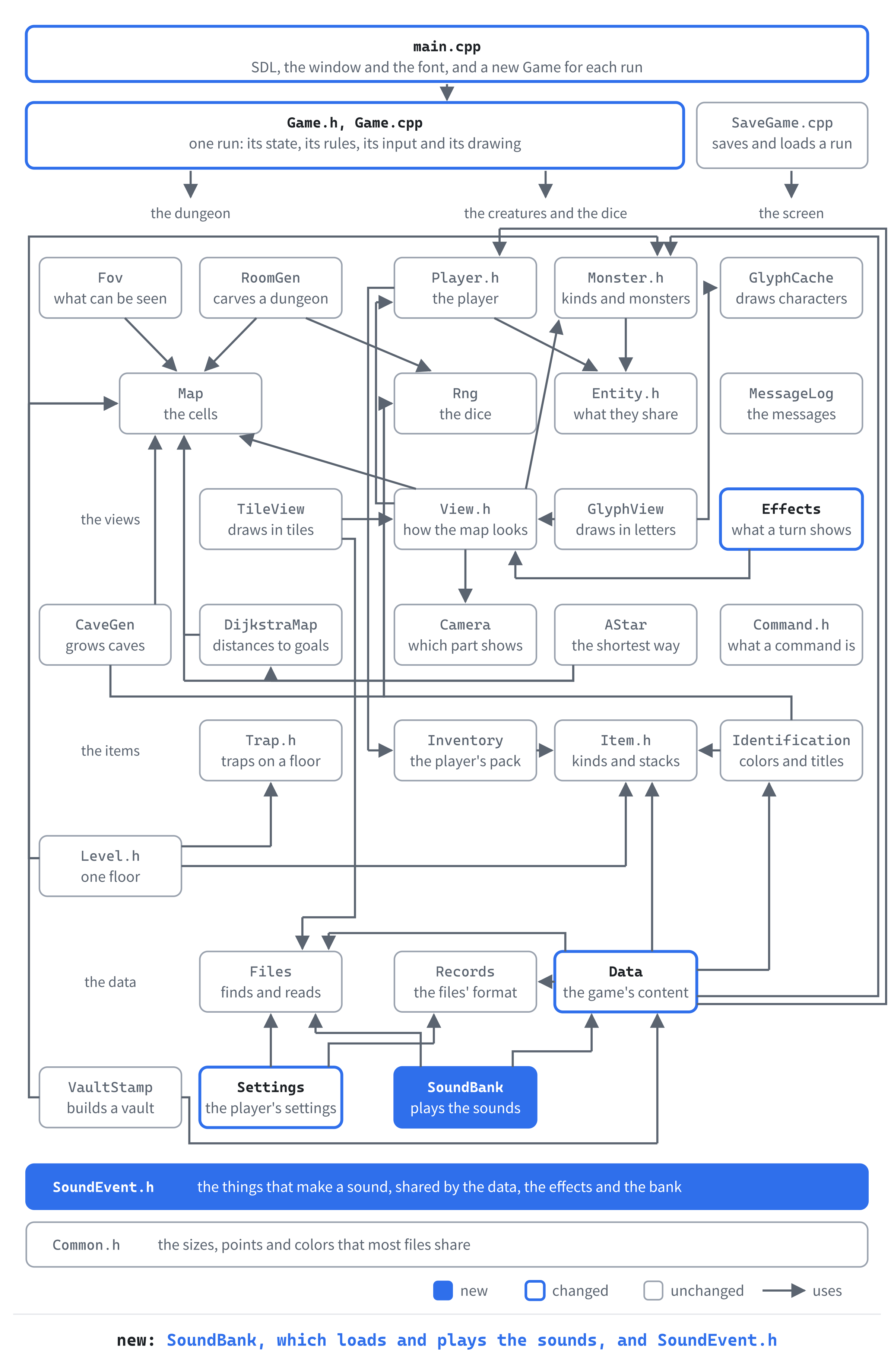
Most of the work is in the sound bank, about 205 lines between its header and its code. Then comes Game.cpp, which grows by about 130 lines, many of them a line for a sound. Reading the list comes to about 80 lines, the events to about 55, and the effects, the settings and main change by about 100 lines between them.
Sound, in Numbers
To a computer, a sound is a list of numbers. A speaker makes sound by moving back and forth, and each number, a sample, says where the speaker should be at one moment. Played fast enough, tens of thousands a second, the moments run together into a sound. The book's sounds have 48,000 samples for each second of sound, each a 16-bit whole number, from -32,768 to 32,767. Most have one channel, for a single speaker, rather than two, for stereo.
Those three things are a sound's format: the size of a sample, how many channels there are, and how many samples a second. A WAV file holds a sound's samples, after a header that says their format.
SDL reads a WAV file with SDL_LoadWAV. It plays sound through an audio device, the speakers or the headphones the player is using. The device is fed by audio streams. A stream takes samples in one format, converts them to whatever format the device wants, and hands them over as the device asks for them. The next image shows a sound's way from its file to the speaker.
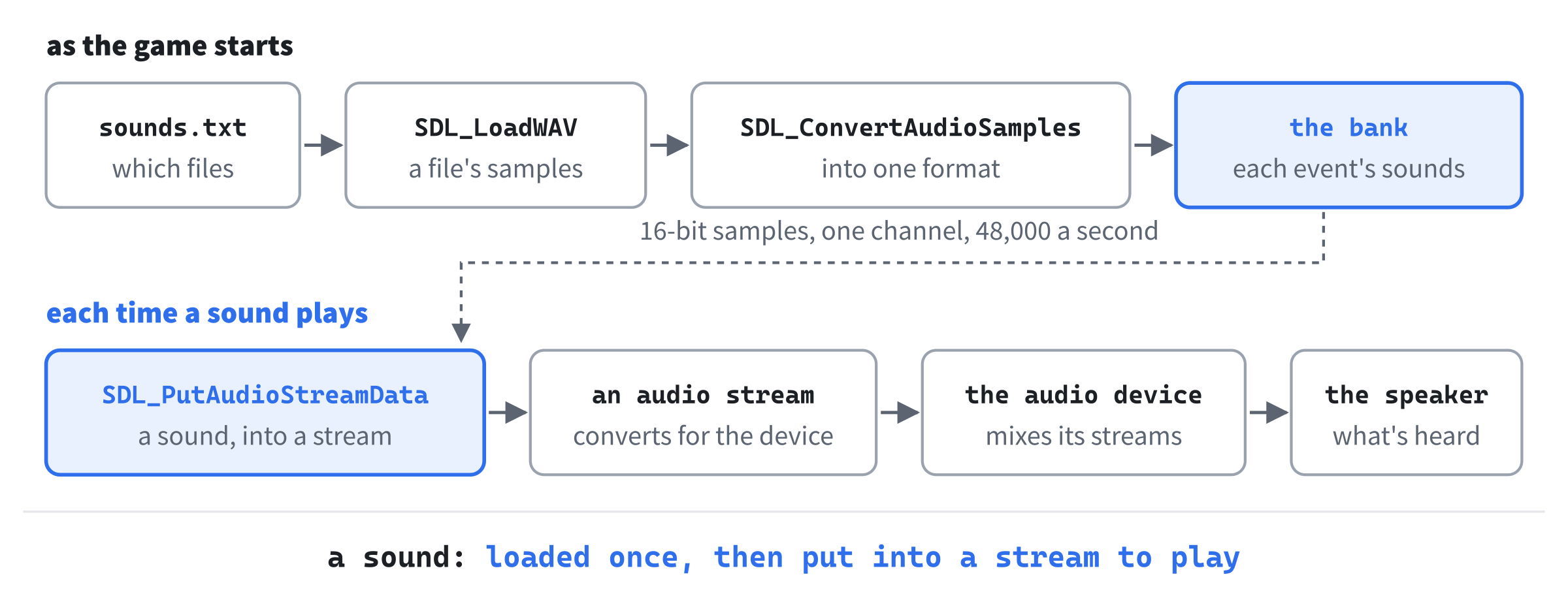
The game loads every sound as it starts, and converts each to one format. So any sound can go into any stream. Playing a sound is then only a matter of putting its samples into a stream, which takes no time worth mentioning.
Sounds as Data
The first part lists the game's sounds: the events in the code, and the files each one plays in a data file. The game reads and checks that file with the rest of its data.
The Events
Each thing in the game that makes a sound is an event: a hit, a kill, a door opening. In Solution Explorer, right-click src, choose Add > New Item, and add a Header File (.h) called SoundEvent.h. Type its first half:
#pragma once
#include <iterator>   // std::size, to count the events' names

// The things in the game that make a sound. sounds.txt says which files
// each one plays
enum class SoundEvent
{
    Hit,        // a blow, or a missile, lands on a monster
    Kill,       // a monster dies
    Hurt,       // the player is hit
    Shoot,      // an arrow is fired, or something thrown
    Miss,       // a missile misses
    Lightning,  // a bolt of lightning
    Fire,       // a fireball's burst, or a dragon's breath
    DoorOpen,
    DoorClose,
    Stairs,     // the player goes down the stairs
    PickUp,
    Gold,
    Amulet,
    Drop,
    Wield,      // a weapon wielded, armor put on, or a bow readied
Add the rest of the events below Wield:
    Quiver,     // arrows put in the quiver
    Drink,
    Read,
    Heal,       // a potion that heals
    Poisoned,
    Confused,
    Teleport,
    Fear,       // the scroll of fear
    Trap,       // a trap springs
    Alarm,      // an alarm trap rings
    Shriek,     // a shrieker shrieks
    Found,      // a secret door, or a trap, found
    Bump,       // the player walks into a wall
    Breaks,     // an arrow breaks
    Refused,    // a command that can't be done now
    LowHealth,  // the player's health falls below a quarter
    Death,      // the player dies
    Choose,     // a class chosen, and the run begun
};
Each event has a comment, unless its name says enough. Some stand for more than one thing: Wield is heard when a weapon is wielded, armor put on, or a bow readied, since each means the player has changed what they're using. And Trap is heard for any trap but the alarm, which has its own.
The data file names the events in words, so the code needs each event's name. Add the names below the events, with a blank line in between, and the count with them:
// Each event's name in sounds.txt, in the order above
constexpr const char* SOUND_EVENT_NAMES[] = {
    "hit", "kill", "hurt", "shoot", "miss", "lightning", "fire",
    "door_open", "door_close", "stairs", "pick_up", "gold", "amulet",
    "drop", "wield", "quiver", "drink", "read", "heal", "poisoned",
    "confused", "teleport", "fear", "trap", "alarm", "shriek", "found",
    "bump", "breaks", "refused", "low_health", "death", "choose",
};

// How many events there are: as many as there are names. The
// static_assert stops the build if the events above ever number more or
// fewer than their names
constexpr int SOUND_EVENTS = static_cast<int>(std::size(SOUND_EVENT_NAMES));
static_assert(static_cast<int>(SoundEvent::Choose) + 1 == SOUND_EVENTS);
An array, SOUND_EVENT_NAMES, holds the names, in the events' order, so an event's name is at its place in the enum. The count, SOUND_EVENTS, is worked out from the names by std::size, which counts an array's elements. So it can't be typed wrong.
The events and their names must stay in step. An event added without a name would leave the names one short, and the last event with no name at all. A static_assert checks that as the code compiles. It takes a condition the compiler can work out for itself, and if the condition is false, the build stops with an error. Here, the last event, Choose, must come one before the number of names, and the mistake is caught before the game ever runs.
The List of Sounds
Which files each event plays is the game's content, so it lives in a data file, sounds.txt, beside the others. From the book's repository, copy sounds.txt from the Chapter 25 folder's data folder into your project's data folder. It begins with a comment that says what it holds:
# The sounds of Amulets of SDL: which files each thing in the game plays,
# from the assets/sounds folder. When a sound has more than one file, one
# of them is chosen at random each time, so a hit doesn't sound the same
# every time. The game reads this file when it starts, so a change here
# needs no recompiling: save the file, and start the game again.
#
# Every [sound] record has these keys, in any order:
#   event   what makes the sound: one of the events below
#   files   its files, one or more, in assets/sounds
#
# The events:
# hit, kill, hurt, shoot, miss, lightning, fire, door_open, door_close,
# stairs, pick_up, gold, amulet, drop, wield, quiver, drink, read, heal,
# poisoned, confused, teleport, fear, trap, alarm, shriek, found, bump,
# breaks, refused, low_health, death and choose. An event left out makes
# no sound.
#
# A line starting with # is a comment, and blank lines don't matter. A
# mistake stops the game, and names the line it's on.
Then comes a record for each event, as in the first two:
[sound]
event = hit
files = hit_1.wav hit_2.wav hit_3.wav

[sound]
event = kill
files = kill_1.wav kill_2.wav kill_3.wav
An event can have one file, or several. With several, one is chosen at random each time the event happens, so three jackals bitten in a row don't sound like one jackal bitten three times.
Design note: Angband's sound file. Angband lists its sounds in a file too,
sound.prf. The file has a line for each event with the sounds it may play: two for a hit, and five for a kill. When an event happens, Angband picks one of its sounds at random, as ours will. It loads each sound the first time it's needed, so a sound no game plays is never read from the disk. Ours loads them all as the game starts, which takes a moment, but means no sound ever waits for the disk.
The list is read and checked when the game starts, along with the rest of the data. A mistake in it stops the game, with the line it's on.
Reading the List
A sound's record becomes a SoundDef, the files one event plays. Open Data.h, and add the new header below #include "Player.h":
#include "SoundEvent.h"Add the struct below VaultDef, with a blank line in between:
// The files an event plays, from sounds.txt: one, chosen at random, each
// time
struct SoundDef
{
    SoundEvent event = SoundEvent::Hit;
    std::vector<std::string> files;
};
The game's data hands out its sounds as it does its classes. Add this below classes's declaration:
const std::vector<SoundDef>& sounds() const;Add the reader below readClasses's declaration:
void readSounds(const std::string& folder);And add the sounds themselves below classes_:
std::vector<SoundDef> sounds_;The sounds are cleared and read with the rest, in Data.cpp. In load, add this line directly below classes_.clear();:
sounds_.clear();And this one directly below readClasses(folder);:
readSounds(folder);Add sounds below classes:
const std::vector<SoundDef>& GameData::sounds() const
{
    return sounds_;
}
Now the reader itself, in three parts. Add the first at the end of Data.cpp, with a blank line in between:
// Every [sound] record in sounds.txt, checked: an event the game knows,
// given once, and its files, each a .wav file. Whether the files are there
// is the SoundBank's business, once the game has started: a missing sound
// isn't worth stopping the game for
void GameData::readSounds(const std::string& folder)
{
    const std::string file = "sounds.txt";
    std::map<std::string, int> eventLines;
    for (const Record& record : readDataFile(folder, file, errors_))
    {
        FieldReader fields(record, file, errors_);
        if (record.type != "sound")
        {
            fields.report(record.line, "unknown record [" + record.type +
                          "]");
            continue;
        }
The records are read as the other files' are, by readDataFile, and each record's keys by a FieldReader. A record of any other type is a mistake. The map eventLines remembers the line each event was given on, so an event given twice can say where it was given first. Add the event below the record's check, with a blank line in between:
SoundDef def;
std::string name = fields.id("event");
bool known = false;
for (int i = 0; i < SOUND_EVENTS; ++i)
{
    if (name == SOUND_EVENT_NAMES[i])
    {
        def.event = static_cast<SoundEvent>(i);
        known = true;
    }
}
int line = fields.lineOf("event");
if (!known && !name.empty())
{
    fields.report(line, "unknown event '" + name + "'");
}
else if (eventLines.contains(name))
{
    fields.report(line, "'" + name + "' has its sounds already, "
                  "on line " + std::to_string(eventLines[name]));
}
else if (known)
{
    eventLines[name] = line;
}
In the preceding code, the event's name is looked for among the names. Its place there, as a SoundEvent, is the event. A name that isn't there is a mistake, and so is an event given a second time, which contains finds in eventLines. The mistake names the line it was given on first. Add the files below the event, with a blank line in between:
        std::istringstream words(fields.text("files"));
        std::string word;
        while (words >> word)
        {
            if (!word.ends_with(".wav"))
            {
                fields.report(fields.lineOf("files"), "'" + word +
                              "' isn't a .wav file");
            }
            def.files.push_back(word);
        }

        if (fields.finish() && known)
        {
            sounds_.push_back(def);
        }
    }
}
The files are words, split by a std::istringstream, as a class's kit is. A file that isn't a .wav is a mistake, since WAV is the only kind of sound file SDL can load by itself. Any record with a mistake is left out, and so is one whose event the game doesn't know.
Whether the files are there isn't checked here. The game finds that out when it loads them, after it has started. A missing sound isn't worth stopping the game for.
Checkpoint: Press F5. The game starts as it did, silent, since nothing plays the sounds yet, though it has read the list. Close it, and break the file. In sounds.txt, change the first record's event = hit to event = hitt, and in the second record, turn kill_1.wav into kill_1.mp3. Save the file, and press F5 again: a message box names both mistakes, and their lines. The next image shows it.

Put both back as they were, and the game starts again.
A Bank of Sounds
The second part loads the sounds, and plays one for every event in the game, the moment the event happens.
The Sounds Themselves
From the book's repository, copy the sounds folder from the Chapter 25 folder's assets folder into your project's assets folder, beside the font and the tiles. It holds 86 WAV files, two or three for most events, named for their events, as in hit_1.wav, hit_2.wav and hit_3.wav. The repository's ASSETS-LICENSE.md says how you may use them in games of your own.
All but two of them are in one format: 48,000 16-bit samples a second, in one channel. The two sounds of the player's death are in stereo. The shortest sound, a secret door found, lasts about a sixteenth of a second, and the longest, the player's death, about a second.
Starting the Audio
SDL starts its parts one at a time, and the game has started only its video so far. Open main.cpp, and add this above if (!TTF_Init()), with a blank line in between:
// Sound is welcome, but the game plays on without it
if (!SDL_InitSubSystem(SDL_INIT_AUDIO))
{
    SDL_Log("No sound: %s", SDL_GetError());
}
The function SDL_InitSubSystem starts one more part of SDL, its audio, after SDL_Init has started the video. If SDL can't start its audio, it fails. Then the game says why, and carries on. A silent game is still a game.
The Bank
The sounds are kept in a sound bank, a class that loads them, holds them, and plays them. Add a Header File (.h) called SoundBank.h, and type its first part:
#pragma once
#include <SDL3/SDL.h>
#include <vector>   // std::vector, for the sounds and their samples
#include "Data.h"
#include "SoundEvent.h"

// The game's sounds: every file sounds.txt names, loaded once, and
// converted to one format, then played on the audio device. An event with
// several files plays one of them, chosen at random, so a hit doesn't
// sound the same every time
class SoundBank
{
public:
    // Opens the audio device, and loads the files in assets/sounds. A file
    // that can't be loaded is logged, and left out. Without an audio
    // device, the game plays on, in silence
    explicit SoundBank(const GameData& data);
    ~SoundBank();

    SoundBank(const SoundBank&) = delete;
    SoundBank& operator=(const SoundBank&) = delete;

    // Plays one of the event's sounds, if it has any
    void play(SoundEvent event);
In the preceding code, the bank is made from the game's data, which lists the files to load. It owns an audio stream, which must be destroyed exactly once. So a bank can't be copied, as the glyph cache can't. The game asks it to play an event, and it plays one of the event's sounds. Add its private part below play's declaration, with a blank line in between:
private:
    // One sound's samples, in the bank's one format
    using Samples = std::vector<Uint8>;

    // Each event's sounds, in SoundEvent's order
    std::vector<std::vector<Samples>> sounds_;

    // The stream to the audio device. A sound put into it plays when the
    // ones before it have finished
    SDL_AudioStream* stream_ = nullptr;
};
A line starting using makes Samples another name for std::vector<Uint8>, a sound's samples as bytes. The new name is shorter to write, and says what the bytes are. The bank keeps a vector of sounds for each event, in a vector of its own, in SoundEvent's order. An event's sounds are then sounds_[static_cast<int>(event)], and an event with none has an empty vector.
Now add a C++ File (.cpp) called SoundBank.cpp. Type its includes and the two things the bank needs to know:
#include "SoundBank.h"
#include <string>   // std::string, for the files' paths
#include "Files.h"

namespace
{
    // Every sound is converted to this as it's loaded: 16-bit samples, one
    // channel, 48,000 a second, which most of the files are already. Then
    // every sound can go into the same stream
    constexpr SDL_AudioSpec FORMAT = { SDL_AUDIO_S16, 1, 48000 };

    // The folder the sound files are in
    const std::string SOUNDS_FOLDER = "assets/sounds/";
}
An SDL_AudioSpec is a format: the size and kind of a sample, then the channels, and the samples a second. The sample here is SDL_AUDIO_S16, a signed 16-bit whole number. Every sound is converted to FORMAT as it's loaded.
Add the constructor's first part below the unnamed namespace, with a blank line in between:
SoundBank::SoundBank(const GameData& data)
    : sounds_(SOUND_EVENTS)
{
    // The default device, with a stream to it in the bank's format. SDL
    // converts from that to whatever the device wants
    stream_ = SDL_OpenAudioDeviceStream(SDL_AUDIO_DEVICE_DEFAULT_PLAYBACK,
                                        &FORMAT, nullptr, nullptr);
    if (stream_ == nullptr)
    {
        SDL_Log("No sound: %s", SDL_GetError());
        return;
    }
    SDL_ResumeAudioStreamDevice(stream_);
The member sounds_ starts with an empty vector for each event. Then SDL_OpenAudioDeviceStream opens the player's default device, SDL_AUDIO_DEVICE_DEFAULT_PLAYBACK, and makes a stream into it that takes samples in the bank's format. The two nullptrs say the stream has no function of the bank's to call for more samples, since the bank puts them in itself. A device opened this way starts paused, so SDL_ResumeAudioStreamDevice starts it. Without a device, the bank logs why and stops, and every sound it's asked for is silence.
Then load each file the data lists. Add this below SDL_ResumeAudioStreamDevice(stream_);, with a blank line in between:
for (const SoundDef& def : data.sounds())
{
    for (const std::string& file : def.files)
    {
        std::string path = resourcePath(SOUNDS_FOLDER + file);
        SDL_AudioSpec spec;
        Uint8* buffer = nullptr;
        Uint32 length = 0;
        if (!SDL_LoadWAV(path.c_str(), &spec, &buffer, &length))
        {
            SDL_Log("Couldn't load %s: %s", path.c_str(), SDL_GetError());
            continue;
        }
Each WAV file is read by SDL_LoadWAV, which gives back three things through its pointers: the file's format, the samples, and their length in bytes. The format goes in spec, and the samples in a block of memory SDL has allocated. A file that can't be loaded is logged, and the bank goes on to the next. Add the rest of the constructor below it:
            Uint8* converted = nullptr;
            int convertedLength = 0;
            bool done = SDL_ConvertAudioSamples(&spec, buffer,
                                                static_cast<int>(length),
                                                &FORMAT, &converted,
                                                &convertedLength);
            SDL_free(buffer);
            if (!done)
            {
                SDL_Log("Couldn't convert %s: %s", path.c_str(),
                        SDL_GetError());
                continue;
            }
            sounds_[static_cast<int>(def.event)].emplace_back(
                converted, converted + convertedLength);
            SDL_free(converted);
        }
    }
}
A call to SDL_ConvertAudioSamples converts the file's samples from its format to the bank's, into a new block of memory that it allocates. The file's own samples are no longer needed, so they're freed with SDL_free, since SDL allocated them. The converted samples are copied into the event's vector of sounds, and freed too. Giving emplace_back two pointers, the start of the samples and just past their end, makes a Samples vector of the bytes between them. Chapter 24 made a missile's flight from part of a path in the same way.
The bank's stream is destroyed with the bank, and the device with it. Add the destructor below the constructor:
// Destroying the stream closes the device it opened
SoundBank::~SoundBank()
{
    if (stream_ != nullptr)
    {
        SDL_DestroyAudioStream(stream_);
    }
}
Last, add play below the destructor:
void SoundBank::play(SoundEvent event)
{
    const std::vector<Samples>& variants = sounds_[static_cast<int>(event)];
    if (stream_ == nullptr || variants.empty())
    {
        return;
    }

    // SDL's own dice choose the variant, not the game's: the game's dice
    // decide what happens, and a sound mustn't change that
    Sint32 choice = SDL_rand(static_cast<Sint32>(variants.size()));
    const Samples& samples = variants[choice];
    SDL_PutAudioStreamData(stream_, samples.data(),
                           static_cast<int>(samples.size()));
}
An event without sounds, or a bank without a device, plays nothing. Otherwise SDL_rand picks one of the event's sounds, from SDL's own random numbers. Given a number, it returns a whole number from 0 to one less than it.
The game's dice decide everything that happens, and a seed replays a run because they roll in the same order every time. A sound that rolled them would change every roll after it, so the bank uses SDL's instead. Then SDL_PutAudioStreamData copies the sound's samples into the stream, which plays them.
The Game Holds It
The bank is made once, in main, and lasts as long as the game is open. Loading the sounds again for every run would be a waste. In main.cpp, add the new header below #include "GlyphCache.h":
#include "SoundBank.h"Make the bank directly below the glyph cache:
SoundBank sounds(data);Each run's Game is given the bank. Find this line, in the loop that makes them:
Game game(renderer, glyphs, data, seed, useTiles, firstRun);Change it to these:
Game game(renderer, glyphs, data, sounds, seed, useTiles,
          firstRun);
The bank is destroyed at the end of the same block as the glyph cache, before SDL is shut down, as it must be. Find the comment at the block's end:
} // The glyphs are destroyed here, before the renderer that made themChange it to these:
}   // The sounds and the glyphs are destroyed here, the glyphs before
    // the renderer that made them
A Game keeps the bank as a reference, as it keeps the glyph cache. It borrows the bank, and doesn't own it. Open Game.h, and add the new header below #include "Settings.h":
#include "SoundBank.h"Replace the comment above Game(SDL_Renderer* renderer, GlyphCache& glyphs, const GameData& data, with this:
// The kinds of monster and item come from data, which must outlive
// the Game, as must the sounds. A seed of 0 means a random one. With
// useTiles, the run starts in the tile view. With atTitle, it starts at
// the title screen, and otherwise at the class menu, unless a saved run
// is waiting
In Game.h, change unsigned int seed, bool useTiles, bool atTitle); to SoundBank& sounds, unsigned int seed, bool useTiles, bool atTitle);. Then add the bank itself below data_:
SoundBank& sounds_;In Game.cpp, the constructor takes the bank, and keeps it. Find these lines:
Game::Game(SDL_Renderer* renderer, GlyphCache& glyphs,
           const GameData& data, unsigned int seed, bool useTiles,
           bool atTitle)
    : renderer_(renderer), glyphs_(glyphs), data_(data),
Change them to these:
Game::Game(SDL_Renderer* renderer, GlyphCache& glyphs,
           const GameData& data, SoundBank& sounds, unsigned int seed,
           bool useTiles, bool atTitle)
    : renderer_(renderer), glyphs_(glyphs), data_(data), sounds_(sounds),
Every sound is asked for through one function, playSound. That way, how a sound is played can change in one place, as it will in the next part. In Game.h, add its declaration below hurtPlayer's:
void playSound(SoundEvent event);Its definition comes at the end of this part, once every event asks for its sound.
The Sounds of a Fight
Now every event asks for its sound, starting with the fighting. A hit is shown in one place, showHit. It can choose the player's sound or a monster's, as it chooses the flash's color. Replace the whole of showHit with this:
// A hit shows: the cell struck flashes, red for a monster, and white for
// the player, after any effects already waiting, and it's heard
void Game::showHit(Point cell)
{
    bool onPlayer = cell == player_.pos;
    SDL_Color color = onPlayer ? Palette::PLAYER_HIT : Palette::MONSTER_HIT;
    effects_.flash({ cell }, color, SDL_GetTicks());
    playSound(onPlayer ? SoundEvent::Hurt : SoundEvent::Hit);
}
Whether the hit is on the player is worked out once, as onPlayer. It's used twice, with the conditional operator: white and Hurt for the player, and red and Hit for a monster.
Monsters struck together by a bolt or a burst flash together, and their hit is one sound. In showStruck, add this line directly below effects_.flash(cells, Palette::MONSTER_HIT, SDL_GetTicks());:
playSound(SoundEvent::Hit);A monster's death has its own sound, as it's shown. In showKilled, add this line directly below effects_.ghost(monster.pos, *monster.def, SDL_GetTicks());:
playSound(SoundEvent::Kill);A missile is heard as it's loosed, whoever loosed it, and a miss has its sound too. In shootMissile, add this line directly below effects_.missile(flight, itemLook(missile), SDL_GetTicks());:
playSound(SoundEvent::Shoot);Add this one directly below the two lines that log a miss, which start log_.add(capitalized(name) + " misses the " +:
playSound(SoundEvent::Miss);Most of the sounds still to come are like these: one line, directly below the line that shows or logs what the sound belongs to. From here on, such a line is usually given as a sentence, naming the function, the line to add, and the line it goes below. A broken arrow has its sound. In shootMissile, add the line playSound(SoundEvent::Breaks); below log_.add(capitalized(name) + " breaks.");.
An archer's arrow is heard as the player's is. In monsterShoots, add this line directly below the two lines that fly the arrow, starting effects_.missile(lineFrom(monster.pos, player_.pos, steps),:
playSound(SoundEvent::Shoot);Then, in monsterShoots, add the line playSound(SoundEvent::Miss); below log_.add("The " + name + "'s arrow misses you.");.
Lightning and fire are heard as they flash, whoever's they are:
- In
castLightning, add the lineplaySound(SoundEvent::Lightning);beloweffects_.flash(path, Palette::LIGHTNING, SDL_GetTicks());. - In
castFireball, add the lineplaySound(SoundEvent::Fire);beloweffects_.flash(burst, Palette::FIRE, SDL_GetTicks());. - In
monsterBreathes, add the lineplaySound(SoundEvent::Fire);beloweffects_.flash(burst, Palette::FIRE, SDL_GetTicks());.
In monsterCastsLightning, add the lightning's line directly below the two lines that flash the bolt, ending Palette::LIGHTNING, SDL_GetTicks());:
playSound(SoundEvent::Lightning);One more sound belongs to a fight, a warning, as the player's health falls below a quarter. It sounds once, as the health crosses the line, rather than at every hit below it. Replace the comment above hurtPlayer with this:
// The player takes damage, and the hit shows. A big hit, a quarter of
// their health or more, shakes the screen too. Health falling below a
// quarter is worth a warning
Then add this line directly above player_.hp -= damage;:
bool wasHealthy = player_.hp * 4 >= player_.maxHp;And add the warning below the shake's if, directly above the function's closing brace:
bool nowLow = player_.isAlive() && player_.hp * 4 < player_.maxHp;
if (wasHealthy && nowLow)
{
    playSound(SoundEvent::LowHealth);
}
Health is compared with a quarter by multiplying, as the shake's test is. The warning sounds only if the health was a quarter or more before the hit, is below a quarter after it, and the player is still alive. The player's death has a sound of its own.
Doors, Stairs and Secrets
A door opened is heard only if the player can see it, since monsters open doors too, far out of sight. In openDoor, add this below makeNoise(door, DOOR_OPEN_LOUDNESS);:
if (level_.map.isVisible(door.x, door.y))
{
    playSound(SoundEvent::DoorOpen);
}
Only the player closes doors, so a door closing is always seen. In closeDoor, add the line playSound(SoundEvent::DoorClose); below log_.add("You close the door.");.
The stairs are heard as the player takes them. In descend, add this line directly above arriveOnFloor("You go down the stairs");:
playSound(SoundEvent::Stairs);A search, or the Rogue's keen eyes, can find several secrets at once. One sound says so for all of them. In lookForSecrets, add this directly above return found;:
if (found)
{
    playSound(SoundEvent::Found);
}
Walking into a wall has a sound too. In playerStep, add the line playSound(SoundEvent::Bump); below log_.add("You bump into the wall.");. A bump is a small thing, but it says that a step didn't happen, sooner than the log does.
The Sounds of Items
Picking something up sounds different for gold and for an Amulet, which are worth hearing. In pickUp, add this below log_.add("You pick up " + itemName(here->item) + ".");:
ItemClass itemClass = here->item.def->itemClass;
if (itemClass == ItemClass::Gold)
{
    playSound(SoundEvent::Gold);
}
else if (itemClass == ItemClass::Amulet)
{
    playSound(SoundEvent::Amulet);
}
else
{
    playSound(SoundEvent::PickUp);
}
Wielding a weapon, readying a bow and putting on armor share a sound, since each changes what the player is using. Filling the quiver, drinking, reading and dropping have sounds of their own. Drinking and reading are told apart as the message tells them apart, with potion:
- In
wield, add the lineplaySound(SoundEvent::Wield);belowlog_.add("You wield " + itemName(weapon) + ".");. - In
readyBow, add the lineplaySound(SoundEvent::Wield);belowlog_.add("You ready " + itemName(bow) + ".");. - In
wear, add the lineplaySound(SoundEvent::Wield);belowlog_.add("You put on " + itemName(armor) + ".");. - In
fillQuiver, add the lineplaySound(SoundEvent::Quiver);belowlog_.add("Your quiver holds " + itemName(*player_.quiver) + ".");. - In
useItem, add the lineplaySound(potion ? SoundEvent::Drink : SoundEvent::Read);belowlog_.add((potion ? "You drink " : "You read ") + itemName(used) + ".");. - In
dropItem, add the lineplaySound(SoundEvent::Drop);belowlog_.add("You drop " + itemName(stack) + ".");.
What a potion or a scroll does has a sound of its own, beside the sound of drinking or reading it. Regeneration is healing too, so it has the healing sound:
- In
applyEffect, add the lineplaySound(SoundEvent::Heal);belowlog_.add("You feel better.");. - In
applyEffect, add the lineplaySound(SoundEvent::Heal);belowlog_.add("You feel much better.");. - In
applyEffect, add the lineplaySound(SoundEvent::Heal);belowlog_.add("You feel your wounds begin to close.");. - In
applyEffect, add the lineplaySound(SoundEvent::Teleport);belowlog_.add("You are whisked away!");. - In
applyEffect, add the lineplaySound(SoundEvent::Poisoned);belowlog_.add("You feel very sick!");. - In
applyEffect, add the lineplaySound(SoundEvent::Confused);belowlog_.add("You feel dizzy!");. - In
applyEffect, add the lineplaySound(SoundEvent::Fear);belowfrightenMonsters();.
Strength, magic mapping and identifying make only the sound of drinking or reading, since what they do is plain on the screen. Lightning and fire are heard as they're cast.
Traps and Other Troubles
Each trap is heard as it springs. The dart, the needle and the trapdoor share a sound, the alarm has its own, and the teleport trap has the teleport's:
- In
springTrap, add the lineplaySound(SoundEvent::Trap);belowlog_.add("A dart flies out of the wall, and hits you!");. - In
springTrap, add the lineplaySound(SoundEvent::Trap);belowlog_.add("A needle pricks you. You feel very sick!");. - In
springTrap, add the lineplaySound(SoundEvent::Alarm);belowlog_.add("An alarm rings out across the floor!");. - In
springTrap, add the lineplaySound(SoundEvent::Teleport);belowlog_.add("The floor flashes, and you're somewhere else!");. - In
springTrap, add the lineplaySound(SoundEvent::Trap);belowlog_.add("A trapdoor opens under you!");.
A command the game won't start says so with a sound as well as a message, whatever the reason. In canStartCommand, add this line directly below the two lines that log " in view.":
playSound(SoundEvent::Refused);Then add the same sound for the other two reasons:
- In
canStartCommand, add the lineplaySound(SoundEvent::Refused);belowlog_.add("Not while you're poisoned.");. - In
canStartCommand, add the lineplaySound(SoundEvent::Refused);belowlog_.add("Not while you're confused.");.
Three more sounds belong to the player. A cave spider's bite poisons, and the player's death has the last sound of a run. The first sound of a run is choosing a class:
- In
monsterAttacks, add the lineplaySound(SoundEvent::Poisoned);belowlog_.add("You are poisoned!");. - In
finishTurn, add the lineplaySound(SoundEvent::Death);belowlog_.add("You die...");. - In
startAs, add the lineplaySound(SoundEvent::Choose);belowlog_.add("Move with the arrow keys, the numpad, or h j k l y u b n.");.
A shrieker shrieks only while it sees the player, and it sees the player only from a cell the player can see. So a shriek is always seen, and unlike a door's sound, it needs no check of its own. In actStationary, add the line playSound(SoundEvent::Shriek); below announce(monster, "shrieks!");.
Every call is in place, and the function they call comes last. For now, a sound plays the moment it's asked for. In Game.cpp, add playSound below hurtPlayer:
// A sound, played at once
void Game::playSound(SoundEvent event)
{
    sounds_.play(event);
}
The function playSound passes the event straight to the bank, which plays it at once.
Checkpoint: Turn your speakers on, or put on headphones, and press F5, with seed 23. Start a new run as the Fighter, with a, and the choice is heard. Walk into a wall, and the bump is heard. Then press j six times, down into the jackals' room, and fight: each bite, and each blow you strike, has its sound. Listen to a jackal you kill, though: its hit, and then its death, one after the other.
The bank's one stream plays whatever it's given in turn. That's the first of two problems the next parts put right. The second is quieter: every sound is heard the moment it's asked for. So an arrow's hit, or its miss, is heard as it leaves the bow, before it has flown.
Heard as It's Seen
The game works out a turn at once, and Chapter 24 showed it afterward, a moment at a time. The sounds should play the same way, each as the thing it belongs to is seen: an arrow's hit as it lands, and not as it leaves the bow. The effects already know when each thing is seen, so this part plays the sounds with them.
A Sound Waits Its Turn
A sound isn't drawn, but it plays at a moment, as an effect does. So the effects keep the sounds too. Open Effects.h, and add the events' header below #include "Common.h":
#include "SoundEvent.h"Each sound waits with the time it's to play. Add the sounds below effects_, with a blank line in between, and the time they go by:
// A sound, and when it's to play
struct Sound
{
    SoundEvent event = SoundEvent::Hit;
    Uint64 start = 0;
};
std::vector<Sound> sounds_;

// When the last flash or missile asked for starts
Uint64 lastStart_ = 0;
A Sound is a struct declared inside the class, in its private part, since nothing outside the effects needs it. The time lastStart_ is when the last flash or missile asked for starts. That's when a sound asked for after it will play. A ghost or a shake doesn't count, since they start with what's already playing.
Now the two functions the game and its loop need. The game asks for a sound with sound. Add its declaration below shakeOffset's, with a blank line in between:
// A sound, played as the last flash or missile asked for starts: the
// hit, the shot or the blast it belongs to. With nothing waiting, it
// plays at once
void sound(SoundEvent event, Uint64 now);
The loop takes the sounds whose moment has come with soundsDue. Add it below sound, with a blank line in between:
// The sounds whose moment has come, taken out to be played
std::vector<SoundEvent> soundsDue(Uint64 now);
A shake starts with a flash or a missile too, and never with a ghost, as its comment can now say. Replace the comment above void shake(Uint64 now); with this:
// The view shakes, from the moment the last flash or missile asked for
// starts: the hit, or the blast, that shakes it
A sound waiting its turn keeps the loop awake, as an effect does. Replace the comment above bool playing() const; with this:
// True while an effect is playing or waiting, or a sound is waitingThe functions themselves are in Effects.cpp, next.
When a Sound Plays
A flash and a missile each note when they start, in Effects.cpp. In flash, add the line lastStart_ = effect.start; below effects_.push_back(effect);. Then, in missile, add the line lastStart_ = effect.start; below effects_.push_back(effect); too.
A shake started with the last effect of any kind, which could be a ghost. In shake, change effects_.back().start to lastStart_. Then add sound below shakeOffset:
void Effects::sound(SoundEvent event, Uint64 now)
{
    Uint64 start = effects_.empty() ? now : lastStart_;
    sounds_.push_back({ event, start });
}
The function sound notes the event and when it's to play: as the last flash or missile starts, or now, if no effect is playing at all. The braces make a Sound from the two, in their order in the struct. Add soundsDue below it:
std::vector<SoundEvent> Effects::soundsDue(Uint64 now)
{
    std::vector<SoundEvent> due;
    std::vector<Sound> waiting;
    for (const Sound& sound : sounds_)
    {
        if (sound.start <= now)
        {
            due.push_back(sound.event);
        }
        else
        {
            waiting.push_back(sound);
        }
    }
    sounds_ = waiting;
    return due;
}
The function soundsDue hands over the sounds whose moment has come. It sorts the sounds into two vectors, those due and those still waiting, keeps the second, and returns the first.
In playing, change return !effects_.empty(); to return !effects_.empty() || !sounds_.empty();. A key that ends the effects ends the sounds still waiting too, since the player has moved on. In finish, add the line sounds_.clear(); below effects_.clear();.
A sound already in the bank's stream plays on, since the effects no longer hold it.
The Loop Plays Them
Each time around, the loop plays the sounds whose moment has come, just before it forgets the effects that have ended. In Game.cpp, in run, find these lines:
// The effects that have played are forgotten. While any were
// playing, the screen is drawn again: their next frame, or the
// first frame without them
effects_.update(SDL_GetTicks());
Change them to these:
// The sounds whose moment has come are played, and the effects
// that have played are forgotten. While any were playing, the
// screen is drawn again: their next frame, or the first frame
// without them. The loop may have slept, so the clock is read again
now = SDL_GetTicks();
for (SoundEvent sound : effects_.soundsDue(now))
{
    sounds_.play(sound);
}
effects_.update(now);
SDL's clock is read again, into now, since the loop may have slept since it last read it. The same moment does for the sounds and the effects. A sound due plays now, and one still waiting is played on a later time around, when its moment comes.
Then playSound asks the effects for its sound, rather than the bank. Replace the whole of playSound with this:
// A sound, played with the effect asked for last, so it's heard as the
// thing it belongs to is seen: a hit as its flash starts, an arrow as it
// flies
void Game::playSound(SoundEvent event)
{
    effects_.sound(event, SDL_GetTicks());
}
Every sound is still asked for where it was, and only when it plays has moved. A miss needs a little more, as the next section shows.
A Miss, Heard as It Lands
A hit is heard as its flash starts, which is as the arrow lands. But a miss makes no flash, since nothing is hit. So the last flash or missile asked for before a miss is the arrow's own flight, and sound would play the miss as the arrow leaves the bow. An arrow that breaks would be heard then too, unless it had hit something first. These sounds need the moment the arrow lands, which only the effects know.
The effects work that moment out as they fly a missile, so missile can return it. In Effects.h, find the declaration of missile, with its comment:
// Something flies along a path, once the effects before it have played
void missile(const std::vector<Point>& path, const ItemLook& look,
             Uint64 now);
Change it to these:
// Something flies along a path, once the effects before it have
// played. Returns when it lands
Uint64 missile(const std::vector<Point>& path, const ItemLook& look,
               Uint64 now);
A sound can then wait for a moment it's given, rather than for the last flash or missile. Add this below sound's declaration, with a blank line in between:
// A sound at a moment given: a miss, heard as the arrow lands, though
// there's nothing there to see
void soundAt(SoundEvent event, Uint64 when);
In Effects.cpp, find the first two lines of missile:
void Effects::missile(const std::vector<Point>& path, const ItemLook& look,
                      Uint64 now)
Change them to these:
Uint64 Effects::missile(const std::vector<Point>& path,
                        const ItemLook& look, Uint64 now)
In missile, add the line return effect.end; below lastStart_ = effect.start;. A missile's end is the moment it has flown its whole path, and lands. Then add soundAt below sound:
void Effects::soundAt(SoundEvent event, Uint64 when)
{
    sounds_.push_back({ event, when });
}
It keeps the sound with the moment it's given, and soundsDue hands it over when that moment comes, as it does the rest.
The game asks for such a sound with a function of its own, beside playSound. In Game.h, add the line void playSoundAt(SoundEvent event, Uint64 when); below void playSound(SoundEvent event);. Then, in Game.cpp, add playSoundAt below playSound:
// A sound at a moment of its own: a miss, or an arrow breaking, heard as
// the arrow lands, with nothing there to see
void Game::playSoundAt(SoundEvent event, Uint64 when)
{
    effects_.soundAt(event, when);
}
Now the player's shot keeps the moment its arrow lands. In shootMissile, find this line:
effects_.missile(flight, itemLook(missile), SDL_GetTicks());Change it to these:
Uint64 lands = effects_.missile(flight, itemLook(missile),
                                SDL_GetTicks());
The moment is kept as lands, for the two sounds that need it. In shootMissile, change playSound(SoundEvent::Miss); to playSoundAt(SoundEvent::Miss, lands);, and change playSound(SoundEvent::Breaks); to playSoundAt(SoundEvent::Breaks, lands);.
An archer's arrow lands too. In monsterShoots, find these lines:
effects_.missile(lineFrom(monster.pos, player_.pos, steps),
                 itemLook(arrow), SDL_GetTicks());
Change them to these:
std::vector<Point> path = lineFrom(monster.pos, player_.pos, steps);
Uint64 lands = effects_.missile(path, itemLook(arrow), SDL_GetTicks());
The arrow's path is made first, on a line of its own, so the call that flies it fits on one line. In monsterShoots, change playSound(SoundEvent::Miss); to playSoundAt(SoundEvent::Miss, lands);. A hit still uses playSound, since its flash starts as the arrow lands, and so does a shot, which is heard as the arrow leaves.
Checkpoint: To hear the difference, slow the missiles down: in Effects.h, set MISSILE_MS to 200 for now. Press F5, with seed 23, start a new run as the Rogue, and take the six steps down. Fire at the nearest jackal, with f and Enter. The shot is heard as the arrow leaves, and the hit and the jackal's death as it lands, three cells and six tenths of a second later. An arrow that misses is heard as it lands too, though nothing flashes there. Set MISSILE_MS back to 25 afterward.
Sounds Together
The bank's one stream plays whatever it's given in turn. So a jackal killed is heard as its hit, and then its death, one after the other, though they happen together. In a busy turn, sounds pile up behind each other, and are heard late, or long after the turn.
A Device and Its Streams
SDL can play many streams at once on one device, and the device mixes them, adding their samples together. So the bank opens the device itself, and binds several streams to it. Each sound goes into a stream that has nothing left to play. Open SoundBank.h, and replace the comment above void play(SoundEvent event); with this:
// Plays one of the event's sounds, if it has any, alongside any others
// playing
The bank keeps eight streams, which is more sounds at once than a turn usually makes. Add the count above the comment // One sound's samples, in the bank's one format, with a blank line in between:
// How many sounds can play at once
static constexpr int STREAMS = 8;
The one stream goes, and the device and its streams take its place. Find these lines, at the end of the class:
// The stream to the audio device. A sound put into it plays when the
// ones before it have finished
SDL_AudioStream* stream_ = nullptr;
Change them to these:
// The audio device, and the streams bound to it, one for each sound
// playing, which the device mixes. Each stream plays one sound at a
// time. next_ is the stream to cut short if they're all busy
SDL_AudioDeviceID device_ = 0;
std::vector<SDL_AudioStream*> streams_;
size_t next_ = 0;
An SDL_AudioDeviceID is the number SDL gives an open device, and 0 means none. The streams are pointers, as the one stream was, and next_ says which stream to cut short if every one is busy.
Opening the Device
The format's comment in SoundBank.cpp is out of date. In SoundBank.cpp, change every sound can go into the same stream to any sound can go into any stream. Then, in the constructor, find these lines:
// The default device, with a stream to it in the bank's format. SDL
// converts from that to whatever the device wants
stream_ = SDL_OpenAudioDeviceStream(SDL_AUDIO_DEVICE_DEFAULT_PLAYBACK,
                                    &FORMAT, nullptr, nullptr);
if (stream_ == nullptr)
{
    SDL_Log("No sound: %s", SDL_GetError());
    return;
}
SDL_ResumeAudioStreamDevice(stream_);
Change them to these:
// The default device, and STREAMS streams in the bank's format, bound
// to it. Binding sets each stream's output to whatever the device
// wants, and SDL converts
device_ = SDL_OpenAudioDevice(SDL_AUDIO_DEVICE_DEFAULT_PLAYBACK, nullptr);
if (device_ == 0)
{
    SDL_Log("No sound: %s", SDL_GetError());
    return;
}
for (int i = 0; i < STREAMS; ++i)
{
    SDL_AudioStream* stream = SDL_CreateAudioStream(&FORMAT, &FORMAT);
    if (stream != nullptr && SDL_BindAudioStream(device_, stream))
    {
        streams_.push_back(stream);
    }
    else if (stream != nullptr)
    {
        SDL_DestroyAudioStream(stream);
    }
}
In the preceding code, SDL_OpenAudioDevice opens the default device for the bank's own use, and the nullptr lets SDL choose the device's format. Each stream is made with SDL_CreateAudioStream, taking and giving the bank's format, and bound to the device with SDL_BindAudioStream. Binding sets what the stream gives to whatever the device wants, so SDL still does the converting. Any stream that can't be made or bound is left out, and the bank plays with the others. A device opened this way starts playing at once, unlike the one SDL_OpenAudioDeviceStream opened for the bank's first stream, which started paused.
The streams must be destroyed, and the device closed, in that order, since a stream is bound to the device. Find the destructor:
// Destroying the stream closes the device it opened
SoundBank::~SoundBank()
{
    if (stream_ != nullptr)
    {
        SDL_DestroyAudioStream(stream_);
    }
}
Change it to this:
// The streams go first, which unbinds them, and then the device
SoundBank::~SoundBank()
{
    for (SDL_AudioStream* stream : streams_)
    {
        SDL_DestroyAudioStream(stream);
    }
    if (device_ != 0)
    {
        SDL_CloseAudioDevice(device_);
    }
}
Destroying a stream unbinds it from its device, so the device closes with nothing bound to it.
A Free Stream
Without streams, the bank has nothing to play on. In play, change stream_ == nullptr to streams_.empty(). Then find the last three lines of play:
const Samples& samples = variants[choice];
SDL_PutAudioStreamData(stream_, samples.data(),
                       static_cast<int>(samples.size()));
Change them to these:
const Samples& samples = variants[choice];

// A stream with nothing left to play takes the sound, so it plays
// alongside the others. With every stream busy, one is cut short,
// each in turn
SDL_AudioStream* stream = nullptr;
for (SDL_AudioStream* each : streams_)
{
    if (SDL_GetAudioStreamQueued(each) == 0)
    {
        stream = each;
        break;
    }
}
if (stream == nullptr)
{
    stream = streams_[next_];
    next_ = (next_ + 1) % streams_.size();
    SDL_ClearAudioStream(stream);
}
SDL_PutAudioStreamData(stream, samples.data(),
                       static_cast<int>(samples.size()));
In the preceding code, SDL_GetAudioStreamQueued says how many bytes a stream still holds. A stream holding none has finished its last sound, so it takes the new one. If every stream is busy, one is cut short with SDL_ClearAudioStream, which throws away what it holds. Then that stream takes the new sound instead.
The streams take turns being cut short, by next_, which goes around them with %. So no one stream is always the one to lose. The next image shows a killing blow's sounds, on one stream, and on two of the eight.
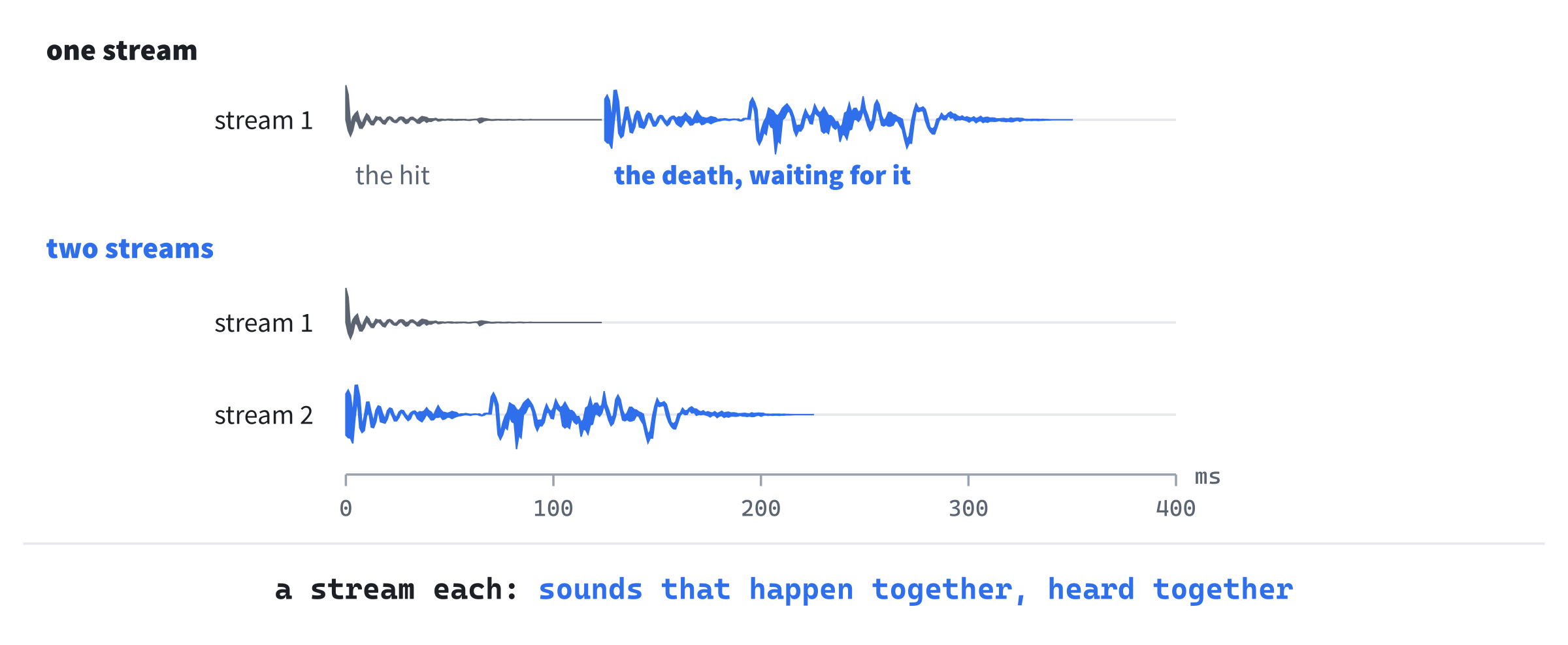
With one stream, the death waits for the hit to end. On two, they start together, as they happened.
Design note: Crawl's sounds. Dungeon Crawl Stone Soup ties its sounds to its messages rather than to events. An option such as
sound += LOW HITPOINT WARNING:danger3.wavplays a file whenever a message contains the words before the colon. So any message can have a sound without a change to the game's code. It has an option,one_SDL_sound_channel, which lets only one sound play at a time. That option is off unless the player turns it on.
Ours ties sounds to events, which takes a line of code for each. But a message's words can change without a sound going quiet.
Checkpoint: Press F5, with seed 23, start a new run as the Fighter, and take the six steps down. Wait for the jackals with the period, and then strike the one down and to your right, with n. Your blow kills it, and its hit and its death are heard together now.
The Volume, and Quiet
A player may want the game quieter than everything else on the computer, or silent, without turning down the computer itself. This part adds a volume and a way to turn the sound off, kept in settings.txt with the shaking.
The Device's Gain
A device's gain scales every sample it plays: at 1, a sound plays as loud as it was made, at 0.5 its samples are half as big, and at 0 there's silence. SDL can set a device's gain, and the gain applies to every stream bound to it. Open SoundBank.h, and add this below play's declaration, with a blank line in between:
// How loud every sound is, from 0 to 100, unless they're muted
void setVolume(int percent, bool muted);
In SoundBank.cpp, add setVolume below play:
// The device's gain scales every stream bound to it: 1 is as loud as the
// sounds were made, and 0 is silence
void SoundBank::setVolume(int percent, bool muted)
{
    if (device_ == 0)
    {
        return;
    }
    float gain = muted ? 0.0f : percent / 100.0f;
    SDL_SetAudioDeviceGain(device_, gain);
}
The volume is a percentage, as players expect, and becomes a gain from 0 to 1. Muting makes the gain 0, but leaves the volume as it was. So turning the sound on again brings it back as loud as it was.
Kept with the Settings
The volume and the muting belong with the player's other settings. Open Settings.h, and find this line:
bool shake = true; // the screen shakes on big hits and blastsChange it to these:
bool shake = true;    // the screen shakes on big hits and blasts
int volume = 80;      // how loud the sounds are, from 0 to 100
bool muted = false;   // no sound at all, whatever the volume
Each is read if the file has it. In loadSettings, in Settings.cpp, add this below the shake's if:
if (fields.has("volume"))
{
    size_t mistakes = errors.size();
    int volume = fields.number("volume", 0);
    if (volume > 100)
    {
        fields.report(fields.lineOf("volume"),
                      "'volume' goes up to 100");
    }
    else if (errors.size() == mistakes)
    {
        settings.volume = volume;
    }
}
if (fields.has("muted"))
{
    size_t mistakes = errors.size();
    bool muted = fields.yesNo("muted");
    if (errors.size() == mistakes)
    {
        settings.muted = muted;
    }
}
As with the shake, a value with a mistake in it leaves the setting at its default, as the comment above the shake's if says. Before a value is read, the number of mistakes so far, errors.size(), is kept as mistakes. The setting changes only if no mistake was added while reading it. Without that, a volume typed wrong would read as 0, and silence the game.
The function number reads a whole number. It reports a mistake if the value isn't one, or is below 0, its second argument. A volume over 100 is a mistake too, reported on the volume's line, and the volume keeps its default. And saveSettings writes both. Add these lines directly above its return:
text += "volume = " + std::to_string(settings.volume) + "\n";
text += std::string("muted = ") + (settings.muted ? "yes" : "no") +
        "\n";
The volume's line can add with + from its start. That's because "volume = " + std::to_string(...) adds a std::string to the literal, which + can do. Only two plain literals joined with + need one of them made a std::string first, as the muting's line does.
M, and the Menu
Every Game sets the bank's volume from the settings as it's made, since the bank outlives the runs and the settings are read for each. In Game.cpp, in the constructor, add this line directly below the if that starts the run in the tile view:
sounds_.setVolume(settings_.volume, settings_.muted);M turns the sound off, or on again, from the game or from the menu. The change is saved at once, as K's is. In Game.h, add the function's declaration below playSound's:
void toggleSound();In Game.cpp, add toggleSound below playSound:
// M turns the sound off, or on again, from the game or the menu, and
// it's saved at once
void Game::toggleSound()
{
    settings_.muted = !settings_.muted;
    sounds_.setVolume(settings_.volume, settings_.muted);
    saveSettings(settings_);
}
Pressed in the game, M says what it did in the log, since nothing on the screen shows it. In handlePlayingKey, add M's check directly below the check for ?, the help:
if (key.key == SDLK_M)
{
    toggleSound();
    log_.markRead();
    log_.add(settings_.muted ? "Sound off." : "Sound on.");
    redraw_ = true;
    return;
}
The call to markRead makes the messages before it dim, as a new command does. So "Sound off." is the one bright line. Like ?, M takes no turn. The help lists it too. In Game.cpp, add this line below { "Esc", "the menu: save the run and quit, or settings" },:
{ "M", "sound off, or on again" },The menu has M too, and Left and Right, for the volume, a step of ten at a time. Add the step below FRAME_MS, with a blank line in between:
// The menu's Left and Right change the volume by this much
constexpr int VOLUME_STEP = 10;
Replace the comment above handleMenuKey with this:
// Esc's menu: S saves the run and quits, K turns the screen's shaking on
// or off, M turns the sound off or on, Left and Right turn the volume
// down and up, and Esc goes back to the game
Then add the new keys' branches below the K key's, above the Esc key's:
else if (key.key == SDLK_M)
{
    toggleSound();
    redraw_ = true;
}
else if (key.key == SDLK_LEFT || key.key == SDLK_RIGHT)
{
    // The volume, down or up a step at a time, also saved at once
    int step = key.key == SDLK_LEFT ? -VOLUME_STEP : VOLUME_STEP;
    settings_.volume = SDL_clamp(settings_.volume + step, 0, 100);
    sounds_.setVolume(settings_.volume, settings_.muted);
    saveSettings(settings_);
    redraw_ = true;
}
A call to SDL_clamp keeps the volume from 0 to 100, however many times Left or Right is pressed. The bank's volume changes at once, so the next sound is heard at the new volume. The setting is saved at once too.
The menu shows both, with its keys' column wide enough for "Left/Right". Replace the whole of drawMenu with this:
// Esc's menu, over the dungeon
void Game::drawMenu() const
{
    float row = glyphs_.lineHeight();
    SDL_FRect box = drawDialog(480.0f, 9 * row);
    float x = box.x + 2 * MARGIN;
    float y = box.y + row;
    glyphs_.drawText("MENU", x, y, Palette::TEXT);
    y += 2 * row;
    glyphs_.drawText("S           Save the run, and quit", x, y,
                     Palette::TEXT);
    y += row;
    std::string shake = settings_.shake ? "on" : "off";
    glyphs_.drawText("K           Screen shake: " + shake, x, y,
                     Palette::TEXT);
    y += row;
    std::string sound = settings_.muted ? "off" : "on";
    glyphs_.drawText("M           Sound: " + sound, x, y, Palette::TEXT);
    y += row;
    glyphs_.drawText("Left/Right  Volume: " +
                     std::to_string(settings_.volume) + "%", x, y,
                     Palette::TEXT);
    y += row;
    glyphs_.drawText("Esc         Back to the game", x, y, Palette::TEXT);
}
In the preceding code, the menu is two rows taller, for the sound and the volume. Each line's text starts in the same place, after the widest key.
Checkpoint: Press F5, start a new run, and press Esc. The menu shows "Sound: on" and "Volume: 80%". Press Left twice, and the volume is 60%; press M, and the sound is off. The next image shows the menu.
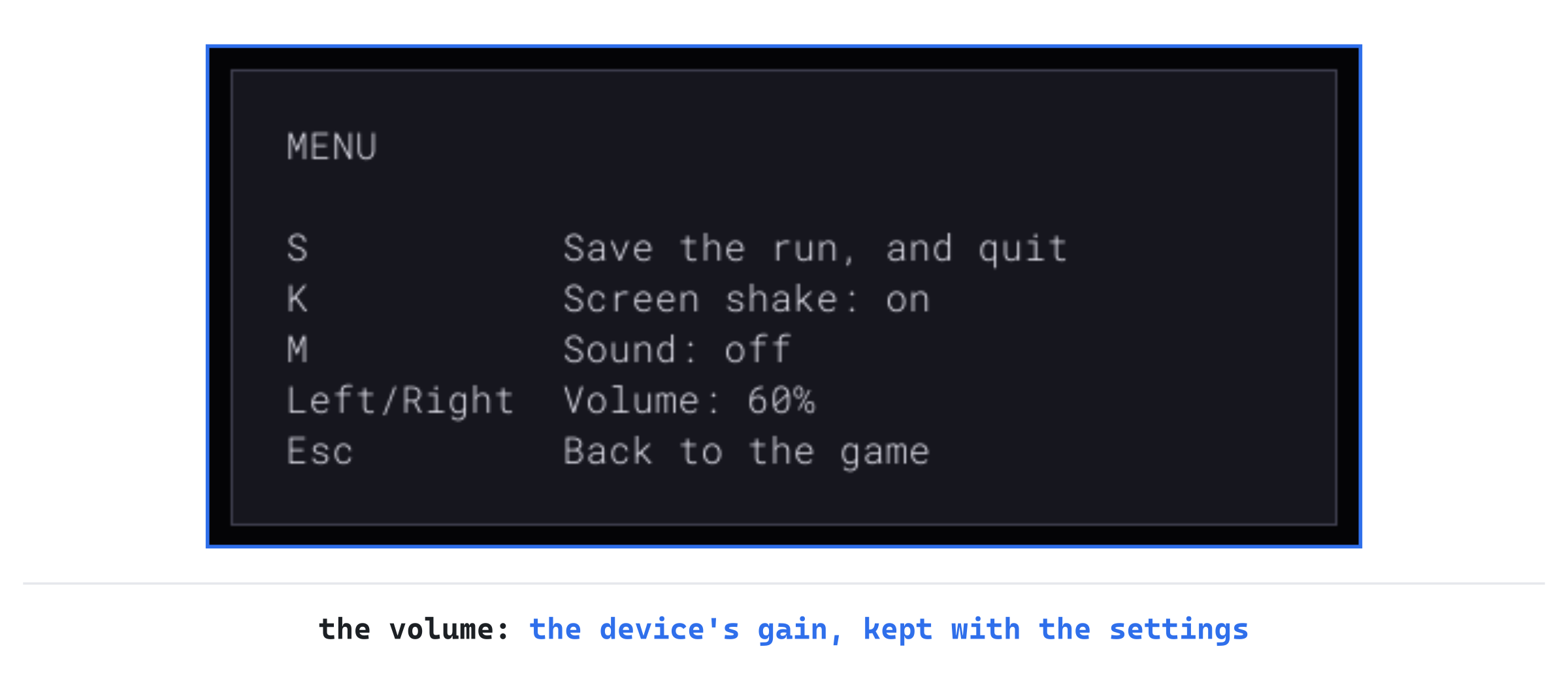
Press Esc, and the game is silent: walk into a wall, and there's no bump. Now M, in the game, makes the log say "Sound on." The bump is back, a little quieter than before. In settings.txt, in the folder %APPDATA%\GameCodeSchool\AmuletsOfSDL, the volume and the muting are kept beside the shaking.
A Tone for a Missing File
A sound file that can't be loaded is logged, and left out. That's easy to miss, since its event plays its other sounds, or nothing. The last part plays a tone in its place: a short note. It says that something happened, and that a file is missing, loudly enough to be noticed.
A Sound Made of Numbers
A tone is a sound made by the program, a sample at a time, rather than read from a file. The purest note is a sine wave: the speaker swinging smoothly back and forth, a set number of times a second. That number is its pitch. The note A above middle C swings 440 times a second. Open SoundBank.cpp, and add this below SOUNDS_FOLDER, inside the unnamed namespace, with a blank line in between:
// The tone a sound whose file can't be loaded plays instead: a short
// note, A above middle C, fading out, so the game still says that
// something happened, and the missing file is easy to notice. It's
// built a sample at a time, in the bank's format: a sine wave, as loud
// as LOUDNESS of the loudest a 16-bit sample can be, getting quieter to
// the end
std::vector<Uint8> makeTone()
{
    constexpr float PITCH = 440.0f;
    constexpr float SECONDS = 0.15f;
    constexpr float LOUDNESS = 0.3f;
    int count = static_cast<int>(FORMAT.freq * SECONDS);
    std::vector<Uint8> samples(count * sizeof(Sint16));
    for (int i = 0; i < count; ++i)
    {
        float time = static_cast<float>(i) / FORMAT.freq;
        float fade = 1.0f - static_cast<float>(i) / count;
        float wave = SDL_sinf(2.0f * SDL_PI_F * PITCH * time);
        Sint16 sample = static_cast<Sint16>(wave * fade * LOUDNESS *
                                            SDL_MAX_SINT16);
        SDL_memcpy(&samples[i * sizeof(Sint16)], &sample, sizeof(sample));
    }
    return samples;
}
In the preceding code, the tone lasts 0.15 seconds, so it has 48,000 times 0.15 samples, 7,200 of them, and two bytes for each. For each sample, time is how far into the tone it comes, in seconds. Then SDL_sinf gives the wave's height at that time, from -1 to 1, swinging 440 times a second. Pi comes from SDL_PI_F, as a float, since a whole swing of SDL_sinf is two pi.
The fade falls from 1 to 0 over the tone, so it dies away rather than stopping with a click. And the height is scaled to LOUDNESS, three tenths of SDL_MAX_SINT16. That's the biggest a 16-bit sample can be.
Each sample is a Sint16, two bytes, but the vector holds bytes. So the sample is copied into its two bytes with SDL_memcpy.
Treating the bytes as Sint16s, with a cast, would be simpler to write. But C++ doesn't allow reading or writing an object through a pointer to another type, and the compiler is free to assume a program doesn't. Copying the bytes is always allowed. The next image shows the tone.

The tone dies away over its 0.15 seconds. A hundredth of a second of it, drawn wider, shows the sine wave's swings.
In Place of a File
The bank makes a tone wherever a file can't be loaded, or converted. Open SoundBank.h, and replace the comment above explicit SoundBank(const GameData& data); with this:
// Opens the audio device, and loads the files in assets/sounds. A file
// that can't be loaded is logged, and a tone plays in its place.
// Without an audio device, the game plays on, in silence
In SoundBank.cpp, in the constructor, find this line:
SDL_Log("Couldn't load %s: %s", path.c_str(), SDL_GetError());Change it to these:
SDL_Log("A tone plays instead of %s, which couldn't be "
        "loaded: %s", path.c_str(), SDL_GetError());
sounds_[static_cast<int>(def.event)].push_back(makeTone());
Then find these lines, a little further down:
SDL_Log("Couldn't convert %s: %s", path.c_str(),
        SDL_GetError());
Change them to these:
SDL_Log("A tone plays instead of %s, which couldn't be "
        "converted: %s", path.c_str(), SDL_GetError());
sounds_[static_cast<int>(def.event)].push_back(makeTone());
The tone takes the missing file's place among its event's sounds. So an event with three files, one of them missing, plays the tone a third of the time. Each message ends with SDL's reason, which ends with a period of its own.
Checkpoint: Close the game, and in your project's assets\sounds folder, rename bump_1.wav to bump_1.old. Press F5. The console window says A tone plays instead of, then the file's path, which couldn't be loaded, and SDL's reason, that it couldn't open the file. Start a run, and walk into a wall a few times: about one bump in three is the tone. Rename the file back to bump_1.wav afterward.
Playing the Game
Play a few floors with the sound on, and the game tells you more than it shows. A shrieker is easy to miss on the screen, but its shriek isn't, and every monster that heard it is on its way. When your health falls below a quarter, a warning sounds, and it's the moment to drink a potion, or to leave. Even a wall walked into, a door opened and a command refused each has its sound, so you know what happened without reading the log.
The sounds follow the fights. A turn of blows is heard in the order it happened, each sound with its flash, and a kill together with its hit. When you press keys quickly, each key cuts off the sounds still waiting, as it ends the effects. So you hear only what you've stayed to see.
If you play somewhere quiet, M turns the sound off without a trip to the menu, and M again turns it back on.
Understanding the Code
Each thing that makes a sound is a SoundEvent, named in SOUND_EVENT_NAMES for sounds.txt. In that file, each [sound] record gives an event's files. The data's readSounds reads and checks the list with the rest of the data, into SoundDefs. The SoundBank is made once, in main. It loads every file with SDL_LoadWAV, converts it to one format with SDL_ConvertAudioSamples, and keeps each event's sounds as bytes, in SoundEvent's order.
The game asks for a sound with playSound, which hands it to the effects. In the effects, sound notes it with the start of the last flash or missile asked for, lastStart_, or with now, if nothing is playing. A miss, or an arrow that breaks, goes through playSoundAt and soundAt instead, with the moment the arrow lands, which missile returns. The loop plays each sound as its moment comes, from soundsDue. A key's finish drops the sounds still waiting, with the effects.
The bank plays a sound by putting one of the event's sounds, chosen with SDL_rand, into one of its STREAMS streams. Each stream is bound to the device, which mixes them. The bank takes a stream with nothing left to play. With every one busy, it cuts one short, each in turn.
The device's gain is the volume, set by setVolume from the settings' volume and muted. M and the menu change those, and settings.txt keeps them. A file that can't be loaded, or converted, is logged, and makeTone makes a tone to play in its place.
Experimenting
Try each of these, and put each back afterward:
- One stream. In
SoundBank.h, setSTREAMSto1. Fight the jackals as the Fighter, and kill one: its death cuts its hit short, before the hit is heard. The one stream is busy, so only the death is heard. - One sound for every hit. In
sounds.txt, change the hit's files tohit_1.wavalone. Fight the jackals as the Fighter, and every blow sounds exactly the same, which soon sounds like a machine rather than a fight. - A higher note. In
makeTone, setPITCHto880.0f, and renamebump_1.wavtobump_1.old, as at the last checkpoint. The tone is an octave higher, since doubling a note's swings a second raises it an octave. - Too early. In
playSound, play the sound at once again, as it did before sounds waited their turn, withsounds_.play(event);. Slow the missiles again, withMISSILE_MSat200, and fire at a jackal. The hit and the death are heard as the arrow leaves, long before it lands. A miss still waits for the arrow to land, sinceplaySoundAtstill goes through the effects.
The first shows why the bank has eight streams, the second why most events have several sounds, and the third how a tone's pitch works. The fourth shows what playing the sounds with the effects is for.
Common Errors and Fixes
If the game didn't build, or doesn't behave as described, the problem is probably one of these.
C2607: static assertion failed, in SoundEvent.h, on the line of the static_assert. The events and their names aren't in step: an event was added without a name, or a name without an event. Count them against each other, and add what's missing, in the same place in both.
C2061: syntax error: identifier 'SoundBank', in Game.h, followed by more. The Game takes and keeps a SoundBank, but Game.h doesn't include SoundBank.h. So the compiler hasn't heard of one. Add #include "SoundBank.h" below #include "Settings.h".
C2280: 'SoundBank::SoundBank(const SoundBank &)': attempting to reference a deleted function, in main.cpp. The Game's constructor takes the bank by value, SoundBank sounds. So making a Game would copy the bank, and the bank can't be copied. The constructor's parameter must be a reference, SoundBank& sounds, in Game.h and in Game.cpp.
The game is silent, and the console window says No sound: Audio subsystem is not initialized. The bank tried to open a device before SDL's audio had been started. Check the call to SDL_InitSubSystem(SDL_INIT_AUDIO) in main, below the call to SDL_Init.
The game is silent, and the console window says Couldn't load for every sound, with Couldn't open and the file's path. The sounds aren't in your project's assets\sounds folder. Copy the sounds folder from the book's repository into assets, beside the font, as you did for the bank. Once a missing file plays a tone, at the end of the chapter, the console says A tone plays instead of for every file, and every sound is the tone.
FAQ
Q) Why does a volume of 50% sound more than half as loud?
A) The ear doesn't hear gain the way the numbers measure it. Halving a sound's samples makes it about six decibels quieter, which the ear hears as quieter, but not as half as loud. By a common rule of thumb, a sound must be about ten decibels quieter to seem half as loud, which is a gain of about a third. Many games turn their volume setting into a gain with a curve for that reason. Ours keeps the plain percentage, which is simple, and the steps of ten still go from loud to silent.
Q) Why WAV files, rather than MP3 or Ogg Vorbis files, which are much smaller?
A) SDL reads WAV files by itself, and nothing else. An MP3 or an Ogg file is compressed, and needs a decoder to turn it back into samples. That means a library such as SDL_mixer, or a single-file decoder such as stb_vorbis. The book's sounds come to 2.4 MB as WAV files, which is small for a game. They load quickly, with nothing to decode.
Q) Why does a key throw away the sounds that haven't played yet?
A) Because they belong to effects the key has just ended. A hit heard after its flash was skipped would come from nowhere. And in a run of quick keys, the sounds would pile up behind the game, and be heard turns late. The sounds already playing play on, since they're in the streams. Only those still waiting go.
AI Exercise (Optional)
Many games make a sound quieter the further from the player it happens, so a door opened across a room is faint, and a blow beside you is loud. If you'd like to add that, with an AI's help, open your AI chatbot of choice, and try a prompt like this:
"I'm writing a roguelike in C++ with SDL 3. A class SoundBank keeps each event's sounds as std::vector<Uint8> samples, 16-bit mono at 48,000 a second, and plays one with play(SoundEvent event), putting it into whichever of eight streams, pointers to SDL_AudioStream bound to one device with SDL_BindAudioStream, has nothing queued, or cutting one short with SDL_ClearAudioStream. The device's gain is the volume, set with SDL_SetAudioDeviceGain. The game asks for sounds with Game::playSound(SoundEvent event), which queues them with its effects, by Effects::sound(SoundEvent event, Uint64 now), or with Game::playSoundAt(SoundEvent event, Uint64 when), by Effects::soundAt(SoundEvent event, Uint64 when), for a miss heard as the arrow lands, and the loop plays them later. I'd like each sound to be quieter the further from the player it happens, given the Point where it happens: full volume within two cells, falling to a quarter at twenty cells or more, counting cells as the larger of the two distances, across and down. Show me every change, with each curly brace on its own line, and explain it."
Notice what the preceding prompt does. It says that sounds are queued, and played later. So the answer knows the loudness must travel with the sound, from where it's asked for to where it's played.
When the answer comes back, check how it sets the loudness. A stream's own gain is set by SDL_SetAudioStreamGain, and the device's gain scales it, so the two multiply, as they should. But the streams are reused, so a stream's gain must be set every time a sound goes into it. Otherwise a faint sound's gain stays on the stream, and the next sound in it is faint too. And check the sounds that have no place, such as the stairs, or a command refused: they should play at full volume.
Summary
Every event in the game has its sound now, two or three versions of most, listed in sounds.txt and checked with the rest of the data. The bank loads them once, converted to one format, and plays each on a stream of its own, which the device mixes. Each plays with the effects, so it's heard as the thing it belongs to is seen, and a miss as the arrow lands. M and the menu turn the sound off, or set its volume, kept in settings.txt, and a file that can't be loaded plays a tone in its place. In Chapter 26, the game can be won: the third Amulet ends the run in victory, and every run, won or lost, leaves a morgue file behind, and a score for the table of high scores.