
The game plays well, but it plays quietly. A blow lands, and the only sign is a line in the log. An arrow reaches its target the moment it's fired, and a fireball is a message.
Game makers call the small, quick effects that make an action feel like it happened juice: a flash on the cell that was struck, an arrow flying across the room, the screen jolting at a big hit. This chapter adds them without slowing the game down. Every effect lasts a fraction of a second, and any key cuts them short.
The next image shows a fireball's burst, caught as it flashes over the jackal it killed.
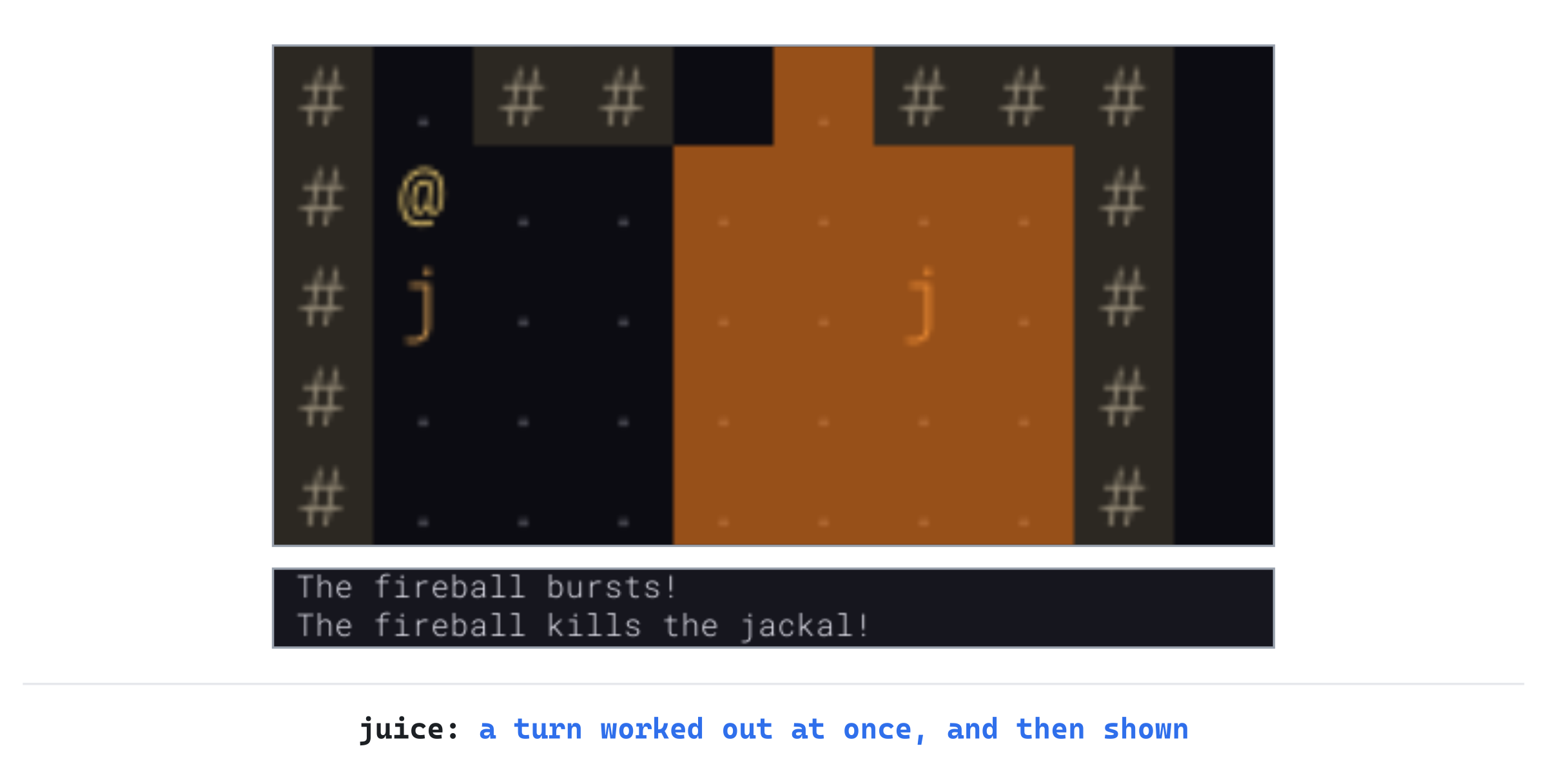
The game still works out a whole turn at once, in an instant, as it always has. What's new is that the player sees the turn play out afterward, a moment at a time, in the order it happened.
Chapter 24 in the book's repository holds this chapter's finished project. The chapter carries on in your own project from Chapter 23, or from the book's Chapter 23 folder.In this chapter, we will:
- Flash the cell of every hit, red on a monster and white on the player, fading in a sixth of a second
- Play a turn's effects one after another, in the order they happened, with the loop waking only while they play
- Fly arrows and darts along their paths, flash bolts and bursts, and keep a monster killed in sight until the blow lands
- Shake the screen at a big hit or a blast, moved by the clock, not the game's dice
- Keep the player's settings in a file of their own, and let them turn the shaking off from the menu
There are four checkpoints along the way. Let's start with the plan.
Planning the Chapter
This chapter adds four files, and changes seven:
| File | Status | What it's for |
|---|---|---|
src/Effects.h, src/Effects.cpp |
New | The effects playing and waiting: flashes, missiles in flight, monsters just killed, and shakes |
src/Settings.h, src/Settings.cpp |
New | The player's settings, kept in settings.txt: so far, whether the screen shakes |
src/Game.h, src/Game.cpp |
Changed | The loop, an effect for every hit, their drawing, and a key in the menu |
src/Camera.h, src/Camera.cpp |
Changed | The map view, shaken |
src/Common.h |
Changed | The colors of hits, lightning and fire |
src/Data.cpp, data/items.txt |
Changed | The arrow, which archers' arrows look like as they fly |
| The other files | Unchanged |
The next image shows how the files fit together at the end of the chapter. The effects belong to Game, which asks for them. They borrow a missile's look and a monster's kind from the views' own types. The settings stand apart, reading and writing their file through Files and Records, as the save does.

Most of the work is in Game.cpp, which grows by about 190 lines. The effects take about as many, between their header and their code. The settings come to about 75, and the camera and the colors change by a few lines each.
A Turn, Played Back
The game works out a turn in an instant. When the player fires an arrow, the code finds the jackal it hits, rolls the damage, kills the jackal, takes it off the map, and lets the other monsters act, one of them biting the player. All of that happens before anything is drawn. Drawn as it stands, the screen jumps from before the turn to after it.
So each event asks for an effect at the moment it happens in the code. Then the effects play one after another, in the order they were asked for. The arrow flies, the jackal's cell flashes red, and then the player's flashes white. The jackal is shown on its cell until the blow lands, though the game took it off the map at once. The next image shows that turn, worked out at the top, and played back below.
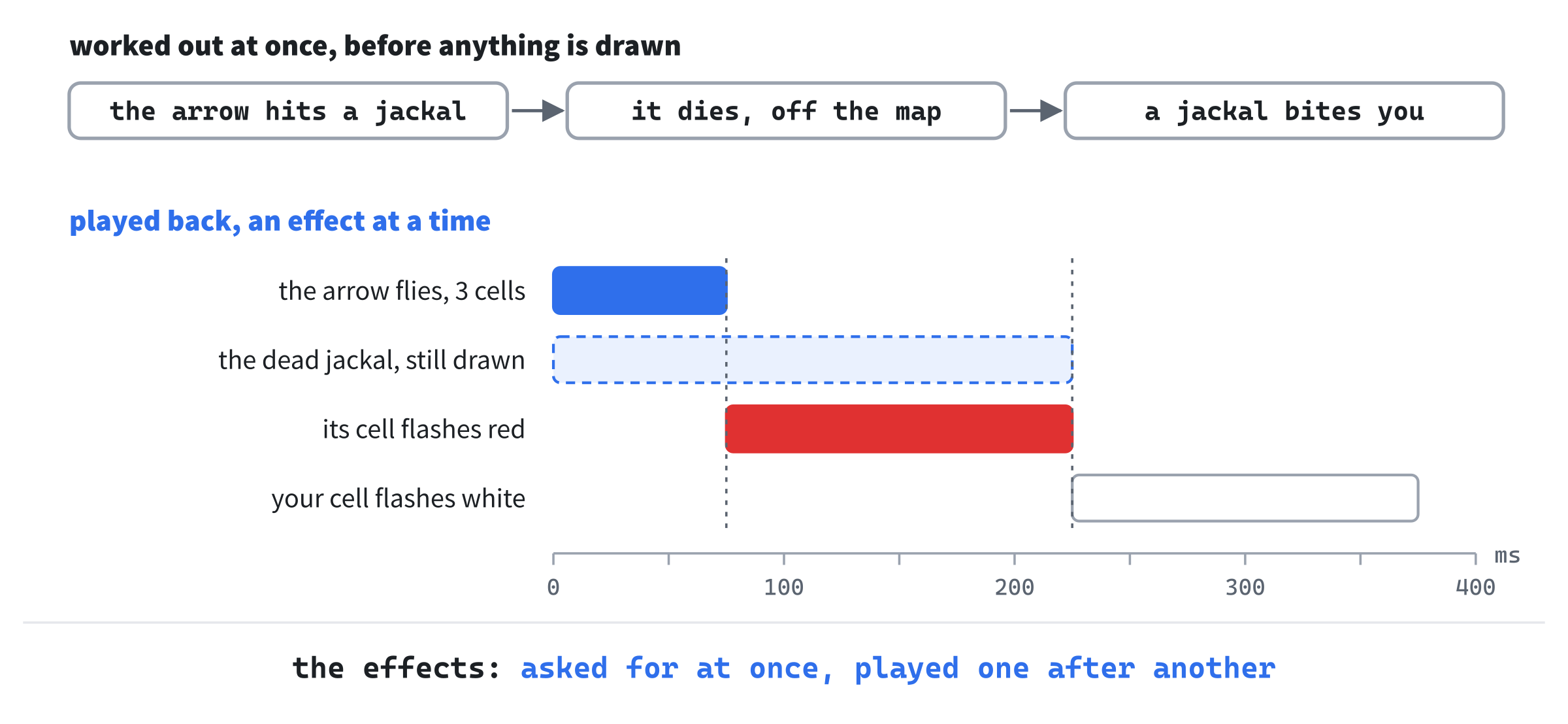
The playback is only drawing. Nothing in the game waits for it. So a seed plays the same run with effects or without, and the bot in Chapter 27 plays without drawing at all.
While effects play, the loop wakes about 60 times a second to draw them. The moment the last one ends, it goes back to sleeping until something happens. A key ends any effects still playing, so they never hold up a player who already knows what happened.
Hits Flash
This part builds the effects with a single kind, a flash. Then it flashes the cells that the player's blows and missiles strike, and the player's own cell when they're hurt.
Colors for a Hit
A flash is a see-through color drawn over a cell, so what was hit shows through it. Open Common.h, and add the two colors at the end of the Palette namespace, below ARMOR, with a blank line in between:
// A hit's flash, over the cell struck: red on a monster, and white on
// the player, see-through, so what was hit shows through it
constexpr SDL_Color MONSTER_HIT = { 230, 40, 30, 170 };
constexpr SDL_Color PLAYER_HIT = { 255, 255, 255, 170 };
The last number of each color is its alpha, how solid it is. It goes from 0 for not at all to 255 for completely. At 170, a flash covers about two thirds of what's under it. So the monster or the player still shows through, as the death screen's shade let the dungeon show through in Chapter 6.
An Effect
In Solution Explorer, right-click src, choose Add > New Item, and add a Header File (.h) called Effects.h. Type the first part, an effect:
#pragma once
#include <SDL3/SDL.h>
#include <vector>   // std::vector, for the effects and their cells
#include "Common.h"

// An effect, shown over the map for a moment, so the player sees what
// happened. Its start and end are times in milliseconds, as SDL_GetTicks
// gives them
struct Effect
{
    std::vector<Point> cells;
    SDL_Color color = {};
    Uint64 start = 0;
    Uint64 end = 0;
};
An effect is the cells it covers, a color, and when it plays, from start to end. The times are in milliseconds, as SDL_GetTicks counts them, the clock Chapter 23's loop uses. An effect knows when it plays, so drawing it is only a matter of asking where it's got to at the moment.
The effects belong together, in a class that keeps those playing and those waiting their turn. Add it below the struct, with a blank line in between:
// The effects playing, and those waiting their turn. The game works out a
// whole turn at once, in an instant, but its effects play one after
// another, in the order they're asked for, so the player sees the turn in
// the order it happened
class Effects
{
public:
    // How long a flash lasts
    static constexpr Uint64 FLASH_MS = 150;

    // Cells flash a color, once the effects before it have played
    void flash(const std::vector<Point>& cells, SDL_Color color,
               Uint64 now);
A flash lasts FLASH_MS, 150 milliseconds. That's about a sixth of a second: long enough to see, and short enough not to wait for. It's a static constexpr member, one number for the whole class, as the Dijkstra map's UNREACHED is.
The game asks for a flash with flash, giving the time it's asked for. That time is all Effects knows of the clock. It never reads the clock itself, so it does exactly what it's told. That makes it easy to reason about.
The rest of the class keeps the effects up to date, and answers the game's questions about them. Add it below flash's declaration, with a blank line in between:
    // Forgets the effects that have played
    void update(Uint64 now);

    // True while an effect is playing, or waiting its turn
    bool playing() const;

    // Every effect, for drawing, which leaves out those that haven't
    // started yet, or have ended
    const std::vector<Effect>& all() const;

    // Ends them all at once, as a key does: the player wants to get on
    void finish();

private:
    // When the next effect can start: now, or when the last one ends
    Uint64 nextStart(Uint64 now) const;

    std::vector<Effect> effects_;
};
The effects themselves are private, in a vector. So is a helper, nextStart, that only the class needs.
One After Another
Now add a C++ File (.cpp) called Effects.cpp. Type its includes and flash:
#include "Effects.h"
#include <vector>   // std::erase_if, to forget the effects that have played

void Effects::flash(const std::vector<Point>& cells, SDL_Color color,
                    Uint64 now)
{
    Effect effect;
    effect.cells = cells;
    effect.color = color;
    effect.start = nextStart(now);
    effect.end = effect.start + FLASH_MS;
    effects_.push_back(effect);
}
A flash doesn't start when it's asked for. It starts when nextStart says, which is when the effects before it have ended. That's what plays a turn back in order. Add update, playing and all below it, with a blank line in between:
void Effects::update(Uint64 now)
{
    std::erase_if(effects_, [now](const Effect& effect)
    {
        return effect.end <= now;
    });
}

bool Effects::playing() const
{
    return !effects_.empty();
}

const std::vector<Effect>& Effects::all() const
{
    return effects_;
}
The function update forgets the effects that have ended, with std::erase_if and a lambda, as Chapter 6 took the dead away. This lambda needs the time, so it captures it: [now] copies now into the lambda, where its body can use it. Chapter 10's lambda captured t in the same way. The function playing says whether any effect is left, playing or waiting. And all hands them over, for drawing.
Last, add finish and nextStart below all, with a blank line in between:
void Effects::finish()
{
    effects_.clear();
}

Uint64 Effects::nextStart(Uint64 now) const
{
    Uint64 start = now;
    for (const Effect& effect : effects_)
    {
        start = SDL_max(start, effect.end);
    }
    return start;
}
The function finish forgets the effects all at once, for a key. And nextStart finds the latest end of all the effects there are, or now, if they've all ended.
The Game's Effects
The game holds the effects. Open Game.h, and add the new header below #include "DijkstraMap.h":
#include "Effects.h"Add the effects themselves below command_, with a blank line above them:
// What's being shown of the turn just played
Effects effects_;
A hit shows through one function, showHit, called where the damage is dealt. Add its declaration below hurtMonster's:
void showHit(Point cell);And drawing the effects is a function of its own, as drawing the line of fire is. Add its declaration below drawLineOfFire's:
void drawEffects() const;Both get their definitions later in this part, once the loop knows how to play the effects.
The Loop, While Effects Play
The loop sleeps until something happens, or until a running command's next step is due. While effects play, it can't sleep long: an effect changes every frame. Open Game.cpp, and add the time between frames below REST_TURNS, with a blank line above it:
// While effects play, the screen is drawn every FRAME_MS milliseconds,
// about 60 times a second
constexpr Sint32 FRAME_MS = 16;
Sixteen milliseconds is about a sixtieth of a second, which is as often as most screens show a new picture. The wait is a Sint32, since that's what SDL_WaitEventTimeout takes. In run, replace the comment above SDL_Event event; with this:
// Sleep until something happens. A turn-based game has nothing to
// do while the player is thinking. But while effects play, the
// sleep lasts only a frame, so they're drawn as they change; and
// while a command runs, it lasts only until the command's next step
// is due, so the player sees it happen, a step at a time. A step is
// due COMMAND_STEP_MS after the one before, however many events
// come in between, but a command waits for the effects to finish
Then find these lines, below it:
Uint64 now = SDL_GetTicks();
if (command_ && now >= stepDue)
{
    stepCommand();
    stepDue = now + COMMAND_STEP_MS;
}
else if (command_)
{
    Sint32 wait = static_cast<Sint32>(stepDue - now);
Change them to these:
bool animating = effects_.playing();
Uint64 now = SDL_GetTicks();
if (command_ && !animating && now >= stepDue)
{
    stepCommand();
    stepDue = now + COMMAND_STEP_MS;
}
else if (animating || command_)
{
    Sint32 wait = animating ? FRAME_MS
                            : static_cast<Sint32>(stepDue - now);
The flag animating is true while any effect is playing or waiting. A command's step is taken only when no effect is playing, so a command waits for a turn's effects to end before playing the next turn. While effects play, the loop waits for an event for no longer than a frame. The conditional operator, ? :, picks the wait: a frame while animating, or else the time left until a command's step is due.
Once the event is handled, the effects that have ended are forgotten. And while effects were playing, the screen is drawn again. Add this below the else that logs the failure, with a blank line in between:
// The effects that have played are forgotten. While any were
// playing, the screen is drawn again: their next frame, or the
// first frame without them
effects_.update(SDL_GetTicks());
if (animating)
{
    redraw_ = true;
}
The screen is drawn again whenever effects were playing at the start of the time around the loop. So once the last effect has ended and been forgotten, the screen is drawn once more, without it. The next time around, animating is false, and the loop goes back to sleeping until something happens.
A Key Ends Them
A player who knows what happened shouldn't have to wait for the effects to say so. Any key ends the effects still playing, and then does what it does. In handleEvent, replace the comment above if (!command_) with this:
// A key ends any effects still playing: the player has seen enough,
// and wants to get on. A key pressed while a command runs stops it,
// and does nothing else. A key held down repeats, and its repeats
// are ignored
Then add this line directly below it:
effects_.finish();A click ends them too, since it starts a shot or a walk, as a key does. In handleEvent, find this line:
handleClick(event);Change it to these:
// A click ends any effects still playing, as a key does
effects_.finish();
handleClick(event);
So a click, like a key, never waits for the effects. It ends them, and then does what it always did.
A Hit Flashes
A hit shows as a flash on the cell struck: red for a monster, and white for the player. Add showHit below hurtMonster:
// A hit shows: the cell struck flashes, red for a monster, and white for
// the player, after any effects already waiting
void Game::showHit(Point cell)
{
    SDL_Color color = Palette::MONSTER_HIT;
    if (cell == player_.pos)
    {
        color = Palette::PLAYER_HIT;
    }
    effects_.flash({ cell }, color, SDL_GetTicks());
}
The braces in { cell } make a vector of one cell, for flash. It takes a vector, since later flashes cover many cells. The time is now, and the flash starts after any effects already waiting.
Design note: how hard a hit flashes. Brogue flashes a creature that's hit, too, red for a blow. The more of the creature's health the hit takes, the stronger the flash: half strength for a scratch, rising toward full strength for a hit that nearly kills. A killing blow doesn't flash at all, since the creature is gone. Ours keeps to one strength, and lets the color say whose hit it was. In the next part, a killing blow flashes too, on a ghost of the monster, so the player sees where it landed.
Now each hit shows, just after its damage is dealt. The player's own blow comes first. In playerAttacks, add the line showHit(monster.pos); below monster.hp -= damage;.
A missile's hit comes next. The cell it struck is landing, where the missile stopped. In shootMissile, add the line showHit(landing); below hurtMonster(*target, damage, name);.
The flash goes there, and not in hurtMonster, which deals the missile's damage. A bolt, a burst and a dragon's fire go through hurtMonster too, and each can strike several monsters at once. The next part flashes the monsters they strike together, rather than one after another.
Six places hurt the player in a way that should flash. Their own fireball can catch them in its burst, and a dart trap can hit them. The other four are monster attacks: a blow, an archer's arrow, a mage's lightning and a dragon's fire.
Rather than add a line to each, the player's damage gets a function of its own, hurtPlayer. It takes the health, as hurtMonster does for a monster, and shows the hit. In Game.h, add its declaration below showHit's:
void hurtPlayer(int damage);Five of the six take the health in the same words. In Game.cpp, open Find and Replace with Ctrl+H. Type player_.hp -= damage; in the top box, and hurtPlayer(damage); in the box below it, and click Replace All. It replaces five, in castFireball and the four monster attacks.
The sixth, the dart trap, rolls its damage in the same statement. In springTrap, find these lines:
player_.hp -= rollDamage(rng_, DART_MIN, DART_MAX, 0,
                         player_.defense);
Change them to these:
hurtPlayer(rollDamage(rng_, DART_MIN, DART_MAX, 0,
                      player_.defense));
As with updateSight in Chapter 12, the Replace All comes before hurtPlayer is typed. Typed first, its own player_.hp -= damage; would have been replaced too. Then it would call itself, over and over, until the program crashed. Now add it below showHit:
// The player takes damage, and the hit shows
void Game::hurtPlayer(int damage)
{
    player_.hp -= damage;
    showHit(player_.pos);
}
Two hurts don't flash. Poison takes its health in tickStatuses, a little every turn. A flash every turn of it would be noise rather than news. And a fall through a trapdoor lands the player on a new floor, where a flash on the cell they fell from would mean nothing.
Drawing the Effects
The effects are drawn over the map, the monsters and the player, and under the line of fire and the panels. Add drawEffects below drawLineOfFire:
// The effects playing now, over the map: each flash fades as it goes on.
// An effect still waiting its turn, or over, isn't drawn. Only the cells
// in sight are, as with the line of fire
void Game::drawEffects() const
{
    Uint64 now = SDL_GetTicks();
    SDL_SetRenderDrawBlendMode(renderer_, SDL_BLENDMODE_BLEND);
    for (const Effect& effect : effects_.all())
    {
        bool showing = effect.start <= now && now < effect.end;
        if (!showing)
        {
            continue;
        }
        float left = 1.0f - static_cast<float>(now - effect.start) /
                            static_cast<float>(effect.end - effect.start);
        SDL_Color color = effect.color;
        color.a = static_cast<Uint8>(color.a * left);
        setColor(color);
        for (Point cell : effect.cells)
        {
            if (!level_.map.isVisible(cell.x, cell.y))
            {
                continue;
            }
            SDL_FRect rect = view_->camera().cellRect(cell);
            SDL_RenderFillRect(renderer_, &rect);
        }
    }
    SDL_SetRenderDrawBlendMode(renderer_, SDL_BLENDMODE_NONE);
}
In the preceding code, showing is true only while an effect plays, so one waiting its turn, or over, is skipped. A flash playing works out how much of it is left, from 1 at its start to 0 at its end. Its color's alpha is multiplied by that, so it fades as it goes. The blend mode lets the color mix with what's under it, and goes back to none afterward, as the other drawing expects.
Only the cells in sight are drawn, as with Chapter 21's line of fire, and for the same reason. An arrow can fly on out of sight, and a flash where it struck would give away a monster the player can't see. In drawGame, add the line drawEffects(); below view_->drawPlayer(player_.pos, *player_.classDef);.
Checkpoint: Press F5, with seed 23 in Command Arguments, and start a new run as the Fighter, with a. Press j six times, down into the room below, where three jackals come for you. Wait with the period. When a jackal bites, your cell flashes white for an instant, and when you strike back, its cell flashes red. Fight on, pressing keys quickly: every key ends the flashes still playing, so the game never makes you wait for them. The next image shows a bite, slowed down to catch it.
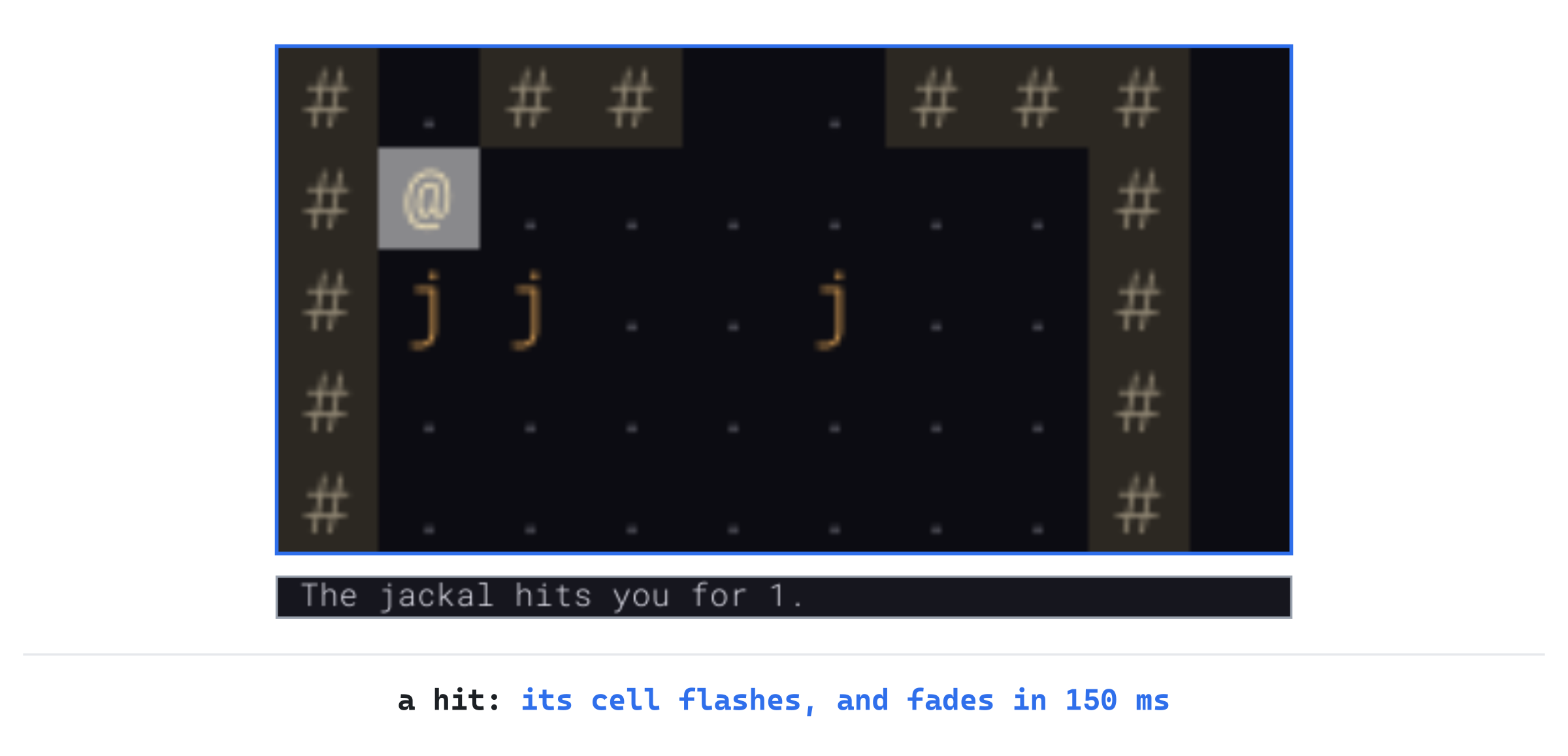
The Fighter still shows through the white, which fades to nothing in a sixth of a second. A jackal your blow kills is another matter. The game takes it off the map at once, so its red flash lights an empty floor. That's what the next part puts right.
Missiles, Bolts and Bursts
A flash shows where a hit landed, but not how it got there. This part flies missiles along their paths, flashes a bolt's whole line and a burst's whole area, and keeps a monster that's just been killed in sight until the blow that killed it has landed.
Three Kinds of Effect
An effect becomes one of three kinds: a flash, as before; a missile, something flying along a path, drawn as the item it is; and a ghost, a monster already killed, drawn on its cell until the effects before it have played. Open Effects.h. A missile needs the item's look, and a ghost the monster's kind. The views' header has both. Add it below #include "Common.h":
#include "View.h"Add the kinds below the includes, with a blank line in between:
// What an effect shows
enum class EffectKind
{
    Flash,     // cells flashing a color, which fades
    Missile,   // something flying along a path, a cell at a time
    Ghost,     // a monster already killed, shown until the blow lands
};
An effect now has a kind, and the fields its kind needs. Find the struct:
struct Effect
{
    std::vector<Point> cells;
    SDL_Color color = {};
    Uint64 start = 0;
    Uint64 end = 0;
};
Change it to this:
struct Effect
{
    EffectKind kind = EffectKind::Flash;
    std::vector<Point> cells;              // a flash's, or a missile's path
    SDL_Color color = {};                  // a flash's
    ItemLook look = {};                    // a missile's
    const MonsterDef* monster = nullptr;   // a ghost's, on its one cell
    Uint64 start = 0;
    Uint64 end = 0;
};
Each effect has every field, though it uses only some of them. A flash uses its color, a missile its look, and a ghost its monster's kind, as a pointer to the kind the game's data keeps. That's simpler than a struct for each kind, and wastes only a few bytes, for effects that last a fraction of a second. The kind starts as a flash, so the hit flashes made earlier in the chapter still work unchanged.
A missile takes MISSILE_MS, 25 milliseconds, to fly each cell of its path, so an arrow crosses a room in a quarter of a second. Add it below FLASH_MS, with a blank line in between:
// How long a missile takes to fly a cell
static constexpr Uint64 MISSILE_MS = 25;
Add the functions that ask for the new kinds below flash's declaration, with a blank line in between:
// Something flies along a path, once the effects before it have played
void missile(const std::vector<Point>& path, const ItemLook& look,
             Uint64 now);

// A monster that's just been killed stays on its cell, from now until
// the effects asked for so far have played: the blow that killed it
void ghost(Point cell, const MonsterDef& def, Uint64 now);
Their definitions go in Effects.cpp, next.
A Missile and a Ghost
In Effects.cpp, add both below flash, with a blank line in between:
void Effects::missile(const std::vector<Point>& path, const ItemLook& look,
                      Uint64 now)
{
    Effect effect;
    effect.kind = EffectKind::Missile;
    effect.cells = path;
    effect.look = look;
    effect.start = nextStart(now);
    effect.end = effect.start + MISSILE_MS * path.size();
    effects_.push_back(effect);
}

void Effects::ghost(Point cell, const MonsterDef& def, Uint64 now)
{
    Effect effect;
    effect.kind = EffectKind::Ghost;
    effect.cells = { cell };
    effect.monster = &def;
    effect.start = now;
    effect.end = nextStart(now);
    effects_.push_back(effect);
}
In the preceding code, a missile waits its turn, as a flash does, and takes MISSILE_MS for each cell of its path. A ghost doesn't wait: it starts now, since the monster is on its cell already. It ends when the effects asked for so far have ended. So a ghost asked for just after the blow that killed its monster lasts exactly until that blow's flash has faded.
A Missile's Flight
The player's arrows, darts and thrown daggers all fly through shootMissile. Until now, it walked the path and dealt with the first creature it met, in the same loop. Now it finds where the missile stops first, so it can fly it there before the hit is shown. Replace the comment above void Game::shootMissile(Item missile, const std::vector<Point>& path, with this:
// A missile flies along the path, to the first creature on it, or the
// path's end, and the player sees it fly. A creature is hit with a chance
// that falls with distance, and a hit does a roll of the damage, less its
// defense, but at least 1. Hit or miss, the creature hunts the player if it
// lives, and the missile lands where it stopped, but an arrow breaks one
// time in BREAK_ONE_IN
Then find these lines, inside it:
Point landing = path.back();
for (size_t i = 0; i < path.size(); ++i)
{
    Monster* target = monsterAt(path[i]);
    if (target == nullptr)
    {
        continue;
    }
    landing = path[i];
    int chance = hitChance(static_cast<int>(i) + 1);
Change them to these:
size_t stop = path.size() - 1;
for (size_t i = 0; i < path.size(); ++i)
{
    if (monsterAt(path[i]) != nullptr)
    {
        stop = i;
        break;
    }
}
Point landing = path[stop];
std::vector<Point> flight(path.begin(), path.begin() + stop + 1);
effects_.missile(flight, itemLook(missile), SDL_GetTicks());

Monster* target = monsterAt(landing);
if (target != nullptr)
{
    int chance = hitChance(static_cast<int>(stop) + 1);
The loop only finds the first cell with a monster on it, stop, or the path's last cell if there's none. The flight is the path up to and including that cell. A vector can be made from part of another, by giving it two iterators: where to start, path.begin(), and where to stop, just past the cell where the missile stops. Then the missile flies, and the rest of the function deals with whatever is on the landing cell, as the loop's body did. The dice are rolled in the same order as before, so a seed plays the same run.
The hit's flash now comes after the flight, since the flight is asked for first. A monster the hit kills stays in sight until the flash has faded. Add these lines directly below showHit(landing);:
if (!target->isAlive())
{
    showKilled(*target);
}
The function no longer leaves a loop, so the break at the end goes. Find these lines:
    alarm(*target);
}
break;
Change them to these:
    alarm(*target);
}
The rest of shootMissile is as it was. An arrow may break, and otherwise falls near the cell where it stopped.
A Monster Killed Stays
The game takes a dead monster off the map the moment it dies. Without a ghost, the arrow would fly at an empty cell, and the flash would light an empty floor. In Game.h, add showKilled's declaration below hurtPlayer's:
void showKilled(const Monster& monster);In Game.cpp, add showKilled below hurtPlayer:
// A monster just killed is still shown on its cell, until the effects
// asked for so far have played: the blow that killed it has landed, and
// its flash has faded
void Game::showKilled(const Monster& monster)
{
    effects_.ghost(monster.pos, *monster.def, SDL_GetTicks());
}
The ghost takes the monster's cell, and its kind by reference. It keeps a pointer to the kind, which lasts as long as the game's data does. But it doesn't keep the monster itself, which is about to be erased. The player's own killing blow needs a ghost too. In playerAttacks, add this line directly above log_.add("You kill the " + name + "!");:
showKilled(monster);Now a monster killed by the player's own blow stays in sight until its flash has faded, as one killed by a missile does. A monster that lives through a hit gets no ghost, and it may move before its flash plays, as one fleeing from the blow does. Then the flash lights the cell it left, since a flash marks where the hit landed.
Bolts and Bursts
A bolt of lightning strikes every monster on its line at once, and a burst every monster in its area. Each shows as its whole line or area flashing. Then every monster it struck flashes red, together, since they were all struck at once. Open Common.h, and add the two colors below PLAYER_HIT, with a blank line in between:
// A bolt of lightning's line, and a burst of fire, as they flash
constexpr SDL_Color LIGHTNING = { 160, 200, 255, 190 };
constexpr SDL_Color FIRE = { 255, 130, 30, 190 };
In Game.h, add the declaration of the function that flashes the monsters struck below showKilled's:
void showStruck(const std::vector<Monster*>& struck);In Game.cpp, add showStruck below showKilled:
// Monsters struck together, by a bolt or a burst, flash red together, and
// those it killed are shown until then
void Game::showStruck(const std::vector<Monster*>& struck)
{
    if (struck.empty())
    {
        return;
    }
    std::vector<Point> cells;
    for (const Monster* monster : struck)
    {
        cells.push_back(monster->pos);
    }
    effects_.flash(cells, Palette::MONSTER_HIT, SDL_GetTicks());
    for (const Monster* monster : struck)
    {
        if (!monster->isAlive())
        {
            showKilled(*monster);
        }
    }
}
In the preceding code, the cells of every monster struck flash in a single flash, so they flash together. Those killed stay until it fades. A bolt or a burst that struck nothing shows nothing more.
In castLightning, the line flashes first. Add this line directly below log_.add("A bolt of lightning flashes out!");:
effects_.flash(path, Palette::LIGHTNING, SDL_GetTicks());Then the monsters it struck flash. Add this line directly above castLightning's second loop, for (Monster* monster : struck):
showStruck(struck);The fireball's burst flashes the area it covers, which the function worked out in its loop's head. In castFireball, find these lines:
log_.add("The fireball bursts!");
std::vector<Monster*> struck;
for (Point cell : burstAt(center, FIREBALL_RADIUS))
Change them to these:
log_.add("The fireball bursts!");
std::vector<Point> burst = burstAt(center, FIREBALL_RADIUS);
effects_.flash(burst, Palette::FIRE, SDL_GetTicks());
std::vector<Monster*> struck;
for (Point cell : burst)
The area is kept in a vector, burst, so it can be both flashed and walked. Add this line directly above makeNoise(center, FIREBALL_LOUDNESS);:
showStruck(struck);The burst's flash plays first, and then the monsters it struck flash red, together.
The Monsters' Shots
An archer's arrow flies at the player as the player's do. The archer has no arrow item, since its arrows don't land. So it borrows the look of the game's own arrow, which items.txt must therefore have. Open Data.cpp, and find these lines:
// The kinds of item the game's own code asks for by id, which
// items.txt must have: gold, and the Amulet
const char* const NEEDED_ITEMS[] = { "gold", "amulet" };
Change them to these:
// The kinds of item the game's own code asks for by id, which
// items.txt must have: gold, the Amulet, and the arrow, whose look an
// archer's arrows borrow as they fly
const char* const NEEDED_ITEMS[] = { "gold", "amulet", "arrow" };
The comment in items.txt says what the game needs too. Open data/items.txt, and change the three lines that start # The game needs gold to these four:
# The game needs gold, which lies in piles of its own, the amulet, and
# the arrow, which archers' arrows look like as they fly. Gold and the
# amulet are never chosen as items. There can be up to 10 kinds of potion,
# one for each color.
In Game.cpp, the archer's arrow flies before its hit is rolled. So in monsterShoots, find this line:
int chance = hitChance(stepsBetween(monster.pos, player_.pos));Change it to these:
int steps = stepsBetween(monster.pos, player_.pos);
Item arrow = { data_.findItem("arrow") };
effects_.missile(lineFrom(monster.pos, player_.pos, steps),
                 itemLook(arrow), SDL_GetTicks());
int chance = hitChance(steps);
The arrow's path is Chapter 21's line of fire, from the archer to the player. Its look is the arrow item's, made into an Item of that kind for itemLook. A mage's bolt flashes its line, as the player's does. In monsterCastsLightning, add these lines directly below std::string name = monster.def->name;:
int steps = stepsBetween(monster.pos, player_.pos);
effects_.flash(lineFrom(monster.pos, player_.pos, steps),
               Palette::LIGHTNING, SDL_GetTicks());
A dragon's fire flashes its burst, around the player, and then the other monsters it burned. In monsterBreathes, find these lines:
log_.add("The " + name + " breathes fire!");
for (Point cell : burstAt(player_.pos, BREATH_RADIUS))
Change them to these:
log_.add("The " + name + " breathes fire!");
std::vector<Point> burst = burstAt(player_.pos, BREATH_RADIUS);
effects_.flash(burst, Palette::FIRE, SDL_GetTicks());
std::vector<Monster*> burned;
for (Point cell : burst)
Add this line directly below hurtMonster(*other, damage, "the fire");:
burned.push_back(other);And this one below the loop, directly above makeNoise(player_.pos, FIGHT_LOUDNESS);:
showStruck(burned);So a dragon's fire plays as the player's fireball does: the burst first, then your own hit, and then the monsters it burned, together.
Drawing Them
A ghost and a missile are drawn as the views draw a monster and an item. The flashes go over them, so a flash lights the ghost it falls on. Replace the comment above drawEffects with this:
// The effects playing now, over the map, those waiting their turn or over
// left out: a monster killed, still standing until the blow that killed it
// has landed; a missile, on the cell of its path it's reached; and a flash,
// its color fading as it goes on. Flashes go last, over the rest. Only the
// cells in sight are drawn, as with the line of fire
Then add the ghosts and missiles above the first SDL_SetRenderDrawBlendMode in drawEffects, with a blank line in between:
for (const Effect& effect : effects_.all())
{
    bool showing = effect.start <= now && now < effect.end;
    if (showing && effect.kind == EffectKind::Ghost)
    {
        Point cell = effect.cells.front();
        if (level_.map.isVisible(cell.x, cell.y))
        {
            view_->drawMonster(cell, *effect.monster);
        }
    }
    else if (showing && effect.kind == EffectKind::Missile)
    {
        size_t reached = (now - effect.start) / Effects::MISSILE_MS;
        reached = SDL_min(reached, effect.cells.size() - 1);
        Point cell = effect.cells[reached];
        if (level_.map.isVisible(cell.x, cell.y))
        {
            view_->drawItem(cell, effect.look, true);
        }
    }
}
A missile works out how many cells it has flown, from the time since it started. Then it's drawn on that cell of its path, never past the last. Integer division, /, drops the remainder, so the missile stays on a cell for the whole of its 25 milliseconds there. It's drawn lit, as an item in sight is.
A ghost or a missile is drawn only if its cell is in sight, as a flash's cells are. The burst of a fireball can reach around a corner, and the ghost of a monster it killed there would show the player what's around it. The flashes' loop now skips the other kinds. In drawEffects, change if (!showing) to if (!showing || effect.kind != EffectKind::Flash).
Checkpoint: Press F5, with seed 23, and start a new run as the Rogue, with b. Press j six times, then f, and Enter to fire at the nearest jackal. The arrow flies to it, a cell at a time, and the jackal's cell flashes red. The jackal stays in sight until the flash fades, though the log already says the arrow killed it. The next image shows the arrow's flight, slowed down, and caught at three moments.

Now start again as the Mage, with c, take the same six steps, and press z and Enter. The bolt's line flashes pale blue, and then the jackal it struck flashes red. The next image shows the bolt.

Then read your scroll of fireball, with i and b. The cursor goes to the nearest jackal, and the shaded cells show where the burst would reach, your own cell among them. Press Tab to aim at the other jackal instead, and Enter. The burst flashes orange over the cells around it, and then the jackal flashes red.
The Screen Shakes
A flash says where a hit landed, but every hit flashes alike, a jackal's nip and an ogre's blow. This part shakes the screen for the hits that matter: a blow that takes a quarter of the player's health or more, and a fireball's burst.
A Shake Is an Effect
A shake is an effect like the others, with a start and an end. It has no cells or color, since it moves the whole map view. Open Effects.h, and add the new kind to EffectKind, below Ghost:
Shake, // the map view shaking, less and lessA shake needs two numbers of its own: how long it lasts, and how far it moves the view. Add them below MISSILE_MS, with a blank line in between:
// How long a shake lasts, and how far it moves the view at first, in
// pixels
static constexpr Uint64 SHAKE_MS = 200;
static constexpr float SHAKE_PX = 6.0f;
A shake lasts 200 milliseconds, a fifth of a second, and moves the view by up to six pixels at its start. That's enough to feel, and not enough to lose your place on the map. The view is drawn at a fraction of a pixel as easily as at a whole one, so the distance is a float.
Add the two functions a shake needs below ghost's declaration, with a blank line in between:
// The view shakes, from the moment the last effect asked for starts:
// the hit, or the blast, that shakes it
void shake(Uint64 now);

// How far the shaking moves the view at a moment: nowhere, unless it's
// shaking
SDL_FPoint shakeOffset(Uint64 now) const;
The game asks for a shake with shake, as it asks for a flash. The drawing asks shakeOffset how far the view is moved at the moment it's drawn. Unless a shake is playing, that's nowhere at all.
Shaking
Open Effects.cpp, and add shake below ghost:
void Effects::shake(Uint64 now)
{
    Effect effect;
    effect.kind = EffectKind::Shake;
    effect.start = effects_.empty() ? now : effects_.back().start;
    effect.end = effect.start + SHAKE_MS;
    effects_.push_back(effect);
}
A shake doesn't wait its turn, as a flash does. It starts with the last effect asked for, which is the hit or the blast that shook the screen. So the jolt and the flash land together. Its end counts in nextStart, as every effect's does, so whatever comes after it waits for the screen to settle.
Now add shakeOffset below shake:
// A shake moves the view back and forth, across and up and down at
// different rates, so it jitters rather than circles, and less and less
// as it goes on. A swing across takes about 50 milliseconds, and one up
// and down about 70, long enough for a few frames to show each one. Its
// moves come from the time, not the game's dice, which are kept for the
// game, so a seed still replays the same dungeon
SDL_FPoint Effects::shakeOffset(Uint64 now) const
{
    SDL_FPoint offset = { 0.0f, 0.0f };
    for (const Effect& effect : effects_)
    {
        bool shaking = effect.kind == EffectKind::Shake &&
                       effect.start <= now && now < effect.end;
        if (!shaking)
        {
            continue;
        }
        float time = static_cast<float>(now - effect.start);
        float left = 1.0f - time / static_cast<float>(SHAKE_MS);
        offset.x += SHAKE_PX * left * SDL_sinf(time * 0.12f);
        offset.y += SHAKE_PX * left * SDL_cosf(time * 0.09f);
    }
    return offset;
}
In the preceding code, SDL_sinf and SDL_cosf are SDL's sine and cosine, for a float. As the time goes on, each swings smoothly between 1 and -1, again and again. Then SHAKE_PX turns that into a swing of up to six pixels either way.
The number left falls from 1 at the shake's start to 0 at its end, so the swings die away. The view swings across and up and down at different rates, so it jitters, rather than going around in a circle. If two shakes overlap, their moves add up.
The rates matter. A frame is drawn about every 16 milliseconds. Since a swing across takes about 50, it's drawn at three points along the way, and the eye sees it swing.
Much quicker than the frames, a swing would be caught wherever each frame happened to fall. That can look like a slow drift rather than a shake, as a wagon's wheels in a film can seem to turn slowly backward. The next image shows a shake's moves, and the frames that catch them.
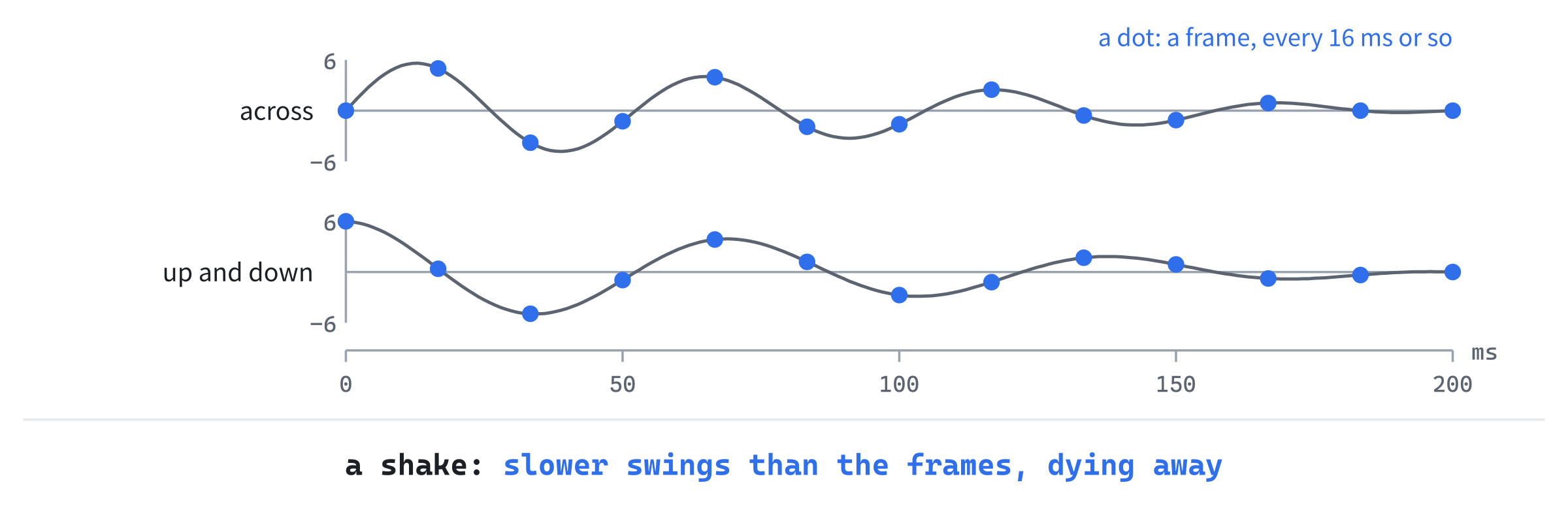
Every frame lands somewhere new, and the swings shrink to nothing in a fifth of a second.
The moves come from the clock, not from the game's dice. Each roll of rng_ moves the dice on, so a shake that rolled them would change every roll after it. How many rolls it made would depend on how many frames were drawn, which depends on how busy the computer is. So the same seed and the same keys would no longer play the same run.
The Camera Shakes
Every cell of the map is drawn where the camera says. So shaking the camera shakes the whole map: the floor and walls, the items, the monsters, the player, the effects and the line of fire. The panels and the log are drawn where they are, without the camera, so they stay still. Open Camera.h, and replace the comment above cellRect with this:
// Where a cell is drawn on the screen, shaken, if the view is shakingAdd setShake below cellRect, with a blank line in between:
// Shakes the view: from now on, every cell is drawn this many pixels
// off, until the shake is set back to { 0, 0 }. Where the mouse points
// isn't shaken
void setShake(SDL_FPoint offset);
And add the shake itself below top_:
SDL_FPoint shake_ = { 0.0f, 0.0f };Open Camera.cpp. The shake is added to the place cellRect works out for a cell, so in cellRect, find this line:
return { cell.x * size - left_, cell.y * size - top_, size, size };Change it to these:
return { cell.x * size - left_ + shake_.x,
         cell.y * size - top_ + shake_.y, size, size };
Add setShake below cellRect:
void Camera::setShake(SDL_FPoint offset)
{
    shake_ = offset;
}
The function that goes the other way, cellAt, is left alone. It finds the cell under the mouse. A click ends the effects playing, the shake among them. So the map is back in its place by the time the click is handled, and the click goes to the cell under the mouse there.
The function shows is shaken, since it asks cellRect. So a cell shaken into the view from just past its edge is drawn.
Big Hits and Blasts
Two things shake the screen: a hit that takes a quarter of the player's health or more, and a fireball's burst. Both go through one function, shakeScreen. That gives the setting in the last part one place to stop them. Open Game.h, and add its declaration below hurtPlayer's:
void shakeScreen();In Game.cpp, replace the comment above hurtPlayer with this:
// The player takes damage, and the hit shows. A big hit, a quarter of
// their health or more, shakes the screen too
Then add the shake directly below showHit(player_.pos);:
if (damage * 4 >= player_.maxHp)
{
    shakeScreen();
}
The test damage * 4 >= player_.maxHp asks whether the damage is a quarter of the player's health or more, without dividing. Integer division rounds down, which would make the test a little wrong.
The Rogue starts with 30 health, and 30 / 4 is 7. So a hit of 7 would count as a quarter, though it's a little less. Multiplied, 7 * 4 is 28, less than 30. So 8 is the least that shakes, as it should be.
A small hit doesn't shake the screen. In a long fight, the player is hit almost every turn, and a shake every turn would soon stop meaning anything. Now add shakeScreen below hurtPlayer:
// The screen shakes, with the effect asked for last
void Game::shakeScreen()
{
    effects_.shake(SDL_GetTicks());
}
A fireball's burst shakes the screen too, wherever it lands. In castFireball, add this line directly below effects_.flash(burst, Palette::FIRE, SDL_GetTicks());:
shakeScreen();Last, the camera is told how far it's shaken before each drawing, where it's told what to follow. In run, add this below the if that calls follow, with a blank line on each side:
// While the screen shakes, the map is drawn a little off,
// and only the map: the panels stay put
view_->camera().setShake(effects_.shakeOffset(SDL_GetTicks()));
The camera's shake is set every time the screen is drawn: a little way while a shake plays, and { 0, 0 } once it's over, which puts the map back where it belongs. The loop already draws every frame while effects play, so the shake is drawn as it moves.
The shake is set here, and not in drawGame, since drawGame is const. That's a promise that drawing changes nothing. The compiler would let drawGame set it anyway, since const doesn't reach through the pointer view_ to the view it points at. But the promise would be broken.
Checkpoint: Press F5, with seed 23, and start a new run as the Mage, with c. Take the six steps down with j, and fight the jackals as at the last checkpoint. Use lightning at the nearest, and your scroll of fireball at the other one, with Tab. As the fireball bursts, the map jolts, and settles again as the orange fades. The panel at the side and the log below stay still.
Turning It Off
Not everyone likes the screen moving under them. Shaking can bring on the kind of queasiness some people feel reading in a car, and some players simply find it in the way. Many games let it be turned off, and this one will too. This part adds the game's first setting, and a file to keep it in, so it lasts from one run to the next, and from one day to the next.
A File of Settings
Settings belong to the player, and not to a run. A new run, or a death, shouldn't turn the shaking back on. So they go in a file of their own, settings.txt, in the folder where the game keeps its save. It's written in the records the data files use. With shaking turned off, it reads like this:
# Amulets of SDL's settings. The game writes this file when a setting
# changes.

[settings]
shake = no
The game writes the file whenever a setting changes, and reads it when it starts. A player can edit it in Notepad too, so the game must cope with a file that has mistakes in it.
Design note: Crawl's options. Dungeon Crawl Stone Soup keeps its options in a text file too,
init.txt, one to a line, asname = value. Its options guide runs to hundreds of them, and a few are about this chapter's effects. Withreduce_animations, a bolt or an arrow is shown only as its whole path, without its flight, and that's the default for games played in a web browser. Anduse_animationslets each kind of animation be turned off on its own. Among them ishp, which flashes the screen red at a hit once the player's health is below a warning level, set by another option.
Ours starts with a single setting. Each new one is a member of the struct, a key in the file, and a line in the menu, as the next chapter shows with the sound's.
The Settings
In Solution Explorer, right-click src, choose Add > New Item, and add a Header File (.h) called Settings.h. Type it in:
#pragma once

// The player's settings, kept in settings.txt in their own folder, so they
// last from one run to the next, and from one day to the next
struct Settings
{
    bool shake = true;   // the screen shakes on big hits and blasts
};

// The settings saved in settings.txt, or, if there's no such file yet, the
// ones above. A mistake in the file is logged, and the game goes on with
// what it could read: settings aren't worth stopping the game for
Settings loadSettings();

// Writes the settings to settings.txt. Returns false if it couldn't
bool saveSettings(const Settings& settings);
The settings are a struct, with one member so far, shake. It's on unless the player turns it off. The next chapter adds the sound's settings beside it. The two functions read the file and write it. They aren't members of a class, since there's nothing for an object to hold between the two: what they read and write is the struct.
Reading Them
Now add a C++ File (.cpp) called Settings.cpp. Type its includes and the file's name:
#include "Settings.h"
#include <SDL3/SDL.h>
#include <string>   // std::string, for the file's name and text
#include <vector>   // std::vector, for the records and the mistakes
#include "Files.h"
#include "Records.h"

namespace
{
    const std::string SETTINGS_FILE = "settings.txt";
}
Then add the first part of loadSettings below it, with a blank line in between:
Settings loadSettings()
{
    Settings settings;
    std::string text;
    if (!readTextFile(userPath(SETTINGS_FILE), text))
    {
        return settings;
    }
    std::vector<std::string> errors;
    for (const Record& record : readRecords(text, SETTINGS_FILE, errors))
    {
        FieldReader fields(record, SETTINGS_FILE, errors);
        if (record.type != "settings")
        {
            fields.report(record.line, "unknown record [" + record.type +
                          "]");
            continue;
        }
        // A value with a mistake in it is reported, and the setting keeps
        // its default: a slip of the keyboard mustn't change a setting
        if (fields.has("shake"))
        {
            size_t mistakes = errors.size();
            bool shake = fields.yesNo("shake");
            if (errors.size() == mistakes)
            {
                settings.shake = shake;
            }
        }
        fields.finish();
    }
In the preceding code, with no file yet, the settings are the struct's own. That's how every player starts. Otherwise the file's records are read by readRecords, and each one's keys by a FieldReader, as the data files' are.
A record of any other type is a mistake. So is a key no one asks for, which finish reports, as it does for the data. The shake is read only if the file has it, since yesNo reads a missing key as no. A file without the key should leave the shaking on, as it starts.
A value other than yes or no is a mistake too. The function yesNo reports it, and reads it as no, as it does in the data. So the code counts the mistakes before reading the value, and uses the value only if there are no more after. Otherwise shake = maybe would turn the shaking off, though the player never said no.
Add the rest of loadSettings below the first part:
    for (const std::string& error : errors)
    {
        SDL_Log("%s", error.c_str());
    }
    return settings;
}
The mistakes go to the console window, and the game starts anyway. A mistake in the data stops the game, since a game without its monsters can't be played. But a mistake in the settings only leaves a setting as it starts.
Writing Them
Add saveSettings below loadSettings:
bool saveSettings(const Settings& settings)
{
    std::string text = "# Amulets of SDL's settings. The game writes this "
                       "file when a setting\n# changes.\n\n[settings]\n";
    text += std::string("shake = ") + (settings.shake ? "yes" : "no") +
            "\n";
    return writeTextFile(userPath(SETTINGS_FILE), text);
}
The file is written whole, every setting in it, by writeTextFile. It writes to a file of its own first, so a crash part way through never leaves half a settings.txt. Two string literals side by side, with nothing between them, are joined into one by the compiler. That lets a long one be split over two lines. The first part of the shake's line is made a std::string, since + can't join two plain literals, as Chapter 17 found with the save's name.
Writing returns whether it worked, as writeTextFile does. The menu doesn't need to know: if the file can't be written, the setting still changes for this run, and is only forgotten when the game closes.
The Game Keeps Them
Open Game.h, and add the new header below #include "Rng.h":
#include "Settings.h"Add the settings below effects_, with a blank line in between:
// The player's settings, from settings.txt
Settings settings_;
The game reads them as it's made, along with everything else. In Game.cpp, in the constructor, find this line:
view_(&glyphView_), seed_(chooseSeed(seed)), rng_(seed_)Change it to these:
view_(&glyphView_), seed_(chooseSeed(seed)), rng_(seed_),
settings_(loadSettings())
The member settings_ comes last in the list, as it comes last of these members in Game.h. The members are made in the order they're declared, whatever order the list gives. So keeping the two in the same order means the list reads as it runs. A Game is made at the start of every run, so the settings are read each time. They're saved the moment they change, so each run finds them as the last one left them.
The shake is stopped in the one place that asks for it. Replace the comment above shakeScreen with this:
// The screen shakes, with the effect asked for last, unless the player
// has turned shaking off
In shakeScreen, find this line:
effects_.shake(SDL_GetTicks());Change it to these:
if (settings_.shake)
{
    effects_.shake(SDL_GetTicks());
}
With the shaking off, shakeScreen does nothing. Every shake in the game goes with it, the big hits' and the blasts'.
A Key in the Menu
The setting is changed in Esc's menu, which gets a line of its own for it, and the help says so. In Game.cpp, change "the menu: save the run, and quit" to "the menu: save the run and quit, or settings".
Replace the comment above handleMenuKey with this:
// Esc's menu: S saves the run and quits, K turns the screen's shaking on
// or off, and Esc goes back to the game
Then add the K key's branch below the S key's, above the Esc key's:
else if (key.key == SDLK_K)
{
    // Screen shake, on or off, which is saved at once
    settings_.shake = !settings_.shake;
    saveSettings(settings_);
    redraw_ = true;
}
K turns the shaking on if it's off, and off if it's on. Then it saves the settings at once. Saving at once means a setting isn't lost, whether the player saves the run, dies, or closes the window. The menu stays open, and is drawn again, with the setting's new state.
The menu is a row taller. In drawMenu, change 6 * row to 7 * row. Then add the K key's line above the Esc key's:
std::string shake = settings_.shake ? "on" : "off";
glyphs_.drawText("K    Screen shake: " + shake, x, y, Palette::TEXT);
y += row;
The line says whether the shaking is on or off, so the player sees what K will change before pressing it. The letter is K, for shaKe, since S is taken by the save.
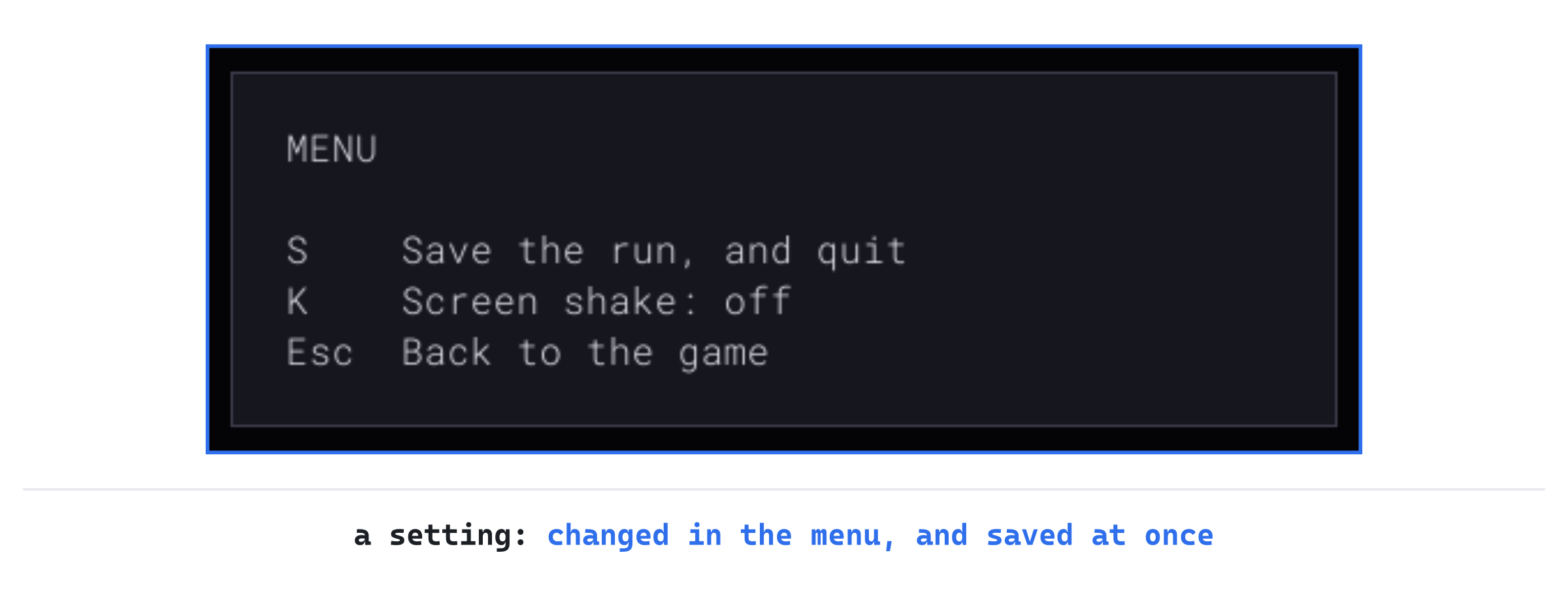
Checkpoint: Press F5, with seed 23, and start a new run as the Mage. Press Esc: the menu has a new line, for K, which says "Screen shake: on". Now press K, and it says "Screen shake: off". The next image shows the menu.
Press Esc to go back, take the six steps down, and fight the jackals as before, with lightning and the fireball. The burst flashes, but the map stays still. Close the window, which saves the run, and press F5 again. Continue the run, with C, and press Esc. The shaking is still off, since the setting was saved the moment it changed.
To see the file, press Windows+R, type %APPDATA%\GameCodeSchool\AmuletsOfSDL, and press Enter. File Explorer opens the game's folder, with settings.txt in it. In Notepad, the file says shake = no. Back in the game, press K again, to turn the shaking back on.
Playing the Game
Play a few floors, and the fights read differently. A turn that used to be a block of lines in the log now plays out in front of you. Your blow lands, and then each blow struck back lands on you, one after another, in the order they happened. When two jackals bite in the same turn, two white flashes say so, one after the other, before you've read a word of the log.
A shake with a white flash is a warning. Something just took a quarter of your health or more in one go, and it may do it again next turn. That's the moment to think about a potion, or about putting a door between you and it.
Missiles show where they come from. An archer's arrow flies from the archer to you, so when shots come from more than one direction, you see from where. And an arrow of yours that misses still flies all the way to its target. Unless it breaks, it falls nearby, so you know where to look for it afterward.
None of it slows you down. Every key ends the effects still playing. So once you know what happened, you can press on, as fast as you can press keys.
Understanding the Code
The game still works out each turn at once. It asks for effects as things happen: flash for a hit, a bolt or a burst, missile for something flying, ghost for a monster just killed, and shake for a big hit or a blast. Each is an Effect, with a kind, the cells it covers, and a start and end in milliseconds. A flash or a missile starts when the effects before it end, from nextStart, so the turn plays back in order. Ghosts show from now until then, and a shake starts with the last effect asked for.
While any effect is playing or waiting, run sleeps a frame at most, FRAME_MS, and draws again. A command waits for the effects to finish before its next step.
Each time around, update forgets the effects that have ended. Then drawEffects draws those in sight: the ghosts and missiles where they've got to, and the flashes over them, fading by their alpha, with the blend mode on. Before each drawing, the camera's shake is set from shakeOffset. Its swings come from the clock, never from the dice, and die away. A key or a click calls finish, and the effects are gone.
The player's damage goes through hurtPlayer, which flashes white, and shakes the screen for a quarter of the player's health or more. Monsters struck flash red, through showHit or, for a bolt or a burst, showStruck. A monster killed stays in sight, through showKilled, until its blow has landed. Both shakes go through shakeScreen, which does nothing when settings_.shake is off. The settings are read from settings.txt by loadSettings each time a Game is made, and written by saveSettings whenever K in the menu changes them.
Experimenting
Try each of these, and put each back afterward:
- Slow motion. In
Effects.h, setFLASH_MSto1000andMISSILE_MSto200. With seed 23, start as the Rogue, take the six steps down, and fire at a jackal with f and Enter. The arrow crawls to the jackal, a cell every fifth of a second, and its flash lingers for a whole second. Fire again, and press a key while the arrow is in the air: it's all over at once. - Every hit shakes. In
hurtPlayer, changedamage * 4 >= player_.maxHptodamage > 0. Fight the jackals as the Fighter, and the screen shakes at every bite. Within a few turns, a shake tells you nothing. - Solid flashes. In
Common.h, change the last number ofMONSTER_HITfrom170to255. Fight the jackals as the Fighter: each jackal you hit vanishes under solid red for a moment, and only shows through as the color fades. - A mistake in the settings. Close the game, open
settings.txtin Notepad, and setshaketomaybe. Start the game again: the console window sayssettings.txt:5: 'shake' should be yes or no, and the game starts anyway. Fight the jackals as the Mage, and the fireball still shakes the screen.
The first shows how quickly the effects really play, the second why only a big hit shakes, and the third why a flash starts see-through. The fourth shows that a slip in the file leaves the setting as it starts.
Common Errors and Fixes
If the game didn't build, or doesn't behave as described, the problem is probably one of these.
C3493: 'now' cannot be implicitly captured because no default capture mode has been specified, followed by C2326, in Effects.cpp. The lambda in update uses now, but its square brackets are empty. A lambda sees only what it captures. Write [now] in the brackets, as Chapter 10's blend captures t.
C2110: '+': cannot add two pointers, in Settings.cpp. The line that writes the shake adds "shake = " to the yes or no with +, without std::string( around it. Both are plain string literals, which are pointers to their first characters. Two pointers can't be added. Make the first a std::string, as the book does, and + joins them.
Warning C4717: 'Game::hurtPlayer': recursive on all control paths, function will cause runtime stack overflow, and the game stops the first time the player is hurt. The function hurtPlayer was typed before the Replace All, which turned its own player_.hp -= damage; into a call to hurtPlayer. It calls itself, forever, until the program runs out of room for the calls. Change that line in hurtPlayer back to player_.hp -= damage;.
A hit's flash is a solid block of color, which hides the monster, and doesn't fade. The blend mode wasn't set in drawEffects. Without SDL_SetRenderDrawBlendMode(renderer_, SDL_BLENDMODE_BLEND);, SDL ignores a color's alpha, and draws it solid. Add the line above the flashes' loop, and the line that sets it back to SDL_BLENDMODE_NONE below it.
FAQ
Q) Why work out the turn first and play it back after? Couldn't the game wait for each effect before going on?
A) It could, but then the game's rules would depend on the clock. A blow would have to wait for the arrow before it, and the monsters for the blow. Every part of a turn would need to know about time. Worked out at once, a turn is as simple as it always was, and a seed plays the same run with effects or without. The bot in Chapter 27 depends on that: it plays thousands of turns without drawing anything at all.
Q) Isn't all of this just decoration? The game plays the same without it.
A) It plays the same, but it doesn't feel the same. And it tells you more, faster: which monster was hit, in what order, and how hard. A 2012 talk by Martin Jonasson and Petri Purho, Juice It or Lose It, made the word famous. They took a simple Breakout game: a ball, a paddle and some blocks. Then they gave it juice until it felt alive, with color, sound, squash and stretch, and a screen that shakes at every impact.
Q) Why does a key end the effects, rather than speed them up?
A) A player who presses a key has already decided what to do next, so they've seen enough. Playing the rest faster would still hold them up a little, and over a long fight, a little adds up. Ending them loses nothing, since the log has every line.
AI Exercise (Optional)
Many games show a hit's damage as a number that rises from the cell struck and fades away. If you'd like to add that, with an AI's help, open your AI chatbot of choice, and try a prompt like this:
"I'm writing a roguelike in C++ with SDL 3. My class Effects keeps a std::vector<Effect>, each with an EffectKind (Flash, Missile, Ghost, Shake), std::vector<Point> cells, SDL_Color color, and Uint64 start and end, in milliseconds from SDL_GetTicks. A flash starts at nextStart(now), when the effects before it end, but a shake starts with the last effect asked for: effects_.back().start. Game::drawEffects() draws them. Game::hurtMonster(Monster& monster, int damage, ...) and Game::hurtPlayer(int damage) deal damage, and just after, Game::showHit(Point cell) asks for the hit's flash, or Game::showStruck for the monsters a bolt or a burst struck together. The camera's cellRect(Point cell) gives the SDL_FRect a cell is drawn in, and glyphs_.drawText(std::string, float x, float y, SDL_Color) draws text. I'd like an EffectKind::Number, with a std::string text, that starts with the hit's flash, rises 16 pixels from the cell over 600 milliseconds, and fades as it goes. Show me every change, with each curly brace on its own line, and explain it."
Notice what the preceding prompt does. It says how a shake starts with the effect before it, so the number can start with the hit's flash in the same way, rather than waiting for it to end.
When the answer comes back, check how it fades the text. The glyphs are textures, and drawText colors them with SDL_SetTextureColorMod, which ignores alpha. So fading needs SDL_SetTextureAlphaMod as well. It must be set back to 255 afterward, or every letter drawn after the number fades too. And check that the number doesn't hold up the effects after it: if its end counts in nextStart, every hit waits 600 milliseconds for the number before it.
Summary
The game still works out a turn at once, and now plays it back: every hit flashes, red on a monster and white on the player, missiles fly along their paths, bolts and bursts light their cells, and a monster killed stays in sight until the blow lands. The effects play in order, from a single list, while the loop wakes every frame to draw them, and any key ends them. A big hit or a blast shakes the map, with swings from the clock. The player can turn the shaking off in Esc's menu, a setting kept in settings.txt. In Chapter 25, the game makes its first sounds, each heard as the thing it belongs to is seen, with a volume and a mute kept in the same file.