
So far, the @ has walked through a dungeon in which every room and corridor is on show from the first turn. There's nothing left to discover, and that takes the fun out of exploring. In a traditional roguelike, you see only what the @ could see: the room it's standing in, the corridor ahead, and nothing behind a wall. What it has seen, it remembers, so the map fills in as you explore.
This chapter puts the lights out. The game works out exactly which cells the @ can see, up to 9 cells away, with an algorithm called symmetric shadowcasting. Then it remembers every cell the @ has ever seen, and draws those dimly, so you can tell what's in view from what's only remembered.
Last comes a debugging aid on the F1 key, at the top left of the keyboard. Press it, and the whole map appears, until you press it again. It's a great help while you're working on the game.
The next image shows the end of the chapter. The @ has walked from the first room of seed 7's dungeon, through the room next to it, and along a short corridor to the doorway of a third. What it can see is in full color, and what it remembers is dim, in cooler colors, as if lit by the moon.

The rest of the dungeon is still dark, waiting to be explored.
Chapter 04 in the book's repository holds this chapter's finished project. The chapter carries on in your own project from Chapter 3, or from the book's Chapter 03 folder.In this chapter, we will:
- Give every map cell a place to note whether it can be seen, and whether it's been seen
- Work out what the player can see with symmetric shadowcasting, scanning outward in four quarters
- Keep the slopes of the light as exact fractions, so every corner is decided the same way every time
- Make sight symmetric, so that a monster can see you only if you can see it
- Remember what's been seen, and draw it dimly, in cooler colors
- Make the F1 key a debugging aid that shows the whole map
There are five checkpoints along the way. Let's put the lights out.
Planning the Chapter
This chapter adds two files, and changes four:
| File | Status | What it's for |
|---|---|---|
src/Fov.h, src/Fov.cpp |
New | The field of view: which cells the player can see |
src/Map.h, src/Map.cpp |
Changed | Each cell remembers whether it's visible, and whether it's been explored |
src/main.cpp |
Changed | Works out the field of view after every step, and draws only what's seen or remembered |
src/Common.h |
Changed | The colors of memory, and a color for debugging notes |
| The other files | Unchanged |
The next image shows how the files fit together at the end of the chapter, with the new ones filled in blue, and the changed ones outlined in blue.
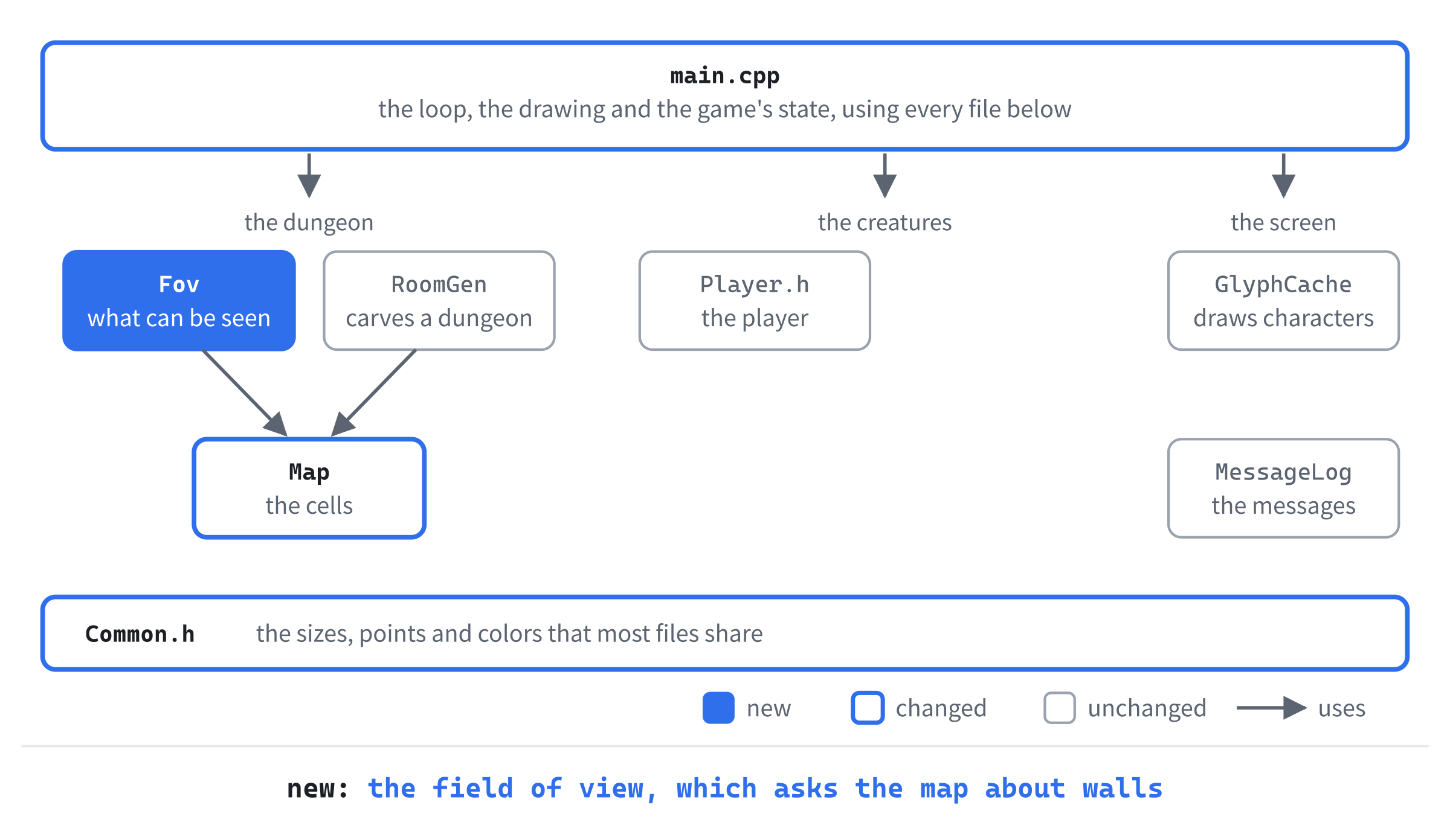
The field of view gets a file of its own, like the dungeon generator. It's a set of functions in a namespace, Fov, since it keeps nothing between one turn and the next. It asks the map one question, "does this cell block sight?", and tells the map one thing, "this cell is visible." Everything it knows about walls comes through that one question. That pays off in Chapter 19, where closed doors block sight too, and only the map's answer has to change.
We'll build the chapter in three steps: sight, then memory, and last, the F1 key that shows the whole map.
Cells That Can Be Seen
Until now, each cell of the map has held one thing, its terrain. Now each cell needs to hold whether the player can see it, too. So the map's vector will hold a small struct for each cell, rather than a bare Terrain.
The Map's New Cells
Open Map.h. The map needs four new functions for sight. Add them below the declaration of bordersFloor:
// Sight: what stops it, and which cells the player can see right now
bool blocksSight(int x, int y) const;
bool isVisible(int x, int y) const;
void setVisible(int x, int y);
void clearVisible();
The function blocksSight says whether a cell stops the light, and isVisible says whether the player can see it right now. Then setVisible marks a cell as seen, and clearVisible unmarks every cell, ready for the field of view to be worked out again.
Now for the cells themselves. Find the vector of cells, at the bottom of the class:
std::vector<Terrain> cells_;Replace it with these lines:
// What each cell is made of, and whether the player can see it
struct Cell
{
    Terrain terrain = Terrain::Wall;
    bool visible = false;
};

std::vector<Cell> cells_;
A Cell holds a cell's terrain and whether it's visible. Its members have default values, so a new Cell is a wall that can't be seen. The struct is declared inside Map, in its private part, so it's Map::Cell. Nothing outside the map ever uses it. The rest of the game still asks the map about terrain, through at, and about sight, through the new functions.
Map.cpp
The map's functions need to reach inside each cell now. Open Map.cpp, and in the constructor's initializer list, change cells_(MAP_W * MAP_H, Terrain::Wall) to cells_(MAP_W * MAP_H). The vector then makes each of its cells from Cell's default values, which is a wall that can't be seen, so the constructor doesn't need to say Terrain::Wall any more.
Next, at returns the cell's terrain, rather than the whole cell. In at, change cells_[y * MAP_W + x]; to cells_[y * MAP_W + x].terrain;, where .terrain picks the terrain out of the cell. Then set does the same in reverse. In set, change cells_[y * MAP_W + x] = terrain; to cells_[y * MAP_W + x].terrain = terrain;, so that it changes only the cell's terrain, and leaves whether it's visible alone.
Now fill makes whole cells. Replace the whole of fill with this:
// Makes every cell terrain, and unseen, ready for a new dungeon
void Map::fill(Terrain terrain)
{
    Cell cell;
    cell.terrain = terrain;
    cells_.assign(cells_.size(), cell);
}
Now fill makes one Cell with the terrain it's given, and fills the vector with copies of it. Each copy has visible set to false, so a new dungeon starts unseen.
Last come the four functions for sight. Add them at the bottom of the file, below bordersFloor:
bool Map::blocksSight(int x, int y) const
{
    return at(x, y) == Terrain::Wall;
}

bool Map::isVisible(int x, int y) const
{
    return inBounds(x, y) && cells_[y * MAP_W + x].visible;
}

void Map::setVisible(int x, int y)
{
    if (inBounds(x, y))
    {
        cells_[y * MAP_W + x].visible = true;
    }
}

void Map::clearVisible()
{
    for (Cell& cell : cells_)
    {
        cell.visible = false;
    }
}
In the preceding code, blocksSight is true for a wall. It asks at, so a cell off the map blocks sight too. The function isVisible says whether a cell is marked visible, and answers false for any cell off the map. Then setVisible marks a cell, if it's on the map. And clearVisible visits every cell, by reference, and unmarks it.
Checkpoint: Press F5. The game looks and plays exactly as before, since nothing calls the new functions yet. But the map now has room to know what can be seen.
The Field of View
Now for the field of view itself. Its job is to answer one question for every cell near the player: is there a straight line from the middle of the player's cell to the cell, with no wall in the way?
Light and Shadow
Think of the player as holding a lamp. The light spreads out in every direction. Wherever it meets a wall, the wall stops it, and casts a shadow behind it. Shadowcasting works the same way. It sweeps outward from the player, a row of cells at a time, and keeps track of which parts of the row the light can still reach.
Design note: lamps and lit rooms. Rogue lit some rooms and left others dark. In a lit room, you saw the whole room, and in a dark room, or a corridor, only the cells right beside you. Later games worked sight out cell by cell instead: Björn Bergström described recursive shadowcasting on RogueBasin in 2001, and Albert Ford's symmetric version, the one this game uses, followed in 2020. How far you can see is a matter of feel. A short reach makes every corner tense, and a long one makes the dungeon open, and its fights easier to plan.
The sweep is easiest in a triangle. So the area around the player is split into four quarters: north, east, south, and west. Each quarter is a triangle that starts at the player and widens by one cell on each side for every row further out. The next image shows the four quarters, out to a distance of four rows.
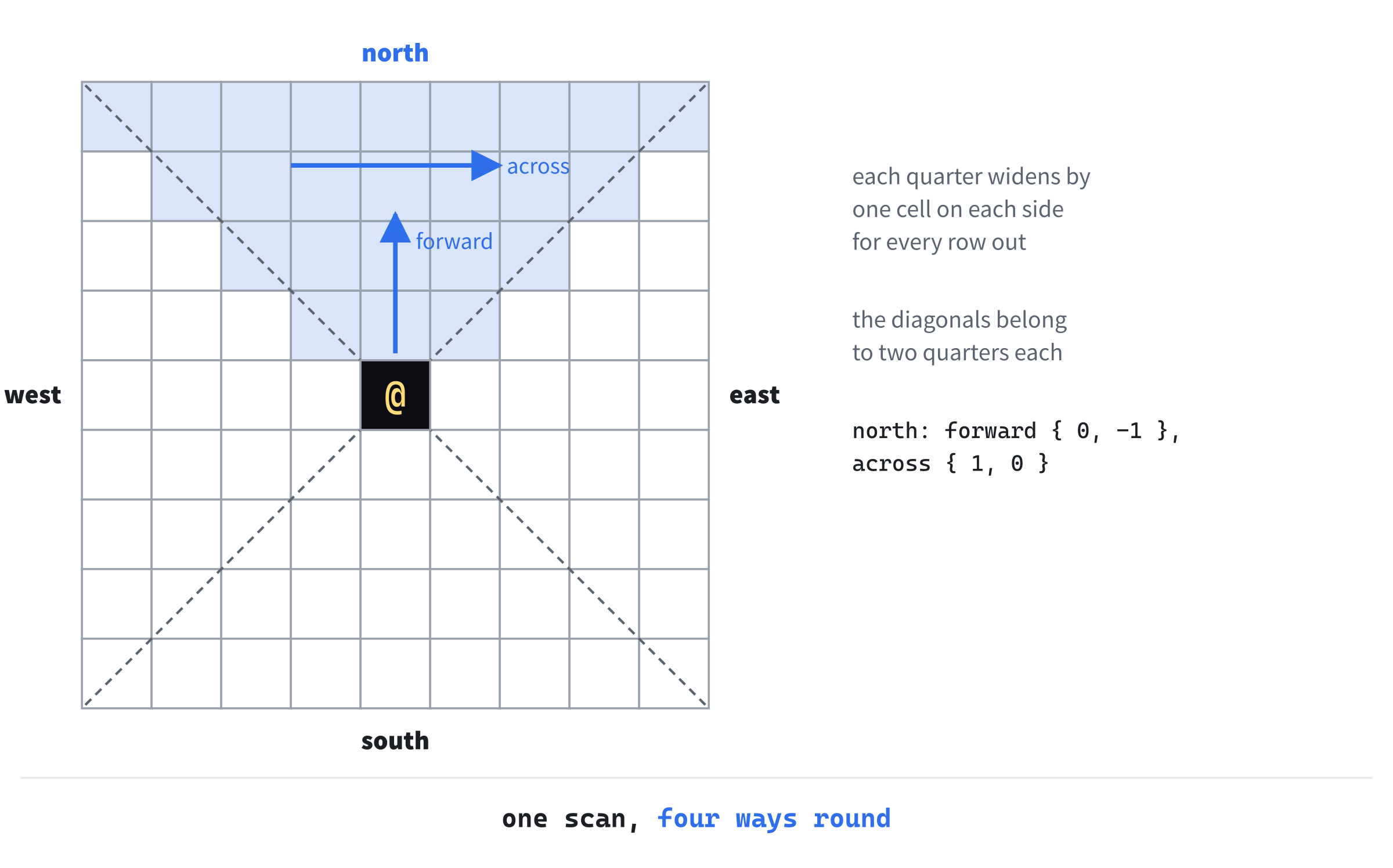
The cells on the diagonals belong to two quarters each, so they're worked out twice. That's harmless: a cell that's visible from either quarter is visible.
Within a quarter, the light is a wedge between two lines that start at the middle of the player's cell. Each line is described by its slope: how many columns it moves across for each row it moves out. A quarter's light starts as the whole triangle, between a slope of -1 on the left and 1 on the right, since the triangle widens by one column each way for each row. The next image shows a quarter's rows, and its first two slopes.

A cell in a quarter is given by its depth and its column. Its depth is the number of rows out from the player, and its column is how far the cell is to one side or the other of the quarter's middle line. The figures in this chapter show the north quarter, where negative columns are to the left and positive ones to the right. So left and right, from here on, mean lower and higher columns.
A Wall Splits the Light
As the sweep crosses a row, it moves from left to right, one cell at a time. While it crosses floor, the light carries on. When it reaches a wall, the light before the wall is cut off at the wall's left edge, and that part of the light goes on to the next row by itself. When it comes out of the wall, back onto floor, the light starts again, from that cell's left edge. And if the row ends in floor, the light that's left carries on to the next row too.
So one wedge of light can split into several, each going on alone. The next image shows a row with a wall in it, and the two wedges that go on past it.
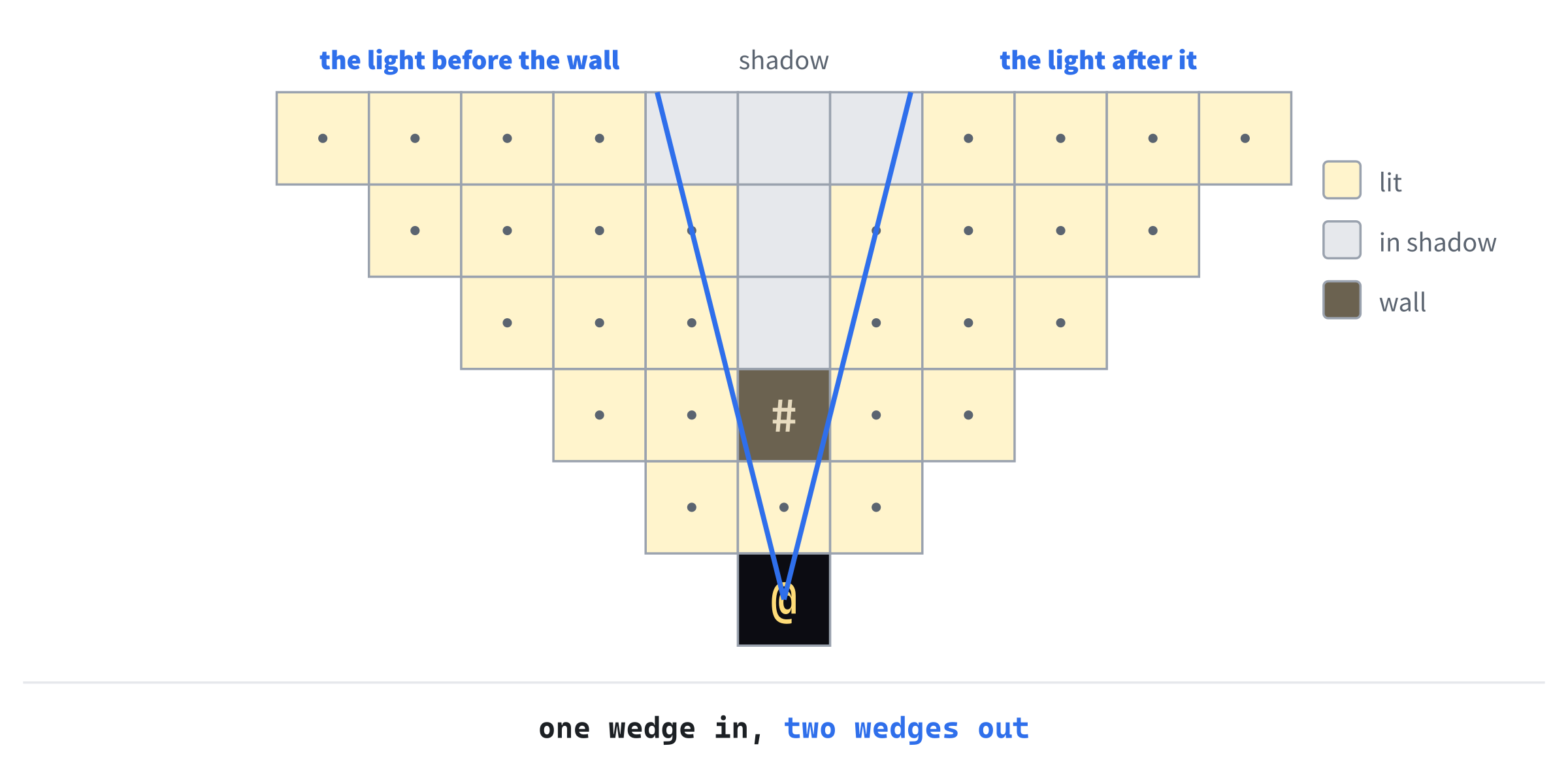
Each wedge that goes on is the same problem again, one row further out: the next row, between two slopes. That's a job for recursion, as in Chapter 2's split. The function that scans a row calls itself for each wedge that goes on, and the base case is a row beyond the player's sight.
Fair Light: Symmetry
There's one more decision, and it matters more than it looks. Which cells count as lit? A cell that's only partly in the light could count, or not.
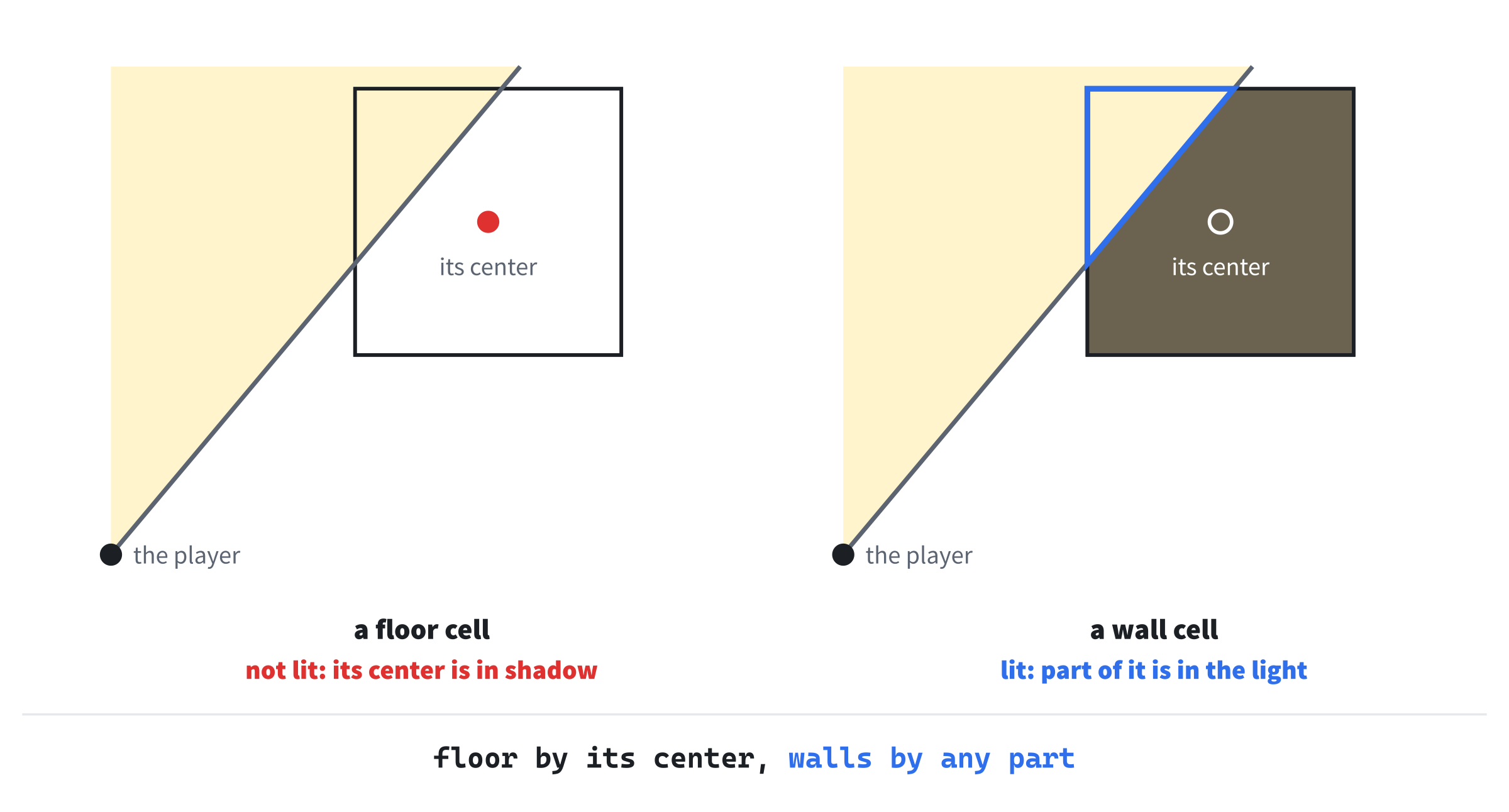
The game uses a rule that makes sight symmetric: if a floor cell can see another floor cell, the second can see the first. A floor cell is lit only if its center is in the light. A straight line between two centers is the same line whichever end you start from, so if the light reaches one center from the other, it reaches back.
Walls are different. A wall is lit if any part of it is in the light. That way, a room's walls are drawn whole, even at shallow angles, where the light only grazes them. Walls don't need to be symmetric, since nothing stands in a wall to look back.
The next image shows both rules at once: a floor cell that the light only partly covers isn't lit, but a wall cell that it partly covers is.
Symmetry pays off in the next chapter. A monster will see you only when you can see it, so you'll never be ambushed by a monster that sees you from a cell you can't see.
Exact Slopes
A slope is a fraction: so many columns across for so many rows out. It could be kept as a float, but floats are rarely exact. A line that passes exactly through a cell's corner might be computed as passing just to one side of it, or the other, depending on rounding. Then the field of view would flicker between two answers.
So the game keeps each slope as a fraction of two whole numbers, and does all its arithmetic with whole numbers. Then a line through a corner is decided the same way every time.
Fov.h
In Solution Explorer, right-click src, choose Add > New Item, and add a Header File (.h) called Fov.h. Type the whole file, so that it reads like this:
#pragma once
#include "Common.h"

class Map;

// The field of view: which cells can be seen from a cell. It's worked out
// by symmetric shadowcasting, as Albert Ford described it in 2020, so if
// one cell can see another, the other can see it too
namespace Fov
{
    // Marks every cell that can be seen from origin, up to radius cells
    // away, as visible, once it has cleared what was visible before
    void compute(Map& map, Point origin, int radius);
}
The namespace Fov has one function, compute. It takes the map, the cell to see from, and how far the player can see, in cells.
The header doesn't include Map.h. It only says class Map;, a forward declaration. This tells the compiler that a class called Map exists, without saying anything else about it.
That's all a header needs to name a class in a reference parameter. It keeps Fov.h small, and a file that includes Fov.h doesn't have to read Map.h too. The source file, Fov.cpp, will include Map.h itself, since it calls the map's functions.
The Quarters
In the same way, add a C++ File (.cpp) called Fov.cpp, and type its includes, and an unnamed namespace for its helpers. For now, the namespace is empty, apart from the struct that describes a quarter:
#include "Fov.h"
#include "Map.h"

namespace
{
    // One of the four quarters around the origin: north, east, south or
    // west. Each is a triangle that widens away from the origin, one row
    // at a time. A cell in it is given by its depth, the number of rows
    // out, and its column, left or right of the quarter's middle line
    struct Quarter
    {
        Point origin;
        Point forward;   // one row further out
        Point across;    // one column across

        Point cellAt(int depth, int col) const
        {
            return { origin.x + forward.x * depth + across.x * col,
                     origin.y + forward.y * depth + across.y * col };
        }
    };
}
In the preceding code, a Quarter has three points. Its origin is the player's cell. Its forward step goes one row further out, and its across step goes one column across, to the next higher column. Which way across points doesn't matter, since each quarter is scanned the same way, from one edge to the other.
The function cellAt turns a depth and a column into a cell on the map: the origin, plus depth forward steps, plus col across steps. That one function lets the same code scan all four quarters. Only the two steps differ: for the north quarter, forward is up, { 0, -1 }, and across is right, { 1, 0 }.
Slopes and Rounding
Next comes the slope. Add it inside the namespace, below Quarter:
// A slope from the origin: num columns across for every den rows out.
// Kept as a fraction of whole numbers, so it's exact, and a line that
// passes exactly through a corner is decided the same way every time
struct Slope
{
    int num;
    int den;   // always more than 0
};
A Slope is a fraction: num columns across for every den rows out. A slope of 1 is { 1, 1 }, and a slope of a half is { 1, 2 }. The denominator is always positive, which keeps the comparisons simple.
Rounding a fraction needs division, and C++'s division has a catch. Add this function below Slope:
// Division that rounds down, toward minus infinity. C++'s own division
// rounds toward zero, so -3 / 2 is -1, where this gives -2
int floorDiv(int a, int b)
{
    int quotient = a / b;
    if (a % b != 0 && a < 0)
    {
        --quotient;
    }
    return quotient;
}
The function floorDiv divides and rounds down, toward minus infinity. C++'s own / rounds toward zero instead, so -3 / 2 is -1, but rounding down gives -2. For positive numbers, the two are the same. For negative numbers that don't divide exactly, they differ by one. And the left half of a quarter has negative columns.
So floorDiv starts with C++'s answer. If the division wasn't exact, and the answer is negative, it subtracts one. It knows the division wasn't exact when a % b != 0. The divisor is always positive here, so the sign of the answer is the sign of a.
Now the two functions that find a row's first and last columns. Add them below floorDiv:
// The column that a slope crosses at a depth, rounded to the nearest
// whole column. A slope that crosses exactly halfway between two
// columns rounds up for the start of a row, and down for its end
int roundTiesUp(int depth, Slope slope)
{
    return floorDiv(2 * depth * slope.num + slope.den, 2 * slope.den);
}

int roundTiesDown(int depth, Slope slope)
{
    return -floorDiv(slope.den - 2 * depth * slope.num, 2 * slope.den);
}
Both functions find where a slope crosses a row, at a depth: depth times the slope, rounded to the nearest whole column. The trick of adding a half and rounding down rounds to the nearest. Doing it with the whole fraction doubled keeps everything in whole numbers.
The two differ only when the slope crosses exactly halfway between two columns. That's exactly on the border between two cells, where the light's edge only touches the cell beyond it. So for the start of a row, roundTiesUp rounds up, to the column on the right. For the end, roundTiesDown rounds down, to the column on the left. Either way, a cell that the light only touches is left out of the row.
Two more helpers finish the slopes. Add them below roundTiesDown:
// The slope to the left edge of a cell, from the origin's center
Slope leftEdge(int depth, int col)
{
    return { 2 * col - 1, 2 * depth };
}

// True if the cell's center lies between the two slopes. Floor is only
// lit when it is, which is what makes the field of view symmetric
bool centerIsLit(int depth, int col, Slope start, Slope end)
{
    return col * start.den >= depth * start.num &&
           col * end.den <= depth * end.num;
}
First, leftEdge gives the slope from the origin to the left edge of a cell, at the middle of its row. The cell at column col spans from col - 1/2 to col + 1/2, so its left edge is at col - 1/2, at depth depth. Doubling both, to avoid the halves, gives (2 * col - 1) / (2 * depth).
The edge is taken at the middle of the row, so a wall stops only the light that crosses its row's middle, between its two edges. Figure 4.5 shows it: the wall's nearer corners stick out into the light on either side. Light that only clips a corner carries on, so the light reaches a little further around walls than their square shapes suggest.
Then centerIsLit says whether a cell's center lies between the two slopes. The center is at column col, depth depth. It's inside if col / depth is at least the start slope and at most the end slope. Multiplying both sides by the denominators gives the same test in whole numbers, which is what the code does.
Scanning a Row
Now for the heart of the field of view: the function that scans one row of a quarter, and sends the light on to the next. It's long, so it comes in four parts. Add the first below centerIsLit:
// Lights one row of a quarter: the cells from slope start to slope
// end, at a depth. Light that gets past the row goes on to the next
// one. Where a wall splits it, the part before the wall goes on by
// itself, and the part after it carries on along this row
void scanRow(Map& map, const Quarter& quarter, int radius, int depth,
             Slope start, Slope end)
{
    if (depth > radius)
    {
        return;
    }

    bool isFirst = true;
    bool previousBlocks = false;
    int firstCol = roundTiesUp(depth, start);
    int lastCol = roundTiesDown(depth, end);
The function scanRow takes the map, the quarter, the player's sight radius, the row's depth, and the slopes at the light's two edges. If the row is beyond the radius, it does nothing, which is the base case that stops the recursion.
Then isFirst and previousBlocks will remember the cell before the current one, as the scan crosses the row. The first and last columns come from the slopes, rounded as the last section described. The light reaches the cells from firstCol to lastCol.
The second part starts the loop over those columns, and lights each cell that should be lit. Add it below lastCol:
for (int col = firstCol; col <= lastCol; ++col)
{
    Point cell = quarter.cellAt(depth, col);
    bool blocks = map.blocksSight(cell.x, cell.y);

    // Walls are lit if any of them is. Floor is lit only if its
    // center is. Either way, only within the radius
    bool inRange = depth * depth + col * col <= radius * (radius + 1);
    bool lit = blocks || centerIsLit(depth, col, start, end);
    if (inRange && lit)
    {
        map.setVisible(cell.x, cell.y);
    }
Each column becomes a cell on the map through cellAt, and blocks asks the map whether it stops sight. The cell is in range if depth * depth + col * col, the square of its distance from the player, is no more than radius * (radius + 1). That's a cell whose center is no more than about half a cell beyond the radius. This limit makes a rounder circle than radius * radius would, with no single cells sticking out at the ends of the four straight lines. A wall is lit whatever its center does, and floor only if centerIsLit.
The third part handles the walls, and finishes the loop. Add it below the closing brace of the if that lights the cell, with a blank line in between:
    if (!isFirst && previousBlocks && !blocks)
    {
        // A wall has ended: the light starts again at this cell
        start = leftEdge(depth, col);
    }
    if (!isFirst && !previousBlocks && blocks)
    {
        // A wall has begun: the light before it goes on to the
        // next row, as far as the wall's left edge
        Slope wallEdge = leftEdge(depth, col);
        scanRow(map, quarter, radius, depth + 1, start, wallEdge);
    }
    isFirst = false;
    previousBlocks = blocks;
}
The first if is for a wall that has just ended: the cell before was a wall, and this one isn't. So the light starts again here, and start moves to this cell's left edge.
The second if is for a wall that has just begun: the cell before was floor, and this one is a wall. So the light before the wall is cut off at the wall's left edge, and scanRow calls itself to carry that wedge on to the next row, from start to the wall's edge. Then the loop remembers this cell for the next one, and moves on.
The last part sends on whatever light is left at the end of the row. Add it below the loop's closing brace:
    // Unless the row ended in a wall, the light goes on to the next row
    if (!isFirst && !previousBlocks)
    {
        scanRow(map, quarter, radius, depth + 1, start, end);
    }
}
If the row ended in floor, the light that's still going carries on to the next row, from start to the end slope. If the row ended in a wall, there's no light left to carry on, since the wall's own if has already sent on the part before it. The check for isFirst covers a row with no cells at all, which can happen when the slopes have closed in on each other.
The recursion never goes deep. Each call is one row further out, and the calls stop just past the radius, so they're never more than ten deep.
Computing the Field of View
All that's left is the function that the rest of the game calls. Add it at the bottom of the file, below the namespace's closing brace:
void Fov::compute(Map& map, Point origin, int radius)
{
    map.clearVisible();
    map.setVisible(origin.x, origin.y);

    // Each quarter's forward and across steps, as x and y on the map
    const Quarter quarters[] = {
        { origin, { 0, -1 }, { 1, 0 } },    // north
        { origin, { 1, 0 }, { 0, 1 } },     // east
        { origin, { 0, 1 }, { 1, 0 } },     // south
        { origin, { -1, 0 }, { 0, 1 } },    // west
    };
    for (const Quarter& quarter : quarters)
    {
        // The first row is one cell out, and spans the whole quarter: from
        // one column left for each row out, to one column right
        scanRow(map, quarter, radius, 1, { -1, 1 }, { 1, 1 });
    }
}
Each call to compute first unmarks every cell, so that cells seen last turn but not now go dark. Then it marks the player's own cell, which no quarter covers. The four quarters each have their own forward and across steps. For each one, the first row is one cell out, with the light spanning the whole quarter, from slope -1 to slope 1.
Checkpoint: Click in Fov.cpp, and press Ctrl+F7. It compiles on its own, since it needs only its own header, Map.h, and Common.h.
Seeing in the Game
Now the game can use the field of view. Open main.cpp, and add its header below #include "Common.h":
#include "Fov.h"With Fov.h included, main.cpp can call Fov::compute. Next, add how far the player can see inside the namespace, below FONT_SIZE:
// How far the player can see, in cells
constexpr int SIGHT_RADIUS = 9;
The constant SIGHT_RADIUS is 9 cells. That's far enough to see across most rooms, but not across the map, so there's always something left to explore.
Now drawMap draws only the cells the player can see. Replace the whole of drawMap with this:
// The part of the map the player can see: floor, and walls only where
// they border it
void drawMap(SDL_Renderer* renderer, const GlyphCache& glyphs,
             const Map& map)
{
    for (int y = 0; y < MAP_H; ++y)
    {
        for (int x = 0; x < MAP_W; ++x)
        {
            if (!map.isVisible(x, y))
            {
                continue;
            }
            if (map.at(x, y) == Terrain::Floor)
            {
                drawCell(renderer, glyphs, x, y, '.', Palette::FLOOR);
            }
            else if (map.bordersFloor(x, y))
            {
                drawCell(renderer, glyphs, x, y, '#', Palette::WALL,
                         Palette::WALL_BACK);
            }
        }
    }
}
In the preceding code, continue skips any cell that isn't visible. Everything else is drawn as before.
The field of view has to be worked out whenever the player arrives somewhere new: at the start, in a new dungeon, and after every step. Find these lines, near the top of runGame:
// The dungeon, and the player, in the middle of its first room
Map map;
std::vector<SDL_Rect> rooms = RoomGen::generate(map, rng);
Player player;
player.pos = RoomGen::centerOf(rooms.front());
Replace them with these:
// The dungeon, the player in the middle of its first room, and what
// the player can see from there
Map map;
std::vector<SDL_Rect> rooms = RoomGen::generate(map, rng);
Player player;
player.pos = RoomGen::centerOf(rooms.front());
Fov::compute(map, player.pos, SIGHT_RADIUS);
The field of view is worked out from the player's starting cell. A new dungeon needs it too. Add this line in the Space key's code, below the line that moves the player to the new dungeon's first room:
Fov::compute(map, player.pos, SIGHT_RADIUS);The new dungeon's field of view is worked out, which also clears the old one, cell by cell. And every step needs it. Add the same line in the walking code, below player.pos = to;:
Fov::compute(map, player.pos, SIGHT_RADIUS);Now the player's field of view follows them, one step at a time.
Checkpoint: Press F5. The lights are out. The window shows only the first room, and whatever the player can see from where they stand. Walk around, and the view moves with you: rooms appear as you enter them, and vanish as you leave. Walk into a corridor, and you can see along it until it turns.
The view is often a surprise at first. Below the first room of seed 7, a line of floor runs down from a gap in a wall, one cell wide and then three, with nothing around it. The next image shows it, with the room it belongs to outlined.
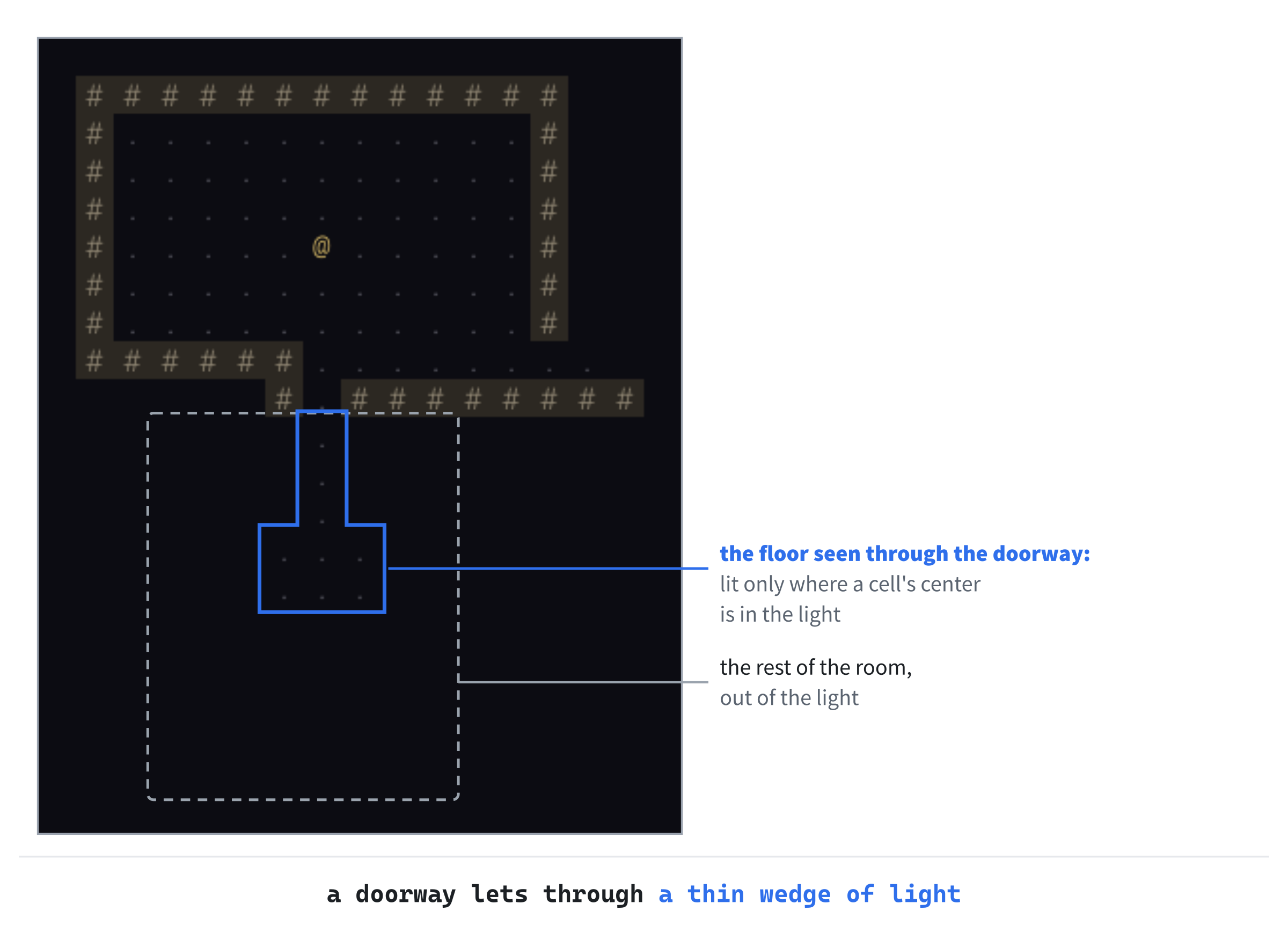
That's not a bug. It's the floor of the next room, seen through its doorway. The doorway is one cell wide, so the light that gets through it is a thin wedge.
A floor cell is lit only if its center is in the light, so at first only the cells straight in line with the player are lit. The wedge widens as it goes, so lower down it takes in the cells on either side, until the line stops at the edge of the player's sight. The rest of the room is out of the light, walls and all. Walk through the doorway, and the whole room appears.
Remembering
As soon as the player walks on, the room they left goes dark, as if it had never been there. Real explorers remember where they've been, and so should the game. So each cell will remember whether it has ever been seen, and the game will draw those cells too, in dimmer, cooler colors.
Explored Cells
Open Map.h, and find the sight functions' declarations:
// Sight: what stops it, and which cells the player can see right now
bool blocksSight(int x, int y) const;
bool isVisible(int x, int y) const;
void setVisible(int x, int y);
void clearVisible();
Replace them with these lines:
// Sight: what stops it, which cells the player can see right now, and
// which they've ever seen
bool blocksSight(int x, int y) const;
bool isVisible(int x, int y) const;
bool isExplored(int x, int y) const;
void setVisible(int x, int y);
void clearVisible();
A new function, isExplored, says whether the player has ever seen a cell. Each cell needs to remember that, so find the struct Cell, and the comment above it:
// What each cell is made of, and whether the player can see it
struct Cell
{
    Terrain terrain = Terrain::Wall;
    bool visible = false;
};
Replace them with these lines:
// What each cell is made of, whether the player can see it, and
// whether they've seen it before
struct Cell
{
    Terrain terrain = Terrain::Wall;
    bool visible = false;
    bool explored = false;
};
Each cell has an explored member, which starts as false. Now open Map.cpp. The comment above fill should say that it leaves every cell unexplored, as well as unseen, since it makes fresh cells. Replace the comment above fill with this:
// Makes every cell terrain, unseen and unexplored, ready for a new dungeonNow add isExplored below isVisible:
bool Map::isExplored(int x, int y) const
{
    return inBounds(x, y) && cells_[y * MAP_W + x].explored;
}
The new isExplored returns the cell's explored member, or false for any cell off the map.
A cell is explored the moment it's seen, and it stays explored. So setVisible marks both. Replace the whole of setVisible with this:
// A cell the player can see is one they've explored, too, and it stays
// explored when it goes out of sight
void Map::setVisible(int x, int y)
{
    if (inBounds(x, y))
    {
        cells_[y * MAP_W + x].visible = true;
        cells_[y * MAP_W + x].explored = true;
    }
}
Now setVisible sets explored as well as visible. Then clearVisible unmarks visible, but never explored, so a cell that goes out of sight stays remembered. Only fill, for a new dungeon, makes cells unexplored again.
The Colors of Memory
Remembered cells are drawn in their own colors. Open Common.h, and add them to the palette, below FLOOR:
// Remembered cells, out of sight: dimmer, and cooler, as if moonlit
constexpr SDL_Color MEMORY_WALL = { 70, 74, 96, 255 };
constexpr SDL_Color MEMORY_WALL_BACK = { 24, 25, 34, 255 };
constexpr SDL_Color MEMORY_FLOOR = { 48, 52, 72, 255 };
The remembered walls and floor are darker than the ones in view, and bluer, as if moonlit. So what's in the player's light looks warm by comparison, and you can tell at a glance what's in view now.
Drawing What's Remembered
Now drawMap draws remembered cells as well as visible ones, each in its own colors. It takes four changes. First, replace the comment above drawMap with this:
// The map as the player knows it: what they can see, in full color,
// and what they remember, dimmed. Walls are drawn only where they
// border floor
Next, the check that skips cells. Find this line:
if (!map.isVisible(x, y))Replace it with these lines:
bool visible = map.isVisible(x, y);
if (!visible && !map.isExplored(x, y))
Here, visible is kept in a variable, since the colors depend on it too. A cell is skipped only if it's neither visible nor explored. Next, the floor's color. Find the line that draws the floor:
drawCell(renderer, glyphs, x, y, '.', Palette::FLOOR);Replace it with these lines:
SDL_Color color = visible ? Palette::FLOOR
                          : Palette::MEMORY_FLOOR;
drawCell(renderer, glyphs, x, y, '.', color);
The ?: picks the floor's own color if the cell is visible, and the remembered floor's if it isn't. Last, the walls. Find the lines that draw a wall:
drawCell(renderer, glyphs, x, y, '#', Palette::WALL,
         Palette::WALL_BACK);
Replace them with these lines:
SDL_Color color = visible ? Palette::WALL
                          : Palette::MEMORY_WALL;
SDL_Color back = visible ? Palette::WALL_BACK
                         : Palette::MEMORY_WALL_BACK;
drawCell(renderer, glyphs, x, y, '#', color, back);
Both the wall's color and its background are chosen in the same way, so a remembered wall is dim stone on a dark, cool background.
Checkpoint: Press F5, and explore. Everything you've seen stays on the map, dimmed, and what's in view is bright. Walk back into a room you've visited, and it lights up again. Press Space, and the new dungeon starts unexplored.
The next image shows the difference up close. The corridor around the player is lit, and so is part of the room ahead, seen through its doorway. Everything behind the player is remembered.
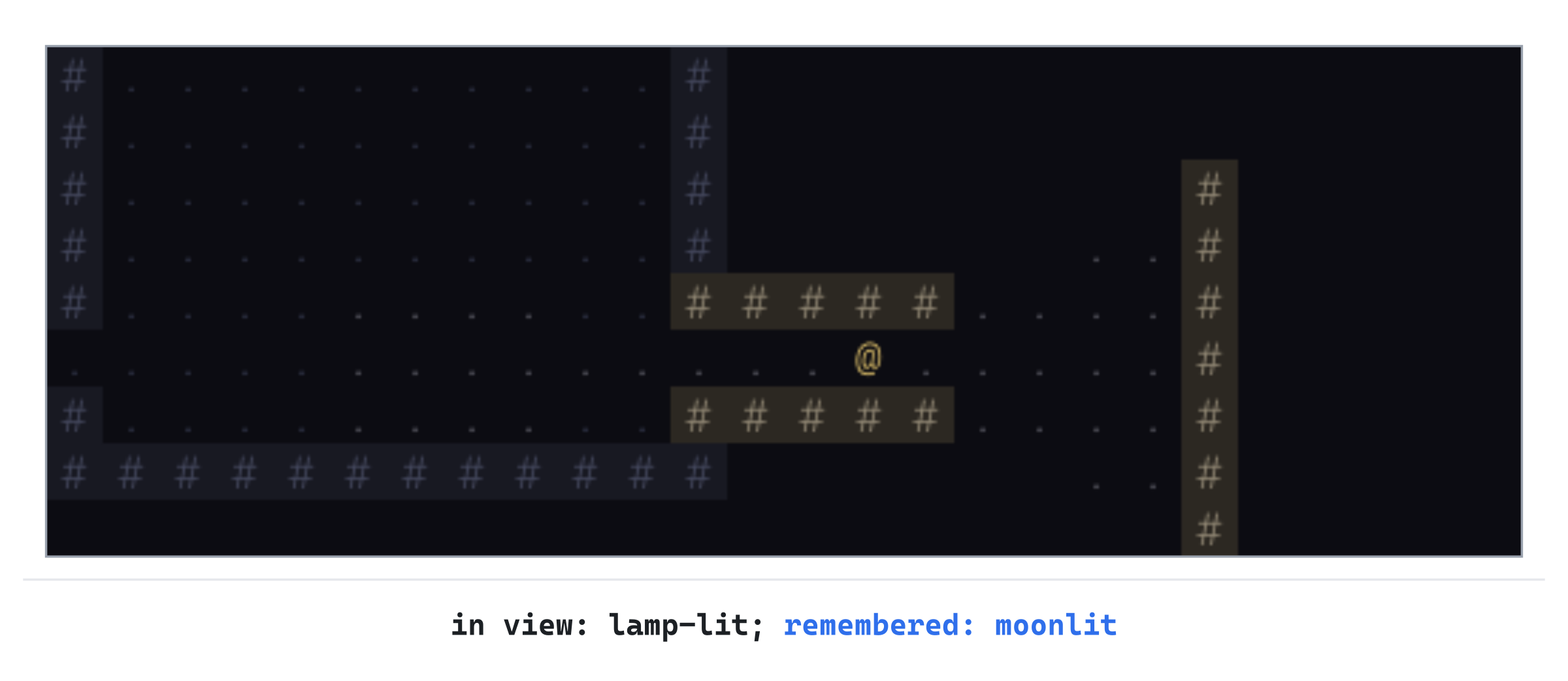
The remembered part of the map is exactly what the player has seen, and nothing more. In particular, a room you've only looked into is remembered only as far as you saw it, until you go in and see the rest.
A Debugging Aid
A game that hides its map is harder to work on. To check a dungeon, or follow a bug, you need to see all of it. So the last part of the chapter adds a debugging aid: a key for the person writing the game, rather than the person playing it. Pressing the F1 key will show the whole map, drawn as if remembered, and pressing it again will hide it. On a laptop where F1 does something else, such as muting the sound, hold the Fn key as you press it.
The side panel will say so whenever the map is revealed, in a color the game uses for nothing else. That way, you can never forget that it's on, and mistake what you see for the real game.
Where F1 Goes
This part makes eight small changes to main.cpp, as well as one to Common.h. First, the color. Open Common.h, and add it to the palette, below MEMORY_FLOOR:
// Notes from the debugging aids, in a color the game never uses
constexpr SDL_Color DEBUG = { 240, 110, 200, 255 };
The new color, DEBUG, is a bright pink. It's a color that no wall, floor, monster, or message will ever use.
The changes to main.cpp are spread through the file. The next image maps them out, as in the last few chapters.
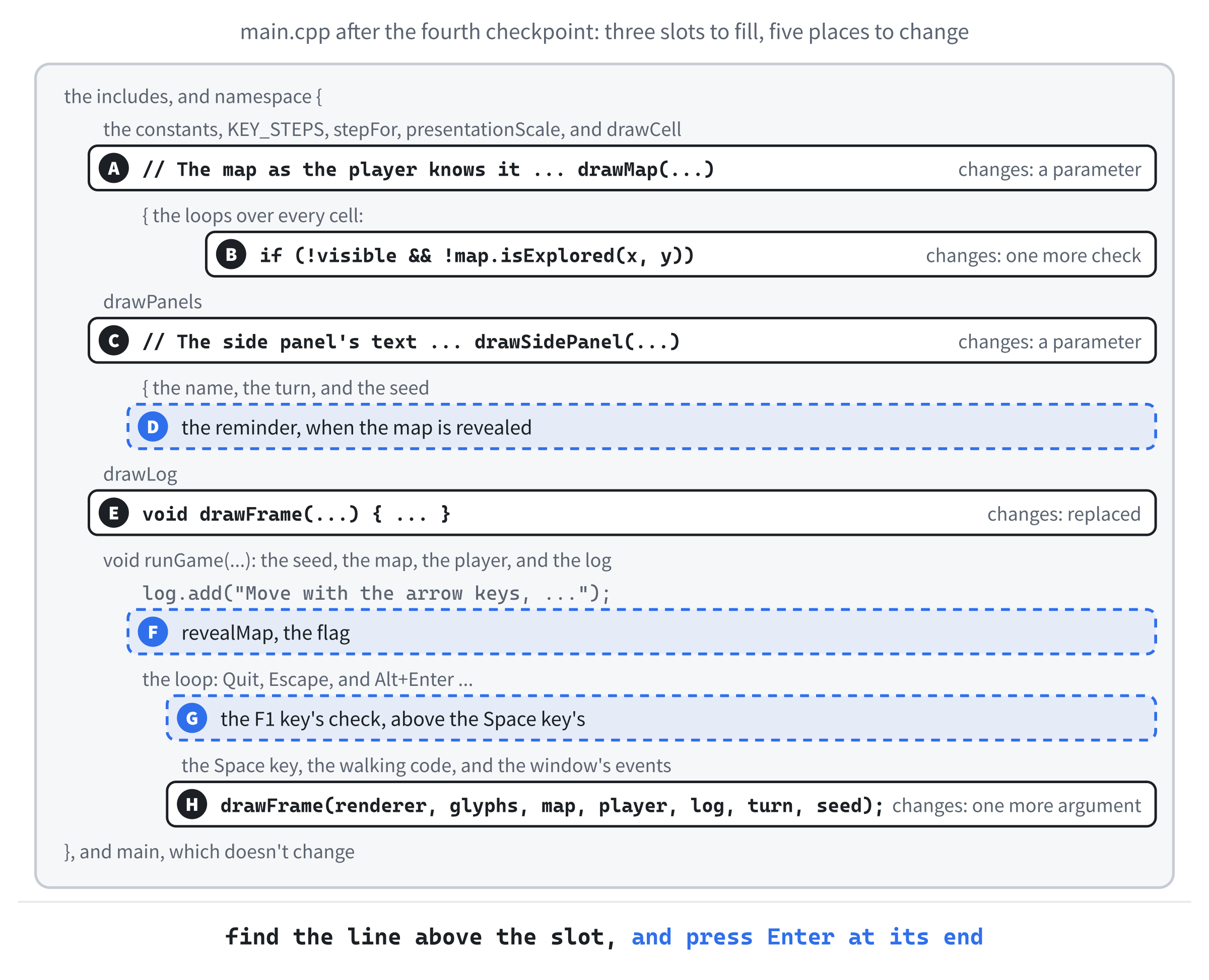
As before, if a slot's place still isn't clear, the Chapter 04 folder in the repository holds main.cpp as it is at the end of the chapter.
Drawing It All
At slot A, drawMap takes a flag that says whether to reveal the map. Find the comment above drawMap, and its first two lines:
// The map as the player knows it: what they can see, in full color,
// and what they remember, dimmed. Walls are drawn only where they
// border floor
void drawMap(SDL_Renderer* renderer, const GlyphCache& glyphs,
             const Map& map)
Replace them with these lines:
// The map as the player knows it: what they can see, in full color,
// and what they remember, dimmed. With revealMap, a debugging aid, all
// the rest is drawn as if remembered too. Walls are drawn only where
// they border floor
void drawMap(SDL_Renderer* renderer, const GlyphCache& glyphs,
             const Map& map, bool revealMap)
Now drawMap takes revealMap, and the comment says what it does. At slot B, a cell is skipped only if the map isn't being revealed: change if (!visible && !map.isExplored(x, y)) to if (!visible && !map.isExplored(x, y) && !revealMap). Then every cell that isn't visible is drawn in the colors of memory when the map is revealed, so you can still tell what's in view.
At slot C, the side panel needs the flag too, to show its reminder. Find the comment above drawSidePanel, and its first line:
// The side panel's text: the game's name, then the run so far, one row
// under another
void drawSidePanel(const GlyphCache& glyphs, int turn, unsigned int seed)
Replace them with these lines:
// The side panel's text: the game's name, then the run so far, one row
// under another, and a reminder when a debugging aid is on
void drawSidePanel(const GlyphCache& glyphs, int turn, unsigned int seed,
                   bool revealMap)
Now drawSidePanel takes revealMap, too. Slot D is the reminder itself. Add these lines to the end of drawSidePanel, below the line that writes the seed:
if (revealMap)
{
    y += 2 * row;
    glyphs.drawText("DEBUG: map revealed (F1)", x, y, Palette::DEBUG);
}
When the map is revealed, the panel says so, two rows below the seed, in the debugging color. The reminder names the key, so you know how to turn it off.
At slot E, drawFrame passes the flag along. Replace the whole of drawFrame with this:
void drawFrame(SDL_Renderer* renderer, const GlyphCache& glyphs,
               const Map& map, const Player& player,
               const MessageLog& log, int turn, unsigned int seed,
               bool revealMap)
{
    setColor(renderer, Palette::BACKGROUND);
    SDL_RenderClear(renderer);
    drawMap(renderer, glyphs, map, revealMap);
    drawCell(renderer, glyphs, player.pos.x, player.pos.y, '@',
             Palette::PLAYER);
    drawPanels(renderer);
    drawSidePanel(glyphs, turn, seed, revealMap);
    drawLog(glyphs, log);
    SDL_RenderPresent(renderer);
}
The new drawFrame takes revealMap as its last parameter, and hands it to drawMap and drawSidePanel. It takes eight parameters now, and the list will keep growing as the game does. Chapter 7 gathers the game's state into a class, which ends the passing around.
The F1 Key
Slot F is the flag itself. Add these lines to runGame, below the welcome messages:
// A debugging aid: F1 shows the whole map, and F1 again hides it
bool revealMap = false;
The flag starts as false, so the game starts as a player would see it.
At slot G, the F1 key. Its check goes between the Alt+Enter key's check and the Space key's. Find these two lines, where the Space key's check starts:
else if (event.type == SDL_EVENT_KEY_DOWN &&
         event.key.key == SDLK_SPACE)
Put the F1 key's check above them, so that they read like this:
else if (event.type == SDL_EVENT_KEY_DOWN &&
         event.key.key == SDLK_F1)
{
    if (!event.key.repeat)
    {
        revealMap = !revealMap;
        redraw = true;
    }
}
else if (event.type == SDL_EVENT_KEY_DOWN &&
         event.key.key == SDLK_SPACE)
F1 flips revealMap, with !, from false to true, or back. Repeated presses are ignored, as for Alt+Enter, so holding F1 down doesn't flicker. Then the window is drawn again, to show the change.
At slot H, the loop passes the flag to drawFrame. Find this line:
drawFrame(renderer, glyphs, map, player, log, turn, seed);And change it to these lines:
drawFrame(renderer, glyphs, map, player, log, turn, seed,
          revealMap);
Every frame draws the map as revealMap says. That's every slot filled.
Checkpoint: Press F5, walk a few steps, and press F1. The whole dungeon appears, dimmed, with what's in view still bright. And the side panel says the map is revealed, in pink. Press F1 again, and the dungeon goes back to what you've explored.
The next image shows the revealed map, after the same walk as Figure 4.1.
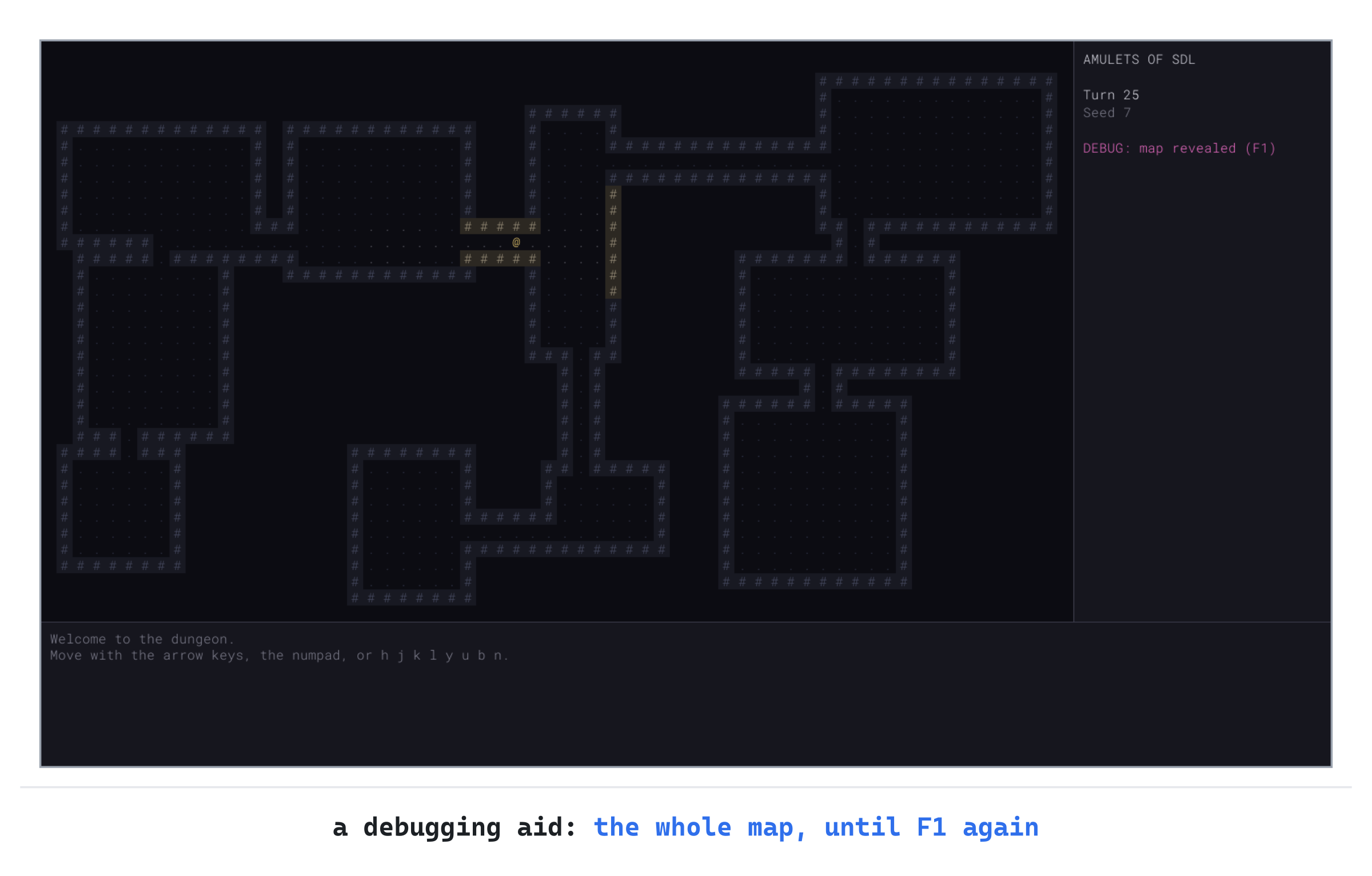
Debugging aids like this one earn their keep many times over. Later chapters add more of them, on the other function keys, to show what the monsters are thinking and how far away everything is.
Playing the Game
Now there's something to discover. Walk out of the first room, and follow the corridors. Each new room appears as you reach its doorway, and the map fills in behind you. Try to explore the whole dungeon with as few steps as you can, then press F1 to see what you missed.
Watch the light around corners, too. Stand in a corridor near a room's doorway, and step to the side: the part of the room you can see changes with every step, just as it would with a lamp. Then stand in a room's corner, and look along its walls, which stay whole however shallow the angle.
Understanding the Code
Every time the player moves, Fov::compute clears the old view, and sweeps the four quarters around the player. In each quarter, scanRow crosses one row at a time, lighting floor whose center is in the light and walls that the light touches. When a wall cuts the light, the part before the wall goes on to the next row by itself. And when the wall ends, the light starts again. The recursion stops at the edge of the player's sight.
The map keeps two marks on every cell. The visible mark is cleared every turn, and set again by the field of view. The explored mark is set the first time a cell is seen, and never cleared until a new dungeon. So drawMap can draw what's in view, what's remembered, and, with F1, everything.
The field of view only asks the map one question about walls: does this cell block sight? So when Chapter 19 adds doors that block sight when they're closed, only blocksSight changes, and the field of view works as it is.
Experimenting
The field of view has a few numbers you can play with. Try each of these, and put each back afterward:
- A longer reach. Change
SIGHT_RADIUSto20, and you can see across whole rooms, and far down corridors. Then try3, and the dungeon feels like a cave lit by a single candle. - A spikier circle. In
scanRow, changeradius * (radius + 1)toradius * radius, and setSIGHT_RADIUSto5. In an open room, the edge of your sight shows single cells sticking out at the top, bottom, left, and right. - Walls by their centers. In
scanRow, changebool lit = blocks || centerIsLit(depth, col, start, end);tobool lit = centerIsLit(depth, col, start, end);. Stand in a room's corner, and some of its walls go missing, where the light only grazes them. - No memory. In
drawMap, take!map.isExplored(x, y) &&out of the check that skips cells, and the rooms you leave vanish again. - Brighter memory. Change the
MEMORY_colors to something closer to the lit ones, and see how much harder it is to tell what's in view.
Changes to Fov.cpp itself are fine for an experiment too. But put them back before you go on, since the monsters in the next chapter rely on sight being symmetric.
Common Errors and Fixes
If the game didn't build, or doesn't behave as described, the problem is probably one of these.
C2440: 'return': cannot convert from 'const _Ty' to 'Terrain', in Map.cpp, and the lines after it say that _Ty is Map::Cell. The function at is returning the whole cell, rather than its terrain. It should read return cells_[y * MAP_W + x].terrain;.
C2665: 'std::vector<Map::Cell,std::allocator<Map::Cell>>::vector': no overloaded function could convert all the argument types, in the map's constructor. The constructor still passes Terrain::Wall to the vector, which now holds Cells. It should read : cells_(MAP_W * MAP_H).
LNK2019: unresolved external symbol "void __cdecl Fov::compute(class Map &,struct Point,int)", and then LNK1120: 1 unresolved externals. Fov.cpp isn't part of the project. With Show All Files on, right-click it in Solution Explorer, and choose Include In Project.
C2182: 'compute': this use of 'void' is not valid, in Fov.h, followed by C2065: 'Map': undeclared identifier. The forward declaration class Map; is missing from Fov.h, so the compiler doesn't know that Map is a type, and misreads the whole line. Add it above the namespace.
C3861: 'compute': identifier not found. The call to compute is missing Fov:: in front of it. It should read Fov::compute(map, player.pos, SIGHT_RADIUS).
Everything is still visible. drawMap isn't skipping the cells that can't be seen. Check that its loop starts with the check on isVisible, or, from the memory section on, on visible and isExplored.
The view doesn't move with the player. The field of view is only worked out at the start. Check that the walking code calls Fov::compute right after player.pos = to;.
The F1 reminder stays on screen, or F1 does nothing. Check that the F1 key's code sets redraw to true, and that the loop passes revealMap to drawFrame.
FAQ
Q) Why not cast a ray to every cell instead?
A) It's a fine way to start, and many games have used it. But rays from the center of one cell to another miss some cells and pass through others at odd angles. So walls can end up with holes in them, and sight isn't always symmetric. Shadowcasting visits each cell once, decides it exactly, and is quicker too.
Q) Why should sight be symmetric?
A) Because the game is fairer for it. In the next chapter, a monster can see you only if its cell is visible to you, and it's close enough. If sight weren't symmetric, a monster could see you from a cell you can't see, and you'd be attacked out of nowhere. Symmetry also means the game needs only one field of view, the player's, rather than one for every monster.
Q) Doesn't working out the field of view after every step take a long time?
A) No. A radius of 9 covers a few hundred cells at most, and each is visited about once. It takes a tiny fraction of a millisecond, which is nothing for a game that waits for a key between turns.
Q) Why is the radius 9, and not 10?
A) It's a matter of taste. Nine reaches across most of the rooms that Chapter 2 makes, so you can see most of a room once you're in it. But it doesn't reach across the map, so there's always something beyond the light. Try others, as Experimenting suggests, and see which feels right to you.
Q) Why doesn't the game remember monsters and items too?
A) There's nothing to remember yet. When monsters arrive, in Chapter 5, they're drawn only while you can see them, since a monster you saw a moment ago may have moved. Items, which arrive in Chapter 12 and stay put, are remembered where you saw them.
AI Exercise (Optional)
Many roguelikes darken the edge of the player's sight, so the light seems to fade with distance rather than stopping at a hard edge. If you'd like to try that with an AI's help, open your AI chatbot of choice, and try a prompt like this:
"I'm writing a roguelike in C++ with SDL 3. My field of view marks the cells the player can see as visible, up to SIGHT_RADIUS (9) cells away, using symmetric shadowcasting. A function, drawMap, draws each visible floor cell with drawCell(renderer, glyphs, x, y, '.', color), and each visible wall with drawCell(renderer, glyphs, x, y, '#', color, back), where color and back are SDL_Colors. The player's cell is player.pos, a Point with int x and y. I'd like the colors of visible cells to fade toward the remembered colors, Palette::MEMORY_FLOOR, MEMORY_WALL and MEMORY_WALL_BACK, as their distance from the player grows, so the light seems to fade. Show me the changes to drawMap, with each curly brace on its own line, and explain how the fade is worked out."
Notice what the preceding prompt does. It names the colors the fade should end at, so that a visible cell at the edge of the light looks just like a remembered one. The prompt also says how the cells are drawn, so that the AI changes drawMap rather than writing its own.
When the answer comes back, check it against your code. Does it blend the colors' red, green, and blue separately, and keep the alpha at 255? Does it measure distance the same way the field of view does, so the fade reaches the memory colors right at the edge of sight? And does it still draw remembered cells exactly as before?
Summary
The player now sees only what symmetric shadowcasting lights, remembers what they've seen, and can press F1 to see it all. In Chapter 5, something stirs. Monsters arrive, from a table of kinds, and wander the dungeon. Those that see you will come for you, and thanks to this chapter, they'll see you only when you can see them.