
Close the game's window, and the run is gone. That was fine while a run was one floor and a few minutes long. With nine floors to get through, a run can take an evening, or several. It has to be put down and picked up again.
This chapter adds saving. Esc opens a menu that saves the run and quits, and the next time the game starts, a title screen offers to carry on exactly where you left off. Exactly is the hard part. A save must hold everything the run needs to go on as if it had never stopped, the dice included, so the monster that was about to step left still steps left. The next image shows the end of the chapter: a saved run, waiting on the title screen, and the same run carried on.

On the left, the title screen offers to continue the run, to start a new one, or to quit. The right shows what C does: the run goes on from its second floor, where it was saved the moment the player arrived.
A save can also be damaged, by a crash, by a full disk, or by someone with Notepad. The game must notice, rather than crash an hour later. And a save mustn't undo the genre's one firm rule: when you die, you stay dead. By the end of the chapter, the save is written on every new floor, so a crash loses one floor at most. And it's deleted when the player dies, so there's nothing to go back to.
Chapter 17 in the book's repository holds this chapter's finished project. The chapter carries on in your own project from Chapter 16, or from the book's Chapter 16 folder.In this chapter, we will:
- Write the run to a save file, in the same records as the data files, from a new menu on Esc
- Read a save back into a run of its own, checking every value as it's read
- Continue a saved run from a title screen, with the dice rolling just as they would have
- Turn away a damaged save, with every reason why, and keep one from another version of the game
- Save on every new floor, and delete the save when the player dies
There are five checkpoints along the way. Let's start with the plan.
Planning the Chapter
This chapter adds one file, and changes ten:
| File | Status | What it's for |
|---|---|---|
src/SaveGame.cpp |
New | Game's own functions for saving a run and loading it |
src/Files.h, src/Files.cpp |
Changed | A folder for the files the game writes, and writing a file whole |
src/Rng.h, src/Rng.cpp |
Changed | The dice's state, as text, and back again |
src/Data.h, src/Data.cpp |
Changed | Finding a kind of monster by its id |
src/Identification.h, src/Identification.cpp |
Changed | Giving a kind back the look it had in a saved run |
src/Game.h, src/Game.cpp |
Changed | Esc's menu, the title screen, and when the run is saved |
| The other files | Unchanged |
The next image shows how the files fit together at the end of the chapter. The new file, SaveGame.cpp, sits beside Game.cpp, since it holds more of the Game class's own member functions: the ones that save and load.
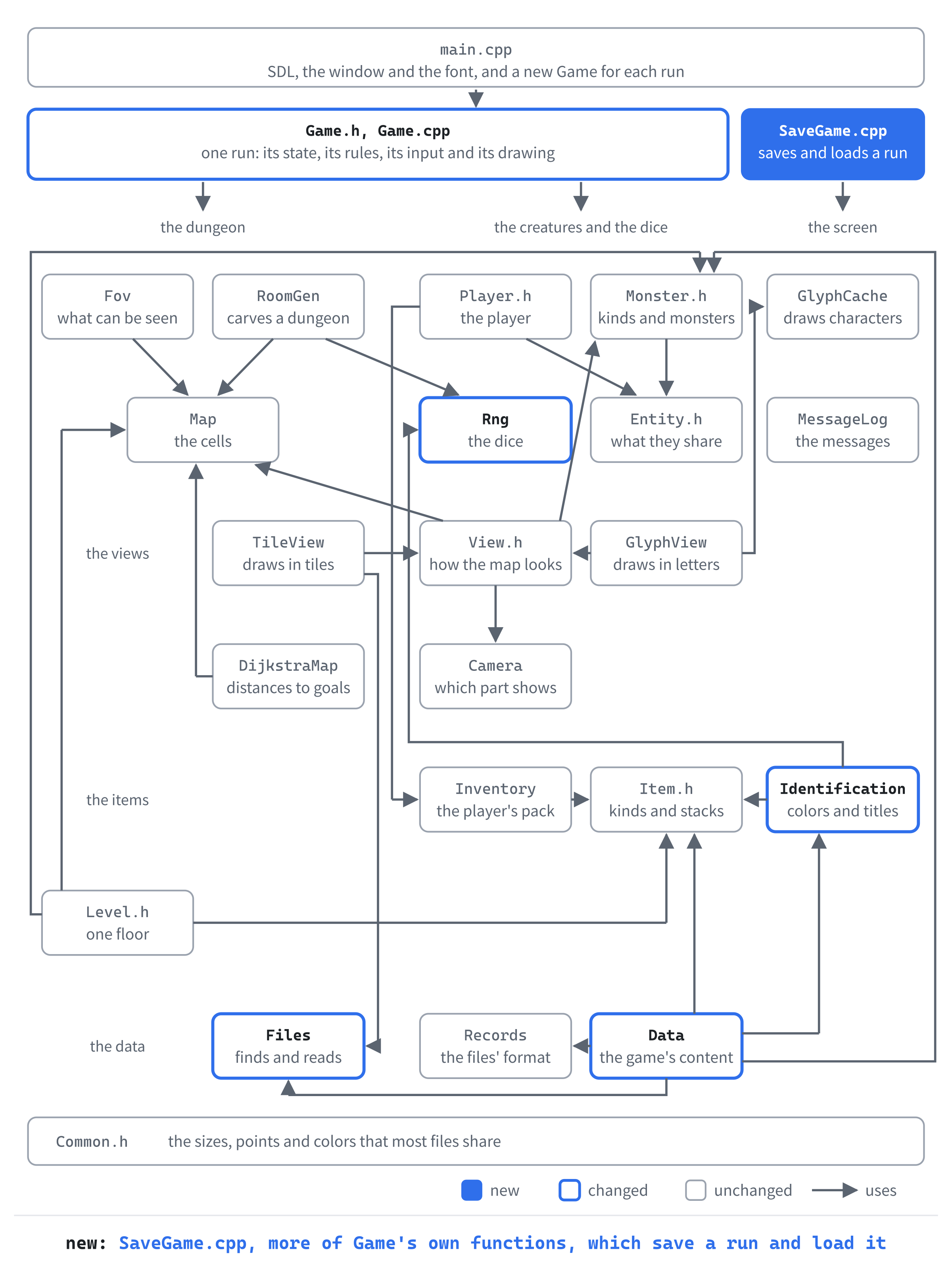
A class's member functions don't have to live in one file. Any .cpp file that includes the class's header can define some of them, and the linker puts them all together. The file Game.cpp is well over two thousand lines long already. And saving and loading are a job of their own, so they get a file of their own.
What a Save Holds
A save holds everything about a run that can't be worked out again from the rest, and nothing that can. Which cells the player can see isn't saved, for instance. Instead, updateSight works it out from the map and where the player stands, as it does after every step. The next image sorts a run into the two piles.
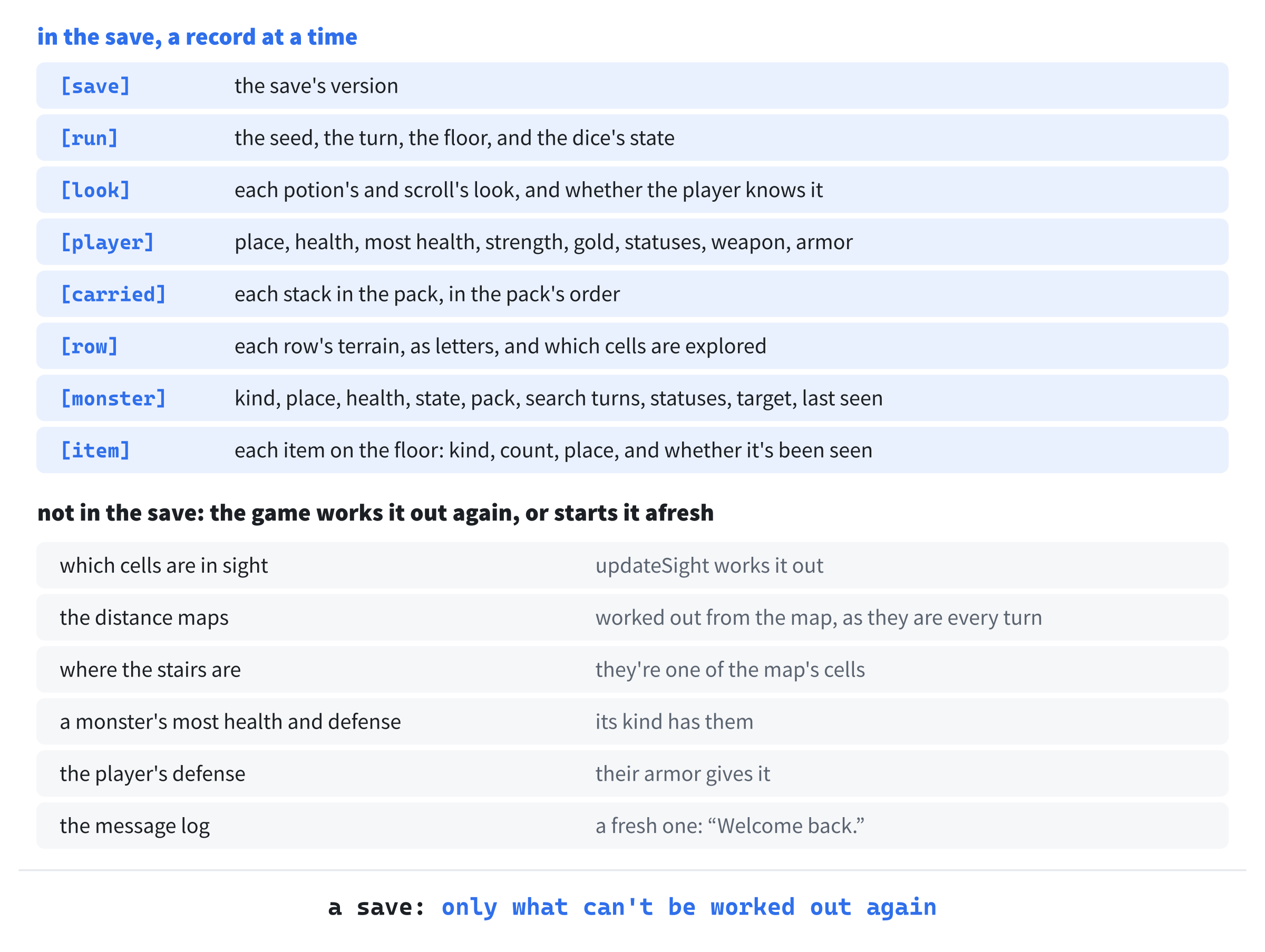
Leaving out what can be worked out again isn't only about size. Two copies of one fact can disagree. A monster's maximum health is its kind's hp. If a save held it too, a save written before someone changed monsters.txt would hold one number while the data file held another. Kept in one place, a fact can't contradict itself.
The message log is left out for a different reason: it's only talk. A continued run starts a fresh log, which says where you are.
Kinds by Name
Every monster's def points at its kind, in the game's data, and every item's does too. A pointer is an address in memory, good only while the program runs. Start the game again, and the kinds may be read into memory somewhere else, so an address saved in a file would point at nothing in particular.
So the save names each kind by its id, from Chapter 16. A monster's record says kind = jackal, and loading looks the jackal up by that id. This is one reason Chapter 16 made every id unique: saves name kinds by them, and so will later chapters' vaults.
The Format
A save is text, in the same records as Chapter 16's data files. So readRecords and FieldReader can read it back, check every value, and name the line of any mistake. It starts with a [save] record, which holds the format's version. Then a [run] record holds the seed, the turn, the floor and the dice. After those come a [look] for each kind of potion and scroll, the [player], a [carried] for each stack in the pack, a [row] for each of the map's 36 rows, and a [monster] or an [item] for each monster and each item on the floor.
Text takes more room than a tightly packed binary file, and it's slower to read, but neither matters here. A save is about 17 KB, read once. In return, a save can be read in Notepad, and a damaged one can be reported line by line. That's worth far more.
Three Rules
Three rules run through the chapter. First, the dice are saved, so a continued run rolls exactly as it would have. Second, a save is written whole or not at all, so a crash part way through never leaves half a save. Third, a save is read all or nothing: it's read into a run of its own, which takes the place of the one in play only once every record has been read and checked.
Saving the Run
The first part of the chapter writes the save. It needs a folder to write in, a safe way to write a file, and the dice's state as text. Then comes the save itself, a record at a time. At its checkpoint, Esc opens a new menu, S saves the run and quits, and you can open the save in Notepad and read it.
Where the Save Goes
Until now, the game has only read files, from its own folder. A save is a file it writes, which is a different matter. The program's folder may be one that its player can't write to at all, such as Program Files, where installed programs live. And on a computer that several people use, each of them needs a save of their own.
SDL has the answer. The function SDL_GetPrefPath gives a folder that belongs to the user who's playing, meant for the game's own files, such as its saves. It makes the folder if it isn't there yet. On Windows, it's in the user's AppData\Roaming folder, under two names: the organization that makes the game, and the game. Open Files.h, and find the comment at its top:
// Finding the files the game comes with, and reading them. SDL does the
// reading, because it takes every path as UTF-8, on every system, which is
// how SDL_GetBasePath gives the game's folder
Change it to this:
// Finding the files the game comes with, and the folder for the files it
// writes, and reading and writing them. SDL does the reading and writing,
// because it takes every path as UTF-8, on every system, which is how
// SDL_GetBasePath and SDL_GetPrefPath give their folders
Then add the new function's declaration at the end of the file:
// The full path of a file the game writes, such as "save.txt", in the
// folder SDL gives the game for each user's own files. On Windows, that's
// AppData\Roaming\GameCodeSchool\AmuletsOfSDL in the user's folder
std::string userPath(const std::string& name);
The two names go in Files.cpp. Open it, and add them below #include <SDL3/SDL.h>, with a blank line in between:
namespace
{
    // The names SDL_GetPrefPath files the game's own folder under: the
    // organization that makes the game, and the game
    const char* const ORGANIZATION = "GameCodeSchool";
    const char* const GAME = "AmuletsOfSDL";
}
SDL's documentation asks that these names never change, and with good reason. The folder is named after them, so new names would mean a new folder. Every save in the old one would be lost to the game. Now add the function, at the end of the file:
std::string userPath(const std::string& name)
{
    // SDL makes the folder, if it isn't there yet. This text, unlike
    // SDL_GetBasePath's, is the game's to free
    char* folder = SDL_GetPrefPath(ORGANIZATION, GAME);
    if (folder == nullptr)
    {
        SDL_Log("Couldn't find a folder to write in: %s", SDL_GetError());
        return name;
    }
    std::string path = folder + name;
    SDL_free(folder);
    return path;
}
The function SDL_GetPrefPath gives the folder's full path, ending with a separator, ready for a file's name. Unlike SDL_GetBasePath's, this text is the game's to free, with SDL_free. So the path is copied into a std::string first. If SDL can't find or make the folder, the name is used on its own. The save then goes in the working directory, which is better than no save at all.
Writing a File Whole
Writing a file takes time, and a lot can happen in the middle of it. If the game crashed, or the computer lost its power, part way through writing a save, the file would be left half written. The old save would be gone, and only half of the new one there. A half-written save is worse than none, since it looks like a save until something tries to read it.
The fix is to write the new save to a file of its own, make sure it has reached the disk, and only then put it in the old one's place. Renaming a file is a single step. So at every moment there's a whole save to be found: the old one until the rename, and the new one after it. The next image shows the two steps.
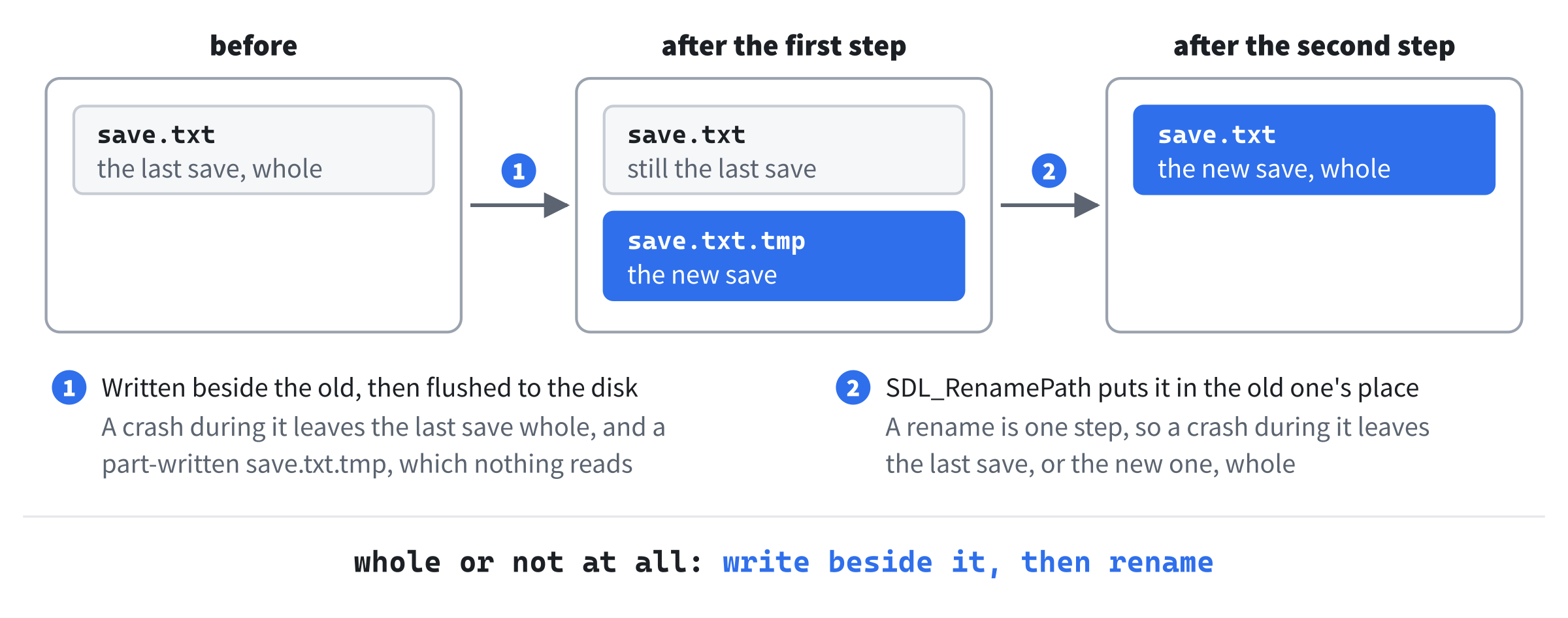
A crash during the first step leaves the old save untouched, beside a half-written save.txt.tmp that nothing reads. The next save writes over it. After the rename, a crash leaves the new save, whole. Add the declaration at the end of Files.h:
// Writes text to a file, whole or not at all. It's written to a file of
// its own first, which then takes the real file's place, so a crash part
// way through never leaves half a file. Returns false if it can't be
// written
bool writeTextFile(const std::string& path, const std::string& text);
And the function at the end of Files.cpp:
bool writeTextFile(const std::string& path, const std::string& text)
{
    // The text goes to a temporary file, and is flushed, so it's on the
    // disk itself, not waiting in memory. Then a rename replaces the old
    // file in one step, so the file is always either the old one, whole,
    // or the new one, whole, even if the computer loses its power
    std::string temporary = path + ".tmp";
    SDL_IOStream* file = SDL_IOFromFile(temporary.c_str(), "wb");
    if (file == nullptr)
    {
        return false;
    }
    size_t size = text.size();
    bool written = SDL_WriteIO(file, text.data(), size) == size &&
                   SDL_FlushIO(file);
    bool closed = SDL_CloseIO(file);
    return written && closed &&
           SDL_RenamePath(temporary.c_str(), path.c_str());
}
The temporary file has .tmp added to the real file's name. It's opened as a stream, with SDL_IOFromFile, where "wb" means to write it, in binary, so the text goes in exactly as it is. Then SDL_WriteIO writes the text, and gives back how much it wrote, which must be all of it.
A system keeps what's written in memory for a while, and writes it to the disk when it suits it, so a power cut could still lose it. The call to SDL_FlushIO makes sure the text has reached the disk: on Windows, it asks the system for that at once, with FlushFileBuffers. Only then is the file closed, and renamed over the old one, with SDL_RenamePath. If any step fails, the function returns false, and SDL's error says why. SDL's own documentation describes the same trick, and warns that without the flush, a power cut can leave a file renamed whose text never reached the disk.
The Dice's State
A seed makes a whole run, but only from its start. After a few hundred turns, the dice are somewhere else in their stream of numbers, and the save must put them back exactly there. Otherwise a continued run would roll differently from the moment it was loaded, and the monster about to step left might step right.
The engine behind the dice, a std::mt19937, can write its whole state to a stream, and read it back. Its state is 624 numbers, so it makes a long line in a save, but it's only numbers. Open Rng.h, and add this below #include <random>:
#include <string> // std::string, for the dice's state as textThen add the two functions below roll's declaration:
// The dice's state, as text, and setting it back from that text, so a
// saved run rolls on just as it would have. setState changes nothing,
// and returns false, if the text isn't a state
std::string state() const;
bool setState(const std::string& text);
Open Rng.cpp, and add the header below #include "Rng.h":
#include <sstream> // std::ostringstream and std::istringstream, for the stateThen add the state, below roll:
// The standard engines write their state to a stream, and read it back,
// as whole numbers with spaces between: 624 of them for a std::mt19937
std::string Rng::state() const
{
    std::ostringstream out;
    out << engine_;
    return out.str();
}
A std::ostringstream is an output stream that writes into a string, as std::cout writes to the console. The engine goes into it with <<, which writes its 624 numbers with spaces between them. Then str gives back what was written. Add the way back below it:
bool Rng::setState(const std::string& text)
{
    std::istringstream in(text);
    std::mt19937 engine;
    in >> engine;
    if (in.fail() || !(in >> std::ws).eof())
    {
        return false;
    }
    engine_ = engine;
    return true;
}
The text is read with >> into a new engine, rather than straight into engine_. If the text isn't a state, the stream fails, and engine_ is left as it was, as the comment in Rng.h promises. The test (in >> std::ws).eof() skips any spaces after the state, and then checks that nothing else is left. So a state with extra numbers on the end is turned away too. Only then does the new engine replace the old one.
A File of Game's Own
Now for the save itself. Add a C++ File (.cpp) called SaveGame.cpp, and type its first part:
// Saving a run. These are Game's own functions, in a file of their own,
// since Game.cpp is long enough already. A save is text, in the same
// records as the data files
#include "Game.h"
#include <map>       // std::map, for the monsters' states by name
#include "Files.h"

namespace
{
    // The save, in the folder SDL gives the game for each user
    const std::string SAVE_FILE = "save.txt";

    // The version of the save's format. Whatever changes what's saved
    // changes the version, so an old save is never misread
    constexpr int SAVE_VERSION = 1;

    std::string savePath()
    {
        return userPath(SAVE_FILE);
    }
In the preceding code, SaveGame.cpp includes Game.h, as Game.cpp does. That's all it takes to define Game's member functions here. Its helpers go in an unnamed namespace, as in Data.cpp, so nothing outside the file can see them. The save's name goes through userPath, so it lands in the game's own folder. It's a std::string, not a const char* like the names in Files.cpp, since messages about a save start with its name, joined on with +.
The most important line in the file is SAVE_VERSION. Whatever changes what a save holds changes the version too, so the game never reads a save in another format as if it were its own. The next chapter's caves raise it to 2, and later chapters raise it again, each time a run holds something new.
Letters for the Map
The map goes into the save a row at a time, with a letter for each cell's terrain. The letters are the glyph view's own, so a row in the save looks like a row of the map. Add the table, and a function that looks a terrain up in it, below savePath:
// Each kind of terrain's letter in a save's rows
struct TerrainLetter
{
    Terrain terrain;
    char letter;
};

constexpr TerrainLetter TERRAIN_LETTERS[] = {
    { Terrain::Wall, '#' },
    { Terrain::Floor, '.' },
    { Terrain::StairsDown, '>' },
};

char letterFor(Terrain terrain)
{
    for (const TerrainLetter& each : TERRAIN_LETTERS)
    {
        if (each.terrain == terrain)
        {
            return each.letter;
        }
    }
    return '?';
}
In the preceding code, letterFor gives ? for a terrain the table doesn't have. That could only happen if a later chapter added a terrain and forgot the table. The ? would then turn up in the save, where it's easy to spot. And reading the save would fail on that line, rather than quietly making a wall.
A monster's state is saved by name, too. Add the names below letterFor:
// The monsters' states, by their names in a save
const std::map<std::string, MonsterState> MONSTER_STATES = {
    { "asleep", MonsterState::Asleep },
    { "wandering", MonsterState::Wandering },
    { "hunting", MonsterState::Hunting },
    { "fleeing", MonsterState::Fleeing },
};

std::string nameOf(MonsterState state)
{
    for (const auto& [name, each] : MONSTER_STATES)
    {
        if (each == state)
        {
            return name;
        }
    }
    return "";
}
A loop in nameOf looks through the map for a state's name, which is the other way around from a map's usual job. The loop's auto& [name, each] takes each of the map's pairs apart into its key and its value, with C++17's structured bindings. Looking through four entries is no burden.
Why names, rather than the enum's numbers? A number such as 2 means hunting only for as long as the enum's members stay in their order. Add a new state at the top of the enum, and every saved 2 would mean something else, without a word of warning. A name means the same whatever the order.
Writing Records
Each line of a record is a key, an equals sign and a value, and a few helpers write the kinds of value a save holds. Add these below nameOf:
// Writing: each line of a record is "key = value"
void addField(std::string& text, const std::string& key,
              const std::string& value)
{
    text += key + " = " + value + "\n";
}

void addField(std::string& text, const std::string& key, int value)
{
    addField(text, key, std::to_string(value));
}

void addPoint(std::string& text, const std::string& key, Point point)
{
    addField(text, key,
             std::to_string(point.x) + " " + std::to_string(point.y));
}
The function addField comes in two versions, one for text and one for whole numbers. So most of its callers don't have to turn a number into text first. Two functions with one name, told apart by their parameters, are overloads. The compiler picks the one whose parameters fit the call. A point is two numbers on one line, x and then y, as a monster's floors are in monsters.txt.
The last two helpers write a color, as three numbers, and the four statuses that the player and the monsters share. Add them below addPoint, and close the namespace:
    void addColor(std::string& text, const std::string& key,
                  SDL_Color color)
    {
        addField(text, key, std::to_string(color.r) + " " +
                            std::to_string(color.g) + " " +
                            std::to_string(color.b));
    }

    // The statuses the player and the monsters share
    void addStatuses(std::string& text, const Entity& entity)
    {
        addField(text, "poisoned", entity.poisoned);
        addField(text, "regenerating", entity.regenerating);
        addField(text, "confused", entity.confused);
        addField(text, "afraid", entity.afraid);
    }
}
The function addStatuses takes an Entity, so it works for the player and for a monster alike. A look's color is always fully solid, so its alpha is left out. Reading it back gives 255, as Chapter 16's colors do.
The Save Itself
The game asks for a save with one function. Open Game.h, and add its declaration below updateSight's:
// Saving the run, in SaveGame.cpp
bool writeSave();
Back in SaveGame.cpp, add the first part of writeSave at the end of the file:
// Writes the run as it stands, between turns: everything that can't be
// worked out again from the rest
bool Game::writeSave()
{
    std::string text = "# A saved run of Amulets of SDL. The run's end "
                       "deletes it.\n";
    text += "\n[save]\n";
    addField(text, "version", SAVE_VERSION);

    text += "\n[run]\n";
    addField(text, "seed", std::to_string(seed_));
    addField(text, "turn", turn_);
    addField(text, "floor", level_.depth);
    addField(text, "dice", rng_.state());
The text is built up a record at a time, and written in one go at the end. Its first line is a comment for anyone who opens the file, which readRecords skips. It says that the run's end deletes the save, a promise the third part of the chapter keeps. The seed goes through std::to_string rather than the whole-number addField, since it's an unsigned int, and it can be too big for an int.
Next come the looks. Each kind of potion and scroll has a look in this run, a color or a title, which the player may or may not have learned. Add them below:
// How this run's potions and scrolls look, and which the player knows
for (const ItemDef& def : data_.items())
{
    bool hasLook = def.itemClass == ItemClass::Potion ||
                   def.itemClass == ItemClass::Scroll;
    if (!hasLook)
    {
        continue;
    }
    const Appearance& look = identification_.appearanceOf(def);
    text += "\n[look]\n";
    addField(text, "kind", def.id);
    addField(text, "name", look.name);
    addColor(text, "color", look.color);
    addField(text, "known", identification_.isKnown(def) ? "yes" : "no");
}
Only potions and scrolls have looks, so continue skips every other kind. A look is saved with its kind's id, so the right kind gets it back. Its name is saved as it is, whether it's a color, such as crimson, or a scroll's title, such as ZELMOR THIKA.
Then the player, and their pack. Add them below the looks, with a blank line in between:
text += "\n[player]\n";
addPoint(text, "pos", player_.pos);
addField(text, "hp", player_.hp);
addField(text, "max_hp", player_.maxHp);
addField(text, "strength", player_.strength);
addField(text, "gold", player_.gold);
addStatuses(text, player_);
if (player_.weapon)
{
    addField(text, "weapon", player_.weapon->def->id);
}
if (player_.armor)
{
    addField(text, "armor", player_.armor->def->id);
}
for (const Item& item : player_.inventory.items())
{
    text += "\n[carried]\n";
    addField(text, "kind", item.def->id);
    addField(text, "count", item.count);
}
In the preceding code, the weapon and the armor are saved only if the player has them. The pack gets a record for each stack, in the pack's own order. So each stack gets its letter back: the stack that was c is c again. The player's defense isn't saved, since it comes from their armor.
Then the map. Add it below the pack:
// The floor, a row at a time: what each cell is made of, and a 1 for
// each cell the player has seen
for (int y = 0; y < MAP_H; ++y)
{
    std::string terrain;
    std::string explored;
    for (int x = 0; x < MAP_W; ++x)
    {
        terrain += letterFor(level_.map.at(x, y));
        explored += level_.map.isExplored(x, y) ? '1' : '0';
    }
    text += "\n[row]\n";
    addField(text, "y", y);
    addField(text, "terrain", terrain);
    addField(text, "explored", explored);
}
Each row becomes two strings with a letter for every cell. The first holds the terrain, and the second a 1 for each cell the player has explored and a 0 for the rest. A row is 64 cells across, so each string is 64 characters long. The 36 rows make the biggest part of a save after the dice.
Last come the monsters and the items on the floor. Add the monsters below the map, with a blank line in between:
for (const Monster& monster : level_.monsters)
{
    text += "\n[monster]\n";
    addField(text, "kind", monster.def->id);
    addPoint(text, "pos", monster.pos);
    addField(text, "hp", monster.hp);
    addField(text, "state", nameOf(monster.state));
    addField(text, "pack", monster.packId);
    addField(text, "search_turns", monster.searchTurns);
    addStatuses(text, monster);
    if (monster.target)
    {
        addPoint(text, "target", *monster.target);
    }
    if (monster.lastSeen)
    {
        addPoint(text, "last_seen", *monster.lastSeen);
    }
}
A monster's maximum health and its defense aren't saved, since its kind says what they are. Its target, and the place it last saw the player, are each a std::optional<Point>, saved only when they hold a point. That's how a hunter that lost sight of you just before the save still knows where to look after it.
The items are the last records, and then the text is written. Add these below, with a blank line in between, and the function is done:
    for (const FloorItem& floorItem : level_.items)
    {
        text += "\n[item]\n";
        addField(text, "kind", floorItem.item.def->id);
        addField(text, "count", floorItem.item.count);
        addPoint(text, "pos", floorItem.pos);
        addField(text, "seen", floorItem.seen ? "yes" : "no");
    }

    return writeTextFile(savePath(), text);
}
The flag seen says whether the player has seen the item, which decides whether the map remembers it when it's out of sight. Then the whole text goes to writeTextFile, whole or not at all, and its answer is writeSave's.
Esc's Menu
A save has to be asked for somehow. Since Chapter 1, Esc has quit the game outright. Now it opens a small menu instead, which offers to save the run and quit, or to go back to it. Open Game.h, and add a state for the menu above Dead,:
Menu, // Esc's menu, to save the run and quitThen add the menu's key handler, and the function that saves and quits, below handleDeadKey's declaration:
void handleMenuKey(const SDL_KeyboardEvent& key);
void saveAndQuit();
And add the menu's drawing below drawDeathScreen's:
void drawMenu() const;Open Game.cpp, and replace the comment above handlePlayingKey with this:
// Esc opens the menu, > goes down the stairs, g picks up, i shows the
// inventory, d drops, x starts looking around, and the moving keys move
// the player
Then, in handlePlayingKey, find these lines:
if (key.key == SDLK_ESCAPE)
{
    running_ = false;
    return;
}
Change them to these:
if (key.key == SDLK_ESCAPE)
{
    state_ = GameState::Menu;
    redraw_ = true;
    return;
}
The menu's keys go to a handler of their own. In handleKey, add the menu's case above case GameState::Dead::
case GameState::Menu:
    handleMenuKey(key);
    break;
Add the handler below handleDeadKey:
// Esc's menu: S saves the run and quits, and Esc goes back to the game
void Game::handleMenuKey(const SDL_KeyboardEvent& key)
{
    if (key.key == SDLK_S)
    {
        saveAndQuit();
    }
    else if (key.key == SDLK_ESCAPE)
    {
        state_ = GameState::Playing;
        redraw_ = true;
    }
}
S saves the run and quits, and Esc goes back to the game, just where it was. The other keys do nothing, as on the death screen. Add the saving and quitting below it:
// Saves the run and ends the game. If the save can't be written, the game
// stays open, and says why, so the run isn't lost
void Game::saveAndQuit()
{
    if (writeSave())
    {
        running_ = false;
        return;
    }
    log_.add("The run couldn't be saved: " + std::string(SDL_GetError()));
    state_ = GameState::Playing;
    redraw_ = true;
}
A save that can't be written doesn't end the game, since that would lose the run. The game goes back to playing instead, and the log says why, in SDL's words, from SDL_GetError. A full disk, say, can then be dealt with, and the run saved again.
The menu is drawn over the dungeon. Add drawMenu below drawDeathScreen:
// Esc's menu, over the dungeon
void Game::drawMenu() const
{
    float row = glyphs_.lineHeight();
    SDL_FRect box = drawDialog(480.0f, 6 * row);
    float x = box.x + 2 * MARGIN;
    float y = box.y + row;
    glyphs_.drawText("MENU", x, y, Palette::TEXT);
    y += 2 * row;
    glyphs_.drawText("S    Save the run, and quit", x, y, Palette::TEXT);
    y += row;
    glyphs_.drawText("Esc  Back to the game", x, y, Palette::TEXT);
}
Chapter 12's drawDialog shades the map and draws an empty box in the middle of it, and the menu's three lines go in the box. Last, draw must call it. In draw, find these lines:
else if (state_ == GameState::Inventory)
{
    drawInventory();
}
Change them to these:
else if (state_ == GameState::Inventory)
{
    drawInventory();
}
else if (state_ == GameState::Menu)
{
    drawMenu();
}
Checkpoint: Press F5, take a few steps, and press Esc. The dungeon fades, and the menu sits in the middle of it. Press Esc again, and you're back where you were. Then press Esc and S, and the game saves the run and closes.
Now find the save. Press Windows+R, type %APPDATA%\GameCodeSchool\AmuletsOfSDL, and press Enter. File Explorer opens the folder SDL made for the game, with save.txt in it. Double-click it, and it opens in Notepad. The next image shows the start of a save.

Scroll down, and the rest of the run is there: your pack, if you've picked anything up, the 36 rows of the map, and every monster and item on the floor. The dice line runs off the right of the window, 624 numbers long, and it's about two fifths of the whole file. Nothing reads the save yet, so starting the game again starts a new run. Reading it back is next.
Reading It Back
Reading a save is the bigger half of the job. Every value must be checked as it's read, and the save mustn't touch the run in play until all of it has been read. This part writes the reading, and its checkpoint compiles it. The title screen that uses it comes after.
Finding a Monster's Kind
A save names kinds by their ids, and loading must turn the ids back into pointers. Chapter 16 gave the data a search for a kind of item, and the monsters need one too. Open Data.h, and find these lines:
// The kind of item with this id, or nullptr if there's none
const ItemDef* findItem(const std::string& id) const;
Change them to these:
// The kind of monster or item with this id, or nullptr if there's none
const MonsterDef* findMonster(const std::string& id) const;
const ItemDef* findItem(const std::string& id) const;
Open Data.cpp, and add the search below items:
const MonsterDef* GameData::findMonster(const std::string& id) const
{
    for (const MonsterDef& def : monsters_)
    {
        if (def.id == id)
        {
            return &def;
        }
    }
    return nullptr;
}
The search is findItem's, for monsters. Going through every kind in turn is quick, and it happens only while a save is read.
Looks Given Back
A potion's look is chosen at random when a run starts, so a continued run must get its old looks back. Otherwise the purple potion you learned was healing would come back some other color, and a potion of poison might wear purple. Open Identification.h, and add this below learn's declaration:
// Gives a kind the look it had in a saved run
void setAppearance(const ItemDef& def, const Appearance& look);
Open Identification.cpp, and add the function below learn:
void Identification::setAppearance(const ItemDef& def,
                                   const Appearance& look)
{
    appearances_[&def] = look;
}
Indexing appearances_ with [] makes an entry for the kind if it has none, and replaces its look if it has one. Whether the player knows the kind is a separate matter, set with Chapter 12's learn.
Reading Values
Open SaveGame.cpp. It reads as well as writes now, and its comment should say so. Replace the comment above #include "Game.h" with this:
// Saving a run, and loading it again. These are Game's own functions, in a
// file of their own, since Game.cpp is long enough already. A save is
// text, in the same records as the data files, so FieldReader checks every
// value read back, and names the line of any mistake
The reading needs two more headers. Add <sstream> below <map>:
#include <sstream> // std::istringstream, to read the seedAnd add Records.h below Files.h:
#include "Records.h"A row of the map comes back as letters, which must be turned into terrain again. Add this below letterFor:
// The terrain a letter stands for. False if it stands for none
bool terrainFor(char letter, Terrain& terrain)
{
    for (const TerrainLetter& each : TERRAIN_LETTERS)
    {
        if (each.letter == letter)
        {
            terrain = each.terrain;
            return true;
        }
    }
    return false;
}
The function terrainFor returns false for a letter that isn't in the table, and gives the terrain back through a reference parameter. Returning a Terrain alone couldn't say "none of them", since every value of the enum is a real terrain.
The reading's helpers go at the end of the namespace, below addStatuses, just as the writing's went below nameOf. Add the first two:
// Reading: a place on the map, as x and y
Point readPoint(FieldReader& fields, const std::string& key)
{
    std::vector<int> xy = fields.numbers(key, 2, 0);
    return { xy[0], xy[1] };
}

void readStatuses(FieldReader& fields, Entity& entity)
{
    entity.poisoned = fields.number("poisoned", 0);
    entity.regenerating = fields.number("regenerating", 0);
    entity.confused = fields.number("confused", 0);
    entity.afraid = fields.number("afraid", 0);
}
The function readPoint asks for exactly two whole numbers, each 0 or more, and readStatuses reads the four counts. Both leave the checking to FieldReader, from Chapter 16. So a missing key, or a value that isn't a number, is reported with its line. Then the reading carries on, to find any other mistakes as well.
A kind comes back from its id. Add this below readStatuses:
// The kind a key names by its id, or nullptr, with the mistake
// reported, if the data files have no such kind
const ItemDef* readItemKind(FieldReader& fields, const GameData& data,
                            const std::string& key)
{
    std::string id = fields.id(key);
    const ItemDef* def = data.findItem(id);
    if (def == nullptr && !id.empty())
    {
        fields.report(fields.lineOf(key), "no kind of item is called '" +
                      id + "'");
    }
    return def;
}
The function id checks that the value is written as an id, and findItem looks it up. An id that the data files don't have is a mistake, reported with its line. But an empty one isn't reported again, since id has reported the missing key already. A monster's kind comes back the same way. Add it below, with a blank line in between:
const MonsterDef* readMonsterKind(FieldReader& fields,
                                  const GameData& data,
                                  const std::string& key)
{
    std::string id = fields.id(key);
    const MonsterDef* def = data.findMonster(id);
    if (def == nullptr && !id.empty())
    {
        fields.report(fields.lineOf(key),
                      "no kind of monster is called '" + id + "'");
    }
    return def;
}
The seed needs reading of its own, since it's an unsigned int, and FieldReader's numbers are ints. Add this below:
// The run's seed. It can be bigger than an int, so it's read as an
// unsigned int
unsigned int readSeed(FieldReader& fields)
{
    std::string text = fields.text("seed");
    std::istringstream in(text);
    unsigned int seed = 0;
    if (!text.empty() && !((in >> seed) && (in >> std::ws).eof()))
    {
        fields.report(fields.lineOf("seed"),
                      "'seed' should be a whole number");
    }
    return seed;
}
A std::istringstream reads from a string, as std::cin reads from the keyboard. Then >> reads the number from it. The test after it is the one in setState: the reading must work, and nothing but spaces may follow the number.
A Reader for Each Record
Each type of record has a function that reads it. The looks come first. Add this below readSeed:
// How one kind of potion or scroll looks in the run, and whether the
// player knows it
void readLook(FieldReader& fields, const GameData& data,
              Identification& looks)
{
    const ItemDef* def = readItemKind(fields, data, "kind");
    Appearance look;
    look.name = fields.text("name");
    look.color = fields.color("color");
    bool known = fields.yesNo("known");
    if (def != nullptr)
    {
        looks.setAppearance(*def, look);
        if (known)
        {
            looks.learn(*def);
        }
    }
}
Every key is asked for, whether the kind was found or not. So finish can report any key that nobody asked for, as in Chapter 16's files. Only a kind that was found gets its look, and it's learned if the player knew it.
The player's record is next. Add the first part of readPlayer below readLook:
// The player, but for the pack, which has a record for each stack. The
// player's defense comes from their armor, so it isn't saved
void readPlayer(FieldReader& fields, const GameData& data,
                Player& player)
{
    player.pos = readPoint(fields, "pos");
    player.hp = fields.number("hp", 1);
    player.maxHp = fields.number("max_hp", 1);
    player.strength = fields.number("strength", 0);
    player.gold = fields.number("gold", 0);
    readStatuses(fields, player);
Health must be at least 1, since the player in a saved run is alive. Strength and gold may be 0. Then come the weapon and the armor, either of which may be left out. Add the rest of readPlayer below it:
    if (fields.has("weapon"))
    {
        const ItemDef* def = readItemKind(fields, data, "weapon");
        if (def != nullptr)
        {
            player.weapon = Item{ def };
        }
    }
    if (fields.has("armor"))
    {
        const ItemDef* def = readItemKind(fields, data, "armor");
        if (def != nullptr)
        {
            player.armor = Item{ def };
            player.defense = def->defense;
        }
    }
}
The function has notes each key as asked for, and says whether it's there. Armor gives the player their defense, just as putting it on does.
Each stack in the pack has a record of its own. Add this below readPlayer:
// One stack in the player's pack. The records come in the pack's
// order, so every stack gets its letter back
void readCarried(FieldReader& fields, const GameData& data,
                 Player& player)
{
    const ItemDef* def = readItemKind(fields, data, "kind");
    int count = fields.number("count", 1);
    if (def != nullptr && !player.inventory.add(Item{ def, count }))
    {
        fields.report(fields.lineOf("kind"), "the pack is already full");
    }
}
Each stack goes into the pack with add, as picking it up does, in the order the save has them. So each gets its old letter back. A pack that's full before a stack comes along means the save holds more stacks than a pack can, and that's a mistake.
The rows of the map come next. Add the first part of readRow below readCarried:
// One row of the map: which row it is, what each of its cells is made
// of, and which of them the player has seen
void readRow(FieldReader& fields, Map& map)
{
    int y = fields.number("y", 0);
    std::string terrain = fields.text("terrain");
    std::string explored = fields.text("explored");
    if (y >= MAP_H)
    {
        fields.report(fields.lineOf("y"), "'y' goes up to " +
                      std::to_string(MAP_H - 1));
        return;
    }
    if (terrain.size() != MAP_W || explored.size() != MAP_W)
    {
        fields.report(fields.lineOf("terrain"), "a row is " +
                      std::to_string(MAP_W) + " cells across");
        return;
    }
A row that's out of range, or isn't 64 cells long, is reported. Then the function returns at once, since its cells have nowhere sensible to go. Add the rest of readRow below it:
    for (int x = 0; x < MAP_W; ++x)
    {
        Terrain cell = Terrain::Wall;
        if (!terrainFor(terrain[x], cell))
        {
            fields.report(fields.lineOf("terrain"),
                          "no terrain is called '" +
                          std::string(1, terrain[x]) + "'");
            return;
        }
        map.set(x, y, cell);
        if (explored[x] == '1')
        {
            map.setExplored(x, y);
        }
    }
}
Each letter is turned back into terrain, and the map is set a cell at a time. A letter the table doesn't have is reported, with the letter itself, and the rest of the row is skipped. Each 1 in explored marks its cell as explored, as the player's own eyes did when the run was played.
The monsters come next. Add the first part of readMonster below readRow:
// A monster, as it was. Its kind gives it its health at most, and its
// defense, which aren't saved
void readMonster(FieldReader& fields, const GameData& data,
                 std::vector<Monster>& monsters)
{
    Monster monster;
    monster.def = readMonsterKind(fields, data, "kind");
    monster.pos = readPoint(fields, "pos");
    monster.hp = fields.number("hp", 1);
    std::string state = fields.text("state");
    auto found = MONSTER_STATES.find(state);
    if (found != MONSTER_STATES.end())
    {
        monster.state = found->second;
    }
    else if (!state.empty())
    {
        fields.report(fields.lineOf("state"), "no state is called '" +
                      state + "'");
    }
In the preceding code, the state's name is looked up in MONSTER_STATES, the same map that gave the name when the save was written. A name the map doesn't have is a mistake, unless it's empty, since a missing state has been reported already. Add the rest of readMonster below it:
    monster.packId = fields.number("pack", 0);
    monster.searchTurns = fields.number("search_turns", 0);
    readStatuses(fields, monster);
    if (fields.has("target"))
    {
        monster.target = readPoint(fields, "target");
    }
    if (fields.has("last_seen"))
    {
        monster.lastSeen = readPoint(fields, "last_seen");
    }
    if (monster.def != nullptr)
    {
        monster.maxHp = monster.def->hp;
        monster.defense = monster.def->defense;
    }
    monsters.push_back(monster);
}
A monster's maximum health and defense come from its kind, if the kind was found, as they do when a monster is made. The monster goes into the vector either way, since a mistake anywhere means the whole save will be turned away. The items on the floor are the last. Add them below readMonster:
// An item lying on the floor
void readFloorItem(FieldReader& fields, const GameData& data,
                   std::vector<FloorItem>& items)
{
    FloorItem floorItem;
    floorItem.item.def = readItemKind(fields, data, "kind");
    floorItem.item.count = fields.number("count", 1);
    floorItem.pos = readPoint(fields, "pos");
    floorItem.seen = fields.yesNo("seen");
    items.push_back(floorItem);
}
That's every type of record. The namespace's closing brace is still below readFloorItem, where it was.
A Run of Its Own
Now the function that reads a save. Its rule is all or nothing. The save is read into a run of its own, a fresh floor, player, set of looks and dice. Only if every record is read without a mistake does that run take the place of the one in play. The next image shows the idea.

A save with a mistake on its last line leaves the game exactly as it was, and the reasons are kept, for the title screen to show.
Loading can end in three ways: the save is loaded, it's from another version of the game, or it's damaged. A save from another version isn't damaged. It's fine, for the game that wrote it, so it gets an answer of its own, which the fourth part of the chapter puts to use. Open Game.h, and add an enum for the three below GameState's:
// What came of loading the save
enum class LoadResult
{
    Loaded,
    OtherVersion,   // it's from another version of the game
    Damaged,        // it can't be used, for the reasons in errors
};
Then replace the comment above bool writeSave(); with this:
// Saving and loading, in SaveGame.cppAnd add the loading's declaration below writeSave's:
LoadResult loadSave(std::vector<std::string>& errors);Back in SaveGame.cpp, add the first part of loadSave at the end of the file:
// Reads the save into a run of its own: a floor, a player, the looks of
// the potions and scrolls, and the dice. Only once all of it has been read
// and checked does that run take the place of the one in play. Anything
// else leaves the mistakes in errors: a save from another version of the
// game, or a damaged one
LoadResult Game::loadSave(std::vector<std::string>& errors)
{
    std::string text;
    if (!readTextFile(savePath(), text))
    {
        errors.push_back("Couldn't read " + savePath());
        return LoadResult::Damaged;
    }
    std::vector<std::string> lineErrors;
    std::vector<Record> records = readRecords(text, SAVE_FILE, lineErrors);

    // The version comes first, before anything else is read: a save from
    // another version of the game isn't damaged, just not this game's
    if (records.empty() || records.front().type != "save")
    {
        errors.push_back(SAVE_FILE + ": a save starts with [save]");
        return LoadResult::Damaged;
    }
    FieldReader versionField(records.front(), SAVE_FILE, errors);
    int version = versionField.number("version", 1);
    if (!versionField.finish())
    {
        return LoadResult::Damaged;
    }
    if (version != SAVE_VERSION)
    {
        errors.push_back(SAVE_FILE + ": it's version " +
                         std::to_string(version) + ", and this game reads "
                         "version " + std::to_string(SAVE_VERSION));
        return LoadResult::OtherVersion;
    }
    errors.insert(errors.end(), lineErrors.begin(), lineErrors.end());
A save that can't be read at all is damaged, with its full path as the one mistake. The version must be read next, before anything else. A save from another version may hold records this game has never heard of, and listing them as mistakes would only confuse. So the records are read into a vector, and the first one is looked at on its own.
It must be a [save] record, or the save is damaged. Its version is read with a FieldReader of its own, and a version that can't be read, or a record with keys a [save] doesn't have, is damage too. A version that's simply not this game's is another version, with a message that names both. Only then are the mistakes that readRecords found added to the list, since they matter only in a save this game can read.
The run of its own comes next: six local variables, the seed, the turn, the dice, a Level, a Player and an Identification. Add them below, with a blank line in between:
unsigned int seed = 0;
int turn = 0;
Rng dice(0);
Level level;
Player player;
Identification looks;
Each is made fresh, as a new run would make them. The dice start from any seed at all, since their state will be set from the save. Then come the records, each handed to its reader by its type, from the second, since the first has been read. Add the first part of the loop below:
for (size_t i = 1; i < records.size(); ++i)
{
    const Record& record = records[i];
    FieldReader fields(record, SAVE_FILE, errors);
    if (record.type == "run")
    {
        seed = readSeed(fields);
        turn = fields.number("turn", 0);
        level.depth = fields.number("floor", 1);
        std::string state = fields.text("dice");
        if (!state.empty() && !dice.setState(state))
        {
            fields.report(fields.lineOf("dice"),
                          "'dice' isn't the dice's state");
        }
    }
The [run] record's values go into the local variables. The dice's state must be one that setState accepts. A state that isn't changes nothing, so the dice stay as they started. Add the other types below it:
else if (record.type == "look")
{
    readLook(fields, data_, looks);
}
else if (record.type == "player")
{
    readPlayer(fields, data_, player);
}
else if (record.type == "carried")
{
    readCarried(fields, data_, player);
}
else if (record.type == "row")
{
    readRow(fields, level.map);
}
else if (record.type == "monster")
{
    readMonster(fields, data_, level.monsters);
}
else if (record.type == "item")
{
    readFloorItem(fields, data_, level.items);
}
Each reader gets what it fills in: the looks, the player, the map, or the floor's vectors of monsters and items. Add the end of the loop below:
    else
    {
        fields.report(record.line, "unknown record [" + record.type +
                      "]");
        continue;
    }
    fields.finish();
}
if (!errors.empty())
{
    return LoadResult::Damaged;
}
A record of a type that a save doesn't have is a mistake. And continue skips finish for it, since its keys mean nothing. Every other record is finished, so a misspelled key anywhere is caught. Once the loop is done, any mistake at all means the save is damaged, and loadSave says so, leaving the run in play untouched.
Add the rest of the function below:
    // The stairs aren't saved: they're wherever the map has them
    for (int y = 0; y < MAP_H; ++y)
    {
        for (int x = 0; x < MAP_W; ++x)
        {
            if (level.map.at(x, y) == Terrain::StairsDown)
            {
                level.stairs = { x, y };
            }
        }
    }

    // Everything was read, so the saved run takes the place of the new one
    seed_ = seed;
    turn_ = turn;
    rng_ = dice;
    level_ = level;
    player_ = player;
    identification_ = looks;
    updateSight();
    toPlayer_.compute(level_.map, { player_.pos });
    return LoadResult::Loaded;
}
In the preceding code, the stairs are found on the map, since they're one of its cells already. Then six assignments put the saved run in place of the one in play. Each is a copy of a whole object: the floor with its map, monsters and items, the player with their pack, and the rest. Last, updateSight works out what the player can see, and the distance map to the player is worked out, as newLevel does for a new floor. Whatever a save leaves out, the game works out again.
Checkpoint: Open SaveGame.cpp, and press Ctrl+F7 to compile it on its own. It compiles, with no errors or warnings. Nothing calls loadSave yet, so there's no point running the game, which is just as it was at the first checkpoint.
Continuing a Run
Now the game can offer a saved run when it starts. A title screen appears whenever a save is waiting, with three keys: C continues the saved run, N starts a new one, and Esc quits. Chapter 22 turns it into the game's full title screen, but for now it appears only when there's a run to offer. Closing the window will save the run too.
The Title Screen
Two small functions come first, one to see whether there's a save, and one to delete it. Open Game.h, and add the first directly above bool writeSave();, below the comment:
bool saveExists() const;Add the second below loadSave's declaration:
void removeSave();Open SaveGame.cpp, and add both functions below the unnamed namespace, above writeSave's comment:
bool Game::saveExists() const
{
    return SDL_GetPathInfo(savePath().c_str(), nullptr);
}

void Game::removeSave()
{
    if (!SDL_RemovePath(savePath().c_str()))
    {
        SDL_Log("The save couldn't be deleted: %s", SDL_GetError());
    }
}
The call to SDL_GetPathInfo fills in what SDL learns about a path, such as its size. With nullptr in place of somewhere to put that, it only says whether the path is there. And SDL_RemovePath deletes a file, and counts one that isn't there as deleted, with no error. It returns false only when a file that's there can't be deleted, as when another program has it open. That's worth a line in the console: a save that outlived its run's death would offer the dead run again.
The title screen is a state of its own. In Game.h, add it to the states, above Playing,:
Title, // a saved run is waiting, to be continued or notAdd its key handler above handleMenuKey's declaration:
void handleTitleKey(const SDL_KeyboardEvent& key);And add the function that continues a run below handleMenuKey's:
void continueRun();Then add the title's drawing above drawMenu's declaration:
void drawTitle() const;A save that can't be loaded has its reasons shown on the title screen, so they're kept in a member. Add it below inventoryAction_:
// Why the saved run couldn't be loaded, for the title screen, if it
// couldn't
std::vector<std::string> loadErrors_;
Open Game.cpp. The title screen lists a few reasons at most, since a badly damaged save could have hundreds. Add the limit to the unnamed namespace, below LOOK_PANEL_LINES:
// The title screen lists this many of the reasons a save couldn't be
// loaded, at most
constexpr int MOST_LOAD_ERRORS = 8;
A new Game looks for a save as it's made. Replace the comment above Game::Game with this:
// A new run: the first floor, the looks of this run's potions and
// scrolls, and the player, with a short sword in hand. If a run was saved,
// the title screen offers to continue it instead
Then add this at the end of the constructor, below the view's if:
// A saved run waiting means the title screen comes first, to continue
// it or not
if (saveExists())
{
    state_ = GameState::Title;
}
The constructor has made a new run, floor and all, before it looks for a save. That's on purpose. N, on the title screen, plays that new run, and C replaces it with the saved one. So either way there's a run ready to play.
The title's keys go to its own handler. In handleKey, add its case above case GameState::Playing::
case GameState::Title:
    handleTitleKey(key);
    break;
Add the handler above handleMenuKey:
// The title screen, while a saved run is waiting. C continues it. N plays
// the new run this Game made instead, and the saved one is lost. Esc quits,
// and keeps the saved run for next time
void Game::handleTitleKey(const SDL_KeyboardEvent& key)
{
    if (key.key == SDLK_C && loadErrors_.empty())
    {
        continueRun();
    }
    else if (key.key == SDLK_N)
    {
        removeSave();
        state_ = GameState::Playing;
    }
    else if (key.key == SDLK_ESCAPE)
    {
        running_ = false;
    }
    redraw_ = true;
}
In the preceding code, C works only while there's nothing known to be wrong with the save. Once loading has failed, loadErrors_ holds the reasons, and C does nothing. N deletes the save and plays the new run, and Esc quits, leaving the save for next time. Add the continuing below the handler:
// Loads the saved run in place of the new one, or leaves the reasons it
// couldn't for the title screen. The save stays where it is: it's the
// checkpoint the run goes back to if the game stops without saving, and
// death deletes it
void Game::continueRun()
{
    std::vector<std::string> errors;
    LoadResult result = loadSave(errors);
    if (result != LoadResult::Loaded)
    {
        loadErrors_ = errors;
        return;
    }
    log_ = MessageLog();
    log_.add("Welcome back. You're on floor " +
             std::to_string(level_.depth) + ".");
    state_ = GameState::Playing;
}
A run that's continued keeps its save. If the game stops without saving, as in a crash, the save is where the run goes on from. A fresh MessageLog replaces the new run's welcome, which was about a run that's no longer being played. The log says where you are instead.
Keeping the save means it must go when the run ends, or a player could die and continue from where they saved. In finishTurn, find these lines:
log_.add("You die...");
state_ = GameState::Dead;
Change them to these:
// Death is final: the save goes too, so the run can't be continued
log_.add("You die...");
state_ = GameState::Dead;
removeSave();
A run that's over can't be continued, since its save is gone with it.
The title screen has the window to itself, with no map and no panels. In draw, add this below SDL_RenderClear(renderer_);:
// The title screen has the window to itself
if (state_ == GameState::Title)
{
    drawTitle();
    SDL_RenderPresent(renderer_);
    return;
}
Then add the first part of drawTitle below drawDeathScreen, above drawMenu:
// The title screen: the game's name, and the keys. If the saved run
// couldn't be loaded, the first few reasons why
void Game::drawTitle() const
{
    float centerX = SCREEN_W / 2.0f;
    float row = glyphs_.lineHeight();
    float y = SCREEN_H / 3.0f;
    drawCentered("AMULETS OF SDL", centerX, y, Palette::PLAYER);
    y += 3 * row;
The title is drawn a third of the way down the window, in the player's own color. Unlike the dialogs, it's centered on the whole window, SCREEN_W across, since there's no map view beside it. Add the middle part below, with a blank line in between:
std::vector<std::string> keys;
if (loadErrors_.empty())
{
    drawCentered("A saved run is waiting.", centerX, y, Palette::TEXT);
    keys = { "C    Continue it",
             "N    Start a new run, and lose the saved one",
             "Esc  Quit, and keep the saved run for later" };
}
else
{
    std::string what = "The saved run couldn't be loaded:";
    keys = { "N    Start a new run", "Esc  Quit" };
    drawCentered(what, centerX, y, Palette::DANGER);
    int shown = SDL_min(static_cast<int>(loadErrors_.size()),
                        MOST_LOAD_ERRORS);
    for (int i = 0; i < shown; ++i)
    {
        y += row;
        drawCentered(loadErrors_[i], centerX, y, Palette::DIM_TEXT);
    }
}
y += 3 * row;
In the preceding code, the screen says either that a saved run is waiting, or that it couldn't be loaded, with the first few reasons why. The keys on offer differ too, since there's nothing to continue after a failed load. Add the last part below:
    // The keys line up on the left, as a block in the middle
    size_t longest = 0;
    for (const std::string& line : keys)
    {
        longest = SDL_max(longest, line.size());
    }
    float x = centerX - longest * glyphs_.charWidth() / 2.0f;
    for (const std::string& line : keys)
    {
        glyphs_.drawText(line, x, y, Palette::TEXT);
        y += row;
    }
}
The keys are drawn as a block, each line starting at the same place. So the keys and their meanings line up in columns. The block as a whole is centered, by the width of its longest line, which SDL_max finds.
Closing the Window
Closing the window has quit the game since Chapter 1, and now it should save the run, just as Esc and S do. A player who closes the window in the middle of a run surely expects to find the run there again. In handleEvent, find these lines:
if (event.type == SDL_EVENT_QUIT)
{
    running_ = false;
}
Change them to these:
if (event.type == SDL_EVENT_QUIT)
{
    // Closing the window in the middle of a run saves it, as the
    // menu's "Save and quit" does
    bool inRun = state_ != GameState::Title && state_ != GameState::Dead;
    if (inRun)
    {
        putBackUnfinishedScroll();
        saveAndQuit();
    }
    else
    {
        running_ = false;
    }
}
Closing the window on the title screen doesn't save. The run in play there is the new one the constructor made, and saving it would write over the saved run the title is offering. On the death screen, the run is over, and there's nothing to save. Anywhere else, the run is saved through saveAndQuit, so a save that can't be written keeps the game open, as before.
One moment can't be saved as it is. A scroll of identify leaves the pack when it's read, and then the pack opens, for the player to choose what the scroll names. The save has no place for a choice half made. Saved then, the run would come back without the scroll, or anything named, and nothing would say why.
So the scroll goes back in the pack first. In Game.h, add the function that does it below saveAndQuit's declaration:
void putBackUnfinishedScroll();Then add it below saveAndQuit, in Game.cpp:
// The save has no place for a choice half made, such as what a scroll of
// identify will name. The scroll has left the pack by then, so a run saved
// as it is would lose it. Instead, the scroll goes back in the pack, as
// though it hadn't been read, though its name stays known. There's room
// for it, since it has only just left
void Game::putBackUnfinishedScroll()
{
    ItemEffect effect = ItemEffect::None;
    if (state_ == GameState::Inventory &&
        inventoryAction_ == InventoryAction::Identify)
    {
        effect = ItemEffect::Identify;
    }
    if (effect == ItemEffect::None)
    {
        return;
    }
    for (const ItemDef& def : data_.items())
    {
        if (def.effect == effect)
        {
            player_.inventory.add(Item{ &def });
            return;
        }
    }
}
The scroll is found by its effect, among the kinds in data_, and goes back in the pack as one more of its kind. Its name stays known, since the player has seen it. The effect goes in a variable, rather than straight into the loop's test, since Chapter 21's scrolls of lightning and fireball are read first, and aimed after, and will need the same.
Design note: Rogue's save files. Rogue's S command saved the game and quit, as our menu does. The file began with Rogue's version, and a save from another version was refused: "Sorry, saved game is out of date." Every byte went through
encwrite, which mixed it with two strings of key and a running total. So the file couldn't be read, or changed, by hand. Restoring deleted the file, and refused one with a second name, a link that would have outlived the deleting, to "defeat multiple restarting from the same place," as Rogue 5.4.4's source puts it.
Ours keeps the version check, but not the deleting, which would make a crash after continuing lose the whole run. The price is the cheat Rogue's deleting stopped: kill the game before a fight goes wrong, and continue from the save. No file can tell a kill from a crash, so that's the trade we take. And the file stays open to read, since being able to read your own save, as this chapter's checkpoints do, is worth more than making a cheat's life harder.
Checkpoint: Press F5. The run you saved at the first checkpoint is still waiting, so the game starts on the title screen. If you have no save, play a few steps, save with Esc and S, and press F5 again. Press C, and you're back where you saved, at the same health, beside the same monsters. The log says Welcome back. You're on floor 1.
The save is still there, since continuing keeps it. Play a few steps, and close the window with its X, which saves the run again, over the old save. Press F5 again, and the title screen is back. This time press N: a new run starts, and the saved one is deleted.
Last, save with Esc and S, press F5, continue with C, and let something kill you. Press Esc on the death screen, and the next time the game starts, there's no title screen: death deleted the save.
A Damaged Save
A save is a file, and files get damaged. Disks fill up, other programs break off the writing, and players try their hand with Notepad. The loading so far catches a value that can't be read, but a save can be wrong in ways no single value shows. A monster can be off the edge of the map, or a row of the map can be missing altogether. The loading of the last part would take either save, and play on: with a monster stranded beyond the edge, where nothing can see or reach it, or with a row of solid rock where the map had rooms.
This part checks a save as a whole, as Chapter 16 checked the data files. And it sets a damaged save aside, renamed save.bad, so it's never offered again but can still be looked at. It also deals with a save from another version of the game. That isn't damage: the save is fine, for the game that wrote it, so it's kept.
Checking Each Record
A FieldReader checks each value on its own, but some values only make sense together, or only for some kinds. These checks go in the readers, where the values are. A look first: only potions and scrolls have looks, so a [look] for a short sword is a mistake. In readLook, find these lines:
bool known = fields.yesNo("known");
if (def != nullptr)
Change them to these:
bool known = fields.yesNo("known");
bool hasLook = def != nullptr &&
               (def->itemClass == ItemClass::Potion ||
                def->itemClass == ItemClass::Scroll);
if (def != nullptr && !hasLook)
{
    fields.report(fields.lineOf("kind"),
                  "only potions and scrolls have looks");
}
if (hasLook)
The player can't have more health than their most. In readPlayer, add this below player.maxHp = fields.number("max_hp", 1);:
if (player.hp > player.maxHp)
{
    fields.report(fields.lineOf("hp"), "'hp' is more than 'max_hp'");
}
What the player wields must be a weapon. In readPlayer, find these lines:
const ItemDef* def = readItemKind(fields, data, "weapon");
if (def != nullptr)
Change them to these:
const ItemDef* def = readItemKind(fields, data, "weapon");
if (def != nullptr && def->itemClass != ItemClass::Weapon)
{
    fields.report(fields.lineOf("weapon"),
                  "'" + def->id + "' isn't a weapon");
}
else if (def != nullptr)
And what the player wears must be armor. In readPlayer, find these lines:
const ItemDef* def = readItemKind(fields, data, "armor");
if (def != nullptr)
Change them to these:
const ItemDef* def = readItemKind(fields, data, "armor");
if (def != nullptr && def->itemClass != ItemClass::Armor)
{
    fields.report(fields.lineOf("armor"),
                  "'" + def->id + "' isn't armor");
}
else if (def != nullptr)
Each mistake names the kind by its id, as in 'leather_armor' isn't a weapon, and nothing is wielded or worn. And the else means a kind that's wrong is never put in the player's hand, or on their back, even for a moment.
Gold goes in the purse, never in the pack, so a [carried] record of gold is a mistake. In readCarried, find this line:
if (def != nullptr && !player.inventory.add(Item{ def, count }))Change it to these:
if (def != nullptr && def->itemClass == ItemClass::Gold)
{
    fields.report(fields.lineOf("kind"), "gold goes in the purse");
}
else if (def != nullptr && !player.inventory.add(Item{ def, count }))
A row of the map mustn't be given twice, and its explored must be only 0s and 1s. The first check needs to know the rows read so far, which the caller will keep. Replace the comment above readRow with this:
// One row of the map: which row it is, what each of its cells is made
// of, and which of them the player has seen. rowsRead keeps track of
// the rows so far, so none is given twice
In readRow, change Map& map) to Map& map, std::vector<bool>& rowsRead). Then add the check below the one for y, the first if in the function:
if (rowsRead[y])
{
    fields.report(fields.lineOf("y"), "row " + std::to_string(y) +
                  " is given twice");
    return;
}
rowsRead[y] = true;
The vector rowsRead has a true for each row read so far. A row that's there already is reported, and otherwise it's marked as read. Now find these lines, at the end of readRow:
if (explored[x] == '1')
{
    map.setExplored(x, y);
}
Change them to these:
if (explored[x] == '1')
{
    map.setExplored(x, y);
}
else if (explored[x] != '0')
{
    fields.report(fields.lineOf("explored"),
                  "'explored' is 0s and 1s");
    return;
}
A monster can't have more health than its kind gives it. In readMonster, add this below monster.defense = monster.def->defense;:
if (monster.hp > monster.maxHp)
{
    fields.report(fields.lineOf("hp"), "a " + monster.def->id +
                  " has " + std::to_string(monster.maxHp) +
                  " health at most");
}
And the floor can't be deeper than the dungeon goes. In loadSave, add this below level.depth = fields.number("floor", 1);:
if (level.depth > LAST_FLOOR)
{
    fields.report(fields.lineOf("floor"), "'floor' goes up to " +
                  std::to_string(LAST_FLOOR));
}
Each of these checks reports its mistake with its line, as FieldReader's own do. And the reading carries on, so a save with several mistakes has them all listed.
Checking the Records Together
Some mistakes are in no record at all: a save with no [run], or with two, or with a row of the map missing. These can only be seen once every record has been read, so the loop counts as it goes. In loadSave, add the counts below Identification looks;:
int runs = 0;
int players = 0;
std::vector<bool> rowsRead(MAP_H, false);
In loadSave, add this line above seed = readSeed(fields);:
++runs;Add this line above readPlayer(fields, data_, player);:
++players;In loadSave, change readRow(fields, level.map); to readRow(fields, level.map, rowsRead);.
Every kind of potion and scroll must have its look back, or the game would stop with an error the first time it needed a missing look. The identification can say whether a kind has one. Open Identification.h, and add this below setAppearance's declaration:
// True if the kind has a look. Every potion and scroll should
bool hasAppearance(const ItemDef& def) const;
Open Identification.cpp, and add the function below setAppearance:
bool Identification::hasAppearance(const ItemDef& def) const
{
    return appearances_.contains(&def);
}
Back in SaveGame.cpp, the checks of the records together go below the loop, after the mistakes have been checked for. Add the first part below the if that follows the loop, with a blank line in between:
// The records must add up to a whole run: one [run] and one [player],
// every row of the map, and a look for every potion and scroll
if (runs != 1)
{
    errors.push_back(SAVE_FILE + ": a save has one [run]");
}
if (players != 1)
{
    errors.push_back(SAVE_FILE + ": a save has one [player]");
}
for (int y = 0; y < MAP_H; ++y)
{
    if (!rowsRead[y])
    {
        errors.push_back(SAVE_FILE + ": row " + std::to_string(y) +
                         " of the map is missing");
    }
}
The counts say how many [run] and [player] records there were, and a save has exactly one of each. Each row the loop never saw is missing, and each is named. Add the looks below:
for (const ItemDef& def : data_.items())
{
    bool needsLook = def.itemClass == ItemClass::Potion ||
                     def.itemClass == ItemClass::Scroll;
    if (needsLook && !looks.hasAppearance(def))
    {
        errors.push_back(SAVE_FILE + ": the " + def.id +
                         " has no [look]");
    }
}
if (!errors.empty())
{
    return LoadResult::Damaged;
}
Every kind of potion and scroll in the data files must have its look. A save written before someone added a potion to items.txt would fail here, which is right: that run's looks don't cover the new kind.
Everything in Its Place
The last checks are about places. Everything on the map must be on it, and on ground it could stand on. There must also be no two monsters in one cell, no monster on the player, and no two items in one cell. Add a helper for the first two at the end of the unnamed namespace, below readFloorItem:
// Reports something the save puts off the map, or in a wall, as in
// "save.txt: the jackal at 70, 5 is off the map". True if it's
// somewhere it can be
bool checkPlace(const Map& map, Point pos, const std::string& what,
                std::vector<std::string>& errors)
{
    std::string where = SAVE_FILE + ": " + what + " at " +
                        std::to_string(pos.x) + ", " +
                        std::to_string(pos.y);
    if (!map.inBounds(pos.x, pos.y))
    {
        errors.push_back(where + " is off the map");
        return false;
    }
    if (!map.isWalkable(pos.x, pos.y))
    {
        errors.push_back(where + " is in a wall");
        return false;
    }
    return true;
}
In the preceding code, the place is checked against the map's bounds first, since a cell off the map can't be asked what it's made of. Each mistake names what's there, and where. The function says whether the place was good, so the caller can skip checks that would make no sense. In loadSave, add the player's and the monsters' checks below the looks' checks, with a blank line in between:
// Everything on the map must be on it, on ground it can stand on, with
// one monster to a cell, none on the player, and one item to a cell
checkPlace(level.map, player.pos, "the player", errors);
for (size_t i = 0; i < level.monsters.size(); ++i)
{
    const Monster& monster = level.monsters[i];
    std::string what = "the " + monster.def->id;
    if (!checkPlace(level.map, monster.pos, what, errors))
    {
        continue;
    }
    bool shared = monster.pos == player.pos;
    for (size_t j = 0; j < i; ++j)
    {
        shared = shared || level.monsters[j].pos == monster.pos;
    }
    if (shared)
    {
        errors.push_back(SAVE_FILE + ": " + what + " at " +
                         std::to_string(monster.pos.x) + ", " +
                         std::to_string(monster.pos.y) +
                         " shares its cell");
    }
}
In the preceding code, each monster is checked against the player and against every monster before it in the vector. Checking only the ones before means each pair is compared once. Add the items' checks below:
for (size_t i = 0; i < level.items.size(); ++i)
{
    const FloorItem& floorItem = level.items[i];
    std::string what = "the " + floorItem.item.def->id;
    if (!checkPlace(level.map, floorItem.pos, what, errors))
    {
        continue;
    }
    bool shared = false;
    for (size_t j = 0; j < i; ++j)
    {
        shared = shared || level.items[j].pos == floorItem.pos;
    }
    if (shared)
    {
        errors.push_back(SAVE_FILE + ": " + what + " at " +
                         std::to_string(floorItem.pos.x) + ", " +
                         std::to_string(floorItem.pos.y) +
                         " shares its cell");
    }
}
The stairs come last. Every floor but the last has one stairs down, and the last has none. A save whose map breaks that is damaged too, since a floor with no way down is one the player could never leave. At the end of loadSave, find the stairs' loop:
// The stairs aren't saved: they're wherever the map has them
for (int y = 0; y < MAP_H; ++y)
{
    for (int x = 0; x < MAP_W; ++x)
    {
        if (level.map.at(x, y) == Terrain::StairsDown)
        {
            level.stairs = { x, y };
        }
    }
}
Change it to these lines:
// The stairs aren't saved: they're wherever the map has them. Every
// floor but the last has one stairs down, and the last has none
int stairs = 0;
for (int y = 0; y < MAP_H; ++y)
{
    for (int x = 0; x < MAP_W; ++x)
    {
        if (level.map.at(x, y) == Terrain::StairsDown)
        {
            level.stairs = { x, y };
            ++stairs;
        }
    }
}
bool lastFloor = level.depth == LAST_FLOOR;
if (stairs != (lastFloor ? 0 : 1))
{
    errors.push_back(SAVE_FILE + ": the map has " +
                     std::to_string(stairs) + " stairs down, where floor " +
                     std::to_string(level.depth) + " has " +
                     (lastFloor ? "none" : "one"));
}
if (!errors.empty())
{
    return LoadResult::Damaged;
}
The loop counts the stairs as it finds them. Then any mistake at all, in the places or the stairs, means a damaged save. A save that gets past all of these is whole, and sensible, and it's loaded, and the title screen says why one that doesn't was turned away.
Setting a Damaged Save Aside
A damaged save is renamed save.bad, so it's never offered again, but it's still there to be read. Open Game.h, and add the renaming below removeSave's declaration:
bool setSaveAside();The title screen needs to know whether a save failed because it was damaged or because it's from another version, and whether a damaged one could be renamed. Replace the comment above std::vector<std::string> loadErrors_; with this:
// Why the saved run couldn't be loaded, for the title screen, if it
// couldn't, whether that's because it's from another version, and
// whether a damaged one could be set aside
And add the flags below loadErrors_:
bool saveIsOtherVersion_ = false;
bool saveSetAside_ = false;
Open SaveGame.cpp. A damaged save needs a name of its own, beside the save's. Find these lines, near the top:
// The save, in the folder SDL gives the game for each user
const std::string SAVE_FILE = "save.txt";
Change them to these:
// The save, in the folder SDL gives the game for each user, and where
// a damaged one is set aside
const std::string SAVE_FILE = "save.txt";
const std::string DAMAGED_FILE = "save.bad";
Then add the renaming below removeSave:
// Renames a damaged save to save.bad, in place of any save.bad before it.
// If it can't, the reason is logged, and the save stays where it is
bool Game::setSaveAside()
{
    if (!SDL_RenamePath(savePath().c_str(), userPath(DAMAGED_FILE).c_str()))
    {
        SDL_Log("The save couldn't be set aside: %s", SDL_GetError());
        return false;
    }
    return true;
}
The rename replaces any save.bad from before, so only the latest damaged save is kept. If the rename fails, as when another program has the save open, the reason is logged, and the function returns false, so the title screen won't claim otherwise. The comment at the top of the file should mention the new checks. Replace the comment above #include "Game.h" with this:
// Saving a run, and loading it again. These are Game's own functions, in a
// file of their own, since Game.cpp is long enough already. A save is
// text, in the same records as the data files, so FieldReader checks every
// value read back, and names the line of any mistake. Then the records are
// checked against each other, since a save is only any use whole
Open Game.cpp, and replace the comment above continueRun with this:
// Loads the saved run in place of the new one, or leaves the reasons it
// couldn't for the title screen. The save stays where it is: it's the
// checkpoint the run goes back to if the game stops without saving, and
// death deletes it. A damaged save is set aside, so it's never offered
// again, but can still be looked at
Then, in continueRun, add these lines below loadErrors_ = errors;:
saveIsOtherVersion_ = result == LoadResult::OtherVersion;
if (result == LoadResult::Damaged)
{
    saveSetAside_ = setSaveAside();
}
A damaged save is set aside at once, and saveSetAside_ notes whether that worked, while a save from another version stays where it is. Either way, the reasons go to the title screen, which says what became of the save. Replace the comment above drawTitle with this:
// The title screen: the game's name, and the keys. If the saved run
// couldn't be loaded, what became of it, and the first few reasons why
Then, in drawTitle, find the line that sets what, at the start of the else:
std::string what = "The saved run couldn't be loaded:";Change it to these lines:
std::string what = "The saved run is damaged, so it's been set "
                   "aside as save.bad:";
if (!saveSetAside_)
{
    what = "The saved run is damaged, and couldn't be set aside:";
}
And add this below the keys line that follows it:
if (saveIsOtherVersion_)
{
    what = "The saved run is from another version of the game:";
    keys = { "N    Start a new run, and lose the saved one",
             "Esc  Quit, and keep the saved run" };
}
A damaged save has gone to save.bad, unless the renaming failed, and then the screen says so. Either way, N simply starts a new run. But a save from another version is still in place, so its keys say what N and Esc will do with it: N deletes it, and Esc keeps it. Last, add this at the end of the else, below the loop that draws the reasons:
int more = static_cast<int>(loadErrors_.size()) - shown;
if (more > 0)
{
    y += row;
    drawCentered("and " + std::to_string(more) + " more",
                 centerX, y, Palette::DIM_TEXT);
}
The screen says how many reasons it had no room for, as Chapter 16's message box does.
Checkpoint: Press F5, take a few steps, and save with Esc and S. Open save.txt in Notepad, as at the first checkpoint, and find the first [monster] record. Set its pos to 70 5, save the file, and press F5. The title screen offers the run as usual, since a save isn't read until it's continued.
Press C. The title screen now says the save is damaged, and has been set aside as save.bad. It gives the reason, with the monster's kind and its place. The next image shows it for a jackal.
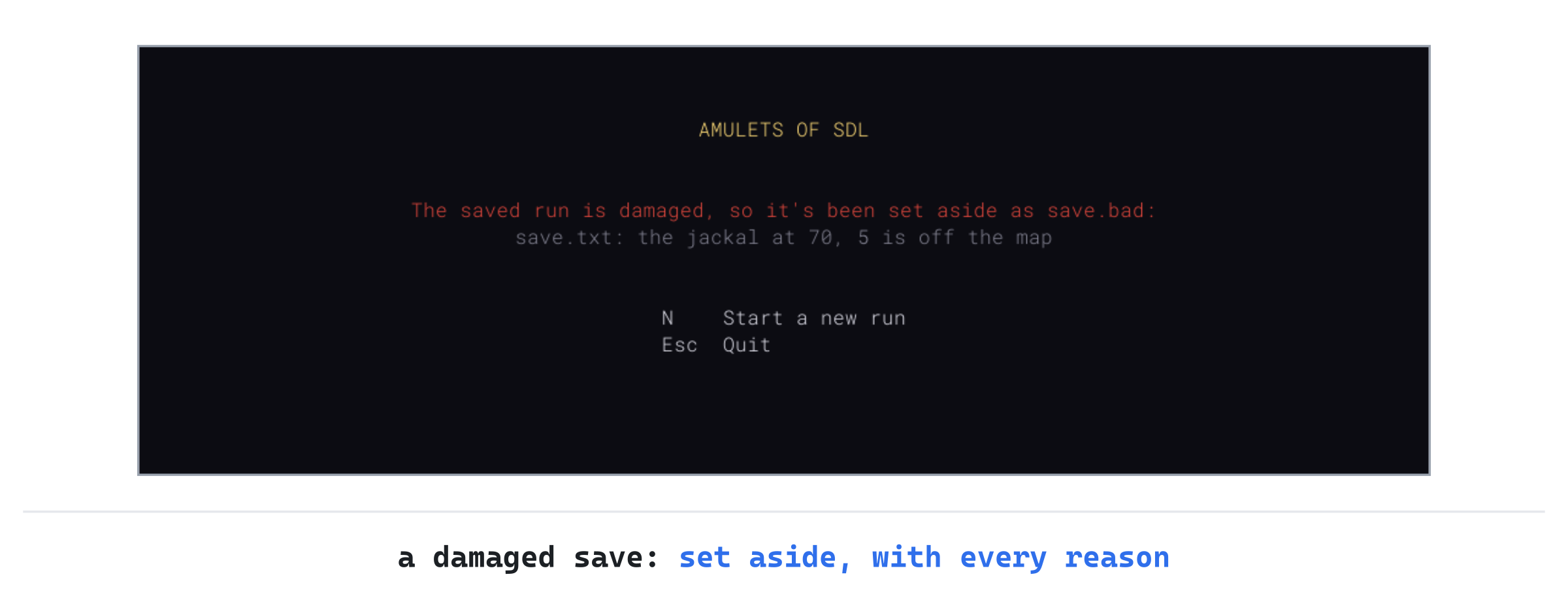
Look in the game's folder, and save.txt has become save.bad. Press N for a new run, save it again, and this time set the version in its [save] record to 2. Then press F5, and C. The title screen says the save is from another version of the game, save.txt: it's version 2, and this game reads version 1, and the save stays where it is. Set the version back to 1, and the run can be continued again.
Checkpoints and Permadeath
The save works, but a crash can still cost a lot. The save on disk is the last one the player asked for, with Esc and S or by closing the window, and that may have been an hour ago.
This last part makes the save a checkpoint too, written each time the player arrives on a new floor, so a crash costs one floor at most.
A Save on Every Floor
Arriving on a new floor is a natural moment for a checkpoint: nothing is going on yet, and losing a floor's worth of play, at worst, is bearable. In Game.cpp, replace the comment above descend with this:
// > on the stairs goes down to a new floor. The player keeps everything
// they have, and the floor they leave is gone. The run is saved on arrival
Then add the save at the end of descend, below the if for the bottom of the dungeon:
// Each new floor is a checkpoint: if the game stops without saving,
// as in a crash, the run goes on from here
if (!writeSave())
{
    log_.add("The run couldn't be saved: " +
             std::string(SDL_GetError()));
}
A save that can't be written doesn't stop the game. There's nothing better to do than play on, and the log says why. The first floor isn't saved when it's made. A crash there costs no more than the start of a run. And a save written as the Game is made would write over the one the title screen offers.
The next image shows a save through a whole run, from the first floor to the player's death.

Nothing is saved on the first floor until the player saves and quits. From the second floor on, there's always a save, the latest checkpoint or the latest save and quit. The run's end takes it away.
Design note: NetHack's checkpoints. NetHack deletes a save when it's restored, as Rogue did. But it also writes each level to a file of its own as the player leaves it. And with its checkpoint option on, which is the default, it writes the game's state on every change of level too. After a crash, a separate program,
recover, turns those files into a save. So the game goes on from the last change of level.
Ours does both jobs in one step, since each new floor writes the save itself. There's nothing to recover, and no second program to run: the title screen offers the checkpoint as it would any save. It shares NetHack's weak spot, too: kill the game before a death, and the run goes on from the last save. That's the trade this chapter took for a save that survives a crash.
Checkpoint: Press F5, and play until you find the stairs down. Go down with >, and the run is saved as you arrive on floor 2. Now stop the game the hard way: in Visual Studio, press Shift+F5, Stop Debugging. The game is gone in an instant, with no chance to save, just as in a crash. Press F5 again, press C on the title screen, and you're on floor 2, where you arrived.
Then let something kill you, and press Esc on the death screen. The next time the game starts, there's no title screen, since the run is over.
Playing the Game
The game plays as it did, with Esc's menu in place of quitting. What's changed is how a run ends. It no longer has to end in one sitting: save it and quit, and carry on tomorrow, or next week. And a death still ends it: the save goes with the run.
Nothing stops you from stopping the game before a death, and continuing from the last save, or from copying save.txt somewhere safe before a dangerous fight. The game can't tell a kill from a crash, and it won't stand in your way, since it's your game. But a roguelike played that way loses what makes it a roguelike, which is that every choice counts.
Understanding the Code
A save is a text file of records, in the game's own folder from SDL_GetPrefPath. It's written by writeSave in SaveGame.cpp, which holds more of Game's member functions. A save holds what can't be worked out again: the seed, the turn, the floor, the dice's state as text, each look, the player and their pack, the map's rows as letters, and every monster and item, with each kind named by its id. Then writeTextFile writes it to a file of its own and renames that over the old one, so a save is always whole.
Loading reads a save into a fresh floor, player, set of looks and dice. It checks the version first, then every value as it's read, then the records together, and then every place on the map. Only a save that passes everything takes the place of the run in play, and a damaged one is set aside as save.bad. The title screen offers a waiting save at start-up. Esc's menu and closing the window save the run, each new floor writes a checkpoint, and death deletes the save.
Experimenting
Try each of these, and put each back afterward:
- The same dice. Type
42into Command Arguments, start a new run, pressing N if the title screen offers an old one, and take four steps. Save and quit, continue the run, take six more steps, and press F1 to see every monster. Then close the window, press N on the title screen for a new run of seed 42, take the same ten steps without stopping, and press F1 again. Every monster is in the same place, since the dice rolled the same numbers either way. - A rich save. Save a run, set the player's
goldto500in Notepad, and continue. The panel shows 500 gold: a save that's whole and sensible is trusted, whoever wrote it. - Too healthy. Copy
save.txtsomewhere first, if you want the run back. Then set the player'shpto99, withmax_hpat 30, and continue. The title screen says the save is damaged, with'hp' is more than 'max_hp'and its line, and the save becomessave.bad. - A missing row. Delete one
[row]record, all four of its lines, and continue. The title screen names the row that's missing, as insave.txt: row 12 of the map is missing.
The third and fourth show the two kinds of check at work. A single value can be wrong in its own record. But a missing row is wrong in no record at all, and only the save as a whole can show it.
Common Errors and Fixes
If the game didn't build, or doesn't behave as described, the problem is probably one of these.
There's no save.txt in the project folder. It isn't meant to be there. The game writes it in its own folder, from SDL_GetPrefPath: press Windows+R, type %APPDATA%\GameCodeSchool\AmuletsOfSDL, and press Enter.
C3861: 'userPath': identifier not found, in SaveGame.cpp, with the same for writeTextFile, and from the second checkpoint for readTextFile. The file doesn't include Files.h, where they're declared. Add #include "Files.h" with the other includes at its top.
C2065: 'seed_': undeclared identifier, in SaveGame.cpp, followed by C2661 and dozens more. The function was typed as bool writeSave(), without Game::. So it's a function of its own, which knows nothing of the game's members. Its first line should be bool Game::writeSave().
C2079: 'out' uses undefined class 'std::basic_ostringstream<char,std::char_traits<char>,std::allocator<char>>', in Rng.cpp, followed by C2677, and the same for in. The include for <sstream> is missing from the top of Rng.cpp.
Esc opens the menu, but then S does nothing, and neither does Esc. The menu's keys go nowhere, because handleKey has no case for GameState::Menu. Add the case, above case GameState::Dead:, and close the window to get out for now.
Esc seems to do nothing, and then S closes the game. The menu is there, but draw never draws it. Add its else if, below the inventory's, in draw.
Closing the window on the title screen threw away my saved run, and left a new one in its place. The test in handleEvent leaves out the title screen. So closing the window there saves the new run the constructor made, over the saved one. It should be bool inRun = state_ != GameState::Title && state_ != GameState::Dead;.
A continued run starts in the dark. The map shows only what you'd explored, dimmed, and no monster is in sight until you take a step. The end of loadSave doesn't call updateSight, so nothing is marked as seen until the first turn does it.
C2660: '`anonymous-namespace'::readRow': function does not take 2 arguments, in loadSave. The call to readRow still passes two arguments, and it needs rowsRead too. It should read readRow(fields, level.map, rowsRead);.
FAQ
Q) Why not write the save in a binary format, as many games do?
A) A binary file is smaller and faster to read, but a save of 17 KB or so, read once, gains nothing from either. A text save can be read and mended by eye, and every mistake in it can be named by its line. Binary formats also have traps of their own, such as the order of bytes in a number, which a text file never has to think about.
Q) What stops a player from going back to a save, and escaping a death?
A) Nothing, and nothing much could. Stop the game before a death, and the save is still there. Rogue tried, by scrambling its save files and deleting each when it was restored, but a copied file can always be copied back, and deleting on restore costs an honest player the run in every crash. The game's job is to make the honest way the natural one: one save, kept up to date, and deleted when the run ends.
Q) Why does the save hold the dice, and not just the seed and the number of rolls so far?
A) That can work, if every number the engine hands out is counted, including the extra ones a distribution sometimes asks for behind the scenes. The engine even has a discard function to skip ahead. But it's one more thing to keep exactly right. The engine's state is the place itself, written down: 624 numbers, read back in a moment, with nothing to count.
AI Exercise (Optional)
The title screen offers a saved run without saying anything about it. If you'd like to make it a little more helpful with an AI's help, open your AI chatbot of choice, and try a prompt like this:
"I'm writing a roguelike in C++ with SDL 3. A saved run is a text file of records, each a [type] line followed by key = value lines, read by a function readRecords into a std::vector<Record>, and checked a key at a time by a class FieldReader, with text(key), number(key, least), has(key) and finish(). The first records are [save], with a version, and [run], with the seed, the turn and the floor. The title screen shows 'A saved run is waiting.' I'd like it to say which floor the run is on, and how many turns it's taken, by reading only the [run] record, without loading the whole save. Show me every change, with each curly brace on its own line, and explain it."
Notice what the preceding prompt does. It names the reading functions the game already has, so the answer can use them rather than parsing the file itself. And it asks for the [run] record alone, which keeps the title screen quick, and keeps it from depending on the rest of the save being sound.
When the answer comes back, check what it does with a damaged save. The title screen should still appear, and the floor and turn shouldn't be shown if they can't be read.
Summary
A run is saved as text, in the game's own folder, written whole or not at all, with the dice's state. So a continued run rolls on exactly as it would have. The save is read back all or nothing, checked value by value and then as a whole, and a damaged save is set aside while one from another version is kept. Each new floor is a checkpoint, and death deletes the save, so a crash costs a floor at most, and death still costs everything. In Chapter 18, the dungeon gets caves, grown rather than carved, and the save's version goes up to 2, for the caves' own kind of floor.