
Every monster in the game is a row in a table in Monster.h, and every kind of item a row in Item.h. To make the jackal a little tougher, or to add a monster, you change the code and build it again. That's fine for the person who wrote the code, and a wall for everyone else.
This chapter moves the monsters and the items out of the code and into two text files, monsters.txt and items.txt, which the game reads when it starts. A change to either needs no compiling: save the file, start the game again, and the change is there. The game checks every line it reads, and a mistake stops it with a message that names the file, the line, and what's wrong. The next image shows the end of the chapter: a new monster, the grizzly bear, added without a single line of code.
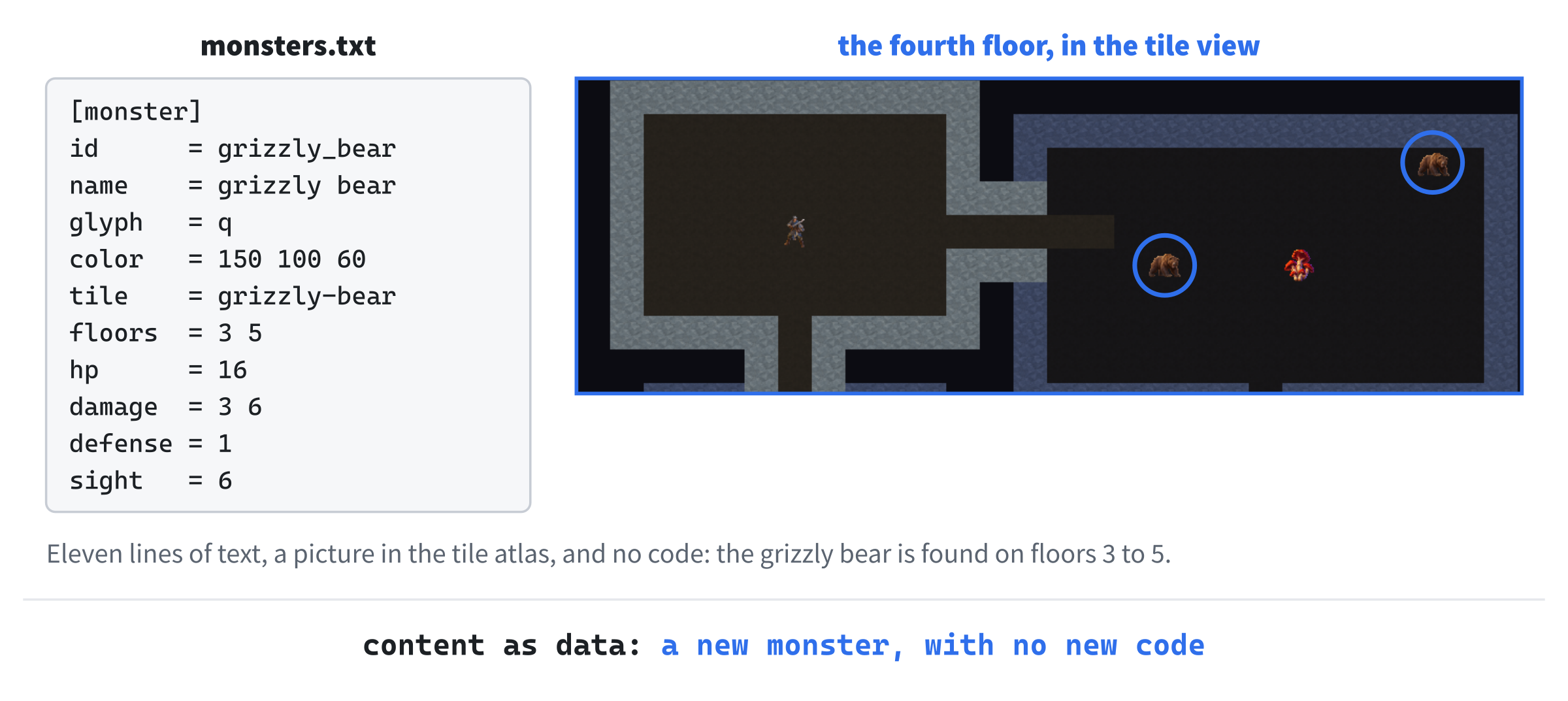
On the left is the bear's record in monsters.txt, eleven lines of text. The right shows the fourth floor, in the tile view, with two grizzly bears in the room beside the player's.
Chapter 16 in the book's repository holds this chapter's finished project. The chapter carries on in your own project from Chapter 15, or from the book's Chapter 15 folder.In this chapter, we will:
- Build the game beside its files, and find them from the program's own folder, however it's started
- Write a reader for a simple format of records, with keys and values, that reports every mistake with its line
- Read the monsters from
monsters.txt, check them, and play exactly the same game as before - Read the items from
items.txtin the same way - Show the mistakes in a message box, and add a grizzly bear without compiling anything
There are five checkpoints along the way. Let's start with the plan.
Planning the Chapter
This chapter adds six files and two data files, and changes ten, along with the tile atlas:
| File | Status | What it's for |
|---|---|---|
src/Files.h, src/Files.cpp |
New | Finding the game's files from its own folder, and reading them |
src/Records.h, src/Records.cpp |
New | The format of the data files: records of keys and values, and their mistakes |
src/Data.h, src/Data.cpp |
New | The game's content: every kind of monster and item, read and checked |
data/monsters.txt, data/items.txt |
New | The monsters and the items |
src/Monster.h, src/Item.h |
Changed | Kinds filled in from the files, with their tables gone |
src/Identification.h, src/Identification.cpp |
Changed | The looks for the kinds in the file |
src/View.h, src/TileView.cpp |
Changed | A tile's name as a std::string, and the tile index read like any file |
src/Common.h |
Changed | The last floor, which the data's checks need |
src/Game.h, src/Game.cpp, src/main.cpp |
Changed | The data read first, and handed to each run |
assets/tiles.png, assets/tiles.txt |
Changed | A picture of the grizzly bear |
| The other files | Unchanged |
The next image shows how the files fit together at the end of the chapter. The three new modules sit in a row of their own at the bottom: Files finds and reads files, Records knows the format, and Data knows what a monster and an item are.
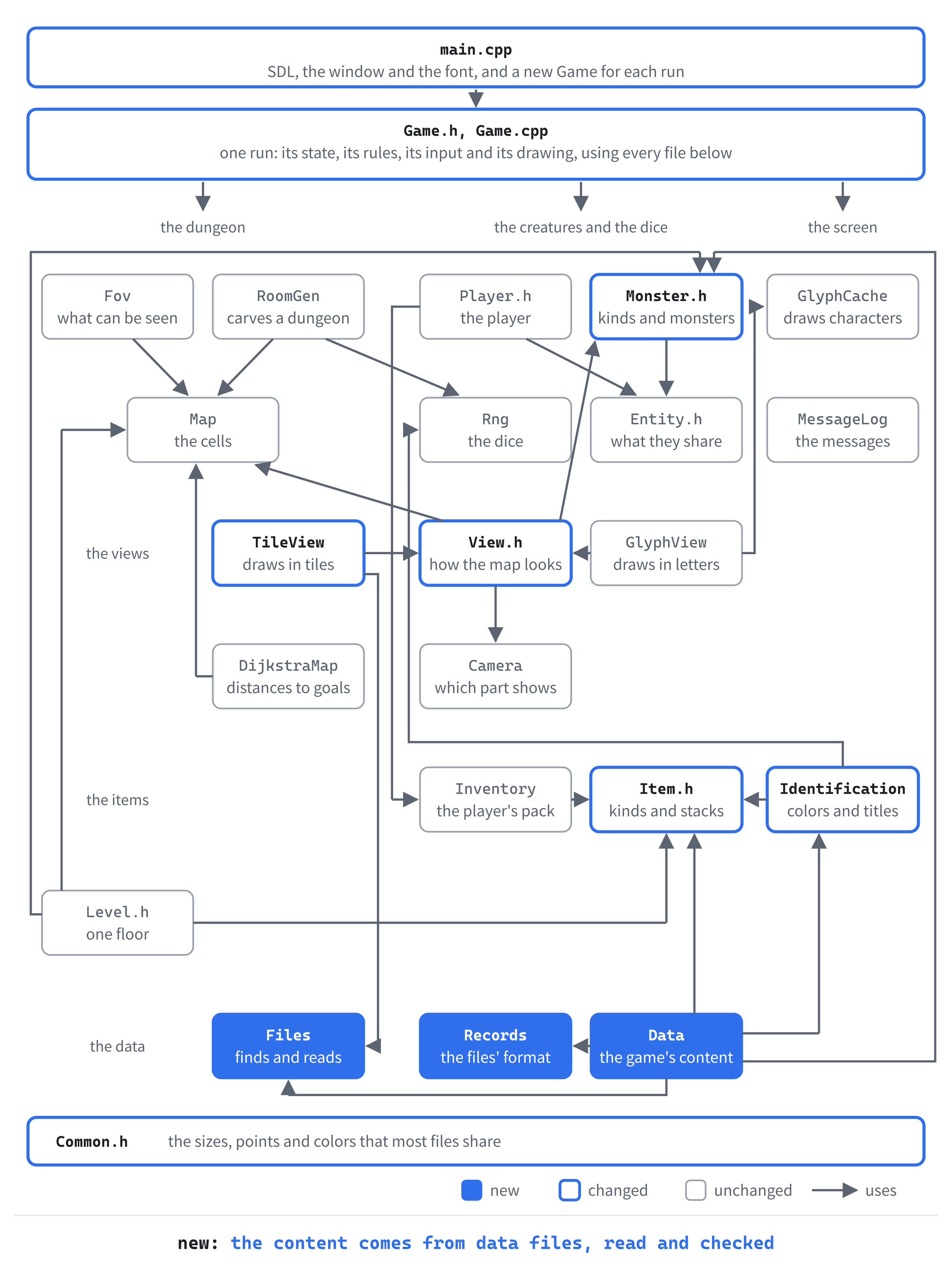
Splitting the work three ways keeps each part simple. The Records module knows nothing about monsters. So Chapter 17's save file can use the same format, and so can the vaults and classes of later chapters. And Data knows nothing about the text, only about the records it's handed.
The data is read once, when the program starts. It goes into an object of a new class, GameData, which main owns. Each run's Game gets a reference to it, and every monster's def points at a kind in it. Since nothing changes the kinds once they're read, those pointers stay good for as long as the program runs.
One rule runs through the chapter: a mistake is never quietly mended. A value that can't be read isn't given a default and played anyway, since a silent default is a bug you'd hunt for later. Instead, every mistake in a file is listed, with its line, and the game doesn't start until they're fixed.
A Folder of Its Own
The first step makes the game find its files the same way however it's started. So far, the font and the tiles have been found from the working directory, which Visual Studio sets to the project folder when you press F5. Start the program any other way, and it looks somewhere else.
Where the Program Is
The fix is to find the files from the folder the program itself is in, and SDL can say where that is. Then the program and its files must be in the same folder. In Solution Explorer, right-click the project, and choose Properties. Set Configuration to All Configurations and Platform to All Platforms, as in Chapter 1, and set General > Output Directory to $(ProjectDir).
Visual Studio's name for the project folder is $(ProjectDir). So the program is now built right there, beside assets, the DLLs, and the data folder to come. Until now, it was built in a folder called x64\Debug, and only the working directory kept the game from noticing. The next image shows the difference.
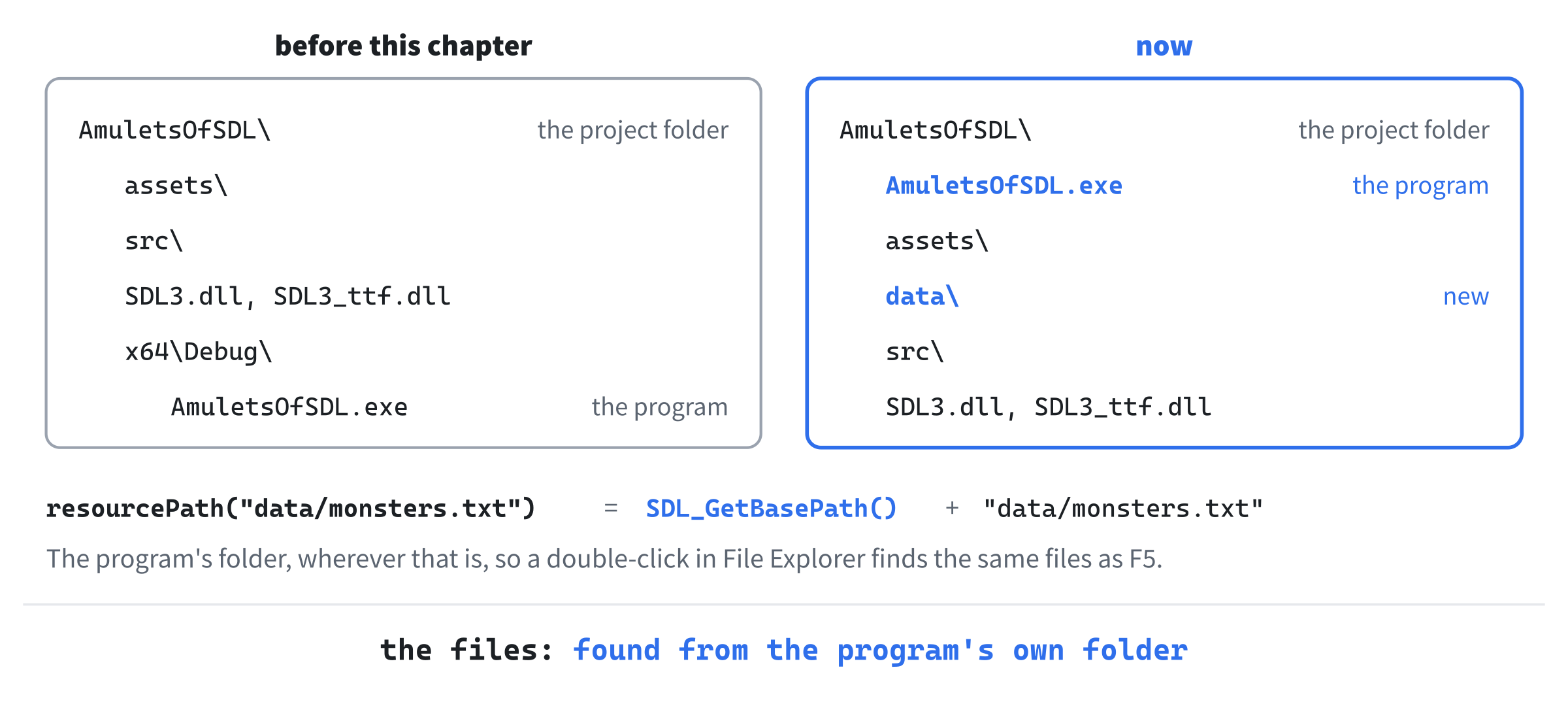
Wherever the project folder is, the program and its files are now together, so a path that starts from the program's folder always finds them.
Copying the files to the program's folder after each build would work too, until it didn't. Visual Studio only builds when code has changed. So a change to a data file alone would never be copied, and the game would go on reading the old one.
Finding and Reading Files
Two functions do the finding and the reading. Add a Header File (.h) called Files.h, and type it in:
#pragma once
#include <string>   // std::string, for paths and the text of files

// Finding the files the game comes with, and reading them. SDL does the
// reading, because it takes every path as UTF-8, on every system, which is
// how SDL_GetBasePath gives the game's folder

// The full path of a file the game comes with, such as
// "data/monsters.txt". It's found from the folder the game's program is
// in, so the game finds its files however it's started
std::string resourcePath(const std::string& relative);

// Reads a whole text file into text, with every line ending in "\n".
// Returns false if the file can't be read
bool readTextFile(const std::string& path, std::string& text);
Add a C++ File (.cpp) called Files.cpp, and type its first part:
#include "Files.h"
#include <SDL3/SDL.h>

std::string resourcePath(const std::string& relative)
{
    // SDL works the folder out the first time it's asked, and keeps it.
    // The text is SDL's, so it isn't freed here. It ends with a separator,
    // ready for a file's name to be added
    const char* base = SDL_GetBasePath();
    if (base == nullptr)
    {
        SDL_Log("Couldn't find the game's folder: %s", SDL_GetError());
        return relative;
    }
    return base + relative;
}
The function SDL_GetBasePath gives the folder the program is in. It ends with a separator, such as a backslash, ready for a file's name to be added. SDL works it out the first time it's asked, and keeps the text itself, so the game doesn't free it. If SDL can't tell, the path is used as it is, which is how the game behaved before.
Add the second function below it:
bool readTextFile(const std::string& path, std::string& text)
{
    size_t size = 0;
    void* contents = SDL_LoadFile(path.c_str(), &size);
    if (contents == nullptr)
    {
        return false;
    }
    text.assign(static_cast<const char*>(contents), size);
    SDL_free(contents);

    // Windows ends each line of text with "\r\n", and other systems with
    // "\n". Removing every \r leaves one kind of line ending to deal with
    std::erase(text, '\r');
    return true;
}
A call to SDL_LoadFile reads the whole file into memory, and says how big it is. The text is copied into text, and SDL's copy is freed with SDL_free, since SDL made it. Windows ends each line with two characters, \r and \n, where other systems use just \n. Removing every \r with C++20's std::erase means no other code ever has to think about it.
Why does SDL read the files, rather than C++'s own std::ifstream? SDL gives the program's folder in UTF-8, the encoding that can spell any name. Visual Studio's std::ifstream reads a char path in the system's older encoding instead. So in a folder with an accented name, such as C:\Users\Zoë, the path would come out garbled, and the game couldn't open its own files. SDL takes paths in UTF-8 on every system, so the folder it gives can go straight back to it.
The Font and the Tiles
Now the font and the tiles can be found from the program's folder. Open main.cpp, and add the new header below #include "Common.h":
#include "Files.h"The font's comment no longer needs to explain the working directory. Replace the comment above const char* const FONT_PATH with this:
// The font, and its size in pointsIn main.cpp, change glyphs(renderer, FONT_PATH, FONT_SIZE) to glyphs(renderer, resourcePath(FONT_PATH), FONT_SIZE). The path in FONT_PATH stays as it was, assets/RobotoMono-Light.ttf, and resourcePath puts the program's folder in front of it.
The tiles are found the same way. Open Game.cpp, and add the header below #include <sstream>:
#include "Files.h"Replace the comment above const char* const TILES_PATH with this:
// The tiles' picture and index, in the game's folderThen, in the constructor, find this line:
tileView_(renderer, TILES_PATH, TILES_INDEX_PATH),Change it to these two:
tileView_(renderer, resourcePath(TILES_PATH),
          resourcePath(TILES_INDEX_PATH)),
The tile view reads its index, tiles.txt, with std::ifstream. It should use readTextFile like everything else. Open TileView.cpp, and find these lines at the top:
#include <fstream>   // std::ifstream, to read tiles.txt
#include <sstream>   // std::istringstream, to read each of its lines
Change them to these:
#include <sstream>   // std::istringstream, to read tiles.txt's lines
#include "Files.h"
In readIndex, find these lines:
std::ifstream file(path);
if (!file)
{
    SDL_Log("Couldn't open %s", path.c_str());
    return false;
Change them to these:
std::string text;
if (!readTextFile(path, text))
{
    SDL_Log("Couldn't read %s: %s", path.c_str(), SDL_GetError());
    return false;
The rest of readIndex goes through the file a line at a time. It can go through the text the same way, with a std::istringstream, which reads from a string as a file stream reads from a file. Add this line above std::string line;:
std::istringstream lines(text);In readIndex, change std::getline(file, line) to std::getline(lines, line). The function now reads lines from the text, and the loop over them doesn't change at all.
Checkpoint: Press F5. The game is exactly as it was, since F5 starts it in the project folder either way. Now find the program itself: in File Explorer, the project folder holds AmuletsOfSDL.exe, beside assets and the DLLs. Double-click it, and the game starts, with its font and its tiles, as it couldn't have before this step.
The Format
The second step writes the reader for the data files' format. Nothing uses it yet, so it ends with a file that compiles, ready for the monsters.
Records
The data files are made of records. Each one starts with its type in square brackets, on a line of its own. The lines under it are its keys, each with a value after an equals sign. Here is part of one:
[monster]
id      = giant_white_rat
name    = giant white rat
glyph   = r
hp      = 4
A line that starts with # is a comment, and blank lines are skipped. So a file can explain itself. The spaces around a key or a value don't count, which lets the equals signs line up. A # anywhere but at the start of a line is part of the line, since Chapter 20's vaults draw their walls with it.
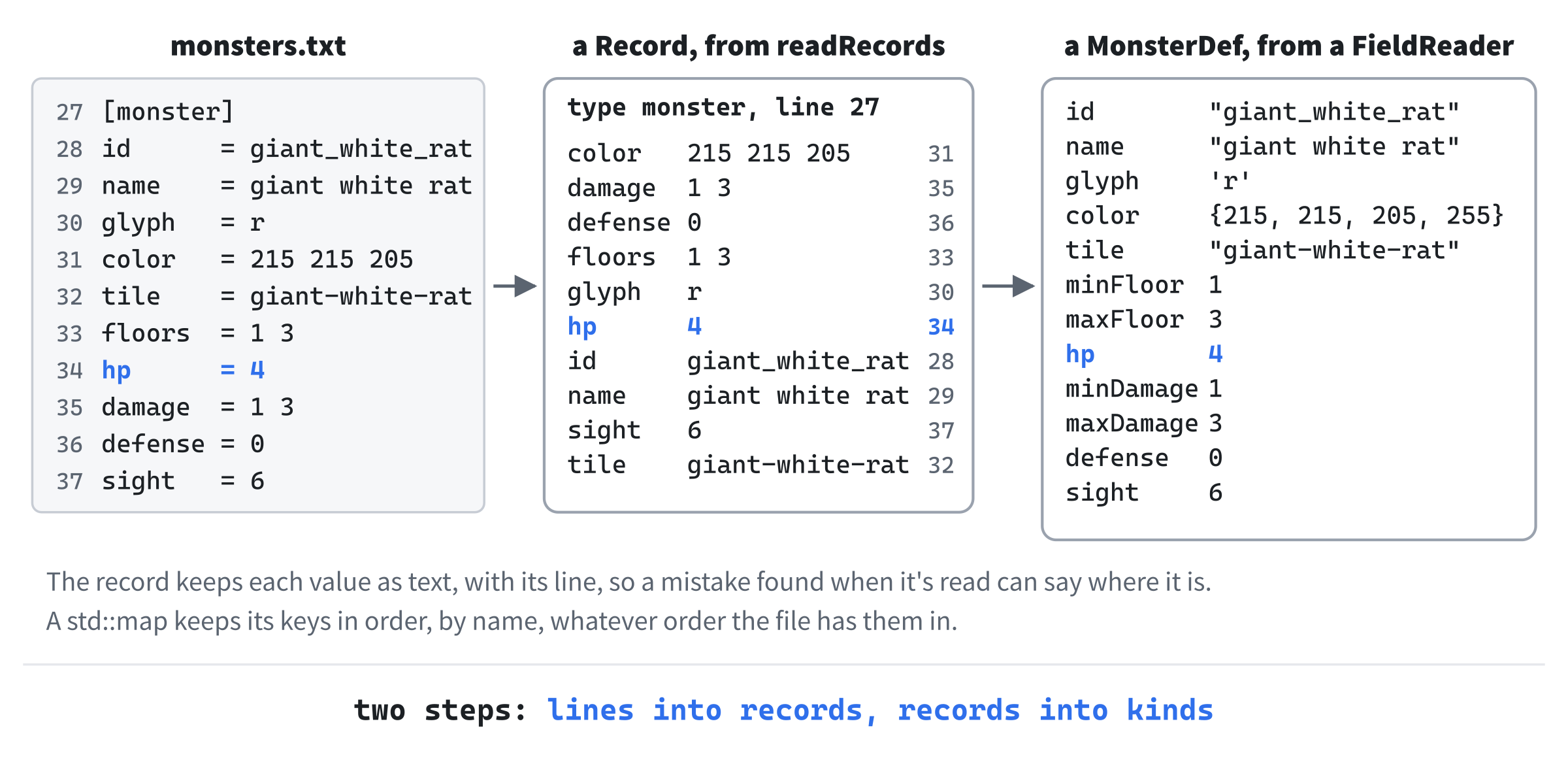
Reading such a file comes in two parts. First, the lines become records, each with its type and its keys, and each key with its value and its line. Then each record is taken apart a key at a time, and every value is checked against what it should be, as the next image shows.
Add a Header File (.h) called Records.h, and type its first part:
#pragma once
#include <SDL3/SDL.h>
#include <map>      // std::map, for a record's keys
#include <set>      // std::set, for the keys a record has been asked for
#include <string>   // std::string, for the keys, values and mistakes
#include <vector>   // std::vector, for the records, numbers and mistakes

// The text format of the game's data files: records, each a "[type]" line
// and the "key = value" lines under it, as in
//
//     [monster]
//     id = cave_orc
//     hp = 16
//
// A line starting with # is a comment, and blank lines are skipped. A #
// anywhere else is part of the line, since a wall is drawn as one. Every
// mistake is reported as "file:line: what's wrong"
Then add the two structs that hold what a file says, below the comment, with a blank line in between:
// One key's value from a record, and the line it was on
struct Field
{
    std::string value;
    int line = 0;
};

// One record: its type, as in [monster], the line it starts on, and its
// keys
struct Record
{
    std::string type;
    int line = 0;
    std::map<std::string, Field> fields;
};
A Field is one key's value, with the line it came from. So a mistake found later can still say where it is. A Record holds its keys in a std::map, from each key's name to its Field. That keeps one entry for each key, and finds a key by its name quickly, which is just what taking a record apart needs.
Add the two functions that read the format, below Record:
// The records in a file's text. The file's name is for the mistakes, which
// go into errors
std::vector<Record> readRecords(const std::string& text,
                                const std::string& file,
                                std::vector<std::string>& errors);

// True if the text is one whole number and nothing else, which goes in
// number
bool readWholeNumber(const std::string& text, int& number);
The mistakes go into a vector the caller passes by reference, rather than being printed at once. So the caller can collect every mistake in every file before saying anything.
Taking a Record Apart
The second part is a class, FieldReader, that takes one record apart. Add its first part below readWholeNumber:
// Takes a record's values apart, a key at a time, and reports what's wrong
// with each: a key that's missing, or a value that isn't what it should
// be. When it's done, any key it was never asked for is unknown
class FieldReader
{
public:
    FieldReader(const Record& record, const std::string& file,
                std::vector<std::string>& errors);

    // The value of a key that must be there
    std::string text(const std::string& key);

    // True if the record has the key, which may be left out
    bool has(const std::string& key);

    // The line a key is on, or the record's first line if it isn't there
    int lineOf(const std::string& key) const;

    // An id: lowercase letters, digits and _, as in cave_orc, so it's one
    // word wherever it's written
    std::string id(const std::string& key);

    // Exactly count whole numbers, none of them less than least
    std::vector<int> numbers(const std::string& key, int count, int least);
    int number(const std::string& key, int least);
And the rest of it below number:
    // One character the font can draw, other than a space
    char glyph(const std::string& key);

    // A color: its red, green and blue, each from 0 to 255
    SDL_Color color(const std::string& key);

    // Reports a mistake on one of the record's lines
    void report(int line, const std::string& what);

    // Reports the keys never asked for, which no record of this type has.
    // True if the record had no mistakes at all
    bool finish();

private:
    const Field* find(const std::string& key);

    const Record& record_;
    std::string file_;
    std::vector<std::string>& errors_;
    std::set<std::string> asked_;
    bool ok_ = true;
};
In the preceding code, each function asks for one key, and gives back its value in the form it should have: a word, an id, numbers, a character or a color. Each also notes that the key was asked for, in asked_. That's the trick that finds misspelled keys.
Once the code reading a monster has asked for every key a monster can have, any key the record has that nobody asked for must be a mistake. Then finish reports it. No list of the keys a monster may have is kept anywhere, and none can fall out of date.
The class holds a reference to the record, and another to the vector of mistakes, so it copies neither. It only lives while one record is read, so both outlive it.
Reading Records
Add a C++ File (.cpp) called Records.cpp, and type its first part:
#include "Records.h"
#include <sstream>   // std::istringstream, to read lines, numbers and words

namespace
{
    // The text without the spaces at either end
    std::string trimmed(const std::string& text)
    {
        size_t first = text.find_first_not_of(" \t");
        if (first == std::string::npos)
        {
            return "";
        }
        size_t last = text.find_last_not_of(" \t");
        return text.substr(first, last - first + 1);
    }
}
The function trimmed takes the spaces and tabs off both ends of a line, with find_first_not_of and find_last_not_of. A line of nothing but spaces has no first character that isn't one, which find_first_not_of reports as std::string::npos. So it comes back empty.
The records come from readRecords. Add its first part below the unnamed namespace:
std::vector<Record> readRecords(const std::string& text,
                                const std::string& file,
                                std::vector<std::string>& errors)
{
    std::vector<Record> records;
    std::istringstream lines(text);
    std::string line;
    int number = 0;
    while (std::getline(lines, line))
    {
        ++number;
        std::string where = file + ":" + std::to_string(number) + ": ";
        line = trimmed(line);
        if (line.empty() || line.front() == '#')
        {
            continue;
        }
The text is read a line at a time with a std::istringstream, as the tile index is. And number counts the lines, from 1, for the mistakes. Every mistake on a line starts with where, the file and the line, as in monsters.txt:34:. A comment, or an empty line once it's trimmed, is skipped.
Add the rest of the loop below it, with a blank line in between:
if (line.front() == '[' && line.back() == ']')
{
    Record record;
    record.type = line.substr(1, line.size() - 2);
    record.line = number;
    records.push_back(record);
    continue;
}
size_t equals = line.find('=');
if (equals == std::string::npos)
{
    errors.push_back(where + "expected [record] or key = value");
    continue;
}
if (records.empty())
{
    errors.push_back(where + "a key comes before any [record]");
    continue;
}
A line in square brackets starts a new record, and its type is what's inside them. Any other line must be a key and a value, so it needs an equals sign, and a record before it to belong to. Then add the end of the function below, with a blank line in between:
        std::string key = trimmed(line.substr(0, equals));
        std::string value = trimmed(line.substr(equals + 1));
        Record& record = records.back();
        if (record.fields.contains(key))
        {
            errors.push_back(where + "'" + key + "' is given twice");
            continue;
        }
        record.fields[key] = { value, number };
    }
    return records;
}
A line's key is what comes before the first equals sign, and the value is everything after it, both trimmed. The key goes into the last record read. A key given twice is a mistake, since one of the two values would have to be thrown away, and nobody can say which was meant.
Two more pieces are short. Add them below readRecords:
bool readWholeNumber(const std::string& text, int& number)
{
    std::istringstream in(text);
    return (in >> number) && (in >> std::ws).eof();
}

FieldReader::FieldReader(const Record& record, const std::string& file,
                         std::vector<std::string>& errors)
    : record_(record), file_(file), errors_(errors)
{
}
The function readWholeNumber reads a number, and then checks that nothing but spaces follows it, which std::ws skips. Without that check, "4 rats" would read as 4. The constructor just keeps what it's given.
Asking for Keys
Each kind of value has a function of its own. Add the first two below the constructor:
std::string FieldReader::text(const std::string& key)
{
    const Field* field = find(key);
    if (field == nullptr)
    {
        return "";
    }
    if (field->value.empty())
    {
        report(field->line, "'" + key + "' needs a value");
    }
    return field->value;
}

bool FieldReader::has(const std::string& key)
{
    asked_.insert(key);
    return record_.fields.contains(key);
}
The function text finds the key with find, which comes at the end of the file, and reports a key that's there with nothing after its equals sign. It gives back the empty string for a key that's missing, since find has reported that already. The function has is for a key that may be left out: it notes the key as asked for, and says whether the record has it.
Add the next two below has:
int FieldReader::lineOf(const std::string& key) const
{
    auto found = record_.fields.find(key);
    return found != record_.fields.end() ? found->second.line : record_.line;
}

std::string FieldReader::id(const std::string& key)
{
    std::string value = text(key);
    for (char c : value)
    {
        bool allowed = (c >= 'a' && c <= 'z') || (c >= '0' && c <= '9') ||
                       c == '_';
        if (!allowed)
        {
            report(lineOf(key), "'" + key + "' should be lowercase letters, "
                   "digits and _");
            break;
        }
    }
    return value;
}
In the preceding code, lineOf gives the line a key is on, for the mistakes found after a value is read, such as an id used twice. An id must be lowercase letters, digits and underscores, so an id is always one word, wherever it's written. That matters once ids are used to name kinds in other files, as a kit or a save will.
Numbers come next. Add the first part of numbers below id:
std::vector<int> FieldReader::numbers(const std::string& key, int count,
                                      int least)
{
    const Field* field = find(key);
    if (field == nullptr)
    {
        return std::vector<int>(count, least);
    }
    std::vector<int> values;
    std::istringstream in(field->value);
    std::string word;
    bool right = true;
    while (in >> word)
    {
        int n = 0;
        right = right && readWholeNumber(word, n);
        values.push_back(n);
    }
A missing key gives back count copies of least, the smallest value allowed. So the code that reads a monster always has numbers to work with, even when the record is wrong. It never matters which numbers, since a record with a mistake is never used. Then the stream reads the text a word at a time, and each word must pass readWholeNumber, or right becomes false.
Add the rest of numbers below it:
    right = right && static_cast<int>(values.size()) == count;
    for (int value : values)
    {
        right = right && value >= least;
    }
    if (!right)
    {
        std::string what = count == 1 ? "a whole number"
                                      : std::to_string(count) +
                                        " whole numbers";
        report(field->line, "'" + key + "' should be " + what + ", " +
               std::to_string(least) + " or more");
        return std::vector<int>(count, least);
    }
    return values;
}
The value is right only if every word was a whole number, there are exactly as many as wanted, and none is less than least. For a monster's floors, "4" is wrong, since floors need two numbers. So is "1 3 5", and so is "1 three".
Reading the numbers straight from the stream, with in >> n, looks simpler, but it lets a mistake through. Given "4 +", the stream reads the 4, takes the + as the start of another number, and reaches the end of the text looking for its digits. That fails, but at the end of the text, just as a right value does, so the + would go unnoticed. A word at a time, readWholeNumber sees the + for what it is.
Add number, for one number, and glyph, below numbers:
int FieldReader::number(const std::string& key, int least)
{
    return numbers(key, 1, least).front();
}

char FieldReader::glyph(const std::string& key)
{
    std::string value = text(key);
    if (value.empty())
    {
        return '?';
    }
    if (value.size() != 1 || value[0] < '!' || value[0] > '~')
    {
        report(lineOf(key), "'" + key + "' should be one character");
        return '?';
    }
    return value[0];
}
A glyph must be one character, from ! to ~, the characters that draw something. Those are the printable characters of ASCII, other than the space. Then add color and report below glyph:
SDL_Color FieldReader::color(const std::string& key)
{
    std::vector<int> parts = numbers(key, 3, 0);
    for (int part : parts)
    {
        if (part > 255)
        {
            report(lineOf(key), "'" + key + "' goes up to 255");
            return { 255, 255, 255, 255 };
        }
    }
    return { static_cast<Uint8>(parts[0]), static_cast<Uint8>(parts[1]),
             static_cast<Uint8>(parts[2]), 255 };
}

void FieldReader::report(int line, const std::string& what)
{
    errors_.push_back(file_ + ":" + std::to_string(line) + ": " + what);
    ok_ = false;
}
In the preceding code, a color is three numbers, red, green and blue, read by numbers. None can be more than 255, the most a Uint8 holds. Then report adds a mistake, with the file and the line, and notes that the record had one.
Last, add finish and find, below report:
bool FieldReader::finish()
{
    for (const auto& [key, field] : record_.fields)
    {
        if (!asked_.contains(key))
        {
            report(field.line, "unknown key '" + key + "'");
        }
    }
    return ok_;
}

// The key's field, or nullptr, with the mistake reported, if the record
// doesn't have it
const Field* FieldReader::find(const std::string& key)
{
    asked_.insert(key);
    auto found = record_.fields.find(key);
    if (found == record_.fields.end())
    {
        report(record_.line, "[" + record_.type + "] needs '" + key + "'");
        return nullptr;
    }
    return &found->second;
}
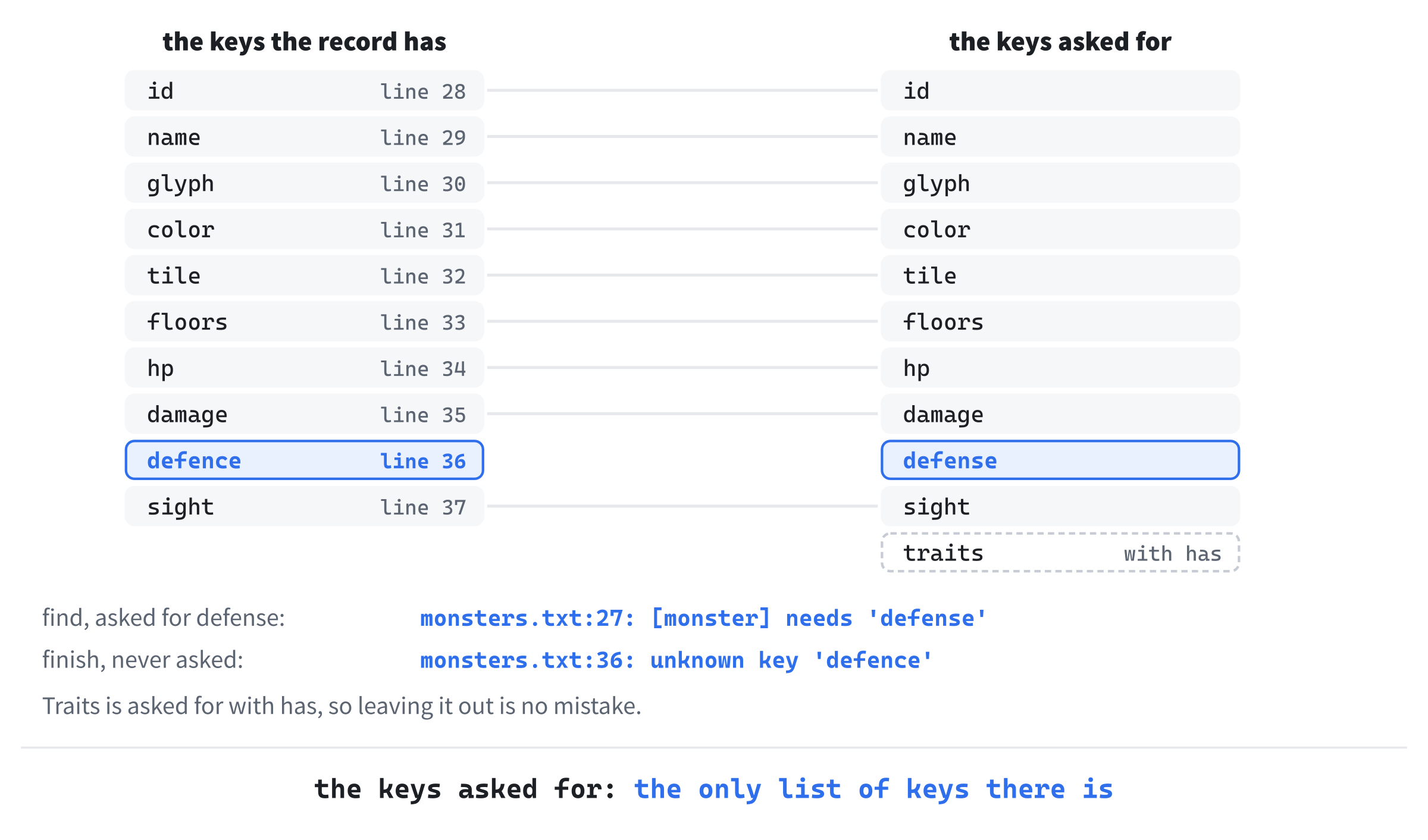
In the preceding code, finish goes through every key the record has. It uses a structured binding, [key, field], which names the two halves of each entry in the map. Any key not in asked_ is unknown. And find notes the key as asked for, whether the record has it or not. A key the record doesn't have is reported missing, on the record's first line.
A misspelled key gives two mistakes, as the next image shows: the key that should be there is missing, and the one that is there is unknown. Both point at the same slip, from two sides.
Checkpoint: Click in Records.cpp, and press Ctrl+F7 to compile it on its own. It compiles, with no errors or warnings. Nothing calls it yet, so the game itself is unchanged.
The Monsters' File
The third step moves the monsters into monsters.txt, and reads them with what the last step built. It ends with the same game as before, which is now read from a file you can change.
The File
In File Explorer, make a folder called data in the project folder, beside assets. From the book's repository, copy monsters.txt from the Chapter 16 folder's data folder into it. The file is the finished chapter's, with one monster more than this step wants: open it, and delete the grizzly bear's record, from the [monster] above id = grizzly_bear down to its sight = 6. You'll type it back in yourself at the end of the chapter.
The file starts with a comment that lists every key, so it explains itself to anyone who opens it:
# The monsters of Amulets of SDL: one [monster] record for each kind. The
# game reads this file when it starts, so a change here needs no
# recompiling: save the file, and start the game again.
#
# A record's keys can come in any order:
#   id       its name in the data files: lowercase letters, digits and _
#   name     its name in messages
#   glyph    its character in the glyph view
#   color    that character's red, green and blue, each from 0 to 255
#   tile     its picture's name in assets/tiles.txt
#   floors   the floors it's found on, from and to
#   hp       its health
#   damage   what each blow does, from and to, before the target's defense
#   defense  taken off the damage of every blow it takes
#   sight    how far it sees, in cells
#   traits   any of these, or leave the key out for none:
#              never_sleeps  erratic  stationary  shrieks  slow
#              never_flees   regenerates  drains
#              pack:N        found N at a time, all together
#              venomous:N    a hit poisons for N turns
#
# A line starting with # is a comment, and blank lines don't matter. A
# mistake stops the game, and names the line it's on.
Then come the monsters, the same sixteen as in Chapter 15's table, with the same numbers. Here is the first, which starts on line 27:
[monster]
id      = giant_white_rat
name    = giant white rat
glyph   = r
color   = 215 215 205
tile    = giant-white-rat
floors  = 1 3
hp      = 4
damage  = 1 3
defense = 0
sight   = 6
Each value in a record is named by its key, where the table's rows gave their values only by position. A trait is a word, and the two traits with an amount carry it after a colon: the jackal's record says traits = pack:3, and the cave spider's traits = venomous:4.
The records are in the same order as the table's rows were. That matters to the dice: chooseMonsterKind picks from the kinds in the order they're listed, so the same order makes the same dungeon for every seed.
Kinds From the File
A kind of monster is now filled in from a file, a key at a time, rather than written out in a table. Open Monster.h, and add a header below #include <optional>:
#include <string> // std::string, for a kind's namesReplace the comment above struct MonsterDef with this:
// What every monster of one kind has in common, read from monsters.txtIn MonsterDef, delete everything from const char* name; down to int defense;, and type these in their place:
std::string id;     // its name in the data files, as in cave_orc
std::string name;   // its name in messages
char glyph = '?';
SDL_Color color = {};
std::string tile;   // its picture's name in tiles.txt
int minFloor = 1;   // the floors it's found on, from minFloor to
int maxFloor = 1;   // maxFloor
int sight = 1;      // how far it can see, in cells
int hp = 1;         // its health when it's made
int minDamage = 0;  // each of its blows does minDamage to maxDamage,
int maxDamage = 0;  // before the target's defense
int defense = 0;
The names are std::strings now. A const char* pointed at text written in the program, which lasted as long as the program did. But the text of a file is gone once the file is read. Each std::string keeps a copy of its own. Every member also has a default, written in place, since a kind starts empty and is filled in a key at a time.
The kind has an id too, its name in the data files, as in giant_white_rat. Nothing uses it in this chapter beyond checking it, but saves and vaults will name kinds by their ids.
The table itself goes. In Monster.h, delete everything from // Every kind of monster there is, so far. down to };, the end of MONSTER_DEFS. The checks of the file will need the last floor, so it moves from Game.cpp into Common.h. Open Common.h, and add this below LOG_LINE_H:
// The dungeon's floors are numbered from 1, at the top, down to
// LAST_FLOOR, at the bottom, which has no stairs down
constexpr int LAST_FLOOR = 9;
Then open Game.cpp, find these lines, and delete them:
// The floor at the bottom of the dungeon, which has no stairs down
constexpr int LAST_FLOOR = 9;
The code that uses it, for the stairs and the bottom of the dungeon, finds it in Common.h now, through Game.h.
The Game's Data
The kinds are read and held by a class of their own. Add a Header File (.h) called Data.h, and type it in:
#pragma once
#include <string>   // std::string, for paths and error messages
#include <vector>   // std::vector, for the kinds and the errors
#include "Monster.h"

// The game's content, read from the text files in its data folder, so it
// can be changed without recompiling. Every mistake in a file is reported
// with the file and the line it's on, and a file with mistakes stops the
// game: nothing is quietly given a value it wasn't
class GameData
{
public:
    // Reads every data file in the folder. Returns false if any has a
    // mistake; errors() lists them all
    bool load(const std::string& folder);

    const std::vector<MonsterDef>& monsters() const;
    const std::vector<std::string>& errors() const;

private:
    void readMonsters(const std::string& folder);

    std::vector<MonsterDef> monsters_;
    std::vector<std::string> errors_;
};
In the preceding code, load reads every data file in a folder, and monsters hands out the kinds. Both getters return const references, so nothing outside can change the vectors. That's what keeps the monsters' pointers into them good. And errors lists every mistake found.
Add a C++ File (.cpp) called Data.cpp, and type its first part:
#include "Data.h"
#include <map>       // std::map, for the traits and the ids so far
#include <sstream>   // std::istringstream, to read the traits' words
#include "Common.h"
#include "Files.h"
#include "Records.h"

namespace
{
    // A data file's records, or none, with the mistake reported, if the
    // file can't be read
    std::vector<Record> readDataFile(const std::string& folder,
                                     const std::string& file,
                                     std::vector<std::string>& errors)
    {
        std::string text;
        if (!readTextFile(folder + file, text))
        {
            errors.push_back("Couldn't read " + folder + file);
            return {};
        }
        return readRecords(text, file, errors);
    }
In the preceding code, readDataFile reads a whole file and hands its text to readRecords. A file that can't be read at all is one mistake, with its full path. That's the most useful thing to see when the folder is wrong.
The traits are words in the file, and bits in the code. Add a map from each word to its bit, below readDataFile:
// The monsters' traits that are bits, by their names in the files
const std::map<std::string, unsigned int> TRAIT_BITS = {
    { "never_sleeps", Trait::NEVER_SLEEPS },
    { "erratic", Trait::ERRATIC },
    { "stationary", Trait::STATIONARY },
    { "shrieks", Trait::SHRIEKS },
    { "slow", Trait::SLOW },
    { "never_flees", Trait::NEVER_FLEES },
    { "regenerates", Trait::REGENERATES },
    { "drains", Trait::DRAINS },
};
A std::map written out like this is filled when the program starts, each pair in braces a word and its bit. The words are the bits' names, in lowercase, so they're easy to guess.
The traits' value is a list of words, read a word at a time. Add the first part of readTraits below the map:
// The traits a "traits" value names, as in "slow never_flees". Two
// have an amount after a colon: pack:3, for a pack of three, and
// venomous:4, for a bite that poisons for four turns
void readTraits(FieldReader& fields, MonsterDef& def)
{
    if (!fields.has("traits"))
    {
        return;
    }
    int line = fields.lineOf("traits");
    std::istringstream words(fields.text("traits"));
    std::string word;
    while (words >> word)
    {
        // The trait's name, and its amount, if it has one
        size_t colon = word.find(':');
        std::string name = word.substr(0, colon);
        int amount = 0;
        bool counted = colon != std::string::npos &&
                       readWholeNumber(word.substr(colon + 1), amount) &&
                       amount >= 1;
In the preceding code, a monster with no traits leaves the key out, which has allows. Each word may have a colon, and a whole number after it, of 1 or more. The name is the part before the colon, or the whole word if there's none, since substr with std::string::npos as its length takes everything.
Add the rest of readTraits below it, with a blank line in between:
        if (TRAIT_BITS.contains(word))
        {
            def.traits |= TRAIT_BITS.at(word);
        }
        else if (name == "pack" && counted)
        {
            def.pack = amount;
        }
        else if (name == "venomous" && counted)
        {
            def.venom = amount;
        }
        else if (name == "pack" || name == "venomous")
        {
            fields.report(line, "'" + name + "' needs an amount of 1 "
                          "or more, as in " + name + ":3");
        }
        else
        {
            fields.report(line, "unknown trait '" + word + "'");
        }
    }
}
In the preceding code, a word in the map turns its bit on, with |=, which keeps the bits already on. A pack or a venom with a good amount sets its field. One without an amount is a mistake that says how to write it, and any other word is an unknown trait.
Each kind's id must be its own, so a second record with the same id is a mistake. Add the check below readTraits, and close the unnamed namespace:
    // Reports an id that an earlier record in the file already has, since
    // each kind's id must be its own. idLines holds the ids so far, and the
    // lines they're on, and a new id joins them
    void checkNewId(FieldReader& fields, const std::string& id,
                    std::map<std::string, int>& idLines)
    {
        if (id.empty())
        {
            return;   // a missing id has been reported already
        }
        if (idLines.contains(id))
        {
            fields.report(fields.lineOf("id"), "the id '" + id +
                          "' is already used, on line " +
                          std::to_string(idLines[id]));
            return;
        }
        idLines[id] = fields.lineOf("id");
    }
}
In the preceding code, idLines remembers each id so far, and the line it was on. So the mistake can say where the first one is: the id 'giant_white_rat' is already used, on line 28.
Reading the Monsters
The class's own functions come next. Add load and the two getters below the namespace:
bool GameData::load(const std::string& folder)
{
    monsters_.clear();
    errors_.clear();
    readMonsters(folder);
    return errors_.empty();
}

const std::vector<MonsterDef>& GameData::monsters() const
{
    return monsters_;
}

const std::vector<std::string>& GameData::errors() const
{
    return errors_;
}
The function load empties both vectors first, so reading twice never keeps an old kind or an old mistake. Then add the first part of readMonsters below them:
// Every [monster] record in monsters.txt, checked, and kept if it has no
// mistakes
void GameData::readMonsters(const std::string& folder)
{
    const std::string file = "monsters.txt";
    size_t errorsBefore = errors_.size();

    // The ids so far, and their lines, to catch one given twice
    std::map<std::string, int> idLines;

    for (const Record& record : readDataFile(folder, file, errors_))
    {
        FieldReader fields(record, file, errors_);
        if (record.type != "monster")
        {
            fields.report(record.line, "unknown record [" + record.type +
                          "]");
            continue;
        }
The count, errorsBefore, is how many mistakes there were before this file, so the end of the function can tell whether this file had any. Each record gets a FieldReader of its own, and a record of any type but [monster] is reported, and skipped.
Add the fields below it, with a blank line in between:
MonsterDef def;
def.id = fields.id("id");
def.name = fields.text("name");
def.glyph = fields.glyph("glyph");
def.color = fields.color("color");
def.tile = fields.text("tile");
std::vector<int> floors = fields.numbers("floors", 2, 1);
def.minFloor = floors[0];
def.maxFloor = floors[1];
def.hp = fields.number("hp", 1);
std::vector<int> damage = fields.numbers("damage", 2, 0);
def.minDamage = damage[0];
def.maxDamage = damage[1];
def.defense = fields.number("defense", 0);
def.sight = fields.number("sight", 1);
readTraits(fields, def);
Every key is asked for, in the order the comment at the top of the file lists them. Each is asked for with the smallest value it can have: a monster must be found on floor 1 or deeper, have 1 health or more, and see at least 1 cell. Damage and defense can be 0, as a shrieker's damage is. The tile's name is the one value left unchecked, because a name that isn't in tiles.txt already shows itself: the tile view draws it as a pink square, as it has since Chapter 8.
Add the checks below them, with a blank line in between:
    // Ranges run from low to high
    if (def.minFloor > def.maxFloor)
    {
        fields.report(fields.lineOf("floors"), "'floors' runs backward");
    }
    if (def.minDamage > def.maxDamage)
    {
        fields.report(fields.lineOf("damage"), "'damage' runs backward");
    }
    checkNewId(fields, def.id, idLines);

    if (fields.finish())
    {
        monsters_.push_back(def);
    }
}
A range that runs backward is a mistake, such as floors from 5 to 3. Then finish reports any key that wasn't asked for, and only a record with no mistakes at all goes into the vector.
One check needs every record at once. The function chooseMonsterKind falls back to the kinds found on a floor, and a floor with none would leave it nothing to choose from. Add the last part of readMonsters below, with a blank line in between:
    // Every floor needs a kind of monster to fill it. A kind with a
    // mistake is left out, which could leave a floor empty for no real
    // reason, so this waits until the records are all good
    if (errors_.size() > errorsBefore)
    {
        return;
    }
    for (int floor = 1; floor <= LAST_FLOOR; ++floor)
    {
        bool found = false;
        for (const MonsterDef& def : monsters_)
        {
            found = found || (def.minFloor <= floor && floor <= def.maxFloor);
        }
        if (!found)
        {
            errors_.push_back(file + ": no monster is found on floor " +
                              std::to_string(floor));
        }
    }
}
In the preceding code, the check only runs if every record was good. A record with a mistake is left out of the vector, so it could leave a floor without a kind for no reason but the mistake. Saying so would only confuse.
Reading Before Anything Else
The data is read in main, before anything else, and each Game is given it. Open Game.h, and add the header below #include "Common.h":
#include "Data.h"Then find these lines, the constructor's declaration:
// A seed of 0 means a random one. With useTiles, the run starts in
// the tile view
Game(SDL_Renderer* renderer, GlyphCache& glyphs, unsigned int seed,
     bool useTiles);
Change them to these:
// The kinds of monster come from data, which must outlive the Game. A
// seed of 0 means a random one. With useTiles, the run starts in the
// tile view
Game(SDL_Renderer* renderer, GlyphCache& glyphs, const GameData& data,
     unsigned int seed, bool useTiles);
Add the data's reference below GlyphCache& glyphs_;:
const GameData& data_;The member data_ is a reference, like glyphs_. So the Game uses the one GameData in main, and never a copy. A reference member must be set in the constructor's list, and it can't be changed afterward. That suits data that's read once.
In Game.cpp, find the first three lines of the constructor:
Game::Game(SDL_Renderer* renderer, GlyphCache& glyphs, unsigned int seed,
           bool useTiles)
    : renderer_(renderer), glyphs_(glyphs), glyphView_(renderer, glyphs),
Change them to these:
Game::Game(SDL_Renderer* renderer, GlyphCache& glyphs,
           const GameData& data, unsigned int seed, bool useTiles)
    : renderer_(renderer), glyphs_(glyphs), data_(data),
      glyphView_(renderer, glyphs),
The kinds of monster come from the data now. In chooseMonsterKind, find these lines:
// Every kind found on a floor
auto kindsOn = [](int floor)
Change them to these:
// Every kind found on a floor. The lambda captures this, the Game, to
// use its data_
auto kindsOn = [this](int floor)
In Game.cpp, change : MONSTER_DEFS) to : data_.monsters()). The lambda's empty brackets were right while the kinds were a table of the whole program. But data_ is a member, so the lambda captures this, as Chapter 12's did, to use it.
Last, main reads the data. Open main.cpp, and add the header below #include "Common.h":
#include "Data.h"Add the data's folder below FONT_SIZE:
// The folder the data files are in
const char* const DATA_FOLDER = "data/";
Then add this at the start of main, above the call to SDL_Init, leaving a blank line after it:
// The game's content comes first. A mistake in it stops the game
// before anything else starts, with every mistake in the log
GameData data;
if (!data.load(resourcePath(DATA_FOLDER)))
{
    for (const std::string& error : data.errors())
    {
        SDL_Log("%s", error.c_str());
    }
    return 1;
}
A mistake in the data stops the game before SDL has started at all. The three SDL functions it needs, SDL_GetBasePath, SDL_LoadFile and SDL_Log, all work before SDL_Init. So nothing else needs to be set up to read the files, or to say what's wrong with them. Each mistake goes to the console window, the black window that opens with the program, and the game's own window never opens.
In main.cpp, change Game game(renderer, glyphs, seed, useTiles); to Game game(renderer, glyphs, data, seed, useTiles);. Every run gets the same data, and none of them reads the files again.
Design note: Angband's edit files. Angband, a descendant of Moria, went through the same change in the 1990s. Under Ben Harrison, who maintained it from version 2.7.0, much of its content moved into text files in a folder called
edit. Players could change them without a compiler, and did. Until version 2.9.1, though, the number of monsters and objects was fixed in the program. So a new monster could only take the place of an old one.
Ours has no such limit. A vector holds as many kinds as the file has, so a new kind of monster is just a new record, as the end of this chapter shows.
Checkpoint: Change the seed in Command Arguments to 42, and press F5. The game is the same as it was at the end of Chapter 15, monster for monster, on every seed: the kinds are read from the file, in the same order, with the same numbers.
Now change the data. Open monsters.txt in Visual Studio, set the giant white rat's glyph to R, save the file, and press F5 again. Visual Studio builds nothing, since no code has changed. With F1 on, the rat in the room below yours is an R.
Now make a mistake. Set the rat's hp to four, save, and press F5. The game's window never opens, and the console window says why:
monsters.txt:34: 'hp' should be a whole number, 1 or morePut the hp back to 4, and the glyph back to r, and the game is back as it was. Every change to a monster is now a change to a text file.
The Items' File
The fourth step does for the items what the third did for the monsters. It ends with the same game again, with the items read from items.txt.
The File
From the Chapter 16 folder's data folder, copy items.txt into your project's data folder. A record's type is the item's class: [potion], [scroll], [weapon], [armor] or [gold]. The class decides what else it needs. Here is a potion, and the armor that's noisy:
[potion]
id        = potion_of_healing
name      = healing
tile      = potion
frequency = 7
effect    = heal

[armor]
id        = plate_armor
name      = plate armor
tile      = metal-armor
frequency = 1
defense   = 5
noisy     = yes
Every record has an id, a name, a tile and a frequency. A potion or a scroll has an effect, and a weapon has damage, from and to. Armor has defense, and noisy = yes if walking in it makes a noise. The ids say what a kind is in full, as potion_of_healing and scroll_of_fear do. So a list of ids, such as a class's kit in Chapter 22, reads well.
Kinds of Item From the File
Open Item.h. Its <string> header is still needed, but for a different reason. In Item.h, change to find a kind by its name to for a kind's names.
Replace the comment above struct ItemDef with this:
// What every item of one kind has in common, read from items.txt. A potion
// or a scroll has an effect; a weapon has damage; armor has defense, and
// may be noisy
In ItemDef, delete everything from const char* name; down to int frequency;, and type these in their place:
std::string id;     // its name in the data files, as in short_sword
std::string name;   // the kind's own name, as in "healing"
ItemClass itemClass = ItemClass::Potion;
ItemEffect effect = ItemEffect::None;
std::string tile;   // its picture's name in tiles.txt
int frequency = 0;  // how common it is, against the others' frequencies
As with the monsters, the names are std::strings, and every member has a default. The table and the function that searched it go too. In Item.h, delete everything from // Every kind of item there is, so far. down to return nullptr;, and the closing brace below it.
A kind's tile name is a std::string now. The item's look, which carries it to the views, must hold one too. Open View.h, and add this below #pragma once:
#include <string> // std::string, for a tile's nameIn View.h, change const char* tile; to std::string tile;. The views pass the name on to drawTile, which already takes a const std::string&, so they need no change.
A Key That Can Be Left Out
Armor's noisy is yes or no, and left out means no. That's a new kind of value for FieldReader. Open Records.h, and add this below number's declaration, with a blank line in between:
// A key that may be left out, which is yes or no. Left out, it's no
bool yesNo(const std::string& key);
Open Records.cpp, and add the function below number:
bool FieldReader::yesNo(const std::string& key)
{
    if (!has(key))
    {
        return false;
    }
    std::string value = text(key);
    if (!value.empty() && value != "yes" && value != "no")
    {
        report(lineOf(key), "'" + key + "' should be yes or no");
    }
    return value == "yes";
}
The function has notes the key as asked for, whether it's there or not. So a record without it is fine. A value that's there must be yes or no, so noisy = loud is a mistake, rather than quietly meaning no.
Reading the Items
Open Data.h, and add the item's header below <vector>:
#include "Item.h"Then find these lines:
const std::vector<MonsterDef>& monsters() const;
const std::vector<std::string>& errors() const;
Change them to these:
const std::vector<MonsterDef>& monsters() const;
const std::vector<ItemDef>& items() const;

// The kind of item with this id, or nullptr if there's none
const ItemDef* findItem(const std::string& id) const;

const std::vector<std::string>& errors() const;
Add a function to read the items below readMonsters's declaration:
void readItems(const std::string& folder);And a vector for them below monsters_:
std::vector<ItemDef> items_;Open Data.cpp. The items' checks need to know how many colors a potion can be, which is the identification's business. Add its header below #include "Files.h":
#include "Identification.h"The classes and the effects are words in the file, and enums in the code. Add two maps for them to the unnamed namespace, below checkNewId:
// The classes of item, by the types of record that hold them
const std::map<std::string, ItemClass> ITEM_CLASSES = {
    { "potion", ItemClass::Potion },
    { "scroll", ItemClass::Scroll },
    { "weapon", ItemClass::Weapon },
    { "armor", ItemClass::Armor },
    { "gold", ItemClass::Gold },
};

// What potions and scrolls can do, by their names in the files
const std::map<std::string, ItemEffect> ITEM_EFFECTS = {
    { "heal", ItemEffect::Heal },
    { "heal_fully", ItemEffect::HealFully },
    { "strengthen", ItemEffect::Strengthen },
    { "teleport", ItemEffect::Teleport },
    { "map_floor", ItemEffect::MapFloor },
    { "identify", ItemEffect::Identify },
    { "poison", ItemEffect::Poison },
    { "regenerate", ItemEffect::Regenerate },
    { "confuse", ItemEffect::Confuse },
    { "frighten", ItemEffect::Frighten },
};
The game's own code asks for two kinds by id: the short sword the player starts with, and gold. A file without them would leave the game with nothing to hand the player, or to put in a pile. Add the list of them below ITEM_EFFECTS:
// The kinds of item the game's own code asks for by id, which
// items.txt must have: the player's first weapon, and gold
const char* const NEEDED_ITEMS[] = { "short_sword", "gold" };
In load, add this line below monsters_.clear();:
items_.clear();And this one below readMonsters(folder);:
readItems(folder);Add the items' getter, and a search by id, below monsters:
const std::vector<ItemDef>& GameData::items() const
{
    return items_;
}

const ItemDef* GameData::findItem(const std::string& id) const
{
    for (const ItemDef& def : items_)
    {
        if (def.id == id)
        {
            return &def;
        }
    }
    return nullptr;
}
The function findItem replaces Chapter 13's findItemDef, which searched the table by name. An id is the better key: no two kinds can have the same id, but two could have the same name. Then add the first part of readItems, below readMonsters:
// Every record in items.txt, checked, and kept if it has no mistakes. The
// record's type is the item's class, and decides what else it needs: an
// effect for a potion or a scroll, damage for a weapon, and defense for
// armor, which may also be noisy
void GameData::readItems(const std::string& folder)
{
    const std::string file = "items.txt";
    size_t errorsBefore = errors_.size();
    std::map<std::string, int> idLines;

    for (const Record& record : readDataFile(folder, file, errors_))
    {
        FieldReader fields(record, file, errors_);
        auto itemClass = ITEM_CLASSES.find(record.type);
        if (itemClass == ITEM_CLASSES.end())
        {
            fields.report(record.line, "unknown record [" + record.type +
                          "]");
            continue;
        }
In the preceding code, the record's type is looked up in ITEM_CLASSES. The map's find gives back its end() for a type it doesn't have, such as [treasure], which is reported and skipped. Otherwise, itemClass->second is the class.
Add the keys every item has, and a potion's or a scroll's effect, below it, with a blank line in between:
ItemDef def;
def.itemClass = itemClass->second;
def.id = fields.id("id");
def.name = fields.text("name");
def.tile = fields.text("tile");
def.frequency = fields.number("frequency", 0);
if (def.itemClass == ItemClass::Potion ||
    def.itemClass == ItemClass::Scroll)
{
    std::string effect = fields.text("effect");
    auto found = ITEM_EFFECTS.find(effect);
    if (found != ITEM_EFFECTS.end())
    {
        def.effect = found->second;
    }
    else if (!effect.empty())
    {
        fields.report(fields.lineOf("effect"),
                      "unknown effect '" + effect + "'");
    }
}
In the preceding code, an effect the map doesn't have is a mistake, unless the effect is empty. A missing effect has been reported already, by text, and saying so twice would only clutter the list. Add a weapon's and armor's keys below it:
    else if (def.itemClass == ItemClass::Weapon)
    {
        std::vector<int> damage = fields.numbers("damage", 2, 0);
        def.minDamage = damage[0];
        def.maxDamage = damage[1];
        if (def.minDamage > def.maxDamage)
        {
            fields.report(fields.lineOf("damage"),
                          "'damage' runs backward");
        }
    }
    else if (def.itemClass == ItemClass::Armor)
    {
        def.defense = fields.number("defense", 0);
        def.noisy = fields.yesNo("noisy");
    }
    checkNewId(fields, def.id, idLines);

    if (fields.finish())
    {
        items_.push_back(def);
    }
}
In the preceding code, gold asks for nothing more, so a damage key in a [gold] record is reported as unknown. Each class asks for its own keys, and finish catches the rest. So a weapon with defense is a mistake too, without a list of which keys go with which class.
Then come the checks of the file as a whole. Add these below the loop, with a blank line in between:
// The checks of the file as a whole wait until the records are all
// good, as the monsters' do
if (errors_.size() > errorsBefore)
{
    return;
}
for (const char* id : NEEDED_ITEMS)
{
    if (findItem(id) == nullptr)
    {
        errors_.push_back(file + ": the game needs an item with the id '" +
                          id + "'");
    }
}
And the last of them below, with a blank line in between:
    // Items are chosen by frequency, so some must be above 0. And each
    // kind of potion needs a color of its own
    int total = 0;
    int potions = 0;
    for (const ItemDef& def : items_)
    {
        total += def.frequency;
        if (def.itemClass == ItemClass::Potion)
        {
            ++potions;
        }
    }
    if (total == 0)
    {
        errors_.push_back(file + ": every frequency is 0, so no item can "
                          "be chosen");
    }
    if (potions > potionColorCount())
    {
        errors_.push_back(file + ": there are " + std::to_string(potions) +
                          " kinds of potion, but only " +
                          std::to_string(potionColorCount()) +
                          " colors for them");
    }
}
In the preceding code, items are chosen by frequency, so if every frequency were 0, chooseItemKind would roll from 1 to 0. And each kind of potion needs a color of its own, so there can be no more kinds of potion than there are colors.
Looks for Every Kind
The identification gives each kind of potion and scroll its look, and it has always gone through ITEM_DEFS to find them. Now it's given the kinds. Open Identification.h, and add this below #include <unordered_set>:
#include <vector> // std::vector, for the kindsThen replace the comment above void randomize with this:
// Gives every kind of potion and scroll a new look, and forgets every
// kind known
In Identification.h, change void randomize(Rng& rng); to void randomize(const std::vector<ItemDef>& kinds, Rng& rng);. Then add this at the end of the file, below the class, with a blank line in between:
// How many colors there are for potions. Each kind of potion needs one of
// its own, so there can be no more kinds of potion than this
int potionColorCount();
Open Identification.cpp, and replace the comment above struct PotionColor with this:
// The colors a potion can be. The data's checks make sure there are at
// least as many as there are kinds of potion
In Identification.cpp, change void Identification::randomize(Rng& rng) to void Identification::randomize(const std::vector<ItemDef>& kinds, Rng& rng). Then, in randomize, change : ITEM_DEFS) to : kinds). Add the count at the end of the file, below learn:
int potionColorCount()
{
    return static_cast<int>(std::size(POTION_COLORS));
}
The function std::size counts the colors in the table, so adding a color to POTION_COLORS raises the limit by itself.
The Game's Kinds
Last, the game finds its kinds in the data. In Game.cpp, change identification_.randomize(rng_); to identification_.randomize(data_.items(), rng_);. Then change findItemDef("short sword") to data_.findItem("short_sword"), and change findItemDef("gold") to data_.findItem("gold").
The two loops in chooseItemKind are alike, and Find and Replace can change both. In Game.cpp, with Match case still on, type : ITEM_DEFS) in the top box, and : data_.items()) in the box below it, and click Replace All, which changes two.
In Game.cpp, change &ITEM_DEFS[0] to &data_.items().front(). The items now come from the data too, as the constructor's comment should say. Open Game.h, and replace the comment above Game(SDL_Renderer* renderer with this:
// The kinds of monster and item come from data, which must outlive
// the Game. A seed of 0 means a random one. With useTiles, the run
// starts in the tile view
Design note: NetHack's objects, in C. NetHack never moved its objects out of the program. Every kind is a line in a C file,
objects.c, built with macros. The potion of healing isPOTION("healing", "purple-red", 1, 0, 57, 100, CLR_MAGENTA): its name, its look until you know it, that it's magic and grants no power, its share of the potions, its price and its color. Each class's shares must add up to 1000, and the game refuses to start with an "init-prob error" if they don't. A new potion means building the game again.
Ours trades that for a file anyone can edit. The price is the reading and the checking this chapter has written, which NetHack's compiler does for it.
Checkpoint: Change the seed to 31, and press F5. Once more, the game is the same as at the end of Chapter 15, item for item. Now try Chapter 15's experiment without compiling: open items.txt, set the plate armor's frequency to 63, save, and press F5. Visual Studio builds nothing. Press F1: two of the first floor's six items are plate armor, and over many floors, about half of everything you find will be. Set it back to 1.
A mistake is reported as the monsters' are. Set the potion of healing's frequency to six, and the console window says items.txt:37: 'frequency' should be a whole number, 0 or more. Put it back to 7.
Mistakes on the Screen
The last step shows the mistakes where a player will see them, and adds a monster with no code at all. It ends with a grizzly bear on the middle floors.
A Message Box
A player who starts the game from File Explorer can't read the console window's messages, because the window closes the moment the game stops. To them, the game seems to do nothing. SDL can show a message box, before SDL_Init and with no window of the game's. Open main.cpp, and add these headers below #include <SDL3_ttf/SDL_ttf.h>:
#include <string>   // std::string, for the mistakes in the data files
#include <vector>   // std::vector, for the list of them
A message box can only be so tall. Add the most it lists to the unnamed namespace, below DATA_FOLDER:
// A message box can only be so tall, so it lists this many mistakes at
// most. The console window lists them all
constexpr int MOST_ERRORS_SHOWN = 15;
Then add the first part of the function that shows them, below it:
// Lists the mistakes in the data files in the console window, and in a
// message box, which a player sees however they started the game. The
// box can be shown before SDL_Init, and needs no window of the game's
void showDataErrors(const std::vector<std::string>& errors)
{
    std::string text = "The game can't start, because its data files "
                       "have mistakes:\n\n";
    int shown = 0;
    for (const std::string& error : errors)
    {
        SDL_Log("%s", error.c_str());
        if (shown < MOST_ERRORS_SHOWN)
        {
            text += error + "\n";
            ++shown;
        }
    }
Every mistake goes to the console window, as before, and the first fifteen are added to the box's text too. Add the rest of the function below it:
    int more = static_cast<int>(errors.size()) - shown;
    if (more > 0)
    {
        text += "and " + std::to_string(more) + " more, listed in the "
                "console window\n";
    }
    SDL_ShowSimpleMessageBox(SDL_MESSAGEBOX_ERROR, "Amulets of SDL",
                             text.c_str(), nullptr);
}
The box says how many mistakes it left out, and where to find them all. Then the call to SDL_ShowSimpleMessageBox shows the box, with an error's icon, and waits until the player closes it. Its last argument is the window the box belongs to, and nullptr means none.
Replace the comment above GameData data; with this:
// The game's content comes first. A mistake in it stops the game
// before anything else starts, with every mistake listed
Then, in main, find these lines:
for (const std::string& error : data.errors())
{
    SDL_Log("%s", error.c_str());
}
Change them to this:
showDataErrors(data.errors());The loop that printed the mistakes is in showDataErrors now, along with the box.
A Grizzly Bear
Now the payoff. A new monster needs a record, and a picture for the tile view, and nothing else. From the book's repository, copy tiles.png and tiles.txt from the Chapter 16 folder's assets folder into your project's assets folder, in place of the old ones. They hold the bear's picture, grizzly-bear.
Open monsters.txt, and add this record below the goblin's, before the middle band's comment:
[monster]
id      = grizzly_bear
name    = grizzly bear
glyph   = q
color   = 150 100 60
tile    = grizzly-bear
floors  = 3 5
hp      = 16
damage  = 3 6
defense = 1
sight   = 6
The bear is found on floors 3 to 5, a heavy hitter for its depth, with no traits. Its place in the file, after the goblin, keeps the file in order of first floor. Being a new kind, it's also a new choice for the dice, so a seed's dungeons can differ from Chapter 15's from here on. That's true even on the first floor, where one monster in ten comes from three floors down, and can now be a bear.
Checkpoint: First, break something. In monsters.txt, set the giant white rat's hp to four, and misspell its defense as defence. Save the file, and start the game from File Explorer, by double-clicking AmuletsOfSDL.exe. A message box lists the three mistakes, as the next image shows.
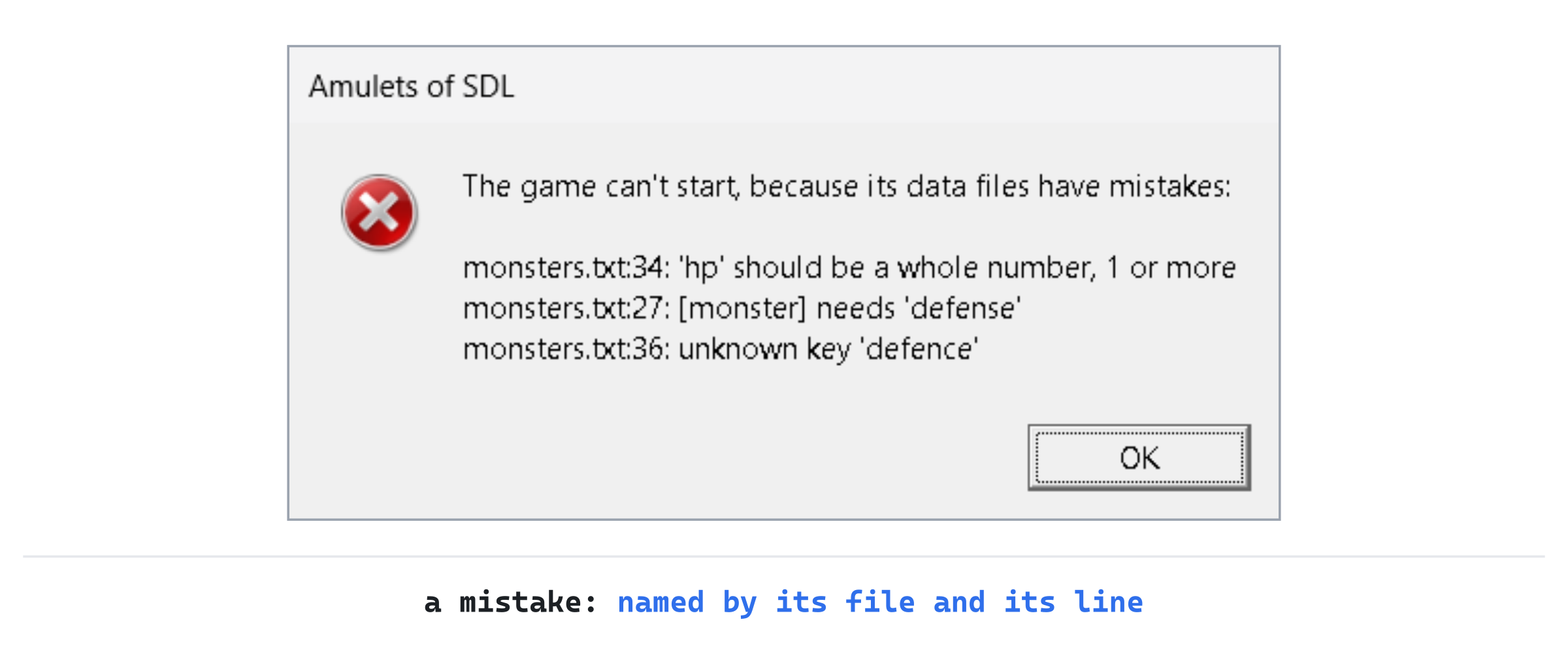
Fix both, and the game starts. Now meet the bear. Bears live on floors 3 to 5. So, as in Chapter 15's first experiment, make the constructor's newLevel(1) a newLevel(4) for a moment.
Set the seed to 40, press F5, and press F1. Two bears, q, wait in the room to the right of yours. Press F2 for the tile view, and there they are, as Figure 16.1 showed. Put newLevel(1) back when you're done.
Playing the Game
The game plays just as it did, and that was the point. What's new is that you can change it. Each change is a save and a restart away, with any mistake reported, not quietly played.
Want the jackals in packs of five? Change pack:3 to pack:5 in their record. Too many potions of poison? Lower their frequency.
Try a monster of your own: copy a record, and give it a new id, a name, a glyph and a color. Then borrow a tile it looks a little like, or use one that isn't in the atlas, which the tile view draws as a pink square. Put it on the floors you want, and see how it fares against you.
Understanding the Code
The game's content is in two text files in its data folder, made of records: a type in brackets, then keys and values. The Files module finds them from the program's folder, with SDL_GetBasePath, and reads them with SDL_LoadFile. So the project's Output Directory puts the program beside them. In Records, readRecords turns the text into records, with each key's line. Then a FieldReader takes a record apart a key at a time, checking each value, and reports every key never asked for as unknown.
A GameData reads monsters.txt and items.txt into vectors of kinds, with their traits, classes and effects turned from words into the code's bits and enums. It checks each file as a whole: every floor has a monster, and the game's needed items are there. The program reads the data in main, before anything else, shows every mistake in the console window and in a message box, and hands the data to each Game by const reference. A record with a mistake is never used, and the game never starts with one.
Experimenting
Try each of these, and put each back afterward:
- A tougher start. In
monsters.txt, give the jackalhp = 10. The first floor's packs take twice the blows to put down, and you'll feel it within a few turns. - One id twice. Change the fruit bat's
idtogiant_white_rat. The message box saysmonsters.txt:40: the id 'giant_white_rat' is already used, on line 28. - An empty floor. Change the vampire's floors to
8 8. Floor 9 has the ogre, the troll and the shadow hound still, so nothing is wrong. Then end the deep band's three other kinds at floor 8 too, with7 8, and the box saysmonsters.txt: no monster is found on floor 9.
The last experiment shows the one check that needs the whole file. No single record is wrong, yet the file can't be used.
Common Errors and Fixes
If the game didn't build, or doesn't behave as described, the problem is probably one of these.
The console window says "Couldn't read" and a path ending in x64\Debug\data/monsters.txt, and the game's window never opens. The program is still built in x64\Debug, so it looks for its files there. Set Output Directory to $(ProjectDir), for All Configurations and All Platforms, as the first step does.
C2065: 'MONSTER_DEFS': undeclared identifier, in chooseMonsterKind, followed by C2530 and C2143. The lambda still loops over the old table, which is gone. Change it to data_.monsters().
C3493: 'this' cannot be implicitly captured because no default capture mode has been specified, in chooseMonsterKind, followed by more about data_. The lambda's brackets are still empty, but it uses data_, a member. Make them [this].
C2661: 'Game::Game': no overloaded function takes 4 arguments, in main. The call that makes each Game doesn't pass data, so it has four arguments where the constructor wants five. It should be Game game(renderer, glyphs, data, seed, useTiles);.
The game won't start, and the box says monsters.txt:27: [monster] needs 'defense' and monsters.txt:36: unknown key 'defence'. A key is misspelled. The two mistakes are one slip, as Figure 16.5 showed.
The game won't start, and the box says items.txt: the game needs an item with the id 'short_sword'. The short sword's record is missing, or its id is misspelled. The game gives it to the player at the start, so it must be there.
A grizzly bear is a pink square in the tile view. The old tiles.txt has no picture called grizzly-bear. Copy tiles.png and tiles.txt from the Chapter 16 folder.
FAQ
Q) Why not a common format, such as JSON, with a library to read it?
A) A library would read the text, but it wouldn't check what the text means. That's most of the work: that a monster's floors are two numbers, that a trait is one the game knows. This format is simple enough to read in a couple of hundred lines, it's easy to write by hand, and every mistake names its line. A library would also be one more thing to download and set up, as SDL was in Chapter 1.
Q) Why stop at the first file with mistakes, instead of using the good records?
A) A game played without some of its records is a different game, and the player might never know why. Stopping makes a mistake impossible to miss, and listing every mistake at once means they can all be fixed in one go.
Q) Can the game read the files again while it's running?
A) Not as it stands. Every monster points at a kind in the data, so reading the files again would leave the pointers pointing at kinds that are gone. Restarting the game is quick, and it's always safe.
AI Exercise (Optional)
A data file is a good place to add a feature without touching much code. If you'd like to try one with an AI's help, open your AI chatbot of choice, and try a prompt like this:
"I'm writing a roguelike in C++ with SDL 3. Monsters are read from a text file of records, each a [monster] line followed by key = value lines. A class, FieldReader, takes one record apart: text(key), number(key, least), numbers(key, count, least), has(key) for a key that may be left out, and finish(), which reports any key never asked for. The struct MonsterDef holds a kind, filled in by a function readMonsters. I'd like an optional key, 'description', a sentence about the monster, which the look panel shows when the player looks at one. Show me every change, with each curly brace on its own line, and explain it."
Notice what the preceding prompt does. It names the reader's functions, so the answer can use has for an optional key, rather than writing a parser of its own. And it asks for the change to go all the way to the screen, which is where you'll see whether it works.
When the answer comes back, check that a record without a description is still fine, and that a misspelled descripton is still reported as unknown. That's the format's promise, and the new key should keep it.
Summary
The monsters and the items are read from monsters.txt and items.txt, records of keys and values that Records reads and FieldReader checks, a key at a time. Every mistake is reported by its line, and the game won't start until they're fixed. The program is built beside its files, and finds them from its own folder. And a grizzly bear joined the dungeon without a line of code. In Chapter 17, the game saves, so a run can be put down and picked up again, in the same format of records.