
Until now, every fight has been face to face: you hit what's next to you, and what's next to you hits back. This chapter adds attacks from afar, for you and for the monsters. You aim with a cursor, along a line of fire that the game shades on the map. Then a scroll of lightning, a bow's arrow, a thrown dart or a fireball flies along it.
The monsters learn to do the same. Archers shoot from across the room, and keep their distance while they do it. Dusk-elf mages cast lightning, and the young red dragon from Chapter 20 breathes fire. The next image shows a fireball being aimed.
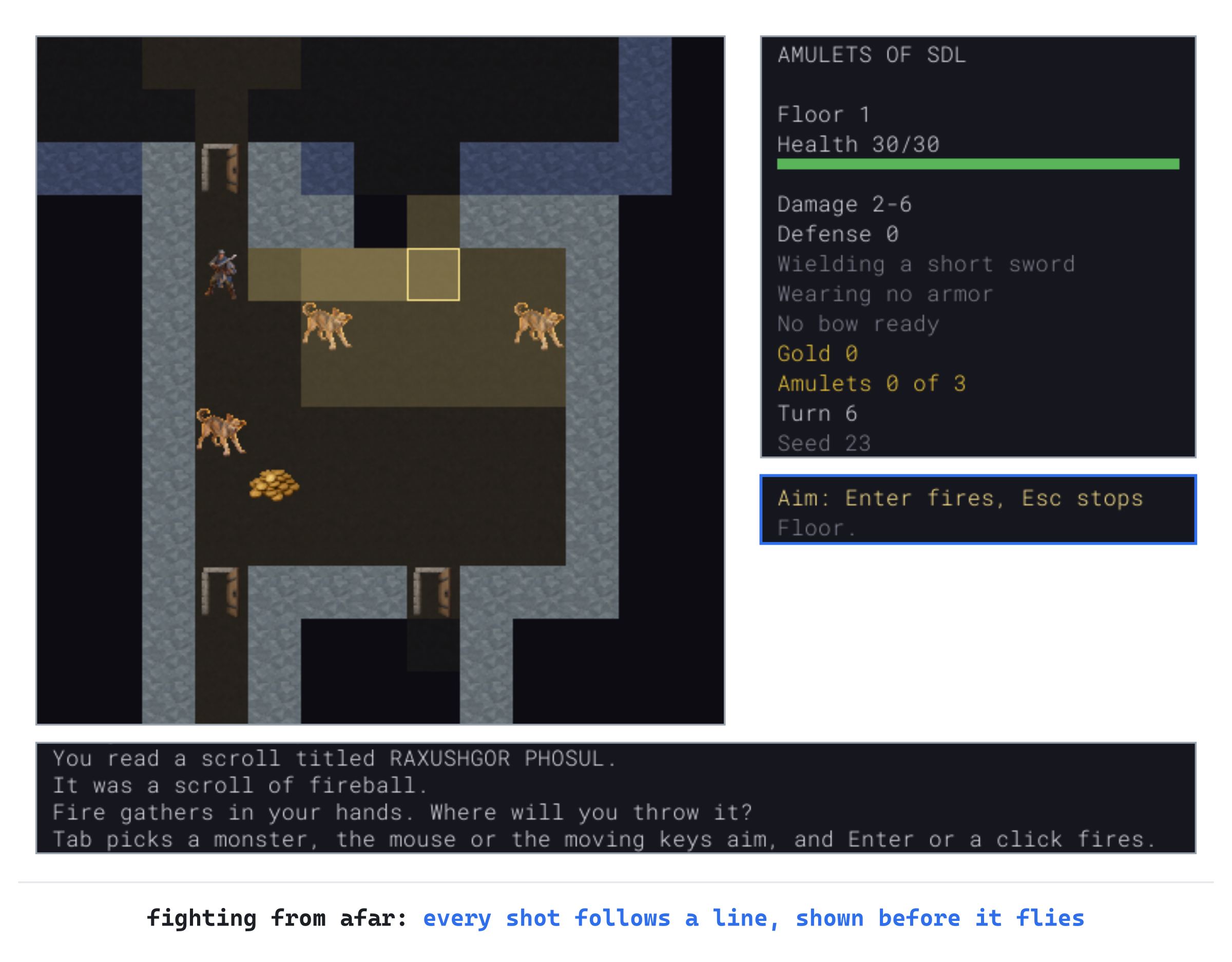
The bright cells are the fireball's path, from you to where it will burst, and the fainter ones are the burst itself, two steps all around, as far as you can see. Everything in the faint cells will burn, which is the reason to look before you fire.
Chapter 21 in the book's repository holds this chapter's finished project. The chapter carries on in your own project from Chapter 20, or from the book's Chapter 20 folder.In this chapter, we will:
- Draw a line of fire from one cell to another with Bresenham's line, using whole numbers only
- Aim with a cursor, in a new state of the game, and read a scroll of lightning that strikes everything in its path
- Pick targets with Tab, nearest first, and aim with the mouse
- Add bows, arrows and darts, a quiver to hold the arrows, and save them in version 5 of the save
- Fire arrows and throw darts and daggers, with a chance to hit that falls with distance, and pick them up where they land
- Give monsters attacks from afar, with arrows, lightning and fire, and archers that keep their distance
- Add a scroll of fireball, which bursts where it lands, and burns everything near it
There are six checkpoints along the way. Let's start with the plan.
Planning the Chapter
This chapter adds no new files. It changes seven, along with the tile atlas and both data files:
| File | Status | What it's for |
|---|---|---|
src/Item.h |
Changed | Bows and missiles, and two scrolls that are aimed |
src/Data.cpp |
Changed | The new classes and scrolls read, and the monsters' attacks from afar |
src/Player.h |
Changed | A bow, ready to fire, and a quiver of arrows |
src/Monster.h |
Changed | An attack from afar, and a trait for keeping one's distance |
src/Game.h, src/Game.cpp |
Changed | Aiming, the line of fire, shooting and throwing, and monsters that do the same |
src/SaveGame.cpp |
Changed | The bow and the quiver, in version 5, and the monsters' cooldowns |
data/items.txt, data/monsters.txt |
Changed | Two scrolls, two bows, arrows and darts; an archer and a mage |
assets/tiles.png, assets/tiles.txt |
Changed | Pictures of a bow, arrows, darts, the archer and the mage |
| The other files | Unchanged |
The next image shows how the files fit together at the end of the chapter. Nothing new joins them. Aiming lives in Game, as looking does. An attack from afar is part of a monster's kind, read from its record.
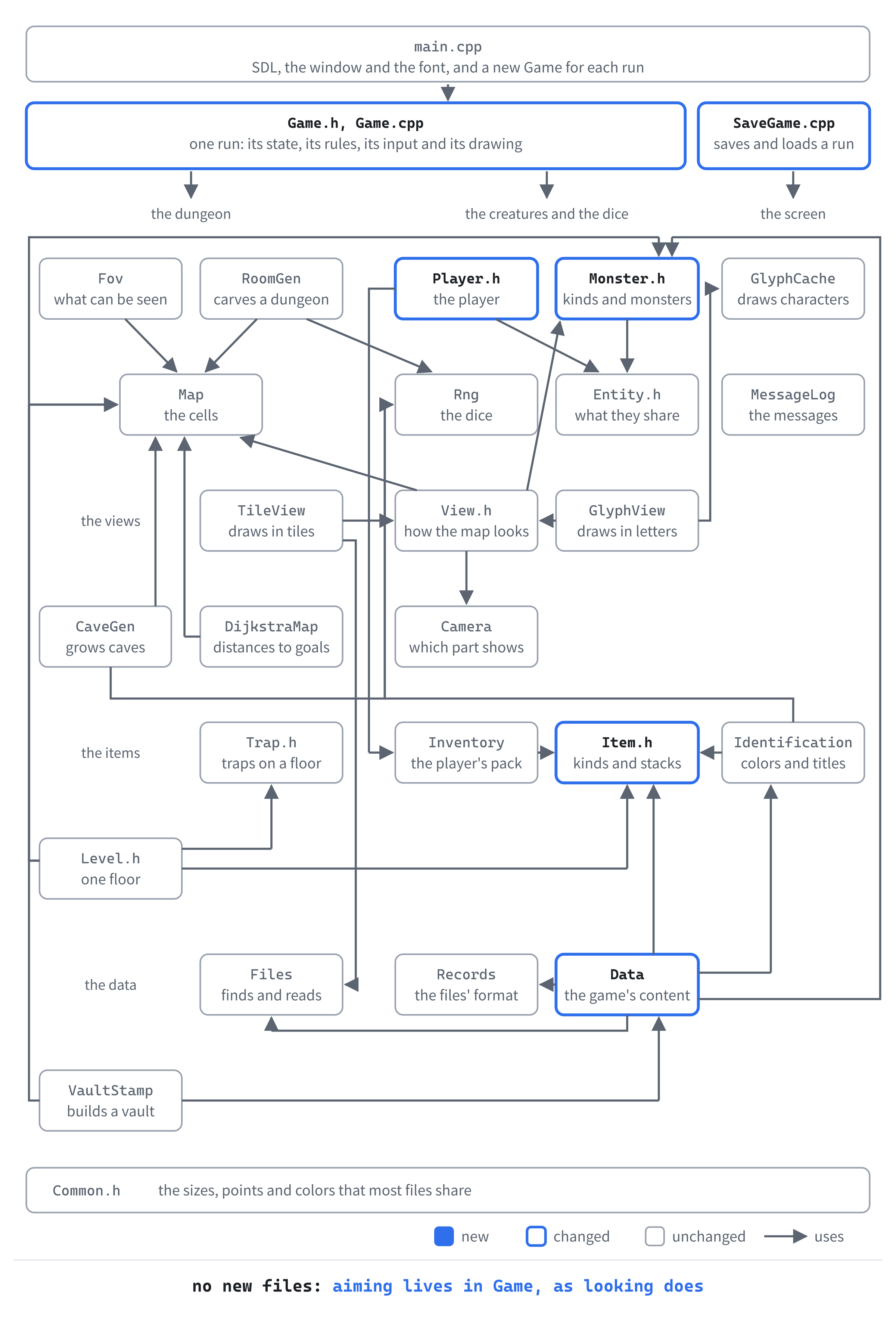
Most of the work is in Game.cpp, which grows by nearly a thousand lines. The others gain far less, from three lines in Player.h to 75 in Data.cpp.
How a Shot Flies
Every attack from afar, the player's and the monsters', follows the same line. It starts at the attacker, goes cell by cell toward the target, and stops at the first wall or closed door. The next image shows the cells of such a line.

What happens along the line depends on what's flying. Lightning goes through everything in its way and strikes it all. An arrow, a dart or a fireball stops at the first creature it meets. A fireball then bursts, and burns everything within two steps.
A Line of Fire
The first part adds aiming, and the first thing to aim: a scroll of lightning. Reading it starts a new state of the game, Targeting, with a cursor that the moving keys move. The line of fire from you to the cursor is shaded on the map, and Enter fires the lightning along it.
The Scroll of Lightning
The scroll is a new kind of scroll, with a new effect. Open Item.h, and add the effect below Frighten:
Lightning, // a bolt along a line the player aimsOpen Data.cpp, and add its name below { "frighten", ItemEffect::Frighten },:
{ "lightning", ItemEffect::Lightning },Now the record. Open data/items.txt. In the comment at the top, the list of effects grows by one. Change the effect key's two lines to these three:
#     effect   heal, heal_fully, strengthen, teleport, map_floor,
#              identify, poison, regenerate, confuse, frighten or
#              lightning, which the player aims
Then add the scroll's record below the scroll of fear's, the one with effect = frighten:
[scroll]
id        = scroll_of_lightning
name      = lightning
tile      = scroll
frequency = 4
effect    = lightning
The scroll is as common as the scroll of fear, and found on any floor. Like any scroll, it isn't known until it's read, or identified.
A New State, and What It's For
Aiming is a state of its own, as looking is. Open Game.h, and add it to GameState, below Confirming:
Targeting, // aiming, with the cursor, at a cellThe state needs to know what it's aiming for, since a scroll's lightning is only the first of several things. Add this below the GameState enum, with a blank line in between:
// What the player is aiming for
enum class TargetPurpose
{
    Lightning,   // a scroll of lightning's bolt
};
The enum TargetPurpose has one member for now. Later in this chapter, it gains a bow's arrows and things to throw, and then a fireball.
The cursor is the look cursor, from Chapter 9's look mode, so aiming needs no new one. Find these lines:
// The cell the look cursor is on, in the Look state
Point lookCursor_;
Change them to these:
// The cell the cursor is on, in the Look state, and the Targeting
// state, where it's what the player aims at, and what for
Point lookCursor_;
TargetPurpose targetPurpose_ = TargetPurpose::Lightning;
The functions that aim and fire go below handleConfirmKey's declaration:
void startTargeting(TargetPurpose purpose);
void handleTargetingKey(const SDL_KeyboardEvent& key);
void stopTargeting();
void fireAtCursor();
std::vector<Point> lineOfFire() const;
void castLightning(const std::vector<Point>& path);
void hurtMonster(Monster& monster, int damage, const std::string& by);
The function startTargeting begins aiming, and handleTargetingKey takes the keys while it lasts. Esc calls stopTargeting, and Enter fireAtCursor. The cells a shot would pass through come from lineOfFire. Then the bolt goes along them in castLightning, and hurtMonster tells what happens to each monster it strikes.
Two more declarations: add alarm below playerAttacks's declaration:
void alarm(Monster& monster);And add the drawing of the line of fire below drawTraps's declaration:
void drawLineOfFire() const;The functions themselves go in Game.cpp, starting with the line they all depend on.
Bresenham's Line
A line of fire is a line of cells, and a line between two cells on a grid is a choice. The true line runs at a slant, and the cells can only follow it a step at a time. In 1962, Jack Bresenham at IBM found a way to choose the cells with whole numbers alone, for a pen plotter that could only step. It's still the usual way, in roguelikes and in drawing programs.
The idea is to step along the line's longer axis every time, and along its shorter axis only sometimes. An error sum keeps track of how far the cells have strayed from the true line. When the error would grow past half a cell, the line steps along the shorter axis too, and the error comes back down.
Open Game.cpp. The line needs std::abs, so add its header below #include "Game.h":
#include <cstdlib> // std::abs, for the line of fireAdd the line to the unnamed namespace, below distanceSquared:
// The cells of a line from one cell toward another, after the first,
// for length cells: past the second, if it's nearer. Bresenham's way:
// a step goes along the line's longer axis, and along the shorter one
// too whenever the error, how far the cells have strayed from the true
// line, would grow past half a cell. Each step changes the error by a
// whole number, so the sums stay exact
std::vector<Point> lineFrom(Point from, Point to, int length)
{
    std::vector<Point> cells;
    int dx = std::abs(to.x - from.x);
    int dy = -std::abs(to.y - from.y);
    if (dx == 0 && dy == 0)
    {
        return cells;   // no way to go
    }
    int stepX = from.x < to.x ? 1 : -1;
    int stepY = from.y < to.y ? 1 : -1;
    int error = dx + dy;
    Point cell = from;
The variable dx is the distance across, and dy the distance down. The distance down is made negative, which keeps the sums simple. A line from a cell to itself goes nowhere, and has no cells. The steps are 1 or -1, toward the target, and the error starts as dx + dy. Add the rest of the function below it:
    while (static_cast<int>(cells.size()) < length)
    {
        int twice = 2 * error;
        if (twice >= dy)
        {
            error += dy;
            cell.x += stepX;
        }
        if (twice <= dx)
        {
            error += dx;
            cell.y += stepY;
        }
        cells.push_back(cell);
    }
    return cells;
}
Each time around the loop, twice is the error doubled, so that half a cell is a whole number. Stepping across adds dy to the error, and stepping down adds dx. Each step is taken only when the doubled error says it's due. A line along a diagonal takes both steps every time. The loop runs until there are length cells, so the line can carry on past to, as a bolt of lightning does.
Aiming
Add the lightning's numbers to the unnamed namespace, below FALL_MAX:
// A scroll of lightning's bolt: how far it goes, and its damage, which
// armor doesn't stop (*tune*)
constexpr int LIGHTNING_RANGE = 8;
constexpr int LIGHTNING_MIN = 8;
constexpr int LIGHTNING_MAX = 14;
The bolt goes 8 cells, and does 8 to 14 damage, which no armor stops. That kills nearly anything on the first two floors, and hurts anything deeper.
Reading the scroll starts the aiming. In applyEffect, add this case below the case for ItemEffect::Frighten:
case ItemEffect::Lightning:
    log_.add("Lightning crackles in the air. Where will you aim it?");
    startTargeting(TargetPurpose::Lightning);
    break;
Reading a scroll takes a turn, and until now, useItem finished the turn straight after the effect. An aimed scroll has to wait for the player to fire. In useItem, find these lines:
applyEffect(*used.def);
finishTurn();
Change them to these:
applyEffect(*used.def);

// A scroll that's aimed finishes its turn when the player fires it
if (state_ != GameState::Targeting)
{
    finishTurn();
}
Now the aiming itself. Add startTargeting below playerStep:
// Starts aiming, with the cursor on the player until it's moved
void Game::startTargeting(TargetPurpose purpose)
{
    targetPurpose_ = purpose;
    state_ = GameState::Targeting;
    lookCursor_ = player_.pos;
    log_.add("The moving keys aim, and Enter fires.");
    redraw_ = true;
}
The cursor starts on the player, and the log says how to aim. The state's keys go to a function of their own. In handleKey, add a case for the new state below the case for GameState::Confirming:
case GameState::Targeting:
    handleTargetingKey(key);
    break;
Add the keys' function below startTargeting:
// Aiming: the moving keys move the cursor, Enter fires at it, and Esc
// stops
void Game::handleTargetingKey(const SDL_KeyboardEvent& key)
{
    Point step;
    if (key.key == SDLK_ESCAPE)
    {
        stopTargeting();
    }
    else if (key.key == SDLK_RETURN || key.key == SDLK_KP_ENTER)
    {
        fireAtCursor();
    }
    else if (stepFor(key, step))
    {
        Point to = { lookCursor_.x + step.x, lookCursor_.y + step.y };
        if (level_.map.inBounds(to.x, to.y))
        {
            lookCursor_ = to;
        }
    }
    redraw_ = true;
}
In the preceding code, the moving keys move the cursor a cell at a time, with Chapter 3's stepFor, but never off the map. Enter, or the Enter on the keypad, fires.
Esc stops aiming, but the scroll has been read by then, and its lightning can't go back on the page. If stopping cost nothing, reading an unknown scroll and pressing Esc would identify it for free. Add stopTargeting below handleTargetingKey:
// Esc while aiming, which on its own takes no turn. But a scroll that's
// aimed has been read, so its magic is gone, and the reading took a turn
void Game::stopTargeting()
{
    state_ = GameState::Playing;
    if (targetPurpose_ == TargetPurpose::Lightning)
    {
        log_.add("The lightning crackles away into nothing.");
        finishTurn();
    }
}
The log says the lightning is lost, and the turn passes, since reading the scroll took one. Only a scroll is wasted this way, so the if checks what's being aimed. The lightning is all there is for now, but a bow, later in this chapter, can be put away for nothing.
Closing the window while aiming is another matter. The scroll has been read, but nothing has been aimed, and Chapter 17's putBackUnfinishedScroll puts such a scroll back in the pack before the run is saved. So far, it knows only the scroll of identify. Replace the comment above putBackUnfinishedScroll with this:
// The save has no place for a choice half made, such as what a scroll of
// identify will name, or where a scroll of lightning goes. The scroll has
// left the pack by then, so a run saved as it is would lose it. Instead,
// the scroll goes back in the pack, as though it hadn't been read, though
// its name stays known. There's room for it, since it has only just left
Then add the lightning's case below the identify's:
else if (state_ == GameState::Targeting &&
         targetPurpose_ == TargetPurpose::Lightning)
{
    effect = ItemEffect::Lightning;
}
A scroll of lightning that's being aimed goes back in the pack, then, as a scroll of identify does while its choice is open.
Firing
Firing works out the line, and sends the lightning along it. Add fireAtCursor below stopTargeting:
// Fires at the cursor, along the line of fire, which takes the turn
void Game::fireAtCursor()
{
    std::vector<Point> path = lineOfFire();
    if (path.empty())
    {
        // The cursor is on the player, or the line's first cell is a wall
        // or a closed door
        if (lookCursor_ == player_.pos)
        {
            log_.add("Move the cursor off yourself first.");
        }
        else
        {
            log_.add("Something solid is in the way.");
        }
        return;
    }
    state_ = GameState::Playing;
    castLightning(path);
    removeDeadMonsters();
    finishTurn();
}
In the preceding code, an empty line of fire means there's nothing to fire along: the cursor is on the player, or a wall or a closed door is right next to them. The log says which, and no turn passes. Otherwise, the lightning goes, the dead are removed, and the turn ends.
The line of fire is lineFrom's line, cut short by anything solid. Add lineOfFire below fireAtCursor:
// The cells a shot at the cursor passes through: along the line from the
// player, as far as its range, past the cursor if it's nearer. It stops
// short of a wall or a closed door
std::vector<Point> Game::lineOfFire() const
{
    std::vector<Point> path;
    for (Point cell : lineFrom(player_.pos, lookCursor_, LIGHTNING_RANGE))
    {
        if (!level_.map.isWalkable(cell.x, cell.y))
        {
            break;
        }
        path.push_back(cell);
    }
    return path;
}
The line goes as far as the shot's range, which for the lightning is LIGHTNING_RANGE cells, through the cursor and beyond it. It stops at the first cell that can't be walked on. A wall stops it, and so does a closed door, but an open door doesn't.
The bolt strikes every monster on the line. Add the start of castLightning below lineOfFire:
// A bolt of lightning, along the path: every monster on it is struck, for
// LIGHTNING_MIN to LIGHTNING_MAX damage, since magic ignores armor. They're
// all struck at once, before any of them is heard, and those it didn't
// kill hunt the player
void Game::castLightning(const std::vector<Point>& path)
{
    log_.add("A bolt of lightning flashes out!");
    std::vector<Monster*> struck;
    for (Point cell : path)
    {
        Monster* monster = monsterAt(cell);
        if (monster != nullptr && monster->isAlive())
        {
            int damage = rng_.roll(LIGHTNING_MIN, LIGHTNING_MAX);
            hurtMonster(*monster, damage, "the lightning");
            struck.push_back(monster);
        }
    }
Each monster on the path takes its own roll of the damage, and is kept on a list, struck. Add the rest of the function below it:
    for (Monster* monster : struck)
    {
        makeNoise(monster->pos, FIGHT_LOUDNESS);
        if (monster->isAlive())
        {
            alarm(*monster);
        }
    }
}
The noise of each strike comes after all the strikes. Each noise wakes whatever hears it. If each came straight after its own strike, a monster further along the line could wake up between being struck and being killed. The log would say "The kobold wakes up!" in the middle of a bolt that killed it. The monsters that live hunt the player, through alarm.
Each strike is told the same way, whatever did it. Add hurtMonster below castLightning:
// A monster takes damage from afar, and the player is told: "The
// lightning hits the goblin for 9." On its own, it wakes no one, and sets
// no one hunting
void Game::hurtMonster(Monster& monster, int damage, const std::string& by)
{
    monster.hp -= damage;
    std::string name = monster.def->name;
    if (!monster.isAlive())
    {
        log_.add(capitalized(by) + " kills the " + name + "!");
        return;
    }
    log_.add(capitalized(by) + " hits the " + name + " for " +
             std::to_string(damage) + ".");
}
The parameter by names what struck: "the lightning" here, and later an arrow or a dart. The names are capitalized for the start of the sentence, with Chapter 9's capitalized.
Who Hunts the Player
A monster struck in melee starts hunting the player if it was asleep or wandering, and so does its pack. One struck from afar should too, so those lines move out of playerAttacks into a function of their own. In playerAttacks, find these lines:
// A blow wakes a monster, and sets it hunting whoever struck it
bool unaware = monster.state == MonsterState::Asleep ||
               monster.state == MonsterState::Wandering;
if (unaware)
{
    monster.state = MonsterState::Hunting;
    monster.lastSeen = player_.pos;
    wakePack(monster);
}
Change them to these:
// A blow wakes a monster, and sets it hunting whoever struck it
alarm(monster);
Then add alarm below playerAttacks:
// A monster the player attacks, if it was asleep or wandering, hunts them
// now, and its pack with it
void Game::alarm(Monster& monster)
{
    bool unaware = monster.state == MonsterState::Asleep ||
                   monster.state == MonsterState::Wandering;
    if (unaware)
    {
        monster.state = MonsterState::Hunting;
        monster.lastSeen = player_.pos;
        wakePack(monster);
    }
}
The body of alarm is the lines that came out of playerAttacks, unchanged: the check for an unaware monster, the hunt, and the pack.
Showing the Line
While aiming, the camera follows the cursor, as it does while looking. In run, find these lines:
// The view's camera keeps the look cursor in sight while
// looking, and the player the rest of the time
Point focus = player_.pos;
if (state_ == GameState::Look)
Change them to these:
// The view's camera keeps the cursor in sight while looking
// or aiming, and the player the rest of the time
Point focus = player_.pos;
if (state_ == GameState::Look ||
    state_ == GameState::Targeting)
The look panel describes what's under the cursor while aiming, too. Replace the comment above lookTarget with this:
// The cell the look panel describes: the cursor's while looking or aiming,
// and otherwise the one under the mouse, if any
In lookTarget, change if (state_ == GameState::Look) to if (state_ == GameState::Look || state_ == GameState::Targeting). The panel's header says what the keys do. In drawLookPanel, add this below the header for looking:
else if (state_ == GameState::Targeting)
{
    y = drawWrapped("Aim: Enter fires, Esc stops", y, Palette::HIGHLIGHT);
}
The line of fire is shaded on the map, so the player sees where the shot will stop before firing it. In draw, add this below view_->drawPlayer(player_.pos);:
if (state_ == GameState::Targeting)
{
    drawLineOfFire();
}
Add the shading below drawItems:
// While aiming: the cells the shot would pass through, in a see-through
// highlight, so the player sees where it would stop before firing. Only
// the cells in sight are shaded: past them, where the shading stopped
// would tell of a wall or a monster the player can't see
void Game::drawLineOfFire() const
{
    SDL_Color shade = Palette::HIGHLIGHT;
    shade.a = 70;
    SDL_SetRenderDrawBlendMode(renderer_, SDL_BLENDMODE_BLEND);
    setColor(shade);
    for (Point cell : lineOfFire())
    {
        if (!level_.map.isVisible(cell.x, cell.y))
        {
            break;
        }
        SDL_FRect rect = view_->camera().cellRect(cell);
        SDL_RenderFillRect(renderer_, &rect);
    }
    SDL_SetRenderDrawBlendMode(renderer_, SDL_BLENDMODE_NONE);
}
The highlight's color is drawn see-through, with an alpha of 70 out of 255, so the cells beneath show through it. Blending is turned on for the shading, and off again after, since everything else is drawn solid.
The shading stops at the first cell the player can't see. Sight reaches nine cells, in a circle, and eight steps on a slant go further than that, so the line can run on out of sight. If the shading ran on with it, where it stopped would tell of a wall the player can't see. Later in this chapter, an arrow stops at the first creature in its way, and then the shading would tell of a monster too. That's why the comment names both.
Checkpoint: A scroll of lightning turns up only by chance, so give yourself one for now. Add this line to the constructor, below player_.weapon = Item{ data_.findItem("short_sword") };: player_.inventory.add(Item{ data_.findItem("scroll_of_lightning") });. Type 23 into Command Arguments, press F5, and walk down six steps with j, through the open door below you, into the room below. Three jackals lie asleep in it, two of them in a row to your right, a step lower. Read the scroll, with i and a: "It was a scroll of lightning." The cursor sits on you. Press n once and l five times, to put it on the farther of the two jackals. The next image shows the line of fire, through both of them.
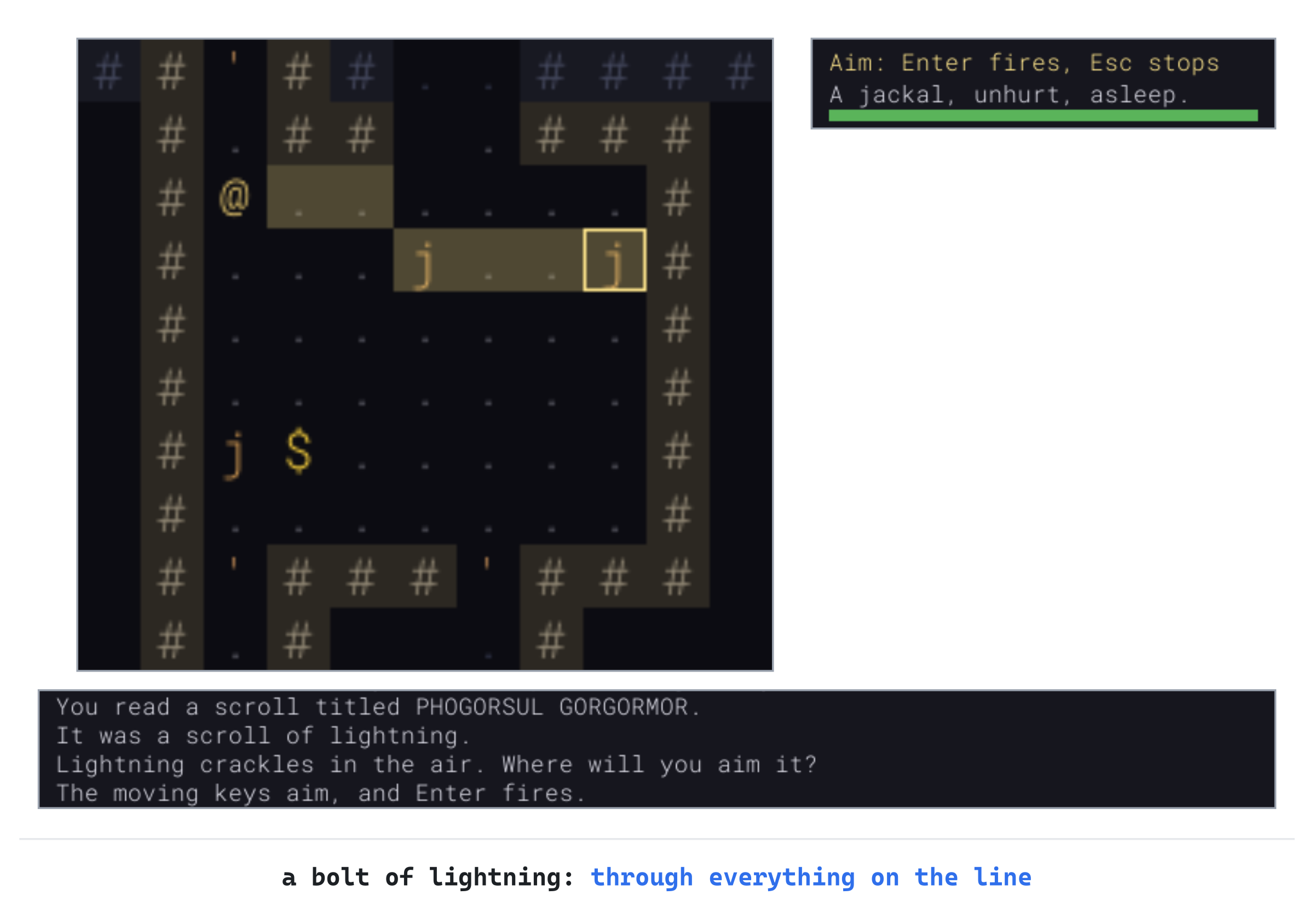
Press Enter. "A bolt of lightning flashes out!", and "The lightning kills the jackal!", twice. The third jackal wakes up, and notices you. Leave the line in the constructor for now: the next checkpoint uses it too.
Quicker Aiming
Moving the cursor a cell at a time works, but it's slow. Most of the time, the target is a monster you can see. This part adds two quicker ways to aim: Tab and the mouse. Tab puts the cursor on a monster in sight, nearest first.
Tab
Tab sorts the monsters in sight, and the sort is the standard library's. Open Game.cpp, and add its header below #include "Game.h":
#include <algorithm> // std::sort, for the monsters to aim atOpen Game.h, and add the function below handleTargetingKey's declaration:
void targetNext();Back in Game.cpp, add the start of it below handleTargetingKey:
// Moves the cursor to the next monster in sight, nearest first: each Tab
// goes one further out, and after the farthest, back to the nearest
void Game::targetNext()
{
    std::vector<const Monster*> inSight;
    for (const Monster& monster : level_.monsters)
    {
        if (level_.map.isVisible(monster.pos.x, monster.pos.y))
        {
            inSight.push_back(&monster);
        }
    }
    if (inSight.empty())
    {
        return;
    }
The monsters in sight are gathered as pointers, so the sort moves pointers around rather than whole monsters. With none in sight, the cursor stays where it is. Now sort them. Add this below it, with a blank line in between:
// Nearest first, and between two as near, the one higher up and then
// further left, so the order is always the same
Point from = player_.pos;
std::sort(inSight.begin(), inSight.end(),
          [from](const Monster* a, const Monster* b)
          {
              int nearA = distanceSquared(a->pos, from);
              int nearB = distanceSquared(b->pos, from);
              if (nearA != nearB)
              {
                  return nearA < nearB;
              }
              if (a->pos.y != b->pos.y)
              {
                  return a->pos.y < b->pos.y;
              }
              return a->pos.x < b->pos.x;
          });
A call to std::sort puts the monsters in order, using the lambda to compare two at a time: it returns true if the first should come before the second. The nearer comes first, by Chapter 5's distanceSquared. Between two as near, the one higher up comes first, and then the one further left. So two monsters at the same distance always come in the same order, and Tab never seems to skip one. The lambda captures from, the player's place, by value, as it needs nothing else.
Add the rest of the function below it:
    size_t next = 0;
    for (size_t i = 0; i < inSight.size(); ++i)
    {
        if (inSight[i]->pos == lookCursor_)
        {
            next = (i + 1) % inSight.size();
        }
    }
    lookCursor_ = inSight[next]->pos;
}
The cursor moves to the monster after the one it's on. If it isn't on any of them, as when aiming starts, next stays 0, the nearest. After the farthest, the % brings it back to the nearest.
Tab calls it while aiming. Replace the comment above handleTargetingKey with this:
// Aiming: the moving keys move the cursor, Tab moves it to the next
// monster in sight, Enter fires at it, and Esc stops
Then, in handleTargetingKey, add Tab's branch below Esc's:
else if (key.key == SDLK_TAB)
{
    targetNext();
}
Aiming starts on the nearest monster now, rather than on the player, since that's nearly always what's wanted. Replace the comment above startTargeting with this:
// Starts aiming: the cursor goes to the nearest monster in sight, if
// there is one, and otherwise stays on the player until it's moved
In startTargeting, find these lines:
lookCursor_ = player_.pos;
log_.add("The moving keys aim, and Enter fires.");
Change them to these:
lookCursor_ = player_.pos;
targetNext();
log_.add("Tab picks a monster, the mouse or the moving keys aim, and "
         "Enter or a click fires.");
The hint in the log now names Tab, and the mouse, which comes next.
The Mouse
The mouse already moves a hover over the map, for the look panel, through Chapter 9's trackMouse. While aiming, the cursor can follow it. In trackMouse, add these lines at the end, below the check that asks for a redraw, with a blank line in between:
// While aiming, the cursor follows the mouse
std::optional<Point> cell = hoveredCell();
if (state_ == GameState::Targeting && cell)
{
    lookCursor_ = *cell;
}
A click fires. Open Game.h, and add its function below handleConfirmKey's declaration:
void handleClick(SDL_Event event);Back in Game.cpp, add it below trackMouse:
// A click on the map, while aiming, fires at the cell clicked. The event
// gives its place in the window's pixels, as a mouse motion does
void Game::handleClick(SDL_Event event)
{
    SDL_ConvertEventToRenderCoordinates(renderer_, &event);
    bool onMap = event.button.x >= 0.0f && event.button.x < MAP_VIEW_W &&
                 event.button.y >= 0.0f && event.button.y < MAP_VIEW_H;
    if (state_ != GameState::Targeting || !onMap ||
        event.button.button != SDL_BUTTON_LEFT)
    {
        return;
    }
    lookCursor_ = view_->camera().cellAt(event.button.x, event.button.y);
    fireAtCursor();
    redraw_ = true;
}
The event is taken by value, as trackMouse's is, since SDL_ConvertEventToRenderCoordinates changes it. It turns the click's place in the window's pixels into a place in the game's 1600 by 900 picture, whatever size the window is. A click off the map, or with any button but the left, does nothing.
The click comes in as its own kind of event. In handleEvent, add this below the branch that calls trackMouse:
else if (event.type == SDL_EVENT_MOUSE_BUTTON_DOWN)
{
    handleClick(event);
}
One more change is for the tile view. There the map is bigger than its view, and while aiming, the camera follows the cursor. That's right for the keys, but now the mouse moves the cursor too.
Point at a jackal, and the camera brings it to the middle of the view, away from the mouse. Now the mouse is over another cell, and its next move puts the cursor there, and the camera moves again. The cursor runs away from the mouse until the map can't scroll any further, and a click fires wherever the mouse happens to be.
So while aiming, the camera should move only when the cursor leaves the view, which only the keys can make it do. In run, find this line, and delete it:
view_->camera().follow(focus);In its place, add these lines, below the if for F7's vault, with a blank line in between:
// While aiming, the camera moves only when the cursor leaves
// the view. The mouse moves the cursor, and a camera that
// followed it would slide the map out from under the mouse
if (state_ != GameState::Targeting ||
    !view_->camera().shows(lookCursor_))
{
    view_->camera().follow(focus);
}
The camera's shows, from Chapter 8, says whether any part of a cell is in the view. The glyph view's map fits its view, so there the camera never moves anyway. While looking, the mouse doesn't move the cursor, so the camera still follows it.
Checkpoint: Press F5, with seed 23 and the scroll still given in the constructor, and walk down six steps into the jackals' room again. Read the scroll, with i and a. This time the cursor jumps to the nearest jackal, the one a step down and three to the right. Press Tab, and it moves to the jackal below you, and Tab again, to the farther jackal in the row. One more Tab brings it back to the nearest. The next image shows the cursor on each in turn.
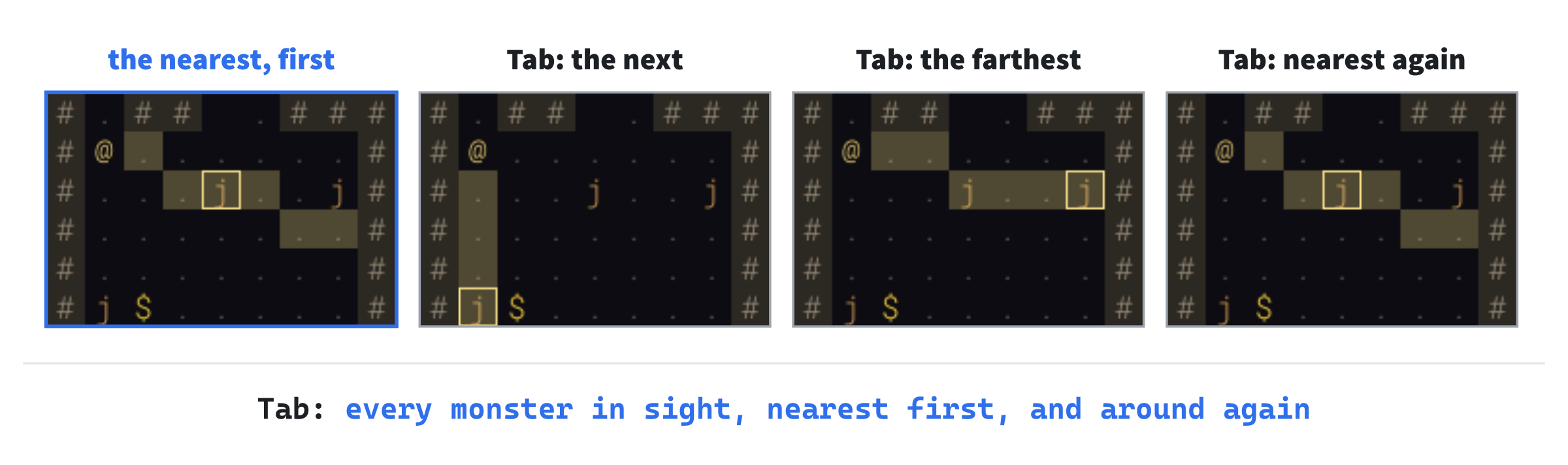
Put the cursor on the farther jackal of the two in a row, and press Enter: the bolt kills them both, as before.
Then try the mouse in the tile view, where the map is bigger than its view. Press F5, walk down again, and press F2. Read the scroll, and the cursor follows the mouse over the map, while the map holds still. Click on a jackal to fire. Now take the line out of the constructor.
Bows, Arrows and Darts
A scroll is used once, but a bow is used again and again, with arrows. The arrows are found in bundles, carried in a quiver, and mostly picked up again after a fight. This part adds them as items: two bows, arrows and darts, a bow to ready and a quiver to fill, and a line in the side panel. Firing and throwing come next.
Two New Classes
Bows and missiles are classes of item of their own. A bow has the damage its arrows do, and a range.
Missiles are arrows and darts. They're found in bundles and stack in the pack, as potions do. One that's thrown, rather than fired, has damage of its own. Open Item.h, and find these lines:
Gold,
Amulet,   // counted, as gold is, not carried in the pack
Change them to these:
Bow,       // fires the arrows in the quiver
Missile,   // arrows, for a bow, and darts, to throw
Gold,
Amulet,    // counted, as gold is, not carried in the pack
The Amulet's comment moves a space to the right, to line up with the new ones. Replace the comment above struct ItemDef with this:
// What every item of one kind has in common, read from items.txt. A potion
// or a scroll has an effect; a weapon has damage; armor has defense, and
// may be noisy. A bow has its arrows' damage and a range; a missile is
// found in a stack, and if it's thrown, has damage of its own
Then add the new fields below bool noisy = false;:
int range = 0;          // a bow's, in cells
int minFound = 1;       // how many of a missile are found together
int maxFound = 1;
bool thrown = false;    // made to be thrown: a dagger, a dart
The field thrown marks what's made to be thrown, a dart or a dagger. So a dagger, which is a weapon, can be both wielded and thrown. How many lie together when a bundle is found is minFound to maxFound.
Missiles stack, as potions and scrolls do. Replace the comment above stacks with this:
// Potions, scrolls, arrows and darts stack: any number of one kind
// share a slot in the pack, or a cell on the floor. Each weapon, bow
// and suit of armor is one of its own
Then, in stacks, find this line:
itemClass == ItemClass::Scroll;Change it to these:
itemClass == ItemClass::Scroll ||
itemClass == ItemClass::Missile;
Now a bundle of arrows takes one slot in the pack, however many arrows are in it.
Reading Them
Open Data.cpp. Weapons, bows and thrown missiles all have damage, from and to, so reading it becomes a function of its own. Add this to the unnamed namespace, below readTraits:
// A kind's damage, from and to, which mustn't run backward
void readDamage(FieldReader& fields, ItemDef& def)
{
    std::vector<int> damage = fields.numbers("damage", 2, 0);
    def.minDamage = damage[0];
    def.maxDamage = damage[1];
    if (def.minDamage > def.maxDamage)
    {
        fields.report(fields.lineOf("damage"), "'damage' runs backward");
    }
}
The classes have names in items.txt. Add these below { "armor", ItemClass::Armor },:
{ "bow", ItemClass::Bow },
{ "missile", ItemClass::Missile },
Replace the comment above readItems with this:
// Every record in items.txt, checked, and kept if it has no mistakes. The
// record's type is the item's class, and decides what else it needs: an
// effect for a potion or a scroll, damage for a weapon, defense for armor,
// which may also be noisy, damage and a range for a bow, and for a missile
// how many are found together, and damage if it's thrown
In readItems, find the weapons' branch:
else if (def.itemClass == ItemClass::Weapon)
{
    std::vector<int> damage = fields.numbers("damage", 2, 0);
    def.minDamage = damage[0];
    def.maxDamage = damage[1];
    if (def.minDamage > def.maxDamage)
    {
        fields.report(fields.lineOf("damage"),
                      "'damage' runs backward");
    }
}
Change it to these:
else if (def.itemClass == ItemClass::Weapon)
{
    readDamage(fields, def);
    def.thrown = fields.yesNo("thrown");
}
else if (def.itemClass == ItemClass::Bow)
{
    // A bow's damage is what its arrows do
    readDamage(fields, def);
    def.range = fields.number("range", 1);
}
Each weapon's damage is read by readDamage now, and it may be thrown. A bow's damage is its arrows' damage, and its range how far it shoots. Add the missiles' branch below the bows':
else if (def.itemClass == ItemClass::Missile)
{
    // An arrow does its bow's damage; a missile that's thrown
    // has damage of its own
    std::vector<int> found = fields.numbers("found", 2, 1);
    def.minFound = found[0];
    def.maxFound = found[1];
    if (def.minFound > def.maxFound)
    {
        fields.report(fields.lineOf("found"), "'found' runs backward");
    }
    def.thrown = fields.yesNo("thrown");
    if (def.thrown)
    {
        readDamage(fields, def);
    }
}
Every missile has a found, how many lie together. Only a thrown one has damage. An arrow's damage comes from the bow that fires it, so the same arrow does more from a long bow than from a short one.
The Items
Now the records. Open data/items.txt. Its comment at the top lists the classes and their keys, and both lists grow. Change its first four lines to these five:
# The items of Amulets of SDL: one record for each kind. The record's type
# is the item's class: [potion], [scroll], [weapon], [armor], [bow],
# [missile], [gold] or [amulet]. The game reads this file when it starts,
# so a change here needs no recompiling: save the file, and start the game
# again.
Below the weapons' keys, which end with the line # target's defense, add these:
#     thrown   yes if it's made to be thrown, as a dagger is; leave it out
#              for no
And below the armor's keys, the last of which is noisy, add these:
#   [bow]:
#     damage   what each arrow it fires does, from and to, before the
#              target's defense
#     range    how far it shoots, in cells
#   [missile]:
#     found    how many are found together, from and to
#     thrown   yes for a missile that's thrown, as a dart is; leave it out
#              for an arrow, which is fired from a bow
#     damage   for one that's thrown: what it does, from and to
A dagger is made for throwing. In the dagger's record, add thrown = yes below its damage. Then add the bows' records below the last suit of armor, the plate armor, with a blank line in between:
# Bows: } in the glyph view. A bow fires the arrows in the quiver

[bow]
id        = short_bow
name      = short bow
tile      = bow
frequency = 2
damage    = 2 7
range     = 8

[bow]
id        = long_bow
name      = long bow
tile      = bow
frequency = 1
damage    = 3 10
range     = 10
And the missiles' below them, with a blank line in between:
# Missiles: { in the glyph view, found in stacks

[missile]
id        = arrow
name      = arrow
tile      = arrows
frequency = 3
found     = 6 12

[missile]
id        = dart
name      = dart
tile      = darts
frequency = 2
found     = 4 8
thrown    = yes
damage    = 1 3
The long bow is rarer, hits harder and shoots further. Arrows come six to twelve at a time, and darts four to eight. A dart does less than an arrow, but needs no bow.
The new items need pictures. From the book's repository, copy tiles.png and tiles.txt from the Chapter 21 folder's assets folder into your project's assets folder, in place of the old ones. They add five tiles. This part uses bow, arrows and darts. The other two, novice-archer and dusk-elf-mage, are for two monsters that fight from afar, later in this chapter.
Found in Bundles
A missile is found as a bundle, so when one is chosen for the floor, its count is rolled too. Open Game.cpp. In placeItems, add these below floorItem.item.def = chooseItemKind();:
const ItemDef& kind = *floorItem.item.def;
if (kind.itemClass == ItemClass::Missile)
{
    floorItem.item.count = rng_.roll(kind.minFound,
                                     kind.maxFound);
}
A vault's treasure can be a bundle too. In fillVault, add these below treasure.item.def = chooseItemKind();:
const ItemDef& kind = *treasure.item.def;
if (kind.itemClass == ItemClass::Missile)
{
    treasure.item.count = rng_.roll(kind.minFound, kind.maxFound);
}
Each needs a name and a look. In itemName, add this below the Amulet's branch:
if (def.itemClass == ItemClass::Bow)
{
    return withArticle(def.name);
}
if (def.itemClass == ItemClass::Missile)
{
    if (item.count == 1)
    {
        return withArticle(def.name);
    }
    return std::to_string(item.count) + " " + def.name + "s";
}
A bow is "a short bow", one missile "an arrow", and more of them "12 arrows". Missiles are always known for what they are, as weapons are, so there's nothing to identify.
In itemLook, add this below the Amulet's branch:
if (def.itemClass == ItemClass::Bow)
{
    return { '}', Palette::WEAPON, def.tile, false };
}
if (def.itemClass == ItemClass::Missile)
{
    return { '{', Palette::WEAPON, def.tile, false };
}
A bow is a } and a missile a {, both in the weapons' color. Their tiles keep their own colors, so the last value is false.
The Bow and the Quiver
The player keeps a bow ready, as they keep a weapon in hand. They keep their arrows in a quiver, apart from the pack. Open Player.h, and replace the comment above Inventory inventory; with this:
// What they carry, the weapon in their hand, the armor they wear, the
// bow they have ready, and the arrows in their quiver, if any. Armor
// sets the player's defense
Then add these below std::optional<Item> armor;:
std::optional<Item> bow;
std::optional<Item> quiver;
The quiver holds one Item, with its count, so it's one kind of arrow at a time.
Using a bow from the pack readies it, and using arrows fills the quiver. Open Game.h, and add these below wear's declaration:
void readyBow(int slot);
void fillQuiver(int slot);
Open Game.cpp, and add readyBow below wield:
// Readies a bow from the pack, which takes a turn. The bow that was
// ready, if there was one, goes back into the pack
void Game::readyBow(int slot)
{
    state_ = GameState::Playing;
    log_.markRead();
    Item bow = player_.inventory.removeStack(slot);
    if (player_.bow)
    {
        player_.inventory.add(*player_.bow);
        log_.add("You put away " + itemName(*player_.bow) + ".");
    }
    player_.bow = bow;
    log_.add("You ready " + itemName(bow) + ".");
    finishTurn();
}
Readying a bow works as wielding a weapon does. The bow comes out of the pack, and the bow that was ready, if there was one, goes back in. Then a turn passes. Add fillQuiver below readyBow:
// Puts a stack of arrows from the pack in the quiver, which takes a turn.
// Arrows of the same kind join the ones there; arrows of another kind go
// back into the pack
void Game::fillQuiver(int slot)
{
    state_ = GameState::Playing;
    log_.markRead();
    Item arrows = player_.inventory.removeStack(slot);
    if (player_.quiver && player_.quiver->def == arrows.def)
    {
        player_.quiver->count += arrows.count;
    }
    else
    {
        if (player_.quiver)
        {
            player_.inventory.add(*player_.quiver);
        }
        player_.quiver = arrows;
    }
    log_.add("Your quiver holds " + itemName(*player_.quiver) + ".");
    finishTurn();
}
In the preceding code, arrows of the kind already in the quiver join them. Arrows of another kind take their place, and the ones that were there go back into the pack.
Using an item means something different for each class, and useItem's comment lists them. Replace the comment above useItem with this:
// Uses an item from the pack, which takes a turn. A weapon is wielded,
// armor worn, a bow readied, and arrows put in the quiver; darts are only
// thrown. A potion is drunk, or a scroll read: its kind is known from then
// on, so the player learns what it was, and then sees what it does
Then, in useItem, find this line:
ItemClass itemClass = player_.inventory.items()[slot].def->itemClass;Change it to these:
const ItemDef& kind = *player_.inventory.items()[slot].def;
ItemClass itemClass = kind.itemClass;
Then add these below the weapons' branch:
if (itemClass == ItemClass::Bow)
{
    readyBow(slot);
    return;
}
if (itemClass == ItemClass::Missile && !kind.thrown)
{
    fillQuiver(slot);
    return;
}
if (itemClass == ItemClass::Missile)
{
    state_ = GameState::Playing;
    log_.markRead();
    log_.add("Darts are for throwing: t throws one.");
    return;
}
A bow is readied, and arrows go in the quiver. Darts aren't fired from a bow, so using them only says how they're used. That costs no turn, since nothing happened.
In the Side Panel
The side panel shows the bow and the arrows, below the armor. Open Game.h, and add this below wearingText's declaration:
std::string bowText() const;In Game.cpp, replace the comment above wieldingText with this:
// What the player is wielding and wearing, in words, for the panel and the
// inventory, and their bow
Add bowText below wearingText:
// The bow the player has ready, and what's in the quiver
std::string Game::bowText() const
{
    if (!player_.bow)
    {
        return "No bow ready";
    }
    std::string text = capitalized(itemName(*player_.bow));
    if (player_.quiver)
    {
        return text + ", " + itemName(*player_.quiver);
    }
    return text + ", no arrows";
}
In drawSidePanel, change // What the player has in hand and on their back to // What the player has in hand and on their back, and their bow. Then add these lines below the two that draw wearingText():
glyphs_.drawText(bowText(), x, y, Palette::DIM_TEXT);
y += row;
The inventory shows the same three lines at its top. In drawInventory, change (Inventory::SLOTS + 8) * row to (Inventory::SLOTS + 9) * row, which makes the dialog a line taller. Then find these lines:
glyphs_.drawText(wearingText(), x, y, Palette::DIM_TEXT);
y += 2 * row;
Change them to these:
glyphs_.drawText(wearingText(), x, y, Palette::DIM_TEXT);
y += row;
glyphs_.drawText(bowText(), x, y, Palette::DIM_TEXT);
y += 2 * row;
The panel and the inventory both say now what the bow is, and how many arrows are left.
Saving the Bow
A save must keep the bow and the quiver, so its version goes up to 5. Open SaveGame.cpp, and replace the comment above constexpr int SAVE_VERSION with this:
// The version of the save's format. Whatever changes what's saved
// changes the version, so an old save is never misread. Version 2
// added the caves' floor (Chapter 18), version 3 doors, secret doors
// and traps (Chapter 19), version 4 the Amulets (Chapter 20), and
// version 5 the bow and the quiver (Chapter 21)
In SaveGame.cpp, change SAVE_VERSION = 4; to SAVE_VERSION = 5;. Then, in writeSave, add these below the armor's lines:
if (player_.bow)
{
    addField(text, "bow", player_.bow->def->id);
}
if (player_.quiver)
{
    addField(text, "quiver", player_.quiver->def->id);
    addField(text, "quiver_count", player_.quiver->count);
}
The bow is saved by its kind's id, and the quiver by its kind and its count. Both are left out when there's none. Reading them back checks that each is what it should be. Add this below the armor's reading, in the player's record:
if (fields.has("bow"))
{
    const ItemDef* def = readItemKind(fields, data, "bow");
    if (def != nullptr && def->itemClass != ItemClass::Bow)
    {
        fields.report(fields.lineOf("bow"),
                      "'" + def->id + "' isn't a bow");
    }
    else if (def != nullptr)
    {
        player.bow = Item{ def };
    }
}
Then add the quiver's below it:
if (fields.has("quiver"))
{
    const ItemDef* def = readItemKind(fields, data, "quiver");
    int count = fields.number("quiver_count", 1);
    bool arrows = def != nullptr &&
                  def->itemClass == ItemClass::Missile &&
                  !def->thrown;
    if (def != nullptr && !arrows)
    {
        fields.report(fields.lineOf("quiver"),
                      "'" + def->id + "' isn't for a quiver");
    }
    else if (def != nullptr)
    {
        player.quiver = Item{ def, count };
    }
}
A bow that isn't a bow, or a quiver of something that isn't arrows, is a mistake in the save. It's reported on its line, as any other is.
Checkpoint: Give yourself a bow, arrows and darts. In the constructor, below player_.weapon = Item{ data_.findItem("short_sword") };, add three lines for now: player_.inventory.add(Item{ data_.findItem("short_bow") });, then player_.inventory.add(Item{ data_.findItem("arrow"), 12 });, and last player_.inventory.add(Item{ data_.findItem("dart"), 6 });. Press F5, with seed 23. If the title screen offers a run saved by Chapter 20's game, press N for a new one: it's version 4, and this game reads version 5. The side panel says "No bow ready". Press i: the pack holds a short bow, 12 arrows and 6 darts. Use the bow, with a: "You ready a short bow.", and the panel says "A short bow, no arrows". Press i, and use the arrows, which are first in the pack now: "Your quiver holds 12 arrows." The next image shows the panel and the pack.
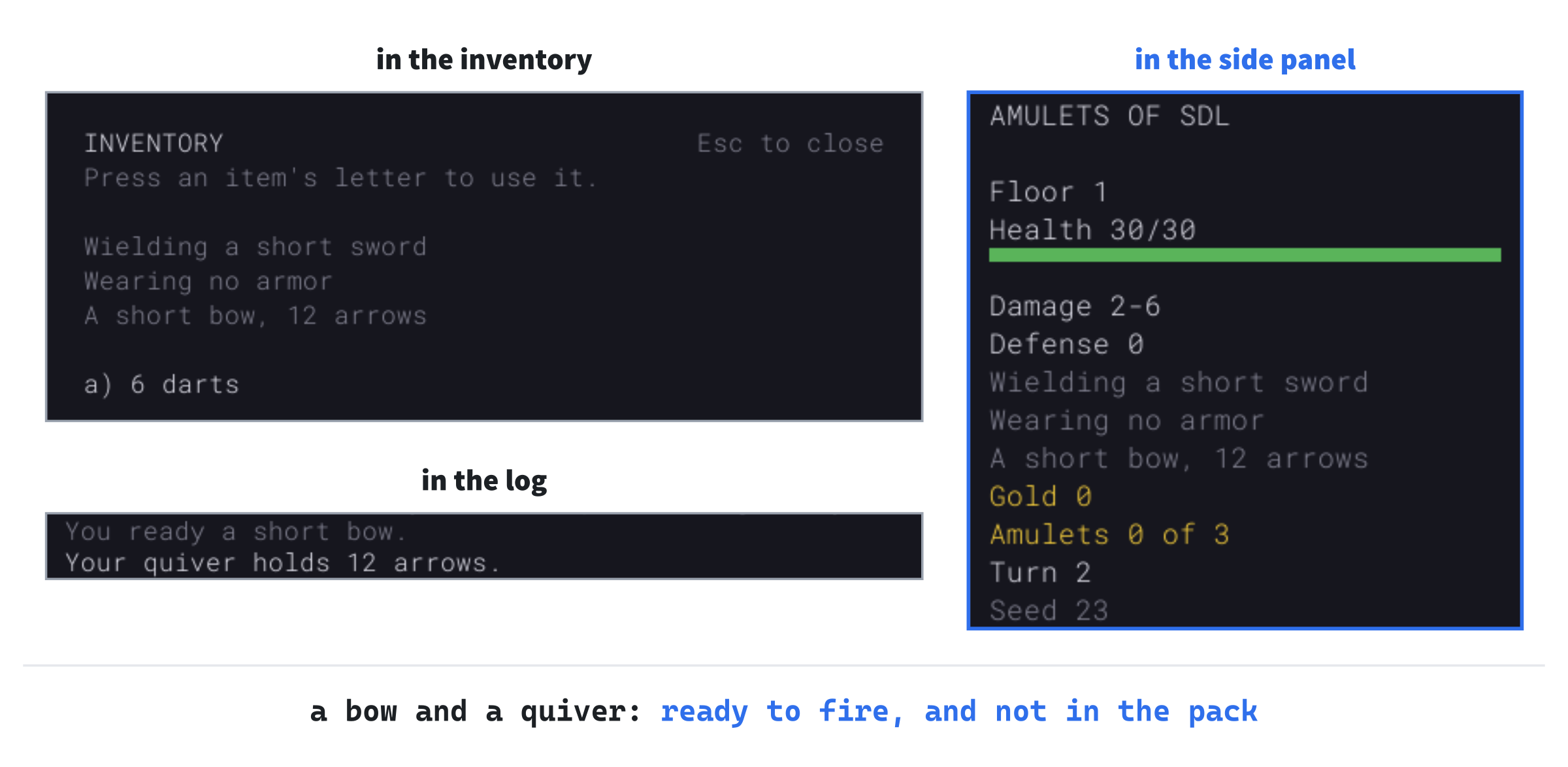
Press i and use the darts: "Darts are for throwing: t throws one." There's no t yet, nor f to fire: they come next. Leave the three lines in the constructor for the next checkpoint.
Shooting and Throwing
Now the bow can be fired, and the darts thrown. Both use the same aiming as the scroll of lightning: f aims an arrow, and t asks what to throw and then aims it. Unlike lightning, a missile stops at the first creature in its way, and it can miss. Where it stops, it lands, to be picked up again.
Two More Things to Aim
Open Game.h. Aiming has two more purposes. Add them to TargetPurpose, below Lightning:
Fire,        // an arrow from the bow
Throw,       // something made to be thrown: a dagger, or a dart
Choosing what to throw is a use of the inventory, as choosing what to drop is. Add it to InventoryAction, below Identify:
Throw,The aiming has to remember which slot of the pack is being thrown, while the player aims it. Add this below targetPurpose_:
int throwSlot_ = 0; // the pack's slot of what's being thrownAdd the functions that start a shot, and a throw, below stopTargeting's declaration:
void fire();
void chooseThrow(int slot);
And the ones that fly the missile, and land it, directly below fireAtCursor's:
void shootMissile(Item missile, const std::vector<Point>& path,
                  int minDamage, int maxDamage);
void dropNear(Item item, Point cell);
Open Game.cpp. A thrown missile goes six cells, and a fired one as far as its bow's range. Add the numbers below LIGHTNING_MAX:
// How far the player throws. A missile hits with a chance, in a
// hundred, of HIT_CHANCE_NEAR within two cells, and HIT_CHANCE_STEP less
// for each cell further, down to HIT_CHANCE_MIN. An arrow breaks one
// time in BREAK_ONE_IN (all *tune*)
constexpr int THROW_RANGE = 6;
constexpr int HIT_CHANCE_NEAR = 95;
constexpr int HIT_CHANCE_STEP = 5;
constexpr int HIT_CHANCE_MIN = 50;
constexpr int BREAK_ONE_IN = 4;
The chance to hit falls with distance: 95 in 100 within two cells, five less for each cell further, but never below 50. At a short bow's furthest, eight cells, it's 65. The chance is worked out by a function of its own, since the monsters' arrows use it too, later in this chapter. Add hitChance to the unnamed namespace, below lineFrom:
// A missile's chance to hit, in a hundred, cells away: HIT_CHANCE_NEAR
// within two cells, and HIT_CHANCE_STEP less for each cell further,
// down to HIT_CHANCE_MIN
int hitChance(int cells)
{
    return SDL_max(HIT_CHANCE_MIN, HIT_CHANCE_NEAR -
                   HIT_CHANCE_STEP * SDL_max(0, cells - 2));
}
Its parameter, cells, is how far away the target is. Of the two calls to SDL_max, the outer keeps the chance from falling below HIT_CHANCE_MIN, and the inner keeps the step count from going below 0 for the two nearest cells.
The Keys
f fires, and t throws. Replace the comment above handlePlayingKey with this:
// Esc opens the menu, > goes down the stairs, g picks up, i shows the
// inventory, d drops, x starts looking around, c closes a door, s
// searches, f fires the bow, t throws, and the moving keys move the
// player
Then add the two keys below s's:
if (key.key == SDLK_F)
{
    fire();
    redraw_ = true;
    return;
}
if (key.key == SDLK_T)
{
    openInventory(InventoryAction::Throw);
    return;
}
The t key opens the inventory to choose what to throw, with the new action. Its case goes in handleInventoryKey's switch, below the case for InventoryAction::Identify:
case InventoryAction::Throw:
    chooseThrow(slot);
    break;
With nothing made for throwing in the pack, there's no point opening it. In openInventory, add this below the check for an empty pack:
bool throwable = false;
for (const Item& item : player_.inventory.items())
{
    throwable = throwable || item.def->thrown;
}
if (action == InventoryAction::Throw && !throwable)
{
    log_.markRead();
    log_.add("You have nothing made for throwing.");
    redraw_ = true;
    return;
}
The inventory says what it's for. In drawInventory, add a title and a hint for throwing, below the ones for identifying:
else if (inventoryAction_ == InventoryAction::Throw)
{
    title = "THROW WHICH?";
    hint = "Press the letter of a dagger, or darts.";
}
And what can't be thrown is dimmed, as what's already known is when identifying. In drawInventory, find these lines:
// Choosing what to identify, the things already known are dim
bool known = identification_.isKnown(*items[slot].def);
bool dim = inventoryAction_ == InventoryAction::Identify && known;
Change them to these:
// Choosing what to identify, the things already known are dim,
// and choosing what to throw, the things not made for it
bool known = identification_.isKnown(*items[slot].def);
bool dim = (inventoryAction_ == InventoryAction::Identify && known) ||
           (inventoryAction_ == InventoryAction::Throw &&
            !items[slot].def->thrown);
Only daggers and darts can be chosen, and everything else is dimmed to say so.
Starting a Shot
Add fire below stopTargeting:
// f fires an arrow from the quiver with the bow, at whatever the player
// aims at. Without a bow ready, or arrows, there's nothing to fire
void Game::fire()
{
    log_.markRead();
    if (!player_.bow)
    {
        log_.add("You have no bow ready.");
        return;
    }
    if (!player_.quiver)
    {
        log_.add("Your quiver is empty.");
        return;
    }
    startTargeting(TargetPurpose::Fire);
}
Firing with no bow ready or an empty quiver says why, and takes no turn. Otherwise it starts aiming, for the bow. Add chooseThrow below fire:
// t has the player choose what to throw: only what's made for throwing,
// a dagger or a dart. Then they aim it
void Game::chooseThrow(int slot)
{
    if (!player_.inventory.items()[slot].def->thrown)
    {
        log_.markRead();
        log_.add("That isn't made for throwing.");
        return;
    }
    throwSlot_ = slot;
    startTargeting(TargetPurpose::Throw);
}
The slot is kept in throwSlot_ while the player aims. Nothing leaves the pack until the throw is made.
Esc stops aiming, as before, and stopTargeting needs no change. It finishes the turn only when a scroll is being aimed, so putting a bow down, or a dart back, costs nothing.
The Line Stops at a Creature
Lightning goes through everything in its way, but an arrow or a dart stops at the first creature it meets. And how far the line goes depends on what's flying. In lineOfFire, find these lines:
std::vector<Point> path;
for (Point cell : lineFrom(player_.pos, lookCursor_, LIGHTNING_RANGE))
Change them to these:
int range = LIGHTNING_RANGE;
if (targetPurpose_ == TargetPurpose::Fire)
{
    range = player_.bow->def->range;
}
else if (targetPurpose_ == TargetPurpose::Throw)
{
    range = THROW_RANGE;
}

// Lightning goes through creatures; anything else stops at the first,
// whose cell is the path's last
bool throughCreatures = targetPurpose_ == TargetPurpose::Lightning;

std::vector<Point> path;
for (Point cell : lineFrom(player_.pos, lookCursor_, range))
An arrow goes as far as the bow's range, and a throw goes THROW_RANGE cells. Lightning keeps its own range, and it's the only shot that goes through creatures. Then add the stop at a creature below path.push_back(cell);:
bool creature = false;
for (const Monster& monster : level_.monsters)
{
    creature = creature || monster.pos == cell;
}
if (creature && !throughCreatures)
{
    break;
}
The creature's own cell is the last on the path, since it's pushed before the check. The shading shows the line ending on it, so the player sees what will be hit before firing. A monster out of sight isn't given away, since the shading stops at the edge of sight. Sight reaches nine cells, so a long bow's arrow, which flies ten, can go on past the end of the shading.
Firing
Now fireAtCursor fires whatever is being aimed. Replace the comment above fireAtCursor with this:
// Fires at the cursor, along the line of fire, which takes the turn: the
// lightning, an arrow from the quiver, or one of what's thrown
In fireAtCursor, find this line:
castLightning(path);Change it to these:
if (targetPurpose_ == TargetPurpose::Lightning)
{
    castLightning(path);
}
else if (targetPurpose_ == TargetPurpose::Fire)
{
    const ItemDef& bow = *player_.bow->def;
    Item arrow = *player_.quiver;
    arrow.count = 1;
    --player_.quiver->count;
    if (player_.quiver->count == 0)
    {
        player_.quiver.reset();
    }
    log_.add("You shoot " + itemName(arrow) + ".");
    shootMissile(arrow, path, bow.minDamage, bow.maxDamage);
}
An arrow is taken from the quiver, one at a time. The arrow is a copy of the quiver's Item, with a count of 1, and the quiver's own count goes down. An empty quiver is reset, so the panel says "no arrows". The bow's damage goes with the arrow, to shootMissile. Add the throw below it:
else
{
    Item thrown = player_.inventory.items()[throwSlot_];
    thrown.count = 1;
    player_.inventory.removeOne(throwSlot_);
    log_.add("You throw " + itemName(thrown) + ".");
    shootMissile(thrown, path, thrown.def->minDamage,
                 thrown.def->maxDamage);
}
One of what's thrown leaves the pack, through removeOne. It takes one from a stack, or the whole slot if it's the last. A thrown missile's damage is its own.
A Missile in Flight
The missile's flight is shootMissile's: it follows the path to the first creature, and rolls to hit. Add the start of it below lineOfFire:
// A missile flies along the path, to the first creature on it, or the
// path's end. A creature is hit with a chance that falls with distance,
// and a hit does a roll of the damage, less its defense, but at least 1.
// Hit or miss, the creature hunts the player if it lives, and the missile
// lands where it stopped, but an arrow breaks one time in BREAK_ONE_IN
void Game::shootMissile(Item missile, const std::vector<Point>& path,
                        int minDamage, int maxDamage)
{
    std::string name = "the " + missile.def->name;
    Point landing = path.back();
    for (size_t i = 0; i < path.size(); ++i)
    {
        Monster* target = monsterAt(path[i]);
        if (target == nullptr)
        {
            continue;
        }
        landing = path[i];
        int chance = hitChance(static_cast<int>(i) + 1);
The missile lands at the path's end unless a creature stops it first. If one does, its chance to hit is hitChance's for that creature's distance. The path's first cell is 1 away, so the cell at i is i + 1 away. Add the hit, or the miss, below it:
    if (rng_.roll(1, 100) <= chance)
    {
        int damage = rollDamage(rng_, minDamage, maxDamage, 0,
                                target->defense);
        hurtMonster(*target, damage, name);
        makeNoise(target->pos, FIGHT_LOUDNESS);
    }
    else
    {
        log_.add(capitalized(name) + " misses the " +
                 target->def->name + ".");
    }
    if (target->isAlive())
    {
        alarm(*target);
    }
    break;
}
Each hit rolls the damage with Chapter 6's rollDamage, less the creature's defense, but never less than 1. A hit also makes a fight's noise where it lands. Hit or miss, a creature shot at hunts the player, if it lives: being missed is still being shot at. Add the rest of the function below it, with a blank line in between:
    bool arrow = missile.def->itemClass == ItemClass::Missile &&
                 !missile.def->thrown;
    if (arrow && rng_.roll(1, BREAK_ONE_IN) == 1)
    {
        log_.add(capitalized(name) + " breaks.");
        return;
    }
    dropNear(missile, landing);
}
An arrow breaks one time in four. Darts and daggers are made to be thrown, and never break. What doesn't break lands where the missile stopped.
Where It Lands
A missile lands on its cell, if it can. It joins a bundle of its own kind already lying there, but anything else that's there pushes it to a free cell beside it. Add the start of dropNear below shootMissile:
// Puts an item down where it landed: on the cell, onto a stack of its own
// kind there if it stacks, or if anything else lies there, on a free cell
// beside it. With nowhere free, it's lost
void Game::dropNear(Item item, Point cell)
{
    std::vector<Point> cells = { cell };
    for (Point step : DIRECTIONS)
    {
        cells.push_back({ cell.x + step.x, cell.y + step.y });
    }
The cells to try are the cell itself, first, and then its eight neighbors. Add the search below it:
for (Point here : cells)
{
    if (!level_.map.isWalkable(here.x, here.y))
    {
        continue;
    }
    bool taken = false;
    for (FloorItem& lying : level_.items)
    {
        if (lying.pos == here && lying.item.def == item.def &&
            item.def->stacks())
        {
            lying.item.count += item.count;
            return;
        }
        taken = taken || lying.pos == here;
    }
Any cell that can't be walked on, such as a wall beside the target, is skipped. A stack of the same kind takes the missile, if the kind stacks, and anything else lying there makes the cell taken. Add the rest of the function below it:
        if (!taken)
        {
            FloorItem dropped;
            dropped.pos = here;
            dropped.item = item;
            dropped.seen = level_.map.isVisible(here.x, here.y);
            level_.items.push_back(dropped);
            return;
        }
    }
}
The flag seen is set if the player can see the cell, so a missile that lands in sight is remembered, as a dropped item is. With all nine cells taken, the missile is lost, which in practice almost never happens.
Picking up arrows of the kind in the quiver puts them straight back into it. Replace the comment above pickUp with this:
// g picks up the item the player stands on, which takes a turn: gold and
// an Amulet are counted, arrows like those in the quiver go into it, and
// anything else into the pack, if there's room. Finding nothing there, or
// no room, takes no turn
Then add this below the Amulet's branch, in pickUp:
else if (player_.quiver && here->item.def == player_.quiver->def)
{
    // Arrows of the kind in the quiver go straight back into it
    player_.quiver->count += here->item.count;
}
Checkpoint: Press F5, with seed 23 and the three lines still in the constructor. Ready the bow and fill the quiver, as before, with i and a, twice. Then walk down six steps into the jackals' room. Press f: the cursor goes to the nearest jackal, and the line of fire stops on it, rather than going on to the jackal behind it. The next image shows it.
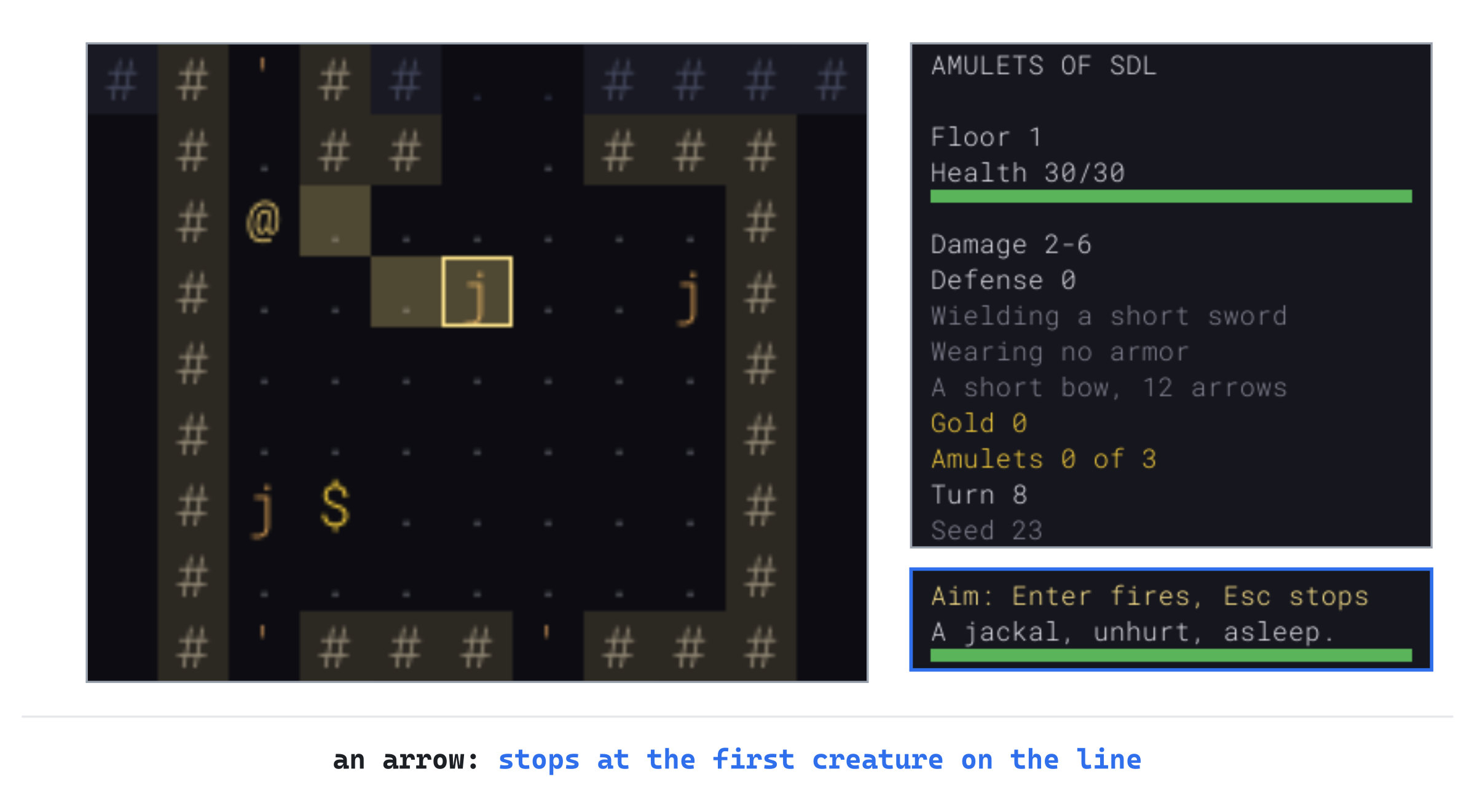
Press Enter: "You shoot an arrow." and "The arrow hits the jackal for 4." The jackal wakes, badly hurt, and flees. The arrow breaks, as one in four does.
Now press t: the inventory asks "THROW WHICH?". Throw a dart, with a: the cursor goes to the wounded jackal, and Enter throws: "You throw a dart." and "The dart kills the jackal!" The dart lies where the jackal fell, to be picked up again. Take the three lines out of the constructor now.
Monsters That Fight from Afar
The player has a bow now, and the monsters get even. This part gives monsters an attack from afar, described in their records. Arrows can miss, lightning can't, and fire bursts around its target. Two new monsters use them, an archer and a dusk-elf mage, and the young red dragon learns to breathe fire. The archer and the mage also keep their distance, which makes them a different kind of fight.
An Attack from Afar
A monster's attack from afar is part of its kind: what it attacks with, its damage, how far it reaches, and how often it can do it. Open Monster.h. Add this below the Trait namespace, with a blank line in between:
// What a kind of monster attacks with from afar, if anything: arrows, which
// can miss; a bolt of lightning, along a line; or a burst of fire
enum class RangedKind
{
    None,
    Arrows,
    Lightning,
    Fire,
};

// A kind of monster's attack from afar: its kind, its damage from and to,
// how far it reaches, in steps, and the turns between attacks, 1 for one
// every turn
struct RangedAttack
{
    RangedKind kind = RangedKind::None;
    int minDamage = 0;
    int maxDamage = 0;
    int range = 0;
    int every = 1;
};
In the preceding code, every is the turns between attacks. It's 1 for an archer, which shoots every turn it can, and more for magic, which needs time to gather. The kind RangedKind::None is for the many kinds with no attack from afar. It's what a RangedAttack is unless a record says otherwise.
Add the attack to MonsterDef, below int pack = 1;:
RangedAttack ranged;Each monster counts down the turns until it can attack again. Add this to Monster, below int packId = 0;:
int cooldown = 0; // turns until it can attack from afar againKeeping one's distance is a trait. Add it below VAULT_ONLY, with a blank line in between:
// It fights from afar, and keeps away from the player to do it
constexpr unsigned int KEEPS_DISTANCE = 1 << 10;
The trait is read from a record's traits, as every other trait is.
Reading It
In a record, the attack is one key, ranged, with five words: the kind, the damage from and to, the range, and the turns between attacks. So ranged = arrows 2 7 7 1 is an arrow every turn, for 2 to 7, at up to 7 steps. Open Data.cpp, and add the trait's name below { "vault_only", Trait::VAULT_ONLY },:
{ "keeps_distance", Trait::KEEPS_DISTANCE },The kinds have names too. Add them, and the start of the function that reads the key, to the unnamed namespace, below TRAIT_BITS, with a blank line in between:
// The kinds of attack from afar, by their names in the files
const std::map<std::string, RangedKind> RANGED_KINDS = {
    { "arrows", RangedKind::Arrows },
    { "lightning", RangedKind::Lightning },
    { "fire", RangedKind::Fire },
};

// The attack from afar a "ranged" value names, as in "arrows 2 6 7 1":
// its kind, its damage from and to, its range, and the turns between
// attacks
void readRanged(FieldReader& fields, MonsterDef& def)
{
    if (!fields.has("ranged"))
    {
        return;
    }
    std::istringstream words(fields.text("ranged"));
    std::string kind;
    RangedAttack ranged;
    bool read = static_cast<bool>(words >> kind >> ranged.minDamage >>
                                  ranged.maxDamage >> ranged.range >>
                                  ranged.every) &&
                (words >> std::ws).eof();
In the preceding code, the value is read a word at a time from a std::istringstream, as Chapter 16 read a record's numbers. The >> chain reads all five words, and the whole read is true only if every one of them worked. Then (words >> std::ws).eof() makes sure nothing is left over. Add the rest of the function below it:
    auto found = RANGED_KINDS.find(kind);
    bool right = read && found != RANGED_KINDS.end() &&
                 ranged.minDamage >= 0 &&
                 ranged.minDamage <= ranged.maxDamage &&
                 ranged.range >= 1 && ranged.every >= 1;
    if (!right)
    {
        fields.report(fields.lineOf("ranged"), "'ranged' is arrows, "
                      "lightning or fire, then damage from and to, a "
                      "range, and the turns between attacks");
        return;
    }
    ranged.kind = found->second;
    def.ranged = ranged;
}
The value is right only if it was read whole, names a kind, and has sensible numbers. That means damage that doesn't run backward, a range of at least a step, and at least a turn between attacks. Anything else is reported, with the form it should take. In readMonsters, add this below readTraits(fields, def);:
readRanged(fields, def);A monster with no ranged key keeps its RangedKind::None, and fights only in melee, as before.
The Archer, the Mage and the Dragon
Open data/monsters.txt. In the comment at the top, add the new trait to the list, below the line for vault_only:
# keeps_distance fights from afar, three to five steps awayThen add the new key's description below the line for venomous:N, the last of the traits:
#   ranged   (if it attacks from afar) arrows, lightning or fire, then the
#            damage from and to, how far it reaches, and the turns between
#            attacks: arrows 2 7 7 1 is an arrow every turn. Arrows can
#            miss; lightning strikes along a line; fire bursts on the cells
#            around its target
The archer belongs to the middle band, beside the cave orcs. Add its record below the cave orc's, the one with traits = opens_doors pack:2, with a blank line in between:
[monster]
id      = archer
name    = archer
glyph   = p
color   = 150 205 120
tile    = novice-archer
floors  = 4 6
hp      = 12
damage  = 1 4
defense = 1
sight   = 8
traits  = opens_doors keeps_distance
ranged  = arrows 2 7 7 1
The dusk-elf mage belongs to the deep band. Add its record below the vampire's, with a blank line in between:
[monster]
id      = dusk_elf_mage
name    = dusk-elf mage
glyph   = h
color   = 165 120 225
tile    = dusk-elf-mage
floors  = 7 9
hp      = 14
damage  = 2 4
defense = 1
sight   = 9
traits  = keeps_distance
ranged  = lightning 3 7 6 6
Last, the dragon gets its breath. Add this line at the end of the young red dragon's record, below its traits:
ranged = fire 6 12 6 5The archer, a p, shoots every turn, for 2 to 7, from up to 7 steps away, on floors 4 to 6. The mage, an h, casts lightning every sixth turn, for 3 to 7, from up to 6 steps, on floors 7 to 9. The dragon breathes fire every fifth turn, for 6 to 12, from up to 6 steps. The archer's and the mage's pictures came with the new tiles, copied earlier in this chapter for the bows and arrows.
Who Can See Whom
An attack from afar needs a clear shot: nothing solid on the line between the monster and the player, and no other creature either. A monster doesn't shoot through its friends. It needs the distance too, counted in steps, where a diagonal step is one. Open Game.cpp, and add this to the unnamed namespace, below lineFrom:
// How many steps apart two cells are, diagonal steps counting as one
int stepsBetween(Point a, Point b)
{
    return SDL_max(std::abs(a.x - b.x), std::abs(a.y - b.y));
}
A diagonal step goes one across and one down at once, so the steps between two cells are the larger of the two distances. Monsters' arrows hit with the same chance as the player's at that distance, from hitChance, which is already there.
Keeping a distance needs two numbers, and the dragon's breath a third. Add these below BREAK_ONE_IN:
// A monster that keeps its distance stays KEEP_MIN to KEEP_MAX steps
// from the player. A breath of fire bursts on every cell within
// BREATH_RADIUS steps of its target: three cells across (*tune*)
constexpr int KEEP_MIN = 3;
constexpr int KEEP_MAX = 5;
constexpr int BREATH_RADIUS = 1;
Open Game.h, and add the monsters' new functions below monsterAttacks's declaration:
bool attacksFromAfar(Monster& monster);
bool clearShot(Point from, Point to);
void monsterShoots(Monster& monster);
void monsterCastsLightning(Monster& monster);
void monsterBreathes(Monster& monster);
bool backsAway(Monster& monster);
void keepDistance(Monster& monster);
The functions themselves come next, in the order a monster uses them.
Attacking from Afar
Back in Game.cpp, add the start of attacksFromAfar below monsterAttacks:
// A monster with an attack from afar uses it if it's ready, the player is
// within its range, and its shot is clear. Then it has to wait its kind's
// turns to attack from afar again. Returns true if it attacked
bool Game::attacksFromAfar(Monster& monster)
{
    const RangedAttack& ranged = monster.def->ranged;
    if (ranged.kind == RangedKind::None || monster.cooldown > 0)
    {
        return false;
    }
    if (stepsBetween(monster.pos, player_.pos) > ranged.range)
    {
        return false;
    }
    if (!clearShot(monster.pos, player_.pos))
    {
        return false;
    }
The attack is made only if it's ready, the player is in range, and the shot is clear. Add the rest of the function below it, with a blank line in between:
    if (ranged.kind == RangedKind::Arrows)
    {
        monsterShoots(monster);
    }
    else if (ranged.kind == RangedKind::Lightning)
    {
        monsterCastsLightning(monster);
    }
    else
    {
        monsterBreathes(monster);
    }
    monster.cooldown = ranged.every;
    return true;
}
Each kind of attack has a function of its own. Then the cooldown starts, and the function returns true, so the monster's turn is over. Add clearShot below attacksFromAfar:
// True if a line from one cell reaches another with nothing in the way:
// nothing solid, and no other creature, since a monster doesn't shoot
// through another
bool Game::clearShot(Point from, Point to)
{
    for (Point cell : lineFrom(from, to, stepsBetween(from, to)))
    {
        if (cell == to)
        {
            return true;
        }
        bool blocked = !level_.map.isWalkable(cell.x, cell.y) ||
                       monsterAt(cell) != nullptr;
        if (blocked)
        {
            return false;
        }
    }
    return false;
}
In the preceding code, the line is followed from the monster toward the player, and reaching the player's cell means the shot is clear. A wall, a closed door or another creature on the way blocks it. The line is the same lineFrom as the player's line of fire, so walls and doors stop a monster's shot just as they stop the player's.
An arrow can miss. Add monsterShoots below clearShot:
// An arrow at the player: it hits with the chance a missile has at that
// distance, for its damage less the player's defense
void Game::monsterShoots(Monster& monster)
{
    const RangedAttack& ranged = monster.def->ranged;
    std::string name = monster.def->name;
    int chance = hitChance(stepsBetween(monster.pos, player_.pos));
    if (rng_.roll(1, 100) > chance)
    {
        log_.add("The " + name + "'s arrow misses you.");
        return;
    }
    int damage = rollDamage(rng_, ranged.minDamage, ranged.maxDamage, 0,
                            player_.defense);
    player_.hp -= damage;
    log_.add("The " + name + "'s arrow hits you for " +
             std::to_string(damage) + ".");
    makeNoise(player_.pos, FIGHT_LOUDNESS);
    if (!player_.isAlive())
    {
        player_.killedBy = withArticle(name) + "'s arrow";
    }
}
In the preceding code, the arrow hits with the same chance as the player's at that distance, and the player's armor takes its share. A monster's arrows don't land on the floor, so archers are no source of free arrows. If the arrow kills, the death screen says "an archer's arrow".
Lightning doesn't miss, and armor doesn't help. Add monsterCastsLightning below monsterShoots:
// A bolt of lightning at the player. It's magic, so armor doesn't help
void Game::monsterCastsLightning(Monster& monster)
{
    const RangedAttack& ranged = monster.def->ranged;
    std::string name = monster.def->name;
    int damage = rng_.roll(ranged.minDamage, ranged.maxDamage);
    player_.hp -= damage;
    log_.add("The " + name + " casts lightning at you, for " +
             std::to_string(damage) + "!");
    makeNoise(player_.pos, FIGHT_LOUDNESS);
    if (!player_.isAlive())
    {
        player_.killedBy = withArticle(name) + "'s lightning";
    }
}
Fire bursts around the player, on every cell within BREATH_RADIUS steps, three cells across. It burns whatever is there, monsters too, so a dragon's breath can burn a monster fighting beside the player. Open Game.h, and add the burst below castLightning's declaration:
std::vector<Point> burstAt(Point center, int radius) const;In Game.cpp, add the start of it below hurtMonster:
// The cells a burst reaches from its center: those within radius steps
// that the center can see, with no wall in between, so walls shelter
// what's behind them. The center is one of them
std::vector<Point> Game::burstAt(Point center, int radius) const
{
    std::vector<Point> cells;
    for (int dy = -radius; dy <= radius; ++dy)
    {
        for (int dx = -radius; dx <= radius; ++dx)
        {
            Point cell = { center.x + dx, center.y + dy };
            if (!level_.map.isWalkable(cell.x, cell.y))
            {
                continue;
            }
The burst tries every cell in the square around its center, radius steps each way, and skips any that can't be walked on. Add the rest of the function below it:
            bool open = true;
            int steps = stepsBetween(center, cell);
            for (Point between : lineFrom(center, cell, steps))
            {
                open = open && (between == cell ||
                                level_.map.isWalkable(between.x, between.y));
            }
            if (open)
            {
                cells.push_back(cell);
            }
        }
    }
    return cells;
}
A cell is in the burst only if the center can see it. That means every cell before it on the line from the center can be walked on. A wall shelters what's behind it. The center has no line to follow, so it's always in. Add the start of monsterBreathes below monsterCastsLightning:
// A burst of fire on the cells within BREATH_RADIUS steps of the player.
// Everyone in it is burned, armor or no armor: the player, and any other
// monster that's too close, but not the breather
void Game::monsterBreathes(Monster& monster)
{
    const RangedAttack& ranged = monster.def->ranged;
    std::string name = monster.def->name;
    log_.add("The " + name + " breathes fire!");
    for (Point cell : burstAt(player_.pos, BREATH_RADIUS))
    {
        Monster* other = monsterAt(cell);
        if (cell == player_.pos)
        {
            int damage = rng_.roll(ranged.minDamage, ranged.maxDamage);
            player_.hp -= damage;
            log_.add("The fire burns you for " + std::to_string(damage) +
                     "!");
            if (!player_.isAlive())
            {
                player_.killedBy = withArticle(name) + "'s fire";
            }
        }
In the preceding code, the fire fills a burst around the player. It burns the player at its center for a roll of the attack's damage, armor or no armor. If it kills them, the death screen says "a young red dragon's fire". Add the rest of the function below it:
        else if (other != nullptr && other != &monster && other->isAlive())
        {
            int damage = rng_.roll(ranged.minDamage, ranged.maxDamage);
            hurtMonster(*other, damage, "the fire");
        }
    }
    makeNoise(player_.pos, FIGHT_LOUDNESS);
}
Every other creature in the burst takes its own roll of the damage, but not the breather, which can stand close enough to be in its own burst. A monster burned this way isn't set hunting the player: the player didn't burn it.
Keeping Their Distance
An archer that walked up to the player and shot them point-blank would waste its bow. Monsters with keeps_distance back away when the player is closer than KEEP_MIN, three steps. Add backsAway below monsterBreathes:
// A monster that keeps its distance, with the player closer than KEEP_MIN
// steps, backs away from them, down the flee map, if it can. Returns true
// if it did
bool Game::backsAway(Monster& monster)
{
    if (stepsBetween(monster.pos, player_.pos) >= KEEP_MIN)
    {
        return false;
    }
    Point away = stepDown(monster, fromPlayer_);
    if (away == monster.pos)
    {
        return false;
    }
    moveMonster(monster, away);
    return true;
}
The step back is downhill on the flee map, Chapter 10's fromPlayer_. That map leads away from the player and toward a way out, rather than into a corner. If no step leads away, the monster stays to fight. Add keepDistance below backsAway:
// A monster that keeps its distance, and can't attack from afar this turn,
// comes closer if it's more than KEEP_MAX steps from the player, and
// otherwise stays put until it can attack again. Cornered, with the player
// next to it, it fights
void Game::keepDistance(Monster& monster)
{
    if (stepsBetween(monster.pos, player_.pos) > KEEP_MAX)
    {
        moveMonster(monster, stepDown(monster, toPlayer_));
    }
    else if (isNextTo(monster.pos, player_.pos))
    {
        monsterAttacks(monster);
    }
}
A monster further than KEEP_MAX, five steps, comes closer. One between three and five steps stays where it is, waiting for its attack to come ready. Cornered, with the player next to it, it fights with whatever it has in hand.
What a hunting monster does is decided by actHunting, and the new choices go first. Replace the comment above actHunting with this:
// A hunting monster goes after the player, unless it's badly wounded or
// afraid, when it flees instead. Seeing them, it attacks from afar if it
// can; if not, it attacks if it's next to them, and otherwise comes closer
// by the shortest way, remembering where they are. One that keeps its
// distance backs away first, if they're too close, and comes no closer
// than it has to. Having lost them, it goes to where it last saw them, and
// if they're not there, it searches nearby for a while, then gives up
In actHunting, find these lines:
monster.searchTurns = 0;
if (isNextTo(monster.pos, player_.pos))
Change them to these:
monster.searchTurns = 0;
bool keeps = monster.def->has(Trait::KEEPS_DISTANCE);
if (keeps && backsAway(monster))
{
    return;
}
if (attacksFromAfar(monster))
{
    return;
}
if (keeps)
{
    keepDistance(monster);
}
else if (isNextTo(monster.pos, player_.pos))
The order matters. A monster that keeps its distance backs away first, when the player is too close. Then any monster with an attack from afar uses it, if it can. Only then does a monster that keeps its distance decide whether to come closer. Any other monster attacks in melee, or comes closer, as before.
Backing away first is what makes an archer an archer. Written the other way around, with the shot first, an archer shoots point-blank every turn and never steps back.
Cooldowns, and the Dead
The cooldown counts down a turn at a time, in monstersAct. A dragon's breath can kill a monster that hasn't acted yet this turn, so a monster that's dead must be skipped first. In monstersAct, add these below the check that stops when the player has died:
// A monster killed this turn, by another's fire, does nothing
if (!monster.isAlive())
{
    continue;
}
Then add the countdown below the check for slow monsters:
// An attack from afar gets ready again, a turn at a time
if (monster.cooldown > 0)
{
    --monster.cooldown;
}
The countdown comes after the check for slow monsters. So a slow monster's attack takes twice as long to come ready, like everything else a slow monster does.
The end of the turn tells of deaths by poison, and a monster burned to death has had its death told already. In finishTurn, add this at the start of the loop over the monsters:
// A monster killed this turn, as by a dragon's fire, has had its
// death told already
if (!monster.isAlive())
{
    continue;
}
The death has been told already, by hurtMonster, so the monster is skipped rather than told of twice.
Saving the Cooldowns
A saved run should come back with each monster's attack as ready, or not, as it was. The cooldown is saved only when it's above 0, as an optional key. So a save without it is still right, and the save's version stays at 5. Open SaveGame.cpp. In writeSave, add this below addField(text, "search_turns", monster.searchTurns);:
if (monster.cooldown > 0)
{
    addField(text, "cooldown", monster.cooldown);
}
And when reading, below monster.searchTurns = fields.number("search_turns", 0);:
if (fields.has("cooldown"))
{
    monster.cooldown = fields.number("cooldown", 1);
}
Design note: Brogue's distant fighters. In Brogue, a monster flag,
MONST_MAINTAINS_DISTANCE, makes a monster try to keep three cells between itself and the player. A dozen kinds have it, nearly all of them spellcasters, such as the goblin mystic, the ogre shaman and the dar battlemage. The centaur, which shoots from afar, has it too. Brogue's casters often heal or shield their allies rather than attack, so keeping back keeps them alive while the fighters close in.
Ours keep three to five steps away. That's a step closer than Brogue's at the near end. The far end keeps an archer or a mage within reach of its own attack, seven steps or six.
Checkpoint: Archers live on floors 4 to 6, so set the constructor's newLevel(1) to newLevel(4) for a moment. Type 174 into Command Arguments, and press F5. An archer, a green p, is awake in the cave below you, eight steps away. Wait three turns, with the period key: "The archer notices you!", and its first arrow misses. Walk down toward it with j, and it shoots every turn: two more misses, then "The archer's arrow hits you for 7." and "The archer's arrow hits you for 4." The next image shows it.
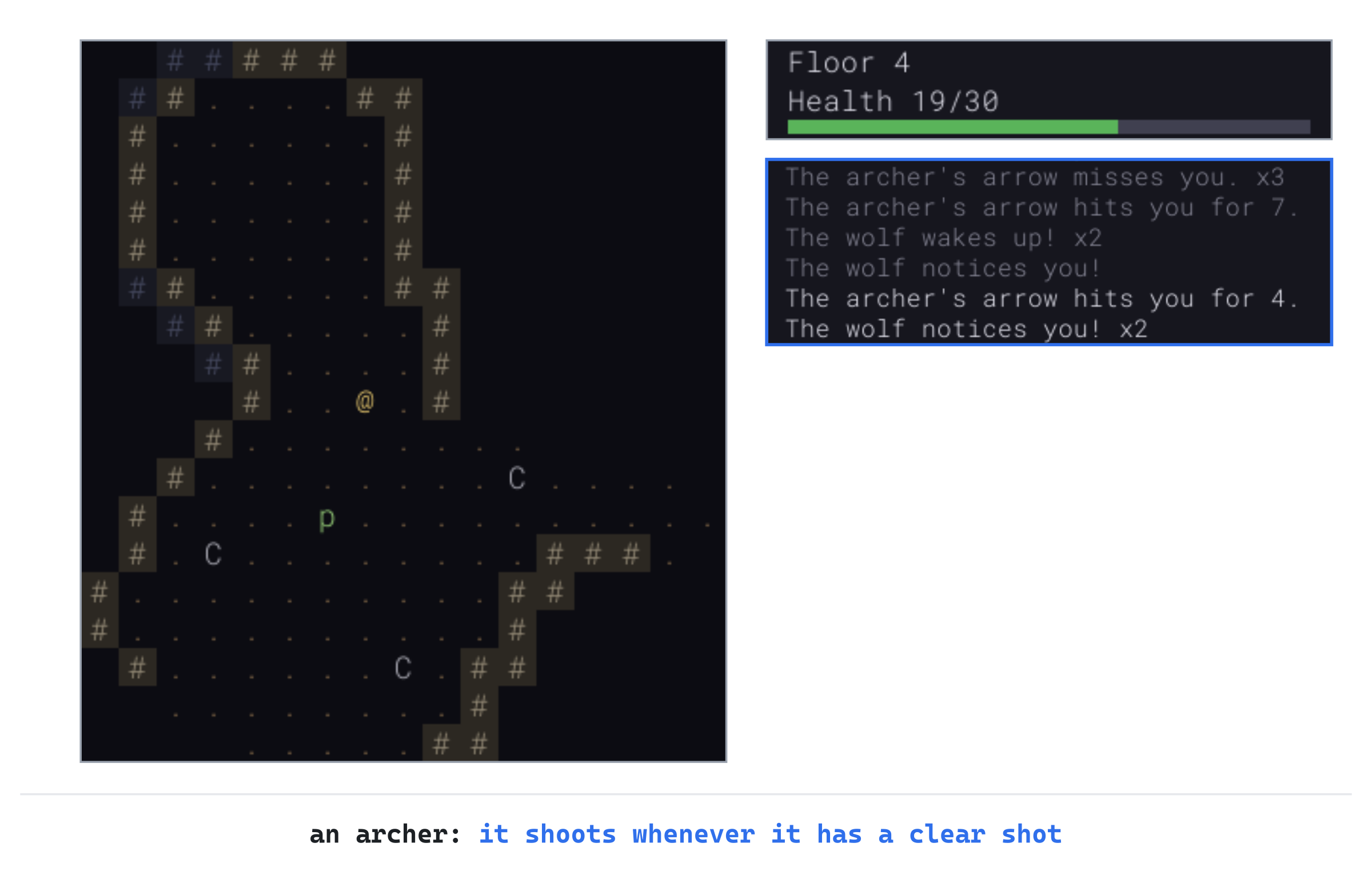
Keep walking. Once you're closer than three steps, it stops shooting, and steps away along the cave. Its arrows have woken a pack of wolves, which arrive a few turns later, so don't stay for them. Set newLevel(4) back to newLevel(1) when you're done.
The Scroll of Fireball
The last thing to aim is a scroll of fireball. It flies like a missile, to the cursor or the first creature in its way. Then it bursts, burning everything within two steps. That includes the player, if they aim too close. The burst reuses burstAt, from the dragon's breath.
The Scroll
Open Item.h, and add the effect below Lightning:
Fireball, // a burst of fire where the player aimsOpen Data.cpp, and add its name below { "lightning", ItemEffect::Lightning },:
{ "fireball", ItemEffect::Fireball },Open data/items.txt. In the comment at the top, change the line that ends lightning, which the player aims, and the one above it, to these:
#              identify, poison, regenerate, confuse, frighten,
#              lightning or fireball, which the player aims
Then add the scroll's record below the scroll of lightning's:
[scroll]
id        = scroll_of_fireball
name      = fireball
tile      = scroll
frequency = 3
effect    = fireball
Open Game.h. Aiming has one more purpose. Add it to TargetPurpose, below Throw:
Fireball, // a scroll of fireball's burstAnd add the fireball's function below castLightning's declaration:
void castFireball(Point center);With the scroll known to the game, aiming it comes next.
Aiming a Fireball
Open Game.cpp, and add the fireball's numbers below BREAK_ONE_IN:
// A scroll of fireball: how far it flies, how far its burst reaches,
// its damage, which armor doesn't stop, and how loud it is (*tune*)
constexpr int FIREBALL_RANGE = 8;
constexpr int FIREBALL_RADIUS = 2;
constexpr int FIREBALL_MIN = 6;
constexpr int FIREBALL_MAX = 10;
constexpr int FIREBALL_LOUDNESS = 15;
The fireball flies up to 8 cells. It bursts two steps all around, for 6 to 10, armor or no armor. Its noise is 15, louder than a fight's, so a fireball wakes a good part of the floor.
Reading the scroll starts the aiming. In applyEffect, add this case below the lightning's:
case ItemEffect::Fireball:
    log_.add("Fire gathers in your hands. Where will you throw it?");
    startTargeting(TargetPurpose::Fireball);
    break;
A fireball flies no further than the cursor, since it bursts where it's aimed. In lineOfFire, add this below the throw's range:
else if (targetPurpose_ == TargetPurpose::Fireball)
{
    // A fireball goes no further than the cursor, where it bursts
    range = SDL_min(FIREBALL_RANGE,
                    stepsBetween(player_.pos, lookCursor_));
}
The range is the steps to the cursor, or FIREBALL_RANGE, whichever is less. The line also stops at the first creature, since throughCreatures is only true for lightning. So the fireball bursts on the first creature in its way. Aim past a monster, and the fireball goes off in its face.
The player should see the burst before they fire, so the shading shows it, fainter than the path. In drawLineOfFire, find these lines:
for (Point cell : lineOfFire())
{
    if (!level_.map.isVisible(cell.x, cell.y))
    {
        break;
Change them to these:
std::vector<Point> path = lineOfFire();
bool allSeen = true;
for (Point cell : path)
{
    if (!level_.map.isVisible(cell.x, cell.y))
    {
        allSeen = false;
        break;
The path is kept, since the burst needs its end. The flag allSeen stays true only if the shading reaches that end, with every cell of the path in sight. Then add the burst below the loop, with a blank line in between:
// A fireball's burst, around the end of its path, in a fainter shade,
// if the whole path is in sight
if (targetPurpose_ == TargetPurpose::Fireball && !path.empty() && allSeen)
{
    shade.a = 40;
    setColor(shade);
    for (Point cell : burstAt(path.back(), FIREBALL_RADIUS))
    {
        if (level_.map.isVisible(cell.x, cell.y))
        {
            SDL_FRect rect = view_->camera().cellRect(cell);
            SDL_RenderFillRect(renderer_, &rect);
        }
    }
}
The burst is shaded only when allSeen is true, and then only its cells in sight. Otherwise, a burst shaded out of sight would show where the path ended, and its shape would show the walls around it. The burst's cells are shaded with an alpha of 40, fainter than the path's 70, and cells that are both look a little brighter. It's the burst that castFireball will use, so every shaded cell burns, and cells out of sight can burn too.
The Burst
Firing a fireball bursts it at the end of the path. In fireAtCursor, add this below the lightning's branch:
else if (targetPurpose_ == TargetPurpose::Fireball)
{
    castFireball(path.back());
}
Add the start of castFireball below hurtMonster:
// The fireball bursts at the end of its path. Everyone within
// FIREBALL_RADIUS steps that the burst can reach takes FIREBALL_MIN to
// FIREBALL_MAX damage, armor or no armor, the player too, if they stand
// too close. All are burned at once, before the blast is heard, and the
// monsters it didn't kill hunt the player
void Game::castFireball(Point center)
{
    log_.add("The fireball bursts!");
    std::vector<Monster*> struck;
    for (Point cell : burstAt(center, FIREBALL_RADIUS))
    {
        Monster* monster = monsterAt(cell);
        if (cell == player_.pos)
        {
            int damage = rng_.roll(FIREBALL_MIN, FIREBALL_MAX);
            player_.hp -= damage;
            log_.add("You're caught in the blast, for " +
                     std::to_string(damage) + "!");
            if (!player_.isAlive())
            {
                player_.killedBy = "your own fireball";
            }
        }
In the preceding code, the player can be caught in their own blast, armor or no armor. If it kills them, the death screen says "your own fireball". Add the rest of the function below it:
        else if (monster != nullptr && monster->isAlive())
        {
            int damage = rng_.roll(FIREBALL_MIN, FIREBALL_MAX);
            hurtMonster(*monster, damage, "the fireball");
            struck.push_back(monster);
        }
    }
    makeNoise(center, FIREBALL_LOUDNESS);
    for (Monster* monster : struck)
    {
        if (monster->isAlive())
        {
            alarm(*monster);
        }
    }
}
Every monster in the burst is burned. Then the blast is heard, once, from its center. As with the lightning, the noise comes after all the burning, so no monster wakes up in the middle of the blast that kills it. The survivors hunt the player.
As with the lightning, Esc wastes the scroll, since it's been read. In stopTargeting, add the fireball's branch below the lightning's:
else if (targetPurpose_ == TargetPurpose::Fireball)
{
    log_.add("The fire flickers out.");
    finishTurn();
}
And closing the window while aiming one puts it back in the pack, as for the lightning. Replace the comment above putBackUnfinishedScroll with this:
// The save has no place for a choice half made, such as what a scroll of
// identify will name, or where a scroll of lightning or fireball goes.
// The scroll has left the pack by then, so a run saved as it is would lose
// it. Instead, the scroll goes back in the pack, as though it hadn't been
// read, though its name stays known. There's room for it, since it has
// only just left
Then add the fireball's case below the lightning's:
else if (state_ == GameState::Targeting &&
         targetPurpose_ == TargetPurpose::Fireball)
{
    effect = ItemEffect::Fireball;
}
That's every scroll that's read before it's used.
Checkpoint: For a scroll of fireball, add player_.inventory.add(Item{ data_.findItem("scroll_of_fireball") }); to the constructor for now, below player_.weapon = Item{ data_.findItem("short_sword") };. Press F5, with seed 23, walk down six steps into the jackals' room, and read the scroll, with i and a. The same seed doesn't make quite the same floor now, since a new kind of scroll changes what the dice choose. This time the jackals wake as you walk in.
The cursor goes to the nearest, only two steps from you. Aimed there, the fireball would catch you in its blast. Instead, press u and then l, to put the cursor on the floor above and between the two jackals in the row. The next image shows the path and the burst around its end, covering both jackals but not you.
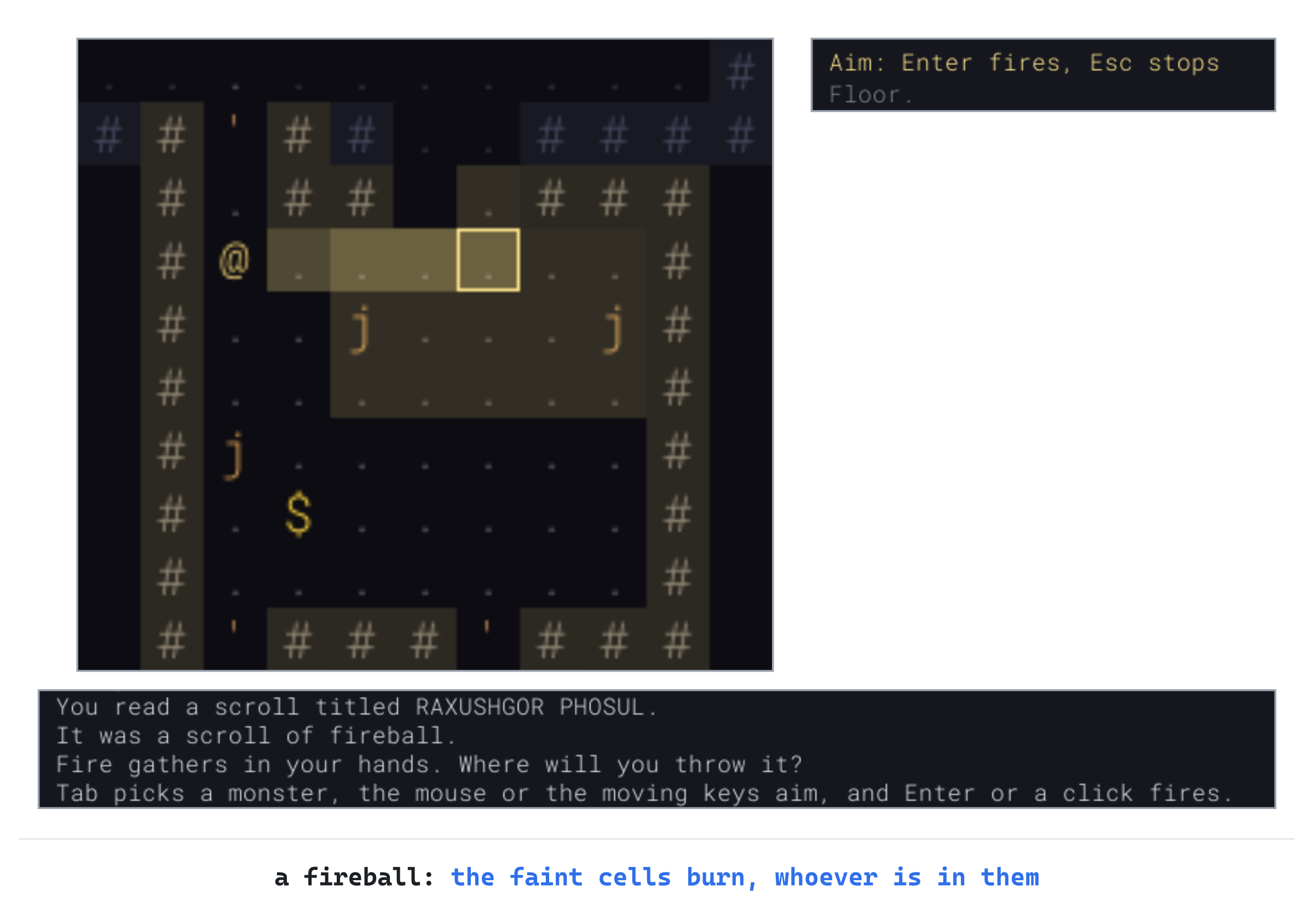
Press Enter: "The fireball bursts!", and "The fireball kills the jackal!", twice. Now take the line out of the constructor.
Playing the Game
A bow changes the opening of every fight. Any monster that comes at you down a corridor can take two or three arrows before it arrives, and a sleeping one can be shot before it wakes. Arrows are worth picking up after a fight: one in four breaks, but the rest land where they stopped. Darts need no bow, and a dagger can be thrown and then wielded again.
Archers and mages are the reverse: they want distance, and you want to close it. Walk straight at one and it steps back, still shooting whenever it can. So corner it, or break its line with a wall or a door, and make it come to you. Scrolls of lightning and fireball are for the moments that a bow can't handle: a pack in a row for the lightning, a crowd for the fireball. Watch the faint cells before throwing a fireball, since you burn as well as anything else.
Understanding the Code
Aiming is a state, Targeting, with a purpose: the lightning, the bow, a throw or a fireball. It uses the look cursor, which starts on the nearest monster in sight, and moves with the moving keys, Tab, or the mouse. The camera moves only when the cursor leaves the view, so the map holds still under the mouse.
The line of fire, from lineOfFire, is Bresenham's line from the player through the cursor. It's cut short by anything solid, by the purpose's range, and by the first creature, for anything but lightning. The line is shaded by drawLineOfFire, as far as the player can see, with a fireball's burst around its end.
Firing ends the turn. Lightning strikes every monster on the line. Each missile goes to the first creature and rolls to hit, with a chance that falls with distance. A fireball bursts with burstAt, on every cell within two steps that its center can see.
Every attack hurts first and makes its noise after, and the monsters it attacks hunt the player, through alarm. A missile that doesn't break lands where it stopped, through dropNear.
Bows and missiles are classes of item, with a range, a count when found, and a mark for what's thrown. The player keeps a bow ready and a quiver of arrows, saved in version 5 of the save. Monsters get a RangedAttack from their records, with a cooldown that counts down each turn. Each turn, attacksFromAfar uses it when the shot is clear and in range, and the trait keeps_distance makes a monster back away when the player comes closer than three steps.
Experimenting
Try each of these, and put each back afterward:
- Arrows of glass. Set
BREAK_ONE_INto1, and every arrow breaks. A quiver of twelve is twelve shots, and no more. - A bigger fireball. Set
FIREBALL_RADIUSto3, and repeat the last checkpoint, but press u only once before Enter. The burst reaches all three jackals, and you: "You're caught in the blast, for 8!" - An archer that stands its ground. In
monsters.txt, takekeeps_distanceout of the archer's traits, and repeat the fifth checkpoint, without compiling. The archer still shoots from afar, but when you come close, it doesn't step back. It stands where it is and shoots you point-blank.
The last two show why the numbers and traits matter. A burst of three steps is seven cells across, which is hard to throw without being in it. An archer without its trait is just a monster with a bow.
Common Errors and Fixes
If the game didn't build, or doesn't behave as described, the problem is probably one of these.
C2664: 'bool SDL_ConvertEventToRenderCoordinates(SDL_Renderer *,SDL_Event *)': cannot convert argument 2 from 'const SDL_Event *' to 'SDL_Event *', in handleClick. The event was taken by const reference, as many parameters are, but the conversion changes the event it's given. Take it by value, SDL_Event event, in Game.h and in Game.cpp, as trackMouse does.
C3861: 'hitChance': identifier not found, in shootMissile. The chance to hit is a call to hitChance, but the function itself was never added to the unnamed namespace. Add it below lineFrom.
C2511: 'std::vector<Point,std::allocator<Point>> Game::lineOfFire(void)': overloaded member function not found in 'Game', followed by C2143 and more. The function was defined without the const its declaration has, so it looks like a different function. Add const after the parentheses in Game.cpp.
After reading the scroll, nothing happens, whatever you press, Esc included, though the debugging keys still work. The game is in the Targeting state, and handleKey has no case for it, so no handler sees the keys. Add the case to handleKey's switch, and stop the stuck game with Shift+F5.
The game won't start, and a box says monsters.txt: and a line number, then 'ranged' is arrows, lightning or fire, then damage from and to, a range, and the turns between attacks. A ranged value is missing a number, or has one too many. It takes exactly five words: the kind, two numbers of damage, the range, and the turns between attacks.
An archer never backs away, but stands and shoots at every distance, even next to you. In actHunting, the attack from afar comes before the step back. So a monster that can shoot always does, and never gets to step away. Put backsAway first, as the chapter does.
FAQ
Q) Why can I see a monster I can't shoot?
A) Sight and the line of fire are worked out differently. Sight, from Chapter 4, asks whether two cells can see each other, any way at all. It gives the same answer both ways. The line of fire is one path, cell by cell, and it can clip a corner that sight sees around. The shaded line shows where a shot would really stop, before you fire.
Q) Why don't the archers' arrows land, as mine do?
A) If they did, an archer would be a free supply of arrows: stand near it, let it shoot, and pick up what it missed with. Arrows are meant to be found, and spent.
Q) Why does lightning go through monsters, when arrows don't?
A) An arrow is a thing, and stops in the first thing it meets. A bolt of lightning is magic, and passes on, which makes it the scroll for a pack in a corridor. The two need different tactics, which is the point of having both.
AI Exercise (Optional)
A crossbow would be a third kind of bow. It hits harder than a long bow, but has to be wound back between shots, which takes a turn. If you'd like to try it, with an AI's help, open your AI chatbot of choice, and try a prompt like this:
"I'm writing a roguelike in C++ with SDL 3. Items are read from a data file into struct ItemDef, which has an itemClass (ItemClass::Bow for bows), minDamage, maxDamage and range. The player has std::optional<Item> bow and quiver in struct Player. Game::fire() starts aiming with the bow, and Game::fireAtCursor() takes an arrow from the quiver and calls shootMissile with the bow's damage, then finishTurn(). I'd like a crossbow: a bow whose record says it needs reloading, so after each shot it must be reloaded, with a key, which takes a turn, before it can fire again. Show me every change, with each curly brace on its own line, and explain it."
Notice what the preceding prompt does. It names the functions a shot goes through, and the data the crossbow will need. So the answer has somewhere to put the reloading, rather than inventing a new system.
When the answer comes back, check where it keeps whether the crossbow is loaded. If it's on the player or the bow's Item, it must be saved. Otherwise a crossbow fired just before saving comes back loaded. And check what readying a different bow does: a crossbow put away loaded should probably still be loaded when it's readied again.
Summary
Aiming is a state of its own, with a cursor that the moving keys, Tab or the mouse put on a target. Its line of fire is Bresenham's line, shaded within sight, so the player knows where a shot will stop. Scrolls of lightning and fireball, bows, arrows, darts and daggers all fly along it, with a chance to hit that falls with distance, and what doesn't break lands to be picked up. Monsters fight from afar too, from their records: archers shoot, mages cast lightning, and the dragon breathes fire, and archers and mages keep their distance while they do it. In Chapter 22, you choose who you play: a Fighter, a Rogue or a Mage, each starting with its own kit, and the Rogue and the Mage with gifts of their own.