
Until now, every run has begun the same way: thirty health, a short sword in hand, and an empty pack. This chapter lets the player choose who goes down, from three classes. The Fighter starts tough, in chain mail and with a long sword, the Rogue with a bow and a quiver of arrows, and the Mage with two scrolls and a dagger.
The three are more than their numbers. A class can have gifts, things it does better than the others. The Rogue spots secret doors and traps in passing, and wakes sleeping monsters less often. The Mage gets more from its scrolls, and casts lightning from memory.
The next image shows the class menu that starts every run.

Each class on that menu is a record in a data file, classes.txt, which is read and checked as the monsters and the items are. A new class is a new record, with no code to write.
Chapter 22 in the book's repository holds this chapter's finished project. The chapter carries on in your own project from Chapter 21, or from the book's Chapter 21 folder.In this chapter, we will:
- Read the classes from a data file of their own, each with its health, strength and defense, and a kit of items to start with
- Start every run on a class menu, and begin the run as the class chosen, with its kit in hand, on its back and in the pack
- Draw each class with its own picture in the tile view, and save the class in version 6 of the save
- Give classes gifts, read from the same file, starting with the Rogue's keen eyes and stealth
- Give the Mage its gifts: scrolls that hit harder, scrolls known at a glance, and lightning cast by heart
- Open the game on a title screen with the classes' pictures, and add a help screen that lists every key
There are six checkpoints along the way. Let's start with the plan.
Planning the Chapter
This chapter adds one file, data/classes.txt, and no new source files. It changes twelve, along with items.txt and the tile atlas:
| File | Status | What it's for |
|---|---|---|
data/classes.txt |
New | The three classes: their health, strength, defense, kit and gifts |
src/Player.h |
Changed | A class, and its gifts; the player's class, and their defense worked out from it |
src/Data.h, src/Data.cpp |
Changed | The classes read and checked, after the items their kits name |
src/Game.h, src/Game.cpp |
Changed | The class menu, a run begun as a class, the gifts at work, and the title and help screens |
src/SaveGame.cpp |
Changed | The player's class, in version 6, and the turns until the Mage's lightning is ready |
src/View.h, src/GlyphView.h, src/GlyphView.cpp |
Changed | The player drawn as their class |
src/TileView.h, src/TileView.cpp |
Changed | The player drawn as their class, and a picture drawn anywhere on the screen |
src/main.cpp |
Changed | The title screen for the first run only |
data/items.txt, assets/tiles.png, assets/tiles.txt |
Changed | A comment; pictures of the three classes |
| The other files | Unchanged |
The next image shows how the files fit together at the end of the chapter. Nothing new joins them. A class lives in Player.h, beside the player who plays it. It's read from its file by Data.
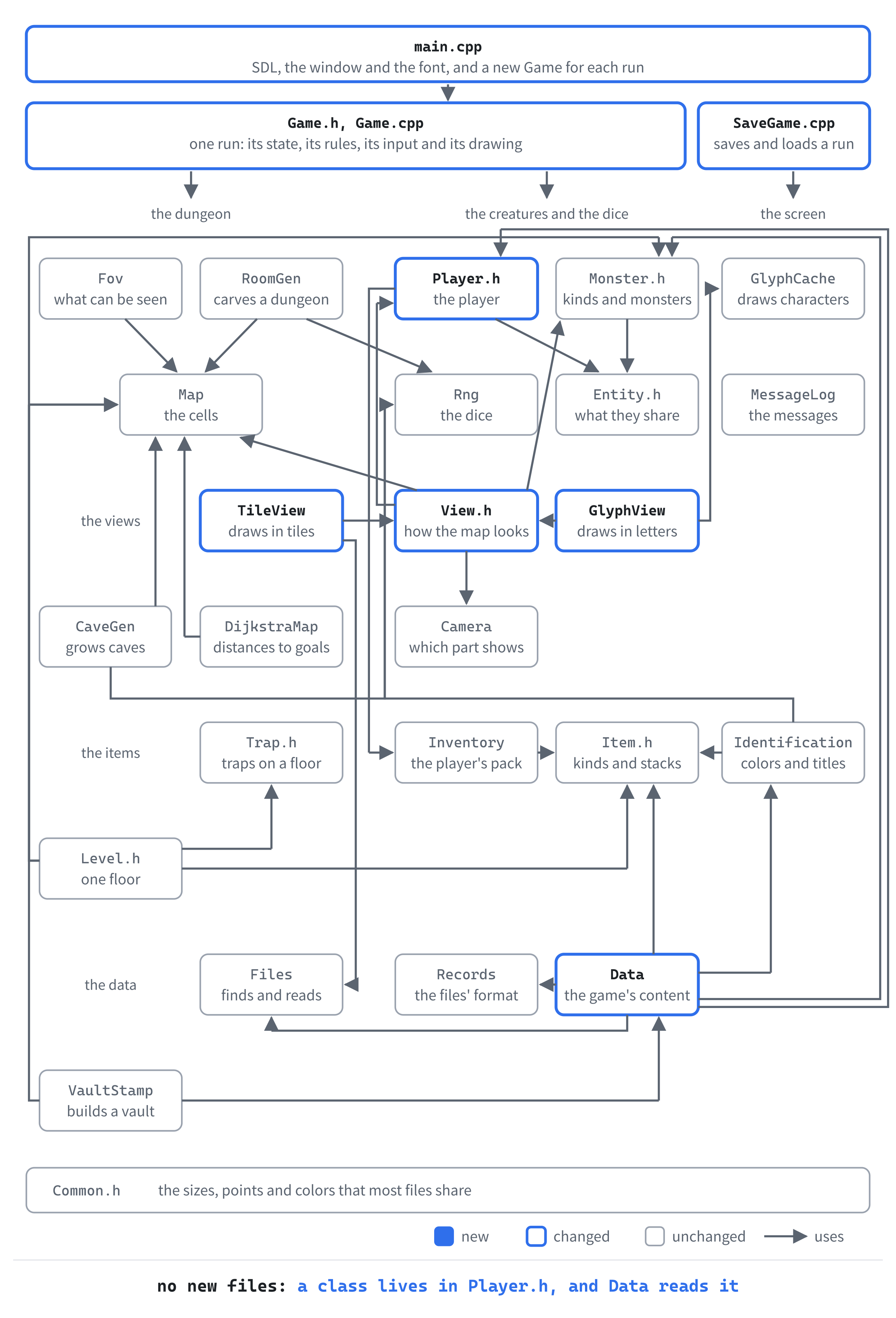
Most of the work is in Game.cpp, which grows by about 430 lines. Then come Data.cpp, by about 160, and Player.h, by about 60. The others change by twenty lines or fewer each.
How a Class Becomes a Run
A class is a record of data. It has a name and a picture, its health, strength and defense, and a kit. The kit is the items it starts with, named by their ids in items.txt.
When the player chooses a class, the run begins with the class's numbers, and its kit handed out. The first weapon goes in the player's hand, the first armor on their back, the first bow is made ready, and the first arrows go in the quiver. Everything else goes in the pack. The next image shows where the Rogue's kit goes.
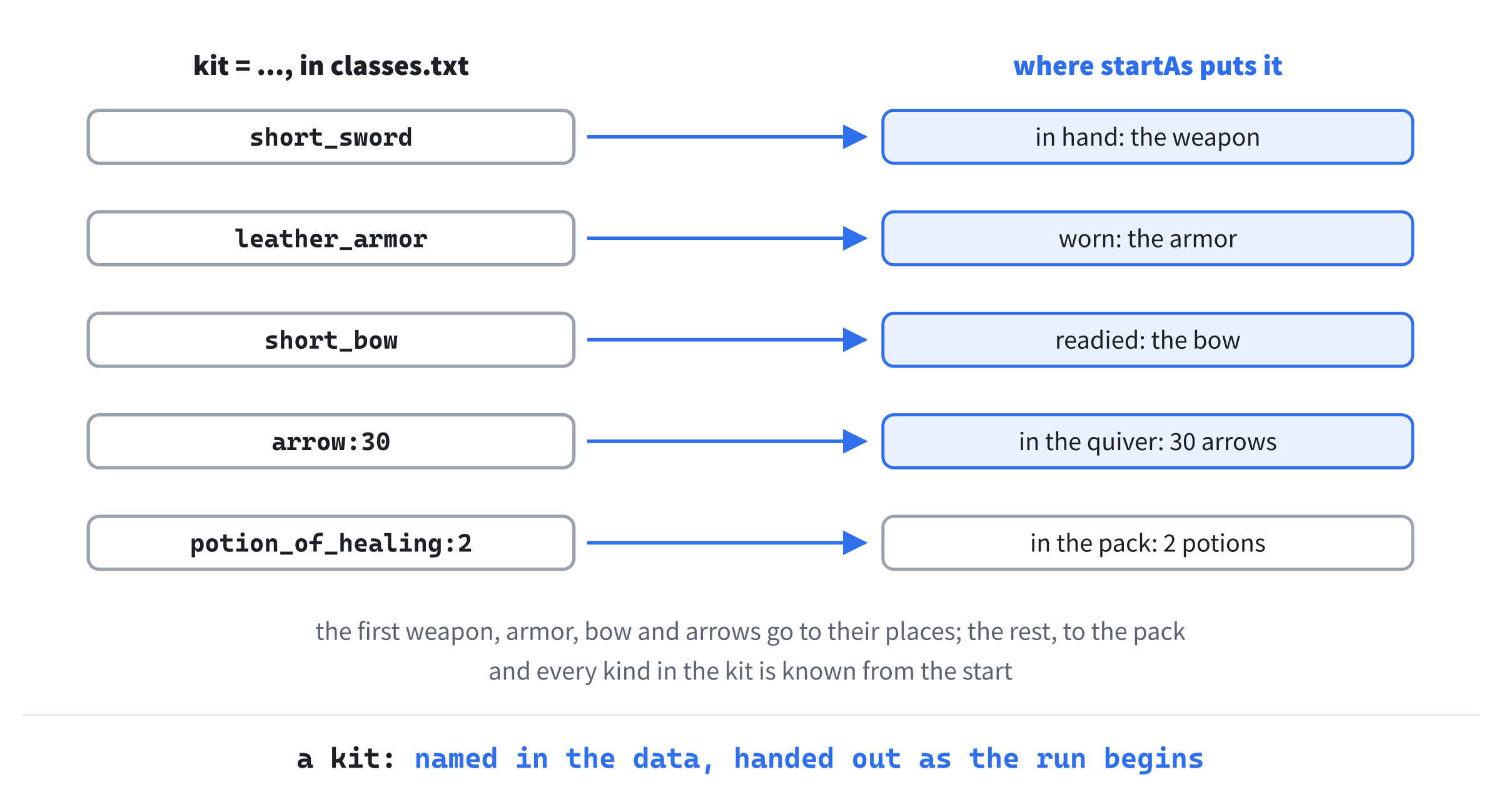
Every kind in the kit is known from the start, potions and scrolls included, so a Mage knows its scrolls for what they are. A class doesn't change the first floor: the kit rolls no dice, so a seed makes the same first floor for every class.
Classes in a Data File
The first part reads the classes from classes.txt, and checks them. Nothing uses them yet: the run still starts with a short sword until the next part, where the player chooses a class.
A Class
A class is a kind of player, as a MonsterDef is a kind of monster. It's a set of numbers and words that the player points at once the run begins. Open Player.h. A class has a kit, a vector of items, so add its header below #include <string>:
#include <vector> // std::vector, for a class's kitThen add the class itself below #include "Inventory.h":
// A class the player can choose, read from classes.txt: its name, its
// picture, a line about it for the class menu, its health, strength and
// defense, and its kit, what it starts with
struct ClassDef
{
    std::string id;     // its name in a save, as in fighter
    std::string name;   // its name on the screen, as in Fighter
    std::string tile;   // its picture's name in tiles.txt
    std::string about;
    int hp = 1;
    int strength = 0;
    int defense = 0;    // its own, before armor adds any
    std::vector<Item> kit;
};
Each item in kit is an Item, a kind and a count. The class's own defense makes a Fighter harder to hurt than a Mage, even in the same armor. The numbers start at safe values, so a ClassDef never holds garbage. But every class read from the file sets them all.
Reading the Classes
The game's data reads the classes and keeps them. Open Data.h. It needs ClassDef, so add its header below #include "Monster.h":
#include "Player.h"Add the classes' getter below vaults()'s declaration:
const std::vector<ClassDef>& classes() const;A save will name a class by its id, so the data can find a class by id too. Replace the comment above findMonster with this:
// The kind of monster or item, or the class, with this id, or nullptr
// if there's none
Add findClass below findItem's declaration:
const ClassDef* findClass(const std::string& id) const;The reader is private, since only load calls it. Add it below readVaults's declaration:
void readClasses(const std::string& folder);And the classes themselves, below std::vector<VaultDef> vaults_;:
std::vector<ClassDef> classes_;The functions themselves go in Data.cpp, starting with the kit.
The Kit
A kit is one key, kit, with the items' ids in a row, as in long_sword chain_mail potion_of_healing. For more than one of a kind that stacks, the id has a colon and a count after it, as in arrow:30. That's the same shape as a monster's pack:3. Open Data.cpp, and add the most classes there can be, and the start of the kit's reader, to the unnamed namespace, below checkVaultMap:
// The most classes the class menu has room for, from a to f
constexpr int MAX_CLASSES = 6;

// A class's kit, from a "kit" value such as "dagger arrow:20": the
// kinds of item it starts with, by their ids, and for a stack, how
// many, after a colon. Only a kind that stacks can have more than one,
// and gold and the Amulets aren't carried, so they can't be in a kit
std::vector<Item> readKit(FieldReader& fields, const GameData& data)
{
    std::vector<Item> kit;
    int line = fields.lineOf("kit");
    std::istringstream words(fields.text("kit"));
    std::string word;
    while (words >> word)
    {
        // The kind's id, and how many, if there's a colon
        size_t colon = word.find(':');
        std::string id = word.substr(0, colon);
        int count = 1;
        bool counted = colon == std::string::npos ||
                       (readWholeNumber(word.substr(colon + 1), count) &&
                        count >= 1);
        const ItemDef* def = data.findItem(id);
In the preceding code, the kit is read a word at a time from a std::istringstream, as Chapter 21 read a monster's ranged. For each word, find gives the colon's place, or std::string::npos if there isn't one. Then substr cuts the id from in front of it. Chapter 16's readWholeNumber reads the count after it, and turns away anything that isn't a whole number, such as arrow:many.
Each word can go wrong in several ways, and each has its own message. Add the checks below it:
if (def == nullptr)
{
    fields.report(line, "no kind of item is called '" + id +
                  "'");
}
else if (!counted)
{
    fields.report(line, "'" + id + "' needs a count of 1 or "
                  "more after its colon, as in " + id + ":3");
}
else if (count > 1 && !def->stacks())
{
    fields.report(line, "'" + id + "' doesn't stack, so it "
                  "can't have a count");
}
else if (def->itemClass == ItemClass::Gold ||
         def->itemClass == ItemClass::Amulet)
{
    fields.report(line, "'" + id + "' isn't carried, so it "
                  "can't be in a kit");
}
In the preceding code, an id that no kind has is the likeliest mistake, a misspelling, so it's checked first. A count that isn't one or more is next, then a count on a kind that doesn't stack: a long sword is always one long sword. Add the rest of the function below it:
        else
        {
            kit.push_back(Item{ def, count });
        }
    }
    if (static_cast<int>(kit.size()) > Inventory::SLOTS)
    {
        fields.report(line, "a kit can't have more than " +
                      std::to_string(Inventory::SLOTS) + " things");
    }
    return kit;
}
Each word with no mistake joins the kit, as an Item of its kind and its count. A kit can't hold more than the pack does, Inventory::SLOTS, twenty things. That's more than any kit needs, but a mistake in the file shouldn't be able to overflow the pack.
The Classes
The classes are read after the items, since their kits name items, and the items must be there to be named. In load, add this line below vaults_.clear();:
classes_.clear();And this below readVaults(folder);:
readClasses(folder);Add the getter and findClass below findItem:
const std::vector<ClassDef>& GameData::classes() const
{
    return classes_;
}

const ClassDef* GameData::findClass(const std::string& id) const
{
    for (const ClassDef& def : classes_)
    {
        if (def.id == id)
        {
            return &def;
        }
    }
    return nullptr;
}
Add the start of readClasses at the end of the file:
// Every [class] record in classes.txt, checked, and kept if it has no
// mistakes. A kit names kinds of item by their ids, so the items are read
// first. The class menu needs a class to offer, and has room for
// MAX_CLASSES
void GameData::readClasses(const std::string& folder)
{
    const std::string file = "classes.txt";
    size_t errorsBefore = errors_.size();
    std::map<std::string, int> idLines;
    for (const Record& record : readDataFile(folder, file, errors_))
    {
        FieldReader fields(record, file, errors_);
        if (record.type != "class")
        {
            fields.report(record.line, "unknown record [" + record.type +
                          "]");
            continue;
        }
A record that isn't a [class] is reported and skipped. Add the reading of each record below it, with a blank line in between:
    ClassDef def;
    def.id = fields.id("id");
    def.name = fields.text("name");
    def.tile = fields.text("tile");
    def.hp = fields.number("hp", 1);
    def.strength = fields.number("strength", 0);
    def.defense = fields.number("defense", 0);
    def.kit = readKit(fields, *this);
    def.about = fields.text("about");
    checkNewId(fields, def.id, idLines);

    if (fields.finish())
    {
        classes_.push_back(def);
    }
}
Each key is asked for in the form it should have: an id, words, and numbers with the least each can be. Health must be at least 1, and strength and defense at least 0. The kit has its own reader. It's handed *this, the data, so that it can look up each item by its id. Add the rest of the function below it, with a blank line in between:
    // The checks of the file as a whole wait until the records are all
    // good, as the monsters' do
    if (errors_.size() > errorsBefore)
    {
        return;
    }
    if (classes_.empty() || static_cast<int>(classes_.size()) > MAX_CLASSES)
    {
        errors_.push_back(file + ": there must be from 1 to " +
                          std::to_string(MAX_CLASSES) + " classes");
    }
}
That way, a file with a broken record isn't also told that it has too few classes. A game must have at least one class to offer, and no more than the menu can hold.
The Classes' File
Now the classes themselves. From the book's repository, copy classes.txt from the Chapter 22 folder's data folder into your project's data folder. It's the finished chapter's, with a key that this part can't read yet, gifts, in two of its records. Open it, and delete the line that starts gifts from the Rogue's record, and the one from the Mage's. They go back later in this chapter, once the game can read gifts.
The comment at the top of the file explains every key, gifts included. Below it are the three classes, in the order the menu offers them. The first is the Fighter, with the most health, and the best weapon and armor:
[class]
id       = fighter
name     = Fighter
tile     = fighter
hp       = 32
strength = 1
defense  = 1
kit      = long_sword chain_mail potion_of_healing
about    = Tough and strong, in chain mail, with a long sword.
The Rogue is lighter in a fight, with a short sword and leather armor, but it starts with a bow, thirty arrows, and two potions of healing:
[class]
id       = rogue
name     = Rogue
tile     = rogue
hp       = 30
strength = 1
defense  = 1
kit      = short_sword leather_armor short_bow arrow:30 potion_of_healing:2
about    = Quick and quiet, with a bow for what's best fought from afar.
The Mage is the frailest of the three, with a dagger, no armor, and two scrolls, one of lightning and one of fireball:
[class]
id       = mage
name     = Mage
tile     = mage
hp       = 28
strength = 0
defense  = 0
kit      = dagger scroll_of_lightning scroll_of_fireball potion_of_healing:2
about    = Frail, but with magic to hand.
The tiles named here, fighter, rogue and mage, aren't in tiles.txt yet. But nothing draws them until later in this chapter, when the tiles come with each class's picture.
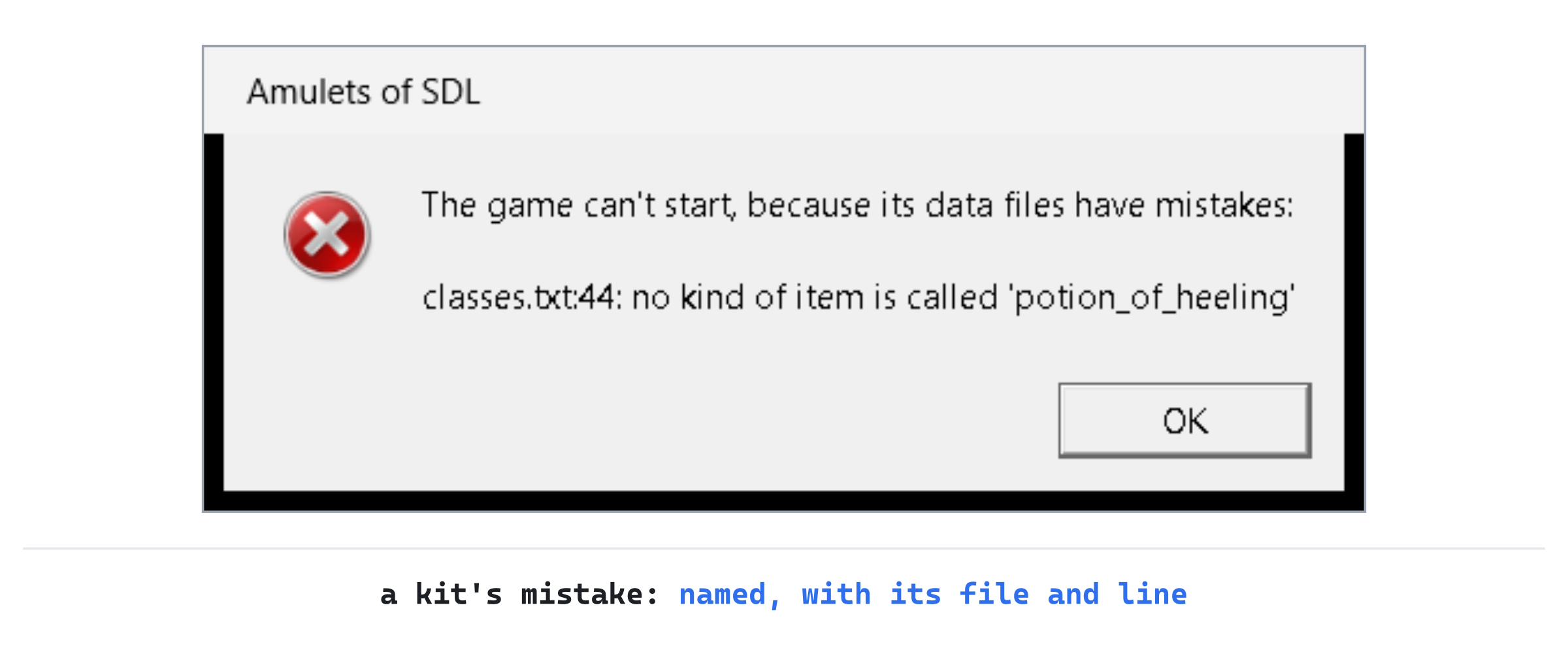
Checkpoint: Press F5. The game starts as it did, with a short sword, since nothing uses the classes yet. Close it, and break the file: in the Fighter's kit, misspell potion_of_healing as potion_of_heeling, and save classes.txt. Start the game again, and a message box says what's wrong, and where. The next image shows it.
Put the spelling back, and save the file. Try the other mistakes too, one at a time: long_sword:2, which doesn't stack, or arrow:0, or gold in a kit. Each has its own message, on the kit's line.
Choosing a Class
The second part puts the classes to work. A new run begins on a class menu, and the class chosen gives the player their health, strength and defense. It also hands out their kit. The save keeps the class, in a new version.
The Player's Class
The player points at the class they chose. Open Player.h, and add this at the top of Player, above // The damage of a blow with bare fists, with a blank line in between:
// The class they chose at the start of the run
const ClassDef* classDef = nullptr;
The pointer is nullptr until the player chooses, so the game can tell a run that has begun from one that hasn't. It points into the data's vector of classes, as a monster's def points into the kinds of monster. The vector lasts as long as the game does.
A player's defense was their armor's, and nothing else. Now it's their class's, with their armor's added to it. Replace the comment above Inventory inventory; with this:
// What they carry, the weapon in their hand, the armor they wear, the
// bow they have ready, and the arrows in their quiver, if any. Armor
// adds to their defense
Then add updateDefense at the end of Player, below maxDamage:
// Works out their defense again: their class's own, and their armor's,
// if they wear any. It changes whenever they put armor on
void updateDefense()
{
    defense = classDef->defense;
    if (armor)
    {
        defense += armor->def->defense;
    }
}
The defense is worked out from the start each time, rather than changed by adding some and taking some away. That way it can't drift: whatever armor goes on or comes off, the number is always right.
The Class Menu
The menu is a state of the game, as the title screen is. Open Game.h, and add it to GameState, below Title:
ClassMenu, // choosing a class, at the start of a new runA new run starts on the menu now, not in the dungeon. In Game.h, change GameState state_ = GameState::Playing; to GameState state_ = GameState::ClassMenu;. Then add the function that begins a run as a class below newLevel's declaration:
void startAs(const ClassDef& def);Add the menu's keys below handleTitleKey's declaration:
void handleClassMenuKey(const SDL_KeyboardEvent& key);And its drawing below drawTitle's declaration:
void drawClassMenu() const;The menu names every item in every kit, potions and scrolls included, which the player hasn't learned yet. So itemName needs a way to give an item's true name. In Game.h, change std::string itemName(const Item& item) const; to std::string itemName(const Item& item, bool trueName = false) const;. The default means that every call to it so far still does what it did.
Names, and Lists of Them
Open Game.cpp. The player's health comes from their class now, so find these lines, and delete them:
// The player's health at the start of a run
constexpr int PLAYER_HP = 30;
The menu says what each class starts with as a sentence, its items joined with commas and an "and". Add listed to the unnamed namespace, below lineFrom:
// Words as a list: "a dagger, leather armor and a short bow"
std::string listed(const std::vector<std::string>& words)
{
    std::string text;
    for (size_t i = 0; i < words.size(); ++i)
    {
        if (i > 0)
        {
            text += i + 1 == words.size() ? " and " : ", ";
        }
        text += words[i];
    }
    return text;
}
Every word but the first has something in front of it: ", " for most, and " and " for the last. One word is just itself, and two are joined by "and" alone.
Now the true names. Replace the comment above itemName with this:
// An item's name, as the log and the inventory give it. A kind the player
// knows goes by its name: "a potion of healing", "3 scrolls of magic
// mapping". One they don't goes by its look: "a crimson potion", "a
// scroll titled ZELMOR THIKA". With trueName, as the class menu asks for,
// every kind goes by its name
In Game.cpp, change std::string Game::itemName(const Item& item) const to std::string Game::itemName(const Item& item, bool trueName) const, without the default, which goes only in the declaration, as C++ requires. Then, in itemName, change if (identification_.isKnown(def)) to if (trueName || identification_.isKnown(def)).
A New Run
The constructor still makes the first floor and the looks of the potions and scrolls, but not the player, who waits for a class. Replace the comment above Game::Game with this:
// A new run: the first floor, and the looks of this run's potions and
// scrolls. The player chooses their class on the class menu, which comes
// first. If a run was saved, the title screen comes before it, offering to
// continue that run instead
In the constructor, find these lines, and delete them:
player_.weapon = Item{ data_.findItem("short_sword") };
player_.hp = PLAYER_HP;
player_.maxHp = PLAYER_HP;

log_.add("Welcome to the dungeon.");
log_.add("Move with the arrow keys, the numpad, or h j k l y u b n.");
The welcome moves into startAs, since it belongs at the start of play, after the menu. And the floor and the looks are made before the class is chosen, with the seed's dice. So a seed makes the same first floor for every class.
Closing the window in the middle of a run saves it. Until now, a run was under way in any state but the title screen and the death screen. But the class menu comes before there's anything to save. In handleEvent, find these lines:
// Closing the window in the middle of a run saves it, as the
// menu's "Save and quit" does
bool inRun = state_ != GameState::Title && state_ != GameState::Dead;
Change them to these:
// Closing the window in the middle of a run saves it, as the
// menu's "Save and quit" does. A run is under way once the player
// has a class, until they die
bool inRun = player_.classDef != nullptr &&
             state_ != GameState::Dead;
Asking whether the player has a class, rather than which state the game is in, stays right as more states come along, such as the help screen later in this chapter.
The Menu's Keys
The menu's keys go to a function of their own. In handleKey's switch, add a case for the menu below the case for GameState::Title:
case GameState::ClassMenu:
    handleClassMenuKey(key);
    break;
The title screen's N started the new run right away. Now it goes to the class menu instead. Replace the comment above handleTitleKey with this:
// The title screen, while a saved run is waiting. C continues it. N starts
// the new run this Game made instead, from the class menu, and the saved
// one is lost. Esc quits, and keeps the saved run for next time
In handleTitleKey, change state_ = GameState::Playing; to state_ = GameState::ClassMenu;. Then add the menu's own keys below handleTitleKey:
// The class menu, at the start of a new run. A class's letter chooses
// it, and the run begins. SDL's keycodes for the letters run in order,
// from SDLK_A. Esc quits
void Game::handleClassMenuKey(const SDL_KeyboardEvent& key)
{
    if (key.key == SDLK_ESCAPE)
    {
        running_ = false;
        return;
    }
    int choice = static_cast<int>(key.key) - static_cast<int>(SDLK_A);
    int count = static_cast<int>(data_.classes().size());
    if (choice < 0 || choice >= count)
    {
        return;
    }
    startAs(data_.classes()[choice]);
    redraw_ = true;
}
The classes are offered as a, b, c and so on, in the file's order, so a letter less SDLK_A is the class's place in the vector. Any other key gives a place outside the vector, and is ignored.
Beginning the Run
The run begins as the class: its numbers, then its kit. Add the start of startAs below handleClassMenuKey:
// The run begins, as a class: its health, strength and defense, and its
// kit, which the player knows all about, so no potion or scroll in it is
// a gamble. The kit's first weapon is wielded, its first armor worn, its
// first bow readied, and its first arrows put in the quiver. The rest goes
// in the pack
void Game::startAs(const ClassDef& def)
{
    player_.classDef = &def;
    player_.hp = def.hp;
    player_.maxHp = def.hp;
    player_.strength = def.strength;
    for (const Item& item : def.kit)
    {
        identification_.learn(*item.def);
        ItemClass itemClass = item.def->itemClass;
        bool arrows = itemClass == ItemClass::Missile && !item.def->thrown;
        if (itemClass == ItemClass::Weapon && !player_.weapon)
        {
            player_.weapon = item;
        }
        else if (itemClass == ItemClass::Armor && !player_.armor)
        {
            player_.armor = item;
        }
In the preceding code, identification_.learn makes each kind in the kit known. Then each item goes to its place, in the order the kit gives them. A test such as !player_.weapon is true only while that place is empty, so only the first weapon is wielded. Add the rest of the function below it:
        else if (itemClass == ItemClass::Bow && !player_.bow)
        {
            player_.bow = item;
        }
        else if (arrows && !player_.quiver)
        {
            player_.quiver = item;
        }
        else
        {
            player_.inventory.add(item);
        }
    }
    player_.updateDefense();

    log_.add("Welcome to the dungeon.");
    log_.add("Move with the arrow keys, the numpad, or h j k l y u b n.");
    state_ = GameState::Playing;
}
In the quiver's test, an arrow is a missile that isn't thrown, as Chapter 21 told arrows from darts. Anything else, such as a second weapon or a stack of potions, goes in the pack. The defense is worked out once the armor is on. Last comes the welcome that the constructor used to give, as play begins.
Wearing armor sets the defense too. In wear, change player_.defense = armor.def->defense; to player_.updateDefense();.
Design note: one hero, or many. In Rogue, every game began with the same hero: ring mail on, a mace in hand, a bow, a few dozen arrows, and some food. NetHack made the choice part of the game, with thirteen roles, each with its own kit, its own skill with weapons, and gifts of its own. Its Valkyrie starts stealthy and resistant to cold, and its Samurai fast. A class is a different first hour of play, and a different way to fight. Ours keeps NetHack's idea at a smaller size: three numbers, a kit, and a few gifts, which come later in this chapter.
The kit, the numbers and the gifts make three different games out of one dungeon, as the next sections show.
Drawing the Menu
The class menu has the window to itself. In draw, replace the comment above if (state_ == GameState::Title) with this:
// The title screen has the window to itself, and so does the class
// menu
Then add the menu's branch below the title's:
if (state_ == GameState::ClassMenu)
{
    drawClassMenu();
    SDL_RenderPresent(renderer_);
    return;
}
The side panel names the class. In drawSidePanel, find these lines:
glyphs_.drawText("Floor " + std::to_string(level_.depth), x, y,
                 Palette::TEXT);
Change them to these:
glyphs_.drawText(player_.classDef->name + ", floor " +
                 std::to_string(level_.depth), x, y, Palette::TEXT);
Now the menu itself. Add the start of drawClassMenu below drawTitle:
// The class menu: each class with its letter, its health, strength and
// defense, the line about it, and what it starts with, all as a block in
// the middle of the window, its names in a column
void Game::drawClassMenu() const
{
    float centerX = SCREEN_W / 2.0f;
    float row = glyphs_.lineHeight();
    const std::vector<ClassDef>& classes = data_.classes();

    // Each class has a bright line, with its letter, its name and its
    // numbers, then dim lines under it, and a gap. Its name is padded to
    // the longest, so the lines under it line up
    struct Line
    {
        std::string text;
        SDL_Color color;
    };
    size_t widestName = 0;
    for (const ClassDef& def : classes)
    {
        widestName = SDL_max(widestName, def.name.size());
    }
    std::string indent(widestName + 5, ' ');
    std::vector<Line> lines;
In the preceding code, a Line is a struct of its own, inside the function, since nothing else needs it. It holds a line's text, and its color. The indent is five spaces more than the longest name: one for the letter, two after it, and two after the name. Add the lines for each class below it:
for (size_t i = 0; i < classes.size(); ++i)
{
    const ClassDef& def = classes[i];
    char letter = static_cast<char>('a' + i);
    std::string name = def.name;
    name.resize(widestName, ' ');
    lines.push_back({ std::string(1, letter) + "  " + name +
                      "  Health " + std::to_string(def.hp) +
                      ", strength +" + std::to_string(def.strength) +
                      ", defense " + std::to_string(def.defense),
                      Palette::TEXT });
    lines.push_back({ indent + def.about, Palette::DIM_TEXT });
    std::vector<std::string> kit;
    for (const Item& item : def.kit)
    {
        kit.push_back(itemName(item, true));
    }
    lines.push_back({ indent + "Starts with " + listed(kit) + ".",
                      Palette::DIM_TEXT });
    lines.push_back({ "", Palette::TEXT });
}
In the preceding code, a class's letter is 'a' plus its place in the vector, the same sum handleClassMenuKey undoes. Its kit is named with itemName(item, true), each item by its true name, and joined into a sentence by listed. An empty line after each class leaves a gap before the next. Add the rest of the function below it, with a blank line in between:
    // The block of lines, centered by its widest, under the heading
    size_t widest = 0;
    for (const Line& line : lines)
    {
        widest = SDL_max(widest, line.text.size());
    }
    float x = centerX - widest * glyphs_.charWidth() / 2.0f;
    float y = (SCREEN_H - (lines.size() + 5) * row) / 2.0f;
    drawCentered("CHOOSE YOUR CLASS", centerX, y, Palette::PLAYER);
    y += 3 * row;
    for (const Line& line : lines)
    {
        glyphs_.drawText(line.text, x, y, line.color);
        y += row;
    }
    y += row;
    drawCentered("A class's letter chooses it. Esc quits.", centerX, y,
                 Palette::DIM_TEXT);
}
Every line starts at the same x, worked out from the widest line. So the block as a whole is centered, rather than each line on its own.
The Short Sword, and the Save
The data checked that items.txt had a short sword, since the code asked for it by id. The player's first weapon comes from the kit now. Open Data.cpp, and find these lines:
// items.txt must have: the player's first weapon, gold, and the Amulet
const char* const NEEDED_ITEMS[] = { "short_sword", "gold", "amulet" };
Change them to these:
// items.txt must have: gold, and the Amulet
const char* const NEEDED_ITEMS[] = { "gold", "amulet" };
The comment in items.txt says the same. Open data/items.txt, and change the four lines that start # The game needs the short_sword to these three:
# The game needs gold, which lies in piles of its own, and the amulet.
# Gold and the amulet are never chosen as items. There can be up to 10
# kinds of potion, one for each color.
A save must keep the player's class, so its version goes up to 6. Open SaveGame.cpp, and replace the comment above constexpr int SAVE_VERSION with this:
// The version of the save's format. Whatever changes what's saved
// changes the version, so an old save is never misread. Version 2
// added the caves' floor (Chapter 18), version 3 doors, secret doors
// and traps (Chapter 19), version 4 the Amulets (Chapter 20), version
// 5 the bow and the quiver (Chapter 21), and version 6 the player's
// class (Chapter 22)
In SaveGame.cpp, change SAVE_VERSION = 5; to SAVE_VERSION = 6;. The defense isn't saved, since it's worked out from the class and the armor. Replace the comment above readPlayer with this:
// The player, but for the pack, which has a record for each stack. The
// player's defense comes from their class and their armor, so it isn't
// saved
The class is read first, since the rest of the player depends on it. Add this at the start of readPlayer, above player.pos = readPoint(fields, "pos");:
std::string id = fields.id("class");
player.classDef = data.findClass(id);
if (player.classDef == nullptr && !id.empty())
{
    fields.report(fields.lineOf("class"), "no class is called '" +
                  id + "'");
}
A class the data doesn't have is a mistake in the save, reported on its line. An empty id has already been reported by fields.id, as a missing key, so it isn't reported twice.
The armor no longer sets the defense on its own. In readPlayer, find this line, and delete it:
player.defense = def->defense;Then add this at the end of readPlayer, below the quiver's reading:
if (player.classDef != nullptr)
{
    player.updateDefense();
}
The defense is worked out once both the class and the armor are known. Last, writeSave writes the class. Add this below text += "\n[player]\n";:
addField(text, "class", player_.classDef->id);A run is saved only once the player has a class, so classDef is never nullptr here.
Checkpoint: Press F5. If the title screen offers a saved run, press N for a new one: it was saved in version 5, and this game reads version 6. The class menu comes up, with the three classes. Choose the Fighter, with a. The side panel says "Fighter, floor 1", "Health 32/32", "Damage 4-10" and "Defense 4". The damage is the long sword's 3 to 9, with the Fighter's strength of 1 added, and the defense is the Fighter's own 1 and the chain mail's 3. Close the window, which saves the run, and press F5 again. The title screen offers the saved run: press N for a new one, and choose the Mage, with c. Press i. The next image shows the Mage's pack.

Every scroll and potion in it is known by name, since the Mage starts knowing its kit. The scroll of lightning, read now, would be aimed at once, rather than guessed at.
Each Class's Picture
In the glyph view, every class is an @, which is how roguelikes have always drawn the player. The tile view, though, has drawn the player as one picture, the tile called player. This part gives each class its own, named by its record's tile.
The Tiles
From the book's repository, copy tiles.png and tiles.txt from the Chapter 22 folder's assets folder into your project's assets folder, in place of the old ones. The player's picture is called fighter now, in the same place in tiles.png, and two more come with it: rogue and mage. Until the code changes, the tile view looks for a tile called player, which isn't there anymore. So it draws the player as a pink square, the color Chapter 8 gave a missing tile.
The Views
Drawing the player needs the class now. Open View.h, and add the class's header below #include "Monster.h":
#include "Player.h"Then find these lines:
// The player, and a monster, on the cell they stand on
virtual void drawPlayer(Point cell) const = 0;
Change them to these:
// The player, as their class looks, and a monster, on the cell they
// stand on
virtual void drawPlayer(Point cell, const ClassDef& def) const = 0;
Both views must change to match, or they wouldn't override the new function. Open GlyphView.h, and change void drawPlayer(Point cell) const override; to void drawPlayer(Point cell, const ClassDef& def) const override;. Then open GlyphView.cpp, and find this line:
void GlyphView::drawPlayer(Point cell) constChange it to these:
// Every class is an @ in the glyph view, so the class isn't needed, and
// its parameter has no name
void GlyphView::drawPlayer(Point cell, const ClassDef&) const
Leaving a parameter's name out is how C++ says it's unused on purpose. At their stricter settings, compilers warn about a named parameter that's never used, as Visual Studio's warning C4100 does at /W4.
The tile view draws the class's own tile. Open TileView.h, and change void drawPlayer(Point cell) const override; to void drawPlayer(Point cell, const ClassDef& def) const override;.
In TileView.cpp, change void TileView::drawPlayer(Point cell) const to void TileView::drawPlayer(Point cell, const ClassDef& def) const. Then, in drawPlayer, change drawTile(cell, "player", NO_TINT); to drawTile(cell, def.tile, NO_TINT);.
The game hands the views the player's class. In Game.cpp, in draw, change view_->drawPlayer(player_.pos); to view_->drawPlayer(player_.pos, *player_.classDef);. And in drawCaveSteps, F6's debugging aid from Chapter 18, change view_->drawPlayer(*caveSteps_->start); to view_->drawPlayer(*caveSteps_->start, *player_.classDef);.
Checkpoint: Type 8 into Command Arguments, and press F5. If the title screen offers a saved run, press N for a new one. Choose the Fighter, with a, and press F2 for the tile view. Then close the window, start again, press N for a new run, and do the same as the Rogue, and then as the Mage. The next image shows the three at the start of a run, each with its own picture.

The floor around them is the same each time, since seed 8 makes the same first floor for every class. Press F2 again for the glyph view, where each of them is an @.
Gifts, and the Rogue's
A class's numbers and kit make a difference in the first fights, but less later on, once the player has found better armor and weapons. Gifts last the whole run. A gift is something a class does better than the others. It's named in the data file, and kept as a bit.
This part brings in gifts, and the Rogue's two. Keen eyes find secret doors and traps in passing, and stealth wakes sleeping monsters half as often.
Gifts as Bits
Chapter 11 kept a monster's traits as bits in one number, each trait a bit of its own. Gifts work the same way. Open Player.h, and add the gifts below #include "Inventory.h":
// The gifts a class can have, things it does better than the others, as
// bits in ClassDef::gifts
namespace Gift
{
    // A free search every turn, so secret doors and traps are found in
    // passing
    constexpr unsigned int KEEN_EYED = 1 << 0;

    // A monster asleep that can see the player wakes half as often
    constexpr unsigned int STEALTHY = 1 << 1;
}
Each gift is a different power of two, 1 << 0 and 1 << 1, so each has a bit of its own. The next part adds three more, for the Mage. A class keeps the gifts it has in one number. Replace the comment above struct ClassDef with this:
// A class the player can choose, read from classes.txt: its name, its
// picture, a line about it for the class menu, its health, strength and
// defense, its kit, what it starts with, and its gifts
Then add the gifts at the end of ClassDef, below std::vector<Item> kit;:
unsigned int gifts = 0;

// True if the class has the gift. & keeps only the bits both have
bool has(unsigned int gift) const
{
    return (gifts & gift) != 0;
}
The function has works as MonsterDef::has does for a trait. The & gives 0 unless the gift's bit is among the class's.
Reading Gifts
The gifts are read by name. Open Data.cpp, and add the names to the unnamed namespace, below MAX_CLASSES:
// The classes' gifts, by their names in the files
const std::map<std::string, unsigned int> GIFT_BITS = {
    { "keen_eyed", Gift::KEEN_EYED },
    { "stealthy", Gift::STEALTHY },
};
Then add the reader below them:
// The gifts a "gifts" value names, as in "keen_eyed stealthy". A class
// with none leaves the key out
void readGifts(FieldReader& fields, ClassDef& def)
{
    if (!fields.has("gifts"))
    {
        return;
    }
    int line = fields.lineOf("gifts");
    std::istringstream words(fields.text("gifts"));
    std::string word;
    while (words >> word)
    {
        auto found = GIFT_BITS.find(word);
        if (found == GIFT_BITS.end())
        {
            fields.report(line, "unknown gift '" + word + "'");
            continue;
        }
        def.gifts |= found->second;
    }
}
In the preceding code, |= turns on a gift's bit in the class's number, leaving the others as they are. Any word that isn't a gift's name in GIFT_BITS is a mistake, reported on the key's line. In readClasses, add this below def.kit = readKit(fields, *this);:
readGifts(fields, def);The Rogue's gifts go back in its record. Open classes.txt, and add this line at the end of the Rogue's record, below its about:
gifts = keen_eyed stealthyThe comment at the top of the file already explains the key, and every gift, including the Mage's three, which the next part brings in.
Gifts on the Menu
The class menu says what each class's gifts do, under the line about it. Open Game.cpp, and add the gifts' words to the unnamed namespace, below wrapped:
// What each gift a class can have does, for the class menu
struct GiftText
{
    unsigned int gift;
    const char* text;
};

constexpr GiftText GIFT_TEXTS[] = {
    { Gift::KEEN_EYED, "finds secret doors and traps in passing" },
    { Gift::STEALTHY, "wakes sleeping monsters half as often" },
};
The table GIFT_TEXTS pairs each gift with words that say what it does, in the order the menu gives them. It's a constexpr array of a struct, as Chapter 19's TRAP_DEFS is. Add the sentence they make below it:
// A class's gifts, as a sentence for the class menu, or nothing if it
// has none
std::string giftsText(const ClassDef& def)
{
    std::vector<std::string> texts;
    for (const GiftText& each : GIFT_TEXTS)
    {
        if (def.has(each.gift))
        {
            texts.push_back(each.text);
        }
    }
    if (texts.empty())
    {
        return "";
    }
    return capitalized(listed(texts)) + ".";
}
The words for each gift the class has are gathered, joined with listed, and made a sentence. It gets a capital at its start, from Chapter 9's capitalized, and a period at its end. In drawClassMenu, add this below lines.push_back({ indent + def.about, Palette::DIM_TEXT });:
std::string gifts = giftsText(def);
if (!gifts.empty())
{
    lines.push_back({ indent + gifts, Palette::DIM_TEXT });
}
The Rogue's line says "Finds secret doors and traps in passing and wakes sleeping monsters half as often." The Fighter has none, so it has one line fewer. That's why each line is kept with its own color, rather than worked out from its place in the block.
Keen Eyes
Searching, with s, looks at the eight cells around the player, and takes a turn. A keen-eyed Rogue does the same looking every turn, for free, so the looking has to be split from the turn. In Game.cpp, find these lines:
// Searches the eight cells around the player, which takes a turn. Each
// secret door or hidden trap there is found with a chance of 1 in
// FIND_ONE_IN. A secret door found becomes a closed door, and a trap found
// is known, and drawn
void Game::search()
{
    log_.markRead();
Change them to these:
// Looks at the eight cells around the player. Each secret door or hidden
// trap there is found with a chance of 1 in FIND_ONE_IN. A secret door
// found becomes a closed door, and a trap found is known, and drawn.
// Returns true if anything was found
bool Game::lookForSecrets()
{
The function that searched is renamed lookForSecrets. It still tells of what it finds, but not of finding nothing, which is for search to say. Its end changes too. Find these lines:
if (!found)
{
    log_.add("You search, and find nothing.");
}
finishTurn();
Change them to this:
return found;Now search is the s command alone: it looks, says so if it found nothing, and takes the turn. Add it above lookForSecrets, with a blank line in between:
// s searches the eight cells around the player, which takes a turn
void Game::search()
{
    log_.markRead();
    if (!lookForSecrets())
    {
        log_.add("You search, and find nothing.");
    }
    finishTurn();
}
Open Game.h, and add lookForSecrets below search's declaration:
bool lookForSecrets();The free search comes at the start of every turn, before the monsters act. Back in Game.cpp, replace the comment above finishTurn with this:
// The rest of a turn, once the player has acted, always in this order: a
// keen-eyed player searches; the monsters act; statuses tick, for the
// player and then the monsters; the player heals a little now and then;
// and last of all comes the one check for the player's death
Then add the search at the start of finishTurn, above // The player may have moved, so the distances to them are new, and so, with a blank line in between:
// A keen-eyed player searches as they go, every turn, for free
if (player_.isAlive() && player_.classDef->has(Gift::KEEN_EYED))
{
    lookForSecrets();
}
The free search is the same as s's, with the same chance to find each secret beside the player: one in three. It doesn't take a turn, since it's part of one, and it only happens while the player is alive. Whatever it finds is in the log as before, "You find a secret door!", but it says nothing when there's nothing to find. Otherwise the log would fill with it.
Stealth
A sleeping monster that can see the player wakes with a chance of one in twenty each turn, WAKE_ONE_IN. Stealth halves that chance. Replace the comment above actAsleep with this:
// An asleep monster doesn't move. It wakes if the player comes next to it,
// and, while it could see them, with a chance of 1 in WAKE_ONE_IN a turn,
// or half that for a stealthy player. Woken, it hunts them
In actAsleep, find these lines:
bool nextTo = isNextTo(monster.pos, player_.pos);
bool stirs = seesPlayer(monster) && rng_.roll(1, WAKE_ONE_IN) == 1;
Change them to these:
int wakeOneIn = WAKE_ONE_IN;
if (player_.classDef->has(Gift::STEALTHY))
{
    wakeOneIn *= 2;
}
bool nextTo = isNextTo(monster.pos, player_.pos);
bool stirs = seesPlayer(monster) && rng_.roll(1, wakeOneIn) == 1;
A stealthy player makes the chance one in forty. Coming right next to a sleeping monster wakes it as before, and so does a noise: stealth only helps with being seen.
Checkpoint: With 8 still in Command Arguments, press F5. If the title screen offers a saved run, press N for a new one. Choose the Rogue, with b: the class menu lists its gifts now. Walk down two steps, with j, toward the bottom wall of the room. On the way, the Rogue's keen eyes find a secret door in the wall below: "You find a secret door!" The next image shows it.

Now close the window, which saves the run, and press F5 again. Press N for a new run, and choose the Fighter, with a. Walk the same two steps, and wait, with the period key, as long as you like. The Fighter finds nothing, since it only finds what it searches for, with s.
The Mage's Gifts
The Mage starts frail, with magic it can use only twice: one scroll of lightning, and one of fireball. Once they're read, it's a weak fighter with a dagger. This part gives it three gifts that make magic its strength: scrolls that do half as much damage again, scrolls known at a glance, and lightning cast by heart, from memory. The lightning comes back a few turns after it's used.
Three More Gifts
Open Player.h, and add the Mage's gifts to Gift, below STEALTHY:
// A scroll's magic does half as much damage again
constexpr unsigned int SCROLL_POWER = 1 << 2;

// A scroll's kind is known as soon as it's picked up
constexpr unsigned int SCROLL_LORE = 1 << 3;

// Lightning cast by heart, with no scroll: aimed as a scroll of
// lightning is, and ready again a few turns later
constexpr unsigned int LIGHTNING_BY_HEART = 1 << 4;
The player keeps the turns until the lightning is ready again. Add this to Player, below int amulets = 0;:
// The turns until lightning cast by heart is ready again: 0 when it's
// ready
int spellTurns = 0;
The gifts need names in the data. Open Data.cpp, and add them to GIFT_BITS, below { "stealthy", Gift::STEALTHY },:
{ "scroll_power", Gift::SCROLL_POWER },
{ "scroll_lore", Gift::SCROLL_LORE },
{ "lightning_by_heart", Gift::LIGHTNING_BY_HEART },
The Mage's gifts go back in its record. Open classes.txt, and add this line at the end of the Mage's record, below its about:
gifts = scroll_power scroll_lore lightning_by_heartAnd the menu needs words for them. Open Game.cpp, and add these to GIFT_TEXTS, below the words for Gift::STEALTHY:
{ Gift::SCROLL_POWER, "does half as much damage again with scrolls" },
{ Gift::SCROLL_LORE, "knows every scroll on picking it up" },
{ Gift::LIGHTNING_BY_HEART, "casts lightning by heart" },
The Mage's line on the menu says "Does half as much damage again with scrolls, knows every scroll on picking it up and casts lightning by heart." Each gift now needs its code.
Scroll Power
A scroll's damage is rolled in two places: the lightning, and the fireball. Both go through one function now, which adds half again for a player with the gift. Open Game.h, and add it below castFireball's declaration:
int scrollDamage(int least, int most);In Game.cpp, add it below castFireball:
// A roll of a scroll's damage, from least to most, and half as much again
// for a player with the gift of scroll power
int Game::scrollDamage(int least, int most)
{
    int damage = rng_.roll(least, most);
    if (player_.classDef->has(Gift::SCROLL_POWER))
    {
        damage += damage / 2;
    }
    return damage;
}
Half again is the roll divided by 2, added to the roll. For whole numbers, C++ rounds the division down. A roll of 10 does 15, and a roll of 9 does 13. In castLightning, change int damage = rng_.roll(LIGHTNING_MIN, LIGHTNING_MAX); to int damage = scrollDamage(LIGHTNING_MIN, LIGHTNING_MAX);.
The fireball rolls its damage twice, once for the player caught in the blast, and once for each monster. In Game.cpp, open Find and Replace with Ctrl+H. Type rng_.roll(FIREBALL_MIN, FIREBALL_MAX) in the top box, and scrollDamage(FIREBALL_MIN, FIREBALL_MAX) in the box below it, and click Replace All. It replaces two, both in castFireball.
A Mage caught in its own fireball is burned the harder for it, since the gift goes with every roll. That's the price of standing too close.
Scroll Lore
A scroll the player picks up is a gamble until it's read, or identified. The Mage knows it at a glance. In pickUp, add this above log_.add("You pick up " + itemName(here->item) + ".");:
// A player with the gift of scroll lore knows a scroll at a glance
bool lore = here->item.def->itemClass == ItemClass::Scroll &&
            player_.classDef->has(Gift::SCROLL_LORE) &&
            !identification_.isKnown(*here->item.def);
if (lore)
{
    identification_.learn(*here->item.def);
}
The kind is learned before the pickup is told, so the log names the scroll for what it is. A scroll already known needs no learning, and no telling. Add the telling below log_.add("You pick up " + itemName(here->item) + ".");:
if (lore)
{
    log_.add("You know it at a glance.");
}
The log then reads "You pick up a scroll of magic mapping." and "You know it at a glance." Potions are still a gamble, for the Mage as for everyone.
Lightning by Heart
The Mage's last gift is a spell: the scroll of lightning's bolt, cast with no scroll, and ready again twelve turns later. It's aimed as the scroll is, with its own purpose. Add the turns it takes to the unnamed namespace, below LIGHTNING_MAX:
// Lightning cast by heart is ready again SPELL_TURNS turns after it's
// cast (*tune*)
constexpr int SPELL_TURNS = 12;
Open Game.h. Add the spell to TargetPurpose, below Fireball:
Spell, // lightning cast by heart, the Mage'sAnd add its function below fire's declaration:
void castByHeart();The spell's key is z. Back in Game.cpp, replace the comment above handlePlayingKey with this:
// Esc opens the menu, > goes down the stairs, g picks up, i shows the
// inventory, d drops, x starts looking around, c closes a door, s
// searches, f fires the bow, t throws, z casts lightning by heart, and
// the moving keys move the player
Then, in handlePlayingKey, add its branch below the branch for t, the one that calls openInventory(InventoryAction::Throw):
if (key.key == SDLK_Z)
{
    castByHeart();
    redraw_ = true;
    return;
}
Add castByHeart below fire:
// z casts lightning by heart, a gift of the Mage's: aimed as a scroll of
// lightning is, with no scroll to read, and ready again SPELL_TURNS turns
// later. Esc lets it go, and costs nothing
void Game::castByHeart()
{
    log_.markRead();
    if (!player_.classDef->has(Gift::LIGHTNING_BY_HEART))
    {
        log_.add("You know no spells by heart.");
        return;
    }
    if (player_.spellTurns > 0)
    {
        int turns = player_.spellTurns;
        log_.add("Your lightning gathers again: " + std::to_string(turns) +
                 (turns == 1 ? " more turn." : " more turns."));
        return;
    }
    log_.add("Lightning crackles at your fingertips. Where will you aim it?");
    startTargeting(TargetPurpose::Spell);
}
In the preceding code, a class without the gift is told so, and so is a Mage whose lightning isn't ready, with how many turns are left. Neither takes a turn. Otherwise startTargeting begins the aiming, with the spell's purpose.
Firing the spell is firing the scroll's lightning, and then starting the wait. In fireAtCursor, add this below the lightning's branch:
else if (targetPurpose_ == TargetPurpose::Spell)
{
    castLightning(path);
    player_.spellTurns = SPELL_TURNS;
}
The spell's bolt goes through creatures, as the scroll's does. In lineOfFire, find this line:
bool throughCreatures = targetPurpose_ == TargetPurpose::Lightning;Change it to these:
bool throughCreatures = targetPurpose_ == TargetPurpose::Lightning ||
                        targetPurpose_ == TargetPurpose::Spell;
Esc while aiming calls stopTargeting, which needs no change. It finishes the turn only for a scroll's purposes, and the spell isn't one.
The Wait
The wait counts down a turn at a time, at the start of every turn. Replace the comment above finishTurn with this:
// The rest of a turn, once the player has acted, always in this order: a
// keen-eyed player searches, and lightning cast by heart gathers again;
// the monsters act; statuses tick, for the player and then the monsters;
// the player heals a little now and then; and last of all comes the one
// check for the player's death
Then add the countdown below the keen-eyed search, with a blank line in between:
// Lightning cast by heart gathers again, a turn at a time
if (player_.spellTurns > 0)
{
    --player_.spellTurns;
}
A spell cast this turn is set to SPELL_TURNS, 12, in fireAtCursor. The countdown comes straight after, in the same turn's finishTurn, so it says 11 once the turn is over. Eleven turns later it's 0, and on the twelfth turn after the casting, the Mage can cast again.
The side panel shows whether the spell is ready. In drawSidePanel, add this above glyphs_.drawText("Gold " + std::to_string(player_.gold), x, y,:
if (player_.classDef->has(Gift::LIGHTNING_BY_HEART))
{
    bool ready = player_.spellTurns == 0;
    std::string text = ready ? "Lightning ready (z)"
                             : "Lightning in " +
                                   std::to_string(player_.spellTurns);
    glyphs_.drawText(text, x, y,
                     ready ? Palette::TEXT : Palette::DIM_TEXT);
    y += row;
}
The line is bright when the spell is ready, and dim while it gathers. Only a class with the gift has the line at all.
A saved run must keep the wait, or a Mage could save and continue to have the spell ready at once. Open SaveGame.cpp. A save from before the spell has no spell_turns, and it's still right: no wait, and the spell ready. So the key is read only if it's there, as a weapon is, and the version stays at 6. In readPlayer, add this above readStatuses(fields, player);:
if (fields.has("spell_turns"))
{
    player.spellTurns = fields.number("spell_turns", 0);
}
And in writeSave, add this below addField(text, "amulets", player_.amulets);:
addField(text, "spell_turns", player_.spellTurns);Every class saves the key, even one without the gift, whose wait is always 0.
Design note: Brogue's one hero. Brogue has no classes at all, and every game starts with the same kit: a dagger, fifteen darts, leather armor and a ration of food. What the hero becomes depends on what they find. As Brogue's community wiki puts it, your build is the items you find, and the ones you choose to spend your scrolls of enchanting on. It's the opposite of NetHack's answer, and as good a one. Ours sits between the two: a class decides only the start and a few gifts, and the dungeon decides the rest.
The gifts change how each class plays as much as the kits do, which the next checkpoint shows for the Mage.
Checkpoint: Type 23 into Command Arguments, in place of the 8, and press F5. If the title screen offers a saved run, press N for a new one. Choose the Mage, with c. The side panel says "Lightning ready (z)". Walk down six steps with j, into the jackals' room, where the jackals wake as you come in. Press z: "Lightning crackles at your fingertips. Where will you aim it?" The cursor goes to the nearest jackal. Press Enter: the bolt kills it, and the panel says "Lightning in 11". Then press z again: "Your lightning gathers again: 11 more turns." The next image shows it.
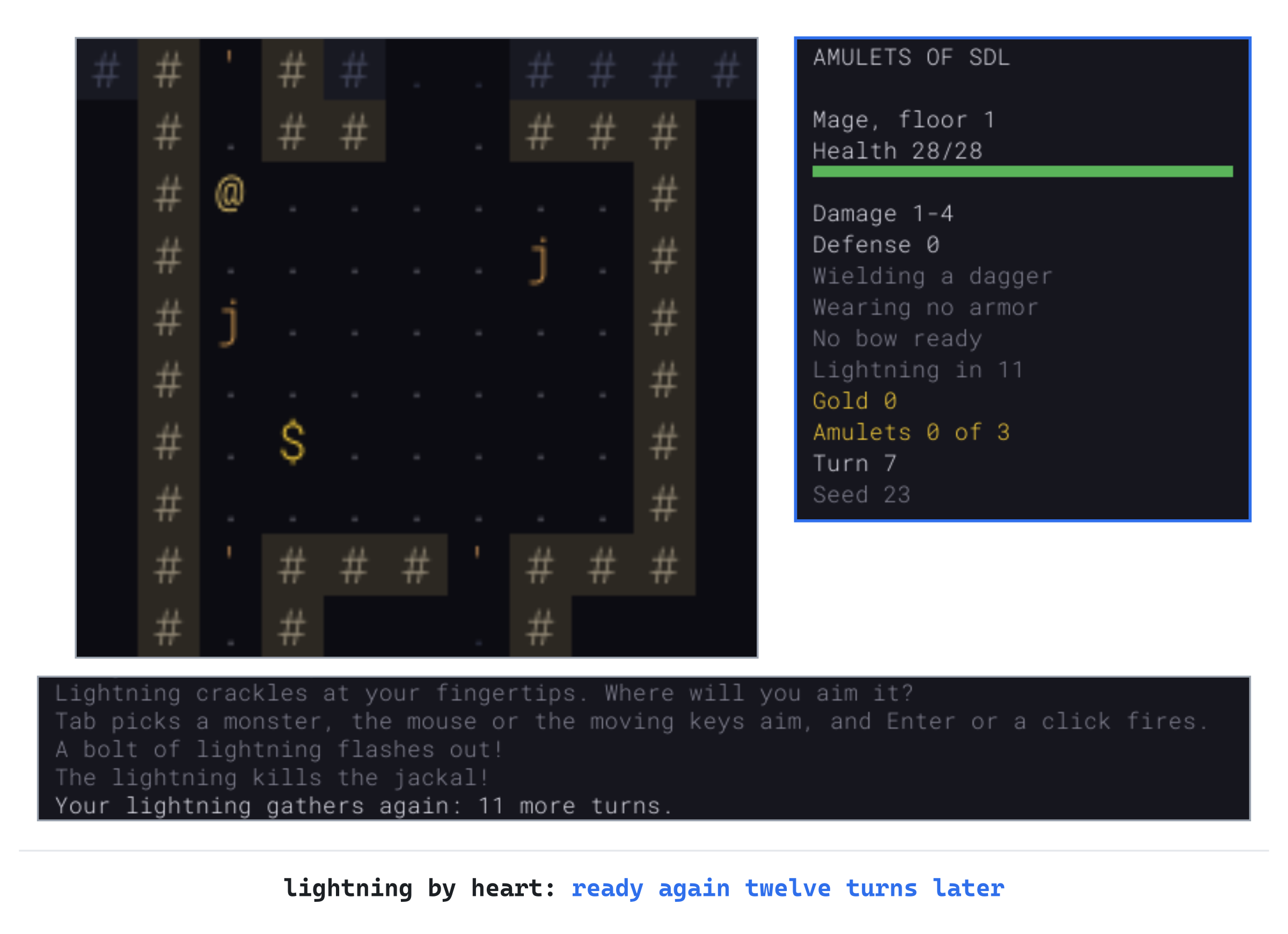
Fight the other jackals with the dagger, or wait them out, and in eleven turns the lightning is ready again. The scroll of lightning in the pack is still there, for when one bolt isn't enough.
A Title Screen, and Help
Two things are missing. The game starts on the class menu, unless a run was saved. So a new player never sees its name, or what a run is for. And nothing in the game says what the keys are. This part opens the game on a title screen with the classes' pictures on it, and adds a help screen on ? that lists every key.
Pictures Anywhere
The tile view draws a tile on a cell of the map, where the camera puts it. The menus need a tile anywhere on the screen, at any size. Open TileView.h, and add this below bool isLoaded() const;:
// A tile, by its name, anywhere on the screen and at any size, as the
// menus show the classes
void drawPicture(const std::string& name, SDL_FRect where) const;
The drawing that both need goes in a private function of its own. Add it directly below drawTile's declaration:
void drawTileAt(SDL_FRect where, const std::string& name,
                SDL_Color tint) const;
Open TileView.cpp, and find these lines, the start of drawTile:
// One tile on its cell, where the camera puts it. A name tiles.txt doesn't
// have is drawn as a square in the debugging color, so the mistake can't
// go unnoticed
void TileView::drawTile(Point cell, const std::string& name,
                        SDL_Color tint) const
{
    if (!camera_.shows(cell))
    {
        return;
    }
    SDL_FRect where = camera_.cellRect(cell);
Change them to these:
// One tile on its cell, where the camera puts it, if the camera shows the
// cell
void TileView::drawTile(Point cell, const std::string& name,
                        SDL_Color tint) const
{
    if (!camera_.shows(cell))
    {
        return;
    }
    drawTileAt(camera_.cellRect(cell), name, tint);
}

void TileView::drawPicture(const std::string& name, SDL_FRect where) const
{
    drawTileAt(where, name, NO_TINT);
}

// One tile, tinted, in a rectangle on the screen. A name tiles.txt doesn't
// have is drawn as a square in the debugging color, so the mistake can't
// go unnoticed
void TileView::drawTileAt(SDL_FRect where, const std::string& name,
                          SDL_Color tint) const
{
In the preceding code, the drawing that was drawTile's is drawTileAt's now, for any rectangle on the screen. The rest of the old function, below these lines, is its body, unchanged. Now drawTile works out a cell's rectangle, as it did, and hands it on. And drawPicture hands on whatever rectangle it's given, with no tint.
The Title Screen, Every Time
The title screen comes first when the game starts, saved run or not, but not when the player plays again after dying. They've seen it, and they want the class menu. So main tells each Game whether it's the first. Open main.cpp, and find these lines:
// Only the first uses the seed from the command line, and each
// starts in the view the last one ended in
bool playAgain = true;
bool useTiles = false;
while (playAgain)
{
    Game game(renderer, glyphs, data, seed, useTiles);
    playAgain = game.run();
    useTiles = game.usesTiles();
    seed = 0;
Change them to these:
// Only the first uses the seed from the command line, and only
// the first starts at the title screen: playing again goes
// straight to the class menu. Each starts in the view the last
// one ended in
bool playAgain = true;
bool firstRun = true;
bool useTiles = false;
while (playAgain)
{
    Game game(renderer, glyphs, data, seed, useTiles, firstRun);
    playAgain = game.run();
    useTiles = game.usesTiles();
    seed = 0;
    firstRun = false;
Open Game.h, and find the constructor's declaration, with the comment above it:
// The kinds of monster and item come from data, which must outlive
// the Game. A seed of 0 means a random one. With useTiles, the run
// starts in the tile view
Game(SDL_Renderer* renderer, GlyphCache& glyphs, const GameData& data,
     unsigned int seed, bool useTiles);
Change them to these:
// The kinds of monster and item come from data, which must outlive
// the Game. A seed of 0 means a random one. With useTiles, the run
// starts in the tile view. With atTitle, it starts at the title
// screen, and otherwise at the class menu, unless a saved run is
// waiting
Game(SDL_Renderer* renderer, GlyphCache& glyphs, const GameData& data,
     unsigned int seed, bool useTiles, bool atTitle);
The title screen does more than offer a saved run now. In Game.h, change Title, // a saved run is waiting, to be continued or not to Title, // the title screen: a new run, a saved one, or the help.
In Game.cpp, the constructor takes the new parameter. Replace the comment above Game::Game with this:
// A new run: the first floor, and the looks of this run's potions and
// scrolls. The player chooses their class on the class menu. The title
// screen comes before it for the game's first run, and for any run when a
// saved one is waiting, to continue it or not
Then find the constructor's first lines:
Game::Game(SDL_Renderer* renderer, GlyphCache& glyphs,
           const GameData& data, unsigned int seed, bool useTiles)
Change them to these:
Game::Game(SDL_Renderer* renderer, GlyphCache& glyphs,
           const GameData& data, unsigned int seed, bool useTiles,
           bool atTitle)
In the constructor, find these lines:
// A saved run waiting means the title screen comes first, to continue
// it or not
if (saveExists())
Change them to this:
if (atTitle || saveExists())The comment that was above the if is gone, since the constructor's own comment now says when the title screen comes first.
The Title Screen's Keys
With no saved run, the title screen's C has nothing to continue, and N has nothing to lose. Replace the comment above handleTitleKey with this:
// The title screen. N starts the new run this Game made, from the class
// menu, and C continues the saved run instead, if there is one: starting a
// new run loses it. ? shows the keys, and Esc quits, keeping any saved run
// for next time
In handleTitleKey, find these lines:
if (key.key == SDLK_C && loadErrors_.empty())
{
    continueRun();
}
else if (key.key == SDLK_N)
{
    removeSave();
    state_ = GameState::ClassMenu;
}
Change them to these:
bool saved = saveExists();
if (key.key == SDLK_C && saved && loadErrors_.empty())
{
    continueRun();
}
else if (key.key == SDLK_N)
{
    if (saved)
    {
        removeSave();
    }
    state_ = GameState::ClassMenu;
}
else if (typedKey(key) == SDLK_QUESTION)
{
    showHelp();
}
C continues only a saved run that's there and could be loaded. N removes a saved run only if there is one. ? shows the help, which comes later in this part. It's found with Chapter 15's typedKey, since ? is Shift and the slash on a US keyboard. A key event's keycode leaves Shift out, as it does for >.
Drawing the Title Screen
The title screen says what a run is for, and shows the classes. Replace the comment above drawTitle with this:
// The title screen: the game's name, what a run is for, the classes'
// pictures, and the keys. A saved run is offered too, or, if it couldn't be
// loaded, what became of it, and the first few reasons why
In drawTitle, change float y = SCREEN_H / 3.0f; to float y = SCREEN_H / 4.0f;, which leaves room for the pictures. Then add the line about a run below drawCentered("AMULETS OF SDL", centerX, y, Palette::PLAYER);:
y += 2 * row;
drawCentered("Find the three Amulets of SDL, deep in a dungeon that's "
             "new every time, and live.", centerX, y, Palette::DIM_TEXT);
Add the classes' pictures below the next line, y += 3 * row;, with a blank line in between:
// The classes' pictures in a row, twice the size of the map's tiles, if
// the tiles could be loaded
if (tileView_.isLoaded())
{
    const std::vector<ClassDef>& classes = data_.classes();
    float picture = 2.0f * TILE_PX;
    float gap = picture / 2.0f;
    float width = classes.size() * (picture + gap) - gap;
    float x = centerX - width / 2.0f;
    for (const ClassDef& def : classes)
    {
        tileView_.drawPicture(def.tile, { x, y, picture, picture });
        x += picture + gap;
    }
    y += picture + 2 * row;
}
The pictures have half a picture's gap between them, and the row is centered. They're drawn by the tile view whichever view the game is in, since they're pictures on a menu, not cells of the map.
The keys depend on whether a run is saved, and whether it could be loaded. The if and else that choose them change in several places, so it's simplest to replace them whole. Find these lines, from if (loadErrors_.empty()) down to the y += 3 * row; that follows the else:
if (loadErrors_.empty())
{
    drawCentered("A saved run is waiting.", centerX, y, Palette::TEXT);
    keys = { "C    Continue it",
             "N    Start a new run, and lose the saved one",
             "Esc  Quit, and keep the saved run for later" };
}
else
{
    std::string what = "The saved run is damaged, so it's been set "
                       "aside as save.bad:";
    if (!saveSetAside_)
    {
        what = "The saved run is damaged, and couldn't be set aside:";
    }
    keys = { "N    Start a new run", "Esc  Quit" };
    if (saveIsOtherVersion_)
    {
        what = "The saved run is from another version of the game:";
        keys = { "N    Start a new run, and lose the saved one",
                 "Esc  Quit, and keep the saved run" };
    }
    drawCentered(what, centerX, y, Palette::DANGER);
    int shown = SDL_min(static_cast<int>(loadErrors_.size()),
                        MOST_LOAD_ERRORS);
    for (int i = 0; i < shown; ++i)
    {
        y += row;
        drawCentered(loadErrors_[i], centerX, y, Palette::DIM_TEXT);
    }
    int more = static_cast<int>(loadErrors_.size()) - shown;
    if (more > 0)
    {
        y += row;
        drawCentered("and " + std::to_string(more) + " more",
                     centerX, y, Palette::DIM_TEXT);
    }
}
y += 3 * row;
Change them to these:
if (!loadErrors_.empty())
{
    std::string what = "The saved run is damaged, so it's been set "
                       "aside as save.bad:";
    if (!saveSetAside_)
    {
        what = "The saved run is damaged, and couldn't be set aside:";
    }
    keys = { "N    Start a new run", "?    How to play", "Esc  Quit" };
    if (saveIsOtherVersion_)
    {
        what = "The saved run is from another version of the game:";
        keys = { "N    Start a new run, and lose the saved one",
                 "?    How to play",
                 "Esc  Quit, and keep the saved run" };
    }
    drawCentered(what, centerX, y, Palette::DANGER);
    int shown = SDL_min(static_cast<int>(loadErrors_.size()),
                        MOST_LOAD_ERRORS);
    for (int i = 0; i < shown; ++i)
    {
        y += row;
        drawCentered(loadErrors_[i], centerX, y, Palette::DIM_TEXT);
    }
    int more = static_cast<int>(loadErrors_.size()) - shown;
    if (more > 0)
    {
        y += row;
        drawCentered("and " + std::to_string(more) + " more",
                     centerX, y, Palette::DIM_TEXT);
    }
    y += 3 * row;
}
else if (saveExists())
{
    drawCentered("A saved run is waiting.", centerX, y, Palette::TEXT);
    y += 2 * row;
    keys = { "C    Continue it",
             "N    Start a new run, and lose the saved one",
             "?    How to play",
             "Esc  Quit, and keep the saved run for later" };
}
else
{
    keys = { "N    Start a new run", "?    How to play", "Esc  Quit" };
}
In the preceding code, there are three branches, where there were two. The damaged save's branch, which was the else, comes first now, with its test turned around. It has to be first: a save from another version is still there after C fails to load it, so testing saveExists() first would offer to continue it again. The gap above the keys moves into the branches that draw lines above them, and every list of keys gains the help.
The saved run that's waiting moves to a branch of its own, else if (saveExists()), with C to continue it. A game with no saved run gets the last branch: a new run, the help, or quit.
The Death Screen
The death screen says where the player died, as well as when. Replace the comment above drawDeathScreen with this:
// The death screen: a dialog that says what killed the player, where, and
// when
In drawDeathScreen, find these lines:
drawCentered("Killed by " + player_.killedBy + ", on turn " +
             std::to_string(turn_) + ".", centerX, y, Palette::TEXT);
Change them to these:
drawCentered("Killed by " + player_.killedBy + " on floor " +
             std::to_string(level_.depth) + ", on turn " +
             std::to_string(turn_) + ".", centerX, y, Palette::TEXT);
Playing again goes straight to the class menu, since the next Game isn't the first.
The Help Screen
The help screen is a state of its own, which shows every key and what it does. Open Game.h, and add it to GameState, below ClassMenu:
Help, // the keys, on a screen of their ownThe help can be shown from the title screen, the class menu or the game, and Esc goes back to wherever it came from. The game keeps that state while the help is up. Add this below state_:
GameState stateBeforeHelp_ = GameState::Title; // where ? came fromAdd the help's functions below handleClassMenuKey's declaration:
void showHelp();
void handleHelpKey(const SDL_KeyboardEvent& key);
Drawing the game becomes a function of its own, beside the screens that have the window to themselves. Add it below draw's declaration:
void drawGame() const;And add the help's drawing below drawClassMenu's declaration:
void drawHelp() const;The keys and what they do go in a table. Open Game.cpp, and add it to the unnamed namespace, below wrapped:
// What the keys do, for the help screen
struct KeyHelp
{
    const char* keys;
    const char* what;
};

constexpr KeyHelp KEY_HELP[] = {
    { "Arrows, numpad, hjklyubn", "move, or attack what's in the way" },
    { ". or numpad 5", "wait a turn" },
    { "g / d", "pick up / drop" },
    { "i", "use something from the pack" },
    { "f / t", "fire the bow / throw" },
    { "z", "cast lightning by heart (the Mage)" },
    { "Tab, or the mouse", "aim; Enter or a click fires" },
    { "c / s", "close a door / search for secrets" },
    { "x, or the mouse", "look at what's there" },
    { ">", "go down the stairs" },
    { "F2", "switch between characters and tiles" },
    { "Alt+Enter", "full screen" },
    { "Esc", "the menu: save the run, and quit" },
    { "?", "this help" },
};
In the preceding code, the keys are as the help shows them, and so is what they do. A key added in a later chapter gets a line here too, so that the help stays the whole list.
The help's keys go to a function of their own. In handleKey's switch, add a case for it below the case for GameState::ClassMenu:
case GameState::Help:
    handleHelpKey(key);
    break;
Add showHelp and handleHelpKey below handleTitleKey:
// ? shows the keys, on a screen of their own, from the title screen, the
// class menu or the game. The game waits, since it's no one's turn
void Game::showHelp()
{
    stateBeforeHelp_ = state_;
    state_ = GameState::Help;
    redraw_ = true;
}

// The help screen: Esc, or ? again, goes back to where the player was
void Game::handleHelpKey(const SDL_KeyboardEvent& key)
{
    if (key.key == SDLK_ESCAPE || typedKey(key) == SDLK_QUESTION)
    {
        state_ = stateBeforeHelp_;
        redraw_ = true;
    }
}
The class menu shows the help too. Replace the comment above handleClassMenuKey with this:
// The class menu, at the start of a new run. A class's letter chooses
// it, and the run begins. SDL's keycodes for the letters run in order,
// from SDLK_A. ? shows the keys, and Esc quits
Then add ? below its Esc, in handleClassMenuKey:
if (typedKey(key) == SDLK_QUESTION)
{
    showHelp();
    return;
}
And so does the game. Replace the comment above handlePlayingKey with this:
// Esc opens the menu, ? shows the keys, > goes down the stairs, g picks
// up, i shows the inventory, d drops, x starts looking around, c closes a
// door, s searches, f fires the bow, t throws, z casts lightning by heart,
// and the moving keys move the player
In handlePlayingKey, add ? below the branch for Esc:
if (typedKey(key) == SDLK_QUESTION)
{
    showHelp();
    return;
}
The branch returns without calling finishTurn, so reading the help in the middle of a run costs no turn.
Drawing the Help
Until now, draw has given the title screen and the class menu the window to themselves, each with its own return. With a third screen, it's clearer as one choice of four, with the game's drawing in a function of its own. In draw, find these lines:
// The title screen has the window to itself, and so does the class
// menu
if (state_ == GameState::Title)
{
    drawTitle();
    SDL_RenderPresent(renderer_);
    return;
}
if (state_ == GameState::ClassMenu)
{
    drawClassMenu();
    SDL_RenderPresent(renderer_);
    return;
}

// Cells half in the map view are cut off at its edges, so nothing in
Change them to these:
    // The title screen, the class menu and the help each have the window
    // to themselves
    if (state_ == GameState::Title)
    {
        drawTitle();
    }
    else if (state_ == GameState::ClassMenu)
    {
        drawClassMenu();
    }
    else if (state_ == GameState::Help)
    {
        drawHelp();
    }
    else
    {
        drawGame();
    }
    SDL_RenderPresent(renderer_);
}

// The game: the map, the panels and the log, and any dialog over them
void Game::drawGame() const
{
    // Cells half in the map view are cut off at its edges, so nothing in
In the preceding code, draw chooses the screen and presents it. Everything else it did, the map, the panels and the log, is drawGame's, unchanged. Its own SDL_RenderPresent has to go, since draw presents now. At the end of drawGame, find these lines:
        drawMenu();
    }
    SDL_RenderPresent(renderer_);
}
Change them to these:
        drawMenu();
    }
}
Now the help itself. Add the start of drawHelp below drawTitle:
// The help screen: what a run is for, and what each key does, the keys in
// a column of their own, as a block in the middle
void Game::drawHelp() const
{
    float centerX = SCREEN_W / 2.0f;
    float row = glyphs_.lineHeight();
    float y = SCREEN_H / 6.0f;
    drawCentered("HOW TO PLAY", centerX, y, Palette::PLAYER);
    y += 2 * row;
    drawCentered("Find the three Amulets of SDL, in the vaults on floors 3, "
                 "6 and 9, and live.", centerX, y, Palette::DIM_TEXT);
    y += 3 * row;
The help's line about a run says where the Amulets are, which the title screen's doesn't. Add the keys below it, with a blank line in between:
    size_t widestKeys = 0;
    size_t widestWhat = 0;
    for (const KeyHelp& line : KEY_HELP)
    {
        widestKeys = SDL_max(widestKeys, SDL_strlen(line.keys));
        widestWhat = SDL_max(widestWhat, SDL_strlen(line.what));
    }
    float keysWidth = (widestKeys + 3) * glyphs_.charWidth();
    float x = centerX - (keysWidth + widestWhat * glyphs_.charWidth()) / 2.0f;
    for (const KeyHelp& line : KEY_HELP)
    {
        glyphs_.drawText(line.keys, x, y, Palette::TEXT);
        glyphs_.drawText(line.what, x + keysWidth, y, Palette::DIM_TEXT);
        y += row;
    }
    y += 2 * row;
    drawCentered("Esc or ? goes back.", centerX, y, Palette::DIM_TEXT);
}
The keys' column is as wide as the widest of them, with three spaces after it, so what they do starts in the same place on every line. The length of a C string comes from SDL_strlen, as a std::string's does from size.
Pictures on the Class Menu
Each class's picture goes beside its bright line. Replace the comment above drawClassMenu with this:
// The class menu: each class with its picture, its letter, its health,
// strength and defense, the line about it, and what it starts with, all as
// a block in the middle of the window, its names in a column
A line now says which class's picture, if any, is drawn beside it. In drawClassMenu, find these lines:
std::string text;
SDL_Color color;
Change them to these:
std::string text;
SDL_Color color;
const ClassDef* picture = nullptr;   // drawn beside the line
The bright line is the one with the picture. Find these lines:
", defense " + std::to_string(def.defense),
Palette::TEXT });
Change them to these:
", defense " + std::to_string(def.defense),
Palette::TEXT, &def });
The pictures need room to the left of the block. Find these lines:
// The block of lines, centered by its widest, under the heading
size_t widest = 0;
for (const Line& line : lines)
{
    widest = SDL_max(widest, line.text.size());
}
float x = centerX - widest * glyphs_.charWidth() / 2.0f;
Change them to these:
// The block of lines, with the pictures to its left, centered by its
// widest, under the heading. The pictures are twice the size of the
// map's tiles, if the tiles could be loaded
size_t widest = 0;
for (const Line& line : lines)
{
    widest = SDL_max(widest, line.text.size());
}
float picture = 2.0f * TILE_PX;
float gap = picture / 4.0f;
float width = picture + gap + widest * glyphs_.charWidth();
float x = centerX - width / 2.0f + picture + gap;
The block is centered with the pictures' column counted in, so the text starts a picture and a gap to the right. Then draw each picture beside its line. Find these lines:
for (const Line& line : lines)
{
    glyphs_.drawText(line.text, x, y, line.color);
Change them to these:
for (const Line& line : lines)
{
    if (line.picture != nullptr && tileView_.isLoaded())
    {
        tileView_.drawPicture(line.picture->tile,
                              { x - gap - picture, y, picture, picture });
    }
    glyphs_.drawText(line.text, x, y, line.color);
Last, the menu's hint names the help. In drawClassMenu, find these lines:
drawCentered("A class's letter chooses it. Esc quits.", centerX, y,
             Palette::DIM_TEXT);
Change them to these:
drawCentered("A class's letter chooses it. ? shows the keys, and Esc "
             "quits.", centerX, y, Palette::DIM_TEXT);
Checkpoint: Press F5. The title screen comes up, whether or not a run is saved, with the three classes' pictures. The next image shows it.

Press ?: the help screen lists every key. The next image shows it.
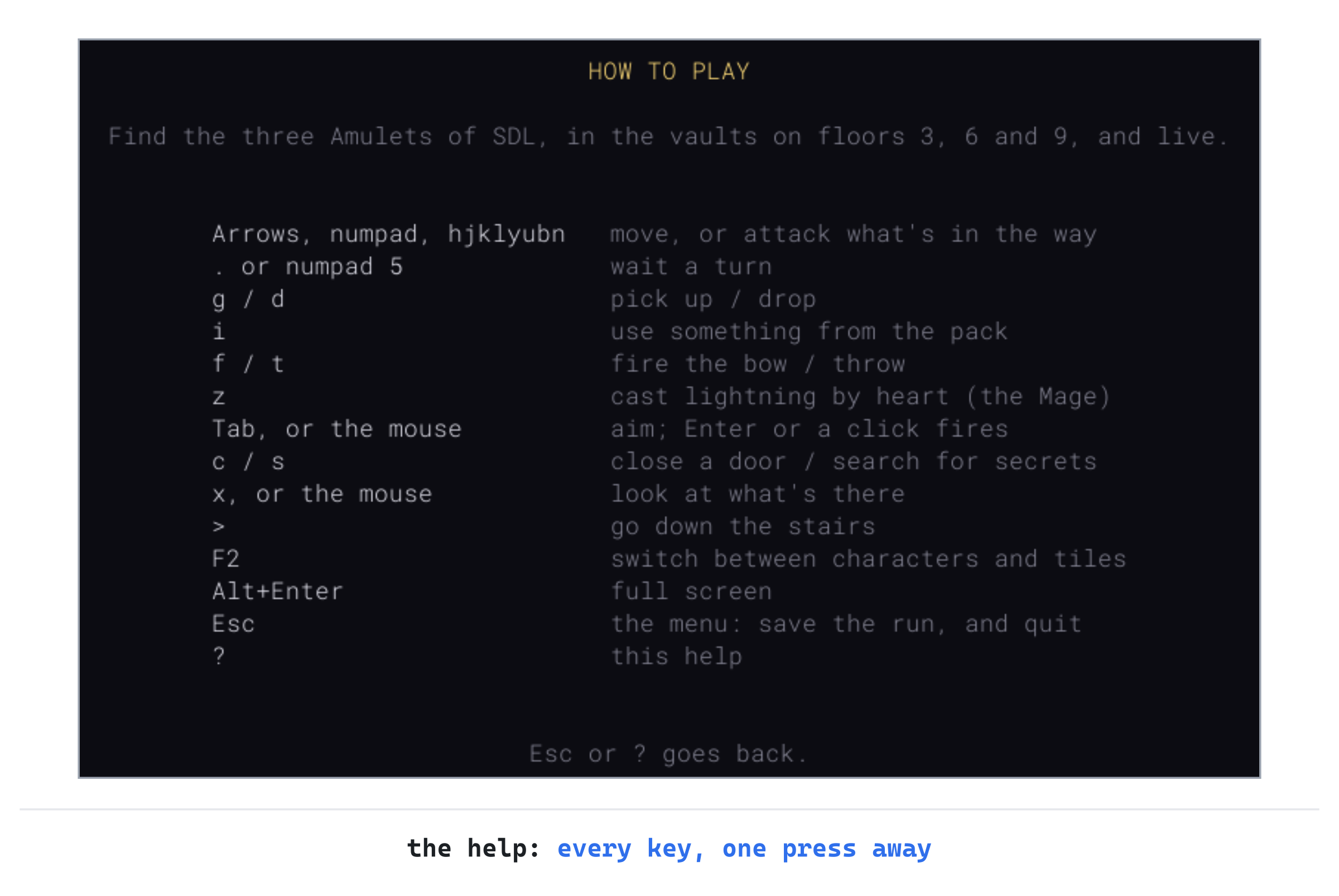
Press Esc to go back to the title screen, and N for a new run: the class menu has the pictures now, as Figure 22.1 showed. Choose a class, and press ? in the dungeon: the help comes up. Then ? again goes back to the game, as it was, with no turn gone.
Playing the Game
Play the same seed as each class, and the same first floor plays three different ways. The Fighter is the easiest start. Its defense of 4 takes the sting out of most blows on the first floors, so a jackal's bite of 1 to 3 does 1. And its long sword ends most early fights in two or three blows. It has no tricks, so its one potion of healing is for the fight that goes wrong.
The Rogue fights from afar first: thirty arrows start most fights before the monster arrives. Its keen eyes find secret doors and traps in passing, so it walks into fewer traps, and finds the ways around that the others miss. Stealth lets it slip past sleeping monsters more often. Its sword is short, though, so a fight that reaches it is harder than the Fighter's.
The Mage is the hardest to play well. Lightning by heart is its weapon, once every twelve turns, so it chooses its fights and waits between them. Its scrolls hit half as hard again, and every scroll it finds is known at a glance. So it reads scrolls as tools, never as gambles. With 28 health and no armor, it must never let a pack surround it.
Understanding the Code
A class is a ClassDef, read from classes.txt by the game's data, after the items its kit names. The kit's words become items in readKit, with counts for stacks, and gifts' names become bits in readGifts.
The player points at the class they chose, through classDef. Then startAs begins the run with its health, strength and defense, and hands out its kit. The first weapon, armor, bow and arrows go to their places, and the rest to the pack, with every kind known. The defense is the class's own and the armor's, worked out by updateDefense whenever either changes.
Gifts are bits in ClassDef::gifts, asked about with has. Keen eyes run lookForSecrets at the start of every turn, and stealth doubles the odds against waking. Scroll power goes through scrollDamage, and scroll lore learns a scroll's kind as it's picked up. Lightning by heart is a purpose of its own, Spell, with spellTurns counting down to the next casting.
The game's screens are states: the title screen, the class menu and the help. Of these, the title screen is for the first run or a saved one, and the help remembers where it came from in stateBeforeHelp_. Each of them has the window to itself, through draw, and everything else is drawGame's. The save keeps the class by its id, in version 6, and the spell's wait, as a key with a default.
Experimenting
Try each of these, and put each back afterward:
- A fourth class, with no compiling. At the end of
classes.txt, add the record below, with a blank line above it. Start the game: the class menu offers d, a Ranger, with the archer's picture. It starts with its long bow ready and forty arrows in the quiver. - A Mage without its lightning. In
classes.txt, takelightning_by_heartout of the Mage's gifts. The panel has no line for the lightning, and z says "You know no spells by heart." - Lightning every turn. Set
SPELL_TURNSto1. The lightning is ready again as soon as it's cast, and the Mage can cast it every turn, from across a room.
Here is the Ranger's record, for the first:
[class]
id       = ranger
name     = Ranger
tile     = novice-archer
hp       = 30
strength = 0
defense  = 1
kit      = dagger leather_armor long_bow arrow:40
about    = A hunter, with a long bow and plenty of arrows.
gifts    = keen_eyed
The first two need no compiling, since a class is data. The last shows why the Mage's wait is there: a spell that's always ready is a better bow, with no arrows to run out of.
Common Errors and Fixes
If the game didn't build, or doesn't behave as described, the problem is probably one of these.
C3668: 'TileView::drawPlayer': method with override specifier 'override' did not override any base class methods, followed by C2259: 'TileView': cannot instantiate abstract class. The drawPlayer in View.h takes the class now, but the tile view's still takes only a cell, so it overrides nothing. The pure virtual function in View is then left without an override in TileView, which makes it abstract. So Game, which has a TileView in it, can't make one. Change TileView.h and TileView.cpp as the part on each class's picture does.
C2572: 'Game::itemName': redefinition of default argument: parameter 1, in Game.cpp. The default value, = false, was given in the function's definition, as well as in its declaration in Game.h. A default goes in the declaration only, so take it out of the definition.
The game won't start, and a box says classes.txt: and a line number, then unknown gift 'keen_eye'. A gift's name is misspelled. The names are keen_eyed, stealthy, scroll_power, scroll_lore and lightning_by_heart, as the comment at the top of the file lists them.
Closing the window on the class menu stops the game with a read access violation, in writeSave. The test for a run under way, in handleEvent, still asks which state the game is in. So it counts the class menu as a run, and saves it. With no class chosen, player_.classDef is nullptr, and writeSave reads its id through it. Ask whether the player has a class instead, as the part on choosing a class does.
FAQ
Q) Why doesn't the first floor change with the class?
A) The floor and the looks of the potions and scrolls are made in the constructor, before the class menu, and choosing a class rolls no dice. So a seed makes the same first floor for every class. The floors after it are made with the same dice the fights use, so they part ways once the play does. That's still enough to make classes easy to compare, and a seed shared with a friend a fair start, whichever class each of you plays.
Q) Why is the Mage's lightning a gift, and not just more scrolls?
A) The game was tuned by a bot that plays it hundreds of times over, which Chapter 27 builds. In its games, a Mage with only its two scrolls almost never won. Once the scrolls were read, it was a weak fighter with a dagger, and no amount of health or kit changed that. Lightning that comes back gives it a weapon for the whole run, and the wait keeps it from being too strong.
Q) Why does ? need typedKey, when z doesn't?
A) A key event's keycode is the key, without Shift. On a US keyboard, ? is Shift and the slash, so its keycode is the slash's. Only typedKey, from Chapter 15, asks SDL which character the key types with Shift held. The same goes for >.
AI Exercise (Optional)
A Barbarian could have a gift of its own, rage. It's a key that doubles its strength for a few turns, after which it has to rest before it can rage again. If you'd like to try it, with an AI's help, open your AI chatbot of choice, and try a prompt like this:
"I'm writing a roguelike in C++ with SDL 3. Classes are read from a data file into struct ClassDef, with gifts as bits (namespace Gift, constexpr unsigned int KEEN_EYED = 1 << 0, and so on), and ClassDef::has(gift) tests one. The Mage has a gift, LIGHTNING_BY_HEART: the z key casts lightning, and then Player::spellTurns counts down, once a turn, at the start of Game::finishTurn(), until it can be cast again; spellTurns is saved. Player::strength is added to the damage of every blow. I'd like a new gift, RAGE, for a new class: a key that doubles the player's strength for 10 turns, then can't be used again for 30. Show me every change, with each curly brace on its own line, and explain it."
Notice what the preceding prompt does. It names the gift that works the same way, the Mage's lightning. So the answer can follow it, rather than invent a new way to count turns.
When the answer comes back, check how it doubles the strength, and how it puts it back. If it halves the strength at the end, a potion of strength drunk during the rage is half lost. So it's better to keep the strength the rage added, and take exactly that away. And check the save: a run saved in the middle of a rage must come back raging, with the same turns left, or saving and loading becomes a way to cheat.
Summary
A class is a record of data: its health, strength and defense, a kit to start with, and gifts. It's read from classes.txt and chosen on a class menu at the start of every run. The Rogue's gifts find secrets in passing and wake fewer monsters, and the Mage's make its scrolls stronger and better known, and give it lightning by heart. The game opens on a title screen, and ? shows every key. In Chapter 23, the player gives commands that take many turns: resting until healed, traveling across the floor by A*, and exploring with a single key, each stopping the moment something new appears.