
Chapter 29 turned a cube by three angles, and found that at a quarter turn about y, two of them turn it about the same axis: gimbal lock. Chapter 31 limited a camera's pitch to stay clear of the same trouble. For a cube a player turns by hand, or a camera that never looks straight up, that's enough. For an object that must turn every way, such as a spaceship, a thrown die or a diver, three angles aren't. They lock, and a blend between two of them can go the long way round.
This chapter builds the tool that holds a whole turn at once: the quaternion, four numbers for an axis and an angle. It has a reputation for being hard, but everything it needs is in this book already. Its product comes from Chapter 4's dot product and Chapter 28's cross product. Its matrix is Chapter 29's turn, written another way. Its blend, slerp, walks an arc at an even pace, as Chapter 8's lerp walks a line. The demo turns one slab two ways side by side, and measures how far each turns.
In this chapter, we will:
- See gimbal lock in the axes, and in a blend that goes the long way round
- Hold a turn as four numbers: an axis, and half an angle
- Multiply quaternions with the dot and cross products
- See why a quaternion holds half the angle, and why q and -q are one turn
- Turn a quaternion into a matrix for the pipeline
- Blend two turns with slerp
- Use quaternions to turn objects and cameras
- Build Tumble, a slab turned by quaternions beside one turned by Euler angles
We'll start with the trouble.
The Trouble With Euler Angles
The Lock
Euler angles turn an object by three angles in a row: a yaw about the vertical, y, a pitch about x and a roll about z. Tumble multiplies them as yaw times pitch times roll, Y X Z, where Chapter 29's cube used Z Y X. The order is a choice, and every order has a lock somewhere. Picture the three turns as rings, one inside the next, as in a gyroscope's gimbal. The yaw's ring turns everything inside it, and the pitch's ring turns the roll's ring with it. For Y X Z, the lock is at a pitch of 90 degrees. The next image shows the three turns' axes at rest, and at that pitch.
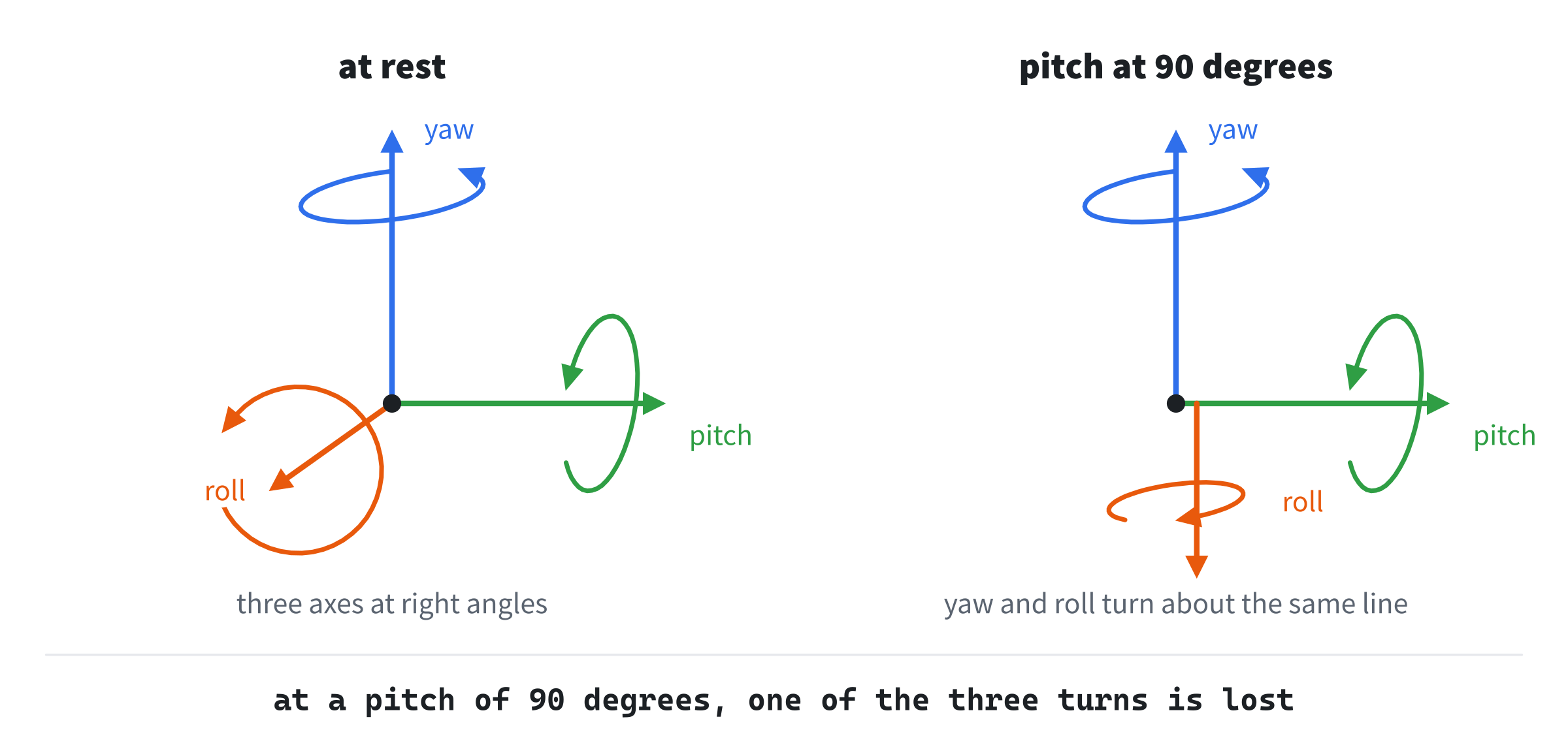
At a pitch of 90 degrees, the roll's axis lies along the yaw's. Then the yaw and the roll both turn the object about that one line, and a direction of turning is lost, as Chapter 29 found. So different angles give the same orientation. With a pitch of 90, a yaw of 90 and a roll of 0 is exactly the same orientation as a yaw of 0 and a roll of -90. Only the yaw less the roll counts, as only α - γ did in Chapter 29.
A Blend That Goes the Long Way
Near the lock, two orientations can be close while their angles are far apart. Tumble's keys 1 and 2 both have a pitch of 85 degrees. Key 1 has a yaw of 150 and a roll of 0, and key 2 a yaw of -150 and a roll of 80. Near the lock, nearly all that counts is the yaw less the roll: 150 against 130, once -150 is taken as 210, the same angle. So the two orientations are only 20.8 degrees apart. But blending the angles from one to the other swings the yaw through 300 degrees and the roll through 80. Measured along the way, the object turns through 379.8 degrees, more than a whole turn, to end up 20.8 degrees from where it began. Nothing locks on the way, since the pitch stays at 85. The angles simply don't measure the turn they make.
Quaternions
Four Numbers for One Turn
Any orientation can be reached from rest by a single turn about one axis. That's Euler's rotation theorem, from the same Euler as the angles. A quaternion holds that axis and angle in four numbers, w, x, y and z:
w = cos(θ / 2)
(x, y, z) = axis × sin(θ / 2)
William Rowan Hamilton found quaternions in 1843, long before there were computers to draw with them. Taken as a vector, the four are 1 long, since cos² + sin² is 1 and the axis is 1 long. Why they hold half the angle, rather than the angle, comes after the product. The new header, Quat.h, starts with the four numbers:
#pragma once
#include <cmath>
#include "Vec3.h"
#include "Mat4.h"

// Quat: a quaternion, four numbers that hold a whole turn (Chapter 35). For
// a turn by an angle about an axis, w is the cosine of half the angle, and
// (x, y, z) is the axis times the sine of half the angle, so that all four,
// as a vector, are 1 long.
struct Quat
{
    float w = 1.0f;
    float x = 0.0f;
    float y = 0.0f;
    float z = 0.0f;
A new Quat is (1, 0, 0, 0): a turn of 0, about any axis. It has two constructors, as Vec3 has:
Quat() = default;
Quat(float w, float x, float y, float z) : w(w), x(x), y(y), z(z) {}
Then a quaternion is made from an axis and an angle:
// A turn by an angle, in radians, about an axis.
static Quat fromAxisAngle(Vec3 axis, float angle)
{
    Vec3 a = axis.normalized();
    float s = std::sin(angle * 0.5f);
    return { std::cos(angle * 0.5f), a.x * s, a.y * s, a.z * s };
}
The axis is normalized first, so that the four numbers come out 1 long. It's one turn, not three in a row, so there's no middle turn to lock.
The Product
Two turns, one after the other, are one turn, and the quaternion for it is the product of theirs. Write a quaternion as w and a vector v, for its x, y and z. Then the product is:
q1 q2 = (w1 w2 - v1 · v2, w1 v2 + w2 v1 + v1 × v2)It's built from Chapter 4's dot product and Chapter 28's cross product. As with matrices, q1 q2 turns by q2 first, and then by q1:
// The product: one quaternion that turns by q, and then by this one.
// With v for (x, y, z), it's (w1 w2 - v1 . v2, w1 v2 + w2 v1 + v1 x v2).
Quat operator*(const Quat& q) const
{
    return { w * q.w - x * q.x - y * q.y - z * q.z,
             w * q.x + x * q.w + y * q.z - z * q.y,
             w * q.y - x * q.z + y * q.w + z * q.x,
             w * q.z + x * q.y - y * q.x + z * q.w };
}
The first of the four lines is w1 w2 less the dot product. The other three are the vector part's x, y and z, multiplied out. You can check it with two quarter turns about y, which should make a half turn. Each is (0.707, 0, 0.707, 0). So w is 0.5 - 0.5, which is 0. The vector part is 0.5 + 0.5 along y, and there's no cross product, since the two axes are the same. The product is (0, 0, 1, 0), which holds the cosine and the sine of 90 degrees, half of a half turn.
The cross product changes sign when its two vectors swap, so the order matters, as it did for matrices. Take quarter turns about y and about x. With the turn about y on the left, the product is (0.5, 0.5, 0.5, -0.5), and with it on the right, it's (0.5, 0.5, 0.5, 0.5). So quaternions don't free you from the order of turns, only from the lock. Slerp needs the plain arithmetic of four numbers, and their dot product:
// The arithmetic of four numbers, which slerp blends with: a quaternion
// times a number, the sum of two, and the negative of one.
Quat operator*(float s) const { return { w * s, x * s, y * s, z * s }; }
Quat operator+(const Quat& q) const
{
    return { w + q.w, x + q.x, y + q.y, z + q.z };
}
Quat operator-() const { return { -w, -x, -y, -z }; }

// The dot product of all four numbers. For two quaternions 1 long, it's
// the cosine of the angle between them, as points in four dimensions.
float dot(const Quat& q) const
{
    return w * q.w + x * q.x + y * q.y + z * q.z;
}
The dot product is Chapter 4's, with four numbers instead of two.
Half the Angle
A quaternion turns a point by multiplying it on both sides. The point v is written as the quaternion (0, v), with a w of 0. Then the turned point is q v q*, where q* is q's conjugate: q with its axis reversed. The turn is applied twice, once on each side, so q holds half the angle, and the two halves make the whole. A quarter turn about y takes (1, 0, 0) to (0, 0, -1) this way, as Chapter 29's rotationY does.
Half the angle has a strange result. The next image shows a quaternion with its w across and its axis part up, where a turn by θ is the point at θ / 2 on a circle.
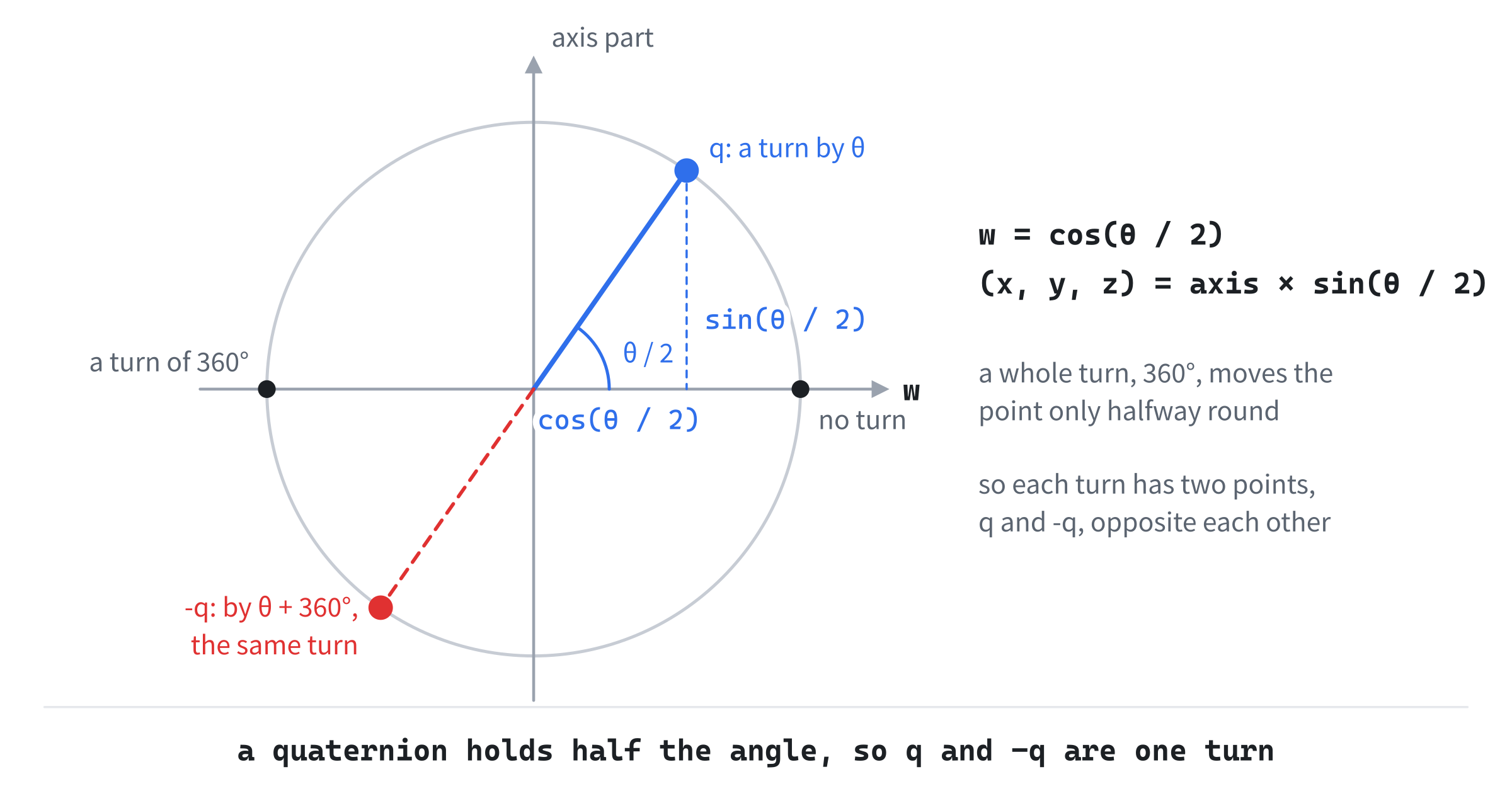
A turn by θ + 360 degrees is the same turn, but it lands at θ / 2 + 180 degrees: the opposite point, -q. For 40 degrees about y, q is (0.940, 0, 0.342, 0), and 400 degrees gives exactly its negative. So every turn has two quaternions, q and -q, which turn every point the same way. Next come the conjugate, and normalizing:
// The same turn undone: the axis reversed, and the angle kept.
Quat conjugate() const { return { w, -x, -y, -z }; }

// Scaled back to a length of 1, which arithmetic in floats drifts from.
Quat normalized() const
{
    float n = std::sqrt(dot(*this));
    return n > 0.0f ? Quat{ w / n, x / n, y / n, z / n } : Quat{};
}
The conjugate undoes a turn, since the same angle about the reversed axis takes everything back. Every product and blend in floats moves a quaternion a little away from a length of 1, and normalized scales it back. A length of 0 gives no turn, rather than a divide by 0.
The Matrix
The pipeline works in matrices, so each quaternion is turned into one before it's drawn:
// The turn as a matrix, for the pipeline: the matrix that does what
// q v q*, the quaternion, the point and the conjugate multiplied,
// does to a point v.
Mat4 toMat4() const
{
    Mat4 m;
    m.m[0][0] = 1 - 2 * (y * y + z * z);
    m.m[0][1] = 2 * (x * y - w * z);
    m.m[0][2] = 2 * (x * z + w * y);
    m.m[1][0] = 2 * (x * y + w * z);
    m.m[1][1] = 1 - 2 * (x * x + z * z);
    m.m[1][2] = 2 * (y * z - w * x);
    m.m[2][0] = 2 * (x * z - w * y);
    m.m[2][1] = 2 * (y * z + w * x);
    m.m[2][2] = 1 - 2 * (x * x + y * y);
    return m;
}
Each number is what multiplying out q v q* gives for that place in the matrix. For a turn by θ about y, the quaternion's x and z are 0, and its y is sin(θ / 2). So the top left number is 1 - 2 sin²(θ / 2), which is cos θ, exactly the top left of Chapter 29's rotationY. For 40 degrees, both are 0.766. Since every number in the matrix is built from products of two of the four, -q gives the same matrix as q.
Slerp
Along the Arc
A quaternion is 1 long, so it's a point on a sphere in four dimensions, as a 2D vector 1 long is a point on a circle. The dot product of two quaternions is the cosine of the angle between them there, which is half the angle of the turn from one to the other. The shortest way between them is an arc, and slerp, spherical linear interpolation, walks it at an even pace. Ken Shoemake brought it to computer animation in 1985.
The arc lies in the flat plane through a, b and the sphere's middle, so the flat circle of Chapters 5 and 6 is all it takes. Call the angle between a and b θ. In that plane, let c be 1 long, at right angles to a, on b's side. Then the point at an angle φ from a is a cos φ + c sin φ, as Chapter 6 turned a vector by an angle. At φ = θ, that's b, so b is a cos θ + c sin θ, which gives c:
c = (b - a cos θ) / sin θPut c into the point, with φ as t θ, and the point is a mix of a and b. The two weights are:
s0 = sin((1 - t) θ) / sin θ
s1 = sin(t θ) / sin θ
slerp(a, b, t) = s0 a + s1 b
The weight on b comes straight out. The weight on a comes out as cos(t θ) - cos θ sin(t θ) / sin θ, which is the same number as s0, written more briefly. At t = 0, the weights are 1 and 0, and at t = 1, they're 0 and 1. In between, the angle from a is t θ, which grows evenly with t. Halfway from no turn to a quarter turn about y, slerp gives (0.924, 0, 0.383, 0), a turn of exactly 45 degrees.
A straight blend of the four numbers, normalized, stays on the sphere too, but it doesn't keep an even pace. The next image shows both, for two points 120 degrees apart.
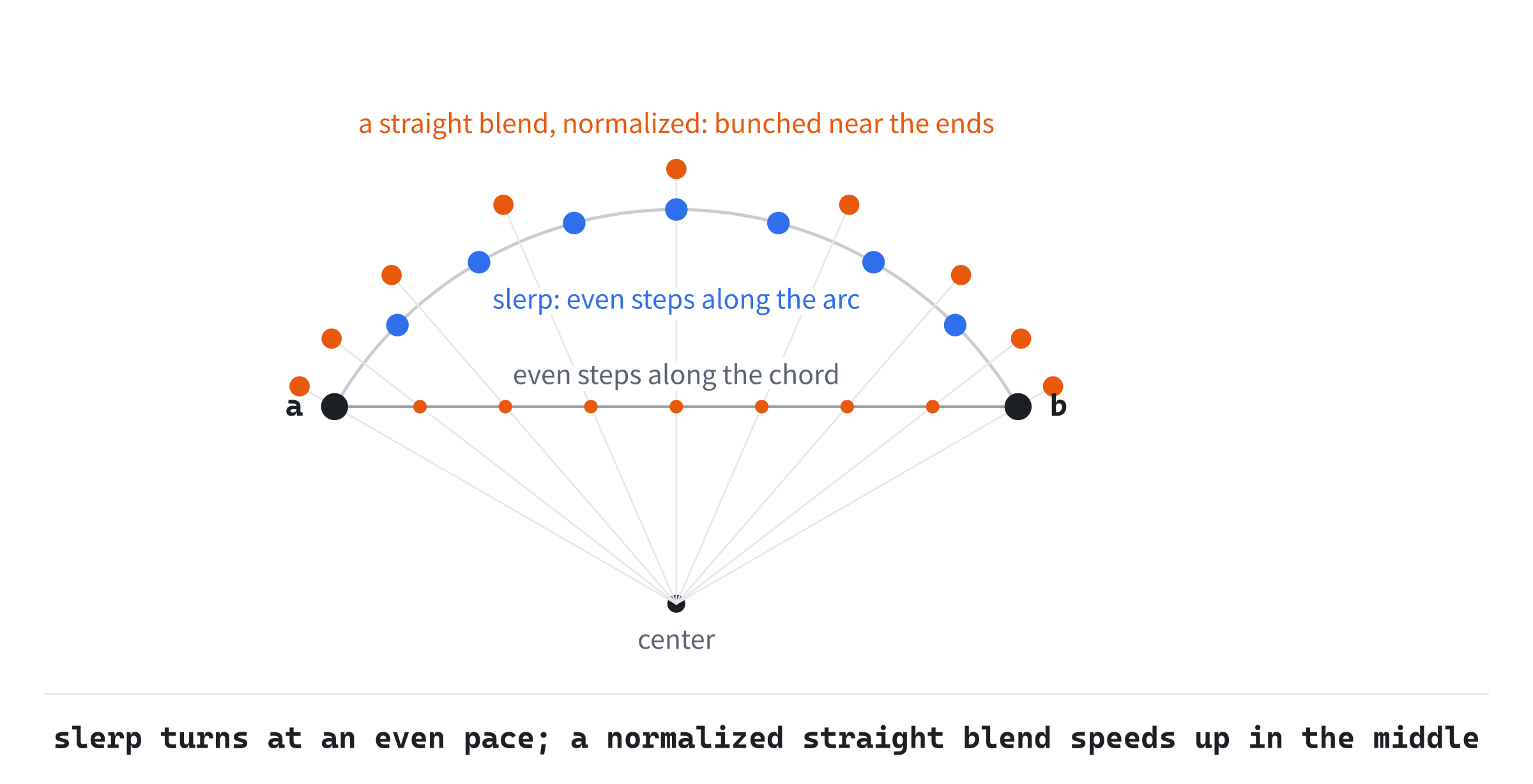
The straight blend's points are even along the chord, so once they're pushed out to the sphere, they bunch near the ends and spread out in the middle. A quarter of the way along a quarter turn, it has turned 21.6 degrees, where slerp has turned 22.5. For a turn of 170 degrees, it's 35.8 against 42.5. Here's slerp, a free function after the struct's closing brace:
};

// Spherical linear interpolation: the orientation a fraction t of the way
// from a to b, along the shortest arc between them, at an even pace. If
// the dot product is negative, -b is the same turn as b, and nearer, so
// the blend goes to it instead. If the two are nearly the same, a straight
// blend, normalized, is close enough, and avoids dividing by almost 0.
inline Quat slerp(Quat a, Quat b, float t)
{
    float d = a.dot(b);
    if (d < 0.0f)
    {
        b = -b;
        d = -d;
    }
    if (d > 0.9995f) return (a * (1.0f - t) + b * t).normalized();
    float theta = std::acos(d);
    float s0 = std::sin((1.0f - t) * theta) / std::sin(theta);
    float s1 = std::sin(t * theta) / std::sin(theta);
    return a * s0 + b * s1;
}
If the dot product is negative, the two are more than 90 degrees apart on the sphere. Then -b is nearer, and it's the same turn as b, so the blend goes to -b instead. From a turn of 40 degrees about y to the negative of one of 50, the dot product is -0.996. Without the flip, the blend turns 350 degrees the long way round. With it, the blend turns the 10 degrees between them.
If the two are nearly the same, sin θ is nearly 0. Then a normalized straight blend is close enough, and it avoids dividing by almost 0. The test's 0.9995 is a turn of under 4 degrees. Otherwise, the two weights blend them.
Measuring a Turn
Tumble measures how far each side turns, so Quat.h has one more function:
// The angle of the turn from one orientation to another, in radians: the
// angle of r, the turn that takes a to b. Its w is the cosine of half that
// angle, and the length of its (x, y, z) the sine, so atan2 gives the half
// angle, even when it's tiny, where acos of a float near 1 isn't precise.
// Since r and -r are the same turn, w's size is what counts.
inline float turnBetween(const Quat& a, const Quat& b)
{
    Quat r = b * a.conjugate();
    float s = std::sqrt(r.x * r.x + r.y * r.y + r.z * r.z);
    return 2.0f * std::atan2(s, std::fabs(r.w));
}
The turn from a to b is b times a's conjugate, since a's conjugate undoes a. Its w is the cosine of half that turn, and the length of its vector part the sine, so Chapter 5's atan2 gives the half angle. The function takes w's size, since -r is the same turn as r. It's precise even for a tiny turn. Taking the arccosine of a dot product near 1, the obvious way, isn't: a float near 1 can't tell a turn of a tenth of a degree from one a little larger. Summed over 200 steps, the arccosine made Tumble's 20.8 degree turn into 25.
Turning Objects and Cameras
Turning Step by Step
An object that turns freely keeps its orientation as a quaternion, and multiplies a small turn into it each frame. Which side the small turn goes on matters. On the left, as delta * orientation, the small turn comes last, so it's about the world's axes. On the right, as orientation * delta, it comes first, so it's about the object's own axes. The orientation then carries it round with the object.
Take a ship whose nose points down -z, and give it a quarter turn of yaw, so that its nose points down -x. Then pitch it up a quarter turn. About the world's x, nothing happens, since the nose already lies along x. About its own x, its nose points straight up. A spacecraft wants its own axes.
Floats drift here too. A quaternion multiplied by a small turn a million times is 0.983 long. Its matrix assumes a length of 1, so it shrinks the object by up to 6.5 percent. But the fix is cheap. Any quaternion 1 long is a pure turn, so normalizing it now and then puts it right. A drifted matrix needs its three columns straightened against each other.
A Camera
A camera's view is its placement undone, as Chapter 31 found: a move by -eye, and then the camera's turn undone. With the turn held as a quaternion q, undoing it is q's conjugate. The conjugate's matrix is exactly the transpose of q's, so it's the inverse that Chapter 31 used:
V = R⁻¹ T(-eye)
R⁻¹ = Rᵀ = the matrix of q*
That's Chapter 31's view, with the turn coming from a quaternion rather than from look-at. A quaternion camera has no lock, so it can roll and loop freely, as a flight game's must.
Building Tumble
Tumble turns one slab through the same four keys two ways, side by side. On the left, slerp blends the keys' quaternions. On the right, the keys' Euler angles are blended, each on its own, and the slab is turned by the blended angles. Both are eased into and out of every key by Chapter 8's smoothstep. The readout says how far each side turns over the current segment, from one key to the next. Space pauses, Left and Right scrub while paused, and R starts again.
Get the code. The complete project is in the
Tumblefolder of the book's repository.
Tumble starts from the skeleton, with its timing, and doesn't read the mouse. It reuses drawArrow from Chapter 2, fmt2 from Chapter 4, and setColor and smoothstep from Chapter 8. Its Vec2.h, Vec3.h and Mat4.h are Textured Cube's, and its Quat.h is the one this chapter built. Here are its includes and its colors:
#include <cmath>
#include <string>
#include "Vec2.h"
#include "Vec3.h"
#include "Mat4.h"
#include "Quat.h"

constexpr int WINDOW_WIDTH  = 1000;
constexpr int WINDOW_HEIGHT = 700;

constexpr SDL_Color TEXT = { 235, 238, 242, 255 };
constexpr SDL_Color GREY = { 90, 100, 112, 255 };
constexpr SDL_Color RED = { 235, 80, 80, 255 };
constexpr SDL_Color GREEN = { 60, 190, 100, 255 };
constexpr SDL_Color BLUE = { 90, 150, 240, 255 };
The slab's own axes are drawn in red, green and blue. Then come the constants:
// The view: pixels for each unit, and where the two slabs' middles are.
// Then the pace: segments a second while playing, and while scrubbing.
constexpr float SCALE = 150.0f;
constexpr float LEFT_X = 250.0f;
constexpr float RIGHT_X = 750.0f;
constexpr float MIDDLE_Y = 370.0f;
constexpr float PLAY_SPEED = 0.28f;
constexpr float SCRUB_SPEED = 0.4f;
The animation plays a segment, from one key to the next, in about 3.6 seconds, and scrubs a little faster.
The Helpers
Six new functions go before main. The first two turn Euler angles into a matrix and into a quaternion:
// Euler angles, a yaw about y, then a pitch about x, then a roll about z,
// in radians, as a matrix and as a quaternion. Both multiply their three
// turns in the same order, so that a key is the same orientation both ways.
Mat4 eulerToMat4(Vec3 e)
{
    return Mat4::rotationY(e.x) * Mat4::rotationX(e.y) * Mat4::rotationZ(e.z);
}

Quat eulerToQuat(Vec3 e)
{
    return Quat::fromAxisAngle({ 0, 1, 0 }, e.x) *
           Quat::fromAxisAngle({ 1, 0, 0 }, e.y) *
           Quat::fromAxisAngle({ 0, 0, 1 }, e.z);
}
The Euler angles are a Vec3: the yaw in x, the pitch in y and the roll in z. Both functions multiply the same three turns in the same order, so a key is the same orientation on both sides, and the two sides meet at every key. The third draws a slab:
// Draw a slab under a turn, its middle at (cx, MIDDLE_Y), seen from the
// front with z dropped, as Normals drew. Its edges are shaded by depth, as
// Transforming a Cube's were, and its own axes are drawn from the turn's
// columns: x in red, y in green and z in blue.
void drawSlab(SDL_Renderer* renderer, const Mat4& turn, float cx)
{
    const Vec3 CORNER[8] = { { -0.9f, -0.55f, -0.3f }, { 0.9f, -0.55f, -0.3f },
                             { 0.9f, 0.55f, -0.3f }, { -0.9f, 0.55f, -0.3f },
                             { -0.9f, -0.55f, 0.3f }, { 0.9f, -0.55f, 0.3f },
                             { 0.9f, 0.55f, 0.3f }, { -0.9f, 0.55f, 0.3f } };
    const int EDGE[12][2] = { { 0, 1 }, { 1, 2 }, { 2, 3 }, { 3, 0 },
                              { 4, 5 }, { 5, 6 }, { 6, 7 }, { 7, 4 },
                              { 0, 4 }, { 1, 5 }, { 2, 6 }, { 3, 7 } };
    for (int e = 0; e < 12; ++e)
    {
        Vec3 a = turn.apply(CORNER[EDGE[e][0]]);
        Vec3 b = turn.apply(CORNER[EDGE[e][1]]);
        float shade = SDL_clamp(0.6f + (a.z + b.z) * 0.5f * 0.35f, 0.35f, 1.0f);
        SDL_SetRenderDrawColor(renderer, (Uint8)(150 * shade),
                               (Uint8)(160 * shade), (Uint8)(175 * shade), 255);
        SDL_RenderLine(renderer, cx + a.x * SCALE, MIDDLE_Y - a.y * SCALE,
                       cx + b.x * SCALE, MIDDLE_Y - b.y * SCALE);
    }
    const SDL_Color AXIS_COLOR[3] = { RED, GREEN, BLUE };
    const float AXIS_LENGTH[3] = { 1.2f, 1.05f, 0.9f };
    Vec2 middle = { cx, MIDDLE_Y };
    for (int j = 0; j < 3; ++j)
    {
        Vec3 axis = column(turn, j) * AXIS_LENGTH[j];
        drawArrow(renderer, middle,
                  { cx + axis.x * SCALE, MIDDLE_Y - axis.y * SCALE },
                  AXIS_COLOR[j]);
    }
}
In the preceding code, the corners and edges are Transforming a Cube's, with the box flattened to 1.8 by 1.1 by 0.6, so that its turn is easy to read. The view drops z, as Normals' did, and nearer edges are lighter. Its three axes are the turn's columns, drawn from its middle, as Transforming a Cube drew them. The fourth blends two Vec3s:
// A blend of two Vec3s, each part on its own, by Chapter 8's lerp.
Vec3 lerp(Vec3 a, Vec3 b, float t)
{
    return { lerp(a.x, b.x, t), lerp(a.y, b.y, t), lerp(a.z, b.z, t) };
}
It blends each part with Chapter 8's lerp, which is how the right side blends its angles. The fifth measures the two sides' turns over a segment:
// How far each way of blending turns the slab from one key to the next:
// the angles between 200 orientations along the way, added up, in
// radians. The easing doesn't change the path, so it's left out.
void segmentTurns(Vec3 ea, Vec3 eb, float& bySlerp, float& byEuler)
{
    const int STEPS = 200;
    Quat qa = eulerToQuat(ea);
    Quat qb = eulerToQuat(eb);
    Quat lastS = qa;
    Quat lastE = qa;
    bySlerp = 0.0f;
    byEuler = 0.0f;
    for (int i = 1; i <= STEPS; ++i)
    {
        float t = (float)i / STEPS;
        Quat s = slerp(qa, qb, t);
        Quat q = eulerToQuat(lerp(ea, eb, t));
        bySlerp += turnBetween(lastS, s);
        byEuler += turnBetween(lastE, q);
        lastS = s;
        lastE = q;
    }
}
In the preceding code, both sides are stepped through the segment in 200 steps, and the turns between steps are added up. The slerp side's sum is the angle between the two keys. The Euler side's is the long way round, if it takes one. The last writes radians as whole degrees:
// Degrees, from radians, as whole-number text.
std::string degrees(float radians)
{
    return std::to_string((int)std::lround(radians * 180.0f / PI));
}
It rounds to the nearest whole degree, which is all the readout needs.
The State
The state goes after the font is loaded:
// The four keys, as a yaw, a pitch and a roll, in degrees, turned into
// radians. Keys 1 and 2 have a pitch of 85 degrees, near the lock, and
// yaws far apart. The playhead runs from 0 to 4, a segment a unit, and
// wraps round.
const float DEG = PI / 180.0f;
const Vec3 KEY[4] = { { 0, 0, 0 }, Vec3(150, 85, 0) * DEG,
                      Vec3(-150, 85, 80) * DEG, Vec3(0, -85, 0) * DEG };
float playhead = 0.0f;
bool paused = false;
The keys are written in degrees, which are easier to read, and multiplied by DEG to make radians. Key 0 is no turn, and key 3 a pitch of -85 degrees, so the last segment is a turn about x alone.
The Events
Space pauses, and R starts again:
// Events: quitting, and the keys that happen once.
SDL_Event event;
while (SDL_PollEvent(&event))
{
    if (event.type == SDL_EVENT_QUIT) running = false;
    else if (event.type == SDL_EVENT_KEY_DOWN)
    {
        if (event.key.key == SDLK_ESCAPE) running = false;
        else if (event.key.key == SDLK_SPACE) paused = !paused;
        else if (event.key.key == SDLK_R)
        {
            playhead = 0.0f;
            paused = false;
        }
    }
}
Left and Right aren't events here, since they're held. Each frame's work reads them.
Each Frame's Work
Each frame, the playhead moves:
// The playhead moves on while playing, or with Left and Right while
// paused, and wraps round the four segments.
const bool* keys = SDL_GetKeyboardState(nullptr);
if (!paused) playhead += PLAY_SPEED * dt;
else if (keys[SDL_SCANCODE_LEFT]) playhead -= SCRUB_SPEED * dt;
else if (keys[SDL_SCANCODE_RIGHT]) playhead += SCRUB_SPEED * dt;
playhead = std::fmod(playhead + 4.0f, 4.0f);
While paused, Left and Right move it instead. Adding 4 before std::fmod keeps a playhead scrubbed below 0 from wrapping to a negative number. Then the two sides are blended:
// The segment, from key a to key b, and how far along it, eased by
// Chapter 8's smoothstep, the same for both sides. The left side
// slerps between the keys' quaternions; the right side blends their
// Euler angles, each on its own.
int a = (int)playhead;
int b = (a + 1) % 4;
float s = smoothstep(playhead - a);
Quat left = slerp(eulerToQuat(KEY[a]), eulerToQuat(KEY[b]), s);
Vec3 right = lerp(KEY[a], KEY[b], s);
float bySlerp = 0.0f;
float byEuler = 0.0f;
segmentTurns(KEY[a], KEY[b], bySlerp, byEuler);
The segment is the playhead's whole part, and how far along it is the rest, eased by smoothstep. Both sides use the same eased fraction, so they leave and reach every key together, and slow into each one. The segment's turns are measured afresh every frame, which is simpler than keeping them, and costs very little.
Drawing
After the skeleton clears the screen, a line divides the two sides, and the two slabs are drawn:
// A line between the two sides, and the two slabs: the left turned by
// the slerped quaternion, the right by the blended Euler angles.
setColor(renderer, GREY);
float mid = WINDOW_WIDTH / 2.0f;
SDL_RenderLine(renderer, mid, 110.0f, mid, WINDOW_HEIGHT - 50.0f);
drawSlab(renderer, left.toMat4(), LEFT_X);
drawSlab(renderer, eulerToMat4(right), RIGHT_X);
The left slab's matrix comes from the slerped quaternion, and the right slab's from the blended angles. Last come the readout and the controls:
// The readout: the segment, and how far each side turns over it.
// Then each side's numbers: the quaternion's four, and the Euler
// angles' three.
drawText(renderer, font,
         "key " + std::to_string(a) + " to key " + std::to_string(b) +
         ": slerp turns " + degrees(bySlerp) + " degrees, the Euler "
         "angles " + degrees(byEuler), 12, 10, TEXT);
drawText(renderer, font, std::string(paused ? "paused" : "playing"),
         12, 32, GREY);
drawText(renderer, font, "slerp: quaternion", LEFT_X - 80, 80, TEXT);
drawText(renderer, font,
         "(" + fmt2(left.w) + ", " + fmt2(left.x) + ", " +
         fmt2(left.y) + ", " + fmt2(left.z) + ")", LEFT_X - 120, 102,
         TEXT);
drawText(renderer, font, "blended Euler angles", RIGHT_X - 100, 80,
         TEXT);
drawText(renderer, font,
         "yaw " + degrees(right.x) + ", pitch " + degrees(right.y) +
         ", roll " + degrees(right.z), RIGHT_X - 130, 102, TEXT);
drawText(renderer, font,
         "[Space] pause   [Left] [Right] scrub while paused   "
         "[R] start again   [Esc] quit", 12, WINDOW_HEIGHT - 26, GREY);
The left side shows its quaternion's four numbers, and the right side its three angles. There's nothing to add to the skeleton's cleanup.
Trying It Out
Run the demo. The two slabs turn from key to key, together at every key, and mostly apart between them. Then try it, step by step:
- Watch the keys. The two slabs leave each key together and arrive at the next together. Both slow as they reach a key, since both are eased.
- Watch key 1 to key 2. The readout says slerp turns 21 degrees and the Euler angles 380. The left slab tilts a little, and the right one spins all the way round on its way.
- Scrub it. Press Space while the readout says key 1 to key 2, and hold Left or Right. The right slab's axes whirl round, but in space they stay at right angles, since a matrix made from angles is always a turn. The flat view, with z dropped, rarely shows it. What the blended angles lose isn't the turn, but the short way between two turns.
- Watch key 3 to key 0. Both turn 85 degrees, and the two slabs move as one. When only one angle changes, the blend turns about one axis, and blending angles is right.
- Read the other two. From key 0 to key 1, slerp turns 158 degrees and the angles 172. From key 2 to key 3, slerp turns 178 and the angles 238. Each time, the angles go farther.
The next image shows the demo paused halfway from key 1 to key 2.
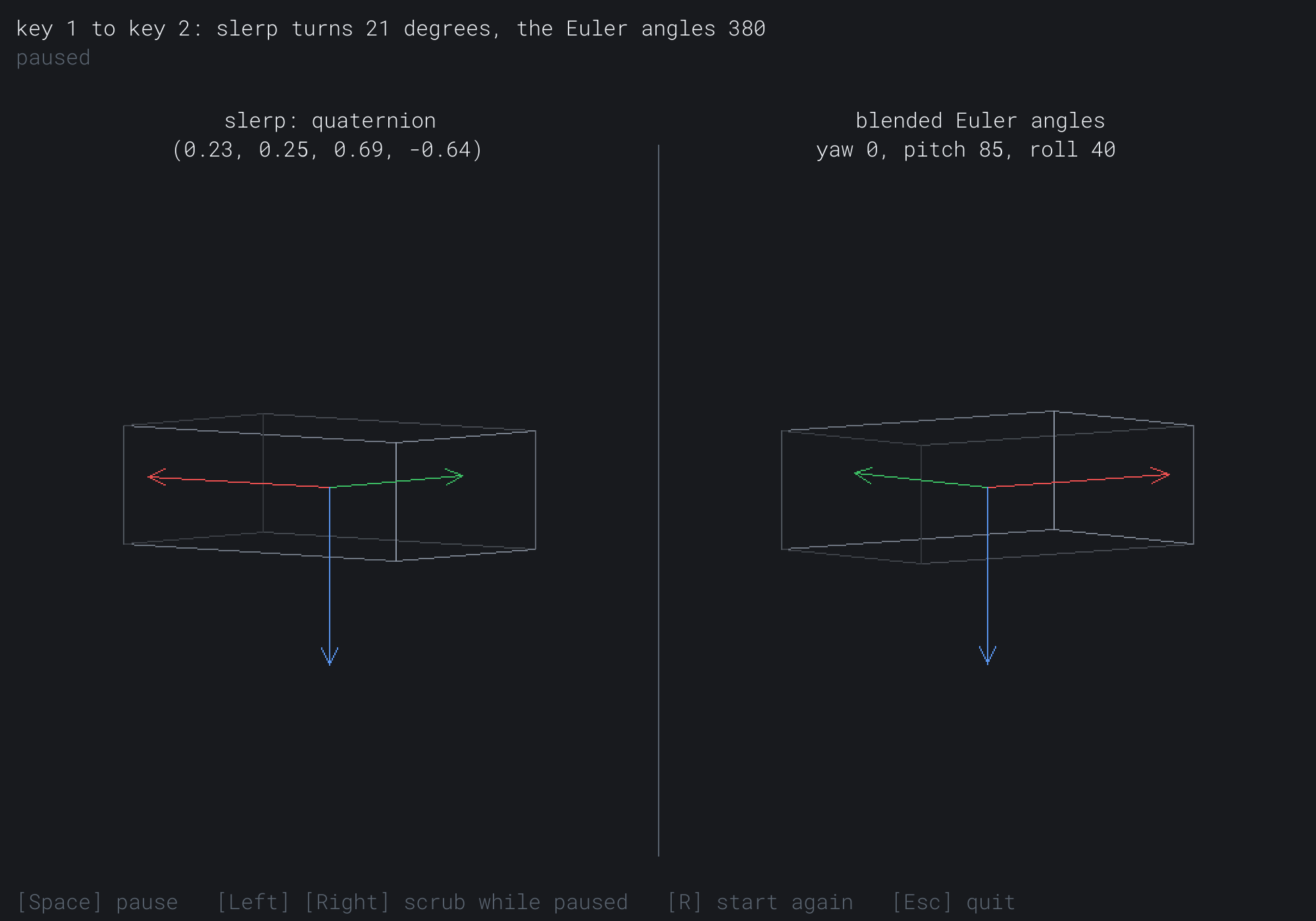
The left slab is 10.4 degrees from each key, its quaternion (0.23, 0.25, 0.69, -0.64). The right slab's angles are halfway: a yaw of 0, a pitch of 85 and a roll of 40. The two slabs look alike, but their red and green axes have swapped sides. The right slab is half a turn from the left one, about the vertical, on its long way round. The next image shows the demo paused halfway from key 3 to key 0.
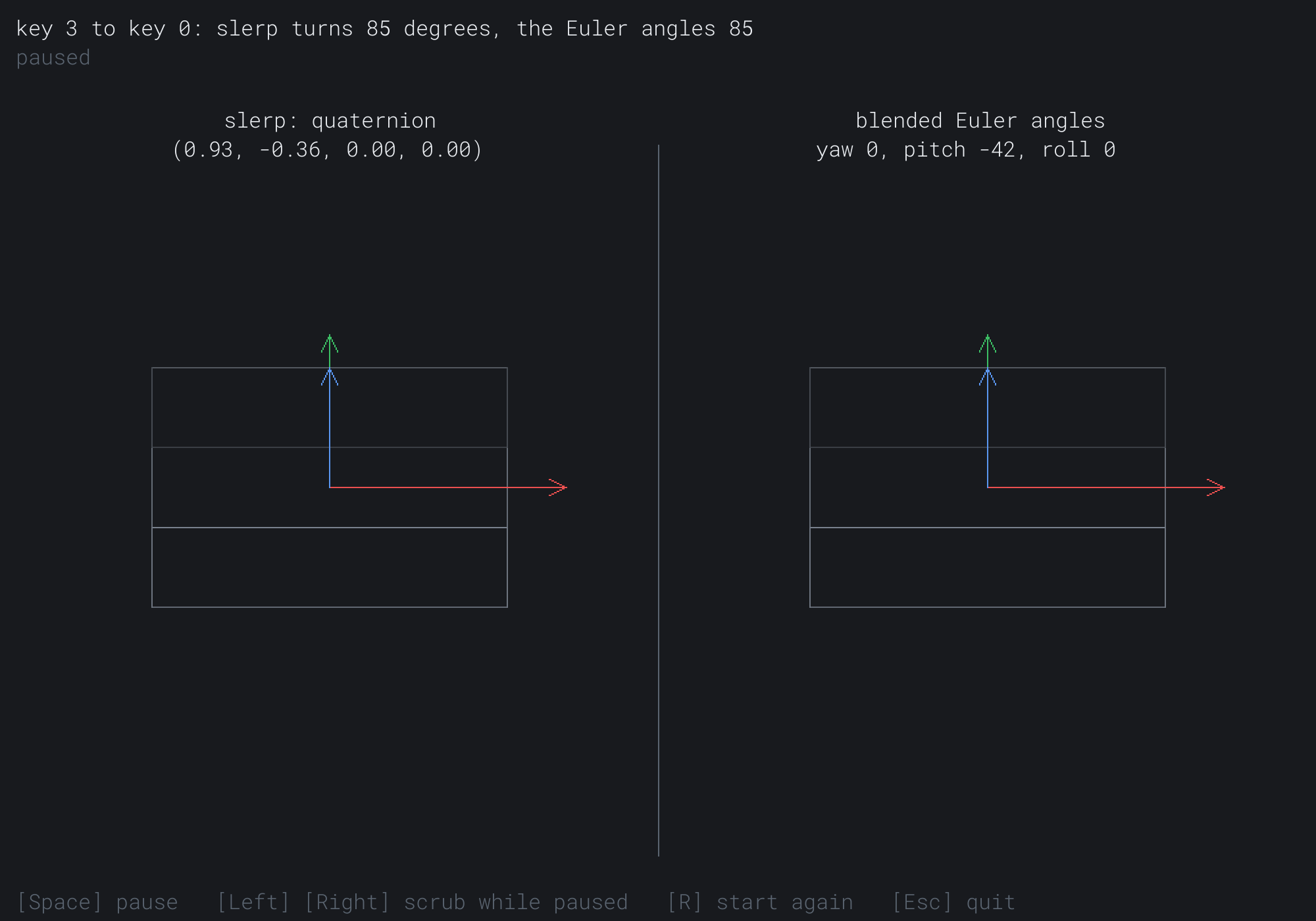
Both slabs are pitched halfway, by about -42 degrees, and the quaternion is (0.93, -0.36, 0.00, 0.00): a turn about x alone.
FAQ
Q) Do quaternions remove Chapter 31's pitch limit?
A) The mathematics no longer needs it, since a quaternion camera has no lock. Games that walk or fly level usually keep it anyway, so that the player can't look past straight up and find the world upside down.
Q) Is a straight blend, normalized, good enough?
A) For small steps, yes. It's called nlerp, and it's cheaper than slerp, with no sines. Over a quarter turn, it's never more than about a degree off the even pace, and in blends from frame to frame, nobody can tell. Over a large turn, its uneven pace shows.
Q) Why does my slerp sometimes go the long way round?
A) It's blending to q when -q is nearer. The two are the same turn, but a blend toward the farther one turns more than halfway round. Test the dot product's sign, and blend to -b when it's negative, as this chapter's slerp does.
Exercises
The first three exercises need only a pencil. The others change Tumble.
- Build a quaternion (paper). Write the quaternions for a half turn about x, and for a quarter turn about z.
- Multiply (paper). Use the product's vector form to multiply a quarter turn about x by a quarter turn about y, in that order. Check it against the chapter's
(0.5, 0.5, 0.5, 0.5). - A whole turn (paper). Show that a turn of 360 degrees about any axis is the quaternion
(-1, 0, 0, 0), and that its matrix is the identity. - The world's axes and its own (code). Give the left slab a quaternion of its own, and let W, S, A and D turn it by small turns each frame. Multiply them on the left, and then on the right, and see how the two differ once the slab has turned.
- Nlerp (code). Add a third slab, turned by a normalized straight blend of the keys' quaternions. Show its angle from slerp's in the readout, and find where in a segment it's largest.
- Through the lock (challenge). Set the pitch of keys 1 and 2 to exactly 90 degrees. Then find a yaw and a roll for key 2 that make it the same orientation as key 1, though its angles differ. What does the readout say for that segment, and why?
For the code exercises, work on a copy of the demo's folder, so that the original stays as the chapter describes it.
AI Exercise (Optional)
A quaternion is what a spaceship needs. With an AI's help, you can fly one. Open your AI chatbot of choice, and try a prompt like this:
"I have a C++ demo using SDL3. It has a struct Vec3 and a struct Mat4 with rotation, translation and perspective matrices. It also has a struct Quat with w, x, y and z, fromAxisAngle(axis, angle), an operator* that turns by its right side first, conjugate(), normalized() and toMat4(), and a free function slerp(a, b, t). I draw wireframes through a view matrix and a projection. Please make a small spaceship, a wireframe dart, that flies through a field of wireframe asteroids. Keep its orientation as a Quat. W and S pitch it, A and D yaw it, and Q and E roll it, each by a small turn about the ship's own axes, multiplied in on the right. The ship always flies along its own nose. The camera follows behind it, and its orientation slerps toward the ship's each frame, so that it lags a little. Build the view from the conjugate of the camera's quaternion. Explain why the turns go on the right, and why the ship can loop and roll without ever locking."
That prompt describes the quaternion you built, so the AI builds on it, rather than writing its own. Small turns on the right are about the ship's own axes, which is how a pilot steers. The orientation is one quaternion, never three angles, so no pose locks.
Then add a radar that shows the asteroids around the ship, turned into the ship's own frame by its conjugate.
Summary
Euler angles turn an object three times in a row, and at one middle angle, two of the turns share an axis, so a direction of turning is lost. Near that lock, close orientations can have angles far apart, and blending the angles goes the long way round. Tumble's keys 1 and 2 are 21 degrees apart, and the blended angles turn 380 degrees between them. A quaternion holds one turn about one axis in four numbers: w is the cosine of half the angle, and x, y and z are the axis times the sine. Its product, built from the dot and cross products, does one turn after another, in an order that matters. A point is turned as q v q*, so a quaternion holds half the angle, and q and -q are the same turn. Its matrix is Chapter 29's turn, written from the four numbers. Slerp walks the arc between two quaternions at an even pace, and goes to -b when that's nearer. Small turns multiplied on the left are about the world's axes, and on the right about the object's own, and a camera's view turns by its quaternion's conjugate.
A Final Word: Thank You
With that, the machine is complete. Look back at the distance covered. We began with a single point on a window, and the humble Vec2. One careful layer at a time, we added arithmetic, length, and the dot and cross products. Then came angles, turns and motion, then shapes, curves and closest points. After them came overlap tests, the separating axis theorem, raycasting and collision response. Spatial grids, a physics engine, noise and pathfinding came next. Then came textures, transforms, matrices and cameras. And then came a whole third dimension, from Vec3 and the cross product's normal through the full pipeline, to a textured, lit cube and a slab tumbling under a quaternion. Every algorithm was ours, built from a blank file and explained line by line. SDL opened a window, drew our lines and showed our pixels. What you have isn't a finished game, but something more durable: the machinery every game runs on, understood from the inside, in code you wrote. The demos in this book are small. The understanding isn't.
I want to end not with mathematics, but with gratitude.
Thank you. Genuinely. You picked up a book about the stuff that scares people off: vectors and matrices, the separating axis theorem, projection and quaternions. And you stayed for all thirty-five chapters. You built every demo, ran every one, and dragged the mouse around until the ideas moved. That takes a particular kind of stubbornness, the good kind. It's the same stubbornness that separates people who use tools from people who understand them. You're now, unmistakably, in the second group.
I have taught this material for a long time, and I know how it can feel from the other side of the page: the moment a formula looks like a wall, and the quiet worry that maybe you're "not a math person" or "not a real graphics programmer." I hope this book has retired those thoughts for good. There was never a wall. There was only a stack of small, learnable, visible pieces, and you've now assembled every one of them yourself. A rotation matrix isn't magic to you anymore. Neither is a z-buffer, or the perspective divide, or a look-at camera, or a quaternion. You know what they are, because you wrote them.
So here is my one ask, and my one wish for you. Go make something. It doesn't have to be big, or finished, or good. Take the one idea from these pages that lit you up, whether the flocking critters, the flowing noise field or the tumbling textured cube. Then build one small thing that's entirely yours. That's where understanding turns into skill, and skill into the quiet, durable joy of being able to make the thing you can imagine.
It has been a real privilege to spend this journey with you. Thank you for taking it. Now go build, and have fun.
— John