
Chapter 12 measured how far a point is from a line. This chapter asks for more: given a point and a shape, which point of the shape is nearest to it? Not just how far, but where. That point, the closest point, is one of the quiet workhorses of game geometry. Its distance is the point's distance from the shape. It tells a game whether a ball touches a box, which way to push a ball that has sunk into a wall, and where to snap an object dragged onto a track.
We'll find it for each of Chapter 11's shapes: the segment, the circle, the box and the polygon. Each takes only a few lines, and the segment, the one with a twist, takes the most explaining. We'll also meet the chapter's real trap. A shape can be a boundary, a line around nothing, or a solid, with an inside. For a point inside, the two give different closest points, and using the wrong one is a classic collision bug.
In this chapter, we will:
- Find the closest point on a segment, and see why clamping is exactly right
- Find the closest point on a circle and in a box
- Find the closest point on a polygon, edge by edge
- Tell a shape's boundary from its solid inside, and know which one a question needs
- See where the closest point jumps from one place to another
- Build Magnet, where the mouse shows the nearest point on every shape
We'll start with the segment, since the polygon is built from it.
Closest Point on a Segment
Given a point P and a segment from A to B, which point of the segment is nearest to P? Chapter 12 found the nearest point on the infinite line through A and B: the foot of the perpendicular from P. When the foot lands between A and B, it's on the segment, and it's the answer. But the foot can land beyond either end, out on the line where the segment doesn't reach. Then the nearest point of the segment is that end.
Projecting, Then Clamping
The foot's place along the line comes from Chapter 4's projection. The dot product of P - A with B - A is the foot's distance along the line from A, times the length of B - A. It's negative when the foot is behind A. Dividing by that length once gives the distance in pixels. Dividing by it again turns the distance into a fraction of the segment: 0 at A, 1 at B, and 0.5 halfway. Dividing by the squared length does both at once, with no square root:
// How far along the segment from A to B the foot of the perpendicular
// from P lands, as a fraction: 0 at A and 1 at B, and less than 0 or more
// than 1 when the foot is beyond an end. A segment with no length has no
// direction to measure along, so it gives 0.
float fractionAlong(Vec2 P, Vec2 A, Vec2 B)
{
    Vec2 ab = B - A;
    float lengthSq = ab.lengthSquared();
    if (lengthSq < 0.0001f) return 0.0f;
    return (P - A).dot(ab) / lengthSq;
}
This is Chapter 8's inverse lerp, in two dimensions. For a point on the line, fractionAlong gives the t at which lerp(A, B, t) is that point. For a point off the line, it gives its foot's t. A segment whose ends are the same point has no direction to project onto, so the function returns 0, which makes A the answer.
Then comes the step that makes it a segment. The fraction is clamped to the range from 0 to 1, by std::clamp, from the <algorithm> header. A fraction below 0 becomes 0, and one above 1 becomes 1, so a foot beyond an end is pulled back to that end:
// The closest point to P on the segment from A to B: the foot of the
// perpendicular, with its fraction clamped to the segment's 0 to 1.
Vec2 closestOnSegment(Vec2 P, Vec2 A, Vec2 B)
{
    float t = std::clamp(fractionAlong(P, A, B), 0.0f, 1.0f);
    return lerp(A, B, t);
}
Then lerp turns the clamped fraction back into a point. Without the clamp, this would be the closest point on the infinite line. The clamp is the whole difference between a line and a segment.
A Worked Example
Take the segment from A (0, 0) to B (10, 0). Then B - A is (10, 0), and its squared length is 100. For P at (3, 5), P - A is (3, 5), and its dot product with (10, 0) is 30. Divided by 100, the fraction is 0.3. That's between 0 and 1, so the clamp leaves it alone. The closest point is 0.3 of the way from A to B, at (3, 0): the foot itself, 5 from P.
For P at (-2, 4), the dot product is −20, and the fraction is −0.2. The foot is at (-2, 0), beyond A, off the segment. The clamp raises the fraction to 0, so the closest point is A itself, √20 from P, about 4.47. And for P at (13, 3), the fraction is 1.3, which the clamp lowers to 1, so the closest point is B. The next image shows all three.
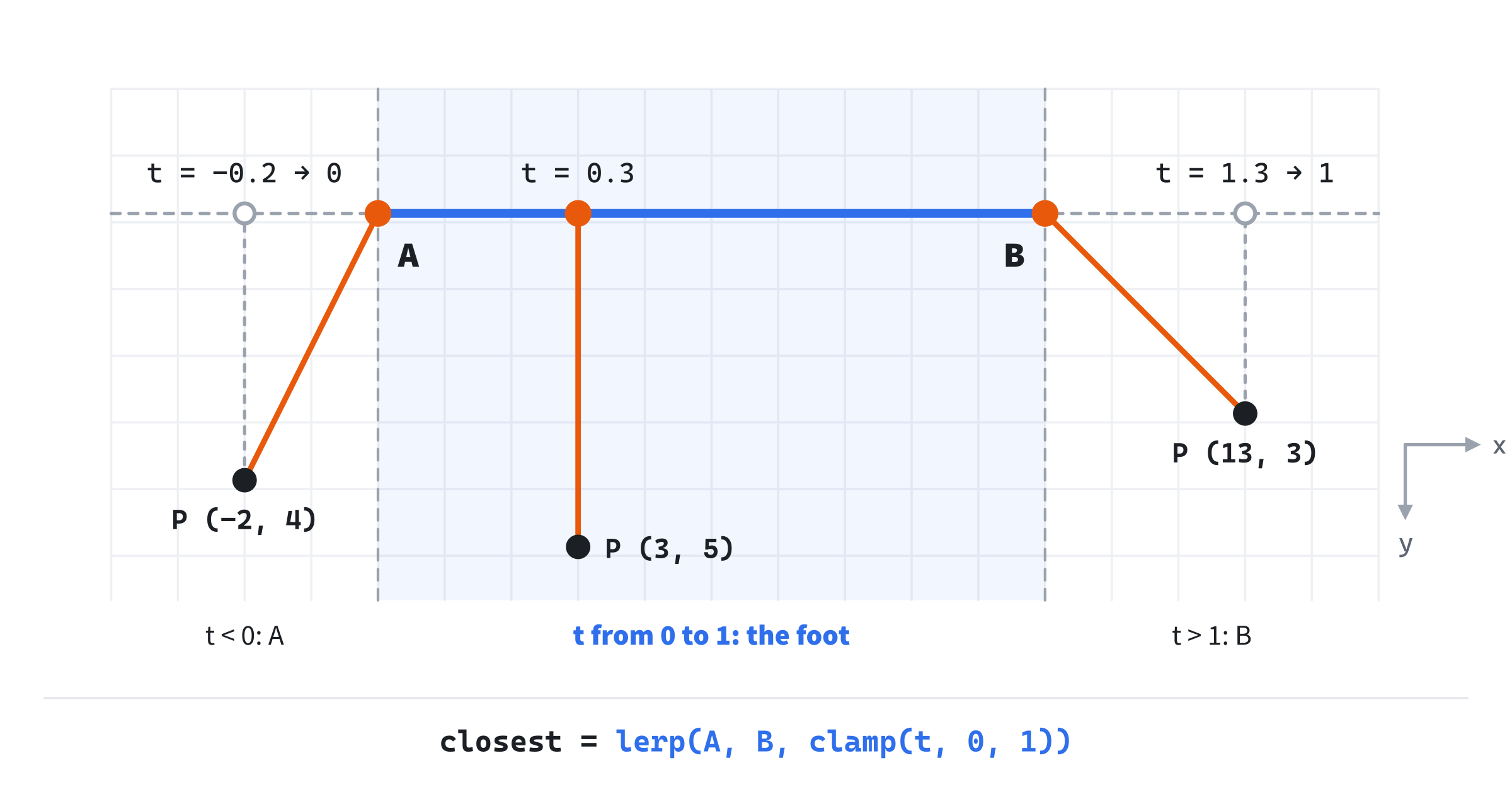
The lines through A and B at right angles to the segment split the plane into three regions. Every point between them has its foot on the segment. Every point beyond A goes to A, and every point beyond B goes to B.
Why the Clamp Is Right
Clamping looks like a handy patch: the foot is off the end, so use the end. But it's exactly right, and one right triangle shows why.
Call the foot's fraction f, and P's distance from the line h. Take any point on the line, at a fraction t. It's (t - f) × |B - A| along the line from the foot, one way or the other, and the foot is h from P, at right angles. So by Pythagoras, the squared distance from P to the point at t is:
distance² = ((t - f) × |B - A|)² + h²The h² part is the same for every t. Only the first part changes, and it grows the farther t is from f, on either side. So the nearest point is the one whose t is as close to f as it's allowed to be. On the line, t can be anything, so it's f itself: the foot. On the segment, t must stay from 0 to 1, and the closest t to f in that range is f clamped. When f is −0.2, no t in the range is closer to it than 0.
The worked example shows it in numbers. For P at (3, 5), f is 0.3 and h is 5, so the squared distance is ((t - 0.3) × 10)² + 25. It's 25 at a t of 0.3, and more anywhere else. For P at (-2, 4), f is −0.2 and h is 4, so it's ((t + 0.2) × 10)² + 16. That's lowest at a t of −0.2, off the segment. On the segment, it's lowest at a t of 0, where it's 4 + 16, or 20. The next image plots both.
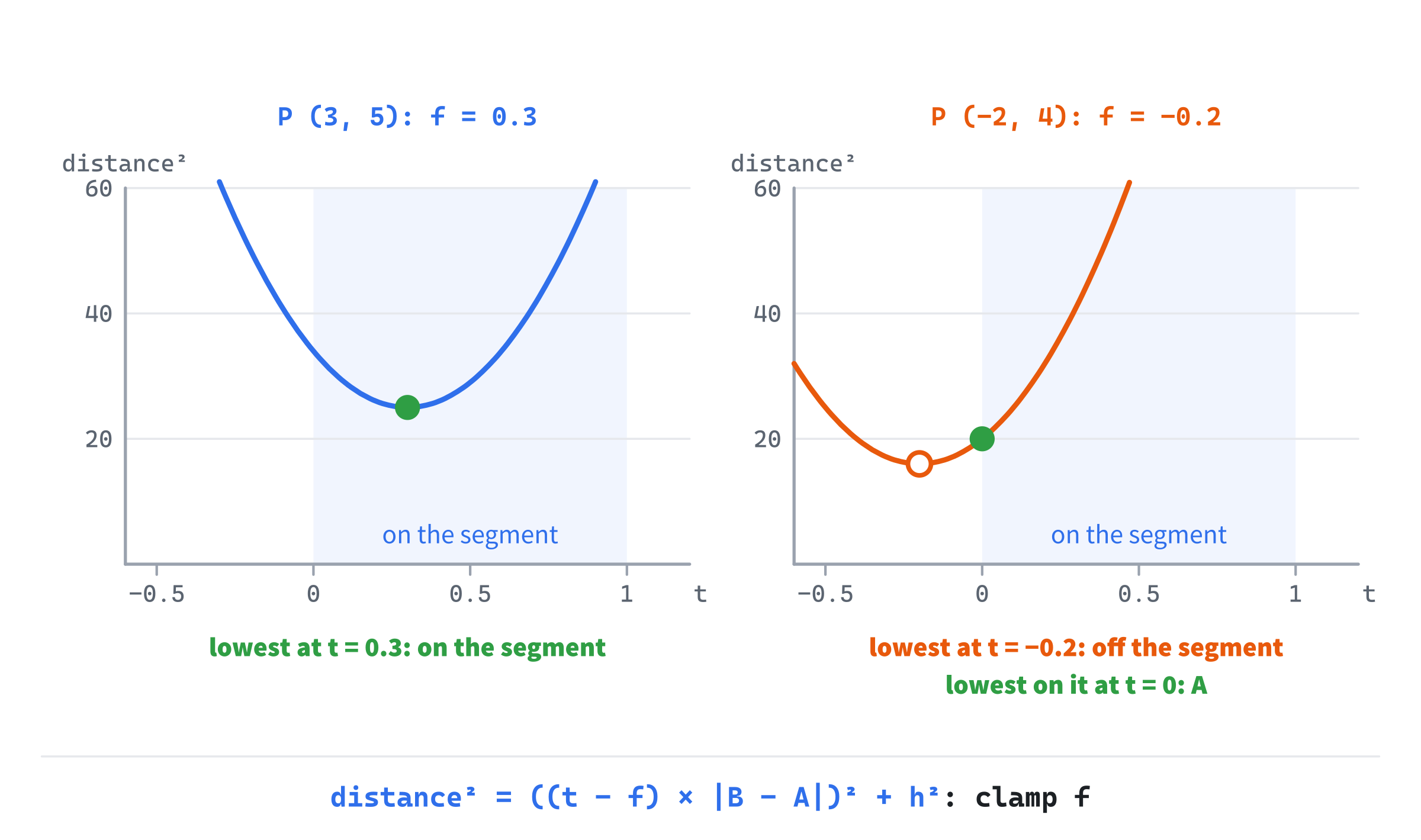
The same reasoning works for any distance that grows steadily on both sides of its best value. Limit that value to a range, and the best value in the range is the clamped one. The box uses this next, once for each axis.
Closest Point on a Circle
After the segment, the circle is a rest. The nearest point of a circle's rim to P is the rim point in P's direction from the center: head from the center toward P, and stop at the radius. The function takes Chapter 11's Circle:
// The closest point to P on a circle's rim: the rim point in P's direction
// from the center. From the center itself, every rim point is as close as
// any other, so the one straight to the right is chosen.
Vec2 closestOnCircle(Vec2 P, const Circle& circle)
{
    Vec2 out = P - circle.center;
    float len = out.length();
    if (len < 0.0001f) return circle.center + Vec2{ circle.radius, 0.0f };
    return circle.center + out * (circle.radius / len);
}
The vector out runs from the center to P, and out * (circle.radius / len) is that vector made exactly as long as the radius. That's normalizing and scaling in one step. Added to the center, it lands on the rim, straight toward P. For a circle at (100, 100) with a radius of 50, and P at (160, 180), the vector out is (60, 80), which is 100 long. Scaled by 50 / 100, it's (30, 40), so the closest point is (130, 140). It's 50 from P: P's 100 from the center, less the radius.
The guard is for P exactly at the center. Every rim point is then equally near, and out has no direction, so the function picks one: the rim point straight to the right. We'll come back to that choice in Ties and Jumps.
Closest Point in a Box
The box is the simplest of all, and it shows what a box with its sides along the axes is good for.
Clamp Each Coordinate
The closest point in a box to P is P with each coordinate clamped into the box's range:
// The closest point to P in a box, counting its inside: P with each
// coordinate clamped into the box's range. A point inside the box is its
// own closest point.
Vec2 closestInBox(Vec2 P, const AABB& box)
{
    return { std::clamp(P.x, box.min.x, box.max.x),
             std::clamp(P.y, box.min.y, box.max.y) };
}
P's x is clamped between the box's min.x and max.x, and its y between min.y and max.y. This is where Chapter 11's rule for an AABB pays off. The std::clamp function needs its low end to be no more than its high end, or its answer is undefined, and a box's min is never more than its max.
Why is it right to clamp the two coordinates separately? The squared distance from P to a point (x, y) is:
distance² = (x - P.x)² + (y - P.y)²The first part depends only on x, and the second only on y. And a box's range of x is the same at every height, so choosing x never limits y. So each part can be made as small as it can be on its own. The first is smallest when x is as close to P's x as the box allows, which is P's x clamped, by the segment's reasoning. The same goes for y. A box that's turned is different, since its range of x changes with y. The FAQ explains how to handle one.
The Nine Regions
The box's sides, carried on across the plane, split it into nine regions. Each of P's two coordinates is below the box's range, inside it, or above it: three choices for x and three for y.
Where both are inside their ranges, P is inside the box. Nothing is clamped, and P is its own closest point, at a distance of 0. Where one coordinate is outside its range, P is in one of the four regions straight beside a side. That coordinate is clamped, and the closest point is on that side, straight across from P. Where both are outside, P is in one of the four corner regions. Both are clamped, and the closest point is the corner. The next image shows the nine regions.

The segment's three regions are the same idea in one dimension: a fraction below the range, in it, or above it.
Closest Point on a Polygon
A polygon's boundary is its edges, and each edge is a segment. So the closest point on a polygon is the nearest of the closest points on its edges, and we already have closestOnSegment:
// The closest point to P on a polygon's edges: the nearest of the closest
// points on each edge. Squared distances are compared, since the nearest
// point has the smallest of those too, and they need no square root.
Vec2 closestOnPolygon(Vec2 P, const Polygon& poly)
{
    size_t n = poly.points.size();
    Vec2 best = poly.points[0];
    float bestDistSq = 1e18f;
    for (size_t i = 0; i < n; ++i)
    {
        Vec2 a = poly.points[i];
        Vec2 b = poly.points[(i + 1) % n];
        Vec2 c = closestOnSegment(P, a, b);
        float distSq = (c - P).lengthSquared();
        if (distSq < bestDistSq)
        {
            bestDistSq = distSq;
            best = c;
        }
    }
    return best;
}
In the preceding code, the loop walks the edges, each from point i to the next. The (i + 1) % n joins the last point back to the first, as Chapter 11's polygon code did. For each edge, it finds the closest point, and keeps the nearest so far. The search starts with bestDistSq larger than any squared distance on the screen, so the first edge always replaces it.
It compares squared distances, rather than distances. The nearest point has the smallest squared distance too, since squaring keeps positive numbers in order, and squared distances need no square root. That matters here, since the loop measures one for every edge. Its work grows with the number of edges: a triangle takes three segment tests, and a polygon with a hundred edges takes a hundred. A game with thousands of edges tests only the ones near P, as Chapter 12's FAQ described for rays.
The function works for any polygon, convex or not, since it checks every edge. But notice what it finds for a point inside the polygon: the nearest point on an edge, some distance away. That's the right answer to one question, and the wrong answer to another, which is the subject of the next section.
Boundary or Solid
The circle, the box and the polygon all have insides, and a point inside one raises a question that the segment never did.
Two Different Questions
Ask for the closest point to a P inside a shape, and there are two sensible answers. If the shape is a boundary, a line around nothing, the closest point is on that line: the nearest point of the circle's rim, or of the polygon's edges. If the shape is a solid, with an inside, P is already in it. So P is its own closest point, at a distance of 0.
The functions so far don't agree. The circle's and the polygon's treat their shapes as boundaries. The box's, with its clamps, treats the box as a solid: a point inside comes back unchanged. This book names the two kinds by that difference: closestOn for a boundary, and closestIn for a solid. A segment is always a boundary, since it has no inside.
The difference matters most in the test that makes closest points famous. A ball of radius r overlaps a solid shape exactly when the closest point in the shape to the ball's center is within r of it. For a boundary, the same test fails in a way that's easy to miss. Put a ball of radius 30 at (660, 480), inside Magnet's triangle. The nearest edge to its center is 52 pixels away, more than 30, so the boundary version says they don't touch. Yet the ball is wholly inside the triangle. The next image shows the two answers.
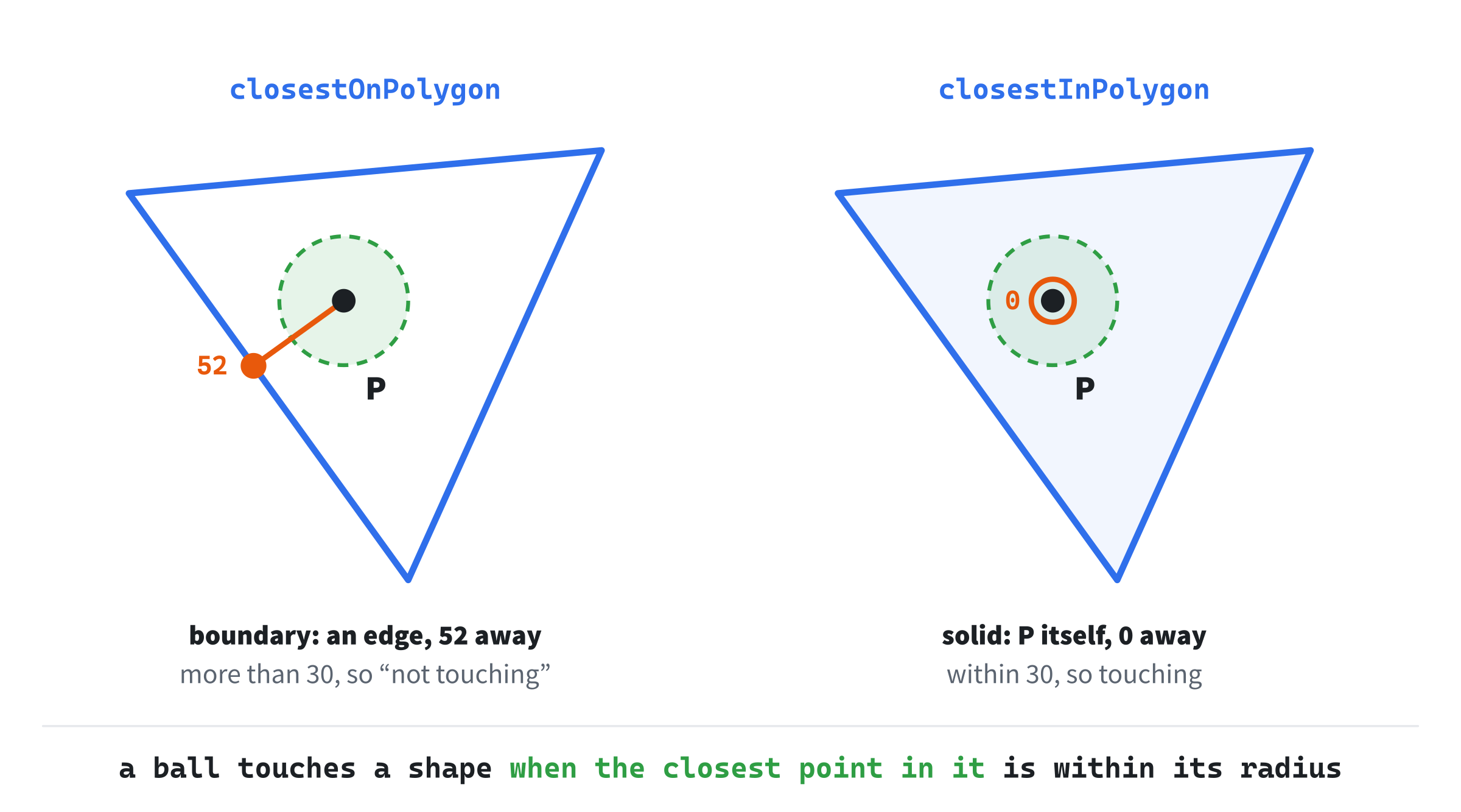
Which one a question needs depends on what it asks:
- Overlapping and touching need the solid version. A ball inside a box overlaps it, however far the ball is from the box's sides.
- Pushing something out of a shape it has sunk into needs the boundary version, since the way out is through the nearest edge. Chapter 18 does this.
- Snapping a point onto an outline, such as a track or the surface of a wall, needs the boundary version.
For a point outside a shape, the two versions agree, since the nearest point of a solid seen from outside is always on its edge. They differ only inside.
Making Them Solid
A boundary function becomes a solid one with a test for whether P is inside. For the circle, that test compares P's squared distance from the center with the squared radius:
// The closest point to P in a circle, counting its inside: P itself when
// it's inside, and the rim point otherwise.
Vec2 closestInCircle(Vec2 P, const Circle& circle)
{
    float r = circle.radius;
    if ((P - circle.center).lengthSquared() <= r * r) return P;
    return closestOnCircle(P, circle);
}
A point inside a convex polygon is on the same side of every edge. Chapter 12's side test, the cross product of an edge with the vector to P, gives the side. The function checks that the sides all agree, just as Chapter 11's isConvex checks that a polygon's corners all turn the same way:
// Whether P is inside a convex polygon: on the same side of every edge, by
// Chapter 12's side test, just as Chapter 11's isConvex checks the turns
// at its corners. A point on an edge counts as inside.
bool insideConvex(Vec2 P, const Polygon& poly)
{
    bool right = false;
    bool left = false;
    size_t n = poly.points.size();
    for (size_t i = 0; i < n; ++i)
    {
        Vec2 a = poly.points[i];
        Vec2 b = poly.points[(i + 1) % n];
        float side = (b - a).cross(P - a);
        if (side > 0.0f) right = true;
        if (side < 0.0f) left = true;
    }
    return !(right && left);
}
A point exactly on an edge has a cross product of 0 for that edge, which sets neither flag, so it counts as inside. The function doesn't care which way round the polygon's points go, since it asks only that the sides agree. With it, the polygon's solid version is one line:
// The closest point to P in a convex polygon, counting its inside.
Vec2 closestInPolygon(Vec2 P, const Polygon& poly)
{
    return insideConvex(P, poly) ? P : closestOnPolygon(P, poly);
}
The test needs a convex polygon. In a concave one, some points inside are on the far side of a dented edge's line, so insideConvex would call them outside. Chapter 15 tests points against any polygon.
The box goes the other way. Its boundary version treats it as the polygon of its four corners, from Chapter 11's corners:
// The closest point to P on a box's edges, not counting its inside: the
// box as a polygon, its four corners in order around it.
Vec2 closestOnBox(Vec2 P, const AABB& box)
{
    return closestOnPolygon(P, { corners(box) });
}
The braces make a temporary Polygon from the vector of corners, which is all a Polygon holds. Now each shape with an inside has both versions, and Magnet switches between them with a key.
Ties and Jumps
Most points have exactly one closest point on a shape, but some have several, all equally near. At the circle's center, every rim point is the same distance away, and closestOnCircle has to pick one. Inside the triangle, there are lines of points equally near two edges. They run from each corner into the middle, splitting the corner's angle in half. They meet at (677, 483), the one point equally near all three edges, 64 pixels from each.
Cross one of those lines, and the boundary version's closest point jumps from one edge to the other. A small move of P makes a big move of the answer. The same happens inside the box, along lines from its corners. It happens at the circle's center too, where a move of a pixel can swing the answer to the far side of the rim.
Outside a convex shape, it never happens. Every point outside has exactly one closest point, and it slides smoothly as the point moves. Inside, the solid version gives P itself, which moves smoothly too. So the solid version of a convex shape never jumps at all. The boundary version jumps only inside.
For drawing a dot, a jump is harmless. But Chapter 18 uses the boundary's closest point to decide which way to push a ball out of a wall. There, a jump swings the push from one direction to another in a single frame, so it's worth knowing where the jumps are before they surprise you.
Building Magnet
Magnet puts four shapes on the screen: a segment, a circle, a box and a triangle. Wherever the mouse is, it finds the closest point on each, and draws a line to it, a dot on it, and its distance. The readout gives the segment's fraction before and after the clamp. And S switches the circle, the box and the triangle between boundaries and solids.
Get the code. The complete project is in the
Magnetfolder of the book's repository.
Magnet starts from the skeleton, without the timing, since nothing moves by itself. It reuses drawGrid, fillCircle, fmt2, drawCircleOutline, drawPolygon and setColor, and Chapter 11's corners. Its Vec2.h is Laser's, since this chapter adds nothing to it. Here are its includes and colors:
#include <algorithm>
#include <cmath>
#include <string>
#include <vector>
#include "Vec2.h"

constexpr int WINDOW_WIDTH  = 1000;
constexpr int WINDOW_HEIGHT = 700;

constexpr SDL_Color TEXT = { 235, 238, 242, 255 };
constexpr SDL_Color GREY = { 90, 100, 112, 255 };
constexpr SDL_Color BLUE = { 47, 111, 235, 255 };
constexpr SDL_Color AMBER = { 232, 89, 12, 255 };
constexpr SDL_Color SILVER = { 150, 158, 170, 255 };
The <algorithm> header is there for std::clamp. Next come Chapter 11's shapes, unchanged, all but the ray:
// A segment: its two ends.
struct Segment
{
    Vec2 a;
    Vec2 b;
};

// A circle: its center and its radius.
struct Circle
{
    Vec2 center;
    float radius;
};

// An axis-aligned box: its smallest and largest corners. Neither of min's
// coordinates is ever more than max's.
struct AABB
{
    Vec2 min;
    Vec2 max;
};

// A polygon: its corners, in order around its edge, each once.
struct Polygon
{
    std::vector<Vec2> points;
};
After them come the closest-point functions, in the order this chapter built them, and then one more.
Showing a Closest Point
The last function draws a closest point, and it's the only one this chapter hasn't shown yet:
// A closest point, shown: a line to it from the mouse, a dot on it, and
// its distance, in whole pixels.
void showClosest(SDL_Renderer* renderer, TTF_Font* font, Vec2 mouse,
                 Vec2 closest)
{
    setColor(renderer, SILVER);
    SDL_RenderLine(renderer, mouse.x, mouse.y, closest.x, closest.y);
    setColor(renderer, AMBER);
    fillCircle(renderer, closest, 5.0f);

    // The distance, centered just past the dot, on the far side from the
    // mouse, so it's clear of the line. When the mouse is on the dot,
    // there's no far side, so it goes above. TTF_GetStringSize measures
    // the text, in pixels, so that it can be centered.
    float dist = distance(mouse, closest);
    Vec2 away = (dist > 0.5f) ? (closest - mouse) / dist : Vec2{ 0.0f, -1.0f };
    std::string label = std::to_string(std::lround(dist));
    int w = 0, h = 0;
    if (font) TTF_GetStringSize(font, label.c_str(), 0, &w, &h);
    Vec2 at = closest + away * 22.0f;
    drawText(renderer, font, label, at.x - w / 2.0f, at.y - h / 2.0f, AMBER);
}
In the preceding code, a silver line runs from the mouse to the closest point, and an amber dot marks it. Then the distance is written in whole pixels, just past the dot, on the far side from the mouse, so that the number never sits on the line. The vector away is the unit vector from the mouse to the dot, and the label goes 22 pixels along it. When the mouse is on the dot, as it is inside a solid shape, there's no such direction, so the label goes above the dot.
SDL_ttf's TTF_GetStringSize measures the text, in pixels. Taking off half its width and half its height centers the label on that spot. Its 0 means the whole string, up to its end, as it does in drawText.
The Shapes and the Mode
The shapes go after the font is loaded:
// The shapes, in Chapter 11's structs. They stay where they are, and
// the mouse does the moving.
const Segment segment = { { 150, 160 }, { 400, 120 } };
const Circle circle = { { 720, 200 }, 95.0f };
const AABB box = { { 150, 420 }, { 340, 580 } };
const Polygon triangle = { { { 560, 430 }, { 780, 410 }, { 690, 610 } } };

// Whether the circle, the box and the triangle count their insides.
bool solid = false;
Each is one of Chapter 11's structs, filled with braces, and const, since only the mouse moves. The triangle's points are in a std::vector inside a Polygon, which is why its braces are three deep. And solid starts out false, so the shapes start out as boundaries. In the events, S flips it:
// Events: quitting, and the keys and clicks that happen once.
SDL_Event event;
while (SDL_PollEvent(&event))
{
    if (event.type == SDL_EVENT_QUIT) running = false;
    else if (event.type == SDL_EVENT_KEY_DOWN)
    {
        if (event.key.key == SDLK_ESCAPE) running = false;
        else if (event.key.key == SDLK_S) solid = !solid;
    }
}
The line for S is the only one the events gain. The rest is the skeleton's.
Finding the Points
After the mouse is read, each shape's closest point is found:
// The closest point to the mouse on each shape, or in it, when the
// shapes are solid. A segment has no inside, so it has one version.
Vec2 mouse = { mx, my };
Vec2 onSegment = closestOnSegment(mouse, segment.a, segment.b);
Vec2 onCircle = solid ? closestInCircle(mouse, circle)
                      : closestOnCircle(mouse, circle);
Vec2 onBox = solid ? closestInBox(mouse, box)
                   : closestOnBox(mouse, box);
Vec2 onTriangle = solid ? closestInPolygon(mouse, triangle)
                        : closestOnPolygon(mouse, triangle);
float t = fractionAlong(mouse, segment.a, segment.b);
The segment has one version. Each of the others has two, and solid chooses between them, with the conditional operator. The last line keeps the segment's fraction before the clamp, for the readout.
Drawing
After the grid come the shapes, with the segment's ends named, so that you can tell which end its t counts from:
// The shapes, with the segment's ends named.
setColor(renderer, BLUE);
SDL_RenderLine(renderer, segment.a.x, segment.a.y, segment.b.x,
               segment.b.y);
drawText(renderer, font, "A", segment.a.x - 20, segment.a.y - 10, BLUE);
drawText(renderer, font, "B", segment.b.x + 10, segment.b.y - 10, BLUE);
drawCircleOutline(renderer, circle.center, circle.radius, BLUE);
drawPolygon(renderer, corners(box), BLUE);
drawPolygon(renderer, triangle.points, BLUE);
The box is drawn as the polygon of its corners, which is how closestOnBox treats it. Then each closest point is shown, and the mouse is drawn as a cross, named P, as this chapter names it:
// The closest point on each, from the mouse.
showClosest(renderer, font, mouse, onSegment);
showClosest(renderer, font, mouse, onCircle);
showClosest(renderer, font, mouse, onBox);
showClosest(renderer, font, mouse, onTriangle);

// The mouse, as a cross, named P.
setColor(renderer, TEXT);
SDL_RenderLine(renderer, mx - 7, my, mx + 7, my);
SDL_RenderLine(renderer, mx, my - 7, mx, my + 7);
drawText(renderer, font, "P", mx + 8, my + 2, TEXT);
Last come the readout and the controls:
// The readout: the segment's fraction, before and after the clamp,
// and what the other shapes are.
drawText(renderer, font,
         "segment: t = " + fmt2(t) + ", clamped to " +
         fmt2(std::clamp(t, 0.0f, 1.0f)), 12, 10, TEXT);
drawText(renderer, font,
         solid ? "solid: inside a shape, P is its own closest point"
               : "boundaries: inside a shape, P goes to an edge",
         12, 30, SILVER);
drawText(renderer, font,
         "[Move the mouse] look   [S] solid or boundary   [Esc] quit",
         12, WINDOW_HEIGHT - 26, GREY);
The first line gives the segment's t as fractionAlong found it, and then clamped, as closestOnSegment uses it. The second line says what the other shapes are.
Trying It Out
Run the demo, and move the mouse around. The next image shows Magnet with P inside the triangle, at (660, 480).

The segment's t is 1.79, past B, so it's clamped to 1. The segment's dot is on B, 444 pixels away. The circle's dot is on its rim, straight toward P, 191 pixels away. The box's is on its right side, straight across from P, 320 pixels away. P is inside the triangle, but the shapes are boundaries, so the triangle's dot is on its nearest edge, 52 pixels away. That's Figure 13.4's left half. Press S, and the dot jumps onto P, with a distance of 0.
Some things to try:
- Move from left to right below the segment. Its dot sits on A while
tis below 0, glides along whiletruns from 0 to 1, and sits on B after that. - Circle the box, and watch its dot slide along each side, then stop at each corner while you pass through the corner's region.
- With the shapes as boundaries, move across the inside of the triangle, from near one edge to near another. Somewhere between, the dot jumps from one edge to the other.
- With the shapes as boundaries, move across the circle's center. The dot leaps to the far side of the rim.
- Press S, and move into each shape. Its dot stays on P, at a distance of 0, until P leaves.
Then compare the two kinds with P inside the box. As a solid, the box gives 0. As a boundary, it gives the distance to its nearest side, which is how far P would have to go to get out.
FAQ
Q) Why divide by the squared length, and not by the length?
A) Because the clamp needs a fraction. Dividing the dot product by the length once gives the foot's distance from A, in pixels. Clamped to 0 and 1, that would pull every foot more than a pixel from A onto B. It's an easy slip, since Chapter 12's t was a distance in pixels, from a ray with a unit direction. Dividing by the squared length gives the fraction, from 0 to 1, that the clamp and lerp both expect.
Q) Does closestOnPolygon need a convex polygon?
A) No. It checks every edge, so it finds the nearest point on the edges of any polygon, dented or not. Only the solid version needs a convex one, for insideConvex. Chapter 15's tests work for any polygon, and with one of those, closestInPolygon would work for any polygon too.
Q) How do I find the closest points between two shapes, rather than a point and a shape?
A) Two segments that don't cross have their nearest pair at an end of one of them. So test each of the four ends against the other segment, with closestOnSegment, and keep the nearest of the four pairs. If they cross, the distance is 0, and Chapter 12's test finds where. Two polygons work the same way, edge against edge. Games with many shapes use quicker methods, such as the GJK algorithm, which is beyond this book.
Q) How do I find the closest point on a box that's turned?
A) Turn P, instead of the box. Take P's offset from the box's center, and turn it by minus the box's angle, with Chapter 6's rotated. In the box's own frame, it's an AABB again, centered on the origin, so clamp each coordinate to plus or minus its half-size. Then turn the result back by the box's angle, and add the center. That's the turn into the box's frame that Chapter 11 described for testing whether a point is inside an OBB.
Exercises
The first three exercises need only a pencil. The others change Magnet.
- A segment by hand (paper). For the segment from A
(2, 1)to B(8, 9), find the closest point to P(10, 3), and its distance. Then do the same for P(-4, 3). Which one is clamped? - Nine regions (paper). For the box from
(0, 0)to(4, 3), find the closest point in the box to(6, 1), to(-2, 5)and to(1.5, 2.5), and say which kind of region each is in. Then find the closest point on the box's edges to(1.5, 2.5). - Boundary or solid (paper). A circle has its center at
(5, 5)and a radius of 3. Find the closest point on it to(9, 8), and the closest point in it. Then do both for(6, 5). - A capsule (code). Add a capsule to Magnet, as Chapter 11's FAQ described it: a segment with a radius. Its boundary's closest point is the closest point on its segment, moved toward P by the radius. As a solid, it's P itself whenever P is within the radius of the segment. Draw it as two circles joined by two lines, as Chapter 11's fifth exercise did.
- Snap (code). Add a marker that follows the mouse, but jumps onto the nearest shape's outline whenever the mouse is within 40 pixels of it, and slides along that outline as the mouse moves. Which version of each shape does it need?
For the code exercises, work on a copy of the demo's folder, so that the original stays as the chapter describes it.
AI Exercise (Optional)
Every point on the screen has a distance to the nearest shape. Painting those distances makes a picture that shows this chapter's ideas at a glance: where the closest point is an end or a corner, and where it jumps. It's the kind of map games use for soft shadows and glowing outlines, under the name of a distance field. With an AI's help, you can paint one behind Magnet. Open your AI chatbot of choice, and try a prompt like this:
"I have a C++ demo using SDL3, with four fixed shapes: a Segment of two Vec2 ends, a Circle with a center and a radius, an AABB with min and max corners, and a Polygon holding a std::vector of Vec2 points. I have functions that return the closest point to a point P on each shape's outline: closestOnSegment(P, A, B), closestOnCircle(P, circle), closestOnBox(P, box) and closestOnPolygon(P, poly). Please paint the background as a contour map of distance. Split the 1000 by 700 window into 5-pixel squares, find each square's distance to the nearest outline of the four shapes, and color the square by it: bright near an outline, fading to dark far away, with a thin bright band every 25 pixels of distance. The shapes never move, so work out the colors once, before the main loop, and keep them in a std::vector. Explain what the bands show around the box's corners and inside the triangle."
That prompt describes your shapes and your functions, so the AI builds the map from them, instead of from code of its own. It asks for the boundary versions, since inside a solid shape, the distance is 0 everywhere, and the map would show nothing there. And it works out the colors once. There are 28,000 squares, each measured against four shapes, and nothing changes from one frame to the next.
Then look at the bands. Around the segment, they're shaped like a running track: straight beside it, and round past its ends, where its closest point is an end. Around the box, they're straight beside the sides, and round at the corners, for the same reason. Inside the triangle, they meet in creases, along the lines where two edges are equally near, which are where Magnet's dot jumps. If the bands look blocky, try smaller squares, and if the window is slow to open, try bigger ones.
Summary
The closest point on a segment is the foot of the perpendicular, with its fraction along the segment, (P - A) · (B - A) / |B - A|², clamped to the range from 0 to 1. Pythagoras shows that the clamp is exactly right: the squared distance grows the farther t is from the foot's fraction, so the nearest allowed t is that fraction, clamped. On a circle, the closest point is the rim point toward P. In a box, it's P with each coordinate clamped, since the two coordinates' parts of the distance don't depend on each other. The box's nine regions say whether that lands on a side, on a corner, or on P itself. On a polygon, it's the nearest of its edges' closest points. A shape can be a boundary or a solid, and for a point inside, the two give different answers. A ball overlaps a shape when the closest point in the solid is within its radius, while pushing out needs the boundary. Inside a shape, and at a circle's center, the boundary's closest point can jump. Magnet showed them all. In Chapter 14, we leave straight edges behind for smooth Bezier curves, built from nothing more than Chapter 8's lerp.