
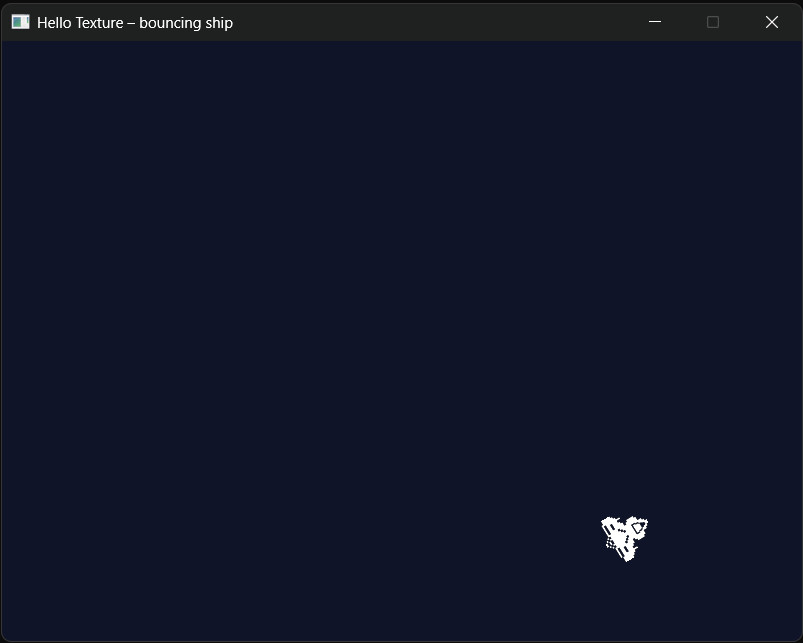
Drawing coloured rectangles will only take you so far. Real games use textures — PNG or JPEG images loaded from disk and drawn onto the screen at whatever position, size, and rotation the game logic dictates. This project is the simplest possible introduction to that: a ship sprite that bounces around the window, spinning as it goes.
The key new tool is SDL3_image, a companion library that adds PNG, JPEG, WebP, and other format support to SDL3. Understanding why it's a separate library, how to install it, and what files it adds to your project is just as important as learning the API itself — so we'll cover that first.
Why SDL3_image Is a Separate Library
SDL3 itself can only load BMP images. That's intentional. BMP support is a few hundred lines of code with no external dependencies — it covers the absolute minimum needed to get pixels on screen. PNG and JPEG are a different story: they require libpng and libjpeg respectively, each of which is a substantial third-party library. Bundling all of that into SDL3 would add megabytes of code to every SDL3 program, including the ones that never load an image at all.
The solution is SDL3_image: an optional add-on you link only when your project actually needs it. The result is that your project ends up with two DLLs next to the .exe:
SDL3.dll— the core library (window, renderer, input, audio…)SDL3_image.dll— the image-loading add-on (PNG, JPEG, WebP…)
Both must be present at runtime. Forget one and the program crashes on launch with a missing DLL error.
Project Setup
If you haven't set up SDL3 yet, Chapter 1 of Learning C++ by Building Games covers installing SDL3 and configuring Visual Studio. Come back here once that's working.
Installing SDL3_image
Download SDL3_image from the SDL_image releases page on GitHub. Grab the SDL3_image-devel-x.x.x-VC.zip (the Visual C++ development package for Windows).
Extract it somewhere sensible — alongside your SDL3 folder works well. The structure mirrors SDL3:
include\SDL3_image\— header fileslib\x64\SDL3_image.lib— the import library you link againstlib\x64\SDL3_image.dll— the runtime DLL
In Visual Studio, open your project properties and make two additions:
- C/C++ → General → Additional Include Directories — add the path to SDL3_image's
includefolder - Linker → Input → Additional Dependencies — add
SDL3_image.libalongsideSDL3.lib
Then copy SDL3_image.dll into the same folder as SDL3.dll — wherever you put your runtime DLLs (usually next to the built .exe, or in the project output directory).
The Ship Asset
The project uses a single PNG sprite. Right-click to save it, then place it in the same folder as the compiled executable:
ship.png— the ship sprite

Initialisation
The header include is the only visible difference from a plain SDL3 project:
#include <SDL3/SDL.h>
#include <SDL_image.h>   // SDL3_image header
Initialisation and window/renderer creation are identical to any other SDL3 project:
if (!SDL_Init(SDL_INIT_VIDEO))
{
    SDL_Log("SDL_Init failed: %s", SDL_GetError());
    return 1;
}

SDL_Window* window = SDL_CreateWindow(
    "Hello Texture – bouncing ship",
    WINDOW_W, WINDOW_H,
    0
);
SDL_Renderer* renderer = SDL_CreateRenderer(window, nullptr);

if (!window || !renderer)
{
    SDL_Log("Window/Renderer failed: %s", SDL_GetError());
    SDL_Quit();
    return 1;
}
SDL3_image doesn't need its own initialisation call — IMG_LoadTexture is ready to use as soon as SDL3 is up and a renderer exists.
Loading the Texture
SDL_Texture* shipTexture = IMG_LoadTexture(renderer, "ship.png");
if (!shipTexture)
{
    SDL_Log("IMG_LoadTexture failed: %s", SDL_GetError());
    SDL_DestroyRenderer(renderer);
    SDL_DestroyWindow(window);
    SDL_Quit();
    return 1;
}

float texW = 0.0f, texH = 0.0f;
SDL_GetTextureSize(shipTexture, &texW, &texH);
IMG_LoadTexture does two things in one call: SDL3_image decodes the PNG file into raw pixel data, then SDL3 uploads those pixels to the GPU as a texture. The result is an SDL_Texture* ready to draw. If you only had core SDL3 you'd need to save the image as a BMP and use the more verbose SDL_LoadBMP + SDL_CreateTextureFromSurface route instead.
SDL_GetTextureSize fills in the texture's natural width and height as floats. We use these to position the ship at screen centre initially, and later for bounce detection — we need to know how wide the sprite is to detect when its right edge hits the window edge.
Ship State
float posX = (WINDOW_W - texW) / 2.0f;
float posY = (WINDOW_H - texH) / 2.0f;

float velX = 200.0f;   // pixels per second
float velY = 150.0f;

float angle = 0.0f;
float spin  = 90.0f;   // degrees per second
The ship's state is just six floats. Position is the top-left corner of the sprite rectangle. Velocity is in pixels per second — not pixels per frame, which would tie the movement speed to the frame rate. Angle accumulates over time driven by spin, also expressed per second.
The Game Loop
Delta Time
Uint64 now       = SDL_GetTicks();
float  deltaTime = (now - lastTime) / 1000.0f;
lastTime = now;
SDL_GetTicks returns milliseconds since SDL initialised. Dividing the difference by 1000 gives seconds. Every movement and rotation is then multiplied by deltaTime, so a machine running at 30 FPS and one running at 120 FPS both see the ship move at the same real-world speed.
Update
posX  += velX * deltaTime;
posY  += velY * deltaTime;
angle += spin * deltaTime;

if (posX < 0.0f)              { posX = 0.0f;            velX = -velX; }
else if (posX + texW > WINDOW_W) { posX = WINDOW_W - texW; velX = -velX; }

if (posY < 0.0f)              { posY = 0.0f;            velY = -velY; }
else if (posY + texH > WINDOW_H) { posY = WINDOW_H - texH; velY = -velY; }
Movement is straightforward Euler integration. The bounce logic checks whether the sprite rectangle — not just its corner — has crossed a wall. When the right edge (posX + texW) exceeds the window width, we clamp posX to keep the sprite fully on screen and flip velX. Without the clamp, the sprite could sink into the wall and oscillate there if the frame rate drops.
Draw
SDL_SetRenderDrawColor(renderer, 15, 20, 40, 255);
SDL_RenderClear(renderer);

SDL_FRect dest = { posX, posY, texW, texH };

SDL_RenderTextureRotated(renderer, shipTexture,
                         nullptr, &dest,
                         angle, nullptr,
                         SDL_FLIP_NONE);

SDL_RenderPresent(renderer);
SDL_RenderClear wipes the screen to the dark navy colour set by SDL_SetRenderDrawColor. Unlike the Musical Fireworks project — which used a semi-transparent overlay to create motion trails — this project does a clean clear every frame, which is the standard approach for most games.
SDL_RenderTextureRotated is the key draw call. Its parameters:
- First
nullptr— source rectangle (which part of the texture to use).nullptrmeans the whole texture. &dest— where on screen to draw it, in pixels.angle— rotation in degrees, clockwise.- Second
nullptr— the pivot point for rotation.nullptruses the centre ofdest. SDL_FLIP_NONE— no horizontal or vertical flip. Other options areSDL_FLIP_HORIZONTALandSDL_FLIP_VERTICAL.
Clean Up
SDL_DestroyTexture(shipTexture);
SDL_DestroyRenderer(renderer);
SDL_DestroyWindow(window);
SDL_Quit();
Textures are GPU resources — always destroy them explicitly. SDL3_image doesn't need its own shutdown call; destroying the texture is sufficient. Resources go in reverse order: texture before renderer, renderer before window, window before SDL_Quit.
Complete Listing
The full source is at EliteIntegrity/Learning-C-by-Building-Games — Hello Texture, or read it in full below:
/*
 * ============================================================
 *  Hello Texture  -  SDL3 + SDL3_image Tutorial Project
 * ============================================================
 *
 *  A ship sprite bounces around the window, spinning as it goes.
 *  Demonstrates IMG_LoadTexture, SDL_RenderTextureRotated,
 *  and delta-time frame-rate-independent movement.
 *
 *  Escape / close window  ->  quit
 * ============================================================
 */

#include <SDL3/SDL.h>
#include <SDL_image.h>

static const int WINDOW_W = 800;
static const int WINDOW_H = 600;

int main(int /*argc*/, char* /*argv*/[])
{
    if (!SDL_Init(SDL_INIT_VIDEO))
    {
        SDL_Log("SDL_Init failed: %s", SDL_GetError());
        return 1;
    }

    SDL_Window* window = SDL_CreateWindow(
        "Hello Texture – bouncing ship",
        WINDOW_W, WINDOW_H,
        0
    );
    if (!window)
    {
        SDL_Log("SDL_CreateWindow failed: %s", SDL_GetError());
        SDL_Quit();
        return 1;
    }

    SDL_Renderer* renderer = SDL_CreateRenderer(window, nullptr);
    if (!renderer)
    {
        SDL_Log("SDL_CreateRenderer failed: %s", SDL_GetError());
        SDL_DestroyWindow(window);
        SDL_Quit();
        return 1;
    }

    SDL_Texture* shipTexture = IMG_LoadTexture(renderer, "ship.png");
    if (!shipTexture)
    {
        SDL_Log("IMG_LoadTexture failed: %s", SDL_GetError());
        SDL_DestroyRenderer(renderer);
        SDL_DestroyWindow(window);
        SDL_Quit();
        return 1;
    }

    float texW = 0.0f, texH = 0.0f;
    SDL_GetTextureSize(shipTexture, &texW, &texH);

    float posX = (WINDOW_W - texW) / 2.0f;
    float posY = (WINDOW_H - texH) / 2.0f;
    float velX = 200.0f;
    float velY = 150.0f;
    float angle = 0.0f;
    float spin  = 90.0f;

    Uint64 lastTime = SDL_GetTicks();

    bool running = true;
    while (running)
    {
        Uint64 now       = SDL_GetTicks();
        float  deltaTime = (now - lastTime) / 1000.0f;
        lastTime = now;

        SDL_Event event;
        while (SDL_PollEvent(&event))
        {
            if (event.type == SDL_EVENT_QUIT) running = false;
            if (event.type == SDL_EVENT_KEY_DOWN &&
                event.key.key == SDLK_ESCAPE) running = false;
        }

        posX  += velX * deltaTime;
        posY  += velY * deltaTime;
        angle += spin * deltaTime;

        if (posX < 0.0f)                  { posX = 0.0f;            velX = -velX; }
        else if (posX + texW > WINDOW_W)  { posX = WINDOW_W - texW; velX = -velX; }

        if (posY < 0.0f)                  { posY = 0.0f;            velY = -velY; }
        else if (posY + texH > WINDOW_H)  { posY = WINDOW_H - texH; velY = -velY; }

        SDL_SetRenderDrawColor(renderer, 15, 20, 40, 255);
        SDL_RenderClear(renderer);

        SDL_FRect dest = { posX, posY, texW, texH };
        SDL_RenderTextureRotated(renderer, shipTexture,
                                 nullptr, &dest,
                                 angle, nullptr,
                                 SDL_FLIP_NONE);

        SDL_RenderPresent(renderer);
    }

    SDL_DestroyTexture(shipTexture);
    SDL_DestroyRenderer(renderer);
    SDL_DestroyWindow(window);
    SDL_Quit();

    return 0;
}
Common Issues
Program crashes on launch with "SDL3_image.dll not found". The DLL must be in the same directory as the .exe, or somewhere on the system PATH. Copy SDL3_image.dll from the SDL3_image package into the same folder as SDL3.dll. In Visual Studio, that's usually the x64\Debug or x64\Release output folder.
Linker error: IMG_LoadTexture unresolved external symbol. You've included the header but haven't linked the library. In Visual Studio project properties, go to Linker → Input → Additional Dependencies and add SDL3_image.lib. Also check that the path to the lib\x64 folder is listed under Linker → General → Additional Library Directories.
IMG_LoadTexture returns null — ship.png not found. The PNG must be in the working directory at runtime, not just in the project source folder. In Visual Studio the working directory for debugging defaults to the project folder (.vcxproj location), not the build output folder. Either copy ship.png to the project root, or adjust Debugging → Working Directory in project properties to point at the folder where the DLLs live.
Ship appears but doesn't rotate — it just slides around. Make sure you're updating angle += spin * deltaTime inside the loop and passing angle to SDL_RenderTextureRotated, not a literal 0.0.
Ship clips into the wall briefly before bouncing. This happens if deltaTime is large enough that one frame moves the sprite past the boundary. The clamp (posX = 0.0f etc.) corrects the position immediately after flipping velocity, which prevents the sprite getting stuck in the wall on the next frame.
Where to Take It Next
- Multiple sprites. Create a
struct Spritewith position, velocity, angle, spin, and texture pointer, then hold astd::vector<Sprite>. The update and draw loops become a single range-for over the vector — and you immediately have a small asteroid field. - Transparency. PNG supports an alpha channel. Call
SDL_SetTextureAlphaMod(texture, value)(0 = invisible, 255 = fully opaque) to fade sprites in and out at runtime without modifying the image file. - Spritesheet animation. Instead of loading one texture per frame, pack all animation frames into a single PNG side by side. Pass a source
SDL_FRecttoSDL_RenderTextureRotatedto select which frame to show — the firstnullptrargument in the draw call is that source rect. - Mouse interaction. Intercept
SDL_EVENT_MOUSE_BUTTON_DOWNand check whether the click position falls within the ship's destination rectangle. You now have the first piece of a click-to-select or click-to-shoot mechanic.